C
H
A
P
T
E
R
1
What Is CCNA?
The growth of Cisco Systems since its inception has been phenomenal and consistent. This growth has occurred in part due to market dominance in their core product lines, as well as through adding breadth of products through acquisition of other companies. The stock price has grown to the point that many Cisco employees who get stock options as part of their compensation packages cannot afford to leave Cisco and leave such a large sum of money behind!
The Cisco Certified Internetwork Expert (CCIE) certification program was introduced in 1994 as the only Cisco certification. The entire breadth of the then-current product line was allowed to be covered on the exam, and it was intended to be a truly difficult certification to obtain. Certification required an exam (computer-based) and then a hands-on, two-day lab. The failure rate on each portion was high.
NOTE Cisco does not publish the success rate for passing the CCIE exam or lab. I did some informal surveys, none of which I am allowed to quote. Consistently, the feedback was more than a 50 percent failure rate on CCIE lab candidates, with about an 80 percent failure rate for first-time candidates!
The breadth of Cisco’s product line has been growing and will continue to grow. Inside the Cisco sales arena, Systems Engineers and Account Managers sometimes long for the days of a one-volume, thin product manual. In those days, the entire product line could be memorized. Today, the product line is too broad for any one person to remember and to understand how all the products work.
So two problems evolved for Cisco relating to certification: one relating to the breadth of topics, the other to the depth of knowledge required. The CCIE exam could no longer cover the breadth of products. One solution was to create types of CCIE certifications, of which there are now three:
•
CCIE—Routing/Switching•
CCIE—ISP•
CCIE—WAN4 Chapter 1: What Is CCNA?
The other solution was to create certifications in addition to the CCIE that did not require the same depth of skills and knowledge. The Cisco Certified Networking Associate (CCNA) certification is the first and most basic of these certifications. (The rest of these new certifications are described in the Introduction to this book.)
The CCNA exam is basic, but not necessarily easy. The purpose of the exam could be best summarized as follows:
To prove the candidate has mastered the topics covered on the CCNA exam, to the technical depth required for basic networks.
Of course, that objective is open to considerable interpretation. What is a basic network? What breadth of topics are covered? Does basic mean small?
This chapter provides a complete interpretation of what the CCNA exam actually covers and the depth of knowledge needed. It also compares these objectives with the typical training you would have taken before attempting the exam. Cisco publishes a detailed list of CCNA objectives; each will be described. Finally, a “game plan” of how to complete your preparations with this study guide is included.
CCNA Exam Philosophy
This book defines the objective of the CCNA exam as “proving mastery of the basics.” Mastery, in this case, means recalling all the facts and concepts relating to the subject. The only two questions that remain are as follows:
•
What are the subjects?•
How deeply do I need to know each subject?We begin by examining all that Cisco has published about the exam.
What Cisco Says about CCNA
After sifting through the materials currently available from Cisco, the following is what we
know about the exam:
•
There are 60 published exam objectives that can be covered on the exam.•
A basic network (the exam covers “basic” networks) has two or three routers, LAN switches, leased lines or Frame Relay for WAN access, and ISDN for dial backup.•
Cisco’s certification Web page is URL http://www.cisco.com/warp/public/10/wwtraining/certprog.
CCNA Exam Philosophy 5
Figure 1-1 Typical Basic CCNA Network
The objectives create a great tool for preparation. If you are going to prepare only slightly, making sure you can answer all 60 objectives is an obvious thing to do. However, what each objective means, and the breadth of questions that could be asked based on an individual objective, is open to interpretation. This book gives an interpretation of the objectives and makes suggestions to you about topics that you need to be ready for, and topics that are unlikely to be covered on the exam.
The definition of “basic network” is in a diagram on Cisco’s Web site, with Figure 1-1 being essentially identical. However, the network diagram does not necessarily define the list of topics that this test covers. Is DECNET covered? Is AppleTalk? IPX? X.25? ATM? The list goes on. So, from what Cisco tells us, we cannot define what is on the test exactly. But, you can get a pretty good idea, based on the objectives.
What We Can Infer from What Cisco States
A full definition of exactly what topics are on the exam will probably never be stated by Cisco. Cisco does want candidates to succeed at passing the CCNA exam, but not at the expense of making CCNA a “paper certification.” Paper certification refers to the process through which someone can just buy a test study guide, read it, memorize portions, take the test, and pass. Cisco’s goal is that passing CCNA should reflect the fact that you have internalized and mastered these basic concepts, not that you can read a book and memorize well. To protect you against having the CCNA slowly lose credibility due to people just reading a book and passing the test, Cisco will probably always avoid an exact definition of the topics on the exam. By giving a general definition only, those who understand networks are rewarded. Those who prefer to memorize will be less likely to pass the test.
An exact definition of what is covered on the CCNA exam is difficult to construct. Cisco’s 60 stated CCNA objectives should describe all the topics that will be on your exam. However, the
Frame Relay
6 Chapter 1: What Is CCNA?
objectives are subject to interpretation. To address this potential problem, this book directly refers to the CCNA objectives whenever possible. In this chapter, an interpretation of the objectives is offered. A chart containing many of the borderline topics is included, with an opinion about how likely it is for each topic to be on the exam.
The objectives will change as time goes on. As this happens, a higher percentage of the test questions will not be in the list of objectives found in this book. Of course, Cisco will change or add to the objective list at their discretion, so pulling the latest CCNA objectives list from Cisco’s Web site is worth the effort. In an effort to make any changed objective lists more usable, Cisco Press will include my comments on its Web site (http://www.ciscopress.com/) with an explanation of each new objective.
The CCNA exam topics will closely match what is covered in the recommended prerequisite training. Cisco Worldwide Training (WWT) is the Cisco organization responsible for the certifications. Many of the certification exams, including CCNA, were an evolution from exams covering a particular course. It is reasonable to expect, with good benefits to us, that CCNA and the other certifications will cover the topics in the prerequisite classes. Knowing that, we can make better choices on which topics to focus upon, and which to ignore.
These suggested prerequisite classes are listed by Cisco as key parts of the Training Paths you can take to prepare for the CCNA and other certifications. Because I am inferring that the CCNA exam will only cover topics in these courses, knowing what these topics are and the depth to which the courses cover each topic will be important to your preparation. An entire section of this chapter, titled “Analysis of Training Paths,” is devoted to an examination of the CCNA recommended prerequisite training.
Summary of the CCNA Exam Philosophy
The following list encapsulates the basic philosophy behind preparing for the CCNA exam based on what Cisco is willing to disclose to CCNA candidates.
•
While open to interpretation, the CCNA objectives define the main topics covered on the exam. At a minimum, you should know about each subject covered in these objectives.•
The depth of knowledge on each topic is comparable to what is covered in the prerequisitecourses. The book attempts to cover the topics at a slightly deeper level to make sure you know more than enough.
•
Getting the latest copy of Cisco’s CCNA objectives from their Web site is very useful. Comparing that list to the one used for this book will let you know the topics you will need to spend additional time studying.CCNA Exam Preparation Philosophy 7
CCNA Exam Preparation Philosophy
When I was a child, I loved basketball. Almost all my relatives played. My favorite uncle was the all-time leading scorer at the local high school, and my first recollections about my childhood involve a basketball. I loved to play, but I also loved to practice. So I practiced. A lot. (Of course, I am not a well-known NBA star; so you know how good I really was.) Anyway, I always practiced with my left hand a lot more because I was right-handed. I hoped to overcome my weakness in the left hand and gain an advantage over others. Ironically, by the time I reached college, I had lost some of my skills using my right hand, and players would anticipate that I would go to the left!
I digress only to make a point. Preparing for the exam by reading many exam-like questions is like practicing a sport only by playing games; you will never fully learn the fundamentals. So this book attempts to enforce some self-discipline for practicing and learning, outside the context of a multiple-choice question. This book helps you learn what your weaknesses are, so you can practice more with those. But to keep you from forgetting what you are best at, the scenarios in the last chapter remind you of all the topics so that you can feel sure you have not focused too much on just your weaknesses.
This book attacks the process of your preparation for the CCNA exam in a manner similar to training for sporting events. Some of the key features to help you prepare are outlined in the next few sections.
Core Chapters Match the Major Topics in the CCNA Objectives
Cisco organizes the 60 CCNA exam objectives into seven major categories. Not coincidentally, the chapter titles for the next seven chapters happen to match the general topical areas of these major categories. Some objectives may need to be covered in two chapters because of the related topics in each chapter, but most of the coverage in each chapter pertains to the objectives in that major category. In a couple of cases, an objective listed in one major category is better covered in a different chapter, but cross references have been inserted so that you can quickly and easily find material on a particular objective. Also, a complete cross-reference table of objectives and chapters is included in this introductory chapter.
Determining Your Strengths and Weaknesses
You may feel confident about one topic, and less confident about another. However, that may be a confidence problem, not a knowledge problem! One key to using your time well is to determine if you truly need more study or not, and if so, how much?
8 Chapter 1: What Is CCNA?
Figure 1-2 How to Use This Chapter
Each chapter begins with a quiz that helps you decide how well you recall the topics in that chapter. From there, you choose a path of fully reading the entire chapter, ignoring that chapter because you know it already, or something in between. Much of the factual information is summarized into lists and charts, so a review of the chapter is easy. Also, exercises at the end of the chapter provide an excellent tool for practice and for quick review.
Questions and Exercises That Are Harder Than the Actual Exam
Teams practicing to play against the University of Kentucky’s teams when Rick Pitino was their coach would sometimes practice with seven players on defense and five on offense. The only way to truly feel the pressure of Kentucky’s great defense, as implemented by lots of great athletes, was to put a couple of extra practice players on the court. The theory was, if you could beat seven average players, you had a chance to beat a great team of five Kentucky players.
NA260102
Do I know this already? Quiz
Review Chapter using charts and
tables
End-of-chapter exercises
Next Chapter
Read Chapter Skip Chapter
High score want more review Medium score
CCNA Exam Preparation Philosophy 9
Likewise, the exercises in this book are intended to make you stretch beyond what the exam requires. Do not be discouraged as you take the quizzes and exercises in the book; they are intended to be harder than the exam. If, by the end of your study time, you are getting 70–80 percent of these harder non-multiple choice questions correct, the CCNA exam should be easier to handle. You will probably want to validate your readiness by using the testing engine included on the CD with this book, as suggested in Figure 1-3 later in this chapter.
The main method of making this book’s exams harder than the CCNA exam is not by asking for facts or concepts you will never see on the CCNA exam; it is by asking for information in ways that will not imply the correct answer. You will get some questions correct on the CCNA exam just because the multiple choice answers will trigger your memory to the correct information. By asking questions that are not multiple choice, and by asking for the same information in different ways, you will exercise your memory so that the multiple-choice exam is easy!
Scenarios for Final Preparation
If all you do is focus on your weaknesses, your strengths may suffer. Chapter 9, “Scenarios for Final Preparation,” provides exercises that can cover any topic in this book. As a side effect, it gives you an opportunity to exercise all your knowledge and skills, both strong and weak. These scenarios also give you one last reminder of some facts you may have forgotten.
Simulated Testing on the CD
Of course, if you never practice using actual exams, you will not be fully prepared. The test engine on the CD can be used in two ways to help you prepare for the actual test. First, it gives you a timed test of the same length as the actual CCNA exam and score the exam for you. Secondly, you can tell the tool to feed you questions on a particular subject, so you can do some intensive review.
Summary of the CCNA Exam Preparation Philosophy
The following list encapsulates the basic philosophy behind preparing for the CCNA exam based on the features that this book provides for you as a CCNA candidate:
•
This book has tools to help you prepare for the exam.•
If you use the book, you should be confidently prepared for the exam.10 Chapter 1: What Is CCNA?
Analysis of CCNA Training Paths
Training Paths is the term Cisco uses to describe the training that will help you gain the knowledge you need to pass a certification exam. As mentioned before, Cisco World Wide Training (WWT) owns the responsibility for certifications inside Cisco. Not surprisingly, of the two Training Paths suggested by Cisco for preparation for the CCNA exam, both include WWT courses.
Another training path is implied by Cisco, although not called a training path on their Web site. That training path is via the Cisco Networking Academies, a program in which high school and university students take a four-semester series of courses. The knowledge and skills learned in these courses probably exceeds what is required for CCNA; however, a disadvantage of being a typically younger candidate is that you may not have learned as much information “acciden-tally,” by simply working in the industry for some years. This book treats the Cisco Networking Academies as simply a third training path for CCNA preparation.
Finally, I am adding a fourth training path, which Cisco does not mention, to the mix. The On-the-Job-Training (OJT) Training Path, which includes no formal preparation, has an obvious meaning. There is no required training for the CCNA exam; just like there is no required training for the CCIE exam and lab. If you have had no formal training, but plenty of experience, then this training path describes where you are coming from.
NOTE A very common occurrence for networking personnel leads them toward the OJT path for CCNA preparation. Many learn the basics about routing and switching before taking a Cisco class, possibly due to budget constraints, or possibly due to learning another vendor’s routers before learning about Cisco. From a training perspective, many students skip the Introduction to Cisco Router Configuration (ICRC) course and attend the Advanced Cisco Router
Analysis of CCNA Training Paths 11
Table 1-1 summarizes the training paths for CCNA certification.
Cisco’s Recommended Courses
Knowing what is covered in Cisco’s recommended prerequisite courses is important to anyone wanting to pass the CCNA exam. This importance is due to the following opinions:
•
The CCNA exam covers topics to the depth they are covered in the recommended courses.•
The CCNA exam includes topics covered in the recommended prerequisite courses.•
The objectives are tied to the course content of the prerequisite courses and, in some cases,use terminology specifically from the courses.
So if you are in Training Paths 1 or 2 and have a really good memory, then you know exactly what’s on the exam. If you took Training Paths 1 or 2, but have an imperfect memory, or you are part of Cisco’s Networking Academies or OJT Training Paths, you have a small problem, which this book can help solve. The problem is knowing what is in each of these prerequisite courses and how deeply the topics are covered. This book will help solve these problems by attempting to do the following:
•
Listing the prerequisite course topics in detail in this section•
Providing a depth of coverage slightly deeper than in the coursesWhat follows is a detailed description of the core prerequisite training courses, with analysis of what could be inferred about the CCNA exam from a close examination of these courses. Table 1-1 CCNA Training Path
Training Path What Is Involved
CCNA Path 1 As defined by Cisco Systems, this involves taking courses:
Internetworking Technology Multimedia (ITM) (CD-based)
Cisco Routing and LAN Switching (CRLS) (instructor led)
CCNA Path 2 As defined by Cisco Systems, this involves taking courses:
Internetworking Technology Multimedia (ITM) (CD-based)
Introduction to Cisco Router Configuration (ICRC) (instructor led)
High-Performance Solutions for Desktop Connectivity (HPSDC)
Cisco Networking Academy
Cisco’s Networking Academies are designed for high school and university students, with a goal of providing a learning path that provides the students with valuable Cisco skills, ready to use in the marketplace
12 Chapter 1: What Is CCNA?
Introduction to Cisco Router Configuration
Cisco’s Introduction to Cisco Router Configuration (ICRC) class has been the key introductory course for several years. ICRC traditionally covered only topics related to routing. A new introductory level course, Cisco Routing and LAN Switching (CRLS), is an alternative to ICRC that includes coverage of LAN switching concepts. Eventually, the ICRC course may be phased out in deference to CRLS.
A rating system devised specifically for this book is referenced in some soon-to-follow tables. The rating is an opinion (mine) about how likely it is that a particular topic will be covered on the CCNA exam. I examined the prerequisite courses in detail, examined the objectives in detail, took the exam, and e-mailed all over Cisco for some verification. Tables 1-2, 1-3, and 1-4 represent the results of these efforts.
The ratings are based mainly on three assessments. First, whether or not the topic is covered by a narrow interpretation of the objectives, a broad interpretation of the objectives, or is not covered by an objective at all is considered. Next, whether the topic is covered by both, only one, or neither of the suggested Training Paths is considered. Finally, informal feedback from Cisco, watching certification mailing lists, whether course topics are likely to be dropped in the next course releases, and other intangibles are all considered. After consideration, I chose a rating for each topic based on the following four-point scale:
1. Likely
2. Somewhat likely 3. Somewhat unlikely 4. Unlikely
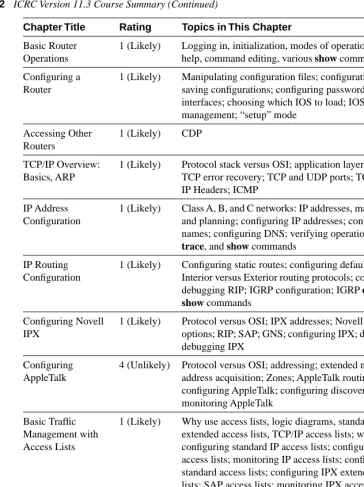
Table 1-2 is a paraphrased version of the ICRC Version 11.3 course. Included with the references are the ratings and a few comments about the content.
Table 1-2 ICRC Version 11.3 Course Summary
Chapter Title Rating Topics in This Chapter
Layered Models 1 (Likely) OSI model, layered protocol concepts, encapsulation
Application and Upper Layers
1 (Likely) Describes the 4 upper layers of OSI, defines “segment,” describes connection-oriented protocols
Physical and Data Link Layers
1 (Likely) Lists common physical and data link specifications; defines MAC address; describes Ethernet, Token Ring, and FDDI operation; brief explanation of WAN data links
Network Layer and Path Determination
Analysis of CCNA Training Paths 13
Basic Router Operations
1 (Likely) Logging in, initialization, modes of operation, passwords, help, command editing, various show commands
Configuring a Router
1 (Likely) Manipulating configuration files; configuration modes; saving configurations; configuring passwords and interfaces; choosing which IOS to load; IOS image management; “setup” mode
Accessing Other Routers
1 (Likely) CDP
TCP/IP Overview: Basics, ARP
1 (Likely) Protocol stack versus OSI; application layer examples; TCP error recovery; TCP and UDP ports; TCP, UDP, and IP Headers; ICMP
IP Address Configuration
1 (Likely) Class A, B, and C networks: IP addresses, mask subnetting, and planning; configuring IP addresses; configuring host names; configuring DNS; verifying operation with ping,
trace, and show commands
IP Routing Configuration
1 (Likely) Configuring static routes; configuring default routes; Interior versus Exterior routing protocols; configuring RIP; debugging RIP; IGRP configuration; IGRP debug and
show commands
Configuring Novell IPX
1 (Likely) Protocol versus OSI; IPX addresses; Novell encapsulation options; RIP; SAP; GNS; configuring IPX; displaying IPX; debugging IPX
Configuring AppleTalk
4 (Unlikely) Protocol versus OSI; addressing; extended networks; address acquisition; Zones; AppleTalk routing protocols; configuring AppleTalk; configuring discovery mode; monitoring AppleTalk
Basic Traffic Management with Access Lists
1 (Likely) Why use access lists, logic diagrams, standard and extended access lists, TCP/IP access lists; wildcard masks; configuring standard IP access lists; configuring extended access lists; monitoring IP access lists; configuring IPX standard access lists; configuring IPX extended access lists; SAP access lists; monitoring IPX access lists; AppleTalk packet access lists; AppleTalk zone access lists; monitoring AppleTalk access lists
Introduction to Serial Connections
1 (Likely) Telephone company service basics, survey of data-link protocols for WANs, SDLC/HDLC/PPP/LAPB framing, PPP functions, PAP and CHAP authentication, PAP and CHAP configuration
continues
Table 1-2 ICRC Version 11.3 Course Summary (Continued)
[image:12.612.122.486.103.590.2]14 Chapter 1: What Is CCNA?
High-Performance Solutions for Desktop Connectivity
High-Performance Solutions for Desktop Connectivity (HPSDC) could be renamed “LAN Switching Basics: All about FastHub 300s and 2820 and 1900 Switches.” It is a particularly good reference for those wanting CCDA and CCDP certification because this course focuses more on design tradeoffs than some other courses. Several of the CCNA objectives not covered in ICRC are covered in this course, particularly those relating to comparisons of bridges, routers, and switches.
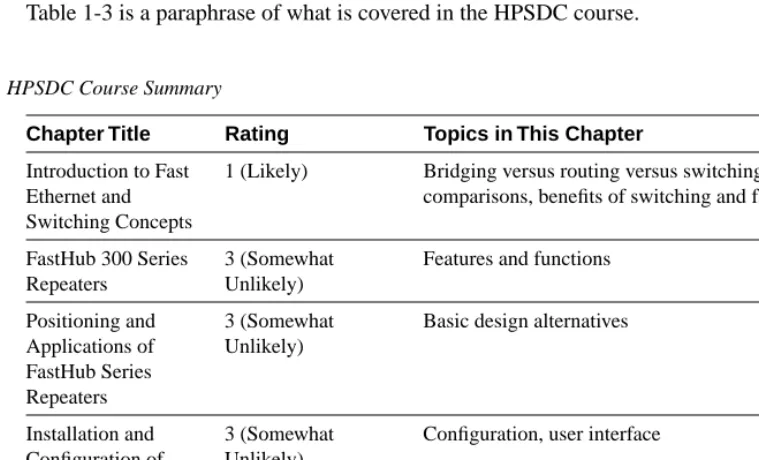
Table 1-3 is a paraphrase of what is covered in the HPSDC course.
Configuring X.25 4 (Unlikely) Protocol stack versus OSI, addressing, terminology, framing, PVCs and SVCs, configuring X.25, adjusting windows and packet sizes, monitoring X.25, X.25 switching by a router
Configuring Frame Relay
1 (Likely) Terminology, LMI messages, Inverse ARP, addressing, configuration, monitoring, configuration using subinterfaces, NBMA, full and partial mesh issues
Table 1-3 HPSDC Course Summary
Chapter Title Rating Topics in This Chapter
Introduction to Fast Ethernet and Switching Concepts
1 (Likely) Bridging versus routing versus switching
comparisons, benefits of switching and fast Ethernet
FastHub 300 Series Repeaters
3 (Somewhat Unlikely)
Features and functions
Positioning and Applications of FastHub Series Repeaters
3 (Somewhat Unlikely)
Basic design alternatives
Installation and Configuration of FastHub 300 Series Repeaters
3 (Somewhat Unlikely)
Configuration, user interface
Maintenance and Troubleshooting of FastHub 300 Series Repeaters
4 (Unlikely) LED interpretation, management reporting Table 1-2 ICRC Version 11.3 Course Summary (Continued)
[image:13.612.82.462.372.602.2]Cisco Routers and LAN Switches (CRLS)
Cisco’s CRLS course was previously called “Cisco SupportPro” and was geared toward presale engineers. The current version of this course is more focused on the technical portions of the earlier class. There is significant overlap with ICRC, both in topics and identical course materials.
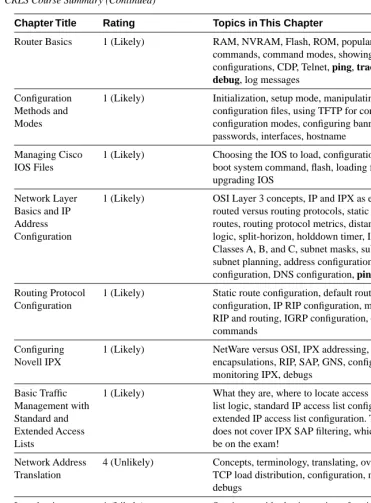
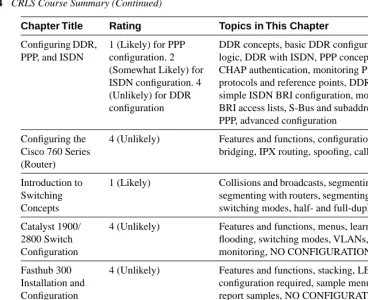
Table 1-4 shows a paraphrased outline of CRLS, along with some analysis. The Catalyst 2820
and 1900 Switches
3 (Somewhat Unlikely)
Features and functions
Positioning and Applications of Catalyst 2820 and 1900 Switches
3 (Somewhat Unlikely)
Basic design alternatives
Installation and Configuration of Catalyst 2820 and 1900 Switches
4 (Unlikely) Cabling and configuration
Maintenance and Troubleshooting of Catalyst 2820 and 1900 Switches
4 (Unlikely) LED interpretation, examining status from the console
Table 1-4 CRLS Course Summary
Chapter Title Rating Topics in This Chapter
Cisco Overview 2 (Somewhat Likely) Short product overview (one page on routers, for example)
Cisco Networking Solutions
3 (Somewhat Unlikely) Product positioning, telecommuting, access routers, 25xx routers, 36xx routers, SOHO routers, IOS features sets, high performance LANs, 1900 and 2820 switches, FastHub 300 series
Cisco IOS Overview
3 (Somewhat Unlikely) What is IOS, WAN services, compression, TACACs, management, ClickStart, each topic just shows basic concept (no configuration)
(IOS) User Interface
1 (Likely) Login, passwords, command help, command editing
continues
Table 1-3 HPSDC Course Summary (Continued)
Router Basics 1 (Likely) RAM, NVRAM, Flash, ROM, popular show commands, command modes, showing configurations, CDP, Telnet, ping, trace,
debug, log messages
Configuration Methods and Modes
1 (Likely) Initialization, setup mode, manipulating
configuration files, using TFTP for configurations, configuration modes, configuring banner, passwords, interfaces, hostname
Managing Cisco IOS Files
1 (Likely) Choosing the IOS to load, configuration register, boot system command, flash, loading from TFTP, upgrading IOS
Network Layer Basics and IP Address Configuration
1 (Likely) OSI Layer 3 concepts, IP and IPX as examples, routed versus routing protocols, static and dynamic routes, routing protocol metrics, distance vector logic, split-horizon, holddown timer, IP addresses, Classes A, B, and C, subnet masks, subnetting, subnet planning, address configuration, hostname configuration, DNS configuration, ping, trace
Routing Protocol Configuration
1 (Likely) Static route configuration, default route configuration, IP RIP configuration, monitoring RIP and routing, IGRP configuration, debug commands
Configuring Novell IPX
1 (Likely) NetWare versus OSI, IPX addressing, IPX encapsulations, RIP, SAP, GNS, configuration, monitoring IPX, debugs
Basic Traffic Management with Standard and Extended Access Lists
1 (Likely) What they are, where to locate access lists, access list logic, standard IP access list configuration, extended IP access list configuration. This course does not cover IPX SAP filtering, which is likely to be on the exam!
Network Address Translation
4 (Unlikely) Concepts, terminology, translating, overloading, TCP load distribution, configuration, monitoring, debugs
Introduction to Wide-Area Network Services
1 (Likely) Service provider basic services, framing for PPP, HDLC, SDLC, LAPB, ISDN concepts, Frame Relay concepts, X.25 concepts
Configuring Frame Relay
1 (Likely) Concepts and terminology, LMI messages, Inverse ARP, basic configuration, monitoring Frame Relay, configuration using subinterfaces, NBMA issues, full-mesh and partial-mesh issues
Table 1-4 CRLS Course Summary (Continued)
[image:15.612.81.452.107.610.2]Internetworking Technology Multimedia (ITM)
ITM is a CD with basic technology self-study material that is accessed with your favorite Web browser. It covers all the basics that will be on the CCNA exam, plus a few extra topics. It does not cover these topics to the depth needed to pass the CCNA exam, however. (ITM is actually intended as a prerequisite course to the CRLS and ICRC courses.) An outline is not given because ITM is essentially prerequisite material. However, it is a good study tool and ends each section with multiple-choice questions.
Analysis of Prerequisite Courses
Many topics will obviously be covered by the exam: IP and IPX addressing, routing, router and switch configuration mode, the OSI model, filtering, Frame Relay configuration, LAN-switching concepts, and the list goes on. These topics are found in the prerequisite course outlines in Tables 1-2 through 1-4, for both Cisco-defined CCNA Training Paths.
Configuring DDR, PPP, and ISDN
1 (Likely) for PPP configuration. 2 (Somewhat Likely) for ISDN configuration. 4 (Unlikely) for DDR configuration
DDR concepts, basic DDR configuration, DDR logic, DDR with ISDN, PPP concepts, PAP and CHAP authentication, monitoring PPP, ISDN protocols and reference points, DDR with ISDN, simple ISDN BRI configuration, monitoring ISDN, BRI access lists, S-Bus and subaddresses, multilink PPP, advanced configuration
Configuring the Cisco 760 Series (Router)
4 (Unlikely) Features and functions, configuration, IP routing, bridging, IPX routing, spoofing, caller-id
Introduction to Switching Concepts
1 (Likely) Collisions and broadcasts, segmenting with bridges, segmenting with routers, segmenting with switches, switching modes, half- and full-duplex Ethernet
Catalyst 1900/ 2800 Switch Configuration
4 (Unlikely) Features and functions, menus, learning and flooding, switching modes, VLANs, SNMP, monitoring, NO CONFIGURATION SAMPLES
Fasthub 300 Installation and Configuration
4 (Unlikely) Features and functions, stacking, LEDs, no configuration required, sample menu, statistic report samples, NO CONFIGURATION SAMPLES
Network Management Solutions
4 (Unlikely) Management theory, Cisco Fast Step for 700 series, Config Maker, Autoinstall, CiscoWorks for Windows
Table 1-4 CRLS Course Summary (Continued)
[image:16.612.124.493.104.404.2]Some topics will certainly not be on the CCNA exam. DECNET, Banyan Vines, Novell NLSP, OSPF, and other advanced topics are not covered on CCNA. Of course, because Cisco provides no absolutely definitive list of topics on the CCNA exam, this is an opinion, but these topics are far beyond what is implied by Cisco’s 60 listed objectives.
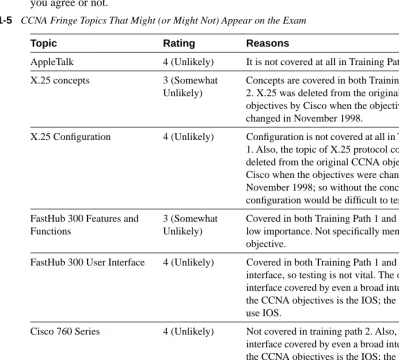
As with any test, deciding whether a fringe topic is or is not going to be on the test is always a difficult part of choosing what to study. Table 1-5 lists some descriptions of fringe topics, and my opinion as to whether they are covered on the exam. This table uses the four-point rating scale described earlier. This is my opinion, but I will also list my reasons, so you can decide if you agree or not.
Table 1-5 CCNA Fringe Topics That Might (or Might Not) Appear on the Exam
Topic Rating Reasons
AppleTalk 4 (Unlikely) It is not covered at all in Training Path 1.
X.25 concepts 3 (Somewhat Unlikely)
Concepts are covered in both Training Path 1 and 2. X.25 was deleted from the original CCNA objectives by Cisco when the objectives were changed in November 1998.
X.25 Configuration 4 (Unlikely) Configuration is not covered at all in Training Path 1. Also, the topic of X.25 protocol concepts was deleted from the original CCNA objectives by Cisco when the objectives were changed in November 1998; so without the concepts, configuration would be difficult to test.
FastHub 300 Features and Functions
3 (Somewhat Unlikely)
Covered in both Training Path 1 and 2; relatively low importance. Not specifically mentioned in any objective.
FastHub 300 User Interface 4 (Unlikely) Covered in both Training Path 1 and 2; easy user interface, so testing is not vital. The only user interface covered by even a broad interpretation of the CCNA objectives is the IOS; the 300 does not use IOS.
Cisco 760 Series 4 (Unlikely) Not covered in training path 2. Also, the only user interface covered by even a broad interpretation of the CCNA objectives is the IOS; the 760 does not use IOS.
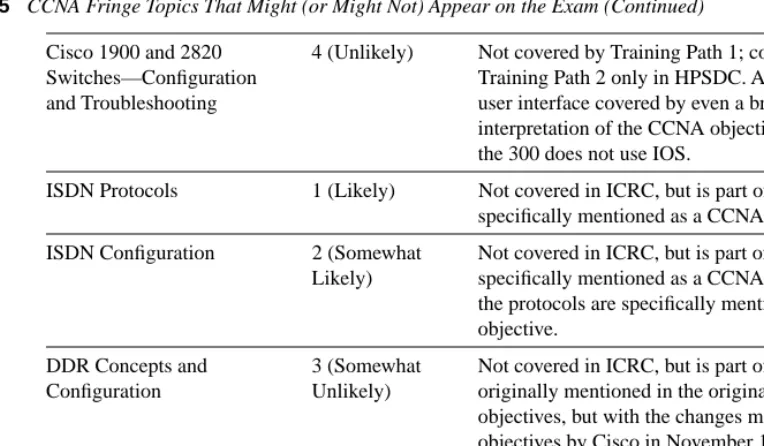
Cisco 1900 and 2820 Switches—Features and Functions
[image:17.612.65.464.223.583.2]This book covers topics that are considered likely or somewhat likely to be on the CCNA exam.
The 60 Stated CCNA Objectives
The most definitive description of what is required on the CCNA exam is the list of 60 CCNA objectives on Cisco’s Web site. This book will ensure that each of the 60 objectives are covered in enough detail to answer the questions on the exam. Taking the exam before becoming comfortable with the meanings of these objectives will put you at a severe disadvantage. Other topics besides those listed in these objectives will be covered on the CCNA exam. For instance, ISDN configuration is not mentioned in any objective, but ISDN protocols are mentioned; a question could list an ISDN configuration and ask a question about the ISDN protocols that router is using. The most likely of these topics are those covered in the Training Paths 1 and 2, as listed in the previous section. However, knowing the following topics is a must. In this section, the 60 objectives are listed, verbatim, from Cisco’s Web site along with notes of my interpretation of each objective. Finally, two cross references are listed: one referring to the chapter of this book that each objective is discussed in, and the other listing all the objectives covered in an individual book chapter.
Cisco 1900 and 2820 Switches—Configuration and Troubleshooting
4 (Unlikely) Not covered by Training Path 1; covered in Training Path 2 only in HPSDC. Also, the only user interface covered by even a broad
interpretation of the CCNA objectives is the IOS; the 300 does not use IOS.
ISDN Protocols 1 (Likely) Not covered in ICRC, but is part of ITM; it is specifically mentioned as a CCNA objective.
ISDN Configuration 2 (Somewhat Likely)
Not covered in ICRC, but is part of ITM; it is not specifically mentioned as a CCNA objective, but the protocols are specifically mentioned in an objective.
DDR Concepts and Configuration
3 (Somewhat Unlikely)
Not covered in ICRC, but is part of ITM; it was originally mentioned in the original CCNA objectives, but with the changes made to the objectives by Cisco in November 1998, DDR coverage was deleted from the objectives.
IPX Packet and SAP Filtering
1 (Likely) Not covered in Training Path 1, but is listed as an objective.
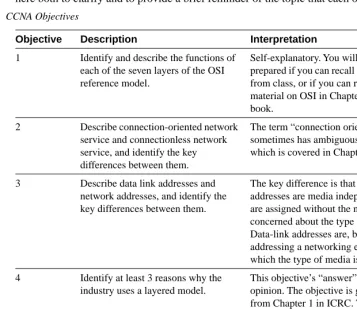
[image:18.612.122.504.104.327.2]List and Interpretation of the 60 Stated CCNA Objectives
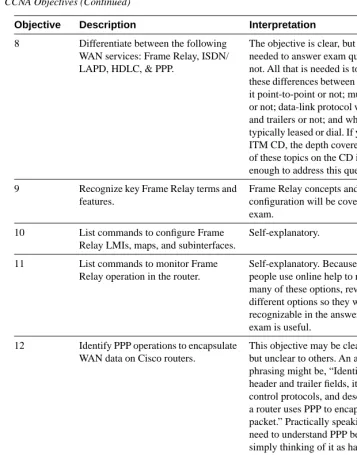
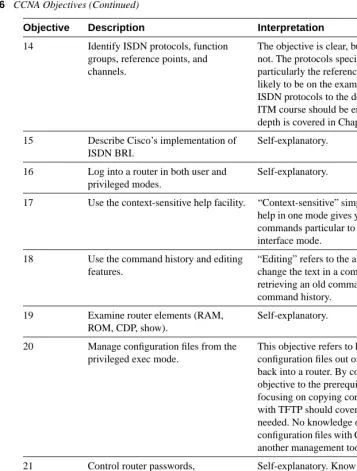
These objectives were collected in November 1998, during the initial writing of this book. The CCNA exam will consist of a combination of the objectives listed in Table 1-6. Many of the objectives are clearly worded and have no hidden meaning. Some of the objectives, in my opinion, either contain hidden nuances or are unclear. The interpretation found in column three of Table 1-6 is not an attempt to describe in detail an “answer” for each objective, but rather is here both to clarify and to provide a brief reminder of the topic that each objective covers. Table 1-6 CCNA Objectives
Objective Description Interpretation
1 Identify and describe the functions of each of the seven layers of the OSI reference model.
Self-explanatory. You will be well prepared if you can recall this material from class, or if you can recall the material on OSI in Chapter 3 of this book.
2 Describe connection-oriented network service and connectionless network service, and identify the key differences between them.
The term “connection oriented” sometimes has ambiguous meaning, which is covered in Chapter 3.
3 Describe data link addresses and network addresses, and identify the key differences between them.
The key difference is that Layer 3 addresses are media independent and are assigned without the need to be concerned about the type of media. Data-link addresses are, by definition, addressing a networking entity for which the type of media is important.
4 Identify at least 3 reasons why the industry uses a layered model.
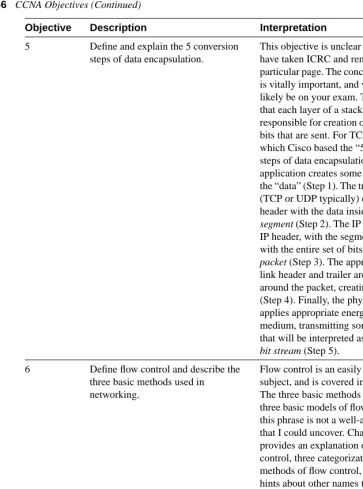
[image:19.612.80.437.198.508.2]5 Define and explain the 5 conversion steps of data encapsulation.
This objective is unclear unless you have taken ICRC and remember a particular page. The concept, however, is vitally important, and will most likely be on your exam. The idea is that each layer of a stack is
responsible for creation of some of the bits that are sent. For TCP/IP, from which Cisco based the “5 conversion steps of data encapsulation,” the application creates some bits, called the “data” (Step 1). The transport layer (TCP or UDP typically) creates a header with the data inside it, called a
segment (Step 2). The IP layer adds an
IP header, with the segment after it, with the entire set of bits called a
packet (Step 3). The appropriate
data-link header and trailer are wrapped around the packet, creating a frame (Step 4). Finally, the physical layer applies appropriate energy to the medium, transmitting some energy that will be interpreted as the correct
bit stream (Step 5).
6 Define flow control and describe the three basic methods used in networking.
Flow control is an easily defined subject, and is covered in Chapter 3. The three basic methods refer to the three basic models of flow control, but this phrase is not a well-accepted term that I could uncover. Chapter 3 provides an explanation of flow control, three categorizations or methods of flow control, and some hints about other names that the exam may include when asking about this objective.
7 List the key internetworking functions of the OSI Network layer and how they are performed in a router.
The term internetworking in this objective is unneeded, but it is otherwise clear. This is a duplicate, practically speaking, of objective 1.
continues
Table 1-6 CCNA Objectives (Continued)
[image:20.612.120.483.102.591.2]8 Differentiate between the following WAN services: Frame Relay, ISDN/ LAPD, HDLC, & PPP.
The objective is clear, but the depth needed to answer exam questions is not. All that is needed is to consider these differences between the terms: is it point-to-point or not; multiprotocol or not; data-link protocol with headers and trailers or not; and whether it is typically leased or dial. If you have the ITM CD, the depth covered for each of these topics on the CD is more than enough to address this question.
9 Recognize key Frame Relay terms and features.
Frame Relay concepts and
configuration will be covered on the exam.
10 List commands to configure Frame Relay LMIs, maps, and subinterfaces.
Self-explanatory.
11 List commands to monitor Frame Relay operation in the router.
Self-explanatory. Because most people use online help to remember many of these options, reviewing the different options so they will be recognizable in the answers on the exam is useful.
12 Identify PPP operations to encapsulate WAN data on Cisco routers.
This objective may be clear to some, but unclear to others. An alternate phrasing might be, “Identify PPP header and trailer fields, its use of control protocols, and describe how a router uses PPP to encapsulate a packet.” Practically speaking, you need to understand PPP better than simply thinking of it as having a header and trailer. You should understand the need for the protocol field, and the purpose of Layer 3-specific control protocols.
13 State a relevant use and context for ISDN networking.
This objective mainly refers to ISDN’s use as a switched WAN media. Table 1-6 CCNA Objectives (Continued)
[image:21.612.81.438.105.560.2]14 Identify ISDN protocols, function groups, reference points, and channels.
The objective is clear, but the depth is not. The protocols specified by ISDN, particularly the reference points, are likely to be on the exam. Knowing ISDN protocols to the depth of the ITM course should be enough; this depth is covered in Chapter 8.
15 Describe Cisco’s implementation of ISDN BRI.
Self-explanatory.
16 Log into a router in both user and privileged modes.
Self-explanatory.
17 Use the context-sensitive help facility. “Context-sensitive” simply means that help in one mode gives you help about commands particular to that user interface mode.
18 Use the command history and editing features.
“Editing” refers to the ability to change the text in a command after retrieving an old command with command history.
19 Examine router elements (RAM, ROM, CDP, show).
Self-explanatory.
20 Manage configuration files from the privileged exec mode.
This objective refers to how to move configuration files out of a router, or back into a router. By comparing this objective to the prerequisite courses, focusing on copying configurations with TFTP should cover all that is needed. No knowledge of moving configuration files with CiscoWorks or another management tool is necessary.
21 Control router passwords, identification, and banner.
Self-explanatory. Know the different passwords; TACACS is unlikely to be covered.
22 Identify the main Cisco IOS commands for router startup.
This really refers to the boot command, the configuration register and how they affect which IOS a router will load.
continues
Table 1-6 CCNA Objectives (Continued)
[image:22.612.122.480.102.574.2]23 Enter an initial configuration using the setup command.
Setup is also called the “Initial Configuration Dialogue” and is most typically used when a router is booted with no configuration in NVRAM. Practicing this once will be useful if you have a spare router. Also, this process is the only process that writes the same configuration to NVRAM and RAM based on one action by the user of the router.
24 Copy and manipulate configuration files.
Self-explanatory, and the same objective in practice as objective 20.
25 List the commands to load Cisco IOS software from: flash memory, a TFTP server, or ROM.
Self-explanatory, and the same objective in practice as objective 22.
26 Prepare to backup, upgrade, and load a backup Cisco IOS software image.
A nuance to this objective is that some routers do not load the entire IOS into RAM, but instead leave portions of the IOS in Flash memory to be read as needed. The IOS disallows writing into Flash memory if this is the case. In older IOS releases, you had to manually boot an IOS from ROM and then copy files into Flash memory. Chapter 2 covers all these details, and shows a sample automated version of this process in later IOS releases. The nuance is that this objective is focused on the process, and in particular, the process when Flash memory is not “writable” when you type the copy command.
27 Prepare the initial configuration of your router and enable IP.
The objective does not imply whether setup mode or configuration mode would be used in this case. Regardless, you should be able to use either for the purposes of passing this exam. For the purposes of succeeding in building router networks, setup mode is relatively useless after you have hands-on skills in configuration mode. Table 1-6 CCNA Objectives (Continued)
[image:23.612.87.435.104.595.2]28 Monitor Novell IPX operation on the router.
Like objective 32, but for IPX.
29 Describe the two parts of network addressing, then identify the parts in specific protocol address examples.
This concept is not only important to the CCNA exam, but is knowledge you will need for the other exams as well. Chapter 3 contains a discussion of Layer 3 routing and the role that Layer 3 address groupings play in the process of routing.
30 Create the different classes of IP addresses [and subnetting].
Self-explanatory.
31 Configure IP addresses. Self-explanatory.
32 Verify IP addresses. Verify in this case is one way of saying log in to the router, and use commands to verify that it configured and is working correctly. This is mainly an outgrowth of Cisco’s courses tending to have three main topics in an implementation chapter: concepts, configuration, and commands to show if it worked. Objectives 30–32 cover those three aspects of IP addresses in a Cisco router.
33 List the required IPX address and encapsulation type.
I do not know what this one really means. There is no required IPX address. There are multiple encapsulation types for IPX on Ethernet, FDDI, and Token Ring. So, in this book I will treat this objective instead to mean, “Describe how to configure IPX addressing, IPX routing, and explain the meaning and purpose of the different IPX
encapsulation types on LANs.” That is most of what is covered, except for access lists, in the Novell chapters in ICRC and CRLS courses.
continues
Table 1-6 CCNA Objectives (Continued)
[image:24.612.126.479.103.571.2]34 Enable the Novell IPX protocol and configure interfaces.
Self-explanatory, and very similar to my interpretation of objective 33.
35 Identify the functions of the TCP/IP transport-layer protocols.
Self-explanatory, and could be learned from many documents and books besides Cisco courses or this book.
36 Identify the functions of the TCP/IP network-layer protocols.
See analysis for objective 35.
37 Identify the functions performed by ICMP.
See analysis for objective 35.
38 Configure IPX access lists and SAP filters to control basic Novell traffic.
Self-explanatory. SAP filters are more likely to be covered than packet filters.
39 Add the RIP routing protocol to your configuration.
This objective, as well as objective 40, could be taken as the objectives of two labs from the ICRC and CRLS courses. After configuring IP addresses, without a routing protocol, the student is asked to add RIP and then IGRP. You should know how to remove either, as well as know what running both would imply.
40 Add the IGRP routing protocol to your configuration.
See interpretation for objective 39.
41 Explain the services of separate and integrated multiprotocol routing.
This objective can be particularly confusing if you come from a non-Cisco shop or from the OJT Training Path. Separate multiprotocol routing is what normal routing protocols do— that is, exchange routing information for a single routable protocol. Integrated multiprotocol routing refers to the function of EIGRP that exchanges routing information for IP, IPX, and AppleTalk, all as one set of protocol flows.
Table 1-6 CCNA Objectives (Continued)
[image:25.612.84.437.101.534.2]42 List problems that each routing type encounters when dealing with topology changes and describe techniques to reduce the number of these problems.
This objective is unclear due to the term routing type, which is not used in the prerequisite courses. Routing type might be better termed routing
protocol, for instance, RIP, IGRP,
EIGRP, OSPF, NLSP, and so on. An even better phrase might be type of
routing protocol because the objective
is really referring to distance vector and link-state routing protocol logic. This objective actually opens up what is one of the more advanced topics covered on this exam. If you understand the distance vector and link-state logic covered in this book, you should be well prepared. The DUAL algorithm used by EIGRP should not be on the exam, nor should the link state algorithm be covered.
43 Describe the benefits of network segmentation with routers.
Self-explanatory.
44 Configure standard and extended access lists to filter IP traffic.
Self-explanatory. The depth of your understanding should include recalling all parts of an IP packet that can be examined by the access list to make a match, as well as the nuances of where the access list is enabled, compared to the flow of the packets you are interested in filtering.
45 Monitor and verify selected access list operations on the router.
“Monitor and verify,” in this and other objectives, means you should know the commands, most typically show and debug, that help you learn if you configured correctly.
46 Describe the advantages of LAN segmentation.
Objectives 46–49 make the most sense when compared with one another. Consider them all at one time. These topics are mainly covered in Chapter 4.
continues
Table 1-6 CCNA Objectives (Continued)
[image:26.612.118.479.104.577.2]47 Describe LAN segmentation using bridges.
See interpretation for objective 46.
48 Describe LAN segmentation using routers.
See interpretation for objective 46.
49 Describe LAN segmentation using switches.
See interpretation for objective 46.
50 Name and describe two switching methods.
Because there is no industry standard name for what this objective calls switching methods, this objective may be a bit ambiguous. The objective refers to internal processing and whether the FCS is checked before the frame is forwarded. The two methods, cut-through and store-and-forward, are covered in Chapter 4.
51 Describe full- and half-duplex Ethernet operation.
Self-explanatory.
52 Describe network congestion problem in Ethernet networks.
This objective might be better stated as, “Describe collisions, broadcasts, and their affect on shared Ethernet performance.” Without understanding this objective, you cannot fully explain the next several objectives.
53 Describe the benefits of network segmentation with bridges.
Self-explanatory, and identical to objective 47.
54 Describe the benefits of network segmentation with switches.
Self-explanatory, and identical to objective 49.
55 Describe the features and benefits of Fast Ethernet.
Self-explanatory.
56 Describe the guidelines and distance limitations of Fast Ethernet.
Self-explanatory. Just memorize it!
57 Distinguish between cut-through and store-and-forward LAN switching.
Self-explanatory. This objective is practically identical to objective 50. Table 1-6 CCNA Objectives (Continued)
[image:27.612.81.438.102.545.2]Cross Reference to Book Chapters Covering an Objective
Table 1-7 lists the objectives found at Cisco’s Web page and the corresponding chapter this book that covers the topic.
58 Describe the operation of Spanning-Tree Protocol and its benefits.
This objective is barely covered in the prerequisite courses. ICRC and CRLS do not address spanning tree; only the HPSDC covers spanning tree, with two paragraphs. As time goes on, and CRLS gains more focus on LAN switching, I believe more in-depth questions on spanning tree will be on the CCNA exam. For our purposes, if you understand spanning trees to the depth covered in this book, you should be ready for the exam.
59 Describe the benefits of virtual LANs. Self-explanatory.
60 Define and describe the function of a MAC address.
Media Access Control addresses identify LAN interface cards. Using and understanding MAC addresses is a key part of the logic behind routers, bridges, and switches.
Table 1-7 Chapter Roadmap of CCNA Objectives as Covered in the Book
Objective Chapter
1 3
2 3
3 3
4 3
5 3
6 3
7 3
8 8
Table 1-6 CCNA Objectives (Continued)
Objective Description Interpretation
[image:28.612.121.477.104.332.2]9 8
10 8
11 8
12 8
13 8
14 8
15 8
16 2
17 2
18 2
19 2
20 2
21 2
22 2
23 2
24 2
25 2
26 2
27 2
28 5, 6
29 3, 5
30 5
31 5
32 5
33 5
34 5, 6
35 5
36 5
37 5
38 5, 7
Table 1-7 Chapter Roadmap of CCNA Objectives as Covered in the Book (Continued)
[image:29.612.82.444.100.603.2]39 6
40 6
41 6
42 6
43 4
44 7
45 7
46 4
47 4
48 4
49 4
50 4
51 4
52 4
53 4
54 4
55 4
56 4
57 4
58 4
59 4
60 3, 4
Table 1-7 Chapter Roadmap of CCNA Objectives as Covered in the Book (Continued)
[image:30.612.125.484.103.475.2]Cross Reference to Objectives Covered in Each Chapter
Table 1-8 lists the chapters in this book and the corresponding CCNA objectives that each chapter covers:
A Game Plan for CCNA Success
You will not have as much time to prepare for the CCNA exam as you would like. The goal of this game plan is to streamline the process, so the time you do invest will be well spent. There are seven major categories of objectives covered by the exam. The general flow of how you should attack these topics is as follows:
1. Find out how much review you need for that objective category. 2. Review, whether in this book or other resources.
3. Perform the exercises at the end of the chapter. 4. Move on to another chapter.
The chapters are ordered to make sense to a novice. However, because you have been exposed to most if not all of these topics, you can skip around in these chapters as much as you like. Although this book is designed to be used by itself, using your Cisco Certified coursebooks, or the Cisco Press book Introduction to Cisco Router Configuration, will be useful as well. If you choose to do that, you will want to refer to this chapter’s section on analyzing the courses, so you can easily find the topics that are worth reviewing in those books and ignore those that are unimportant. Refer back to Figure 1-2 to review how to attack a major topic area (chapter) as documented in this book.
Table 1-8 Chapter Roadmap of CCNA Objectives as Covered in Individual Chapters
Chapter Objective
2 16–27
3 1–7, 29, 60
4 43, 46–60
5 28–38
6 28, 34, 39–42
7 38, 44–45
Your Final Preparation for the Exam
After you have completed the seven major objective categories, what remains is your final preparation. This includes review of all topics, as well as simulated tests, so you can practice taking an exam.
[image:32.612.76.493.201.438.2]Your final preparation does not need to follow a particular order. Figure 1-3 outlines how to do your final preparations.
Figure 1-3 Strategy for Approaching Final Preparations for Taking the CCNA Exam
Summary
You should walk away from this chapter with the following things in mind:
•
The CCNA exam is a test to prove your mastery of basic internetworking concepts.•
The CCNA exam objectives outline topics that will definitely be on the exam.•
The training paths provide clues to other topics on the exam.•
Cisco will most likely never completely define the scope or depth of what will be covered on this or other certification exams.•
The game plan will help you maximize the productivity of your preparation time.NA260103
Finish Chapters 2-8
Do I want a general review?
Do I want to practice a topic?
Do I want to practice testing?
Chapter 9: Scenarios
Review Chapter 3 tables and
questions CD-based
topical exam questions
CD-based practice tests Yes
Yes
The following CCNA exam objectives are reviewed in this chapter. The numbers shown correspond to the master list of objectives found in Chapter 1, “What Is CCNA?”
Objective Description
16 Log into a router in both user and privileged modes.
17 Use the context-sensitive help facility.
18 Use the command history and editing features.
19 Examine router elements (RAM, ROM, CDP, show).
20 Manage configuration files from the privileged exec mode.
21 Control router passwords, identification, and banner.
22 Identify the main Cisco IOS commands for router startup.
23 Enter an initial configuration using the setup command.
24 Copy and manipulate configuration files.
25 List the commands to load Cisco IOS software from: flash memory, a TFTP server, or ROM.
26 Prepare to backup, upgrade, and load a backup Cisco IOS software image.
C
H
A
P
T
E
R
2
Understanding Cisco’s
Internetwork Operating System
(IOS) Software
This chapter focuses on the CCNA objectives falling under Cisco’s CCNA exam objective heading IOS. IOS is important because no headings or individual objectives mention any other operating system or any other user interface that appears on the CCNA exam. In other words, with the current exam objectives, the IOS user interface is the only user interface you need to know, and IOS commands are the only commands you need to know for the exam.
The IOS user interface is integral to these objectives; the best way to refresh your memory about any user interface is to use it! If you can get time using a Cisco router, the learning and recall from your practice will be of significant value. This chapter is designed to remind you of details you may not notice when practicing and provide a reference for those of you who do not have access to routers for practice.
The other focus of this chapter’s CCNA objectives is a myriad of basic command functions in the IOS. The set of commands and features covered in this chapter closely matches those implied by the objectives and covered in the Cisco CCNA Training Paths. However, knowing more about commands than what is covered in the courses may be helpful on other exams. Therefore, you may want to take a little extra router practice time to examine other commands.
How to Best Use This Chapter
By taking the following steps, you can make better use of your study time:
•
Keep your notes and answers for all your work with this book in one place for easy reference.•
Take the quiz and write down your answers. Studies show retention is significantly increased through writing facts and concepts down, even if you never look at the information again.36 Chapter 2: Understanding Cisco’s Internetwork Operating System (IOS) Software
Figure 2-1 How To Use This Chapter
“Do I Know This Already?” Quiz
1. What are the two different names for the router’s mode of operation that when accessed enable you to issue commands that could be disruptive to router operations?
______________________________________________________________________ ______________________________________________________________________ ______________________________________________________________________ 2. What command would you use to receive command help if you knew the show command
option you cannot recall begins with a “C”?
______________________________________________________________________ ______________________________________________________________________ ______________________________________________________________________
NA260201
Do I know this already? Quiz
Review Chapter using charts and
tables
End-of-chapter exercises
Next Chapter
Read Chapter Skip Chapter
High score want more review Medium score
“Do I Know This Already?” Quiz 37
3. Instead of show ip route, which is the only command you typed since logging in to the router, you now want to issue a show ip arp command. What steps would you take to do so, without simply typing show ip arp?
_______________________________________________________________________ _______________________________________________________________________ _______________________________________________________________________ 4. What configuration command causes the router to demand a password from the console?
What configuration mode “context” must you be in; that is, what command(s) must be typed before this command after entering configuration mode?
_______________________________________________________________________ _______________________________________________________________________ _______________________________________________________________________ 5. What is the purpose of Flash memory in a Cisco router?
_______________________________________________________________________ _______________________________________________________________________ _______________________________________________________________________ 6. What is the purpose of ROM in a Cisco router?
_______________________________________________________________________ _______________________________________________________________________ _______________________________________________________________________ 7. What configuration command would be needed to cause a router to use an IOS image
named c2500-j-l.112-14.bin on TFTP server 128.1.1.1 when the router is reloaded? If you forgot the first parameter of this command, what steps must you take to learn the correct parameters and add the command to the configuration? (Assume you are not logged in to the router when you start.)
_______________________________________________________________________ _______________________________________________________________________ _______________________________________________________________________ 8. When using setup mode, you are prompted at the end of the process as to whether you
want to use the configuration parameters you just typed in. Which type of memory is this configuration stored into if you type yes?
38 Chapter 2: Understanding Cisco’s Internetwork Operating System (IOS) Software
9. What two methods could a router administrator use to cause a router to load the IOS stored in ROM?
______________________________________________________________________ ______________________________________________________________________ ______________________________________________________________________ 10. What is the process used to update the contents of Flash memory so that a new IOS in a
file called c2500-j-l.112-14.bin on TFTP server 128.1.1.1 is copied into Flash memory? ______________________________________________________________________ ______________________________________________________________________ ______________________________________________________________________ 11. Two different IOS files are in a router’s flash memory, one called c2500-j-l.111-3.bin and
one called c2500-j-l.112-14.bin. Which one does the router use when it boots up? How could you force the other IOS file to be used? Without looking at the router configuration, what command could be used to discover which file was used for the latest boot of the router?
______________________________________________________________________ ______________________________________________________________________ ______________________________________________________________________ 12. What does CDP stand for?
[image:37.612.81.458.81.417.2]______________________________________________________________________ ______________________________________________________________________ ______________________________________________________________________ The answers to the quiz are found in Appendix B on page 541. Review the answers, grade your quiz, and choose an appropriate next step in this chapter based on the suggestions in Figure 2-1. Your choices for the next step are as follows:
•
5 or fewer correct—Read this chapter.•
6, 7, or 8 correct—Review this chapter, looking at the charts and diagrams that summarize most of the concepts and facts in this chapter.Routers: The IOS and Its User Interface 39
Foundation Topics
Routers: The IOS and Its User Interface
Hardware Review
Before examining the IOS, a review of hardware and hardware terminology is useful. This section of the book reviews common hardware details.
Most Cisco routers have a console and an auxiliary port. All Cisco routers have a console port, which is meant for local administrative access, from an ASCII terminal or computer using a terminal emulator. The auxiliary port, missing on a few models of Cisco routers, is intended for asynchronous dial access from an ASCII terminal or terminal emulator; the auxiliary port is often used for dial backup.
Each router has different types of memory as follows:
•
RAM—Sometimes called DRAM for dynamic random-access memory, RAM is used by the router just like it is used by any other computer—for working storage.•
ROM—This type of memory stores a bootable IOS image, which is not typically used for normal operation. ROM does contain the code that is used to boot the router until the router knows where to get the full IOS image.•
Flash memory—Either an EEPROM or a PCMCIA card. Flash memory stores full function IOS images and is the IOS default for where the router gets its IOS at boot time. Flash memory may also be used to store configuration files on Cisco 7500 series platforms (copy config flash).•
NVRAM—Nonvolatile RAM stores the initial or startup configuration file.All of these types of memory are permanent memory except RAM. There is no hard disk or diskette storage on Cisco routers. Figure 2-2 summarizes the use of memory in Cisco routers.
CCNA Objectives Covered in This Section
16 Log into a router in both user and privileged modes.
17 Use the context-sensitive help facility.
18 Use the command history and editing features.
40 Chapter 2: Understanding Cisco’s Internetwork Operating System (IOS) Software
Figure 2-2 Cisco Router Memory Types
The processors in the routers vary from model to model. Although they are not specifically listed as requirements for the CCNA exam, some reference to terminology is useful. In most routers, the model number you order or own implies the processor speed; you would not then order a specific processor type or card. The exception to this is the 7000, 7200, and 7500 series of routers, for which you choose either a Route Switch Processor 1 (RSP-1), RSP-2, or RSP-4. In any case, the 2500 series, 3600 series, 4000 series, and 7xxx series all run the IOS. This commonality allows Cisco to have exams, such as CCNA, that cover the IOS features without having to cover many hardware details.
Interfaces are used by a router for routing/bridging packets/frames through a router. The types of interfaces available change over time due to new technology. For example, packet-over-SONET and voice interfaces are relatively recent additions to the product line. However, some confusion exists about what to call the actual cards that house the physical interfaces. Table 2-1 summarizes the terminology that may be referred to on the test.
Table 2-1 Router Interface Terminology
Physical interfaces are referred to as interfaces by the IOS commands, as opposed to ports or plugs. IOS commands familiar on one platform will be familiar on another. There are some nuances to numbering the interfaces, however. In all routers except the 7xxx routers, the interface number is a single number. However, with the 7xxx series routers, the interface is numbered first with the slot in which the card resides, followed by a slash, and then the port Model Series What the IOS Calls Interfaces
What the Product Catalog Calls the Cards with the Interfaces on Them
2500 interface Module
3600 interface Network Module
4500 interface Network Processor Module
7200 interface Port Adapters and Service Adapters
7500 interface Interface Processors
NA260202
RAM (working memory)
Flash (IOS)
ROM (IOS)
Routers: The IOS and Its User Interface 41
number on that card. For example, port 3 on the card in slot 2 would be interface 2/3. Numbering starts with 0 for card slots and 0 for ports on any card.
If you want to dig deeper, reading about processors and interfaces in the Cisco Product Manual would be useful.
Internetwork Operating System (IOS)
IOS, a registered trademark of Cisco Systems, is the name for the operating system found in most of Cisco’s routers. Cisco’s products have evolved to the point that routing functions are performed by cards inside larger multifunction routing/switching devices; these more complex devices use the IOS for the routing and related services. For example, the Route/Switch Module (RSM) card for the Catalyst 5000 series LAN switches performs routing functions and executes the IOS.
Fixes and code updates to the IOS can include new features and functions. To learn more about the code release process, features added at particular IOS revision levels, and other terminology that will help you talk to the Cisco Technical Assistan