Abstract – The virtualization plays an important role in cloud computing. Cloud computing is poised to revolutionize computing as a service. With the ability to provide on-demand computing resources dynamically, companies can fundamentally change their information technology strategy. Cloud computing utilizes massively scalable computing resources delivered as a service using internet technologies. Cloud computing allows these computational resources to be shared among a vast number of consumers to allow for a lower cost of ownership of information technology. The Infrastructure as a Service (IaaS) model of cloud computing provides on-demand online computing infrastructure resource at a reduced overall cost of ownership. The IaaS model makes all of the facilities required for a data center application available over the internet which clients purchase as an outsourced service. The proposed system discusses the concept of “Cloud” computing, some of the issues through virtualization. With this, first classify the tasks based on the client requests and resource pool what contains scheduler and classified resource queues composed the whole system. The main function of classify tasks system is analyzing and classifying the requested task. Through analyzing the way of the request, to forecast the trend of resource utilization and simulating operation to classify tasks and to make sure which type of task should be belong. In our system cloud virtual machines contain computing virtual machine queue, I/O virtual machine queue and normal virtual machine queue. Use this strategy to improve the whole resource’s utilization and try to avoid the phenomenon of waste. In this system we use the Cost-efficient scheduling algorithm.
Keywords – Virtual machine, task classify, cloud computing, virtualization.
I. INTRODUCTION
The cloud computing can provide the logical computer on top of physical computer. In cloud computing there is no need for IT infrastructure and updating are not required. There are lots of researches based on cloud computing since the concept has been proposed, such as biology, geographic information, business application, organization usage [3, 4] etc. However, in practical applications there have some problems about resource utilization [5]. Practically the resource utilization will be less than 10% when we are testing the computer performance with Link pack program and when processing large I/O tasks lower processor utilization will be lower [10]. We ascribe the request tasks to processor bound that need a lot of processor resources and a few other resources, I/O bound that need lots of hard disk and network resources [11]. With thousands of computers in
cloud computing, how to improve the resource utilization and reduce the cost, it became a very important problem on cloud computing. Hear we try to classify the tasks that are requested by the clients to several types with the help of using different kind of resource when they are running.
As one of the key technologies to cloud computing is virtualization, have several ways to work. We implement green computing by which are the sever utilization reaches very lower we can turn of the servers. For the merits of Para-virtualization, do not need to catch the privileged instructions, simplify architecture and perfect performance as physical machine, we consider Para-virtualization as our virtual technology and use the Xen virtualizes physical machines [12].
Related work:
In the Existing system In the existing system did not having any types of classification mechanism there by the client requested task can be executed by virtual machine directly so the resources can be provided at same rate for all virtual machine, in this types of systems the resource wastage are available. The following steps can be followed in the existing system. 1) The client can send request to the server. 2) The server can execute the task with the help of virtual machines. 3) Finally this can be forwarded to the client. The cloud data centre can contains the many virtual machines to execute the tasks. In this system all the virtual machines can have the same resources; these resources include processor resources, I/O resources and CPU resources. If any huge task (computing task) provided to the virtual machine the normal virtual machine can take more time to execute the requested task.
In this proposed work, we will focus on how to classify applications and virtual machines and how to assign the requested tasks to an appropriate virtual machine to improve the resource allocation and utilization. In section 2, we will introduce the overall ideal and design architecture of our proposed system. In section 3, we will show the tasks classify rules, the details of the task classify system with the cost effective scheduling algorithm. In section 4, we will show the different kinds of virtual machine and the way to assign the task to them. In section 5, do emulation experiment and analyze the results we get. In section 6, summarize the overall work.
The Effective Data Center and Resource Allocation
on Virtual Machine in Cloud Computing
P. Suresh
Assistant Professor,Department of ECE, PRIST University, Trichy, Tamilnadu
II. CLASSIFY VIRTUALIZATION STRATEGY FOR PROPOSED SYSTEM
2.1. Main Ideal
For lots of tasks to say, at first glance, they are different and there is no relationships are available between them. By the observation of tasks running processes, we can find the regulation that these tasks can been classified by the resource utilization. Some of the tasks required lots of processor resource when running, such as science computing, the processor’s utilization will be reach 100% in a short time and keep the same situation till the task finished, almost does not any interact with outside in the entire process and with low data throughput of memory and network. Moreover, some of the tasks use disk and network to transport data when running, such as stream media, on that time data throughout reach a high level in short time with almost zero utilization of processor. Moreover, some of the tasks use disk and network to transport data when running, such as stream media, on that time data throughout reach a high level in short time with almost zero utilization of processor. The rest of the tasks, without obviously utilize feature of favor any kind of resources, belong to normal task. It required all resources in content range. In the following, we will give the definitions of the task type. Now we are going to see how to classify the tasks.
Definition 1 Computing Tasks:
Task need use a lot of processor resource and very little hard disk and network resources when running. Definition 2 Computing Tasks:
The task required huge data transport through hard disk or network and the processor’s utilization almost reach zero when running.
Definition 3 Normal Tasks:
It required all of the resources processor, hard disk or network in normal range. We called this kind of tasks as Normal tasks.
With the help of classified tasks, we need construct appropriate virtual machines that are computing virtual machine (CVM), I/O virtual machine (I/OVM) and normal virtual machine (NVM) to running the corresponding computing task, I/O task and normal task. We will introduce CVM, I/OVM and NVM later. The way of constructing different kind of virtual machines is assigning physical resources to different kind of virtual machines with differ ratios in the process of virtualization.
With classified tasks and appropriate kind of virtual machines, there also need a scheduler and the scheduling mode to coordinate the interface between classified tasks and the types of virtual machines. We will show the means of scheduling and the architecture of virtual machine resources pool or scheduler in section 3 and 4.
With the help of classified tasks, we need construct appropriate virtual machines that are computing virtual machine (CVM), I/O virtual machine (I/OVM) and
normal virtual machine (NVM) to running the corresponding computing task, I/O task and normal task. We will introduce CVM, I/OVM and NVM later. The way of constructing different kind of virtual machines is assigning physical resources to different kind of virtual machines with differ ratios in the process of virtualization.
With classified tasks and appropriate kind of virtual machines, there also need a scheduler and the scheduling mode to coordinate the interface between classified tasks and the types of virtual machines. We will show the means of scheduling and the architecture of virtual machine resources pool or scheduler in section 3 and 4.
2.2 Design Architecture
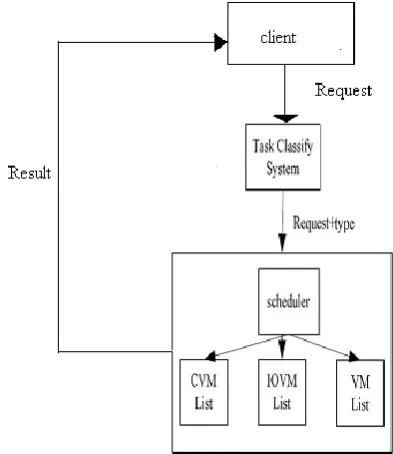
The architecture and scheduling process of classify virtualization strategy shown in Fig. 1. Client, classify tasks system and resources pool what contains scheduler and classified resource queues composed the whole system. The client can be a person or a program who requests to use service.
The main function of Classify Tasks System is analyzing the task and classifying the requested task. Through analyzing the way of request, the complexity of the code and using the predicted algorithm to forecast the trend of resources utilization and simulating operation to classify tasks and to make sure which type the task should be belong.
Resources pool, with different virtual machine resource queues sorted by the type of the virtual machines, contains computing virtual machine queues, I/O virtual machine queues and normal virtual machine queues. Although the queues are different, the scheduler schedules them uniformly. The queue follows the first come first serve mechanism.
The course of the scheduling described as follow. When the client requests service, 1) the request will be send to Task Classify System at the first. The system will analyze the requested task and determine the type by the classify rule, and then sends the request to scheduler with added symbol what shows to which type the task belongs. 2) Once the scheduler received the request, it extracts the symbol from the requested information and check which type the requested task is. Mapping to one of the queues in resources pool with the type of the requested task in the next, and select one virtual machine from the mapped queue. 3) Moving the selected virtual machine from free-queue to running the free-queue and changing the status of the virtual machine as well as the queue information. Then run the task on virtual machine. 4)When the task finished, the virtual machine sends the result to scheduler who will send the result to client and moving the virtual machine from running-queue to free-queue which queue the virtual machine belong to at the primary.
III.TASK CLASSIFY SYSTEM AND COST- EFFICIENT SCHEDULING ALGORITHM
As introduced previously, we need to categorize the tasks for the next work. At this section, we will show the modules of the Task Classify System and give the rule what used in the system to categorize the tasks to computing tasks, I/O-tasks or normal tasks. The system composed by Analyze Request Way module, Resource Predict module and Simulating Operation module. For expressing easily, we define some symbols and formulas in here.
τ Є {τvcpu, τvio, τnvm} (1)
τvcpu, τvio, and τnvm are mean the types of the tasks belong to. They represent Computing tasks, I/O tasks and Normal tasks and the value of can only take one of them.
τ0 = τnvm, τ1= τvcpu, τ2=τvio (2) Pi=(A,τi), i={0,1,2} (3)
A means the resource situation of τi’s utilization through a task running process described by ratio or number, τi means one type of the resources.
3.1 Analyze Request Way Module
The main methods of analyzing the request way are analyze what the protocols the requested task has used, which software will be used and the extension names of the file that will be processed. Generally, the I/O Tasks through http protocol request service with more interaction to clients and using ftp protocol transport large data or files With the set {<τ 2 , h>,<τ 0 , i>, <τ 1 , j>}, maps key to value, if determined the type is τ 0 or τ 1 or τ 2 by one of the means of analyzing protocol. The main use of this module is analyzing the user request and finds the type of task.
3.2 Resource Predict Module
In this module, we will use some predicted algorithm [13] to forecast the demand of virtual resources on the virtual machine on which the task will run. When we get
the results by forecast as the form of number or time, then deal with the results to be the uniform standard in the means of percent through divided the total demand by the used resources. Recording the results with (3), then fetch the maximum value as the result R2. The following is the pseudo code, and assigning the return value to R2.
if | p 1 . A − p 2 . A |< δ return p 0
else if | p 1 .A − p 2 .A |> δ & & p 1 . A > p 2.A return p1
else if | p 1 . A − p 2 . A |> δ & & p 1 . A < p 2 . A return p 2
3.3 Simulating Operation Module
The third way to record the consumption resources is operating the task in the means of simulation that is letting the task running on a virtual machine in an appropriate period. Deal with the results in the same way of predict module and use (3) to record them, but the value of A is different from the predict module. The A has expressed as (4), and using the same pseudo code in predict module, assigning the final value to R3.
(4)
3.4 Integration Module
The main function of this module is integrating the results of above three modules have gotten and figure out the final type. With the value of R1, R2 and R3, here is the pseudo code of how to get the final type.
if R1.τ= R2.τ return R 1 .τ else if R1.τ= R3.τ return R 1 .τ else if R2.τ= R3.τ return R 2 .τ else return τ 0
3.5 Cost-efficient scheduling algorithm
The client requested task very hue means we move on to this module. We use the concept of Pareto dominance [1] to devise a cost-efficient scheduling algorithm to process multiple tasks in a DAG in the cloud setting.
3.5.1 Pareto optimal scheduling heuristic (POSH) We describe a heuristic to dispatch tasks in a DAG to the cost-conscious VMs based on Pareto dominance, and we call it Pareto Optimal Scheduling Heuristic (POSH). POSH is an extension of the Heterogeneous Earliest Finish Time (HEFT) heuristic. Developed for scheduling tasks in a DAG on heterogeneous dedicated multiprocessing systems, HEFT is better than other scheduling heuristics. HEFT assigns a priority to each task in the DAG and then maps the task with the highest priority to the VM that minimizes the earliest finish time. POSH uses both the running time and the monetary cost to modify the last step to map the task with the highest priority to the most cost-efficient VM based on Pareto dominance.
Weighting Phase:
Assign the weights to the nodes and edges in the workflow. The weights assigned to nodes are calculated based on the predicted execution time of the tasks and the weights assigned to edges are calculated based on predicted time of the data transferred between the VMs.
Prioritizing Phase:
Create a sorted list of tasks organized in the order how they should be executed. The priority of each task is to be set with the upward priority value, which is equal to the weight of the node plus the execution time of the successors. The task list is generated by sorting the tasks by the descending order of priority.
Mapping Phase:
Assign the tasks to the resources based on Pareto dominance. Consecutive tasks are mapped to the resources based on the priority queue. For each task, choose the VM that favors scheduling tasks with low monetary cost to run it. Through using these thinks we can able to execute the user requested huge task in the easy manner.
IV.INDIVIDUATION VIRTUAL MACHINES
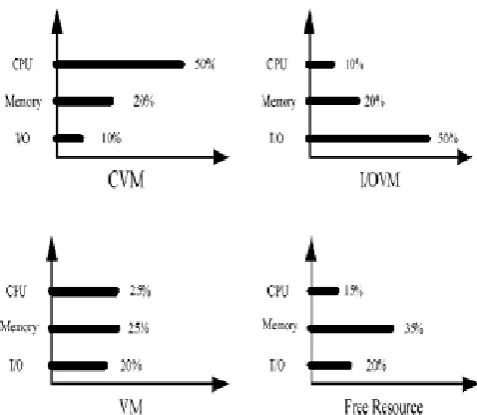
At former, we have introduced that we would use Para virtualization to virtualized individuation virtual machines to run classified tasks and map the task to an appropriate virtual machine. In this paper, we use Xen as the Virtual Machine Monitor who running in Ring0 manages and controls the hardware, charges of the virtualization. At the initialization, Xen will assign some virtual resources to Dom U. The process of initialization is one point of our work that to construct individual virtual machine through assigning different virtual resources to Dom U. The value of resources ratio of each individuation virtual machine at the initialization has shown in Fig. 2.
Figure 2: CVM, I/OVM, VM and Free Resource initialization resources ratio.
4.1 Dom 0
Dom 0, initializing before the other Domains, is the only virtual machine that can communicate with Xen Hypervisor through control interface. It has the privilege to access any physical I/O resources, and in charge of the other virtual machine instances of Dom U. As well as creating new virtual machine as Dom U, if it is necessary. Due to the need of our work, the Dom 0 should be meet more functions as following. 1) Monitoring the resource utilization to check whether the task type is match with the virtual machine type and check whether the virtual machine is working smoothly by the way of sending heart beat from time to time. 2) Instance migration. 3) Dynamically adjust virtual resources.
4.2 Computing Virtual Machine (CVM)
Computing virtual machine (CVM) required lots of processor resources and very little of I/O resources. Initializing with 50% virtual processor resource, 10% virtual I/O resources and 20% virtual memory resource. If it needs more resources when running, could assign more processor’s resource from the free resource shown in Fig. 2 to the virtual machine instance but could not be other virtual resources. Because the aim of the CVM is to run computing task not others and it will lose the personality as being a CVM if we assigned too more other resources to CVM instance.
4.3 I/O Virtual Machine (I/OVM)
The tasks need transport large data or interact with client that we called I/O task, we will need I/O virtual machine (I/OVM) to run them. Due to the I/O task will send or receive lots of information from time to time through I/O equipment like hard disk, network, block devices, so we should assign more virtual I/O resources to I/OVM. And we just assign little virtual processor resource since the less demand for the processor’s resource of the I/O task. Initializing with 55% virtual I/O resources, 10% virtual processor resource and 20% virtual memory resource’s the same reason in CVM, we could only assign virtual I/O resources more to I/O virtual machine instance and no addition of virtual processor resources.
4.4 Normal Virtual Machine (NVM)
Normal virtual machine (NVM), we also called standard virtual machine, is just like the virtual machine we usually mentioned. Initializing with 25% virtual processor resource, 25% virtual I/O resources and 20% virtual memory resource. NVM mainly used to run normal tasks, and there are many researches on it [8, 9] and we will not pay too much attention on it.
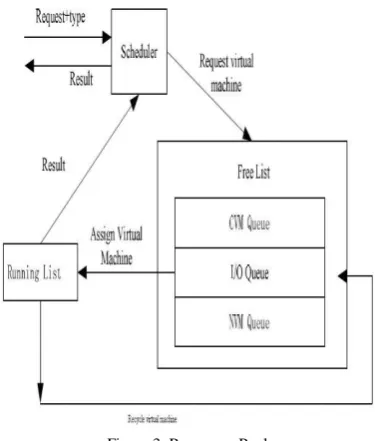
Scheduler, free virtual machine list and running virtual machine list compose the resources pool. The free virtual machine list contains CVM queue, I/OVM queue and NVM queue and Fig. 3 shows the architecture of resources pool or scheduler. The main functions of scheduler are analyzing the request information to get the type of the task, returning the result and managing, scheduling virtual machines to make sure each virtual machine instance could operate smoothly. It can provide the compatibility to our design. The virtual machine instances is that in running list and the others without running any task are list in the free virtual machine list.
Figure 3: Resources Pool
V. EXECUTIONS OF OUR WORK
5.1 Experiment Environment
We use Eucalyptus as open source software likes Amazon EC2, as our experiment platform. It adopts modular design and can be altered or expanded easily. In our experiment, we use one of the physical machine as Cloud Controller and two machines as Cluster Controller and several machines as Node Controllers. The configuration of each machine is Intel® Xeon™ Processor E5530 4C (2.40GHz, 8MB Cache), 8GB physical memory, 800GB hard disk and integrated dual Gigabit Ethernet and the operating system is CentOS 5.5, Eucalyptus’ version is 2.0.3 and Xen 3.4.3.
5.2 Result Analyzing
Testing the request tasks on the platform without our strategy, for the computing tasks, I/O tasks or normal tasks will assigned to virtual machines in a random way. The results shown HPC-CPU is 100%, HPC-IO/sec is 10%, HPC-W is 0KB/s and HPC-R is 30KB/s represent the processor resource utilization, hard disk throughput, network throughput when the computing tasks concentrate running on virtual machine instances that be virtualized from a physical machine.
Figure 4: CPU, Memory and I/O Utilization with strategy
Figure 5: Network Throughput (KB/S)
Then repeating the experiment with classify virtualization strategy, in the period of running time the processor’s resource utilization almost keeps at 100%, IO/sec reached 5%, Total Write is 2050KB/s and Total-Read is 1050KB/s. Fig. 5show the results of each resource’s utilization and compared with all tasks.
VI. CONCLUSION
In this paper we introduced the classify virtualization strategy. In the strategy, we classified the request tasks to Computing Tasks, I/O tasks and Normal Tasks, as well as individuated virtual machines to computing virtual machine (CVM), I/O virtual machine (I/OVM) and normal virtual machine (NVM) and mainly concentrating the scheduling with cost effective scheduling algorithm and its methods. Use the strategy to improve the whole resources’ utilization and try to avoid the phenomenon of waste.
REFERENCES
[1] Sen Su a, Jian Li a, Qingjia Huang a, Xiao Huang a, Kai Shuang a, Jie Wang (2013) “Cost-efficient task scheduling for executing large programs in the cloud” on parallel Computing in Elsevier.
[2] R.Vikram, T. Mekala (2013) “Improve the Efficiency
of Physical Resources Utilization on Cloud
Computing by Classifying Virtualization Strategy” on International Journal of Emerging Technology & Research.
[4] Qichang Chen,Liqiang Wang and Zongbo Shang, “MRGIS: A MapReduce-Enabled high performance workflow system for GIS,” in Proceedings of the IEEE Fourth International Conference on eScience, Indianapolis, USA: Dec. 2008, pp. 646-651
[5] Zhong LI,Gang Wang and Jing Liu, “Asynchronously manipulate I/O requests in the streaming media server to support more concurrent data accesses,” Computer Science, vol. 32�no. 2, pp. 20-24, Feb. (2005). [6] Zhen Xiao, Senior Member, IEEE, Weijia Song, and
Qi Chen “Dynamic Resource Allocation Using Virtual Machines for Cloud Computing Environment” on IEEE Transactions On Parallel And Distributed Systems, Vol. 24, No. 6, June 2013.
[7] C.Vechiola, S.Pandey and R.Buyya,
“High-performance cloud computing: a view of scientific applications,” in Proceedings of the 10th International Symposium on Pervasive Systems, Algorithms, and Networks(ISPAN), Kaohsiung, Dec. 2009, page no. 4-16.
[8] H.A.Lagar-Cavilla, et al, “SnowFlock:Rapid virtual machine cloning for cloud computing,” in Proceedings of the 4th ACM European conference on Computer systems, Nuremberg, Germany, April. 2009, pp. 1-12. [9] M.Fenn, M.A.Murphy, J.Martin and S.Goasguen, “An
evaluation of KVM for use in cloud computing,” in Proceedings of the 2nd International Conference on the Virtual Computing Initiative,Durham,2008. [10]Zhong LI,Gang Wang and Jing Liu, “Asynchronously
manipulate I/O requests in the streaming media server to support more concurrent data accesses,” Computer Science, vol. 32no. 2, pp. 20-24, Feb. (2005).
[11]R.E.Bryant, “Data-intensive supercomputing: the case for DISC,” School of Computer Science Carnegie Mellon University, Pittsbrugh, U.S. Tech. Rep. CMU-CS-07-128, (2007).
[12]P.Barham,D.Dragovic and K. Fraser etc, “Xen and the art ofvirtualization,” in Proceedings of the 19th ACM SymposiumonOperating Systems Principles, 2003, pp. 164-177.
[13]Bowei Xi,Zhen Liu,M.Raghavachari,H.X.Cathy and Zhang Li, “A smart hill-climbing algorithm for application server configuration,” in Proceedings of the 13th International Conference on World Wide Web (WWW), 2004, pp. 287-296.
Author’s profile