Digital Tabletops and Collaborative
Learning
Thesis by
Ahmed N. S. Kharrufa
In Partial Fulfillment of the Requirements
for the Degree of
Doctor of Philosophy
School of Computing Science
Newcastle University
Newcastle upon Tyne, UK
Abstract
People collaborate around tables at home, school and work. Digital tabletop technology presents an opportunity to bring computer support to these traditional face-to-face collaborative settings. This thesis principally addresses the challenge of designing digital tabletop applications for small group learning in the classroom and makes contributions in two distinct, but closely related ar-eas: (i) interaction techniques for digital tabletops; and (ii) the design and evaluation of a digital tabletop-based system for supporting collaborative learning. A review of previous literature com-bined with a preliminary observational study on collaboration around traditional tables indentifies a number of requirements for tabletop interaction. These include the need for fluid interaction techniques that allow control of interface object attributes when these objects are moved between tabletop territories. Attribute gates are proposed as a solution to this problem through utilizing a novel, crossing-based, interaction technique. A recognition of the territorial focus in existing interaction techniques, and their limiting assumption that users work at relatively fixed locations around the table, led to the identification of another challenge, supporting the mobility of users around the shared workspace of the table. TANGISOFTis presented as a hybrid tangible-soft key-board designed specifically for applications that require mobile users with moderate text entry requirements. The investigation of the potential of tabletop technology to support collaborative learning was carried out through the design, development, and evaluation of Digital Mysteries. From an interaction design perspective, the design aimed to utilize the unique affordances of tabletops in terms of combining the benefits of traditional tables and digital technology. From a learning perspective, the design aimed to support higher-level thinking skills, feedback, reflection, and metacognition by focusing on activities that promote these skills and supporting effective col-laboration. The evaluation of Digital Mysteries demonstrated that the design was successful in encouraging the targeted learning activities. The design process and validation of Digital Myster-ies embody a significant contribution to the development of our understanding of digital tabletop technology at the application level, and collaborative learning applications in particular. This un-derstanding is summarized in the form of general guidelines for designing collaborative learning applications for digital tabletop technology.
Publications arising from this thesis
The following published papers are based wholly or in part on work contained in this thesis (note my change of surname used in publications from Sulaiman to Kharrufa in 2009)Kharrufa, A. S., Olivier, P., & Leat, D. (2010). Learning Through Reflection at the Tabletop: A Case Study with Digital Mysteries.In Proceedings of the World Conference on Educational Multimedia, Hypermedia and Telecommunications(Toronto, Canada, June 29-July 2, 2010) pp. 665-674. (Chapters 5 and 6).
Kharrufa, A. S. & Olivier, P. (2010). Exploring the requirements of tabletop interfaces for educa-tion.International Journal of Learning Technology, Vol. 5, No. 1, pp. 42-62. (Chapter 2).
Sulaiman, A., Olivier, P., & Heslop, P. (2009). TangiSoft: A Tangible Direct-Touch Tabletop Keyboard. In Proceedings of the World Conference on Educational Multimedia, Hyper-media and Telecommunications (Honolulu, HA, USA, June 22-26, 2009) pp. 918-926. (Chapter 4).
Sulaiman, A., & Olivier, P. (2008). Attribute gates. In Proceedings of the 21st Annual ACM Symposium on User interface Software and Technology(Monterey, CA, USA, October 19 -22, 2008). UIST ’08. ACM, New York, NY, pp. 57-66. (Chapter 3).
To the memory of my father, Prof. Najib S. Kharrufa. Thank you for implanting in me the passion for learning.
To my wife, Zena. Thank you for your patience, understanding, and support. Most of all, thank you for overlooking my chaotic desk for more than three years.
Acknowledgements
First, I would like to thank my supervisors, professors Patrick Olivier and David Leat for their guidance and support. Special thanks to Professor Olivier for being my academic mentor as well as my supervisor and for putting so much effort in reviewing the thesis to make sure it is presented in the best way possible.
I would also like to thank Diwan Software Ltd. for sponsoring this research. I owe my deepest gratitude to Dr. Ibrahim Allawi, Majed Allawi, and Adil Allawi for making this research possible and for their continual support, and encouragement.
Thanks are also due to Anne de A’Echevarria and Anna Reid for helping in arranging and conducting the studies at the Bedlingtonshire Community High School. Special thanks to Anna Reid for conducting some of the studies by herself in order to provide the most natural setting for the studies without the presence of external observers. I am thankful to the administration of Bedlingtonshire Community High School where all the case studies for mysteries were conducted, and of course special thanks to the students who participated in the studies.
I would also like to acknowledge the contribution of Promethean Limited for providing the multi-pen Activboards. Thanks are also due to Doug Lamond for turning these Activeboards into nice looking tables.
From Space 2 in Culture Lab, special thanks to Phil Heslop for helping with many of the studies and for proof reading the thesis, and to Guy Schofield for helping with the art work and video demonstration for Digital Mysteries. Thanks are also due to Tom Bartindale, James Thomas, and Jon Hook for their help in conducting some of the studies; and to Robyn Taylor for lending me her voice for the video demonstrations. I am grateful to Rafid Abdullah for his help in the final stages of submitting the thesis. I would also like to extend my thanks to everyone in Space 2 for providing help whenever needed.
Finally, I would like to show my gratitude to my family, and specially my mother, for their encouragement and support. I would also like to thank my friends who, despite being scattered all around the globe, showed their cyber-encouragement through the Internet.
Contents
Abstract ii Acknowledgements v 1 Introduction 1 1.1 Overview . . . 1 1.2 Research context . . . 3 1.2.1 Collaboration . . . 3 1.2.2 Collaborative learning . . . 3 1.2.3 Computer support . . . 41.2.4 Computer support for collaborative learning . . . 4
1.2.5 Single display groupware . . . 5
1.3 Theories on CSCW . . . 6
1.3.1 Activity theory . . . 7
1.3.2 Distributed cognition . . . 8
1.4 Digital tabletops . . . 9
1.4.1 Traditional tables astoolsfor collaboration . . . 9
1.4.2 Digital tabletops astoolsfor collaboration . . . 10
1.4.3 Design challenges for digital tabletops . . . 12
1.5 Research objectives . . . 12
1.6 Results and contributions . . . 13
2 Literature Review 15 2.1 Introduction . . . 15
2.2 Work practices around tables . . . 16
2.2.1 Spatial considerations . . . 18
2.2.1.1 Space and location . . . 18
2.2.1.2 Orientation . . . 21
2.2.1.3 Ownership and access rights . . . 22
2.2.1.4 Scale . . . 22
2.2.1.6 Implications on digital tabletops design . . . 24
2.2.2 Communication . . . 27
2.2.2.1 Conversation . . . 27
2.2.2.2 Body position . . . 27
2.2.2.3 Gaze and gesture . . . 27
2.2.2.4 Implications on digital tabletops design . . . 30
2.2.3 Tools . . . 31
2.2.3.1 Table, pens and highlighters . . . 32
2.2.3.2 Hands and bimanual action . . . 32
2.2.3.3 Paper (documents and summary page) . . . 32
2.2.3.4 Implications on digital tabletops design . . . 33
2.2.3.5 Two-handed interaction . . . 33
2.2.3.6 Tangible interaction . . . 34
2.2.3.7 Interaction techniques . . . 34
2.3 Work on design guidelines . . . 36
2.4 Tabletops and learning . . . 38
2.5 Tabletop hardware . . . 43
2.6 Summary . . . 44
3 Attribute Gates 47 3.1 Introduction . . . 47
3.2 Motivation . . . 49
3.3 The conceptual basis of Attribute Gates . . . 51
3.3.1 Activity theory and chunking . . . 51
3.3.2 Crossing-based interfaces . . . 52
3.3.3 Targeting and steering . . . 53
3.4 Attribute Gates: interaction . . . 53
3.4.1 Grid Gates . . . 54
3.4.2 Polar Gates . . . 54
3.4.3 Promoting awareness . . . 56
3.4.4 Putting activity theory into practice . . . 57
3.5 Attribute Gates: spatial configuration . . . 59
3.6 Related work . . . 62 3.7 Evaluation . . . 64 3.7.1 Accuracy (sender) . . . 66 3.7.2 Awareness (receiver) . . . 66 3.7.3 Performance . . . 67 3.7.4 Participant views . . . 68
3.8 Discussion . . . 69
4 TANGISOFT 72 4.1 Introduction . . . 72
4.2 Motivation . . . 73
4.3 Activity theory, tangible and two-handed interaction . . . 77
4.4 Design . . . 78
4.4.1 Direct-touch input . . . 78
4.4.2 The keyboard as a tangible tool . . . 79
4.4.3 Printed layout on paper . . . 79
4.4.4 Paper augmentation . . . 79
4.4.5 Comments on the design . . . 79
4.5 Related work . . . 80
4.6 Implementation . . . 82
4.7 Exploring the use of TANGISOFT. . . 84
4.7.1 Observations and analysis . . . 86
4.8 Discussion . . . 94
5 Tabletops and Learning - Digital Mysteries 96 5.1 Theoretical background . . . 97
5.1.1 Cognitive skills . . . 97
5.1.2 Metacognition, reflection, and feedback . . . 98
5.1.3 Collaboration . . . 101
5.1.4 Ill-defined and well-defined tasks . . . 102
5.2 Mysteries . . . 103
5.3 Computer support . . . 106
5.3.1 The added value of technology . . . 106
5.3.2 Tabletops and computer supported collaborative learning . . . 108
5.3.3 Evaluating the benefits of computer support . . . 109
5.4 Distributed cognition as a design framework . . . 110
5.4.1 The Tools . . . 111
5.4.2 Representation states . . . 111
5.5 Mysteries: from Paper to Digital . . . 112
5.5.1 First iteration: design . . . 112
5.5.2 First iteration: trials and observations . . . 114
5.5.2.1 General layout and externalization . . . 114
5.5.2.2 Breakdown moments . . . 115
5.5.2.3 Common observations between paper and Digital Mysteries . . 116
5.5.3.1 Interaction technique . . . 116
5.5.3.2 Externalization and cognitive-tools . . . 117
5.5.3.3 Structuring the task . . . 119
5.5.3.4 Supporting collaboration . . . 120
5.5.3.5 Scaffolding, feedback and reflection . . . 123
5.5.4 Second iteration: trials and observations . . . 123
5.5.4.1 Interaction technique . . . 123
5.5.4.2 Externalization and task structure . . . 124
5.5.4.3 Collaboration . . . 125
5.5.4.4 Scaffolding, feedback, and reflection . . . 125
5.5.4.5 Other observations . . . 125
5.5.5 Third (and final) iteration: design . . . 125
5.5.5.1 Improvements in the grouping stage . . . 126
5.5.5.2 Improvements in the sequencing stage . . . 127
5.5.5.3 Collaboration . . . 130
5.5.5.4 The new reflection stage . . . 131
5.6 Summary . . . 132
6 Evaluating Digital Mysteries 135 6.1 Evaluation . . . 135
6.2 Externalization: making thinking visible . . . 136
6.3 Promoting discussions . . . 154
6.4 Feedback, reflection, metacognition, and repeated use . . . 156
6.4.1 The grouping stage . . . 156
6.4.2 The sequencing stage . . . 157
6.4.3 The reflection stage . . . 159
6.4.4 Repeated use . . . 161
6.5 Encouraging equitable collaboration . . . 161
6.6 Interaction techniques and utilizing the physical properties of the table . . . 163
6.7 Structuring the task . . . 165
6.8 Conclusion . . . 165
7 Discussion 167 7.1 Results and contributions . . . 167
7.1.1 Interaction techniques . . . 167
7.1.2 Designing for collaborative learning applications . . . 168
7.2 Related work . . . 171
7.3 Limitations of the current research . . . 173
7.5 Recommendations for future research . . . 176
Bibliography 180 A Mysteries data 194 A.1 Will Kyle skip school on Friday? and why? . . . 195
A.1.1 The slips . . . 195
A.1.2 The meta-data . . . 200
A.2 Why did Vicky get clamped? . . . 201
A.2.1 The slips . . . 201
A.2.2 The meta-data . . . 202
A.3 Who killed king Ted? . . . 203
A.3.1 The slips . . . 203
A.3.2 The meta-data . . . 207
A.4 Should Annie leave Windy Creek or should she stay? And why? . . . 208
A.4.1 The slips . . . 208
A.4.2 The meta-data . . . 210
A.5 Why did Oliver decide to join up? . . . 211
A.5.1 The slips . . . 211
A.5.2 The meta-data . . . 214
A.6 Why is the village shop in Hensford closing? . . . 215
A.6.1 The slips . . . 215
A.6.2 The meta-data . . . 218
A.7 Who was responsible for the death of Alice White? . . . 219
A.7.1 The slips . . . 219
List of Figures
1.1 Working around digital and traditional tables. . . 1
1.2 The structure of an activity within the community. . . 8
2.1 The division of the table space into personal, public and storage spaces. . . 18
2.2 Working individually with papers positioned near table edges. . . 19
2.3 Collaborating: leaning forward with papers, including personal ones, pushed slightly toward the centre. . . 19
2.4 Public document position. . . 20
2.5 Orientation and reorientation. . . 21
2.6 Leaning backward: idle-state. . . 28
2.7 Special handling of the public document. . . 28
2.8 Gestures: The use of stylised actions to indicate a state transition. . . 29
2.9 Throwing the public document to another participant . . . 30
3.1 Setting attributes using Grid Gates and Polar Gates. . . 48
3.2 Setting attributes using traditional contextual menus. . . 50
3.3 Activity levels: a good user interface element helps shift more actions into opera-tions, which helps the user to focus on the higher level activity. . . 52
3.4 The steps for setting attributes using Grid Gates. . . 55
3.5 The steps for setting only theread-onlyattribute. The user passes through the space between the other attribute values to keep the original settings. . . 56
3.6 The steps for setting attributes using Polar Gates. . . 57
3.7 Making use of the memory feature of Polar Gates. . . 58
3.8 A worst-case scenario for setting a sequence of attributes using a grid gate. . . 59
3.9 A graph showing the indexes of difficulty for steering and targeting. . . 61
3.10 The path for setting a sequence of attributes using Polar Gates. . . 61
3.11 Configuration of the multi-pen surface and the two participants for the user study. . 64
3.12 Receiver errors (by participant) for each interaction technique. . . 66
3.13 Average timings for the sender task for each attribute setting (by interaction tech-nique). . . 67
3.15 A modified version of polar gate that allows setting scale attributes in the inner ring,
and applying rotation to an object by rotating the outer ring. . . 70
3.16 A modified, one-level, version of Polar Gates that is used with Digital Mysteries. . 71
4.1 The TANGISOFTdirect-touch keyboard. . . 73
4.2 A student entering text using a rotated soft keyboard from the side of the table while working on Digital Mysteries. . . 75
4.3 Writing the wordtheusing Quikwriting (Perlin, 1998), SHARK (Zhai and Kristens-son, 2003), and Dasher (Ward et al., 2000) techniques. . . 77
4.4 The two layouts used in BubbleTYPE (Hinrichs et al., 2008). . . 81
4.5 The adaptive keyboard proposed by Hinrichs et al. (2008). . . 81
4.6 The SLAP keyboard (Weiss et al., 2009) . . . 82
4.7 Alternative designs for the tangible keyboard. . . 83
4.8 The calibration process. . . 83
4.9 Text copying application. . . 85
4.10 The soft keyboard used in the study. . . 86
4.11 Number of rotation actions for each participant. . . 87
4.12 Number of translation actions for each participant. . . 87
4.13 Users with the same static behaviour. . . 88
4.14 Users with same dynamic behaviour. . . 89
4.15 Users who showed different behaviour in terms of rotation only. . . 90
4.16 Users who showed different behaviour in terms of both location and orientation. . . 91
4.17 Static users: enduring higher cognitive load to avoid physical movement. . . 92
4.18 Dynamic users: same dynamic behaviour for both tangible and soft keyboard. . . . 92
4.19 (Left) TANGISOFT: moving near the phrase and rotating the keyboard. (Right) Soft keyboard: the position and rotation of the keyboard is kept relatively constant. . . . 92
5.1 Moseley et al.’s (2005) integrated model for understanding thinking and learning . 97 5.2 Sample slips of the Windy Creek mystery. The mystery contains 20 slips, and the question is “Should Annie leave Windy Creek or should she stay? And why?” . . . 104
5.3 Slip manipulation icons for the first version of Digital Mysteries. . . 113
5.4 A screen capture for the first version of Digital Mysteries showing slips in normal size (which is not always readable) and one enlarged slip in the middle. . . 113
5.5 Paper Mysteries: first iteration (at the final stage of solving the mystery for the two groups). . . 115
5.6 Digital Mysteries: first iteration (at the final stage of solving the mystery). . . 115
5.7 Slip manipulation with a crossing-based polar menu. . . 117
5.8 The three display sizes for a slip. . . 118
5.10 The group, note, and sticky tape cognitive tools. . . 119
5.11 The introductory dialogs that are displayed at the beginning of each stage. . . 121
5.12 A screen capture showing the statistics dialog, grouped slips, the participation pie chart at the top left corner, and the soft keyboard. . . 122
5.13 A custom made tabletop with a Promethean Activboard embedded inside it. . . 124
5.14 The grouping stage showing the group rating traffic light. . . 126
5.15 A sample xml file that is included with each mystery to provide meta-data about the mystery. . . 127
5.16 Grouping feedback. . . 127
5.17 The manipulation tools, cognitive tools, and commands provided at the final version of Digital Mysteries. . . 128
5.18 Sequence evaluation dialog. . . 128
5.19 Feedback upon selecting the piles layout. . . 129
5.20 Feedback upon selecting the linear layout. . . 129
5.21 The answer dialog requires the students to write down their answer and indepen-dently confirm it, opening space for discussion to agree on one answer . . . 130
5.22 Reflection stage control dialog. . . 132
6.1 Screenshots at the end of the grouping and sequencing stages for group 1, trial 1: Windy Creek. . . 138
6.2 Screenshots at the end of the grouping and sequencing stages for group 1, trial 2: Oliver Hopkins. . . 139
6.3 Screenshots at the end of the grouping and sequencing stages for group 1, trial 3: The Village Shop. . . 140
6.4 Screenshots at the end of the grouping and sequencing stages for group 1, trial 4: Alice White. . . 141
6.5 Screenshots at the end of the grouping and sequencing stages for group 2, trial 1: Windy Creek. . . 142
6.6 Screenshots at the end of the grouping and sequencing stages for group 2, trial 2: Oliver Hopkins. . . 143
6.7 Screenshots at the end of the grouping and sequencing stages for group 2, trial 3: The Village Shop. . . 144
6.8 Screenshots at the end of the grouping and sequencing stages for group 2, trial 4: Alice White. . . 145
6.9 Screenshots at the end of the grouping and sequencing stages for group 3 solving Windy Creek mystery. . . 146
6.10 Screenshots at the end of the grouping and sequencing stages for group 4 solving Windy Creek mystery. . . 147
6.11 Screenshots at the end of the grouping and sequencing stages for group 5 solving Windy Creek mystery. . . 148 6.12 Screenshots at the end of the grouping and sequencing stages for group 6 solving
Windy Creek mystery. . . 149 6.13 Examples of discussions around grouping (group 1 solving Windy Creek). . . 155 6.14 Examples of discussions around naming a group (group 2 solving Windy Creek). . 155 6.15 Examples of discussions around grouping (group 4 solving Windy Creek). . . 156 6.16 Discussion around creating notes (group 1 solving The Village Shop). . . 156 6.17 Examples of how the act of creating a note attracts attention of the other students. . 156 6.18 Discussion around the type of the sticky tape to use to mark a relation between two
slips. . . 156 6.19 Screen-shot for group 4 as they select thefinish command and respond to the
se-quence evaluation dialog. . . 158 6.20 The reflection dialog showing the short duration of stage one (group 2, trial 3). . . 159 6.21 Discussions during the reflection stage and their effect in subsequent trials (group
2, trial 3). . . 160 6.22 A sample of the type of reflective discussions made possible by the reflection stage
(group 1, trial 2). . . 160 6.23 An estimate of the participation level of each student based on the time the pen
was being dragged on the table (each member’s participation as a proportion of the group as a whole). . . 162 6.24 Image of a trial illustrating how students worked from all sides of the table, used
orientation, and leaned on the table. . . 164 6.25 Discussion about the strategies to use at stages 2 and 3 for group 1, (trial 1) while
solving “Windy Creek” mystery. . . 165
List of Tables
2.1 Summary of the reviewed literature and the main conclusions. . . 45
4.1 Number of rotation and translation actions for each participant for the tangible and the soft keyboards. . . 86
6.1 Group names, notes, and the answers for groups 1, 2, and 3 solving Windy Creek mystery: Should Annie leave Windy Creek or should she stay? and why? . . . 150 6.2 Group names, notes, and the answers for groups 4, 5, and 6 solving the Windy
Creek mystery: Should Annie leave Windy Creek or should she stay? and why? . . 151 6.3 The number of attempts, the groups created, and the answers for the six groups
solving Windy Creek mystery:Should Annie leave Windy Creek or should she stay? and why? . . . 152 6.4 The number of attempts, the groups created, and the answer for groups 1 and 2
while solving the rest of the mysteries. . . 153 6.5 Number of groups and notes created, and the corresponding number of discussion
activities. . . 154 6.6 Features of digital mysteries compared to desktop and paper realizations. . . 166
Chapter 1
Introduction
1.1
Overview
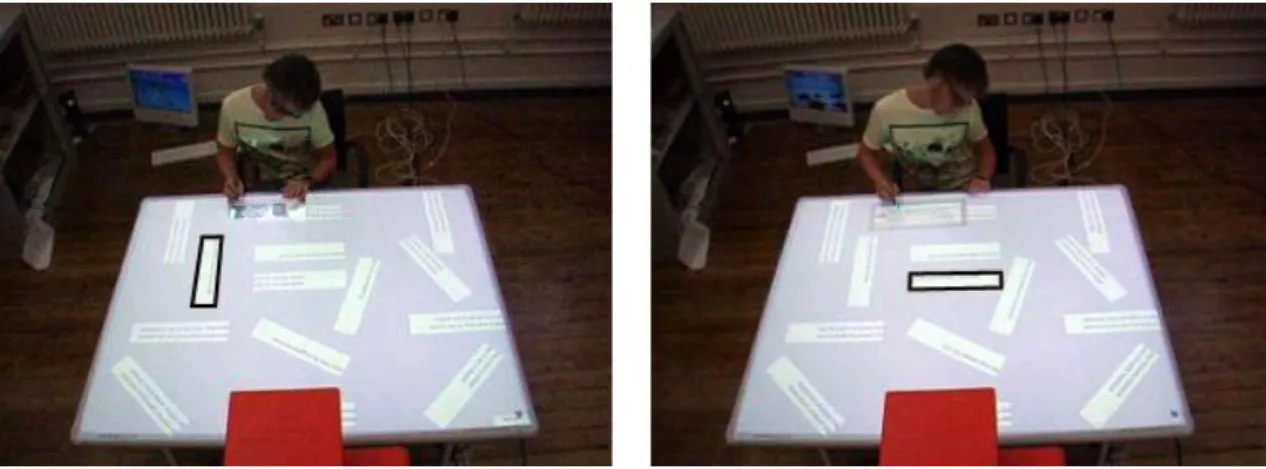
Figure 1.1: Working around a digital table (left). Working around a traditional tabletop (right).
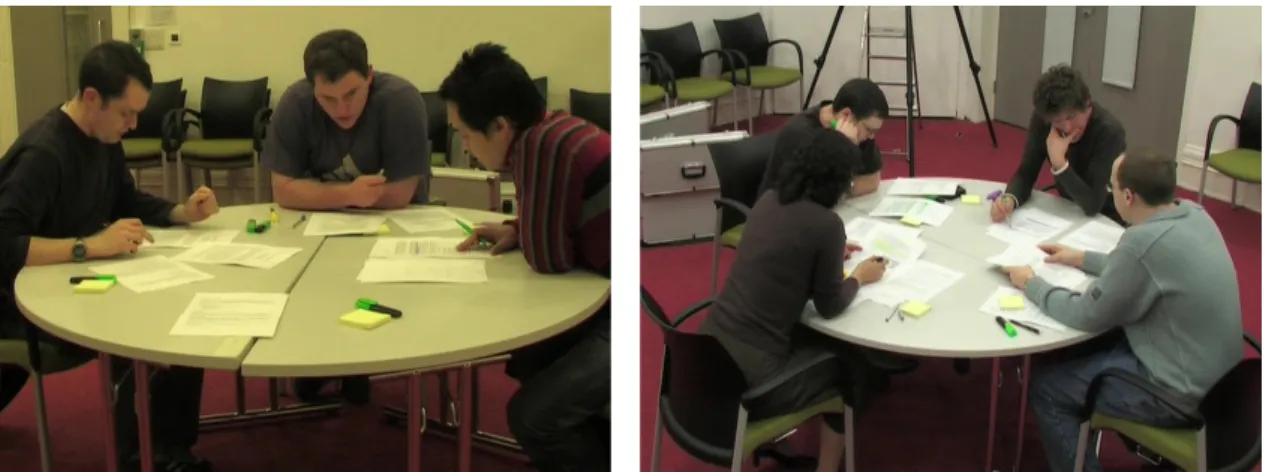
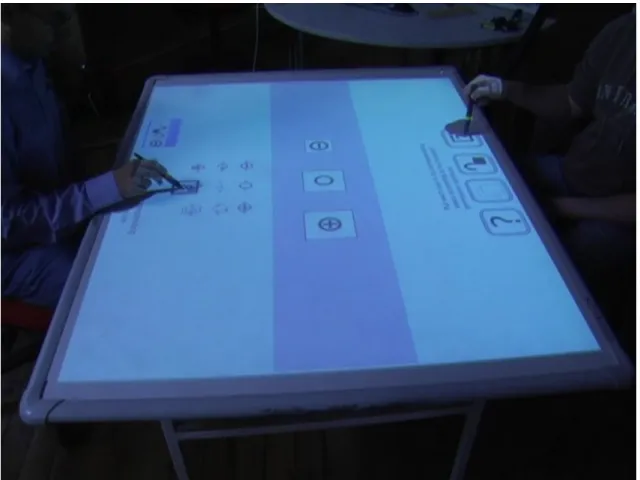
Collaboration around tables is a common activity that people perform while studying, having meetings, brainstorming, and when they engage in a number of other group activities. Digital tabletop technology has recently attracted significant interest from human-computer interaction researchers as it presents the opportunity to bring computer support to these traditional face-to-face collaborative settings. This research is principally concerned with digital tabletops technology and specifically its support for small group collaborative learning (Figure 1.1).
Research on digital tabletops started with the pioneering work of Wellner in 1993. Wellner introduced the concept of digital tabletops by building a single-user table (the DigitalDesk) that introduced a number of novel interaction ideas for tabletop computing such as projecting digital contents on of the table surface, capturing hand movements to interact with these digital contents, and allowing for digitising parts of the table surface using high-resolution cameras. Subsequent research has focused on understanding specific aspects of interaction at digital tabletops such as the use of space (e.g. Scott, 2003; Scott et al., 2004), orientation (e.g. Kruger et al., 2003; Wigdor and Balakrishnan, 2005), table size and reach (e.g. Ryall et al., 2004; Toney and Thomas, 2006b), and group dynamics (e.g. Morris et al., 2006a; Tang et al., 2006). Early applications were generally small and developed with the goal of exploring the specific aspects of the interaction that was
being investigated (Kruger et al., 2002). Only in recent years has more substantial research at the application level started to emerge, and more specifically applications addressing problem solving and learning (e.g. Piper et al., 2006; Hilliges et al., 2007; Rick and Rogers, 2008; Piper and Hollan, 2009; Morgan and Butler, 2009). Nevertheless, work on both the interaction techniques and the applications level is still far from complete and there are a number of aspects that merit further investigation.
This thesis reports a number of contributions in two distinct, but closely related areas: (i) inter-action techniques for digital tabletops, and (ii) the design and evaluation of a digital tabletop-based system for supporting collaborative learning. A state-of-the-art review and a preliminary observa-tional study on collaboration around tradiobserva-tional tables gave rise to a number of requirements for tabletop interaction (Chapter 2). These included the need for fluid interaction techniques that allow control of interface object attributes such as the orientation, scale, and access rights when these objects are moved between tabletop territories. I introduce Attribute Gates, a novel crossing-based interaction technique, as a solution to this problem (Chapter 3). In practice the territorial focus of many tabletop interaction techniques makes a limiting assumption that users work at relatively fixed locations (around the table). In recognition of this limitation, this research places a particu-lar emphasis on supporting mobility of users around a shared working space (tabletop). Working around a shared space, according to findings of Tang et al. (2006), is more suited to tightly coupled collaborative work than a partitioned space with a personal area allocated for each user. The sup-port of users’ mobility brings into focus another problem: the need for a light-weight, mobile, text entry technique. I present TANGISOFTwhich is a hybrid tangible-soft keyboard designed specifi-cally for applications that require mobile users with moderate text entry requirements (Chapter 4). The second broad area of contribution of the thesis relates to the potential of tabletops to support collaborative learning. I investigate this issue through the development of Digital Mysteries, a dig-ital adaptation of themysteriespaper-based learning tool (Chapter 5). A thorough iterative design and evaluation process is used to develop the Digital Mysteries collaborative learning application with the goal of exploiting the unique affordances of digital tabletops (Chapters 5 and 6).
A distinctive characteristic of this research, both in its interaction techniques design and col-laborative learning application development, is its strong and explicit reliance on applicable theory. As this research explores the potential of the digital tabletop as a newtoolfor collaborative learn-ing, distributed cognition and activity theory, with their strong emphasis on the use of tools, are chosen as theoretical frameworks for analysis and design of different aspects of this work.
I approach this research as a computer scientist and interaction designer. This perspective in-fluences how I address the problem of supporting learning, and how I translate human-computer interaction and learning theories into practice. A consequence of this is that the support for col-laborative learning, and the validation of the success of this support, are not realized by targeting learning per-se; but by targeting, and validating, the activities that encourage and increase the prob-ability of effective learning as identified by theories of collaborative learning (Chapters 5 and 6).
1.2
Research context
This research into digital tabletops technology and its support for collaborative learning is grounded in both pragmatic definitions forcollaborationandcollaborative learning, and a perspective on how digital technology supports collaboration in general, and collaborative learning specifically.
1.2.1 Collaboration
In general terms, collaboration and cooperation refer to the act of working with one or more members of a group to create a common outcome (Bannon and Schmidt, 1989). Although the difference between the terms collaborationandcooperation is not very well established within human-computer interaction, I follow Roschelle and Teasley (1995) and Dillenbourg (1999) in using the term cooperation to refer to the horizontal division of work, that is, where work is divided into sub-tasks that are completed individually and then assembled together; and collaboration to refer to the vertical division of work, that is, where work is done by all the group members together synchronously. In learning sciences the stress is on collaborative work related to co-construction of knowledge and mutual engagement (Lipponen, 2002) and this is made clear in the widely quoted definition of collaboration provided by (Roschelle and Teasley, 1995, pp.70) “Collaboration is a coordinated, synchronous activity that is the result of a continued attempt to construct and maintain a shared conception of a problem”. Definitions of collaboration, however, are generally not specific as to the value of parameters such as the number of people involved in the collaboration (i.e. two or more), whether the participants are co-located or distant, and the time span of the activity (i.e. as short as minutes, or as long as years). In the context of tabletop research, the term collaboration is used to refer to co-located settings involving small groups of two to five users, synchronously collaborating with a time span from a few minutes to a few hours.
1.2.2 Collaborative learning
Collaborative learning is used as an umbrella term to cover all activities involving collaboration within an educational or problem solving context (Dillenbourg, 1999). The benefits of collabo-ration for learning are well established (Roschelle and Teasley, 1995; Chickering and Ehrmann, 1996; Boyle, 1997; Dillenbourg, 1999; Stahl, 2006). The second principle of Chickering & Gam-son’sseven principles of good practice(Chickering and Gamson, 1987) states that:
Learning is enhanced when it is more like a team effort than a solo race. Good learn-ing, like good work, is collaborative and social, not competitive and isolated. Working with others often increases involvement in learning. Sharing one’s own ideas and re-sponding to others’ reactions sharpens thinking and deepens understanding.
When people collaborate within an educational context, they engage in certain learning group activities that do not occur in individual learning contexts, for example, explanation to others,
disagreements, and mutual regulation. Consequently, these group activities trigger group learning mechanisms, such as knowledge elicitation and internalization; in addition to triggering learning mechanisms that usually occur in individual learning, such as induction, deduction, and compila-tion (Dillenbourg, 1999). Collaborative learning involves these group activities that do not occur in individual learning. Dillenbourg (1999) noted that although these extra learning mechanisms occur more frequently in collaborative learning than in individual learning, there is no guarantee that they will occur. Computer support can play an important role in increasing the probability that such useful group learning activities will occur. This approach to computer supported col-laborative learning (the focus on useful group activities) releases application designers from the obligation to immerse themselves in learning theory, and affords a more practical approach to designing software that supports collaborative learning.
1.2.3 Computer support
Situations involving activities engaged in by more than one person and supported by comput-ers, are described by the term Computer Supported Cooperative Work (CSCW). Though the term cooperation (and not collaboration) is used, it refers to the broader definition of any jointly un-dertaken activity, regardless of the type of division of labour, social status, or the type of task distribution across time and space (Bannon and Schmidt, 1989). Johansen (1998) categorized four kinds of CSCW systems in terms of time and space:
1. Same time (synchronous), same place (e.g. meeting support tools)
2. Same time, different-places (e.g. video conferencing)
3. Different time, different-places (e.g. e-mail)
4. Different time, same place (e.g. Internet-based corporate workflow systems)
Only categories (1) and (2) conform to the definition of collaboration introduced in Section 1.2.1. Of these, only (1) applies to co-located settings. In the context of digital tabletops learning research, it is possible to use an even more restrictive definition of CSCW which limits the type of workto learning.
1.2.4 Computer support for collaborative learning
Computer supported collaborative learning (CSCL) focuses on how technology can support and enhance peer interaction and group-based learning, and facilitate sharing and distribution of knowl-edge and expertise (Lipponen, 2002). A distinguishing characteristic of CSCL research is that it is mainly conducted in real world, such as schools, rather than laboratory controlled experi-ments that are the reserve of traditional HCI (Lipponen, 2002). Initial research in the field of CSCL distinguished two classes of computer support: tools to facilitate face-to-face collaboration
arounda computer between students in small groups; and the provision of a networked environ-ment for collaborationthroughcomputers (Crook, 1994). However, recent research in CSCL has mostly been confined to networked environments where the learners collaborate synchronously or asynchronously, co-located or distant, but rarely in face-to-face settings (Hilliges et al., 2007; Lehtinen, 2003). In fact, CSCL and face-to-face collaboration are often presented as mutually exclusive (Resta and Laferriere, 2007). Moreover, CSCL tends not to emphasize small groups (i.e. 2-5 learners) despite the realities of modern classroom organization and teaching practices. Stahl (2006) refers to such group sizes as the “engine of knowledge building”, and contrasts this with the two prevalent metaphors of learning (Sfard, 1998), theacquisition metaphor(relating to the individual) and theparticipation metaphor(relating to the community), both of which over-look the small group.
While there is a general consensus as to the benefits of collaboration for learning (Roschelle and Teasley, 1995; Chickering and Ehrmann, 1996; Boyle, 1997; Dillenbourg, 1999; Stahl, 2006), regardless of whether it is supported by technology or not, the benefits that computer support brings to collaborative learning is still under debate (Lipponen, 2002; Lehtinen, 2003). Since the value of collaborative learning is undisputed, with face-to-face collaboration considered the most natural and valuable form, then it is hardly surprising that the benefits of CSCL, which largely excludes face-to-face collaboration, are not as well established.
Nevertheless, Resta and Laferriere (2007) report a number of positive outcomes arising from CSCL, including the development of higher order thinking skills; increased student satisfaction with the learning experience; improved productivity; and improved academic achievement. Dig-ital tabletops have the unique potential to bring computer support to face-to-face collaborative learning. More generally, applications that bring people physically together around a single dis-play while undertaking a collaborative task are referred to as single disdis-play groupware.
1.2.5 Single display groupware
Stewart et al. (1999) used the term single display groupware (SDG) to refer to technologies that physically bring small groups together and enhance their interaction as opposed to networked collaborative settings. They explored how technology designers can improve collaboration by explicitly designing computer support for collaboration at a single display, with a view to en-abling and enriching multi-user interactions; reducing or eliminating conflict; encouraging peer learning and teaching (by eliminating competition and enabling multiple-synchronous input); and strengthening communication skills. Such settings, nevertheless, bring new challenges as allowing multi-synchronous input may give rise to new conflicts and frustrations, lead to reduced collabora-tion because of the ability to work in parallel, and increase task complecollabora-tion times since it is more difficult to enforce a leadership structure. Such concerns, and principally that of reduced collab-oration as a result of multiple input channels, have been investigated by a number of researchers
(e.g. Marshall et al., 2008; Birnholtz et al., 2007; Do-Lenh et al., 2009; Hornecker et al., 2007) and will be discussed in greater details in Chapter 2.
My work narrows the scope of SDG to those of large, horizontal displays. Rogers and Lind-ley (2004) compared collaboration in two classes of large-display settings: vertical and horizontal interactive display surfaces. They investigated how the physical affordance of each setting encour-ages or discourencour-ages certain behaviours (social affordances). Rogers and Lindley considered the conventional way for people to work in a co-located group to be around a table with technology and paper-based materials. They argued that unless for making presentations, the shoulder-to-shoulder style of collaboration around whiteboards puts people in a different physical workspace than the one they feel comfortable with and usually leads to one person taking control over the collaborative session (see also Everitt et al., 2006; Kruger et al., 2002, 2003). On the other hand, the horizontal surface of the table affords face-to-face collaboration, which brings a democratic quality to the interactions (i.e. socially comfortable). Their final conclusion was that the physical affordances of tabletops, compared to vertical surfaces, encouraged group members to exchange more roles, explore more ideas, and enhanced awareness, thus making it more productive for collaboration and sharing of work.
1.3
Theories on CSCW
The study of group and organizational work has a number of associated theories, frameworks, and descriptive methods. In relation to the analysis and design of collaborative systems, the most rel-evant to CSCW are conversation analysis (Wooffitt, 1990; Mazur, 2004; Norman and Thomas, 1991), situated action (Nardi, 1995), activity theory (Kuutti, 1995; Bødker, 1989; Kaptelinin, 1995; Fjeld et al., 2002; Halverson, 2002; Nardi, 1995), and distributed cognition (Hollan et al., 2000; Rogers and Ellis, 1994; Norman, 1993; Halverson, 2002; Nardi, 1995). Conversation anal-ysis (CA) was developed for the detailed analanal-ysis of tacit organized reasoning procedures that inform the production and recognition of naturally spoken language. CA examines a wide range of phenomena including how conversations start and end, how turn taking is structured, and the semantics of corrections (Wooffitt, 1990; Norman and Thomas, 1991). Interaction with, and through, artefacts (including technology) was not part of the original method, yet CA has been utilized in HCI research in two areas (Mazur, 2004): using CA to analyse computer mediated communication (CMC) such as e-mail, digital video conferencing, and chats (Mazur, 2004); and using CA to analyse interaction, to inform interface design, where the interface itself is considered as a conversational partner (Norman and Thomas, 1991). By contrast, theories such as situated action (Nardi, 1995) emphasize the activity of people as they emerge in moment-by-moment reac-tions to the environment. The unit of analysis of SA is the relation between the individual and the environment. On the other hand, CA’s focus is entirely on the conversation and thus technology (and other aspects of the environment) can only be included in the analysis by considering it as a
conversational partner or medium. Rogers and Ellis (1994) argued that existing frameworks de-veloped without reference to cognitive, social and organizational dimensions of the interaction, do not present an adequate means of studying the dynamics of collaborative activities. This observa-tion is particularly salient for frameworks related to technology enhanced collaborative learning. Two theories that explicitly address the cognitive, social and organizational aspects are activity theory (AT) and distributed cognition (DC). Nardi (1995) contrasted the applicability of situated action, activity theory, and distributed cognition for system design. While the focus of her work was on demonstrating the advantages of activity theory and its similarities to DC, she highlighted the weaknesses of the situated action model, in terms of disregarding persistent structures such as the artefacts, institutions and cultural values, and ignoring the subjective elements and motives of the people involved in the activity. On the other hand, Halverson (2002) compared AT and DC, and pointed out that neither of these theories alone address all the factors that need to be considered in the analysis and design of CSCW systems. Both Nardi and Halverson agree on the broad similarities between the two theories and the (rather superficial) differences. However, as described in Section 1.3.1 and Section 1.3.2 the theories have meaningful differences in terms of the aspects of the activity, environment, tools and setting that they bring into focus (and those that they obscure). Therefore I have used both AT and DC for analysis and design, and I introduce relevant aspects of each theory as required throughout the thesis.
After reviewing digital tabletop literature, it was rather interesting to note that most of the researchers approached the analysis and design of their systems based on traditional groupware design guidelines and on notes taken from observational studies on the use of traditional tables, rather than relying on recent theories of CSCW like DC and AT.
1.3.1 Activity theory
Activity theory (AT) (Kuutti, 1995; Bødker, 1989; Kaptelinin, 1995; Fjeld et al., 2002; Halverson, 2002; Nardi, 1995) focuses onhuman activityas the basic unit of analysis. An activity is described as the minimal meaningful context which is directed to an object in order to transform it into an outcome. The inclusion ofcontextin the definition of the activity is to imply that one should not study individual actions in isolation, but include the effects of artefacts, community, rules, division of labour, and history, and consider these as part of the activity. In this sense, AT considers the activity to be the context (Nardi, 1995). An activity is bounded to a goal or an object and therefore it is possible to differentiate between activities according to their objects. It is performed by a subject (human) whose motivation lead to the initiation of the activity. Motivation is important in AT as it is the driving force behind the activity and is considered to be the factor that makes a group work together rather than competing against each other. The object is usually transformed during the course of the activity into the desired outcome. The object and the outcome are not necessarily physical entities, they could be design concepts, plans, or ideas. The artefact plays an important role in AT. It mediates between the subject and the object. As with the object, an artefact
Figure 1.2: The structure of an activity within the community (an annotated version based on Kuutti (1995)).
is not necessarily a physical tool, and in some cases the mediation can be done through language only. An activity may be conducted by a group, which in turn works within a community. The group and the community affect the way the activity is carried out, and thus must not be neglected. Moreover, it is also important to look at the history, not only of the activity, but also of tools and their uses. Activities and tools develop over time and have mutual effect on each other. Activities help in creating and transforming tools, and as tools develop, they impact upon people and the way they carry out activities. The tool can even be viewed as an embodiment of cultural and experiential aspects of a group activity as its form and use is usually the result of many years of development. Figure 1.2 is an annotated version of Kuutti’s (1995) illustration of the basic structure of an activity.
1.3.2 Distributed cognition
In the theory of distributed cognition (DC) (Hollan et al., 2000; Rogers and Ellis, 1994; Norman, 1993; Halverson, 2002; Nardi, 1995) the main unit of analysis is the functional system. A func-tional system consists of the people and the resources used, and their relationship to each other within the work environment. This unit of analysis is not bound by spatial or social factors, but rather by the functional relations of the elements involved. This may expand the unit in space and time regardless of other considerations such as roles and social status of the people involved. DC focuses on understanding interactions between people and technology to explain how cognition is distributed in the work setting. This distribution may be across members of the working group, across people and external resources, and across time (Hollan et al., 2000). A DC analysis of a
certain work practice must include the functional system, the inputs and outputs of the functional system, the intermediate representational forms leading to the final outcome, the goal, the back-ground of the activity, the available resources, and any environmental factors that contributes to the accomplishment of the task (Perry, 2003.)
The approach used by DC to understand these interactions between people and technology is to study the transformations undergone by representation states during the whole process. DC shows a clear emphasis on representation states and the importance of representation states to cog-nition. Representation states are not bound to material things, they may be mental representations in the minds of people, audio representations expressed by conversations, or physical movements like gestures. Representation states are transformed by tools. An idea in the mind may be trans-formed into a sketch by the use of paper and a pen. By describing a representation to another using the phone as a tool, for example, the representation is transformed to an audio presentation. DC theory in this regard considers tools and humans as equals in the functional system. DC also pays attention to the historical and cultural factors that have given rise to the current work practice. People make use of past experiences in carrying out their tasks and in improving the tools used for the task. People from different cultures may carry out the same task differently using different tools and this is an important factor to consider in DC. Cognitive activities refer to the computa-tions taking place while representation states are propagated across media (i.e. individual memory, paper, or computer display) (Rogers and Ellis, 1994). Analysis of group work is put in the heart of the theory. Although a functional system may consist of one person, the general case involves a group and not simply a single individual. By taking the cognitive approach, DC recognizes the importance of knowledge building and knowledge propagation among the group. Lehtinen (2003) observed that designing applications that allow the use of cognitive tools and multiple represen-tation forms, helps learners by reducing cognitive processing load, thereby allowing them to take on more challenging problems than otherwise possible. DC, like AT, focuses on the importance of identifying breakdown situations and the importance of such situations to learning and sharing knowledge among group members (Rogers and Ellis, 1994; Norman, 1993).
1.4
Digital tabletops
1.4.1 Traditional tables astoolsfor collaboration
Traditional tables are still the preferred way for small groups of people to meet and collabo-rate (Kruger et al., 2002; Shen et al., 2003; Scott et al., 2004). Both DC and AT draw our attention to the table as a tool with unique affordances that aid in collaborative task completion and collab-orative learning. These include the following:
Social affordance: The social affordances of tables provide the most convenient collaborative work environment by allowing people to have fluid, face-to-face, barrier free, communication.
This also means that tables provide a good collaborative learning environment which sets pre-conditions that allow for activities that are conducive to learning, such as conversation, argumen-tation, and collaborative object creation (Kruger et al., 2002, 2003; Morris et al., 2004; Scott et al., 2004; Shen et al., 2003).
Large horizontal space: DC theory draws attention to the importance of space in the reduction of cognitive load on humans (Hollan et al., 2000; and Norman, 1993). The large horizontal surface of the table allows people to spread, pile, and organize materials so as to offload some of the cognitive effort. Moreover, the surface of a table allows people to structure and mediate group collaboration (Tang, 1991; Kruger et al., 2003; Scott, 2003; Scott et al., 2004).
Physical support: The horizontal surface of the table allows people to lean on it and place paper and other objects on top of it (Kruger et al., 2002).
Prior experience: Tables are tools that have been developed and used over thousands of years and thus carry with them certain cultural assumptions. For example, the shape of the table, whether round, square, or rectangular and where people sit or stand around it give rise to a number of cul-turally determined assumptions as to its use. In general, round tables usually imply equality of the participants, as opposed to rectangular tables where people sitting at the ends often have higher social status than people on the sides (Pease, 1981; Kruger et al., 2002). Moreover, coordination and interaction among people working around tables are governed by well established social pro-tocols (“standards of polite behaviour” (Kruger et al., 2002, 2003; Morris et al., 2004; Scott et al., 2004; Shen et al., 2003)) that in most cases are enough to prevent conflicts and lead to productive collaboration.
1.4.2 Digital tabletops astoolsfor collaboration
Simply put, a digital tabletop is a table enhanced with functionality furnished by a computer, or in other words a digital table can be thought of as a horizontal computer display that allows multiple-synchronous pen-based, or touch sensitive input. The concept ofcomputer support usu-ally implies desktop-like digital functionality such as Internet access, the ability to search stored data, and support for display and interaction with multimedia. Although these are characteristics ofcomputer support, they are not the features that distinguish digital tabletops from other forms of digital technology, or that can make a difference in supporting group work and group learning. The digital benefits of tabletops that I have sought to explore and exploit are as follows:
Preserving past experience: As a tool, digital tabletops satisfy one of the main design goals recommended by DC theory in that they preserve the physical interactions that people are famil-iar with. Most people have significant experience in using and interacting around tables (Scott
et al., 2004). Supporting traditional tables with digital technologies allows designers to leverage people’s past experience and assumptions of tables. This is significantly different from many cur-rent collaborative technologies (e.g. networks or shared computer displays) which force people to collaborate within less familiar physical and technical settings.
Direct manipulation: In tabletop interaction techniques, the action space and the perception space coincide, allowing for literally directmanipulation of objects. This stands in contrast to traditional desktop interaction where a user performs actions using an input device, such as a mouse, and perceives output on a different space (the screen). A number of researchers have pointed out the importance of matching these two spaces and the shortcomings of forcing users to use two spaces (Fjeld et al., 2002; Hutchins et al., 1985; Sluis et al., 2004).
Structuring the task: Computer support allows us to impose structure on a collaborative task. This can be as simple as subdividing a large task into smaller manageable subtasks. Structuring has proven particularly useful in the learning context, for example, in enforcing learning scenarios (Dillenbourg, 1999; Boyle, 1997; Jermann et al., 2001).
Structuring the interaction: Computer support makes it possible to enforce roles and inter-action rules between collaborators. Relying on social protocols alone to coordinate interinter-action and resolve conflicts around tables, is not always sufficient, and a technologically mediated in-tervention is sometimes required (Morris et al., 2004). Structured interaction can also be utilized to increase the probability of useful learning activities, such as the promotion of explanation and disagreement (Dillenbourg, 1999; Jermann et al., 2001).
Logging: Computer support allows for archiving of collaborative work sessions for future refer-ence or for supporting reflection (Nunes et al., 2003; Collins and Brown, 1988). Logging can also be used for post-hoc evaluation of a groups’ interaction with a tabletop system, by researchers and designers, teachers and facilitators, or the learners themselves.
Feedback: Computer support allows the provision of feedback on different parameters of table-top use, including levels of interaction by participants, results and progress (Hattie and Timperley, 2007; Dillenbourg, 1999; Jermann et al., 2001). Providing appropriate and timely feedback is widely considered to be one of the most valuable means of supporting teaching and learning (Hat-tie and Timperley, 2007; Hat(Hat-tie, 2005).
1.4.3 Design challenges for digital tabletops
As large, horizontal, interactive surfaces with simultaneous multi-user input, digital tabletops im-pose software design challenges that dramatically differ from those of groupware, or shared dis-plays with a single input channel. These differences can be grouped into three categories:
Digital tabletop requirements shared with all SDG settings: Following Stewart et al. (1999): (1) The support of multiple simultaneous inputs by the user interface introduces challenges with respect to both accessing user interface controls (Morris et al., 2006b) (e.g. menus and dialogs) and common user interface objects (Scott et al., 2003; Tang et al., 2006) (e.g. a design plan); (2) The provision of private or shared feedback on users’ actions (Morris et al., 2006a); and (3) The provision of a shared navigation space (Tang et al., 2006). This list is by no means comprehensive as there are still a number of other issues arising form multi-user simultaneous interaction such as the obscuration of display areas by interface components being viewed by others (Ryall et al., 2004; Zanella and Greenberg, 2001; Tse et al., 2004) and possible conflicts in copy/paste or undo operations.
Requirements of large surfaces: A number of requirements are shared between large interac-tive whiteboards and digital tabletops: (1) The provision of mechanisms to allow users toreach distant objects and user interface elements (Morris et al., 2006b; Ryall et al., 2004; Baudisch et al., 2003; Gei, 1998); and (2) Making distant areas of the display visible (Ryall et al., 2004).
Requirements of horizontal surfaces: The horizontal orientation is unique to tabletops and gives rise to a numbers of unique requirements relating to the management of (1) orientation (Kruger et al., 2003; Wigdor and Balakrishnan, 2005; Vernier et al., 2002); and (2) use of space. Depend-ing on the nature of the target application and the user group, there can also be issues that arise if the interactive surface is divided into territories (Scott, 2003; Scott et al., 2004).
Although addressing these issues poses a significant challenge, the face-to-face nature of in-teraction at digital tabletops minimizes the effects of a number of core concerns that have been identified in CSCW research and practice, including awareness, and coordination (Rogers and Lindley, 2004).
1.5
Research objectives
The principal objectives of this research are as follows:
1. To gain an understanding of the use of traditional tabletops in learning contexts and iden-tify primary design requirements for applications to support learning around tabletops. I approached this objective by reviewing literature related to collaboration around tables in
addition to conducting observational studies of people collaborating around traditional ta-bles in educational contexts. I used distributed cognition theory as the framework for the analysis supported by the knowledge gained from the literature reviewed.
2. To identify weaknesses and propose solutions for tabletop interactions that have not yet been fully addressed by previous research. Based on the understanding gained from the previous investigation and while working on the other research objectives, I identified, and proposed solutions for two issues in interacting with digital tabletops that have not been thoroughly addressed by other researchers: (a) a practical and fluid way for setting the attributes of orientation, scale, and access rights while moving objects between territories, or generally any number of attributes in one fluid action; and (b) the problem of text entry with tabletops (in particular for more mobile users).
3. To explore how digital tabletop technology can support face-to-face collaborative learning, and the potential of this new technology in bridging the gap between face-to-face collabo-ration and CSCL.
4. To build and evaluate a full-scale application that puts the understanding and interaction designs developed into practice. I achieved this objective by following an iterative design process and making design choices that are fully grounded in theories of HCI and learning.
5. To propose a set of design guidelines for tabletop learning applications based on the findings of my research.
1.6
Results and contributions
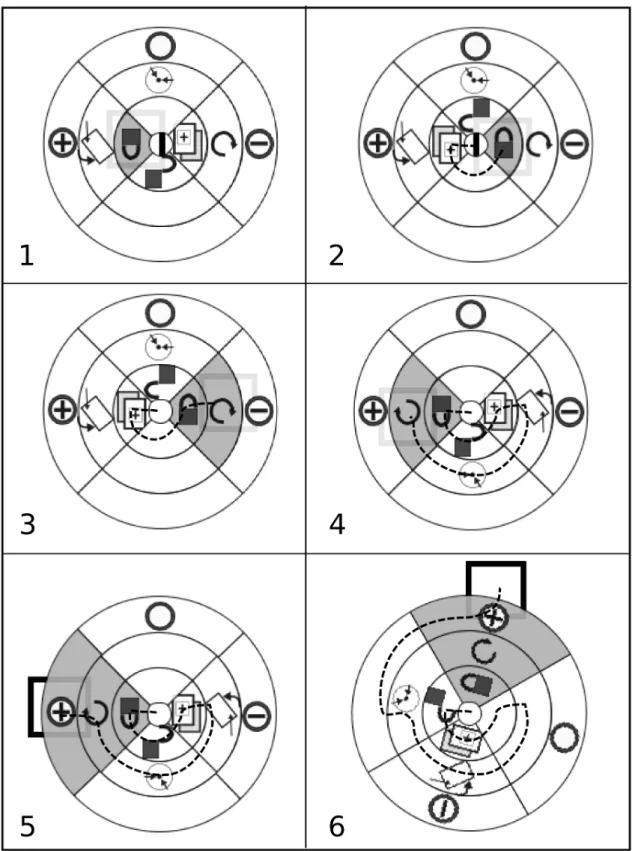
My Principal contributions are in the development of tabletop interaction techniques and table-top learning application design. For interaction techniques, I introduce Attribute Gates, and TANGISOFT. Attribute Gates is a novel crossing-based interaction technique that allows a number of attributes to be set in one fluid movement. This technique is devised to address a specific prob-lem for tabletop interaction, the modification of scale, rotation, and access right attributes while moving objects between tabletop territories. Modified versions of this technique have other uses as demonstrated in the final Digital Mysteries application. TANGISOFT addresses the problem of text entry. It is a hybrid tangible–soft keyboard specifically designed for mobile users around tabletops and allows tangible, two-handed, direct-touch interaction.
On the a application level, I introduce Digital Mysteries as a successful adaptation of the paper-based mysteries learning tool. I present a theory-grounded iterative design process and show how the reliance on theory can help both in making the right design choices, and in simplifying the validation of the design goals. The development process and validation of Digital Mysteries significantly contributes to the development of our understanding of digital tabletop technology
at the application level, in particular for applications targeting learning. My theory-driven design approach and validation technique should help designers and software engineers both to develop and validate successful learning applications without the need for expertise in pedagogical theory, and to overcome the difficulties associated with measuring learning. Finally, I conclude with a number of guidelines for designing collaborative learning applications for digital tabletops that focus on promoting useful collaboration and higher level thinking for the students.
A distinctive characteristic of this research is its focus on the use of the tabletop space as one large shared space acted on by mobile users. In contrast to the recommendation made by Hinrichs et al. (2005) that large display interfaces should not be designed to assume fixed spaces but should support mobile users at the display, most of the previous tabletop research and design guidelines make the assumption that users work from fixed positions (a limitation sometimes imposed by the hardware setting used), doing tasks that require the division of the tabletop space into territories. I found that many of the recommendations given for such settings do not hold for shared collab-orative spaces. While my work started with an observational study that used such a setting, and started with proposing interaction techniques for such settings, during the course of my research, my design priorities shifted to the provision of a shared space setting with truly mobile users.
In presenting the context and contributions of my research, I have organized the thesis as follows: Chapter 2 reviews previous digital tabletop work. The first part of the review, which is related to different partial aspects of tabletop research, is contextualized within an observational study conducted on a number of students doing a learning-related collaborative task around a traditional table. This allowed me to address all aspects of interaction including verbal and non-verbal communication and the tools used in the collaboration. The second part of the review considers design guidelines for tabletop systems at different levels of abstraction. Finally, I review complete tabletop systems, in particular those related to learning and problem solving.
Chapters 3 and 4 describe two novel interaction techniques developed in response to particular challenges for collaborative work at digital tabletops. Chapter 3 presents the Attribute Gates technique, both Grid Gates and Polar Gates, and demonstrate how activity theory can be used to inform the design of digital tabletop interaction techniques. Chapter 4 describes TANGISOFTtext entry technique and shows how such hybrid designs can satisfy the goals of maintaining direct-touch interaction and the provision of mobility and two-handed interaction.
Chapter 5 introduces tabletops’ support for collaborative learning. It also introduces Paper Mysteries as the learning tool of choice to be adapted to tabletop technology and introduces both the desired learning goals and theories to be employed to guide the design and validation process. This chapter then describes the iterative design process that I followed with a detailed description of the features of the final design. Chapter 6 provides validation of the final design and how it satisfies the targeted learning outcomes. Finally, Chapter 7 presents a set of design guidelines for tabletop learning applications and suggests a number of issues and directions for future research on the support of collaborative learning at digital tabletops.
Chapter 2
Literature Review
2.1
Introduction
Research into digital tabletops started with Wellner’s pioneering work on the DigitalDesk in 1993 (Wellner, 1993). Instead of making the computer analogous to a physical desk by using the desktop metaphor, Wellner suggested that the desk should be enhanced to provide digital functionalities. Although the DigitalDesk supported the connection of two systems remotely to allow for remote collaboration, its main focus, however, was on single user interaction with phys-ical desks rather than face-to-face collaboration around tables. Nevertheless, the introduction of the DigitalDesk was the starting point for digital tabletops research, their benefits, and potential applications for both single, but mostly multi-user co-located interaction. Wellner’s DigitalDesk used top projection, and two cameras, one for capturing the whole table space and detecting user input (through hand movements), and the other for providing a small high resolution capture re-gion in which views could be digitized. This configuration equipped the DigitalDesk with three important characteristics: (1) electronic images could be projected onto the desk and onto physical paper documents; (2) image processing enabled input from both pens and bare fingers; and (3) the system was able to capture paper documents placed in the hi-resolution camera zone. Although DigitalDesk did not address the issue of face-to-face co-located collaboration, it supported many advanced functions that remain active topics of investigation including tangible interaction, the augmentation of tangible objects (in this case paper) with digital data, and support for two-handed interaction.
This chapter presents a review of the main directions that tabletop research has taken since Wellner’s initial proposal. It is worth mentioning at this point that when I started this research in early 2007, it was possible to explicitly include almost all the literature related to tabletop inter-action in a review of the field. However, with the introduction of the “Interactive Tabletops and Surfaces” conference in 2006 (and other smaller research events on digital tabletops) the number of tabletop related publications increased significantly. Consequently, this review of tabletop re-search only addresses topics in tabletop interaction more narrowly associated with the problem of designing collaborative learning applications for digital tabletops. The review is divided into
four parts: part one covers work practices around traditional tables and how research on digital tabletops has translated these practices into digital interaction techniques; part two addresses the literature related to general design guidelines for tabletop applications; part three reviews full sys-tems that have targeted learning rather than simplerarchetypaltasks, such as image sharing and browsing; and part four discusses existing tabletop hardware. Throughout this review, unless oth-erwise specified, the term table is used to refer to traditional tables, and the term tabletops to refer to digital tabletops.
2.2
Work practices around tables
Understanding the factors that make existing collaboration at a table so effective is central to the design of new tabletop technology. Tang (1991) called for interface designers to “observe how people collaborate then build software that facilitates collaboration based on those observations, giving the users the ‘tools’ that are ‘naturally’ defined in face-to-face interaction”. Bly (1988), followed by Tang (1991), made careful observations on how people collaborate in design tasks around tables in face-to-face settings with the aim of informing the design of distributed collab-orative technology. These widely cited observations informed much of the subsequent research (e.g. use of the table space (Scott et al., 2004), orientation (Kruger et al., 2003), and collaborative coupling (Tang et al., 2006)). With respect to the table space, Tang and Bly found that the ability to share the drawing space on the table improves the collaborative experience and structuring of the group activities, as compared to other distant settings (telephone link and media link). Activ-ities around the drawing surface, and the close proximity allowed for by the table space, play a role in focusing attention, drawing collaborators together, aiding in the expression of ideas, pro-moting a high degree of awareness, improving coordination, and allowing for parallel interaction on the drawing space. In addition, Tang observed that the spatial orientation among collaborators and the drawing space also played a role in coordination and in defining regions and ownership on the surface. With respect to the process of the collaborative task, they observed that the pro-cess itself contained more information than is contained in the final output. The propro-cess usually involved rapid switching between activities, and that the use of gestures during the process, as afforded by the table setting, played an important role in collaboration by adding to the content of the discussion.
While Bly (1988) and Tang (1991) made general observations on collaboration around tables with the aim of informing distributed collaborative environments, recent observational studies that aimed at informing tabletop design were narrow in scope and focused on certain aspects of collaboration or targeted tasks which might readily translate into digital equivalents, such as sharing photographs. For this reason, my initial goal was to conduct an observational study of a more general scope into how people collaborate around traditional tables. This was not undertaken in the expectation of making new findings, but rather to help in better understanding the previous
studies and to provide a context that manifests the relations between these studies. Literature related to work practices around traditional and digital tables is provided within the context of this observational study, which was designed to make visible the widest range of tabletop work practices.
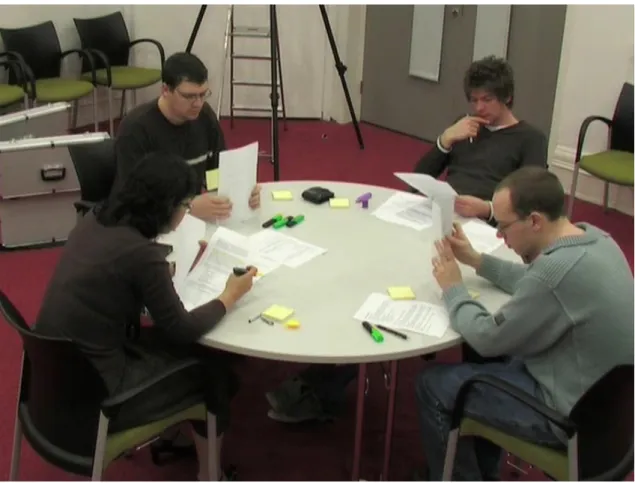
Summary creation study: The task for the study was to collaboratively summarize a five page document. This activity was undertaken in three distinct stages: in stage 1 participants were asked to read and annotate their documents individually (20 minutes allocated); in stage 2 the participants, as a group, were asked to combine their notes onto a single new clean copy of the original document (20 minutes allocated); and in stage 3, as a group, participants were asked to use the annotations from the new version of the document to write a single summary of between 20-30 lines (10 minutes allocated). To motivate the group, participants were told that they would have to make a 5-minute presentation based on their summary. Two groups participated in the study, one group of three male students, and another group of three male students and one female student. All participants were volunteer postgraduate research students with no specific knowledge of collaborative interaction (age range 24-30 years). The participants knew each other well and were members of the same university laboratory. The study was conducted around a round table with four chairs. Three cameras were used to record video and sound throughout the study from three different angles and distances. All participants were provided with a copy of the document that was the subject of the study activity, a highlighter pen, a writing pen, and a set ofPost-itnotes. Each group was also provided with a set of blank pages with which to create the final summary. The instructions were given at the place of the study just before starting the task, and participants were given enough time to read the instructions before starting.
I chose distributed cognition (DC) and activity theory (AT) to inform the analysis (Chapter 1). Halverson (2002) compared the theories underpinning analysis techniques to pairs of dark glasses that when used, bring some objects into focus and obscure others. DC helped in defining the broad scope of the analysis to include in addition to the tools and how they transformed representation states; the use of space (orientation included) and its role in cognition; and other factors that we broadly classified as communication, including aspects of conversation, body position, how documents are handled in public space, gaze, and gestures. AT, on the other hand, helped in analysing some fine-grained interactions using the notions of actions and operations as explained in the analysis.
The observations are divided into three categories: spatial considerations, communication (verbal and non-verbal), and tools. For each category I first present the observations from the study to set the context, followed by literature that explains and expands on these observations, and conclude with accounts from the literature that address the corresponding design implications.
2.2.1 Spatial considerations
Spatial considerations include issues that relate to the table space and objects in this space. The ta-ble space issues include its size and how the space is divided. Issues related to objects in the space are either directly related to space like an object’s location and orientation, or indirectly related to space like an object’s ownership and scale which are linked to its location and orientation.
Figure 2.1: The table was divided into personal spaces in front of each participant, storage spaces to the left of the personal spaces, and a public space in the middle (Stage 3: writing the summary).
2.2.1.1 Space and location
Table space plays an important role in structuring group activities (Bly, 1988; Tang, 1991; Scott et al., 2004). Scott et al. (2004) thoroughly examined how this table space was used and partitioned and the role that this partitioning plays in the collaborative process. Participants in this study, in correspondence with the findings of Scott et al., divided the space into three areas: the spaces directly in front of them were used as personal spaces (as identified by Tang (1991); Vernier et al. (2002); Kruger et al. (2003)), the space in the middle of the table as a public (group) space for collaborative tasks (as identified by Kruger et al. (2003); Vernier et al. (2002)), and the space to the left of their personal spaces as storage spaces. This was apparent through all the stages of the task (Figure 2.1). The position of paper on the table was related to how the table was