Disclaimer and Limitation of Liability:
The content of this file is copyrighted material of Hill. McGraw-Hill makes no representations or warranties as to the accuracy of any information contained in the McGraw-Hill Material, including any warranties of merchantability or fitness for a particular purpose. In no event shall McGraw-Hill have any liability to any party for special,
incidental, tort, or consequential damages arising out of or in connection with the McGraw-Hill Material, even if McGraw-Hill has been advised of the possibility of such damages.
XML
Security
Blake Dournaee
XML Primer
CHAPTER
3
The world of Extensible Markup Language (XML) is an endless ocean of standards and technologies that mimics a living being, constantly chang-ing and ever evolvchang-ing. Trychang-ing to capture the breadth and depth of XML in a single chapter is a hopeless task with no end. The goal here, then, is to focus on a few anchors in the XML ocean that represent fundamental con-cepts.There is little point in repeating details that can be found in the text of a published standard. Instead, the reader will find an explanation of fundamental XML concepts bolstered with real-world examples. Special focus is on building block technologies that provide the groundwork for the sea of XML.
This chapter is divided into two broad topics, an introduction to basic XML syntax and a preliminary discussion of XML processing. The divi-sion between syntax and processing is a theme that will be revisited throughout this book. The core XML syntax topics discussed include the basics of well-formed documents, markup concepts, some information about namespaces, and numerous examples. XML processing is discussed with the presentation of two topics: the Document Object Model (DOM) and the XPath data model. The seasoned reader with previous experience with XML might find this chapter a bit repetitive, but XML syntax and processing is a necessary building block for XML Security.
What Is XML?
This question reminds me of an assignment once given in high school where the task was to answer the broad question: “What is History?” As youngsters we were quick to respond with simple answers such as “His-tory is what happened in the past,” or for those of us who were really lazy, we would provide the proctor with Webster’s definition (and no doubt receive a poor grade).
The question “What is XML?” is a loaded question that has no simple answer. It almost seems like any simple answer given would be akin to answering the “What is History” question with the same naiveté of some-one in high school. For XML, the answer to this question often depends on the audience. There are books on XML for managers, software developers, sales representatives, and marketing people. Here we will take the view-point of a software engineer or computer scientist as we attempt to create yet another definition of this technology.
Meta-Language and Paradigm Shift
The topic of XML Security requires viewing XML from a slightly different angle compared to other technologies that leverage XML to accomplish its goals. XML Security is devoid (thankfully) of presentation semantics. That is, the current XML Security specifications don’t focus on rendering or dis-playing an XML Signature or encrypted XML element. In this respect, XML Security technologies are more closely related to existing security technologies such as the Public Key Cryptography Standards (PKCS), dis-cussed in Chapter 2. Don’t look for any HTML or JavaScript code in this book, because it is simply not the focus of the XML Security specifications. Two vocabulary words that are especially useful in defining XML from an XML Security standpoint are meta-language and paradigm shift.The noun meta-language best describes the what part of XML Security and the verb paradigm-shift helps describe the where part of XML Security. Thankfully, the howpart is left to the dedicated authors of the XML Secu-rity Recommendations and Drafts.
Meta-Language
XML is not a language. Despite the name Extensible Markup Language, it is easiest to understand XML as a meta-language. What exactly does
this mean? A meta-language is a language used to describe other lan-guages. Some would call this a true language. The prefix “meta” used in this sense has its roots in analytic philosophy and loosely means one level up or above and beyond.
So what does this mean for you? In simple terms, XML is a syntax used to describe other markup languages. The XML 1.0 Recommendation as released by the W3C defines no tag set or language keywords. The skepti-cal reader can check for himself or herself, but simply put, only a syntax and grammar is defined by the XML 1.0 Recommendation. The term syn-tax here refers to a set of constraints about how and where tags can be placed, and the acceptable range of characters that are legal, as well as the rules for markup in general. Moreover, the basic rules and syntax of XML 1.0 are deceptively simple and can be learned in the better part of an hour.
At this point, no examples have been provided, so the assumption is that the reader is as lost as ever. The next question is: “If XML is a syntax used to describe other markup languages, what are these other markup languages?” The answer to this question is the sea of XML-related stan-dards and, more importantly, the XML Security Stanstan-dards. For example, the XML Signature Recommendation defines a markup language used to represent a digital signature; the XML Encryption Draft defines a markup language used to represent encrypted elements. Similarly, markup languages such as MathML or DocBook are also other markup languages that are defined in accordance with the syntax put forth by the XML 1.0 Recommendation. MathML is a markup language for ing mathematics and DocBook is a markup language used for represent-ing articles or books.
The final part of our XML definition relates to how exactly these other markup languages are defined: XML is a syntax used to describe other markup languages using markup. This seems like a circular definition— of course markup languages use markup. A short example of arbitrary markup is given in Listing 3-1.
The preceding listing is arbitrary data with tags around it. For exam-ple, we have a piece of data,Samuel Adams, that is marked up with the tag <Good_Beer>. The important point here isn’t what the tags say or even what they mean; instead, the focus should be on what the tags can do. Tags provide markup and markup can accomplish many different things with regards to data. In fact, the list of things that markup can accomplish is so important that it belongs in a box.
With the careful use of tags around arbitrary textual data, we can accomplish almost any sort of semantics desired. We can invent tags and structures, give various roles to data, and define relationships between tags. The power of markup is nearly limitless for carving up any sort of data. This property of markup is especially powerful because the basic concept behind markup is simple. It doesn’t take years of practice to begin using markup, nor is the syntax complicated and difficult to understand. It is this combined simplicity and power that makes XML an exciting technology.
Because XML is a meta-language, every use of XML and markup to add semantics to data results in the creation of a markup language. For exam-ple, if someone were to look at Listing 3-1 and ask the question: “What language is that?” the correct answer is: “It’s a fictional markup language that uses the syntax of XML.” In short, Listing 3-1 actually defines its own markup language. It uses the tags <Food>,<FrenchFries>,<Beers>,
<Good_Beer>, and <Bad_Beer>. While the tag set is small and rather useless, it is a valid markup language. Before we move into the specifics of XML syntax, we will examine the other high-level defining component of XML as it relates to XML Security:paradigm-shift.
Listing 3-1
Example of arbitrary markup
<Food>
<FrenchFries> Curly Fries </FrenchFries> <Beers>
<Good_Beer> Samuel Adams </Good_Beer> <Good_Beer> Guinness </Good_Beer> <Bad_Beer> Budweiser </Bad_Beer> <Bad_Beer> Fosters </Bad_Beer> </Beers>
</Food>
The Roles of Markup
■ Markup can add semantics to data.
■ Markup can demarcate data.
■ Markup can define roles for data.
■ Markup can define containment.
Paradigm-Shift
XML Security represents a clear paradigm-shift from ASN.1-based, binary standards toward more portable, text-based XML solutions. Most of the entities in the security world that relate to cryptography and public-key infrastructure (PKI) use ASN.1 types to encode various entities. When use the term cryptography,we are really referring to applied cryptography that takes a standards-based approach—real cryptographers probably do much of their work with pencil and paper.
Examples of these binary format security standards include X.509 cer-tificates or most of the PKCS standards—all of these use ASN.1 types to encode their pieces and parts. Examples of these formats have already been given in Chapter 2, but the paradigm shift that XML Security promises is a shift from BER encoded ASN.1 “objects” to the analogous XML structures. A clear example of this shift is seen with the way a veri-fication key (usually a public key) is represented in an XML Signature. As discussed in Chapter 4 and Chapter 8, the <KeyValue>tag (just more markup) is used to represent a raw public key that can be used for decryp-tion. This is shown in Listing 3-2. This is contrasted with the X.509
SubjectPublicKeyInfointroduced in Chapter 2 and discussed again in Chapter 8, shown again in Listing 3-3.
Listing 3-2 The <KeyValue> element from an XML signature <KeyValue> <RSAKeyValue> <Modulus> s3mkTQbzxuNFPFDtWd/9jvs8tF5ynBLilbG/sT24OglEol 1PBvRe+VUJU0eI2SRhN/KtZv4iD2jwT0Sko0eeJw== </Modulus> <Exponent>EQ==</Exponent> </RSAKeyValue> </KeyValue> Listing 3-3 A binary SubjectPublic-KeyInfo interpreted with an ASN.1 parser SEQUENCE { SEQUENCE {
OBJECT IDENTIFIER rsaEncryption (1 2 840 113549 1 1 1) NULL
}
BIT STRING 0 unused bits
30 46 02 41 00 B3 79 A4 4D 06 F3 C6 E3 45 3C 50 ED 59 DF FD 8E FB 3C B4 5E 72 9C 12 E2 95 B1 BF B1 3D B8 38 69 44 A2 5D 4F 06 F4 5E F9 55 09 53 47 88 D9 24 61 37 F2 AD 66 FE 22 0F 68 F0 4F 44 A4 A3 47 9E 27 02 01 11 }
Both Listings 3-2 and 3-3 are showing us the same datatype,an RSA public key. Both structures clearly demarcate the type of key as well as the modulus and the exponent. Listing 3-3 does this a bit more covertly, as the modulus and exponent are encoded inside the BIT STRING. List-ing 3-2 uses XML syntax and markup while Listing 3-3 uses ASN.1 and BER. Both encoding schemes are intended to be extensible and both encoding schemes have tradeoffs. The XML version is certainly user-friendly and one might argue that it is easier for an application to parse text data with XML markup. The binary version, however, is far more compact (once encoded in binary, half as small or smaller than the equiv-alent XML version), but, as some would argue, harder for an application to parse. Some would even be appalled at the space wasted by the XML version. The difference between Listings 3-2 and 3-3 is the paradigm shift. For better or for worse, emerging XML Security standards have a strong “ASN.1 hate factor” and instead opt for cryptographic objects to take form as semantically clean, easy to read, and easy to parse XML variations.
Now that the reader has some basic high-level notions about what XML is (perhaps fuzzy notions), we can begin our descent from abstract high-level ideas to more concrete, tedious details.
Elements, Attributes, and Documents
Three important terms for describing basic XML syntax are elements, attributes,and documents.All three of these terms are special and impor-tant; they encompass a large portion of the conceptual playing field for XML and provide the foundation for the remainder of this chapter as well as the entire book.
Elements and Attributes
We have spent some previous discussion throwing around the term markup.A small example was given, and the reader should have seen some tags with stuff inside, but little else should be evident besides the fact that markup is useful for the intellectual carving of data.
Markup is often divided into two separate vocabulary words when we are talking about XML:elements and attributes.An element is a start tag and anend tag including the stuff inside of it and an attribute is a simple name-value pair where the value is in single or double quotes. An
attribute cannot stand by itself and must be inside the start tag of a given element. Two short examples follow:
<Food> Ice Cream </Food>
<Food Flavor="Chocolate"> Ice Cream </Food>
The first line in the previous example is an element called Foodthat has Ice Cream as its element content. The second line in the previous example is the same element with a name-value pair added to it (this is an attribute). The name is Flavorand the value is Chocolate. Elements may also be empty, having no element content. This is shown in the exam-ple that follows:
<HealthyFood></HealthyFood> <HealthyFood/>
The first line in the previous example is an element called <Healthy-Food>that has nothing inside of it. The second line is shorthand for the same empty element. Take note of this shorthand notation, because it is used pervasively in many XML documents. This notation can be confusing at first, but in all cases, it simply means an empty element.
Attributes may be used arbitrarily within start tags to add more mean-ing to the data. In fact, there was a great deal of contention over the inclu-sion of attributes within the XML syntax. The reason is because any data that can be modeled with elements alone can also be modeled with an attribute-centric approach and vice versa. Consider the following short example. This example contains the same data as Listing 3-1, but it is modeled almost entirely with attributes.
<Food FrenchFries = "CurlyFries" Good_Beer1 = "Samuel Adams" Good_Beer2 = "Guinness" Bad_Beer1 = "Budweiser" Bad_Beer2 = "Fosters" </Food>
The markup used in the preceding example is certainly clumsier than Listing 3-1, but the point here is that we are roughly modeling the same data, but using attributes instead. There are five attributes inside the
Food element and they provide us with the same basic information as shown in Listing 3-1. So which one is better? Both are legal XML docu-ments; the answer to this question is really an answer to a much more complicated data-modeling question. The convention, however, is to use
attributes more sparingly than elements. Elements and their contents usually represent concrete information that will be displayed or rendered, while attributes usually represent information required for processing. This dichotomy, however, isn’t strict or formal and there isn’t anything written down that says that this is how it must be. This is just convention. XML Security-based standards use attributes heavily for algorithm infor-mation and data sources while elements are used for concrete crypto-graphic objects, such as keys or signature values. For example, consider the short example that follows:
<DigestMethod Algorithm="http://www.w3.org/2000/09/xmldsig#sha1"/>
This <DigestMethod> empty element uses an attribute called
Algorithmwith the rather long value http://www.w3.org/2000/09/ xmldsig#sha1. This element is commonly seen in an XML Signature, and the meaning of the attribute value is intended to be the SHA-1 hash function. Notice that even though the element is empty, it still communi-cates information via the attribute. There is no requirement that all use-ful elements must have content—this use of an empty element with an attribute is frequently seen in the XML Security world. This shouldn’t mean much to the reader at this point; these details will be hashed out in Chapter 4 and Chapter 5.
XML Documents
Throughout this book and throughout many of the XML Security stan-dards, reference is made to something called an XML document. This term has a specific meaning and carries with it some implicit properties, the most notable of which is the well-formed property. This property is the most basic set of constraints that can be put on data represented using XML; it defines simple syntax rules for the legal positioning of elements and attributes. The reader is now asking, “So, what does well-formed mean? What are these constraints?” In short, the list of constraints for a well-formed document follows—again placed in a box because of their importance.
There is a bit of hidden detail here, but not much. Let’s examine these four constraints and go through some examples.
Root Element
The root element constraint is perhaps the easiest to see and understand. Simply put, any data that wants to be well formed must have exactlyone root element. This means there must be one (and only one) parent ele-ment. The root element has a synonym called document element. Some-times we use the term root element and sometimes we use the term document element. These refer to exactly the same thing; sometimes one just sounds better! Listings 3-4 and 3-5 are examples of data that do not have a single root element, while Listing 3-6 and Listing 3-7 correct these examples to make them well formed. The additional root elements have been added in bold.
Data represented in XML is well-formed if . . .
■ There is exactly one root element.■ Every start tag has a matching end tag. ■ No tag overlaps another tag.
■ All elements and attributes must obey the naming constraints.
Listing 3-4 Sample XML data without a root element (not well formed) <Dark_Chocolate> <Brand1>Hersheys</Brand1> <Brand2>Ghiradelli</Brand2> </Dark_Chocolate> <Ice Cream>
<Brand1>Ben and Jerry</Brand1> <Brand2>Dryers</Brand2> </Ice Cream>
Listing 3-5 Sample XML data without a root element (not well formed)
<Student> Joe </Student> <Student> Bob </Student> <Student> Mary </Student>
Start Tags and End Tags
The next constraints, start tags and end tags, are also simple and easy to see. For every start tag, there must be an associated end tag. Listing 3-8 shows the incorrect data and Listing 3-9 corrects this data by adding the proper end tags.
Again, this constraint is quite simple. It is easy to see by inspection if end tags or start tags are missing—the syntax so far is just not compli-cated. Let’s move along to the last two constraints.
Overlapping Tags
Tags cannot overlap each other in such a way that one tag is closed before another tag. This constraint is difficult to describe with clarity, but suffi-ciently easy to see in an example. Consider the next small example:
<Student>
<SSN>123-45-6789</Student> </SSN>
The previous example is in a lot of syntactic trouble—not only is there no clear root element, but the <Student>tag is closed before the <SSN>
tag. To fix this, you have to be sure that the elements do not overlap. The
Listing 3-6 Sample XML document (well-formed data) <FatteningFoods> <Dark_Chocolate> <Brand1>Hersheys</Brand1> <Brand2>Ghiradelli</Brand2> </Dark_Chocolate> <Ice Cream>
<Brand1>Ben and Jerry</Brand1> <Brand2>Dryers</Brand2> </Ice Cream> </FatteningFoods> Listing 3-7 Sample XML document (well-formed data) <Students>
<Student> Joe </Student> <Student> Bob </Student> <Student> Mary </Student> </Students>
following example shows how you can fix this to make it an XML docu-ment that is well formed.
<Student>
<SSN>123-45-6789</SSN> </Student>
Naming Constraints
Most of the tedious details of the well-formed property are contained within the naming constraints for elements and attributes. These con-straints are much more broad than the previous concon-straints because they limit the range of acceptable characters for elements as well as some details on white space. The least you need to know is contained in the box that follows.
Listing 3-8
Sample XML data missing some end-tags (not well formed)
<Candy> <Good_Candy> Milk Chocolate <Bad_Candy> Dark Chocolate </Candy> Listing 3-9 Sample XML document (well-formed data) <Candy> <Good_Candy> Milk Chocolate </Good_Candy> <Bad_Candy> Dark Chocolate </Good_Candy> </Candy>
Naming Constraints
■ Element names must begin with a letter or underscore.
■ Element names cannot contain embedded spaces.
■ Element names are case sensitive.
■ Attribute names must be unique per element (start tag).
■ Attribute values must use single or double quotes.
Again, these naming constraints are still not that complicated. List-ing 3-10 shows the gratuitous violation of every rule listed in the previous box. The idea is to get the reader in tune with what the simplest legal XML documents look like, and one way of reinforcing this is to look at the illegal use of XML data.
The reader is challenged to scan Listing 3-10 and make an attempt to find six naming constraint violations. The idea here is that well-formed XML documents are not complex; the syntax is simple to learn and quite intuitive.
If the reader has grasped the previous concepts with regard to XML documents, the well-formed property and markup (elements and attrib-utes), most of the battle is already won. At this point, the reader should have the conceptual tools to build the simplest possible legal XML docu-ments. We have made it this far with only three well-defined terms: docu-ments, eledocu-ments, and attributes. Once the reader can create and use XML documents, it is possible to begin playing with and understanding the pieces that comprise XML Security.
Aside from arbitrary binary data, any sort of XML data that is signed or encrypted must be, at the very least, an XML document. Another point that should be made here is that XML documents can be created using only the simplest of tools; a text editor is all that is required. No browsers or fancy tools are necessary. What we are looking at here is pure data, carved up with markup and limited only by the well-formed constraint.
As a final exercise, consider Listing 3-11 that shows an XML Signature. Using only the basic rules of XML syntax, the reader should have enough information to determine if Listing 3-11 is a legal XML document, despite the fact that the reader should have little or no knowledge of the meaning of any of the elements or attributes used.
Listing 3-10
Sample XML data that violates almost every naming constraint (not well formed)
<4Root_Element>
<Message> This is an invalid element </message>
<Another Message> This is also an invalid element </Another Message> <Note color="blue" color="green"> These are colors </Note>
<Note color=red> I forgot this color </Note> <Note lt="<"> Less than sign </Note> </4Root_Element>
The solution is, of course, the erroneous <DigestValue>element. There are two opening tags for this element but no corresponding closing tag.
The URI
One potential confusing aspect of XML documents is the pervasive use of URIs. A URI is a Uniform Resource Identifier and is a short string value intended to identify something on the Web—whether it is a file, a service, or a person. In fact, a URI can identify any resource that has identity. An example of a URI is the string value http://www.rsasecurity.com.
Listing 3-11 includes five URIs within the markup. At this point, it’s not clear what they are used for (other than the fact that they are attribute values), and they tend to clutter the markup because of their length.
Most readers have encountered URIs that identify Web resources such as Web pages that use the HTTP scheme. This is the same string that is pasted into a browser and used to visit your favorite Web site, and in this case data is retrieved from the location (Web pages, graphics, and so forth). The URIs used in Listing 3-11 differ in that not all of these URIs are used as a data source. That is, in the context of Listing 3-11, some of
Listing 3-11
XML data that is not well formed
<Signature xmlns="http://www.w3.org/2000/09/xmldsig#"> <SignedInfo> <CanonicalizationMethod Algorithm="http://www.w3.org/TR/2001/REC-xml-c14n-20010315"/> <SignatureMethod Algorithm="http://www.w3.org/2000/09/xmldsig#rsa-sha1"/> <Reference URI="http://www.rsasecurity.com"> <DigestMethod Algorithm="http://www.w3.org/2000/09/xmldsig#sha1"/> <DigestValue>szlrBmSpQUJCO/ykyhS126/xMOM=<DigestValue> </Reference> </SignedInfo> <SignatureValue> UOmRz+EiYhy5LEsZ+fXBKnHlzWpJ+HFCOQlhWdb I/DVlv7Szt11BEfn8fpC4bxG19UDd7MbpRedi 3qUeVP+GSvMElrPo8u++KsHMKGsaPoqeUOoUI bW7biuW1rMSYpESdUeWbmy2p2/P8sulMouHrT q+Jv92GQ+itjLimhmHLTs= </SignatureValue> </Signature>
the URI values are not meant to be retrieved, but instead are meant to be used as identifiers. This may seem odd because most URIs seen outside of XML documents are meant to be de-referenced and used as a data source. As we examine various XML technologies we will see the distinction between those URIs used mainly as identifiers versus those URIs that are simply meant to be sources of data. We will see that any sort of URI can be used as a pure identifier, even if it happens to point to some real data. The first example of URIs used as identifiers occurs in the following sec-tion on Namespaces in XML.
Namespaces in XML
Another conceptual hurdle is the topic of namespacesin XML. The pur-pose of a namespace when used in an XML document is to prevent the col-lision of semantically different elements and attributes that happen to have the same name. For example, suppose that an author of an XML doc-ument wants to use an element called <Fans>. This particular element can refer to the noun fan as in a ceiling fan, or it can refer to the noun fan as related to an attendee at a sporting event. Still more problems occur if this element, ostensibly created by two different authors, is merged into a single XML document. Clearly, the meaning of the element is ambiguous and it is unreasonable to expect any sort of application to be able to make the distinction between the different elements without some other quali-fying information.
This problem is solved with the use of a namespace. A namespace in the context of XML is simply a collection of element and attribute names iden-tified by a URI Reference. The intention of an XML namespace is to pro-vide a globally unique name for an element or attribute. The previous sentences should mean precious little to the reader without some exam-ples. Before the examples, a point of clarification must be made. The term URI Reference may be confusing —what is a URI Reference? A URI Ref-erence is a URI that is used as a string identifier; it has no purpose beyond this. Some may argue that this term is redundant and confusing, but it is the nature of the URI in these examples; simply an identifier.
A pertinent example is the namespace used for an XML Signature. The URI Reference is http://www.w3.org/2000/09/xmldsig# and the collection of element and attribute names that are associated with this string identifier include the elements and attributes that help define an XML Signature. The specifics of the elements used in an XML Signature
are given in Chapter 4 and Chapter 5. The conceptual picture looks some-thing like Figure 3-1.
The idea behind the namespace is quite simple, but the syntax to use a namespace inside an XML document can get quite confusing because there are multiple ways to accomplish the same thing. Let’s work through some short examples. First consider Listing 3-12, which shows an XML document using elements from the XML Signature namespace without any sort of namespace qualification. Let’s not worry about the contents of
<Signature> http://www.w3.org/2000/09/xmldsig# <Transforms> <SignatureMethod> <CanonicalizationMethod> <Reference> <SignedInfo> <DigestMethod> <DigestValue> <SignatureValue> Figure 3-1 The XML Signature namespace and its related elements Listing 3-12 An XML document using elements from the XML Signature namespace withoutan explicit namespace qualification <Signature> <SignedInfo> ... </SignedInfo> <SignatureValue> ... </SignatureValue> </Signature>
the elements right now; this is not essential to understanding how the namespace declarations work.
Listing 3-12 is ambiguous as far as the namespace is concerned. This XML document uses elements called <Signature>,<SignedInfo>, and
<SignatureValue>, but doesn’t tell us where these element names came from. It is possible at this point that these element names belong to another XML document (not an XML signature). Listing 3-12 is akin to using the <Fans> element indiscriminately, leaving the semantics ambiguous. An XML namespace is declared with some use of the xmlns
attribute. This is shown in Listing 3-13.
The syntax shown in bold in Listing 3-13 declares a default namespace for all of the elements in the XML document, including the root element. This means that all of the elements in this document (unless otherwise noted) all belong to the http://www.w3.org/2000/09/xmldsig#
namespace. This syntax for namespaces is perhaps the most straightfor-ward and easiest to see; it shows how to associate a single namespace within an XML document. We can throw a wrench in the example to see how the syntax becomes more complicated. Consider Listing 3-14.
Listing 3-14 poses a problem because it uses two elements,<Fans>and
<CeilingFans>, that are not part of the XML Signature namespace. We need some way of marking these elements as part of a different
name-Listing 3-13
An XML
document using elements from the XML Signature namespace using a default namespace declaration <Signature xmlns="http://www.w3.org/2000/09/xmldsig#"> <SignedInfo> ... </SignedInfo> <SignatureValue> ... </SignatureValue> </Signature> Listing 3-14 An XML document with an improper element for the default namespace <Signature xmlns="http://www.w3.org/2000/09/xmldsig#"> <SignedInfo> ... </SignedInfo> <SignatureValue> ... </SignatureValue> <Fans> <CeilingFans> 4 </CeilingFans> </Fans> </Signature>
space, such that a processing application can make the proper distinction. This is where the syntax gets a bit more complicated.
What we need to do is declare an additional namespace prefix. The namespace prefix is an arbitrary string (usually short) associated with a given namespace. This prefix is declared as another attribute value inside the parent element for which the prefix is to be valid. This is shown in Listing 3-15.
The namespace prefix chosen for Listing 3-15 is the short string foo. By using the namespace prefix and the colon separator, we can associate a particular element with a given namespace inside the element itself. This is shown in Listing 3-15 when we declare the <Fans>element is a mem-ber of http://fans.comby naming the element <foo:Fans>. This idea is difficult to describe with much clarity, but it is easy to see with an exam-ple. The string foo:Fansis called the qualified name and consists of the namespace prefix(foo) and the local part(Fans).
XML documents that combine multiple technologies (such as a docu-ment that uses eledocu-ments from the XML Signature syntax and XML Encryption syntax) will have to deal with declaring the appropriate name-spaces and qualifying any elements used. For most of the discussion and examples in this book, namespaces are not shown because they add to the syntactic clutter and can cloud the understanding of some of the basic con-cepts. That being said, they are an absolutely essential part of XML and XML Security because without them there is no way to separate different technologies and elements used within a given context. Further, there is still much more to learn about namespaces! The previous discussion is only a primer and gives the reader just enough ammunition to under-stand the examples and usage within this book. The reader is urged to visit the references section for places to go to read more about name-spaces.
Listing 3-15
One way of using two namespaces in an XML document <Signature xmlns="http://www.w3.org/2000/09/xmldsig#" xmlns:foo="http://fans.com"> <SignedInfo> ... </SignedInfo> <SignatureValue> ... </SignatureValue> <Object> <foo:Fans> <foo:CeilingFans> 4 </foo:CeilingFans> </foo:Fans> </Object> </Signature>
More Markup
Elements, attributes, and namespaces represent the most fundamental types of XML markup. Additional markup constructs that should be briefly mentioned are comments, processing instructions, and character data sections.While not too terribly important for the scope of this book, they are fundamental parts of an XML document and are used in the dis-cussion of the Document Object Model (DOM), which is discussed in the second half of this chapter.
Comments
The idea of a comment for a programming language is pervasive for any-one who has compiled even the simplest program. The idea is exactly the same for XML documents; there is a way for document authors to inform others of what is going on inside their twisted minds. The syntax is sim-ple and a brief examsim-ple follows. The text between the <!-- and -->
delimeters is a comment:
<!-- Comment on This! -->
Processing Instructions
A processing instruction is intended to be a customized instruction to the processing application. Processing instructions are currently not widely used in the XML Security standards and can be safely ignored for the most part. The syntax of a processing instruction is the two character delimeter <?followed by a targetand then an arbitrary data string and finally the closing delimeter ?> The key idea about processing instruc-tions is that they are predefined and application specific. For example, if you need to enumerate a certain section of markup as significant for a custom application, you might denote this with a processing instruction. An example of a processing instruction follows:
<? application_processor_1 do_task ?>
The reason processing instructions are even mentioned here is because they show up in the DOM, which is discussed in the second half of this chapter.
Character Data Sections
XML has some restrictions on certain text characters; for example, you can’t create an element with the following markup characters:
<Expression> 4 < 5 </Expression>
The obvious reason for this is because the processing application that parses the XML document can’t determine where elements begin and end. With markup delimeters in the markup itself, it can’t match up the <and
>characters properly. To remedy this, XML defines what are called pre-defined character entities that are used to represent markup characters used in element and attribute names. These are shown in Table 3-1.
While these are useful, they can become cumbersome in practice. To remedy this, the CDATA section is used to add unparsed text to an XML document. The identifier CDATA stands for character data. The syntax looks sort of weird, but the idea here is to be able to add arbitrary data to the XML document without having to worry about using the predefined character entities. A CDATA section looks like this:
<Expression> <![ CDATA [ 4 < 5 ]] > </Expression
The idea is that you place the text in between the second [ (left bracket) and first ] (right bracket). This example is semantically equivalent to the first. The CDATA section doesn’t have to be used for just unparsed text. It can be used for any arbitrary text that the parser should ignore.
More Semantics: The Document Prolog
By now the reader should have a fairly good grasp of XML basics. Some familiarity with namespaces as well as XML document basics allows the
Predefined Character Entity Name Value
> < " " & & ' ' Table 3-1 Predefined Character Entities
reader to understand most of the content of any given XML document. There are, unfortunately, more details that must be hashed out. Most of the following details will not be pursued much further in this book, but they are essential to understanding and using XML documents outside the scope of this book.
Most of these details come to us as part of something called the docu-ment prolog. The term used is quite amusing; one definition for the term prolog is an introduction to a play or a novel. Unfortunately, XML docu-ments are never as exciting as live entertainment or a good read, but the term is accurate. The document prolog is an optional set of declarations used to add semantics to the current XML document. The document pro-log always precedes the root element in an XML document and carries with it some specific syntax constraints. To provide some motivation for the document prolog, let’s look at some examples. Consider Listing 3-16.
Listing 3-16 is a portion of an XML Signature document. The names of the elements are unimportant; the only important thing is the structure of the elements and the attributes and attribute values. Notice that List-ing 3-16 is littered with URI strList-ings. This doesn’t represent anythList-ing too odd—most XML documents use URIs as attribute values. The URI strings are valid attribute values and don’t do anything sinister other than make Listing 3-16 more difficult to read.
What if we had a way to remove these URI strings from the markup to make the document more readable, but retain the URI values somehow? A properly constructed document prolog with the necessary declarations allows us to accomplish this. Let’s give the solution first and then talk about it. See Listing 3-17.
Some might argue that Listing 3-17 is more difficult to read than List-ing 3-16. This is only because we haven’t discussed all the funny syntax yet. Listing 3-16 adds general entity declarations for the URI values— simply put, replacement text. To see this, consider the isolated entity dec-laration shown next:
<!ENTITY dsig "http://www.w3.org/2000/09/xmldsig#">
Listing 3-16 A portion of an XML Signature document <Reference xmlns="http://www.w3.org/2000/09/xmldsig#" URI="http://www.rsasecurity.com" > <DigestMethod Algorithm="http://www.w3.org/2000/09/xmldsig#sha1"/> <DigestValue>60NvZvtdTB+7UnlLp/H24p7h4bs=</DigestValue> </Reference>
The value on the left (dsig) is replaced with the string value on the right in the actual markup. To specify the general entity within the markup, the & and ;syntax is used to delimit the general entity name. These are marked with bold in Listing 3-17. The use of general entities within the markup can make the XML document much easier to read, especially when there is a large amount of text that must be repeated throughout a document. Some of the XML Security standards make use of general entities to provide for more readable examples.
All three of the general entities shown in Listing 3-17 are inside the document prolog.The document prolog consists of some mandatory pieces, which at the very least must include the XML declaration,and the docu-ment type declaration. The XML declaration is the string value <?xml version="1.0"?>. If a document prolog is included in an XML docu-ment, it must begin with this declaration. The XML declaration does little more than communicate the version number along with some other semantics such as the document encoding and whether the XML docu-ment refers to external files. The XML declaration is shown in List-ing 3-17 on the first line.
Immediately following the XML declaration is the document type dec-laration. The document type declaration is designed to provide a grammar for the given XML document. It begins with the string <!DOCTYPE, is fol-lowed with a string (Signature), and must end with a closing >. Inside the document type declaration is where markup declarations such as our general entities belong. (The general entities are actually inside the inter-nal subset, but we’ll ignore this detail for now.) The reader should observe the syntax of both the XML declaration and the document type declara-tion. These declarations do not represent well-formed XML; that is, the syntax is special and doesn’t use the element and attribute syntax shared
Listing 3-17 The use of general entitiesin an XML document <?xml version="1.0"?> <!DOCTYPE Signature [
<!ENTITY dsig "http://www.w3.org/2000/09/xmldsig#"> <!ENTITY alg "http://www.w3.org/2000/09/xmldsig#sha1"> <!ENTITY val "http://www.rsasecurity.com"> ]
>
<Reference xmlns="&dsig;" URI="&val;" > <DigestMethod Algorithm="&alg;"/>
<DigestValue>60NvZvtdTB+7UnlLp/H24p7h4bs=</DigestValue> </Reference>
by the main markup. We will return to this point later and see what is being done to alleviate this funny syntax.
At this point the reader should have a basic grasp of the syntax of the document prolog. Aside from the general entity (replacement text) decla-rations, the document prolog usually fulfills a more dignified role as the chief mechanism for assigning a formal grammar for the current XML document via something called a document type definition.This term is deceptively similar to document type declaration, but refers to something a bit different. The document type definition (DTD) is the collection of internal and external resources (internal to the current XML document) that collectively provide a formal grammar for the XML document. This topic is discussed in more detail in the following section.
Document Type Definition (DTD)
This section discusses the document type definition (DTD), which is the set of rules and constraints for providing a formal grammar for an XML document. First we will look at a simple case of a DTD with a fictional markup language. Following this we will examine parts of a real DTD and see if we can make our way through it.
The DTD
In an earlier section the reader was challenged to consider Listing 3-1 and answer the question: “What language is that?” The answer was: “It is a fic-tional markup language that uses the syntax of XML.”
This fictional language has a fairly well defined syntax described in the well-formed constraints for XML. It is easy for us to construct legal docu-ments because we have no rules other than those imposed by the XML Recommendation. For example, consider Listing 3-18 that uses the same elements as Listing 3-1. Listing 3-18 A fictional language that uses XML with no additional constraints <Good_Beer>
<Food> Samuel Adams </Food>
<FrenchFries> Guinness </FrenchFries> <Beers>
<Bad_Beer> Budweiser </Bad_Beer> <Bad_Beer> Fosters </Bad_Beer> </Beers>
The reader should be staring blankly at Listing 3-18 and probably wondering why the elements don’t make any sense. This is intentional— the syntax of XML is extensible. In fact, with only the well-formed con-straints, one can argue that the syntax is too extensible. Why? Right now we can create semantically meaningless element combinations that amount to gibberish. We have created a fictional markup language, but at this point we have no way to constrain it in any meaningful way. We can’t yet tell valid XML documents from invalid XML documents for our par-ticular language. We don’t have a measure for validity yet so we don’t know if Listing 3-1 or Listing 3-18 is legal or illegal even though they are both well-formed.
The term valid has a special meaning in the context of XML. An XML document is said to be valid if it has been compared against a formal grammar and has not violated any parts of this grammar. This grammar is the document type definition and is usually a file somewhere that con-tains the rules for a particular markup language. Once the document type definition has been created, we can associate it with a given XML docu-ment via the docudocu-ment type declaration. To provide some motivation for this, let’s create a simple grammar for Listing 3-1 that allows us to discern valid and invalid instances of our fictional markup language. Let’s call this particular markup language the Food language, where our three food groups consist of good beers, bad beers, and french fries—a true diet of champions. Listing 3-19 shows an example of a simple document type def-inition that lives in a file separate from the main markup file.
The set of constraints shown in Listing 3-19 is roughly equivalent to the following English description: A document that uses <Food> as its root element must contain exactly two elements, <FrenchFries> and
<Beers>. The <FrenchFries> element must contain some character data and the <Beers>element must contain at least one <Good_Beer>
element or <Bad_Beer>element. Both a <Good_Beer>and <Bad_Beer>
element must contain character data.
The syntax used for the document type definition can be quite intuitive, even though it looks weird. Without explicitly defining each line, the
Listing 3-19
Some constraints for the Food markup language
<!ELEMENT Food (FrenchFries, Beers)> <!ELEMENT FrenchFries (#PCDATA)>
<!ELEMENT Beers (Good_Beer+ | Bad_Beer+)> <!ELEMENT Good_Beer (#PCDATA)>
reader should be able to follow the given English description and deduce the meaning of most of the notation used. The fancy name for each line in Listing 3-19 is element declaration. Each of these element declarations defines constraints for the element name. Let’s look at the first element declaration:
<!ELEMENT Food (FrenchFries, Beers)>
Each element declaration begins with the string <!ELEMENTfollowed by the element name, and then the content-model and finally the closing character >. In the previous small example the element name is Foodand the content-model we are declaring for this element is a sequence of child elements in a specific order. The order is denoted by the order of the ele-ment names within the parentheses. The first child eleele-ment must be
FrenchFries and the second (and final) child element must be Beers. The next element declaration is even simpler:
<!ELEMENT FrenchFries (#PCDATA)>
The previous example simply says that the FrenchFries element must contain only character data—it cannot contain any elements. The odd-looking keyword #PCDATAstands for parsed character data. The third element declaration gets a bit more complex, but it is still readable:
<!ELEMENT Beers (Good_Beer+ | Bad_Beer+)>
The content model here says that the Beerselement must contain a choice (denoted by the | character) of one or more (denoted by the sym-bol) Good_Beeror Bad_Beerelements. Cardinality operators such as , ?, and * are used throughout document type definitions and mean one or more, zero or one,or zero or more,respectively. We will see these cardinal-ity operators again in Chapter 4 when we look at the structure of the XML Signature. The last two element declarations are simply repeats of the second declaration and merely constrain the Good_Beerand Bad_Beer
elements to only contain character data.
The reader should have a basic understanding of how to put together a simple grammar for a custom markup language. The reader is challenged to reconsider Listing 3-1. Is this XML document valid? Does it conform to the grammar set forth in Listing 3-19? The correct answer is no. The rea-son is because the <Beers> element contains more than one child ele-ment—it contains two <Good_Beer> elements and two <Bad_Beer>
to a choice of either one, but not both. This is the constraint defined by the third element declaration.
Now that we have a simple document type definition, we need to asso-ciate this with an instance of our Food markup language. This is done so a processing application can find the formal grammar and perform the check in a seamless way. Luckily, the syntax to accomplish this association is not difficult. A complete, valid,Food XML document that points to an external document type definition is shown in Listing 3-20.
Listing 3-20 uses what is called a system identifier (denoted by the
SYSTEM keyword) to inform the processing application of the document type definition. In this case, the DTD file lives somewhere on a server called food.com. While a remote URI is shown in Listing 3-20, any valid URI can be used for the system identifier value. A filename by itself usu-ally signifies that the DTD file is in the same local directory as the XML document.
A Real DTD
This section looks at pieces of the DTD for an XML Signature (the entire DTD is boring). The reader doesn’t have to know much about an XML Sig-nature yet—the details will be covered in Chapter 4. This section is intended to give the reader some practice reading through a real DTD instead of a fake markup language about beer and french fries.
The first piece we are going to look at is the element declaration for the parent element, which is the <Signature>element, as follows:
<!ELEMENT Signature (SignedInfo, SignatureValue, KeyInfo?, Object*)>
Luckily, this element declaration is simple and is similar to a declara-tion made in the DTD for the Food markup language. The declaration says that a <Signature> element must contain a <SignedInfo> element,
<SignatureValue>element, zero or one <KeyInfo>element, and zero or more <Object>elements. The beauty of this declaration is that it is
Listing 3-20
A valid instance of the Food markup language
<?xml version="1.0"?>
<!DOCTYPE Food SYSTEM "http://food.com/food.dtd"> <Food>
<FrenchFries> Curly Fries </FrenchFries> <Beers>
<Good_Beer> Samuel Adams </Good_Beer> </Beers>
fairly easy to read and we don’t yet have to know a thing about an XML Signature to understand the constraints. Here is another piece, which puts a constraint on the contents of the <SignatureValue> element such that it only contains character data and no elements:
<!ELEMENT SignatureValue (#PCDATA)>
Here is another piece of the XML Signature DTD that gives constraints for the <SignedInfo>element:
<!ELEMENT SignedInfo (CanonicalizationMethod,SignatureMethod,Reference+)>
The constraint simply says that a <SignedInfo>element must con-tain a <CanonicalizationMethod> element, a <SignatureMethod>
element, and one or more <Reference>elements.
Learning More about DTDs
These small sections only give the reader the absolute basics with regard to DTDs, and the reader is urged to consult the references section at the end of this book for more information. Some might argue that we made the discussion easier than it really is, and in some cases we have simpli-fied a few things. We omittedattribute declarations and parameter enti-ties, both of which are found in the actual XML Signature DTD. An attribute declaration is similar to an entity declaration, but it provides constraints for attributes instead of entities and a parameter entity is similar to a general entity, but is intended for use inside a DTD.
XML Schema
Like document type definitions, the XML Schema definition language is used to describe the structure of XML. One view of XML Schema is an overhaul or upgrade of DTDs. Newcomers to XML often get frustrated by the fact that there are two tools for accomplishing roughly the same task. The frustration continues when it is also learned that DTDs are being replaced with corresponding XML Schema definitions.
The DTD faces two major problems:
■ DTDs aren’t powerful enough to provide sophisticated constraints on an XML document.
The first issue sounds plausible, but the second needs a bit of explana-tion. Reconsider the DTD syntax, specifically any of the previously dis-cussed element declarations. The careful reader should notice that the syntax doesn’t correspond to well-formed XML (that is, syntax in which element declarations are made in between an opening <! and closing >
character). There is no end tag for the element declaration. The syntax of DTDs is a bit ironic; it can’t be processed in the same way as the document it constrains. There is really no reason for this. The XML syntax is pow-erful and general enough to model constraints on instance documents that use XML. Switching to an XML-based markup language that con-strains XML document instances is inevitable and makes processing the formal grammar easier. In addition, XML Schema is extensiblein contrast to the DTD language, which is fixed and part of the XML 1.0 Recommendation.
We will not go into any specifics of XML Schema in this book; the topic is simply too large and complex to fit inside a single chapter, let alone a single section. To give the reader a flavor for what XML Schema looks like, we will present part of the Schema definition from the XML Signature Recommendation for a quick tour. The reader should visit the references section for more information on XML Schema. Consider Listing 3-21.
Fortunately, XML Schema is quite intuitive and extensive knowledge of the schema definition language is not required for discerning some basic constraints. XML Schema is much more general in its scope than DTDs and has the features of a programming language.
The two basic types in XML Schema are simple types and complex types. In general, complex types are types that contain other elements while
Listing 3-21
The XML Schema Definition for the
<Signature> element <element name="Signature"> <complexType> <sequence> <element ref="ds:SignedInfo"/> <element ref="ds:SignatureValue"/> <element ref="ds:KeyInfo" minOccurs="0"/>
<element ref="ds:Object" minOccurs="0" maxOccurs="unbounded"/> </sequence>
<attribute name="Id" type="ID" use="optional"/> </complexType>
simple types cannot. In Listing 3-21, the element <Signature>is defined to be a complex type that contains a sequence of four elements: <Signed-Info>, <SignatureValue>, <KeyInfo>, and <Object>. The last two elements, <KeyInfo> and <Object>, have additional constraints declared using attributes that provide the same functionality as the DTD cardinality operators. Both of these elements are optional and <KeyInfo>
is constrained to a single instance while <Object>is unbounded. Finally, there is also a provision for an attribute value called Id, which is also optional.
Processing XML
The reader should now have a fairly good idea of how XML documents are structured and validated, and should understand the difference between a markup language and a meta-language. Given a document that uses XML markup, the reader should be able to tell if it is well formed and should be able to discern some basic validity constraints with the help of a DTD. This section of the primer marks a shift from examining the syn-tax of XML to understanding how XML is processed. XML documents are cool to look at and fun to create, but unless we understand how they are processed and dealt with, the previous section is more a thumb-twiddling exercise rather than something practical.
The next few topics on our plate include understanding the Document Object Model (DOM), which is an API for doing practical things with structured documents, as well as the XPath data model, which is used in the XML Security standards. We will also look at some source code in Java that shows how to use the Apache Xerces toolkit to do a few practical things with XML documents such as parse them and output basic information.
The Document Object Model (DOM)
The DOM is an Application Programming Interface (API) meant for struc-tured documents. The reader may be wondering why we are discussing an API at this stage in the book and may also wonder about the relevance of this section altogether. The reason the DOM is important is because it is highly standardized and represents a widely used and accepted
program-ming model for structured documents. This makes the API important because most XML Security implementations (XML Signature or XML Encryption) will have support in some way or another for the DOM; in essence, these implementations are usually written directly on top of the DOM and rely on its functionality and semantics. Because of this, it is an important building block in XML Security.
To support standardization, there are various levels of the DOM. The term level is akin to a version number for the DOM, where higher levels represent increased functionality. Our discussion here will include the features and behavior found only in DOM Level 1, and more specifically DOM Level 1 Core, which is the smaller subset of DOM Level 1.
Structured Documents vs. Structured Data
The reader may notice that we have not explicitly mentioned XML docu-ments, but instead began this section using the more general term struc-tured documents. The reason for this change in terminology is related to the definition of the Document Object Model. The DOM is an API designed for structured documents in general and isn’t an API exclusive to XML documents. For example, the DOM can also model HTML documents using the same interfaces.
Our focus with the DOM will be XML documents, and because of this, the more specific term structured data is slightly more appropriate. The term document can be confusing because a document as such usually implies some sort of presentation coupling such as fonts, colors, graphics, or multimedia. These types of additional presentation semantics are out of scope for XML documents that represent security objects such as an XML Signature or encrypted XML element. We will look at the DOM in terms of structured data, instead of its wider scope of structured documents.
DOM Interfaces
DOM is a collection of interfaces for manipulating structured data in memory using objects. We are not throwing out a new term; the term object is the same as that found in an object-oriented programming lan-guage such as Cor Java. Simply put, given arbitrary structured data, the DOM specifies interfaces that can be used to access and manipulate this data at a programming language level. A picture of this process is shown in Figure 3-2.
Figure 3-2 shows a simplified view of how the DOM looks at structured data. The DOM uses a tree-like structure to model the relationships
between its interfaces, but does not constrain the actual implementation toa tree data structure. Put another way, the DOM appears to act like a tree from the outside, but a particular implementation of the data struc-tures is not constrained to a tree structure. A tree structure is an obvious model for structured data such as an XML document. The parent element represents the root of the tree and each child element represents child nodes of the root and so on. A better picture of the scope of the DOM is shown in Figure 3-3.
In Figure 3-3 a new box appears with a question mark inside of it. This signifies that the actual implementation of the DOM is out of scope. A direct relationship between the tree-like interface provided by the DOM and the underlying implementation isn’t necessary. DOM merely specifies interfaces; the underlying implementation is up to the vendor that takes on the task of creating a usable DOM API. The outside of the DOM—the user-accessible API—is fixed and has a logical structure that matches that of a tree. The inside—the actual implementation of the DOM inter-faces—is not constrained and may or may not match the outer tree view. The idea here is that the DOM be a portable interface.For example, it may be desirable to add a DOM interface over some other legacy API that deals with structured data. Because of this, the DOM explicitly separates itself from the implementation of its objects.
This key idea is important to remember; often the DOM will appear clunky and obtuse for basic tasks. The reason is because it is not designed with any one document format in mind, but instead for arbitrary struc-tured documents, which may or may not include XML documents.
Inheritance View vs. Flattened View
We will examine the DOM as it is specified for an object-oriented pro-gramming language such as Java. DOM APIs exist for many scripting
lan-<Food>
Structured Data DOM Document
<FrenchFries> Curly Fries </FrenchFries> <Beers> <Good_Beer> Samuel Adams </Good_Beer> </Beers> Figure 3-2 A simplified view of a DOM document object
guages and as such exist in two different views: a flattened viewand an inheritance view. Not all languages support object-oriented features such as inheritance and this creates some redundancy in the API. This redun-dancy adds to the feature set in terms of extra functions and can cause confusion. The flattened view is out of scope for our discussion and the reader should visit the references section at the end of this book for more information on the DOM. All of the upcoming code examples will be given in Java, and, because of this, our primary view of the DOM will be the inheritance view.
Complete understanding of the inheritance view of the DOM comes from understanding just two objects:Nodeand Document. It is difficult to say which object is more fundamental; a clear understanding of both is a necessity for doing anything useful with the DOM. The logical structure of the DOM is a tree, and every object in this conceptual tree is some type of
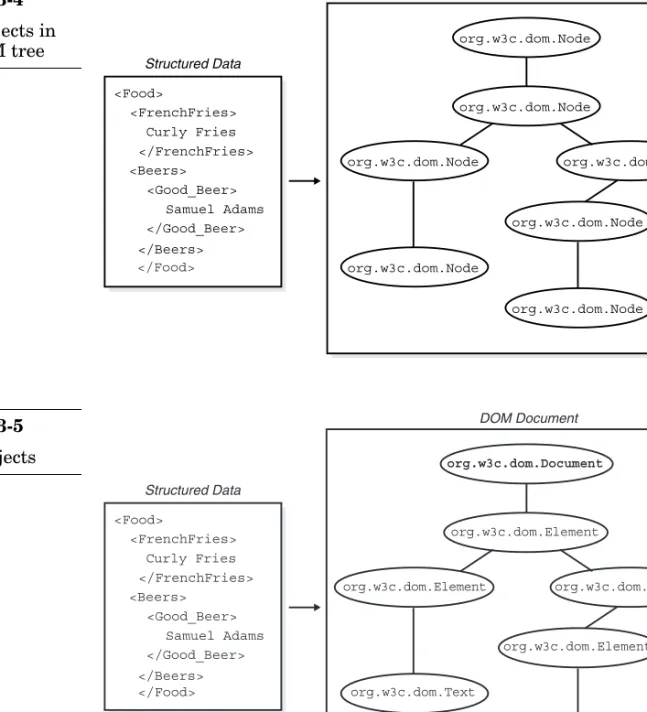
Nodeobject. Consider Figure 3-4.
The first thing to notice about Figure 3-4 is that every node in the conceptual tree has been replaced with a concrete interface called
org.w3c.dom.Node. The name of the object comes from the Java lan-guage binding for the DOM. A given language binding for the DOM is defined by the W3C and doesn’t refer to a given DOM implementation or API. All compliant DOM implementations for Java must use the
org.w3c.dom.* packages that define the DOM interfaces. Our focus with the DOM will be Java and it is appropriate the use the fully qualified interface names at this point in time.
The second thing to notice about Figure 3-4 is that all of the objects that represent the structured document in the figure are identical. All nodes are org.w3c.dom.Nodeobjects. This is only true from an object-oriented subtyperelationship. This is difficult to describe, but easy to show
<Food>
Structured Data DOM Implementation
<FrenchFries> Curly Fries </FrenchFries> <Beers> <Good_Beer> Samuel Adams </Good_Beer> </Beers> DOM Document
?
Figure 3-3 The scope of the DOMwith a picture. Figure 3-5 shows the true objects for the sample XML doc-ument, and Figure 3-6 shows the parent-child relationships of the objects. Figure 3-6 shows the parent child relationships of some common
org.w3c.dom.Nodesubtypes. Not all possible subtypes are shown, and the most common ones are marked in bold. The most important thing to
<Food> Structured Data DOM Document <FrenchFries> Curly Fries </FrenchFries> <Beers> <Good_Beer> Samuel Adams </Good_Beer> </Beers> org.w3c.dom.Node org.w3c.dom.Node org.w3c.dom.Node org.w3c.dom.Node org.w3c.dom.Node org.w3c.dom.Node org.w3c.dom.Node </Food> Figure 3-4 Node objects in the DOM tree
<Food> Structured Data DOM Document <FrenchFries> Curly Fries </FrenchFries> <Beers> <Good_Beer> Samuel Adams </Good_Beer> </Beers> </Food> org.w3c.dom.Element org.w3c.dom.Element org.w3c.dom.Text org.w3c.dom.Element org.w3c.dom.Document org.w3c.dom.Element org.w3c.dom.Text Figure 3-5 DOM objects
notice about Figure 3-6 is that all of the classes shown are subclasses of
org.w3c.dom.Nodeand because of this they properly fulfill the subtype relationship. Each subtype of org.w3c.dom.Nodeis designed to repre-sent something in the structured document. For example, the
org.w3c.dom.Elementtype representselements in an XML document and the org.w3c.dom.Attrtype represents attributes in an XML docu-ment. The list goes on; there are over 15 different subtypes of
org.w3c.dom.Node. We will not cover them all here, because only a few have immediate interest to us. The reader should refer to the references section for more complete information on the DOM.
The careful reader should notice that there appears to be a mismatch between Figure 3-5 and the structured data shown. That is, there is an extra org.w3c.dom.Documentnode at the root of the conceptual tree that has no obvious match to anything in the XML document shown in the figure. This extra node is the main entry point into the structured
org.w3c.dom.Document org.w3c.dom.Attr org.w3c.dom.Text org.w3c.dom.Element org.w3c.dom.Node.Processing Instruction org.w3c.dom.Node.Comment org.w3c.dom.Node.CharacterData org.w3c.dom.Node Figure 3-6 DOM class hierarchy
data and the real root of the XML document is actually the first child in the DOM tree.
This point showcases the importance of the org.w3c.dom.Document
object, which represents the entire structured document. Once an
org.w3c.dom.Documentobject is obtained for a given structured docu-ment, the user can access various org.w3c.dom.Nodeobjects that com-prise the document tree. Any use of the DOM to model an existing structured document begins with the creation of a Documentobject. Iron-ically, the actual bootstrapping of the Documentobject is left out of scope —it is the responsibility of the specific DOM implementation to provide the user with the necessary methods to create an instance of
org.w3c.dom.Document. The next section shows how this bootstrapping process works with the Xerces XML Parser.
Bootstrapping with Xerces
Our first goal in this section is to use the Xerces XML Parser1(which has support for the DOM language bindings) to create an org.w3c.dom. Documentobject from some sort of real XML data. Once we create the
org.w3c.dom.Documentobject, we can traverse the logical tree struc-ture and get information about the XML document. Consider Listing 3-22. The first things to note about Listing 3-22 are the import statements at the top. The previously discussed DOM Java language bindings and the Xerces DOM parser implementation are both added here. The two
sepa-Listing 3-22
Using Xerces
// Import the DOM Java language bindings
import org.w3c.dom.*;
// Import the DOM parser implementation
import org.apache.xerces.parsers.DOMParser;
class CodeListing31 {
public static void main (String args[]) throws Exception { // Make a new DOM Parser
DOMParser domParser = new DOMParser(); // Parse an input document
domParser.parse("food.xml"); // Get the org.w3c.dom.Document node
Document documentNode = domParser.getDocument(); // Get the first child
Element rootNode = (Element)documentNode.getFirstChild(); // What is the name?
System.out.println("Root element: " + "<"+ rootNode.getTagName()+">"); }
}
rate import statements showcase the separation of the parser imple-mentation from the DOM interfaces that are specified in the language binding.
Once the proper DOM interfaces and the parser implementation have been imported, the actual constructor is called for the DOMParserclass. This call and the next two calls are not relying on the DOM API; they are calls that are proprietary to the Xerces processor. In fact, the only calls in the code listing that use the DOM API are the second to last and last func-tion calls.
Once an instance of the DOMParserclass has been created, a call to the
parse()function occurs. This is a blocking call. In other words, the pro-gram is halted while the DOM Parser reads from the specified XML file. This may not seem like a big deal, but when the size of the XML file grows to hundreds or thousands of lines this call has the potential to take a great deal of time.
Once the parsing is complete we are ready to obtain an
org.w3c.dom.Documentobject with a call to getDocument(). This call returns the org.w3c.dom.Documentobject as specified by the DOM. The reader may think of this call as the transition point from the proprietary Xerces parser to the standard DOM APIs. From here the idea is to use only function calls that are specified by the DOM.
The first call obtains the actual root element in the XML document. In Listing 3-22 we are assuming that the input is the food XML document shown in Figure 3-5; the call to getFirstChild()actually obtains the
org.w3c.dom.Elementobject that corresponds to the <Food>element. The actual string text in between the tag markup (<and >) in the input document is printed out with the final getTagName()call. The result of Listing 3-22 is the stunning output:<Food>.
This is hardly useful, but the sample does showcase how the logical structure of the DOM works. When using the DOM it is often desirable to rely on recursive semantics to traverse a structured document. Consider Listing 3-23, which prints out all of the org.w3c.dom.Elementnodes and org.w3c.dom.Textnodes in the food.xmldocument.
All of the gory details are in the printNode()function. The idea here is to give this function an org.w3c.dom.Node object and it will deter-mine the type of node and then make a printing decision. In Listing 3-23 we pass the first child of the org.w3c.dom.Document node (the first child is the document element) directly into the printNode()function. The first thing done inside printNode()is to determine which type of node we have; this function is trivial and only deals with two types of