1945 | P a g e
An Empirical Study to Boost the Performance of Android
Applications Graphical User Interface (GUI)
Dr. Mesfin Abebe
Adama Science and Technology University
School of Electrical Engineering and Computering
Department of Computer Science and Engineeing
Adama, Ethiopia
ABSTRACT
The Android platform is the most dominant technologies in the mobile markets. Currently, there are around 2.8 millions Android applications on Google Play Store. These applications have a wide range of functionalities such as Business, Education, Travel, Entertainment, Shopping, Game, and Weather etc. However, most of these applications have performance problem with their Graphical User Interfaces (GUIs) due to the daunting and expensive testing process. In this study, we inspected the severity of the Android applications GUI performance problem by examining a sample of freely downloadable applications from Google Play Store. Following the identification of the problems, we applied possible performance improving techniques and best practices. The suggested techniques are applied on few of the sample applications layouts (screens) to examine the performance improvement. The result indicated that GUI performance is a common problem in Android applications, which can be enhanced by simply using the best practices and the Android SDK tools.
Key words
:
Android applications, Android tool, performance improvement, performance test, user
interface.
I.
INTRODUCTION
Currently, Android platform and its applications are the dominant in the mobile market with 80 percent market share [1]. In terms of the number of applications available for download, Google play has many free and paid
applications than the other applications stores. These applications cover a wide range of functionality such as
Games, Social, Sports, Business, Education, Entertainment, Weather etc. For instance, in June 2015 Game applications were the highest in number on the store with a 10.33 percent. Usually, the number of Android applications downloaded each year increase from time to time; for example more than 100 billion applications
are downloaded from Google Play until 2015 summer [2].
Android is not only an operating system, but also a complete set of software that facilitates the development of
1946 | P a g e other components into packages supports the developers in the Android applications development process.
Simultaneously, evaluating the performance of an application is critical activity in application development [4].
Most importantly, the user interface performance has a profound effect on the overall performance of the
applications. Hence, developers have to ensure their applications GUIs performance to confirm that the
functionalities are aligned with the quality standards.
Though there are similarities between mobile application and conventional software development, Android
application development is by far different. Android applications have to run on devices with limited memory, CPUprocessing speed, power supply and network connectivity. Hence, developers have to consider all these constraints during the design and development stage[5]. Generally, it is frequently necessary to debug, test and
optimize their applications to enhance and maintain the GUI performance. Testing the applications with the
worst and best possible configuration such as screen resolution, pixel density etc. is very important to minimize the problems [4].
In addition to the limitation with the hardware devices, the complexity of the Android platform and the
functionality it supports constantly increase these days [6]. But, the urge to release the applications to the market
dare the developers to allot time and effort for performance improvement. Moreover, the majority of the
developers are not well-trained to apply existing techniques, methods and concepts to develop quality
applications. Considering all these, we analyzed tenfree downloadable Android applications from Google Play Store. The samples have different sizes and types. Our study identified that GUI performance is a common problem in most of the applications. This result is compliant with a previous research finding that said “one in
five Android users experiences application crush” [7].
The remaining parts of the study are structured as follows: Section 2: explains literatures related to the study. Section 3: describes the methodology and procedure of the study. Sections 4: presents and discusses the results. Finally, Section 5: states the conclusion and proposes areas for future study.
II. LITERATURE REVIEW
There are various studies to facilitate the development of the GUIs of mobile applications. Domenico Amalfitano et al. [8] developed a tool that tests the GUIs of an Android application. The tool detects faults to support the structural exploration of the application. Frequently, one of the most common defects in Android
application is poor responsiveness. In this regard, a study proposed a systematic technique to uncover and
quantify the common causes of poor responsiveness [9]. The researchers applied their proposed approach on
eight open-source applications and discovered sixty-one poor responsiveness problems that are caused by
inappropriate resource usage.
In order to reduce the development cost, time and to reach out a wide range of users; IsabelleDalmasso et al [10] suggested several criteria to choose suitable cross platform tool. Alternatively, to identify the importance of
1947 | P a g e tools, user interface design, application quality and security of mobile application [11]. The result revealed that
there are a large number of complex issues in mobile applications, which need further investigation. Jiany Liu and Jiankun Yu [12] established a guidance to illustrate the underpinning operation of Android platform using a simple music player Android application as a case study.
Android application testing has drawn an extensive attention to assure the required quality. ChienHung Liu et al [13] proposed an approach to automate the testing of Android applications. In addition, Cuixiong Hu and Lulian Neamitiu [14] presented an automating testing process that focus on GUI bugs. They determine the nature and frequently of the GUI bug using automatically generated test cases. However, the main purpose of this study is
to identify the GUI performance problems of an Android application and to prove that how the best practices
and the Android SDK tools can solve the problems.
III. METHOD AND PROCEDURE OF THE STUDY
This section presents the procedure of the study used to investigate the GUIs performance problems and to
implement the best practices and the Android SDK tools. The study includes the following steps:
Downloading the sample Android applications (apk) from Google Play Store. Extracting the source code and XML files.
Import the source code and XML files to Android Studio IDE.
Analyzing the applications GUI performance using the Android SDK tools.
Identify the possible solutions (best practices) to solve the GUI performance problems. Experiment the identified solutions on a sample of layouts (screens)
Evaluate the performance improvement as the result of the proposed solutions.
3.1 Extraction of the Sample Applications
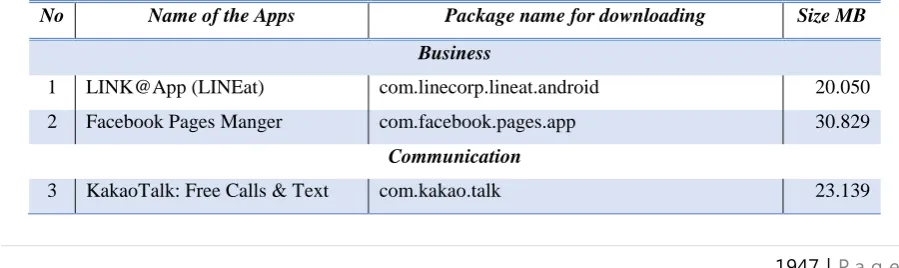
Ten (10) Android applications are downloaded from Google Play Store. The applications are taken from different categories such as: business, communication, education, entertainment, and Shopping as shown in
Table 1. The sample applications are free downloadable that have high download rate. Table 1. List of the sample Android applications for the study
No Name of the Apps Package name for downloading Size MB
Business
1 LINK@App (LINEat) com.linecorp.lineat.android 20.050
2 Facebook Pages Manger com.facebook.pages.app 30.829
Communication
1948 | P a g e
4 Telegram org.telegram.messenger 11.929
Education
5 CLASSTING com.Classting 7.105
6 PororoCon com.weplli.project.pororocon 14.946
Entertainment
7 Akinator the Genie FREE com.digidust.elokence.akinator.freemium 33.901
8 MagicBook: Hearthstone com.nekmit.magichearthstone 30.930
Shopping
9 Bee’nGo – Loyalty & Coupons com.mobeam.beepngo 9.392
10 WHAFF Rewards com.whaff.whaffapp 10.857
Next, the sample apk are extracted to access the Java source code and the XML files of the sample applications.
To extract the apk files into Java source code and XML files, we used the following four software tools:
DEX2Jar, Java Decompiler, APK Tool and APK Installer. The extracted Java source code and XML files imported to the Android studio IDE for further GUIs performance analysis and applying the best practices.
Table 2. The Overdraw analysis result of the sample applications [16]
No Overdraw Description # Screens
1 No overdraw (True color) No overdraw 7
2 1X Overdraw (Blue color) Overdraw once 32
3 2X Overdraw (Green color) Overdraw twice 47
4 3X Overdraw (Pink color) Overdraw three times 196
5 4X+ Overdraw (Red color) Overdraw four or more times 94
Total Number of layouts (Screens) 376
The sample applications GUIs are examined for overdraw using the Android Studio IDE. Overdraw describes how many times each pixel redrawn during rendering period to build the views on the screen. The overdraw test allow us to validate the amount of overdraw and determine the performance of the user interfaces. To do this,
we have turned on the GPU overdraw debug setting; since it is off by default. The overdraw test indicated that
the sample applications have different level of overdraw problems as summarized in Table 2. Furthermore, we used the GUP rendering to measure how long the applications take to render all the GUI elements using the
Profiling GPU rendering tool. The result of the two experiments showed that many of the applications screens
1949 | P a g e
3.2 Analyzing the Applications Performance
A good graphical user interface design should consider a number of issues such as Functionality, Layout Design, and Interaction [1]. For this, we used the Lint static code analysis tool to analyze the applications for potential bugs. The tool has the ability to indicate poorly structured code that can affect the reliability and
efficiency of the applications. For instance, XML resource that has unused namespace consumes space and
unnecessary processing time. In addition, deprecated elements or APIs might fail to achieve the functionality of
the application. Hence, the tool can tell us how the sample applications developers are effectively used this tool
to optimize their applications. Table 3 shows the average result of the Lint tool analysis of the sample applications.
Table 3. The result of analysis using the Android Studio Lint
No Types of Problems Total Frequency Percentage
1 Android Lint 180 11.60%
2 Class Structure 25 1.61%
3 Declaration redundancy 260 16.75%
4 General 63 4.06%
5 Imports 27 1.74%
6 Spellings 517 33.31%
7 Verbose or redundant code constructs 47 3.03%
8 XML 433 27.90%
3.3 Best Practice in Android Development
It is essential to justify how it is simple, but worthy to use the available tools, techniques and best practices of
Android to improve the GUIs performance. Consequently, we took a sample of five layouts (screens) with their
related activity classes from the ten sample applications to deeply analyze their performance problem. Then, we
applied some of the best practices, tools and techniques to improvement the GUIs performance. Finally, we
evaluated the GUIs and rendering performance of the five layouts using the Hierarchy Viewer tool.
As we observed from the Hierarch Viewer, the views are deeply nested and need improvement with their GUIs
performance. This indicates that most developers give less attention to GUIs performance improvement.
However, these problems can be fixed easily by applying the following best practices and using the Android
SDK tools. In this study, we focused on Overdraw problem using the following best practice.
Removing unnecessary backgrounds declaration: this can be done in two ways; by nullified the window background programmatically or removing the unnecessary backgrounds declaration from the XML file. This
1950 | P a g e
3.4 Applying the Best Practice
In this section, we explained the experimentation of the best practice and the use of the Android Studio tools.
According the information gathered in section 3.1 and 3.2, the GUI performance problems are related to overdraw. This problem can affect the rendering performance of the screens of the applications [17]. Generally, most study on the psychology of human interactions strength the 3seconds rule, and recommend developers to
make the application to run as faster as possible [18].
Removing the unnecessary background declaration of the layouts can minimize the GUI performance problem
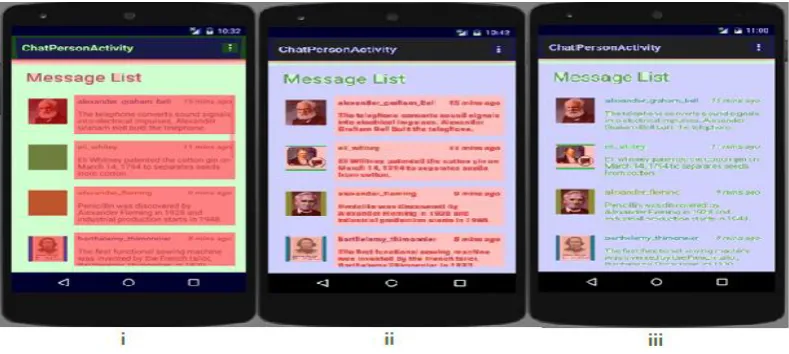
to a certain level. To demonstrate this, we used the Chat_room XML file of the Kakao Talk: Free Calls & Text application. This screen has high overdraws of four or more times (red color). We removed some of the
unnecessary background declaration programmatically and the others through the XML file to minimize the
overdraw problem. Programmatically the activity background is nullified by setting the
getWindow().setBackgroundDrawable(null) to null the background attribute as shown in Fig. 1 (ii). The nullifying activity reduce the background overdraw from 3X (Pink) to 2X (Green). Furthermore, we remove three (3) unnecessary background declarations attributes from the XML file to reduce the 3X (Pink) overdraw to 1X (Blue) overdraw as shown in Fig. 1 (iii).
Figure 1: Removing the background to minimize overdraw
After we applied the best practices, we measure the execution time of each layout (screen) to evaluate the
1951 | P a g e
Table 4. Systrace (Hierarchy View Tool) Timings before and after the modification
Sample Screens
(In two Iteration - I1 and I2)
Original Background
Removed
Difference
(Δ)
Chat_room (I1) 4.235ms 4.021ms - 1.615ms
Chat_room (I2) 4.243ms 4.019ms - 1.613ms
Message_list_list_view (I1) 3.608ms 3.455ms - 0.153ms
Message_list_list_view (I2) 3.601ms 3.401ms - 0.200ms
List_position (I1) 2.962ms 2.538ms - 0.424ms
List_position (I2) 2.973ms 2.604ms - 0.369ms
Opl_review_order_v2 (I1) 5.720ms 5.453ms - 0.267ms
Opl_review_order_v2 (I2) 5.707ms 5.464ms - 0.243ms
IV. RESULTS AND DISCUSSION
This study investigated the GUIs performance problem of Android applications. We analyzed the use interfaces
of ten applications to determine the common problems. Then, proposed best practices and an extensive use of
the Android Studio tools to minimize the problems. Generally, we identified a numbers of exciting results as
show below:
The study reveals the common GUIs performance problems of Android applications. The problems are
repeatedly occurred in many of the sample applications in similar pattern. These problems are unnecessary backgrounds, and deeply nested layouts.
Though there are many best practices to optimize the performance of the GUI of the applications, developers’
do not use these techniques and the Android SDK tools. This can be observed from the sampled problems
shown in section 3 of this study.
Applying a performance improvement phase has a great effect to encourage developers to correct GUI performance problems in time. Therefore, it is required to include a dedicated performance improvement phaseto the development life-cycle.
Although, the above findings are helpful to show the severity of the GUI performance problem, it is required to
conduct the study at a large scale to make generalization. Generally, the user experience of an application is
directly related to the screen appearance. Users will have negative feeling for the application, which is slow to
load or not fast enough to scroll smoothly. Hence, the study suggests the use of the best practices and the
1952 | P a g e
V.
CONCLUSIONS AND FUTURE WORK
With the increasing popularity of the mobile technology and applications user experience becomes very
important to get higher user acceptance. Nowadays, Android applications are the dominant mobile technology in
market. There are various types of applications on Google Play Store that are downloadable with payment and
for free. Nevertheless, many of the applications have GUIs performance problems as identified in this study and
reported by others studies [8, 9, 15].
In this study, we examine the GUI performance problems of Android applications. For the purpose of the study,
we downloaded ten Android applications from Google Play Store. We examined the applications GUI
performance problem using Android SDK tools. The result indicates that most of the applications have GUI
performance problems such as overdraw, and deep hierarchy. We suggested a GUIs performance tuning best practices and applied the best practice on four of the sample applications screens (layouts). Finally, the
performance improvements are presented in terms of time. Although, the study indicates how it is valuable to
apply the best practices and Android Studio tools, it required a detail and more study due to the high complexity
of the Android applications and the platform. In the future, we would like to work on the deep hierarchy
problem.
REFERENCES
[1] http://www.idc.com/prodserv/smartphone-os-market-share.jsp, Smartphone OS Market Share, IDC Analyze,
May 2015.
[2] http://www.statista.com/statistics/270291/popular-categories-in-the-app-store/, Most Popular Apple App
Store Categories 2015, The statistics Portal, December 2015.
[3] Christopher Orr, Building, Testing and Deploying Android Applications with Jenkins, Publisher, 2014. [4] Gerardo Canfora, Mauro D’ Angelo et al., A Case Study of Automating User Experience Oriented
Performance Testing on Smartphones, IEEE, Verification and Validation, 2013.
[5] Chien Hung Liu, Chien Yu Lu et al., Capture Replay Testing for Android Applications, International Symposium on Computer and Control, 2014.
[6] Christopher Dong, Xing Liu, Development of Android Application for Language Studies, ScienceDirect, Vol. 4, 2013, 8-16.
[7] https://www.safaribooksonline.com/library/view/high-performance android/9781491913994/ch04.html,
Screen and UI Performance, 2015.
[8] Domenico Amalfitano, Anna Rita Fasolino et al., Using GUI Ripping for Automated Testing of Android Applications, International Conference of Automated Software Engineering, 2012.
1953 | P a g e [10] Isabelle Dalmasso, Soumya Kanti Datta et al., Survey, Comparison and Evaluation of Cross Platform
Mobile Application Development Tools, International Conference of Wireless Communications and Mobile Computing, 2013 , 323-328.
[11] Anthony I. Wasserman, Software Engineering Issues for Mobile Application Development, The FSE/SDP Workshop on Future of Software Engineering Research, 2010, 397-400.
[12] Jianye Liu, Jiankun Yu, Research on Development of Android Applications, International Conference on Intelligent Networks and Intelligent Systems, 2011, 69-72.
[13] Chien Hung Liu, Chien Yu Lu, et al., Capture-Relay Testing for Android Applications, International Symposium on Computer, Consumer and Control, 2014, 1129-1132.
[14] Cuixiong HU, Lulian Neamtiu, Automating GUI Testing for Android Applications, Proceedings of the 6th International Workshop on Automation of Software Test, 2011, 77-83.
[15] http://apps.evozi.com/apk-downloader/, APK Downloader.
[16] Jung-Hoon Shin, Mesfin Abebe, et al., Examining Performance Issue of GUI Based Android Applications, Advanced Multimedia and Ubiquitous Engineering, Springer Link, 2016, 415-420.
[17] Diego Torres Milano, Android Application Testing Guide, PACKT Publishing, 2009.
![Table 2. The Overdraw analysis result of the sample applications [16]](https://thumb-us.123doks.com/thumbv2/123dok_us/7782790.1286292/4.595.83.515.75.299/table-overdraw-analysis-result-sample-applications.webp)