Attack
M
alicious code can be defined as code that has been developed to perform various harmful activities on a normal computer. Examples of such harmful activity can be actions such as stealing the end users data or personal information, infecting other ma-chines on a network or sending spam through infected machines.There are several categories of malicious code which include but are not limited to vi-ruses, worms, trojan horses and bots. Each of these categories has differing characteristics according to their intended purpose. As we move forward, our aim is to discuss the various techniques we can use for effectively analyzing such malicious code.
Types of Malicious Code
Let us discuss the basic definitions of some dif-ferent types of malicious code:
• Virus: Viruses are simple programs, which are written to change the way the com-puter works without the permission of its user. A virus cannot infect other PCs on a network until someone executes an infected file.
• Trojan Horse: In the context of computer software, a Trojan horse is a program that unlike a virus, contains or installs a mali-cious program (sometimes called the pay-load or 'Trojan') while under the guise of being something else.
• Worms: A computer worm is a self-rep-licating computer program. It uses the network to send copies of itself to other nodes (computer terminals on the net-work) and it may do it without any user intervention.
Malicious Code
Hardik Shah Anthony L. Williams
Difficulty
Computer networks and the Internet have been plagued
by malicious code and its malevolent effects for long. This article
will give you an introduction into the basic and practical usage
of analyzing malware in a controlled environment.
What you will learn...
• What malicious code is
• Tools and techniques used for malicious code analysis
• How to analyze the NetSky-P worm
What you should know...
• Elementary binary debugging techniques • Packet analysis basics
• Bots: A bot is a malicious program, which receives instructions from its controller and performs opera-tions according those instrucopera-tions. By their nature, bots will replicate using various techniques like ex-ploiting remote systems, sending e-mails using social engineering and subsequently creating a net-work of bots which are referred to as botnets. This network of compromised computers can be used to launch Distributed Denial of Service attacks, install malware or perform other nefarious activi-ties. Bots are rising in popularity.
Vulnerabilities
Malicious code such as worms and bots exploits many vulnerabilities in the various computer software.
These exploitation can result in pilfering important data like pass-words and credit card information to launching DDoS attacks to threat-en an threat-entity and extort money. Many botnet authors even provide their hijacked networks of compromised zombie machines for rent to others.
Such software possesses many serious security related implications to all computer users. Several organi-zations have lost millions of dollars due to the proliferation of such soft-ware in their networks. For example, in a northeast manufacturing firm, malicious code destroyed all the com-pany programs and code generators. Subsequently the company lost mil-lions of dollars, was dislodged from its position in the industry and eventually had to lay off 80 workers.
Need for Analysis
Much like the authoring of malicious code there are a myriad of reasons for analyzing worms, viruses and malware. The main reason behind malware analysis is that there is no source available for such programs. The only way to learn such programs is to analyze them and determine their inner workings. Another reason could be that many researchers like to explore the hidden workings of a program by examining it using a disassembler and debugger.
There are two main techniques to analyze such code:
• dead (static) analysis • live (dynamic) analysis
We will discuss each of these strate-gies in the following sections. For this particular analysis we have chosen the NetSky-P worm. It’s amongst the top ten worms reported by SOPHOS anti virus for May 2007 (http://www. sophos.com/security/top-10/).
Dead Analysis
Dead (static) analysis is the safest ap-proach to inspect any malicious binary file. Using this examination technique we will never execute the program but use various disassemblers like Win32Dasm or IDA Pro to safely inves-tigate the contents of the binary file. We will use these tools to analyze the NetSky-p worm in the following sections.
Packers and Unpackers
There is a common file format for executables on the MS Windows
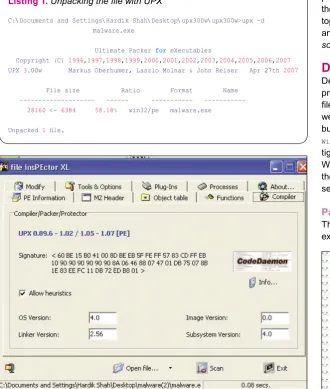
Figure 1. File inspector showing the packer as UPX
Listing 1. Unpacking the file with UPX
C:\Documentsand Settings\Hardik Shah\Desktop\upx300w\upx300w>upx -d malware.exe
Ultimate Packer for eXecutables
Copyright (C)1996,1997,1998,1999,2000,2001,2002,2003,2004,2005,2006,2007
UPX3.00w Markus Oberhumer, LaszloMolnar &John Reiser Apr 27th 2007 File size Ratio Format Name
--- --- ---
28160 <- 6384 58.18% win32/pe malware.exe Unpacked 1file.
platform, which is called the PE for-mat. Each and every executable file on a MS Windows system is in the PE file format. Usually the author of malicious code used various tech-niques to make it harder to analyze them using basic techniques.
A common approach for many malware authors is to use known as executable packers, which re-duce the executable size and alter its contents using specific obfusca-tion algorithms. In these scenarios normal disassembly will not be ef-fective. Among the most commonly employed file packers are utilities such as UPX and ASPack.
To determine which file packer was used we can use a tool called file insPEctor XL. As indicated by its namesake it will inspect the file for common packer signatures from which it can easily detect the packer
used. It is then necessary to unpack such files for the analysis phase, there are various tools which we can use to unpack the files in a protected environment. One such tool is PEID and another is ProcDump. With these tools we can unpack many of the common file packers.
Sometimes malware author makes it more difficult to unpack a particu-lar file by obfuscating the signature bytes in the executable, so that the above-mentioned tools cannot de-tect the correct packer. To overcome this problem, tools like ProcDump have a heuristic analysis feature, which will provide the packer name based on the heuristic definition. In some cases we need to manually unpack the binary file in question. Manual unpacking is another inter-esting topic which due to space limit we can not discuss here. For the purpose of this article we will stick to the various tools mentioned above for unpacking.
The initial action we will take is to determine if the file being examined is indeed packed or not. For this we will use a tool called file insPEctor XL. As
you can see in Figure 1 this tool re-ports that the file is packed using Ulti-mate Packer for Executables (UPX).
UPX is an open source tool that is freely available for download from Sourceforge.net. After down-loading and installing it can by run from the command line with our malware filename as an argument generating the output presented in Listing 1.
Disassembling
and Identifying String Data
A malicious executable file can contain various string which pro-grammer has hardcoded iduring the development. Such strings can be the error messages or can be related to the functioning of the malicious code. For example, if an executable file is sending mails then it can con-tain various strings for the different subject lines like RE: Here is the attachment, ++No virus Found++ etc. So after unpacking the file we need to disassemble it using a tool such as Win32Dasm or IDA Pro to analyze the common strings. This analysis will give us a general idea about the functionality of the file. There are various strings, which we can determine by analyzing. These strings can contain the body of e-mails or subject or name of file attachment, which a worm sends in an attachment etc.Now that we have successfully unpacked the executable we can proceed with disassembly and per-form further investigative work. Let
Figure 3. Shows the various strings it includes in outgoing messages
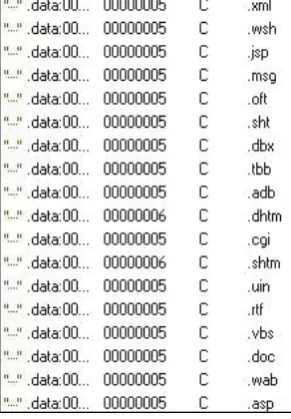
Figure 4. Displays the types of file extensions which the Netsky-P worm inserts into the attachments
us perform the static analysis of this executable using the IDA Pro disassembler. The first thing we will look at in the disassembly are the
strings. Strings in an executable can provide a variety of the information such as: e-mail subject, message, registry entries, file extensions
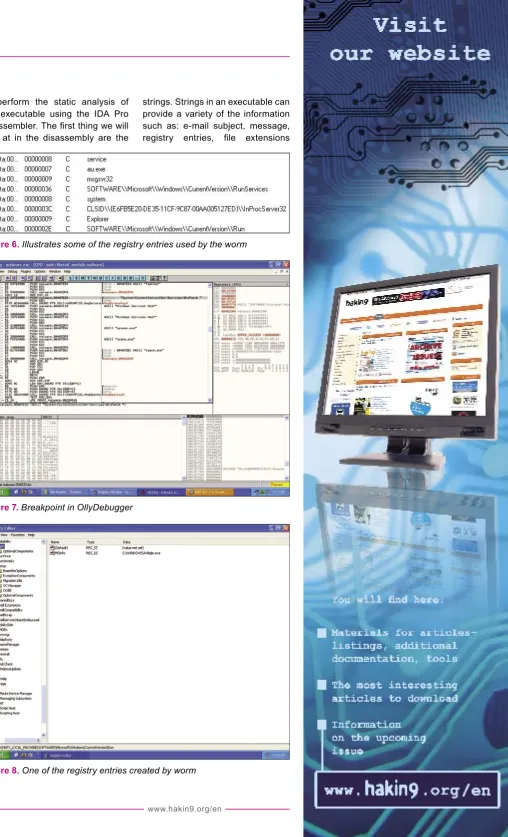
Figure 6. Illustrates some of the registry entries used by the worm
Figure 7. Breakpoint in OllyDebugger
and file names. The example in Figure 2 shows the e-mail subject, which NetSky-P worm uses when it sends the mails from the infected machine.
Based on the information col-lected so far it is safe to say that the Net-Sky-P worm sends e-mails using various subjects fields, file names and extensions. In addition to all this it stores various entries in the registry so that it can start each time the infected computer boots.
Live Analysis
In a live (dynamic) analysis scenario we need to check the overall function-ality and inner workings of the code by actually executing it in a control-led environment. This assists us in eliminating the false positives associ-ated with the dead analysis process. Some malware authors intentionally include various strings and functions to prevent the accurate analysis of their malware (or include code to detect that it is operating within the
confines of a virtual machine and al-ter its execution path); such attempts at obfuscation can be identified in the live analysis phase.
For this we have setup two test systems running MS Windows XP Professional SP2. On the first machine we installed Ollydbg to allow debug-ging of the Net-Sky-P worm and the other system was connected to the same network so that we can effec-tively monitor the various activities of the worm in real time. Then we started Wireshark on both computers and RegMon and FileMon on the second infected system.
It is worthy of note that you must take precautions when dealing with malware to keep it quarantined from your working environment. In our case we chose an air-gapped network with no access to our production networks or the Internet. Many others choose the popular VMWare suite to conduct these types of experiments within the confines of a virtual machine. At the end of the day it is a personal choice what environment you will experiment with, we urge to use a safe one.
After preparing the environment we started OllyDbg debugger and loaded the NetSky.exe file. After that we set the breakpoint on various strings as shown in Figure 7. We set a breakpoint on string System\Current Control Set\Services\WksPatch and run the OllyDebugger. It stopped on the above breakpoint. Careful exami-nation of the strings confirms all the previous findings which we deter-mined in the static analysis phase. Now, we will remove the breakpoints we initially set and use the animate over and various other debugging features (like step in and step out) to trace through the various Windows API calls like GetInternetConnection State() and RegCreateKeyEx(). From this analysis we can determine that the worm was also creating various threads to send e-mails.
Registry Keys
To spread itself a malicious code needs to be started somehow. It can be done either by executing the mali-cious file or by clicking a malimali-cious
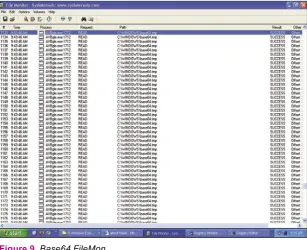
Figure 9. Base64 FileMon
web link or from the autorun option available in the Windows registry. Modern malware employs various social engineering techniques. After the end users execute it the first time, each time a computer boots, malware can run through the entires they have created in the registry.
To examine such behavior we will be using a tool called RegMon from Sysinternals. It will display all the registry entries used by a program.
To inspect the NetSky-P worm we executed it and then checked the vari-ous registry access in the RegMon logs. It was trying to access various keys as we mentioned previously. One detail we observed was that the worm has created a new entry in the reg-istry via HKEY_LOCAL_MACHINE\ SOFTWARE\Microsoft\Windows\ CurrentVersion\Run as displayed in Figure 8.
Then we examined the Windows folder and found two new files: AV-Bgle.exe and Base64.tmp.
FileMon
Malicious code can modify or copy it-self using different names in various locations. It can also download and execute any other file like backdoors, etc. from a remote location and place it in the infected system. In order to observe it, we can use a tool called FileMon that is also available from Sysinternals.
To continue the analysis we re-booted our infected test system and started RegMon, FileMon and Wire-shark again. We checked the FileMon logs and the point of interest we found, was that it was continually ac-cessing a file named Base64.tmp. As the name suggests, we can venture a guess that this file was encoded with the Base64 algorithm. This being the case we used a base64 decoder to determine that the identity of our malicious file was NetSky-P.
Figure 10 shows the decoded file which was in base64 format. Look-ing at the contents it is clear that it is an executable file. It contains the MZ header which is a standard header for executable files on Windows platform.
Packet Capture and Analysis
Most of the malwares in the wild these days try to infect other ma-chines over the network or become part of the botnets and send lots of spam from infected machines. Theycan also send various information from compromised systems like web surfing habits of the users, pass-words, account details, etc. Malware can also be used to launch DDoS attacks over the Internet.
Figure 11. Capture e-mail in wireshark
Figure 12. DNS queries
In order to this, we need to use a packet sniffer like Wireshark which can capture the network traffic going through the infected system. Basing on analysis of that data we can de-termine a variety of details like if it is a botnet then what are the control in-structions, what are the servers from where it is downloading the files and what kind of spam it is sending.
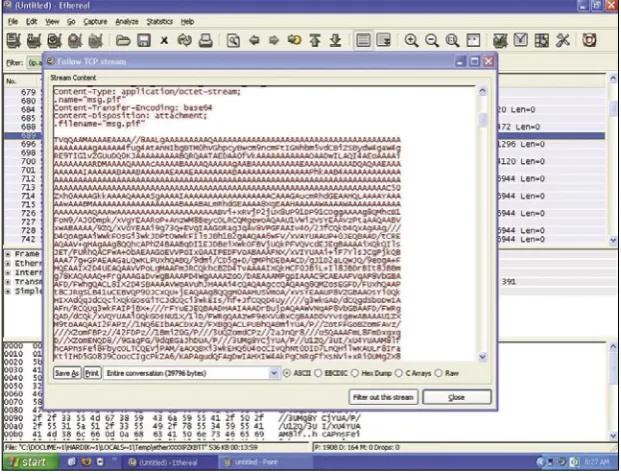
Next, we proceeded to save the decoded file as decoded.exe and open it with IDA Pro for the investiga-tion. From our analyst workstation we noticed that AVBgle.exe was scanning the index.dat file in the Temporary Internet Files folder on the infected system. That is interesting for us because after that we observed the worm randomly sending many e-mails to the e-mail addresses it found in that directory. This behavior is presented in the Wireshark packet dump shown in Figure 11.
A more precise packet analysis is depicted in Figure 12.
At this juncture we decided to per-form a packet analysis of the worm. We noticed that, at first, it was trying to perform various DNS queries for external servers such as Yahoo!, AOL, and Hotmail.
After issuing that traffic it was send-ing e-mails with the various subject, file names, as we discussed previously.
Identifying
Replication Algorithms:
Malware does not operate in a vac-uum, to thrive it needs to spawn in-stances of the same code, which can work together under the control of one master to perform malicious activities. Hence it continuously tries to infect (or reinfect as the case may be) the other machines on the local network or over the Internet. Malware uses a variety of techniques to achieve this objective, three examples are:• Sending e-mail with an attach-ment containing malicious code. • Exploiting the computers
Soft-wares using some known vulner-abilities or zero day.
• Exploiting the vulnerabilities in Operating System itself.
To identify the exact replication al-gorithm in use we need to run the malicious code in a tightly controlled environment and trace the code in a debugger. For this kind of analysis we will use Ollydbg to identify the replica-tion algorithm. In some cases it is not possible to identify the algorithm using the debugger alone. In these scenarios we need to combine the use of other techniques such as packet capturing so that we can determine if the malware is using any known or unknown exploit(s) or other observable behaviors.
From the previous analysis it is clear that the NetSky-P is a mass mailing worm which sends the infect-ed file in e-mail, waiting for unsuspect-ing end users to open the attachment. It uses various social engineering techniques which can confuse novice users, such as appending a string like No Virus Found!! to the e-mail con-tent. If end users are not aware of this type of deception then it is possible to infect the machine in question.
Conclusion
Malicious code has always been a threat to computer end users. In the modern world with the prolif-eration of the Internet, malware is employed extensively to generate website traffic, generate invalid links that forward the unsuspecting to infected web sites, launch DDoS attacks and to pilfer credentials and personally identifiable infor-mation. They now often employ a variety of techniques like using 0day exploits to enable to the code to spread more rapidly.
Using these techniques we can analyze the inner workings of this malicious code. Acquisition of such skills and intuition takes time, patience and dedication. We real-ize that this analysis is in no way complete, our intention was to give a general overview on how to use various malware analysis tools and techniques to inspect modern mali-cious code. l
Tools
• VMWare (Virtualization Software) http://www.vmware.com
• IDA Pro/Freeware (Dissembler) http://www.datarescue.com/
• Ollydbg(Popular Ring 3 Debugger) http://www.ollydbg.de/download.htm
• UPX(Ultimate Packer for Executables) http://upx.sourceforge.net/
• ImpREC(Import Reconstruction for PE files) http://securityxploded.com/ download.php#imprec
• Windows Sysinternals(FileMon,RegMon) http://www.microsoft.com/technet/ sysinternals/default.mspx
About the Authors
Hardik Shah specializes in Network Security, Reverse Engineering and Malicious Code analysis. He is also interested in Web and Application Security. He can be reached at [email protected]
Anthony L. Williams is the Information Security Architect for IRON::Guard Security, LLC where he performs Penetration Testing, Vulnerability Assessments, Audits and Incident Response. He can be reached at [email protected]
On the ’Net
• www.offensivecomputing.net – One of the finest website about malicious code. You can get various malware and their analysis on this site
• www.viruslist.com – viruses encyclopedia,Information on viruses • http://vx.netlux.org/ – virus samples, virus sources