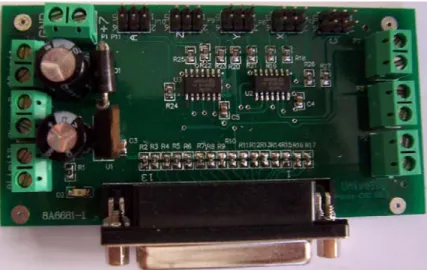
Four/Five Axis TB6560 CNC Driver Users Manual
Revision 2.0
Univelop Comp. Tech. LLC. http://www.cncgeeker.com Oct. 16. 2009
Content
1. GENERAL INFORMATION... 3
1.1. Scope... 3
1.2. General Description ... 3
1.3. Key Features ... 3
2. Descriptions of 4/5-AXIS CNC Board ... 4
2.1. Photo of 4/5-AXIS CNC Boards... 4
2.2. Key Features ... 4
2.3. Electrical Characteristics (recommend) ... 4
3. Hardware Installation... 5
3.1. Board Connection ... 5
3.2. Board Configuration ... 7
3.3. CONNECTING POWER SUPPLY TO DRIVE BOARD ... 7
3.4. SELECTING AND CONNECTING STEPPER MOTORS... 7
3.5. CONNECTING with Computer by DB25 ... 9
3.6. Manual Control (Optional) ... 10
3.7. Limit Signals... 10
3.8. Setup Checklist ... 10
Appendix... 10
A. Change the preset current of the board by changing the value of R12/R13, R22/R23, R32/R33... 10
1.
GENERAL INFORMATION
1.1. ScopeThis document describes the basic functionality and the electrical specifications of Univelop Tech. LLC’s Four/Five Axis TB6560 CNC Driver Boards.
1.2. General Description
Univelop Tech. LLC’s Four Axis CNC Driver Board is designed to communicate directly with KCAM4, MACH 2/3, NINOS, etc…, which supports parallel port.
1.3. Key Features
z Supports KCAM4, MACH 2/3, NINOS, etc…
z Two phase bipolar (chopper) pulse width modulating technology z Resolution 1, 1/2, 1/8, 1/16 micro stepping output
z Suitable for 4, 6, or 8 wire motors
z Absolute Maximum Ratings: 40VDC @ 3.5 amps(peak) /phase motor output* z Current adjustable at 100%, 75%, 50%, 20% of full current by on-board switch** z Voltage regulator is on board for TB6560
z Stop Button for emergency stop z Limit/Home Signal input
z Manual Control Module is available (Optional)
z Step Current® Technology is included: Step Current® technology is used to decrease the current up to 1/2, when motors are in idle for all axis so as to protect expensive step motor and driver board for long time running.
z Built-in overheat protection circuit z Discrete board design
Comparison between Univelop V 2.0 (TB6560) CNC driver and V 1.0 (TA7835) CNC driver board:
V 1.0 (TA7835) V 2.0 (TB6560) IC Overheat protection N/A Built-in
Current Adjustable 100%/50% 100%/75%/50%/20% Current for motor Peak 2.5A Peak 3.5A [*,**] Voltage for motor Max 35V Max 40V [*,**] Micro stepping 1 – 1/8 1 – 1/16
Frequency (fOSC) Max 80khz Max 600khz
Chip manufactory Old technology Current technology, ,makes IC chips get less heat at the
same current
* See TB6560 Datasheet (2007) by TOSHIBA
** The full current is preset at 2.5A by R12/R13 (0.2ohm) for this board (you can adjust it by changing resister).
2. Descriptions of 4/5-AXIS CNC Board
2.1. Photo of 4/5-AXIS CNC BoardsFig. 1 Four/Five Axis CNC Interface Board Dimension: 100mm X 50mm.
Fig. 2 1-Axis CNC Driver Board Dimension: 100mm X 58mm.
2.2. Key Features
2.3. Electrical Characteristics (recommend)
Symbol Parameter Min Typical Max Units
TSTR Storage Temperature - 40 +150 oC
TOP Working Temperature - 15 + 25 + 85 oC
ICC Current 50 100 200 MA
+12V Motor Voltage 5 24 34 [*] V
3. Hardware Installation
3.1. Board ConnectionUse four 6-pin cables to connect the interface board and four 1-axis driver boards, if it is 4-axis CNC driver module. Use five 6-pin cables to connect the interface board and five 1-axis driver boards, if it is 5-axis CNC driver module.
4-Axis Connection:
5-Axis Connection:
C X Y Z A X Y Z A
Pin configuration for connection Pin
CW Voltage to switch direction 2V-5V(10ma) as High, <1V as low GND GND
CK CK Input pulse to drive motor ( max 25Khz)
GND
GND
GND
CW
N/A
CK A A- B B- GND +12V +7V GND S2 P11GND +7V A Z Y X C
YLimit
GND
ZLimit
GND
ALimit
GND
XLimit
GND
STOP
GND
Signal
GND
S1Power, Init, OverHeat LEDs
3.2. Board Configuration 1-Axis CNC Driver Board: P11: Step Current® Technique: P11
1-2 StepCurrent 2-3 Normal
S1-1 -2 -3 -4 S2: -2 -1
M2 M1 step/i DCY2 DCY1 Decay TQ2 TQ1 I
OFF OFF 1 OFF OFF 0% OFF OFF 100% OFF ON 2 OFF ON 25% OFF ON 75%
ON OFF 16 ON OFF 50% ON OFF 50%
ON ON 8 ON ON 100% ON ON 20%
LEDs and Fan connection on board:
P1 D2 D6 D5 D1
5V Fan connection Power Init. OverHeat StepCurrent
3.3. CONNECTING POWER SUPPLY TO DRIVE BOARD 1. Connect suitable power supply at Input outlet on front of controller +7V and GND is connected with a power supply with >+7V and 1amp.
+12V and GND is connected with a power supply with >+12V and 1-6amp. 12-34v DC @ 2-6amp switching power supply recommended
3.4. SELECTING AND CONNECTING STEPPER MOTORS
WARNING: INCORRECT WIRING OF THE STEPPER MOTOR TO THE DRIVE BOARD CAN LEAD TO IMMEDIATE DAMAGE OF DRIVE BOARD - DO NOT CONNECT OR DISCONNECT MOTORS WHILE POWER IS ON
4 Wire, 6 Wire, and 8 Wire stepper motors can be used with 3-AXIS CNC Board. 4 Wire motors are recommended as they are by their manufacture true bipolar motors and
Fan connection: GND, +5V
easier to properly connect to stepper motor drive controller It is critical to obtain a proper motor coil diagram of any motor you wish to utilize (making cross connections between the two coils will destroy the control circuitry) 1.8 deg per step resolution is the industry standard for most automation grade stepper motors and is recommended for most applications
4 WIRE STEPPER DIAGRAM
Each wire is connected to its corresponding terminal block location (i.e. A# wire is connected at A-
location)
6 WIRE STEPPER DIAGRAM (SERIES WIRING)
Center wire of each coil not connected (insulate termination)
Remaining wires are connected to their corresponding terminal block location (i.e. A# wire is connected at A- location).
2 center wires of each coil connected (insulate connection) Remaining wires are connected to their corresponding terminal block location (i.e. A# wire is connected at A- location).
If using 6 or 8 wire motors, connected using series wiring method, reduce labeled amperage rating by 50% (i.e. a motor rated at 4 amps should thus be considered now rated at 2 amps) 3.5. CONNECTING with Computer by DB25
The following is to aid in the setup of the use of controller with various CAM software programs operating on your computer.
DB25 PIN USAGE:
4 Axis Configurations
X Y Z A
CK (out) 2 4 6 8
CW/CCW (out)
3 5 7 9
Limit (in) 15 11 12 13
Stop (in) 10
* Pins 18-25 of DB25 are GND.
5 Axis ConfigurationsX Y Z A C
CK (out) 2 4 6 8 17
(out)
Limit (in) 15 11 12 13
Stop (in) 10
* Pins 18-25 of DB25 are GND.
It is critical that the connection between computer parallel port and motor drive board be direct with the use of adapters (If your computer does not feature a DB25 outlet, you must install one, (these can be achieved via PCMCIA cards on laptop computers)) The use of adapters and hubs is not advisable and most likely will not work.
3.6. Manual Control (Optional) 3.7. Limit Signals
P2: Option Signal Input P3: Emergence Stop P4: Limit A
P5: Limit Z P6: Limit Y P7: Limit X
X Y Z A C
Limit (in) 15 11 12 13
Stop (in) 10
3.8. Setup Checklist
z Setup output pin configuration on chosen control software. z Setup pins in the boards
z Connect power supply to stepper board (make sure power is turned off) z Connect stepper motors
z Connect Parallel cable between computer and controller
z Turn power on
z Attempt to jog each axis with software (if axis turns in opposite direction of desired direction - attempt axis rotation reversal via software- if unable to do so switch 2 wires for one coil (i.e. switch A with A#, do not switch wires between coils)
z You are now done and able to begin using your new stepper motor drive
z REMEMBER NEVER CONNECT OR DISCONNECT MOTORS WHILE POWER IS ON
Appendix
A. Change the preset current of the board by changing the value of R12/R13, R22/R23, R32/R33
The value of Iout(A)=0.5V/R12(Ohm), Iout(A)=0.5V/R13(Ohm). The peak of Iout can’t be exceed 3.5A.