DOI: 10.14810/ijscmc.2015.4403 25
SL5
OBJECT:
SIMPLER
LEVEL
5
OBJECT
EXPERT
SYSTEM
LANGUAGE
Prof. Dr. Samy S. Abu Naser
Faculty of Engineering & Information Technology, Al-Azhar University, Gaza, Palestine
ABSTRACT
This paper introduces SL5 Object, the Simpler Level 5 Object Expert System Language. SL5 Object is a rule-based language for specifying expert systems.This paper first introduces the concept of expert systems and production systems, as well as the typical architecture of such a system. Then it presents a thorough outline of the SL5 Object Language: the syntax of rules and Objects, allowed constructs, the module structure. It also presents the execution cycle of the SL5 Object engine, as well as a number of methods to influence the default progress of this cycle.Finally, this paper introduces an example of Cars diagnoses problems to illustrate the capabilities of SL5 Object and the concepts presented.
.
KEYWORDS
Programming Language, Production Systems, Expert Systems, Object
1.INTRODUCTION
SL5 Object, the Simpler Level 5 Object Expert System Language, a rule-based language for specifying expert systems. Architecturally, SL5 Object is a production system executing a rule-based program; thus, the SL5 Object language is a declarative (rather than imperative) language. The SL5 Object engine is implemented in Delphi Embarcadero RAD Studio XE6[10].
This paper will first introduce the concept of an expert system, and then it will introduce production systems and how they can be used to solve problems. After this motivation, section 3 will outline the SL5 Object Language: its syntax, symbols, values, variables, lists, Objects, conditional elements, facts, rules and constructs, as well as introducing a number of useful built-in functions and constructs
.
Section 4 will detail the execution cycle of the interpreter. We will look at the steps involve in executing a rule-based program, and how SL5 Object implements these steps. We will also look at mechanisms SL5 Object provides to affect the default implementation of these steps in SL5 Object ; and we will also introduce the concept of modules.
26
2.
EXPERT
SYSTEMS
SL5 Object stands for the “Simpler Level 5 Object ”. First of all, what is an “expert system”? And what is a production system?
2.1Expert System Definition
A computer application that performs a task that would otherwise be performed by a human expert[1..9]. For example, there are experts systems that can diagnose human illnesses, diagnoses cars problems, make financial forecasts, and schedule routes for delivery vehicles[11]. Some expert systems are designed to take the place of human experts, while others are designed to aid them .
Expert systems are part of a general category of computer applications known as artificial intelligence . To design an expert system, one needs a knowledge engineer, an individual who studies how human experts make decisions and translates the rules into terms that a computer can understand.
2.2Expert Systems Architecture
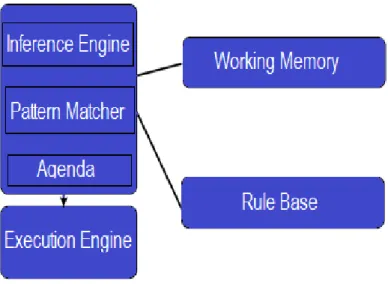
A rule based system generally follows the architecture in figure 1; this is the architecture of SL5 Object. The working memory stores facts about the world; it is also sometimes called the “fact base”. The rule base stores the system’s rules. The rules, objects, and the initial facts form a SL5 Object “program”. The inference engine is the “black box” that performs reasoning over the facts and rules; the left hand side of figure 1 is called the “Rule Engine”. Inside the rule engine, the pattern matcher selects rules that are applicable given the facts in the fact base, and activates these rules - that is, places them on the agenda. Then the execution engine fires the rules on the agenda in a particular order. The agenda can also be called the “conflict set”, since all the rules on the agenda are applicable now, and are therefore in conflict; then the algorithm by which the execution engine decides on an order in which to fire the rules is called “conflict resolution”.
27
3.
THE
SL5
OBJECT
LANGUAGE
3.1SL5 Object at a glance
The SL5 Object language is mostly a declarative language - that is, a SL5 Object program is made up of a set of statements about the world, rather than a list of commands to execute. In fact, since SL5 Object is a rule-based system, these statements about the world are either facts, rules or Objects.
3.2Syntax
On the surface, SL5 Object has a very L5O-like syntax [12]: every component (facts, rules, Objects, etc) takes the form as in L5O language. Also, like in many languages, whites- space is ignored.
3.3Symbols and Operators
Table 1,2,3 shows the symbols and operators used Sl5 Object Language:
Table 1: Arithmetic Operators
Operator Meaning Operator Meaning Operator Meaning
^ power ( ) parenthetical + addition
- subtraction * multiplication / division
MOD calculates remainder
upon division
:= assignment
Table2 : Grammatical Operators:
Operator Meaning Operator Meaning Operat
or
Meaning
IS for compound [ ] or { } array element . dot notation
(attribute. class)
" " string literal , separates items of
arrays, format strings
( ) encloses
functions
Table3: Relational Operators:
Operator Meaning Operat
or
Meaning Operator Meaning
= equal > greater than >= greater
than or equal
< less than <= less than or equal <> not equal
CONTAI NS
one string contains another string
28
3.4Attributes
<attribute name> attribute type
Attributes name defines the qualities of a class and the type of information that comprises a class. Attribute Type in SL5 Object describes the type of information represented by an attribute of a class. In SL5 Object, the supported attribute types are: COMPOUND, SIMPLE, NUMERIC, STRING, PICTURE, RECTANGLE, COLOR, TIME, and INTERVAL.
3.5Ask
ASK <attribute reference>
The ASK command is used to prompt the end user for the value of an attribute. For example : ASK name OF employee.
3.6Classes
Defines the structure and behavior of an Object. For example, in an application a class may represent a physical Object, such as a piece of equipment, or an abstract Object, such as a formula. Individual instances of a class hold the actual data values of the application. A class declaration is a structural definition similar to a database record structure. It describes the attribute names, analogous to field names, and attribute types, like database field data types, of the information represented by the class. Unlike databases, however, classes can contain information about how to obtain the values of their attributes through rules or methods
3.6.1 System Classes
System classes are automatically built by SL5 Object when a new knowledge base is created, thereby providing built-in logic and Object tools. Although you cannot change or add system class attributes, you can create instances of most system classes and then reference or set the attribute's current values.
Instances of display item system classes, such as a checkbox, listbox, and table, are created using the SL5 Editor. Here is an example of Textbox System Class :
CLASS textbox WITH location RECTANGLE
INIT 10, 10, 210, 35 WITH pen color COLOR
WITH fill color COLOR WITH justify COMPOUND
left, center, right INIT left WITH font STRING
INIT "System"
WITH font style MULTICOMPOUND bold, italic, underline, strikeout
29
WITH frame SIMPLE WITH scroll SIMPLE WITH filename STRING
WITH text STRING
Figure 2: Example of Textbox System Class
The textbox system class allows you to create and format a body of text within a display. By creating a textbox instance, you can specify such format options as location, font, style, and color.
Location: The attribute location defines the location and size of the textbox instance. Values assigned to location specify the x, y coordinates of the upper left and lower right corners of the rectangle surrounding the textbox.
pen color/fill color : Assigning values to the attribute pen color defines the color of the text. Assigning values to the attribute fill color defines the color of the background rectangle surrounding the textbox.
Justify: The attribute justify can have a value of either right, left, or center. If you do not specify a value, the text is left-justified.
Font:The attribute font specifies the type of font used in the textbox. The font name (Helvetica, Courier, etc.) is assigned as a string value of font. The font name you specify must be available in your system. If the font is not available or not specified, SL5 Object uses the default "System" font.
Font style:The attribute font style can have a value of bold, italic, underline, and strikeout.
Font size:The attribute font size specifies the size of the font in points.
Frame: To draw a frame around the textbox, the attribute frame must have a value of TRUE.
Scroll: Assigning a value of TRUE to the attribute scroll allows the end user to scroll through the text area using both vertical and horizontal scroll bars. If scroll is TRUE, SL5 Object will not word-wrap text, and the end user must use the scroll bars to view the entire text. If scroll is FALSE, the scroll bars are not displayed, and word-wrap occurs at the textbox's boundaries.
Filename:To read text into the textbox from a disk-resident file, assign the name of the file, and optionally the path, to the attribute filename. Text read from a file takes precedence over any text declared by the text attribute.
Text: The attribute text holds the memory resident text SL5 Object displays when you are not reading text in from a disk file.
Example:
INSTANCE answer 43 IS A textbox WITH location: = 10, 10, 100, 100
WITH pen color: = 0, 0, 0, WITH fill color := 255, 255, 255, 255
WITH font := "HELVETICA" WITH font style IS bold, italic
WITH font size := 12
30 Figure 3: Instance of Textbox System Class
3.6.2 User classes
The classes that are defined by the application developer during application development
3.7Rules
The in SL5 Object takes the form as in figure 3. reserved word RULE designates a forward-chaining demons are used to codify the operational logic, rules-of-thumb, and cause-and-effect relationships that comprise the actions of an application. In SL5 Object Editor, you create and edit rules.. If the conclusion contains more than one statement, AND must precede each statement after the first one. All statements in the conclusion of a rule are executed if the rule fires. For this reason, OR is not allowed in conclusions. In the conclusion of a rule, NOT enters the following attribute into session context with the value false if the rule fires.
RULE <rule name> IF <antecedent> [AND <antecedent> [AND <antecedent>...]]
[OR <antecedent> [OR <antecedent>...]]
THEN <conclusion> [ELSE <alternate conclusion>]
[AND <alternate conclusion> [AND <alternate conclusion>...]]
Figure 4: rule sample
4.
EXECUTION
CYCLE
OF
SL5
OBJECT
Now that we have seen the SL5 Object language, we can inspect the execution cycle of the SL5 Object engine more closely. The typical execution cycle of an expert system (and the one used by SL5 Object) consists of a number of steps:
• Match facts from the fact base against the left hand sides of the rules in the rule base;
move matched rules onto the agenda
• Order the rules on the agenda according to some conflict resolution strategy
• Execute the right hand sides of (“fire”) the rules on the agenda in the order decided by
step 2
31
5.
DEVELOPMENT
WINDOW
The Development Window appears when you start SL5 Object. It provides access to all of SL5 Object’s major components and functions. This window contains four menus: File, Edit, Run, Test, Debug, Paths, About, and Help.
5.1 Development Window Menus
• File Menu: The File menu allows you to manage knowledge base files. The File menu
contains these items: New, Open, Save, Save As... , Exit
• Edit Menu: The Edit menu allows you to manage content of the knowledge base. The
Edit menu contains these items: Copy, Paste, Undo, Cut.
• Run Menu: The File menu allows you to compile the knowledge base and run it. The
File menu contains these items: Compile, Run
• Test Menu: The Test menu allows you to test the knowledge base. The test menu contains these items: Select Degree of Coverage, Create Test Case, Execute Test Case, Summary of Test Cases.
• Debug Menu: The debug menu allows you to debug knowledge base step by step. The
debug menu contains these items: Initial debug report, and Debug.
• Paths Menu: Paths menu allows you to study different paths in expert system. The Paths
menu contains these four items: Create DB of all possible paths, DB report, Show all Paths graphically, Execute selected paths.
• Help Menu : The Help menu lets you access information about using SL5 Object.
• About Menu: About SL5 Object ...
32
6.
E
XPERT SYSTEMSE
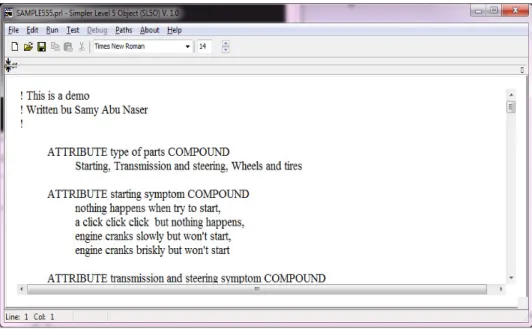
XAMPLEThe following is an example of an expert system to illustrate this organization. This Expert system is an example of Simpler Level 5 Object (SL5 Object) that Demonstrate the use of some of the System classes, Instances, Rules, etc. This Expert System diagnoses Car Problems through a dialogue between the System and the End User. The Conclusion of the finding is displayed and an Advise is given for the End User to solve the problem. The expert system is written using the SL5 Object language.
! This is a demo
! Written by Samy Abu Naser !
ATTRIBUTE type of parts COMPOUND
Starting, Transmission and steering, Wheels and tires
ATTRIBUTE starting symptom COMPOUND nothing happens when try to start, a click click click but nothing happens, engine cranks slowly but won't start, engine cranks briskly but won't start
ATTRIBUTE transmission and steering symptom COMPOUND chattering sound when first begin to move,
pressing the accelerator and car does not respond while under way, a screeching noise when you are turning or steering sharply at low speed
ATTRIBUTE wheels and tires symptom COMPOUND car's suspension bangs over bumps,
car's pulls in either direction when cruising along, tire wear is excessive in the middle
ATTRIBUTE start SIMPLE
INSTANCE the domain ISA domain WITH start := TRUE
INSTANCE the application ISA application WITH title display := introduction
WITH conclusion display := Conc
INSTANCE introduction ISA display WITH wait := TRUE
WITH delay changes := FALSE WITH items [1 ] := textbox 1
INSTANCE textbox 1 ISA textbox WITH location := 10,10,800,350 WITH pen color := 0,0,0 WITH fill color := 100,200,100 WITH justify IS left
33
WITH font style IS bold WITH font size := 14
WITH text :=" Car Diagnosis Expert System Written By Samy Abu Naser
This Expert system is an example of Simpler Level 5 Object (SL5 Object) that Demonstrate the use of some of the System classes, Instances, Rules, etc. This Expert System diagnoses Cars Problems through a dialogue between the System and the End User. The Conclusion of the finding is displayed and an Advise is given for the End User to solve the problem."
INSTANCE Conc ISA display WITH wait := TRUE
WITH delay changes := FALSE WITH items [1] := title textbox WITH items [2 ] := problem textbox WITH items [3 ] := advise textbox
INSTANCE title textbox ISA textbox WITH location := 20,10,800,70 WITH pen color := 0,0,0 WITH fill color := 200,200,100 WITH justify IS center
WITH font := "Arial" WITH font style IS bold WITH font size := 14
WITH text := " The Conclusion of the Car Diagnosis Expert System"
INSTANCE problem textbox ISA textbox WITH location := 20,110,800,130 WITH pen color := 0,0,0
WITH fill color := 170,170,170 WITH justify IS left
WITH font := "Arial" WITH font size := 14 WITH text :=" "
INSTANCE advise textbox ISA textbox WITH location := 20,280,800,130 WITH pen color := 0,0,0
WITH fill color := 170,170,170 WITH justify IS left
WITH font := "Arial" WITH font size := 14 WITH text :=" "
RULE R1
IF type of parts IS Starting THEN ASK starting symptom
RULE R2
34
RULE R3
IF type of parts IS Wheels and tires THEN ASK wheels and tires symptom
RULE R0 IF start
THEN ASK type of parts
RULE R4
IF type of parts IS Starting
AND starting symptom IS nothing happens when try to start THEN
text OF problem textbox := " The problem is electricity is not going to the starter. "
AND text OF advise textbox := "The Advice: clean and retighten disconnect out the problem. CF 90% "
RULE R5
IF type of parts IS Starting
AND starting symptom IS a click click click but nothing happens THEN
text OF problem textbox := "The problem is enough electricity turn the starter over."
AND text OF advise textbox := "The Advice: clean and retighten corroded battery the problem. CF 80% "
RULE R6
IF type of parts IS Starting
AND starting symptom IS engine cranks slowly but won't start
THEN text OF problem textbox := "The problem is defective starter and weak battery."
AND text OF advise textbox := "The Advice: have a mechanic check out the worn system. CF 90% "
RULE R7
IF type of parts IS Starting
AND starting symptom IS engine cranks briskly but won't start THEN text OF problem textbox := "The problem is no spark or fuel."
AND text OF advise textbox := "The Advice: remove the distributer cap and wipe dry the ignition path. CF 90% "
RULE R8
IF type of parts IS Transmission and steering
AND transmission and steering symptom IS chattering sound when first begin to move THEN text OF problem textbox := "The problem is the clutch is not engaging properly."
AND text OF advise textbox := "The Advice: check transmission fluid level or bands CF 100% “
RULE R9
IF type of parts IS Transmission and steering
AND transmission and steering symptom IS pressing the accelerator and car died while under way
35
RULE R10
IF type of parts IS Transmission and steering
AND transmission and steering symptom IS a screeching noise when you are turning or steering sharply at low speed
THEN text OF problem textbox := "The problem is the power steering the power steering pump." AND text OF advise textbox := "The Advice: have the stretched power steering beg pump or hose. CF 90% "
RULE R11
IF type of parts IS Wheels and tires
AND wheels and tires symptom IS car's suspension bangs over bumps
THEN text OF problem textbox := "The problem is the suspension is hitting bottom."
AND text OF advise textbox := "The Advice: replace the faulty shock absorbers required. CF 90%"
RULE R12
IF type of parts IS Wheels and tires
AND wheels and tires symptom IS car's pulls in either direction when cruising along THEN text OF problem textbox := "The problem is misaligned wheels, flatted front tire."
AND text OF advise textbox := "The Advice: check the front end wheel alignment, proper level. CF 90%"
RULE R13
IF type of parts IS Wheels and tires
AND wheels and tires symptom IS tire wear is excessive in the middle
THEN text OF problem textbox := "The problem is the tire has been over inflation."
AND text OF advise textbox := "The Advice: let the excess air out, check tire accessory. CF 100%"
END
6.1 Running the Car Diagnosis Problem Expert System
36 Figure 6: Execution of the Car diagnosis expert system using Sl5 Object
7.
CONCLUSION
We have introduced SL5 Object, the Simpler Level 5 Object Expert System Language. SL5 Object is both a rule-based language for specifying expert systems, and a rule-based system for executing expert systems written in the SL5 Object language. An expert system is a system that can reason about facts about the world using rules, objects and take appropriate actions as a result.
The SL5 Object system is implemented in Delphi Embarcadero RAD Studio XE6. The SL5 Object language has a L5O-like syntax. We outlined the basics of the SL5 Object language: values, variables, lists, functions, conditional elements, facts, rules and classes.In section 4, we introduced the execution cycle of SL5 Object , as well as mechanisms provided by SL5 Object.
After this introduction to the SL5 Object language, we introduced a simple expert system for car diagnosis. The expert system gives the result of the diagnosis and gives an advice for the user to how to fix the problem after asking the user a number of questions about his or her car situation. We implemented this expert system in SL5 Object using the features introduced in this paper.
REFERENCES
[1] Abu Naser S. and Aead A. (2013) . Variable Floor for Swimming Pool Using an Expert System, International Journal of Modern Engineering Research (IJMER), 3(6) ,3751-3755.
[2] Abu Naser, El-Hissi H., Abu-Rass M., and El-khozondar N. (2010) . An Expert System for Endocrine Diagnosis and Treatments Using JESS, Journal of Artificial Intelligence, 3(3).
[3] Abu Naser, Al-Dahdooh R., Mushtaha A. and El-Naffar M. (2010) . Knowledge Management in ESMDA: Expert System for Medical Diagnostic Assistance, AIML Journal,10(1) .
37 [5] Abu Naser S., Akkila A. (2008) . A proposed Expert System for Skin Diseases Diagnosis, Journal of
Applied Sciences Research,4(12)
[6] Abu Naser S., Kashkash K, Fayyad M. (2008) . Developing an Expert System for Plant Disease Diagnosis,Journal of Theoretical and Applied Information Technology,1(2) .
[7] Abu Naser, Baraka M. and Baraka A. (2008) . A Proposed Expert System For Guiding Freshman Students In Selecting A Major In Al-Azhar University, Gaza, Journal of Theoretical and Applied Information Technology,4(9) .
[8] Azaab S., Abu Naser S., Sulisel O. (2000) . A proposed expert system for selecting exploratory factor analysis procedures, Al-Aqsa University Journal,4(2) ,9-26.
[9] Abu Naser S. (1999) . Big O Notation for Measuring Expert Systems complexity, Islamic University Journal - Gaza,7(1) ,57-68.
[10] Embarcadero Technologies, Inc. 2014, Users Manual, Version 20.0.15596.9843.
[11] Giarratano, J. and Riely, 2004, Expert Systems: Principles and Programming 4th ed., Thomson/PWSW publishing Co. Boston, MA., ISBN:0534937446