Wegho Chatbot
MIGUEL JOÃO COELHO DA SILVA
Outubro de 2018Wegho Chatbot
Miguel João Coelho da Silva
Dissertação para obtenção do Grau de Mestre em
Engenharia Informática, Área de Especialização em
Engenharia de Software
Orientador: António José Rocha de Oliveira
Júri: Presidente: Vogais:
Porto, outubro de 2018
iii
Resumo
Esta dissertação foi escrita para acompanhar o projeto de construção de um Chatbot para o Marketplace Wegho, de a modo melhorar o seu serviço de Apoio ao Cliente. Este Chatbot foi desenvolvido utilizando o Azure Bot Service da Microsoft.
A Wegho é um Marketplace que oferece tipos diferentes de serviços como limpeza doméstica e reparações, e que funciona através de um website e de aplicações móveis, disponíveis para iOS e Android. Estes serviços são disponibilizados através de trabalhadores profissionais e qualificados. Através do Marketplace um cliente pode marcar um ou mais serviços para uma data aceite entre as duas entidades, por um preço competitivo.
O Chatbot desenvolvido tem como propósito principal resolver simples problemas que um cliente possa ter, tal como responder a questões frequentes. Também é capaz de gerir serviços, seja a criar um novo ou a alterar ou cancelar os que já estiverem previamente marcados.
Este serviço funciona através de conversas naturais com o cliente, como se este estivesse a falar com outra pessoa, percebendo o que lhe é solicitado, qual o objetivo desejado com cada mensagem, e qual a informação enviada. Nos casos em que o Chatbot não é capaz de
“compreender” o que o utilizador necessita, é capaz de entender que é o caso e então redirecioná-lo para um agente humano do serviço de Apoio ao Cliente.
Este serviço foi avaliado através de um período de testes, tendo utilizadores de teste a falar com o Chatbot com objetivos específicos, e gravando as transcrições destas conversas. No fim de cada conversa o utilizador teve também a possibilidade de dar feedback para que possa, posteriormente, ser analisado. Com estas transcrições outras métricas foram retiradas para avaliação, tais como a qualidade dos pares de mensagens entre o utilizador e o Chatbot, a quantidade destes, se as respostas são suficientemente diretas ou demasiado ambíguas, entre outras.
v
Abstract
This dissertation was written to support the project of the construction of a Chatbot service for the Wegho Marketplace in order to improve the Customer Support service. This Chatbot was
built using Microsoft’s Azure Bot Service.
Wegho is a Marketplace that offers different kinds of services such as domestic cleaning and home repairs, and works through a website and mobile apps, on iOS and Android. These services are provided using professional and qualified workers. Through the Marketplace a customer can schedule one or more service on a suitable date, for a competitive price.
The Chatbot developed has as its main purpose the solving of simple customer issues, such as answering frequently asked questions. It is also able to handle some service management, such as creating a new one, or modifying and cancelling previously existing ones.
This service works through natural conversations with the customer, understanding what is required of him, what the goal intended with each message sent to it is as well as the information sent. In cases where the Chatbot doesn’t “understand” what the customer wants of it, it recognizes it and redirects him or her to a human agent within the Customer Support service.
This service was evaluated through a test period, having test users talk with the Chatbot with specific goals, and saving the transcripts of these conversations. At the end of each conversation the user also gives feedback so that it may later be analysed. From these transcripts another metrics to then be evaluated were taken, such as the quality of utterance pairs between the user and the Chatbot, the quantity of these, if the responses are direct or more ambiguous, among others.
vii
Index
1 Introduction ... 1 1.1 Context ... 1 1.2 Problem ... 1 1.3 Objectives ... 2 1.4 Approach ... 3 1.5 Structure ... 3 2 Value Analysis ... 52.1 5 Key Elements of NCD Model ... 5
2.1.1 Opportunity Identification ... 6
2.1.2 Opportunity Analysis ... 6
2.1.3 Idea Generation and Enrichment ... 6
2.1.4 Idea Selection ... 7
2.1.5 Concept Definition ... 7
2.2 Value... 8
2.2.1 Value for the Customer ... 8
2.2.2 Value Temporal Position ... 9
2.3 Value Proposition ... 9
2.4 Canvas Model ... 10
3 State of the Art ... 13
3.1 Microsoft’s Azure Bot Framework ... 13
3.1.1 LUIS ... 14
3.1.2 QnA Maker ... 15
3.2 Watson Conversation Service ... 16
3.3 Chatfuel ... 17
3.4 Comparison ... 19
4 Analysis ... 21
4.1 Actors ... 22
4.2 Use Case Details ... 22
4.2.1 Ask Questions ... 22
4.2.2 Simulate Service Request ... 23
4.2.3 Schedule New Service ... 23
4.2.4 Request Redirection to Customer Support ... 23
4.2.5 List Services ... 23
4.2.6 Modify Service ... 23
4.2.7 Cancel Service ... 24
4.2.8 Answer Unresolved Questions ... 24
viii
4.2.10 Notify of Problem ... 24
4.2.11 Check-In ... 24
4.2.12 Handle Supplier Problem ... 24
4.3 Non-functional Requirements ... 25
4.3.1 Integration with Zendesk ... 25
4.3.2 Integration with Twilio ... 25
4.3.3 Integration with Wegho Web Services ... 25
4.3.4 Communicate with LUIS ... 25
4.3.5 Communicate with QnA Maker ... 25
4.3.6 Notify Supplier ... 26
4.3.7 Redirect Supplier’s notification’s answer to Customer Support ... 26
5 Design ... 27 5.1 Technologies ... 27 5.1.1 LUIS ... 27 5.1.2 QnA Maker ... 27 5.1.3 Azure Functions ... 28 5.1.4 Zendesk ... 28 5.1.5 Twilio ... 28
5.1.6 Azure Logic Apps ... 28
5.2 Class Diagrams ... 29 5.2.1 Main Classes ... 29 5.2.2 Other Classes ... 31 5.3 Design Workflows ... 32 5.3.1 User Questions ... 33 5.3.2 User Authentication ... 34 5.3.3 Service Creation ... 35 5.3.4 Service Management ... 37
5.3.5 Supplier Check-In Verification ... 39
5.4 Design Alternatives ... 40
5.4.1 Use of Web Services instead of Zendesk Support Tickets ... 40
5.4.2 Supplier Check-In ... 41
5.4.3 Facebook Messenger as Exclusive Channel ... 41
5.5 Architecture ... 42 6 Development ... 45 6.1 QnA Maker ... 45 6.2 LUIS ... 46 6.3 Facebook Messenger ... 50 6.3.1 Persistent Menu ... 50
6.3.2 Get Started Button ... 51
6.3.3 Handover Protocol ... 51
6.3.4 Proxy ... 52
6.4 Chatbot ... 53
ix
6.4.2 State Data ... 54
6.4.3 Web Services ... 55
6.4.4 Zendesk Connection ... 57
6.4.5 Scorable Dialogs ... 57
6.5 Supplier Logic App ... 57
6.6 Main Problems ... 58
6.6.1 Persistent Menu functioning without thread control ... 58
6.6.2 New messages not appearing in Facebook Messenger ... 58
6.6.3 Customer Support requesting thread control not working ... 59
6.6.4 Connection between Chatbot and pre-existing Wegho web services ... 59
6.6.5 Adaptive Card not working on Facebook Messenger ... 60
6.6.6 QnA Maker Dialog inside other Dialogs ... 61
7 Experimentation and Evaluation ... 63
7.1 Metrics ... 63 7.2 Hypothesis ... 64 7.3 Evaluation Methodology ... 64 7.3.1 Tests Database ... 66 7.3.2 Logic Apps ... 67 7.4 Results ... 67
7.4.1 QnA Tests Results ... 67
7.4.2 Task Tests Results ... 69
8 Conclusions ... 73
8.1 Accomplished objectives ... 73
8.2 Limitations and further improvements ... 74
8.3 Final appreciation ... 75
9 References ... 77
10 Annexes ... 81
xi
Figures List
Figure 1 - New Concept Development Model Wheel ... 5
Figure 2 – Business CANVAS Model ... 10
Figure 3 - LUIS Response Example ... 15
Figure 4 - Watson Conversation Solution Architecture ... 17
Figure 5 - Chatfuel AI Rules Example ... 18
Figure 6 - Use Case Diagram ... 21
Figure 7 – Class Diagram of Dialog classes ... 30
Figure 8 –Controller classes’ Class Diagram ... 32
Figure 9 - User Questions Activity Diagram ... 33
Figure 10 - Authentication Activity Diagram ... 34
Figure 11 - New Service Creation Activity Diagram ... 36
Figure 12 - Existing Service Management Activity Diagram ... 38
Figure 13 – Supplier Check-In Verification Activity Diagram ... 40
Figure 14 - Solution Architecture Components Diagram ... 43
Figure 15 - QnA Maker Pair Example ... 46
Figure 16 - Example of new utterance being added to LUIS Intent ... 49
Figure 17 - Entity caught in new LUIS utterance ... 49
Figure 18 - Review endpoint utterances webpage ... 49
Figure 19 - Persistent Menu example ... 51
Figure 20 - Entity Framework Class Diagram ... 55
Figure 21 - Example of functioning Adaptive Card ... 60
Figure 22 - Adaptive Card not working on Facebook Messenger ... 61
Figure 23 - Tests Database ... 66
xiii
Tables List
Table 1 - Azure App Service Pricing Details ... 14
Table 2 - LUIS Service Pricing Details ... 15
Table 3 - Watson Conversation Service Pricing Details ... 17
Table 4 - Chatbot Creation Tools Comparison Table ... 19
Table 5 - LUIS Intents... 47
Table 6 - LUIS Entities ... 48
Table 7 - Percentage of questions of with no answer found ... 67
Table 8 - Quality Scores ... 68
Table 9 - Quantity Scores ... 68
Table 10 - Relation Scores ... 69
Table 11 - Manner Scores ... 69
Table 12 - Percentage of Users that Finished Tasks ... 69
Table 13 - Percentage of Successful Resolutions ... 70
Table 14 - Percentage of Follow-Up Questions... 71
Table 15 - Average of Coherent Turns ... 71
xv
Code Excerpts List
Code Excerpt 1 - Calling of new Dialog example ... 54 Code Excerpt 2 - PromptDialog example ... 54
xvii
Acronyms and Symbols
List of Acronyms
LUIS Language Understanding Intelligent Service
QnA Questions and Answers
SDK Software Development Kit
AI Artificial Intelligence
FB Facebook
CRM Customer Relationship Manager
SMS Short Message Service
1
1
Introduction
In this section an introduction will be made on the project elaborated for this dissertation. In it the context will be described, along with its problems and objectives, as well as the approach chosen for its solution. Lastly, the structure of this document will also be described.
1.1
Context
Wegho is a marketplace of domestic services, using properly validated suppliers of these kinds of services, and working through a website and mobile application. The Customer Support is a very important factor for these types of services, and even though a frequently asked questions zone already exists, much of these works end up being done by human assistance. This support service needs to be able to handle every client or potential client, helping him/her with any situation they might come across. This may correspond to complex situations that need a personalized support, or something a bit simpler like providing the hyperlink to a FAQ webpage.
1.2
Problem
The customer support side of a service provided by a company is a fundamental piece of its organization. At Wegho there is currently one person dedicated to that function, helping every customer or potential customer in whatever is needed, either scheduling a new service or rescheduling one that can no longer happen as previously set. Adding to this important function, this person must also answer every small or big question anyone may have about the Marketplace, how it operates, what is currently possible or impossible to do. Many a times, the only way to help the inquirer is simply to direct him or her to the frequently asked questions section of the website or application.
2
Having these small or simple issues to be handled by the human customer support service can end up being a hindrance on the work that needs to be done, since more time could be allocated to handling more complex issues, such as those that cannot be solved by a simple answer or direction.
1.3
Objectives
With this project it’s intended that a Chatbot for Wegho is developed. This will have to be able, through conversational interactions, to respond to simple requests from clients such as answering questions about the functioning of the marketplace, or just making a simple management of services. This management will include the creation of services with attributes given by the client as well as the maintenance or cancelation of previously created services.
This Chatbot will also have the functionality of assisting a service supplier when this doesn’t “check-in” to a specific service, 15 minutes after it was scheduled to begin, giving him several options on how to solve this situation.
Lastly, the Chatbot will have to be able to understand the user and the state of the conversation adequately so that it can direct it to a human agent of the customer support, every time it understands that it won’t be able to single-handedly respond to the user’s requests. The user may also directly request to be recommended.
The Chatbot will be available on several communication services for its use, such as Facebook Messenger, Skype, Twilio, and on a Webchat on the Wegho website and mobile app.
In summation the objectives to be fulfilled with this project are the following:
1. Creation of a new service;
2. Modification of an existing service; 3. Cancellation of an existing service;
4. Assisting supplier when no check-in has been made; 5. Understanding of the user;
6. Direction of user to customer support when it fails to understand his/ her intent; 7. Direction of user to customer support when directly requested;
3
1.4
Approach
To develop this project a study of the existing frameworks and tools were made, analysing their characteristics to choose what the most appropriate were. These Chatbot creation tools will have to be able to connect to multiple channels, specially Facebook Messenger, Skype and Twilio. They will also need to have the ability to be developed for the Portuguese language, since the final product will be used by a Portuguese company.
A connection to Zendesk, a Customer Service Manager platform will also be made, creating tickets, issues to be solved, anytime that it is pertinent to do so. These will have to be created when some sort of human interaction will have to be added to the Chatbot.
After choosing the technology to work with, the developer will use tutorials to learn how to properly use it. Guides and articles will also be made use of so as to know what the best practices when developing a Chatbot will be. These practices will not only be best software development patterns, but also conversational solutions patterns.
1.5
Structure
After this introduction this dissertation will have a section of Value Analysis, in which a study of what value the solution made will have to the actors that will end up using it. To do so, the Key Elements of the New Concept Development Model by Peter Koen will be analysed (Koen, et al., 2014). A value proposition will also be made, and a CANVAS model will be designed.
The section that comes next is the State of the Art, where various Chatbots creation tools are studied and described. At the end of this section there is an area where these tools are compared to have a contrasting view between them.
Afterwards there will be the section of Analysis, where through a Use Cases diagram all the tasks that the solution will have to perform are properly described and assigned to their respective actors, noting where associations between these tasks exists.
The following section will be the Design, where the various technologies studied are looked at deeply and described on how they were specifically utilized. In this section the various workflows of the solution are also described, through the usage of activity diagrams. It’s here
4
the decisions made were chosen. And finally, the architecture of the final solution is presented in the form of a components diagram and properly described.
The next section will be the Development, which is where the whole development of the solution is described. This includes how every component was constructed, what the main problems that arose were, and if and how they were solved.
On the section of Experimentation and Evaluation it will be described the ways on how the solution constructed for this project will be evaluated, such as what kinds of tests will be done and how their results will be studied.
Lastly, the section of Conclusions will be where a final balance on the project is made, reviewing what the objectives were and if they were accomplished, and having also an analysis of the limitations found when developing this project and the potential future work to be done.
5
2
Value Analysis
In this section an analysis of the value of the project developed for this dissertation will have on
the client’s business will be made. One of the main goals of this analysis is to find out what is important to develop, being able to discard features that would not have any use for the client, therefore increasing the efficiency of the project.
2.1
5 Key Elements of NCD Model
The NCD (New Concept Development) Model (Figure 1) serves to provide a common language and definition to the key components of a project or product, since its inception, from the opportunity identification or idea generation, to its final concept definition. In it there are five key elements, distributed in a wheel to demonstrate that these ideas flow, circulate and iterate among themselves. The arrows pointing into the model represent the starting point for projects, and they leave the front-end process by entering the New Product Development (NPD) or Technology Stage Gate (TSG) process.
6
In this model the most important keywords are opportunity, idea and concept. An opportunity is a business or technology gap that exists between the current situation and an envisioned future. An idea is the most embryonic form of a new product or service, and a concept refers to a well-defined product or service with main features and customer benefits clearly identified.
2.1.1
Opportunity Identification
The Customer Support service available for the Wegho marketplace is provided solely by human agents, and a small and simple FAQ section in the webpage and mobile app. These agents are responsible for everything that may be asked of a customer, from helping create a new service, modifying or cancelling an existing one, or answering any questions they may have, no matter how simple or complex they might be. Many times, they must answer the same exact question to multiple clients, making the job unnecessarily repetitive, and making them waste time that could be directed to more complex and specific issues.
2.1.2
Opportunity Analysis
Since the Customer Support is handed exclusively by human agents, and it ends up having lots of repetition in the customer’s issues to be solved, much of this could be solved by having the
solutions accessible to the user in a much easier way. Some of these can be found at the frequently asked questions section of the website and mobile app, but most need some personalization towards the specific client, the issue, and its characteristics.
2.1.3
Idea Generation and Enrichment
To address the opportunity found, one solution is the creation of a system that automatically understands the issue to be solved by the Customer Support. This will need to have access to
all the intricacies required to the solution of the specific problem, including the customer’s attributes. With these, a solution to the customer’s issue will need to be calculated, hopefully without the need for human interaction on the provider’s side and be presented to the
7 However, there will also have to be the need for the solution to be aware of the complexity of the problem at hand, knowing when the issue requires the assistance of a human, and therefore redirecting the customer to the Customer Support agent.
One way to potentially solve this issue could be to simply hire more agents to work on the Customer Support service, hence having more collective time to allocate all issues required. But this solution would only increase the cost of the whole service and would still mean that all
customer’s issues, big and small, would have to be handled by a human.
Another way to solve the issue at hand would be to develop a Chatbot, a natural language understanding software, that would understand the problem and solve it without the direct assistance of a human, unless required or directly requested.
2.1.4
Idea Selection
The idea selected was the Chatbot development. This was chosen because although there would be a cost to its development, this would be fixed and while one human has a limit to how many issues he or she can solve, the software would have no such limit. The Chatbot would be able to answer all the issues it was previously trained for, not being limited to one at a time.
This solution would also mean that the smaller and simpler issues a customer may have could be all solved by it, having no need to be handled by the human agents, clearing their time for more pressing issues.
2.1.5
Concept Definition
A Chatbot is an interface with which a person can interact with through natural language conversations, being able to both understand what is required of it and respond accordingly. This can be accessible through a popular messaging service such as Microsoft’s Messenger or
8
2.2
Value
2.2.1
Value for the Customer
The service designed with this project has its significance in that the customer will be able to have its issues solved in a simpler and more effective way. This service will also have an added functionality that it will be available for use 24/7, while a human agent has, inherently, a limited time of work hours available to assist the customer. The customer will also be able to use the service on different channels like FB Messenger, Skype, or even in a webchat in the website and mobile app. This availability is a big benefit for the customer since he won’t be too limited on how or where he can interact with the Chatbot.
In terms of sacrifices a customer may have to make when using this service, will be the loss of the personalized assistance that only a human is capable of. The service will also not be able to solve too complex issues, those that are too particular to a specific case, and therefore cannot be trained by the developer for the Chatbot to understand. The customer may also initially not trust the service, being more used to have its issues handled by humans, and therefore being wary as to whether the Chatbot will be able to solve his issues or not. And in cases in which the customer needs to be redirect to a human agent due to the complexity of the issue to be solved, he or she may get the sense that the time spent using the service was time wasted.
One other sacrifice that the customer may encounter is the possibility that the service will have bugs unknown to the developer, failing to correctly solve the issue at hand, thinking this is not something that will happen when interacting with a human agent.
However, although these sacrifices are apparent, one benefit to the Chatbot is that it would not exclusively be the Customer Service type available. The customer would still be able to talk to a human agent, either by being automatically forwarded by the Chatbot when it understands it needs to, or by simply choosing to do so.
At the end of using the service the customer will be able to evaluate its performance, giving the developer precious feedback that will enable to further improve the Chatbot so that it will become better with time.
9
2.2.2
Value Temporal Position
Woodall (2003) divides Value for the Customer (VC) into four value temporal positions. Ex Ante VC (pre-purchase), Transaction VC (at the point of trade), Ex Post VC (post-purchase) and Disposition VC (after use/experience). In this section we will divide the benefits and sacrifices that the customer will have with the Chatbot into these positions.
• Ex Ante VC
o Benefits
▪ Time and Channel’s Availability o Sacrifices ▪ Mistrust ▪ Unfamiliarity • Transaction VC o Benefits ▪ Simplicity ▪ Effectiveness o Sacrifices
▪ Inability to solve Complex Issues
▪ Possibility of encountering software bugs • Ex Post VC
o Benefits
▪ Issue Solved
o Sacrifices
▪ Time wasted with service if redirected • Disposition VC
o Benefits
▪ Possibility of evaluating service
2.3
Value Proposition
The Value Propositions of this project are the easy service management that will be possible to do when using the Chatbot developed, either creating, modifying or cancelling services, and the quick and effective customer assistance. This will be because of the possibility of the Chatbot handling all the simpler issues that customers or potential customers may have with the marketplace, leaving the human agents to deal with the bigger and more complex ones. And since the Chatbot will be available 24/7 and on multiple channels, answering the users almost immediately, the issues it will be able to solve are bound to be more effective than if the user had to contact an agent, within the hours it would be available at work.
10
2.4
Canvas Model
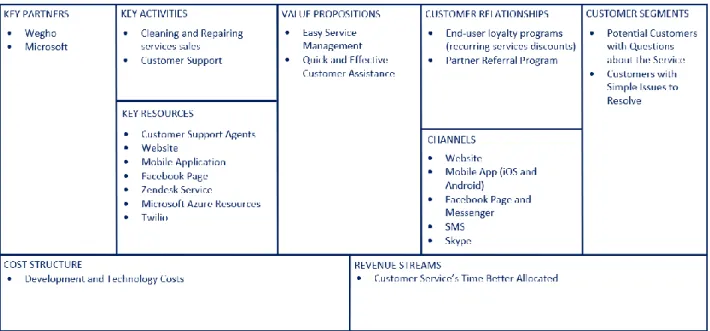
The Business Canvas Model for this project will be explained in this section and can be seen illustrated in Figure 2.
The Key Partners on this project are Wegho, the product owners; B2F, the company who developed both the website and mobile applications; and Microsoft, whose resources will be used to develop the Chatbot.
The Key Activities of the project are Repairing and Cleaning services sales, which will be scheduled with the help of the Chatbot developed on this project, and Customer Support, which will be supported through the help that this solution will provide in answering client’s issues.
The Key Resources the marketplace and the Chatbot will have are the Customer Support Agents, who handle all the issues required and who will work coordinating with the Chatbot, taking care of the issues the Chatbot cannot deal with. This coordination will be present with the creation of tickets on the CRM Zendesk Service, and the Chatbot will be present on multiple channels, being the FB Messenger (and through the Customer Chat Plugin also on the website and the mobile apps). The Twilio platform will also be used to communicate with the service providers through SMS if required. The Chatbot will be developed by using the Microsoft Azure Resources, such as the Bot Framework, QnA Maker and LUIS.
11 As Customer Relationships, the customers will have discounts when using the services that the marketplace has to offer repeatedly, having the price shortened when scheduling on monthly occurring services for example. And every time a user invites another user, both will receive
10€ credit to use when scheduling a new service.
The Customer Segments who will use the Chatbot service will be customers, or potential customers, who have questions about the Wegho Marketplace or who have simple issues to be done, without having the need to use a human Customer Support agent.
The Cost Structure of the project to be developed will be only the costs associated to the development of the project, such as the working hours and the prices of the resources to be used. The Revenue Stream will come from the human agents of the Customer Support having their time better allocated, not having to spend so much time handling simpler and ordinary issues that can be solved by the Chatbot.
13
3
State of the Art
In this section several Chatbot creation tools available for use are studied and all their characteristics are analysed so that a coherent and significant evaluation of the choice of which to use can be made.
3.1
Microsoft
’s Azure
Bot Framework
The Microsoft’s Azure Bot Service provides an integrated environment that is purpose-built for bot development, enabling the building, connecting, testing, deployment and management of intelligent bots, all from one place. Bot Service leverages the Bot Builder SDK with support for .NET and Node.js (Microsoft Azure, 2017 a). It also offers a comprehensive documentation area, full of get started guides, tutorials and samples.
The Bot Service also comes with easy configuration to work on multiple channels, including FB Messenger, Skype, Skype For Business, Microsoft Teams, Slack, Twilio, Kik, Telegram, SMS, Cortana, email, and in a website or app through a webchat component.
During the development it’s possible to test the Chatbot using the Bot Framework Emulator, allowing to chat with it, testing all the coded functionalities, without the need of previous publishing.
The Bot Framework comes with two pricing tiers to be chosen. Both tiers allow for free unlimited messages on so-called standard channels, such as Skype, FB Messenger, Slack, among others. But while the Free tier limits the number of messages to be sent on the Premium Channels, like a Web Chat component, to 10.000 per month, the Premium Tier has no such limit, costing €0.422 per 1.000 messages.
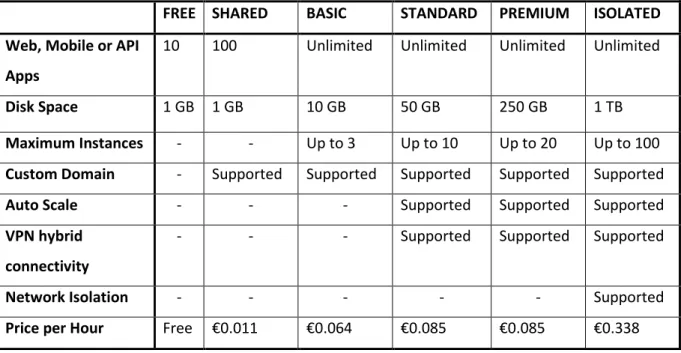
Apart from the service cost, the Chatbot will also be powered by Azure App Services and will have the additional costs for the resources consumed, as described in Table 1.
14
Table 1 - Azure App Service Pricing Details
FREE SHARED BASIC STANDARD PREMIUM ISOLATED
Web, Mobile or API Apps
10 100 Unlimited Unlimited Unlimited Unlimited
Disk Space 1 GB 1 GB 10 GB 50 GB 250 GB 1 TB
Maximum Instances - - Up to 3 Up to 10 Up to 20 Up to 100
Custom Domain - Supported Supported Supported Supported Supported
Auto Scale - - - Supported Supported Supported
VPN hybrid connectivity
- - - Supported Supported Supported
Network Isolation - - - Supported
Price per Hour Free €0.011 €0.064 €0.085 €0.085 €0.338
A benefit of using the Bot Framework is its connectivity to other Azure Services, more specifically the Cognitive Services. These are a set of services that add intelligence to applications and include LUIS (Language Understanding Intelligent Service) and QnA Maker, among others.
3.1.1
LUIS
LUIS is a machine learning-based service, used to build natural language into apps, bots and IoT devices. This works by defining the intents and entities the service will have to comprehend from the user’s sentences. Intents are the goals the user might have by what have through what he says (e.g., create a service, login, etc…) and the entities are valuable information to be gathered from the sentence (e.g., date, address, name, etc…). (Microsoft Azure, 2017 b)
LUIS will be able to identify such intents and entities by being trained to do so. The developer will have to define everything that will be needed to be extracted from the user’s sentences, by
means of giving examples of utterances containing such elements. The service will then use machine learning to train itself with these utterances and, after being published, use active learning to improve identification. In this process LUIS will also provide the developer with real utterances that it is relatively unsure of for review. (Microsoft Azure, 2017 b)
15 After the model is designed, trained and published, it receives utterances through HTTP requests and responds with the extracted user intentions as a JSON object. These responses include a score for each element identified, which represents the percentage of which LUIS is certain that it belongs to the intent or entity required. A representation of this process is shown in Figure 3
The LUIS service, like the Bot Framework, also has two pricing tiers to choose from, the free and basic tiers, as described in Table 2.
Table 2 - LUIS Service Pricing Details
TIER TRANSACTIONS PER SECOND PRICE
Free 5 10,000 transactions free per month
Basic 50 €1.265 per 1,000 transactions
3.1.2
QnA Maker
The QnA Maker is a REST API and web-based service provided by Microsoft that utilizes a trained knowledge base to understand natural language sentences, corresponding them to the context, and that tries to give the respective answer. (Microsoft Azure, 2018 g) The knowledge base can be trained through different sources, either by linking to an existing frequently asked questions page on a website, which then translates to question and answer pairs, by giving a structured file containing the pairs, or by manually providing it individually with each pair.
After the knowledge base is trained, an application can send a POST request to the web-service endpoint, which will then respond with a JSON with the list of all possible answers, sorted by their ranking score. This score is the percentage of which the service is certain that the answer corresponds to the question asked.
16
3.2
Watson Conversation Service
The Watson Conversation Service is IBM’s Chatbot creation service. It combines machine learning, natural language understanding and integrated dialog tools to create conversation flows between applications and users.
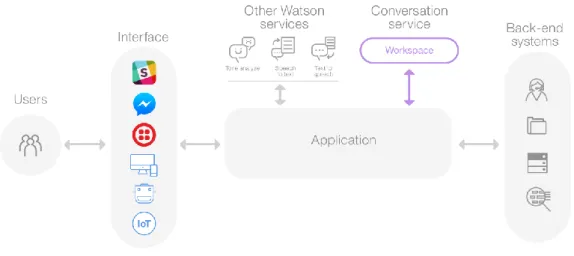
When the service receives user input, it connects to a workspace, a container for the dialog flow and training data. Then it interprets the input, directs the flow of the conversation and gathers the information. Afterwards the application interacts with the developer’s back-end systems, based on the information gathered, and functions as required (IBM, 2018 b).
The training data, just like on Microsoft’s framework, consists of intents and entities and uses sample utterances to be trained. And as training data is added, a natural language classifier is automatically added to the workspace and is trained to understand the types of requests indicated and that the service should listen to and respond to.
The service uses a graphical representation of the dialogs’ flows, giving the developer the option
to add branches to each of the intents to be handled. Each branch can then have nodes that handle the many permutations of a request, based on the entities found or other information passed to the service from the application or another external service.
The application can also use other IBM Watson services such as Tone Analyzer, Speech to Text or Text to Speech to increase the functionalities of the Chatbot. The first understands emotions
from the user’s sentences, and the other two services can convert the utterances said from text to audio, and vice-versa (IBM, 2018 a).
17
Watson’s Conversation Service has two pricing tiers to choose from as to work with, the Lite and Standard, and are as described in Table 3.
Table 3 - Watson Conversation Service Pricing Details
LITE STANDARD
API Calls Up to 10,000 API calls Unlimited API queries/month
Workspaces Up to 5 workspaces Up to 20 workspaces
Intents Up to 100 intents Up to 2000 intents
Entities Up to 25 entities Up to 1000 entities
Cloud - Shared public cloud
Price $0 USD $0.0025 (USD) per API call
3.3
Chatfuel
Chatfuel is a Chatbot development service that focuses on the creation of bots without the need of programming. It uses Artificial Intelligence to recognize phrases sent by a user and replying the defined relevant answer. It also has no cost attached to working with it (Chatfuel, 2018).
18
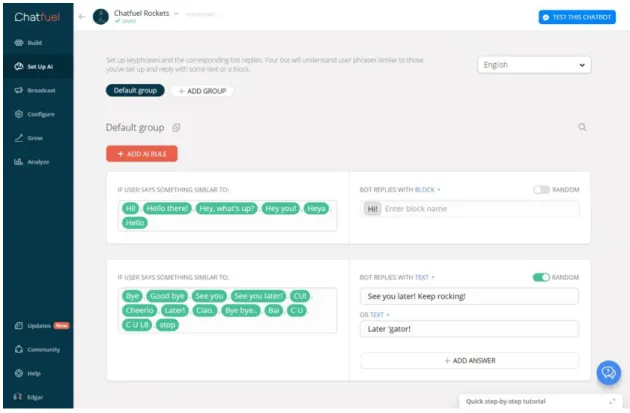
The developer can train the AI by creating “AI Rules”, pairs of multiple possibilities of questions or simple sentences a user may send to the Chatbot, and the appropriate answers to reply with. These replies can be simple text phrases, or previously set up text blocks that can be connected more than one AI Rule. These Rules can also be structured in AI Groups, so as to have a better organization. An example of these rules on the Chatfuel website can be seen in Figure 5.
Every time a user sends the Chatbot a sentence that Chatfuel cannot correspond to an existing rule, it is saved in a section called “User Inputs Not Recognized By AI”, saving also the number of times that specific sentence was asked. The developer can then use the sentences in that section to better train the Chatbot, adding them to the corresponding rule.
Chatfuel uses FB Messenger as its channel of distribution. To create a new Chatbot with this tool, the developer must either associate it with an existing page or create a new one. After being setup, every message that is sent to that page will be directed to the Chatbot.
This tool also has the functionality of broadcasting messages to its users. These are messages, with text only or with more objects such as buttons or an image, that can be sent to all users that have previously talked with the Chatbot. These can be sent immediately or be scheduled
19 to be sent at a specific time or as a sequence, a response to one or more predefined text blocks, sent after a defined set of time.
3.4
Comparison
When comparing the studied tools, what can first be seen is the difference in working with
Azure’s Bot Service and Watson’s Conversation Service or Chatfuel. The first allows for a more
complex development, using programming to define the flows of dialogs, while the other two services prefer a more graphic and user-friendly development. And while Chatfuel is exclusively to be used with the FB Messenger channel, Watson’s service allows for more channels and
Azure’s allows for even more, having the widest range of available services. Also, whereas Chatfuel has no cost to work with it, both the other services have prices, divided in different tiers from which to choose from, being Azure’s the more expensive one, especially because it asks for payment for the main service, plus LUIS cognitive service and for the Azure App Services’
resources consumed. This tools’ comparison can also be seen represented in the Table 4.
Table 4 - Chatbot Creation Tools Comparison Table
Tool License Channels Portuguese
Available Programming Languages Tools Integrated Microsoft Bot Framework Free Basic Skype, FB Messenger, Email, Twilio, Microsoft Teams, Slack, Web Chat
Yes C# SDK Node.js SDK Azure Cognitive Services IBM Watson Conversation Lite Standard
Slack, FB Messenger Yes Node SDK Java SDK Python SDK iOS SDK Unity SDK Watson Services
21
4
Analysis
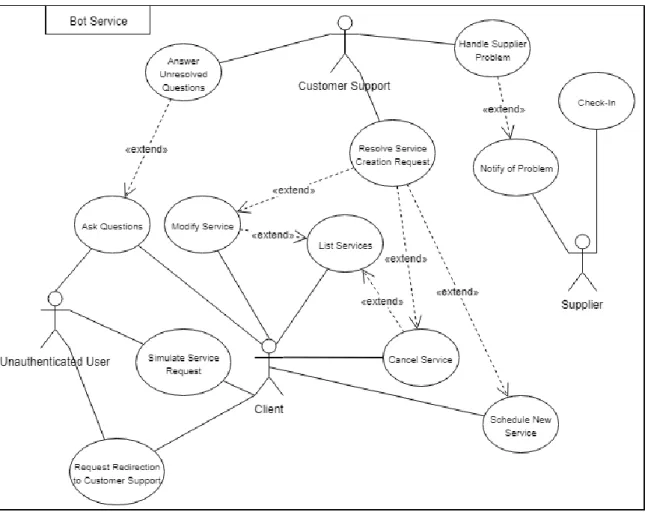
In this section an analysis of the project to be developed will be made to fulfil the objectives defined in Section 1.3. A Use Cases diagram (Figure 6) will be used to illustrate and explain the different types of users that will use the final product, and what actions each will have.
A description of the non-functional requirements that the project will have to fulfil will also be detailed.
22
4.1
Actors
There are four actors who will interact with the solution, the Client, the Unauthenticated User, the Supplier and the Customer Support.
The Unauthenticated User will be able to simulate new service requests, request to be redirected to the Customer Support and ask questions to the Chatbot.
The Client will have the same capabilities of the Unauthenticated User, plus the possibility of managing services, which includes the creation of new ones and the modification of those that already exist, either by making a change request or cancelling it. They will also be able to ask questions to the Chatbot, which if it can’t respond to will ask if they want to be redirected to the Customer Support. The Client can also directly request this at any point during their interaction with the Chatbot.
The Customer Support will receive the service management requests and act accordingly to them. They will also receive the questions that were asked and that the Chatbot was not able to single-handedly respond to.
The Supplier will be notified when he hasn’t checked in on a service after 15 minutes of its scheduled starting time. If he is delayed by any circumstance or has had an issue that has inhibited him to be on the location of the service, he may directly respond to that notification explaining the reason for this.
4.2
Use Case Details
All the use cases will be explained in detail here, describing what will be required of each.
4.2.1
Ask Questions
When a user asks questions to the Chatbot it will have to be able to respond with a concise and correct response. The actors that will be able to do this use case are the Client and the Unauthenticated User.
23
4.2.2
Simulate Service Request
Both the Client and the Unauthenticated User actors will be able to simulate the creation of new services. They will give details for that service and will receive a response from the Chatbot containing whether or not it would be able to schedule and the price it would have.
4.2.3
Schedule New Service
When a user requests the Chatbot to create a new service, this will follow the same procedure of the Simulate Service Request use case, except that at the end it will allow for the saving of the request. This use case will only available to the Client actor.
4.2.4
Request Redirection to Customer Support
A user will be able to request to be redirected to the Customer Support at any time during his use of the Chatbot. This can happen because it wasn’t being able to correspond to its questions
or demands, or if the user explicitly request this. This use case will be available to the Client and Unauthenticated actors.
4.2.5
List Services
Users will have the capability of request to see their previously scheduled services, no matter what platform they used to schedule them. This request can be given by giving a specific date or date span of the services which they want to see, or not, to which the Chatbot will list all the services scheduled for the following year. After listing them the Chatbot will give the user the possibility to do multiple actions to any one service, which includes cancelling or modifying it. This use case will only be available to the Client actor.
4.2.6
Modify Service
Users of the Client actor will also be able to modify their previously scheduled services, either by requesting to do so or after they list them. After asking to do so the Chatbot will ask the user what modification they want to make and will then save the request for further handling by the Customer Support.
24
4.2.7
Cancel Service
Users will also have the ability to request the cancellation of services. Similar to the Modify Service use case, this can be requested explicitly or after the listing of multiple services. After a confirmation from the user the Chatbot will save the request, which will also be handled by the Customer Support afterwards. This use case is also only available to the Client actor.
4.2.8
Answer Unresolved Questions
This use case is available to the Customer Support actor and it involves answering questions that were made by other users to the Chatbot (4.2.1) that it could not give an answer to.
4.2.9
Resolve Service Management Request
The Customer Support actor will also have the capacity to resolve service management requests. These involve the Client actor’s requests to create, modify or cancel a service, to which the user will have to associate that request on the Wegho platform.
4.2.10
Notify of Problem
The Supplier actor will be able to notify of a problem or any situation that impeded him to check-in on time. This notification will be made through a SMS message in response to one that he has received and will be forwarded to the Customer Support as an e-mail.
4.2.11
Check-In
The Supplier will also be able to check-in to a service in case that he received a notification that he missed the check-in deadline due to forgetting to do it.
4.2.12
Handle Supplier Problem
The Customer Support actor will have also the capacity to handle the Supplier actor’s problem notification that’s explained in the Section 4.2.10, talking with the respective service’s client if
25
4.3
Non-functional Requirements
The Chatbot will also have to be able to correspond to various non-functional requirements, which will be described in this section.
4.3.1
Integration with Zendesk
The Chatbot will need to be integrated with Zendesk in order to create customized support tickets to later be handled by the Customer Support.
4.3.2
Integration with Twilio
It will also be necessary for the Chatbot to be integrated with the Twilio platform for the sending and receiving of SMS messages for the Supplier actor’s use cases functioning.
4.3.3
Integration with Wegho Web Services
The Wegho web service will also need to be integrated with the Chatbot for the execution of two main purposes: the authentication of a user, transforming him from an Unauthenticated User actor to a Client one; and for the validation of service details when simulating or creating one. This will include verifying every detail that the user gives to see if they are within the parameters set in the Wegho back-office.
4.3.4
Communicate with LUIS
The Chatbot will need to communicate with the LUIS service for the capability of understanding the natural language used by all users and catching their intents.
4.3.5
Communicate with QnA Maker
The Chatbot will also need to communicate with the QnA Maker service in order to search its knowledge base for the answer of a potential user question.
26
4.3.6
Notify Supplier
This project’s end product will have to be able to know when a supplier doesn’t check-in to a service 15 minutes after it was scheduled to begin, having then to notify the supplier of such event.
4.3.7
Redirect Supplier’s notification’s answer
to Customer Support
Lastly the end product will have to be able to catch a Supplier’s notification SMS answer and
27
5
Design
In this section the Design of the project will be explained. First all the technologies used are enunciated, following with a representation of the classes constructed for the final product. The workflows designed for the execution of the use cases listed in Section 4.2 are also illustrated in this Section. Lastly, the architecture of the whole project can be seen designed and explained, including its representation through the use of a Components Diagram.
5.1
Technologies
The solution designed with the Microsoft Bot Framework was developed in a Visual Studio Project. It was constructed using the C# language and the Bot Builder SDK for .NET framework. This framework works with the Azure Bot Service to design and build the dialogs that make the Chatbot, using Language Understanding Intelligent Service (LUIS) and QnA Maker to understand the user’s utterances and their intents.
5.1.1
LUIS
LUIS is a machine learning-based service to build natural language understanding into apps. It is designed to identify valuable information in conversations, interpreting user goals (Intents) and distilling valuable information from sentences (Entities). It uses reinforcement learning to continuously improve the quality of the natural language processing model. Once the model starts processing input, LUIS begins active learning, allowing whomever is managing the service to constantly update and improve it (Microsoft Azure, 2018 f).
When the model is ready and published the Chatbot can use it as a REST API, sending the user’s
utterances in JSON format and receiving in exchange another JSON which contains the Intent found to be the most appropriate and the Entities recognized, if any.
5.1.2
QnA Maker
QnA Maker is a web-based service that takes a knowledge base consisting of a set of question
28
knowledge base can be extracted from an existing webpage or document, like for example a FAQ page on a website, or it can be built manually by adding all the questions and answers the API is supposed to be able to respond to. It can also be improved by adding more examples of how a question might be asked, so it is trained for more complex user queries. The more different examples of how to make a question, the better prepared it will be.
5.1.3
Azure Functions
A C# function was also developed using Azure Functions, to work as a proxy between the FB Messenger and the Chatbot. This function works as an HTTP-based API endpoint that is called every time a new message event should be sent to the Chatbot from the Messenger, getting, in the middle of the two so as to handle thread control issues.
5.1.4
Zendesk
Zendesk is a Customer Relationship Manager platform that works with the creation of support tickets and the handling of these by the Customer Support of the companies that use it. Using its API and the already existing usage of it by the Wegho company, the Chatbot creates tickets to notify the Customer Support that an action needs to be done by a human agent. This can be the finishing of a specific workflow or the help requested, due to lack of understanding or capability from the Chatbot.
5.1.5
Twilio
Twilio is a communication platform that, through an API, allows its users to send SMS messages to regular telephone numbers. The Chatbot uses this platform to implement the authentication of its users to their Wegho accounts, through the sending of a message with a randomly created token in order to verify the user’s authenticity.
5.1.6
Azure Logic Apps
Azure Logic Apps is a cloud service that allows the creation of orchestrated and automated tasks, using multiple connectors such as HTTP, SQL, Twilio among many others. These can be triggered through these connectors, for example by receiving a HTTP POST request, or through scheduling. This service was used in two circumstances: to handle the verification of suppliers not checking
29 into services, and to save test issues in a database. These circumstances are explained in more detail in the Design Workflows (5.2.1) and Evaluation Methodology (7.3.2) sections respectively.
5.2
Class Diagrams
The class diagram of the Bot Builder solution can be seen in the Annexes in Section 10.1 in Figure 24. In it we can see all the classes created for this project. For this dissertation that class diagram was separated into two, one containing the main classes of the Bot Builder workflow. The other diagram includes all classes that the main ones will communicate with.
5.2.1
Main Classes
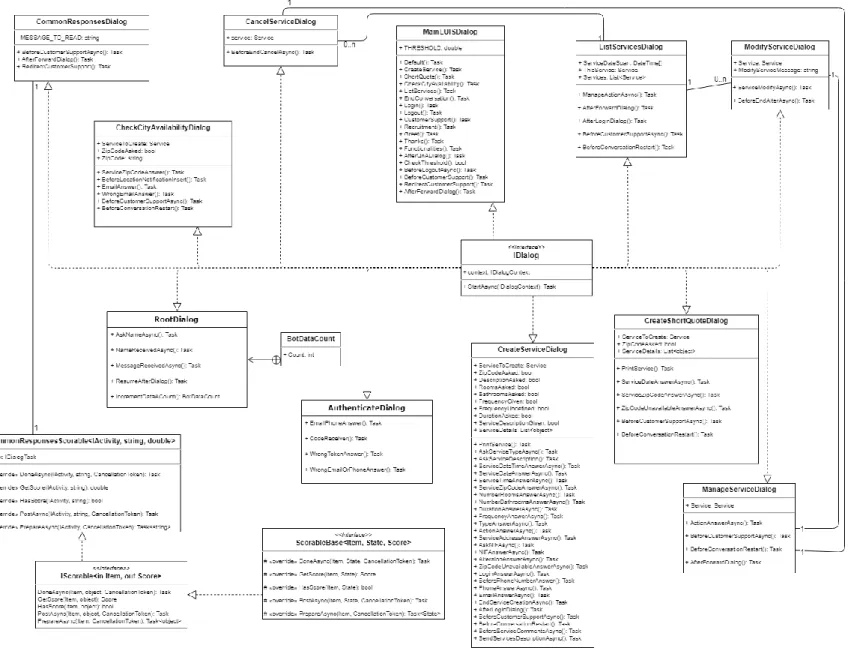
The main classes that regulate the workflow of the Chatbot are the Dialogs, which implement the IDialog interface. The first time a user interacts with the Chatbot, it will enter an instance of the RootDialog class, which will get the name of the user and introduce itself and its functionalities. Afterwards it will call the MainLUISDialog which will wait for a response from the LUIS API to know what the Intent of the user is so as to act accordingly. From this point on, the Chatbot, if a known Intent was found, will be redirected to the other Dialog classes, which are the following:
• CreateServiceDialog – Workflow to create a new service;
• CreateShortDialog – Workflow to get the minimum price of a service for a specific date and location;
• AuthenticateDialog – Workflow to authenticate the user to its Wegho account;
• ListServicesDialog –Workflow to list the user’s already scheduled services and act on
them if required;
• ManageServiceDialog – Workflow to manage a specific existing service, allowing the choice to cancel, modify or do nothing to it;
• CancelDialog – Workflow to cancel a previously existing service if requested and confirmed;
• ModifyServiceDialog – Workflow to ask the user the modifications requested for a specific existing service;
• CheckCityAvailability – Workflow that will check the user’s given Zip Code to see if it’s
30
A representation of these classes can be seen in Figure 7.
31
5.2.2
Other Classes
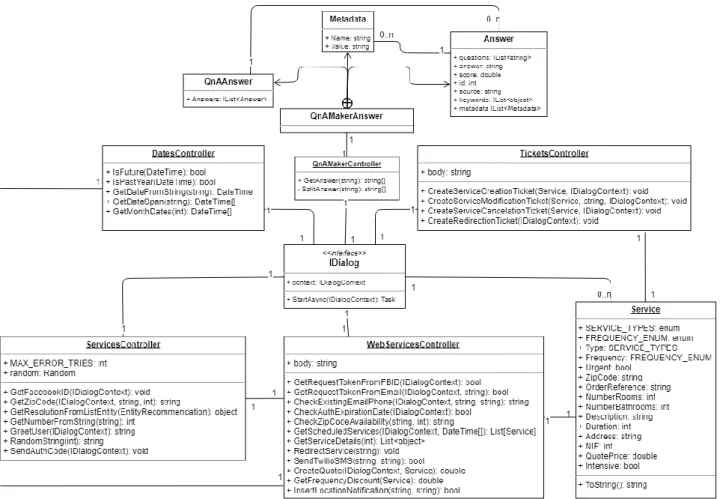
The Dialog classes are complemented by two other types of classes. The first are the models, Service and QnAMakerAnswer. The Service is an object that is instantiated every time that a user requests to either schedule a new service or to view an existing one. The QnAMakerAnswer nests multiple classes: the QnAAnswer, the Metadata and the Answer. The QnAAnswer’s only attribute is a list of Answer objects which, in each turn, will have a list of Metadata objects, besides other attributes. This class is instantiated any time that the Chatbot has to communicate with the QnA Maker API, being thus connected with most of the Dialogs.
The other class type is the Controller, which is all static classes where methods used multiple times inside other Controller classes and Dialog Classes are defined. These are represented in the class diagram in Figure 8 and are the following:
• DatesController – In this class all methods that interpret date values are defined, the main one being understanding DateTime values from various formats in sentences; • QnAMakerController – This class is called any time a request to the QnA Maker API
needs to be made. From that request it receives a JSON that is then deserialized into a QnAAnswer object, which contains all the answers found by the web service and returns the one chosen as the most appropriate;
• TicketsController – This class is where all the calls to the Zendesk API are made to create the different types of Tickets that may be required;
• WebServicesController – In this class, all the methods that call the Web Services described in Section 6.4.3 are implemented, in order to validate service details. It also includes the method called when a user requests to be redirected to the Customer Support and the method that sends a message to a given phone number through Twilio; ServicesController – In this class are all the other methods required for the logic of the
Chatbot. This includes the retrieval of the user’s Facebook name with the use of a
request to the Graph API (Facebook, 2018 a), retrieving an integer from a user given sentence, and generating a random code to be sent to the user for authentication.
32
5.3
Design Workflows
From the Use Cases defined in the Analysis (Section 0), five main workflows were designed. User authentication, question and answer, service management, service creation, and also supplier’s fail to check-in.
33
5.3.1
User Questions
As can be seen in activity diagram (Figure 9), every time a user asks the Chatbot a question, this will try and see if in the knowledge base of the QnA Maker service there is a question and respective answer that could be the solution to the user request. If one is found, it is returned to the user, after which he can decide to ask another question or not. If no solution is found in the knowledge base, then the Chatbot will notify the user of this. If this situation is repeated too many times, with its limit defined in the code of the Chatbot and with the possibility to be altered to a bigger or smaller number, the user will be asked if he wants to be redirected to a human Customer Support agent. If he chooses to do so, a Zendesk ticket will be created to notify the support of what has happened, and after which an agent can enter the conversation and talk with the user to satisfy his requests.
34
5.3.2
User Authentication
A user will enter the authentication workflow (Figure 10) any time he either requests to do so or is required because it is part of another workflow. When this happens, the Chatbot will ask the user to provide the e-mail address or telephone number that is associated with his Wegho account. If an account is found, the Chatbot will then use the Twilio service to send a message to the telephone number registered to it with a token to be returned by the user. If the user takes too much time to respond with the token, or gives an incorrect one, the Chatbot will ask if he wants to try again with a new token. If the user responds with the correct token, he will be authenticated and will have access to his scheduled services.
35
5.3.3
Service Creation
When a user asks to create a new service the Chatbot will enter the respective workflow to correspond to this request, as can be seen in Figure 11. After analysing the request to retrieve all the information already provided by the user, the Chatbot will, if needed, ask the user for the remaining details. When all the details are received, the user will be shown a list of all the information passed including the quote price calculated, if possible, and will be asked to undertake an action. He will be able to alter any detail, cancel the request or confirm it. If he chooses to confirm it the Chatbot will then enter the authentication workflow previously explained in Section 5.3.2. After the success of this a Zendesk ticket will be created containing all the information of the service produced for the Customer Support to manage. At the same time the user will be notified by the Chatbot that his request was saved and will soon be handled, and that he will receive an e-mail confirmation after it.
The different types of services that the Chatbot will be prepared to offer are domestic and office
cleaning services, all others being relegated to a simple “other” type, with a description field for the user to indicate what he may want. This was decided since all service types have different complexities to them and adding them all would exponentially increase the complexity and difficulty of the development. Thus, these two different types were selected since these are the most requested by customers.
36
37
5.3.4
Service Management
The next workflow is for when a user requests the Chatbot to modify, cancel or simply list the services that he has already scheduled. When this occurs, the Chatbot will first go into the authentication workflow described in section 5.3.2. After this the user will be shown a preview containing only the service type and date, restricting them to those in the date or date span requested, or in the following year if no such constraint was given. From these the user will be able to choose to take an action on any specific service, either to see more information about it, to cancel or modify it. After he chooses to see more information he will again be given the same choices of cancelling or modifying it, or to exit the workflow. If he chooses to cancel it, and confirms this request, a Zendesk ticket will be created for the Customer Support to do so, containing the identifying details of the service. If the user chooses to modify, it he will be asked to detail what he wants to have changed, so that the Chatbot can create a new Zendesk ticket with these details, or the Customer Support to properly handle. This workflow can be seen represented in Figure 12.
38
39
5.3.5
Supplier Check-In Verification
Every time a service supplier arrives at the location of a service he is supposed to check-in in the platform, so that the status of the service in the Wegho database is updated. If this doesn’t
happen, either when the supplier forgets to do so, or if he is delayed, 15 minutes after the service is supposed to happen, he will receive a SMS message notifying him.
This happens by having a Logic App running on a recurrence trigger, every 15 minutes. When it runs it executes a SQL query checking the status of every service scheduled between 15 and 29 minutes before the time of the trigger, acting on every instance whose status is not checked-in. When an instance like this is found the logic app will use a Twilio connector to send a SMS to the supplier, telling him that he is late in checking in. The logic app will only act on the services between these periods of time so that no supplier is spammed with multiple messages, receiving only one.
After a Supplier receives the message he is supposed to check-in, when the problem was that he forgot to do so when he arrived at the location of the service, or if he deems it necessary to respond to it, giving an explanation, for example saying that he will arrive even later than was expected and why. This answer will then be directed to the Customer Support as an e-mail that will act accordingly to it, notifying the Client if they decide that that is warranted to be done.
40
5.4
Design Alternatives
5.4.1
Use of Web Services instead of Zendesk Support Tickets
One alternative to the resolution of the cancelling and the creating of services workflows was to automatically solve them using webservices, instead of finishing them with the creation of a Zendesk ticket. Thus, when a user requested to cancel a service, at the end of the workflow the Chatbot would call a webservice that would set the service status in the Wegho database as cancelled. And when a user finished a new service request the Chatbot would call a webservice that would create it in the database. Immediately after this, the user would be able to check these changes in effect by asking the Chatbot to see the services, or to check them in the Wegho platforms.
41 This alternative was discarded due to the structure of the already existing back office of the Wegho platform. All the actions that were supposed to happen directly are currently connected to user sessions on the website and mobile apps, as to implement this system on the Chatbot would require a reformulation of how everything is currently working, including the authentication system. Consequently, it was decided that a simpler approach would be constructed for the Chatbot, creating the support tickets to be manually handled by the Customer Support agents.
5.4.2
Supplier Check-In
An alternative to the solution of the Supplier late check-in was to have the Chatbot directly send a notification to him, giving him the option to either check-in, inform of the estimated time of arrival to the location of the scheduled service, or ask to talk directly to the Client. This was to be handled through SMS messages, using the Twilio channel of the Bot Service. Eventually this solution was discarded because every message sent would have a price associated with it and having dialogs between the Supplier and the Chatbot on that channel would end up having too big of a cost for the simplicity and use of it. It would also be complex to implement with the Chatbot on how to automatically start, due to its nature of responding to User’s requests, never starting preemptively.
Therefore, the use of a Logic App was decided to be the better solution due to its simple construction and because it would then be simpler to orchestrate when this workflow would happen using a Recurrence trigger and the execution of a SQL query. Also, through the sending of a single message to the Supplier, it was shown that it decreases the ultimate cost of this workflow.
5.4.3
Facebook Messenger as Exclusive Channel
The FB Messenger was chosen as the only channel on which the Chatbot would be currently available in contrast to what was defined on the objectives. This was decided because the platform has some advantages when using it exclusively. Firstly, it allows for its supervision to be made in a simpler way, having the Customer Support being able to see every conversation in real time on the Wegho’s Facebook page.
42
It was also decided because Messenger already has a protocol to change thread control of the conversation between different apps, the Handover Protocol (Facebook, 2018 b). With this protocol the control of the conversation can be passed between the Chatbot and the Customer Support (in the Inbox Messenger app) in a simple and efficient way. This passage of control can be made by having a HTTP web request made with the logic code of the Chatbot, or by having the Customer Support manually doing it on the Facebook page.
Finally, with the existence of the FB Customer Chat Plugin (Facebook, 2018 f) it was easy to integrate the Chatbot in the website by including the Facebook Javascript SDK in the page where the plugin will be rendered.
The Chatbot could also be available on other channels like Skype, Twilio, MS Teams, among others. Nevertheless, having these would increase the complexity of the future management of conversations, as with for example Twilio, that would add a cost to every message that would be sent and received.
5.5
Architecture
This project contains two main solutions: the Wegho Bot, the Chatbot itself, and the Bot State Entities. These are the state of each conversation a user will have with the Chatbot, saving every information required in a database in a SQL Server. The Bot Framework also communicates with the two Cognitive Services utilized, LUIS and QnA Maker. All these previously mentioned components of the project are part of the same azure services resource group.
Out of this group, the Chatbot will communicate with the Zendesk software as the way for the customer support to manage every issue that the Chatbot will have to redirect.
The Chatbot will be available on FB Messenger and using Customer Chat Plugin, a Webchat component will also be available on the website.
43 This architecture was designed and transformed into a Components Diagram, which shows all the different parts of the solution and how they are integrated between each other (Figure 14).