Rohit P. Soni
Dept Of Info Technology, Smt. Kashibai Navle College Of
Engineering, Vadgaon Bk, Pune-41
Sfurti S. Dapake
Dept Of Info Technology, Smt. Kashibai Navle College Of
Engineering, Vadgaon Bk, Pune-41
Shreyas V. Sonawane
Dept Of Info Technology, Smt. Kashibai Navle College Of
Engineering, Vadgaon Bk, Pune-41
Vatsal N. Pawar
Dept Of Info Technology, Smt. Kashibai Navle College Of
Engineering, Vadgaon Bk, Pune-41
ABSTRACT
In this paper we discuss suitability of using a java UI designer, for overcoming the java User Interface Designing Problem. The current available softwares for Java UI design are complex in nature. Moreover these softwares are also heavy in nature viz. they consume a lot of system resources and thereby run slower. Java UI Designer is an environment where one can use any component available in java and can easily put it on to a frame by simple drag-n-drop. Java UI Designer is developed purely in swings or rather you can say that it is as light weight as swings. It is beneficial for rapid application development viz. the applications which are to be developed in java save time in UI making. In this paper, we discuss about the Java UI Designer application, which provides us with database connectivity, visual assistance and templates which boost up java application development process.
General Terms
Java, Swings
Keywords
Swings, Position Detection, Java UI designer, JDBC.
INTRODUCTION
Today convergence rules the IT industry and computer users are very creative in making use of powerful applications to affect almost every aspect of life. The concept of context awareness originally stems from the research of human-computer interaction (HCI). One of the objectives in HCI research is to design computer interfaces that reduce user intervention while providing more relevant functions/services to the user. Obviously, a fixed set of context notions has very limited success in learning the java language and computer user’s intention under various scenarios
.
In this dissertation, the java and computer use is examined and studied focusing on the user-centered approach. This approach is attempt at exploiting the information environment to suit specific user needs. Context awareness therefore can be viewed as a facilitator for java users who seek to reduce human interaction and improved UI making process. [1] The main reason to discuss in this paper is about a system which reduces the manual work and silly mistakes done while
doing UI using java language. [1]
Now a day’s java is very popular language and because of its certain unique features it gets used widely. Also x-applet also known as swing provides very powerful sets which can provide better functionalities in java application.
Traditionally java developers while designing UI, first visualize the position of component by giving its location in pixels and then check it by executing it. So this becomes very time consuming and work is needed to be done by trial and error method.
This paper investigates and reports the experience of developing the projects based on Java to java application developers in industry.
1.
JAVA UI DESIGNER
Unlike application development environments like Visual Basic, .NET, the java UI designer comes along with components and working area where components are to be placed. While placing the components, their tracking positions, properties, sizes and events are maintained.
Moreover the use of swings provides us with powerful features such as light weightiness, platform compatibility and small size [2].
Hence java designer is completely built on swings. Following are some of the features of swing and java that we have used.
File chooser: We can save our file anywhere in directory no need to compulsorily save it in bin directory of java while executing. By setting class path to bin directory from java designer we can directly compile and execute the code (User Interface) from java designer [3].
Glass Pane: It’s a special container in swings, which acts like a glass [4]. Glass pane enables user to place component on container with repositioning facility, handles mouse events and detects current mouse position. So it’s easier to place and reposition components on panel.
JDBC: To do database related applications JDBC allows us to get connected to database of various types [5].
Mouse Listeners: To handle mouse events as well as to keep track of current position of cursor, and location of any component, here we need mouse listeners [6].
Keyboard Listeners: To update properties of any component, we need to give input via keyboard, so here
we need keyboard listeners [6].
1.1
Working of Java UI Designer
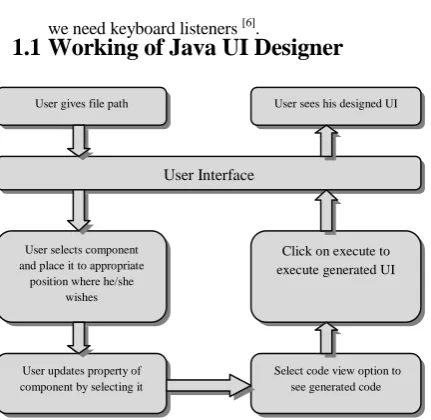
Following diagram gives us brief working of java UI designer.
Fig. 1: Working of Java Designer
As shown in above fig., we get a brief idea about how java designer works.
First user gives file path in directory where user wishes to save his file. After the creation of file, user can generate UI as per his wish or can select from template provided in java designer. After this step, user can update properties of components if he wishes. So all this tasks are done by user.
Now in next phase, user can compile code by code view button also he can see generated code as well. Next to execute the file from given directory, he can click execute button and can execute code. Now user can see his UI after execution. All of these tasks are done by the Java UI designer.
1.2
Important features of Java UI Designer
An important advantage of java UI designer is that, a user who doesn’t know much about java can easily generate java UI. This not only reduces time but also reduces the cost of application which gets raised by UI development in java. Java Designer strictly uses swing set so can give all properties of swings. Few important features are listed below:-
Designing of interface like VB.
Visual assist.
Template, which boosts up speed of UI development.
JDBC direct connectivity.
Generation of code in well parenthesis format which is readable.
Execution of code from any path into the directory i.e user does not need to set class path.
Platform independent.
Easily used by naïve users.
Completely error free.
Lightweight.
More secure as file do not get corrupted by viruses or any external entity.
Very low utilization of system files.
Fast performance.
Easily upgradable.
Event to any components gets easily added and can be
coded easily too.
Quick Updating properties of any component by just selecting it.
2.
Previous work done on Java IDE
Now as java is purely object oriented platform independent language, many programmers wish to develop an application in java.
So to boost up speed, various java environments are developed we called them as Java IDE [7].
Some of them are listed below
Eclipse IDE: It’s a open source java IDE which provides all libraries of java and applet [7][13].
Net beans: It’s a java IDE having built in templates for applets and swings but is quite heavy on system [14].
JCreater: A powerful kit to develop an application and can open any java file without having workspace.
It should be noted that Java UI Designer is not an IDE for java. It’s a designer of User Interface in java which helps other IDE to develop UI rapidly.
2.1
Difference in existing system and Java
UI Designer
Table 1. Difference between Existing System and Java UI Designer
Parameter Existing System Java UI
Designer
Automation Less Full
Human interaction High Moderate
Security Low High
Usability Less High
Platform dependency
Full Independent
Possibility of errors
Less No
Use of libraries Complete Java Swings JBDC connectivity Little Difficult Easy Support for
Execution of non GUI i.e. command line programs
Yes No
2.2
Use of Java UI Designer for Students
Until now we discussed the use of Java UI Designer by Java developers, but Java Designer can also be used by Students for their academic purpose. Students can use this application for completing their assignments.
Viz. students can complete their mini projects, assignments, Home works as early as possible. So that syllabus can get covered easily and student can gain more knowledge from faculty in same time.
Moreover the ease of use of java UI designer will also increase the interest levels of the students. Thus students will easily get User gives file path User sees his designed UI
User Interface
User updates property of component by selecting it User selects component and place it to appropriate
position where he/she wishes
Click on execute to execute generated UI
acquainted with java and also try out different things.
Student will be able to use the java UI designer for their mini projects and complete their projects in time.
3.
JAVA UI DESIGNER IN ACTION
Let us have a look at java UI designer and its working with detailed description so that it will get easier to know more about Java UI Designer.
Fig. 2 Java UI Designer
As shown in the fig, the designer screen is divided into 7 different parts listed below:-
1. Options Bar 2. Component Pane 3. Property Bar 4. Working Area 5. JDBC
6. Templates 7. Add Listeners
3.1 Options bar:
Fig. 3 Options bar
Now let us discuss each part in detail:
The options bar consists of Menu items which help in Choosing file path, editing tools, etc. And the buttons provided give some extra features
Execute Code: It directly executes code. But before executing code we must compile the code, otherwise it will not get executed.
Compile Code: It compiles the designed UI, generates java code of the respective UI and generates its class file in the given directory. It shows java code in well parenthesized format so that it can be easily read.
Delete Component: It deletes unwanted components from UI which is designed by user. The code of the deleted components is automatically removed from the final code.
New Project: If user wishes to have new project in
another work space he can directly go for this button and can start new project in new work area.
3.2 Component Pane:
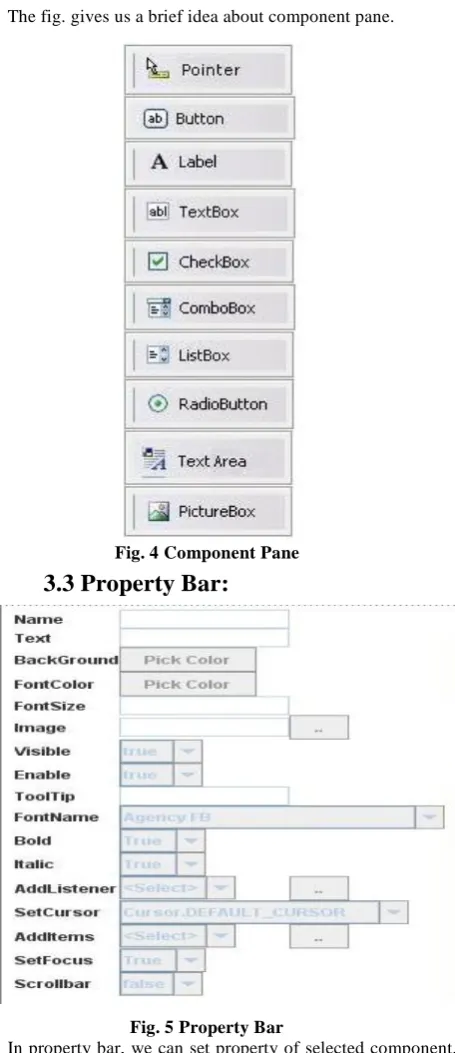
In Component pane we can see the component available with java. So user just needs to select component and drag it on working area at appropriate location.
The fig. gives us a brief idea about component pane.
Fig. 4 Component Pane
3.3 Property Bar:
Fig. 5 Property Bar
In property bar, we can set property of selected component. The property bar has special facility that it only enables the property of related component.
E.g. button does not require Scrollbar property so this property is disabled when “button” is selected.
In java the user is bound to get confused with different Options Bar
Component Pane
Property Bar
Working Area
Execute code Delete component
properties of different components. Thus property bar helps us in avoiding such confusions.
3.4 Working Area:
In this area the actual UI designing is done. In the working area we just need to select a component from component pane and drag it to work area. By selecting the dragged component, we can change its properties from property bar and can immediately see the changes made to the component.
Here working area is completely made up of container pane and glass pane. Container pane allows us to put our components on frame, at the same time glass pane allows to handle mouse events and listeners. So with glass pane we can drag component and can place to anywhere on work area. So it automatically keeps track of component, its location and its dimension. When we drag our component on container pane, the component actually gets placed on glass pane. And it is only during the code generation phase that the component is placed on container pane.
3.5 JDBC:
Java UI designer allows us to connect to several multiple databases in an application. User just needs to provide database type and database path if necessary (in case of access). Code for the database connectivity is automatically generated on the background side.
In java while creating type1 driver for a database it is required to give DSN (Data Source Name) [5][6]. In this system there is no need to give the DSN all the tasks are handled by the system itself [8]. Thus manual work is reduced and silly mistakes are avoided.
A same connection string can be used to access different databases. Thus space complexity is reduced [9].
Only the components which can be bound with the database (list box, combo box etc.) are accessible while creating a connection string. Other components are hidden from the user.
3.6 Templates:
Fig. 6 Templates
Above figure show us the basic login form template Most of the daily use software and websites have a standardized set of forms [10][11]. Thus we have included these types of forms in the Java U.I Designer. We have provided provisions so that changes to the templates can be easily made by the user according to his or her needs.
The readymade templates further boost up the development process.
3.7 Add Listeners:
Listeners are nothing but java interfaces supporting object orientation facility [7]. Listeners and events are widely used in the development phase of java [12].
Without listeners it is not possible to develop even a single application [6]. So we have developed our system in such a way that listeners can be easily assigned to the components. Listeners can be added easily to the component by just clicking on the desired component.
By using our system the user only needs to code for the particular component he intends to use, there is no need to keep a track of all the components while coding.
4.
EVALUATIONS AND PROBLEMS
IN JAVA UI DESIGNER
Because of the difficulty in designing a UI in Java, it is not used in rapid application development (RAD), Java UI designer helps us to design UI in java and also helps in RAD. Thus we can add all events, JDBC (all 4 driver types), automatic database query generation [5][9].
But in Java UI Designer we can’t do java programming i.e. non GUI based programs as Java UI Designer is not an java IDE.
5.
ACKNOWLEDGEMENTS
We would like to sincerely acknowledge the efforts of Shailaja N. Uke and Swapnil D. Patil for their contribution in execution of the project, implementing such ideas and trading up vision in IT culture which helps all IT industry.
6.
CONCLUSION
The process of making UI quickly and friendly in java swing becomes easier in java UI designer. The code is generated in well parenthesized format, which is easy to understand and easy to code in future.
In java designer, the java swing components are placed on frame. The frame uses normal java compiler rather than applet. In the applet viewer we need to give parameters in HTML tag which is quite a complicated task.
Also in java designer we are able to store code where we wish and also can the execute code from there itself. This feature is not provided by other tools. There is no need for a copy of java file in bin directory of java for execution.
7.
REFERENCES
[1] Problem with java Swing
http://www.daniweb.com/softwaredevelopment/java/thre ads/37939
[2] Using swing other features
http://docs.oracle.com/javase/tutorial/uiswing/misc/ [3] JFileChooser- How to use it
http://docs.oracle.com/javase/1.4.2/docs/api/javax/swing/ JFileChooser.html
[4] Use of glass pane
http://www.java2s.com/Code/Java/SwingJFC/Demonstra teuseofGlassPane.htm
http://www.oracle.com/technetwork/java/javase/jdbc/ind ex.html
[6] Steven Holzner et al., Java 2 (JDK 5 edition) Programming black book, Dreamtech press and Paragraph press.
[7] Cay S. Horstmann, Gary Cornell, Core Java 2 Volume-II Advance features, The sun microsystem Press.
[8] In depth java and SQL
questionswww.coderanch.com/JavaForums/Java/JDBC.h tm
[9] JDBC
Articlewww.service-architecture.com/database/articles/jdbc.html
[10] Generics: Java
docs.oracle.com/javase/tutorial/java/generics/index.html [11] Java Generics tutorial
tutorials.jenkov.com/java-generics/index.html
[12] Writing Event and
Listenersdocs.oracle.com/javase/tutorial/uiswing/events/i ndex.html
[13] Eclipse