229
LAN Based Intrusion Detection And Alerts
Vivek Malik, Mohit Jhawar, Harleen, Akshay Khanijau, Nakul Chawla
Abstract : With the ever increasing size and number of networks around the world, the network traffic increases even more. The pace at which such an increase is observed, gives a rise to the need of Intrusion Detection exponentially. Under such circumstances, data is vulnerable to its maximum capacity. Intrusion Detection is required to safeguard the public servers from unauthorized access. Filtering of unauthorized access attempts whilst maintaining low latency in order not to interfere and compromise network capacity and bandwidth has become a cause of major concern. Implementation of Intrusion Detection system thus comes into play. It segregates the traffic from authenticated clients and attackers or intruders, while simultaneously ceding the issues of latency, security, bandwidth and throughput of the network. The ever increasing types of computer attacks are getting more and more difficult to identify. Hence the use of honeypots may provide an effective and reliable solution to Intrusion Detection and Alert mechanisms.
Index Terms: Honeypots, Honeypot Intrusion Detection System, Honeyd, Intrusion Detection System, Nmap, Port Scanning, System generated e-mail alert
————————————————————
1
I
NTRODUCTIONAny unauthorized access or infiltration is called Intrusion[1]. Intrusion Detection is a methodology that provides a mechanism to identify and locate any unauthorized requests that attempt to penetrate through a computer system, be it for misusing it or just for eavesdropping. With the increasing size of networks around the world, the computer systems are at an exponential risk of being compromised. Also the size of networks provides an easy way for the hackers to cover up their traces. An Intrusion Detection System (IDS) in this case comes into play. It is a system that sits on a network and quietly monitors the activity of users and alerts the administrator when a suspicious attack is uncovered or traced. An IDS, is tool for network securities that detects vulnerability exploits of an application or a system, provides logs for knowledge discovery for future development and maintenance to prevent the attacks from taking place again. An Intrusion Prevention System (IPS) is an extended functionality of IDS that detects the attacks as well as prevents the attacker from gaining access to a system.
2
I
NTRUSIOND
ETECTIONS
YSTEMS2.1 About IDS
An IDS, is tool for network securities that detects vulnerability exploits of an application or a system, provides logs for knowledge discovery for future development and maintenance to prevent the attacks from taking place again. An Intrusion Prevention System (IPS) is an extended functionality of IDS that detects the attacks as well as prevents the attacker from gaining access to a system [2]. The sole purpose of the IDS system is the detection of an intrusion. It is not actively placed in the network infrastructure and thus, is not a real time communication medium between the sender and the receiver. The IDS quietly listens and monitors to the passing traffic through the network. It reports its results to the system administrator, but is incapable of preventing any detected exploit. Attackers can exploit vulnerabilities very quickly once they gain access to the network, rendering the IDS an inadequate for prevention.
2.2 Detection Mechanisms
Signature-based detection: In signature based detection, comparison is made between the signature or pattern and previous events to discover current threats. This technique can be used for finding already known threats but cannot find unknown threats, variations of threats or hidden threats. In this methodology, packets coming from a source are monitored by the system and are compared from a database of signatures and known threats. This is same as detection of malware by any antivirus software. The problem which persists is that there is a lag between a new threat being discovered and the signature being applied to detect the threat during which, the IDS will be unable to detect any new threats. [3]
Anomaly-based detection: A comparison of definition or traits of normal actions with abnormal events. This detection mechanism monitors network traffic and compares it against a well-defined and established baseline. The baseline defines a standard of characterizing an event as being “normal” or “abnormal” for a particular network. The normal events generally adhere to network characteristics like protocols used, bandwidth, communication channels and ports. Whereas the abnormal events are generally flout ______________________________
Vivek Malik is currently pursuing bachelors degree program in information technology engineering from Guru Tegh Bahadur Institute of Technology (GGSIPU), India, PH-9911164343. E-mail: [email protected] Mohit Jhawar is currently pursuing masters degree
program in electric power engineering from Guru Tegh Bahadur Institute of Technology (GGSIPU), India, PH-9999946975. E-mail: [email protected]
Harleen is currently pursuing masters degree program in information technology engineering from Guru Tegh Bahadur Institute of Technology (GGSIPU), India
Akshay Khanijau is currently pursuing bachelors degree program in information technology engineering from Guru Tegh Bahadur Institute of Technology (GGSIPU), India, PH-8860995153. E-mail: [email protected] Nakul Chawla is currently pursuing bachelors degree
the network rules. The administrator is alerted as and when such an event, which is anomalous and abnormal to the network or significantly different, than the baseline. [3]
2.3 Types of IDS
Network Intrusion Detection System: The analysis of entire subnet is performed for passing traffic. It works in a promiscuous mode, and a match is performed on the passing traffic with the library of commonly known attacks for identification, and alerting the administrator upon detection of any anomaly. An illustration of NIDS would be setting it up on a network or a subnet alongside the network firewalls to monitor any kind of attack activity or malicious penetration attempts to the firewall. [2]
Host Based Intrusion Detection System: In this type of IDS a snapshot of the system is taken and matched to a previous snapshot. Modification or deletion of any critical system file is alerted to the system administrator, and it starts forensics and investigation of the damages incurred. A common example of HIDS is seen on machines where configurations are not changed or as a matter of fact remain nearly constant. [2] Host based IDS consists of software or AGENT components, which exist on a Server, Router, Switch or Network appliance. The agent versions must report to a console or can be run together on the same Host, though it is not a preferred method. [4]
Network Node Intrusion Detection System: The Network Node IDS performs the analysis of the traffic that is passed from the network to a specific host. The difference between NIDS and NNIDS is that the traffic is monitored on the single host only and not for the entire subnet. The example of the NNIDS would be, installing it on a VPN device, to examine the traffic once it was decrypted. This way it can be identified if a person is trying to break into your VPN device [5]
Honeypot Intrusion Detection System: They are categorized under the “Bait” and “Trap” methodology. In the Honeypot based IDS, different types of operating systems, multiple operating systems, dedicated “services” (File Transfer Protocol (FTP), Hyper Text Transfer Protocol (HTTP), etc.) can be emulated and most importantly, the „finger print” of an intruder can be tracked. Through this the source or origin of the attack can be found. There are inherent risks in using Honeypot methodology. Allowing a “Hacker” onto a computer is dangerous but if placed appropriately in a limited environment to the Honeypot Server and the fact that there are “available” services or operating systems noticeable on the network is bound to bring more “hackers” to snoop the network. Reiterating, this can be avoided if placed in the right location and in isolation from all other “Operational” systems [6].
3
H
ONEYPOTS3.1 Overview to Honeypots
A honey pot is a security resource whose value lies in being probed, attacked, or compromised [6]. A system is setup to be easy prey for intruders with minor modifications so that their activity can be logged or traced. They aren't limited to
solving a single or user specific issues but are often used for multitude of issues and different situations. Their aim is to provide security to the systems by deceiving the attackers and trapping them into custom traps setup. A honeypot's main utility is to simplify the Intrusion Detection problem of separating “anomalous" from “normal" by having no legitimate purpose, thus any activity on a honeypot is considered anomalous. These characteristics of honeypots make it perfect for monitoring malicious activity on networks, also being a valuable research tool in Network Security. Honeypot concepts are not particularly new; however, the study of Honeypots has been formalized now. With this formalization the main focus is on research and study of attackers' methodologies. These advantages have led to honeypots being influential in the discovery of new security vulnerabilities. [6] A honeypot is setup in following two most common cases:
Firstly, learning how intruders probe and their attempts to gain system access. Since a record of the intruder‟s activities is kept, we can gain insight into attack methodologies to protect our real production systems in a better manner.
Secondly, the forensic information required to aid the tracking of intruder activities. This information is often used to provide officials with the details needed to prosecute.
3.1 Types of Honeypots
Honeypots can be classified into two types : Low-interaction honeypots and High-interaction honeypots. The level of activity that the intruder is allowed is known as the interaction.
Low-interaction honeypots: Honeypots having limited system interaction. The activity of the attacker is limited to the corresponding level of emulation. The work is done by emulating operating systems and services. These honeypots are simple and are thus easier to set up and maintain while being at minimal risk. The procedure involves the installation of the software followed by the emulation process. From there onwards, the honeypot gradually takes its own course. The attacker does not have access to the real operating system and cannot harm others. [7],[8] The main disadvantage of low interaction honeypots is that only limited information is logged and only known activity can be traced. Also, it is easy for an intruder to detect a low-interaction honeypot. Even very well emulated honeypots can be easily detected by a skilled intruder. Examples of low-interaction honeypots include Specter, Honeyd.
231 behavior we would not expect but the attackers can use the
actual operating system to attack systems with no honeypots, which proves to be a major disadvantage. Thus, additional technologies have to be implemented that help in preventing any damage that could occur on other non-honeypot systems. Examples of high-interaction non-honeypots are Symantec Decoy Server and Honeynets. [7], [8]
4
S
YSTEML
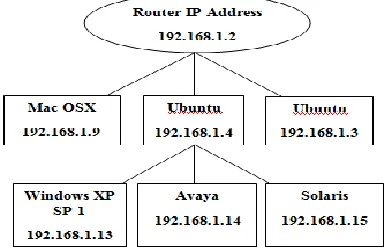
AYOUTVarious different types of honeypots solutions are available but for the particular project, honeyd has been used. It is because of the simple reason that it is just the perfect fit for the project and is simple to use. Although honeypots can be thought of as internet facing but for the project, honeyd was used on an internal network. While internet facing honeypots are used mainly for the purpose of finding new malware and research, the internal honeypots are used as alerting systems i.e. alerting us when other devices try and connect to our honeypots which is the basic crux of the project. [9] In the project, machines working on Linux based operating systems are used. Honeyd was used on the Linux machine through the installation of Ubuntu. After the installation was done, it was checked if the connection to the Mac or other Ubuntu machine is established or not. The figure below describes how the setup was made:
Fig. 1: System Layout showing a LAN network connection and Emulated Systems by honeyd server.
Upon installation of Ubuntu and checking of the connection established, a configuration file was created. The Honeyd configuration file basically tells the honeyd what type of operating system is to be emulated, which particular port is to be opened etc. Following configuration file is used to setup honeyd [10]:
create default
set default default tcp action block set default default udp action block set default default icmp action block
create windows
set windows personality "Microsoft Windows XP Professional SP1”
set windows default tcp action reset add windows tcp port 135 open add windows tcp port 139 open add windows tcp port 445 open
create avaya
set avaya personality "Avaya G3 PBX version 8.3" set avaya default tcp action reset
add avaya tcp port 4445 open add avaya tcp port 5038 open
create solaris
set solaris personality "Avaya G3 PBX version 8.3" set solaris default tcp action reset
add solaris tcp port 22 open add solaris tcp port 2049 open
set windows ethernet "00:00:24:ab:8c:12" set avaya ethernet "00:00:24:ab:8c:13" set solaris ethernet "00:00:24:ab:8c:14"
dhcp windows on eth0 dhcp avaya on eth0 dhcp solaris on eth0
In the configuration file made, the honeypot is acquiring the IP address via Direct Host Configuration Protocol (DHCP). The "create default" is telling the honeyd to drop the traffic unless it is defined later on. This also made sure that the honeyd was answerable only to the network connections defined later on in the "config" file. Whenever "create" is used within the "config" file, it is basically creating a template for the honeypot. In the windows template made above, whenever another device on the network connects to the honeypot, it will be seen as a Windows XP Professional Service Pack 1 device. Further, the ports 135, 139 and 445 were opened which were the common ports. In case there is any traffic which is not aimed at the open ports, the "action reset" statement will make sure that the traffic is dropped. The “set windows ethernet” was used to set a MAC address for our honeypot. The dhcp statement is used to tell the system that the IP address would be acquired via DHCP. The basic configuration file was completed and then the honeyd was launched using the following command:
honeyd -d -f /etc/honeypot/honeyd.conf
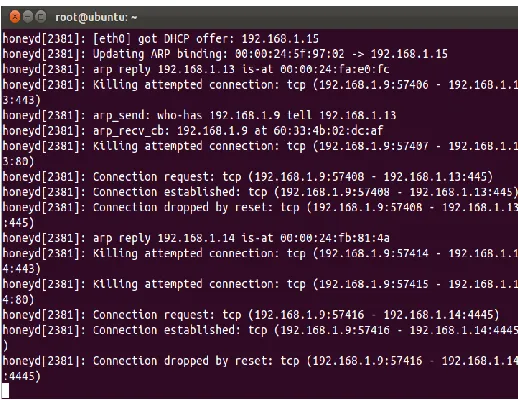
Here, "-d" was used so that it doesn‟t run in the background. This also allowed for more detailed output so that troubleshooting can be done as and when needed. Along with this, this showed how the IP address was acquired using DHCP. The following output was observed when it was run:
In the detailed output, it is seen that DHCP gave the honeypot an address of 192.168.1.13 to the Windows Operating System (Windows XP SP1, as per configuration file). Similarly the DHCP gave the address 192.168.1.14 to Avya and 192.168.1.15 to Solaris systems respectively. All the three systems are emulated on the LAN after the honeyd server starts and appear to be physically present on the network now.
4.1 Flow of Events
Following algorithm is used in order to check for any attack requests and providing alerts:
1. Start the honeyd server with the designed configuration file. The systems are emulated as and when the server is started
2. Start the designed application that checks for connection requests (attacks) made by systems in the network.
3. The application checks if a new line is appended in the syslog file every three seconds.
4. If a new line is appended, parse it and retrieve the data of attack activity, store it in database and alert the system administrator.
5. If no new line is appended, repeat the process from step 3.
5
O
BSERVATIONS ANDI
NFERENCESFrom the output, it is seen that honeyd is successfully deployed. It is still necessary to make sure that the ports configured in the "config" file were open. For this purpose, a port scanner called nmap has been used. It is possible to scan all 65,535 ports of the honeypot developed but for keeping the detailed output only up to the requirements needed in the scope of the project, only a handful of ports were scanned. Nmap port scanner scans these ports from another system in the LAN network. This acts as our attack request and a response is observed from the honeyd server. The following port scan command is used from the Mac OSX system on the network on the emulated Windows XP SP1.
nmap -p 445 192.168.1.13
Fig. 3: Port scanning being done by nmap port scanner from Mac OSX system on the emulated servers.
The first nmap port scanning command for port 445 on the address 192.168.1.13, gives a response of scanning the address in 2.09 seconds. Similarly, the second mapping is done on the address 192.168.1.14, emulated by the honeyd server based upon the configuration file. As soon as the honeyd server detects that there‟s a connection request from a system on the network for an emulated system, it logs entire data into a syslog file. This syslog file is parsed using java line by line for any new event of addition i.e. appending a line at the end. All the new lines appended are checked, as and when the java application detects the line:
connection request:tcp (192.168.1.9:57488 -192.168.1.13:445)
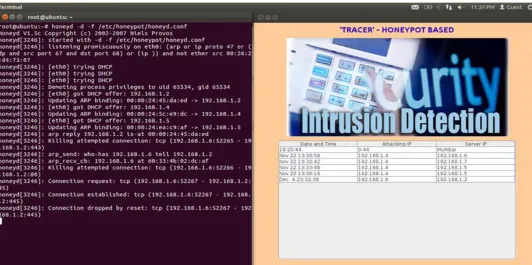
It fires a method that sends the alert to the administrator‟s e-mail id as well as to his phone via an SMS gateway. Also the entire data logged into the syslog file is then read simultaneously, stored into a database connected to java in background. This database holds the attacker IP address, Server IP address (one of the emulated servers, being attacked, time of attack and port number on which penetration request was made). The designed application in java is designed such that it monitors any new line being appended at the end of the syslog file every three second. If it finds that there‟s an new line appended, it checks for the occurrence of certain keywords in the new line. Upon successful find, the entire line is broken down into parts and the data to be stored in the database server and to be sent via e-mail is stored in different variables. These variables containing the desired data of port scanning attempt made by a computer in the network is stored in a database and simultaneously sent to the e-mail ID of the system administrator. Figure 4 shows the system response generated when a port scanning attempt is made by another system physically present in the network.
233 Figure 5 below shows the alert received by the administrator on his email ID while Figure 6 shows the prototype application.
Fig. 5: e-mail alerts received by system administrator when a penetration attempt is made.
6
R
ESULTS6.1 Port scanning
The port scanning was done using nmap on the open ports as per the configuration file. This resulted in a connection request log on the honeyd honeypot server; immediately an alert was generated by the designed application specifying the IP address of the system being compromised along with the IP address of the attacking system. Also, the date, time and the port number on which the penetration request was made was logged into the database by the designed application. Thus, the purpose of intrusion detection and alert when a system was being compromised was achieved.
6.2 Real time alerts
A real time alert was generated to the system administrator on his/her email id as well as cell phone via SMS.
7
C
ONCLUSIONAlthough intrusion detection and alert generation has come a long way since its inception, it is still not a fool proof defense mechanism. Attackers can identify low-interaction systems and refrain from falling into the trap. They may also be able to compromise the high-interaction systems. In spite of aforementioned drawbacks, it is still being used as an active mechanism to tackle the intrusion on systems and the data logged is used for knowledge discovery thus providing the cyber forensics fingerprints and attacking patters commonly used by attackers.
A
CKNOWLEDGMENTThe efforts put in to complete this research project were immense; however it would not have come to life without the kind support and help of many people associated with it. We take up this opportunity to express our sincere gratitude towards Mr. Pradeep Gulati (Asst. Professor) Department of Information Technology, Guru Tegh Bahadur Institute of Technology; who gave us the opportunity to work in his department on the project Intrusion Detection and Alert. We would also like to thank Travis Altman (resident of Richmond, Virginia; USA) for his blog travislatman.com for helping us in many aspects to complete the research project. We would like to take up this opportunity to also thank authors of many publications for the commendable work by them that we constantly referred during the course of the research project.
R
EFERENCES[1] https://www.thefreedictionary.com/intrusion
[2] SANS Institute InfoSec Reading Room,”Understanding Intrusion DetectionSystems”,https://www.sans.org/reading- room/whitepapers/detection/understanding-intrusion-detection-systems-337 (2001)
[3] “An Introduction to Intrusion Detection Systems and the Dragon IDS Suite”, http://www.intrusion-detection-system-group.co.uk/
[4] Wayne T Work, "Intrusion Detection Systems - What are they and how they work", Security
Gauntlet Consulting 56 Applewood LaneNaugatuck, CT 06770, 203.217.5004, 6/12/2003
[5] Yogendra Kumar Jain, Surabhi Singh, "Honeypot Based Secure Nework", Vol 3 No,2 Feb 2011, ISSN: 0975-3397, pp 612-620
[6] Lance spitzner, "Honeypots: Tracking Hackers", USA:Addison Wesley, 0-321-10895-7, ch 3/4/8, 2002
[7] Jammi Ashok, Y. Raju, S. Munisankariah, "Intrusion Detection Through Honeypots", IJEST10-02-10-055, ISSN: 0975: 5462, pp 5689-5610
[8] Ram Kumar Singh, T. Ramanujan, "Intrusion Detection System Using Advanced Honeypots", (IJCSIS) International Journal of Computer Science and Information Security, Vol. 2, No. 1, 2009
[9] Travis Altman, “Honeypot/honeyd tutorial part 1, getting started”, http://travisaltman.com/honeypot-honeyd-tutorial-part-1-getting-started/ (2011)
[10]Travis Altman, “Honeypot/honeyd tutorial part 2,
multiple honeypots”,