Characterizing the Mobile Microtask Writing Process
TAL AUGUST,
Paul G. Allen School of Computer Science and Engineering, University of WashingtonSHAMSI T. IQBAL,
Microsoft ResearchMICHAEL GAMON,
Microsoft ResearchMARK ENCARNACIÓN,
Microsoft ResearchThe unique limitations of mobile environments make content creation and editing difficult. Microtasking—breaking down complex tasks into subtasks—requires shorter attention spans and quick interactions, making it suitable for mobile usage scenarios. Writing is an ideal process for mobile microtasking because of its many subgoals, but little is known about how writers can use this decomposition through the evolution of a document. In this paper we present findings from a controlled, week long study to characterize how writers use mobile microtasks while authoring a document. We found that writers created microtasks for editing and inserting information that generally required minimal writing. These tasks were especially well suited for mobile devices with writers completing tasks on commutes or while waiting for meetings. Writers who microtasked found it easy to interact with their document and complete tasks, writing and editing their document more overall compared to writers who instead edited their document directly on their phone. CCS Concepts:•Human-centered computing→User studies;Text input.
Additional Key Words and Phrases:mobile microtasking, writing
ACM Reference Format:
Tal August, Shamsi T. Iqbal, Michael Gamon, and Mark Encarnación. 2020. Characterizing the Mobile Microtask Writing Process. In 22nd International Conference on Human-Computer Interaction with Mobile Devices and Services (MobileHCI ’20), October 5–8, 2020, Oldenburg, Germany.ACM, New York, NY, USA,18pages.https://doi.org/10.1145/3379503.3403541
1 INTRODUCTION
Mobile devices are increasingly being used by workers to complete productivity tasks while away from their desktop [3]. Working while mobile enables workers to complete tasks while on the go; however, the unique constraints of mobile devices, such as limited screen size [26] and fragmented attention [19,23], restricts the work that mobile devices are typically used for [2]. Many productivity tasks where content is created or edited are not suited for such environments as they require focused attention or larger screen real estate [25,31]. Unfortunately, most interfaces for content creation tasks in mobile environments do not account for the unique constraints of mobile usage scenarios [22].
Microtasking [6]—breaking down complex tasks into small, manageable subtasks—is one way to identify subtasks that can be completed in short bursts of time, making them potentially suitable for mobile devices [11]. We study the suitability of mobile microtasking in the context of writing, which is a complex task whose common existing mobile tools are replicas of desktop instantiations fitted to a mobile screen (e.g., Microsoft Word Mobile).
Writing is a common work process that is typically considered as requiring focused attention, but research has shown that it benefits from being decomposed into smaller subtasks [8]. For example, a writer working on a proposal might be
Permission to make digital or hard copies of all or part of this work for personal or classroom use is granted without fee provided that copies are not made or distributed for profit or commercial advantage and that copies bear this notice and the full citation on the first page. Copyrights for components of this work owned by others than the author(s) must be honored. Abstracting with credit is permitted. To copy otherwise, or republish, to post on servers or to redistribute to lists, requires prior specific permission and/or a fee. Request permissions from [email protected].
© 2020 Copyright held by the owner/author(s). Publication rights licensed to ACM. Manuscript submitted to ACM
deeply focused to the point where looking up a particular reference or editing an awkward sentence would interrupt their flow [9]. Some of these peripheral tasks could be deferred until later so that the writing flow is not disrupted. A subset of these deferred tasks could also be completed without requiring a full word processor [29], suggesting that writers might accomplish them even when they only have a mobile device.
Past work on mobile microtask writing has focused on automatically generating tasks for writers [11] or offloading tasks to crowdworkers [21]. However, automatically generated tasks do not provide insight into what tasks users themselves consider as relevant microtasks for their writing, and how they choose what tasks are suitable for a mobile device. Tasks completed by crowdworkers don’t allow writers to create or edit content on a mobile device for themselves. Less is known about how a writer creates and completes their own tasks on a mobile device.
Our research focuses on the opportunities offered by mobile interfaces to support writing on-the-go. Rather than suggesting mobile writing as a replacement for focused writing on the desktop, we are interested in understanding how the mobile experience plays into a cross-device ecosystem of content creation where writers can create and edit both at a desk and on a mobile device. We are in particular interested to understand writers’ use of mobile microtasking for writing: what tasks do writers create for themselves to complete on a mobile device, how do they complete these tasks while mobile, and how does mobile work change task completion. Another hurdle for microtask writing is that completing writing microtasks requires context about the document [8,27]. Providing the entire document as context for a microtask can make navigation for the task difficult and frustrating, especially for a mobile phone or small screen [17]. How does context play a role in completing mobile microtasks? Such questions can be answered through a deeper exploration of how authors manage their own writing microtasks while authoring a document and how mobile interfaces are integrated into their experiences.
We ran a controlled, week long, user study with 24 participants to characterize the mobile microtask writing process and how it contributes to the overall writing experience in a cross-device setting. In a setup involving focused writing at a desk and interactions on a mobile device, we analyzed how writerscreatedmicrotasks to offload appropriate parts of writing to a mobile phone during a writing session on a desktop word processor, how theycompletedmicrotasks over the course of a week using a prototype mobile system that provided varying levels of context, and how their
integrationof these tasks back into their document impacted the final document. We additionally explored how a baseline group instead used Microsoft Word Mobile, a commercial-grade mobile editing and writing system, to write and edit a document.
We find that formicrotask creation, quickly creating tasks for later while composing a document allowed writers to continue focusing on writing. Many of the tasks involved inserting information and adding or editing sentences that were well suited for mobile phones. The limited space of mobile phones was a constraint formicrotask completion
more so than context: most participants avoided writing extensively on a mobile keyboard by completing the tasks that required only a few lines of surrounding text to contextualize and complete. Those who used the mobile microtasking system generally gave longer responses to their tasks and found the experience easier compared to writers using Word Mobile. Whenintegrating microtasks, writers who used the mobile microtasking system ended up making more edits to their documents compared to writers who edited the document directly with Word Mobile.
Our results provide an in-depth exploration of how mobile microtasking integrates into writers’ processes and exciting evidence of how mobile devices can be used in the writing process via microtasking. Based on these findings we discuss design recommendations for mobile content creation and editing systems.
2 RELATED WORK
We discuss prior work in how productivity tasks are accomplished while mobile, concepts of microproductivity that explore ways to adapt complex tasks to micromoments, and processes of writing to understand opportunities for mobile interfaces.
2.1 Use of Mobile Devices for Productivity Tasks
People are increasingly using multiple devices, such as phones or tablets, to complete their work. Users face a number of barriers, such as fragmented attention and time, while mobile [13]. Some tasks lend themselves better to mobile work, such as email, with users deferring tasks that are ill suited to a mobile environment [3]. Users tend to also type slower on a mobile device compared to a keyboard [24], making composing long pieces of text difficult. At the same time, the portability of a mobile device lends itself well to the fragmented workday many workers experience, and logs of mobile and desktop use show that mobile devices are often leveraged for productivity tasks [22].
Cross-device synchronization poses a major challenge for shifting tasks between a mobile device and a PC [1,12] and users rarely shift the same task across mobile and desktop systems [14]. Recent work has also identified different types of tasks that mobile devices are suitable for, finding that tasks requiring brief interactions with one or more applicationsf (called review tasks) could be better supported on mobile devices [2]. Truong et al. [30] explored using the unlock mechanisms on smartphones as a way of completing microtasks, finding that many users were willing to complete microtasks throughout their day and across different locations. We build on this work by examining mobile device editing and content creation in the context of cross-device writing.
2.2 Microproductivity
Microproductivity is the process of breaking down large, complex tasks into small, manageable, context-free tasks that can be completed in short moments. These tasks are referred to as microtasks. Microtasking can lead to more effective work: increasing overall task quality and shortening ramp-up times after an interruption or break in work [6]. Microtasks are effective for breaking down work and completing small tasks using time previously thought of as unusable, such as while commuting to work, while waiting for a meeting to begin, or even while on social media [10]. Microtasking has opened up the possibility of completing work through smaller screens, such as a mobile device [31] or a smartwatch [21]. Mercury [31], a system that automatically generated coding microtasks on a mobile device, allowed programmers to make meaningful progress on a coding task with little time and attention, and to resume the task faster after a break. Play Write [11] allowed users to make progress on a writing task via completion of automatically generated microtasks on a mobile device. Users strongly preferred Play Write to the Microsoft Word Mobile interface when multitasking, indicating the resilience of microtasking when multitasking [11].
While Mercury and Play Write focused on individuals completing microtasks, systems have also shown the benefits of microtasking across collaborators and crowdworkers. Wearwrite [21] allowed users to coordinate microtask completion by crowdworkers using a smartwatch. Microwriter [29] supported microtasks across collaborators, who found the ability of sharing tasks on a paper helpful for sharing ideas.
In a similar vein, crowdsourcing systems like Crowdforge [18], Soylent [4], and Mechanical Novel [16] all show the value of crowdsourced writing. Soylent allowed users to offload tasks while writing to a crowd that would complete these tasks in real time [4]. Mechanical Novel broke down the entire writing process into tasks easily accomplished by crowdworkers, such as writing a section of a story or voting on the best next chapter of a story [16]. Lastly, work has
also shown the feasibility of writing in collaboration with a machine. Clark et al. [7] explored slogan and creative story writing in a human-machine collaboration, finding that users enjoyed the sentences suggested by the machine, allowing them to think more creativity. In many of these systems the writing was distributed across multiple individuals rather than multiple devices. In this work we explore writing for a single individual distributed across multiple devices and the suitability of mobile devices in this cross-device writing.
2.3 Writing via microtasks
Flower & Hayes [8] proposed a cognitive process theory of writing that has a natural parallel in microtasks. In this theory, writing is broken down into three core processes: planning, translating, and reviewing. Each of these processes have subgoals, such as organization or goal setting in the planning process. These processes are hierarchical, meaning that while writing, a writer might switch between each task at different levels of writing [8]. Similarly, writers can break down complex writing goals into small, manageable subgoals while microtasking.
The cognitive process model also provides one potential hurdle for effective microtask writing: writing tasks are often heavily context dependent [27]; it is difficult to imagine writing an introductory sentence without knowing the preceding and following sentences, the goals of the paragraphs, and the trajectory of the document as a whole. Salehi et al. [27] explored communicating this context in crowdsourced writing. They found that one effective strategy for early drafts was providing high level feedback, while for later drafts highlighting areas of the response that were good or needed work was most effective. Other microtask writing systems have provided the entire document [21], parts of the document [4], or restricted tasks to only those that needed little context, such as editing tasks [11] as opposed to content creation. While past work has explored communicating context to crowdworkers who have never worked on the document before but have access to a desktop and few time constraints, in this paper we explore the most effective ways of providing context for a single author to complete their own microtasks on a mobile device.
Writing microtasks can also have different intentions behind them [15,32]. Kaur et al. [15] identified the different intentions for tasks in academic papers and Wikipedia articles, developing a taxonomy of writing tasks broken down into four categories: adding content, surface-level issues, editing content, and references. In our work, we are interested in how writer-created microtasks fit into a cross-device ecosystem of writing, providing insight into the types of tasks writers feel are appropriate to be deferred to a mobile device.
Work on microtask writing has focused on automatically-generated tasks [11], multi-author documents [29], or crowdsourced writing tasks [4,16,21]. In each of these contexts, there is little focus on how writers use microtasks throughout their writing process in a cross-device environment. In this paper we set out to understand how authors create their own writing tasks for a mobile device while at a desktop (rather than have them automatically generated), how authors complete these tasks on their mobile device (rather than a crowdworker or collaborator), and how authors integrate completed tasks into the document back at a desktop.
3 CHARACTERIZING MOBILE MICROWRITING
We observed how authors used microtasks as part of a cross-device writing process spanning desktop and mobile devices with a controlled user study. Our goal was to explore the suitability of mobile devices in a larger ecosystem of cross-device editing [22,31] and how a mobile device can be used to the best of its abilities to complement desktop writing when it is not possible for a writer to be at their desk. We do not argue that microtask writing is more productive than writing at a desktop, rather, we sought to explore how microtasking can augment focused writing by allowing writers to create, complete and integrate microtasks into a document.
We explored two mobile interactions with documents: a baseline interaction where participants used Microsoft Word Mobile, a leading commercial mobile writing tool that is a general replica of desktop editors fitted to a mobile screen, and a prototype mobile microtask writing system designed to conform to the limited attention and small screen constraints of the mobile device. We describe the prototype system in Section3.3. In the baseline interaction, participants edited their document directly on their mobile phone. Participants using the prototype microtasking system instead completed microtasks separate from the document itself (for an example, see Figure1).
During the study participants drafted a document on a desktop word editor and used their phone as part of the editing process over the course of a week. Participants wrote short documents on a controlled topic, allowing us to analyze behaviour during the same stages of writing and completing microtasks. This also allowed us to explore final document statistics and user feedback on the tool compared to Microsoft Word Mobile.
The study was designed to explore the following research questions:
(1) RQ1:Microtask Creation- what kinds of tasks do writers create for themselves while on a desktop to complete later on a mobile phone?
(2) RQ2:Microtask Completion- how do writers complete microtasks presented independent of the document on a mobile phone and how does this compare with editing the document directly on a phone?
(3) RQ3:Content Integration- how does integration of the content created while mobile impact the final document? 3.1 Participants
Participants were recruited at a large technology company via email lists and flyers. Participant’s average age was 30.25 years (std=7.01). 10 participants were native English speakers, 11 were fluent, and 3 had professional working proficiency. All participants had completed at least a bachelor’s degree. The majority of participants were researchers or software engineers, with 7 in managerial or business positions. 21 participants used their mobile phone for productivity tasks (e.g., answering email) at least weekly. Participants were compensated with a $50 giftcard. A total of 24 participants completed the study (M=14, F=10).
3.2 Experimental Design
The study had three parts: 1) a 15-minute in-lab writing session on a predefined topic using Microsoft Word on a desktop where at the end participants created microtasks for future consumption, 2) a week-long in the wild session for completing microtasks either using our prototype mobile microtasking system (described in the next section) or Microsoft Word Mobile and 3) a final 5-minute in-lab writing session where writers integrated the outcome of the microtasks into the original Microsoft Word document on the desktop and finalized the document. The study was designed to accommodate participants’ own productivity habits while still controlling for writing topics and amount of time given to a participant for writing.
Our goal was to provide a writing experience that was controlled but also representative of writing when microtasking could be helpful (e.g. writing in an airplane or when the internet is down, or when one does not want to break writing flow by switching to a different app). Much of the work on microtask writing (e.g., [11]) has used even shorter study durations or more controlled writing prompts. While this did require us to restrict the writing, we believe that the results still hold value to understand how writers combine focused and microwriting.
Prior work had shown that the limited context of microtasks can make it difficult to complete them on a mobile device [11], so we were interested in understanding how much context was needed to complete a microtask. With this
goal in mind, we designed the study to be a 2x2 between-subjects study exploring two categories of context: global and local. Each category of context was further broken down into 2 levels of expressing this context.
For local context, participants could see either enough text to fit onto a mobile screen without scrolling (glanceable) or enough text surrounding a task to overflow a mobile screen (scrolling). For global context, users were either provided the writing prompt they received when writing the document (prompt) or a link to their document (document).
Because we were interested in the opportunities mobile systems provide for writing on-the-go, we included a baseline condition using a leading commercial mobile writing system. In this condition participants had no access to microtasks but could access and edit the document directly on their phone using Microsoft Word Mobile over the course of the week. Microsoft Word Mobile is a good example of an existing mobile writing tool that generally replicates desktop instantiations fitted to a mobile screen. We were interested in comparing this type of current tool to an alternative mobile writing process that leverages microtasks to direct writers’ limited attention and input capabilities.
Participants saw one level of local context (glanceable or scrolling, see Figure1) and one level of global context (prompt or document) for each microtask. Participants were assigned into one level for each type of context from the 4 possible combinations, or the baseline condition, for a total of 5 conditions. Context levels were fixed for all of a participant’s microtasks. Assignment was split across all 5 conditions–the 4 context microtasking conditions and the baseline–resulting in 5 participants assigned to the baseline condition (one context condition held 4 participants). Our study’s goal was to understand the experience of writing via microtasks, and we use the baseline condition to have a comparison point with standard mobile writing tools.
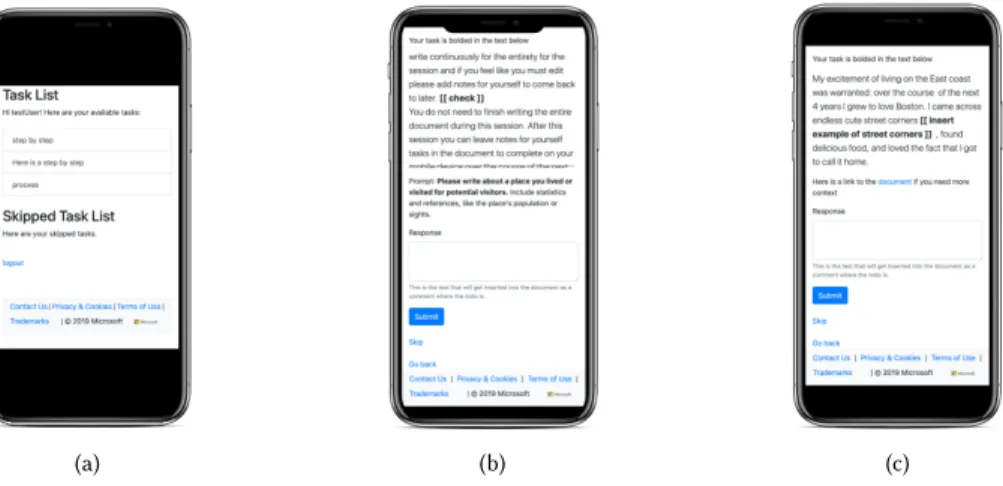
(a) (b) (c)
Fig. 1. Views of the web app. (a) Task list user will see after logging in. (a) Task display with the prompt and scrolling local context. (a) Task display with the document link and glanceable local context.
3.3 System
We developed a prototype microtask writing system to characterize how microtasking influenced a writers’ process and test different levels of context to provide. The writing microtask system has two subsystems: a Microsoft Word add-in (‘the add-in’) for capturing microtask creation, and a mobile web application (‘the web app’) for users to complete microtasks from their mobile device.
3.3.1 Microsoft Word Add-in. The add-in is a VSTO Microsoft Word add-in that captures user actions (e.g., typing) in a document. Whenever a user inserts double brackets ([[ ]]) around a piece of text, the add-in saves the text inside the brackets as the microtask itself and collects the text surrounding the microtask as local context. The amount of text the add-in collects depends on the local context condition the writers is in (i.e., glanceable or scrolling).
For glanceable context, the system collects the surrounding 300 characters minus the amount of text within the task. The remaining characters are collected evenly from above and below the task. For example, if a task had 20 characters, the context includes the 140 characters ((300−20)/2)=140) above and below the task. Because truncated sentences could be nonsensical or confusing and overwhelm any help that the text may provide, the surrounding text is truncated to the previous full sentence above and below the task. This is to guarantee that the full sentences did not expand over the 300 character limit, which is strictly the amount of text that the view in the mobile app allows for without scrolling. For scrolling context, the allotted number of characters is 750. Rather than truncating to the nearest full sentence, the system instead expands to the nearest fullparagraph. This was to provide much more complete surrounding text and to have the text overflow in the mobile web app view.
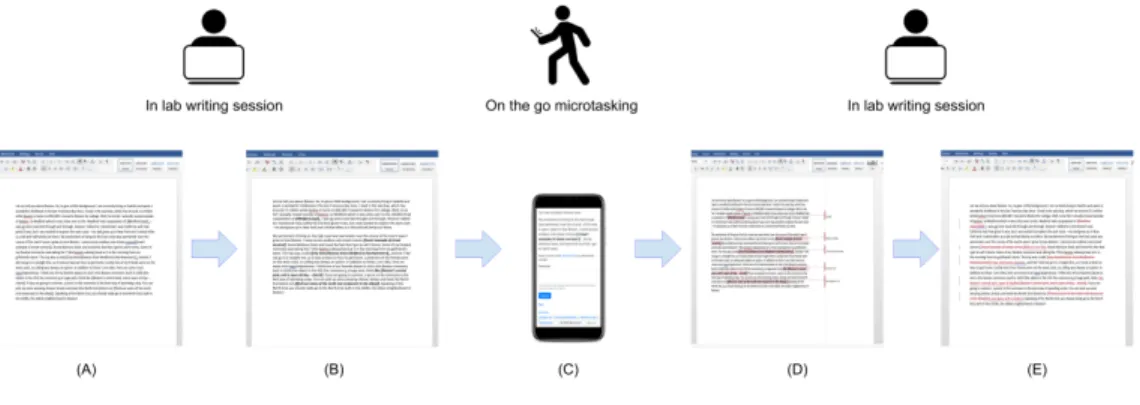
A token is provided to the Word add-in at launch time to authenticate to the web app and specify which user is writing. Each microtask created in the document is communicated to the mobile web app, along with the document and user. The add-in also polls the web app for any completed microtasks matching the current user and document. When a microtask is completed by the user in the mobile web app, this populates into the Word document as a comment over the location where the microtask was inserted. If the microtask had been deleted, then the comment is inserted as a comment over wherever the inline microtask was (see Figure2).
3.3.2 Web app.The web app contains an API for the Word add-in to push new microtasks and poll for completed microtasks and an interface for users to complete their microtasks on their mobile phone.
The API for the web app authenticates users via a token submitted by the Word add-in specifying the user. When given a new microtask the web app API saves this microtask with the associated user and document. When the add-in polls for completed tasks, the web app only returns tasks created and completed by that user for the specific document the add-in is listening on.
The interface of the web app consists of a login page, a task list page, and a task page (see Figure1). At the login page users log in with the username and password provided to them at the end of the first section of the study. This username and password is associated with the token the Word add-in used to communicate the current user to the web app. Once logged in, writers see all their tasks in an accordion style list. Each item in the list displays the task text, truncated at overflow. Users can select a task, bringing them to the task view page.
The task view page has a 300 pixel by 250 pixel frame that holds the surrounding text (local context) of the task. This is either overflowed, in the case of scrolling context, or not, in the case of glanceable context. The task itself also is included in this context, bolded to denote it as the current task (see far right image in Figure1). Font size is the same for all tasks. Below the local context frame is either the prompt of the document or a link to the document, depending on the global context condition.
Writers can complete a task by writing in the provided text box and hitting ‘submit’. Alternatively, they can skip the task by hitting the ‘skip’ button below. If writers decide to skip they were prompted to select why they skipped from a selection box, or write their own reason in. When a task is skipped, it would move down to a skipped task list below the task list on the task list page (Figure1). Users can select these tasks, where their skip reason is displayed along with
the task, and can complete these tasks then. Only completed tasks (not skipped or unfinished ones) get populated back to the document.
Fig. 2. Document lifecycle for writers using microtask system. (A) Writers write a document for 10 minutes. (B) Writers create/convert notes into microtasks. (C) Writers complete microtasks on their mobile phone over the course of a week using the microtask system. (D) Completed microtasks are updated in the document as comments. (E) Writers edit the document with the completed microtasks.
3.4 Methodology
Before beginning the study every participant was given a brief overview of the study. They then signed a consent form outlining the potential risks and benefits of participation.
3.4.1 Initial in-lab writing session.After agreeing to the study, participants began with the 15-minute in-lab writing session. At the beginning of the writing session participants filled out a brief survey covering their writing and productivity habits. Questions included their English fluency, what they write most often, their level of education, and how often they use mobile-based productivity tools. During the initial writing phase participants were not told what condition they were in and were given the same instructions to leave tasks however they wished.
Writing Task.Participants were instructed to write about a place they had lived or visited for readers who are potential visitors. This writing prompt was chosen to provide participants with an interesting topic they were personally invested in and therefore more motivated to write about. We designed the task so that it would resemble a writing experience where a writer would have some focused writing time and the opportunity to continue editing while on-the-go. Our goal was to see how well our tool supported the on-the-go editing and how it impacted editing later in focused writing. Each participant used Microsoft Word 2016 and Microsoft SurfaceBooks to write their document in order to control for word processor version and keyboard differences. Participants were not allowed to use any other program on the computer or access the Internet during the writing session. The writing prompt asked participants to include relevant statistics and information, such as the population of the area, interesting surrounding destinations, or directions. These instructions were aimed at encouraging participants to leave notes for themselves to later search out information and include it in the document via microtasks. Participants had 10 minutes to write and were encouraged to write nonstop.
Microtask Creation.After the 10-minute writing session was over, participants were given 5 additional minutes to convert these notes into microtasks for themselves to complete on their phone over the course of the next week and/or
add new microtasks. They were instructed on how to leave these notes so a microtask would be created, which involved placing double brackets (‘[[ ]]’) around the tasks. In the document this would change the text to be italicized and bolded (e.g., [[check this]] to[[check this]]). For editing microtasks (e.g., rewriting an awkward sentence) participants were instructed to include the text to be edited in the brackets. Baseline participants at this point were asked to continue leaving tasks for themselves in the document but to not write more besides that. All participants were told that at the end of the week they would have 5 minutes to finalize their document in a second writing session.
At the end of the writing session, participants rated their documents on a 5-point Likert scale (1=Not at all, 5=Ex-tremely) for coherence, grammaticality, creativity, and how entertaining the document was. These questions were drawn from past work comparing document quality in crowdsourcing [16].
Each participant completed the writing session with a researcher present who answered any questions they might have. After finishing the 15-minute writing session, participants were given a URL, username, and password that they could use to complete their microtasks on their mobile device and were instructed to save the URL to a bookmark or shortcut on their phone for easy access. Baseline participants were given a link to a Microsoft Word document and instructed to only access and edit it on a mobile device.
3.4.2 Editing on mobile device.Following the in-lab writing session, participants were given a week to complete writing tasks on a mobile device. Participants in the baseline condition were given access to their document directly to complete any tasks they had left for themselves using Microsoft Word Mobile. All completed tasks were immediately updated in the document, and these baseline participants were allowed to edit the document on their phone in any other ways they wished over the course of the week.
Participants in the microtask condition used our microtask writing system to complete their writing tasks (Figure1), which we described in Section3.3. Each participant had a different level of local or global context that defined their interactions with these microtasks. Participants logged into the microtask writing system with a username and password provided to them after the in lab writing session. Once logged in, participants saw all their microtasks and could select them in whatever order they desired (see Figure1). After selecting a task, participants saw the task, their assigned level of local and global context, and a text box to respond to the task (for more details, see Section3.3).
We gathered usage data on the website, including how often users logged in, viewed microtasks, how many microtasks they completed, how many they skipped, how long they spent on each microtask, and how much they wrote for each task. Participants were reminded over email 2–3 times over the course of the week to complete tasks. These reminder emails were always sent at 3 pm in order to catch participants before they left work for the day.
3.4.3 Final in-lab writing session.Following the week of completing microtasks, participants were given another brief writing session of 5 minutes. Participants came into the lab for this second session. All completed microtasks were included as comments in the document, and all skipped or unfinished microtasks remained in the document as participants had left them following the first writing session. Participants were instructed to finalize and polish their document using whatever completed microtasks were helpful and removing all inline tasks. During this session participants were given access to the Internet.
Participants then completed an exit survey with questions on the ease of completing writing tasks based on the difficulty of use and mental burden questions in the User Burden Scale [28], ratings on documents quality and a short informal interview about the tool and their ability to complete tasks. All participants were debriefed with information about the goals of the study and additional resources if they wanted to learn more.
3.5 Analysis
Each step of the study focused on answering one of our research questions. At each stage of the study writer behaviour (e.g., creating microtasks or editing the document) and document quality were compared between writers using the microtask system and those editing the document directly using Word Mobile (our baseline condition). Additional comparisons across the different context levels given to participants are also reported in the results. Because little work had explored the entire writing process when part of the editing happens using microtasks, we sought to remain flexible in our analyses by describing this writing process rather than focusing on statistical hypothesis testing.
Initial writing session:The analyses for the initial writing session focused on answeringRQ1: What tasks do writers create for themselves to complete on a mobile phone?
After the first in-lab writing session the number of tasks created by each participant was saved and all participant microtasks were categorized manually into task type. Task type was broken down into two main categories adapted from [15]: inserting and editing content. Because most of our tasks were surface level content (making it a redundant category), and there were no references used, we focused on these two categories of adding and editing content. In addition, initial document length, content and writer’s self-ratings of document quality were saved.
Completing microtasks:The analyses for the the week-long period where participants edited the document (either by completing microtasks or editing the document directly) focused onRQ2: How do writers complete microtasks presented independent of the document on a mobile phone and how does this compare with editing the document directly on a phone?
The number of tasks users completed and skipped out of the total number they created was compared across conditions. We additionally analyzed the amount of time it took for participants to complete tasks and the length of responses for tasks. We defined time to complete a task as the difference between when a user viewed a task for the last time and when that task was submitted. Finally, we analyzed usability metrics for completing tasks (either on the web app or Word Mobile) based on questions from [28] (e.g., “The website demanded too much effort,” rated on a 5-point Likert scale).
Final writing session:The final writing session allowed us to focus onRQ3: How does integration of the content created while mobile impact the final document?
Final documents were saved following the final writing session. Each document was compared to its earlier draft, saved after the initial writing session. To characterize how a document changed, length differences and edit distance were calculated between the document snapshots. Edit distance, known as Levenstein distance [20], is a string matching method that calculates the number of edits (defined as deletions, additions, or substitutions) required from changing one string to another (e.g., the edit distance from ‘banana’ and ‘nanas’ is 3). Initial ratings of document coherence and grammaticality were compared with final ratings for each document.
4 RESULTS
4.1 Initial writing session
After analyzing our data we found that context levels displayed in the microtask writing system did not significantly impact completion rate, response length, or response time for microtasks. Because of this, we collapse across context conditions for the following analyses. We report on participant response to context levels and discuss the practical implications of these reactions for guidelines on providing context to authors for completing microtasks. A results summary is in Table1.
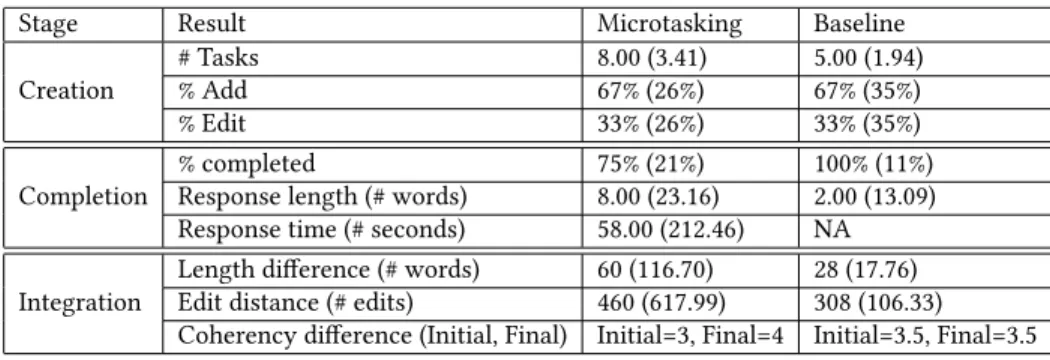
Table 1. Summary of results. All results are reported as median (std) across participants.
Stage Result Microtasking Baseline
# Tasks 8.00 (3.41) 5.00 (1.94)
% Add 67% (26%) 67% (35%)
Creation
% Edit 33% (26%) 33% (35%)
% completed 75% (21%) 100% (11%)
Response length (# words) 8.00 (23.16) 2.00 (13.09)
Completion
Response time (# seconds) 58.00 (212.46) NA
Length difference (# words) 60 (116.70) 28 (17.76)
Edit distance (# edits) 460 (617.99) 308 (106.33)
Integration
Coherency difference (Initial, Final) Initial=3, Final=4 Initial=3.5, Final=3.5
4.1.1 Microtask creation.Writers created a median of 8 tasks (std=3.41), with 149 tasks total using the microtask writing system. Writers in the baseline condition created a median of 5 tasks (std=1.72), with a total of 34 tasks. This was highly variable across participants, with some making only 3 or 4 tasks, while others creating upwards of 12 and 13. We evaluated baseline tasks by manually inspecting the documents, finding that participants left tasks for themselves in similar ways (e.g., triangle brackets, bolded text).
Most tasks were insertion tasks for microtask writers (median=67%, std=26%) and baseline writers (median=67%, std=35%) with most tasks inserting small amounts of information that writers could not remember while writing (e.g., adding opening times for an attraction or the population of a city). Adding sentences or including more descriptions (e.g, adding a sentence about a place, or a concluding sentence) were also common. Editing tasks, which constituted the rest of the tasks for microtask (median=33%, std=26%) and baseline writers (median=33%, std=35%), focused on rewriting sentences, fixing typos, or in some cases editing and rearranging full paragraphs. Most tasks required only surface level adjustments (e.g., edit a sentence or add in a fact). There was a small subset (<10) of tasks that required more in-depth writing (e.g., rewriting a paragraph or adding a conclusion).
4.1.2 Document state after the initial writing session.At the end of the initial authoring session, the average document length was 305.75 (std=75.30) words, corresponding to a little over half a page of single spaced text. Initial document length was similar between participants who left microtasks for later completion using the microtasking system (mean=308.58, std=71.76) and those in the baseline condition (e.g., who would edit the document directly later) (mean=302, std=96.27). Some participants in the baseline condition left comments on the document. For these participants we added the length of comments to the total word count of the document.
Most writers rated their documents as somewhat coherent (median=3, std=0.49) and grammatical (median=3, std=0.75), while most writers found their documents a little creative (median=2, std=1.02) and entertaining (median=2, std=0.8) at the end of the initial session. All ratings were based on a 5-point Likert scale. The low scores for documents on creativity and entertaining suggest that participants did not feel like they had the time for spending effort to create exciting documents, and overall felt only OK about what they were able to complete in the 15 minutes given (shown by the middling scores for coherence and grammar).
4.2 Mobile editing
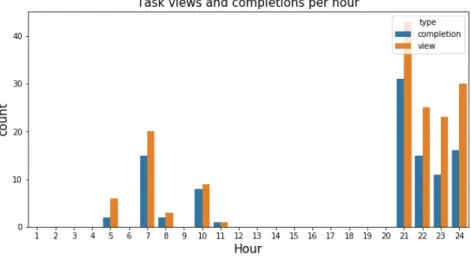
4.2.1 Task Completion while Mobile.Participants using the microtasking system viewed and completed tasks generally in the afternoon and evening (see Figure1), reflecting participant responses that they completed tasks while on their
Fig. 3. Task views throughout the day for microtasking participants. Participants editing the document directly followed this pattern but with edits done in the morning between 9 and 11 AM.
commute. Participants editing the document directly (the baseline condition) generally followed this pattern, but with most edits done in the morning between 9 and 11 AM. The authors in the microtask condition completed an average of 73% of their tasks (median=75%, std=21%). The majority (34 out of the 44) of tasks participants did not complete they instead skipped (as opposed to never responding). Most of these skipped tasks were due to the tasks being unnecessary (14 tasks). Participants in the baseline condition, who completed tasks directly in the document, on average completed 94% (median=100%, std=11%) of their tasks. One baseline participant did not complete any tasks, and so was not included in the task completion analyses.
Overall the average length of responses was 12.99 words (median=6, std=22.02). A few microtasks generated substantial responses (greater than 100 words), leading to the high variance in response length. Microtasking participants tended to write more for their tasks (median=8, std=23.16) compared to baseline participants (median=2, std=13.09). Participants also tended to write more for adding tasks (median=9 words, std=23.41) than for editing tasks (median=5, std=22.36). The short length of responses overall suggests that users sought to write minimally on their phone.
Microtask users on average took 126.70 seconds (median=58, std=212.46) to complete tasks. Participants took slightly longer to complete insertion tasks (median=60, std=195.97) than editing tasks (median=55, std=163.13). Participants also varied widely in how long it took them to complete tasks, ranging from taking a median time of 26 seconds per task to taking 210 seconds per task. We did not have telemetry data that specified the time it took baseline participants to complete tasks using Word Mobile.
How context impacted task completion.Participants were able to complete tasks regardless of the amount of context they were given (e.g., glanceable or scrolling and document link or simply the prompt). However, participant responses highlight tradeoffs between the amount of surrounding text to give for tasks. 8/10 participants given scrolling local context reported never feeling like the microtask system forced them to remember too much information. This was also shown in participant responses saying they enjoyed the amount of context given for each task: P11 said, “ having just a few lines visible while being able to scroll through the rest and access the entire document with one click was super convenient.” However, 4/10 participants in the scrolling condition also said that the system presentedtoo much
information at least a little bit of the time, while 8/10 participants given glanceable context (much less surrounding text to navigate on the phone) reported never feeling that the system presented too much information. These responses highlight a tradeoff between providing more or less surrounding text for completing tasks. While participants were able to complete tasks regardless, it is important to recognize when the added burden of more text could be helpful, possibly leaving it up to writers when to be given more text while completing mobile microtasks.
The 10 participants who could access the document from the microtask system (separate from the baseline participants who edited the document directly on their phones) viewed their document 11 times for their 77 total tasks. While most participants did not mention the document being helpful for completing tasks, P11 and P23 felt that the document was helpful for checking some task context more than immediate surrounding context. Tasks for which the participants viewed the document did not differ noticeably from other types of tasks (e.g., surface level insertions and edits), but participants did take much longer for completing these tasks (median=169.5 seconds, std=314.35) compared with other tasks (median=58 seconds, std=212.46).
4.3 Final writing session
In the final writing session, all participants (baseline and microtasking) were given 5 minutes to finalize the document. Participants in the microtasking conditions had to use this time to integrate any completed tasks (populated to the document as comments) into the document, whereas the edits made by the baseline participants were already in the document.
4.3.1 Document Evolution.Participants’ documents generally were longer after this final session, with an median increase in length of 53.5 words (std=106.18 words) from the initial writing session. This increase was larger for microtask writers (median=60, std=116.70) compared with baseline writers (median=28, std=17.76). This increase in length also came with more substantial changes in the document: microtask writers wrote final documents that had a higher edit distance between final and initial draft (median=460 edits, std=617.99) compared with baseline writers (median=308 edits, std=106.33). This median difference (152 characters) is roughly the equivalent of a small paragraph of text (2-3 sentences).
Self-Rated Document Quality.Writers who used the microtask system increased their rating of document coherence from the initial document rating (median=3) to their final document rating (median=4), while writers who edited the document directly did not (initial median=3.5, final median=3.5). Coupled with the increased editing and length changes in the document, this suggests that microtasking encouraged more refining of the document compared with the baseline. There were no differences in self-rated creativity, entertainment, or grammaticality across initial and final documents.
Document Engagement.The difference in document editing was also observed in the final writing session. Participants in the baseline condition rarely used the entire 5 minutes to edit their documents, while participants using the microtask system almost always did. When asked about not using the full amount of time, baseline participants reported not needing the entire time to edit the document during the final writing session. Past work has shown that microtasks help users ramp up for completing more complex tasks [5]. We found some evidence of this: participants who used the microtasking system felt that the tasks had helped them get started writing again. P1, for example, found the tasks, “helped prime me to keep writing. [It was] nice to have easily marked places to jump to, with content, instead of having to remember where the weak parts were.”
4.3.2 Participant feedback.The participant interviews and ratings of the system contextualized their writing and behavior during the study.
Table 2. Summary of main findings
Research Questions Main findings Section
RQ1 Writers create surface-level insertion and editing tasks most often, and these are the main tasks they feel comfortable completing on a mobile phone.
4.1
RQ2 Writers complete most tasks they assign themselves, with generally short responses reflecting the constraints of a mobile phone. Writers tend to write more for tasks using a microtask system rather than editing the document directly.
4.2
RQ3 Writers who used the microtasking system tended to edit their document more than writers who instead edited the document directly over the week.
4.3
Task deferral allowed better flow while writing.Participants liked to defer tasks for a later time, P21 created tasks when, “wanting to spend more time thinking about the structure of the sentence,” and as P19 put it, “adding tasks helped me focus more on writing rather than getting distracted with internet search. it was nice to get back to that later and search for information during a bus ride.” One participant liked the way of deferring tasks so much that they continued using the microtasking system after the study was complete.
Participants create tasks suitable for mobile interactions.Many of the participants’ tasks fit well with the constraints of mobile phones. The majority of tasks were simple insertion and editing tasks, with only a few tasks that required extensive writing for most participants. This was also reflected in participants’ completed tasks. For example, P2 said, “while I created all kinds of tasks for myself, I only wanted to tackle those that I could do on my phone, leaving the more involved ones for desktop writing.” This was generally due to the participant’s aversion to typing or navigating excessively on a phone. As P12 said, “I found that [completing tasks] hard since it required a lot of clicking and typing om [sic] my phone.”
Just-right context with the Microtasking system.Generally participants found it easier to use the microtask interface than navigating the document directly. P18 (a baseline writer) reported, “It’s hard to do it on the phone, I would open in [sic] on desktop if it was a work related document.” While P21 and P20, both users of the microtask system, found the interface “very easy” and “... intuitive and the context around the tasks helped.” These responses were supported by participants’ rating of the usability of the microtask system, calculated using the difficulty of use questions in the User Burden Scale [28]. Baseline participants rated their mobile writing experience as more difficult (median=2, std=0.97) than those using the microtask system (median=1, std=0.75) (on a 5-point Likert scale, 1 being the easiest).
5 DISCUSSION
Workers are increasingly using multiple devices, including mobile devices, for productivity tasks away from their desks [3]. The unique constraints of transferring work and mobile environments, such as limited screen size [26] and fragmented attention [19,23], make content creation and editing task such as writing difficult. In this paper we explored how microtasking can facilitate cross-device writing by characterizing the microtask writing process using both desktop and mobile devices. What kinds of tasks do writers create for themselves to complete on a mobile phone, how do writers complete tasks on a mobile phone, and how does this mobile work impact the final document while back at a desktop? We begin to answer these questions through a controlled, week-long user study where writers had an initial writing session to begin writing a document and creating microtasks on a desktop. Following the writing session, participants either completed microtasks over a week in the wild using a mobile microtask system (Figure2) or edited the document
directly on their mobile phone using Microsoft Word Mobile. Participants then integrated these completed tasks into their document in a final writing session.
Writers created tasks that were were well-suited for mobile work. Tasks often required minimal writing and context from the document and included inserting snippets of information (e.g., a fact that the writer couldn’t remember), adding short sentences, or editing surface-level issues. While these tasks were based on a controlled writing prompt that encouraged microtasking in general (e.g., by not allowing access to the internet), the process of looking up external information and the types of tasks participants made (e.g., inserting and editing) suggests that these tasks generalizes well to other writing tasks where referencing external information is common [15].
Writers found navigating the document and completing writing intensive tasks difficult on a phone due to the small screen and keyboard (P2 and P12). This could be related to the fact that mobile writing is often slower and more error prone [24] and that navigating through large amounts of text can be difficult for users [17]. These difficulties were also reflected in writers reporting having trouble editing the document directly in Microsoft Word Mobile.
Our findings suggest that microtasking is an effective way of enabling mobile productivity for complex content creation and editing tasks in our writing study. Writers enjoyed how the mobile microtasking system surfaced tasks for them while still providing some surrounding text to contextualize the task (P11), while writers using Microsoft Word Mobile found navigating the entire document difficult (P18). Writers using the microtasking system also tended to write and edit their document more over the course of the entire study compared to baseline participants. The small number of baseline participants (5 total) makes it difficult to draw conclusive findings; however, these results point to the exciting application of microtasking in mobile interaction with a document, showing that microtasking may be an effective way of reducing a document to only the necessary information to make completing tasks easier while mobile. Based on observations during the user study, microtasking helped writers re-engage with the document quicker during the final writing session. Writers had a smooth transition back into writing by having to integrate their completed tasks into the document, going from simple task completion (e.g., completing and integrating microtasks) to more complex tasks (e.g., editing the entire document). Our findings that this ramping up was associated with more editing is in line with past work on task ordering to help users ramp up to complex tasks [5] and suggests the benefits microtasking might have in facilitating cross-device work.
It is important to also discuss the implications of these findings for work/life balance. Workers are not–and should not be–expected to constantly contribute to a document or task through mobile work. Instead, mobile work and microtasking can help workers remain engaged with their document or task when they want to be. Workers can make progress when the work is still on their mind and they have a free moment, not as a way of sacrificing much needed downtime. Our results suggest that writers luckily already have boundaries on what they would and would not do while mobile (e.g., only complete tasks with short responses). Making sure to keep these expectations and boundaries in place as mobile work becomes increasingly common is important for maintaining a healthy work/life balance.
This study offers an example of how writing tools can leverage mobile systems to support writing processes at a higher level than purely editing and formatting. Writing is made up of many cognitive processes [8]; however, many current writing tools help writers only with the revising process [8,9]. The microtask system gave writers control over creating, completing and integrating their own tasks, a novel contribution to mobile writing microtask systems [11,21,29]. Writers were able to break down the complex task of writing into smaller subtasks encouraging a hierarchical writing process [8] that integrated well with mobile devices. Based on writer feedback and measures of document edits, writers enjoyed and benefited from this process. One participant liked the process so much, they continued using the tool after the study was completed.
Based on our findings we outline design recommendations below to leverage these benefits in mobile microtask writing:
Constrain the task completion mobile interfaceOur results highlight tradeoffs in mobile productivity [3]; while the mobile experience allows for more flexibility in completing tasks, it is important to keep in mind the system’s constraints. Forcing participants to navigate an entire document, even one that is less than a page, makes completing tasks more difficult. Surfacing tasks that take into account the constraints of a mobile system by, for example, providing restricted surrounding text and a simple interface for writing a response, leads to an easier and more effective microtasking experience.
We found this to be the case in our own study. The microtask system surfaced writing tasks, allowing writers to complete tasks without navigating through the entire document. Because most tasks did not require deep document context, the immediate surrounding text that the microtask system provided was usually enough to complete tasks.
Allow flexibility when integrating completed tasksWriters completed tasks in varying ways, sometimes responding with a single word or a full paragraph. To address the variance in responses, adding completed tasks as comments to the document or in some other way that allows writers to integrate the tasks on their own is useful. This is especially important when writers don’t have direct access to the document to edit while microtasking, since they might not be able to edit surrounding text in the document to fit with their response. In addition, we found that this integration had the benefit of encouraging writers to re-engage with their writing after being away.
6 LIMITATIONS & FUTURE WORK
In our study we used a controlled prompt and restricted writing to specific times. While this was helpful to explore how participants microtasked, it restricted how well our findings generalize to other less controlled writing scenarios. Future work could explore microtasking in a more natural setting, such as observing writers over a longer period of time working on a personal writing project rather than a controlled prompt.
This study did not control for task type, only characterizing the tasks after they were created. There was some indication based on participant interviews that different task types (like editing ones) required more surrounding context. A future study could explore the impact of immediate surrounding context while controlling for task type. This would be a strong extension to our findings on precedence of mobile phone constraints over amount of context for completing mobile writing microtasks. This study explored single-author documents only, but collaborative writing leads to interesting possibilities for microtasks [29] since the author who creates a task could be different from the one who completes it. An exciting extension of this work is to explore how writers collaborate on the same document, creating and completing microtasks between them.
7 CONCLUSION
This paper presents findings from a controlled, week-long user study to characterize how mobile microtasking fits into the the cross-device writing experience. Writers created microtasks for editing and inserting information that generally required minimal writing and context, making these tasks well suited for mobile devices. Microtasking writers wrote more and edited their document more than writers editing their document directly on Microsoft Word Mobile. Writer responses to microtasking suggest that the experience of creating, completing, and integrating microtasks helps writers stay more focused on writing, easily complete writing tasks in short moments while mobile (e.g., while commuting), and get back into writing their document more easily when back at a desk. Based on these results, we discuss design
recommendation for building mobile writing tools that support writers’ processes beyond editing and revising and across multiple devices.
8 ACKNOWLEDGEMENTS
We would like to thank our reviewers for their thoughtful feedback. We are also grateful to Paul Bennett, Shane Williams, and the IDEAS team at Microsoft Research for their support and feedback. This work was initiated while the first author was an intern at Microsoft.
REFERENCES
[1] Elizabeth Bales, Timothy Sohn, and Vidya Setlur. 2011. Planning, apps, and the high-end smartphone: exploring the landscape of modern cross-device reaccess. InInternational Conference on Pervasive Computing. Springer-Verlag, Berlin, Heidelberg, 1–18.
[2] Nikola Banovic, Christina Brant, Jennifer Mankoff, and Anind Dey. 2014. ProactiveTasks: The Short of Mobile Device Use Sessions. InProceedings of the 16th International Conference on Human-Computer Interaction with Mobile Devices & Services. Association for Computing Machinery, New York, NY, USA, 243–252.
[3] Patti Bao, Jeffrey Pierce, Stephen Whittaker, and Shumin Zhai. 2011. Smart phone use by non-mobile business users. InProceedings of the 13th international conference on human computer interaction with mobile devices and services. ACM, Association for Computing Machinery, New York, NY, USA, 445–454.
[4] Michael S Bernstein, Greg Little, Robert C Miller, Björn Hartmann, Mark S Ackerman, David R Karger, David Crowell, and Katrina Panovich. 2010. Soylent: a word processor with a crowd inside. InProceedings of the 23nd annual ACM symposium on User interface software and technology. ACM, Association for Computing Machinery, New York, NY, USA, 313–322.
[5] Carrie J Cai, Shamsi T Iqbal, and Jaime Teevan. 2016. Chain reactions: The impact of order on microtask chains. InProceedings of the 2016 CHI Conference on Human Factors in Computing Systems. ACM, Association for Computing Machinery, New York, NY, USA, 3143–3154.
[6] Justin Cheng, Jaime Teevan, Shamsi T Iqbal, and Michael S Bernstein. 2015. Break it down: A comparison of macro-and microtasks. InProceedings of the 33rd Annual ACM Conference on Human Factors in Computing Systems. ACM, Association for Computing Machinery, New York, NY, USA, 4061–4064.
[7] Elizabeth Clark, Anne Spencer Ross, Chenhao Tan, Yangfeng Ji, and Noah A Smith. 2018. Creative writing with a machine in the loop: Case studies on slogans and stories. In23rd International Conference on Intelligent User Interfaces. ACM, Association for Computing Machinery, New York, NY, USA, 329–340.
[8] Linda Flower and John R Hayes. 1981. A cognitive process theory of writing.College composition and communication32, 4 (1981), 365–387. [9] Nick Greer, Jaime Teevan, and Shamsi T Iqbal. 2016. An introduction to technological support for writing. Technical Report. Technical Report.
Microsoft Research Tech Report MSR-TR-2016-001.
[10] Nathan Hahn, Shamsi T Iqbal, and Jaime Teevan. 2019. Casual Microtasking: Embedding Microtasks in Facebook. InProceedings of the 2019 CHI Conference on Human Factors in Computing Systems. ACM, Association for Computing Machinery, New York, NY, USA, 19.
[11] Shamsi T Iqbal, Jaime Teevan, Dan Liebling, and Anne Loomis Thompson. 2018. Multitasking with Play Write, a mobile microproductivity writing tool. InThe 31st Annual ACM Symposium on User Interface Software and Technology. ACM, Association for Computing Machinery, New York, NY, USA, 411–422.
[12] Tero Jokela, Jarno Ojala, and Thomas Olsson. 2015. A diary study on combining multiple information devices in everyday activities and tasks. In
Proceedings of the 33rd Annual ACM Conference on Human Factors in Computing Systems. ACM, Association for Computing Machinery, New York, NY, USA, 3903–3912.
[13] Amy K Karlson, Shamsi T Iqbal, Brian Meyers, Gonzalo Ramos, Kathy Lee, and John C Tang. 2010. Mobile taskflow in context: a screenshot study of smartphone usage. InProceedings of the SIGCHI Conference on Human Factors in Computing Systems. Association for Computing Machinery, New York, NY, USA, 2009–2018.
[14] Amy K Karlson, Brian R Meyers, Andy Jacobs, Paul Johns, and Shaun K Kane. 2009. Working overtime: Patterns of smartphone and PC usage in the day of an information worker. InInternational Conference on Pervasive Computing. Springer, Springer, Berlin, Heidelberg, 398–405.
[15] Harmanpreet Kaur, Alex C Williams, Anne Loomis Thompson, Walter S Lasecki, Shamsi T Iqbal, and Jaime Teevan. 2018. Creating Better Action Plans for Writing Tasks via Vocabulary-Based Planning.Proceedings of the ACM on Human-Computer Interaction2, CSCW (2018), 86.
[16] Joy Kim, Sarah Sterman, Allegra Argent Beal Cohen, and Michael S Bernstein. 2017. Mechanical novel: Crowdsourcing complex work through reflection and revision. InProceedings of the 2017 ACM Conference on Computer Supported Cooperative Work and Social Computing. ACM, Association for Computing Machinery, New York, NY, USA, 233–245.
[17] Jaewon Kim, Paul Thomas, Ramesh Sankaranarayana, Tom Gedeon, and Hwan-Jin Yoon. 2017. What snippet size is needed in mobile web search?. InProceedings of the 2017 Conference on Conference Human Information Interaction and Retrieval. ACM, Association for Computing Machinery, New York, NY, USA, 97–106.
[18] Aniket Kittur, Boris Smus, Susheel Khamkar, and Robert E Kraut. 2011. Crowdforge: Crowdsourcing complex work. InProceedings of the 24th annual ACM symposium on User interface software and technology. ACM, Association for Computing Machinery, New York, NY, USA, 43–52.
[19] Luis Leiva, Matthias Böhmer, Sven Gehring, and Antonio Krüger. 2012. Back to the app: the costs of mobile application interruptions. InProceedings of the 14th international conference on Human-computer interaction with mobile devices and services. Association for Computing Machinery, New York, NY, USA, 291–294.
[20] Gonzalo Navarro. 2001. A guided tour to approximate string matching.ACM computing surveys (CSUR)33, 1 (2001), 31–88.
[21] Michael Nebeling, Alexandra To, Anhong Guo, Adrian A de Freitas, Jaime Teevan, Steven P Dow, and Jeffrey P Bigham. 2016. WearWrite: Crowd-assisted writing from smartwatches. InProceedings of the 2016 CHI Conference on Human Factors in Computing Systems. ACM, Association for Computing Machinery, New York, NY, USA, 3834–3846.
[22] Antti Oulasvirta and Lauri Sumari. 2007. Mobile kits and laptop trays: managing multiple devices in mobile information work. InProceedings of the SIGCHI conference on Human factors in computing systems. ACM, Association for Computing Machinery, New York, NY, USA, 1127–1136. [23] Antti Oulasvirta, Sakari Tamminen, Virpi Roto, and Jaana Kuorelahti. 2005. Interaction in 4-second bursts: the fragmented nature of attentional
resources in mobile HCI. InProceedings of the SIGCHI conference on Human factors in computing systems. Association for Computing Machinery, New York, NY, USA, 919–928.
[24] Kseniia Palin, Anna Maria Feit, Sunjun Kim, Per Ola Kristensson, and Antti Oulasvirta. 2019. How Do People Type on Mobile Devices? Observations from a Study with 37,000 Volunteers. InProceedings of the 21st International Conference on Human-Computer Interaction with Mobile Devices and Services(Taipei, Taiwan). Association for Computing Machinery, New York, NY, USA, 12.
[25] Mark Perry, Kenton O’hara, Abigail Sellen, Barry Brown, and Richard Harper. 2001. Dealing with mobility: understanding access anytime, anywhere.
ACM Transactions on Computer-Human Interaction (TOCHI)8, 4 (2001), 323–347.
[26] Dimitrios Raptis, Nikolaos Tselios, Jesper Kjeldskov, and Mikael B. Skov. 2013. Does Size Matter? Investigating the Impact of Mobile Phone Screen Size on Users’ Perceived Usability, Effectiveness and Efficiency.. InProceedings of the 15th International Conference on Human-Computer Interaction with Mobile Devices and Services(Munich, Germany). Association for Computing Machinery, New York, NY, USA, 127–136.
[27] Niloufar Salehi, Jaime Teevan, Shamsi Iqbal, and Ece Kamar. 2017. Communicating context to the crowd for complex writing tasks. InProceedings of the 2017 ACM Conference on Computer Supported Cooperative Work and Social Computing. ACM, Association for Computing Machinery, New York, NY, USA, 1890–1901.
[28] Hyewon Suh, Nina Shahriaree, Eric B Hekler, and Julie A Kientz. 2016. Developing and validating the user burden scale: A tool for assessing user burden in computing systems. InProceedings of the 2016 CHI conference on human factors in computing systems. ACM, Association for Computing Machinery, New York, NY, USA, 3988–3999.
[29] Jaime Teevan, Shamsi T Iqbal, and Curtis Von Veh. 2016. Supporting collaborative writing with microtasks. InProceedings of the 2016 CHI conference on human factors in computing systems. ACM, Association for Computing Machinery, New York, NY, USA, 2657–2668.
[30] Khai N. Truong, Thariq Shihipar, and Daniel J. Wigdor. 2014. Slide to X: unlocking the potential of smartphone unlocking. InProceedings of the 2014 CHI conference on human factors in computing systems. ACM, Association for Computing Machinery, New York, NY, USA, 3635–3644.
[31] Alex C Williams, Harmanpreet Kaur, Shamsi Iqbal, Ryen W White, Jaime Teevan, and Adam Fourney. 2019. Mercury: Empowering Programmers’ Mobile Work Practices with Microproductivity. InProceedings of the 32nd Annual ACM Symposium on User Interface Software and Technology. Association for Computing Machinery, New York, NY, USA, 81–94.
[32] Diyi Yang, Aaron Halfaker, Robert Kraut, and Eduard Hovy. 2017. Identifying Semantic Edit Intentions from Revisions in Wikipedia. InProceedings of the 2017 Conference on Empirical Methods in Natural Language Processing. Association for Computational Linguistics, Copenhagen, Denmark, 2000–2010.