Front cover
Implementing the IBM
Storwize V5000
Jon Tate
Saiprasad Prabhakar Parkar
Lee Sirett
Chris Tapsell
Paulo Tomiyoshi Takeda
Easily manage and deploy systems
with embedded GUI
Experience rapid and flexible
provisioning
Protect data with remote
mirroring
International Technical Support Organization
Implementing the IBM Storwize V5000
First Edition (October 2013)
This edition applies to Version 7 Release 1 of IBM Storwize V5000 machine code.
Note: Before using this information and the product it supports, read the information in “Notices” on
Contents
Notices . . . ix
Trademarks . . . .x
Preface . . . xi
Authors . . . xi
Now you can become a published author, too! . . . xiii
Comments welcome. . . xiii
Stay connected to IBM Redbooks . . . xiv
Chapter 1. Overview of the IBM Storwize V5000 system. . . 1
1.1 IBM Storwize V5000 overview . . . 2
1.2 IBM Storwize V5000 terminology . . . 3
1.3 IBM Storwize V5000 models . . . 5
1.4 IBM Storwize V5000 hardware . . . 7
1.4.1 Control enclosure . . . 8
1.4.2 Expansion enclosure. . . 9
1.4.3 Host connectivity . . . 10
1.4.4 Disk drive types. . . 10
1.5 IBM Storwize V5000 terms . . . 11
1.5.1 Hosts . . . 11 1.5.2 Node canister . . . 11 1.5.3 I/O groups . . . 12 1.5.4 Clustered system . . . 12 1.5.5 RAID . . . 13 1.5.6 Managed disks . . . 14 1.5.7 Quorum disks . . . 14 1.5.8 Storage pools . . . 14 1.5.9 Volumes . . . 16 1.5.10 iSCSI . . . 19 1.5.11 SAS . . . 19
1.6 IBM Storwize V5000 features . . . 19
1.6.1 Mirrored volumes . . . 19 1.6.2 Thin provisioning . . . 20 1.6.3 Easy Tier . . . 21 1.6.4 Storage Migration . . . 21 1.6.5 FlashCopy . . . 21 1.6.6 Remote Copy . . . 22 1.6.7 External virtualization . . . 23
1.7 Problem management and support . . . 23
1.7.1 IBM Assist On-site and remote service . . . 23
1.7.2 Event notifications . . . 24
1.7.3 SNMP traps. . . 24
1.7.4 Syslog messages . . . 24
1.7.5 Call Home email . . . 24
1.8 More information resources . . . 25
2.1 Hardware installation planning . . . 28
2.2 SAN configuration planning. . . 31
2.3 FC Direct-attach planning . . . 33
2.4 SAS Direct-attach planning . . . 33
2.5 LAN configuration planning . . . 35
2.5.1 Management IP address considerations. . . 35
2.5.2 Service IP address considerations . . . 36
2.6 Host configuration planning. . . 37
2.7 Miscellaneous configuration planning . . . 38
2.8 System management . . . 39
2.8.1 GUI . . . 39
2.8.2 CLI . . . 40
2.9 First-time setup . . . 41
2.10 Initial configuration . . . 49
2.10.1 Adding Enclosures after initial configuration . . . 59
2.10.2 Configuring Call Home, email alert, and inventory . . . 69
2.10.3 Service Assistant tool . . . 71
Chapter 3. Graphical user interface overview . . . 75
3.1 Getting started. . . 76
3.1.1 Supported browsers . . . 76
3.1.2 Access the management GUI . . . 76
3.1.3 Overview panel layout. . . 79
3.2 Navigation . . . 80
3.2.1 Function icons navigation . . . 81
3.2.2 Extended help navigation . . . 82
3.2.3 Breadcrumb navigation aid . . . 84
3.2.4 Suggested Tasks feature . . . 85
3.2.5 Presets . . . 86
3.2.6 Access actions . . . 87
3.2.7 Task progress . . . 88
3.2.8 Navigating panels with tables . . . 88
3.3 Status Indicators menus . . . 93
3.3.1 Horizontal bars . . . 93
3.3.2 Allocated status bar menu . . . 93
3.3.3 Running tasks bar menu . . . 95
3.3.4 Health status bar menu . . . 97
3.4 Function icon menus . . . 99
3.4.1 Home menu . . . 100
3.4.2 Monitoring menu . . . 100
3.4.3 Pools menu . . . 110
3.4.4 Volumes menu . . . 121
3.4.5 Hosts menu . . . 125
3.4.6 Copy Services menu . . . 128
3.4.7 Access menu . . . 133
3.4.8 Settings menu . . . 137
3.5 Management GUI help . . . 148
3.5.1 IBM Storwize V5000 Information Center. . . 148
3.5.2 Watching an e-Learning video . . . 148
3.5.3 Learning more . . . 149
3.5.4 Embedded panel help . . . 149
3.5.5 Hidden question mark help . . . 150
3.5.7 IBM endorsed YouTube videos. . . 151
Chapter 4. Host configuration . . . 153
4.1 Host attachment overview . . . 154
4.2 Preparing the host operating system . . . 155
4.2.1 Windows 2008 R2: Preparing for FC attachment . . . 155
4.2.2 Creating SAS hosts. . . 157
Chapter 5. I/O Group basic volume configuration . . . 161
5.1 Provisioning storage from IBM Storwize V5000 and making it available to the host. . 162
5.1.1 Creating a generic volume . . . 164
5.1.2 Creating a thin-provisioned volume. . . 167
5.1.3 Creating a mirrored volume. . . 169
5.1.4 Creating a thin-mirror volume . . . 174
5.2 Mapping a volume to the host . . . 177
5.2.1 Mapping newly created volumes to the host by using the wizard . . . 177
5.2.2 Manually mapping a volume to the host . . . 181
5.3 Discovering the volumes from the host and specifying multipath settings . . . 185
5.3.1 Windows 2008 Fibre Channel volume attachment . . . 186
5.3.2 Windows 2008 iSCSI volume attachment . . . 191
5.3.3 Windows 2008 Direct SAS volume attachment. . . 203
5.3.4 VMware ESX Fibre Channel volume attachment . . . 207
5.3.5 VMware ESX iSCSI volume attachment . . . 215
5.3.6 VMware ESX Direct SAS volume attachment. . . 227
Chapter 6. Storage migration wizard. . . 237
6.1 Interoperability and compatibility . . . 238
6.2 Storage migration wizard . . . 238
6.2.1 External virtualization capability . . . 238
6.2.2 Overview of the storage migration wizard . . . 238
6.2.3 Storage migration wizard tasks . . . 239
6.3 Storage migration wizard example scenario . . . 253
6.3.1 Storage migration wizard example scenario description. . . 253
6.3.2 Using the storage migration wizard for example scenario . . . 255
Chapter 7. Storage pools . . . 295
7.1 Working with internal drives . . . 296
7.1.1 Internal Storage window . . . 297
7.1.2 Actions on internal drives . . . 299
7.2 Configuring internal storage . . . 307
7.2.1 RAID configuration presets . . . 307
7.2.2 Customizing initial storage configuration. . . 309
7.2.3 Creating an MDisk and pool . . . 310
7.2.4 Using the recommended configuration . . . 312
7.2.5 Selecting a different configuration. . . 314
7.3 Working with MDisks on internal and external storage . . . 320
7.3.1 Adding Externally Virtualized MDisks to storage pools . . . 322
7.3.2 Importing externally virtualized MDisks to storage pools . . . 326
7.3.3 MDisk by Pools panel . . . 332
7.3.4 RAID action for MDisks . . . 334
7.3.5 Selecting the drive tier for externally virtualized MDisks . . . 338
7.4.2 Actions on storage pools. . . 346
Chapter 8. Advanced host and volume administration . . . 349
8.1 Advanced host administration . . . 350
8.1.1 Modifying Mappings menu . . . 352
8.1.2 Unmapping volumes from a host . . . 356
8.1.3 Renaming a host . . . 359
8.1.4 Deleting a host . . . 361
8.1.5 Host properties . . . 362
8.2 Adding and deleting host ports . . . 367
8.2.1 Adding a host port . . . 368
8.2.2 Adding a Fibre Channel port . . . 369
8.2.3 Adding a SAS host port. . . 370
8.2.4 Adding an iSCSI host port. . . 371
8.2.5 Deleting a host port . . . 372
8.3 Host mappings overview . . . 373
8.3.1 Unmap Volumes . . . 374
8.3.2 Properties (Host) . . . 374
8.3.3 Properties (Volume) . . . 374
8.4 Advanced volume administration . . . 375
8.4.1 Advanced volume functions . . . 376
8.4.2 Mapping a volume to a host . . . 379
8.4.3 Unmapping volumes from all hosts . . . 380
8.4.4 Viewing a host that is mapped to a volume. . . 380
8.4.5 Renaming a volume . . . 381
8.4.6 Shrinking a volume . . . 382
8.4.7 Expanding a volume . . . 382
8.4.8 Migrating a volume to another storage pool . . . 383
8.4.9 Exporting to an image mode volume. . . 385
8.4.10 Deleting a volume . . . 387
8.5 Volume properties . . . 388
8.5.1 Overview tab . . . 388
8.5.2 Host Maps tab . . . 391
8.5.3 Member MDisk tab . . . 392
8.5.4 Adding a mirrored volume copy . . . 394
8.5.5 Editing thin-provisioned volume properties . . . 395
8.6 Advanced volume copy functions . . . 398
8.6.1 Thin-provisioned menu . . . 399
8.6.2 Splitting into a new volume . . . 400
8.6.3 Validate Volume Copies option . . . 402
8.6.4 Delete Volume Copy option . . . 404
8.6.5 Migrating volumes by using the volume copy features . . . 404
8.7 Volumes by Storage Pool . . . 406
8.8 Volumes by Host . . . 408
Chapter 9. Easy Tier . . . 411
9.1 Easy Tier overview . . . 412
9.2 Easy Tier for IBM Storwize V5000 . . . 413
9.2.1 Disk tiers . . . 413
9.2.2 Tiered storage pools . . . 414
9.3 Easy Tier process . . . 415
9.3.1 I/O Monitoring . . . 415
9.3.3 Data Migration Planner . . . 415
9.3.4 Data Migrator . . . 416
9.3.5 Easy Tier operating modes . . . 416
9.3.6 Easy Tier rules . . . 417
9.4 Easy Tier configuration by using the GUI . . . 419
9.4.1 Creating multitiered pools: Enable Easy Tier . . . 419
9.4.2 Downloading Easy Tier I/O measurements. . . 427
9.5 Easy Tier configuration by using the command-line interface. . . 429
9.5.1 Enabling Easy Tier evaluation mode. . . 429
9.5.2 Enabling or disabling Easy Tier on single volumes. . . 432
9.6 IBM Storage Tier Advisor Tool . . . 434
9.6.1 Creating graphical reports. . . 434
9.6.2 STAT reports. . . 435
9.7 Tivoli Storage Productivity Center . . . 436
9.7.1 Tivoli Storage Productivity Center benefits . . . 437
9.7.2 Adding IBM Storwize V5000 in Tivoli Storage Productivity Center . . . 437
9.8 Administering and reporting an IBM Storwize V5000 system through Tivoli Storage Productivity Center . . . 439
9.8.1 Basic configuration and administration . . . 439
9.8.2 Generating reports by using Java GUI . . . 441
9.8.3 Generating reports by using Tivoli Storage Productivity Center web console . . 444
Chapter 10. Copy services . . . 449
10.1 FlashCopy . . . 450
10.1.1 Business requirements for FlashCopy . . . 450
10.1.2 FlashCopy functional overview . . . 451
10.1.3 Planning for FlashCopy. . . 459
10.1.4 Managing FlashCopy by using the GUI . . . 461
10.1.5 Managing FlashCopy mappings . . . 467
10.1.6 Managing a FlashCopy consistency group . . . 490
10.2 Remote Copy . . . 500
10.2.1 Remote Copy concepts. . . 500
10.2.2 Global Mirror with Change Volumes . . . 507
10.2.3 Remote Copy planning . . . 512
10.3 Troubleshooting Remote Copy . . . 515
10.3.1 1920 error . . . 515
10.3.2 1720 error . . . 517
10.4 Managing Remote Copy by using the GUI . . . 517
10.4.1 Managing cluster partnerships . . . 518
10.4.2 Managing stand-alone Remote Copy relationships . . . 522
10.4.3 Managing a Remote Copy consistency group . . . 534
Chapter 11. External storage virtualization . . . 547
11.1 Planning for external storage virtualization . . . 548
11.1.1 License for external storage virtualization. . . 548
11.1.2 SAN configuration planning . . . 550
11.1.3 External storage configuration planning . . . 551
11.1.4 Guidelines for virtualizing external storage . . . 552
11.2 Working with external storage . . . 552
11.2.1 Adding external storage . . . 553
12.1 Reliability, availability, and serviceability on the IBM Storwize V5000 . . . 560
12.2 IBM Storwize V5000 components . . . 561
12.2.1 Enclosure midplane assembly . . . 561
12.2.2 Node canisters: Ports and LED. . . 562
12.2.3 Node canister replaceable hardware components . . . 566
12.2.4 Expansion canister: Ports and LED . . . 570
12.2.5 Disk subsystem . . . 571
12.2.6 Power supply unit . . . 574
12.3 Configuration backup procedure . . . 576
12.3.1 Generating a configuration backup by using the CLI . . . 576
12.3.2 Downloading a configuration backup by using the GUI . . . 577
12.4 Upgrading software . . . 580
12.4.1 Upgrading software automatically . . . 581
12.4.2 GUI upgrade process . . . 581
12.4.3 Upgrading software manually . . . 584
12.5 Event log . . . 589
12.5.1 Managing the event log. . . 590
12.5.2 Alert handling and recommended actions. . . 593
12.6 Collecting support information . . . 601
12.6.1 Support information via GUI . . . 601
12.6.2 Support information via Service Assistant. . . 602
12.6.3 Support Information onto USB stick . . . 603
12.7 Powering on and shutting down IBM Storwize V5000 . . . 605
12.7.1 Shutting down the system . . . 605
12.7.2 Powering on . . . 608
Appendix A. Command-line interface setup and SAN Boot . . . 609
Command-line interface . . . 610
Basic setup . . . 610
Example commands . . . 620
SAN Boot . . . 623
Enabling SAN Boot for Windows. . . 623
Enabling SAN Boot for VMware . . . 624
Windows SAN Boot migration . . . 624
Related publications and information . . . 627
IBM Redbooks . . . 627
IBM Storwize V5000 publications. . . 627
IBM Storwize V5000 support . . . 627
Notices
This information was developed for products and services offered in the U.S.A.
IBM may not offer the products, services, or features discussed in this document in other countries. Consult your local IBM representative for information on the products and services currently available in your area. Any reference to an IBM product, program, or service is not intended to state or imply that only that IBM product, program, or service may be used. Any functionally equivalent product, program, or service that does not infringe any IBM intellectual property right may be used instead. However, it is the user's responsibility to evaluate and verify the operation of any non-IBM product, program, or service.
IBM may have patents or pending patent applications covering subject matter described in this document. The furnishing of this document does not grant you any license to these patents. You can send license inquiries, in writing, to:
IBM Director of Licensing, IBM Corporation, North Castle Drive, Armonk, NY 10504-1785 U.S.A.
The following paragraph does not apply to the United Kingdom or any other country where such provisions are inconsistent with local law: INTERNATIONAL BUSINESS MACHINES CORPORATION
PROVIDES THIS PUBLICATION “AS IS” WITHOUT WARRANTY OF ANY KIND, EITHER EXPRESS OR IMPLIED, INCLUDING, BUT NOT LIMITED TO, THE IMPLIED WARRANTIES OF NON-INFRINGEMENT, MERCHANTABILITY OR FITNESS FOR A PARTICULAR PURPOSE. Some states do not allow disclaimer of express or implied warranties in certain transactions, therefore, this statement may not apply to you.
This information could include technical inaccuracies or typographical errors. Changes are periodically made to the information herein; these changes will be incorporated in new editions of the publication. IBM may make improvements and/or changes in the product(s) and/or the program(s) described in this publication at any time without notice.
Any references in this information to non-IBM websites are provided for convenience only and do not in any manner serve as an endorsement of those websites. The materials at those websites are not part of the materials for this IBM product and use of those websites is at your own risk.
IBM may use or distribute any of the information you supply in any way it believes appropriate without incurring any obligation to you.
Any performance data contained herein was determined in a controlled environment. Therefore, the results obtained in other operating environments may vary significantly. Some measurements may have been made on development-level systems and there is no guarantee that these measurements will be the same on generally available systems. Furthermore, some measurements may have been estimated through extrapolation. Actual results may vary. Users of this document should verify the applicable data for their specific environment.
Information concerning non-IBM products was obtained from the suppliers of those products, their published announcements or other publicly available sources. IBM has not tested those products and cannot confirm the accuracy of performance, compatibility or any other claims related to non-IBM products. Questions on the capabilities of non-IBM products should be addressed to the suppliers of those products.
This information contains examples of data and reports used in daily business operations. To illustrate them as completely as possible, the examples include the names of individuals, companies, brands, and products. All of these names are fictitious and any similarity to the names and addresses used by an actual business enterprise is entirely coincidental.
COPYRIGHT LICENSE:
This information contains sample application programs in source language, which illustrate programming techniques on various operating platforms. You may copy, modify, and distribute these sample programs in any form without payment to IBM, for the purposes of developing, using, marketing or distributing application programs conforming to the application programming interface for the operating platform for which the sample programs are written. These examples have not been thoroughly tested under all conditions. IBM, therefore,
Trademarks
IBM, the IBM logo, and ibm.com are trademarks or registered trademarks of International Business Machines Corporation in the United States, other countries, or both. These and other IBM trademarked terms are marked on their first occurrence in this information with the appropriate symbol (® or ™), indicating US registered or common law trademarks owned by IBM at the time this information was published. Such trademarks may also be registered or common law trademarks in other countries. A current list of IBM trademarks is available on the Web at http://www.ibm.com/legal/copytrade.shtml
The following terms are trademarks of the International Business Machines Corporation in the United States, other countries, or both:
AIX® DS8000® Easy Tier® FlashCopy® IBM® Netfinity® Power Systems™ Redbooks® Redbooks (logo) ® Storwize® System i® System Storage® Tivoli® VIA® XIV® xSeries®
The following terms are trademarks of other companies:
Intel, Intel logo, Intel Inside logo, and Intel Centrino logo are trademarks or registered trademarks of Intel Corporation or its subsidiaries in the United States and other countries.
Linux is a trademark of Linus Torvalds in the United States, other countries, or both.
Microsoft, Windows, and the Windows logo are trademarks of Microsoft Corporation in the United States, other countries, or both.
Java, and all Java-based trademarks and logos are trademarks or registered trademarks of Oracle and/or its affiliates.
UNIX is a registered trademark of The Open Group in the United States and other countries. Other company, product, or service names may be trademarks or service marks of others.
Preface
Organizations of all sizes are faced with the challenge of managing massive volumes of increasingly valuable data. But storing this data can be costly, and extracting value from the data is becoming more difficult. IT organizations have limited resources but must stay responsive to dynamic environments and act quickly to consolidate, simplify, and optimize their IT infrastructures. The IBM® Storwize® V5000 system provides a smarter solution that is affordable, easy to use, and self-optimizing, which enables organizations to overcome these storage challenges.
Storwize V5000 delivers efficient, entry-level configurations that are specifically designed to meet the needs of small and midsize businesses. Designed to provide organizations with the ability to consolidate and share data at an affordable price, Storwize V5000 offers advanced software capabilities that are usually found in more expensive systems.
This IBM Redbooks® publication is intended for pre-sales and post-sales technical support professionals and storage administrators.
The concepts in this book also relate to the IBM Storwize V3700. This book was written at a software level of Version 7 Release 1.
Authors
This book was produced by a team of specialists from around the world working at the IBM Manchester Lab, UK.
Jon Tate is a Project Manager for IBM System Storage® SAN
Solutions at the International Technical Support Organization, San Jose Center. Before joining the ITSO in 1999, he worked in the IBM Technical Support Center, providing Level 2/3 support for IBM storage products. Jon has over 27 years of experience in storage software and management, services, and support, and is an IBM Certified Consulting IT Specialist and an IBM SAN Certified Specialist. He is also the UK Chairman of the Storage Networking Industry Association.
Saiprasad Prabhakar Parkar is a senior IT Specialist for IBM
at the ISTL Pune, India. He has worked for IBM for five years and provides Level 3 support for UNIX, IBM Power Systems, and storage products. Sai has a total of 10 years of experience in UNIX, and Power System and Storage. He also is an IBM Certified Solution Specialist.
Thanks to the following people for their contributions to this project: Martyn Spink Djihed Afifi Karl Martin Imran Imtiaz Doug Neil David Turnbull Stephen Bailey IBM Manchester Lab
John Fairhurst Paul Marris Paul Merrison IBM Hursley Mary Connell IBM STG
Lee Sirett is a Storage Technical Advisor for the European
Storage Competency Centre (ESCC) in Mainz, Germany. Before he joined the ESCC, he worked in IBM Technical Support Services for 10 years and providing support for various IBM Products, including Power Systems™. Lee has 24 years experience in the IT Industry. He is IBM Storage Certified and an IBM Certified XIV® Administrator and Certified XIV Specialist.
Chris Tapsell is a Presales Storage Technical Specialist for
IBM Systems & Technology Group. Before his current role, in his 25+ years at IBM, he worked as a CE covering products such as, typewriters up to AS400 (System i®), as a Support Specialist for all of the IBM Intel server products (PC Server, Netfinity®, xSeries®, and System x), PCs and notebooks, and as a Presales Technical Specialist for System x.
Chris holds a number of IBM Certifications covering System x and Storage products.
Paulo Tomiyoshi Takeda is a SAN and Storage Disk
Specialist at IBM Brazil. He has over eight years of experience in the IT arena. He holds a Bachelors degree in Information Systems from Universidade da Fundacao Educacional de Barretos and is IBM Certified for IBM DS8000® and IBM Storwize V7000. His areas of expertise include planning, configuring, and troubleshooting DS8000, SAN Volume Controller, and IBM Storwize V7000. He was involved in storage-related projects such as, capacity growth planning, SAN consolidation, storage microcode upgrades, and copy services in the Open Systems environment.
Thanks to the following authors of the previous edition of this book: Uwe Dubberke Justin Heather Andrew Hickey Imran Imtiaz Nancy Kinney Dieter Utesch
Now you can become a published author, too!
Here’s an opportunity to spotlight your skills, grow your career, and become a published author—all at the same time! Join an ITSO residency project and help write a book in your area of expertise, while honing your experience by using leading-edge technologies. Your efforts helps to increase product acceptance and customer satisfaction, as you expand your network of technical contacts and relationships. Residencies run from two to six weeks in length, and you can participate either in person or as a remote resident working from your home base.
Find out more about the residency program, browse the residency index, and apply online at this website:
http://www.ibm.com/redbooks/residencies.html
Comments welcome
Your comments are important to us!
We want our books to be as helpful as possible. Send us your comments about this book or other IBM Redbooks publications in one of the following ways:
Use the online Contact us review Redbooks form that is found at this website:
http://www.ibm.com/redbooks
Send your comments in an email to:
Mail your comments to:
IBM Corporation, International Technical Support Organization Dept. HYTD Mail Station P099
2455 South Road
Stay connected to IBM Redbooks
Find us on Facebook:
http://www.facebook.com/IBMRedbooks
Follow us on Twitter:
http://twitter.com/ibmredbooks
Look for us on LinkedIn:
http://www.linkedin.com/groups?home=&gid=2130806
Explore new Redbooks publications, residencies, and workshops with the IBM Redbooks weekly newsletter:
https://www.redbooks.ibm.com/Redbooks.nsf/subscribe?OpenForm
Stay current on recent Redbooks publications with RSS Feeds:
Chapter 1.
Overview of the IBM Storwize
V5000 system
This chapter provides an overview of the IBM Storwize V5000 architecture and includes a brief explanation of storage virtualization.
This chapter includes the following topics:
IBM Storwize V5000 overview
IBM Storwize V5000 terminology
IBM Storwize V5000 models
IBM Storwize V5000 hardware
IBM Storwize V5000 terms
IBM Storwize V5000 features
Problem management and support
1.1 IBM Storwize V5000 overview
The IBM Storwize V5000 solution provides a modular storage system that includes the capability to virtualize its own internal storage and external SAN-attached storage. The IBM Storwize V5000 system is a virtualizing Redundant Array of Independent Disk (RAID) entry and midrange storage system.
IBM Storwize V5000 features the following benefits:
Brings enterprise technology to entry and midrange storage
Speciality administrators are not required
Easy client setup and service
Ability to grow the system incrementally as storage capacity and performance needs change
Simple integration into the server environment
The IBM Storwize V5000 addresses the block storage requirements of small and midsize organizations and consists of one 2U control enclosure and, optionally, up to six 2U expansion enclosures, which are connected via serial-attached Small Computer Systems Interface (SCSI SAS) cables that make up one system that is called an I/O Group.
Two I/O Groups can be connected to form a cluster.
The control and expansion enclosures are available in the following form factors and can be intermixed within an I/O group:
12 x 3.5-inch drives in a 2U unit
24 x 2.5-inch drives in a 2U unit
Within each enclosure, there are two canisters. Control enclosures contain two node canisters, and expansion enclosures contain two expansion canisters.
The IBM Storwize V5000 supports up to 168 x 3.5-inch or 336 x 2.5-inch or a combination of both drive form factors for the internal storage in a two I/O group cluster.
SAS, NL-SAS and solid-state drives (SSDs) types are supported.
The IBM Storwize V5000 is designed to accommodate the most common storage network technologies to enable easy implementation and management. It can be attached to hosts via a SAN fabric, an iSCSI infrastructure, or via SAS. Hosts can be SAN or Direct attached.
Important: IBM Storwize V5000 can be direct-attached to a host. For more information
about restrictions, see the IBM System Storage Interoperation Center (SSIC), which is available at this website:
http://www-03.ibm.com/systems/support/storage/ssic/interoperability.wss
Information also is available at this website:
The IBM Storwize V5000 is a virtualized storage solution that groups its internal drives into RAID arrays (called Managed Disks or MDisks). MDisks can also be created by importing LUNs from external FC SAN-attached storage. These MDisks are then grouped into storage pools. Volumes are created from these storage pools and provisioned out to hosts. Storage pools are normally created with MDisks of the same type and capacity of drive. Volumes can be moved non-disruptively between storage pools with differing performance characteristics. For example, a volume can be moved between a storage pool that is made up of NL-SAS drives to a storage pool made up of SAS drives.
The IBM Storwize V5000 system also provides several configuration options that are aimed at simplifying the implementation process. It also provides configuration presets and automated wizards called
Directed Maintenance Procedures
(DMP) to help resolve any events that might occur.Included with an IBM Storwize V5000 system is a simple and easy to use graphical user interface (GUI) that is designed to allow storage to be deployed quickly and efficiently. The GUI runs on any supported browser. The management GUI contains a series of
preestablished configuration options that are called
presets
that use commonly used settings to quickly configure objects on the system. Presets are available for creating volumes and IBM FlashCopy® mappings and for setting up a RAID configuration.You can also use the command-line interface (CLI) to set up or control the system.
1.2 IBM Storwize V5000 terminology
The IBM Storwize V5000 system introduced some terminology, which is consistent with the entire IBM Storwize family and SAN Volume Controller. The terms are defined in Table 1-1. Table 1-1 IBM Storwize V5000 terminology
IBM Storwize V5000 term Definition
Battery Each control enclosure node canister in a IBM Storwize V5000 contains a battery.
Canister Canisters are hardware units that are subcomponents of a IBM Storwize V5000 enclosures. Each enclosure contains two canisters.
Chain A set of enclosures that is attached to provide redundant access to the drives that are inside the enclosures. Each control enclosure has two chains.
Clone A copy of a volume on a server at a particular point. The contents of the copy can be customized while the contents of the original volume are preserved.
Control enclosure A hardware unit that includes the chassis, node canisters, drives, and power sources.
Data migration By using IBM Storwize V5000, you can migrate data from existing external storage to its internal volumes.
Drive IBM Storwize V5000 supports a range of hard disk drives (HDDs) and SSDs.
Enclosure An enclosure is the basic housing unit for the IBM Storwize V5000. It is the rack-mounted hardware that contains all the main components of the system: canisters, drives, and power supplies.
Event An occurrence that is significant to a task or system. Events can include completion or failure of an operation, a user action, or the change in the state of a process.
Expansion canister A hardware unit that includes the SAS interface hardware that enables the node hardware to use the drives of the expansion enclosure.
Expansion enclosure A hardware unit that includes expansion canisters, drives, and power supply units.
External storage MDisks that are SCSI logical units (LUs) presented by storage systems that are attached to and managed by the clustered system.
Fibre Channel port Fibre Channel ports are connections for the hosts to get access to the IBM Storwize V5000.
Host mapping The process of controlling which hosts can access specific volumes within a IBM Storwize V5000.
Internal storage Array MDisks and drives that are held in enclosures and nodes that are part of the IBM Storwize V5000.
iSCSI (Internet Small Computer System Interface)
Internet Protocol (IP)-based storage networking standard for linking data storage facilities.
Managed disk (MDisk) A component of a storage pool that is managed by a clustered system. An MDisk is part of a RAID array of internal storage or a SCSI LU for external storage. An MDisk is not visible to a host system on the storage area network.
Node canister A hardware unit that includes the node hardware, fabric, and service interfaces, SAS, expansion ports, and battery. PHY A single SAS lane. There are four PHYs in each SAS cable. Power Supply Unit Each enclosure has two power supply units (PSU).
Quorum disk A disk that contains a reserved area that is used exclusively for cluster management. The quorum disk is accessed when it is necessary to determine which half of the cluster continues to read and write data.
Serial-Attached SCSI (SAS) ports SAS ports are connections for the host to get direct attached access to the IBM Storwize V5000 and expansion enclosure. Snapshot An image backup type that consists of a point-in-time view of a
volume.
Storage pool A collection of storage capacity that provides the capacity requirements for a volume.
Strand The SAS connectivity of a set of drives within multiple enclosures. The enclosures can be control enclosures or expansion enclosures.
1.3 IBM Storwize V5000 models
The IBM Storwize V5000 platform consists of a number of different models.
The IBM Storwize V5000 models are described in Table 1-2. All models have two node canisters. C models are control enclosures and E models are expansion enclosures. Table 1-2 IBM Storwize V5000 models
Thin provisioning or thin provisioned
The ability to define a storage unit (full system, storage pool, or volume) with a logical capacity size that is larger than the physical capacity that is assigned to that storage unit.
Volume A discrete unit of storage on disk, tape, or other data recording medium that supports some form of identifier and parameter list, such as, a volume label or input/output control.
Worldwide port names Each Fibre Channel port is identified by their physical port number and worldwide port name (WWPN).
IBM Storwize V5000 term Definition
More information: For more information about the features, benefits, and specifications of
IBM Storwize V5000 models, see this website:
http://www.ibm.com/systems/storage/disk/storwize_v5000/index.html
The information in this book is accurate at the time of writing. However, as the IBM Storwize V5000 matures, expect to see new features and enhanced specifications.
Model Cache Drive slots
One-Year Warranty
2077-12C 16 GB 12 x 3.5-inch 2077-24C 16 GB 24 x 2.5-inch 2077-12E N/A 12 x 3.5-inch
2077-24E N/A 24 x 2.5-inch
Three-Year Warranty
2078-12C 16 GB 12 x 3.5-inch 2078-24C 16 GB 24 x 2.5-inch 2078-12E N/A 12 x 3.5-inch
Figure 1-1 shows the front view of the 2077/2078-12C and 12E enclosures.
Figure 1-1 IBM Storwize V5000 front view for 2077/2078-12C and 12E enclosures
The drives are positioned in four columns of three horizontal-mounted drive assemblies. The drive slots are numbered 1 - 12, starting at upper left and going left to right, top to bottom. Figure 1-2 shows the front view of the 2077/2078-24C and 24E enclosures.
Figure 1-2 IBM Storwize V5000 front view for 2077/2078-24C and 24E enclosure
The drives are positioned in one row of 24 vertically mounted drive assemblies. The drive slots are numbered 1 - 24, starting from the left. There is a vertical center drive bay molding between slots 12 and 13.
1.4 IBM Storwize V5000 hardware
The IBM Storwize V5000 solution is a modular storage system that is built on a common enclosure (control enclosure and expansion enclosure).
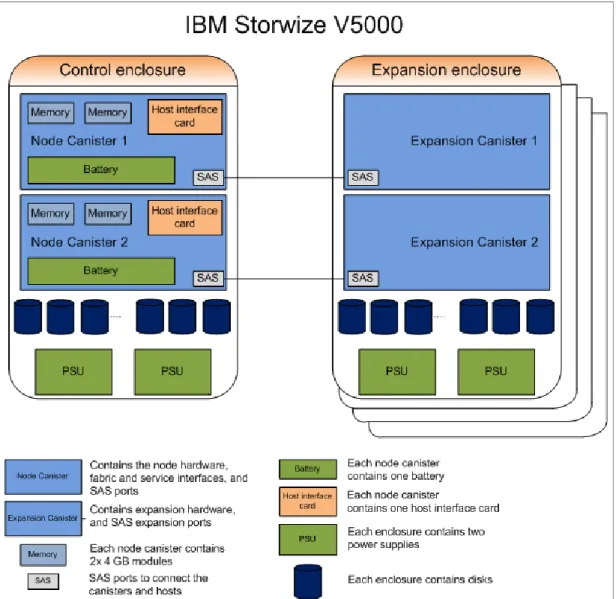
Figure 1-3 shows an overview of the hardware components of the IBM Storwize V5000 solution.
Figure 1-3 IBM Storwize V5000 hardware components
In Figure 1-4 on page 7, you can see that there are two power supply slots at the bottom of the enclosure. The power supplies are identical and exchangeable. There are two canister slots at the top of the chassis.
In Figure 1-5, you can see the rear view of an IBM Storwize V5000 expansion enclosure.
Figure 1-5 IBM Storwize V5000 expansion enclosure rear view - models 12E and 24E
You can see that the only difference between the node enclosure and the expansion enclosure are the canisters. The canisters of the expansion have only the two SAS ports. For more information about the expansion enclosure, see 1.4.2, “Expansion enclosure” on page 9.
1.4.1 Control enclosure
Each IBM Storwize V5000 system has one control enclosure that contains two node canisters, disk drives, and two power supplies.
Figure 1-6 shows a single node canister.
Figure 1-6 IBM Storwize V5000 node canister
Each node canister contains the following hardware:
Battery
Memory: 8 GB memory
8 Gb Fibre Channel Host interface card
Four 6 Gbps SAS ports
Two 10/100/1000 Mbps Ethernet ports
Two USB 2.0 ports (one port is used during installation)
System flash
The battery is used in case of power loss. The IBM Storwize V5000 system uses this battery to power the canister while the cache data is written to the internal system flash. This memory dump is called a
fire hose memory dump
. After the system is up again, this data is loaded back to the cache for destage to the disks.Figure 1-6 on page 8 also shows the following that are provided by the IBM Storwize V5000 node canister:
Two 10/100/1000 Mbps Ethernet ports, which are used for management. Port 1 (left port) must be configured. The second port is optional and is used for management. Both ports can be used for iSCSI traffic. For more information, see Chapter 4, “Host configuration” on page 153.
Two USB ports. One port is used during the initial configuration or when there is a problem. They are numbered 1 on the left and 2 on the right. For more information about usage, see Chapter 2, “Initial configuration” on page 27.
Four serial attached SCSI (SAS) ports. They are numbered 1 on the left to 4 on the right. The IBM Storwize V5000 uses ports 1 and 2 for host connectivity and ports 3 and 4 to connect to the optional expansion enclosures. The IBM Storwize V5000 incorporates two SAS chains and three expansion enclosures can be connected to each chain.
Four Fibre Channel ports, which operate at 2 Gbps, 4 Gbps, or 8 Gbps. The ports are numbered from left to right starting with 1.
The two nodes act as a single processing unit and form an I/O group that is attached to the SAN fabric, an iSCSI infrastructure or directly attached to hosts via FC or SAS. The pair of nodes is responsible for serving I/O to a volume. The two nodes provide a highly available fault-tolerant controller so that if one node fails, the surviving node automatically takes over. Nodes are deployed in pairs that are called
I/O groups
.One node is designated as the configuration node, but each node in the control enclosure holds a copy of the control enclosure state information.
The IBM Storwize V5000 supports two I/O groups in a clustered system.
The terms
node canister
andnode
are used interchangeably throughout this book.1.4.2 Expansion enclosure
The optional IBM Storwize V5000 expansion enclosure contains two expansion canisters, disk drives, and two power supplies.
Figure 1-7 shows an overview of the expansion enclosure.
Figure 1-7 Expansion enclosure of the IBM Storwize V5000
The expansion enclosure power supplies are the same as the control enclosure
.
There is a single power lead connector on each power supply unit.Figure 1-8 shows the expansion canister ports.
Figure 1-8 Expansion canister ports
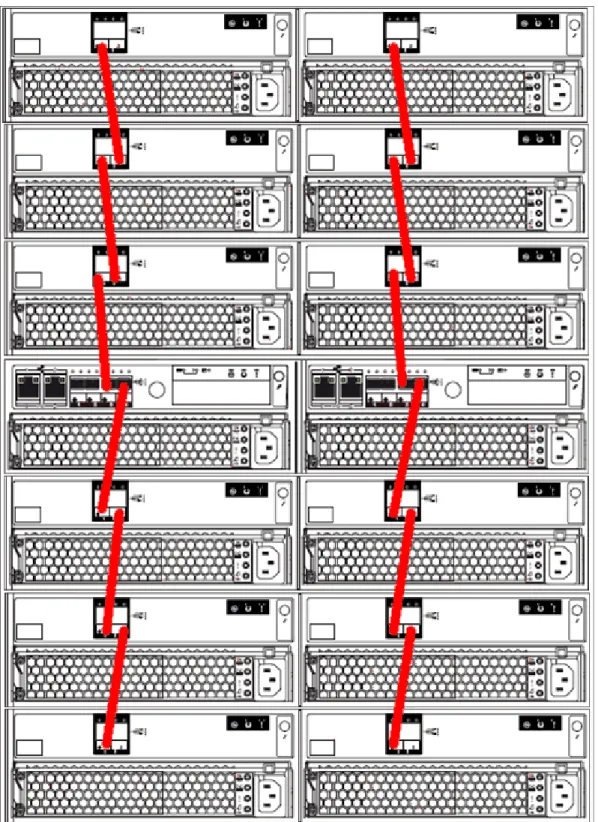
As shown in Figure 1-8, each expansion canister provides two SAS interfaces that are used to connect to the control enclosure and any optional expansion enclosures. The ports are numbered 1 on the left and 2 on the right. SAS port 1 is the IN port and SAS port 2 is the OUT port.
Use of the SAS connector 1 is mandatory because the expansion enclosure must be
attached to a control enclosure or another expansion enclosure. SAS connector 2 is optional because it is used to attach to more expansion enclosures.
Each port includes two LEDs to show the status. The first LED indicates the link status and the second LED indicates the fault status.
For more information about LED and ports, see this website:
http://pic.dhe.ibm.com/infocenter/storwize/v5000_ic/index.jsp
1.4.3 Host connectivity
With 1 Gb iSCSI, 8 Gb FC, and 6 Gb SAS host interfaces supported as standard, the IBM Storwize V5000 is designed to accommodate the most common storage networks. This broad networking support enables deployment of IBM Storwize V5000 in existing storage network infrastructures.
The 1 Gb iSCSI and 6 Gb SAS interfaces are built into the node canister hardware and the 8 Gb FC interface is supplied by a host interface card (HIC). As of this writing, the 8 Gb FC HIC is the only HIC that is available and is supplied as standard.
1.4.4 Disk drive types
IBM Storwize V5000 enclosures support SSD, SAS, and Nearline SAS drive types. Each drive has two ports (two PHYs) and I/O can be issued down both paths simultaneously.
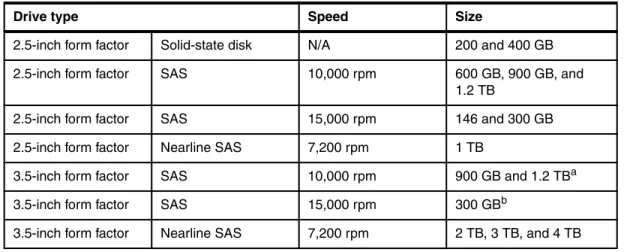
Table 1-3 shows the IBM Storwize V5000 Disk Drive types that are available at the time of writing.
Table 1-3 IBM Storwize V5000 Disk Drive types
1.5 IBM Storwize V5000 terms
In this section, we introduce the terms that are used for the IBM Storwize V5000 throughout this book.
1.5.1 Hosts
A host system is a server that is connected to IBM Storwize V5000 through a Fibre Channel connection, an iSCSI connection, or through a SAS connection.
Hosts are defined on IBM Storwize V5000 by identifying their WWPNs for Fibre Channel and SAS hosts. iSCSI hosts are identified by using their iSCSI names. The iSCSI names can be iSCSI qualified names (IQNs) or extended unique identifiers (EUIs). For more information, see Chapter 4, “Host configuration” on page 153.
Hosts can be Fibre Channel attached via an existing Fibre Channel network infrastructure or direct attached, iSCSI attached via an existing IP network, or directly attached via SAS. A significant benefit of having direct attachment is that you can attach the host directly to the IBM Storwize V5000 without the need for an FC or IP network.
1.5.2 Node canister
A node canister provides host interfaces, management interfaces, and SAS interfaces to the control enclosure. A node canister has the cache memory, the internal storage to store software and logs, and the processing power to run the IBM Storwize V5000 virtualizing and management software. A clustered system consists of a one or two node pairs or I/O groups. One of the nodes within the system is known as the
configuration node
that manages configuration activity for the clustered system. If this node fails, the system nominates theDrive type Speed Size
2.5-inch form factor Solid-state disk N/A 200 and 400 GB 2.5-inch form factor SAS 10,000 rpm 600 GB, 900 GB, and
1.2 TB
2.5-inch form factor SAS 15,000 rpm 146 and 300 GB 2.5-inch form factor Nearline SAS 7,200 rpm 1 TB
3.5-inch form factor SAS 10,000 rpm 900 GB and 1.2 TBa a. 2.5-inch drive in a 3.5-inch drive carrier
3.5-inch form factor SAS 15,000 rpm 300 GBb b. 2.5-inch drive in a 3.5-inch drive carrier
1.5.3 I/O groups
Within IBM Storwize V5000, there are one or two pairs of node canisters, which are known as
I/O groups
. The IBM Storwize V5000 supports four node canisters in the clustered system, which provides two I/O groups.When a host server performs I/O to one of its volumes, all the I/Os for a specific volume are directed to the I/O group. Also, under normal conditions, the I/Os for that specific volume are always processed by the same node within the I/O group.
Both nodes of the I/O group act as preferred nodes for their own specific subset of the total number of volumes that the I/O group presents to the host servers (a maximum of 2048 volumes per hosts). However, both nodes also act as a failover node for its partner node within the I/O group. Therefore, a node takes over the I/O workload from its partner node (if required) without affecting the server’s application.
In a IBM Storwize V5000 environment (which uses active-active architecture), the I/O handling for a volume can be managed by both nodes of the I/O group. Therefore, servers that are connected through Fibre Channel connectors must use multipath device drivers to handle this capability.
The IBM Storwize V5000 I/O groups are connected to the SAN so that all application servers that access volumes from the I/O group have access to them. Up to 1024 host server objects can be defined to one I/O group or 2048 in a two I/O group system.
1.5.4 Clustered system
A clustered system consists of one or two pairs of node canisters or I/O groups. All configuration, monitoring, and service tasks are performed at the system level. The configuration settings are replicated across all node canisters in the clustered system. To facilitate these tasks, one or two management IP addresses are set for the clustered system. By using this configuration, you can manage the clustered system as a single entity.
There is a process to back up the system configuration data on to disk so that the clustered system can be restored in the event of a disaster. This method does not back up application data; only IBM Storwize V5000 system configuration information is backed up.
The system can be configured by using the IBM Storwize V5000 management software (GUI), CLI, or the USB key.
Important: The active/active architecture provides availability to process I/Os for both
controller nodes and allows the application to continue running smoothly, even if the server has only one access route or path to the storage controller. This type of architecture eliminates the path/LUN thrashing that is typical of an active/passive architecture.
System configuration backup: After the system configuration is backed up, save the
backup data on your hard disk (or at the least outside of the SAN). If you are unable to access the IBM Storwize V5000, you do not have access to the backup data if it is on the SAN. Perform this configuration backup after each configuration change to be safe.
1.5.5 RAID
The IBM Storwize V5000 contains a number of internal drives, but these drives cannot be directly added to storage pools. The drives must be included in a RAID array to provide protection against the failure of individual drives.
These drives are referred to as members of the array. Each array has a RAID level. RAID levels provide different degrees of redundancy and performance and have different restrictions regarding the number of members in the array.
IBM Storwize V5000 supports hot spare drives. When an array member drive fails, the system automatically replaces the failed member with a hot spare drive and rebuilds the array to restore its redundancy. Candidate and spare drives can be manually exchanged with array members.
Each array has a set of goals that describe the required location and performance of each array. A sequence of drive failures and hot spare takeovers can leave an array unbalanced, that is, with members that do not match these goals. The system automatically rebalances such arrays when the appropriate drives are available.
The following RAID levels are available:
RAID 0 (striping, no redundancy)
RAID 0 arrays stripe data across the drives. The system supports RAID 0 arrays with one member, which is similar to traditional JBOD attach. RAID 0 arrays have no redundancy, so they do not support hot spare takeover or immediate exchange. A RAID 0 array can be formed by one to eight drives.
RAID 1 (mirroring between two drives, which is implemented as RAID 10 with two drives) RAID 1 arrays stripe data over mirrored pairs of drives. A RAID 1 array mirrored pair is rebuilt independently. A RAID 1 array can be formed by two drives only.
RAID 5 (striping, can survive one drive fault, with parity)
RAID 5 arrays stripe data over the member drives with one parity strip on every stripe. RAID 5 arrays have single redundancy. The parity algorithm means that an array can tolerate no more than one member drive failure. A RAID 5 array can be formed by 3 - 16 drives.
RAID 6 (striping, can survive two drive faults, with parity)
RAID 6 arrays stripe data over the member drives with two parity stripes (which is known as the P-parity and the Q-parity) on every stripe. The two parity strips are calculated by using different algorithms, which give the array double redundancy. A RAID 6 array can be formed by 5 - 16 drives.
RAID 10 (RAID 0 on top of RAID 1)
RAID 10 arrays have single redundancy. Although they can tolerate one failure from every mirrored pair, they cannot tolerate two-disk failures. One member out of every pair can be rebuilding or missing at the same time. A RAID 10 array can be formed by 2 - 16 drives.
1.5.6 Managed disks
An MDisk refers to the unit of storage that IBM Storwize V5000 virtualizes. This unit can be a logical volume on an external storage array that is presented to the IBM Storwize V5000 or a RAID array that consists of internal drives. The IBM Storwize V5000 then can allocate these MDisks into storage pools.
An MDisk is invisible to a host system on the storage area network because it is internal to the IBM Storwize V5000 system.
An MDisk features the following modes:
Array
Array mode MDisks are constructed from internal drives by using the RAID functionality. Array MDisks are always associated with storage pools.
Unmanaged
LUNs presented by external storage systems to IBM Storwize V5000 are discovered as unmanaged MDisks. The MDisk is not a member of any storage pools, which means it is not being used by the IBM Storwize V5000 storage system.
Managed
Managed MDisks are LUNs presented by external storage systems to an IBM Storwize V5000 that are assigned to a storage pool and provide extents so that volumes can use it. Any data that might be on these LUNs when they are added is lost.
Image
Image MDisks are LUNs that are presented by external storage systems to an IBM Storwize V5000 and assigned directly to a volume with a one-to-one mapping of extents between the MDisk and the volume. For more information, see Chapter 6, “Storage migration wizard” on page 237.
1.5.7 Quorum disks
A quorum disk is an MDisk that contains a reserved area for use exclusively by the system. In the IBM Storwize V5000, internal drives can be considered as quorum candidates. The clustered system uses quorum disks to break a tie when exactly half the nodes in the system remain after a SAN failure.
The clustered system automatically forms the quorum disk by taking a small amount of space from an MDisk. It allocates space from up to three different MDisks for redundancy, although only one quorum disk is active.
To avoid the possibility of losing all of the quorum disks because of a failure of a single storage system if the environment has multiple storage systems, you should allocate the quorum disk on different storage systems. It is possible to manage the quorum disks by using the CLI.
1.5.8 Storage pools
A storage pool is a collection of MDisks (up to 128) that are grouped to provide capacity for volumes. All MDisks in the pool are split into extents of the same size. Volumes are then allocated out of the storage pool and are mapped to a host system.
MDisks can be added to a storage pool at any time to increase the capacity of the pool. MDisks can belong in only one storage pool. For more information, see Chapter 7, “Storage pools” on page 295.
Each MDisk in the storage pool is divided into a number of extents. The size of the extent is selected by the administrator when the storage pool is created and cannot be changed later. The size of the extent ranges from 16 MB - 8 GB.
The extent size directly affects the maximum volume size and storage capacity of the clustered system.
A system can manage 2^22 (4,194,304) extents. For example, with a 16 MB extent size, the system can manage up to 16 MB x 4,194,304 = 64 TB of storage.
The effect of extent size on the maximum volume and cluster size is shown in Table 1-4. Table 1-4 Maximum volume and cluster capacity by extent size
Use the same extent size for all storage pools in a clustered system, which is a prerequisite if you want to migrate a volume between two storage pools. If the storage pool extent sizes are not the same, you must use volume mirroring to copy volumes between storage pools, as described in Chapter 7, “Storage pools” on page 295.
A storage pool can have a threshold warning set that automatically issues a warning alert when the used capacity of the storage pool exceeds the set limit.
Default extent size: The GUI of IBM Storwize V5000 has a default extent size value of 1
GB when you define a new storage pool. This is a change in the IBM Storwize code v7.1. The GUI cannot change the extent size. Therefore, if you want to create storage pools with a different extent size, this must be done via the CLI by using the mkmdiskgrp and mkarray
commands.
Extent size Maximum volume capacity for normal volumes (GB)
Maximum storage capacity of cluster 16 2048 (2 TB) 64 TB 32 4096 (4 TB) 128 TB 64 8192 (8 TB) 256 TB 128 16384 (16 TB) 512 TB 256 32768 (32 TB) 1 PB 512 65536 (64 TB) 2 PB 1024 131072 (128 TB) 4 PB 2048 262144 (256 TB) 8 PB 4096 262144 (256 TB) 16 PB 8192 262144 (256 TB) 32 PB
Single-tiered storage pool
MDisks that are used in a single-tiered storage pool should have the following characteristics to prevent performance and other problems:
They should have the same hardware characteristics, for example, the same RAID type, RAID array size, disk type, and disk revolutions per minute (RPMs).
The disk subsystems providing the MDisks must have similar characteristics, for example, maximum input/output operations per second (IOPS), response time, cache, and
throughput.
Use MDisks of the same size, and ensure that the MDisks provide the same number of extents. If this configuration is not feasible, you must check the distribution of the volumes’ extents in that storage pool.
Multitiered storage pool
A multitiered storage pool has a mix of MDisks with more than one type of disk tier attribute, for example, a storage pool that contains a mix of generic_hdd AND generic_ssd MDisks. A multitiered storage pool contains MDisks with different characteristics unlike the single-tiered storage pool. However, each tier should have MDisks of the same size and MDisks that provide the same number of extents.
A multitiered storage pool is used to enable automatic migration of extents between disk tiers by using the IBM Storwize V5000 Easy Tier® function, as described in Chapter 9, “Easy Tier” on page 411.
1.5.9 Volumes
A volume is a logical disk that is presented to a host system by the clustered system. In our virtualized environment, the host system has a volume that is mapped to it by IBM Storwize V5000. IBM Storwize V5000 translates this volume into a number of extents, which are allocated across MDisks. The advantage with storage virtualization is that the host is decoupled from the underlying storage, so the virtualization appliance can move around the extents without impacting the host system.
The host system cannot directly access the underlying MDisks in the same manner as it can access RAID arrays in a traditional storage environment.
The following types of volumes are available:
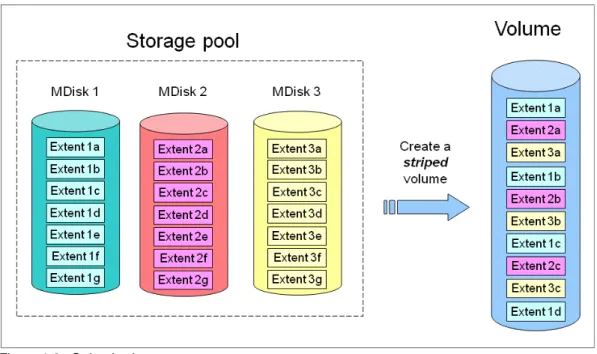
Striped
A striped volume is allocated one extent in turn from each MDisk in the storage pool. This process continues until the space that is required for the volume is satisfied.
Figure 1-9 shows how a striped volume is allocated, assuming 10 extents are required.
Figure 1-9 Striped volume
Sequential
A sequential volume is a volume in which the extents are allocated one after the other from one MDisk to the next MDisk, as shown in Figure 1-10.
Image mode
Image mode volumes are special volumes that have a direct relationship with one MDisk. They are used to migrate existing data into and out of the clustered system to or from external FC SAN-attached storage.
When the image mode volume is created, a direct mapping is made between extents that are on the MDisk and the extents that are on the volume. The logical block address (LBA)
x
on the MDisk is the same as the LBAx
on the volume, which ensures that the data on the MDisk is preserved as it is brought into the clustered system, as shown in Figure 1-11.Figure 1-11 Image mode volume
Some virtualization functions are not available for image mode volumes, so it is often useful to migrate the volume into a new storage pool. After it is migrated, the MDisk becomes a managed MDisk.
If you want to migrate data from an existing storage subsystem, use the Storage Migration wizard, which guides you through the process.
For more information, see Chapter 6, “Storage migration wizard” on page 237.
If you add an MDisk that contains data to a storage pool, any data on the MDisk is lost. If you are presenting externally virtualized LUNs that contain data to a IBM Storwize V5000, import them as image mode volumes to ensure data integrity or use the migration wizard.
1.5.10 iSCSI
iSCSI is an alternative method of attaching hosts to the IBM Storwize V5000. The iSCSI function is a software function that is provided by the IBM Storwize V5000 code, not hardware.
In the simplest terms, iSCSI allows the transport of SCSI commands and data over an Internet Protocol network that is based on IP routers and Ethernet switches. iSCSI is a block-level protocol that encapsulates SCSI commands into TCP/IP packets and uses an existing IP network instead of requiring FC HBAs and a SAN fabric infrastructure.
Concepts of names and addresses are carefully separated in iSCSI.
An iSCSI name is a location-independent, permanent identifier for an iSCSI node. An iSCSI node has one iSCSI name, which stays constant for the life of the node. The terms initiator name and target name also refer to an iSCSI name.
An iSCSI address specifies the iSCSI name of an iSCSI node and a location of that node. The address consists of a host name or IP address, a TCP port number (for the target), and the iSCSI name of the node. An iSCSI node can have any number of addresses, which can change at any time, particularly if they are assigned by way of Dynamic Host Configuration Protocol (DHCP). An IBM Storwize V5000 node represents an iSCSI node and provides statically allocated IP addresses.
Each iSCSI node, that is, an initiator or target, has a unique IQN, which can have a size of up to 255 bytes. The IQN is formed according to the rules that were adopted for Internet nodes. The IQNs can be abbreviated by using a descriptive name, which is known as an alias. An alias can be assigned to an initiator or a target.
For more information about configuring iSCSI, see Chapter 4, “Host configuration” on page 153.
1.5.11 SAS
The SAS standard is an alternative method of attaching hosts to the IBM Storwize V5000. The IBM Storwize V5000 supports direct SAS host attachment providing easy-to-use, affordable storage needs. Each SAS port device has a worldwide unique 64-bit SAS address.
1.6 IBM Storwize V5000 features
In this section, we describe the features of the IBM Storwize V5000.
1.6.1 Mirrored volumes
IBM Storwize V5000 provides a function that is called
storage volume mirroring
, which enables a volume to have two physical copies. Each volume copy can belong to a different storage pool, be generic or a thin-provisioned, and be on different physical storage systems, which provides a high-availability solution.When a host system issues a write to a mirrored volume, IBM Storwize V5000 writes the data to both copies. When a host system issues a read to a mirrored volume, IBM Storwize V5000 requests it from the primary copy. If one of the mirrored volume copies is temporarily
unavailable, the IBM Storwize V5000 automatically uses the alternative copy without any outage for the host system. When the mirrored volume copy is repaired, IBM Storwize V5000 resynchronizes the data.
A mirrored volume can be converted into a non-mirrored volume by deleting one copy or by splitting away one copy to create a non-mirrored volume.
The mirrored volume copy can be any type: image, striped, sequential, and thin-provisioned or not. The two copies can be different volume types.
The use of mirrored volumes also can assist with migrating volumes between storage pools that have different extent sizes. Mirrored volumes also can provide a mechanism to migrate fully allocated volumes to thin-provisioned volumes without any host outages.
The Volume Mirroring feature is included as part of the base software and no license is required.
1.6.2 Thin provisioning
Volumes can be configured to be
thin-provisioned
orfully allocated
. Concerning application reads and writes, a thin-provisioned volume behaves as though they were fully allocated. When a volume is created, the user specifies two capacities: the real capacity of the volume and its virtual capacity.The real capacity determines the quantity of MDisk extents that are allocated for the volume. The virtual capacity is the capacity of the volume that is reported to IBM Storwize V5000 and to the host servers.
The real capacity is used to store the user data and the metadata for the thin-provisioned volume. The real capacity can be specified as an absolute value or a percentage of the virtual capacity.
The thin provisioning feature can be used on its own to create over-allocated volumes, or it can be used with FlashCopy. Thin-provisioned volumes can be used with the mirrored volume feature as well.
A thin-provisioned volume can be configured to
autoexpand
, which causes the IBM Storwize V5000 to automatically expand the real capacity of a thin-provisioned volume as its real capacity is used. This parameter prevents the volume from going offline. Autoexpand attempts to maintain a fixed amount of unused real capacity on the volume. This amount is known as thecontingency capacity
. The default setting is 2%.The contingency capacity initially is set to the real capacity that is assigned when the volume is created. If the user modifies the real capacity, the contingency capacity is reset to be the difference between the used capacity and real capacity.
A volume that is created with a zero contingency capacity goes offline when it must expand. A volume with a non-zero contingency capacity stays online until it is used up.
Autoexpand does not cause the real capacity to grow much beyond the virtual capacity. The real capacity can be manually expanded to more than the maximum that is required by the current virtual capacity and the contingency capacity is recalculated.
To support the autoexpansion of thin-provisioned volumes, the storage pools from which they are allocated have a configurable warning capacity. When the used free capacity of the group exceeds the warning capacity, a warning is logged. For example, if a warning of 80% is specified, the warning is logged when 20% of the free capacity remains.
A thin-provisioned volume can be converted to a fully allocated volume by using volume mirroring (and vice versa).
The Thin Provisioning feature is included as part of the base software and no license is required.
1.6.3 Easy Tier
IBM Easy Tier provides a mechanism to seamlessly migrate hot spots to the most appropriate tier within the IBM Storwize V5000 solution. This migration can be to different tiers of internal drive within IBM Storwize V5000 or to external storage systems that are virtualized by IBM Storwize V5000.
The Easy Tier function can be turned on or off at the storage pool and volume level. It is possible to demonstrate the potential benefit of Easy Tier in your environment before installing SSDs by using the IBM Storage Advisor Tool.
For more information about Easy Tier, see Chapter 9, “Easy Tier” on page 411. The IBM Easy Tier feature is licensed per enclosure.
1.6.4 Storage Migration
By using the IBM Storwize V5000 Storage Migration feature, you can easily move data from other Fibre Channel attached external storage to the internal capacity of the IBM Storwize V5000. Migrating data from other storage to the IBM Storwize V5000 storage system provides benefit from more functionality, such as, the easy-to-use GUI, internal virtualization, thin provisioning, and Copy Services.
The Storage Migration feature is included as part of the base software and no license is required.
1.6.5 FlashCopy
FlashCopy copies a source volume on to a target volume. The original contents of the target volume is lost. After the copy operation starts, the target volume has the contents of the source volume as it existed at a single point in time. Although the copy operation takes time, the resulting data at the target appears as though the copy was made instantaneously. FlashCopy is sometimes described as an instance of a time-zero (T0) copy or a point-in-time (PiT) copy technology.
FlashCopy can be performed on multiple source and target volumes. FlashCopy permits the management operations to be coordinated so that a common single point-in-time is chosen for copying target volumes from their respective source volumes.
IBM Storwize V5000 also permits multiple target volumes to be FlashCopied from the same source volume. This capability can be used to create images from separate points in time for the source volume, and to create multiple images from a source volume at a common point in time. Source and target volumes can be thin-provisioned volumes.
Reverse FlashCopy enables target volumes to become restore points for the source volume without breaking the FlashCopy relationship and without waiting for the original copy operation to complete. IBM Storwize V5000 supports multiple targets and thus multiple rollback points.
The FlashCopy feature is licensed per enclosure.
For more information about FlashCopy copy services, see Chapter 10, “Copy services” on page 449.
1.6.6 Remote Copy
The Remote Copy can be maintained in one of two modes: synchronous or asynchronous. With the IBM Storwize V5000, Metro Mirror and Global Mirror are the IBM branded terms for the functions that are synchronous Remote Copy and asynchronous Remote Copy.
By using the Metro Mirror and Global Mirror Copy Services features, you can set up a relationship between two volumes so that updates that are made by an application to one volume are mirrored on the other volume. The volumes can be in the same system or on two different systems.
For both Metro Mirror and Global Mirror copy types, one volume is designated as the primary and the other volume is designated as the secondary. Host applications write data to the primary volume and updates to the primary volume are copied to the secondary volume. Normally, host applications do not perform I/O operations to the secondary volume. The Metro Mirror feature provides a synchronous copy process. When a host writes to the primary volume, it does not receive confirmation of I/O completion until the write operation completes for the copy on the primary and secondary volumes. This ensures that the
secondary volume is always up-to-date with the primary volume if a failover operation must be performed.
The Global Mirror feature provides an asynchronous copy process. When a host writes to the primary volume, confirmation of I/O completion is received before the write operation
completes for the copy on the secondary volume. If a failover operation is performed, the application must recover and apply any updates that were not committed to the secondary volume. If I/O operations on the primary volume are paused for a brief time, the secondary volume can become an exact match of the primary volume.
Global Mirror can operate with or without cycling. When it is operating without cycling, write operations are applied to the secondary volume as soon as possible after they are applied to the primary volume. The secondary volume is less than one second behind the primary volume, which minimizes the amount of data that must be recovered in the event of a failover. However, this requires that a high-bandwidth link is provisioned between the two sites.