Installation Guide
O
RACLE
D
ATABASE
ON
UNIX S
ERVER
78-0359B MFG/PRO Version 9.0 Printed in the U.S.A. September 2001
QAD Inc. The information contained in this document is subject to change without notice. QAD Inc. provides this material as is and makes no warranty of any kind, expressed or implied, including, but not limited to, the implied warranties of merchantability and fitness for a particular purpose. QAD Inc. shall not be liable for errors contained herein or for incidental or consequential damages (including lost profits) in connection with the furnishing, performance, or use of this material whether based on warranty, contract, or other legal theory.
Some states do not allow the exclusion of implied warranties or the limitation or exclusion of liability for incidental or consequential damages, so the above limitations and exclusion may not be applicable.
MFG/PRO® is a registered trademark of QAD Inc.
PROGRESS® and ProVISION SA® are registered trademarks of Progress Software Corporation.
Oracle® is a registered trademark of Oracle Corporation.
UNIX® is a registered trademark of UNIX System Laboratories, Inc. Novell™ is a trademark of Novell, Inc.
Windows™ is a trademark of Microsoft Corporation.
Windows NT® and MS-DOS® are registered trademarks of Microsoft Corporation. PC/NFS® is a registered trademark of Sun Microsystems, Inc.
PathWay® is a registered trademark of Wollongong Corp. Copyright © 2001 by QAD Inc.
78-0359B QAD Inc. 6450 Via Real Carpinteria, California 93013 Phone (805) 684-6614 Fax (805) 684-1890
Contents
A
BOUTT
HISG
UIDE. . . 1
What is in This Guide . . . 2
Audience . . . 2
Installation Errata . . . 2
Release Bulletin . . . 2
QAD Web Site . . . 2
Other MFG/PRO Version 9.0 Documentation . . . 3
Document Conventions . . . 3
QAD’s Global Technical Services . . . 3
Converting an Existing Oracle Database . . . 4
C
HAPTER1
I
NSTALLATIONO
VERVIEW. . . 5
Installation Summary . . . 6
Installing the Oracle RDBMS . . . 6
Building PROGRESS DataServer Components . . . 6
Database Server Setup . . . 6
Loading and Setting Up Windows Clients . . . 6
Loading Service Pack Media . . . 7
Multiple Language Installation Overview . . . 8
MFG/PRO Language Codes . . . 8
How Language Sessions Operate . . . 9
MFG/UTIL . . . 9
Keyboard Commands . . . 9
Database Sets . . . 11
Example Oracle Directory Structure . . . 11
User License Overview . . . 12
User Licensing System . . . 12
User Licensing Programs . . . 13
Named and Concurrent User Licensing . . . 13
Online Help Options . . . 14
C
HAPTER2
S
YSTEMR
EQUIREMENTS. . . 15
Minimum Requirements . . . 16
General Requirements . . . 16
Database Server . . . 16
Windows Clients . . . 17
Hardware Sizing . . . 18
Host Mode or Server Memory Formulas . . . 18
Example . . . 20
Client Workstation Memory Requirements . . . 20
Disk Drive Requirements . . . 21
Host Mode and Server Disks . . . 21
Example . . . 23
Client Workstation Disk Requirements . . . 23
Disk Controller Requirements . . . 24
CPU Sizing . . . 24
Host Mode and Server CPU Requirements . . . 24
Client Workstation CPU Requirements . . . 24
Network Sizing . . . 25
LAN . . . 25
WAN . . . 25
Network Fileserver . . . 25
Oracle Database Sizing . . . 26
SGA (System Global Area) . . . 26
Rollback Segments . . . 26
Database I/O and Tablespace Sizing . . . 27
CONTENTS V
Oracle Software Requirements . . . 30
Required Oracle Software Components . . . 30
C
HAPTER3
MFG/PRO-
ON-O
RACLEC
ONSIDERATIONS. . . 33
Choosing the MFG/PRO-on-Oracle Architecture . . . 34
Hardware Setup and Disk Layout . . . 34
Use of Oracle Tablespaces . . . 35
Use of Oracle Character Sets . . . 35
Oracle Environment Variables . . . 36
Client/Server Installs . . . 37
Installations on the Database Server . . . 37
Installations on the Application Server . . . 38
Client and Server Configuration Files . . . 38
Server Configuration Files . . . 38
Client Configuration Files . . . 39
C
HAPTER4
B
UILDINGPROGRESS D
ATAS
ERVERC
OMPONENTS. . . 41
Database Server Build Overview . . . 42
Products and Configurable Elements . . . 42
Tips for Running PROBUILD . . . 43
Environment Settings . . . 43
Running PROBUILD . . . 44
Tips for Running Link Scripts . . . 44
Missing PRO*C Libraries . . . 45
Notes on PROBUILD on Solaris for Oracle . . . 46
C
HAPTER5
D
ATABASES
ERVERS
ETUP. . . 47
Setup Overview . . . 48
Host-Mode and Client/Server . . . 49
Assumptions . . . 49
Loading MFG/PRO from Tape Media . . . 50
Mounting the CD-ROM . . . 51
1: Creating the Schema Holder and SQL Scripts . . . 51
Preliminary Setup . . . 54
Start Installation . . . 55
Enter Schema Holder Information . . . 57
Enter SQL Script Information . . . 59
2: Running SQL Scripts to Create the Oracle Database . . . 62
3: Copying the Schema Holder Under a New Name . . . 65
4: Configuring the Database Set . . . 66
User Script Generation . . . 70
5: Loading MFG/PRO Data . . . 71
6: Loading Service Pack Media . . . 74
7: Starting MFG/PRO and Registering the License . . . 74
License Registration . . . 75
Exiting MFG/PRO . . . 76
8: Loading Online Help Data . . . 76
9: Loading the Source Code Cross-Reference (Optional) . . . 77
C
HAPTER6
L
OADINGC
LIENTM
EDIA. . . 81
Loading Client Media . . . 82
Preliminary . . . 82
Running the Client Installation . . . 82
Loading Service Pack Client Media . . . 85
C
HAPTER7
W
INDOWSC
LIENTS
ETUP. . . 87
Configuring the Client PC Database Set . . . 88
Setup Prerequisites . . . 88
Client Setup . . . 89
If Files Are Missing . . . 97
Testing the Client PC Setup . . . 98
Using Express Setup for Client PCs . . . 99
Changing a Client’s PROPATH After Setup . . . 100
C
HAPTER8
M
ULTIPLEL
ANGUAGES
ETUP. . . 101
Multiple Language Assumptions . . . 102
CONTENTS VII
Loading an Additional Language for Windows Clients . . . 104
Windows and Win32 Character Client Setup . . . 104
Updating Translated Default Data . . . 104
Loading Menus and Messages . . . 105
Loading Translated Online Help . . . 106
Replacing User Interface (gui) Data . . . 106
Creating a Language Schema Holder . . . 109
Setting Up Users and Testing the Language Installation . . . 110
Cleaning Up the System . . . 111
A
PPENDIXA I
NSTALLATIONR
EFERENCE. . . 113
Oracle Database Administration . . . 114
Modifying the Oracle Database . . . 114
Using MFG/UTIL for Administration . . . 115
Migrating a Custom PROGRESS Database to Oracle . . . 116
About Protoora . . . 116
Terminal Type and Codepages . . . 117
Multi-Language Terminal Types . . . 118
Multiple Languages and Codepages . . . 119
Adding MFG/PRO Modules . . . 119
Special Compilation . . . 121
For UNIX Character Programs . . . 121
For Windows Client Programs . . . 122
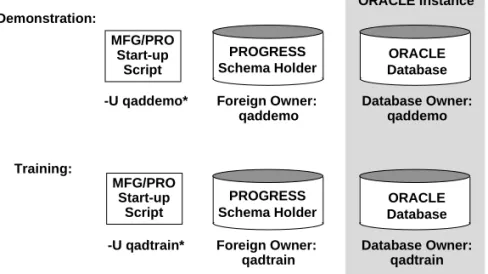
Setting Up Multiple Databases . . . 122
Multiple Database Overview . . . 122
Schema Holder . . . 123
SQL Scripts . . . 124
Start-Up Script . . . 126
Compiling with an Unknown FOREIGN_OWNER . . . 126
A
PPENDIXB O
RACLEU
PGRADES. . . 127
Overview of Oracle Upgrades . . . 128
Different Levels of Upgrade . . . 128
Version Release . . . 128
Maintenance Release Upgrade . . . 129
QAD Considerations . . . 129
Upgrading Possibilities . . . 130
Backward Compatibility . . . 130
Patch Installation . . . 130
Maintenance or Feature Release Upgrades . . . 131
Version Release Upgrades . . . 131
Downgrading . . . 132
G
LOSSARY. . . 133
About This Guide
What is in This Guide 2Document Conventions 3
What is in This Guide
Use this guide to install MFG/PRO 9.0 for Oracle server software versions 7.x and 8.1.x on supported UNIX systems.
The instructions in this guide include how to:
• Install MFG/PRO server software on a UNIX server
• Install MFG/PRO Character Client software
• Install MFG/PRO Windows graphical user interface (GUI) client software
• Configure a standard MFG/PRO 9.0 environment including character and GUI clients
Audience
These instructions are for the MFG/PRO system administrator who manages the MFG/PRO database and is familiar with UNIX,® PROGRESS,® Oracle,® Microsoft Windows,™ and networking.
Installation Errata
In addition to these instructions, you may receive a supplementary errata sheet with changes and additional instructions. Check your product package.
Release Bulletin
In conjunction with these instructions, see the MFG/PRO 9.0 Release Bulletin for additional utilities required for the modules you use. These utilities, which are related to a particular programming patch (ECO), correct possible corruptions in your data.
QAD Web Site
For QAD customers with a Web account, MFG/PRO documentation is available for review or downloading at:
ABOUT THIS GUIDE 3
To obtain a QAD Web account, go to: http://www.qad.com/
Other MFG/PRO Version 9.0 Documentation
• For an overview of new features and software updates, see the Release Bulletin.
• For instructions on navigating the MFG/PRO environment, see the User Interface Guide.
• For information on the entire system, see the User Guides.
• For technical details, see the File Relationships and Database Definitions.
• For system administration information, see the System Administration Reference Guide.
• To view documents online in PDF format, see the Documents on CD.
Document Conventions
This guide uses the conventions listed in the following table.
QAD’s Global Technical Services
MFG/PRO installations have a wide variety of configuration possibilities, are highly scalable, and are easily customized. While this guide provides basic installation and conversion information, it cannot consider every possible MFG/PRO computing environment or configuration.
To take full advantage of MFG/PRO’s flexibility and potential in your specific environment, contact your QAD support representative for information on the installation and customization offerings supplied by
If you see: It means:
monospaced text A command or file name.
italicized monospaced text
Italicized monospaced text indicates a variable name for a value you enter as part of an operating system command. For example, YourCDROMDir.
indented command line
A long command that you enter as one line (although it appears in the text as two lines).
QAD’s Global Technical Services. These offerings include performance enhancements as well as technical and administration training.
Converting an Existing Oracle Database
Converting an existing Oracle database requires a qualified Oracle Database Administrator (DBA) be on site, and that adequate PROGRESS expertise is available. If these resources are not available, it is strongly recommended that you work with a QAD-certified Oracle conversion consultant.
These recommendations are based on experience. Please contact QAD’s Global Technical Services to evaluate your conversion options. This manual does not include specific steps for converting Oracle databases. For that information, refer to the Oracle installation or migration guides provided with the Oracle media. Also, refer to the operating system specific guide for the appropriate migration information on the web at:
http://metalink.oracle.com http://docs.oracle.com
C
HAPTER1
Installation Overview
This chapter covers the pre-installation requirements for aMFG/PRO 9.0 system, including an installation summary, a multi-language overview, and a description of MFG/PRO installation utilities.
Installation Summary 6
Multiple Language Installation Overview 8 MFG/UTIL 9
Database Sets 11
Example Oracle Directory Structure 11 User License Overview 12
Installation Summary
The basic MFG/PRO installation consists of the following major tasks. It is assumed you want to set up Windows clients.
Installing the Oracle RDBMS
• Check hardware and operating system requirements
• Set up environment
• Install software
• Perform post-installation tasks
Building PROGRESS DataServer Components
• Run PROBUILD utility
• Run link scripts created by PROBUILD
Database Server Setup
• Launch the installation to load the UNIX files on the database server and create a schema holder and SQL scripts.
• Run SQL scripts to create the Oracle database.
• Copy the schema holder under a new name.
• Configure database set start-up scripts
• Load system and help data. ÌSee “Loading
Service Pack Media” on page 7.
• Install the Service Pack Server media onto the server, if applicable.
Loading and Setting Up Windows Clients
• Load the Windows client media onto a file server.
• Load the Service Pack Windows Client media onto the file server, if applicable.
• Set up the needed files and Windows start-up icons on the first PC.
INSTALLATION OVERVIEW 7
Loading Service Pack Media
Service Packs contain MFG/PRO product updates issued between releases. Service Packs include important patches, code updates, system administration tools, drivers, and additional components. Service Packs offer a distinct advantage over the single-patch delivery mechanism by bundling a carefully controlled group of fixes and updates in an easily installed and well-documented package.
Service Packs are not offered for every release of MFG/PRO. If your product package does not contain Service Pack media, your release does not currently have a Service Pack.
The following major tasks are required to load Service Pack media.
• Load the Service Pack Server media onto your MFG/PRO server after installation and configuration.
• Load the Service Pack Windows Client media onto each Windows client or onto your network file server, depending upon your MFG/PRO configuration.
If you are upgrading to an MFG/PRO release with a Service Pack, the following major tasks are required to load Service Pack media.
• Load the Service Pack media onto your MFG/PRO database server after completing your upgrade.
• Load the Service Pack Windows Client media onto each Windows client or onto your network file server, depending upon your MFG/PRO configuration.
Refer to the Service Pack installation instructions in your product package for specific procedures.
Multiple Language Installation Overview
To install multiple languages, repeat the following installation tasks for each language:
• Load the UNIX files on the database server for each language
• Load the help data for each language
• Load the Windows files on the file server for each language
You do not need to build translated databases and compile against them because the programs come precompiled.
ÌSee Appendix A, “Terminal Type and Codepages,” on page 117 for additional infor-mation.
In multi-language environments, the language codepage controls how PROGRESS stores and retrieves data. A codepage applies to one or more languages; for example, codepage ibm850 applies to all western European languages. Because data storage and retrieval must use a single codepage, the languages in a multi-language environment must be in the same codepage family. The correct codepage for the MFG/PRO databases is assigned during installation.
MFG/PRO Language Codes
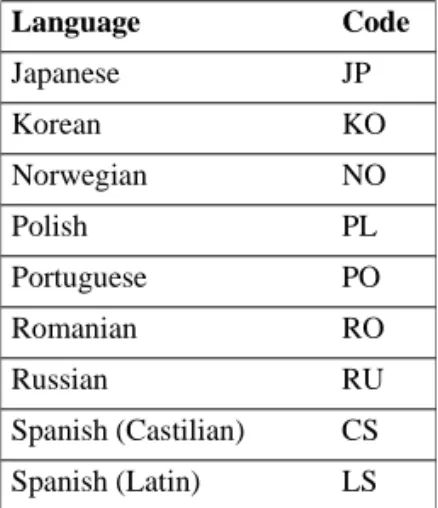
During installation and user setup, you use a MFG/PRO language code to specify which language you are installing. Table 1.1 lists all the
MFG/PRO language codes. (Some languages may not be available for this release.) The language code also appears on the label of your product media.
Table 1.1 MFG/PRO Language Codes
Language Code Language Code
Arabic AR Japanese JP
Bulgarian BU Korean KO
Chinese (Traditional) TW Norwegian NO
Chinese (Simplified) CH Polish PL
Czech CZ Portuguese PO
Danish DA Romanian RO
Dutch DU Russian RU
Finnish FI Spanish (Castilian) CS
INSTALLATION OVERVIEW 9
How Language Sessions Operate
After installation, you assign a language code to each user to determine which language they use. Based on the language code, the user connects to a language-specific set of programs and accesses language-specific system data (menus, messages, and help).
MFG/UTIL
MFG/UTIL is the installation and system management tool for MFG/PRO. It is launched automatically during installation of both the database server and Windows clients. After installation, use MFG/UTIL to perform maintenance, such as compilation and editing start-up scripts or Windows client icons. On Windows clients, you access MFG/UTIL from its start-up icon.
Keyboard Commands
When using MFG/UTIL in a character user interface, the keyboard commands are as follows.
German GE Swedish SW
Greek GR Turkish TU
Hungarian HU US English US
Italian IT
Keyboard Entry Command Name Description
F1 Go Moves to next frame or run a program. F2 Help Displays context-sensitive help (may not be
available on all windows). F3 Menu Bar Accesses the menu bar.
F4 End Exits a frame, program, or menu.
Space Bar Select Selects check-boxes and on/off options. Enter or Tab Tab Moves to next field or command. Shift+Tab or
Control+U
Back Tab Moves to the previous field or command.
Note In the character interface, button commands appear within brackets; for example: < OK >. To choose a button command, use the Tab key to move to the button and press Enter.
Log Files
You can refer to the following log files created by the installation utilities. \
Each time MFG/UTIL runs a prolonged task such as compiling or loading a .df file, it creates a new log file. The most recent log file is always called mfgutil.log. Older log files are named with the convention mfgulog.xxx, where xxx is a number from 001 through 999. The lower the number, the older the file. For example, these files are listed newest to oldest:
mfgutil.log mfgulog.002 mfgulog.001
MFG/UTIL does not delete or purge any log files. If you want to delete older log files, use the standard operating system commands.
Utility Log File Name Directory Location Installation
script
install.log and mfgpro.log
Sub-directory /log under the installation destination directory
INSTALLATION OVERVIEW 11
Database Sets
One of the functions of MFG/UTIL is to configure start-up parameters using the concept of database sets. A database set defines the connection parameters for a group of databases. In the case of MFG/PRO on Oracle, the required databases are the PROGRESS schema holder database and the Oracle database. Optionally, you can also include one or more custom side databases.
You can set up different database sets for different purposes. For example, you could have one database set that connects to a production database and schema holder, and one that connects to a training database and schema holder. In this case, both database sets could connect to the same schema holder but different Oracle databases.
In the UNIX environment, MFG/UTIL uses the database set information to create start-up scripts. In Windows, it creates start-up icons, a Windows initialization file (for example, progress.svg), and a start-up parameter file (for example, producti.pf). The parameter file contains the required connection parameters for your databases.
Example Oracle Directory Structure
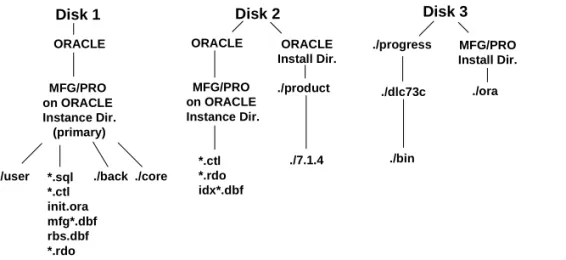
You should set up your Oracle directory structure so that the data files are spread among various disks.
Fig. 1.1 Oracle Disk Structure Example MFG/PRO on ORACLE Instance Dir. (primary) ORACLE Disk 1 ./progress MFG/PRO Install Dir. ./ora ORACLE Disk 2 Disk 3 MFG/PRO on ORACLE Instance Dir. *.sql *.ctl init.ora mfg*.dbf rbs.dbf *.rdo *.ctl *.rdo idx*.dbf ./user ./back ./core
ORACLE Install Dir. ./product ./7.1.4 ./dlc73c ./bin
User License Overview
User licensing tracks user counts on MFG/PRO and alerts QAD customers to license violations. Additionally, user licensing alerts customers to the expiration of MFG/PRO evaluation software.
License utilities do not currently restrict the total number of users that can log into MFG/PRO. This means that a user is not prevented from logging in when the total number of licensed users is exceeded. User counts are tracked according to the two licensing schemes QAD currently sells: concurrent and named users.
Note The user license utility applies only to MFG/PRO modules licensed by user count. For example, it does not apply to the EDI module.
User Licensing System
When QAD ships an order, a unique license code is supplied to each customer site. When a product is not actually shipped (for example, a license upgrade to increase user count), a license code sheet is still sent to the customer site. This license code identifies to the software the number of users for which the site is licensed.
When the software is first installed, the first user logging into
MFG/PRO—typically the system administrator—is prompted to enter the supplied license code.
When a user logs in and the number of logged-in users exceeds licensed users, two error messages display. The user must press OK or Enter to exit each message.
When a user logs in within 10 days of evaluation software’s expiration date, a warning displays. After expiration, no users can log in and the customer must contact their distributor or QAD for a renewal or temporary license code.
INSTALLATION OVERVIEW 13
User Licensing Programs
The programs related to user licensing are on the Database Management Menu (36.16). They are:
• License Registration (36.16.10): program to modify the license code
• License Violation Report (36.16.11): a report showing system logins that violate the user license count
• User Inquiry (36.16.12): a browse to monitor the activity of users
Named and Concurrent User Licensing
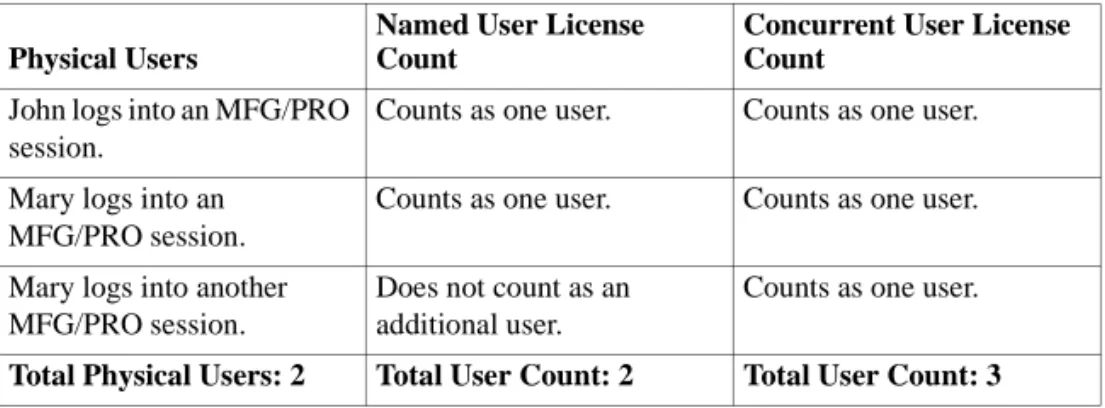
The user count is calculated differently depending on whether you purchased concurrent or named user licensing. In concurrent user licensing, each concurrent login to MFG/PRO is counted as a concurrent user. If a single user logs into multiple MFG/PRO sessions
simultaneously, each login is counted separately. In named user licensing, each physical user logging into MFG/PRO is counted as one user, regardless of how many simultaneous sessions they have.
Table 1.2 is an example of QAD licensing schemes.
Table 1.2
Licensing Schemes Physical Users
Named User License Count
Concurrent User License Count
John logs into an MFG/PRO session.
Counts as one user. Counts as one user.
Mary logs into an MFG/PRO session.
Counts as one user. Counts as one user.
Mary logs into another MFG/PRO session.
Does not count as an additional user.
Counts as one user.
Online Help Options
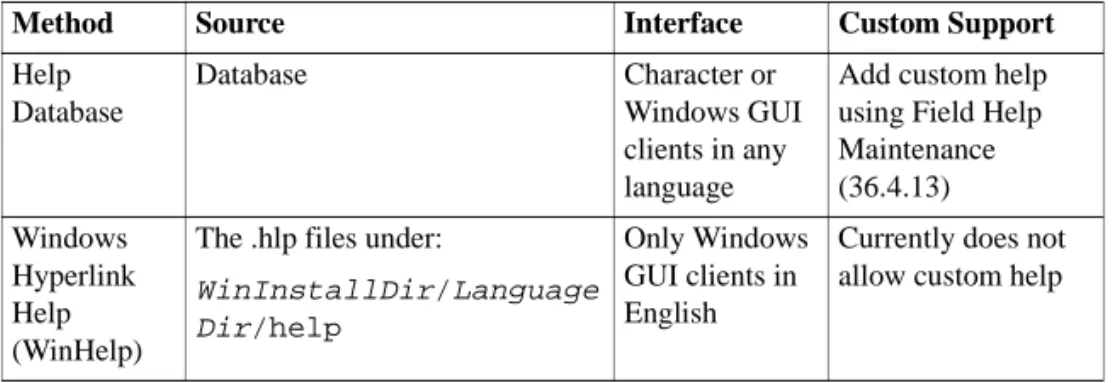
During installation and implementation, keep in mind the two
mechanisms for displaying online help about MFG/PRO: the character help database and Windows hyperlink files (WinHelp). Although the display methods differ, the help content is the same.
Important When you create the help databases, they are empty. You must load the .fhd help file to populate the help databases. If you do not, character help will not be available system wide. See Chapter 5,
“Database Server Setup,” for field help load instructions. Table 1.3
Comparison of Online Help Methods
You can control which type of help displays for each user through User Interface Profile (36.20.4).
Do not confuse a similar maintenance program, Window Help
Maintenance (36.7.21), with the Windows hyperlink help. Window Help Maintenance controls a look-up feature called scrolling windows and does not affect the Windows hyperlink help.
Method Source Interface Custom Support
Help Database Database Character or Windows GUI clients in any language
Add custom help using Field Help Maintenance (36.4.13) Windows Hyperlink Help (WinHelp)
The .hlp files under:
WinInstallDir/Language Dir/help
Only Windows GUI clients in English
Currently does not allow custom help
C
HAPTER2
System Requirements
An Oracle installation requires planning for adequate system resources. This chapter provides approximate guidelines as well as more detailed formulas you can use to generate an accurate estimate of hardware requirements for your installation.Minimum Requirements 16 Hardware Sizing 18
Disk Drive Requirements 21 CPU Sizing 24
Network Sizing 25 Network Fileserver 25 Oracle Database Sizing 26 Oracle Software Requirements 30
Minimum Requirements
General Requirements
• Compared with MFG/PRO on PROGRESS, MFG/PRO on Oracle databases require more hardware resources—CPU capacity, memory, and disk space—and more system performance tuning.
• The system administrator must be a certified Oracle database administrator and must know how to manage PROGRESS client processes.
• You must know what system configuration you will use in order to build the correct DataServer components. For more information, refer to the configuration descriptions in this chapter.
Database Server
• MFG/PRO: Version 9.0 server media.
• Oracle: Version 7.x or 8.1.x have slightly different requirements. You should implement one or the other, but not a combination of the two. Check whether the version you plan to use is compatible with the PROGRESS DataServer. SQL*DBA or Server Manager,
SQL*PLUS, and PRO*C will be used. You may also need
networking components; see “Client/Server and Networking” below.
• PROGRESS: Version 8.3 or later UNIX DataServer and client executable is required. Contact your PROGRESS or MFG/PRO sales representative for the specific lettered release best suited to your hardware. You may need networking components; see “Client/Server and Networking” below. Also, at least one license of PROGRESS 4GL or ProVISION is required for complete system administration.
• Client/Server and Networking: You can set up the PROGRESS DataServer for Oracle to be either remote from the PROGRESS client executable or local to it. In a remote configuration, you need
PROGRESS networking. In a local configuration, you access Oracle remotely.
• If you are using Oracle 7.x, you need SQL*Net V2.1 and the appropriate protocol adapters.
• If you are using Oracle 8.1.x, you need SQL*Net/NET8 and the appropriate protocol adapters.
SYSTEM REQUIREMENTS 17
In either local or remote configuration, you should also have a host-mode configuration installed for a single user. This way, you can run batch processes such as MRP and reports without creating adverse network traffic.
• Disk Space: You need at least 1 gigabyte (GB) of free disk space to install PROGRESS and MFG/PRO Version 9.0 on your database server machine. For each MFG/PRO language release you install, you need an additional 600 megabytes (MB). You also need more space if you load the source code cross-reference data. These requirements do not include space needed for your database data.
Note Depending on your Oracle version, your disk space requirements will differ. Refer to your Oracle documentation for specific disk space requirements for your Oracle version.
Windows Clients
• PROGRESS: Version 8.3 or later software on each PC client or on a file server that is accessible to each PC client. Contact your
PROGRESS or MFG/PRO sales representative for the specific 8.3 lettered release. Having PROGRESS on each PC will give you better performance.
• PROGRESS Query Version 8.3.
• MFG/PRO: Version 9.0 Windows media.
ÌFor details, see the PROGRESS Networks Guide.
• Network: You need a client/server environment and a working knowledge of PROGRESS networking.
The network should be a WINSOCK-compliant 1.1 TCP/IP protocol stack, such as MS TCP/IP or PC-TCP from FTP software. QAD recommends a 10Mbit Ethernet or 16Mbit token ring network or faster.
For Oracle 7.1.x, you need SQL*Net V2.1 or higher. For Oracle 8.1.x, you need SQL*Net/NET8 or higher. Both protocols require the appropriate protocol adapters.
• PC Clients:
• 150MHz (or faster) Intel Pentium processor.
• RAM: 32MB for Windows 95 or 32MB for Windows NT Workstation.
• Super VGA video.
• 1.0GB (or larger) hard drive.
• 32-bit network card.
Note PC client requirements vary depending on your Oracle database and PROGRESS software versions. Review the
PROGRESS and Oracle documentation for updates on supported client platforms and system requirements.
• File Server: A file server machine is recommended to store and download Windows programs. To load the media, you must have a CD-ROM drive on this machine or on a PC networked to it.
• Disk Space: For an Oracle 7.x database, a networked or local drive with at least 650MB for all modules is required. For an Oracle 8.1.x database, a networked or local drive with at least 1 GB for all modules is required. These estimates are based on the Windows NT file system (NTFS) disk format. If you use a file allocation table (FAT) disk format, you need more disk space; however, a FAT disk format is not recommended for the Windows file server.
The following section covers sizing guidelines in more detail and recent benchmark information to support sizing of basic MFG/PRO on Oracle systems. However, until a system is built, exact performance and disk layout are to some extent unknown.
Sizing worksheets are available in Appendix A, “Tablespaces in the Oracle Database,” on page 113.
Hardware Sizing
Hardware sizing consists of determining memory requirements for the server and the clients.
Host Mode or Server Memory Formulas
The following memory size formula is for an MFG/PRO host mode system or a database server in a client/server environment. This memory formula estimates the MFG/PRO memory requirement. In some cases additional memory is required to maintain an MFG/PRO-related system,
SYSTEM REQUIREMENTS 19
such as barcode or EDI packages, or non-related software systems on the same host/server.
Oracle Database Memory Size Formula
[(Number of Concurrent Users x 6) + O/S Kernel + (Number of Production DBs x P)] x 1.2 = MB Memory
A description of each variable in the memory size formulas follows.
Number of Concurrent Users
The memory required to run an MFG/PRO session is 3MB for a PROGRESS RDBMS implementation. An Oracle RDBMS
implementation of MFG/PRO requires 6MB per MFG/PRO session because each user spawns both an Oracle database process and a PROGRESS DataServer process.
A concurrent user is considered any MFG/PRO client connected to a database. Some examples of this are a person entering sales order data, a report being printed, or a background batch process loading data via CIM. This holds true for both MFG/PRO host mode systems and client/server configurations.
In host mode, the UNIX processes running the MFG/PRO programs utilize this memory. In the client/server mode, the memory is for additional database buffers and operating system functions to increase disk I/O throughput.
O/S Kernel
This is the amount of memory that the operating system requires. Most operating systems require 32MB.
Number of Production DBs x P
A certain amount of memory is required for each MFG/PRO production database. In a standard MFG/PRO installation there is one MFG/PRO production database. The MFG/PRO help, GUI, GL Report Writer, development, or test databases are not considered production databases and are not used in this calculation.
The P in this formula represents the total memory required for the PROGRESS database server start-up parameters. The most common server start-up parameters are -B, -L, -hash, and -spin. If the total of these parameters is unknown, use 48MB. Larger, more fragmented databases should use a -B start-up parameter larger than 30MB and a P value greater than 48MB. For MFG/PRO in an Oracle implementation, the P value should be 80MB or twice the number of users, whichever is greater.
(User + OS + DB) x 1.2
Add together the user, O/S kernel, and production database memory requirements. An additional 20 percent must then be added for operating system input/output buffers to ensure you have enough memory. Round up the resulting memory to the nearest multiple of 64MB. This is done because hardware vendors usually sell machine memory in increments of 64MB. (If memory is sold in smaller increments, round up to the next memory size increment.)
Example
An MFG/PRO site has 75 users, two production (or site) databases, and an O/S kernel requiring 32MB. The PROGRESS start-up parameters total 48MB for each production database. The P value is 48MB for a
PROGRESS implementation and 80MB for an Oracle implementation (greater of 80MB or 2 times the number of users).
Oracle Databases
[(75 x 6) + 32 + (2 x 160)] x 1.2 =
[ 450 + 32 + 320 ] x 1.2 = 962.4MB, rounded up to 1GB
Client Workstation Memory Requirements
The minimum memory requirement for a client workstation is 32MB. The 32MB RAM is needed to load Windows, PROGRESS, and MFG/PRO. For simultaneous use of MFG/PRO and other Windows applications, 48MB RAM is recommended.
SYSTEM REQUIREMENTS 21
Disk Drive Requirements
Like hardware sizing, disk drives are sized for the server and the clients. Disk drive controllers are also sized.
Host Mode and Server Disks
With MFG/PRO, as with any commercial application environment, disk I/O is a major factor. Properly spreading the information across disk drives reduces access time. When determining the disk requirements for MFG/PRO, the number of drives is more important than the amount of space needed. The number of disk drives is based on the recommendation that no more than 500MB of any database resides on a given disk drive. Excess disk space on the drives can be used when preparing for
MFG/PRO upgrades and training systems.
The hard disk sizing is the same for an MFG/PRO host mode system and a database server in a client/server environment. A general formula for calculating disk drive requirements follows.
Number of Disk Drives =
[(Base DB + History + AL) x Number of Production DBs x RDBMS factor] + OS + MP + User Dirs.
A description of each variable in the disk drives formula follows.
Base DB
One of the most difficult estimates to make is the size of the database before it is built. QAD’s experience has shown that many customers’ databases total 1GB per 50 users in the first production year.
This assumes that most MFG/PRO modules are being used except Field Service or Service Support Management and that General Ledger consolidations are done after each period closing.
Based on the guideline of 1GB per 50 users (500MB per 25 users) and the rule of only populating 500MB on a drive, the following formula can be used to determine the number of disk drives for the Base DB:
History
The Base DB disk requirement accounts for current year information only. Additional disk space is required for prior year historical data. As a general rule, we recommend 50% of the base database size for each year of history.
AL (Oracle Archive Log Files)
The archive log files should reside on their own disk drive. Use 1 for this component of the formula.
Number of Production Databases
Disk space is required for the base database, history and the archive log files for the production databases. Once base database, history, and archive log file requirements are added, the number of production databases that will reside on a host or database server must multiply the total.
RDBMS Factor
The total requirements for the base databases, history, and archive log files for all production databases must then be multiplied by a factor for the appropriate RDBMS product (PROGRESS or Oracle). For
PROGRESS, the RDBMS factor is 1. For Oracle the RDBMS factor is 3. The RDBMS factor in the disk requirements formula accounts for the differences in requirements between a PROGRESS and an Oracle implementation.
OS (Operating System)
The operating system and related functions and utilities will require some disk space. One drive is usually sufficient to hold the operating system; use 1 for this factor in the formula. Some hardware vendors recommend putting the operating system swap space on an additional drive. If this is the case, use 2 for this factor in the formula.
SYSTEM REQUIREMENTS 23
MP (MFG/PRO Programs and PROGRESS)
MFG/PRO programs and the PROGRESS 4GL typically require 1 disk drive.
User Dirs. (User Directories)
User directories should be placed on their own drive. The user temporary files usually require 2MB to 5MB per concurrent user. Use the following formula for this portion of the disk requirements:
Number Users / 200 = Number of Disk Drives (round up)
Example
A MFG/PRO site has 75 users, one production database, and one year of history.
MFG/PRO Server with Oracle Drive Configuration
Client Workstation Disk Requirements
A minimum of 35MB disk space is required for temporary file storage. Sorts and buffers utilize temporary files. The following items require disk space and can be stored either on the client or on a network file server.
Disks Usage
1x2GB Operating system and swap 1x2GB MFG/PRO, PROGRESS, and Oracle 1x2GB Users and TEMP
1x2GB SYSTEM
2x2GB ROLLBACK
8x2GB Tables and indexes 1x2GB Online redo logs 1x2GB Archived redo logs
Disk Controller Requirements
There should not be more than four disk spindles per disk I/O channel with SCSI or SCSI II disk controllers. The Fast and Wide SCSI
controllers may be able to handle five disk spindles per disk I/O channel.
CPU Sizing
The central processing unit (CPU) size is split into server and client requirements.
Host Mode and Server CPU Requirements
CPU sizing varies depending on system usage. Several hardware vendors can make CPU recommendations for MFG/PRO on their equipment. Also, QAD has a sizing matrix available for Digital, Hewlett Packard, and IBM.
MFG/PRO and PROGRESS support symmetric multi-processing environments (SMP machines).
Client Workstation CPU Requirements
In a client/server environment (MFG/PRO for Windows), the power of the client workstation is a factor in overall system performance. The minimum client workstation is a 150MHz Pentium system; a 166MHZ Pentium processor is recommended.
The client monitor should be VGA (640 x 480 resolution) or Super VGA (800 x 600). A Super VGA monitor is recommended. The 800 x 600 resolution is the highest resolution supported by MFG/PRO for Windows.
Disk space Usage
300MB MFG/PRO image libraries. These are MFG/PRO files that have the .pl extension. These should be installed on the client.
750MB Full set of MFG/PRO programs
65MB Minimum PROGRESS (run-time) or 225MB full PROGRESS
SYSTEM REQUIREMENTS 25
Network Sizing
LAN
The MFG/PRO for Windows software requires a TCP/IP WINSOCK 1.1-compliant network to access the MFG/PRO production database(s) in a client/server environment.
At a minimum, the network must be a 10Mbit Ethernet or 16Mbit Token Ring. A 16-bit network interface card (NIC) may be used, but a 32-bit NIC is preferred. It is recommended that no more than 16 MFG/PRO GUI users are on the same single 10Mbit network segment.
WAN
It is recommended that standard MFG/PRO GUI client/server not be run over a WAN. MFG/PRO GUI client/server can be run over a WAN using Winframe from Citrix. The following bandwidth requirements can be used for initial WAN sizing:
Network Fileserver
A network fileserver is typically required in a GUI client/server environment.
Viewer Bandwidth
Character 5kbs per user
WEB 12kbs per user
Oracle Database Sizing
The important database sizing areas to be considered are database memory sizing, tablespace sizing, and number of rollback segments.
SGA (System Global Area)
The Oracle database memory, allocated in terms of SGA (System Global Area), is comprised of Database Buffer cache (DB_BLOCK_BUFFERS), Shared Pool (SHARED_POOL_SIZE), and Log Buffer
(LOG_BUFFER).
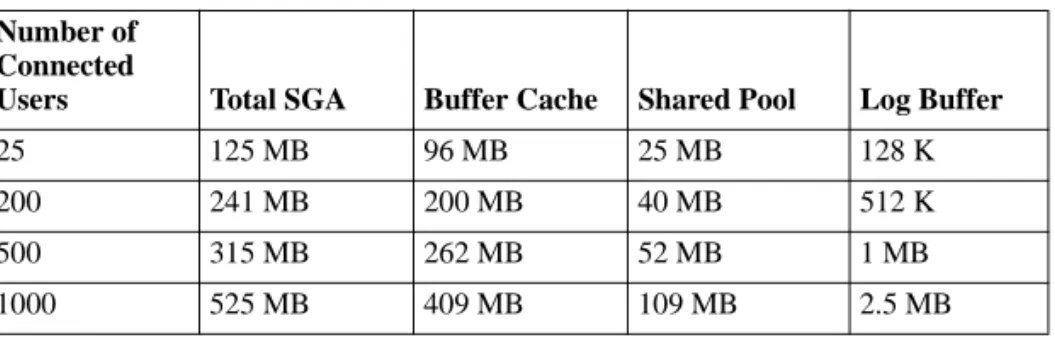
Outlined here are some examples of Oracle database memory sizing. The information is derived from existing MFG/PRO sites and benchmarks. The sizing values apply for the database Block Size (DB_BLOCK_SIZE) of 8K. Most of the values are for initial set-up and are not tested for full work loads.
Table 2.1 Oracle Database Memory Sizing
Rollback Segments
The number of rollback segments determines how many concurrent transactions can be run. If there are more transactions then they will have to wait for freeing up of rollback segment entries, which can be re-used. The recommended number of rollback segments varies for different numbers of concurrent users.
Number of Connected
Users Total SGA Buffer Cache Shared Pool Log Buffer
25 125 MB 96 MB 25 MB 128 K
200 241 MB 200 MB 40 MB 512 K
500 315 MB 262 MB 52 MB 1 MB
SYSTEM REQUIREMENTS 27
Table 2.2
Rollback Segment Sizing
Database I/O and Tablespace Sizing
The Oracle database writes to a number of system files and tablespace data files during its operation. Tablespace sizing and placement of system files and data files on different disks are both important tasks in
implementing MFG/PRO on Oracle.
Distributing I/O
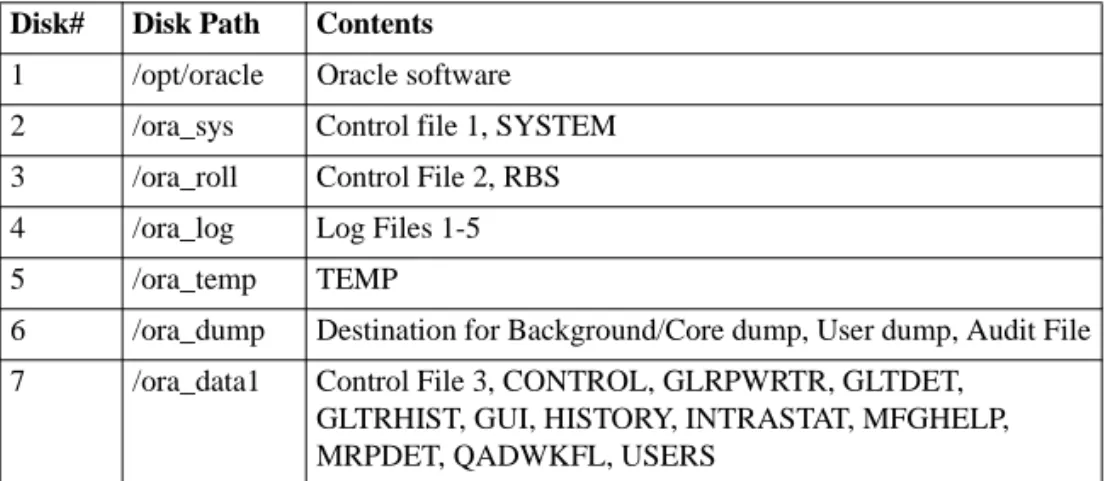
The I/O distribution example shown below indicates how to distribute Oracle’s system files and tablespaces among the 10 disks available. To distribute I/O among the 10 disks, items should be placed on different disks as per Oracle’s recommendations (Ref. Oracle DBA Handbook 7.3 by Oracle Press). 43 tablespaces (QAD User DATA and INDEX) can be distributed on 4 disks. The following configuration will give a fair distribution of I/O on the disks.
Table 2.3 Placement of Oracle System and Data Files Number of
Concurrent Users
Number of
Rollback Segments Rollback Segment Sizing
25 4
200 30 Initially 1M. Next 1M. Optimal 2M.
Percent increase 0. Minimum extents 2.
500 40
1000 60 Initially 5M. Next 5M. Optimal 10M.
Percent increase 0. Minimum extents 2.
Disk# Disk Path Contents 1 /opt/oracle Oracle software 2 /ora_sys Control file 1, SYSTEM 3 /ora_roll Control File 2, RBS 4 /ora_log Log Files 1-5
5 /ora_temp TEMP
6 /ora_dump Destination for Background/Core dump, User dump, Audit File 7 /ora_data1 Control File 3, CONTROL, GLRPWRTR, GLTDET,
GLTRHIST, GUI, HISTORY, INTRASTAT, MFGHELP, MRPDET, QADWKFL, USERS
Tablespace Sizing
To determine tablespace sizes, you must consider the number of users to be supported and how much data they will generate in a year. The example in table 2.4 shows initial tablespace sizing for a 500-user database.
Except for the SYSTEM tablespace, the settings in the following table apply to Oracle 7.x and 8.1.x environments. For Oracle 8.1.x, set the tablespace to 60MB even though the autoextend option is active for it. Review and modify any settings in the crdb2ORACLE_SID.sql file as needed for your Oracle database environment. See “2: Running SQL Scripts to Create the Oracle Database” on page 62.
Table 2.4
Tablespace Sizing for a 500-user Database
8 /ora_index1 CONTROL_IDX, GLRPWRTR_IDX, GLTDET_IDX, GLTRHIST_IDX, GUI_IDX, HISTORY_IDX, INTRASTAT_IDX, MFGHELP_IDX, MRPDET_IDX, QADWKFL_IDX
9 /ora_data2 REFERENCE, SODDET, SOMSTR, STATIC, TRANSACTION, TRGLDET, TRHIST, WODDET, WOMSTR, WORKFILE, WRROUTE
10 /ora_index2 TOOLS, REFERENCE_IDX, SODDET_IDX,
SOMSTR_IDX, STATIC_IDX, TRANSACTION_IDX, TRGLDET_IDX, TRHIST_IDX, WODDET_IDX, WOMSTR_IDX, WORKFILE_IDX, WRROUTE_IDX Disk# Disk Path Contents
Tablespace Size
SYSTEM 50 MB
ROLLBACK (RBS) 220 MB
TOOLS 15 MB
TEMP 120 MB
LOG FILE SIZE 05 MB
USERS 01 MB
MFGHELP 03 MB
MFGHELP_IDX 03 MB
GUI 16 MB
SYSTEM REQUIREMENTS 29 GLRPWRTR 02 MB GLRPWRTR_IDX 08 MB INTRASTAT 02 MB INTRASTAT_IDX 02 MB TRANSACTION 80 MB TRANSACTION_IDX 90 MB HISTORY 10 MB HISTORY_IDX 14 MB STATIC 30 MB STATIC_IDX 90 MB CONTROL 03 MB CONTROL_IDX 12 MB REFERENCE 03 MB REFERENCE_IDX 03 MB WORKFILE 03 MB WORKFILE_IDX 03 MB GLTDET 14 MB GLTDET_IDX 23 MB GLTRHIST 03 MB GLTRHIST_IDX 06 MB TRHIST 53 MB TRHIST_IDX 52 MB TRGLDET 20 MB TRGLDET_IDX 31 MB MRPDET 90 MB MRPDET_IDX 190 MB QADWKFL 19 MB QADWKFL_IDX 11 MB SOMSTR 03 MB SOMSTR_IDX 06 MB SODDET 13 MB SODDET_IDX 10 MB WOMSTR 08 MB Tablespace Size
Oracle Software Requirements
The Oracle RDBMS is the primary product that QAD uses underneath MFG/PRO. Oracle is being used to store all relevant data from the QAD applications.
In addition to the standard offering, extra functionality can be obtained by deploying the Oracle Server Options or tools for administration,
development, and reporting.
Required Oracle Software Components
Most of the Oracle software required to run MFG/PRO on UNIX is included in the standard Oracle Server. The following components are used by MFG/PRO:
Oracle 7.x
• Oracle RDBMS, currently supported versions are 7.3.x and above.
• SQL*Net with the TCP/IP Protocol Adapter, currently supported versions are 2.x and above.
• SQL*Plus.
• For a Windows client installation on an Oracle 7.1.x database, only SQL*Net is required.
Oracle 8.1.x
• Oracle RDBMS, currently supported versions are 8.0.5 and above.
• SQL*Net/NET8 components appropriate for your Oracle server version, including the TCP/IP Protocol Adapter.
WOMSTR_IDX 11 MB WODDET 35 MB WODDET_IDX 40 MB WRROUTE 19 MB WRROUTE_IDX 06 MB Tablespace Size
SYSTEM REQUIREMENTS 31
• SQL*Plus.
• For a Windows client installation on an Oracle 8.1.x database, only NET8 is required.
Note These version and release numbers may change without notice. Always review the QAD, PROGRESS and Oracle Web sites for the most up–to–date list of component versions supported.
C
HAPTER3
MFG/PRO-on-Oracle
Considerations
Prior to installing Oracle software to support MFG/PRO, there are specific issues to resolve or plan for.Choosing the MFG/PRO-on-Oracle Architecture 34 Hardware Setup and Disk Layout 34
Use of Oracle Tablespaces 35 Use of Oracle Character Sets 35 Oracle Environment Variables 36 Client/Server Installs 37
Choosing the MFG/PRO-on-Oracle
Architecture
When choosing between the different types of configurations, you should consider the level of effort that would be required to modify the selected configuration at a later time.
• Adding more hardware resources by increasing capacities of existing systems is normally rather simple—but you may encounter limits to potential increases.
• Adding more hardware resources by adding extra systems normally implies going to a client/server environment or from two-tier to multiple-tier environment. This always implies that more software must be added.
• Moving or duplicating the application to another system implies that software must be installed on the other system. However, this does not require database export, rebuild, and import; the switch to client/server can be accomplished by modifying environment variables or setup files.
• Moving the database to a different system requires a full database export, rebuild, and import, which can be time-consuming. Such modifications are normally the most complex. Careful initial planning can help you avoid them.
Hardware Setup and Disk Layout
A typical MFG/PRO-on-Oracle installation can require a disk capacity of several gigabytes. It is therefore important to chose a setup that is reasonable from both administrative and performance perspectives. From the administrative standpoint, you should consider separating the
following components:
• Oracle software
• Oracle database, including database files and control files
• Oracle startup files, log files, and so on
• MFG/PRO software
MFG/PRO-ON-ORACLE CONSIDERATIONS 35
Performance considerations become more important with increased database size. For example, if the database is in the 750MB to 1GB range, and only one physical disk is available, there is only one possibility. However, if a configuration includes databases of several gigabytes and several physical disks are available, performance will be significantly influenced by how the disk space is used.
In some environments, database files can be put on raw devices to increase performance; however this configuration is more difficult to administer.
Use of Oracle Tablespaces
An Oracle database is comprised of a number of tablespaces, or logical storage areas. Each tablespace is physically stored on one or more file systems or raw devices. By default, MFG/PRO uses approximately 40 tablespaces to store data and indexes. In addition, at least three other tablespaces are necessary:
• The system tablespace used by Oracle to store all internal information, such as information about tables
• A rollback tablespace
• A temporary tablespace
Additionally, tablespace users and tools are built during MFG/PRO Oracle database creation.
Use of Oracle Character Sets
Oracle includes comprehensive mechanisms to support different languages and character sets, most of which can be controlled after installation. MFG/PRO is available for many different languages. You should consider several factors before actually doing the installation:
• When creating the database, take care of choosing the appropriate character set. Once the database is created, its character set cannot be changed.
• At the client side, the environment variable NLS_LANG should be set to achieve the correct character set conversion.
• If using the NLS_LANG parameter in init.ora, make sure to set NLS_SORT = binary.
MFG/PRO uses WE8ISO8859P1 as the default character set for its installation. You should choose a character set that contains all characters that are needed in your environment. The right choice will depend on your location. In the United States, Canada, and most of western Europe, a good choice is E8ISO8859P1; in most of eastern Europe, a good choice is WE8ISO8859P9.
ÌApplies to Oracle
7.x only. Because the NLS_LANG environment variable is not set by default in most MFG/PRO-on-Oracle 7.x environments, Oracle may unexpectedly
use the default of American_America.US7ASCII, which causes problems with MFG/PRO when the database is created with a different character set. Therefore, if the Oracle database is created with the WE8ISO8859P1 character set, for example, it is imperative that the NLS_LANG be set to american_america.WE8ISO8859P1.
Oracle Environment Variables
A number of environment variables are used by Oracle; the full description can be found in the Oracle Installation and Configuration Guide. However, you should in particular understand two of these before starting the installation:
• ORACLE_HOME
This variable points to the root of the Oracle product directory, and it frequently includes the release number of Oracle. An example that follows the normal standard of the Oracle installation procedure is: /usr/oracle/app/oracle/product/8.1.6
This would be used for an installation of Oracle release 8.1.6. Note that this directory normally is different from the home directory of the Oracle UNIX login account.
MFG/PRO-ON-ORACLE CONSIDERATIONS 37
• ORACLE_SID
This variable, which is frequently referred to as the Oracle System Identifier, is the name of the database. It is unrelated to the
ORACLE_HOME directory and the Oracle release number.
QAD recommends using any name other than qad or qaddb. These names are used by standard MFG/PRO programs—qad for the PROGRESS schema holder and qaddb for the Oracle database logical reference. On most operating systems, there is a restriction on the length of the name, so it should be short.
Client/Server Installs
Many MFG/PRO-on-Oracle systems are large—100 users or more. In these cases, Oracle is installed on a separate system used solely as a database server. Communication between MFG/PRO—more specifically, the PROGRESS DataServer and the Oracle 7.x database engine—is provided by SQL*Net. Communication with the Oracle 8.1.x database is provided by SQL*Net/NET8.
This section covers that configuration from an Oracle perspective. The two systems required are the database server and the application server.
Installations on the Database Server
The database server runs Oracle, and where host-mode is implemented, it also runs PROGRESS, the DataServer, and MFG/PRO. The first step in the client/server installation is installing Oracle. Keys areas in a
client/server install include:
• First install the Oracle Server, the Oracle Server utilities, and
depending on your Oracle version, or SQL*Net/Net8, along with any necessary protocol adapters, normally TCP/IP.
• Set up Oracle server networking, including the SQL*Net or Net8 listener using the listener.ora file.
• Finally, create the Oracle database with the necessary tablespaces, rollback segments, and other elements required for MFG/PRO.
Installations on the Application Server
On the application server, MFG/PRO, PROGRESS 4GL and DataServer, and Oracle SQL*Net/Net8 client software are required. Considerations include:
• The DataServer should be implemented in client mode.
• The Oracle software to install is SQL*Net/Net8 client software with the needed protocol adapters necessary, normally TCP/IP. No server software is installed.
• The SQL*Net/Net8 client must be configured. A file,
tnsnames.ora, must be created to map logical database names to network connections and ORACLE_SID on the database server.
• An environment variable, TWO_TASK, must be set to point at a valid entry in the tnsnames.ora file for all MFG/PRO users.
The TWO_TASK environment variable ensures that all Oracle data processing takes place on the database server.
Client and Server Configuration Files
This section describes the most important configuration files for each component in the network. It includes the types of information required in each file and shows the relationships between them. Normally, these files should be generated using the SQL*Net configuration tool. They are described in detail in the Oracle Installation and Configuration Guide. Oracle recommends that you do not create these files by hand or modify them.
Server Configuration Files
The database server needs to have a SQL*Net listener process running; this will accept incoming connection requests and make the connection to the actual database instance. The configuration of this process is done in the listener.ora file.
MFG/PRO-ON-ORACLE CONSIDERATIONS 39
Client Configuration Files
On the application server, which is a client in the Oracle context, the TWO_TASK environment variable names an entry in the Oracle configuration file tnsnames.ora. This file maps this name to a network connection and an ORACLE_SID. A simple example of an entry is:
QADDB_REMOTE= (DESCRIPTION = (ADDRESS_LIST = (ADDRESS = (PROTOCOL = TCP) (Host = Production1) (Port = 1521) ) )
(CONNECT_DATA = (SID =QADDB) )
)
The Oracle setup for networking can easily be tested with Oracle’s SQL*Plus. Before setting TWO_TASK for the MFG/PRO connection, make sure remote connect works for SQL*Plus.
For a detailed description of SQL*Net and the formats of connect strings and protocols, please refer to the Oracle SQL*Net documentation.
C
HAPTER4
Building PROGRESS
DataServer Components
This chapter provides DataServer installation tips that supplement the installation instructions in the PROGRESS DataServer for Oracle Guide, Chapter 3, “Building the DataServer.”Database Server Build Overview 42 Tips for Running PROBUILD 43 Tips for Running Link Scripts 44
Database Server Build Overview
Figure 4.1 shows the work flow for building the DataServer.
Fig. 4.1
DataServer Work Flow
First you run the PROBUILD utility, which creates UNIX scripts that contain the commands to link new PROGRESS executables. You then run the scripts to actually create the DataServer executables.
The link scripts refer to the file buildenv for environment variables. If you receive errors while running the link scripts, you can usually resolve them by editing the buildenv file.
You must build the DataServer on at least the host machine (for running batch processes). If you have chosen a UNIX client/server configuration, you must also build the DataServer on the UNIX client machines.
Products and Configurable Elements
ÌForconfigu-ration details, see the MFG/PRO 9.0 System Administration Guide.
While using the PROBUILD utility, you specify which products and configurable elements you want, according to the hardware configuration you have chosen.
For a host-mode and local DataServer, you build a single executable. You do not need to build any DataServer components for PROGRESS client processes running on MS-Windows, because they dynamically link to the Oracle PRO*C library.
PROBUILD Scripts DataServer
Executables buildenv
File
BUILDING PROGRESS DATASERVER COMPONENTS 43
Tips for Running PROBUILD
Use this summary in conjunction with Section 3.2, “Building the Local DataServer,” or Section 3.5, “Building the Remote DataServer” in the PROGRESS DataServer for Oracle Guide.
Environment Settings
Before you run PROBUILD, follow these guidelines relating to the environment settings:
• You must be logged in as the root user ID to run the link scripts.
• If DLC is not set, use the command below to set it:
DLC=YourProgressDir; export DLC
• If the UNIX PATH does not contain the $DLC/bin directory, use the command below to set it:
PATH=$PATH:$DLC/bin;
• The TERM variable must be set to match an appropriate entry in the PROTERMCAP file.
• Make sure to add the ORACLE_HOME environment variable in the buildenv file. For example, if the Oracle home directory is
/d2/oracle7, type:
ORACLE_HOME=$/d2/oracle7 ; export ORACLE_HOME
• If you have a Sun Solaris system, add the LD_LIBRARY_PATH environment variable in the buildenv file.
• Run PROBUILD from the directory
ProgressDir/probuild/eucapp (where ProgressDir is your actual PROGRESS path).
• You must use the standard C compiler for the machine.
Running PROBUILD
1 Change to ProgressDir/probuild/eucapp.
2 Type ./probuild.
3 In the Install Link Script Into prompt, specify where to create the link scripts.
4 In the Product List, select PROGRESS Client.
5 In the Link Script and Executable prompt, specify your desired names or accept the default.
6 In the Configurable Elements prompt, select Oracle DataServer and TCP/IP network protocol.
Warning Even if you will not use TCP/IP at all, link errors occur on several UNIX platforms if you do not include the TCP/IP option.
Tips for Running Link Scripts
Once PROBUILD is finished, you are ready to run the link scripts that generate the DataServer executable. Make sure that ORACLE_HOME is correctly defined, pointing to where Oracle was installed. Then run the link script.
This works in most cases. In very exceptional cases, you might have to set ORALIB manually prior to running the link script. If this is the case, refer to Section 3.3, “Creating the DataServer Executables on UNIX,” in the PROGRESS DataServer for Oracle Guide. Also note the following.
• Steps 1 to 6 are not necessary unless you receive unresolved external reference errors during the link. Refer to the next section for more information.
• The names of the link scripts are taken from the prompts you answered while running PROBUILD. If you do not remember the names, you can use the following command to display the newest files in a directory.
BUILDING PROGRESS DATASERVER COMPONENTS 45
Missing PRO*C Libraries
If you receive unresolved external reference errors during the link, you must find the Oracle PRO*C libraries that contain the missing objects and add them to the ORALIB setting in the buildenv file, which sets the environment variable.
First try following steps 1 to 6 in Section 3.3, “Creating the DataServer Executables on UNIX,” in the PROGRESS DataServer for Oracle Guide. These steps involve making a sample application that is delivered with the Oracle PRO*C library and copying the options and link map used by that application. Progress Software Corporation also supports a knowledge-base entry about the ORALIB settings.
Note The instructions in Section 3.3 of the PROGRESS DataServer for Oracle Guide are partially incorrect. In step 4, type sample1 in the make command instead of sample. Also, before step 7, you must copy the contents of the tmpfile to the buildenv file and change to the $DLC/bin directory.
Locating Missing Libraries
If you still receive unresolved external reference errors, use the following steps to find the missing library.
1 Change to the $ORACLE_HOME/lib directory and use the ar command (a UNIX command) to list the contents of all the libraries in that directory. A short script to do this is:
for File in *.a do
echo $File >>liblist.txt ar -t $File >>liblist.txt done
2 Use a text editor and look through the file liblist.txt for the objects that are missing.
Tip
With the vi text editor, you can use the command ?\.a to search backward for the most recent library.
3 When you find a missing object, scan backward to find the library file. Check whether the object is in two libraries.
4 Add the library names to the ORALIB setting in the buildenv file and run the link scripts again. If an object is in more than one library, add only one of them; if the link script fails again, enter the other library instead. However, if one of the two libraries already appears in the buildenv file, add that library as a second entry (the link script needs to refer to it twice). For example:
5 If you cannot find which library contains the missing object, open a man-page for the missing object (man MissingObjectName). The missing object may be in a nonstandard system library. In this case, you will find a man-page on it that should give you a sample command line with a requisite -l parameter. The -l parameter will be a library you must add to the ORALIB setting in the buildenv file.
Notes on PROBUILD on Solaris for Oracle
• The LD_LIBRARY_PATH must contain /usr/ucblib both a link time and at runtime.
• The resulting DataServer executables cannot be owned by root (the link script will do that by default). It should be owned by the Oracle dba user and have 775 permission instead of 4775.
ORALIB="$ORACLE_HOME/lib/libocic.a \ $ORACLE_HOME/lib/osntab.o \ $ORACLE_HOME/lib/libsqlnet.a \ $ORACLE_HOME/lib/libora.a \ $ORACLE_HOME/lib/libcv6.a \ $ORACLE_HOME/lib/libcore.a \ $ORACLE_HOME/lib/libnlsrtl.a \ $ORACLE_HOME/lib/libsqlnet.a \ $ORACLE_HOME/lib/libcore.a" In this example, the
libcore and libsqlnet libraries are repeated because they depend on each other.
C
HAPTER5
Database
Server Setup
This chapter explains how to load the MFG/PRO media, set up the databases, and configure database sets for the start-up scripts.Setup Overview 48
Loading MFG/PRO from Tape Media 50 Mounting the CD-ROM 51
1: Creating the Schema Holder and SQL Scripts 51 2: Running SQL Scripts to Create the Oracle Database 62 3: Copying the Schema Holder Under a New Name 65 4: Configuring the Database Set 66
5: Loading MFG/PRO Data 71 6: Loading Service Pack Media 74
7: Starting MFG/PRO and Registering the License 74 8: Loading Online Help Data 76