Active Directory 2008 Audit Management Pack
Guide for Operations Manager 2007 and Essentials
2010
Published: June 2010 Version: 6.0.5000.0
Copyright
Active Directory 2008 Audit Management Pack for Operations Manager and Essentials
Terms of Use
All management packs should be thoroughly tested before being introduced into a production System Center Operations Manager 2007 or Essentials 2010 environment. The authors of this management pack accept no responsibility or liability for negative impact as a result of use of this management pack in your Operations Manager environment.
Contents
Active Directory 2008 Audit Management Pack Guide ... 5
Introduction to the Active Directory 2008 Audit Management Pack ... 6
Supported Configurations ... 6
Getting Started ... 7
Before You Import the Management Pack ... 7
Files in This Management Pack ... 7
How to import the Management Pack ... 7
Management Pack for Customizations ... 7
Required Configuration... 7
Optional Configuration ... 9
Security Considerations ... 9
Low-Privilege Scenario and Run As Profile ... 9
Understanding Management Pack Operations ... 10
Classes ... 10
Discoveries ... 10
Agent Tasks ... 10
Console Tasks ... 11
Console Views ... 11
Rules ... 12
Monitors ... 14
Reports ... 14
Known Issues ... 14
5
Active Directory 2008 Audit Management Pack
Guide
Author: Tommy Gunn
E-mail:[email protected]
Document Version
This guide was written based on the 1.0.0.60 version of the Active Directory 2008 Audit Management Pack.
Revision History
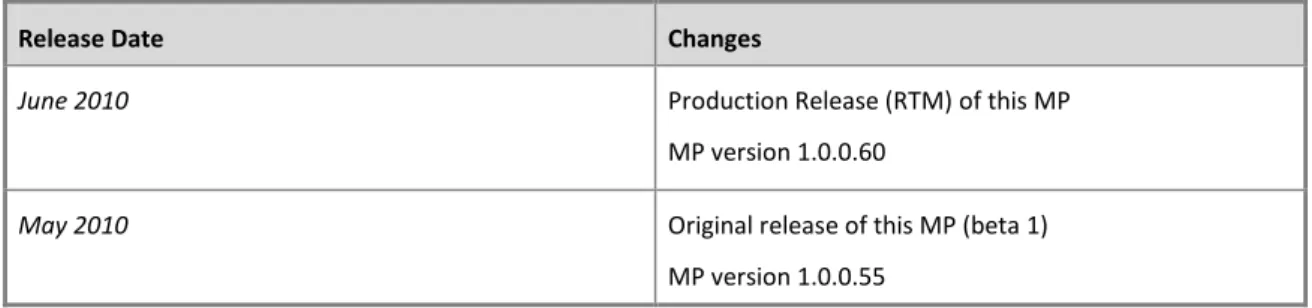
Release Date Changes
June 2010 Production Release (RTM) of this MP MP version 1.0.0.60
May 2010 Original release of this MP (beta 1) MP version 1.0.0.55
6
Introduction to the Active Directory 2008 Audit
Management Pack
The Active Directory 2008 Audit Management Pack is designed to address a feature not included in the Active Directory 2008 Management Pack or System Center Essentials 2010 – auditing of security events related to changes in Active Directory objects. This management pack is intended to be a not only a relatively complete resource for auditing Active Directory changes, but also very efficient in its operation.
Features of the Active Directory 2008 Audit Management Pack include:
Security event auditing without the use of wildcards to optimize performance and minimize unnecessary load on your OpsMgr or Essentials environment
Auditing of all of the most common areas of Active Directory administration: users, security groups, organizational units, group policy and Active Directory topology A custom class used to target audit rules to allow administrators to easily control the execution of these auditing rules as well as to facilitate basic alert reporting
Alert views that filter the audit events by category, making it easy to filter down to the events that are of interest
Uses rules instead of unit monitors, as audit events do not generally indicate a problem with the health of Active Directory or the domain controller
Alert descriptions include a link to the knowledge article in the security event WIKI at ultimatewindowssecurity.com (when possible)
This is the first release of this management pack, which I hope to improve over time through community feedback.
Getting the Latest Management Pack and Documentation
You can find the latest version of the Active Directory 2008 Audit Management Pack in the Community Management Pack Catalog at SystemCenterCentral.com.
Supported Configurations
The Active Directory 2008 Audit Management Pack for Operations Manager 2007 and Essentials 2010 supports the following Operations Manager versions:
Operations Manager Version Notes
Operations Manager 2007 R2 System Center Essentials 2010
Table 2 - Management Pack Compatibility
NOTE: This management pack has only been fully tested on System Center Operations Manager 2007 R2 and System Center Essentials 2010.
7
Getting Started
Before You Import the Management Pack
Before importing the Active Directory 2008 Audit Management Pack, note the following limitations of the management pack:
It requires the Windows Server 2008 Active Directory Management Pack (version 6.0.6452.0 or higher) to be installed. This is because the management pack includes diagnostic tasks targeting Windows 2008 Operating System MP.
Files in This Management Pack
The Active Directory 2008 Audit Management Pack consists of the following files: SCC.Active.Directory.Audit.xml
Active Directory 2008 Audit MP Guide 1.0.0.60.pdf
How to import the Management Pack
A single XML file is included for this management pack (SCC.Active.Directory.Audit.xml) which is imported into the Operations Manager Console. For general instructions about importing a management pack, see How to Import a Management Pack in Operations Manager 2007
(http://go.microsoft.com/fwlink/?LinkId=142351).
Management Pack for Customizations
This version of the Active Directory 2008 Audit Management Pack is not sealed, so there is no need to create a separate version of the management pack for customizations.
Required Configuration
The required configuration to enable full functionality for this management pack is to enable the appropriate audit and object access policies in Active Directory
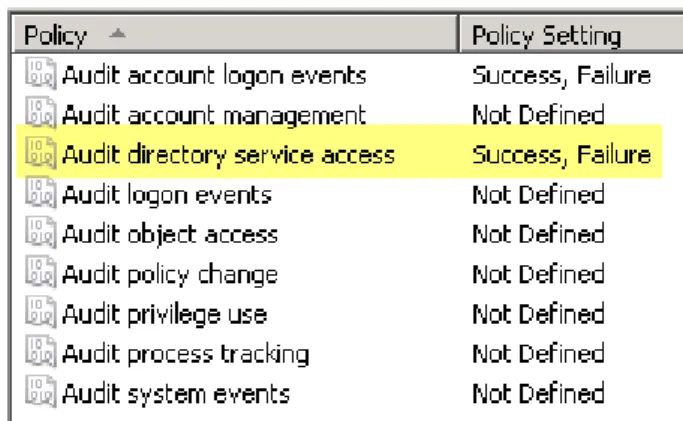
1. Enable the “Directory Service Access” audit category in the Default Domain Policy
(Policies, Windows Settings, Security Settings, Local Policies, Audit Policy) for success and failure auditing as pictured below
8 2. Enable the “Directory Service Change” group policy subcategory using the command
line below on a domain controller.
auditpol /set /subcategory:"Directory Service Changes" /success:enable /failure:enable 3. Configure auditing for specific Active Directory object types in your Active Directory
domain(s)
a) Click Start, point to Programs, point to Administrative Tools, and then
click Active Directory Users and Computers.
b) Make sure that Advanced Features is selected on the View menu by making sure
that the command has a check mark next to it.
c) Right-click the Active Directory domain that you want to audit (e.g. – contoso.com),
and then click Properties.
d) Click the Security tab, and then click Advanced.
e) Click the Auditing tab, and then click Add.
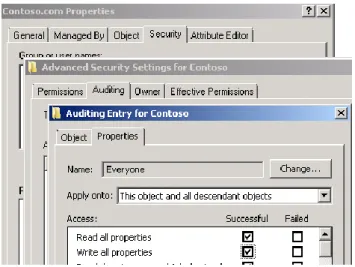
f) Select the object types you wish to audit. For this MP, I suggest “Write all properties”
checkbox for “This object and all descendent objects” as pictured below:
Figure 2 - AD Object Audit Settings
IMPORTANT: This setting will likely be okay in small-to-medium AD environments. However, in larger environments, you may have to enable object auditing at a more granular level. The detailed steps for how to do this are also explained in some detail KB article 814595 (http://support.microsoft.com/kb/814595) in the section titled
“Configure Auditing for Specific Active Directory Objects“
NOTE: Make sure your Security Event Logs are of sufficient size on your domain controllers to ensure events are not lost or overwritten. This could be as much as 100-500 MB, depending on the size of your environment and the audit policy you
9
TIP: Windows security expert Randy Franklin Smith offers recommendations for Windows 2008 audit policies you may wish to read to eliminate noise events in other areas of your audit strategy.
Recommended Baseline Audit Policy for Windows Server 2008
Optional Configuration
This management pack contains a small number rules to audit account logon events (e.g. account lockout). If you wish to audit account logon events, you should enable success / failure for the “Audit account logon events (success and failure)” and “Audit logon events (success and failure)” category in the Default Domain Policy.
Security Considerations
Low-Privilege Scenario and Run As Profile
Since these rules involve reading of the Security Event Log on domain controllers, the default agent security context (Local System) should be sufficient. No additional configuration required.
10
Understanding Management Pack Operations
The Windows 2008 Active Directory Audit Management Pack contains the following components.
Classes
There is one class in this management pack named “Windows 2008 Active Directory Audit Target”. This class serves two primary purposes:
To facilitate alert reporting using alert reports in the Microsoft Generic Report Library As the target of all auditing rules. This allows administrators to easily control where the rules
Task Name Description Windows 2008 Active Directory
Audit Target
This class represents a Windows 2008 Active Directory Domain Controllers targeted for security auditing
Table 3 – Classes
Discoveries
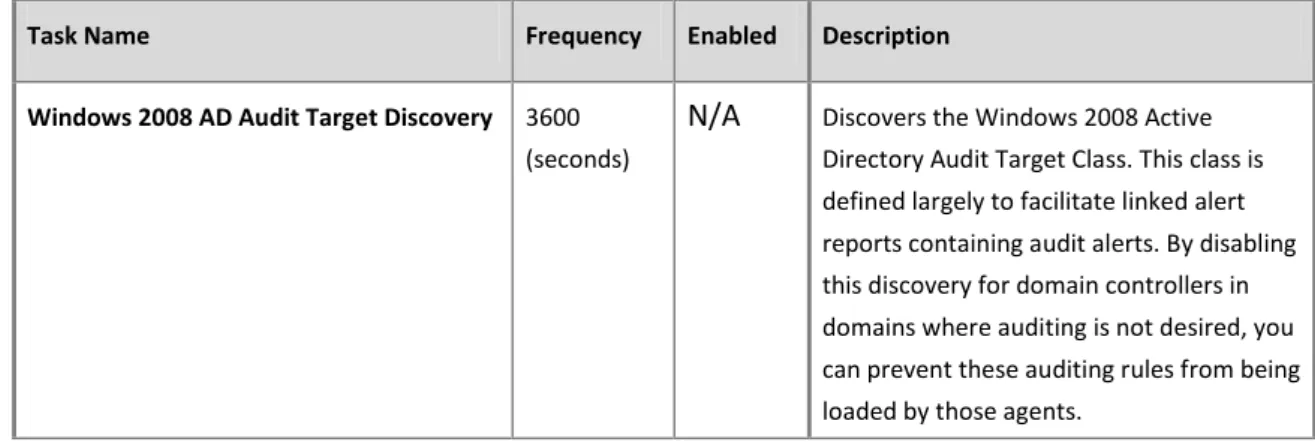
There is one object discovery in this management pack.
Task Name Frequency Enabled Description Windows 2008 AD Audit Target Discovery 3600
(seconds)
N/A Discovers the Windows 2008 Active Directory Audit Target Class. This class is defined largely to facilitate linked alert reports containing audit alerts. By disabling this discovery for domain controllers in domains where auditing is not desired, you can prevent these auditing rules from being loaded by those agents.
Table 4 – Discoveries
Agent Tasks
The following table lists the tasks defined for this management pack.
Task Name Command Line / Script Parameters Description
GPResult c:\windows\system32\gpresult /r Retrieves the output of GPResult /R from the target computer
11
Task Name Command Line / Script Parameters Description
Get RSoP GetRSoP.vbs N/A Retrieves resultant set of policy (RSoP) from the selected agent. Script taken from
http://www.vbsedit.com/scripts/policy/scr_347.asp
Table 5 – Agent Tasks
Console Tasks
This management pack contains no console tasks
Console Views
The Active Directory 2008 Audit Management pack includes a custom alert views to display audit events related based on the type of change. All alerts raised by the audit rules in this management pack contain a value in parameter8 of the alert that is used to filter alerts displayed in each view without the use of wildcards, as shown in the figure below. Each view filters based on a specific parameter8 value added to the rule when it was originally authored.
The table below contains the rules contained within the Active Directory 2008 Audit MP.
View Name View Type Description
Group Management Alerts Alert View Displays alerts related to Active Directory security group changes
Group Policy Management Alerts
Alert View Displays alerts related to Active Directory group policy changes.
Log Management Alerts Alert View Displays alerts related to the Windows Security Event Log
OU Management Alerts Alert View Displays alerts related to Active Directory organizational unit changes
Physical Topology Management Alerts
Alert View Displays alerts related to changes in physical elements of Active Directory topology components, including sites, site links and subnets
12
View Name View Type Description
User Management Alerts Alert View Displays alerts related to Active Directory user changes
Table 6 - Console Views
Rules
There following rules are located in this management pack. These rules all filter on the specific event parameters to minimize load by eliminating wildcard searches on event descriptions as a whole.
Special thanks to Stefan Koell (www.code4ward.net) for creating the Log Smith for Operations
Manager 2007 that was used extensively to identify event parameters to make a more efficient management pack!
IMPORTANT: The rules contained in this table that are disabled by default (Enabled = false) are primarily event collection rules used in the creation of this pack. Read the description field of these rules carefully BEFORE you enable, which includes an explanation of the function of the rule.
Name Target Category Enabled
(Security Event ID 4728) - A member was added to a security-enabled global
group Windows 2008 Active Directory Audit Target SecurityHealth True
An Active Directory Site was Created Windows 2008 Active Directory Audit Target SecurityHealth True
An Active Directory Site was Deleted Windows 2008 Active Directory Audit Target SecurityHealth True
An Active Directory Site Link was
Created Windows 2008 Active Directory Audit Target SecurityHealth True
An Active Directory Site Link was
Deleted Windows 2008 Active Directory Audit Target SecurityHealth True
An Active Directory Site has been
Modified Windows 2008 Active Directory Audit Target SecurityHealth True
An Active Directory Subnet was Created Windows 2008 Active Directory Audit Target SecurityHealth True An Active Directory Subnet was Deleted Windows 2008 Active Directory Audit Target SecurityHealth True An Active Directory Subnet was Modified Windows 2008 Active Directory Audit Target SecurityHealth True (Security Event ID 4723) - Change
password attempt Windows 2008 Active Directory Audit Target SecurityHealth True
Collect Account and Group Events (misc 47XX events) (DO NOT ENABLE for
development only) Windows 2008 Active Directory Audit Target EventCollection False
Collect Event 5136: Object Modifications
(DO NOT ENABLE development only) Windows 2008 Active Directory Audit Target EventCollection False
Collect Event 5136: Object Creation (DO
NOT ENABLE development only) Windows 2008 Active Directory Audit Target EventCollection False
Collect Event 5139: Object Moved (DO
13 Collect Event 5141: Object Deleted (DO
NOT ENABLE development only) Windows 2008 Active Directory Audit Target EventCollection False
(Security Event ID 4727) - A
security-enabled global group was created Windows 2008 Active Directory Audit Target SecurityHealth True
(Security Event ID 4739) - Domain Policy
was changed Windows 2008 Active Directory Audit Target SecurityHealth True
(Security Event ID 4730) - A
security-enabled global group was deleted Windows 2008 Active Directory Audit Target SecurityHealth True
A Group Policy Object (GPO) has been
Created Windows 2008 Active Directory Audit Target SecurityHealth True
A Group Policy Object (GPO) was
Deleted Windows 2008 Active Directory Audit Target SecurityHealth True
A Group Policy Object (GPO) was
Modified Windows 2008 Active Directory Audit Target SecurityHealth True
(Security Event ID 4713) - Kerberos
policy was changed Windows 2008 Active Directory Audit Target SecurityHealth True
(Security Event ID 1102) - The audit log
was cleared Windows 2008 Active Directory Audit Target SecurityHealth True
An Organizational Unit was Created Windows 2008 Active Directory Audit Target SecurityHealth True
An Organizational Unit was Deleted Windows 2008 Active Directory Audit Target SecurityHealth True
An Organizational Unit was Modified Windows 2008 Active Directory Audit Target SecurityHealth True
An Organizational Unit was Moved Windows 2008 Active Directory Audit Target SecurityHealth True
(Security Event ID 4729) - A member was removed from a security-enabled
global group Windows 2008 Active Directory Audit Target SecurityHealth True
(Security Event ID 1104) - The security
event log was cleared Windows 2008 Active Directory Audit Target SecurityHealth True
(Security Event ID 4706) - A new trust
was created to a domain Windows 2008 Active Directory Audit Target SecurityHealth True
(Security Event ID 4707) - A trust to a
domain was removed Windows 2008 Active Directory Audit Target SecurityHealth True
(Security Event ID 4755) - A
security-enabled universal group was changed Windows 2008 Active Directory Audit Target SecurityHealth False
(Security Event ID 4754) - A
security-enabled universal group was created Windows 2008 Active Directory Audit Target SecurityHealth True
(Security Event ID 4758) - A
security-enabled universal group was deleted Windows 2008 Active Directory Audit Target SecurityHealth True
(Security Event ID 4756) - A member was added to a security-enabled
universal group Windows 2008 Active Directory Audit Target SecurityHealth True
(Security Event ID 4757) - A member was removed from a security-enabled
universal group Windows 2008 Active Directory Audit Target SecurityHealth True
(Security Event ID 4764) - A group’s type
was changed Windows 2008 Active Directory Audit Target SecurityHealth True
A User Account was Modified Windows 2008 Active Directory Audit Target SecurityHealth True
(Security Event ID 4720) - A User
Account was Created Windows 2008 Active Directory Audit Target SecurityHealth True
(Security Event ID 4726) - A user
account was deleted Windows 2008 Active Directory Audit Target SecurityHealth True
(Security Event ID 4725) - A user
account was disabled Windows 2008 Active Directory Audit Target SecurityHealth True
(Security Event ID 4740) - A user
account was locked out Windows 2008 Active Directory Audit Target SecurityHealth True
(Security Event ID 4740) - A User
14
Monitors
There are no monitors in this management pack.
Reports
This management pack contains the following reports
Report Name Report Type Description
Security Audit Alerts Linked Report Displays alerts targeted to the Active Directory 2008 Audit Target class, which is defined and discovered in this MP.
NOTE: This report uses the OpsMgr 2007 R2 class filter to make object selection easier for the user running the report
Known Issues
There are no known issues associated with this management pack at this time
Support
Support for the Active Directory 2008 Audit Management Pack can be obtained in the support forums available at SystemCenterCentral.com