CS 4500 Software Engineering Laboratory
Team Najobe: Customer Relationship Management
Benjamin J. Smith
Joseph Engh
Nathan Thomas
Software Requirements Specification
Version 1.0
Document Change Record
Version Number Date Description
0.1 January 25, 2007 Initial document creation. 0.5 January 31, 2007 Revision and updating. 0.8 January 31, 2007 Submit to team for critique. 0.9 February 1, 2007 Updates from team input 1.0 February 2, 2007 Finished and handed in.
1.1 February 22, 2007 Meet with Porter, discuss changes. 1.5 February 24, 2007 Updated document, using suggestions. 1.8 February 26, 2007 Further updates using more suggestions. 2.0 February 26, 2007 Final revision
TABLE OF CONTENTS 1. EXECUTIVE SUMMARY...1 1.1 SCOPE...1 1.2 SYSTEM OVERVIEW...1 1.3 DOCUMENT OVERVIEW...2 2. SYSTEM REQUIREMENTS...3 2.1 NECESSARY SOFTWARE...3 2.2 NECESSARY HARDWARE...3 2.3 USER CHARACTERISTICS...3 2.4 CONSTRAINTS...3
2.5 ASSUMPTIONS AND DEPENDENCIES...3
3. ARCITECTURE ...4 3.1 DATABASE...4 3.2 WEB SERVER...4 3.3 APPLICATION...4 4. PERSONNEL ...5 4.1 TEAM NAME...5 4.2 BENJAMIN J.SMITH...5 4.3 JOSEPH ENGH...5 4.4 NATHAN THOMAS...5 5. SYSTEM FEATURES ...6
5.1 RANK 1: BARE ESSENTIALS...6
5.1.1 Individual user accounts ...6
5.1.2 Calendar with ability to create events...6
5.1.3 Reminders from the calendar that are emailed...6
5.1.4 Individual and Team calendars linked...6
5.1.5 File repository for each Team member...6
5.1.6 Shared file repository for the entire team ...6
5.1.7 Contact info...6
5.1.8 Team management ...6
5.2 RANK 2:PLANNED FEATURES...6
5.2.1 Upload files with drag and drop capability ...6
5.2.2 Track expenses for each team member ...7
5.2.3 Data sheets with customizable columns...7
5.2.4 Email for each team member ...7
5.2.5 Access to other Email accounts...7
5.2.6 Link contacts to calendar events. ...7
5.3 RANK 3: BELLS AND WHISTLES...7
5.3.1 Reports ...7 5.3.2 Map contacts...7 5.3.3 File conversion...7 5.3.4 Tiered functionality...7 5.3.5 Blog...7 5.3.6 Moveable components...7 5.3.7 Messaging or chat...7
5.3.8 Phone call reminders ...8
5.3.9 Text message reminders ...8
5.3.10 Mobile capabilities’ ...8
6. TIMELINE ...9
6.1 PROJECT PERSPECTIVE...9
1.
EXECUTIVE SUMMARY
The Najobe Customer Relationship Manager (CRM) is designed to create synergies between members of your sales team, ensure customer satisfaction, and boost sales.
1.1 SCOPE
In our mobile, fast paced economy sales teams are increasingly on the move and away from the office. With these mobile sales teams comes the need to have access to important information and to share it with customers, other team members and the main office. The Najobe CRM provides solutions to these and other problems. Najobe is a solution to manage customers, employees, products and the information related to each. This solution is a web application that can be used by team members to share information, contacts and data.
Najobe provides users with the ability to schedule and track appointments. In addition, users can receive reminders in the format and timetable of their choice, which helps them track appointments and manage their contacts and customers. Najobe also allows the users to share those contacts with other team members and to retrieve a map with directions to the contact. Included in the data management is the ability to store any type of file and convert it to many different formats that can be used on many different systems. These localized files are available from anywhere users can access the system. Users can also be assured that their files are secure and protected from unwanted sharing, and from unauthorized access. Najobe facilitates group communication through forums and messaging. Users can create custom forms to store information, track their expenses and manage customer accounts. Users can localize separate email addresses by connecting as many outside email address with their Najobe email. Because Najobe is a tiered application, it will scale to grow with your enterprise. The feature set and support provided grow with your company’s needs.
Our easy to use, yet powerful, application is different than other CRM applications because of its unique feature set it provides. Among these features is the file format conversion. Of the other applications on the market salesforce.com is the most similar. Our solution is more practical because of price. This competitive price is achived by our low overhead.
1.2 SYSTEM OVERVIEW
One of the major benefits of Najobe is that it requires no software installation. A simple creation of the users account will give the user access to these powerful tools. A web browser and an internet connection will connect and organize your team. A connection to Najobe can be made on many devices, including mobile devices.
1.3 DOCUMENT OVERVIEW
This SRS captures the complete software requirements for Customer Relationship Management as part of the CS 4500 final project.
The remaining SRS sections are organized as follows:
• Section 2. System Requirements: What users will need to use our application.
• Section 3. Architecture: Components of our application.
• Section 4. Personnel: Who will be working on the application and what they will be implementing.
• Section 5. System Features: This includes a list and rank of all of the features of the application.
2.
SYSTEM REQUIREMENTS
The only requirements that are needed to run our application is a modern web browser with an internet connection. No bells and whistles, no fancy hardware required, just a simple internet connection. Our application enables users of multiple hardware and software platforms to use our application without hindrance.
2.1 NECESSARY SOFTWARE
The only necessary software is a web browser. Comp ability with certain browsers and versions will be determined later.
2.2 NECESSARY HARDWARE
The users of the application will have to have the hardware to connect to the internet, the mode of connection and hardware used is up to the user.
2.3 USER CHARACTERISTICS
Users should be able to use a computer and be familiar with the internet.
2.4 CONSTRAINTS
Most of the constraints we have we have imposed on ourselves. These are listed below in the Architecture section.
2.5 ASSUMPTIONS AND DEPENDENCIES
The main assumption of our software is that each user in a team will have access to the internet. This will be the responsibility of the company to provide the necessary tools for this.
3.
ARCITECTURE
Our system will have three main components: a database, web server, and a web application. Within the web application there will be many sub components. These sub components include the individual features of the application. These features, which are listed below, will be the meat of our system. We will deploy all the components of our system on the machine acquired from the department.
3.1 DATABASE
For the database we will use MySQL. The database will initially be set up on the same machine as the web server and the same machine as the application. The database will be accessed through a port on the machine. This will allow the database to be moved in the event of scaling the application. Although the database will have to be maintained, the initial setup will be the most time consuming part of this component
3.2 WEB SERVER
The Web server will be set up using Tomcat. As with the database the initial set up of this component will be the most time consuming, after that it should require little maintenance. Because the database is not connected to the web server, the system to able be scale and the server deployed onto multiple machines if necessary.
3.3 APPLICATION
The web application encompasses the major components of our program and has all the features that the customer will interact with. The application will be written in Java. A detailed list of the components of this application is listed below in the features section. These features will comprise most of the work associated with the application and will be divided up amongst the group.
4.
PERSONNEL
Because of the nature of our application each person will be in charge of the setup and maintenance of a specific part of the architecture. Each person will also be in charge of particular features of the application.
4.1 TEAM NAME
Our chosen team name is “Najobe” this is a simple compilation of the first two letters of our first names.
4.2 BENJAMIN J. SMITH
He has experience writing java enterprise applications, mostly client-server desktop applications with database interactions. He will setup and manage the database. He will put together the design document and marketing presentation. He will be in charge of these features for the application: project structure, calendar, calendar email reminders, linking the calendar with contacts, linking personal calendar with team calendar and email services for the web site.
4.3 JOSEPH ENGH
He has experience is web application development and SQL database administrations He is proficient in the Java programming language and in JSP/Servlets and has extensive knowledge of the MySQL database server. He will setup and manage the web server. He will be in charge of these features for the application: website template, project structure, contacts manager, file repository, sharing files and uploading files with drag and drop.
4.4 NATHAN THOMAS
He has experience writing java enterprise applications, server management, and model view controller architecture. He will setup and manage the computer the web server and database will be on. He will be in charge of these features for the application: project structure, skeletal structure of the application, data sheets with customizable columns, user accounts, and team management.
5.
SYSTEM FEATURES
In the following section we have ranked our system features according to this scale. Rank 1: Bare Essentials: Without these features and functionality our system will not work at all. Rank 2: Planned Features: Features and functions we like and expect have functional by the final demonstration (in addition to the bare essentials). Rank 3: Bells and Whistles: Features and functions we would like to include, but realistically we’re not sure we'll have the time to get them done.
5.1 RANK 1: BARE ESSENTIALS
5.1.1 Individual user accounts
Each user has their account and is able to log in.
5.1.2 Calendar with ability to create events
User can create events on their calendar; Managers can create events on the team calendar.
5.1.3 Reminders from the calendar that are emailed
Users have the option to have reminders email to them.
5.1.4 Individual and Team calendars linked
The events on a users individual calendar is linked to the team calendar.
5.1.5 File repository for each Team member
Users can store files they need.
5.1.6 Shared file repository for the entire team
The team has the ability to share files between themselves.
5.1.7 Contact info
Able to store contact info for customers and others. When sharing contacts you can choose which data to share and can choose to share including appointments.
5.1.8 Team management
The ability to control who is on which team and the information they have access to.
5.2 RANK 2: PLANNED FEATURES
5.2.1 Upload files with drag and drop capability
5.2.2 Track expenses for each team member
Users can input expenses for easy management.
5.2.3 Data sheets with customizable columns
Users can change their data sheets to their preferences.
5.2.4 Email for each team member
Email for each user through the application.
5.2.5 Access to other Email accounts
Users can access their other email accounts through our portal
5.2.6 Link contacts to calendar events.
Events on the Calendar are linked to user contacts.
5.3 RANK 3: BELLS AND WHISTLES
5.3.1 Reports
Reports of expenses, sales, hours, … Includes some kind of data storage and management for reports.
5.3.2 Map contacts
Connect contacts to an online mapping source. (Google maps)
5.3.3 File conversion
Ability to convert files to different formats.
5.3.4 Tiered functionality
Different functionality depending on the size of the company and amount they are willing to spend.
5.3.5 Blog
5.3.8 Phone call reminders
Users get reminders using a phone call.
5.3.9 Text message reminders
Users get reminders using a text message.
5.3.10 Mobile capabilities’
6.
TIMELINE
6.1 PROJECT PERSPECTIVE
The project has to be done by the demo day on the 12th of March. There will be no room for a time extension. We will try to have the basic features, features with the rank 1, done by the time we have to do the prototype demonstration.
6.2 TIMLINE TABLE
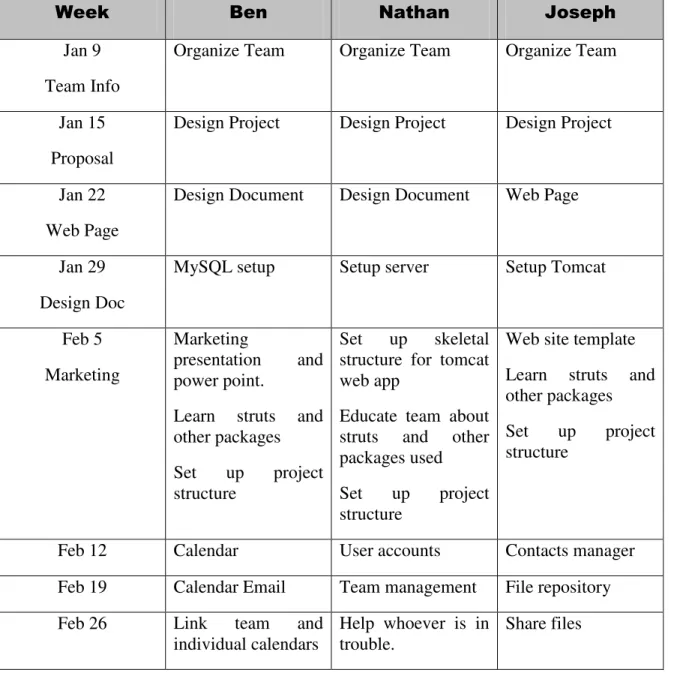
The table is organized with the week and the thing the person is supposed to do that week. The dates in the week column are the date at the beginning of the week.
Table 6.2.1 : Project Timeline
Jan 9 Team Info
Organize Team Organize Team Organize Team
Jan 15 Proposal
Design Project Design Project Design Project
Jan 22 Web Page
Design Document Design Document Web Page
Jan 29 Design Doc
MySQL setup Setup server Setup Tomcat
Feb 5 Marketing
Marketing
presentation and
power point.
Learn struts and other packages
Set up project
structure
Set up skeletal
structure for tomcat web app
Educate team about struts and other packages used
Set up project
structure
Web site template Learn struts and other packages
Set up project
Mar 5 Integrate with other systems parts and test
Set up Demo
Integrate with other systems parts and test
Set up Demo
Integrate with other systems parts and test
Set up Demo Mar 12
Prototype
Email for team members
Track expenses
Datasheets with
customizable columns
Up load with drag and drop
Mar 19 Layout / Look and
feel
Bells and whistles
Layout / Look and feel
Bells and whistles
Layout / Look and feel
Bells and whistles
Mar 26 Layout / Look and
feel
Bells and whistles
Layout / Look and feel
Bells and whistles
Layout / Look and feel
Bells and whistles
Apr 2 Debug Debug Debug
Apr 9 Integration Prepare presentation Integration Prepare presentation Integration Prepare presentation Apr 16 Presentations
Cleanup / finish Cleanup / finish Cleanup / finish
Apr 23 Project Due