*Correspondence to Author:
PhD, Assos.Prof. Rahimova Nazila Candidate of Technical Sciences, Assos. professor of Azerbaijan State University of Oil and Industry, Baku
How to cite this article:
Rahimova Nazila. CREATING A TEST SYSTEM TO TEST KNOWL-EDGE OF STUDENTS ON THE SUBJECT OF INFORMATICS. American Journal of Computer En-gineering, 2020; 3:9.
eSciPub LLC, Houston, TX USA. Website: https://escipub.com/
Rahimova Nazila., AJCE, 2020; 3:9
American Journal of Computer Engineering
(ISSN:2688-5360)
Research Article AJCE (2020) 3:9
CREATING A TEST SYSTEM TO TEST KNOWLEDGE OF
STUDENTS ON THE SUBJECT OF INFORMATICS
The subject article is dedicated to the creation of test system for examination of students in a subject of computer science. The software testing users as well as the software on automation of creation of tests and the analysis of the tests handed over by the users are developed.
Keywords: test systems, test control, computer training system, object model.
PhD, Assos.Prof. Rahimova Nazila
Candidate of Technical Sciences, Assos. professor of Azerbaijan State University of Oil and Industry, Baku
ABSTRACT
https://escipub.com/american-journal-of-computer-engineering/ 1
Introduction
There is a variety of works in the field of creating programs for testing, ranging from the tests with rigidly posed questions, involving simple answers, and ending with answers in a freely constructed form.
Test control can be used as a means of current, thematic and boundary control, and in some cases for the final control. The verification of basic knowledge by means of test control allows the teacher in the remaining time to pay more attention to communication with students, to test not so much knowledge with the traditional forms, as to understand the problems of a particular academic discipline. It should be emphasized that the verification of basic knowledge is the area of test control. Test control has a number of advantages:
1. Effectiveness both in the process of learning during independent work, and in the course of knowledge control at all stages of education;
2. Saving time of the teacher;
3. A high degree of differentiation of the tested persons according to the level of knowledge;
4. The possibility of individualization of the learning process;
5. Prediction of speed and learning outcomes.
Relevance. Each school pays great attention to the degree of learning of students. The highest results can be achieved if the curriculum has a modern knowledge control mechanism. Modern learning is not possible without automated knowledge test systems. For many educational institutions, the development of information technologies for training and monitoring is a topical issue. Computer knowledge control systems are becoming increasingly popular, due to their objectivity, accessibility and economic efficiency. Recently, test control has attracted increasing attention of teachers in various fields, as the most universal form of knowledge control. Such attention to pedagogical control is fully
justified, because the traditional control system is experiencing a certain crisis, which has been repeatedly pointed out by numerous studies of this problem.
Materials and research methods
DLS (Distance Learning System) is a software and hardware complex required to organize the distance learning via the Internet, and in addition to this DLS is the purpose of this graduation work.
The LMS includes several individuals or properties that are fundamental to its creation. The administrator of the system TO is a user of the system and is responsible for monitoring the learning process.
A teacher is a person who is responsible for creating teaching materials or test items and supervising students for their materials.
A student is a person who is taking the course of study chosen by him/her and is a user of this system.
A group is a group consisting of several students who are united among themselves on the topic of a chosen course or having the same specialty. Departments and Chairs are united in their subjects or teachers working in a common specialty. They are used to quickly find and organize teachers.
Teaching materials are resources that contain information on the chosen course created by the teachers. They are used by students for training, and they are published in the program system for future use. These resources mainly include tests and lectures.
The course is created by the teacher, as in the case of its contents, and consists of training materials united on a single topic.
A system library is a knowledge base that consists of test materials and lectures created by a teacher that are allowed for publication. Regardless of the student's registration in the system, he can view this data contained in the library.
the form of text, flash-clips, images, which are used by the teacher to create courses of study and which are published in the library with general access for any student via the Internet. A test is a resource of a system that has informational data about the material passed by the student on the basis of the educational material. It is created by the teacher to control students' understanding of the material after the course. Tests are one of the most important parts while creating and studying an e-course, which consist of questions created on the basis of educational material and answers to them. With the help of tests, students are surveyed and their knowledge on this topic is tested.
Free information resources - These resources include the library of the system, and any Internet users have access to them.
The course creator is the person or teacher who created the course.
The course administrator is a teacher who is assigned to research the results of students according to their progress, and also the person with whom you can contact for any problem at the time of studying the course.
To make the learning process successful, initially it is necessary to determine the functions used by all users of this LMS. Basically, three types of users define technical tasks, these include: a teacher, an administrator, and a student. When creating a library of a system with shared access to it, it should also be noted that every person using the Internet can have access to it. The table shows the necessary data for any kind of users.
Functions of system users
User type The need for user authorization
User functions in the system
Teacher Yes 1. Creating and managing courses 2. Creation of lectures and teaching materials
3. Development of control tasks 4. Monitoring progress
5. Student consultation
Student Yes 1. Studying course materials 2. Passing control tasks 3. Consultation with teachers 4. Control your own results
User type The need for user authorization
User functions in the system
Administrator Yes 1. Creation and management of teachers 2. Administration of the educational process
3. Course management
As you know, when parsing and designing a complex system, it should initially be divided into parts and each part should be considered separately to simplify work on the system. There are two methods for separating subsystems:
o Object decomposition (component) o Structural partitioning (functional)
learning subsystem. In the field of programming, the same processes are called Back-end and Front-end, which mark the end or the beginning of the process. For user input and processing of any data type for further use, the back-end is responsible for the front-end. In this case, the
Front-end is considered to be the interface of the system between the user and the back-end. Ratio of system functions with front-end and back-end processes
Processes Functions
Front-end 1. organize users
2. organize and manage courses
3. organize lectures and teaching materials
4. create control tests
5. Assigning courses to groups
Back-end 1. Teaching students the course
2. Free access to resources that are published for general use.
These two types of system can quite arrange high-quality training.
After the stage of partitioning the system over the subsystem, it can be divided into smaller parts, which will bring the system to the state where each action is included in a separate module that controls it. The modular structure allows to upgrade the system. This leads to the fact that if a problem occurs or to add new
information, it is enough to fix it in one module, and not to change the whole system. User status determines who is a person in the system: administrator, student or teacher. In the future, to change some personal properties of users using special methods. Each user of the system also has its own method by which it receives or sends messages from other users of the system. The administrator diagram is shown in Fig. 1.
In this figure, the properties that apply to all users are highlighted in gray. The staffing structure is also created with certain methods available to the administrator. Editing and confirmation of courses created by the teacher
In addition to this, the teacher has the function to edit tests, courses or lectures at his discretion, but the results of the courses can also be obtained by the administrator.
Students, in turn, have the function of receiving lectures, tests or teaching materials in general. In fig. 3. depicts a diagram of students.
This structure can serve as UML code when creating classes in a program. And according to this structure, you can start creating a test system for distance learning.
The verification of basic knowledge by means of test control allows the teacher in the remaining time to pay more attention to communicating with students, to test traditional forms of knowledge, not so much knowledge, as an understanding of the problems of a particular academic discipline. Test control is possible in
the "paper" form, when students are given sheets of paper with printed tests, but really it is effective only in a "computerized" form. High adaptability test control well contributes to this:
unusualness compared to traditional forms of control, encourage systematic studies in the subject, create additional motivation for learning. 2. Activate the mental activity and the efficiency of learning material through interactivity.
3. Allow to individualize learning not only according to the pace of studying the material, but also according to the logic and type of perception of students.
4. Allow to organize the distance learning, not only for the purposes of correspondence
education, but also for students who miss classes due to illness.
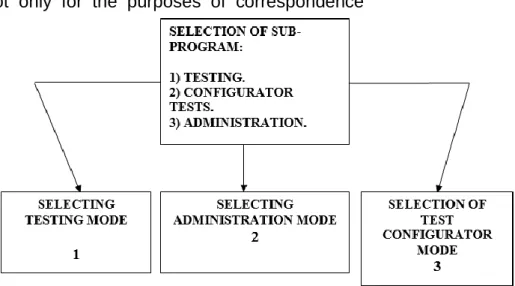
The result of the work is a program designed to create and to conduct tests, as well as the processing of test results. Includes the following modules:
Testing - a program for testing.
Configurator - a program for creating tests.
Administration - a program for administering users and processing test results.
When you select a test, a dialog box is opened, the appearance of the box is presented below. Any tester must select the group in which he is studying and select his/her name in the lists of names which are registered in this group. If the user is not among the registered users, he can add himself to the database by clicking on the “New” button (if this is allowed or ask the administrator to add him to the database). In order no one else could enter under his own name, the user is prompted to enter a password. Test Configurator - designed to enter the subroutine of creating and editing new and existing tests.
Administering is for input to the subprogram for the administering of the users being tested. Next, the user is prompted to choose a topic on which he wants to test his knowledge.
The name of the author of the test is displayed in the “Author” field, and a brief information about the test itself is displayed in the ”Description” field. At any time, if there are any difficulties for the user, he can click on the “Help” button and get detailed information on working with this dialog box.
With the help of tthe dialog box "Test Editor", any modification to edit tests is carried out.
Paragraph one presents the “List of Questions” element that lists all the questions in this test. In order to add a question to the list of questions, you can press the key Ctrl + F5 or select the menu item "Questions / Add". This will add another line in the "Question List".
In order to delete a question from the list of questions, you can press the Ctrl + F6 key or select the “Questions / Delete” menu item. In this case, the line with this question disappears from the “List of Questions”.
So that you can always see the edited question, it is displayed in its entirety in the element "Questions and list of answers"
Each question can be one of three types:
1. One option - the user is offered several response options, one of which is correct.
2. Several options - the user is offered several answer options and a few of them are correct.
Questions and answers are edited in the editor, which is located at the bottom of the program. Working in the editor is not much different from working in typical text editors such as MS Word, WordPad, etc. The table below lists the main features of the editor.
After you have entered the text of the question and answer options, you can set the parameters of the question. The number of answer options is set in the special field “Number.answers”. In order to add an answer to the list of answers, you can press the Ctrl + F7 key or select the menu item "Answers / Increase the number of answers". This will add another line in the list of possible answers. To delete the answer from the list of answers, you can press the Ctrl + F8 key or select the menu item "Answers / reduce the number of answers". In this case, the line with this question will disappear from the list of possible answers. Another way to change the number of answers is to click on the top or
bottom arrow in the item next to the Answers field. The “Question complexity” parameter determines the complexity of the current question. If the time to answer a question needs to be limited, then you can set the required value in the “Time to question” field (in the format of minutes: seconds). In the “Section” field, you can select a section to which the current question relates (question sections may relate to different topics).
With the help of the program it is possible to create not only electronic tests, but also preparation of "paper tests" is possible. They are designed for testing without using a computer. Processing of such tests occurs manually. To create a "paper test" you need to open the required test (or create a new one) and select the menu item "Paper Test / Print". After that, a window will open in which you can edit the resulting test.
created paper test. The paper test can also be saved in an MS WORD file. To do this, you just need to click on the “Write” button in the same window and in the opened window type the name of the file in which the paper test will be saved.
One of the main goals of testing is to get ideas about how well (or poorly) a person knows any area of knowledge. Therefore, the test should provide for the processing of user results. In the program, this can be done in the Outputs window, which can be called up by pressing the F12 key or selecting the Window / Results menu item. The appearance of the dialog box is presented below.
In this window, you can determine what result the user will receive by answering a certain number of questions. Evaluation is on the test as a whole.
In order to set the estimates, you need to set the number of conclusions of the assessment. The maximum number is 10 and the minimum is -1. Depending on the number of conclusions, several fields will become available for editing, in which you need to enter the evaluation text (result, output). The criterion that this assessment will be set to the user is its lower and upper limit. If the questions answered by the user is more than the lower limit, but less than the top, then in this case he will receive exactly this assessment. For example, in fig. The following evaluation options. The first rating is “Poor” - its boundaries are 0 and 5. The second rating is “Satisfactory” - its boundaries are 6 and 7. The third rating is “Good” - its boundaries are 8 and 9. The fourth rating is “Excellent” - its boundaries are 10 and 10. User replied for 5 questions. Accordingly, he will receive a rating of "Bad".
When you select to view the test results, a dialog box opens, the appearance of which is presented below.
Using the program, you can work with user groups and with the users themselves and their test results. Below is a brief description of this
window.
In paragraph one, the figure shows the element “List of users and groups”. The list is presented in the form of a tree, where the groups are represented by the second tree node, and the students registered in the system by the third tree nodes.
Clicking on the user name in the “List of users and groups” will display a list of passed tests. This includes all the tests that the user passed. To view the test results of any test from the list, click the mouse pointer on the test name.
Following the item with the list of passed tests is a comment on the test. Here is brief information on the passed test. It is this information that is displayed to the user when he finishes responding to the test.
The element Test results displays complete information on the passed test. Here you can see what the user received questions and how he answered them. A detailed test report consists of:
1. The question asked by the user, including his number.
2. Variants of answers offered to this question.
3. The answer that the user gave to this question.
4. Indicator of the correct user response. After a student has answered each question, a module that serves to perform tests gives an assessment to students using the following formula.
R = R + a * (1 / S) * 100
where R is the test result that is passed, a is the flag of fidelity of the answer (1 or 0), S is the total number of questions.
Even if a student cannot pass the test in an hour, the test result will still be entered into the system database.
The Statistics element shows statistics on passing the test. Statistics include:
2. Time to start testing. 3. The end time of testing.
4. The number of questions in the test. 5. The number of correct answers. 6. The number of incorrect answers. If you need to print or save the test results to a doc file. You can use the menu item "Report / Test Result". The report can also be saved in the MS WORD file.
Findings
The purpose is to create an information test system to test students' knowledge on the subject of computer science:
1. Created the necessary software that conducts testing of users, as well as software for the preparation of the tests themselves and the software for analyzing the answers of the tests passed by the user.
2. An alternative form of storing a database of tests and user responses on them is proposed. In contrast to the existing programs, where the tests and the results of user responses are stored in separate files, in the presented work all the data is stored in one database.
3. A detailed reference system has been developed for obtaining information on working with the program.
4. The user interface is presented in two languages: Russian and English.
5. With the help of the program you can easily create tests in any subjects and disciplines.
References
1. Роджер Дженнингс. «Руководство разработчика бах данных на Visual Basic 6.0», Издательский дом ”Вильямс”, 2001, 976 стр. 2. Джеффри П. Мак-Манус. «Обработка баз
данных на Visual Basic 6.0», Издательский дом ”Вильямс”, 2001, 672 стр.
3. К. Гетс, М. Джилберт. «Программирование в Microsoft Office. Полное руководство по VBA», Издательская группа ”BHV”, 2000, 768 стр.
4. Афанасьев В.В., Афанасьева И.В., Тыщенко О.Б. - Основные компоненты компьютерных технологий обучения. - М.:1999
5. Демкин В.П., Можаева Г.В. Технологии дистанционного обучения. - Томск, 2002 6. Сайт www.ssl.obninsk.ru
-Автоматизированные обучающие системы. 7. Сайт www.nitesoft.org – Описание системы
NiteTest.
8. www.xpt.narod.ru.