An Average Power Reduction Method for Web
Applications on Wireless Terminals
Toshiya Koyasu, Hideki Shimada, Kenya Sato
Department of Information Systems Design, Doshisha University, Kyoto, Japan Email: [email protected], [email protected], [email protected]
Received February 11,2012; revised March 20, 2012; accepted April 17, 2012
ABSTRACT
Recently, there is a widespread use of Web browser-based Web applications such as e-mails and chats. However, fre-quent communication between mobile wireless terminals and HTTP servers give rise to problematic increases of ave- rage power consumption for the mobile devices. Current attempts to tackle this problem focus on reducing power con-sumption at the network and data link layers used by the devices. In this study, we propose a different solution where certain functionalities of the mobile application are delegated to other devices with abundant power resources (either from large capacity batteries or power outlets). This method off-loads parts of the communication process normally done at wireless terminals to amply powered machines. With messages pushed from the machines only when the HTTP server responds with an update, the wireless terminal needs to transmit data less frequently, thus cutting down on power consumption. Our prototype implementing the proposed method succeeded in reducing the rise in average power con-sumption.
Keywords: Web Applications; Ajax; Wireless Communication
1. Introduction
Recent years have seen a growth of smart phones and other wireless devices with sophisticated Web browsers [1], making it possible and more practical to use Web pages and applications from wireless terminals. This has also made common the use of Ajax applications from wireless terminals. Ajax applications are notable for their high usability and their convenience of not having to in- stall additional software. Some examples of these are text-based chats and email applications that let users communicate using the Web browser as the interface.
However, the use of Web applications with Ajax tech- nology on a wireless terminal, ones that synchronize data updates on the server with Web browser displays, poses a problem: High power consumption. In this study, we pro- pose a method of reducing power consumption at the wireless terminal while using Ajax [2] applications.
2. Device Power Consumption
2.1. Web Applications
Ajax is an approach to Web applications that attempts to improve on usability. Web application usability is tied to the way the browser and the HTTP server communicate with each other: a critical functionality for a Web appli- cation. Traditional Web applications without Ajax would
reload the whole displayed page every time this needs to be done. This action causes unfavorable user experience because it temporarily removes UI components such as text boxes and buttons from the display, and could possi- bly interrupt the user’s tasks. On the other hand, Ajax applications only update parts of the display, only when they need to be updated. UI components remain visible, which leads to higher usability.
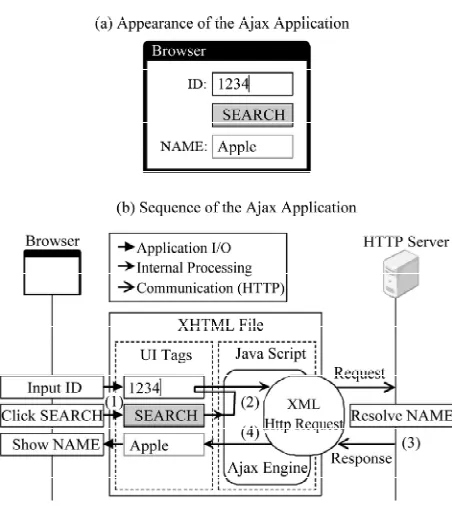
Figure 1(a) shows an example of how an Ajax appli- cation works. In this application, the user types a product ID in the ID text box and presses the SEARCH button. A search is then conducted in the remote database for the corresponding product. The result is displayed in the NAME text box while other parts of the UI remain as they are. Figure 1(b) is the sequence of actions begin- ning with the ID input and ending with the product name display.
Web browser: The front-end of the Web application.
HTTP Server: A collection of Web, application and database servers that is the back-end of the Web ap- plication.
XHTML File: The file that defines the visuals and functionalities of the Web application.
Javascript: The scripting language used to embed ex- tended functionalities on the Web page.
Figure 1. Behavior of the Ajax application.
updating.
XML Http Request: An HTTP client library that can be used from a Javascript program.
UI Tags: The XHTML tags that define the Web appli- cation’s UI.
The basic components and actions 1) through 4) in the figure are as follows:
1) The user types the product number in the ID text box and presses the SEARCH button. A function defined in the Ajax engine is called as an event handler for the button press event.
2) The function retrieves the ID text box value and sends it to the server using XML Http Request. At the same time, another Ajax engine function is registered as a handler for the event that occurs when a response is re- ceived.
3) The HTTP Server resolves the product name based on the value received, and sends back a response to XML Http Request.
4) XML Http Request calls the event handler regis-tered in action 3). The handler inserts the product name into the NAME text box.
2.2. Synchronous Applications
An application where browser display updates are syn- chronized with server data updates, such as a browser- based chat application, would update the browser display to show a newly submitted message when it is posted to the HTTP server. We call this type of application a “syn- chronous application”. The Web being a pull-based com- munication system, a synchronous application would need
to somehow send request messages periodically from the browser to the HTTP server. We will take the chat appli- cation as an example to describe how these messages can be sent.
1) Non-Ajax method
B-Chat [3] achieves periodical requests with client pull, a feature in which XHTML files are re-retrieved and re- displayed periodically. B-Chat uses this feature to get the XHTML file with the latest messages every once in a while. With client pull, the whole browser display must be reloaded every time synchronization occurs, so the user wouldn’t be able to operate on the page if the sync interval is too short. Therefore, applications that use client pull tend to set the sync interval to longer periods compared applications using Ajax. B-Chat uses a 30 se- cond sync interval.
2) Ajax method
Ajax Chat [4] achieves periodical requests using Java- script functions in its Ajax engine. Applications using this method can set shorter sync intervals because only specific parts of the browser display needs to be updated. The user is not interrupted by synchronization. Rather, the shorter the sync interval, the smaller the latency of display update after data is updated on the server, so ap-plications that use Ajax tend to set shorter sync intervals compared non-Ajax applications. Ajax Chat uses a 2 se- cond sync interval.
Mobile wireless terminals consume more power when communicating via its wireless network interface. A study [5] done by Carroll et al. shows that a particular device’s power consumption while communicating was 1016.4 mW, which was 6.31 times higher than while off communication (161.2 mW). We can generally say that using an application with a high rate of communication on a wireless terminal increases its energy consumption. A synchronous application is one of them. Ajax applica- tions in particular communicate more frequently com- pared to others, so the problem is grave and needs to be addressed.
3. Proposed Method
Approach
To reduce average power consumption on a device using synchronous Ajax applications, we propose the two fol- lowing approaches to off-load transactions and reduce communication frequency.
examples would be desktop PCs with their screen savers running, idle servers, and networked home ap-pliances [6] that are to be introduced in the near fu-ture.
[image:3.595.310.539.455.718.2] Using push-based communications to deliver updates: We use push-based communications to send updated data to the wireless terminal after the Surrogate De-vice retrieves them from the HTTP server. In push- based communications, the data is sent from the pub- lisher to the recipient without the recipient requesting it. Thus the wireless terminal does not need to poll the Surrogate Device for updates.
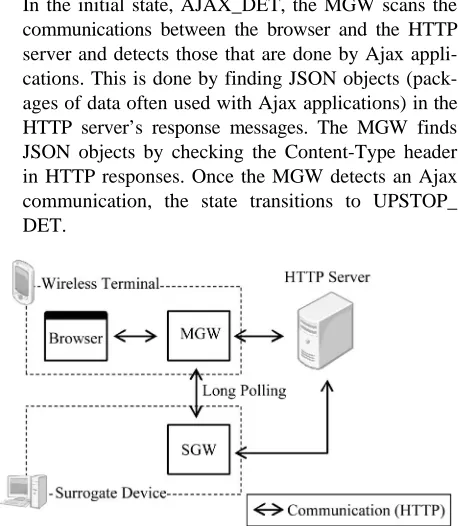
Figure 2 shows the proposed communication model for this transaction off-loading. Descriptions of the com- munications 1) through 4) are as follows:
1) Direct communication: This phase is used to detect communication done by synchronous Ajax applications against the HTTP server. After a communication is de- tected, the system checks to see if there are updates at the HTTP server. If the data is updated frequently at the re- mote server, the wireless terminal continues to commu- nicate directly with the server, as off-loading would only have trivial effects. This also avoids the overhead time produced by off-loading.The same is done for non-Ajax synchronous applications; they communicate directly with the HTTP server.
2) Surrogate Communication Request: If data updates at the HTTP server are infrequent, then the wireless ter- minal requests the Surrogate Device to carry out the ac- tual communications. We call this request the “Surrogate Communication Request”, and the message sent at this time the “Surrogate Communication Request Message”. The wireless terminal suspends communications after sending out this request.
3) Surrogate communication: The Surrogate Device, upon receiving a Surrogate Communication Request, checks the HTTP server for data updates.
4) Surrogate Communication Response: If data is up-dated on the remote server, the Surrogate Device ends
Figure 2. Communication model of the transaction offload.
communications with the HTTP server and pushes the updated data back to the wireless terminal. We call this push the “Surrogate Communication Response” and the message sent at this time the “Surrogate Communication Response Message”.
[image:3.595.62.276.570.717.2]4. Prototype Implementation
Figure 3 shows the setup of the prototype we imple- mented to evaluate the proposed method. Each of the components are shown corresponding to Figure 2. The prototype consists of the Master Gateway (MGW), re-siding on the wireless terminal, and the Slave Gateway (SGW), residing on the Surrogate Device.
4.1. Master Gateway
The MGW is the module to be used by the browser as a local proxy server. As with a generic local proxy server, the MGW relays communications between the browser and the HTTP server and caches the server responses. In addition to this basic functionality, it also distinguishes the transactions that are taking place. This is done based on the request URI after stripping it of the query para- meters. Each of the transactions is assigned a defined state. The state assigned to a transaction is checked when the browser sends a request. Subsequent behavior of the MGW depends on the state of each of the transactions. The four states and their corresponding actions are as follows:
Ajax Communication Detection State AJAX_DET: In the initial state, AJAX_DET, the MGW scans the communications between the browser and the HTTP server and detects those that are done by Ajax appli- cations. This is done by finding JSON objects (pack- ages of data often used with Ajax applications) in the HTTP server’s response messages. The MGW finds JSON objects by checking the Content-Type header in HTTP responses. Once the MGW detects an Ajax communication, the state transitions to UPSTOP_ DET.
Update Stop Detection State (UPSTOP_DET): In the UPSTOP_DET, the MGW attempts to detect whether updates at the HTTP server has ceased tem- porarily. The MGW decides that updates have ceased temporarily when the latest response from the HTTP server is identical to the most recently cached response. Once a temporary cease in communications has been detected, the MGW sends a request message to the SGW (the Surrogate Communication Request Mes- sage) that contains both the browser’s request and the server’s response, combined as a multi-part message body. This is the Surrogate Communication Request Message. The state now transitions to RES_WAIT.
Response Waiting State (RES_WAIT):
In RES_WAIT, the MGW waits for a response from the SGW. Any Ajax requests sent from the browser are responded with cached contents. Completing all communications within the wireless terminal in this way has the effect of practically suspending its com- munications. Once the SGW responds with a Surro- gate Communication Response Message, the cache is overwritten with the newly arrived data. The state now transitions to RESD.
Surrogate Response Delivery State (RESD):
In RESD, the MGW delivers the Surrogate Commu- nication Response Message to the browser. The mes- sage, which is the cache contents that have been over- written, is delivered in response to requests from the browser. The state transitions back to UPSTOP_DET at this point.
4.2. Slave Gateway
The SGW is the module that receives Surrogate Commu- nication Requests from the MGW and carries out the communications for the wireless terminal; it sends out the request message contained in the Surrogate Commu- nication Request Message periodically to the HTTP ser- ver. Consecutive responses from the server are checked to see if they differ from the sample response message contained in the Surrogate Communication Request Message. If in fact the responses do differ, the SGW decides that the remote data has been updated, and pushes the new response (the Surrogate Communication Request Message) to the MGW and terminates com- munications with the server.
4.3. Method of Content Transmission
For content transmission from the SGW to the MGW, we adopt the long polling method, which is used to achieve pseudo-pushing in pull-based communication systems such as the Web. In long polling, the client initially sends a request to the server. The server, instead of responding instantly, holds the request until a certain event occurs (usually the arrival of newly available data). Once this
event occurs, the server sends a response to the client. In this prototype, the SGW holds the Surrogate Com- munication Request until it detects data updates at the server.
5. Evaluations
5.1. Evaluation Items
To evaluate the proposed method, we implemented and ran a sample application (described later) in various situ- ations for 10 minutes each and evaluated the following two points.
The Number of transmissions by the wireless termi-nal: We compared the number of times the wireless interface was used to send and receive messages.
Average latency: We compared the average latency of the browser display update since the data update on the server.
5.2. Evaluation Method
We used an application resembling the communication model of an Ajax synchronous application, the chat. This application has the following two front-ends.
1) Sender
The Sender front-end is the one that submits new chat messages. It submits messages at normally distributed random time intervals having an average of μ (msec.) and a standard deviation of 250 (msec.). The requests have two parts to its query parameter. One is a timestamp of the request (the number of milliseconds since January 1st, 1970 at 00:00) that represents the time of submission of the chat message. The other is a sequence of 140 ran- domly selected Japanese Hiragana characters, encoded in UTF-8, that represents the actual chat message.
2) Receiver
The Receiver front-end is the one that retrieves sub-mitted chat messages. It sends out a request to the HTTP server once every 3 seconds. The request has the time-stamp of the request as the query (in the same format as the Sender). The HTTP server responds with chat mes-sages that were submitted later than this timestamp.
[image:4.595.308.539.653.736.2]5.3. Method of Content Transmission
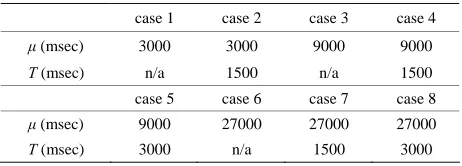
Table 1 shows the combinations of evaluation conditions,
Table 1. Evaluation cases.
case 1 case 2 case 3 case 4
μ (msec) 3000 3000 9000 9000
T (msec) n/a 1500 n/a 1500
case 5 case 6 case 7 case 8
μ (msec) 9000 27000 27000 27000
consisting of μ (the average time intervals between mes-sage submissions by the Sender) and T (the time intervals between surrogate communications by the surrogate communication device). T is shown as “n/a” where this method is unnecessary.
5.4. Method of Content Transmission
Specifications of each device used in the evaluation are shown in Tables 2-4. The devices all reside in different networks, and the Sender and Receiver are used on the wireless terminal.
During evaluation, we turned off the wireless device’s HSDPA interface and used its IEEE 802.11 g interface, and limited its throughput to that of HSDPA, which we had measured in advance. This is in consideration of the possibility that the HSDPA interface’s unstable through- put may cause unpredictable effects on evaluation. We used Iperf 1.7.0 [7] with a window size of 32 KB to mea- sure the HSDPA interface’s through put. The limit ap- plied to the IEEE 802.11 g interface is the average of 20 transmissions between the wireless terminal and the HTTP server. The actual values are 80 Kbps upstream and 40 Kbps downstream. We used NEGiES 1.57 [8] to apply the throughput limits.
5.5. Evaluation Procedure
First, the Receiver starts retrieving chat messages. Once the first response from the HTTP server is retrieved, the Sender starts submitting chat messages. Both front-ends are stopped after 10 minutes (counting from the initial message retrieval by the Receiver). The number of trans- missions by the wireless terminal and the average latency are then evaluated.
Table 2. Specification of the wireless terminal.
CPU Atom Z520 1.33 GHz
Memory 1.00 GB
Network HSDPA [9], IEEE 802.11 g
[image:5.595.310.539.443.568.2]Web Browser Firefox 3.6.13
Table 3. Specification of the surrogate device.
CPU Core2 Duo U9400 1.40 GHz
Memory 3.00 GB
Network 100 BASE-TX
Table 4. Specification of the HTTP server.
CPU Core 2 Duo E7500 2.93 GHz
Memory 2.00 GB
Network 100 BASE-TX
5.6. Evaluation Results
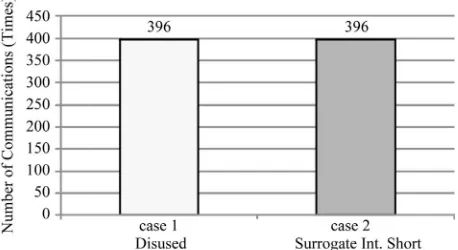
The resulting number of communications and the average latency are shown as follows: cases 1 and 2 in Figures 4
and 5, cases 3 through 5 in Figures 6 and 7, cases 6 through 8 in Figures 8 and 9.
6. Discussion
Let us define the average increase in the wireless nal’s power consumption, compared to when the termi-nal’s communications are halted, as
1
comavg com t
w W
t
6.31 com
W
10 60 600 com
t
. (1)
Here, Wcom is the rate in which power consumption
in-creases or dein-creases when communicating, compared to when it is not. We set this according to the study by Car-roll et al. (cited in Chapter 2) to
(2) it is the length of time the sample application ran, which is
(3)
tcom is the total length of time (sec) the Receiver used the
wireless terminal’s interface to communicate.
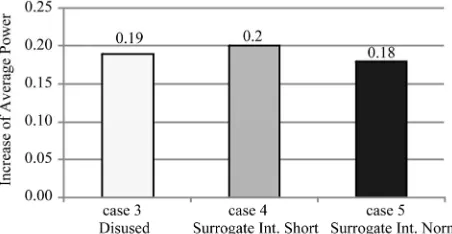
[image:5.595.57.286.520.585.2]Figure 10 shows the values of Equation (1) when ap-plied to the evaluation results for cases 3 through 5. Fig-ure 11 is for cases 6 through 8.
Figure 4. Number of communications on cases 1 and 2.
[image:5.595.312.536.598.716.2]Figure 6. Number of communications on cases 3 to 5.
[image:6.595.311.533.233.352.2]Figure 7. Average delay on case 3 to 5.
Figure 8. Number of communications on cases 6 to 8.
Figure 9. Average delay on cases 6 to 8.
From Figure 11, we can see that the wireless termi- nal consumed 14% more power when using the sample
Figure 10. Increase of average power on cases 3 to 5.
Figure 11. Increase of average power on cases 6 to 8.
application (case 6) and that our proposed method low-ered it to 7% (cases 7 and 8). However, in Figure 10, the average power consumption when not using our method is 19% (case 3), which is lower than the 20% when it was used (case 4).
There are two possible reasons for this. One is that the HTTP server’s data update rate (approximately once every 9 seconds) was relatively low for the sync rate (approximately once every 3 seconds). As such, the num- ber of transmissions eliminated was a trivial 14 times. The other is that the size of the Surrogate Communica- tion Request Message (963 bytes) was larger than that of the data update request message in long polling (434 bytes) and the wireless terminal had to communicate for a longer total time.
In summary, the proposed method can reduce power consumption given that data update intervals are suffi- ciently long compared to the sync interval of the syn-chronous application. More specifically, we can conclude that our method is effective if the data update intervals are more than 9 times longer than the sync interval.
[image:6.595.59.283.237.360.2]6.1. Overhead Time
[image:6.595.60.283.397.525.2] [image:6.595.56.284.557.678.2]over-head time can be held down to under 1 second if the in- tervals of surrogate communications are approximately half of the sync interval.
With the above evaluation results, combined with the fact that synchronous applications do not impose real- time constraints, we conclude that the overhead time in- troduced by our proposed method does not impair prac- ticality.
6.2. Comparisons with Related Methods
In the method proposed by Ishida et al. [10], the wireless interface on the terminal is set to sleep mode every time a transmission ends. A device called the Wakeup Module is then used in place of the wireless interface to wait for incoming transmission waves and wake up the wireless interface when needed.
In the method proposed by Russel [11], the front-end and the back-end of the Ajax application are modified to adapt long polling (described in Section 4.3) to reduce the communication rate: The HTTP server waits until there is new data available to respond to the browser.
Both of these methods require specific expertise in mobile devices or Web applications if they are to be ap- plied to existing applications. As such, it is difficult if not impossible for the end user to use those methods. In con- trast, our method has the advantage of being able to be used by the end user, since it does not require that modi- fications be made on existing applications.
7. Conclusions
In this study, we proposed a method of off-loading a wireless terminal’s communications to another device in order to tackle the problem of increased power consump- tion that occurs while using synchronous Ajax applica- tions (applications that synchronize the Web browser’s display with data updates on the server). Our evaluation prototype kept the average increase in power consump- tion.
We used a networked device as the Surrogate Device in this particular study, but this method could potentially be adapted to wireless base stations and Web servers themselves.
Our method is a valuable contribution in the applica-tion software level to the wide social needs [12] of longer
battery lives. Because this is a high-level method, we can expect it to be used in conjunction with other low-level technologies in hardware and communications.
8. Acknowledgements
This work was supported by JSPS Grant-in-Aid for Sci-entific Research KAKENHI (2100084).
REFERENCES
[1] M. Stanley, “The Mobile Internet Report,” 2009. http://www.morganstanley.com/institutional/techresearch/ mobile_internet_report122009.html
[2] J. J. Garrett, “Ajax: A New Approach to Web Applica-tions,” 2005.
http://www.adaptivepath.com/ideas/ajax-new-approach-w eb-applications
[3] http://www.adaptivepath.com/ideas/essays/archives/0003 85.php
[4] http://wws.cside.com/cgi-plant/b_chat/blueimp.net, https://blueimp.net/ajax/
[5] A. Carroll and G. Heiser, “An Analysis of Power Con-sumption in a Smart Phone,” Proceedings of the 2010 USENIX Annual Technical Conference, Boston, 23-25 June 2010, pp. 1-14.
[6] M. Isshiki, M. Hirahara and T. Kishimoto, “FEMINITY Series Home Network System for Network Home Appli-ances,” Toshiba Review, Vol. 57, No. 10, 2002, pp. 7-10.
[7] NLANR/DAST, “Iperf 2.0.3,” 2008. http://iperf.sourceforge.net/
[8] RHOX, “NEGiES Version 1.57,” 2005. http://hp.vector.co.jp/authors/VA036210/
[9] Japan Communications Inc., “B-Mobile3G,” 2009. http://www.bmobile.ne.jp/english/3g.html
[10] S. Ishida, M. Suzuki, T. Morito and H. Morikawa, “A Multi-Step Wake-Up Scheme for Low-Power-Listening Wireless Communication System,” Technical Report of IEICE, Information Network, Vol. 107, No. 525, 2008, pp. 355-360.
[11] A. Russel, “Comet: Low Latency Data for the Browser,” 2006.
http://infrequently.org/2006/03/comet-low-latency-data-f or-the-browser/
[12] ORIMO Inc., “ORIMO Mobile Research, a Study on Smart Phones,” 2010.