Compatibility Issues on Life Cycle
Implementation of an Android Application
Koushik Saha
U.G. Student, Department of Information Technology, Kalyani Government Engineering College, Kalyani, W.B., India
ABSTRACT:Android is a mobile operating system which gives a world class platform to users to create useful application. It is based on a modified version of Linux kernel [2]. Android application consists of several components like service,activity, broadcast receiver.These components are takes a valuable part in the application life cycle.Several processes of life cycle activities indicate the process state like foreground or background.While broadcast receivers allows to implement input method as a service.The accessibility features keeps android running state and send appropriate instruction about user interactions.
In this papercompatibility issues of API, SDK, managing state throughout the lifecycle activities are presented to analyzelife cycle development phase of an android application.Android runtime environment allows application packages to run into the existing system so here it is also described for better performance in memory access across the integrated apps platform for installing applications in android runtime.
KEYWORDS:Android, AOT, APK, API, ART,Dalvik, JIT, Life Cycle, Linux,SDK,Smartphone.
I. INTRODUCTION
Android was originally developedby Android, Inc. In 2005, later Google purchased Android. By this step Google took over development work of Android and as well as its development team.The first android device was built on Linux kernel 2.6.25 and now it is on a successor version of 3.4. The version varies with respect to chipset configuration of the device.Android is supported in most of the devices, delivers the high tech features.Most of the Android code was released under the open source license of Google. For open source anyone can access full source code of android. Hardware manufacturers can add their own extension to the android.For this android become most popular among the manufacturers. They see Android as a solution to continue design their own hardware. The unified approach to application development is making the android more popular. For developers it is become easy to develop for android powered devices. Today developers feel free to develop application as it produces various features to do something in real which are in dreams. Now the world of smartphonesthe applications are become the most important part for our every moment [1].
II. LIFECYCLEPROCESSACTIVITIES
A. LIFE CYCLE PROCESSES:
Android application runs several processes during the life cycle.There are importance hierarchies for those processes are being run for an application running state.Other processes may not needed,it is required to determine which process should be killed when system runs on low memory.The process types are:
i. Foreground process
It is an application process with which user is now interacting.Here a process is called that it’s in the foreground if the process activity is placed at top position of activity stack. When the process is at the top of stack then the onResume() method called. It is also a broadcast receiver that is in running state (the BroadcastReceiver.onReceive()method holds running state). It has also contains the currently executing service in one of the callbacks (Service.onCreate(), Service.onStart(), or Service.onDestroy()).
ii. Empty process:
This is a process which not contains any active application components. This is used for caching purposes for improve startup time in which component needs to run in it for next time.System can also kill process for balance the resources of underlying kernel caches and the empty cached process. With appropriate use of this empty process the system may run efficiently in most of the cases.
iii. Service process:
This is a process which starts with startService() method. Service process holds a service that is not in the foreground (not directly visible to the device user). The service process deals with several things which user actually cares about (such as background network data download or background music playback). So this process is running by the system unless there is not such enough memory to retain the process with all foreground and visible process.
iv. Background process:
The background process holds an activity which is not visible to the user currently (onStop() method is called). The system can kill any of the background processes when running on low memory.Actually the background process killed by system to provide memory space for foreground, visible or service process.When there are many background process running then these processes are kept in LRU (least recently used) list so that when the system is on low memory then the most recently seen process is to be killed.
B. ACTIVITY LIFECYCLE METHODS:
The lifecycle activity methods depict the state of the activity process.Several states such as visible or hidden state of an activity process aredefined by following methods in the activity lifecycle:
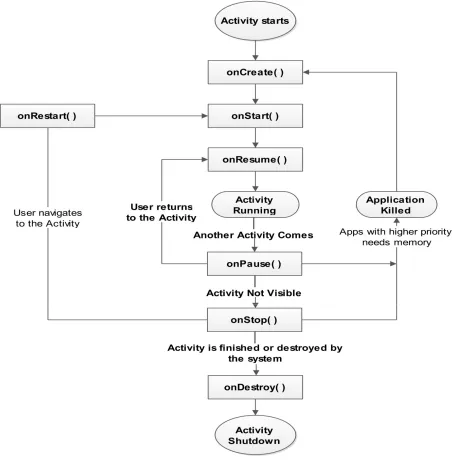
1. onCreate():The onCreate() method is called when an activity is first created (Fig. 1). If there was a previous frozen activity then this method also provide with a bundle which contains frozen state of thatprevious activity.
2. onStart():The onStart() method is called when an activity is visible to the user.
3. onResume():This method is called when user starts interacting with the activity. Here activity is in the running state or active state. When an activity changed frompaused state to running state the onResume() method can also be called.
4. onPause():When a visible activity is going to the background as another process maybe needed to run then onPause() method is called. The paused activity maybe killed by the system or it may be resumed followed by onResume() method.
6. onRestart(): The stopped activity state can be restarted by onRestart() method.It can be visible followed by onStart() method.
7.onDestroy(): The onDestroy() method is called before the activity is destroyed.This method is called for save the space by the system.
C. MANAGING STATE THROUGHOUT THE LIFE CYCLE:
It is possible to save the activity state for further use after an activity stopped or destroyed.This saved state is called instance state. The stopped or destroyed activity can be saved by following ways:
1. By storing the primitive values in a dictionary called bundle that the system used save the activity state. 2. To hold complex values in a custom class that is used to save the state by android.
3. Assuming the responsibilities and by avoiding the small configuration changes to maintain the activity state.
A. BUNDLE STATE:
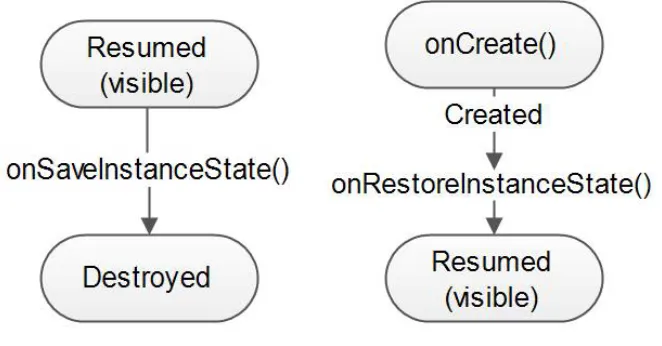
To save instance state value dictionary object is used, called bundle. The OnCreate() method(Fig. 2) passed a bundle as a parameter when an activity is created, which is used to restore the instance state. The bundle is not used for more complex data rather than the more simple strings are preferable.
For save and retrieve the instance state in the bundle the activity provides following two methods: 1. OnSaveInstanceState():When the activity is being destroyed then this is invoked by the system.
2. OnRestoreInstanceState(): It is possible to restore activity state after initialization is complete. After the OnCreate() method is finished this is called.
The following diagram shows how these methods are used as a bundle:
Fig. 2 Bundle State
III.COMPATIBILITYISSUES
A. SDK COMPATIBILITY:
TABLE I
Major performance improvements made in the various Android versions under API levels
API VERSION NAME IMPROEMENTS
21 Lollipop Android 5.0 Tracking battery consumption app
19 KitKat Android 4.4 NFC Host Card Emulation
18 Jelly Bean Android 4.3
OpenGL for Embedded Systems 3.0 graphics support
14 Ice Cream Sandwich
Android 4.0
Low-level streaming multimedia (KhronosOpenMAX AL
Grid Layout
B. API LEVEL COMPATIBILITY:
In each successive platform version of android it adds new API’s that not available in the previous version.For each and every platform a unique API level is fixed to identify the new API’s in the API levels. As an example for android 1.0 the API level is 1 and for android 5.0 the API level is 21.
It is possible to declare the minimum version with which application is compatible by API level,using the manifest tag and the minSdkVersion attribute.
For example, Job Scheduler API lets user optimizing battery life, in which jobs can be defined under specific conditions for run asynchronously in future.
B. ANDROID RUNTIME COMPATIBILITY:
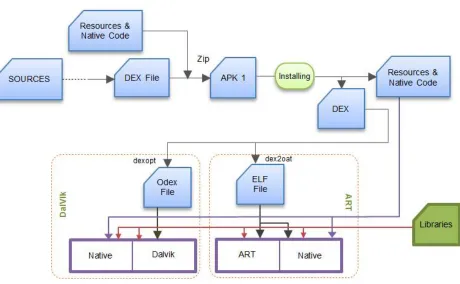
Android Runtime improves app performance is introduced in Android 4.4 version. Since Dalvik VM(Virtual Machines) register based VM’s consumes instructions efficiently which will avoid unnecessary memory access. It is now possible of higher level optimizations in ART over the applications code base. The overhead in the code such as exception checks are removed. Here method and interface calls are frequently optimized. In ART, it induced the new “dex2oat” component which is replaced by the “dexopt” Dalvik equivalent(Fig. 3). In ART the Odex files (optimized dex) also disappeared which is replaced by ELF files, so that better memory management with less memory usage can be done. For converting into “dex” files the Dalvik uses Just In Time (JIT) compiler but in new android runtime it uses Ahed Of Time (AOT) compiler. AOT compiles the code into machine language when app is installed. No compilation is done during execution of app, so this improves apps launch speed. By this method it reduces CPU work and increases battery backup of the device. ART improves garbage collection for better app performance by freeing space in VM.
Fig. 3 Existing APK Life Cycle
i. Proposed System:
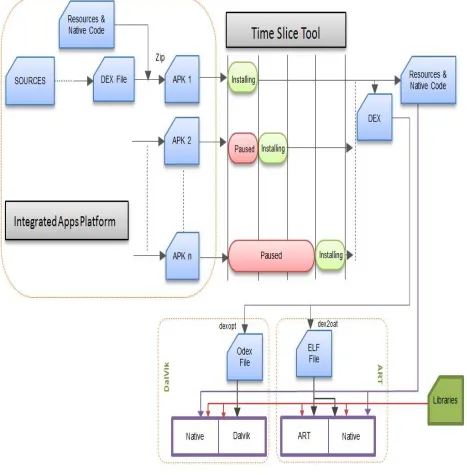
Time Slice Tool works by implementing Dual Garbage Collector (GC) for installing Integratedapps. Here two garbage collector heap used for allocation and tracking of applications (Fig. 4) in Integrated apps platform. The blue rectangle in the heap indicates the allocation of an app. The green rectangle is indicates the compilation status during installation and the red one indicates installation complete status of an app. When an app get completion status then the tracking heap allocates another for start installation.So, it saves the memory being get stuck during installation. From Integrated apps platform when one application is going to compile its code during installation the other applications get paused in the time slice tool. When the existing is completed its installation and completed the compilation of the same then the next application is processed through the tool.
IV. CONCLUSION
Now from smartphones to T.V. every device is going to be runon Android.Today android has emerged as a world’s most reliable operating System for it runs billions devices everyday.It’s required to be published more compatible application on every devices for better usability of the android.Android’s open source gives the power of continuously upgradation for better usability.The capabilities of implementation of sensors like hardware may take into future to run android not only into smartphones also into household machines and medical devices.
REFERENCES
[1] Wei-Meng Lee,”Beginning Android™ Application Development”,ISBN: 118-01711-1,ISBN: 118-08729-9 (ebk),ISBN: 978-1-118-08749-7 (ebk),ISBN: 978-1-118-08780-0 (ebk)
[2] HervéGuihot,”Pro Android App Performance Optimization”,ISBN-13 (pbk): 978-1-4302-3999-4, ISBN-13 (electronic): 978-1-4302-4000-6 [3] Anwar Ghuloum, Brian Carlstrom, Ian Rogers, “The ART runtime”, Presented at Google I/O 2014, San Francisco, CA, USA, June 26, 2014,
[online], Available:https://www.google.com/events/io/schedule/session/b750c8da-aebe-e311-b297-00155d5066d7
[4] Ijjina Earnest Paul, KondaRaveendra Kumar, Android OS Customization, International Journal of Engineering and Innovative Technology (IJEIT), ISSN: 2277-3754, Vol. 1, Issue 5, pp. 55-58, May, 2012
[5] MohitSardesai, Sanjay Yadav, RohitSrinivasan, MrsBhartiJoshi , “Gesticulator (Gesture Based Calculator): An Android Application”, International Journal of Innovative Research in Science, Engineering and Technology, Volume 2, Issue 3, ISSN: 2319-8753, pp. 820-824, March, 2013
[6] Vaibhav Kumar Sarkania, Vinod Kumar Bhalla, “Android Internals”, International Journal of Advanced Research in Computer Science and Software Engineering, Vol. 3, Issue 6, June, 2013
[7] Neha B. Thakkar, “Google Android: An Emerging Innovative Software Platform For Mobile Devices “, IJIRST – International Journal for Innovative Research in Science & Technology, Volume 1, Issue 6, ISSN ( online ): 2349-6010, pp. 272-278, Nov., 2014
[8] NileshT.Gole, AmitManikrao, NirajKanot, Mohan Pande, “Evolution Of Operating System And Open Source Android Application”, International Engineering Journal For Research & Development, E ISSN : 2349-0721, Vol. 1, Issue 1, pp. 1-9
[9] Introducing ART[Online], Available: https://source.android.com/devices/tech/dalvik/art.html
[10] Android activity life cycle - what are all these methods for? [Online],Available: http://stackoverflow.com/questions/8515936/android-activity-life-cycle-what-are-all-these-methods-for
[11] Managing the Activity Lifecycle[Online],Available: http://developer.android.com/training/basics/activity-lifecycle/index.html