Table of Contents
List of FiguresChapter 8: Router Models...289
Chapter 9: Router Basics...289
Chapter 11: RIP, IGRP, IPX, and Convergence...289
Chapter 12: Network Addressing...290
Chapter 14: TCP/IP...290
Chapter 16: LAN Switching...290
Chapter 17: Connecting with WAN Protocols...290
Appendix A: Sample Test...290
List of Tables...291
Introduction...291
Chapter 1: The CCNA Examination...291
Chapter 2: The Language of the CCNA Exam...291
Chapter 3: Routing Through the OSI Model...291
Chapter 4: The Data Link Layer...291
Chapter 5: The Network Layer...291
Chapter 7: The Upper Layers...291
Chapter 8: Router Models...291
Chapter 9: Router Basics...292
Chapter 10: Router Commands...292
Chapter 11: RIP, IGRP, IPX, and Convergence...292
Chapter 12: Network Addressing...292
Chapter 13: Subnetting...292
Chapter 14: TCP/IP...292
Chapter 15: Security...293
CCNA for Dummies
Overview
by Ron Gilster, Jeff Bienvenu, and Kevin Ulstad Published by
IDG Books Worldwide, Inc.
An International Data Group Company 919 E. Hillsdale Blvd.
Suite 400
Foster City, CA 94404
www.idgbooks.com (IDG Books Worldwide Web site)
www.dummies.com (Dummies Press Web site)
Copyright © 2000 IDG Books Worldwide, Inc. All rights reserved. No part of this book, including interior design, cover design, and icons, may be reproduced or transmitted in any form, by any means (electronic, photocopying, recording, or otherwise) without the prior written permission of the publisher.
Library of Congress Catalog Card No.: 99−69383 ISBN: 0−7645−0690−0
10 9 8 7 6 5 4 3 2 1 1B/QU/QU/QQ/IN
Distributed in the United States by IDG Books Worldwide, Inc.
Distributed by CDG Books Canada Inc. for Canada; by Transworld Publishers Limited in the United Kingdom; by IDG Norge Books for Norway; by IDG Sweden Books for Sweden; by IDG Books Australia Publishing Corporation Pty. Ltd. for Australia and New Zealand; by TransQuest Publishers Pte Ltd. for Singapore, Malaysia, Thailand, Indonesia, and Hong Kong; by Gotop Information Inc. for Taiwan; by ICG Muse, Inc. for Japan; by Intersoft for South Africa; by Eyrolles for France; by International Thomson Publishing for Germany, Austria and Switzerland; by Distribuidora Cuspide for Argentina; by LR International for Brazil; by Galileo Libros for Chile; by Ediciones ZETA S.C.R. Ltda. for Peru; by WS Computer Publishing Corporation, Inc., for the Philippines; by Contemporanea de Ediciones for Venezuela; by Express Computer Distributors for the Caribbean and West Indies; by Micronesia Media Distributor, Inc. for Micronesia; by Chips Computadoras S.A. de C.V. for Mexico; by Editorial Norma de Panama S.A. for Panama; by American Bookshops for Finland.
For general information on IDG Books Worldwides books in the U.S., please call our Consumer Customer Service department at 800−762−2974. For reseller information, including discounts and premium sales, please call our Reseller Customer Service department at 800−434−3422.
For consumer information on foreign language translations, please contact our Customer Service department at 1−800−434−3422, fax 317−572−4002, or e−mail [email protected].
For information on licensing foreign or domestic rights, please phone +1−650−653−7098.
For sales inquiries and special prices for bulk quantities, please contact our Order Services department at 800−434−3422 or write to the address above.
For information on using IDG Books Worldwides books in the classroom or for ordering examination copies, please contact our Educational Sales department at 800−434−2086 or fax 317−572−4005.
For press review copies, author interviews, or other publicity information, please contact our Public Relations department at 650−653−7000 or fax 650−653−7500.
For authorization to photocopy items for corporate, personal, or educational use, please contact Copyright Clearance Center, 222 Rosewood Drive, Danvers, MA 01923, or fax 978−750−4470.
LIMIT OF LIABILITY/DISCLAIMER OF WARRANTY: THE PUBLISHER AND AUTHOR HAVE USED THEIR BEST EFFORTS IN PREPARING THIS BOOK. THE PUBLISHER AND AUTHOR MAKE NO REPRESENTATIONS OR WARRANTIES WITH RESPECT TO THE ACCURACY OR COMPLETENESS OF THE CONTENTS OF THIS BOOK AND SPECIFICALLY DISCLAIM ANY IMPLIED WARRANTIES OF MERCHANTABILITY OR FITNESS FOR A PARTICULAR
PURPOSE. THERE ARE NO WARRANTIES WHICH EXTEND BEYOND THE DESCRIPTIONS CONTAINED IN THIS PARAGRAPH. NO WARRANTY MAY BE CREATED OR EXTENDED BY SALES REPRESENTATIVES OR WRITTEN SALES MATERIALS. THE ACCURACY AND
COMPLETENESS OF THE INFORMATION PROVIDED HEREIN AND THE OPINIONS STATED HEREIN ARE NOT GUARANTEED OR WARRANTED TO PRODUCE ANY PARTICULAR RESULTS, AND THE ADVICE AND STRATEGIES CONTAINED HEREIN MAY NOT BE
SUITABLE FOR EVERY INDIVIDUAL. NEITHER THE PUBLISHER NOR AUTHOR SHALL BE LIABLE FOR ANY LOSS OF PROFIT OR ANY OTHER COMMERCIAL DAMAGES,
INCLUDING BUT NOT LIMITED TO SPECIAL, INCIDENTAL, CONSEQUENTIAL, OR OTHER DAMAGES.
THIS STUDY GUIDE AND/OR MATERIAL IS NOT AFFILIATED WITH CISCO SYSTEMS, INC. Trademarks: Cisco®, Cisco Systems®, CCDA", CCNA", CCDP", CCNP", CCIE", CCSI", the Cisco Systems logo and the CCIE logo are trademarks or registered trademarks of Cisco Systems, Inc. in the United States and certain other countries. All other trademarks are trademarks of their respectice owners. For
Dummies, Dummies Man, A Reference for the Rest of Us!, The Dummies Way, Dummies Daily, and related trade dress are registered trademarks or trademarks of IDG Books Worldwide, Inc. in the United States and other countries, and may not be used without written permission. All other trademarks are the property of their respective owners. IDG Books Worldwide is not associated with any product or vendor mentioned in this book.
IDG Books is a registered trademark under exclusive license to IDG Books Worldwide, Inc. from International Data Group, Inc.
About the Authors
plus several books on networking, the Internet, computer and information literacy, and programming. Jeff Bienvenu (CCNA, Network+) has worked with Cisco networking hardware for more than three years, with experience managing the networks for a Cisco Regional Networking Academy and now as the
Information Technology Administrator at HighSpeed.Coms corporate offices.
Kevin Ulstad (CCNA, Network+, A+) is currently a regional account executive for HighSpeed.Com. His recent experience includes stints as the LAN administrator for that companys local area networks.
Dedication
Ron Gilster: For Diane& and the hardworking, dedicated students, readers, and co−workers trying to better their lives, further their careers, or pursue their dreams through technical and career certification may you achieve your goals. Best of luck!
Jeff Bienvenu: To Krisann, for her support, love and friendship. To Michaelle and Marcus, who have blossomed despite being burdened with me as their father. And to Dylan, for putting up with me though he would rather not.
Kevin Ulstad: I dedicate this book to Ron Gilster, for inviting me to be a member of the writing team and for his help and guidance; to Ciaran Bloomer, my first Cisco instructor, for turning me on to Cisco equipment; and to my wife, Linda, and children Heather, Megan, Ashlie, and Andrew, for providing me the support at home that allowed me to learn this field in the first place and to spend the time to help write this book. To all of you, my sincere thanks.
Authors Acknowledgments
We would like to thank the wonderful folks at IDG Books who helped to get this book published, especially Joyce Pepple, Nate Holdread, Christine Berman, Carmen Krikorian, Megan Decraene, and the virtual cast of tens who work behind the scenes to shield us from the cold, cruel, technical part of the process. And to Brenda Cox and the Technical Support crew for their continued support to our valued readers.
Special thanks to Ciaran Bloomer for the superb technical editing job he provided.
Publishers Acknowledgments
Were proud of this book; please register your comments through our IDG Books Worldwide Online Registration Form located at http://my2cents.dummies.com.
Some of the people who helped bring this book to market include the following:
Acquisitions, Editorial, and Media Development
Project Editor: Nate Holdread Acquisitions Editor: Joyce Pepple Copy Editor: Christine Berman Proof Editor: Teresa Artman Technical Editor: Ciaran Bloomer
Associate Permissions Editor: Carmen Krikorian Media Development Coordinator: Eddie Kominowski Editorial Manager: Leah P. Cameron
Media Development Manager: Heather Heath Dismore Editorial Assistant: Beth Parlon
Production
Project Coordinators: E. Shawn Aylsworth, Emily Perkins
Layout and Graphics: Karl Brandt, Joe Bucki, Tracy K. Oliver, Jill Piscitelli, Brent Savage, Brian Torwelle, Erin Zeltner
Proofreaders: Laura Albert, Corey Bowen, Christine Sabooni, Charles Spencer Indexer: Christine Spina Karpeles
Special Help
Amanda M. Foxworth, Production Services
General and Administrative
IDG Books Worldwide, Inc.: John Kilcullen, CEO
IDG Books Technology Publishing Group: Richard Swadley, Senior Vice President and Publisher; Walter Bruce III, Vice President and Associate Publisher; Joseph Wikert, Associate Publisher; Mary Bednarek, Branded Product Development Director; Mary Corder, Editorial Director; Barry Pruett, Publishing Manager; Michelle Baxter, Publishing Manager
IDG Books Consumer Publishing Group: Roland Elgey, Senior Vice President and Publisher; Kathleen A. Welton, Vice President and Publisher; Kevin Thornton, Acquisitions Manager; Kristin A. Cocks, Editorial Director
IDG Books Internet Publishing Group: Brenda McLaughlin, Senior Vice President and Publisher; Diane Graves Steele, Vice President and Associate Publisher; Sofia Marchant, Online Marketing Manager IDG Books Production for Dummies Press: Debbie Stailey, Associate Director of Production; Cindy L. Phipps, Manager of Project Coordination, Production Proofreading, and Indexing; Tony Augsburger, Manager of Prepress, Reprints, and Systems; Laura Carpenter, Production Control Manager; Shelley Lea, Supervisor of Graphics and Design; Debbie J. Gates, Production Systems Specialist; Robert Springer, Supervisor of
Proofreading; Kathie Schutte, Production Supervisor
Dummies Packaging and Book Design: Patty Page, Manager, Promotions Marketing
Introduction
Overview
If you have purchased or are considering purchasing this book, you most likely fit into one of the following categories:
You know how valuable CCNA Certification is to a networking professionals career and advancement.
•
Youre wondering just what CCNA Certification is all about. •
You think that reading this book may be a fun, entertaining way to learn about the networking and internetworking with Cisco Systems, Inc. routers and switches.
•
You love all For Dummies books and wait impatiently for each new one to come out. •
Youre a big fan of anything Cisco and just cant get enough of it. •
Well, if your situation fits any of these scenarios, this is the book for you!
If youre already aware of the CCNA Certification program and youre just looking for an excellent study aid, you can skip the next few sections of this introduction in which we do our best to convince you that this is the book youre looking for, mainly because it is (the book, that is). However, if you dont have the foggiest idea just what CCNA Certification is or how to prepare for it, read on!
Why Use This Book?
In what began as a way to ensure that its resellers could also properly support its products, Cisco Systems, Inc. developed what has become the most sought after and prestigious networking certification series
available. To hold any Cisco certification indicates that you know your stuff regarding networking at a certain level. The exams developed to screen certification candidates are rigorous and downright hard. The result is that even the most knowledgeable and experienced Cisco networking professional needs at least a little help getting ready for the CCNA exam. The sole purpose of this book is to help you to shorten your preparation time for the CCNA exam.
As with all other For Dummies books, this book is a no−nonsense reference and study guide. It focuses on the areas that are likely to be on the exam, plus it provides a little background information here and there to help you understand some of the more complex concepts and technologies. This book presents the facts, concepts, processes, and applications included on the exams in step−by−step lists, tables, and figures without long explanations. The book focuses on preparing you for the CCNA exams, not on showing off our
obviously extensive and impressive knowledge of networking and its related technologies (nor our modesty, I might add).
In developing this book, we made two groups of assumptions:
You have an entry−level knowledge of networking, routers, bridges, switches, and other networking components, as well as a fundamental knowledge of electronics, computers, software, protocols, and troubleshooting procedures, and you only need a review and study guide for the exam.
•
You have some experience with Cisco hardware and its integration into networking environments, but you need a refresher on the basics along with a review and study guide for the exam.
If our assumptions in either case suit your needs, then this is the book for you!
Using This Book
This book is organized so that you can study a specific area without wading through stuff you may already know. I recommend that you skim the whole book at least once, noting the points raised at the icons. For your last−minute cram before the exam, each part and chapter of the book is independent and can be studied in any order without confusing yourself.
Each chapter also includes a pre−test (Quick Assessment quiz) and post−test (Prep Test questions) to help you determine where your knowledge is weak and where you need to continue studying. The following sections tell you what weve included between the covers of this book:
Part I: The Basics
Part I provides some general information about taking the exam, an overview of the topic areas you should study, and a primer of the terms and concepts you must know for the CCNA exam. This includes an overview of the CCNA exam, its objectives and benefits, how to arrange to take the test, and some general tips on what to study and how to get ready for the test.
Part II: The OSI Reference Model
Part II provides you with a review of the OSI Reference model and the related fundamentals and background information you should know for the exam. This includes a look at the four layers of this model that are emphasized on the test.
Part III: Routers
Part III deals with the heart of the CCNA exam routers. The exam concentrates on routers, their
configuration, commands, and protocols. This may be the most important section of the book, not that the others are unimportant, but in the sense that the CCNA is actually the routing and switching exam, this part of the book represents at least half of what you should know.
Part IV: Network Protocols
Part IV has everything you need to know about the internetworking, including the infamous subnetting. Also included in this part are reviews on network (IP) addressing; the frames, protocols, and functions of TCP/IP; and security issues of the internetworked environment.
Part V: LANs and WANs
As its name implies, this part of the book covers the concepts and technologies used to organize networked resources into networks in local areas as well as wide areas. Although not obvious from the name, the use of switching systems is the focus in this part of the book. The CCNA exam focuses on routing and switching. This part covers the use of switches in a network and how they can be used to segment a LAN. The link types that can be used to create a WAN are also covered.
Part VI: The Part of Tens
Part VII: Appendixes
This section gives you even more practice test questions, with ten sample test questions on each domain, as well as information about whats on the CD in the back of this book and how to use the CD.
Whats on the CD
The CD−ROM included in this book contains a variety of study aids and practice tests to help you prepare for the CCNA exam. In addition, the QuickLearn game is on the CD−ROM to provide you with an easy, fun way to study. A few links to the Web sites of companies with training sites and sample copies of their wares are also on the CD.
Studying Chapters
CCNA For Dummies is a self−paced method of preparing for the exam. You dont have to guess what to study; every chapter that covers exam objectives guides you with
Preview questions •
Detailed coverage •
Review questions •
This step−by−step structure identifies what you need to study, gives you all the facts, and rechecks what you know. Heres how it works.
First page
Each chapter starts with a preview of whats to come, including
Exam objectives •
Study subjects •
Not sure that you know all about the objectives and the subjects in a chapter? Keep going.
Quick Assessment questions
At the beginning of each chapter, you find a brief self−assessment test that helps you gauge your current knowledge of the topics that chapter covers. Take this test to determine which areas you already understand as well as to determine the areas that you need to focus on most.
If youre in a hurry, just study the sections for the questions you answered incorrectly. •
If you answered every question correctly, jump to the end of the chapter and try the practice exam questions to double−check your knowledge.
•
Study subjects
As you study, special features show you how to apply everything in the chapter to the exam. Labs
Labs are included throughout the book to step you through some of the processes you need to know for the exam, such as installation or configuration of a particular component. Heres an example of a lab included later in the book:
Lab 17−1: Configuring a Frame Relay Interface on a Cisco Router
Select the interface to be configured.
CCNA_for_Dummies(config)#int s0
This command selects serial interface 0. 1.
Enter the configuration mode for that interface. 2.
Configure a network−layer address. 3.
Select the encapsulation type cisco or ietf (cisco is the default).
Router(configif)#encapsulation framerelay [cisco|ietf]
4.
Specify the LMI type (Cisco IOS 11.1 and earlier)
Router(configif)#framerelay lmitype { ansi|cisco|q933i}
5.
Tables
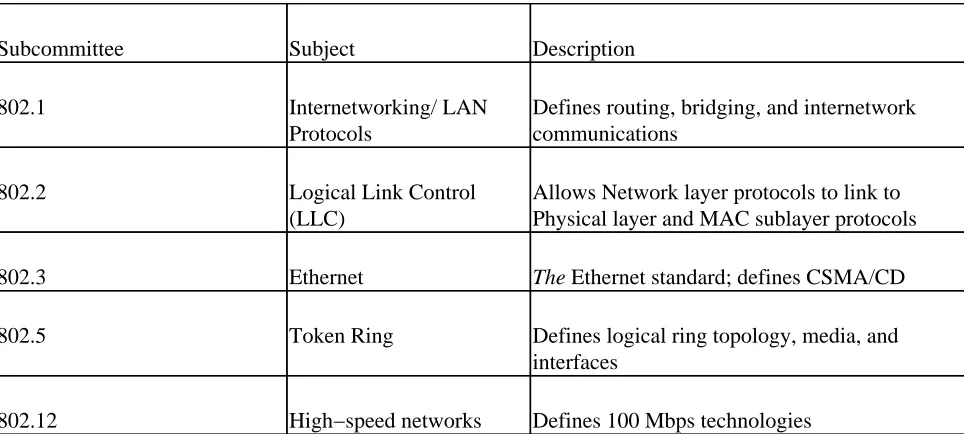
Sometimes, you need just the facts. In such cases, tables are a simple way to present everything at a glance. Table 4−1: The IEEE 802 Standards
Subcommittee Subject Description
802.1 Internetworking/ Defines routing, bridging, LAN Protocols
and inter network communications
802.2 Logical Link Control (LLC) Allows Network layer protocols to link to Physical layer and MAC sublayer
protocols
802.3 Ethernet THE Ethernet standard; defines CSMA/CD
802.5 Token Ring Defines logical ring topology, media, and
interfaces
Prep Tests
The Prep Tests at the end of each chapter gauge your understanding of the entire chapters content. These Prep Test questions are structured in the same manner as those you may see on your exam, so be sure to try your hand at these sample questions. If you have difficulties with any questions on the Prep Test, review the corresponding section within the chapter.
Icons Used in This Book
Time Saver icons point out tips that can help you manage and save time while studying or taking the exam.
Instant Answer icons highlight information to help you recognize correct and incorrect exam answers.
Remember icons point out general information and subjects that you should know and understand for the test. While the information may not appear directly on the exam, it provides you with information you need to identify the correct response.
Tip icons flag information that can come in extra−handy during the testing process. You may want to take notes on these tidbits!
Feedback
Wed like to hear from you. If an area of the test isnt covered as well as it should be, or if weve provided more coverage than you think is warranted about a particular topic, please let us know. Your feedback is solicited and welcome. You can send e−mail to us at the following e−mail addresses:
Ron Gilster: [email protected]
Jeff Bienvenu: [email protected]
Part I: The Basics
Chapter List
Chapter 1: The CCNA Examination
Chapter 2: The Language of the CCNA Exam
In this part&
Youve decided you want to become CCNA certified and let the world know how much you know about local area networks, wide area networks, routing, switching, the OSI Model, TCP/IP, and internetworking. So where do you start? In this part of the book, we give you the particulars about the test, how to schedule the test, where to go, and what to do.
The CCNA exam covers just about everything you need to know about setting up, configuring, installing, administering, and maintaining a network using Cisco hardware and software. You wont find questions on general computing and technical basics, however; you know the bits and bytes and how data moves over wires and between computers. The CCNA exam makes the assumption that if you dont already know this stuff, you wont understand most of the questions on the test to begin with, so why bother? However, you had better know the ins and outs of configuring a router and connecting it into a network.
Chapter 1: The CCNA Examination
In This Chapter
Checking out the CCNA exam •
Knowing how to study: Preparing for the exam •
Scheduling and paying for the exam •
Regardless of the motives Cisco Systems, Inc. had in developing its Career Certifications, the certification exams included in this program have become desired, sought after, and required stepping stones in the career plans of many networking professionals. It matters not that Cisco may have had a built−in audience of technical professionals loyal to its particular line of hardware, because even without this army, Cisco has earned one of the largest market shares in internetworking hardware.
As you prepare yourself to join the ranks of professional networkers proudly wearing their Certified Cisco Networking Associate (CCNA) honors, as we have, youre most likely doing so to start your career, further your career, or re−engage your career. Where certifications like A+ concentrate on hardware issues, and Network+ and MCSE primarily focus on software issues, the CCNA exam deals with the software and functional issues of networking hardware in the focus of the internetwork. The CCNA certification is an earned honor that says to the world, and especially employers, that this person really knows his
internetworking stuff, including routers, switches, bridges, and how they can be combined to provide the best possible networking environment for a given situation.
The CCNA exam transcends any particular operating system or computer manufacturer because Cisco hardware works with nearly every computing environment in use. If it can be networked, Cisco equipment will network it, and your CCNA certification says you are the person to build that network!
This book has one purpose and one purpose only to prepare you for the CCNA exam. It is focused on what you need to know about taking the test, the testing experience, and the knowledge you need to pass the exam. After that has happened, and we know it will, we wish you all the success that comes with your CCNA certification.
A Little Background about the CCNA Exam
Cisco Systems, Inc. sponsors a complete hierarchy of career certifications that center on its routing,
switching, LAN, and WAN products. Because Cisco Systems is the leading internetworking company in the world, its only natural that certification on its equipment and software is a valuable credential for a
networking professional.
Whats included in CCNA certification?
The CCNA (Certified Cisco Networking Associate) exam fulfills only one step along the Cisco Network Support certification track, which is designed for professionals working directly with Cisco−based networks. This certification focuses on LAN and WAN routers and LAN switches.
Earning CCNA certification tells the world, and more importantly employers, that youre able to:
Configure and implement networks to improve such operational areas as bandwidth, response times, reliability, and quality of service
Configure and implement simple routed and switched networks •
Make improvements to networks that improve performance and provide for increased network security
•
Configure and install an intranet locally or globally •
Analyze a variety of network performance issues and suggest appropriate application−oriented solutions
•
Who should get CCNA certification?
Ciscos target audience includes:
The technical support staff of their resale channel partners •
Working networking professionals •
Graduates of the Cisco Regional and Local Networking Academy program •
Someone trying to break into the networking field •
Is CCNA related to other certifications?
The CCNA certification is only one of several career certifications sponsored by Cisco Systems, Inc. Depending on the track, network support or network design, CCNA may be the first or second step on the certification track.
The ultimate goal of anyone getting Cisco certification should be the CCIE (Cisco Certified Internetworking Engineer) certification. This is the ultimate badge of honor in networking. But, because of the rigor of the CCIE exam, which draws equally on real−world, hands−on experience and the technical specifications of the gamut of Cisco Systems hardware and software, you should work your way up to it.
Without getting too confusing, there are two tracks for Cisco certification: Routing and Switching and WAN Switching. As a matter of fact, theres a new CCNA exam just for WAN switching. It is called CCNAWAN Switching.
The CCNA test that this book is focused on is Cisco CCNA exam 1.0, test number 640−107, which is strictly a routing and switching test, but it can be used for either the network support or the network design tracks. In the network support specialization, the focus is on installation, configuration, and operation of routed and switched networks. These are networks that use LAN and WAN routing and switching. The test sequence used in this specialization starts with the CCNA exam, moves on to the CCNP (Cisco Certified Network Professional), and finally, the CCIE exam.
In the network design specialization, the focus shifts to the design of networks at the component level to perform simple and complex network routing and switching. The test sequence for the network design emphasis starts with the CCDA (Cisco Certified Design Associate), proceeds to the CCNA, and finally to the CCDP (Cisco Certified Design Professional).
The Cisco Networking Academy program
The CNA (Cisco Networking Academy) program is a partnership developed by Cisco with high schools, community colleges, and colleges and universities around the world to provide a head start program to high school and college level students toward certifications.
The current academy program consists of four semesters that prepare students through a series of online and hands−on lessons and labs with the skills and knowledge they need to pass the CCNA exam. If youre new to Cisco networking, you may want to investigate whether this program is available in your area. If youre a graduate of a local networking academy, you know first−hand about the fine quality of this forward−looking program and its curriculum.
Why Get CCNA Certification?
Thats a good question. And just where CCNA fits into the mix of certifications and resume alphabet soup is another good question. One thing for certain is that certification of any kind is fast becoming the minimum requirement for nearly all IT and Internet−related jobs, and its not unusual for a network administration job to list the CCNA as a minimum requirement. Cisco Systems views CCNA as an excellent entry−level certification that should qualify the holder for a position as a networking technician on a routed or switched network.
Is CCNA better than Network+, or any of the MCSE certifications? It isnt necessarily better, and, in fact, it may be harder, but its really just different. CCNA certification says something completely different about its holder than any of the other certifications, but then thats the point. The networking world is well aware of the CCNA exam and its a widely recognized and respected certification.
What the CCNA Exam Covers
The CCNA exam consists of 78 to 81 questions, depending on which of the rotating test versions youre lucky enough to draw. The exam covers seven specific knowledge areas of internetworking technologies, as listed in Table 1−1. Some knowledge areas are emphasized more than others, as indicated by the percentage each represents of the whole test, and accordingly the number of questions also varies with the emphasis. Table 1−1 describes the seven major knowledge areas of the CCNA exam, the topics included in each of the major areas, and the percentage of the total test each area represents.
Table 1−1: CCNA Exam Subject Areas
Knowledge Area Approximate Percentage of
Exam
Topic
OSI Reference 30 % The layers of the
OSI model
Connection−oriented and connectionless network services
Data link and network addresses
Reasons for a layered model
Flow control and three methods used in networking
The OSI Network layer and how a router performs its functions
WAN Protocols 10 % Frame Relay,
ISDN/LAPD, HDLC, and PPP
Frame Relay terms and features
Configuring Frame Relay LMIs, maps, and subinterfaces
Monitoring Frame Relay operations in a router
PPP operations and WAN data encapsulation
ISDN networking
ISDN protocols, groups, reference points, and channels
Ciscos implementation of ISDN BRI
IOS 10 %
User and privileged mode logins
Context−sensitive help facilities
The command history and editing
Router elements (RAM, ROM, CDP, show)
Managing configuration from the privileged exec mode
Router passwords, identification, and banner
Cisco IOS commands used for router startup
Using the setup command to create an initial configuration
Managing configuration files
Loading software from: flash memory, TFTP server, or ROM
Preparing an initial router configuration and enabling IP
Network Protocols 5 %
Novell IPX operations
Network addressing
IP address classes and subnetting
Configuring and verifying IP addresses
IPX addresses and encapsulation types
Enabling Novell IPX protocols and interfaces
TCP/IP Transport− and Network−layer protocols
ICMP operations
IPX access lists and SAP filters
Routing 20 %
RIP routing protocol
IGRP routing protocol
Separate and integrated multiprotocol routing
Issues from topology changes
Segmenting a network with a router
Network Security 5 %
Standard and extended access lists
Access list operations on a router
LAN Switching 20 %
LAN segmentation with bridges, routers, and switches
Name and describe two switching methods
Full− and half−duplex Ethernet operations
Fast Ethernet
Cut−through and store−and−forward LAN switching
Spanning Tree Protocol
Virtual LANs
MAC addresses
OSI Reference Model
A major part of the CCNA exam focuses on your knowledge of the OSI Reference Model and its seven−layer approach to network activities, functions, data formats, and communications. Of course, there is more
emphasis in those layers of the model that deal with routing and routers, but every layer in the reference model is included on the exam. As you prepare for the exam, be sure this is an area you know and understand in detail.
WAN protocols
Routers are more often used to connect local area networks (LANs) to other networks than as an interior device on a single network. Because of this, the protocols used to carry data and control signals over wide area networks also have an emphasis on the CCNA exam. This part of the test focuses on Frame Relay, X.25, and point−to−point protocols, along with ISDN services.
Cisco IOS commands
The commands used to configure and monitor router activities play a key part in the everyday life of a CCNA. For that reason, the CCNA exam includes a number of questions on the configuration modes used for the various commands and the methods and sources used to load and back up the IOS software and the routers configuration.
Network protocols
Cisco routers must be able to interface with network protocols to properly interact with a network. On the CCNA exam, Ethernet and TCP/IP protocols are the primary focus reflecting the most popular network architectures in use in the real world. You need to know which network protocols are used on which layers of the OSI model and when and how the IP and IPX protocol suites are applied.
Routing
You must know the difference between a routed protocol and a routing protocol, including some examples and configuration methods. Internetworking issues are also included in this portion of the exam.
Network security
This section of the CCNA exam is concerned with passwords, encryption, and access lists implemented on the router, including how access lists are configured and operate under either IP or IPX protocol suites.
LAN switching
Cisco career certification and survey
On the test you will be given a confidentiality statement that you must agree with to take the exam, some information on Cisco career certification, and a short survey about Cisco certifications. You will get a zero percent score for these items on the score sheet, but dont worry, they dont count against you.
Taking (And Passing) the Exam
The exam is online and interactive. Its well designed and provides you with every possible opportunity to pass. Questions are presented one at a time on the screen in an easy−to−read format with online help always available as you navigate the exam. Unfortunately, there is no subject−matter help available on the test. The exam doesnt exactly set out to trick you, but some questions include false information just to see if you really know your stuff. Contrary to what you may have heard or believe about this exam, Cisco wants you to pass the CCNA exam, but only if you have the knowledge required.
One new wrinkle on the CCNA that was implemented late in 1999 is that after you have answered a question, you cannot go back to review it. In fact, the questions arent numbered, other than which number of the total 79 to 81 questions each one represents. So, answer each question carefully and dont click the Next button until youre sure of your answer(s).
To become CCNA certified, you need to get at least a 75.5% on the CCNA examination. Actually, the CCNA is scored on a point system, and you need to get 755 of the 1,000 points available, or you need to get roughly 60 or 61 of the 79 to 81 questions correct. Or, to look at it another way, you can miss, incorrectly interpret, misconstrue, or choke on no more than 20 questions if you want to pass.
You have 90 minutes to complete the test, which allows you plenty of time to work through the entire test as well as review your answers. However, you also must understand that when time is up, the test is over! Bam, zoom, no last−minute guesses over; done; fini! So, watch the time carefully.
Tip One other thing about taking the test. The physical setup of the testing facility varies from site to site. You find test centers in training companies, community colleges, universities, and the like. Regardless of how the testing center is organized, you are assigned to a single specific computer workstation to take the test. Youre not allowed to take breaks, talk to anyone, or get up and move around. Many test centers have open microphones and video cameras in the room to monitor the test−takers. This is intended to prevent somebody from cheating or disturbing other test−takers. As strict as this sounds, your best bet is to forget about it and plan on sitting at your workstation for the duration, quietly taking your exam. Just watch how much coffee you drink right before the test!
Preparing for the Exam
Youre already well on your way to CCNA success by reading this book. Use the Quick Assessment quizzes at the beginning of each chapter to identify the areas you need to study the most. In addition to this book (if you really think you need it), many excellent resources are available to help you prepare for the exam. I list some of the better World Wide Web and other resources at the end of this chapter, on the CD, and in the Part of Tens.
Whats the best way to prepare for the CCNA exam? It all depends on you. Gilsters Law on Test
Each chapter of this book contains tables and bulleted lists of the items you need to commit to memory for the test. Use these for general study as well as a last−minute review. Use the questions at the end of each chapter to test your general knowledge of the chapter contents and when necessary, review the section referenced in the answer for additional study. Sample test questions are also available in Appendix A and on the CD. In every case, we list where in the book you can find more information on an answer.
Time−Saver You really need to know the protocols, services, and functions that operate on each layer of the OSI model, physical and network addressing, network address subnetting, router configuration, and the basic commands of a router and their use. Use the test percentages shown in Table 1−1 as a gauge of how you should spend your time preparing for the test. Concentrate on the areas in which your knowledge is limited or where you dont have much experience. By all means, review everything you can, more than once, and take as many sample tests as possible.
Tip Your chances of passing the exam and getting certified are better if you have experience with Cisco hardware and software implemented in a local area network. Your chances improve if your experience also includes wide area networks and diverse routing and switching situations. However, its not required, only recommended.
Signing up to Take the Exam
The CCNA examination is conducted by Sylvan Prometric testing centers in more than 700 locations
worldwide. To schedule an appointment to take the test in the United States or Canada, call Sylvan Prometric at 1−800−829−NETS (1−800−829−6387). You can also register online on the Sylvan Prometrics Web site at
www.2test.com. For information on registering to take the CCNA exam in a country outside the United States or Canada, visit www.2test.com. Be sure to mention that you want to take the Cisco CCNA 1.0, exam
#640−407.
Call at least two days before your desired test date, and the friendly and knowledgeable testing counselor will help you set a date, time, and location thats convenient for you. The test is not given at specific times or dates. You pick the date, time, and place. Some testing sites arent available every day of the week, or even every month of the year, and some offer testing during only certain hours of the day. So the earlier you contact them, the better. I recommend calling Sylvan Prometric as soon as you think youre entering the final stages of your exam preparation.
Sylvan Prometric helps you find a testing center near your home or in the vacation spot you want to visit. When you schedule your test, you must either give them your credit card information or you can mail them a check or money order (not a great option if youre in a hurry), but they wont confirm your test date until after they receive the check.
How Much Does It Cost?
The cost of the CCNA exam is $100 (U.S. dollars) in the United States and Canada. The cost ranges from $150 (USD) to $300 (USD) in other countries. Sylvan Prometric accepts all generally accepted credit cards, but you can make other payment arrangements with them if needed, but before you can take the test, you must be paid in full.
World Wide Web Sites to Help You
Here are some URLs that have free information, sample tests, or products to help you prepare for the CCNA exam:
www.cramsession.com/cramsession/cisco/ccna/
http://welcome.to/ccna
www.lilligren.com/cisco/leeccna.htm www.henninger.net/ccna/
http://207.212.98.71/html/CCNA.htm www.learntosubnet.com/
www.cisco−resellers.com/ccnaprep.htm
Where to Go from Here
If youre really committed to earning your CCNA certification, you are indeed certifiable. My advice is to use the study tool or tools that best suit your study habits and the time available. Dont be too cocky or overly confident about this test. Even if youve worked with networks, routers, switches, and the Internet most of your adult live, you probably havent had the opportunity to work with every type of network in every situation. If you have, you can probably skip this test and go straight to the CCIE exams. But, some review cant hurt. Remember that the exam includes questions about commonly used terminology, practices, components, and protocols, along with questions about little−known facts on obscure services, devices or activities an obvious attempt to separate the truly worthy from the pretenders.
When you request a test date from the nice helpers at Sylvan Prometric, give yourself time to study, if only for a couple of days. At the price of this test, you can probably afford the time much more than the cost of retaking the test or the humiliation that will surely be heaped on you by your coworkers and alleged friends should you not pass.
A Little Luck Never Hurts
Chapter 2: The Language of the CCNA Exam
In This Chapter
Explaining network topology •
Exploring LANs, WANs, and MANs •
Reviewing subnet masks •
Networking, especially the subset of networking that involves routing and switching using Cisco Systems, Inc. equipment and software, has a language all its own. In fact, most of this book is dedicated to teaching you first the language of the CCNAs world, along with the tools of the trade. However, in this chapter, we want to provide you with an overview of the terminology and concepts that are fundamental to all of networking, including Cisco networks.
Laying Out the Network Topology
Remember Topology is the physical layout of the computer, other nodes and cabling of the network. For the exam, youre expected to know the most common types of network topologies.
Please accept our topologies
Local area networks are constructed in a physical layout form that best suits the networks location, the building, and where its nodes are located. Most LANs are laid out in a general shape and pattern that
facilitates the connection of workstations and other devices to the network. This general shape and pattern is referred to as the networks topology.
There are four general network topologies:
Bus: Nodes are connected to a central cable, called a backbone, which runs the length of the network. See Figure 2−1.
•
Figure 2−1: A bus network topology.
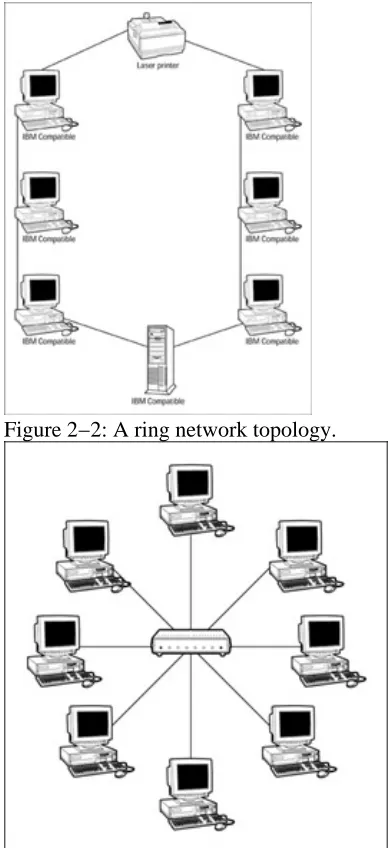
Ring: The primary network cable is installed as a loop, or ring, and the workstations are attached to the primary cable at points on the ring. See Figure 2−2.
Star: Each workstation connects directly to the central server with its own cable, creating a starburstlike pattern.
•
Mesh: Each workstation connects directly to the server and all other workstations, creating a mess, I mean, mesh of network connections. This topology is not very common actually, but it is mentioned on the test.
•
Mixed topologies
The star topology is more commonly used today to cluster workstations on bus or ring networks. This creates hybrid or mixed topologies, such as the star−bus and the star−ring (also called the ringed−star):
Star−bus: A very common implementation for Ethernet networks. A hub or switch is used as the central or clustering device that is then attached to the network backbone (see Figure 2−3). This is the most common topology of Ethernet networks.
•
Star−ring: Used with ring (Token Ring) networks. A special type of hub, called a multistation access unit (MSAU), is used to cluster workstations and to connect to the next MSAU on the network to complete the ring. Instead of using a pure ring structure, the star−ring is the most common form of ring networks.
•
Figure 2−2: A ring network topology.
Applying LAN Technologies
Although Chapter 4 provides a more detailed overview of specific LAN technologies, heres some background information on LAN technologies that you need to know for the test.
The three most common LAN technologies are Ethernet, Token Ring, and FDDI (Fiber Distributed Data Interface). The CCNA exam is heavily weighted with Ethernet technology questions.
Ethernet networks
Instant Answer Ethernet is by far the most popular networking technology in existence for LANs today. Ethernet networks are by definition built on a bus topology that operates on baseband rates of 10 Mbps, 100 Mbps, or 1,000 Mbps (1 Gbps). However, Ethernet usually is implemented on a star−bus topology with either 10 Mbps or 100 Mbps bandwidth.
Ethernet networks employ an access method called CSMA/CD (Carrier Sense Multiple Access/Collision Detection). Under CSMA/CD, when a station wants to send information over the network, it listens for other stations broadcasting. If the network isnt in use, it sends its message. On occasion, two stations may
broadcast at the same time and a collision occurs. When this happens, each station retransmits its message using a back−off algorithm that specifies a random period of time each workstation should wait before retransmitting. Each network node examines all network traffic looking for messages addressed to it. If the message is addressed to a particular node, the node processes it accordingly, otherwise the message is ignored.
Token Ring networks
Token Ring networks usually operate at either 4 Mbps or 16 Mbps. Logically, Token Ring networks are laid out in a loop that starts and ends at the same node forming a ring (hence the name).
In contrast to the processes used on an Ethernet network, a token ring node receives messages only from its nearest upstream neighbor (NAUN) and sends signals to its downstream neighbor (which does not have an acronym). Like Ethernet though, Token Ring networks are implemented in a mixed star−ring topology in which each station is connected to an MSAU (multi−station access unit).
Token Ring networks use a token passing access method, in which only the workstation holding the token is allowed to transmit on the network. As the workstation completes its tasks, it places the token on the network for another node to use.
FDDI: The double−ring network
FDDI (Fiber Distributed Data Interchange) is an ANSI (American National Standards Institute) standard that defines a dual ring technology that operates at 100 Mbps over fiber optic cabling. FDDI is not nearly as popular as Ethernet or Token Ring, but it is on the exam.
Because its implemented on fiber optic media and its high data rates, FDDI is better suited for networks that operate over large geographic areas or in electronically hostile environments, or for networks that have large bandwidth demands. Because it employs two attached and interconnected rings that operate independently, an FDDI system has built−in media redundancy that can be applied when one or more ring segments fail.
Defining LANs, MANs, and WANs
Configure the addressing and routing schemes: This is one of the major topics of this book and the CCNA exam, but see Chapters 8, 9, and 10 for information on these activities.
•
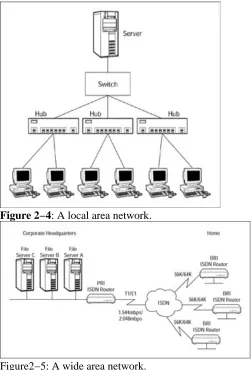
Figure 2−4: A local area network.
Figure2−5: A wide area network.
Subnet Mask Review
Remember There are three usable IP address classes: Class A, Class B, and Class C. Two other IP address classes do exist, but theyre set aside for special purposes. Each IP address class (A, B, and C) has a finite number of bits assigned to hold each of the network and host IDs. Table 2−1 lists the number of bits designated for each of these identities in the 32−bit IP address.
Table 2−1: IP Address Class Bit Assignments
Class Nbr of Network Bits Nbr of Host Bits
A 8 24
B 16 16
C 24 8
Remember Table 2−2 lists the default subnet masks for the IP address classes. Table 2−2: Default Subnet Masks for the IP Address Classes
Class Decimal Mask Binary Mask
A 255.0.0.0 11111111 00000000 00000000 00000000
B 255.255.0.0 11111111 11111111 00000000 00000000
Part II: The OSI Reference Model
Chapter List
Chapter 3: Routing Through the OSI Model Chapter 4: The Data Link Layer
Chapter 5: The Network Layer Chapter 6: The Transport Layer Chapter 7: The Upper Layers
In this part&
The OSI Reference Model is the basis for communicating over a network, whether it be a local area network, a wide area network, or the internetwork. The OSI model, as its called for short, defines the rules,
mechanisms, formats, and protocols used to guide how data flows from one device to another.
For the CCNA exam, you need to know the functions, guidelines, and protocols of all seven layers of the OSI model, especially which functions, guidelines, and protocols are on which layer. In addition, you must know why a layered approach to network communications is used and why this approach is a good thing.
______ is the wire type most commonly used on Ethernet networks. 10.
Answers
The Open Systems Interconnection Reference Model. See The layers of the OSI model. 1.
Network. Review Moving down through the layers. 2.
1. Take a look at Moving down through the layers. 3.
Network or Layer 3. Check out Moving down through the layers. 4.
Data Link or Layer 2. See Moving down through the layers. 5.
Upper. Review Other interesting OSI layer stuff. 6.
Do not or has no effect. Look over Reasons why a layered model is used. 7.
Packets. Check out Packaging the data. 8.
Protocol data unit. See Packaging the data. 9.
UTP or unshielded twisted−pair. Review Choosing the network cable. 10.
The OSI: A Model of Efficiency
Remember The CCNA exam asks you to provide at least three reasons that the industry uses layered interconnection models. First, here are some basic definitions. A layered model is one that takes a task, such as data communications, and breaks it down into a series of tasks, activities, or components. Examples of layered networking models include the seven−layer OSI model (which you need to know inside and out) and the Department of Defense (DoD) five−layer model. These two models are contrasted in Figure 3−1.
Figure 3−1: The seven−layer OSI model contrasts to the five−layer DoD model.
Reasons why a layered−model is used
Layer 3 Network: This is the layer on which routing takes place and, as a result, is perhaps the most important OSI layer to study for the CCNA test. The Network layer defines the processes used to route data across the network and the structure and use of logical addressing.
•
Layer 2 Data Link: As its name suggests, this layer is concerned with the linkages and
mechanisms used to move data about the network, including the topology, such as Ethernet or Token Ring, and also deals with the ways in which data is reliably transmitted.
•
Layer 1 Physical: The Physical layers name says it all. This layer defines the electrical and physical specifications for the networking media that carry the data bits across a network. •
Figure 3−2: The layers of the OSI model. Other interesting OSI layer stuff
Tip Layers 4 through 7 are generally referred to as the upper layers. Conversely, Layers 1 through 3 are collectively called the lower layers. Seems obvious, but youll see this reference on the test.
Time−Saver You need to know the seven layers in sequence, either top−to−bottom or bottom−to−top. Here are some phrases to help you remember the layers of the OSI model:
Please Do Not Throw Salami (or Sausage if you prefer) Pizza Away this works for bottom−to−top. My personal favorite: both the phrase and the pizza.
•
All People Seem To Need Data Processing a top−to−bottom reminder. •
APS Transport Network Data Physically APS refers to Application, Presentation, and Session. This one separates the upper and lower layer groups.
•
Please Do Not Tell Secret Passwords Anytime we know, these are getting lame! •
Packaging the data
Each layer of the OSI model formats the data it receives to suit the functions to be performed on that layer. In general, the package of data that moves through the layers is called a Protocol Data Unit (PDU). However, as the data is reformatted and repackaged, it takes on unique names on certain layers. Table 3−1 lists the name each layer uses to refer to a message.
OSI Layer PDU Name
Application PDU
Presentation PDU
Session PDU
Transport Segment
Network Packet
Data Link Frame
Physical Bits
Time−Saver Absolutely memorize the information in Table 3−1 to the point that you can recite the data unit name associated with each of the OSI models layers.
Down one side and up the other
Keep in mind that the OSI model itself is never actually implemented, but the network hardware, protocols, and other software that form a network act in a layering and unlayering fashion that follows the guidelines of the OSI model. As shown in Figure 3−3, a packet is passed down through the OSI layers from the Application layer to the Physical layer, where its physically transmitted to the Physical layer of the receiving network. At the receiving end, its passed back up through the layers, from Physical layer to the Application layer.
Figure 3−3: The route data takes through the OSI models layers.
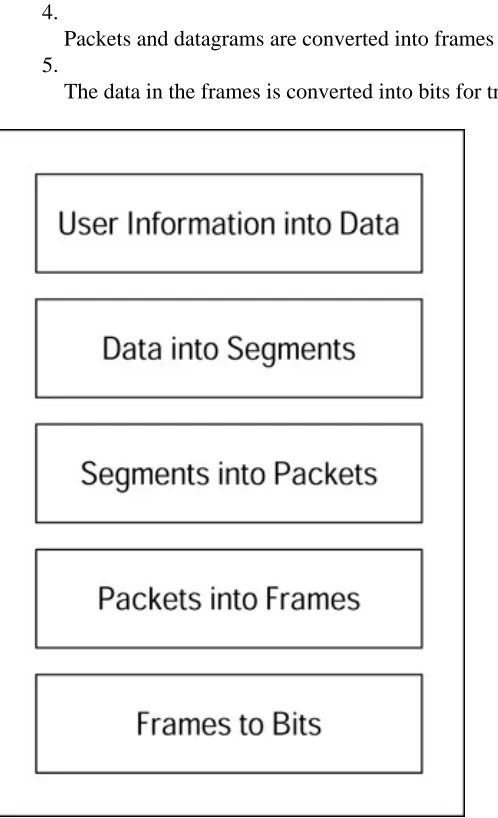
As the data passes down through the OSI layers, each layer uses the services of the layers above or below it. A lower layer encapsulates the PDU from the upper layer, adding whatever header or trailer information needed at that layer, and sends it down to the next lower level. This process continues down to the Physical layer, which then takes the ones and zeroes and transmits them across the networks physical media. At the receiving end, the process is reversed and the data is passed back up until it reaches the Application layer. As the PDU is passed down through the sending side layers, each layer performs its own brand of magic: formatting it, adding a CRC (Cyclic Redundancy Check) or another error−checking mechanism, breaking it into smaller pieces, and more. Each layer also adds its own header to the message. When transmitted by the Physical layer, the original message, if it is still in one piece, has three headers attached to it.
Getting Physical
Time−Saver For purposes of the CCNA exam, you should know what the Physical layer of the OSI model does, what devices operate on the Physical layer, some basic topologies (see Chapter 2), the distance limitations of the various network media, and how the medias distance limitations apply in wiring closets using horizontal and intermediate cross−connects. Gee, is that all? The point is that you should basically memorize the tables in this section.
Electrically speaking
The Physical layer of the OSI model defines the electrical and mechanical specifications used in networking, including transmission distances, the various types of media available, and electrical issues. The standards included in the Physical layer have been developed by various contributing organizations such as the EIA/TIA (the Electrical Industry Association/ Telecommunications Industry Association), the IEEE (pronounced eye triple−E and meaning the Institute of Electrical and Electronics Engineers), UL (Underwriters Laboratories), and others.
Getting to know the wire
Time−Saver Although wireless LAN technologies are emerging, the CCNA exam only includes references to physical cable. So, dont waste your time researching wireless LAN systems.
What you need to know about physical network media, a.k.a. cable, centers around its physical properties and construction features. Here are some of the basic concepts you need to understand about all cable types:
Attenuation: In nearly all cable theres a distance limit at which the signal on a wire weakens and no longer can be recognized.
•
Electromagnetic Interference (EMI): Virtually all electrical devices emit electromagnetic waves that can cause interference and impair the signals of other devices.
•
Radio Frequency Interference (RFI): Devices that broadcast wireless or radio signals can produce interference through radio wave transmissions picked up by other electrical devices, which is the cause of EMI.
•
Cancellation: The electromagnetic fields of two wires placed in close proximity can cancel out each other. This is generally a good thing and helps control the signals being sent over the individual wires, but too much cancellation can destroy the integrity of the signal carried on either wire.
•
Choosing the network cable
Time−Saver There are three basic types of networking cable: twisted−pair, coaxial, and fiber optic. Each of these cables has different characteristics and capabilities. For the CCNA exam, focus your studies on unshielded twisted−pair wire. However, it wont hurt to review the characteristics of fiber−optic and coaxial cable just a bit as well.
The twisted−pair
network media. The bad news is that its very vulnerable to interference and has attenuation problems as well. However, these problems are easily overcome with the right network design and implementation. Twisted−pair wire comes in two types: unshielded (UTP) and shielded (STP), shown in Figure 3−4. Of the two types, unshielded is more commonly used. Its popular in Ethernet networks. Unshielded twisted−pair wire is just about what its name implies two unshielded wires twisted together but generally, network cable consists of four twisted pairs inside a single cable.
Figure 3−4: Twisted−pair wiring. The unshielded truth
Unshielded twisted−pair (UTP) is the most common type of cabling used in networks. For all of the reasons discussed above, it provides the most installation flexibility and ease of maintenance of the big three cabling media. UTP is commonly referred to as 10BaseT Ethernet cable.
UTP cable is grouped into five categories, or cats as the real techies call them (as in Cat 3 or Cat 5):
Category 1 and 2 not used in networking. This isnt here and you didnt see it. •
Category 3 a 4−pair cable supporting bandwidth up to 10 Mbps and is the minimum standard for 10BaseT networks.
•
Category 4 a 4−wire cable commonly used in 16 Mbps Token Ring networks. •
Category 5 a 4−wire cable with bandwidth up to 100 Mbps, used for 100BaseTX and ATM (asynchronous transfer mode) networking.
•
Tip The UTP references on the CCNA exam are usually to Cat 5 cabling, with a few Cat 3 references. Be sure you know which wire is involved and what the situation is on questions concerning cabling.
UTP uses an RJ−45 connector, which looks very much like the little clip connector on your telephone, only a little bigger. (See Figure 3−5.)
Figure 3−5: UTP cable is terminated with an RJ−45 connector. Shielding you from trouble
Shielded twisted−pair (STP), the other of the twisted−pair wire types, is common in Token Ring networks, but is not commonly used for Ethernet although it can be. STP has its wires wrapped in a copper or foil shield to help reduce EMI and RFI interference, which makes it more expensive than UTP wire.
Whats this 10−Base stuff?
Remember The 10Base part indicates that the cable carries 10 Mbps bandwidths over baseband signals. In the case of coaxial cable, the 5 and 2 mean 500 meters and 200 meters, which are the approximate maximum segment lengths for these cables. The T in 10BaseT refers to twisted−pair cable.
Baseband is a network technology that sends its data over a single carrier frequency. Baseband networks require all nodes to participate in every message sent over the network. Typical baseband networks use UTP wiring, but can also use coaxial cable or fiber−optic cabling.
The other cable types
Fiber−optic cable is significantly more expensive than UTP and much more difficult to work with. Its advantages include its capability of carrying data over much greater distances and that its resistant to both EMI and RFI, because it uses a light signal instead of an electrical impulse.
Coaxial cable comes in two types, generally referred to as thinnet and thicknet. Coaxial cable isnt generally used in new installations anymore, but you should know its characteristics for the exam.
Know the cable table
Time−Saver Youll likely see an exam question about cable types and their characteristics. Table 3−2 lists the primary characteristics for each of the major cable types. You should commit the contents of this table to memory.
Table 3−2: Network Media Characteristics
Type Media Maximum Speed Segment Length
10Base2 coaxial 50 ohm thin 10 Mbps 185 Meters
10Base5 coaxial 50 ohm thick 10 Mbps 500 Meters
10BaseT UTP 10 to 1,000 Mbps 100 Meters
Fiber multi−mode 10 to 1,000 Mbps 2000 Meters
Fiber single−mode 10 to 1,000 Mbps 100,000 Meters
Working in the Wiring Closet
Time−Saver Questions and references to wiring closets and wiring practices are on the exam. If you have access to a wiring closet, equipment room, phone closet, or whatever you call the location where your network cabling interconnects, you should spend some time reviewing the connections and standards in use on your network.
Wiring standards
Remember The EIA/TIA standards 568 and 568B are the most widely used wiring standards for network media. These two standards detail six elements of LAN cabling:
Equipment Rooms •
Entrance Facilities •
Work Areas •
Backbone Cabling •
Horizontal Cabling •
Remember The portion of the 568 standards that directly affects most networking situations is horizontal cabling. This part of the standards deals with the network media (wire, connectors, etc.) that run horizontally from the wiring closet to the workstation. Herea summary of these standards:
A minimum of two telecommunications outlets in each work area. •
A maximum distance for Cat 5 UTP cable in a horizontal cabling run is 90 meters. Remember this is not the maximum distance for Cat 5, which is 100 meters. Its the EIA/TIA standard for horizontal cabling runs using Cat 5 UTP.
•
Patch cords at the horizontal cross−connect are not to exceed 6 meters. •
Patch cords from the wall to the workstation should not exceed 3 meters.
Each floor should have a separate wiring closet. ♦
In cases where the square footage of the floor is more than 1,000 square meters or the horizontal cabling is longer than 90 meters, there should be another wiring closet added on the floor.
♦ •
Cross−connecting the backbone
Visualize the horizontal cabling that runs into the wiring closet from a network workstation and then the cable that runs from the wiring closet to the network backbone. Okay, now that you have these two wires, how do you interconnect them? Why, with a cross−connect, of course.
Remember The cross−connect is the connection that bridges the gap between the workstation cabling and the network cabling. A common method of creating network cross−connects is through a patch panel. Each cable is terminated into a patch panel and then a patch cord is used to interconnect each port on the patch panel.
Figure 3−6: Backbone cabling provides the interconnection to the cross connects of a network.
Time−Saver There are some distance limitations defined under the 568 standards for backbone cabling. Table 3−3 highlights the distance requirements for backbone cabling. The values in this table may show up as criteria in one or more questions on the exam.
Table 3−3: Backbone Cabling Distance Requirements
Media Type MCC to HCC MCC to ICC ICC to HCC
Cat 5 90 Meters total Running Length
62.5u Fiber Optic 2000 M 500 M 1500 M
Single−mode Fiber 3000 M 500 M 2500 M
Physical Layer Hardware
The Physical layer contains all the physical hardware used to transport bits around the network. This includes network adapters, cabling, wall plugs, cross−connects, hubs, repeaters, and connectors. Even wireless network media are on the Physical layer.
Could you repeat that?
A repeater is a device you add to a network to solve attenuation problems in cable wire. A repeater cleans up the signal, gives it a boost, and sends it on its way. Although it sounds a lot like your mom, a repeater is a small device with usually one input and one output connector that can be added to the network where its needed. A repeater is commonly used to overcome the 100−meter distance limitation of Cat 5 cabling.
Just a hub of activity
Hubs are either active or passive. A passive hub merely repeats any signals it receives from one of its ports to all other ports, without re−energizing the signal. Passive hubs dont help the attenuation distance of their networks.
Active hubs, in their most basic form, also include a repeater−type feature that re−energizes the signal before sending it on to its ports. Smart active hubs intelligently direct a signal to the port on which its destination exists.
Hubs are used in a star topology to provide mulitport connectivity to a network. Many workstations and peripherals can be clustered to a hub which is then connected to another hub, a switch, router, or directly to a cross−connect.
repeaters, and hubs are all Layer 1 devices.
Prep Test
Which of the following is not a reason for using a layered model for internetworking? A. Change
B. Troubleshooting C. Standards D. Cost 1.
The layer of the OSI model that provides services to end−user software is A. Application
B. Presentation C. Session D. Transport E. Network F. Data Link G. Physical 2.
The OSI layer that defines routing is A. Application
B. Presentation C. Session D. Transport E. Network F. Data Link G. Physical 3.
The OSI layer that establishes and manages communications between computers is A. Application
E. Network F. Data Link G. Physical
The OSI model layer that defines Ethernet and Token Ring networks is A. Application
B. Presentation C. Session D. Transport E. Network F. Data Link G. Physical 5.
The Transport layer formats data into A. Packets
B. Frames C. PDUs D. Segments 6.
The distance limit in a wire at the point where the signal begins to fade is caused by A. EMI
B. RFI C. attenuation D. cancellation 7.
The T in 10BaseT represents A. Twisted−pair
B. Tensile
C. Telecommunications D. Telephony
8.
Hubs, repeaters, and cable media operate on which OSI model layer? A. Application
Answers
802.2. See The sublayers of the Data Link layer. 1.
Connectionless, connection−oriented. Review Connecting on the LLC sublayer. 2.
CSMA/CD (Collision Sense Multiple Access/Collision Detection). Check out Controlling access to the network.
3.
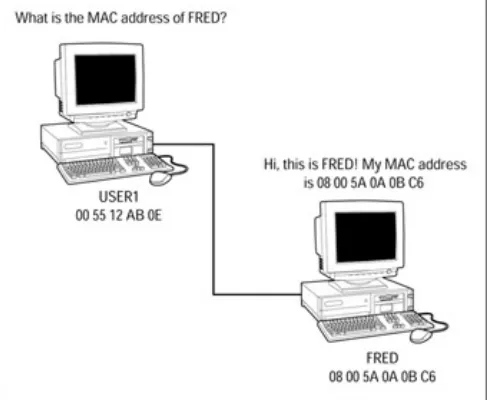
MAC (Media Access Control). See Communicating on the MAC sublayer. 4.
Manufacturers ID number, unique serial number. Look over Communicating on the MAC sublayer.
5.
48. Check out Communicating on the MAC sublayer. 6.
Segmentation. Review Segmenting a Network for Fun and Profit. 7.
Segments, collision domains. Take a look at Segmenting a Network for Fun and Profit. 8.
Layer 2 or Data Link. Check out Bridging the difference. 9.
MAC. See The MAC bridge. 10.
Working on the Data Link Layer
We need to impress upon you the importance of the OSI model layers, and especially the Data Link layer. The Data Link layer is where data is packaged for transmission on the Physical layer as well as where data from the Physical layer is unpacked for use on the Network layer and above. This means that the Data Link layer must define both higher−level message formats and physical level formats, including two very important areas of network specifications: Media Access Control (MAC) addresses and the IEEE (Institute for Electric and Electronic Engineering) 802 specification.
Listing the functions of Layer 2
Tip Remember that the OSI model is only a guideline and not a piece of software. On the CCNA exam, you find the items defined on a certain level described as being on that level or operating at that level. Dont let this language throw you. Try to envision the layers of the OSI model as stops on a two−way process that wraps and unwraps data bundles as theyre shipped out or received.
The Data Link layer is the second layer of the OSI model. It directly supports the Network layer above it and interacts with and is supported by the Physical layer below it. It communicates with the Data Link layer on the opposite end of a transmission through the header and trailer it adds to the data frames it receives or passes on to the Physical layer.
Moving data across the Physical link is a primary role of the Data Link layer. It packages the data sent to it from the upper layers for transmission on the Physical layer. Another fundamental role of the Data Link la