Volume 5, No. 6, July-August 2014
International Journal of Advanced Research in Computer Science
RESEARCH PAPER
Available Online at www.ijarcs.info
Design of Lock Based Authentication System for Android Smartphone user
1
Meera Jadhav, 2Anuradha U, 3Bilwashree H and 4Vani B
Assistant Professor, Department of Computer Science & Engineering SaIT-Bangalore, Visvesvaraya Technological University-Belgaum, India
Abstract:Smart phones have been vigorously & widely used in recent years due to their capabilities of supporting many applications from simple SMS to complicated location based services. It is challenging for smart phones developers to manage & protect privacy or sensitive data of the end users. Almost everybody today owns smart phones. We store our personal information in these devices, as these devices start to contain increasing amounts of important personal information better security is required. If we tend to lose our smart phones there is an overflow of our saved personal information & business information, such as internet banking information, internet search information, schedules, and business documents. These devices do not support the security software which requires continuous monitoring in order to detect threats. In past decades, many security systems are rapidly being developed that includes solutions such as remote control systems. In spite of this, major problems could result after a device is lost. Thus we require strong authentication mechanisms to protect our important personal information, even after the device is lost. In this paper, we describe the security measures to improve Android OS so that users can safely use the android smart phones. We use an upgraded Lock Screen system that is able to support authentication for the users conveniently & provide a good security system for smart phones. We also suggest an upgraded authentication system for Android smart phones.
Keywords:Android, Smart phones, Lock Screen, Authentication
I. INTRODAUCTION
Google’s Android Operating System in Mobile phones is recently new but Android Operating System is the latest & fast gaining popularity in market. Android phone are smart phone that are running on Google's open-source Android operating system. In recent years, almost every user has an Android smart phone because of the features such as app market, multitasking, ease of notifications, diverse phone options and android widgets. Most of the users keep their smart phones with them at all times. Smart phones have become a part of our day-to-day life part & parcel. If you have left behind you smart phone at a restaurant or gym or other location at that time chances of getting phone stolen is very high. At that time, the first line of defense against evil doers is lock screen. However, even with these solutions, major problems could still result after a mobile device is lost. The proposed system contains an upgraded Lock Screen system that is able to support authentication for the user’s convenience and provide a good security system for smart phones.
In past few years, the use of smart phones has increased in numbers worldwide, especially the number of Android OS users. Due to which, Home Launcher was developed to support user convenience. Home Launcher can be downloaded by the user from the Android Market. ADW Launcher, Launcher Pro & GO Launcher were the most commonly used. These systems provide convenience but they lack in security. Home Launchers do not use authentication methods as in Android OS which are developed by smart phone companies. Home Launchers need to have authentication methods to provide better security for user’s data. In this paper, we will analyze the problems with the current Home Launcher Lock Screens & also suggest an upgraded authentication system for Android smart phones. Various operating systems uses lock screen as a user interface element. In order to receive access the device requires the user perform a certain action such as,
entering a password, using a certain button combination on a keypad, or by performing a certain gesture for touch screen [1].
Operating systems that run on smart phones & tablets use a gesture-based lock-screen. Mobile phones manufactured by Neonode were unlocked by swiping to the right on their touch screen. Apple's iOS used by the iPhone and iPad lines, uses a similar unlock mechanism that uses on-screen slider widget to the right. Earlier Android requires the user to press the phone's Menu button they didn’t use a gesture-based lock screen. Now a day’s android uses all sort of new technologies which requires having a strong security to this smart phones. Here we are implementing strong authentication mechanism to provide high security and ease of use [2].
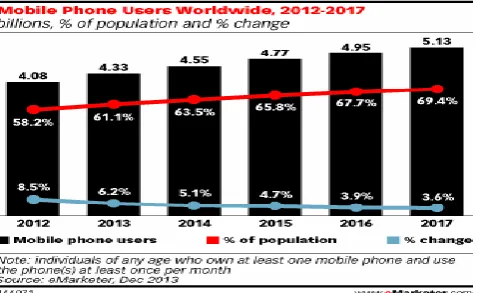
[image:1.595.318.558.604.750.2]With advance in technology many new devices are invented from PCs to laptops & smart phones. Number of smart phone users is increasing day by day and usage of Smartphone in terms of functionality is becoming is very close to PC. According to survey which is shown in Fig 1, Show us that Smart phones have replaced wallet, scanner, Mobile hotspot etc.
This show the usages of smart phones are increasing from year to year. We store our personal information in these devices. In case if we tend to lose are our smart phones there can be outflow of personal and business information such as internet banking information. This could prove disastrous as most of the smart phones are having simple password lock or slide lock. These lead many researchers to develop new invention new mechanism to secure our data & prevent leak out private information in smart phones.
II. RELATEDWORKS
In this section, we will discuss the security requirements & authentication scheme of the Android smart phones.
A. Security requirements for the Android smart
phones:
a. Openness: A variety of external interfaces provides malicious code propagation paths & the code secreted by the developer to facilitate the creation of mobile applications leaves the internal interface vulnerable to malicious code.
b. Portability: If you lose your feature phone, you might lose only your phone number, memos or pictures. However, if you tend to lose your smart phone, there can be outflows of personal & business information, such as internet search information, internet banking, schedules & business documents. This could prove disastrous.
c. Low efficiency: Smart phones are characterized by their low efficiency & low power when compared to PCs. In PC, there is continuous monitoring to detect & as well as to respond security threats & malicious code. This is not the case in smart phones. Smart phones do not support the application of security software.
B. Authentication schemes for the Android smart
phone:
Figure 2: Existing Lock System
The following are the authentication schemes[3]: a) Slide Lock
b) Glass Lock c) Keypad Lock d) Pattern Lock e) Finger Scan f) Face Unlock g) PIN & Password
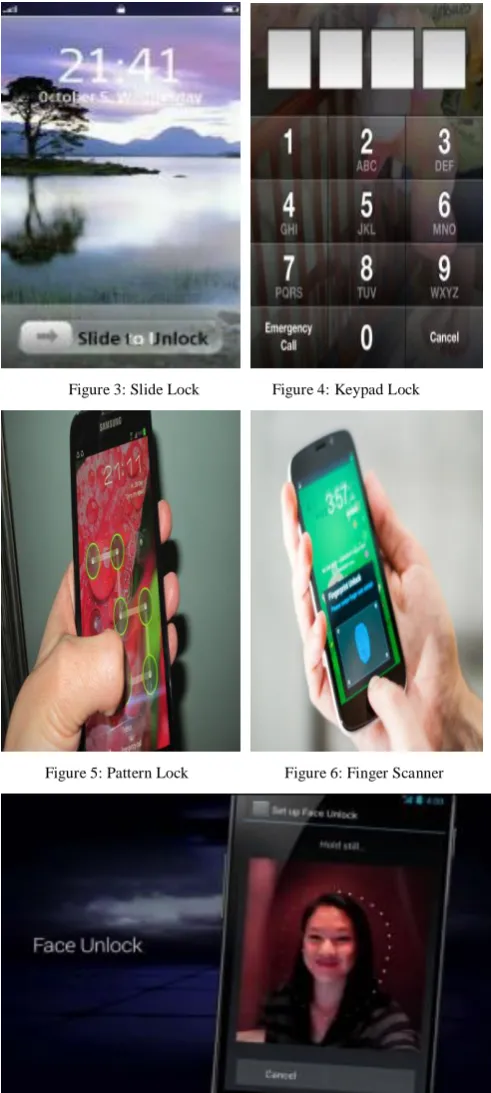
a. Slide Lock: Slide is probably one of the most commonly used lock screen among all the default locks. Slide Lock which is shown in Fig 3. This is a Lock Screen which is provided by Android and iOS. It is “touch horizontal slide” form of screen. It does not provide a good security system. Without fully unlock the phone the user can still access the notifications. None of the other lock screen options allow for this due to their technically security.
b. Glass Lock: Samsung devices mostly use a Lock
Screen based on the Android OS. It works on the same principal like slide lock, where in you can be dragged the slide in all directions. It is just like putting a glass on the screen.
[image:2.595.315.561.223.770.2]
Figure 3: Slide Lock Figure 4: Keypad Lock
Figure 5: Pattern Lock Figure 6: Finger Scanner
Figure 8: PIN & Password Lock
a. Keypad Lock: Keypad lock is shown in Fig 4.This scheme requires a four-digit password, which provides key space from 0 to 9999. We need to repetitive touch the smart phone to give input which is an inconvenience factor.
b. Pattern Lock: Pattern lock is shown in Fig 5. It is the convenient way for input. There are nine dots on the screen, each of which need to be touched and dragged one dot at a time. This form a pattern. It reduces repetitive touching & it is easy to drag. However, if users enter an easy pattern for convenience this leads to weak security power; if users enter a more complicated pattern, the scheme will not be comfortable to use & user may forget the pattern some times.
c. Finger Scan: Atrix smart phone, which is developed by Motorola, supplies a finger scanning system, which provides both better convenience and good security without touch & dragging. The major drawback is overlapping processes on the screen & low speeds are the main problems in this system.
d. Face Unlock:This was introduced back in Ice Cream
sandwich, as a fun way to unlock the phone using the user face. First the user need to place his face in front of the camera until the device decides that the face is enough to be able to unlock with it. This will be stored in the database as a reference in future to unlock the screen using the user face.
e. PIN Pattern and Password: Pattern, PIN and
Password unlock works exactly as they sound. Here, one should either create a pattern or a numeric PIN or an alpha-numeric password that needs to be entered in order to unlock the user phone. This provides the most security among the others.
C. Authentication System for Android
Smartphone’s:
a. Authentication: Authentication is the process of
identifying an individual. In security systems, authentication is distinct from authorization , which is the process of giving individuals access to system objects based on their identity. Authentication merely ensures that the individual is who he or she claims to be, but says nothing about the access rights of the individual.
b. Authentication methods available:
a) Password
b) Non-text password c) Certificates d) Smart cards
a) Passwords: Passwords are one of the authentication methods that is used in every smart phones. Password is a combination of alphabets, numbers or alpha-numeric in nature. We might enforce length, complexity and timeout rules. Here user can set the password so that unauthorized user will not access the information. Once password authentication is set user will be prompted.
b) Non-text passwords: Entering text on a mobile can be
awkward for some users. Alternatively a user can tap symbols within a randomly generated matrix or a sequence of points on a photo. Unlocking a device this way could also decrypt other credentials stored on that device so the authenticated user can access his company's network. Symbols are handy on PDAs and tablets but this are not suitable for devices without mouse.
c) Certificates: Digital certificates bind an identity to a public/private key pair and this are considerably to be stronger as long as the owner private key is protected. Combining a device lock with certificate based network authentication is increasingly common. This method requires a public key infrastructure (PKI) to request, issue, distribute and revoke certificates for access.
d) Smart cards: This is used to unlock a device, were owner’s private key need to be stored. In this way a smart card works. A smart card is a security chip, embedded in a credit card, badge or MMC/SD memory. Chip provides safe storage for cryptographic keys used by authentication & encryption algorithms.
D. Android System Architecture:
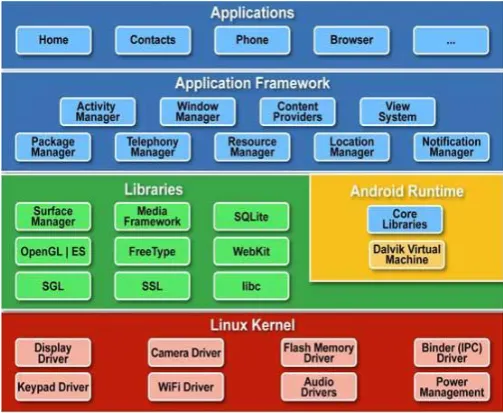
[image:3.595.315.567.552.758.2]There are four layers in android operating system. Any applications can be developed & designed on android platform since it owns its own libraries. The language used to write libraries are C/C++. Linux kernel is the first layer which is written in C.
a. Application layer: This is the upper layer in android architecture. All the applications like sms, browser, camera, Google maps, calendars, contacts are native applications. With the help of application framework to these applications works.
b. Application framework: Android applications that Are
been developed, this layer provide the needed classes & services. The components which are already present in the API can be reused by the developers. This layer contains managers which enable the application for accessing data. These are as follows:
a) Activity manager: The lifecycle of Application is managed here. It also manages all the activities & these activities are controlled by activity manager. b) Resource manager: This provides access to all non –
code resources such as graphics etc.
c) Notification manager: This displays notification of custom alerts in status bar.
d) Location manager: It alerts when the user changes the location.
e) Package manager: It is used to retrieve the
information about the packages installed on the device
f) Window manager: To create views and layouts.
g) Telephony manager: It is used to handle network connection settings & information about services on devices.
h) Android runtime: All applications are executed here. Android has its own virtual machine that is DVM (Dalvik Virtual Machine). This is used to execute android application, where user can execute multiple applications at the same time.
c. Libraries: Android has its own libraries & these libraries are written in C/C++. These libraries cannot be accessed directly but with the help of framework we can access these libraries.
d. Linux kernel: It is the core layer in android
architecture. It provides service like security, memory management, power management etc. It also helps in software/hardware binding for better communication.
E. Security Issues faced by Android :
Android is not secured as it appears, even with such robust security measures. There are several security problems faced by the android, some of them are mentioned below.
a. Android has no security scan over the application being uploaded in the market.
b. There are some applications which can exploit the services of another application without permission request.
c. Android’s permission security model provides power to user to make a decision about an app should be trusted or not. This human power introduces a lot of risk in Android system.
d. The Open Source is available to legitimate developers as well as hackers too. Thus, Android framework cannot be trusted when it comes to develop critical systems.
e. Android operating system developers clearly state that they are not responsible for the security of external storage.
f. Android platform provides all security features, but there will always be a risk if the user will install
suspicious apps or allow permission to an app without paying attention [4, 5].
III. LOCKBASEDAUTHENTICATIONSYSTEM FORANDROIDSMARTPHONES
A. Basic principle of motion:
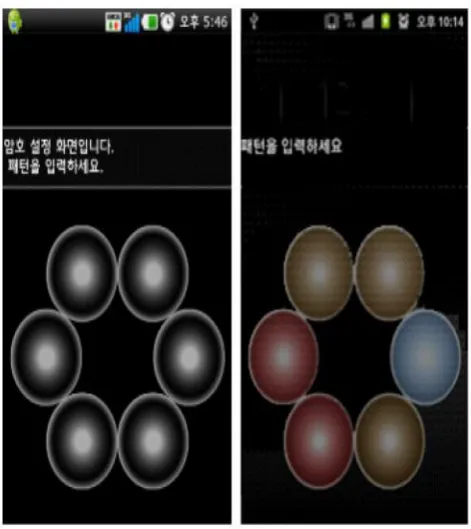
Lock Screen and Home Launcher systems are used here. Lock Screens which are based on touch consist of “simple password-unlock” systems & these are connected with the home screen. In order to restrict the phone function for “multiple password-unlock” we can input gravity sensors, touch sensors & approach sensors to our system. Two modes are used, one is user mode & another is Guest mode.
[image:4.595.320.556.345.610.2]In case of user mode, we have full access to all the application in our mobile phone. User mode can be entered by entering the password; we can do everything with our mobile phone. In Guest mode, the user is restricted to access the application in the mobile phone. Guest mode can be entered by using the acceleration sensor (shaking), we can only do the operations that are authorized by the User. By using this authentication system is connected with Home Launcher, it provides convenience & privacy.
Figure 3: Circular Lock Screen
can be entered by shaking the mobile phone in Home Launcher; here there are a limited number of apps allowed along with the Dock bar, wherein we cannot use the Appdrawer button; we can only use the buttons that are freed by the user’s setting.
B. How the lock based authentication system for
Android Smartphone works:
a. How it works:
Step 1: Home Launcher application package contains Lock screen in it because it consists of number of activities. The Screen receives the “On or Off Broadcast Receiver” so it is processed with Intent from Screen-On that activities the Lock screen Activity.
Step 2: Lock Screen activity it is password based settings, if a user need to access the applications he needs to unlock the screen first via password. Once the password is set, there are two ways to access the app, one way in which user needs to enter the password & another way is he can shake his mobile phone. The user can get the privilege of User mode by entering the password. In a similar way if a user needs to enter in Guest mode, he needs to use the acceleration sensor i.e., shaking.
Step 3: Binding the Home key will be different for both user mode & guest mode. When the Home key button is entered in the Lock screen than the guest mode is automatically entered, at this point the guest can access to only limited applications.
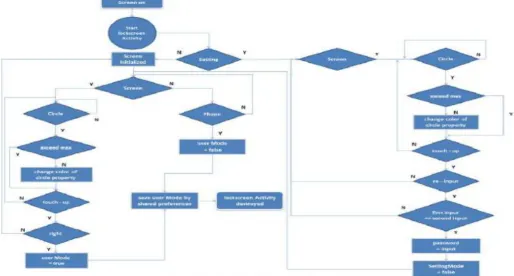
Step 4: Home Launcher application contains five slides & icons with widgets. By using different kinds of touch settings like touch, long-click, drag, home button, and menu button the user can make folders, widgets, icons. If there are any changes or User/Guest processes, Home Launcher re-organizes the view, Fig 4 shows the steps.
[image:5.595.308.565.75.303.2]C. Compare with different Lock Screen:
Table 1: Comparison with different Lock Screen
Different Authentication (lock) ways
Convenience Security Note
Slide Lock Good No There’s no function given by password.
Glass Lock Good No There’s no function given by password.
Keypad Lock Bad Normal Repeated touching
makes it
inconvenience.
Pattern Lock Normal Normal A key space lower than
Keypad lock.
Finger Lock Bad Good Problem with low speed of realization.
Ways to restrict Good Good It provides upgraded convenience & security& it allows multi-inputting.
a. Security: Security power depends upon the size of the key space. The bigger or longer the key space, the more difficult is a brute force attack. Comparing our system to the Pattern Lock and number password systems, pattern lock has about one million key spaces, whereas, number password system has about 10,000 key spaces & our proposed lock screen system has about ten million (6^9 = 10077696) key spaces. It can also be made larger by increasing the number of repetitive touches.
b. Convenience: In order to control the uses, besides entering the password, the acceleration sensor (shaking the mobile phone) can be used. Touching is not required.
[image:5.595.41.556.492.768.2]IV. RESULTS
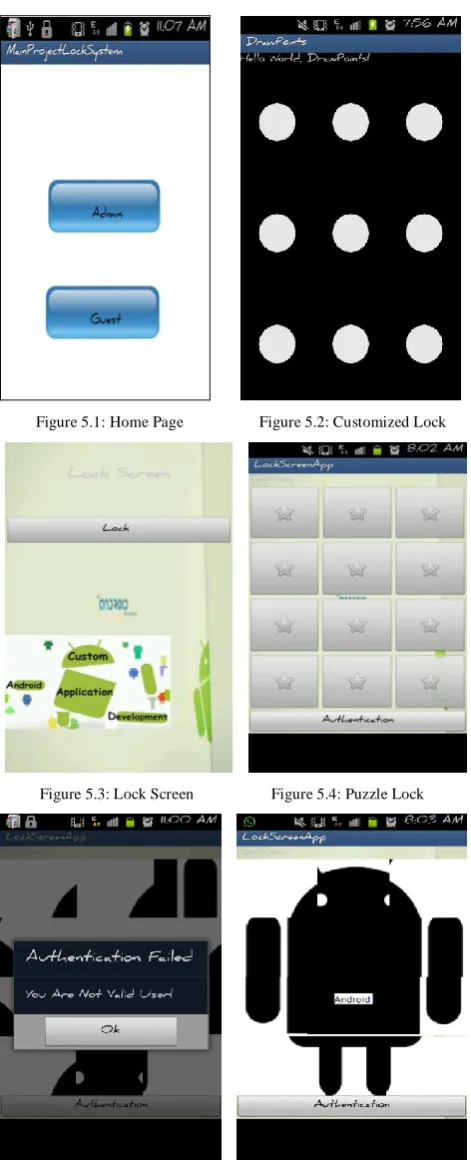
Figure 5.1: Home Page Figure 5.2: Customized Lock
Figure 5.3: Lock Screen Figure 5.4: Puzzle Lock
Figure 5.5: Puzzle Mismatch Figure 5.6: Puzzle Solved
Figure 5.7: Authentication Success Figure 5.8: Image Slider Lock
[image:6.595.36.272.68.650.2]
Figure 5.9: Home Page of Guest Mode Figure 5.10: App locker
Figure 5.11: Blacklist Figure 5.12: Password to Unlock
V. CONCLUSION
In this paper, we analyzed the defects in current Home Launcher Lock Screens & also suggest on improving the authentication systems for Android smart phones. User convenience and security power is improved, when we divide the mode of entry into the authentication system. Android is being installed in tablets, smart phones and many other IT devices that require good security systems. Security
VI REFERENCE
[1] I Fischer, C Kuo, L Huangm, M Frank “Smartphones: Not Smart Enough?”, WiSec '13 Proceedings of the sixth ACM conference on Security and privacy in wireless and mobile networks, 2012, pp 7-12, doi: 10.1145/2462096.246209.
[2] Sohail Khan, Mohammad Nauman, Abu Talib Othman, Shahrulniza Musa “How Secure is your Smartphone: An Analysis of Smartphone Security Mechanisms”, IEEE International Conference on Cyber Security, Cyber Warfare and Digital Forensic (CyberSec), JUNE 2012, pp 76-81, doi: 10.1109/CyberSec.2012.6246082.
[3] Ian Oakley & Andrea Bianchi “ Multi-Touch Passwords for Mobile Device Access” Proceedings of the 2012 ACM
Conference on Ubiquitous Computing, Sept-2012, pp 611-615 ,doi: 10.1145/2370216.2370329.
[4] Kwang Il Shin, Ji Soo Park, Jae Yong Lee, Jong Hyuk Park “Design and Implementation of Improved Authentication System for Android Smartphone Users”, 26th IEEE International Conference on Advanced Information Networking and Applications Workshops, March 2012,pp 704-707, doi: 10.1109/WAINA.2012.31.