Jurnal Alam Bina, jilid6, No.2, 2004
DEVELOPING A SPREADSHEET APPLICATION
FOR BQ PRODUCTION
Razali Adul Hamid, Chong Wan Siang
Deparlment of Quantity Surveying, Faculty of Built Environment, Universiti Teknologi Malaysia, 81310 UTM Skudai, Johor.
ABSTRACT The demand for information technology is continuously increasing. In the Quantity Surveying field, specific software for BQ production and estimating is widely available. However, there are still a lot of companies using the Microsoft Excel for doing calculation, scheduling and most imporlantly production of Bills of Quantities. However, these spreadsheet solutions does not offer total automation compared to the specific software as the BQ cannot be produced automatically. However, using the Visual Basic for Application (VBA) features in Microsoft Excel, this problem has been resolved. This paper presents the development of METa (Microsoft Excel For Taking-Off) which match the BQ production capabilities of the specific software. Each step in the development process was explained and the system architecture of this application is being highlighted. As a conclusion, a highly capable and user-friendly application for BQ production was developed using Microsoft Excel.
Keyword: Automation, BQ, Taking-off, Microsoft Excel, Software
Introduction
Razali Adul Hamid, Chong Wan Siang
With the globalisation effect, the demand for advance information technology was at its peak. Information can be retrieved with a few mouse clicks and the communication between parties of thousand miles away can be easily dealt with. The introduction of wireless wide area network made it all easier for data sharing and networking purposes. Using WWAN, users can access shared databases and information without looking for a place to plug in, and network managers can set up augment networks without installing or moving wires (Jawahar-Nesan and Abdul Hakim Mohammed, 2003).
On the software front, sophisticated software was being developed to fulfil the purpose of information sharing and automation. 3D modelling software has gained much publicity over the years. Automatic engineering analysis and design software which cost hundred of thousands dollar was also available in the market. In the office system, the leading office system producer, Microsoft, has launched the Office 2003 version to cater for the ever-increasing demand of the user.
In the Quantity Surveying field, specific software for SQ production and estimating is widely available. The latest version of the software would be able to automatically calculate quantity from CAD drawing and produced a complete SQ in just a few minutes. Nevertheless, these specific software come with a cost which might not be affordable to all potential users. Therefore, a lot of these firms have resorted to the readily available office system to cater for their computing needs. For this purpose, Microsoft Excel is mostly used for doing calculation, scheduling, charting and production of tables, schedules as well as bills of quantities.
Microsoft Excel and BQ Production
Deve.ASpreadsheet Application forBQProduction
their tasks. Since the 1990s, Microsoft Excel has been the more dominant
spreadsheet product which was used by millions of people throughout the world.
(Walkenbach,2004).
Besides,there are a lot of spreadsheet solutions which have been developed to cater
for all sorts of functions. Among those were the taking-off templates, calculation
modules for engineering designand analysis, cost planning and information system,
life-cycle costing, sub-contractor information system (Hegazy 2001) and etc. These
spreadsheet solutions are great piece of applications in which they can produce the
same result as the specific software. They can work very well in most of the
environment and their main advantage was their inexpensiveness.
Although most of these solution works fine, it main target of user is the developer
himself and a small group of people working with him. Total automation still could not
be achieved where manual customisation will still be needed. Therefore, novice user
will not find these solutions appealing or user-friendly. Besides, these solutions are
formula-intensive solutions where the speed of these software can be greatly
compromised when the file size increased (or when there are a huge amount of data
and formula). While these solutions can maintain their flexibility, often novice user
might encounter disaster if they accidentally make changes to some important cells.
In terms of BQ production, Microsoft Excel is widely used for doing taking-off and
preparation of BQ. In contrast to the specific software, the preparation of BQ from
the taking-off would still have to be done manually. Therefore, the only weakness
from spreadsheet system is it cannot produce the bill of quantities automatically
(Tung, 1996).
However, the ability of spreadsheet is far beyond what had been used by any QS. It
presents an extremely powerful and flexible tool for many type of application. All too
often spreadsheets are treated as if they were only fit for accounting and financial
purposes. Their control structures tend to be limited, but they do offer many
Razali Adul Hamid, Chong Wan Siang
Introduction To Streadsheet Application
A spreadsheet application is a spreadsheet file (or group of related files) that is
designed so that someone other than the developer can perform useful work without
extensive training. A good spreadsheet application has the following characteristic
(Walkenbach,2004).
a.
b. c. d.e.
f. g. h. i. j. k. I.•
It enables the end user to perform a task that he or she probably would not be
able to do otherwise.
It provides the appropriate solution to the problem.
It accomplishes what it is supposed to do.
It produces accurate results and is free of bugs.
It uses appropriate and efficient methods and algorithms to accomplish its job.
It traps errors before the user is forced to deal with them.
It does not allow the user to delete or modify important components
accidentally.
Its user interface is clear and consistent so that the user always knows how to
proceed.
Its formulas, macros, and user interface elements are well documented.
It is designed so that it can be modified in simple ways without making major
changes.
It has an easily accessible help system that provides useful information.
It is designed so that it is portable and runs on any system that has the proper
software.
In Microsoft Excel, spreadsheet application can be developed using the Visual Basic
for Applications (VBA). VBA is best thought of as Microsoft's common application
scripting language and is included with all the Office 2003 applications. VBA offers
the power to create customised spreadsheet-based application that performs feats of
Deve.ASpreadsheet Application for BQ Production
If you are not used to the programming language, the Visual Basic Editor (windows for working with VBA) can look to be very confusing. However, coding in VBA language can be as straight forward as the writing Excel formulas and once you get used to working in the Visual Basic Editor, you are likely to find that writing VBA code is actually easier than writing formula.
Moreover, VBA provide a very good platform for developer to work with. In Excel VBA, the developer can manipulate all the worksheets, commands, functions, charts, formulas and all Excel features to write the application. For example, the developer will have to create a worksheet or write a print preview function if he is using the other type of traditional programming language. In Excel, the worksheets are there for you and you can use it as in normal circumstances without the need to create a new one from scratch.
Furthermore, one of Excel's most useful features for developers is the capabilities to create add-ins. An add-ins is something added to a spreadsheet to give it additional functionality (Walkenbach, 2004). Often, spreadsheet application is created as an add-ins in which it performs additional functions than the standard Excel package. Among the advantages of using the add-ins
are:-a. To restrict access to your code and worksheets.
b. To avoid confusion. If a user loads your application as add-in, the file is not visible and is therefore less likely to confuse novice users or get in the way. c. To gain better control over loading: Add-ins can be opened automatically
when Excel starts.
d. To avoid displaying prompts when loading and unloading.
Razali Adul Hamid, Chong Wan Siang
The Development of METO
BQ production involves a long and tedious process. Nigel (1978) has listed out 8 major steps in producing a bill of quantities, i.e:
a. Measurement of quantities b. Timesing and Squaring
c. Checking Of Timesing and Squaring d. Abstracting
e. Checking of abstracting
f. Preparation And Checking of Draft Bill Of Quantities g. Preparation of Bills of Quantities And Checking h. Final Bills Of Quantities.
Computer systems are used to facilitate this process by automatically reducing double keying work and thus saving a huge amount of time. As a matter of fact, a good BQ Production Software will be able to reduce the steps to only one step that is measurement of quantities. The rest of the steps will be done by the computer itself which do allow for user customisation throughout the process.
Meanwhile, traditional spreadsheet measurement sheet have the ability to reduce to only two steps. These spreadsheet systems could help the user to reduce the burden of timesing & squaring as well as checking of timesing & squaring. Nevertheless, the spreadsheet system still lacks the ability to do the rest of the steps automatically. There are no direct way or function in the spreadsheet system that has the ability to compile, sort, re-sort and summarised the measured item to the specific BQ layout.
follow:-Deve.A Spreadsheet Application for BQ Production
a. No standard measurement sheet. Spreadsheet user prefers to use spreadsheet because of its flexibility where they can do arithmetic calculation on any sort of things which include those that were not possible using specific software. Therefore, they create sheet which might only known to them or which might only fit to one purpose. For example, they can have different formats of measurement sheet for beams, slabs, columns, reinforcements, roofing, finishing works, etc.
b. No standard codes. If it happened that the user uses code to differentiate items in an elements, this code is mode probably vague. There is no standard code or coding format. Therefore, one cannot sort the description on a proper basis (i.e which item to come first).
c. No standard description. As all spreadsheet taking-off system will need the user to re-type the bills of quantity manually, therefore, full description is not needed. Besides, it cannot hold a multiple level of description in which it contained heading, sub-headings, and description.
d. The summary of items has to be done manually too. Although, spreadsheet can be used to sum up all the item with the same code, there is no way for excel to determine which items have been measured and will be brought forward to the summary page. An error which was frequently neglected by the user was he missed out one or two item in the summary sheet.
e. The greater the allowance for flexibility, the greater the risk will be. The spreadsheet is a formula-based measurement sheet. User can enter whatever formula that they wanted. However, this formula can be changed too easily even by accident. A small error on formula will give a great impact on the end product. Therefore, users are not encouraged to use super formula or too much formula to avoid this error.
a. Step 1:
b. Step 2:
c. Step 3:
d. Step 4:
Razali Adul Hamid, Chong Wan Siang
properly, it will cause big trouble. For example, deleting an empty cell will make
your formula, borders and format change and create error and broken formula
which subsequently affect your result.
g. There are some spreadsheet template which uses complex formulas and linking
each formula to calculations. This can be very taxing to the computer resources
where each data entered is being process by all the formulas in the sheet. This
can slow down the speed of the computer and subsequently cause the
computer to hang.
Therefore a wholesale change of the traditional spreadsheet application will be
needed in order to develop a complete spreadsheet application for producing SQ. In
the development phase, the following steps are needed.
Creating a standard measurement sheet
Creating a structured description and coding system
Creating a library system for holding description and coding.
Linking the system
Part 1: Taking-off and measurement with structured coding
Part 2: Producing SQ
Part 3: Formatting SQ
Steps1: Creating
a
standard measurement sheetCreating a standard measurement sheet is the most basic in the development of this
system. This is the main sheet that the user will communicate with the computer
while doing taking off. Therefore, this sheet must be kept simple but at the same
Deve. A Spreadsheet Applicaton forSQ Production
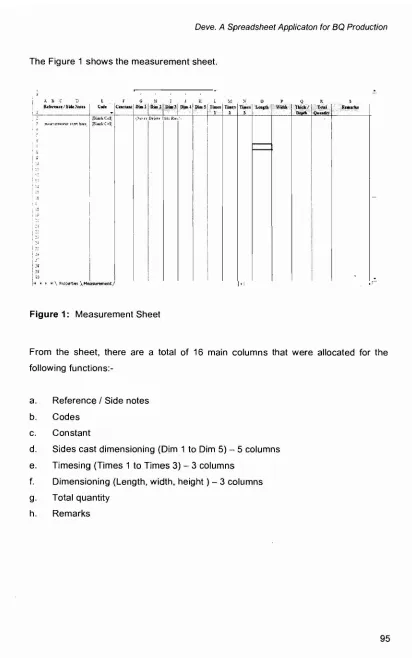
The Figure 1 shows the measurement sheet.
A B C "-' f;
Rc!«¥n,c:c/5*~QIU Cwh:
(Bi;U)\.C~]];
",H".lr~1J\... \1lu nh,:rt, (S~kC~!I;!
so 1
f • ~I\,F'IOoe<t~~ ).,~surement!
Figure 1: Measurement Sheet
From the sheet, there are a total of 16 main columns that were allocated for the following
functions:-a. Reference / Side notes b. Codes
c. Constant
d. Sides cast dimensioning (Dim 1 to Dim 5) - 5 columns e. Timesing (Times 1 to Times 3) - 3 columns
f. Dimensioning (Length, width, height) - 3 columns g. Total quantity
Razali Adul Hamid,Chong Wan Siang
Step 2: Creating astructured description and coding system
Bill of quantities is a list of items that contains description and the quantities for each
item. The list is properly set out in a structured manner in accordance to the
Standard Method Of Measurement. A full set of description will contain heading and
description. There may be sub-headings inserted between these heading and
description to make the set of description more organised and readable.
For the proposed system, it has a fixed 5-level description structure. The levels are
as follows
:-a. Level 1 - Elemental codes using single alphabetic character
b. Level 2- Heading 1 (Main Heading) codes using double numerical character
c. Level 3 - Heading 2 (Sub Heading) codes using double numerical character
d. Level 4 - Heading 3 (Sub Heading) codes using double numerical character
e. Level 5 - Description codes using double numericalcharacter
For example. a 25mm diameterreinforcement bar in ground beam may the following
code
:-a. Element - (A) Work Below Lowest Floor Finish
b. Heading 1 - (50) : High Tensile Deformed Rod Reinforcement As Described
c. Heading 2 - (10) : In Pile Cap
d. Heading 3 - (00) : (blank)
e. Description - (25) : 25mm diametermain bar
.
Therefore, this item will have a unique code of A-50-1 0-00-25 which will be shown as
A50100025 in the codes column of the measurement sheet. This is called a unique
code because it refers to one item only and this is very important because the codes
Deve. A Spreadsheet Application forBQ Production
Step 3: Creatingalibrary system for holding description and coding
The description created has to be stored in a database. In fact, this system has a
very direct two dimensional (2-D) database system. Microsoft Excel is capable to
handle simple database structure without any problem. Therefore, this application will
use Microsoft Excel to as its database agents. Since this is just a 2-D database
system, all data can be presented in a table form divided into columns and rows Oust
like the spreadsheet system). This database will have the following
columns:-a. Full Code
b. Element (E) Code
c. Element Description
d. Heading 1 (H 1) Code
e. E+ H1 Code
f. Heading 1 Description
g. Heading 2 (H2) Code
h. E+ H1 + H2 Code
i. Heading 2 Description
j. Heading 3 (H3) Code
k. E+ H1 + H2 + H3 Code
I. Heading 3 Description
m. Description (D) Code
n. E+ H1 + H2 + H3 + D Code
o. Description
p. Unit
q. Constant
r. Total Quantity
s. BQ Quantity
Full code means the full 9-figured code for each item. For example A50100025 for
25 mm diameter bar in pile cap. Element Code is the number of element which the
Razali Adul Hamid, Chong Wan Siang
character from left in the full code. Element Description is the name of the element
and it does not need any further elaboration.
Heading 1 Code is the two numerical characters as code for that particular level. The
system of numbering starts at 00 to 99 which means that it can contain 100 items.
The heading 1 description is also a familiar item and does not need any further
clarification. The most important column should be the E + H1 Code (Element Code
+ Heading 1 code). If based on the above example, the code of A50 will be shown.
For all users, this code is not necessary and can cause confusion. Therefore, this
application will not show any of this code for user interaction. Instead, it is used
purely for programming purposes.
This E + H1 Code is a unique code. Heading 1 might have one or more items that
have the same H1 code with different element. It is impossible to ask the computer
to sort base on this H1 code in which it will produce undesirable result. Therefore,
each Heading 1 must has a unique code too. In this way a A50 and F50 can be
differentiated. The actual function of this unique code will be explained later. The
Heading 2, Heading 3 and description level all have the same approach as the
Heading 1 level.
Unit and constant will be included in the library too. Another two columns that were
important are the Total Quantities and the SQ Quantities columns. This is important
as a platform for the application to summarise all items that have the same codes in
the Total Quantities before transferring to the actual SQ sheet. SQ Quantities
different from the Total Quantities in a sense that it support the value which is smaller
than 0.5. The standard method of measurement has provided that if the quantity is
less than 0.5,it shall be shown in two decimal points.
Step5: Linking the system
The above paragraphs highlight each of the separate elements in this application.
Now, we are going to look at how these elements being linked together to create a
:-Deve. A Spreadsheet Application for BQ Production
a. Part 1: Taking-off and measurement with structured coding b. Part 2: Producing SQ
c. Part 3: Formatting SQ
Part 1: Taking-off and measurement with structured coding
The main window of this application is the measurement window. From this window, the user can do all the measurement before automatically transfer their workings into a proper SQ. Doing taking off in this system is more or less similar to the traditional spreadsheet system which has been highlighted earlier. The only different is the addition of the structured coding system to the taking-off. For each item to be measured, the user has to enter its description first. To enter this description, the user can either double-clicked the code column or clicking a toolbar button. Upon this, a dialog box as shown below will pop up.
...
""""'
...
_
...
I
r;;;.,;;-_·_--~::::-~=--=:==·:! ~~j
" _."",,~,..,__~.~.1
,...
Figure 2: Description Dialog Sox
Razali Adul Hamid, Chong Wan Siang
To select an appropriate set of description, the user will only need to double click on the selected description at the left panel. The selected description will be transferred to the right panel. Then the next level of description will be loaded into the left panel. The user will repeat this process until the complete set of description is selected.
Upon selecting the actual description, the user will then need to key in the dimension (length, width or height) as well as timesing to the item. He would then proceed to do another item until he finishes all the measurement he wanted.
Part 2: Producing SQ
At any point that the user want to view the BQ, he can do so by clicking another toolbar button. This will prompt him to select the elements of the BQ that he would like to produce. From there, the computer will automatically produce the desire result. The BQ produced in this steps are in bare format.
This system is not equipped with the real time BQ feature which means the BQ change as the user does their measurement. This feature has to be disabled for the sake of time saving. This is because, if this feature is enabled, when a user add an item, the BQ will have to recalculate itself and reproduced again. This will cause the system to slow down especially when it has a lot of items.
Each BQ created is in a separated worksheet.
Part 3: Formatting SQ
Deve. A Spreadsheet Application for BQ Production
System Architecture
We have all the basic idea of the whole project. As a quick summary, the application will have the following
features:-a. An application within Microsoft Excel utilising the Add-Ins tools b. VBA as its programming language
c. Standard measurement sheet created
d. Structured description and coding system created e. A library system for holding description and coding.
The Core Feature
As discussed, traditional spreadsheet system does not have the ability to produce a BQ direct from the measurement work. This core feature of this application is to solve this problem. This feature will involve three different parts as
follow:-a. User Input (Manual) b. Processing (Automatic) c. Output (Automatic)
User Input
The first part is user input. As in any other system, user input is a must. There are two things that needed the user input that are entering description and entering dimension. Entering dimension is to enter all necessary dimensions (times, length, width, height, etc) which have been discussed earlier.
Razali Adul Hamid, Chong Wan Siang
Processing
Specific softwares have the ability to process the data input by the user and produce a BO while traditional spreadsheet system lacked this ability. With the utilisation of the VBA, this spreadsheet system will have the ability to do so. This is because the data can be process and be called upon when necessary. In this core system, processing can be divided into 5 categories as
follows:-a. Loading description into description dialog box
b. Summing up each item
c. Checking for errors
d. Producing BO
e. AmendingIRevising.
Loading Description Into Description Dialog Box
Each set of description shall consist of the combination of Elements, Heading 1, Heading 2, Heading 3, Description, Unit and Constant. In a elemental form of bills of quantities, these sets of description may contain the same Element, Heading 1, 2 or 3.
example:-Deve. A Spreadsheet Applicaton for BQ Production
10mm0bar(10)
l Zmmobar (12)
16mm () bar (J 6)
20mlll o bar (20)
16mm o bar (J6)
20nun0 1>.11CO)
25mlll obar (25)
32mm o bar (32)
The description box will be like the diagram below:
Code Description Example
Element CE DE B Frame
Heading1 CH1 DH1 20 High Tensile Reinforcement Heading2 CH2 DH2 10 Suspended Floor Beam
Heading3 CH3 DH3 00 (blank)
Description CD DD 10 10 mm rIlbar
Unit CU DU KG
Constant CC DC 0.617
Razali Adul Hamid, Chong Wan Siang
When the description box is loaded (Figure 2), the left panel will be filled with the available codes and description for the Element level. After the user double-click the selected element, the computer will load the all the codes and description for Heading 1 which has the selected element. The process will be continued until the user complete the whole set of description.
Upon clicking the OK button, the full code and the constant will be shown in the measurement sheet and the user will go back to the measurement sheet to enter their dimension.
Summing Up Each Item
One of the weak points of traditional spreadsheet system is that the formula written can be changed easily. This error is disastrous and can happened regularly especially to the novice and average user. This application is fully aware of this situation and therefore, it overwrites all formulas created with the default formula each time the total sum function is called. The default row for this formula is the second row of the measurement sheet. It has a mark of "Never delete this row". This application will copy the formula of this in the total quantity column and then paste it to the rest of the measurement sheet.
Checking For Errors
This measurement system is governed by the coding system. One of the errors that might occur is that the user might key-in an invalid code or leaving the cell blank in the code column. If this happened, the measured item will not be summed and subsequently reflected in the BQ. To avoid this error, the computer will now check that all code in this column can match any of the code in the library database.
Producing BQ
Deve. A Spreadsheet Applicaton for SO Production
Unlike the specific software system where BQ is being produced in only one sheet,
thisapplication allows the BQ to be produced by Element. Each element will be given
in one separate worksheet. The immediate advantage of this is that the user can
easily navigate and locate the item that they one instead of browsing through the
whole BQ.
There are 8 major steps to produce a BQ as follows
:-a. Sorting Library
b. Summing Quantity
c. Loading Produce BQ form
d. Adding a BQ Sheet
e. Creating the BQ
f. Sorting BQ
g. Formatting BQ
h. Finalising BQ
Sorting Library
As always, the library database will be sorted in ascending order based on its code
so that the rest of the process will work in order.
Summing Quantity
Before a BQ is being generated, the measured item must be total up. In the
traditional method, this is the squaring process. The total quantity for each item is
Razali Adul Hamid, Chong Wan Siang
Of these two columns, the first is the Total Quantity while the second is the BQ Quantity. Total quantity is the total quantity for each item from the measurement sheet. The quantity is rounded to two decimal points. One of the rules in SMM is that all quantities in the BQ must be rounded off. Therefore, the BQ quantity is used for this purpose. The VBA is used to write and calculate the total for these two columns instead of the formulas in Microsoft Excel. Nevertheless, as being indicated in the earlier part, one of the advantages of the VBA is its capabilities to call upon the Microsoft Excel formula. The total quantity is actually derived from the use of the Sum. If formula in Microsoft Excel.
One of the feedback from specific software system user is that the capability to produce a zero(O) quantity for item that is less than 0.5. Therefore this application has taken this problem into account and has made modification to the BQ quantity.
Loading Produce SQ Form
Since this application separate BQ into elements, therefore, it is thought that the user will have to produce the BQ element by element. When a user click a tool bar button, a form as shown on Figure 3 will be loaded.
Pleas"Se/outThe Element That You Would Like To Produce The8Q
Qk
Figure 3: Select An Element To Produce A BQ
Deve.A Spreadsheet Applicaton for BO Production
AddingaBQ Sheet
The first computer action is to load a new BQ sheet. To speed up the process, a
blank and default BQ has been included in each measurement files. However, this
sheet is totally hidden from the user. The computer will make a copy of this default
sheet and rename the sheet to match the Element being produced. If the BQ has
been produced before hand, it will reset itself to the format of a new BQ sheet.
Creating BQ
This is the most important step. In the traditional method, this is called as abstracting.
The BQ will be created from the data in the library database. However, this database
contains most of the irrelevant data because some of the description will not form an
item while the user is selecting only one element at a time.
The next section is a bit confusing but I tried to explain in a simpler way. Lets us take
a look at the following
example:-Item 1 Item 2
FCode: A10000020 A10000020
CodeE: A A
Dec_Element: Work Below Lowest Floor Finish Work Below Lowest Floor Finish
CodeH1: 10 10
CodeH1A: A10 A10
Dec Heading 1: VRC Grade 25 As Described VRC Grade 25 As Described
CodeH2: 00 00
CodeH2A: A1000 A1000
Dec Heading2: (blank) (blank)
CodeH3: 00 00
CodeH3A: A100000 A100000
Dec_Heading3: (blank) (blank)
CodeD: 10 20
CodeDA: A10000010 A10000020
Dec Description: In pile cap In column stump
Unit: M3 M3
Constant: 0 0
Razali AduJ Hamid, Chong Wan Siang
The two items above is a different item but have similar element, headings, unit and
constant. If a BQ is being produced, it will be something like
this:-Item Description Unit Qty
Work Below Lowest Floor Finish VRC Grade 25 As Described
A In pile cap M3 10
B In column stump M3 5
However, there is no direct way to produce such a structured BQ pattern within the
capabilities of Microsoft Excel formula and this is the reason why traditional
spreadsheet system failed. In this application, this is being made possible. The
following process
follows:-a. Loading all selected item into arrays. Arrays in this part mean a virtual
spreadsheet that exists in the computer memory. Therefore, the computer will
list out all the selected items based on the element and measured item where
BQ quantity is not equal to zero (0). This is to minimise the database and to
reduce the processing time. The first stage only involved the FCode, CodeD,
Dec_Description, Unit&BQ Qty.
b. One point to remember is that the items in the BQ may have the same
headings. And these shared headings will not be repeatedly shown in the BQ.
Therefore, we called this as a unique heading and it has a unique code. When
loading this heading into arrays, the repetitive heading will be filtered out. As a
result, the arrays will contain only unique codes and unique headings.
c. From these two arrays, all information will be transferred back into the ready BQ
sheet. First, the first arrays will be filled into the sheet into the respective
column as shown.
Code1 Code2 Description Unit Qty
A10000010 A10000010 In pile cap M3 10
Deve.A Spreadsheet Applicaton for SO Production
d. Then, the second arrays will be filled into the remaining rows as shown.
Code1 Code2 Description Unit Qty
A10000010 A10000010 In pile cap M3 10
A10000020 A10000020 In column stump M3 5
A Work Below Lowest Floor Finish A10 VRC Grade 25 As Described
A1000 (blank) A100000 (blank)
All items in a heading category will be filled before moving on to the next heading category. For example, if it happened that there is another heading 1, Sawn Formwork As Described (A20), it will be placed in between A10 and A1000.
Sorting BQ
The produced BO is in clumsy order and does not resemble a BO. It is because the BO have not been properly sorted. With the previous ground work like creating the Code2 and the unique code, this application can easily sort the BO. In most programming option, bubble sort function will be called. However, sorting with bubble is slow. In VBA, the sort function in the Microsoft Excel can be called upon and easily and effectively does the job.
In the sorting processes, all items will be sorted in ascending order based on the Code2 column and this it the best way it can works. In this case, the following general rules apply.
A
Razali Adul Hamid,Chong Wan Siang
With this, the above example is being sorted to the following
format:-Code1 Code2 Description Unit Qty
A Work Below Lowest Floor Finish
A10 VRC Grade 25 As Described
A1000 (blank)
A100000 (blank)
A10000010 A10000010 In pile cap M3 10
A10000020 A10000020 In column stump M3 5
A20 Sawn Formwork As Described
~
The next process is to remove the (blank) headings to generate a proper structured
BQ. To avoid confusion to user, the Code1 and Code2 will be hidden.
Code1 Code2 Description Unit Qty
A Work Below Lowest Floor Finish
A10 VRC Grade 25 As Described
A10000010 A10000010 In pile cap M3 10
A10000020 A10000020 In column stump M3 5
A20 Sawn Formwork As Described
A20000010 A20000010 To sides of pile cap M2 30
A20000020 A20000020 To sides of column stump M2 16
Formatting SQ
The BQ produced are in bare format. In this application, formatting is not done
automatically after producing the BQ. The reason is that the formatting part will take
some time and if the user would only like to take a look on the BQ produce,he can
Deve.ASpreadsheet Application forSQProduction
If the user needs to do the formatting, he needs to click a toolbar button. Then the
border line will be drawn and the additional blank rows will be inserted between each
item. Now that the BQ will resemble a good looking BQ.
Finalising BQ
Formatting a BQ is not enough. The proper structure of a BQ has yet to be achieved.
A complete BQ will have the following
:-a. Proper numbering for each item restarted at each page
b. Underline for Headings
c. Indentation for description
d. No heading without description at the end of each page
e. Collection rows at the end of each page
f. Summary page at the end of each element.
Prior to this, spreadsheet system user will have to do the finalising part manually.
This is a very time-wasting processes and is nothing really important to the content of
a BQ. Each time the BQ is modified, the whole process has to be restarted.
This application eliminates this manual handling task. The user will click the finalising
BQ toolbar button and the computer will complete the job automatically. However,
this process takes some time because the computer will need to calculate each page
and each item.
Conclusion
METO was developed from Microsoft Excel without other programming software.
Even the installation and un-installation files were developed by Microsoft Excel.
This report proved that an automated BQ production application can be developed
from a spreadsheet. The problems with the traditional spreadsheet system for
taking-off have been resolved with the VBA and as a result, this system will be able
Razali Adul Hamid,Chong Wan Siang
With this,the above example is being sorted to the following
format:-Code1 Code2 Description Unit Qty I
A Work Below Lowest Floor Finish
A10 VRC Grade 25 As Described
A1000 (blank)
A100000 (blank)
A10000010 A10000010 In pile cap M3 10
A10000020 A10000020 In column stump M3 5
I A20 Sawn Formwork As Described
The next process is to remove the (blank) headings to generate a proper structured
BO. To avoid confusion to user, the Code1 and Code2 will be hidden.
Code1 Code2 Description Unit Qty
A Work Below Lowest Floor Finish
A10 VRC Grade 25 As Described
A10000010 A10000010 In pile cap M3 10
A10000020 A10000020 In column stump M3 5
A20 Sawn Formwork As Described
A20000010 A20000010 To sides of pile cap M2 30
A20000020 A20000020 To sides of column stump M2 16
Formatting SQ
The 80 produced are in bare format. In this application, formatting is not done
automatically after producing the BO. The reason is that the formatting part will take
some time and if the user would only like to take a look on the 80 produce, he can
Deve.ASpreadsheet Application forBQProduction
If the user needs to do the formatting, he needs to click a toolbar button.Then the
border line will be drawn and the additional blank rows will be inserted between each
item. Now that the SQ will resemble a good looking SQ.
Finalising BQ
Formatting a SQ is not enough. The proper structure of a SQ has yet to be achieved.
A complete SQ will have the
following:-a. Proper numbering for each item restarted at each page
b. Underline for Headings
c. Indentation for description
d. No heading without description at the end of each page
e. Collection rows at the end of each page
f. Summary page at the end of each element.
Prior to this, spreadsheet system user will have to do the finalising part manually.
This is a very time-wasting processes and is nothing really important to the content of
a SQ. Each time the SQ is modified, the whole process has to be restarted.
This application eliminates this manual handling task. The user will click the finalising
SQ toolbar button and the computer will complete the job automatically. However,
this process takes some time because the computer will need to calculate each page
and eachitem.
Conclusion
METO was developed from Microsoft Excel without other programming software.
Even the installation and un-installation files were developed by Microsoft Excel.
This report proved that an automated SQ production application can be developed
from a spreadsheet. The problems with the traditional spreadsheet system for
taking-off have been resolved with the VSA and as a result, this system will be able
RazaliAdul Hamid, Chong Wan Siang
capabilities of the expensive specific software in terms of SO production. It is hoped that with future research and development, METO can be upgraded into a complete tools for SO production or a complete OS suite.
Reference
Chong,W. P. (2001). "Mereka Bentuk Perisian Kos Rendah (M.S. Excel) Untuk Pengukuran Kuantiti." University Technology of Malaysia: Undergraduate Thesis. Hegazy, T., and Ersahin, T. (2001). "Simplified Spreadsheet Solutions I Subcontractor Information System." J. Constr. Engrg. and Mgmt., ASCE, 127(6), 461-468.
Jawahar-Nesan,L. and Abdul Hakim Mohammed (2003). "Development of an Automated Cost Control System for Construction Firms." The Malaysian Surveyor. 38.3. 28-36.
Mohd Hisham Ariffin (2002)."Pengunaan Komputer di Firma-Firma Pembinaan Kelas G-7C.ID.B Di Malaysia." The Malaysian Surveyor. 37.2. 32-38.
Nigel, M. Robinson (1978), "Measurement Vol. 1", Hong Kong Polytechnic: Stanley Thomes (Publishers) Ltd.
Tung, Shao Yin (1998), "Penggunaan Helaian Lembaran (Spreadsheet) Sebagai Bantuan Dalam Ukur Kuantiti." University Technology of Malaysia: Undergraduate Thesis.