IntraMail
Features
Introduction
Features
System
1001-1702
Station
2101-2501
Line
3101-3715
Voice Mail
4101-4231
This manual has been developed by NEC Unified Solutions, Inc. It is intended for the use of its customers and service personnel, and should be read in its entirety before attempting to install or program the system. Any comments or suggestions for improving this manual would be appreciated. Forward your remarks to:
NEC Unified Solutions, Inc.
4 Forest Parkway Shelton, CT 06484
www.necunifiedsolutions.com
Nothing contained in this manual shall be deemed to be, and this manual does not constitute, a warranty of, or representation with respect to, any of the equipment covered. This manual is subject to change without notice and NEC Unified Solutions, Inc. has no obligation to provide any updates or corrections to this manual. Further, NEC Unified Solutions, Inc. also reserves the right, without prior notice, to make changes in equipment design or components as it deems appropriate. No
representation is made that this manual is complete or accurate in all respects and NEC Unified Solutions, Inc. shall not be liable for any errors or omissions. In no event shall NEC Unified Solutions, Inc. be liable for any incidental or consequential damages in connection with the use of this manual. This document contains proprietary information that is protected by copyright. All rights are reserved. No part of this document may be photocopied or reproduced without prior written consent of NEC Unified Solutions, Inc.
Table of Contents
Table of Contents
Table of
Contents
Introduction . . . 1
Using the DSX Software Manual . . . 1
Default Feature Setup . . . 2
Charts . . . 5
Telephone Illustrations. . . 9
Features . . . 13
Introduction . . . 13
Account Codes . . . 14
Optional (Unforced) Account Codes . . . 14
Forced Account Codes . . . 14
Verified Account Codes . . . 14
Using Account Codes and Speed Dial . . . 14
Using Account Codes with Last Number Redial and Save . . . 14
Account Codes and Emergency Calls. . . 15
DSS Console Account Code Key . . . 15
Alphanumeric Display . . . 21
Attendant Call Queuing . . . 22
Table of Contents
Call Coverage Keys . . . 40
Call Coverage Guard Timer . . . 40
User Programmable Feature . . . 43
Call Forwarding . . . 44
Call Forwarding Chaining . . . 44
Call Forwarding Cancel . . . 44
Call Forwarding Key . . . 44
Call Forwarding Toggle in a Personal Speed Dial Bin. . . 45
Call Forwarding Confirmation Tone . . . 45
Call Forwarding Timers . . . 46
User Programmable Feature . . . 50
Call Forwarding Off Premises . . . 51
Call Forwarding Off Premises Example. . . 51
Call Timer . . . 55
Call Waiting / Camp-On . . . 58
Callback . . . 61
Caller ID. . . 63
Single and Multiple Message Format Compatibility . . . 63
Caller ID on the SMDR Report . . . 63
Caller ID Integration with Voice Mail . . . 63
Second Call Caller ID (Extension Level Call Waiting Caller ID) . . . 63
Third Party Caller ID Check. . . 64
Caller ID Display Separator . . . 64
Caller ID to Single Line Telephones . . . 64
Caller ID Logging . . . 68
Types of Calls that are Logged . . . 69
Caller ID and Answering Machines . . . 69
Central Office Calls, Answering . . . 74
Answering Priority . . . 74
Overflow . . . 74
Single Ring Option for Single Line Sets . . . 74
User Programmable Feature . . . 77
Central Office Calls, Placing . . . 78
Dial Buffering . . . 78
Store and Forward. . . 78
Access Code Options . . . 81
Setting Up Store and Forward . . . 82
Check Key . . . 86
Class of Service . . . 88
Conference . . . 89
Conference, Meet-Me . . . 91
Conference, Unsupervised . . . 92
Contrast Controls . . . 93
Cordless Telephone . . . 94
Table of Contents
How Call Forwarding and Extension Hunting Interact with DID Calls. . . 102
DID Call Handling with Call Forwarding and Extension Hunting . . . 103
DID Station Intercept and Line Overflow . . . 105
DID Overflow, Camp-On, and Intercept Options. . . 107
Direct Inward Line . . . 109
Night Mode Control . . . 109
Overflow for Direct Inward Lines . . . 109
Direct Line Access . . . 115
Direct Station Selection (DSS) . . . 117
User Programmable Feature . . . 119
Direct Station Selection (DSS) Console . . . 120
Default DSS Console Key Assignments. . . 121
DSS Console Feature Key Assignments. . . 123
User Programmable Feature . . . 128
Directed Call Pickup . . . 129
Directory Dialing . . . 131
Display, Alphanumeric . . . 134
Distinctive Ringing . . . 135
The Distinctive Ringing Hierarchy. . . 135
Understanding Ring Types . . . 136
When Multiple Calls Ring an Extension . . . 136
Do Not Disturb. . . 143
Do Not Disturb BLF for Hotline and Call Coverage Keys. . . 143
Do Not Disturb Override . . . 146
Door Box . . . 147
Door Box Relays. . . 147
Door Box Alerts . . . 147
Equal Access Compatibility. . . 152
Extended Ringing. . . 153
Extension Hunting . . . 154
Circular Hunting . . . 154
Terminal Hunting . . . 155
Uniform Call Distribution (UCD) Hunting . . . 155
Extension Locking . . . 166
Walking Class of Service and Extension Locking . . . 166
Feature Keys . . . 169
Extension Feature Key Assignments . . . 170
User Programmable Feature . . . 176
Flash . . . 177
Flash for Single Line Extensions . . . 177
Table of Contents
User Programmable Feature . . . 197
Headset Compatibility . . . 198
Headset Key . . . 199
Off-Hook Signaling and Headsets . . . 199
User Programmable Feature . . . 201
Hold . . . 202
System (Regular) Hold . . . 202
Exclusive Hold . . . 202
Automatic Hold. . . 202
Intercom Hold . . . 202
Distinctive Flash Rate on Recall. . . 202
Hold Recall Display . . . 203
Hotline . . . 207
Hotline Automatic Transfer . . . 207
User Programmable Feature . . . 209
Interactive Soft Keys . . . 210
Intercom . . . 211
Handsfree Answerback and Forced Intercom Ringing. . . 211
User Programmable Feature . . . 213
Key Ring . . . 214
Overflow for Key Ring Calls . . . 214
Language Selection . . . 217
Language Selection and SMDR . . . 217
Last Number Redial . . . 219
Enhanced Last Number Redial . . . 219
Line Group Routing . . . 223
Line Groups . . . 225
Line Keys . . . 227
Answering Priority . . . 227
User Programmable Feature . . . 229
Line Queuing / Line Callback . . . 230
Line Queuing . . . 230
Line Callback . . . 230
Line Queuing Priority . . . 230
Loop Keys . . . 233
Switched Loop Keys. . . 233
Fixed Loop Keys. . . 233
Answering Priority . . . 233
Meet-Me Conference . . . 236
Message Waiting . . . 238
Single Line Telephone Message Waiting . . . 238
Microphone Mute. . . 241
Handsfree Reply Soft Key . . . 241
Monitor / Silent Monitor . . . 243
Table of Contents
Basic Night Service Types . . . 252
Off-Hook Signaling . . . 255
Off-Hook Signaling for Outside Calls . . . 255
Off-Hook Signaling for Intercom Calls . . . 255
Off-Hook Signaling for Hotline Calls . . . 255
User Programmable Feature . . . 257
One-Touch Keys . . . 258
Paging . . . 259
Internal Paging . . . 259
External Paging. . . 259
Page Relay Control . . . 259
Outside Call Ringing Over External Page . . . 260
Intercom Ring Over External Page. . . 260
Door Chime Over External Page . . . 260
Background Music Over External Page . . . 260
Ring Over Page Volume Adjustment . . . 260
User Programmable Feature . . . 264
Paging, Meet-Me Conference . . . 265
Park . . . 266
Distinctive Flash Rate on Recall. . . 266
Personal Park Orbit Recall Display . . . 267
System Park Orbit Recall Display . . . 267
PBX / Centrex Compatibility. . . 270
PBX/Centrex Access Codes . . . 270
PBX/Centrex Access Codes and Toll Restriction. . . 270
PBX/Centrex Access Codes and Account Codes . . . 270
PBX/Centrex Access Codes and SMDR . . . 271
PC Program (System Administrator) . . . 272
Prime Line Preference . . . 274
Idle Prime Line . . . 274
Intercom Prime Line . . . 274
Prime Line vs. Ringing Line Preference. . . 274
User Programmable Feature . . . 276
Privacy . . . 277
Privacy Release Groups . . . 278
Privacy Release Guard Timer . . . 278
Private Line . . . 280
Programmable Idle Menu Soft Keys (Super Display) . . . 282
User Programmable Feature . . . 284
Pulse to Tone Conversion . . . 285
Regional Defaults. . . 286
Table of Contents
Name Programming Chart . . . 303
Silent Monitor . . . 304
Single Line Telephones . . . 305
Message Waiting. . . 305
Ringing For Incoming Calls . . . 305
Ringer Equivalence Number (REN) Considerations . . . 305
Soft Keys . . . 314
Speed Dial . . . 315
System Speed Dial . . . 315
Personal Speed Dial . . . 315
Unique Speed Dial Entries . . . 315
Storing Line Routing in a Speed Dial Bin . . . 315
Centrex Compatibility. . . 315
Chaining Bins for Dialing Long Numbers . . . 316
Manually Dialing After Speed Dial on T1 Lines . . . 316
Answer Supervision . . . 316
User Programmable Features . . . 321
Name Programming Chart . . . 322
Split (Alternate) . . . 323
Station Key Telephones . . . 325
Ring/Message Lamp . . . 326
Station Message Detail Recording. . . 328
Call Duration Independent of System Clock . . . 328
System Administrator (PC Program) . . . 333
System Identification . . . 334
System Programming Backup and Restore . . . 335
System Programming Password Protection . . . 336
T1 Lines . . . 338
ANI/DNIS Support . . . 338
FSK Caller ID . . . 338
E1 Lines . . . 338
Tandem Calls / Unsupervised Conference. . . 341
Tie Lines . . . 344
Time and Date . . . 349
User Programmable Feature . . . 350
Toll Restriction . . . 351
The Toll Restriction Tables . . . 351
Toll Restriction Overview . . . 352
Default Toll Restriction Configuration. . . 353
Long Distance Dialing Restrictions . . . 355
Some Common Toll Restriction Examples . . . 356
Transfer . . . 358
Distinctive Flash Rate on Recall. . . 358
Transfer Recall Display . . . 358
Table of Contents
Voice Mail . . . 372
Call Forwarding to Voice Mail. . . 372
Leaving a Message . . . 372
Transferring to Voice Mail . . . 372
Conversation Record. . . 372
Conversation Record Key for a Co-worker’s Mailbox. . . 372
Personal Answering Machine Emulation . . . 373
Voice Mail Overflow . . . 373
Message Center Mailbox . . . 373
Interactive Soft Key Shows New Messages . . . 373
Call Forwarding Timers and Voice Mail . . . 374
User Programmable Features . . . 383
Voice Over . . . 385
Volume, Brightness, and Contrast Controls . . . 388
Volume Control Presets . . . 388
Display Brightness and Contrast Control . . . 388
Display Brightness and Contrast Control Presets . . . 388
Walking Class of Service. . . 392
Table of Contents
IntraMail Features . . . 395
Introduction . . . 395
Start-Up Programming. . . 396
Specifications . . . 398
Application Examples . . . 399
IntraMail Feature Glossary . . . 402
Announcement Mailbox. . . 412
The Next Call Routing Mailbox Options . . . 412
Announcement Message . . . 417
Answer Schedule Override . . . 418
Answer Tables . . . 420
The Default Mailbox and Routing Hierarchy . . . 421
Customizing an Answer Table . . . 421
Answering Machine Emulation . . . 425
Auto Attendant Do Not Disturb . . . 427
Auto Erase or Save. . . 429
Handling Partially Reviewed Messages . . . 429
Auto Time Stamp . . . 431
Automated Attendant . . . 433
Upgrading from the Built-In Automated Attendant . . . 434
Automated Attendant, Built-In . . . 436
Upgrading from the Built-In Automated Attendant . . . 437
Automated Attendant Transfer . . . 441
Automatic Routing for Rotary Dial Callers . . . 442
Bilingual Voice Prompts . . . 443
How the System Handles Language Priority . . . 443
Call Forward to a Mailbox . . . 447
Call Forwarding a Subscriber’s Direct Inward Line to their Mailbox . . . 447
Logging Onto a Subscriber Mailbox while Listening to the Greeting . . . 447
Call Routing Mailbox . . . 450
Call Screening . . . 453
Call Screening and Group Mailboxes. . . 453
Automatic Call Screening. . . 453
Caller ID and Voice Mail. . . 456
Caller ID with Return Call . . . 458
Calling the Automated Attendant . . . 459
Centrex Transfer . . . 460
Conversation Record . . . 462
Conversation Record Key for a Co-worker’s Mailbox. . . 462
User Programmable Feature . . . 464
Dial Action Table. . . 465
Directory Dialing . . . 469
Dialing Options Available while Entering a Name . . . 473
Table of Contents
External Transfer . . . 483
Fax Detection . . . 485
Flexible Answering Schedules. . . 486
Flexible Call Routing . . . 487
Flexible Mailbox Numbering Plan. . . 488
Flexible Numbering Plan Example. . . 488
Forced Unscreened Transfer . . . 489
Getting Recorded Help . . . 490
Go to a Mailbox . . . 491
Greeting . . . 493
Multiple Greetings . . . 493
Remote Greetings . . . 493
Group Mailbox. . . 497
Ring Group Mailbox. . . 497
UCD Group Mailbox . . . 497
Understanding Group Mailbox Types . . . 497
Programming a Ring Group Mailbox . . . 499
Programming a UCD Group Mailbox . . . 501
Guest Mailbox . . . 503
Hang Up . . . 506
Instruction Menu . . . 507
Leaving a Message. . . 509
Additional Options While Leaving a Message . . . 509
Listening to Messages . . . 512
Handling Partially Reviewed Messages . . . 513
Telephone Display while Listening to a Message . . . 513
Log Onto Voice Mail . . . 515
Local (On-site) Logon . . . 515
Remote Log On. . . 515
Mailbox Name . . . 518
Mailbox Options Menu . . . 520
Mailbox Security Code Delete. . . 522
Main Menu. . . 523
Make Call. . . 525
Master Mailbox . . . 527
Message Count Display . . . 528
Message Delete . . . 530
Message Forward . . . 531
Message Length . . . 533
Table of Contents
Message Storage Limit . . . 548
Message Waiting Lamp . . . 549
Multiple Company Greetings. . . 550
Next Call Routing Mailbox . . . 552
Subscriber Mailbox Options . . . 552
Logging Onto a Subscriber Mailbox while Listening to the Greeting . . . 553
Programming Voice Mail . . . 558
Quick Message. . . 560
Record and Send a Message . . . 562
Recording Options . . . 562
Remote Programming . . . 564
Routing Mailbox . . . 566
Screened Transfer . . . 567
Screened vs. Unscreened Transfer . . . 567
Screened Transfer and Inactive Mailboxes. . . 567
Security Code. . . 570
Single Digit Dialing . . . 572
Subscriber Mailbox . . . 574
System Administrator . . . 576
System Administrator Mailbox . . . 578
System Reinitialization . . . 579
Time and Date with Voice Mail. . . 580
Time and Date Stamp. . . 581
Time and Date Stamp with Caller ID . . . 581
Transfer to a Mailbox. . . 583
Transfer Message Handling . . . 583
Transfer to a UCD Group . . . 585
Undefined Routing. . . 586
Unscreened Transfer . . . 587
Screened vs. Unscreened Transfer . . . 587
Unscreened Transfer and Inactive Mailboxes . . . 587
Voice Mail Overflow . . . 590
Voice Prompting Messages . . . 593
Table of Contents
System Options: 1001-1702 . . . 595
10xx-Configuration . . . 595
100x-System . . . 595
1001-Version . . . .595
1001-01: System Type . . . 595
1001-02: Software Version. . . 595
1001-03: DSP Version . . . 596
101x-ID. . . 597
1011-Name . . . .597
1011-01: System Name. . . 597
1011-02: Telephone Number . . . 597
Name Programming Chart . . . 598
102x-Time. . . 599
1021-Set Time and Date . . . .599
1021-01: System Time . . . 599
1021-02: System Date. . . 599
1022-Daylight Savings Time . . . .600
1022-01: Automatic Daylight Savings Time Setting . . . 600
1023-Internet (Network Time Server [NTS]) . . . .601
1023-01: Network Time Server Name . . . 601
103x-Programming . . . 602
1031-Password Entry . . . .602
1031-01: New Password . . . 602
11xx-CPU . . . 603
110x-I/O . . . 603
1101-RS232 Settings . . . .603
1101-01: Baud Rate . . . 603
1102-Modem Settings . . . .604
1103-USB Settings . . . .605
1104-Ethernet Setup . . . .606
1104-01: System IP Address. . . 606
1104-02: System Subnet Mask . . . 606
1104-03: Default Gateway . . . 607
111x-Tones . . . 608
1111-DTMF Setup . . . .608
1111-01: Manual DTMF Tone On . . . 608
1111-02: Manual DTMF Tone Off. . . 608
1111-03: Speed Dial DTMF Tone On . . . 608
1111-04: Speed Dial DTMF Tone Off . . . 610
12xx-Slots . . . 611
120x-Stations . . . 611
Table of Contents
1212-01: Line Port Assignment . . . 615
1213-T1/E1 Card Setup . . . .616
1213-01: Number of PCM Channels . . . 616
1213-02: Clock Control . . . 616
1213-03: Transmit Pulse Amplitude. . . 617
1213-04: Framer Type . . . 617
1213-05: Zero Suppression. . . 618
1213-06: Loopback Mode. . . 618
13xx-Numbering . . . 620
130x-Dial Plan . . . 620
1301-Digits . . . .620
1301-[01-10]: Function Type . . . 620
1301-[01-10]: Expected Number of Digits. . . 620
131x-Extensions . . . 623
1311-Stations . . . .623
1311-01: Station Extension Number. . . 623
1312-Voice Mail Ports . . . .624
1312-01: Voice Mail Extension Number . . . 624
1313-Lines . . . .625
1313-01: Line Extension Number. . . 625
1314-Ring Groups . . . .626
1314-01: Ring Group Master Extension Number. . . 626
1315-UCD Groups . . . .627
1315-01: UCD Group Master Extension Number . . . 627
14xx-COS (Class of Service). . . 628
140x-Station . . . 628
1401-Features . . . .628
1401-01: System Speed Dial Access . . . 628
1401-02: Extended Ring . . . 628
1401-03: Privacy. . . 628
1401-04: ACD Supervisor . . . 629
1401-05: Soft Keys . . . 629
1401-06: Conversation Record . . . 629
1401-07: DND Override . . . 629
1401-08: Receive DID Calls. . . 630
1401-09: Receive DID Camp-On . . . 631
1401-10: Name Programming . . . 631
1401-11: Language Programming . . . 631
1401-12: Call Screening . . . 632
1401-13: Hotline Automatic Transfer. . . 632
1402-Access . . . .633
1402-01: Forced Line Disconnect. . . 633
1402-02: Barge In (Intrusion) . . . 633
1402-03: Camp-On to Busy Extension. . . 633
1402-04: Silent Monitor . . . 634
Table of Contents
1403-05: FSK Message Waiting Lamp for Single Line Set . . . 636
1403-06: Loop Disconnect for Single Line Set . . . 636
1404-Caller ID . . . .638
1404-01: Caller ID Display. . . 638
1404-02: Second Call Caller ID . . . 638
1404-03: Third Party Caller ID. . . 638
1404-04: Caller ID Display Separator . . . 639
1404-05: Outgoing ANI Privacy. . . 639
1404-06: Caller ID Alert Lamp . . . 639
1405-Distinctive Ringing . . . .641
1405-01: Ring Type Configuration. . . 641
1405-02: Station Ring Override . . . 641
1405-03: Key Ring Override . . . 641
1406-Call Forwarding Options . . . .643
1406-01: Call Forwarding Off-Premises . . . 643
1406-02: Internal Call Forwarding . . . 643
1407-Paging . . . .644
1407-01: Make All Call Page . . . 644
1407-02: Make Page Into Zone 1 . . . 644
1407-03: Make Page Into Zone 2 . . . 644
1407-04: Make Page Into Zone 3 . . . 645
1407-05: Make Page Into Zone 4 . . . 645
1407-06: Make Page Into Zone 5 . . . 645
1407-07: Make Page Into Zone 6 . . . 645
1407-08: Make Page Into Zone 7 . . . 646
141x-Line . . . 647
1411-Access . . . .647
1411-01: Camp-On to Busy Lines . . . 647
1411-02: Line Queue Priority . . . 647
1411-03: Automatic Hold . . . 647
1411-04: Enhanced Last Number Redial . . . 648
1411-05: Unsupervised Conference . . . 648
1412-Toll Restriction . . . .649
1412-01: Walking Class of Service (Day) . . . 649
1412-02: Walking Class of Service (Night) . . . 649
1412-03: Station Locking . . . 649
1412-04: Forced Account Codes . . . 651
1412-05: Verified Account Codes . . . 651
1412-06: Account Codes for Toll Calls Only. . . 651
15xx-Options . . . 652
150x-Operators . . . 652
Table of Contents
1512-Calls . . . .657
1512-01: Automatic Handsfree. . . 657
1512-02: Call Waiting Tones . . . 657
1513-Intercom . . . .658
1513-01: Intercom Voice Announcements . . . 658
1513-02: Handsfree Reply (Handsfree Answerback) . . . 658
152x-MOH/BGM . . . 659
1521-Setup . . . .659
1521-01: Enable Music on Hold. . . 659
1521-02: Music on Hold for Transferred Calls . . . 659
1521-03: Background Music Source . . . 659
1521-04: Background Music over External Page . . . 660
1521-05: Audio Input 1 Gain Setting . . . 661
1521-06: Audio Input 2 Gain Setting . . . 661
153x-Paging . . . 662
1531-Setup . . . .662
1531-01: External Page Ring Type. . . 662
1531-02: Extension Ring Over External Page . . . 662
1531-03: External Page Ring Volume . . . 663
1531-04: Door Chime Over External Page. . . 664
1531-05: External Page Gain . . . 664
1532-Ring Control . . . .665
1532-[01-64]: External Page Line Ringing . . . 665
154x-SMDR (Station Message Detail Recording) . . . 666
1541-Setup . . . .666
1541-01: SMDR Port . . . 666
1541-02: Print SMDR Headers. . . 666
1541-03: SMDR Language. . . 666
155x-Account Codes . . . 667
1551-Setup . . . .667
1551-01: Dial # to Enter Account Codes . . . 667
1551-02: Allow Account Codes in Speed Dial Bins . . . 667
1551-03: Show Account Codes on Telephone Display . . . 667
1551-04: Account Code Toll Restriction Level . . . 668
16xx-Timers . . . 669
160x-Feature Timers. . . 669
1601-Incoming Call Timers . . . .669
1601-01: Line No Answer Timer . . . 669
1601-02: DIL No Answer Timer . . . 669
1601-03: Call Forward No Answer Timer . . . 670
1601-04: UCD No Answer Timer . . . 670
1602-Outgoing Call Timers . . . .671
1602-01: Interdigit Timer . . . 671
1602-02: Line Response Timer. . . 671
1602-03: Dialtone Detect Timer . . . 671
Table of Contents
1603-03: Exclusive Hold Recall Timer . . . 675
1603-04: Park Orbit Recall Timer . . . 677
1604-Station Timers . . . .678
1604-01: Delay Ring Timer . . . 678
1604-02: Call Coverage Delay Ring Timer . . . 678
1604-03: Extended Ringing Timer . . . 678
1605-Control Timers . . . .680
1605-01: Page Duration Timer . . . 680
1605-02: Meet Me Conference Join Timer. . . 680
1605-03: Door Relay Unlock Timer. . . 680
1605-04: Forced Program Exit Timer. . . 681
1605-05: Backlight Idle Timer . . . 681
161x-COI (Analog Line) Timers . . . 682
1611-Incoming . . . .682
1611-01: Minimum Ring Detect Timer . . . 682
1611-02: Minimum Single Ring Detection Timer . . . 682
1611-03: Minimum Double Ring Detection Off Timer . . . 683
1611-04: Maximum Double Ring Detection Off Timer. . . 684
1611-05: Ringing Signal End Detection Timer . . . 684
1611-06: Caller ID Detection Timer. . . 684
1612-Outgoing . . . .685
1612-01: DP Break Timer. . . 685
1612-02: DP Make Timer . . . 685
1612-03: DP Interdigit Timer . . . 685
1612-04: PBX/Centrex Flash Timer . . . 686
1612-05: Flash Disconnect Timer. . . 686
1612-06: Ground Start Timer . . . 686
1612-07: Shunt Pause Timer. . . 687
1613-Loop Control . . . .688
1613-01: Loop Current Detection Timer . . . 688
1613-02: Far End Disconnect Timer . . . 688
1613-03: Power Failure Recovery Detect Timer . . . 689
162x-SLI (Analog Single Line) Timers . . . 690
1621-Incoming . . . .690
1621-01: Minimum DP Break Timer . . . 690
1621-02: Maximum DP Break Timer. . . 690
1621-03: Minimum DP Make Timer . . . 691
1621-04: Maximum DP Make Timer . . . 692
1621-05: Minimum Hookflash Timer. . . 692
1621-06: Maximum Hookflash Timer . . . 692
1621-07: Minimum Off Hook Timer . . . 692
1621-08: Dial Pulse Guard Timer. . . 693
Table of Contents
1631-05: Receive Dial Pulse Maximum Make Timer . . . 696
1631-06: Receive Minimum Flash Timer. . . 696
1631-07: Receive Maximum Flash Timer . . . 697
1631-08: Receive Minimum Clear Signal Timer . . . 697
1632-Outgoing . . . .698
1632-01: Transmit Dial Pulse Break Timer . . . 698
1632-02: Transmit Dial Pulse Make Timer . . . 698
1632-03: Transmit Dial Pulse Interdigit Timer . . . 698
1632-04: Transmit Flash Timer . . . 699
1632-05: Transmit Clear Signal Timer. . . 699
164x-T1 Specific Timers . . . 700
1641-Ring Detect . . . .700
1641-01: Minimum Ring Detect Timer . . . 700
1641-02: Single Ring Minimum Detection Timer . . . 700
1641-03: Double Ring Minimum Detection Timer . . . 700
1641-04: Double Ring Maximum Detection Timer . . . 700
1641-05: Ring Stop Detection Timer . . . 701
1642-Call Control . . . .702
1642-01: Transmit Wink Timer . . . 702
1642-02: Receive Minimum Wink Timer . . . 702
1642-03: Receive Maximum Wink Timer . . . 702
1642-04: Ground Start Remove Ring Timer . . . 702
165x-E1 Specific Timers . . . 704
1651-TX (Transmit Timers) . . . .704
1651-01: Transmit Seize Acknowledge Timer. . . 704
1651-02: Transmit Digit Acknowledge Timer . . . 704
1651-03: Transmit Answer Timer . . . 704
1651-04: Transmit Forced Clear Signal Timer. . . 704
1651-05: Transmit Seize Signal (BZL) Timer . . . 705
1651-06: Transmit Double Answer (BZL) Timer . . . 705
1652-RX (Receive Timers) . . . .706
1652-01: Receive Minimum Seize Acknowledge Timer . . . 706
1652-02: Receive Maximum Seize Acknowledge Timer. . . 706
1652-03: Receive Minimum Digit Acknowledge Timer . . . 706
1652-04: Receive Maximum Digit Acknowledge Timer . . . 706
1652-05: Receive Minimum Answer Timer. . . 707
1652-06: Receive Maximum Answer Timer . . . 707
1652-07: Receive Minimum Meter Pulse Timer . . . 707
1652-08: Receive Maximum Meter Pulse Timer . . . 708
1652-09: Receive Minimum Double Answer (BZL) Timer. . . 708
1652-10: Receive Maximum Double Answer (BZL) Timer . . . 708
1652-11: Receive Minimum Line Block Timer . . . 708
1652-12: Receive Line Block Recover Timer . . . 709
1653-MFC Incoming Timers . . . .710
1653-01: GI Signal Timer. . . 710
Table of Contents
1654-04: GB Tone Complete Timer. . . 712
1654-05: GC Response Timer . . . 713
1654-06: GC Tone Complete Timer. . . 713
17xx-Speed Dial (System) . . . 714
170x-Setup . . . 714
1701-Format . . . .714
1701-01: Number of System Speed Dial Bins . . . 714
1702-Assignment (System Speed Dial Assignment) . . . .715
1702-[001-999]: Select System Speed Dial Bin to Program . . . 715
1702-[001-999]: System Speed Dial Bin Type. . . 715
1702-[001-999]: System Speed Dial Bin Line . . . 715
1702-[001-999]: System Speed Dial Bin Group. . . 716
1702-[001-999]: System Speed Dial Bin Number . . . 716
Table of Contents
Stations: 2101-2501 . . . 719
21xx-Configuration . . . 719
210x-Setup . . . 719
2101-Type . . . .719
2101-01: Station Type . . . 719
2101-02: Station Name . . . 720
2101-03: Station Display Language . . . 722
2101-04: Door Chime Selection . . . 722
2101-05: Outgoing ANI ID. . . 723
2101-06: Door Relay Assignment . . . 723
2102-Access . . . .724
2102-01: Class of Service . . . 724
2102-02: Station Toll Level (Day) . . . 724
2102-03: Station Toll Level (Night) . . . 724
2102-04: User Programming Access Level . . . 725
2102-05: Station PIN Code. . . 725
2103-Ringing . . . .726
2103-01: Day Ring Type . . . 726
2103-02: Night Ring Type . . . 726
2103-03: Delay Ring Type . . . 726
2103-04: Station’s Intercom Ring Tone . . . 727
2103-05: Station’s Ring Group Ring Tone. . . 727
2103-06: Station’s Recall Ring Tone . . . 727
2103-07: Station’s Ring “A” Tone . . . 728
2103-08: Station’s Ring “B” Tone . . . 728
2103-09: Station’s Ring “C” Tone . . . 728
2104-Display . . . .729
2104-01: Backlight Brightness While Active. . . 729
2104-02: Backlight Brightness While Idle . . . 729
2104-03: Key Pad Illumination. . . 729
211x-Options . . . 731
2111-Features . . . .731
2111-01: Allow Do Not Disturb . . . 731
2111-02: Allow Background Music . . . 731
2111-03: Enable DSS/BLF Keys . . . 731
2111-04: Ringing Line Preference . . . 732
2111-05: Key Access for Outside Lines . . . 732
2111-06: Line Dial Up . . . 732
2111-07: Retain Line Volume Setting . . . 732
2111-08: Answering Machine . . . 733
2111-09: Personal Speed Dial. . . 734
2112-Speaker Control . . . .735
2112-01: Automatic Handsfree. . . 735
2112-02: Headset Mode . . . 735
2112-03: Voice Announcements Through Speaker . . . 735
Table of Contents
2113-04: Privacy Group . . . 740
2113-05: Page Group (Zone) . . . 740
2114-Off Hook Options . . . .741
2114-01: Prime Line Type . . . 741
2114-01: Prime Line Key . . . 741
2114-01: Prime Line Line. . . 741
2114-01: Prime Line Group . . . 742
2114-02: Station Ring Down Type. . . 743
2114-02: Station Ring Down Destination. . . 743
2114-03: Station’s Operator Extension Number . . . 744
2115-Hunting and Overflow Options . . . .745
Sample Hunt Group Programming . . . 745
2115-01: Hunt Type . . . 746
2115-01: Hunt Destination . . . 746
2115-01: UCD Group Master Number . . . 746
2115-02: DID Station Intercept Type . . . 748
2115-02: DID Station Intercept Destination. . . 748
2116-Off Hook Signaling Options . . . .749
2116-01: Off Hook Signaling for Incoming Intercom Calls. . . 749
2116-02: Off Hook Signaling for Calls from Hotline Partner . . . 749
2116-03: Off Hook Signaling for Incoming Outside Calls. . . 750
2117-Call Logging (Caller ID Logging) . . . .751
2117-01: Caller ID Log Type . . . 751
2117-01: Caller ID Log Size. . . 751
2117-01: Caller ID Log Group . . . 752
212x-Keys. . . 753
2121-Feature Keys . . . .753
2121-[01 to 24]: Feature Key Codes. . . 758
2121-[01 to 24]: Feature Key Data . . . 758
2122-Ring Override (Key Ring Override) . . . .759
2122-[01 to 24]: Key Ring Override. . . 759
2123-BLF (DSS Keys) . . . .760
2123-[01-24]: DSS/BLF Key Assignments . . . 760
2124-Soft Keys (Idle Menu Soft Keys for Super Display) . . . .761
2124-[01-12]: Idle Menu Soft Key Assignments (Super Display) . . . 761
213x-Access . . . 763
2131-Lines . . . .763
2131-[01-64]: Line Access . . . 763
2132-Ringing . . . .764
2132-[01-64]: Line Ringing . . . 764
2133-Line Groups . . . .765
2133-[01-64]: Line Group Access . . . 765
Table of Contents
2143-02: Auto Erase/Save of Messages . . . 769 2143-03: Auto Time Stamp . . . 769 2143-04: Message Waiting Lamp. . . 771 2143-05: Recording Conversation Beep. . . 771 2144-Auto-Attendant (Automated Attendant) . . . .772 2144-01: Auto Attendant Do Not Disturb . . . 772 2144-02: Forced Unscreened Transfer . . . 772 2144-03: Dialing Option. . . 772 2144-04: Next Call Routing Mailbox . . . 774 2144-05: Directory List Number . . . 774
215x-Speed Dial (Personal) . . . 775
2151-Assignment (Personal Speed Dial Bin Assignment) . . . .775 2151-[01-20]: Personal Speed Dial Bin Type. . . 775 2151-[01-20]: Personal Speed Dial Bin Line . . . 775 2151-[01-20]: Personal Speed Dial Bin Group. . . 775 2151-[01-20]: Personal Speed Dial Bin Number . . . 776 2151-[01-20]: Personal Speed Dial Bin Name . . . 777
22xx-Ring Groups . . . 779 220x-Setup . . . 779
2201-Identification . . . .779 2201-01: Ring Group Name . . . 779 2201-02: Ring Group Incoming Ring Type . . . 780
221x-IntraMail (Ring Group Mailbox). . . 781
2211-Type . . . .781 2211-01: Mailbox Type . . . 781 2211-01: Routing Mailbox Number . . . 781 2212-Setup . . . .782 2212-01: Number of Messages . . . 782 2212-02: Message Retention . . . 782 2212-03: System Administrator . . . 782 2212-04: Ring Group Mailbox Voice Prompt Language . . . 783 2213-Options . . . .784 2213-01: Message Playback Order . . . 784 2213-02: Auto Erase/Save of Messages . . . 784 2213-03: Auto Time Stamp . . . 785 2213-04: Message Waiting Lamp. . . 785 2213-05: Recording Conversation Beep. . . 786 2214-Auto-Attendant (Automated Attendant) . . . .787 2214-01: Auto Attendant Do Not Disturb . . . 787 2214-02: Forced Unscreened Transfer . . . 787 2214-03: Dialing Option. . . 788 2214-04: Next Call Routing Mailbox . . . 788 2214-05: Directory List Number . . . 789
23xx-UCD Groups . . . 790 230x-Setup . . . 790
Table of Contents
2311-01: UCD Group Mailbox Type . . . 793 2311-01: UCD Group Routing Mailbox Number. . . 793 2312-Setup . . . .794 2312-01: Number of Messages . . . 794 2312-02: Message Retention . . . 794 2312-03: System Administrator . . . 794 2312-04: UCD Group Mailbox Voice Prompt Language. . . 795 2313-Playback . . . .796 2313-01: Message Playback Order . . . 796 2313-02: Auto Erase/Save of Messages . . . 796 2313-03: Auto Time Stamp . . . 796 2313-04: Message Waiting Lamp. . . 797 2313-05: Recording Conversation Beep. . . 797 2314-(Auto-Attendant) Automated Attendant . . . .798 2314-01: Auto Attendant Do Not Disturb . . . 798 2314-02: Forced Unscreened Transfer . . . 798 2314-03: Dialing Option. . . 798 2314-04: Next Call Routing Mailbox . . . 799 2314-05: Directory List Number . . . 799
24xx-DSS Consoles . . . 800 240x-Setup . . . 800
2401-Config (DSS Console Configuration) . . . .800 2401-01: DSS Owner . . . 800 2402-Keys (DSS Console Keys) . . . .801 2402-[01-60]: DSS Console Key Codes. . . 801 2402-[01-60]: DSS Console Key Data . . . 801
25xx-Text Messages (Selectable Display Messaging). . . 806 250x-Setup . . . 806
Table of Contents
Lines: 3101-3715 . . . 809
31xx-Configuration . . . 809 310x-Setup . . . 809
3101-Type . . . .809 3101-01: Line Type . . . 809 3101-02: Line Name . . . 810 3101-03: DTMF Dialing. . . 811 3101-04: PBX Line. . . 811 3101-05: E1 Signaling Type . . . 811 3101-06: MFC Signaling Type . . . 812 3102-Access . . . .813 3102-01: Line Class of Service. . . 813 3102-02: Line Toll Level . . . 813 3103-Settings . . . .814 3103-01: Transmit Gain . . . 814 3103-02: Receive Gain . . . 814 3103-03: Loop Length . . . 815 3103-04: Tandem Calls. . . 816 3103-05: Music On Hold Source . . . 816
311x-Options . . . 817
3111-Features . . . .817 3111-01: Disable Forced Account Codes . . . 817 3111-02: Override Extension’s Toll Level . . . 817 3111-03: Dial Tone Detection . . . 817 3111-04: Enable MFC Group B . . . 818 3111-05: Store and Forward . . . 818 3111-06: Station Message Detail Recording . . . 818 3112-Termination . . . .819 3112-01: Direct Termination in the Day. . . 819 3112-02: Enable Day Overflow . . . 819 3112-03: Day Overflow Destination. . . 820 3112-04: Direct Termination at Night . . . 820 3112-05: Enable Night Overflow . . . 820 3112-06: Night Overflow Destination . . . 821 3113-Ringing . . . .822 3113-01: Pickup Group Assignment. . . 822 3113-02: Day Ring Type . . . 822 3113-03: Night Ring Type . . . 823 3113-04: Delay Ring Type . . . 824
312x-Caller ID . . . 825
Table of Contents
314x-TIE Line . . . 830
3141-Dialing . . . .830 3141-01: Tie Line Caller’s Outbound Dial 9 Group. . . 830 3141-02: Tie Line Caller’s Operator Extension . . . 830 3142-Line Access . . . .831 3142-[01-64]: Tie Line Caller’s Outbound Line Access . . . 831 3143-Group Access . . . .832 3143-[01-64]: Tie Line Caller’s Outbound Line Group Access. . . 832
32xx-Groups . . . 833 320x-Setup . . . 833
3201-Order . . . .833 3201-[01-64]: Line Group . . . 833
33xx-DID (Direct Inward Dialing) . . . 834 330x-Setup . . . 834
3301-Options . . . .834 3301-01: Number of DID Digits. . . 834 3302-Translations . . . .835 DID Example: Routing DID Block 400-416 . . . 835 Default Routing. . . 835 Programming Ranges and Exceptions . . . 835 3302-01: Incoming DID Digits. . . 836 3302-01: Day Translation Destination . . . 836 3302-01: Night Translation Destination . . . 836 3302-01: MFC Category. . . 837
34xx-PBX . . . 838 340x-Setup . . . 838
3401-Codes . . . .838 3401-01: PBX Access Code Digits. . . 838
35xx-Toll Restriction . . . 839 350x-Setup . . . 839
3501-Type . . . .839 3501-01: Toll Restriction Country Type . . . 839 3501-02: Emergency Number. . . 839
351x-Options . . . 840
Table of Contents
3531-02: Table Type (Allow or Deny) . . . 846 3532-Table Entries . . . .847 3532-xx: Table Data . . . 847
354x-1+XXX-XXX / TBL-A XXXXXXX (1 + NPA + NXX Dialing 6-Digit Table) . 848
3541-Table Options . . . .848 3541-01: Initialize Table. . . 848 3541-02: Table Type (Allow or Deny) . . . 848 3542-Table Entries . . . .849 3542-xx: Table Data . . . 849
355x-XXX / TBL-B-XXX (NPA/NXX Dialing 3-Digit Table). . . 850
3551-Table Options . . . .850 3551-01: Initialize Table. . . 850 3551-02: Table Type (Allow or Deny) . . . 850 3552-Table Entries . . . .851 3552-xx: Table Data . . . 851
356x-XXX-XXX / TBL-B XXXXXX (NPA + NXX Dialing 6-Digit Table) . . . 852
3561-Table Options . . . .852 3561-01: Initialize Table. . . 852 3561-02: Table Type (Allow or Deny) . . . 852 3562-Table Entries . . . .853 3562-xx: Table Data . . . 853
36xx-AC Codes (Verified Account Codes Table) . . . 854 360x-Setup . . . 854
3601-Codes . . . .854 3601-xx: Verified Account Code Data . . . 854
37xx-Caller ID (System-Wide Options) . . . 855 370x-Log Groups (Caller ID Logging Groups) . . . 855
3701-Setup . . . .855 3701-[01-08]: Caller ID Logging Group Size . . . 855
371x-Callback. . . 856
Table of Contents
Voice Mail Options: 4101-4231 . . . 863
41xx-Configuration . . . 863 410x-System (Voice Mail System Options) . . . 863
4101-Type . . . .863 4101-01: Voice Mail Type . . . 863 4101-02: Voice Mail Master Number. . . 864
411x-Ports (Voice Mail Port Setup) . . . 865
4111-Options (Voice Mail Port Options) . . . .865 4111-01: Voice Mail Port Name. . . 865 4111-02: Voice Mail Port Class of Service . . . 865 4111-03: Voice Mail Port Toll Restriction Level (Day). . . 866 4111-04: Voice Mail Port Toll Restriction Level (Night) . . . 866 Name Programming Chart . . . 867 4112-Off Hook (Voice Mail Port Off Hook Options) . . . .868 4112-01: Outgoing Dial 9 Group . . . 868 4112-02: Operator’s Extension. . . 868 4113-Line Access (Voice Mail Port Outgoing Line Access) . . . .869 4113-xx: Outgoing Line xx Access . . . 869 4114-Group Access (Outgoing Line Group Access) . . . .870 4114-xx: Outgoing Line Group xx Access . . . 870
42xx-IntraMail . . . 871 420x-Options . . . 871
4201-Messages (IntraMail Message Options) . . . .871 4201-01: Outgoing Message Length. . . 871 4201-02: Incoming Message Length . . . 872 4201-03: Message Backup/Go Ahead Time. . . 872 4202-Notification (Message Notification Options) . . . .873 4202-01: Wait Between Non-Pager Callout Attempts . . . 873 4202-02: Wait Between Digital Pager Callout Attempts . . . 873 4202-03: Wait Between Busy Non-Pager Callout Attempts . . . 874 4202-04: Wait Between RNA Non-Pager Callout Attempts . . . 875 4202-05: Wait for Answer Non-Pager Callout Attempts . . . 875 4202-06: Number of Callout Attempts . . . 876 4202-07: Send Pager Callout Until Acknowledged . . . 877 4202-08: Digital Pager Callback Number . . . 877 4202-09: Delay in Dialing Digital Pager Callback Number. . . 877 4203-Voice Prompts (Active System Voice Prompt Languages) . . . .879 4203-01: Primary Voice Prompt Language . . . 879 4203-02: Secondary Voice Prompt Language . . . 879
421x-Answer Table . . . 880
Table of Contents
4212-[01-10]: Schedule End Time . . . 886 Type 1 (Day of Week) Schedule Example . . . 887 Type 2 (Range of Days) Schedule Example. . . 888 Type 3 (Date) Schedule Example . . . 889
422x-Routing Mailbox . . . 890
4221-Setup (Routing Mailbox Setup) . . . .890 4221-01: Routing Mailbox Type . . . 890 4221-02: Routing Mailbox Voice Prompt Language . . . 890 4222-Routing Options . . . .891 4222-01: Dial Action Table . . . 891 4222-02: Time Limit for Dialing Commands. . . 891 4222-03: Screened Transfer Timeout . . . 891 4222-04: Fax Detection . . . 892 4222-05: Fax Extension . . . 892 4223-Announcement Opts (Announcement Mailbox Options) . . . .893 4223-01: Repeat Count . . . 893 4223-02: Hang Up After . . . 893 4223-03: Next Call Routing Mailbox . . . 894 4224-Directory Options (Directory Dialing Mailbox Options) . . . .895 4224-01: Directory List Number to Use . . . 895 4224-02: Time Limit for Dialing Commands. . . 895 4224-03: Screened Transfer Timeout . . . 896 4224-04: Extension Name Match . . . 897 4224-05: Minimum Number of Letters Required. . . 897 4224-06: Transfer Options . . . 898 4224-07: Next Call Routing Mailbox . . . 899 4224-08: Fax Detection . . . 899 4224-09: Fax Transfer Extension . . . 900
423x-Dial Actions (Dial Action Table Options) . . . 901
Table of Contents
Maintenance Options: 9001 - 9042 . . . 915
90xx-Utilities . . . 915 900x-Reset (Reset Utilities) . . . 915
9001-System (System Reset) . . . .915 9001-01: System Reset . . . 915 9002-Station (Station Reset) . . . .916 9002-01: Station Reset . . . 916
901x-Initialize (Initialize Utilities) . . . 917
9011-System (Initialize System) . . . .917 9011-01: System Initialization . . . 917 9012-Toll Restrictions (Initialize Toll Restriction) . . . .918 9012-01: Initialize Toll Restriction. . . 918 9013-CID Logs (Initialize Caller ID Logs) . . . .919 9013-01: Initialize Caller ID Logs . . . 919 9014-Ring Tones (Initialize Ring Tones) . . . .920 9014-01: Initialize Ring Tones . . . 920
902x-Copy . . . 921
9021-Station Copy . . . .921 9021-01: Station Copy . . . 921 9022-Line Copy . . . .923 9022-01: Line Copy . . . 923
903x-Swap Ports . . . 925
9031-Station Swap . . . .925 9031-01: Station Swap . . . 925 9032-Line Swap . . . .926 9032-01: Line Swap . . . 926
904x-Backup/Restore . . . 927
9041-Backup . . . .927 9041-01: Backup to CompactFlash. . . 927 9042-Restore . . . .928 9042-01: Restore from CompactFlash . . . 928
DSX Program List . . . 929
Introduction
Introduction
Using the DSX Software Manual
Using the DSX Software Manual
How the Manual is Organized
This manual describes the features and programming of the DSX telephone system. It is divided into eight chapters as follows:
❥ Introduction
This is the chapter you are reading now. It provides information about the DSX system’s default feature setup and basic startup programming. You’ll also find handy charts for system codes and capacities, as well as key layout illustrations for each DSX telephone.
❥ Features
The Features chapter contains the description, programming, related features, and operation for each DSX telephone system feature. The programming required to customize each feature is presented in a handy, easy to understand, step-by-step guide. For feature operation, use the convenient operation charts at the end of each feature.
❥ IntraMail
For description, programming, related features and operation of each IntraMail Voice Mail with Auto-mated Attendant feature, turn to the IntraMail chapter.
❥ System 1001-1702
Turn to this chapter for details on the DSX system option programming.
❥ Station 2101-2501
Refer to this chapter for details on the DSX station option programming.
❥ Line 3101-3715
For details on the DSX line option programming, read this chapter.
❥ Voice Mail 4101-4231
Default Feature Setup
Default Feature Setup
Default Features
Default Features for Lines
1. All lines are loop start DTMF.
• Use 3101-01: Line Type (page 809) to change this assignment.
2. In DSX-80/160, lines 1-12 ring on line keys 1-12 for extensions 300-315.
• All other extensions are lamp only for lines 1-12. • Lines 13-64 do not appear on line keys.
3. In DSX40, lines 1-8 ring on line keys 1-8.
• Lines 5-8 require the Line Expansion Board.
4. To customize line ringing, use one of the following:
• User Programmable Features (page 368) code #RAL. • 2132-[01-64]: Line Ringing (page 764).
Default Features for Extensions
1. The circuit types for keyset extensions are automatically set when the extension is plugged in.
2. Keyset users can place outside calls by:
• Pressing a line key and dialing the outside number. -See Central Office Calls, Placing (page 78).
• Pressing INTERCOM, dialing 9, then dialing the outside number. -See Line Group Routing (page 223).
• Line Dial-Up and Direct Line Access are disabled. -See Central Office Calls, Placing (page 78) for more.
3. All extensions have full incoming and outgoing access to all outside lines.
• See Initial Startup Programming on the next page if you want to change this assignment.
4. The default Feature Key assignments are:
• Keys 1-12 (1-8 on DSX-40) are line keys. • Keys 13-24 (9-24 on DSX-40) are undefined.
5. At the attendant’s telephone:
• Key 12 (on 22-button) or key 24 (on 34-button) is an Operator Call Key.
-Use the Operator Call Key to answer incoming Intercom calls queued at the attendant’s extension. See Attendant Call Queuing (page 22).
Default Features for IntraMail
1. Each extension has an IntraMail voice mailbox.
2. All mailboxes are enabled.
• To disable a mailbox, see 2141-01: Station Mailbox Type (page 766).
3. The IntraMail Automated Attendant does not answer outside calls.
Default Feature Setup
Introduction
Initial Startup Programming
1. From any display telephone: - Press INTERCOM + Dial #*#*
- Enter the system password + HOLD 2. The system passwords are:
- 632379 (NECDSX) for Installer (level 3)
- 9999 for System Administrator 2 (level 2) - 0000 for System Administrator 1 (level 1)
3. See System Programming Password Protection (page 336) for more.
1. In 3101-01: Line Type (page 809), assign the correct circuit type for each line. Analog line types are: - 51 for loop start DTMF
- 52 for loop start DP
1. If yes, in 2131-[01-64]: Line Access (page 763), change each extension’s line access as required: - 0 for no access
- 1 for incoming access only - 2 for outgoing access only - 3 for full access
2. Using 902x-Copy (page 921) may save you time.
1. In 2132-[01-64]: Line Ringing (page 764) set the ringing option for each extension: - 0 for lamp only (no ringing) day and night
- 1 for day and night ringing - 2 for night ringing only
- 3 for delay ringing day and night
2. Using 902x-Copy (page 921) may save you time.
1. Turn to System Programming Password Protection (page 336) to learn more about system passwords.
1. Enter the programming mode.
2. Assign the correct circuit type to each of your installed lines.
3. By default, each extension has full incoming and outgoing access to each line. To change this
assignment:
4. By default, all extensions 300-315 ring immediately day and night for on lines 1-12. To change this assignment:
5. To change the default system passwords:
Default Feature Setup
Checking your System’s Software Level
How to Check your System’s Software Level
To check your system’s software level:
1. Press INTERCOM.
2. Dial #*#*.
• The system software level shows on the first line of your display. • You see: DSX-nn vxx.xx.xx
Charts
Introduction
Charts
DSX Dial Codes by Feature (Page 1 of 2)
For this feature Dial this code When you are
Barge In (Intrusion) 4 Barging-In on a co-worker’s call
Call Forwarding INTERCOM + *30 Canceling Call Forwarding at an
extension
INTERCOM + *32 + Extension or 0
(for the operator)
Enabling Call Forwarding Busy/No Answer
INTERCOM + *33 Setting up Call Forwarding Off
Premise
INTERCOM + *34 + Extension or 0
(for the operator)
Enabling Call Forwarding All Calls
INTERCOM + *36 + Extension or 0
(for the operator)
Enabling Call Forwarding No Answer
INTERCOM + *37 + 2 (all calls) or 8
(outside calls)
Setting up Personal Answering Machine Emulation
Call Waiting / Camp-On 2 + Do not hang up
2 + Hang up
Camping-On to a co-worker Leaving a Callback for a co-worker
Central Office Calls, Placing INTERCOM + #9 + Line number
(e.g., 01)
Using Line Dial-Up to place an out-side call
INTERCOM + Line extension number
(e.g., 101)
Using Direct Line Access to place an outside call
INTERCOM + 9 or 90-98 Accessing a Line Group to place an
outside call
Dial Number Preview * Previewing a number before dialing
Directed Call Pickup INTERCOM + ** + Extension Intercepting a call ringing a
co-worker’s extension
Flash #3 Flashing a line at a single line
extension
Forced Line Disconnect # Using Forced Line Disconnect to
dis-connect a busy outside line
Charts
Monitor / Silent Monitor 6 Setting up Monitor after calling a busy
co-worker
Night Service / Night Ring ** + UNA code (01-04) Answering a call ringing UNA at
night
Paging INTERCOM + *1 + Page zone (1-7 or
0 for All Call)
Making an internal Paging announce-ment
Park INTERCOM + * + System Park Orbit
(60-69)
Parking or retrieving a call from Sys-tem Park Orbit
INTERCOM + ** + Extension (e.g.,
301)
Using Personal Park to Park or retrieve a call at a co-workers exten-sion
Removing Lines and Extensions From Service
INTERCOM + #40 + Extension (e.g.,
301) or line (e.g., 101) + 4 (to return) or 6 (to remove)
Removing or returning an extension or line to service
Selectable Display Messaging INTERCOM + *38 + Message (00-16)
+ Hold + Add additional digits + Hold
Enabling a Selectable Display Mes-sage
Speed Dial INTERCOM + # + System bin
(201-299) or Personal bin (701-720)
Dialing a System or Personal Speed Dial number
Transfer INTERCOM + Extension (e.g., 301) Transferring a call to a co-worker’s
extension
INTERCOM + Extension (e.g., 301) +
V-MAIL
Transferring a call to a co-worker’s mailbox
Line Queuing / Line Callback 2 Queuing or leaving a Callback for a
busy line
Voice Mail INTERCOM + V-MAIL Calling your mailbox from your
key-set
Lift handset + *8 Calling your mailbox from your single line telephone
INTERCOM + Extension (e.g., 301) +
V-MAIL
Transferring a call to a co-worker’s mailbox from your keyset
Hookflash + Extension (e.g., 301) + 8 Transferring a call to a co-worker’s mailbox from your single line telephone
INTERCOM + *37 + 2 (all calls) or 8
(outside calls)
Setting up Personal Answering Machine Emulation
DSX Dial Codes by Feature (Page 2 of 2)
Charts
Introduction
System Number Plan/Capacities (Page 1 of 2)
DSX40 DSX80/160
System Options
Classes of Service 1-15
(COS 1 normally reserved for attendants)
Conference 32 simultaneous users in Conference (total of all Conferences system-wide)
8 simultaneous Conferences maximum 8 parties maximum in any one Conference
Extension Hunting (UCD) Master Numbers
8
Extension Hunting Groups 8 (1-8)
Group Call Pickup Groups 8 (1-8, 0 = unassigned)
Privacy Release Groups 16 (1-16, 0 = unassigned)
Speed Dial, Personal 20 bins at each extension (701-720)
See Speed Dial (page 315) for additional information on Speed Dial capacities.
Speed Dial, System 999
Tenant Groups 1
Timeslots Non-blocking
Toll Restriction Levels 7 (1-7, 0 = no restriction)
Voice Mail Master Numbers 1 (normally 700)
Lines
Direct Line Access Codes 101-108 101-164
Line Dial Up Codes #901-#908 #901-#964
Ring Groups 8 (1-8)
0 = no assignment
Ring Group master numbers are normally 600-607.
Line Group Access Codes 90-98
Charts
Analog Door Boxes, Built-In 2 0
Analog Door Boxes, Total The maximum number of DSX Analog Door Boxes you can install is determined by
the number of 2PGDAD Modules, which in turn is limited only by the availability of 16ESIU station ports.
DSS Consoles 4
The System Load Factor may limit the total number that you can install. Refer to the system’s Hardware Manual.
Telephone Extension Numbers 300-325 300-427
Telephone Station Numbers 34 (1-34) 128 (1-128)
Total Number of Station Devices 34
This includes digital extensions, analog extensions, and analog Door Boxes.
128
May be limited by load factor.
Paging and Park
Page Zones (Internal) 7 zones (1-7) and All Call (0)
Page Zone (External) All Call and zone 1 broadcast from the Page audio minijack
Page Relays 2 in each built-in Door Box port
2 in each 2PGDAD Module (Future)
2 in each 2PGDAD Module (Future)
Park Orbits 10 (60-69)
Orbits 68 and 69 have extended (5 min.) timers
Passwords
System Administrator 1 (Level 1)
0000
System Administrator 2 (Level 2)
9999
Installer (Level 3) 632379 (NECDSX)
System Number Plan/Capacities (Page 2 of 2)
Telephone Illustrations
Introduction
Telephone Illustrations
ABC
JKL
TUV
VOLUME
GHI
PQRS
DEF TRANSFER
FLASH
REDIAL
MUTE
SPEAKER INTERCOM
CLEAR CHECK
V-MAIL
DND
CONF
HOLD MNO
WXYZ
In DSX-40:
Keys 1-8 are line keys. Keys 9-12 are undefined.
In DSX-80/160:
Keys 1-12 are line keys.
For Attendants: Key 12 is the Operator Call key.
Thu June 8 11:52 AM
Pat Smith x301
Menu Dir VM:00 CL:00
1093100 - 2
Speed Dial Bin keys
Feature keys
Soft keys
Alpanumeric Display Ring/Message Lamp
Microphone
Fixed Function keys
Line 1 Line 2 Line 3 Line 4 Line 5 Line 6
Telephone Illustrations
ABC
JKL
TUV
VOLUME GHI
PQRS
DEF TRANSFER
FLASH
REDIAL
MUTE
SPEAKER INTERCOM
CLEAR CHECK
V-MAIL
DND
CONF
HOLD MNO
WXYZ
1093100 - 1
In DSX-40:
Keys 1-8 are line keys. Keys 9-24 are undefined.
In DSX-80/160:
Keys 1-12 are line keys. Keys 13-24 are undefined.
For Attendants: Key 24 is the Operator Call key. Speed Dial
Bin keys
Feature keys
Soft keys
Alpanumeric Display Ring/Message Lamp
Microphone
Fixed Function keys
Thu June 8 11:52 AM
Pat Smith x301
Menu Dir VM:00 CL:00
Line 1 Line 2 Line 3 Line 4 Line 5 Line 6
Telephone Illustrations
Introduction ABC JKL TUV VOLUME GHI PQRS DEF TRANSFER FLASH REDIAL MUTE SPEAKER INTERCOM CLEAR CHECK V-MAIL DND CONF HOLD MNO WXYZDirector
y
V-Mail 00
Calls 00
Menu
Pa e
SP Dial 2
1093100 - 4
SP Dial 1
g
In DSX-40:
Keys 1-8 are line keys. Keys 9-24 are undefined.
In DSX-80/160:
Keys 1-12 are line keys. Keys 13-24 are undefined.
For Attendants: Key 24 is the Operator Call key. Soft keys Feature keys Soft keys Alpanumeric Display Ring/Message Lamp Microphone
Fixed Function keys
Line 1 Line 2 Line 3 Line 4 Line 5 Line 6
Line 7 Line 8 Line 9 Line 10 Line 11 Line 12
Telephone Illustrations
TRANSFER ANSWER
1093100 -3
RELEASE
300 301 302 303 304 305
306 307 308 309 310 311
312 313 314 315 316 317
318 319 320 321 322 323
324 325 326 327 328 329
330 331 332 333 334 335
336 337 338 339 340 341
342 343 344 345 346 347
ALL
CALL Park 60 Park 61
Night
Park 62 Park 63 Park 64 Park 65 Park 66
Features
Features
Introduction
Introduction
How To Use This Chapter
This chapter provides detailed information on the system’s features. The features in this chapter are in alpha-betical order, like a dictionary, and are subdivided into headings as follows:
❥ Description
Read Description to get an overview of the feature. Along with the feature’s description is the Default Setting, which outlines how the feature works with the default (factory installed) programming. When initially installed, the system uses the default setting. For specific default settings on each programmable option, follow the cross-reference to that option.
❥ Programming
This heading provides a handy, easy to understand, step-by-step guide to the system programming required to activate and/or customize the feature. If you need more detail about an option, follow the cross-reference to that option.
❥ Related Features
Read Related Features to learn how the feature interacts with other features.
❥ Operation
Account Codes
Account Codes
Description
Account Codes are user-dialed codes that help categorize and/or restrict outside calls. Account Codes are from 2-10 digits long, using any combination of the digits 0-9. There are three types of Account Codes:
❥ Optional (Unforced Account Codes)
❥ Forced Account Codes
❥ Verified Account Codes
Optional (Unforced) Account Codes
Optional Account Codes allow a keyset extension user to enter an Account Code while placing an outside call or any time while on a call. This type of Account Code is optional: the system does not require the user to enter it. If the keyset user is already talking on an outside call, their conversation continues uninterrupted while they enter an Account Code.
Single line telephone users can only enter an Account Code while placing their outside call.
Forced Account Codes
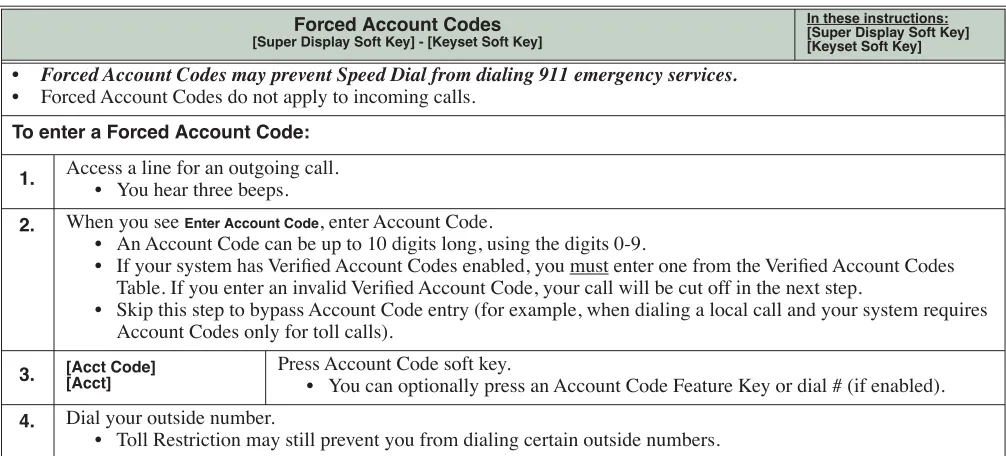
Forced Account Codes require an extension user to enter an Account Code every time they place an outside call. If the user doesn’t enter the code, the system prevents the call. The system can require Forced Account Codes for all outside calls, or just for toll calls (as determined by Toll Restriction programming). Note that Forced Account Codes do not pertain to incoming calls.
Verified Account Codes
With Verified Account Codes, the system compares the Account Code the user dials with a list of codes pro-grammed into the Verified Account Code Table. If the Account Code is in the table, the call goes through (provided it is not prevented by an extension’s Toll Restriction programming). If the code is not in the table, the system prevents the call. Verified Account Codes, if enabled, apply only to Forced Account Codes.
Using Account Codes and Speed Dial
To simplify Account Code operation, Personal and System Speed Dial bins can contain Account Codes. Keep the following in mind when using Speed Dial and Account Codes:
❥ The Account Code can be either the first or last entry in the bin, and must be preceded and followed by the # character. For example, the Account Code 1234 must be entered as #1234#.
❥ 1551-02: Allow Account Codes in Speed Dial Bins (page 667) must be enabled in system programming:
❥ The Speed Dial bin can contain an Account Code followed by an outside number, or just the Account Code. The Account Code must be preceded and followed by a # entry. If the bin contains just the Account Code, the user must be sure to press the bin key before dialing the outside number.
❥ If the system has Verified Account Codes enabled, the Account Code entered in the Speed Dial bin must match an entry in the Verified Account Code Table.
❥ If the Speed Dial bin does not contain an Account Code, the user must enter the Account Code manually. If Forced Account Codes are enabled, the system requires the user to enter the Account Code before it outdials the stored Speed Dial number.
❥ An extension user can preselect a line for a Speed Dial call.
Account Codes
Features
An extension user can preselect a line for a Last Number Redial or Save call.
Account Codes and Emergency Calls
Account Codes are never enforced for emergency (911 and 1+911) calls.
DSS Console Account Code Key
A keyset user can have an Account Code key on their DSS Console. It works the same as a keyset Account Code key.
Conditions
• Do not use Account Codes that begin with 911 or 1911. Default Setting
• Account Codes disabled.
Programming
General Account Code Programming
1. If yes, in 1551-02: Allow Account Codes in Speed Dial Bins (page 667), enter Yes.
2. If no, in 1551-02: Allow Account Codes in Speed Dial Bins (page 667), enter No.
1. If yes, in 1551-01: Dial # to Enter Account Codes (page 667), enter Yes.
2. If no, in 1551-01: Dial # to Enter Account Codes (page 667), enter No.
1. If yes, in 1551-03: Show Account Codes on Telephone Display (page 667), enter Yes.
2. If no, in 1551-03: Show Account Codes on Telephone Display (page 667), enter No.
1. If yes, in 2121-Feature Keys (page 753), select an available key and assign it key code 26.
2. If no, make sure the keyset has no Account Code keys (key code 26) assigned in 2121-Feature Keys (page 753).
1. Should users be able to store Account Codes in Speed Dial bins?
2. While on outside calls, should extension users be able to dial # to enter Account Codes?
3. Should Account Code entries by hidden (i.e., replaced by * characters) on each telephone’s display?
4. Should a keyset have an Account Code key to simplify entering Account Codes?
Account Codes
Setting Up Forced Account Codes
1. In 2102-01: Class of Service (page 724), check the extension’s Class of Service level.
2. If yes (enable Forced Account Codes), in 1412-04: Forced Account Codes (page 651) for the extension’s Class of Service level, enter Yes.
3. If no (disable Forced Account Codes), 1412-04: Forced Account Codes (page 651) for the extension’s Class of Service level, enter No.
1. In 2102-01: Class of Service (page 724), check the extension’s Class of Service level.
2. If yes:
- In 1412-06: Account Codes for Toll Calls Only (page 651), enter Yes.
- In 1551-04: Account Code Toll Restriction Level (page 668), enter the Toll Level the system will use to differentiate toll calls from local calls.
3. If no, in 1412-06: Account Codes for Toll Calls Only (page 651), enter No.
1. If yes, in 3111-01: Disable Forced Account Codes (page 817), enter Yes.
2. If no, in 3111-01: Disable Forced Account Codes (page 817), enter No.
Setting Up Verified Account Codes
1. In 2102-01: Class of Service (page 724), check the extension’s Class of Service level.
2. If yes:
- In 1412-05: Verified Account Codes (page 651), enter Yes.
- In 36xx-AC Codes (Verified Account Codes Table) (page 854), enter codes into the Verified Account Codes Table.
- If 1551-01: Dial # to Enter Account Codes (page 667) is enabled (Yes), do not enter # in any of your Verified Account Codes.
3. If no, in 1412-05: Verified Account Codes (page 651), enter No.
1. Should an extension have Forced Account Codes (i.e., be required to enter an Account Code while placing an outside call)?
2. Should an extension have Forced Account Codes only for long distance (toll) calls?
3. Do you have specific lines that should never require users to enter a Forced Account Code?