Basic Data Management
Environment: 90/25, 30. 30B. 40 Systems
PUBLICATIONS
LiPDATE
Operating System/3 (OS/3) Consolidated Data
Management User Guide
UP$068 Rev 4-D
This Library Memo announces the release and availability of Updating Package D to “SPERRY Operating System/3 (OS/3) Basic Data Management User Guide”, UP-8068 Rev. 4.
This 8. 1 release update documents a correction applicable to a feature present in basic data management prior to the 8. 1 release,
Copies of Updating Package D are now available for requisitioning. Either the updating package only or the complete manual with the updating package may be requisitioned by your local Sperry representative. To receive only the updating package, order UP-8068 Rev. 4—D. To receive the complete manual, order UP-8068 Rev. 4.
Mailing Lists Mailing Lists AOO, AOl, 18, 18U, 19, 19U, 20, 20U; Library Memo for
BZ, CZ and MZ 21, 21U, 75, 75U, 76 and 76U UP-8068 Rev. 4—D
(Package D to UP-8068 Rev. 4, 7 pages plus Memo>
PUBLICATIONS
•
UPDATE
Operating System/3 (OS/3)
Basic Data Management
User Guide
UP—8068 Rev. 4—C
This Library Memo announces the release and availability of Updating Package C to ‘SPERRY UNIVAC Operating System/3 (OS/3) Basic Data Management User Guide”, UP—8068 Rev, 4.
This update documents the following new information on the basic data management file lock feature for the 8.0 release:
How to avoid unnecessary locking out of files
Additional information on file shareability
All other changes are corrections or expanded descriptions applicable to features present in basic data management prior to the 8.0 release.
Copies of Updating Package C are now available for requisitioning. Either the updating package only or the complete manual with the updating package may be requisitioned by your local Sperry Univac representative, To receive only the updating package, order UP—8068 Rev. 4—C. To receive the complete manual, order UP—8068 Rev. 4.
Mailing Lists BZ, CZ and MZ
Mailing Lists A00,A01,18,18U,19, Library Memo for 19U,20,20U,21,21U,75,75U,76 and UP—8068 Rev. 4—C 76U
(Package C to UP—8068 Rev. 4, 32 pages plus Memo)
February, 1983
N
PUBLICATIONS
UPDATE
Operating System/3 (OS/3)Basic Data Management
User Guide
UP4068
Re
4-BThis Library Memo announces the release and availability of Updating Package B to “SPERRY UNIVAC Operating System/3 (0S13)Basic Data Management User Guide”, UP-8068 Rev. 4.
This update for the 8.0 release indicates the availability of a new conversion routine for basic data management. This routine is the OS/3 Sequential DTF Mode to CDI Mode Converter (DTFCDI3O1). This converter processes a basic data management BAL source program module and produces a consolidated data management source module that, with minimal modification, can be used in the consolidated data management environment.
All other changes are corrections or expanded descriptions applicable to features present in basic data management prior ot the 8.0 release.
Copies of Updating Package B are now available for requisitioning. Either the updating package only or the complete manual with the updating package may be requisitioned by your local Sperry Univac representative. To receive only the updating package, order UP-8068 Rev. 4—B. To receive the complete manual, order UP-8068 Rev. 4.
Mailing ListsBZ, Mailing Lists A00, AOl, 18, 18U, 19, 19U, 20, 20U, Library Memo for
CZand MZ 21, 21U, 75, 75U, 76, and 76U UP.8068 Rev. 4—B
(Package B to UP-8068 Rev. 4, 29 pages plus Memo)
PuBLICATIONS
UPDATE
Operating System/3 (OS/3)
Basic Data Management User Guide
UP-8068 Rev. 4-A
This Library Memo announces the release and availability of Updating Package A to “SPERRY UNIVAC Operating System/3 (OS/3) Basic Data Management User Guide”, UP-8068 Rev. 4.
This update documents the following new basic data management features for the 7.0 release:
Consolidated Data Management migration considerations
New information on the file lock feature
All other changes are corrections or expanded descriptions applicable to features present in basic data management
prior to the 7.0 release.
Copies of the Updating Package A are now available for requisitioning. Either the updating package only or the complete manual with the updating package may be requisitioned by your local Sperry Univac representative. To receive only the updating package, order UP-8068 Rev. 4-A. To receive the complete manual, order UP-8068 Rev. 4.
Mailing Lists Mailing Lists 18, 18U, 19, 19U, 20, 20U, 21, Library Memo for
BZ, CZ and MZ 21U, 75, 75U, 76 and 76U UP-8068 Rev. 4-A
(Package A to UP-8068 Rev. 4, 38 pages plus Memo)
SPERRY UNIVAC OS/3 BASIC DATA MANAGEMENT
PSS 1 Update D
All the technical changes are denoted by an arrow(-0.-)in the margin. A down ward pointing arrow( ‘Inext to a line indicates that technical changes begin at this line and continue until an upward pointing arrow( 41is found. A horizontal arrow(-0-)pointing to a line indicates a technical change in only that line. A horizontal arrow located between two consecutive lines indicates technical
changes in both lines or deletions.
UP-8068 Rev. 4
PAGE STATUS SUMMARY
ISSUE: Update D — UP-8068 Rev.
4
RELEASE LEVEL: 8.1 ForwardPSS 1 D
Page Update
Part/Section Page Update Part/Section Page Update
Part/Section Number Level Number Level Number Level
Cover/Disclaimer Orig. 10 (cont) 16 thru 22 Orig. 16 (cont) 6 thru 14 Orig.
11 PART 5
2 3 thru 7 8
9
l0thru 15 16 17 thru 51
Orig. A Orig. A C Orig. A Orig.
Title Page Orig,
Preface 1 Orig.
2 A
3, 4 Orig. Contents 1 thru 11 Orig.
12 C
13, 14 Orig.
15 B
16,16a A 17,18 Orig.
19 C
PART 1
Title Page Orig.
1 1 Orig.
2 A
2a A
3 A
4 thru 18 Orig. PART 2
Title Page Orig.
2 1 thru 4 Orig.
3 1 thru 31 Orig.
4 1 thru 5 Orig.
5 1 thru 12 Orig. 6 1 thru 12 Orig. 7 1 thru 31 Orig. PART 3
Title Page Orig. 8 1 thru 17 Orig. 9 1 thru 62 Orig. PART 4
Title Page Orig.
17 1 thru 75 Orig. PART 6
Title Page Orig. Appendix A 1 thru 11 Orig. Appendix B 1 thru 15 Orig. Appendix C 1 thru 1 1 Orig. Appendix D 1 thru 32 Orig. Appendix E 1 thru 26 Orig.
Appendix F 1 A
2,3 B
Index 1, 2 Orig.
3 A
4thru6 B
7 Orig.
8thrul0 C 11 thru 23 Orig.
24 C
25 thru 27 Orig. User Comment
Sheet 12 1 thru 9 Orig.
10 B
11 thru 13 Orig. 13 1 thru 18 Orig.
iSa C
19 thru 29 Orig.
13A 1 Orig.
2 B
3 Orig.
4 B
4a B
5 thru 13 Orig.
135 1 Orig.
2 B
3 thru 5 Orig.
6 D
7 thru 12 Orig.
13 C
14 D
15 thru 17 Orig.
18 B
i9thru2l Orig. 14 1 thru 13 Orig. 15 1 thru 7 Orig.
8,9 C 10 Orig. 11,12 C 13 Orig. 14 C 15,16 Orig. 17 C
18 thru 20 Orig.
21 C
22 thru 1 1 1 Orig. 10 1 thru 7 Orig.
*
0
0
0
SPERRY UNIVAC OS/3 BASIC DATA MANAGEMENT
PSS 1 Update C
All the technicalchangesare denoted by an arrow (*—) in the margin. A downward pointing arrow (
f
) next to a line indicates that technical changes begin at this line and continue until an upward pointing arrow (4)
is found. A horizontal arrow(-0.-)pointing to a line indicates a technical change in only that line. A horizontal arrow located between two consecutive lines indicates technical changes in both lines or deletions.UP-8068 Rev.4
PAGE STATUS SUMMARY ISSUE: Update C— UP-8068 Rev. 4 RELEASE LEVEL:i 8.0 Forward
Cover/Disclaimer Orig.
Part/Section Page Update Part/Section NumberPage Update Part/Section NumberPage UpdateLevel Level
Number Level
PSS 1 C
Preface 1 Orig.
2 A
3,4 Orig.
10(cont) 14,15 A 16 thru 22 Orig.
16(cont) 5 C
6 thru 14 Orig. PART 5
Contents 1 thru 11 Orig.
12 C
13, 14 Orig.
15 B
16,16a A 17, 18 Orig.
19 C
11 1 Orig.
2 A
3 thru 7 Orig.
8 A
9 C
10 thru 15 Orig.
16 A
17 thru 51 Orig.
Title Page
PART 1
Orig.
12 1 thru 9 Orig.
10 B
11 thru 13 Orig. Title Page Orig.
13 1 thru 18 Orig.
18a C*
19 thru 29 Orig.
17 1 thru 75 Orig. PART 6
Title Page Orig. Appendix A 1 thru 11 Orig. Appendix B 1 thru 15 Orig. Appendix C 1 thru 11 Orig. Appendix D 1 thru 32 Orig. Appendix E 1 thru 26 Orig.
Appendix F 1 A
2,3 B
Index 1, 2 Orig.
3 A
4thru6 B
7 Orig.
8thrul0 C 11 thru 23 Orig.
24 C
25 thru 27 Orig. User Comment
Sheet
1 1 Orig.
2 A
2a A
3 A
4thru 18 Orig. PART 2
Title Page Orig.
2 1 thru 4 Orig.
3 1 thru 31 Orig.
4 1 thru 5 Orig.
5 1 thru 12 Orig. 6 1 thru 12 Orig. 7 1 thru 31 Orig. PART 3
Title Page Orig. 8 1 thru 17 Orig. 9 1 thru 62 Orig. PART 4
Title Page Orig.
13A 1 Orig.
2 B
3 Orig.
4 B
4a B
Sthru 13 Orig.
13B 1 Orig.
2 B
3 thru 5 Orig.
6 B
7 thru 12 Orig.
13,14 C
15 thru 17 Orig.
18 B
19 thru 21 Orig. 14 1 thru 13 Orig. 15 1 thru 7 Orig.
8,9 C 10 Orig. 11,12 C 13 Orig. 14 C 15,16 Orig. 17 C l8thru2O Orig. 21 C
22 thru 111 Orig.
3 B
*New pages
10 1 thru 7 Orig.
8 A
9, 10 Orig.
SPERRY UNIVAC OS/3 BASIC DATA MANAGEMENT
PSS 1 Update B
All the technical changes are denoted by an arrow(-b-)in the margin. A downward pointing arrowI ‘)next to a line indicates that technical changes begin at this line and continue until an up ward pointing arrow(
4)
is found. A horizontal arrow(-)pointing to a line indicates a technical change in only that line. A horizontal arrow located between two consecutive lines indicates technical changes in both lines or deletions.UP-8068 Rev. 4
PAGE STATUS SUMMARY ISSUE: Update B— UP-8068 Rev. 4 RELEASE LEVEL: 8.0 Forward
Cover/Disclaimer Orig.
Page Update Page Update Page Update
Part/Section Part/Section
Part/Section Number Level N umber Level
Number Level
PSS 1 B
11
Preface 1 Orig.
2 A
3, 4 Orig, Contents
Appendix F 2
3 thru 7 8 9thru 15 16 17 thru 51
Orig. A Orig. A Orig. A Orig. 2 3 12 1 thru 11
12 13,14 15 16, 16a l7thru 19 A B Orig. A Orig. B A Orig.
1 thru 9 10 11 thru 13
Index 1,2 Orig.
3 A
4thru6 B 7 thru 27 Orig.
13
Orig. B Orig. 1 thru 29
User Comment Sheet Orig.
PART 1
Title Page Orig.
1 1 Orig.
2 A
2a A
3 A
4thru 18 Orig. PART 2
Title Page Orig,
13A 1 Orig.
2 B
3 Orig.
4 B
4a B*
5 thru 13 Orig. 13B
2 1 thru 4 Orig.
2 3 thru 5 6 7thru 17 18 l9thru 21 Orig. B Orig. B Orig. B Orig.
3 1 thru 31 Orig. 14 1 thru 13 Orig.
4 1 thru 5 Orig. 15 1 thru 111 Orig.
5 1 thru 12 Orig. 16
2 3 4 5 6thru 14 6 1 thru 12 Orig.
7 1 thru 31 Orig. PART 3
Title Page Orig. 8 1 thru 17 Orig. 9 1 thru 62 Orig.
PART 4
Title Page Orig.
B Orig. A B A Orig. PARTS
Title Page Orig. 17 1 thru 75 Orig. PART 6
Title Page Orig. Appendix A 1 thru 1 1 Orig. Appendix B 1 thru 15 Orig. Appendix C 1 thru 1 1 Orig. Appendix D 1 thru 32 Orig. 10 1 thru 7 Orig.
8 A 9,10 Orig. 11,12 A 12a A 13 Orig. 14,15 A
l6thru 22 Orig. *New pages
UP-8068 Rev, 4 SPERRY UNIVAC OS/3 BASIC DATA MANAGEMENT
PSS 1 Update A
PAGE STATUS SUMMARY ISSUE: Update A — UP-8068 Rev, 4
RELEASE LEVEL: 7.0 Forward
Part/Section Page Update Part/Section Page Update
Number Level Part/Section
Page Update
Number Level Number Level
Cover/Disclaimer Orig.
PSS 1 A
11 1 Orig.
2 A
3 thru 7 Orig.
8 A
Preface 1 Orig, 9thru 15 Orig.
2 A 16 A
3, 4 Orig. 17 thru 51 Orig.
Contents 1 thru 1 1 Orig.
12 1 thru 13 Orig.
12 A
13 Orig,
13 1 thru 29 Orig.
15,16 A
16a A*
13A 1 thru 13 Orig. 17 thru 19 Orig.
PART 1 138 1 thru 21 Orig.
Title Page Orig.
14 1 thru 13 Orig.
1 1 Orig.
2 A 15 1 thru 111 Orig.
2a A*
3 A 16 1,2 Orig.
4 thru 18 Orig. 3 thru 5 A
6thru 14 Orig. PART2
Title Page Orig. PART 5
Title Page Orig.
2 1 thru 4 Orig.
17 1 thru 75 Orig. 3 1 thru 31 Orig.
PART 6
4 1 thru 5 Orig. Title Page Orig.
5 1 thru 12 Orig. Appendix A 1 thru 11 Orig. 6 1 thru 12 Orig. Appendix B 1 thru 15 Orig. 7 1 thru 31 Orig. Appendix C 1 thru 11 Orig.
Title Page
PART 3 Appendix D 1 thru 32 Orig.
Orig. 8 1 thru 17 Orig. 9 1 thru 62 Orig. PART 4
Title Page Orig.
Appendix E 1 thru 26 Orig. Appendix F 1,2 A
Index 1,2 Orig.
3 A
4 thru 27 Orig. User Comment
Sheet 10 1 thru 7 Orig.
8 A
9,10 Orig.
11,12 A
12a A*
13 Orig.
14,15 A
16 thru 22 Orig. *New pages
UP-8068 Rev. 4 SPERRY UNIVAC OS/3 BASIC DATA MANAGEMENT
PAGE STATUS SUMMARY
PSS 1
All the technical changes are denoted by an arrow(.-)in the margin. A downward pointing arrow (
f
Inext to a line indicates that technical changes begin at this line and continue until an upward pointing arrow(4)
is found. A horizontal arrow(-*)pointing to a line indicates a technical change in only that line. A horizontal arrow located between two consecutive lines indicates technical changes in both lines or deletions.ISSUE: UP-8068 Rev. 4 RELEASE LEVEL: 7.0 Forward
Cover/Disclaime
Page Update Page Update
Part/Section Page Update Part/Section
Part/Section Number Level Number Level Number Level
PART 5
Title Page
17 lthru75
PART 6
Title Page Appendix A 1 thru 1 1 Appendix B 1 thru 15 Appendix C 1 thru 11 Appendix D 1 thru 32 Appendix E 1 thru 26 Index 1 thru 27 User Comment
Sheet
PSS 1
Preface 1 thru 4 Contents 1 thru 19 PART1
Title Page
1 lthrul8
PART 2
Title Page
2 lthru4
3 lthru3l
4 lthru5
5 lthrul2
6 lthrul2
7 lthru3l
PART 3
Title Page
8 lthrul7
9 lthru62
PART4
Title Page
10 1 thru 22
11 lthru5l
12 1 thru 13
13 lthru29
13A lthrul3
13B lthru2l
14 1 thru 13
15 1 thru 111
a
-1
ci
----I.
..
t
$
I••
•.
$
.
.-Th
•
-..
$
I
‘S
UP-8068 Rev. 4 SPERRY UNIVAC OS/3 Preface 1
BASIC DATA MANAGEMENT
Preface
This manual is one of a series designed to instruct and guide the programmer in the use of the SPERRY UNIVAC Operating System/3 (OS/3). This manual specifically describes OS/3 basic data management and its effective use. Its intended audience is the applications programmer with a basic knowledge of data processing, but with limited programming experience, as well as the seasoned applications programmer.
Two other manuals are available that cover OS/3 basic data management; one is an introductory manual and the other is a programmer reference manual (PRM). The introductory manual briefly describes OS/3 basic data management and its facilities. The PRM provides the characteristics of OS/3 basic data management in skeletal form and is intended as a quick-reference document for the programmer experienced in the use of OS/3 basic data management.
For systems with interactive facilities, an additional series of manuals is provided to instruct and guide the programmer in the use of OS/3 consolidated data management. These are:
s Introduction to consolidated data management, UP-8824
• Consolidated data management concepts and facilities, UP-8825
• Consolidated data management macro language user guide/programmer reference, UP-8826
In general, any further references to the term data management in this user guide imply
basic data management.
This user guide is divided into the following parts:
• PART 1. OS/3 DATA MANAGEMENT
UP-8068 Rev. 4 SPERRY UNIVAC OS/3 Preface
BASIC DATA MANAGEMENT Update A
• PART 2. CARD, DISKETTE, and PRINTER FILES
Describes file and format conventions and the function and operation of OS/3 data management in relation to punched card, diskette, and printer files.
• PART 3. MAGNETIC TAPE FILES
Describes file and format conventions and the function and operation of OS/3 data management in relation to magnetic tape files.
• PART 4. DISK FILES
Describes file and format conventions and function and operation of OS/3 data management as related to disk files. Describes the indexed sequential access method (ISAM) both with and without an index structure, the sequential access method (SAM), the direct access method (DAM), the indexed random access method (IRAM), the multiple indexed random access method (MIRAM), and the nonindexed access
method. Also includes information on disk space management.
• PART 5. PAPER TAPE FILES
Describes record, character, and file conventions and the functions of OS/3 data management for perforated paper tape files.
• PART 6. APPENDIXES
Provide selected functional characteristics of peripheral devices relevant to data management use; explain the OS/3 data management procedures for error and exception handling; compare the EBCDIC/ASCII/Hollerith codes and other card codes used in OS/3; describe the systems standard labels for magnetic tape and disk files; and describe the consolidated data management migration considerations.
Statement Conventions
The conventions used to delineate the data management macroinstructions are:
• Positional parameters must be written in the order specified in the operand field and must be separated by commas. When a positional parameter is omitted, the comma must be retained to indicate the omission, except for the case of omitted trailing para meters.
Examples:
Assume that CNTRL is a data management macroinstruction with three optional positional parameters: A, B, and C.
UP-8068 Rev 4 SPERRY UNIVAC OS/3 Preface 3 BASIC DATA MANAGEMENT
A keyword parameter consists of a word oracode immediately followed by an equal sign, which is1 in turn, followed by a :specification. Keyword parameters can be written in* any order in the operand field. Commas are required only to separate parameters; however, a comma must neither be coded in column 16 of a continuation line nor follow the last keyword of a string.
Example:
Assume that the data management DTF macro for a card file (called CARDIN) has three keyword parameters: IOAREA1, BLKSIZE, and WORKA.
CARDlN DTFCD IOAREA1=AREA1,BLKSIZE=80;WORKA=YES
• Capital letters, commas, equal signs, and parentheses must be coded exactly as
shown. The exceptions are those acronyms that are part of geheric terms
representing information to be supplied by the user and the commas preceding keyboard parameters of declarative macroinstructions. (These commas serve to
remind the user that keyboard parameters coded in a string ust be separated by
commas.)
Examples:
Ft ELDS=([AD DR][,A2TD][,FR EQJ) REOC=(MERGE,label,reel,to) CMceNUMBCHAR=n
X aa (NOV)
m Lowercase letters and words are generic terms representing information that must be supplied bythe user. Such lowercase terms may contain hyphens and acronyms (for readability).
Examples:
name sta rt- addr
number-of-bytes pa ram-i
CCB-name
• Information contained within braces represents mandatory entries of which one must
be chosen.
Examples:
UP8O68 Rev. 4 SPERRY UNIVAC OS/3 BASIC DATA MANAGEMENT
Preface A
I Information contained within brackets represents optional entries that (depending
upon program requirements) are Included or omitted Braces within brackets signify that one of the specified entries mustbe chosen if that parameter isto be included.
Examples:
[I NPUT=NO] [OUTPUT=NO]
I
JworknameL’o
• An optional parameter which has a list of optional entries may have a default
specification which is supplied by the operating system when the parameter is not specified by the user. Although the default may be specified by thern user with no adverse effect, it is considered inefficient to do so. For each reference, when a default specification occurs in the format delineation it is printed on a shaded background If
by parameter omission, the operating system performs some complex. processing other than parameter insertion it is explained under an if-omitted heading in the
parameter description.
Examples:
F,M ERG
L
iNCF
JASCIIL
iEBDUDH• An ellipsis (series of three periods) indicates the omission entries.
Example:
of a variable number of
param-1 param-n
• Commas are required when positional parameters are omitted,
parameter specified.
Example:
except after the last
UP-8068 Rev. 4 SPERRY UNIVAC OS/3 Contents 1 BASIC DATA MANAGEMENT
Contents
PAGE STATUS SUMMARY
PREFACE
CONTENTS
PART 1. OS/3 DATA MANAGEMENT
1. INTRODUCTION
1.1. THE FUNCTION OF DATA MANAGEMENT 1-1
1.2. BASIC AND CONSOLIDATED DATA MANAGEMENT 1-1
1.3. DATA STRUCTURE 1-4
1.3.1. Définitión of Terms 1-6
1.3.2. Punched Card Files 1-7
1.3.3. Diskette Files 1—7
1.3.4. Printer Files 1-7
1.3.5. Magnetic Tape Files 1-7
1.3.6. Disk Files 1-8
1.3.7. Paper Tape Files 1-9
1.4. PROGRAMMING FOR DATA MANAGEMENT 1-9
1.5. OS/3 DATA MANAGEMENT ENHANCEMENTS 1-10
1.5.1. ISAM Files 1-10
1.5.2. SAM and DAM Files 1-10
1.5.3. IRAM Files 1-10
1.5.4. MIRAM Files 1-11
1.5.5. Error and Exception Returns 1-11
1.5.6. Disk Flexibility and Hardware Constraints 1-11
1.5.7. Shared Data ManagerneritModules 1-12
1.6. DATA MANAGEMENT/USER INTERFACE 1-12
1.6.1. Declarative Macroinstructions 1-12
1.6.2. Imperative Macroinstructions 1-14
UP-8068 Rev. 4 SPERRY UNIVAC OS/3
BASIC DATA MANAGEMENT
Contents 2 1.7. 1.7.1. 1.7.2. 1.7.3. 1.7.4. 1.7.5.
2. CARD FORMATS AND FILE CONVENTIONS
2.1. GENERAL 2-1
RECORD FORMATS
Start-of-Data Job Control Statement End-of-Data Job Control Statement
Card Punch Records
:21 2-2 2—3 2-3 3-i FUNCTIONAL DESCRIPTION
Punched Card Input Punched Card Output
3-1 3-1
3-2
3.3. DEFINE A SAM CARD FILE (DTFCD) 3-3
3.4. 3.4.1. 3.4.2. 3.4.3. 3.4.4. 3.4.4.1. 3.4.5. (OPEN) (GET) (PUT) (CNTRL)
ERROR AND EXCEPTION HANDLING
FilenameC
FilenameS 3-25
3.6. SAMPLE PROGRAMS 3-25
4. DISKETTE FORMATS AND FILE CONVENTIONS
4-1 RELATED OS/3 SOFTWARE
System Service Programs (SSP) Job Control
Supervisor
Linkage Editor
Data Utilities
PART 2. CARD, DISKETTE, AND PRINTER FILES
1—15 1-15 1-16 1-17 1-17 1-18 FILE ORGANIZATION Card Input Files
Card Output Files Combined Files 2.2. 2.2.1. 2.2.2. 2.2.3. 2.3. 2.3.1. 2.3.2. 2.3.3. (/$) (/*)
3. FUNCTION AND OPERATION OF PUNCHED CARD SAM
3.1. GENERAL 2-3 2-3 2-3 2-4 3.2. 3.2.1. 3.2.2.
IMPERATIVE MACRO INSTRUCTIONS
Open a Card SAM File Retrieve Next Logical Record Output a Record
Controlling Stacker Selection on the Card Punch
Using the CNTRL Imperative Macro
Close a Card SAM File
UP-8068 Rev.4 SPERRY UNIVAC OS/3 BASIC DATA MANAGEMENT
Contents 3
5. FUNCTION AND OPERATION OF DISKEUE SAM
4-1 4-3 4-4 4-4
4-4
5.1. GENERAL 5—1
5—1 5—1 5-2 5—2 5—3 (DTFCD) 5-3 5-4
6. PRINTER FORMATS AND FILE CONVENTIONS
6.3. 6.4. 6.4.1 6.4.2. 6.4.2.1. 6.4.2.2. 6.4.2.3. 6.4.3. 6.4.4. 6—5 6-7 6—7 6-7 6-8 6-8 6—8 6—9 6—9 4.2. 4.2.1. 4.2.2. 4.2.3. 4.3. 4.3.1. 4.3.2. FILE ORGANIZATION Diskette Input Files Diskette Output Files Combined Files RECORD FORMATS Fixed-Length Records Variable-Length Records 4-4 4-4 5.2. 5.2.1. 5.2.2. 5.2.3. 5.2.4. 5.2.5. 5.2.6. FUNCTIONAL DESCRIPTION Input Record Processing Output Record Processing
Combined File Record Processing Multisector I/O
Specifying 8413 Diskette Use Diskette Limitations
5.3. DEFINE A SAM DISKETTE FILE 5.4. 5.4.1. 5.4.2. 5.4.3. 5.4.4. IMPERATIVE MACROINSTRUCTIONS Open a Diskette SAM File
Retrieve Next Logical Record Writing a Diskette Record Closing a Diskette File
(OPEN) (GET) (PUT) 5—6 5—7 5-8 5-10 (CLOSE) 5-12
6.1. GENERAL 6-1
6.1 .1. 0773 Printer Subsystem 6-2
6.1.2. 0770 Printer Subsystem 6-2
6.1.3. 0768 Printer Subsystem 6-2
* 6.1.4. 0776 Printer Subsystem 6-2
6 1 5 0778 Printer Subsystem 6-2
6.2. FILE ORGANIZATION 6-2
6.2.1. Text 6—3
6.2.2. Tabular Data 6-4
6.2.3. Printer Forms 6-4
RECORD FORMATS
VERTICAL FORMAT AND LOAD CODE BUFFERS Load Code Buffer Interchangeability
LCB Statement Specification
LCB Specification fOr the 0773 and 077S Printers LCB Specification for the 0770 and 0776 Printers LCB Specification for the 0768 Printer
UP-8068 Rev. 4 SPERRY UNIVAC OS/3 BASIC DATA MANAGEMENT
Contents 4 8.2. 8.2.1. 8.2.2. 8.2.3. 8.2.4. 8.2.4.1 8.2.5. IMPERATIVE MACROINSTRUCTIONS Open a Printer File
Output a Record Control Printer Forms Print Overflow Action Close a Printer File
(OPEN) (PUT) (CNTRL) (PRTOV) (CLOSE)
ERRORAND EXCEPTION HANDLING 7-28
FilenameC
Truncation of Print Line 7—28
SAMPLE PROGRAM
PART 3. MAGNETIC TAPE FILES
9. FUNCTIONS AND OPERATIONS, MAGNETIC TAPE SAM
9.1. 9.2. 9.2.1. 9.2.2. 9.2.2.1. 9.2.2.2. 9.2.2.3. 9.2.2.4. 9.2.2.5. 9.2.2.6. (IOAREA1) (BLKSIZE) (TYPEFLE) (ERROR) (EOFADDR) (SAVAREA) 8-1 8-2 8-2 8-8 8-9 8-9 8-14 9—1 9—2 9-10 9-10 9-10 9—11 9—12 9—12 9-13
6.4.4.1. Specifying Home Paper Position 6—9
6.4.4.2. Specifying Forms Overflow Position 6.4.4.3. Specifying Special Forms
6.4.4.4. Paper Tape Loop, 0768 Printer
6.4.4.5. Vertical Format Buffer Statement Example
7. FUNCTION AND OPERATION OF SAM PRINTER
GENERAL
FUNCTIONAL DESCRIPTION DEFINE A SAM PRINTER FILE
FILES 7.1. 7.2. 7.3. 7.4. 7.4.1. 7.4.2. 7.4.3. 7.4.4. 7.4.5. 7.5. 7.5.1. 7.5.2. 7.6. 6-9 6-10 6-10 6-12 7—1 7-1 7-4 7-15 7-16 7-18 7—21 7-24 7-27 (DTFPR) 7-28 7—28
8. MAGNETIC TAPE FORMATS AND FILE CONVENTIONS
8.1. GENERAL 8-1
TAPE VOLUME AND FILE ORGANIZATION EBCDIC Standard Volume Organization EBCDIC Nonstandard Volume Organization EBCDIC Unlabeled Volume Organization ASCII Standard Volume Organization
End-of-File and End-of-Volume Coincidence Magnetic Tape File Record and Block Formats
GENERAL 9—1
DEFINING A MAGNETIC TAPE FILE (DTFMT)
Format of the DTFMT Declarative Macro
Required and Most Frequently Used DTFMT Keywords Specifying the I/O Buffer
Specifying the Length of the I/O Buffer Specifying Type of File Processing Error Processing
UP-8068 Rev.4 SPERRY UNIVAC OS/3 BASIC DATA MANAGEMENT
Contents5 9.2.3.1. 9.3.3.2. 9.2.3.3. 9.2.3.4. 9.2.3.5. 9.2.3.5.1. 9.2.4. 9.2.4.1. 9.2.4.2. 9.2.4.3. 9.2.5. 9.2.5.1. 9.2.5.2. 9.2.5.3. 9.2.5.4. 9.2.6. 9.2.6.1. 9.2.6.2. 9.2.6.3. 9.2.7. 9.2.7.1. 9.2.7.2. 9.2.7.3. 9.2.8. 9.2.8.1. 9.2.8.2. 9.2.9. 9.2.10. 9.3. 9.3.1. 9.3.2. 9.3.3. 9.3.3.1. 9.3.3.2. 9.3.3.3. 9.3.4. 9.3.4.1. 9.3.4.2. 9.3.4.3. 9.3.4.4. 9.3.4.5. 9.3.4.6. 9.3.5. 9.3.6. 9.3.7. 9.4. 9.4.1. 9.4.2. 9.4.3. 9.4.4. (IOAREA2) (IOREG) (WORKA) (ERROPT) (BKNO) (RECFORM) (RECSIZE) (VARBLD) (READ) (REWIND) (OPRW) (CLRW) (FILABL) (TPMARK) (LABADDR) (ASCII) (BUFOFF) (LENCHK) (OPTION) (CKPTREC) 9-13 9-13 9—13 9-14 9-14 9—15 9—15 9—17 9-17 9-18 9-19 9—21 9-22 9-22 9-23 9-23 9-23 9-23 9-24 9-24 9-26 9-27 9-27 9-28 9-28 9-28 9-29 9-29 9-30 9-31 9-31 9-32 9-33 9-34 9-34 9-36 9-36 9-36 9-36 9-38 9—39 9-39 9-39 9-40 9-41 9-43 9-43 9-46 9-48 9-50 9-52
9.2.3. Commonly Used DTFMT Keywords
Specifying a Secondary I/O Buffer Specifying an Index Register Processing in a Work Area Handling Parity Errors Processing Block Numbers
Block Number Specification
Parameters Related to Tape Record Formats
Specifying a Record Format Providing Record Size
Blocking Variable Records in an I/O Area
Parameters Related to Tape Movement
Specifying Input File Direction Exercising General Rewind Options Rewinding at Open
Rewinding at Close
Parameters Related to Tape Label Processing
Specifying Type of Tape Labels
Eliminating Tape Mark After Header Labels Special Label Handling
ASCII Processing
Specifying ASCII Processing Specifying ASCII Buffer Offset
Checking the Length of Variable ASCII Records
Other DTFMT Keyword Parameters
Specifying That a File is Optional Bypassing Checkpoint Dumps
Nonstandard Forms of DTFMT Keywords Processing Multivolume Files
(LBL)
JOB CONTROL STATEMENTS USED WITH MAGNETIC TAPE
FILES
Assigning a Tape Device to Your Job (DVC)
Defining Your Logical File (LFD)
Specifying Tape Volume Information (VOL)
Inhibiting Volume Serial Number Checking
Specifying Dynamic Tape Prepping and Recording Density Specifying a Scratch Volume
Specifying Tape File Label Information
Specifying File Identifier
Checking Volume and File Serial Numbers Specifying File Expiration Date
Specifying File Creation Date Specifying File Sequence Number
Specifying File Generation and Version Numbers
Creating Multivolume Tape Files Extending Tape Files
Error Messages Related to Tape Label Processing
IMPERATIVE MACROS FOR PROCESSING MAGNETIC TAPE FILES
Initiating Tape File Processing Terminating Tape File Processing
Delivering the Next Logical Output Record to Tape SAM
Reading the Next Logical Input Record From Tape
UP-8068 Rev. 4 SPERRY UNIVAC OS/3 BASIC DATA MANAGEMENT
Contents 6
9.4.5. Changing File Processing Mode for an IN/OUT
PART 4. DISK FILES
10. ISAM FORMATS AND FILE CONVENTIONS
10.2. 10.2.1. 10.2.2. 10.2.2.1 10.2.3. 10.2.4. 10.2.5.
MULTIVOLUME ISAM FILES
Specifying Location of Retrieval Search Argument Specifying Length and Location of Record Keys Suppressing a File Lock
Providing Cylinder Overflow Area Specifying Record Size and Format Specifying Specifying 10-1 10-3 10-5 10-8 10-11 10-12 10-14 10-16 11-8 11—8 11—9 11-10
-Tape File (SETF) 9-54
• 9.4.6. Writing Short Output Blocks to Magnetic Tape (TRUNC) 9-56
. 9.4.7. Skipping to the Next Input Block (RELSE) 9-58
9.4.8. Forcing End-of-Volume Procedures (FEOV) 9-59
9.4.9. Processing User Tape Labels (LBRET) 9-60
9.4.10. Controlling Tape Unit Functions (CNTRL) 9-62
10.1. GENERAL
ISAM FILE ORGANIZATION ISAM Record Formats ISAM Data Block Format
Calculating Space Requirements for the File ISAM Index Blocks
Calculating Space for the ISAM Index Area Loading the Top Index into Main Storage
10.3. ALTERNATE SEQUENTIAL ACCESS METHOD (ASAM)
10.3.1. ASAM Data Formats 10.4.
11. FUNCTIONS AND OPERATION OF ISAM
11.1. GENERAL
11.2. FUNCTIONAL DESCRIPTION, OS/3 ISAM 11.2.1. 11.2.2. 11.2.3. 10-18 10-22 10-22 11—1 11-2 11-2 11-3 11-4 Processing an Indexed ISAM File
Processing an ISAM File Without an Index Structure Deleting Records From an ISAM File
11.3. DEFINING AN OS/3 ISAM FILE (DTFIS) 11-6
DTFIS KEYWORD PARAMETERS Specifying File Accessing Options Specifying Size of Data Blocks Specifying Your Error Exit
Describing an Index Area in Main Storage Eliminating the Index Structure
Specifying I/O Buffers
Specifying Current Record Pointer Specifying the Type of File Processing 11.4. 11.4.1. 11.4.2. 11.4.3. 11.4.4. 11.4.5. 11.4.6. 11.4.7. 11.4.8. 11.4.9. 11.4.10. 11.4.11. 11.4.12. 11.4.13. 11.4.14. 11.4.15. (ACCESS) (BLKSIZE) (ERROR) (INDAREA,INDSIZE) 11-11 (INDEXED) 11-12
(IOAREA1 IOAREA2) 11-12
(IOREG) 11-13 (IOROUT) 11-13 (KEYARG) 11-14 (KEYLEN,KEYLOC) 11-15 (LOCK) 11—16 (PCYLOFL) 11—17 (RECFORM,RECSlZE) 11-17 a Save Area for Contents of General Registers (SAVAREA) 11-18
UP-8068 Rev. 4 SPERRY UNIVAC OS/3 BASIC DATA MANAGEMENT
ERROR AND EXCEPTION HANDLING FilenameC
Other Addressable Fields of the DTFIS File Table
11.7 PROGRAMMING EXAMPLE
11 .7.1. Sample ISAM File Load Program
12. IRAM FORMATS AND FILE CONVENTIONS
Contents 7
12.1. GENERAL 12-1
12.1.1. IRAM Concepts 12-1
12.2. IRAM FILE CONVENTIONS AND FORMATS 12.2.1. The Data Partition
12.2.2. Entries in the Index Partition 12.2.3. Structure of IRAM Index
12.2.4. Estimating Disk Space Required for an Indexed IRAM File
12.2.5. Estimating Disk Space Required for a Nonindexed IRAM File
11.4.16. Forestalling Use of Update Functions (UPDATE) 11—19
11.4.17. Specifying Parity Check of Output Records (VERIFY) 11—19 11 .4.18. Specifying Location of Record Work Areas. (WORK1 ,WORKS) 11-19
1 1 .4.19. Nonstandard Forms of the Keyword Parameters 1 1—20
11.4.20. Recapitulation of DTFIS Keyword Parameters 11—21
11.5. IMPERATIVE MACROS FOR ISAM FILES . 11-23
1 1 .5.1. Basic Macroinstructions 1 1—23
11.5.1.1. Initializing an ISAM File (OPEN) 11—24
11.5.1.2. Terminating an ISAM File (CLOSE) 11—25
11 .5.2. Loading and Extending an ISAM File 11-26
11.5.2.1. Initiating the Load Sequence (SETFL) 11—27
11.5.2.2. Writing Initial Records to the File (WRITE,NEWKEY) 11—28
11.5.2.3. Terminating the Load Sequence (ENDFL) 11—30
11.5.3. Inserting New Records in an ISAM File 11—31
1 1 .5.3.1. Adding a New Record to Overflow in an
Existing File (WRITE,NEWKEY) 11—32
1 1 .5.3.2. Adding a New Record to Overflow in an Existing
File (ADD) 11—34
11.5.3.3. Ensuring Completion of Record Transfer (WAITF) 11—35
11.5.4. Processing an ISAM File Randomly . 11-35
1 1 .5.4.1. Retrieving a Record (READ,ID and
READ,KEY) 11-36
11.5.4.2. Updating a Record (WRITE,KEY) 11-38
11.5.4.3. Updating Last Record Retrieved (UPDT) 11—40
11.5.5. Processing an ISAM File Sequentially 11-40
11.5.5.1. Initializing a Retrieval Sequence (SETL) 11—42
11.5.5.2. Retrieving Next Logical Record (GET) 11—44
11.5.5.3. Updating a Record (PUT) 11—46
11.5.5.4. Terminating a Retrieval Sequence (ESETL) 11—48
11.6. 11-49
11.6.1. 11-49
11.6.2. 11-49
11—50 11—50
UP-8068 Rev. 4 SPERRY UNIVAC OS/3 BASIC DATA MANAGEMENT
Contents 8
13. FUNCTIONS AND OPERATIONS OF IRAM
13.1. 13.1.1.
13.1.1.1. 13.1.1.2. 13.1.1.3. 13.1 .1 .4. 13.1.1.5. 13.1.1.6. 13.1.2. 13.1.2.1. 13.1;.2.2. 13.1.2.3. 13.1.2.4. 13.1.2.5. 13.1.2.6. 13.2. 13.2.1. 13.2.2. 13.2.3. 13.2.4. 13.2.5. 13.2.6. 13.2.7.
PROCESSING NONINDEXEDIRAM FILES
Processing Sequential IRAM Files
Creating a Sequential IRAMFIle. Extending a Sequential IRAM File Adding Records to a Sequential File
Retrieving and Updating Records in a Sequential IRAM. File Deleting Records from a Sequential IRAM File
Reorganizing a Sequential IRAM File
Processing Direct IRAM Files
Creating a Direct IRAM File Extending a Direct IRAM File
Adding Records to a Direct IRAM File
Retrieving and Updating Records in a Direct IRAM File Deleting Records from a Direct IRAM File
Reorganizing a Direct IRAM File PROCESSING INDEXED IRAM FILES
Creating an Indexed IRAM File ...
Extending an Indexed IRAM File
Retrieving and Updating in an IRAM File With Index Active Adding Records During Retrieval - Index Active
Retrieval and Update When Index is Inactive Deleting Records from an Indexed IRAM File
Reorganizing an Indexed IRAM File
13—1 13-2 13-2 13—3 13-3 13-3 13-5 13-5 13-5 13-5 13-6 13-7 13-7 13-8 13-8 13-9 13—10 13-11 13-11 13—12 13-13 13-14 13-14 13.4. 13.4.1. 13.4.2. 13.4.3. 13.4.4. 13.4.5. 13.4.6. 13.4.7. 13A.8. 13.4.9. 13.4.10. 13.4.11. 13.4.12. 13.4.13. 13.4.14. 13.4.15. 13.4.16. 13.4.17. 13.4.18. 13.4.19. 13—15 13—18 13—18 13-19 13—19 13-19 13—19 13—20 13—20 13-20 13-20 13—21 13—21 13—21 13—21 13—22 13-22 13—22 13—22 13—23 13—23 13—23 13-23 13-24 13-24 (DIFIR)
13.3. DEFINING AN OS/3 IRAM FILE
DTFIR KEYWORD PARAMETERS
Specifying File Accessing Options (ACCESS)
Specifying the Addition of Records.toIRAM :
Input File (AD D)
Specifying the Buffer Size for IRAM File . . (BFSZ)
Specifying the End-of-File Handling Routine (EOFA)
Specifying Error Routines (ERRO)
Naming Main Storage Location for Index Block Processing (INDA)
Specifying the Index Area Length in Main Storage (INDS)
Indicating Processing by Key (INDX)
Identifying the I/O Area (IOA1)
Identifying an Additional I/O Area (10A2)
Pointing to Current I/O Area (IORG)
Naming a Place for Key Retrieval (KARG)
Specifying Key Lengths for IRAM Files (KLEN)
Specifying Number of Bytes Preceding Keys . (KLOC)
Suppressing a File Lock (LOCK)
Specifying Retrieval and Load Modes for Indexed and
Nonindexed IRAM Files (MODE).
Specifying Optional Files . (OPTN)
Specifying Record Length (RCSZ)
Locating Relative Disk Address for Processing
IRAM File by Relative Record Numbers (SKAD)
13.4.20. Verifying Ascending Record Key Order During
File Creation (SQCK)
13.4.21. Specifying the File Type (TYPE)
13.4.22. Updating Records (UPDT)
UP-8068 Rev. 4 SPERRY UNIVAC OS/3 Contents 9 BASIC DATA MANAGEMENT
13.4.24. Specifying File Processing With One Volume Online at a Time
13.4.25. Specifying Input or Output Record Processing in a Work Area
13.4.26. Nonstandard Forms of the Keyword Parameters
13.5. IRAM KEYWORD PARAMETERS - DDJOB CONTROL
STATEMENTSUPPORTONLY
13.5.1. Variable Sector Support for IRAM Files 13.5.2. File Recovery Support for IRAM FiIes 13.5.3. Automatic Computation of Initial Allocation
Percentages for IRAM Files
13A. MIRAM FORMATS AND FILE CONVENTIONS
13A.2. 13A-3
13A.2.1. 13A-3
13A.2.2. 13A-6
13A.2.3. 13A-7
1 3A.2.4.
13B.1. GENERAL 13B-1
13B.2. 13B-1 13B.2.1. 13B-2 13B.2.2. 13B-2 13B.2.3. 13B-3 13B.2.4. 13B-3 13B.2.5. 13B-3 13B.2.6. 138-3 13B.2.7. 138-4 13B.2.8. 13B-4 13B.2.9. 13B-4 13B.2.1O. 13B-5 13B.2.11. 13B-5 13B.3. 13B-5 13B.3.1. 138-6 13B.3.2. 13B-6 13B.3.3. 13B-7 13B.3.4. 13B-8 13B.3.5. 138-8 13B.3.6. 13B-8 (VMNT) (WORK) (VSEC) (RECV) (AUTO) 13-24 13-24 13-25 13—25 13-26 13-27 13-28 13A.1. GENERAL
13A.1 .1. MIRAM Concepts
MIRAM FILE ORGANIZATION The Data Partition
Entries in the Index Partition MIRAM Index Structure
Retrieving Records froman Indexed MIRAM FiIe
13A—1 13A-2
13A.2.5. Estimating Disk Space Required for an Indexed MIRAM File 1 3A.2.6. Estimating Disk Space Required for a Nonindexed MIRAM File
13B. FUNCTIONS AND OPERATIONS OF MIRAM
S 13A-8
13A-9 13A-12
PROCESSING NONINDEXED MIRAM FILES Creating a Sequential MIRAM File
Extending a Sequential MIRAM File
Adding Records to a Sequential MIRAM File
Retrieving and Updating Records in a Sequential MIRAM File Deleting Records from a Sequential MIRAM File
Reorganizing a Sequential MIRAM File Creating a Relative MIRAM File
Extending a Relative MIRAM File :
Retrieving and Updating Records in a Relative MIRAM File Deleting Records from a Relative MIRAM File
Reorganizing a Relative MIRAM File PROCESSING INDEXED MIRAM FILES Creating an Indexed MIRAM File Extending an Indexed MIRAM File
Retrieving and Updating Records in an Indexed MIRAM File : Adding Records to an Indexed MIRAM File during Retrieval Deleting Records from an Indexed MIRAM File
Reorganizing an Indexed MIRAM File
UP-8068 Rev. 4 SPERRY UNIVAC OS/3 BASIC DATA MANAGEMENT
Contents 10 13B.5. 1 3B.5.1. 1 3B.52. 1 3B.5.3. 1 3B.5.4. 13B.5.5. 1 3B.5.6. 1 3B.5.7. 13B.5.8. 138.5.9. 1 3B.5.1O. 1 3B.5.1 1. 1 3B.5.1 2. 13B.5.13. 138.5.14. 1 3B.5.1 5. 13B.5.16. 138.5.17. 1 3B.5.1 8. 138.5.19. 1 3B.5.20. (ACCESS) (BFSZ) (EOFA) (ERRO) (INDA) (INDS) (IOA1) (10A2) (lORG) (KARG) (KEYn) (LOCK) (MODE) (OPTN) (PROC) (RCB) (RCFM) (RCSZ) (RETR) 13B-i3 1 3B-i 3 1 3B-i 3 1 3B-i 3 1 3B-i 3 1 3B-1 4 1 3 B—i 4 1 3 B—i 4 138-15 138-15 13B-15 138-16 1 3 B—i 6 1 38-i 6 i3B—i7 1 3B-1 7 138-17 1 3B-i 8 138-18 1 3B-1 8 (SKAD) (VRFY) (VMNT) (WORK) 138-19 138-19 1 3B-i 9 138-20 138-20 1386. MIRAM KEYWORD PARAMETERS - DD JOB CONTROL
STATEMENT SUPPORT ONLY
13B.6.1. Variable Sector Support for MIRAM Files 138.6.2. File Recovery Support for MIRAM Files
13B.6.3. Automatic Computation of Initial Allocation Percentages for MIRAM Files
14. NON INDEXED DISK FILE FORMATS AND CONVENTIONS
GENERAL 14.2. 14.2.1. 14.2.2. 14.2.3. 14.2.4. 14.2.4.1. 14.2.4.2. FILE ORGANIZATION Partitioning DTFNI Files Subfiles in DTFNI Partitions
System Standard Labels for Nonindexed Disk Files Optional Standard User Labels
User Header Labels User Trailer Labels
i4-2 14-3 14-3 14-4 14-5 14-5 14-6 14.3. 14.3.1. 14.3.2. 14.3.3.
NONINDEXED FILE RECORD FORMATS Fixed-Length Records
Variable-Length Records
Optional Key Fields With Nonindexed Files
14-6 14-7 i4-8 14-10 DTFMI KEYWORD PARAMETERS
Specifying File Accessing Options
Specifying the Buffer Size for a MIRAMFile Specifying the End-of-File Handling Routine Specifying Error Handling Routines
Naming the Main Storage Area for Index Block Processing Specifying the Index Area Length in Main Storage
Identifying the Primary Data Buffer Identifying the Secondary Data Buffer Pointing to the Current Data Buffer Specifying the Key Argument Field Specifying the Keys for an Indexed File Suppressing a File Lock
Specifying Processing Mode for MIRAM Files Specifying Optional Files
Specifying Type of Operations Specifying Record Control Byte Specifying Record Format Specifying Record Length
Specifying Record Retrieval Purpose
Specify the Location of the Relative Disk Address for Processing a MIRAM File by Relative Record Numbers 138.5.21. Verifying Output Records
138.5.22. Specifying File Processing with One Volume Online ataTime
138.5.23. Specifying Record Processing in a Work Area 138.5.24. Nonstandard Forms of the Keyword Parameters
UP-8068 Rev. 4 SPERRY UNIVAC OS/3 BASIC DATA MANAGEMENT
Contents l1
15. NONINDEXED FILE ACCESS METHODS: FUNCTION AND OPERATION
15.1. GENERAL 15-1
15.2. FUNCTIONAL DESCRIPTION, OS/3 SAM 15-3
15.3. FUNCTIONAL DESCRIPTION, OS/3 DAM 15-4
15.4. FUNCTIONS OF THE OS/3 NONINDEXED FILE ACCESS
METHOD 15-5
15.5. NONINDEXED DISK FILE DECLARATIVE MACROS 15-7
15.5.1. Defining a Sequential Disk File (DTFSD) 15-8
15.5.2. Defining a Direct Access Disk File (DTFDA) 15-11
15.5.3. Defining a Nónindexed Disk File (DTFNI) 15-14
15.5.4. Defining a Partition Control Appendage (DPCA) 15-16
15.6. KEYWORD PARAMETERS FOR DECLARATIVE MACROS 15-20
15.6.1. Specifying File Accessing Options (ACCESS) 15-21
15.6.2. WRITE,AFTER or WRITE,RZERO Macro Issue (AFTER) 15-21
15.6.3. Specifying Block Length (BLKSIZE) 15-22
15.6.4. Address for Routine on End-of-Input File or Partition (EOFADDR) 15-25 15.6.5. Handling Parity Errors on Sequential Disk Files (ERROPT) 15—26
15.6.6. Error Processing (ERROR) 15-26
15.6.7. Specifying Field for Return of Relative Disk Address (IDLOC) 15—28 15.6.8. Specifying the Factor for Record Interlace (LACE) 15-30
15.6.9. Specifying Input/Output Buffer (IOAREA1) 15-33
15.6.10. Specifying a Secondary Input/Output Buffer (IOAREA2) 15-34 15.6.1 1. Specifying Index Register for Current Data Pointer (IOREG) 15-34 15.6.12. Specifying Address of Argument for Key Search (KEYARG) 15-35
15.6.13. Specifying the Length of Record Keys (KEYLEN) 15-36
15.6.14. Specifying Address of Your Label Processing Routine (LABADDR) 15-37
15.6.15. Suppressing a File Lock (LOCK) 15-38
15.6.16. Specifying an Optional Sequential File (OPTION) 15—38 15.6.17. Specifying Address of Partitions for DTFNI Files (PCA) 15—39
15.6.18. Specifying Issue of a READ,lD Macro (READID) 15-40
15.6.19. Specifying Issue of a READ,KEY Macro (READKEY) 15-40
15.6.20. Specifying Format of Recordsin Disc Files (RECFORM) 15—40 15.6.21. Specifying Size of Records in Blocked Disc Files (RECSIZE) 15-42 15.6.22. Specifying the Form for Relative Addressing (RELATIVE) 15-42 15.6.23. Specifying a Save Area for Contents of General Registers (SAVAREA) 15-45 15.6.24. Specifying Relative Disk Address for Random Processing (SEEKADR) 15-46 15.6.25. Assigning Initial Disk Space to a File Partition (SIZE) 15-49
15.6.26. Extending Key Search to Multiple Tracks (SRCHM) 15—50
15.6.27. Specifying Support of Subfiles in a Partition (SUBFILE) 15-50 15.6.28. Specifying Processing of User Trailer Labels (TRLBL) 15—51
15.6.29. Defining the Type of File (TYPEFLE) 15—51
15.6.30. Specifying Dynamic Extension of a File Partition (UOS) 15-53 15.6.31. Specifying Update Processing Mode for Sequential Files (UPDATE) 15-54 15.6.32. Specifying Register for Residual Space, Variable
Records (VARBLD) 15-54
15.6.33. Specifying Parity Check Verification of Output (VERIFY) 15-55 15.6.34. Specifying Sequential Processing in a Work Area (WORKA) 15—56
15.6.35. Specifying Issue of WRITE,lD Macro (WRITEID) 15-56
15.6.36. Specifying Issue of WRITE,KEY Macro (WRITEKEY) 15-57
Contents 12 Update C
15.7. 15-59
15.7.1. (OPEN) 15-62
15.7.2. (CLOSE) 15-63
15.7.3. (LBRET) 15-64
15.7.3.1. 15-66
15.7.3.2. 15-67
15.7,4. (SETP) 15-68
15.7.5. (SETS) 15-70
15.7.6. (POINTS) 15-72
15.7.7. (FEOV) 15-73
15.7.8. (SETF) 15-74
15.7.9. (PUT) 15-75
15.7.9.1. 15-76 15.7.9.2. 15-78 15.7.9.3. 15-79 15.7.9.4, 15-80 15.7.9.5. 15-80 15.7.9.6. 15-81
15.7.10. (TRUNC) 15-82
15.7.11. (WRITE) 15-84
15.7.11.1. (WRITE,AFTER) 15-86
15.7.11.2. (WRITE,RZERO) 15-88
15.7.11.3. (WRITE,AFTER,EOF) 15-89
15.7.11.4. (WRITE,ID) 15-90
15.7.11.5. (WRITE,KEY) 15-93
15.7.1 2. (GET) 15-94
15.7.13. (RELSE) 15-96
15.7.1 4. (READ) 15-97
15,7.14.1. (READ,lD) 15-99
15.7.14.2. (READ,KEY) 15-101
15.7.15. (CNTRL) 15-103
15.7.16. (WAITF) 15-105
15.7.17. (NOTE) 15-106
15.7.18. (POINT) 15-108
16.1. 16—1 16.1.1. 16—1 16.1.2. 16-2 16.1.3. 16-2 16.1.4. 16-3 16.1.4.1. 16-3 16.1.4.2. 16—3 16.1.4.3. 16-4
16.1.4.4. 1 6—4a
16-6 16-8
16.4. 16-11
16.4.1. 16-12
16.4.1.1. 16-14
UP-8068 Rev. 4 SPERRY UNIVAC OS/3
BASIC DATA MANAGEMENT
IMPERATIVE MACROS FOR NONINDEXED DISK FILES Opening a Disk File
Closing a Disk File
Processing Optional User Labels Creating Optional User Labels Retrieving or Updating User Labels Accessing a Selected File Partition Processing Subfiles Within a Partition Initializing Position of a File or Partition Forcing End-of-Volume Procedures Setting File Processing Mode Output of Sequential Disk Files
Creating a Sequential Disk File
Updating and Extending an Existing Disk File Processed Sequentially
Extending an Existing DTFSD Output File Output of Blocked Records, Sequential Disk Files Output of Sequential DTFNI Files With Keys Optional SeqUential Input Files
Output of Short Variable Blocks to Sequental Disk Files RandOm Output of Records to Disk
Creating a Random Disk File by Sequential Load Selecting and Initializing a New Track
Recording the Logical End-of-File
Creating or Updating Blocks by Relative Disk Address Rewriting Randomly Retrieved Blocks to Disk
Retrieving Records From Sequentially Processed Disk Files Skipping Records in Sequentially Processed Input Blocks Random Retrieval From Direct Access Files
Random Retrieval of Records by Relative Disk Address Direct Retrieval and Updating of Input Blocks by Key Controlling Disk Head Movement to a Track
Waiting on Completion of I/O to Random Disk Files Accessing the Current Relative Block Address
Positioning a File or Partition to a Relative Block Address 15.8. ERROR AND EXCEPTION HANDLING
15.8.1. FilenameC
16. SYSTEM RESOURCE CONTROL
15—111 15—111
DEVICE ALLOCATION AND FILE ASSIGNMENT Use of Job Control Statements
Sample Device Assignment Set Job Control Deallocation Statement Using the File Lock Feature
Indicating Which Files are Lockable
Setting File Locks for Data Files in BAL Programs Setting File Locks for Data Files in. Non-Bal Programs File Lock Feature Summary
16.2. RENAMING A DISK FILE
16.3. DYNAMIC DEALLOCATION OF A DISK FILE
(SCR)
(RENAME) (SCRTCH)
(OBTAIN) DISC SPACE MANAGEMENT AND THE VTOC
Retrieving VTOC Information
UP-8068 Rev. 4 SPERRY UNIVAC OS/3 BASIC DATA MANAGEMENT
Contents 13
PART5.PAPER TAPE FILES
17 PAPER TAPE DATA MANAGEMENT
17.2. 17.2.1. 17.2.1.1. 17.2.1.2. 17.2.2. 17.2.3. 17.3. 17.3.1. 17.3.2. 17.3.3. 17.3.4. 17—1 17—1 17-2 17—2 17-2 17-3 17—4 17-4 17—6 17—10 17—10 17.4. 17.4.1. 17.4.2. 17.4.3. 17.4.4. 17.5. 17.5.1. 17.5.1.1. 17.5.1.2. 17.5.1.3. 17.5.1.4. 17.5.1.5. 17.5.1.6. 17.5.2. 17.5.2.1. 17.5.2.2. 17.5.7. 17.5.8. 17.5.9. 17.5.10.
PROCESSING PAPER TAPE FILES Initializing a Paper Tape File
Terminating Paper Tape File Processing Reading a Logical Record From Paper Tape Punching a Logical Record into Paper Tape DEFINING PAPER TAPE FILES
Basic DTFPT Keyword Parameters Specifying File Type
Specifying Record Format Specifying Block Size
Specifying Buffers, Work Areas, and Double Buffering
Specifying Oversized Buffers Specifying Register for Record Size Specifying File Processing Mode
Highlights of Binary Mode Processing Highlights of the Character Mode
(OPEN) (CLOSE) (GET) (PUT) (DTFPT) 17—15 17—17 17—18 17—20 17-22 17-24 17-28 (TYPEFLE) (RECFORM) (BLKSIZE) (IOAREAl) (IOAREA2) (IOREG) (WORKA) (OVBLKSZ) (RECSIZE) (MODE) (MODE=BINARY) (MODE=STD) (SCAN) (LTRANS) (FTRANS) (SCAN) (TRANS) (TRANS) (EOFADDR) (FSCAN) (LSCAN) (TRANS) (TRANS) (EORCHAR) (OPTION) (SAVAREA) (ERROR) (SCAN) (TRANS) 17—28 17—29 17-29 17—30 17-33 17—35 17-36 17—36 17—37 17—50 17—58 17-60 17-62 17—63 17-65 17.1. GENERAL
HARDWARE AND PAPER TAPE CONSIDERATIONS The Program Connector Board
Wiring the Program Connector for the Tape Punch Wiring the Program Connector for the Tape Reader Paper Tape Leader
Paper Tape Trailer
CHARACTER AND RECORD TYPES ON PAPER TAPE Null, Delete, and Stop Characters
Letter and Figure Shift Characters Record Formats in Paper Tape Files Interrecord Gaps in Paper Tape Files
17-3
17.5.3. Letter/ Figure Shifting and Translation, Input Files in Character Mode
17.5.3.1. Character Deletion, Input Files, in Binary or Character Mode
17.5.3.2. Translation for Input Files Without Shifted Codes 17.5.4. Specifying the End-of-Tape Routine for Input Files 17.5.5. Translation and Letter/Figure Shifting, Output Files
17.5.5.1. Translation for Unshifted Output Files, Either Mode 17.5.6. Specifying the End-of-Record Stop Character for Output
Files
17—39 17-45 17-46 17-49
Specifying Optional File Processing Providing a General Register Save Area
Data Management Error Processing, Paper Tape Files Processing ASCII Paper Tapes
UP-8068 Rev. 4 SPERRY UNIVAC OS/3 Contents 14 BASIC DATA MANAGEMENT
17.6. COMPARISON OF OS/3 WITH OTHER PAPER
TAPE SYSTEMS 17-73
17.6.1. Compatibility with OS/4 17-73
17.6.2. Compatibility with the 9200/9300 Series 17-74
17.6.3. Compatibility with IBM System/360 DOS 17-74
PART 6. APPENDIXES
A. FUNCTIONAL CHARACTERISTICS OF PERIPHERAL DEVICES
B. ERROR AND EXCEPTION HANDLING
B.1. GENERAL B-i
B.2. RETURN OF CONTROL B-i
B.2.1. Error Handling with ISAM B-2
B.3. SYSTEM ERROR MESSAGES 8-2
B.3.1. Data Management Error Messages - B-2
B.3.2. Disk Space Management Error Codes B-1O
B.3.3. Disk File Extension Error Handling B-12
B.4. ERROR FLAGGING PROCEDURES 8-12
8.4.1. FilenameC 8-13
8.4.2. Other DTF Fields 8-15
C. CODE CORRESPONDENCES
Cl. GENERAL C-i
C.2. EBCDIC/ASCII/HOLLERITH CORRESPONDENCE C-i
C.2.1. Hollerith Punched Card Code C-2
C.2.2. EBCDIC C-2
C.2.3. ASCII C-2
C.3. OTHER CARD CODES C-8
C.3.1. Compressed Card Code C-B
C.3.2. Column Binary (Image) Code C-9
C.4. DATA CONVERSION C-9
D. LABELS FOR DISK FILES
-D.1. GENERAL D-1
D.2. VOLUME INFORMATION GROUP D-2
D.2.1. VOL1 Label D-3
D.2.2. Disk Format 4 Label D-4
D.2.3. Disk Format 5 Label D-8
D.2.4. Disk Format 6 Label - D-9
UP—8068 Rev.4 SPERRY UNIVAC OS/3 Contents 15
BASIC DATA MANAGEMENT Update B
D.3. FILE INFORMATION GROUP D-12
D.3.1. Disk Format 1 Label D—13
D.3.2. Disk Format 2 Label D-18
- D.3.. Disk Format 3 Label D-25
D.4. OPTIONAL USER STANDARD LABELS D-28
D.4.1. User Header Labels D-28
D.42. User Trailer Labels D-29
D.5. 8413 DISKETTE FILE LABEL D—30
E. MAGNETIC TAPE LABELS
El. OS/3 SYSTEM STANDARD LABELS FOR
MAGNETIC TAPE E-i
E.2. SYSTEM STANDARD TAPE LABELS E-1
E.2,1. Volume Label Group E—2
E.2.2. File Header Label Group E-4
E.2.2.1. First File Header Label (HDR1) E—4
E.2.2.2. Second File Header Label (HDR2) E—7
E.2.3. File Trailer Label Group E—9
E.24. Standard User Header and Trailer Labels E-14
E.3. ASCII STANDARD MAGNETIC TAPE LABELS E-15
E.31. ASCII Character Code and Processing E-15
E311. Output Processing of Labels in ASCII Magnetic Tape Files E—15 E.3.l 2. Input Processing of Labels in ASCII Magnetic Tape Files E—15 E.3.2. OS/3 Processing of Certain Fields in ASCII Tape Labels E-15
E.3.21. Accessibility Field E—16
E.3.22. Label Standard Level Field E—16
E.3.2.3. Expiration Date Field E—16
E.3.24. Systems Code E—16
E.4. PADDING E-16
F. CONSOLIDATED DATA MANAGEMENT MIGRATION CONSIDERATIONS
Fl. WHAT DO I HAVE TO DO TO MIGRATE
TO CONSOLIDATED DATA MANAGEMENT? F-i
F.2. MIGRATION REQUIREMENTS F-i
F.21. BAL Programs F-i
F.2.ii. OS/3 Sequential DTF Mode to CDI
Macro Converter (DTFCDI3O1) F—2
F.2.2. RPG II Programs F-2
F.2.3. 1968 American National Standard COBOL Programs F-2
F.2.4. 1974 American National Standard COBOL Programs F-2
F.2.5. FORTRAN Programs F-3
INDEX
UP-8068 Rev. 4 SPERRY UNIVAC OS/3 Contents 16
BASIC DATA MANAGEMENT Update A
FIGURES
1—1. Organization of Data on Typical Peripheral Devices 1—4
1—2. Magnetic Tape File Organization 1—8
2—1. Typical Card File Structure 2—2
2—2. Fixed-Length Unblocked Record Format for Input and Combined Card Files 2—2
2—3. Card Punch (Output File) Record Formats 2—4
3—1. Schematic Diagram of Card Flow Through 0604 Card Punch 3—20
4—1. Typical Organization of a Diskette Volume 4—2
4—2. Diskette File Record Formats 4—5
6—1. Typical Text Output Example 6—3
6—2. Sample Table Printout 6—4
6-3. Sample Forms Printout 6-4
6—4. Printer Record Formats 6—6
8—1. Reel Organization for EBCDIC Standard Labeled Volumes Containing a Single File 8—3 8—2. Reel Organization for EBCDIC Standard Labeled Tape Volume: Multifile Volume
With End-of-File Condition 8—4
8—3. Reel Organization for EBCDIC Standard Labeled Tape Volumes: Multifile Volumes
With End-of-Volume Condition 8—5
8—4. Reel Organization for EBCDIC Nonstandard Volume Containing a Single File 8—6 8—5. Reel Organization for EBCDIC Nonstandard Multifile Volume 8—7
8—6. Reel Organization for Unlabeled EBCDIC Volumes 8—8
8—7 Label Configuration ASCII Single File Single Volume and Multivolume Sets 8—10
8—8. Label Configuration, ASCII Multifile Single-Volume Set 8—11
8—9. Label Configuration, ASCII Multifile, Multivolume Set 8—12
8—10 Label Configuration Options ASCII Multifile Multivolume Set When
End-of-Volume and End-of-File Coincide 8—13
8—11. Record and Block Formats for Magnetic Tape Files, ASCII and EBCDIC 8—14 10-1. The Two Partitions of an Indexed OS/3 ISAM File: Cylinder Formats of the Index
Partition and the Data Partition 10—4
10—2. Fixed-Length ISAM Records, With and Without Keys 10—6
10—3. Variable-Length ISAM Records, With and Without Keys 10—7
10—4. Layout of ISAM Data Blocks (Prime or Overflow) on Disk, Each Containing
Two Logical Records 10—9
10-5. Schematic Diagram of ISAM Records Chained Into Logical Sequence After Adding
Records to the File 10—10
10—6. Format of Full OS/3 ISAM Index Blocks 10—12
10—7. OS/3 ISAM File Structure 10—13
10-8. Blocks of an ISAM Top Index on Disk and Corresponding INDAREA Table
in Main Storage 10—17
10-9. Logical Aspect of an ASAM File Containing Not More than One Record Chained
in Overflow From Any One Prime Data Record 10—20
10—10. Logical Effect of Successively Adding Three Records in Overflow, Chained From
UP-8068 ev.4 SPERRY UNIVAC OS/3 Contents 16a
BASIC DATA MANAGEMENT Update A
1 2—i. IRAM Data Records With and Without Keys 12—4
12—2. IRAM Data Records Spanning Disk Sectors on a Fixed Sector Disk 12—5
12—3. Typical Fine-Level Index Block of Three Sectors 12—5
1 2—4. Typical Coarse- or Mid-Level Index Sector 12—6
1 2—5. IRAM Index Partition 12—7
1 2—6. Typical Search of 4-Level IRAM Index 12—8
1 3A—1. MIRAM Characteristic Data Record Formats 1 3A—4
13A—2. MIRAM Data Record Slots Spanning Physical Block or Sector Boundaries 13A—5
13A—3. Fine-Level Index Block 13A—6
13A—4. Coarse- or Mid-Level Index Block 13A—7
1 3A—5. MIRAM Index Partition 13A—8
Contents 17
UP-8068 Rev. 4 SPERRY UNIVAC OS/3
BASIC DATA MANAGEMENT
Record Formats and I/O Area Contents for Nonindexed Disk Files Reading a Sequential Disk File With and Without Record Interface 17—1 Tape Leader Paper Data File and Tape Trailer
17—2. Undefined Paper Tape Record of Maximum Size for the File: Relationship of Record Length to BLKSIZE Specification
17—3. Undefined Output Record for Standard Mode Paper Tape File in I/O Area and as Punched on Tape
17—4. Relationships of Record Length, Work Area Length, and I/O Area Length to BLKSIZE Specification and Content of RECSIZE Register for an Undefined
Record Input From Paper Tape With Shifted Codes
17—5. Undefined and Fixed, Unblocked Records Followed by lnterrecord Gaps in Output Paper Tape File, Either Processing Mode
17—6 Undefined and Fixed Unblocked Records Followed by Interrecord Gaps in Input Paper Tape Files, Standard Processing Mode
17—7. Fixed, Unblocked Record Followed by Interrecord Gap in Input Paper Tape File, Binary Processing Mode
17—8 Shifted Undefined Records as They Appear on Paper Tape and in User Work Area Input File Character Mode (MODESTD)
17—9. Shifted, Fixed, Uhblocked Records on Paper Tape and in Work Areas: input File, Character Mode (MODESTD)
17—10. Relationships of Logical Record Length, Work Area Length, and I/O Buffer Length to the BLKSIZE and OVBLKSZ Specifications for a Fixed, Unblocked Record Input From Paper Tape With Shifted Codes
17—11. Portion of ASCII Punched Paper Tape, Showing Correspondence Between Hole Patterns and the Bits of the ASCII Code
C-i. C-2. C-3. 0-i. D-2 D-2. D-3 D-3. D-5 D-4. D-8 D-5. 0-10
D-6. D-1 1
D-7. 0-12
0-8. D-1 3
0-9. 0-i 9
0-10. D-20 0-il. D-20 D-12. 0-21 D-i3. D-26 D-i4 0-28 0-15. 0-29 0-16. D-30 E-i. E-3 E-5 E-3. E-8 E-4. E-iO E—5. E-i2 E—6. 15-1. 15-2. 15—24 15—31 17—3 17-6 17-7 17-9 17—il 17-12 17-13 17—14 17—15 17—33 17—71 C-B C-9 c-1i Compressed Card Code
Column Binary (Image) Card Code 96-Column Card Punch Codes
VTOC Volume Information Label Group VTOC VOL1 Label
Disk Format 4 Label Disk Format 5 Label Disk Format 6 Label Disk Format 0 Label
File Information Group Label Chain Disk Format 1 Label
Disk Format 2 Label Nonindexed Files (DTFSD OTFDA DTFNI) ISAM (DTFIS) File Information Area, Disk Format 2 Label IRAM/MIRAM File Information Area, Disk Format 2 Label Library File Information Area Disk Format 2 Label Disk Format 3 Label
Optional User Standard Header Label Optional User Standard Trailer Label 8413 Diskette File Label Format
Tape Volume 1 (VOL1) Label Format for an EBCDIC Volume First File Header Label (HDR1) Format for an EBCDIC Tape VolUme Second File Header Label (HDR2) Format for an EBCDIC Tape Volume Tape File EOF1 and EOV1 Label Formats
Tape File EOF2 and EOV2 Label Formats
Optional User Header and Trailer Label Format, ASCII and Standard Labeled EBCDIC
UP-8068Rev. 4 SPERRYUNIVAC OS/3 Contents 18 BASIC DATA MANAGEMENT
E-7. E-17 E-8. E—19 E-9. E-21 E-10. E—23 E-11. E—25 TABLES
3—i. Summary of Keyword Parameters for the DTFCD Macroinstruction 3—13
6—i. VFB Statement Specification and Interchangeability ‘6—11
Device Independent Control Character Codes Overflow and Home Paper Control Character Codes
Summary of Keyword Parameters for DTFPR Macroinstruction Device Skip Code Table
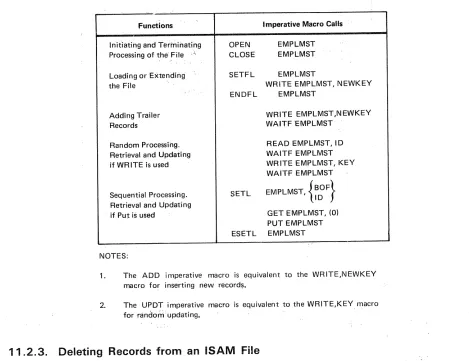
11—1 Imperative Macro Calls for Processing an OS/3 ISAM File With an Index Structure
Listed by Functions “
‘
11—2. Imperative Macro Calls for Processing a Nondirectory.OS/3 ISAM File Without an Index Structure, Listed by Functions
1 1—3. Keyword Parameters of the DTFIS Declarative Macroinstruction 1 1—4. Summary of Filename-Addressable Fields in DTFIS File Table
1 2—1. Disk-Dependent Factors for Calculating Size of Top-Level Index for an IRAM File
13—1. Summary of DTFIR Keyword Parameters ‘ . 13—16
1 3A—1. Disk-Dependent Factors for Determining Disk Space Requirements - 1 3A—1 3
13B—1. Summary of DTFMI Keyword Parameters 13B-1O
Summary of Keyword Parameters for DTFSD Macroinstruction Summary of DTFDA Keyword Parameters
Summary of DTFNI and DPCA Keyword Parameters -. - ..
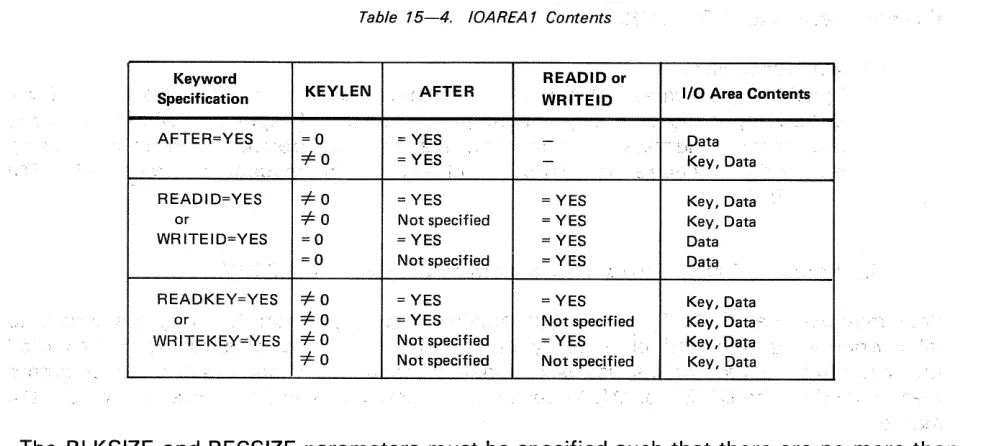
IOAREA1 Contents . ‘
Relative Disk Address (ID> Returned After a READ ‘or WRITE .
Macroinstruction When IDLOC Keyword Is Specified Record Formats for Nonindexed Disk Files
Summary of All Declarative Macro Keyword Parameters Used With the Nonindexed File Processor System
15—8. Summary of Imperative Macroinstructions for Processing Nonindexed Disk Files 15—9. Use of IOREG Keyword Parameter for Processing Blocked or Unblocked
Input Disk Files Sequentially With GET Macro.
Volume Header Label (VOL1> for an ASCII Magnetic Tape Volume First File Header Label (HDR1> for an ASCII Magnetic Tape Volume Second File Header Label (HDR2) for an ASCII Volume
First End-of-File or End-of-Volume Label (EOF1/EOV1>for an ASCII Volume Second End-of-File or End-of-Volume Label (EOF2/EOV2) for an ASCII Volume
7-1. 7-2. 7-3. 7-4.
9-1. Summary of DTFMT Keyword Parameters
.9—2. Variants of DTFMT Keyword Parameters Accepted in OS/3
9-3. Effects of Job Control VOL and LBL Statements on Data Management OPEN Transient, Standard Labeled Tape Files
9—4. Summary of Imperative Macros Used with Magnetic Tape SAM
UP-8068 Rev. 4 SPERRY UNIVAC OS/3 Contents 19
BASIC DATA MANAGEMENT Update C
16—1. File Lock Summary 16—4a
17-1. Summary of DTFPT Keyword Parameters 17-27
17—2. Significance of Bits in filenameC, Paper Tape Files 17—66
A-i. SPERRY UNIVAC Card Reader Subsystems Characteristics A-2
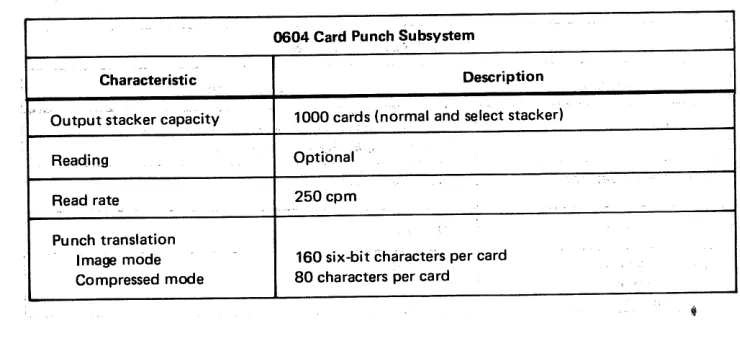
A—2. SPERRY UNIVAC Card Punch Subsystems Characteristics A—3
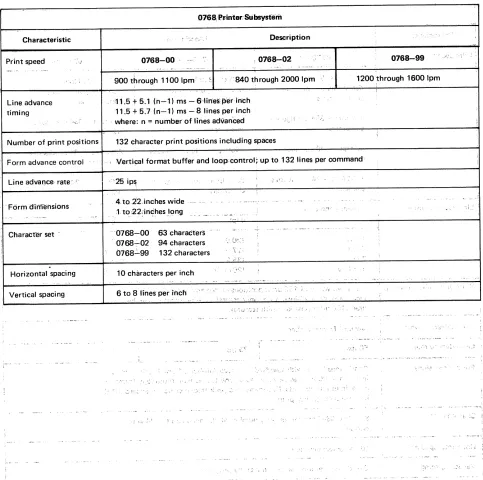
A—3. SPERRY UNIVAC Printer Subsystems Characteristics A-4
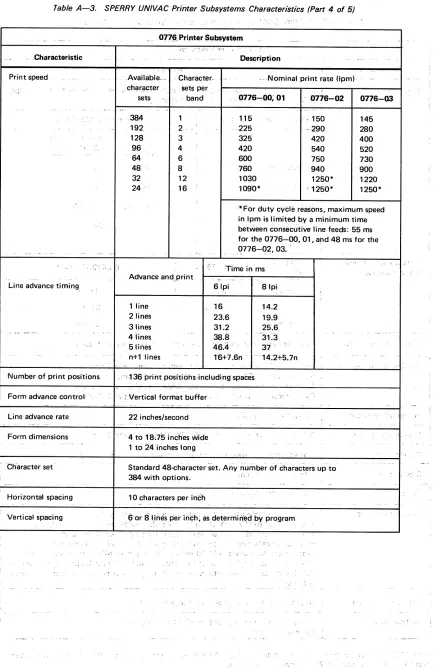
A—4. SPERRY UNIVAC Disk Subsystems Characteristics A—9
A—5. UNISERVO Subsystems Characteristics A—b
A-6. SPERRY UNIVAC 0920 Paper Tape Subsystem Characteristics A—il
B-i. OS/3 Data Management Error Messages B-3
B-iA. Data Management Error Message Subcodes B—9
B—2. OS/3 Disk Space Management Error Codes B—i 1
B—3. Significance of Bits in filenameC B—13
C-i. Cross-Reference Table: EBCDIC/ASCII/Hollerith C—3
D-i. Contents of V0L1 Label D-4
D—2. Contents of Disk Format 4 Label D—6
D—3. Contents of Disk Format 5 Label D—9
D-4. Contents of Disk Format 6 Label D-i0
D—5. Contents of Disk Format 0 Label D—i 1
D—6. Contents of Disk Format 1 Label D—i4
D-7. Contents of Disk Format 2 Label D-2i
D—8. Contents of Indexed File Information Area, Disk Format 2 Label D—23 D—9. Contents of IRAM/MIRAM File Information Area, Disk Format 2 Label D—24 D—iO. Contents of Library Information Area, Disk Format 2 Label D—25
D—i 1. Contents of Disk Format 3 Label D—27
D—i2. Diskette File Label Description D—3i
E—i. Tape Volume 1 (VOL1) Label Format, Field Description for an EBCDIC Volume E-4
E—2. First File Header Label (HDR1), Field Description E—6
E—3. Second File Header Label (HDR2), Field Description E—9
E—4. Tape File EOF1 and EOV1 Labels, Field Description E—i 1
E—5. Tape File EOF2 and EOV2 Labels, Field Description E—13
E—6. Optional User Header and Trailer Labels, Field Description for Standard Labeled
Tape Files E—i4
E-7. Volume Header Label (VOL1), Field Description for an ASCII Volume E—i8 E—8. First File Header Label (HDR1), Field Description for an ASCII Volume E—20 E-9. Second File Header Label (HDR2), Field Description for an ASCII Volume E-22 E—10. First End-of-File or End-of-Volume Label (EOF1/EOV1), Field Description
for an ASCII Volume E-24
E—i 1. Second End-of-File or End-of-Volume Label (EOF2/EOV2), Field Description
C)
0
UP-8068 Rev. 4 SPERRY UNIVAC OS/3 1-1 BASIC DATA MANAGEMENT
1.
Introduction
1.1. THE FUNCTION OF DATA MANAGEMENT
As you know, data processing programs produce desired results by accepting data as input, processing the data as appropriate, and outputting the results of the processing performed.
Beca use most data movement and retrieval operations are inherently the same, regardless of the application involved, generalized, preprogrammed data management packages have been developed to assist you in performing these tasks.
The degree of assistance you receive from these packages depends on the insight into your problems by data management developers and the success they achieve in providing you with the most flexible and convenient data management aids possible. The extent to which you can inform the data management system of the characteristics of your data and
the specific function you want performed on that data is also integral. Therefore, it is
necessary to establish conventions to communicate, or interface, with your data
management system.
Data management services available to you, the programmer, via OS/3 are varied, flexible, and powerful. Descriptions of these services and conventions for using them go well beyond the scope of what a language manual can and should contain. Hence, this and other manuals dealing exclusively with this subject are provided to facilitate your use of OS/3 data management.
1.2. BASIC AND CONSOLIDATED DATA MANAGEMENT
Until recently, the only method of data management available under OS/3 was DTF (define-the-file) or basic data management. The programmers’ means for interfacing with this data management system is through certain declarative and imperative macros related directly to the device from which data is being retrieved or to which data is being moved.
UP-8068 Rev. 4 SPERRY UNIVAC 05/3 1-2
BASIC DATA MANAGEMENT Update A
Consolidated data management generally provides all the services basic data management does, and then some. The single major difference is that MIRAM (multiple indexed random access method) files are the only disk files supported by consolidated data management.
Consolidated data management can best be described by answering the following
question: What does consolidated data management provide that basic data management doesn’t? The answers are:
A single uniform set of declarative and imperative macroinstructions
With basic data management, you must use a specific declarative macroinstruction (DTF) to define your file and the method used to access that file: DTFMT for a magnetic tape file, DTFPR for a printer file, DTFIS for an ISAM disk file, and so on.
Also with basic data management the imperative macroinstructions are not the
same for all types of access methods. Different instructions are used to perform the same functions. For example, to writea record to a tape file you must use a PUT instruction. To write a record to an ISAM file, you must use a WRITE,NEWKEY instruction.
Consolidated data management, on the other hand, has a uniform set of declarative and imperative macroinstructions that you use to define and process all types of files There are two declarative macroinstructions These are the CDIB and RIB instructions. The CDIB instruction identifies the file and the RIB instruction describes the file characteristics and processing requirements. The consolidated data management imperative macroinstructions are also the same for all types of files. For example, if you want to write a record, you use the DMOUT instruction regardless of the file type.
Control structures cannot be modified
The control structures for each basic data management DTF macroinstruction are generated and maintained within your program region. As a result, these structures can be inadvertently modified and compromise the integrity of the