COMPUTER GRAPHICS
forum
Volume 29 (2010), number 8 pp. 2363–2371How to Write a Visualization Research Paper: A Starting Point
Robert S. Laramee
Visual and Interactive Computing Group, Department of Computer Science, Swansea University, Wales, UK http://cs.swan.ac.uk/∼csbob
Abstract
This paper attempts to explain the mechanics of writing a research paper in visualization. This serves as a useful starting point for those who have never written a research paper before or have very little previous experience. After all, no one is born knowing how to write one. And yet, there are certain elements, a commonality, that should be found in virtually all good visualization research papers. We give our recommendations as to each section a good research paper consists of as well as what each section contains. This paper itself follows our recommended structure.
We believe that paper writing should start with the abstract. The abstract can be approximately 6–12 sentences. It is a difficult starting point, but it forces the author to write down a concise description of what they are researching and what the benefits are. Chances are, if the author cannot start out by writing an abstract, then it is not clear in the author’s mind what the paper should be about. Of course, the abstract will be refined and updated during the paper writing process. The abstract should concisely (1) identify the research topic, (2) describe the novelty of the presented work and (3) identify the benefits and advantages that result.
Keywords: visualization research paper, writing methodology
ACM CCS: K.3.2 [Computer and Information Science Education]: Computer Science Education
1. Introduction (Motivation)
‘Give a man a fish; you have fed him for today. Teach a man to fish; and you have fed him for a lifetime.’—Lao Tzu (Chinese proverb).
This quote summarizes the idea behind this paper. It strives to serve as a fishing rod, or at least partially, for those new to writing research papers. These brief guidelines are meant to serve as astartingpoint to those (most likely stu-dents) writing a research paper for the first time. The idea was inspired by some new PhD candidate students studying visual computing and preparing their first research paper(s). Writing a good visualization research paper is difficult, yet, students are given this task with little or no instruction. We felt a strong need to at least provide the student with some written guidelines to start with, which, to the best of our knowledge, do not exist.
Here, we go through section-by-section, those components that we believe a good research paper, in general, contains. We give general informal guidelines on the contents of each section as well. We describe theIntroduction(Section 1), Related Work(Section 2),Method(Section 3), Implementa-tion(Section 5),Results(Section 6),Conclusions and Fu-ture Work (Section 8) andAcknowledgements(Section 9), sections. We also provide recommendations on paper titles (Section 1), temporal planning (Section 1), literature search-ing (Section 2), collaborations (Section 2), diagrams and figures, images (Section 3.5), enhancements (Section 4), ap-plication papers (Section 7), performance analysis (Section 6.2), movies (Section 6.3), supplementary material (Section 6.3), proofreading (Section 9.1) and references (Section 9.2). Several citations to examples are provided for reference. We keep in mind that these topics are rather subjective and our discussion of each topic is driven by experience. The result
c
2010 The Author
Computer Graphics Forumc2010 The Eurographics
is only meant to serve as a rough guideline and a useful starting point. There is no substitute for experience or an ex-perienced advisor. This paper itself is structured according to our recommended guidelines.
Although the title of the starting section is‘Introduction’it should really beMotivation. Quickly, in one or two sentences, introduce the topic. This is followed immediately withwhy this is a useful research direction, including possible applica-tions of the presented research.‘What is this research topic good for?’is really the question a good introduction attempts to answer. See Chenet al.[CLZ07] for a good example of motivating the presented research.
After the motivation behind the subject is described, the novelty, benefits and advantages of the research are de-scribed. Remember, this is actually where a research project often starts. It begins with an idea. And one key to evaluating how good an idea is, is being able to identify its novelty and advantages. Each contribution and each benefit that reading this paper provides is identified very explicitly in a bulleted list. Possible points to mention include
• Does the presented algorithm(s) provide a novel visual-ization of some sort? That is, images never before seen. • Does the presented work provide new interaction
tech-niques not previously published?
• Does the technique described result in faster performance times than previous algorithms and if so why?
• Does the approach provide new insight in some way? • Does the work take advantage of the graphics card
hard-ware in some way? For example, using texture-mapping hardware, or hardware-accelerated interpolation? • What are the contributions, precisely, of this paper? What
does the reader potentially gain from this paper? Words such ascontribute,novelandadvantageousare used in this list. An explicit bulleted list should be used to make the subject black and white to the reviewer, otherwise, a reviewer might not understand the contribution described. See Chen et al.[CMLZ08], Garthet al.[GLT∗07] and Zhanget al. [ZYZL09] for good examples of such lists of contributions.
The presented work normally builds on a previous algo-rithm. If so, your work should inherit benefits from the pre-vious work. Those inherited advantages may also be listed. See Grabner and Laramee [GL05] for a good example of a bulleted list of inherited benefits.
To achieve the amazing benefits your research results have to offer, specific challenges must be overcome, both concep-tual and technical. Those challenges can be mentioned here very briefly.
The ‘Introduction’ section then concludes with how the rest of the paper is organized. Section 2 presents previous
work on this topic. Section 3 presents the method starting with an overview. Section 5 describes some unexpected as-pects of the our model necessary for a successful implemen-tation. Section 6 presents our results both visual and from a performance point of view. Section 7 addresses application papers. Section 8 completes the exposition with conclusions and future work.
1.1. On paper titles
Regardless of the title of your paper, in general it will infor-mally be referred to using two to three words. For example, ‘Marching Cubes: A High Resolution 3D Surface Construc-tion Algorithm’is simplified to‘The Marching Cubes’ pa-per [LC87].‘Visual Analysis and Exploration of Fluid Flow in a Cooling Jacket’ becomes‘The Cooling Jacket’paper [LGD∗05]. On one hand, the title of your paper should ide-ally be simple enough such that it can easily be remembered and identified with two or three words. On the other hand, a title should also be long enough to convey some sort of helpful meaning and description to the reader. This problem can usually be resolved using atitle:subtitlecombination, as in the case of Marching Cubes [LC87] (no pun intended).
1.2. On temporal planning
We believe a high visibility publication requires approxi-mately 2 months to write. A good, complete first draft takes about 1 month to write. During the second month, the paper can be improved with approximately four rounds (or more) of iterative feedback from a co-author(s). Taking this point of view, paper writing should start about 2 months before the proposed deadline. Extra time can be allowed for non-native speakers.
1.3. On LaTeX
In our opinion, the best software for writing papers is LATEX.
LATEX produces high quality, professional-looking output.
Virtually all conferences and journals provide LATEX
tem-plates for paper submissions. We encourage unfamiliar read-ers to explore this software. Kopka and Daly provide an excellent LATEX reference guide [KD04].
2. Related Work
The ‘Related Work’ section is actually what makes a research paper a research paper. It demonstrates to the reader that you have done your homework, reviewed the previous literature, and now are ready to present a new contribution over what has been previously published.
One of the difficult aspects of the Related Work section is choosing the proper scope, for example, how many related papers to include and which ones. For new authors, this is
something an advisor can help with. In short, each previous publication gets a two to three sentence description. In the description it is made clear to the reader how the presented work (this paper) is different (better) than the previous piece of literature.
It is important to note that there is some subjectivity in choosing which papers to refer to and also importantly, which previous literature not to refer to. In particular, the references contained in the paper may influence who is chosen to review the paper. Some senior reviewers, papers chairs, or editors may choose reviewers based on the authors appearing in the list of references (a logical and common method). This means that you as a writer may also influence (but by all means not deterministically) who ends up reviewing your paper. Given a complete list of references, a sub-set of them can be considered mandatory and some can be considered optional. Thus, some authors use the optional references to influence who will review the paper and perhaps will also try to steer away from certain reviewers.
When referring to previous work use names, not only num-bers (or initial letters). So, instead of writing, ‘In [JL97], an algorithm for the creating of evenly-spaced streamlines is presented’, write, ‘Jobard and Lefer present an algorithm for creating evenly-spaced streamlines [JL97]’. The names are much more helpful to the reader than the numbers alone. Also, the previous literature was written by real people whom, in the best case scenario, you will actually meet at a conference. Writing the names also shows a certain respect and appreciation for the previous work that numbers alone do not.
Incidentally, this paper also has related literature. Smith describes how a manuscript should be refereed [Smi90]. Lee presents another interesting paper on how to review a re-search paper [Lee95]. Cetintemel has written an excellent article about how to conduct an academic job search targeted at computer scientists [Cet01]. Globus and Raible have writ-ten a great how-to-cheat when writing a visualization paper [GR94]. Munzner [Mun08] provides a nice overview of ways to prevent an information visualization paper from being re-jected from the review process. We note this paper is targeted towards scientific visualization papers, however, we believe it is also a helpful starting point for those preparing informa-tion visualizainforma-tion manuscripts.
2.1. On the literature search
For a visualization paper, the basic previous literature search consists of looking through the previous 10 years of (1) the IEEE Visualizationconference proceedings, (2) theIEEE Transactions on Visualization and Computer Graphics(IEEE TVCG) journal papers and (3) theEuroVisconference pro-ceedings (calledVisSymuntil 2005). In principle it is sim-ple, but it is time consuming. From these three publication venues basically all other related work can be found by
look-ing through the references of the related papers found in the three aforementioned publications. First, prospective related papers are found by reading the titles. After candidates are found based on titles, then their abstracts should be read. After candidates are found based on abstract, then the full papers should be browsed.
It is also important to look for survey papers and state-of-the-art reports. Very helpful state-state-of-the-art reports are published every year at the EUROGRAPHICS conference and
also in theComputer Graphics Forumjournal. There is also a chance that a related survey paper has been published in theACM Computing Surveysjournal.
The literature search is an educational process. If you find hundreds of previous papers that appear to be related to the chosen topic, this may be a warning sign. For example, if you chose to work on isosurface rendering, then you would, in fact, find hundreds of previous papers on this topic. That means that this is already very well researched. Thus, the chances of making a contribution in this area with impact are reduced. (We learned this the hard way [LB02].) It is better to find a topic with a more manageable, preferably small, amount of previous literature. How toreada research paper is another topic [Lar10].
2.2. On collaborations
Collaborators are good for filling in the gaps when you sus-pect that there may be holes or an absence of knowledge somewhere. We think that collaborations, in general, have a tendency to increase the quality of a paper. Also, we find collaborations one of the best ways of learning new things and for networking.
3. Method (or Computational Model)
Section 3 is the main content of the paper and thus occupies the most space. It starts with an overview (Section 3.1) fol-lowed by the details of each component of your system or each stage of your method, for example Section 3.2 and so on. The name of Section 3 could be the name of your algo-rithm (if it has a name, e.g. Image Space Advection (ISA) [LvWJH04]). Section 3 could also be called justMethodor Computational Model. It presents an idealized model or pro-cess by which your algorithm or system works (or how it should work).
3.1. Method overview
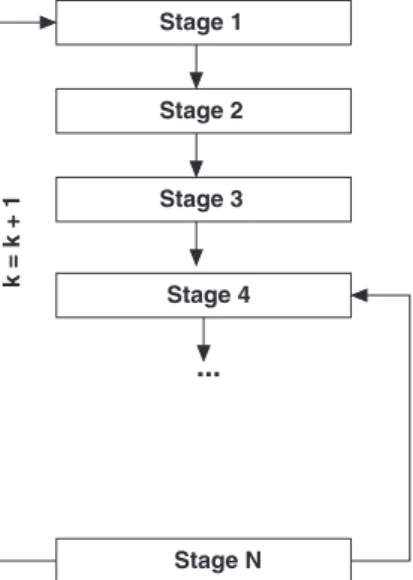
The description of any system or algorithm should start out with an overview before jumping into the details. An overview should include an overview diagram like that of Figure 1. The method overview diagram depicts the concep-tual modelthat the algorithm or system in this paper follows.
Stage 1 Stage 2 Stage 3 Stage 4 Stage N ... k = k + 1
Figure 1: Method overview. An overview diagram illustrates theconceptual model your algorithm implements. Figures should be placed at the top of the page by default. This figure was made usingXfig. Inkscapeis another good, open source tool for producing diagrams.
This is not to be confused with its implementation. Of course there is a correspondence, however, a single concept has potentially many different implementations. This subsection focuses on the concept. Other subsections that follow such as Sections 3.2 and 3.3 can describe implementation details, including pseudocode. See Chenet al.[CMLZ08], Laramee [Lar03] and Schultz and Seidel [SS08], for examples of pseu-docode describing the method. One nice property of Schultz and Seidel’s pseudocode is that it fully describes the input and output of the algorithm.
Section 3, like paper writing, can follow a divide-and-conquer approach. Just as a paper is divided up into sections, Section 3 can be broken down into subsections–starting with an overview diagram. Each subsection in Section 3 can then correspond to a component of the overview diagram.
See Gyulassy et al. [GBHP08], Jobard et al. [JEH01], Larameeet al.[LvWJH04], Spencer et al.[SLCZ09] and Van Wijk [vW05] for good examples of overview diagrams. Gyulassyet al.[GBHP08] provide a really nice diagram that exploits computer graphics to provide a concise step-by-step algorithm guide. See Larameeet al.[LHD∗04] for overview diagrams used in a state-of-the-art literature survey.
3.2. Stage 1
For each stage or component of your system or algorithm there should be a corresponding subsection in Section 3 pro-viding further details to the reader. Subsections themselves
may contain further diagrams, illustrations, examples and pseudo-code.
3.3. Stage 2
A description of the next component in the presented algo-rithm or system (from Figure 1) is presented here.
3.4. Parameters
Any new algorithm ultimately introduces new parameters, for example, threshold values, αvalues, special distances, minimum and maximum values, etc. Identifying and dis-cussing these new parameters is a good idea. Illustrating the effect of setting these parameters to a range of different val-ues is instructive and helps the reader gain an understanding of the algorithm or method being presented. In fact, during any implementation, the best value of any new parameter is generally unknown. Thus, it is best to implement them as user options since their value may change depending on the data set being evaluated. After a thorough testing phase, the new parameter may be given an optimal default value. See Jobardet al.[JL97, JEH01, JEH02], Van Wijk [vW02] and Telea and Van Wijk [TvW99], for good example discussions of new algorithm parameters.
3.5. Figures and images
Figures, images and their captions should be ‘self-contained’. By self-contained, we mean that the reader should be able to look at any figure or image, read its caption, and gain a basic understanding without having to read the main text. Enough details should be provided in the caption such that the reader is not required to read the whole paper to under-stand an image or figure. Many reviewers (and readers), will make a first pass through a paper simply by flipping through the pages, looking at the images and captions, and already gain an impression of the paper. This first pass may already influence the final reviewer’s opinion and thus the outcome of the review. If the reviewer appreciates the images and can gain an understanding of them from the captions, they may form a favourable first impression of the paper. This is true about readers in general and does not only apply to research papers. When a potential reader picks up any reading mate-rial, whether it be a newspaper, magazine or book, they first flip through it to look at the pictures. If they find an inter-esting picture, they read the caption. If they find interinter-esting pictures and captions, they may then go on to read the main text.
Figures and images that show new visualizations are very good to include in a visualization paper. In fact, that is a major goal. If an image really shows something new, then it’s probably a good figure to include. Pedagogic figures are also good. On the topic of figure quality, probably only
experience from reading other papers can help in judging the proper level of quality.
The author will make his job easier if all of his images, for example screen shots or frame buffer images, are the same resolution, perhaps through a user setting. Also, a user setting that changes the background colour to white is very useful. Images with a white background are best for papers in our opinion. We refer the reader to Tufte [Tuf83] for further stylistic guidelines.
4. Enhancements (or Extentions)
After the main details of your research method are presented in Section 3, a follow-up section may be added that includes enhancements or extentions to the basic algorithm. There may be a subsection for each enhancement or extention. See Jobard et al.[JEH02], Jobard and Lefer [JL97] and Turk and Banks [TB96] for examples of this. Enhancements or extentions do not have to be a separate section of the paper. They could be subsections of Section 3.
5. Implementation
This section is more-or-less optional. It describes the im-plementation of your model from Section 3. In particular, it describes aspects of your model that areunexpected. In other words, during the implementation of the computational model, what things came up that were unexpected. What had to be implemented in order for the model to work? Was the implementation more difficult than expected? Or is it easy? Sometimes the implementation details are also integrated into the corresponding method subsections.
6. Results and Performance
The ‘Results’ and ‘Performance Analysis’ sections can be separate, but they are often lumped together in the same sec-tion. If the performance analysis is more extensive it can be put in its own section. Separate subsections are also logical.
6.1. Results
In this section, the nicest images of your algorithm are pre-sented to both synthetic and real-world data sets. The (new) insight provided by the visualization is described. A concise description of the data set the algorithm is being applied to is also described. The following characteristics of the data sets should be given: (1) what the data sets are and perhaps what domain they come from, (2) how large the data sets are–or their resolution in the case of structured data, (3) the spatial and temporal dimensionality of the data sets should be given, (4) whether or not they are represented by structured or unstructured grids and (5) if they are multi-resolution or adaptive resolution data samples.
Hopefully, you will be able to show your algorithm being applied to data sets from another domain, for example, the visualization of simulation data, to demonstrate that your algorithm actually works in general.
6.2. Performance analysis
In visualization (and computer graphics), there’s always a trade-off between quality (or accuracy) and speed (or mem-ory and speed). Generally, the faster the performance, the lower the quality. The algorithm or system being presented should have some free parameters that can be adjusted to trade-off quality for speed and vice-versa. Essentially,every parameter whose value you are not sure of should be a user-defined parameter—an option that can actually be changed by the user at run time (not just compile time).
Remember, visualization is used for analysis, exploration and presentation. For presentation, the image quality must be at its highest, and thus performance probably at its slowest. The highest quality is used to generate the images for the pa-per, presentation and videos. For exploration, the algorithms and systems are tuned for the fast performance times possi-ble. All optional enhancements should be turned off (unless your algorithm always runs at interactive frame rates).
A table of performance times can report both aspects, opti-mized for speed, that is exploration mode, and optiopti-mized for quality, that is presentation mode. The best and most honest reports of performance times will show when the algorithm or system reaches its limits, that is when it starts to run slow due perhaps to large data sets. Algorithms also usually trade-off memory for speed. In other words, faster algorithms often require more memory, basically because more calculations are pre-processed and stored. Unfortunately, these limits are often left out of visualization research papers.
See Larameeet al.[LB02, LvWJH04], Peng and Laramee [PL08] and Spenceret al.[SLCZ09] for examples of detailed performance analysis that trade- off between performance and quality or memory and speed.
6.3. Movies and supplementary material
The submission of a research (or application) paper is gen-erally strengthened by an accompanying MPEG movie or animation. Movies are especially necessary to communicate time-dependent aspects of an algorithm or system that can-not be conveyed in static images alone. This includes aspects such as interaction, animation in a visualization and general time-dependent phenomena. An accompanying movie may also give the reviewer an impression that the work is polished (as opposed to something that was thrown together an hour before the deadline). Movies can also be exploited to show results that did not fit into the paper due to size restrictions. It is also helpful if a supplementary movie demonstrates some
of the parameters discussed in the paper (as discussed in Section 3.4).
We strongly recommend saving and submitting a sup-plementary movie in MPEG format, even if it means less compression. At the time of this writing, MPEG is the only platform-independent movie format available. And this has been the case for the last ten or so years. Regardless of what kind of computing environment the researcher is in, the read-ers and reviewread-ers come from awidevariety of backgrounds spanning multiple generations (both in human and computer life spans) and will generally be using a wide variety of com-puting platforms. Some reviewers are likely to still be using old SGI machines (for example) simply for sentimental rea-sons. If they cannot view your supplementary movie at the time of review, the opportunity is lost.
In terms of the mechanics, we recommend adding a user option to your software or system that automatically: (1) re-sizes the viewer to 5122 pixels (Old MPEG players can
only handle movie resolutions which are a power of two.) and (2) saves each frame as a still image in JPEG (or PNG) format. The still images are used as input to an applica-tion which converts them to MPEG format. We useAdobe Premiere (http://www.adobe.com/products/premiere/) be-cause of its rich set of features. Adobe Premiere is expensive so there are free, alternatives such asVideoMach(http://www.gromada.com/videomach.html). However, VideoMach is not so feature-rich. The still im-ages can then be edited, annotated and re-ordered (etc.), as needed. The MPEG video can either be uploaded using the same submission system provided by the conference or jour-nal. Alternatively, a URL may be provided in the paper itself pointing to the video in the case that no submission option is available. Don’t forget to check the maximum submission file size when compiling a video. If the maximum file size submission seems to low, a request can always be made to increase it.
See the author’s web site for several sample supplementary videos.
7. Application Papers
An application paper presents the contribution of visualiza-tion techniques towards the understanding of applicavisualiza-tion- application-specific data. This class of paper examines and discusses the effectiveness of the visualization methods for a particular ap-plication. In other words, an application paper describes how known, off-the-shelf visualization techniques have been used (and possibly adapted) to study a domain-specific problem. It is not essential to present original visualization techniques. Although there is overlap, in terms of content and layout, with research papers, there are also differences.
Section 1, theIntroduction, is very similar for an applica-tion paper. It provides the motivaapplica-tion for studying the topic at hand.
Section 2,Related Work, is also very similar to a normal research paper. However, in the case of an application pa-per, there are also additional related research papers from the application domain being studied. For example, if the appli-cation paper studies a problem from the biological sciences, then the related work section may also contain references from the biological sciences that may not normally be fea-tured in a visualization research paper.
An application paper may contain an additional section 3, Background. The Background section may describe some pre-requisite knowledge stemming from the application do-main being studied. In other words, the Background section may provide information not presumed to be knowna priori to a typical computer scientist, but may be well-known to a scientist from the application domain. One of the impor-tant roles of the Background section is to describe explicitly the questions that the domain-specific scientist is trying to answer when carrying out their work. See Larameeet al. [LSH04, LWSH04, LGD∗05] for examples of these types of questions.
Instead of theMethodsection found in a research paper, an application paper contains a Visualizationssection. The Visualizations section describes and presents all of the visu-alizations that were applied to the domain-specific problem. It also details the additional advantages or insights that each visualization has to offer over previous studies of the same problem. Often, other disciplines will use simple visualiza-tions to study their data such as time-series plots, 2D scatter plots, and bar charts, etc. The Visualizations section illus-trates the advantages of your techniques over the traditional, simple visualizations. The Method section should also care-fully describe how a particular visualization technique has been adapted to be suitable to the problem at hand. See Scheuermann et al. [SBH99] for an example of this.
Instead of theResultssection normally found in a research paper with a traditional performance analysis, an application paper presents aDomain Expert Reviewsection. See Grundy et al. [GJL∗09] for an example of domain expert review. The two most common criticisms of an application paper are that (1) no additional insight is provided by the visualizations used by the author (over those used previously) and (2) no feedback has been given by an expert from the application domain. Domain expert feedback is an essential ingredient in an application paper. The visualizations must be shown to a domain expert and the domain expert should provide some feedback.
The remaining Conclusions and Future Work sections are similar to a research paper.
8. Conclusions and Future Work
The Conclusions section simply summarizes both the nov-elty of the presented work and lists the resulting advan-tages. Remind the reader why the presented work is so
good and what’s new. Basically, it’s like a concise, one-to-two paragraph summary of the abstract and introduction sections.
The future work should be short. Generally it’s about three sentences of possible future extentions to the presented work. If you’re not sure what to write, it’s almost always possible to include a GPU-centred version of the presented work. Extending the visualization to a higher dimensionality is also often a future work project.
Example: We have presented the essentials to writing a re-search paper in visualization. Although every rere-search paper is different, there is some commonality that can be found in all good research papers. Here we attempt to identify that commonality and describe the essential necessary ingredi-ents of paper sections and their contingredi-ents. Several example research papers are cited for reference. The result is meant to serve as a starting point for those with little or no experience in writing research papers. Writing research papers is both an art and an engineering exercise and no one is born knowing how.
Future work includes writing an HCI version of this paper and writing a more general version that applies to computer science research papers.
9. Acknowledgements
The Acknowledgements section thanks any agency or orga-nization that may have contributed funding to the presented research, for example the EPSRC, KPlus, the NIH, the NSF, etc. This section also mentions any people that may have con-tributed in some way, for example with the implementation or with discussions or feedback.
Thanks to Ben Spencer of Swansea University for provid-ing the impetus behind this paper. Thanks also to Eugene Zhang of Oregon State University for his valuable feedback. We thank Edward Grundy of Swansea University for his help in proofreading the paper. We thank all of our previous co-authors, especially R. Daniel Bergeron of the University of New Hampshire, Durham, Colin Ware also at the University of New Hampshire Durham, and Helwig Hauser at the Uni-versity of Bergen, Norway, for teaching us how to write a research paper.
There is one other thing the Acknowledgements section can be used for and that is to thank potential reviewers. If you have a strong suspicion about who will end up reviewing your paper, then it does not hurt to put this person’s name in the Acknowledgements section and thank them in some capacity. See Larameeet al.[LSH04] for an example of this used in practice. The first author had a strong suspicion that Van Wijk would be a reviewer of that paper and acknowledged his contributions before the review process.
Questions, comments, suggestions for improvement, con-tributions to this paper, or any other feedback is not only welcome but encouraged. Please contact the first author.
9.1. On proofreading
In the ideal world, a paper is proofread by someone outside the project the day before submission to look for small ty-pographical errors. This manuscript has gone through this process. Fresh new eyes that do not necessarily know the topic can be good for spotting these things, at least in our experience.
My former advisor, Helwig Hauser, helped me out one day by proofreading a paper I had been working on [LW02]. The version of the manuscript he reviewed had mistakes in the references–comments left behind by accident. My advisor pointed out the errors by saying, ‘Bob,. . .you know some people, for example reviewers,start with the referenceswhen reading a paper, looking them over very carefully’. I thought to myself, ‘What kind of anal-retentive geek does that?’
I have turned into one of those people. Whenever I re-view a paper, I start by detaching the references from the rest of the paper and laying them aside, making it easier to check them as I read through the paper. References should be accurate and complete, that is with page numbers, etc. A pa-per without complete and correct references can leave a bad impression on the reader and detract from the paper’s credi-bility. Errors can be interpreted as sloppy and also be a sign of hastiness.
9.2. References
[Cet01] CETINTEMELU.: On the Academic Interview Circuit: An end-to-end discussion.SIGMOD Record 30, 4 (2001), 116–122.
[CLZ07] CHENG., LARAMEER., ZHANGE.: Advanced
visu-alization of engine simulation data using texture synthesis and topological analysis. In NAFEMS World Congress Conference Proceedings(May 22–25 2007), NAFEMS, p. 15. (full proceedings on CDROM).
[CMLZ08] CHENG., MISCHAIKOWK., LARAMEER. S., ZHANG
E.: Efficient morse decompositions of vector fields.IEEE Transactions on Visualization and Computer Graphics 14, 4 (2008), 1–15.
[GBHP08] GYULASSY A., BREMER P.-T., HAMANN B.,
PASCUCCIV.: A practical approach to Morse-Smale com-plex computation: Scalability and generality.IEEE Trans-actions on Visualization and Computer Graphics 14, 6 (2008), 1619–1626.
[GJL*09] GRUNDYE., JONESM. W., LARAMEER. S., WISON
R. P., SHEPARD E. L. C.: Visualization of sensor data
(Proceedings of EuroVis June 10–12, 2009, Berlin, Ger-many) 28, 3 (2009), 815–822. (Recipient of the Best Paper Award).
[GL05] GRABNERM., LARAMEER. S.: Image space
advec-tion on graphics hardware. In Proceedings of the 21st Spring Conference on Computer Graphics(May 2005), pp. 75–82.
[GLT*07] GARTHC., LARAMEER., TRICOCHEX., SCHNEIDERJ.,
HAGENH.: Extraction and visualization of swirl and tumble motion from engine simulation data. InTopology-Based Methods in Visualization (Proceedings of Topo-in-Vis 2005)(2007), Mathematics and Visualization, Springer, pp. 121–135.
[GR94] GLOBUSA., RAIBLEE.: Fourteen ways to say nothing
with scientific visualization. InProceedings of the EEE Computer(July 1994), pp. 86–88.
[JEH01] JOBARD B., ERLEBACHER G., HUSSAINI M. Y.:
Lagrangian-Eulerian advection for unsteady flow visu-alization. InProceedings of the IEEE Visualization ’01 (October 2001), IEEE Computer Society, pp. 53–60. [JEH02] JOBARD B., ERLEBACHER G., HUSSAINI Y.:
Lagrangian-Eulerian advection of noise and dye tex-tures for unsteady flow visualization.IEEE Transactions on Visualization and Computer Graphics 8 3 (2002), 211–222.
[JL97] JOBARD B., LEFER W.: Creating evenly–spaced
streamlines of arbitrary density. InProceedings of the Eu-rographics Workshop on Visualization in Scientific Com-puting ’97(1997), vol. 7, pp. 45–55.
[KD04] KOPKAH., DALYP. W.:A Guide To LaTeX(4 edition).
Addison–Wesley, Boston, MA, 2004.
[Lar03] LARAMEER. S.: FIRST: A flexible and interactive
resampling tool for CFD simulation data.Computers & Graphics 27, 6 (2003), 905–916.
[Lar10] LARAMEER. S.: How to read a visualization research
paper: Extracting the essentials. In Proceedings of the IEEE Computer Graphics & Applications (IEEE CG&A) (2010), forthcoming (available online).
[LB02] LARAMEER. S., BERGERONR. D.: An isosurface
con-tinuity algorithm for super adaptive resolution data. In Advances in Modelling, Animation, and Rendering: Com-puter Graphics International (CGI 2002)(July 1–5 2002), Computer Graphics Society, Springer, pp. 215–237. [LC87] LORENSEN W. E., CLINE H. E.: Marching cubes:
a high resolution 3D surface construction algorithm. In Computer Graphics (Proceedings of ACM
SIG-GRAPH 87, Anaheim, CA) (July 27–31 1987), ACM, pp. 163–170.
[Lee95] LEEA. S.: Reviewing a manuscript for publication. Journal of Operations Management 13, 1 (July 1995), 87–92.
[LGD∗05] LARAMEER. S., GARTHC., DOLEISCHH., SCHNEIDER
J., HAUSERH., HAGENH.: Visual analysis and exploration of fluid flow in a cooling jacket. In Proceedings IEEE Visualization 2005(2005), pp. 623–630.
[LHD∗04] LARAMEER. S., HAUSER H., DOLEISCHH., POST
F. H., VROLIJKB., WEISKOPFD.: The state of the art in
flow visualization: dense and texture-based techniques. Computer Graphics Forum 23, 2 (June 2004), 203–221. [LSH04] LARAMEER. S., SCHNEIDERJ., HAUSERH.:
Texture-based flow visualization on isosurfaces from compu-tational fluid dynamics. In Data Visualization, The Joint Eurographics-IEEE TVCG Symposium on Visual-ization (VisSym ’04) (2004), Eurographics Association, pp. 85–90, 342.
[LvWJH04] LARAMEER.,VAN WIJKJ., JOBARDB., HAUSER
H.: ISA and IBFVS: Image space based visualization of flow on surfaces.IEEE Transactions on Visualization and Computer Graphics 10, 6 (2004), 637–648.
[LW02] LARAMEE R. S., WARE C.: Rivalry and
interfer-ence with a head mounted display. ACM Transactions on Computer-Human Interaction (TOCHI) 9, 3 (2002), 238–251.
[LWSH04] LARAMEER., WEISKOPFD., SCHNEIDERJ., HAUSER
H.: Investigating swirl and tumble flow with a comparison of visualization techniques. InProceedings of the IEEE Visualization 2004(2004), pp. 51–58.
[Mun08] MUNZNERT.: Information Visualization: Human-Centered Issues and Perspectives, Springer LNCS Volume 4950. Springer, 2008, ch. Process and Pitfalls in Writ-ing Information Visualization Research Papers, pp. 134– 153.
[PL08] PENGZ., LARAMEER. S.: Vector glyphs for surfaces:
A fast and simple glyph placement algorithm for adaptive resolution meshes. In Proceedings of Vision, Modeling, and Visualization (VMV) 2008(2008), pp. 61–70. [SBH99] SCHEUERMANNG., BURBACHH., HAGENH.:
Visual-izing planar vector fields with normal component using line integral convolution. InProceedings of the IEEE Vi-sualization ’99(1999), pp. 255–262.
[SLCZ09] SPENCER B., LARAMEE R. S., CHEN G.,
image-based approach.Computer Graphics Forum 28, 6 (2009), 1618–1631.
[Smi90] SMITHA. J.: The task of the referee.Computer 23,
4 (April 1990), 65–71.
[SS08] SCHULZT., SEIDELH.-P.: Estimating crossing fibers:
A tensor decomposition approach. IEEE Transactions on Visualization and Computer Graphics 14, 6 (2008), 1635–1642.
[TB96] TURKG., BANKSD.: Image-guided streamline
place-ment. InACM SIGGRAPH 96 Conference Proceedings (1996), pp. 453–460.
[Tuf83] TUFTEE. R.: The Visual Display of Quantitative Information. Graphics Press, Cheshire, CT, 1983.
[TvW99] TELEAA.,VANWIJKJ.: Simplified representation
of vector fields. InProceedings IEEE Visualization ’99 (1999), pp. 35–42.
[vW02] VAN WIJK J. J.: Image based flow visualization. ACM Transactions on Graphics 21, 3 (2002), 745– 754.
[vW05] VANWIJKJ. J.: The value of visualization. In Pro-ceedings of the IEEE Visualization ’05(2005), IEEE Com-puter Society, pp. 79–86.
[ZYZL09] ZHANGE., YEHH., ZHONGZANGL., LARAMEER. S.:
Asymmetric tensor analysis for flow visualization.IEEE Transactions on Visualization and Computer Graphics 15, 1 (2009), 106–122.