Abstract—Android open source mobile operating system has been used by major smartphone manufacturing companies. Its market share also exceeded 80% in the third quarter of 2013. Turnkey solution, offed by MediaTek, helps phone makes to build their phones from a phone template. This easy-to-make solution produces a large volume of Android-powered no-brand phones. It is crucial to ensure the compatibility and reliability of apps run on these phones. This study proposes test cases for performing system testing, compatibility testing, and automated stress testing of Android apps. Our experimental results show the validity of the test cases.
Index Terms—Android apps testing, no-brand smartphone, test automation, test case.
I. INTRODUCTION
The market share of Android mobile operating system exceeded 80% in the third quarter of 2013 [1]. According to a report published by New York Times regarding a modern smartphone making process, MediaTek, a Taiwanese chip maker, not only simply provides a chip but also “offers instructions on how to build a phone, the software architecture to run it and dedicated consultants to advise phone makers through the production process” [2]. The turnkey solution offered by MediaTeck lowers the requirements to build a smartphone, phone makers who adopt this solution can easily build their own phones which are variations of the phone template provided. Therefore, the “no-brand” phones can reach the market quickly. Because of the large volume of easy-to-make no-brand phones, it is important for the makers to have a good testing plan to ensure the quality, compatibility, and reliability of their products. Android operating system has been widely adopted by these no-brand phones. Therefore, there is a need to have good test cases to guide the testing of Android apps run on these phones.
Most of past studies focused on the testing of computer software, little attention has been paid to the testing of mobile applications. In order to fill in the gap on mobile application testing, this study attempts to answer the following research questions:
How to develop test cases for verifying the functionality of mobile phones?
How to prepare test scripts for automation?
Manuscript received April 9, 2014; revised June 15, 2014.
Hsiu-Li Liao and Wan-Chun Chao are with the Department of Information Management, School of Business, Chung Yuan Christian University, Chung Li, Taiwan 32023 ROC (e-mail: [email protected], [email protected]).
Chen-Huei Chou is with the School of Business, College of Charleston, Charleston SC 29464 USA (e-mail: [email protected]).
Does test automation improve the effectiveness of mobile application testing?
The rest of the paper is organized as follows. First, we discuss the background of software testing and Android application development. We next propose some test cases for coverage testing in the research methodology section. Moreover, we report the experimental results. Finally, conclusions and discussions are made.
II. BACKGROUND
A. Software Testing
Computer programs may contain errors which are not detectable by compiler. Compiler can detect syntax errors but not the meaning of the program [3]. Myers [4] stated that “testing is the process of executing a program with the intent of finding errors.” Also, software testing is any activity “aimed at evaluating an attribute or capability of a program or system” [5]. It was recommended that the testing is better to be performed by someone who is not part of the developers. Moreover, using a good test case has a high probability of finding an undiscovered error.
Testing can be broadly categorized into white-box testing and black-box testing. White-box testing is normally performed internally especially during the early stage of software development, while black-box testing is normally conducted externally when the development is completed. The focus of the white-box testing is on the depth of testing. Structural testing over all possible inputs over statements (e.g. if, while, loop, etc.) is performed and expected outcomes are compared. The goal of black-box testing is to confirm that the program works the way it is supposed to work. The coverage of testing which utilizes normal and extreme input values is the aim of black-box testing.
B. Android Mobile Application Development
The applications run on Android mobile phones are the apps written in Java programming language. Google released the first edition of Android Software Development Kit (SDK) on September 2008. The SDK compiles the application codes, data, and recourse files into an archive package called Android Package (APK). This package file has an .apk suffix. The APK of an app can be installed to Android operating system which is a Linux-based system to host different apps. Each app is treated as a different user in the operating system and one unique user ID is assigned to the app when the app is executed. All files related to the app are restricted to the app based on the assigned user ID. Each app has its own virtual machine and this virtual machine is isolated from other apps.
Functional Validation and Test Automation for Android
Apps
Android Debug Bridge (ADB) is a command line tool provided by the SDK. It allows developers to communicate with a connected Android-powered device. It also offers a way to install APKs, run shell commands, store logs, and emulate touch actions from screen. The shell commands, emulation of touchscreen actions, and captured logs are beneficial for testing. The shell commands can be used to verify the connection between a PC and Android-powered devices. A hit from touchscreen can be emulated based on the coordinate information given. The shell commands can also be automated by running a script. ADB can be used for grey-box testing, which is a mixture of white-box testing and black-box testing.
In addition, monkeyrunner is another tool provided by SDK. It’s powered by Python program. It provides event control over an Android-powered device. The events include key/button controls, drag/slide actions, touch actions, capture screenshots, and multiple device control. It can be used for functional testing by providing action keycode and corresponding coordinate. The captured screenshots can be compared with expected outcomes for regression testing. Monkeyrunner can be used for black-box testing through the emulation of actions.
III. RESEARCH METHODOLOGY
One of the main focuses of the study is on the test case development for the applications on Android mobile phones. In particular, we developed test cases for system testing, compatibility testing, and stress testing of Android apps.
In testing mobile applications, Selvam and Karthikeyani [6] raised up some concerns and challenges. These include the type of model device, the version of mobile operating systems, the method to test compatibility, and the amount of required testing. Testing can be further categorized into different levels: unit testing, integration testing, system testing, user-interface testing, regression testing, and acceptance testing.
Different from software on computers, the mobile applications are normally embedded to hardware devices which need to follow telecommunication regulations from various countries. The mobile applications on smart phones deal with a variety of activities such as the interactions with various hardware components, communications with operation system, memory management, and interactions with other applications and user interface. In order to test a particular mobile application, it is recommended to have a comprehensive test case. The analysis of logs generated by the test tool would be helpful to identify the defects of the application [7].
Following the guidelines provided by GSM Association [8], MMS Conference Document Version 2.0.0 [9], and CMMI for Software Engineering Version 1.1 [10], [11], we developed test cases for testing mobile applications. In each case, we clearly define the test purpose, initial condition, testing procedure, and expected behavior.
A. Test Case Design for System Testing
The main focus of the testing coverage was on the system testing and the compatibility testing. Although there is no message size limit specified in the Multimedia Messaging
Service (MMS) standard, different carriers set different limits for their users while sending files over MMS. For example, AT&T limits the message size to 600 kilobytes1 and Verizon set the size limit to 1.2 megabytes2. To reflect the reality using transmissions of images over MMS, we developed a test case using four different types of images to handle the coverage of testing. The images varied in file sizes and image resolutions. The JPEG images were: 1) with the normal size under the limit of 600 kilobytes specified by AT&T, 2) with the large size above the limit of 600 kilobytes, 3) with small pixels 160x120, and 4) with large pixels 640×480, 1280×960, 2400×1800. Fig. 1 shows the details of the test case. This test case should be performed four times using four different JPEG images. Correct JPEG file should be loaded on step 1 of the test procedure.
Test Purpose
To ensure that a JPEG image is correctly transferred over Multimedia Messaging Service.
Initial Condition
1. The MMS on both sender’s and recipient’s mobile phone is in idle mode.
2. On sender’s side, the JPEG image is available in the picture browser of the MMS.
Test Procedure
1. On sender’s side, create a new MMS, insert the JPEG image file, and send the message.
2. Check recipient’s MMS application. If a JPEG image is received. Verify the image with the source from the sender.
Expected Behavior
The message is correctly sent from sender’s MMS and received by recipient’s MMS with correct JPEG image.
Fig. 1. Test case for transferring a JPEG file over MMS.
B. Test Case Design for Compatibility Test
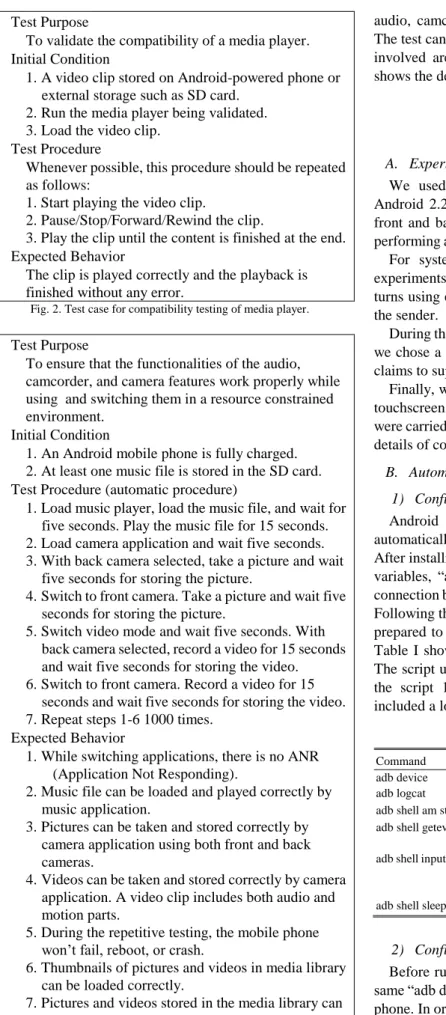
In order to test the compatibility of video playback feature of a mobile application, we developed a test case (listed in Fig. 2) using different video formats. A video file saved with the same file extension may use different codecs to encode. For example, AVI (Audio Video Interleave) is a popular container file format created by Microsoft in 1992. An AVI file can contain video and audio encoded by different combinations of codecs such as uncompressed, DivX, H.264 AVC, etc. If a codec is not supported by a player, the video cannot be decoded to be played. We used FFmpeg (http://www.ffmepg.org) to prepare video clips in various formats using different codecs listed as follows:
1) Flash Video in .flv 2) MPEG-4 in .mp4 3) H.264 in .avi 4) Matroska in .mkv 5) Quick Time in .mov
1 AT&T MMS size limitation listed on its official webpage:
http://www.att.com/esupport/article.jsp?sid=53119&cv=820#fbid=hE2-xB m08w9
2
Verizon MSS size limitation listed on its official webpage: http://developer.verizon.com/content/vdc/en/verizon-tools-apis/verizon_api s/network-api/faqs/faq-multimedia-messaging-system-mms.html#8
Test Purpose
To validate the compatibility of a media player. Initial Condition
1.A video clip stored on Android-powered phone or external storage such as SD card.
2.Run the media player being validated. 3.Load the video clip.
Test Procedure
Whenever possible, this procedure should be repeated as follows:
1. Start playing the video clip.
2. Pause/Stop/Forward/Rewind the clip.
3. Play the clip until the content is finished at the end. Expected Behavior
The clip is played correctly and the playback is finished without any error.
Fig. 2. Test case for compatibility testing of media player.
Test Purpose
To ensure that the functionalities of the audio, camcorder, and camera features work properly while using and switching them in a resource constrained environment.
Initial Condition
1.An Android mobile phone is fully charged. 2.At least one music file is stored in the SD card. Test Procedure (automatic procedure)
1.Load music player, load the music file, and wait for five seconds. Play the music file for 15 seconds. 2.Load camera application and wait five seconds. 3.With back camera selected, take a picture and wait
five seconds for storing the picture.
4.Switch to front camera. Take a picture and wait five seconds for storing the picture.
5.Switch video mode and wait five seconds. With back camera selected, record a video for 15 seconds and wait five seconds for storing the video. 6.Switch to front camera. Record a video for 15
seconds and wait five seconds for storing the video. 7.Repeat steps 1-6 1000 times.
Expected Behavior
1.While switching applications, there is no ANR (Application Not Responding).
2.Music file can be loaded and played correctly by music application.
3.Pictures can be taken and stored correctly by camera application using both front and back cameras.
4.Videos can be taken and stored correctly by camera application. A video clip includes both audio and motion parts.
5.During the repetitive testing, the mobile phone won’t fail, reboot, or crash.
6.Thumbnails of pictures and videos in media library can be loaded correctly.
7.Pictures and videos stored in the media library can be browsed and played correctly.
Fig. 3. Test Case for Automated Stress Testing
C. Test Case Design for Automated Stress Testing
For stress testing, we prepared a test case which utilizes
audio, camcorder, and camera features of a mobile phone. The test can be performed automatically. The Android APKs involved are music player, camcorder, and camera. Fig. 3 shows the details of the test case.
IV. EXPERIMENTS AND RESULTS
A. Experimental Environment
We used two no-brand mobile phones equipped with Android 2.2 and a 5-inch WVGA (800x600) screen. It has front and back cameras. 4GB SD card was inserted. While performing automatic testing, a PC with Windows 7 was used. For system testing, we used AT&T and Verizon for experiments. For each of the four types of image files, we took turns using either the AT&T phone or the Verizon phone as the sender.
During the repeated coverage testing on playing video clips, we chose a top ranked Android media player MX Player. It claims to support a variety of video formats.
Finally, we used ADB shell and monkeyrunner to emulate touchscreen controls for a series of stress tests. Both methods were carried 10 times. In the next sub-section, we describe the details of configurations using the two emulation tools.
B. Automatic Testing Configuration
1) Configuration using android debug bridge
Android Debug Bridge (ADB) shell was used to automatically control mobile phone and perform stress testing. After installing ADB shell and setting Windows environment variables, “adb device” command was used to confirm the connection between the mobile phone and PC over USB cable. Following the procedure listed in stress test case, a script was prepared to call ADB commands and perform various tests. Table I shows the ADB shell commands used in the script. The script used is listed in Appendix A. In order to perform the script 1000 times for stress test, a batch file which included a loop was used.
TABLEI:ADBSHELL COMMAND
Command Action
adb device List Android device attached adb logcat Read log of events
adb shell am start –n “APK” Load a particular APK application adb shell getevent Get event triggered from touchscreen, X
and Y coordinate can be retrieved adb shell input keyevent “value” Trigger a particular event
value=27: camera value=79: headsethook adb shell sleep “SEC” Pause for SEC seconds
2) Configuration using monkeyrunner
Before running a script using monkeyrunner, we used the same “adb device” command to confirm the connection of the phone. In order to use monkeyrunner to emulate touch screen actions, we used Hierarchy Viewer provided by Android SDK to get coordinate of application icons. Monkeyrunner requires Python to run. The script we used was written in Python. The device.touch(X, Y, ”DOWN_AND_UP) command was used to emulate a complete touch action on coordinate (X,Y). The
monkeyrunner API MonkeyRunner.sleep(“value”) was used to pause the test for the number of seconds specified in “value”. The complete script is attached in Appendix B.
C. Results
1) System testing results
Four different image files were used for system testing. When using a JPEG image less than 600 kilobytes, both phones can send and receive the image file over MMS correctly, no matter using AT&T or Verizon as the sender. Similarly, we did not find any error using small resolution file with 160×120 pixel dimension. Errors occurred during the transmissions of image files larger than 600 kilobytes and image files in 640×480, 1280×960, 2400×1800 pixel dimensions. The possible reason of the errors was due to the limitation of AT&T’s support of large size files over MMS.
2) Compatibility testing results
Since a top ranked Android media player MX Player was used for compatibility test, the player passed the playback testing of all five video formats prepared. Their claim of wide-range video-format support was validated in our test. Also, the phone supported the features carried by the player.
3) Stress test results
Based on the 10-run logs captured from ADB shell and monkeyrunner, we did not find any error occurred. Both methods showed that the no-brand Android-powered phone passed the stress testing. ADB shell not only emulates the touch actions but also sends system commands to load applications. Since ADB makes system calls to load APKs, it can capture potential errors occurred among the switch of applications if they share the same resources on multitasking. However, monkeyrunner completely emulates users’ touch actions on everything. It is great for functional testing in automation.
In addition, each cycle took about 110 seconds to complete. In order to finish the 10-run 1000-cycle tests, the automation process spent over 300 hours. Although this is a relatively long term testing, the testing in automation provided a reliable, efficient, and effective solution, compared to testing performed by human software engineers.
V. CONCLUSION
Due to the needs of low-cost smartphones in low income countries, no-brand Android-powered smartphones have been manufactured to meet the demand. However, the reliability and compatibility of such phones have been the major concerns to potential consumers. This study established system and compatibility test cases as well as automated stress test cases to address the concerns.
The contribution of this study is in two folds. First, it fills in the gap of empirical research testing functionality of no-brand Android-powered smartphones. Second, it demonstrates the feasibility of performing automated testing on Android apps. Practitioners or software engineers may replicate the tests with minor changes to meet their requirements (e.g. different coordinate due to different screen sizes).
This study established the test cases for some typical
functionality of modern Android-powered smartphones. However, there are many other apps not included in the study. Future studies may adapt our test cases for other apps. Also, for the purpose of generalizability, it is suggested to replicate the study using different versions of operating system and different phones.
APPENDIX
A. Android Debug Bridge Test Script
adb shell sleep 5
adb shell am start -n com.android.music/com.android.music.MediaPlaybackActivity
adb shell echo -e "***************Enter Music***************" adb shell sleep 5
adb shell input keyevent 79 adb shell sleep 15
adb shell sendevent /dev/input/event0 1 158 1 adb shell sendevent /dev/input/event0 1 158 0 adb shell sleep 5
adb shell am start -n com.android.camera/com.android.camera.Camera adb shell echo -e "***************Enter Camera***************" adb shell sleep 5
adb shell sendevent /dev/input/event1 3 48 255 adb shell sendevent /dev/input/event1 3 53 42 adb shell sendevent /dev/input/event1 3 54 465 adb shell sendevent /dev/input/event1 3 50 6 adb shell sendevent /dev/input/event1 0 2 0 adb shell sendevent /dev/input/event1 0 0 0 adb shell sendevent /dev/input/event1 3 48 255 adb shell sendevent /dev/input/event1 3 53 42 adb shell sendevent /dev/input/event1 3 54 465 adb shell sendevent /dev/input/event1 3 50 6 adb shell sendevent /dev/input/event1 0 2 0 adb shell sendevent /dev/input/event1 0 0 0 adb shell sendevent /dev/input/event1 3 48 0 adb shell sendevent /dev/input/event1 3 53 42 adb shell sendevent /dev/input/event1 3 54 465 adb shell sendevent /dev/input/event1 3 50 0 adb shell sendevent /dev/input/event1 0 2 0 adb shell sendevent /dev/input/event1 0 0 0
adb shell echo -e "======Sensor 1 Capture Picture Finished======" adb shell sleep 5
adb shell sendevent /dev/input/event1 3 48 255 adb shell sendevent /dev/input/event1 3 53 293 adb shell sendevent /dev/input/event1 3 54 35 adb shell sendevent /dev/input/event1 3 50 6 adb shell sendevent /dev/input/event1 0 2 0 adb shell sendevent /dev/input/event1 0 0 0 adb shell sendevent /dev/input/event1 3 48 0 adb shell sendevent /dev/input/event1 3 53 293 adb shell sendevent /dev/input/event1 3 54 35 adb shell sendevent /dev/input/event1 3 50 6 adb shell sendevent /dev/input/event1 0 2 0 adb shell sendevent /dev/input/event1 0 0 0 echo -e "---Switch Camera Sensor---"
adb shell sleep 5
adb shell sendevent /dev/input/event1 3 48 255 adb shell sendevent /dev/input/event1 3 53 42 adb shell sendevent /dev/input/event1 3 54 465 adb shell sendevent /dev/input/event1 3 50 6 adb shell sendevent /dev/input/event1 0 2 0 adb shell sendevent /dev/input/event1 0 0 0 adb shell sendevent /dev/input/event1 3 48 255 adb shell sendevent /dev/input/event1 3 53 42 adb shell sendevent /dev/input/event1 3 54 465 adb shell sendevent /dev/input/event1 3 50 6 adb shell sendevent /dev/input/event1 0 2 0 adb shell sendevent /dev/input/event1 0 0 0 adb shell sendevent /dev/input/event1 3 48 0 adb shell sendevent /dev/input/event1 3 53 42 adb shell sendevent /dev/input/event1 3 54 465
adb shell sendevent /dev/input/event1 3 50 0 adb shell sendevent /dev/input/event1 0 2 0 adb shell sendevent /dev/input/event1 0 0 0
adb shell echo -e "======Sensor 2 Capture Picture Finished======" adb shell sleep 5
adb shell sendevent /dev/input/event1 3 48 255 adb shell sendevent /dev/input/event1 3 53 180 adb shell sendevent /dev/input/event1 3 54 463 adb shell sendevent /dev/input/event1 3 50 6 adb shell sendevent /dev/input/event1 0 2 0 adb shell sendevent /dev/input/event1 0 0 0 adb shell sendevent /dev/input/event1 3 48 0 adb shell sendevent /dev/input/event1 3 53 180 adb shell sendevent /dev/input/event1 3 54 463 adb shell sendevent /dev/input/event1 3 50 0 adb shell sendevent /dev/input/event1 0 2 0 adb shell sendevent /dev/input/event1 0 0 0
adb shell echo -e "***************Enter Camcorder**************" adb shell sleep 5
adb shell input keyevent 27 adb shell sleep 15 adb shell input keyevent 27
adb shell echo -e "======Sensor 1 Record Video Finished======" adb shell sleep 5
adb shell sendevent /dev/input/event1 3 48 255 adb shell sendevent /dev/input/event1 3 53 293 adb shell sendevent /dev/input/event1 3 54 35 adb shell sendevent /dev/input/event1 3 50 6 adb shell sendevent /dev/input/event1 0 2 0 adb shell sendevent /dev/input/event1 0 0 0 adb shell sendevent /dev/input/event1 3 48 0 adb shell sendevent /dev/input/event1 3 53 293 adb shell sendevent /dev/input/event1 3 54 35 adb shell sendevent /dev/input/event1 3 50 6 adb shell sendevent /dev/input/event1 0 2 0 adb shell sendevent /dev/input/event1 0 0 0 echo -e "---Switch Camera Sensor---"
adb shell sleep 5
adb shell input keyevent 27 adb shell sleep 15 adb shell input keyevent 27
adb shell echo -e "======Sensor 1 Record Video Finished======" adb shell sleep 5
adb shell sendevent /dev/input/event0 1 158 1 adb shell sendevent /dev/input/event0 1 158 0 adb shell sleep 5
adb shell echo -e "***************Test Complete***************"
B. Monkeyrunner Test Script
# Imports the Monkeyrunner modules used by this program
from com.android.monkeyrunner import MonkeyRunner, MonkeyDevice, MonkeyImage
# Connects to the current device, returning a MonkeyDevice object device = MonkeyRunner.waitForConnection()
for i in range(0, 1000): # Launch Music
device.touch(180,457,"DOWN_AND_UP") print "Launch Music"
MonkeyRunner.sleep(5) # Play Music
device.touch(185,190,'DOWN_AND_UP') print "Capture and then wait for 15 sec" MonkeyRunner.sleep(15)
# Return to desktop print "Return desktop"
device.press('KEYCODE_BACK','DOWN_AND_UP') MonkeyRunner.sleep(1) device.press('KEYCODE_BACK','DOWN_AND_UP') MonkeyRunner.sleep(5) # Launch Camera device.touch(180,630,"DOWN_AND_UP") print "Launch camera"
MonkeyRunner.sleep(5) # Sensor 1 Capture
device.touch(760,430,'DOWN_AND_UP') print "Capture and then wait for 5 sec" MonkeyRunner.sleep(5)
#sensor switch
device.touch(440,40,"DOWN_AND_UP") print "Switch Sensor"
MonkeyRunner.sleep(5) # Sensor 2 Capture
device.touch(760,430,'DOWN_AND_UP') print "Capture and then wait for 5 sec" MonkeyRunner.sleep(5)
# Switch to Camcorder
device.touch(760,220,'DOWN_AND_UP') print "Switch to Camcorder"
MonkeyRunner.sleep(5) # Sensor 1 Record
device.touch(760,430,'DOWN_AND_UP') print "Record and then wait for 15 sec" MonkeyRunner.sleep(15)
device.touch(760,430,'DOWN_AND_UP') MonkeyRunner.sleep(5)
#sensor switch
device.touch(440,40,"DOWN_AND_UP") print "Switch Sensor"
MonkeyRunner.sleep(5) # Sensor 2 Record
device.touch(760,430,'DOWN_AND_UP') print "Record and then wait for 15 sec" MonkeyRunner.sleep(15)
device.touch(760,430,'DOWN_AND_UP') MonkeyRunner.sleep(5)
# Return to desktop print "Return desktop"
device.press('KEYCODE_BACK','DOWN_AND_UP') print "Script",i,"done"
MonkeyRunner.sleep(5) print "Script Complete"
REFERENCES
[1] IDC. (2013). Android Pushes Past 80% Market Share While Windows Phone Shipments Leap 156.0% Year Over Year in the Third Quarter. [Online]. Available: http://www.idc.com/getdoc.jsp?containerId=prUS24442013 [2] L. Yang. (2013). Providing a template to challenge apple. New York
Times. [Online]. Available:
http://www.nytimes.com/2013/01/07/technology/07iht-mediatek07.ht ml?_r=0
[3] P. Sestoft, Systematic Software Testing, Version 2, 2008.
[4] G. J. Myers, C. Sandler, and T. Badgett, The Art of Software Testing, John Wiley & Sons, 2011.
[5] W. C. Hetzel and B. Hetzel, The Complete Guide to Software Testing, Wellesley, MA: QED Information Sciences, 1988.
[6] R. Selvam and V. Karthikeyani, “Mobile Software Testing-Automated Test Case Design Strategies,” International Journal on Computer Science & Engineering, vol. 3, no. 4, 2011.
[7] P. Gilbert et al., Automating privacy testing of smartphone
applications, Technical Report CS-2011-02, Duke University, 2011.
[8] GSM Association, “TS.11 device field and lab test guidelines v11.5,” Technical Report, Global System for Mobile Communications Association, 2013.
[9] CMG, Comverse, Sony Ericsson, and Motorola Logica, Nokia and Siemens, MMS Conformance Document Version 2.0.0, 2002. [10] CMMI Product Team. (2002). CMMI for Software Engineering,
Version 1.1, Staged Representation (CMMI-SW, V1.1, Staged). Software Engineering Institute, Carnegie Mellon University, Pittsburgh, Pennsylvania. Technical Report CMU/SEI-2002-TR-029. [Online]. Available: http://www.sei.cmu.edu/library/abstracts/reports/02tr029.cfm [11] CMMI Product Team. (2002). CMMI for Software Engineering,
Version 1.1. Continuous Representation (CMMI-SW, V1.1, Continuous). Software Engineering Institute, Carnegie Mellon University, Pittsburgh, Pennsylvania. Technical Report CMU/SEI-2002-TR-028. [Online]. Available: http://www.sei.cmu.edu/library/abstracts/reports/02tr028.cfm
Hsiu-Li Liao received her Ph.D. degree in
information management from National Taiwan University Science and Technology in 2008. She is currently working as an associate professor at the Department of Information Management at Chung Yuan Christian University. She has published refereed papers in Computers & Education, Computers in Human Behavior, International Journal of Services Technology and Management, Review of Economics & Finance, Social Behavior and Personality, Journal of Software, International Journal of Electronic Business Management, Lecture Notes in Computer Science, Issues in Information Systems, and other Chinese management journals. She is also a reviewer of eight IS international
journals. She is a member of IACIS and SIim.
Chen-Huei Chou is an assistant professor of
management information systems and decision sciences in the School of Business at the College of Charleston, SC, U.S.A. His areas of interests include web design issues in disaster management, ontology development, Internet abuse in the workplace, text mining, and data mining. His research has been published in MIS journals and major conference proceedings, including Journal of Association for Information Systems, Decision Support Systems, IEEE Transactions on Systems, Man, and Cybernetics, Journal of Information Systems and e-Business Management, and Computers in Human Behavior.
Wan-Chun Chao received her master degree in
information management from Chung Yuan Christian University in 2013. Her research interests include smartphone application, no-brand handset, electronic commerce, system development, functional verification, test automation, and management information system.