2002
DDC3000 Central Control Unit
The DDC3000 Central Control Unit is a component of the DDC3000 system.
The introductory chapter
DDC3000 Central Control Units
summarizes all general technical data
of the DDC3000 Central Congtrol Unit in an overview.
The following sections explain the general design, technical data, wiring diagrams and installed
basic programs of the individual DC3000 Central Control Units.
Contents
Page
DDC3000 Central Control Unit...1
Overview ...2
DDC3000 Central Control Units...3
Voltage supply and electric wiring diagram...4
Operator interface...6
DDC3000 Central Control Units address ...7
Digital inputs and outputs ...8
Analog inputs and outputs...8
Interfaces ...9
Collected error messages issued over the digital output ...10
Error messages issued to a serial printer...11
Send error messages to a D1/D2 SMS cellular telephone...13
Building management system BMS connection...15
Building management system BMS via modem connection ...17
Data backup / recovery via building management system BMS...19
Data backup / recovery via FLASH card ...20
Data backup / recovery via PC with DOS-operating system...21
Update with FLASH card...22
Update with EKART card ...23
Modifying code numbers of the DDC3000 Central Control Unit ...24
Overview
Type Inputs and
outputs Functions Area Comments Data sheet for Technical Datasheet
In general 2.50-10.000-01..
DDC3010 2 BE
2 BA 0 DDC control loops DDC cassette bus Engineering Parameterization
Softwaremenu
2.50-10.010-01 2.50-10.010-02 2.50-10.010-03
DDC3100 2 BE
2 BA 0 DDC control loops499 flags
99 timers
DDC cassette bus
Field bus Engineering Parameterization
Softwaremenu
2.50-10.100-01 2.50-10.100-02 2.50-10.100-03
DDC3035 2 BE
2 BA 0 DDC control loops Room bus Engineering Parameterization
Softwaremenu 2.50-10.035-01 2.50-10.035-02 2.50-10.035-03 DDC3200 16 BE 8 BE/BA 8 BA 16 AE 8 AA 12 DDC control loops 21* DDC control loops 499 flags 99 timers Field bus
Control cabinet bus
Engineering Parameterization Softwaremenu 2.50-10.200-01 2.50-10.200-02 2.50-10.200-03 DDC3200S1 16 BE 8 BE/BA 8 BA 16 AE 8 AA 12 DDC control loops 21* DDC control loops 499 flags 99 timers Field bus
Control cabinet bus Engineering Parameterization
Softwaremenu 2.50-10.200-11 2.50-10.200-02 2.50-10.200-03 DDC3002 16 BE 8 BE/BA 8 BA 16 AE 8 AA 4 DDC control loops 7* DDC control loops 499 flags 99 timers Field bus
Control cabinet bus Engineering Parameterization
Softwaremenu 2.50-10.002-01 2.50-10.002-02 2.50-10.002-03 DDC3002S 16 BE 8 BE/BA 8 BA 16 AE 8 AA 4 DDC control loops 7* DDC control loops 499 flags 99 timers Field bus
Control cabinet bus Engineering Parameterization
Softwaremenu
2.50-10.002-11 2.50-10.002-02 2.50-10.002-03
DDC3300 2 BE
2 BA 12 DDC control loops21* DDC control loops
499 flags 99 timers
DDC cassette bus Field bus
Control cabinet bus
Engineering Parameterization Softwaremenu 2.50-10.300-01 2.50-10.300-02 2.50-10.300-03 DDC3003 - - 12 DDC control loops 21* DDC control loops 499 flags 99 timers Field bus
Control cabinet bus Engineering Parameterization
Softwaremenu
2.50-10.003-01 2.50-10.003-02 2.50-10.003-03
DDC3350 2 BE
2 BA 4 DDC control loops7* DDC control loops
499 flags 99 timers
LONWORKS- Interface Field bus
Control cabinet bus
Engineering Parameterization Softwaremenu LON-Knoten 2.50-10.350-01 2.50-10.350-02 2.50-10.350-03 2.50-10.350-04 DDC3500 2 BE 2 BA BACnet Engineering 2.50-10.500-01
2002
DDC3000 Central Control Units
All DDC3000 Central Control Units consist of a 19" short cassette made of non-flammable plastic. They are designed as four-fold cassettes and have two plug-in sockets in the rear. Both plug-in sockets provide the operating voltage and the energy supply for the coupling to the DDC Central Control Unit bus, the DDC cassette bus, the DDC room bus, the DDC field bus and the DDC control cabinet bus.
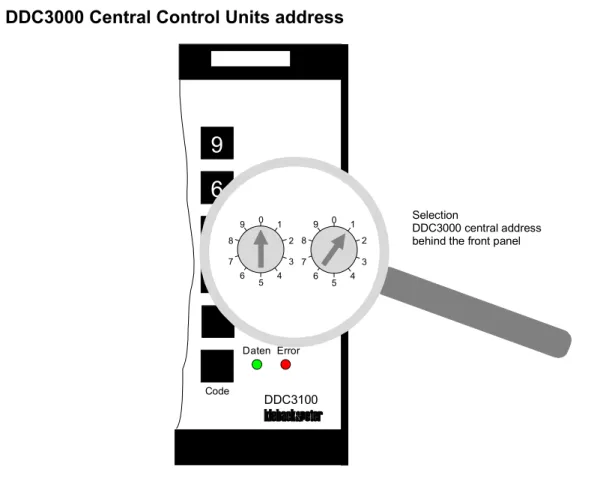
The front panel contains the operator and display elements and a diagnostic jack. Behind a removable front panel are two rotary select switches for setting the address of the DDC3000 Central Control Unit.
The DDC3000 Central Control Units are supplied with an operating voltage of 24V AC, 50..60Hz.
The DDC3000 Central Control Units are bus-capable multi-circuit open- and closed-loop control systems for control, optimization, control and monitoring functions. The DDC Central Control Unit bus is based on the Profibus according to DIN 19245 and allows for the connection of max. 99 DDC3000 Central Control Units.
The central processing unit consists of a 32 bit processor and a real-time multitasking operating system.
These functional units are completed with a battery-buffered RAM, an open-ended data backup in case of mains breakdown and a clock module.
The actual time with date and hour can be called up. The summer / winter time switching is done automatically. The user communicates with the DDC3000 Central Control Unit via the operator keyboard and a 4x20- character illuminated LCD display.
The dialog is carried out in plaintext in three possible operator levels for queries, and input for the DDC data, such as actual value, setpoints and times. A plaintext can be installed for all DDC parameters.
All DDC open- and closed-loop control parameters are entered in the program level,. A virtual parameterization is possible.
The three operator levels and the program level are divided into four priority levels per code key.
The open- and closed-loop control software acts differently depending on the type installed in the DDC3000 Central Control Unit, the DDC control loop cassettes, and the DDC single-room regulators. The DDC control loop cassettes and the DDC single-room regulator continue to work autonomously even when the DDC3000 Central Control Unit has failed. The manual activation level is a constituent part of the basic program of the DDC control loop cassette. Switching processes are entered and carried out via digital inputs and outputs in the DDC3000 Central Control Unit. Every possible digital output and input can be used for issuing a collected error message and for its receipt. For all digital inputs and outputs, a separate power supply is provided to supply the 24V DC.
Analog inputs and outputs are processed according to type. Via a parameterizable sensor switching mechanism, the analog inputs can be made to accommodate the input signal.
The serial interface allows for RS-232 communication on the basis of the P90 protocol. The following functions are realized via the serial interface:
- BMS operator station, BMS central control station with direct line connection or modem
– send via the SMS (Short Message Service) malfunction notifications in plaintext to a cellular phone - data backup / data recovery with portable PC / BMS central control station (data backup)
The DDC3000 Central Control Units are connected on a common DDC Central Control Unit bus. This makes possible
– the access of the parameters of other DDC3000 Central Control Units – the transfer of error messages to other DDC3000 Central Control Units
Voltage supply and electric wiring diagram
Operating voltage
· 24V AC ±10%; 50..60Hz
· no grounding on the secondary side
Recommended power supply 230 V AC; 50..60Hz for 24V AC
· TF60 60VA
· TF160 160VA
· TF250 250VA
Recommended power supply for
voltage supply of digital inputs and outputs 24V DC +/-10% · ETN1 0.1A · Z63 1.0A · Z24 6.0A 7 8 9 4 5 6 1 2 3 0 . +/-DDC 3000 Diagnose Daten Error DDC3100 Code Block Menü ZurückCE Hand SET Zeiten Anlage Istwert Sollwert
Install Param Kreis > < Uhr Meldung 7 8 9 4 5 6 1 2 3 0 . +/-DDC 3000 Diagnose Daten Error DDC3100 Code Block Menü ZurückCE Hand SET Zeiten Anlage Istwert Sollwert
Install Param Kreis > < Uhr Meldung 5 6 7 GND ZBus -Z-Bus +
01
02
term. resistence ca. 220 . 250 .. 270 Ohm (Extras DDC3000 Central unit)Signal line
continuously twisted
2002
Bus cabling
· cable type IY(St)Y 2x2x0.8
· maximum cable length 1000m
· extension via bus driver (DDC58, DDC59) possible
· Z-bus + and Z-bus – must be twisted pair-wise
· no final branch feeders (not longer then 5m in the control cabinet )
· no star configurations
· no ring configurations
· terminator resistors 220 .. 250 .. 270 Ohm on the most distant DDC3000 Central Control Units
(accessory pack of the DDC3000 Central Control Unit) Bus extensions
· maximum with two DDC58, DDC59 each extending a further 1000m (3000m maximum)
(see DDC100 project engineering documentation) DDC58, DDC59 also with terminator resistor.
7 8 9 4 5 6 1 2 3 0 . +/-DDC 3000 Diagnose Daten Error DDC3100 Code Block Menü ZurückCE Hand SET Zeiten Anlage Istwert Sollwert
Install Param Kreis > < Uhr Meldung 7 8 9 4 5 6 1 2 3 0 . +/-DDC 3000 Diagnose Daten Error DDC3100 Code Block Menü ZurückCE Hand SET Zeiten Anlage Istwert Sollwert
Install Param Kreis > < Uhr Meldung 78 79 80
. .
99
max. 1000m
avoid final branch feed(not longer than 10m)
term. resistance
ca. 220 .. 250 .. 270 Ohm (Extras DDC3000 Central unit)
Operator interface
Function display
A green LED "data" and a red LED "error" has been provided to display the function of all equipment.
· The green LED blinks whenever data is being exchanged between connected DDC modules.
· The red LED lights up whenever the DDC3000 Central Control Unit has some problem in its equipment function
(hardware) or no communication to the DDC modules can take place.
LCD display
A 4 x 20 character LCD display is available for the display of all data of the DDC3000 System.
· The illumination of the DDC3000 Central Control Unit display is always turned on with the first (arbitrary)
keystroke.
· Only when the display is illuminated will further operations via the keyboard be evaluated. Approx. 1 minute after
the last keystroke, the illumination of the display is automatically turned off.
· Basic design of the displays:
- 1st and 2nd row Plaintext for plant and parameter messages
- 3rd row Display ACTUAL VALUES, SETPOINTS, ..
- 3rd and 4th row Dialog guides with the display for subsequent possible operating actions
User keyboard
The operation of the DDC3000 Central Control Unit is menu-driven. Dialog guidance takes place via the display of subsequent possible user actions.
· The user keyboard is divided up according to user functions and color coded. The following keys are available:
- 12 keys for the plant operation [plant], [actual values], [setpoints], ..
- 12 keys for the data inputs for plant operation and setting parameters [0], [1], [2], .. - 6 keys for the setting parameters [block], [menu], ..
· Operating and program levels are provided according to the importance of the individual parameter (display,
operation, regulator setting, system monitoring). These levels are addressed via code numbers. The following levels have been prepared:
- 3 for the operator control levels - 1 for the program level.
· The parameters displayed in a code level can be modified in the next higher code level.
· The code numbers can be modified with the help of a code key. The parameters for the code numbers can be
accessed by inserting the code key on the front panel diagnostic jack and pushing the key [Code]. Using these parameters, the code numbers of all four code levels can be modified.
Note:
2002
DDC3000 Central Control Units address
Fig. 2- Address switch of the DDC3000 Central Control Unit behind the removable front panel
0 1 2 3 4 5 6 7 8 9 0 1 2 3 4 5 6 7 8 9
valid DDC3000 Central Control Unit
addresses DDC3000 CentralControl Unit
0 0 00 (basic setting) 0 .. 9 1 .. 6 1..6, 11..16, 21..26,... and 91..96 DDC3010 0 .. 9 1 .. 9 1..6, 11..16, 21..26,... and 91..96 DDC3100 0 .. 9 0 .. 9 1..99 DDC3035 0 .. 9 0 .. 9 1..99 DDC3200 0 .. 9 0 .. 9 1..99 DDC3002 0 .. 9 0 .. 9 1..6, 11..16, 21..26,... and 91..96 DDC3300
Caution when changing the address!
The address of the DDC3000 Central Control Unit may be changed only when the system is in a voltage-free state! Upon switching on the operating voltage, the set address of the DDC3000 Central Control Unit is entered into the system.
9
6
3
+/-Daten Error DDC3100 0 1 2 3 4 5 6 7 8 9 0 1 2 3 4 5 6 7 8 9 Code Selection DDC3000 central address behind the front panelDigital inputs and outputs
Technical data
digital inputs voltage-free contact, typ. current requirement ca. 5mA / DE
freely assignable, can incorporate into control connections
digital outputs transistor output, max. 50mA
as connection node parameterizable with 4 digital inputs
In the DDC3000 system digital inputs are reserved which can also be used as digital outputs. The change-over can be done with the parameterization of the respective contacts.
For example, DDC3200 function
digital input: basic
setting, data acquisition of a digital value.
function
digital output: if the
contact is parameterized. (entry of addresses) Caution when wiring these digital inputs and outputs!
The voltage-free contacts of the digital inputs switch to -24V DC. The consumers switched to the digital output are driven with +24V DC.
Analog inputs and outputs
Technical data
analog inputs input 0..10V or KP10 (base)
parameterizable for each analog input via separate parameters
analog outputs output 0..10V, max. 5mA
The DDC3000 system has analog inputs which can be switched to different sensors. The change-over is carried out by parameterization. For example, DDC3200 function for KP10 basic setting function for 0..10V
Caution when wiring these analog inputs!
The sensor KP10 is driven by another incoming line (terminal 2, 15, 22, 35) than the active detector 0..10V (terminal 21 (0V)).
2002
Interfaces
When configuring the interfaces of the DDC3000 Central Control Units, various settings for the hardware and the software must be made.
The wiring possibilities and the required parameterization are detailed in the following sections. output malfunction message on digital output
output error messages on a serial printer send error messages to a D1/D2 SMS cellular telephone
building management system BMS connection building management system BMS via modem connection
data backup with BMS
data backup with flash-card (as of Vers. 2.54) except for DDC3010, DDC3100, DDC3035
data backup with PC, DOS operating system
update with flash-card except for DDC3010, DDC3100, DDC3035
update with EKART only DDC3010, DDC3100, DDC3035
modify code numbers cable connections
Collected error messages issued over the digital output
Plant messages (DDC software menu M070 plant messages), collected error messages of the DDC control loop cassettes (DDC software menu M110 K/Kx bus) and system messages (DDC software menu M113 system
messages), can switch an internal signaling contact I900 in the DDC3000 Central Control Unit.
The internal signaling contact I900 can be parameterized as a digital source in the control connection, for example,
to switch an external signal. The internal signaling contact I900 remains active until a receipt is returned over the
digital source parameter I901. In the digital source I901, for example, the contact of a receipt key can be
parameterized.
For switching the internal signaling contacts I900 in the above-mentioned DDC software menu in the DDC parameters, SIGN. DEST. should be set to "1" for "all signaling contacts", that is, "local signaling contact".
Principle of operation for collected error messages issued to a digital output
K03
K01
K01= N 000.000.I900 --- N --- N --- N ---.---.---notification destination 8616/01= ----11M070 Plant messages M110 K/Kx bus
destination coll. malf. messages 1095/01= ----11
Set
of the output for collected malfunction messages
Reset
of the output for collected malfunction messages
M069 system menu M069 system menu
notification contact I900= 1 notification contact receipt I901= 000.000. K03 M000 basic program
2002
Error messages issued to a serial printer
Plant messages (DDC software menu M070 plant messages), collected error messages of the DDC control loop cassettes (DDC software menu M110 K/Kx bus) and system messages (DDC software menu M113 system messages), can be issued on the serial interface RS-232 of the DDC3000 Central Control Unit on to a serial pin printer black/white (for example, BMS2248).
The printouts of messages can be carried out from a number of DDC3000 Central Control Units on one (or more) connected printers.
For the printout of messages in the above-mentioned DDC software menu in the DDC parameters, SIGN. DEST should be set to "1" for "printer".
Connection DDC3000 Central Control Unit with serial pin printer
The following remarks are for the connection of serial pin printers to the DDC3000 Central Control Unit:
· Establish cable connection according to following table.
data line MRP008 DDC3010 or DDC3100 DDC3035 DDC3200 DDC3002 DDC3300 Signal
line 0 terminal 31 terminal 24 terminal 60 GND
line 1 terminal 30 terminal 32 terminal 59 Rx
line 2 terminal 29 terminal 31 terminal 58 Tx
line 3 unused unused unused
line 4 unused unused unused
· Configuration of the serial interface for the pin printer in the
DDC basic program of the DDC3000 Central Control Unit:
DDC
parameters plaintext setting
2031 ser. interface rear printer
0 1 2 7 8 9 4 5 6 1 2 3 0 . +/-DDC 3000 Diagn ose Da ten Error DDC3100 Code Block Menü ZurückCE Hand SET Zeiten Anlage Istwert Sollwert
InstallParam Kreis > < Uhr Meldung Data line MRP008
parameters 2031 (2032) printer is selected, the serial interface is automatically set to 4800 Baud.
For diagnostic purposes, the serial interface of the diagnostic jack can be used instead of the rear serial interface (connection base). In this case, the rear serial interface must be switched off via parameterization and the front one activated. The DDC3000.001 cable should be used as the connection cable.
The following DDC parameters in the DDC basic program of the DDC3000 Central Control Unit must be set. DDC
parameters plaintext setting
2031 ser. interface rear freely
2032 ser. interface
diagnostic jack
printer
Printout of messages
If a limit value is violated or by a change in the status of the signal source, a message is sent to all printers attached to the central bus. These messages are printed out in the same form as is usual for the display on the LCD display.
Example: 20.10.1997 / 16:45:10
airstream monitoring exhaust MALFUNCTION address 04.000.K003/01
2002
Send error messages to a D1/D2 SMS cellular telephone
Plant messages (DDC software menu M070 plant messages), collected error messages of the DDC control loop cassettes (DDC software menu M110 K/Kx bus) and system messages (DDC software menu M113 system messages) can be sent to a cellular telephone via the P90 interface of the DDC3000 Central Control Unit. For the transmission of messages a "1" should be parameterized for "D1/D2 SMS" in the above-mentioned DDC software menu in the DDC parameter "MSG DEST".
Principle of operation for sending a message to a cellular telephone
The following points for the transmission of messages to a cellular telephone should be noted.
· Cable connection between the DDC3000 Central Control Unit and a modem are made according to the following
table: data line MRP008 DDC3010or DDC3100 DDC3035 DDC3200 DDC3002 DDC3300 signal
line 0 terminal 31 terminal 24 terminal 60 GND
line 1 terminal 29 terminal 31 terminal 58 Rx
line 2 terminal 30 terminal 32 terminal 59 Tx
line 3 unused unused unused
line 4 unused unused unused
Note: The data line MRP008 is maximum 5m long.
7 8 9 4 5 6 1 2 3 0 . +/-DDC 3000 Diagnose Daten Error DDC3100 Code BlockMenü ZurückCE Hand SET Zeiten Anlage Istwert Sollwert
InstallParam Kreis > < Uhr Meldung
Modem
Modem
telephone net
·
commencement of data communication on the DDC3000 Central Control Unit:
P90 MODE
2051/01= DST-MODE
DDC
parameters plaintext setting
2051 P90-Mode DST-MODE
4599 P90-protocol ON
4600 P90-baud rate 9600
· The DDC software menu M081 modem should only then be parameterized and switched active if a modem
connection to the BMS is required at the same time!
2002
Building management system BMS connection
The connection to the BMS central control station is done via the serial RS-232 interface of the DDC3000 Central Control Unit. The following connection variations are possible:
· connection direct (ca. 5m)
· connection by means of RS-232 driver, dedicated line driver
· connection by means of modem (see software menu M081 modem)
Connection DDC3000 Central Control Unit and BMS direct
The following points should be noted for the connection of the DDC3000 Central Control Units to the BMS central control station:
· The compatibility of the BMS central control station version and the DDC3000 Central Control Unit must be
guaranteed.
Make certain that the documentation matches the update of the BMS version!
· Before connecting DDC3000 <--> BMS be sure that:
- the 24V AC supply lines of the DDC3000 Central Control Unit and the shield lines are truly not connected to the ground conductor system, directly-earthed system and control cabinet ground!
- there are no voltages (for example, statically generated) between the ground potential of the DDC3000 Central Control Units (GND) and the BMS!
· Create the cable connection between BMS central control station and DDC3000 Central Control Unit according to
the following table: data line MRP008 DDC3010or DDC3100 DDC3035 DDC3200 DDC3002 DDC3300 Signal
line 0 terminal 31 terminal 24 terminal 60 GND
line 1 terminal 30 terminal 32 terminal 59 Rx
line 2 terminal 29 terminal 31 terminal 58 Tx
line 3 unused unused unused
line 4 unused unused unused
Note: The data line MRP008 can be maximum 5m long. For distances greater than 5m,
the RS-232 driver or modem should be used.
0 1 2 7 8 9 4 5 6 1 2 3 0 . +/-DDC 3000 Diagn ose Da ten Error DDC3100 Code BlockMenü ZurückCE Hand SET Zeiten Anlage Istwert Sollwert
InstallParam Kreis > < Uhr Meldung Data line MRP008
· The following setting in the DDC software menu M069 system menu should be made before the commencement of data communication on the DDC3000 Central Control Unit:
P90 MODE
2051/01= DST-MODE
DDC
parameters plaintext setting
2051 P90-Mode DST-MODE
4599 P90-protocol ON
2002
Building management system BMS via modem connection
The connection to the BMS central control station is carried out via the serial RS-232 interface of the DDC3000 Central Control Unit. The following variations of the connection are possible (among others):
· connection direct (ca. 5m)
· connection via RS-232-driver, dedicated line driver
· connection via modem (see software menu M081 modem)
Connection between the DDC3000 Central Control Unit and BMS per modem
The following points should be noted for the connection of the DDC3000 Central Control Unit to the BMS central control station:
· The compatibility between the BMS central control station versions and the DDC3000 Central Control Unit must
be guaranteed.
Make sure that the documentation matches the respective update of the BMS!
· Make sure the cable connection between the BMS central control station and the modem as well as the DDC3000
Central Control Unit and the modem is made.
· Cable connection between the DDC3000 Central Control Unit and modem must be made according to the
following table: data line MRP008 DDC3010or DDC3100 DDC3035 DDC3200 DDC3002 DDC3300 signal
line 0 terminal 31 terminal 24 terminal 60 GND
line 1 terminal 29 terminal 31 terminal 58 Rx
line 2 terminal 30 terminal 32 terminal 59 Tx
line 3 unused unused unused
line 4 unused unused unused
Note: The data line MRP008 may be maximum 5m long.
7 8 9 4 5 6 1 2 3 0 . +/-DDC 3000 Diagn ose Da ten Error DDC3100 Code BlockMenü ZurückCE Hand SET Zeiten Anlage Istwert Sollwert
InstallParam Kreis > < Uhr Meldung Modem Modem RX TX GND telephon net Data line DDC2208.001
·
of data communication on the DDC3000 Central Control Unit:
P90 MODE
2051/01= DST-MODE
DDC
parameters plaintext setting
2051 P90-Mode DST-MODE
4599 P90-protocol ON
4600 P90-baud rate 9600
· The software menu M81 modem must be parameterized (see description of the software menu) .
2002
Data backup / recovery via building management system BMS
Stationary building management system BMS
· BMS is connected according to the instructions on page 2.1-17
· Data backup according to menu guide for the operator interface of the BMS
Transportable building management system BMS (KD-PC)
· Connection of DDC3000 Central Control Unit and BMS according to instructions, page 2.1-17
as per the following figure:
Connection of DDC3000 Central Control Unit with KD-PC for data backup
· Connect diagnostic jack of the DDC3000 Central Control Unit and serial interface of the KD-PC with data line
DDC3000.001.
Caution: The serial interface RS-232 on the plug-in socket may not be simultaneously used! (for example, when connecting to the stationary BMS)
· The following setting in the DDC software menu M069 system menu should be made before commencement of
data communication on the DDC3000 Central Control Unit: DDC
parameters plaintext setting
2051 P90-Mode DST-MODE
4599 P90-protocol ON
4600 P90-baud rate 9600
· Data backup according to the menu direction of the BMS operator interface
After completion of the data backup / data recovery, the line connections and the communication parameters of the
DDC software menu M69 system menu returned to the original setting.
7 8 9 4 5 6 1 2 3 0 . +/-DDC 3000 D iag nose D aten Error DDC3100 Code Block Menü ZurückCE Hand SET Zeiten Anlage Istwert Sollwert
InstallParam Kreis > < Uhr Meldung Data line DDC3000.001
Data backup / recovery via FLASH card
The DDC3000 Central Control Unit DDC3002, DDC3200 and DDC3300 have a PCMCIA plug-in socket on the front side (under the front panel), on the left next to the LCD display. A FLASH card can be plugged in here. With the
FLASH cards, the parameterization is backed up, restored, and new DDC3000 programs are loaded (update).
The backup / recovery of the parameterization of the DDC3000 Central Control Unit is possible after version 2.54. (Note: The FLASH card hardware must be adequately suited for this!)
7 8 9
4 5 6
1 2 3
0 .
+/-FLASH card on the PCMCIA plug-in socket on the DDC3000 Central Control Unit
For the backup of the parameterization, prepare the following settings in the DDC software menu M69 system
menu: (do not push [SET]yet!)
DDC parameters
plaintext setting
2051 P90-Mode DDC >FLASH
· remove front panel of the DDC3000 Central Control Unit.
· plug in FLASH card on the PCMCIA plug-in socket.
· confirm above-mentioned setting of the DDC parameters 2051 P90 Mode = DDC >FLASH by pressing the key
[SET].
After completion of the backup, the DDC parameters 2051 P90 Mode = INACTIVE are automatically
switched.
· For the restoration of the parameterization, prepare the following setting in the DDC software menu M69 system
menu: (do not push [SET]yet!)
DDC
parameters plaintext setting
2002
Data backup / recovery via PC with DOS-operating system
The serial interface RS-232 of the DDC3000 Central Control Unit is used for data backup with the KD-PC (operating system MS-DOS).
For data backup, this interface is available as a diagnostic jack and is installed on the front panel of the DDC3000 Central Control Unit.
Connection of DDC3000 Central Control Unit with KD-PC for data backup
· Diagnostic jack of the DDC3000 Central Control Unit and serial interface of the KD-PC connected with the data
line DDC3000.001.
Caution: The serial interface RS-232 on the plug-in socket may not be simultaneously assigned! (for example, with a connection to the stationary BMS)
Program diskette (only for MS-DOS)
Data backup / data recovery DDC3000 (data backup / data recovery DDC3035 - EZR)
· Select via the menu system of the KD-PC the menu position [DDC3000] ([EZR]).
· In the menu of the started data backup program, select the desired menu position.
data backup (3000 to the PC) = 1
data recovery (PC to the 3000) = 2
· After the query and the input of an arbitrary name for the backup file, the parameter settings are shown on the
PC, which must be set on the DDC3000 Central Control Unit in the software menu 69 system menu.
Set parameters in the system menu of the DDC3000 as follows:
No. 4599 P90-protocol = ON
No. 4600 P90-baud rate = 9600
No. 2051 P90-Mode = DATA BACKUP and finally
confirm the P90-Mode on of the DDC3000 with <SET>. Now the data will be backed up.
Sich35 V 3.1 (c) Kieback & Peter 1993
data backup on interface COM1 with 9600 Baud, File a:\backup.
Abort any time with key <ESC>.
· Make the required parameter settings on the DDC3000 Central Control Unit in the DDC software menu M069
system menu.
When the last parameter is set and the key [SET] is pressed on the DDC3000 Central Control Unit, the data backup runs by itself and terminates automatically.
The data backup runs as a background program of the DDC3000 Central Control Unit. That is, other operator commands on the DDC3000 Central Control Unit can be carried out, but do slow down the process of data backup.
· After completion of data backup / data recovery, the line connections and the communication parameters of the
7 8 9 4 5 6 1 2 3 0 . +/-DDC 3000 D iag nose D aten Error DDC3100 Code BlockMenü ZurückCE Hand SE T Zeiten Anlage Istwert Sollwert
InstallParam Kreis > < Uhr Meldung Data line DDC3000.001
Update with FLASH card
The DDC3000 Central Control Unit DDC3002, DDC3200 and DDC3300 have a PCMCIA plug-in socket on the front side (under the front panel), on the left next to the LCD display. A FLASH card can be plugged in here. With the
FLASH cards, the parameterization can be backed up, restored or new DDC3000 programs can be loaded
(update).
As of the version 2.54, updating the DDC3000 Central Control Unit via the parameters setting of the DDC software menu M69 is possible.
When updating the DDC3000 Central Control Unit, i.e. when loading a new program version, the following processes occur:
1. The parameterization of the DDC3000 Central Control Unit on the FLASH card is backed up automatically.
2. The new DDDC3000 program in the DDC3000 Central Control Unit is loaded automatically.
3. The parameterization of the FLASH card in the DDC3000 Central Control Unit is restored automatically.
4. The DDC3000 Central Control Unit is automatically started new with a warm start.
Automatic processes when updating the DDC3000 Central Control Unit with FLASH card
· For the update of the DDC3000 Central Control Unit for a new DDC3000 program, prepare the following setting
in the DDC software menu M69 system menu: (do not push [SET]yet!)
DDC parameters
plaintext setting
2051 P90-Mode DDC UPDATE
· Remove front panel of the DDC3000 Central Control Unit.
· Insert FLASH card in the PCMCIA plug-in socket.
7 8 9 4 5 6 1 2 3 0 . +/-Parameterization DDC3000-Program 1. 2. 3. Para met eriza tion DDC3 00 0-Prog ram
2002
Update with EKART card
The DDC3000 Central Control Unit DDC3010, DDC3100 and DDC3035 have the DDC3000 program permanently stored in EPROM. These EPROMs are installed on the EKART printed circuit card.
When updating the DDC3000 Central Control Unit, the EKART located in the DDC3000 Central Control Unit must be replaced.
EKART
Rear side of the DDC3000 Central Control Unit with EKART
For an update of the DDC3010, DDC3100 and DDC3035, you must order the EKART with the new program version.
· Back up parameterization of the DDC3000 Central Control Unit!
· Turn off DDC3000 Central Control Unit, take out of the rack.
· Remove the screws on the rear panel of the DDC3000 Central Control Unit.
· Pull the present EKART out of the housing of the DDC3000 Central Control Unit.
(The EKART can be recognized by the three equally large plug-in sockets for EPROM)
· Insert new EKART in the housing of the DDC3000 Central Control Unit. Make sure the card is securely seated.
· Remount the rear panel of the DDC3000 Central Control Unit, tighten all screws again.
· Reinsert the DDC3000 Central Control Unit in the rack, switch on.
· Further start-up functions such as restore parameterization, etc.
Modifying code numbers of the DDC3000 Central Control Unit
With the code key Z300, the standard code numbers can be set to customer-specific codes on the DDC3000 Central Control Unit of the DDC3000 system.
Code modifications are possible on the following DDC3000 Central Control Units
DDC3010/DDC3100 after version 3.6
DDC3035 after version 4.6
DDC3200 after production release
DDC3002 after production release
DDC3300 after production release
Code modifications
· Insert code key as shown in the diagnostic jack of the
DDC3000 Central Control Unit
· Press key [Code], the display shows
The program level is automatically unlocked
· Press key [Back] and call up M69 system menu.
In the DDC parameters 1221 the standard code number 4712 of the operator level 2 can be changed.
In the DDC parameters 1222 the standard code number 2359 of the operator level 3 can be changed.
In the DDC parameters 1223 the standard code number 2460 of the program level can be changed.
· The new code numbers are always stored by pressing the key [SET].
The current code numbers are displayed in the above three DDC parameters. When calling up these DDC parameters, modified (and not known) code numbers can later be displayed at any time (only possible with code key).
· Locking of the DDC3000 Central Control Unit is done by removing the code key and pressing the key [Code].
7 8 9 4 5 6 1 2 3 0 . + /-DDC 3000 Diagnose Daten Error DDC3100 Code Block Menü ZurückCE Hand SET Zeiten Anlage Istwert Sollwert
Install Param Kreis > < Uhr Meldung Code key back
2002
Cable connections
Overview of possible cable connections between the DDC3000 Central Control Unit and the BMS
7 8 9 4 5 6 1 2 3 0 . +/-DDC 3000 Diagnose Daten Error DDC3100 Code B lockMenü ZurückCE Hand S ET Zeit en A nlage Ist wert S ollwert
Inst allP aram K rei s > < Uhr Mel dung
0 1 2 0 1 2 DDC3000.001 5m DDC3000.001 5m MRP008 5m MRP008 5m DDC500.004 0,3m PC/ADT 9-25pol 0,3m 9-polig 25-polig 9-polig 25-polig