Howida Abubaker2, Siti Mariyam Shamsuddin1, 2, and Aida Ali1, 2 1,2UTM Big Data Centre
Universiti Teknologi Malaysia Skudai 81310 Johor, MALAYSIA E-mail: [email protected], [email protected]
2Faculty of Computing, Universiti Teknologi Malaysia,
81310 UTM Johor Bahru, Johor, Malaysia; E-mail: [email protected]
Abstract
The widespread of mobile applications has led to increase smart-phone malware. Detecting malware requires extracting features to determine the malware apps from non-malware apps. To understand malware apps’ features, we need a better understanding of the requested permissions in manifest file of apk file. In this paper, we present our framework based on extracting apk’s permissions with the aims to detect the malware upon granted permissions in mobile app. The permissions keywords are extracted from the manifest file of apk file using VirusTotal website. These collected applications and their permissions keywords will go through pre-data analytics process before being trained to various machine learning classifiers. We collected around 30 apps from Google play as non-malware apps and 30 malicious apps from different sources such as PROGuard, Contagio Mobile blog and the Drebin dataset. The permissions keywords of the collected apk are extracted and saved to build final dataset that contains 50 samples of benign and malignant applications with the final collections of permissions keywords. Finally, the dataset is fed to machine learning. By utilizing several classifiers such as NaiveBayes, sequential minimal optimization (SMO), Decision Table, ZeroR and Decision trees (J48 and Random Forests, the results show that sequential minimal optimization (SMO) classifier achieved high performance in the detection rate of the classifier with an acceptable accuracy of 76 %.
Keywords: android applications, malware, data collection, permissions keywords, Machine Learning classifier
107 Analytics on Malicious
1 Introduction
With the development of mobile apps, smartphones platform becomes exposed to security and privacy threats [1]. For instance, downloading applications from multiple sources has contributed to develop malicious applications [2].
Many studies have been done to identify malicious applications and discover the patterns of malware samples. Consequently, malware detection of Android platform becomes topical matters of many researchers. Some identify that there are two methods of malware detection: 1) static analysis, by analyzing a compiled file and 2) dynamic analysis, by analyzing the runtime behavior, such as battery, memory, and network utilization of the device; or hybrid analysis, by combining static and dynamic techniques [1][2]. These techniques are similar to techniques used on any platform of mobile application. The advantage of Static analysis is due to fewer properties needed which is suitable for limited resources of Android devices; and that is more efficient than using dynamic analysis since the malware is not executed, but only analyzed [3].
Some researchers study the behavior of android applications by collecting some of feature vectors such as memory utilization and power consumption to characterize the app is benign or malicious. They train the known feature vectors using machine learning algorithms to predict the classification of unknown feature vectors [3].
In this paper, we focus on static analysis by proposing a framework for detecting malicious android applications based on analyzing requested permissions and utilizing machine learning classifiers to classify applications whether malicious or benign.
The remainder of this paper is structured as follows. Section 2 discusses the related work. The method used for the experimental evaluation is presented in Section 3. Section 4 shows the results of the experiments carried out on a significant dataset of Android malware samples. Conclusions are drawn in Section 5.
2 Related Work
Several studies have been conducted to detect malware on mobile platform. Most researches employ different approaches for malware detection such as Static analysis approaches, dynamic and hybrid analysis approaches. Since our study focus on analyzing permission, we will focus on static approach for detecting android malware. Using permissions analysis for detecting malware has been adopted in many studies such as Ryo Sato et al. [4] used some characteristics in manifest file such as a permission, filter action and category of
intent-priority to detect Android malware. They found that permissions such as send_sms, receive_sms, and read_sms, are often requested by malicious samples.
The Stowaway tool developed by A. P. Felt et al. is able to detect if a compiled android app requests more permissions than necessary, i.e. over privileged. The result of their finding showed that about one-third of app collected was actually over privileged [5].
Frank et al. [6] studied the requested permission patterns of Android apps using pattern-mining technique. They tried to relate the requested permission patterns with the app’s reputation, which can be served as an indicator of app quality. Hamandi et al. [7] conducted a study on some collected apps to determine the malware based on analyzing the requested permissions. The application presents itself as a regular SMS messaging application and uses its basic permission to send/receive short messages. Since many operators worldwide provide services that allow users to transfer credits/units through SMS, the application abuses this service to transfer credits from users illegally. The granted permissions of an app give the app absolute ability to perform threat action. For example, they found that the minimum permissions needed to carry out the malicious activities are the "receive_sms" and "send_sms" which are requested by SMS applications. Other SMS applications also use the "read_sms" and the "write_sms" permissions. As a result, the request for these permissions is looked normal and would not warn user about specific threat.
Feldman et al. [8] proposed Manilyzer system to extract the information in the manifest files of Android application, and produces feature vectors automatically, and then uses machine learning algorithms to classify applications whether malicious or benign. They collected around 617 applications (307 malicious, 310 benign) to be tested with Manilyzer. The result was efficiency with accuracy up to 90%, while the false positives and false negatives are similar with 10%.
In order to protect data from being sent to advertising servers at the occurrence of permission violation in ad networks, Gao et al. [9], proposed PmDroid. They implemented 53 sample apps using a single ad network library and analyzed 430 published market apps. To identify the real violation of permissions, they granted all permissions of these apps and recorded the data sent to the Internet and compared the permission of data received by these ad networks with their official documents. Their findings showed that permissions abuse data sent through ad network markets.
Peiravian & Zhu [10] used permissions as features vectors to detect malware and trained machine learning classifier to classify apps as benign or malware. They collected 2510 APK files where 1260 are malicious apps and the remaining 1250 are benign Android APK files. Around 130 features of permission have been
109 Analytics on Malicious
collected. They used precision and detection rate (Recall), in addition to AUC and accuracy, to evaluate their experiments.
Singh et al. [11] used information in manifest file of Android application to characterize malware and determine the risk of Android permission and apps. They study the behaviors of Android apps using static and dynamic security analysis model. Before doing analysis, they decompiled Android applications using apk tool to get AndroidManifest.xml used for permissions filtering stage, and Smali files used to apply dynamic monitoring module.
However, in this study, we collected our own data (fifty samples) from different sources as described in the following sections.
3 Methodology
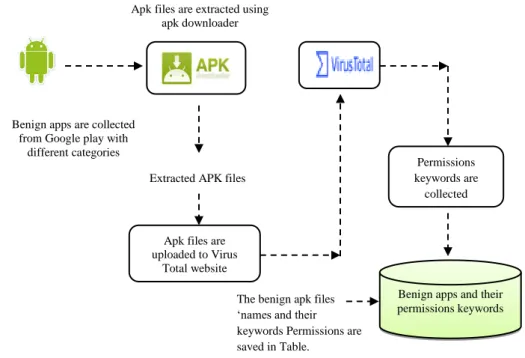
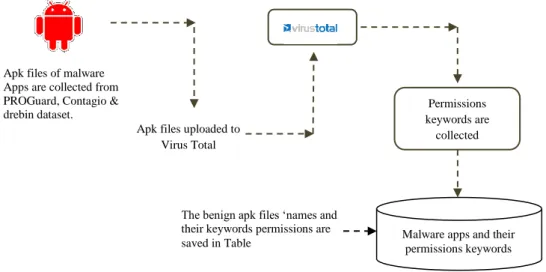
This section presents the methods used to carry out the experiment. Figure 2 and Figure 3 illustrate the process of collecting non-malware and malware applications and their permissions keywords. The process contains three phases. The first stage is data collection, in which benign and malicious samples are collected and transmitted to the next phase. In the second phase, which is apk files extraction, the apk files of benign apps are extracted by using apk downloader tool which is online service that comes with Chrome extension and allow user to download an apk file for free apps from the Google Play directly to desktop rather than to device [17]. The name of package is uploaded to the apk downloader website and then apk is downloaded. The apk of malware is collected from PROGuard, Contagio Mobile blog and the Drebin dataset [13][14][15]. Finally, the requested permissions of apk files are collected for both apps (malware and non-malware) using VirusTotal website [12]. VirusTotal is a free online service that analyzes files, URLs and mobile applications in order to identify viruses, worms, trojans and other kinds of malicious content by using different antivirus engines and website scanners [12]. And finally, the dataset of samples’ names and their permissions keywords is built. The following sections communicate each phase in detail.
3.1 Pre-Data Analytics on Android Malicious
Our final dataset is built by collecting first the apk files of benign and malicious applications and then extracting their permissions keywords from analyses reports that VirusTotal performs. Each phase is described in the following sections.
3.1.1 Data Collection
The initial step of collecting our dataset was to collect benign and malicious applications and extract their apk files. We collected benign apps from Google
Play with different categories. We did not target any specific apps, or specific versions of apps. We collected around 30 apps from Google play and were randomly selected. After collecting the applications and extracting their apk files using apk downloader, the apk files are uploaded to Virus Total website and the permissions keywords of apps are collected. We uploaded the collected apk files one by one to VirusTotal website. Every application scanned by Virus Total, and passed all virus tests was considered as "clean app " and kept to form the non-malware applications.
The analysis report that VirusTotal performs give information about apps such as MD5, SHA1, SHA256, required permissions and etc. Figure 1 shows permissions of one app collected from analysis report of VirusTotal.
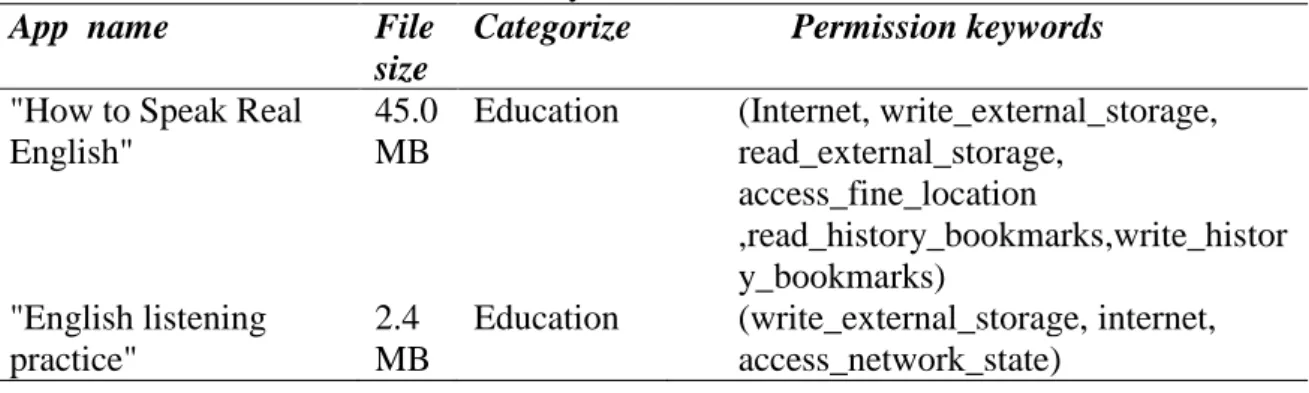
Fig. 1: Example of apk file’s permissions that are collected using Virus Total We extracted the permissions keywords for every application and save them in table with app’s name as displayed in Table1. Also, the file size and category of app are collected as well.
Table 1: Some of the collected non-malware apps with their extracted permissions keywords
App name File
size
Categorize Permission keywords
"How to Speak Real English"
45.0 MB
Education (Internet, write_external_storage,
read_external_storage, access_fine_location ,read_history_bookmarks,write_histor y_bookmarks) "English listening practice" 2.4 MB
Education (write_external_storage, internet,
access_network_state)
Required permissions
android.permission.ACCESS_FINE_LOCATION (fine (GPS) location) android.permission.INTERNET (full Internet access)
android.permission.ACCESS_WIFI_STATE (view Wi-Fi status)
android.permission.ACCESS_COARSE_LOCATION (coarse (network-based) location) android.permission.ACCESS_NETWORK_STATE (view network status)
android.permission.READ_PHONE_STATE (read phone state and identity)
android.permission.WRITE_EXTERNAL_STORAGE (modify/delete SD card contents) android.permission.READ_CONTACTS (read contact data)
111 Analytics on Malicious "Drugs Dictionary Offline FREE_v1.9_apkpure.c om.apk" 2.4 MB Education and awareness (access_network_state, internet )
For example, the "How to Speak Real English" app under education category has four permissions keywords (Internet,write_external_storage,
read_external_storage,access_fine_location,
read_history_bookmarks ,write_history_bookmarks) as listed in the Table 1.
We observed that most of applications use the "internet" permission to access the internet. The whole process of gathering benign applications and their permissions keywords are summarized in Figure 2.
Fig. 2: The process of collecting benign apps and extracting their apk files & permissions keywords
On the other hand, the malware samples were collected from the PROGuard dataset, Contagio Mobile blog and the Drebin dataset [13][14][15]. Thirty apps are collected from PROGuard dataset, ten samples from Contagio Mobile blog and the remaining samples from Drebin dataset. We collected the apk files of malware apps and uploaded them to VirusTotal websites to get their permissions keywords. Then the permissions keywords are collected and saved in table with their apk names’ as shown in Table 2. The "GPSSMSSpy1.apk" app requires the following permissions keywords (access_fine_location, send_sms, receive_sms)
Benign apps are collected from Google play with
different categories
Extracted APK files
Apk files are uploaded to Virus
Total website
Permissions keywords are
collected
Benign apps and their permissions keywords The benign apk files
‘names and their keywords Permissions are saved in Table.
Apk files are extracted using apk downloader
as presented in the Table 2. For instance, the "send sms" permission allows an app to send an SMS on behalf of the mobile user, and similar to the phone call permission, it could cost the user money by sending SMS to for-pay numbers.
Table 2: Some of collected malware apps with their extracted permissions keywords App Name File size Malware type Permission keywords "GPSSMSSpy1.apk" 13.6
KB Spyware (access_fine_location, send_sms, receive_sms)
"GPSSMSSpy2.apk" 14.4 KB
Spyware (access_fine_location, send_sms, receive_sms)
"GPSSMSSpy3.apk" 15.3 KB
Spyware (access_fine_location, send_sms, read contacts , write_sms, receive_sms, read_phone_state )
"GPSSMSSpy4" 15.2 KB
Spyware (receive sms, send_sms,
access_fine_location, read_sms, write_sms, read_phone_state, read_contacts)
The permission "access_fine_location" allows an app to access precise location from location sources such as GPS, cell towers, and Wi-Fi. While "receive_sms" permission lets an app receives an SMS [16]. The process of collecting malware apps with their permissions is carried out similar to the process of collecting benign applications except that apk files are already extracted. We just collected them from PROGuard, Contagio & drebin dataset and uploaded them to Virus Total website to get permissions keywords. Figure 3 summarizes the process of collecting malicious applications and their permissions.
Apk files of malware Apps are collected from PROGuard, Contagio &
drebin dataset.
Apk files uploaded to Virus Total
Permissions keywords are
collected
Malware apps and their permissions keywords The benign apk files ‘names and
their keywords permissions are saved in Table
113 Analytics on Malicious
The PROGuard dataset consists of 10479 samples, obtained by obfuscating the MalGenome and the Contagio Minidump datasets with seven different obfuscated techniques [13]. The Contagio Mobile blog has a collection of the latest malware samples, threats, observations, and analyses [14]. The Drebin dataset contains 5,560 applications from 179 different malware families [15]. The samples have been collected in the period of August 2010 to October 2012. After collecting the malware apk files; we uploaded them to VirusTotal for scanning and getting the permissions keywords. Finally, the permissions keywords of malware apps were saved in table as shown in table 2 and explained in Figure 3. Lastly, all the non- malware and malware apps are transferred to next phase.
3.1.2 Preprocessing Dataset
In this phase, we built our final dataset by combining the benign and malicious applications with their collected permissions. We collected 23 non- malware apps and 27 malware apps. We chose combination of permissions that occur in both apps (benign and malicious) but mostly occur in malware apps as done in previous study of Ryo Sato et al. [4].They collected around 11 permissions keywords for analysis. We gathered around 26 permissions as listed in Figure 4 and present them as binary numbers. The permission feature has two values either 1’s or 0’s representing the presence or absence of permissions for the corresponding column feature of app’s name respectively. The features were stored as CSV file then converted to arff file. Table 3 displays some examples from final dataset of Android permissions saved as CSV file. The class of benign app is labeled by "non-malware" and the class of malware apps is categorized by "malware". The final step was using Weka software to perform the classification and analysis dataset.
@attribute send_sms numeric @attribute receive_sms numeric
@attribute 'read sms' numeric @attribute 'write sms' numeric @attribute read_phone_state numeric
@attribute read_logs numeric @attribute read_history_bookmarks numeric @attribute write_history_bookmarks numeric
@attribute delete_packages numeric @attribute process_outgoing_calls numeric @attribute mount_unmount_filesystems numeric
@attribute write_external_storage numeric @attribute read_external_storage numeric
@attribute 'write conacts' numeric @attribute 'read conatcts' numeric @attribute 'acess fine location' numeric
@attribute 'call phone' numeric @attribute 'wake lock' numeric @attribute change_wifi_state numeric @attribute access_wifi_state numeric @attribute 'acess network state' numeric @attribute receive_boot_completed numeric
@attribute access_coarse_location numeric @attribute record_audio numeric @attribute 'Get account' numeric @attribute 'Modify audio state
Table 3: Some examples from final dataset of 50 samples (23 non- malware apps and 27 malware apps)
apk name Send sms receive _sms read phone state read_log read_extern al_storage write conacts class
How to Speak Real
english 0 0 0 0 1 0
non malware
English listening practice 0 0 0 0 0 0
non malware instagram.android 0 0 0 0 0 0 non malware com.grabtaxi.passenger 0 1 1 0 0 0 non malware com.gamma.scan 0 0 0 0 0 0 non malware com.socialnmobile.dictap ps.notepad.color.note. 0 0 0 0 0 0 non malware GPSSMSSpy2 1 1 0 0 0 0 malware
3.1.3 Machine Learning Classifier
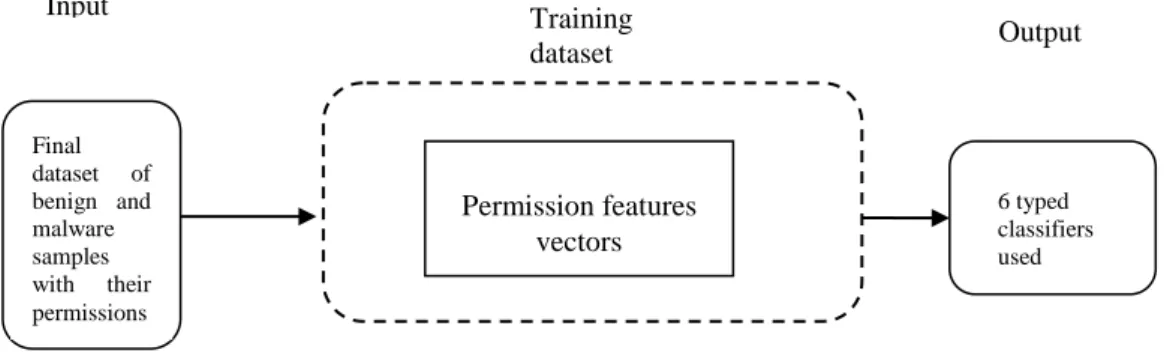
In this phase, we apply Machine learning classifier and evaluate the performance of the classifiers used. We use the Waikato Environment for Knowledge Analysis (WEKA) machine learning tool to carry out our experiment. The selected classifiers functioned in a default setting. The process of using machine learning classifiers is illustrated in the Figure 5.
Fig. 5: Using machine learning classifiers
The steps of carrying out the experiment are explained as follows:
Input Preprocessing: the features listed in Figure 4, were preprocessed into a matrix of input vectors for training the machine learning algorithms. For example, the column of the matrix represented the name of application while the rows represented the collected permissions of apps. The permission feature has two values either 1’s or 0’s representing the presence or absence of permissions for the corresponding column feature Input Output Permission features vectors Training dataset 6 typed classifiers used Final dataset of benign and malware samples with their permissions
115 Analytics on Malicious
of app’s name respectively. A total of 26 permissions features were collected as listed in Figure 4.
Training: we used supervised learning to train dataset of 50 applications; 27 malicious apps and 23 non-malicious apps that are labeled in one of two classes; malware or non- malware as shown in Table3.
Evaluation: we applied 10-fold cross validation technique to evaluate the performance of the classifier model. We used precision and recall metrics to evaluate our classifiers algorithms. Classified samples can be true positive (TP –samples correctly labeled as belonging to the class), false positive (FP – samples incorrectly labeled as belonging to a certain class), false negative (FN - samples incorrectly labeled as not belonging to a certain class), and true negative (TN - samples correctly labeled as not belonging to a certain class). Given the number of true positives and false negatives, recall is calculated using the following formula 1:
(1) Where True Positive (TP) represented the number of correctly identified non- malware apps. And False Negative (FN) is the number of incorrectly identified non- malware apps.
Precision is calculated as in the following formula:
(2) False Positive (FP) in this equation is number of incorrectly identified malware apps.
4 Experiment Result
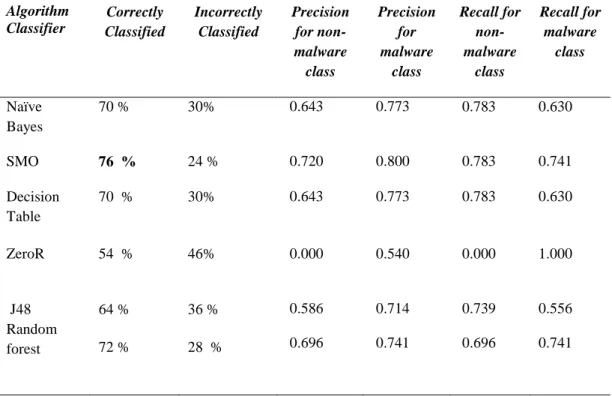
This section represents the results of experiment and performance evaluation of malware detection based on analyzing requested permissions. We used 10-fold cross validation for evaluating the classifiers on the testing set. Table 4 reveals that sequential minimal optimization (SMO) has the highest classification rate than other tested classifiers. NaiveBayes correctly classifies 70 % of feature vectors, while ZeroR classifier correctly classifies 54 % of feature vectors.
Table 4: Comparison of different algorithm classifiers Algorithm Classifier Correctly Classified Incorrectly Classified Precision for non-malware class Precision for malware class Recall for non-malware class Recall for malware class Naïve Bayes 70 % 30% 0.643 0.773 0.783 0.630 SMO 76 % 24 % 0.720 0.800 0.783 0.741 Decision Table 70 % 30% 0.643 0.773 0.783 0.630 ZeroR 54 % 46% 0.000 0.540 0.000 1.000 J48 Random forest 64 % 72 % 36 % 28 % 0.586 0.696 0.714 0.741 0.739 0.696 0.556 0.741
5 Conclusion
This study presents mobile malware characterization by extracting requested permissions of apps, as well as to determine the ideal classifier based on correctly classified feature vectors. In this research, we evaluated various machine learning classifiers to enhance the malware detection outcome for different categories collection of file samples and obtain the optimum classifier that is able to detect mobile malware. The selected classifiers were NaiveBayes, sequential minimal optimization (SMO), Decision Table, ZeroR and Decision trees (J48 and Random Forests).
The malware samples were collected from PROGuard dataset, which contains 10479 samples, and the Contagio Minidump datasets with seven different obfuscated techniques. Next, we collected some apps from Contagio Mobile blog that has a collection of the latest malware samples. Some applications are gathered from Drebin dataset that contains 5,560 applications from 179 different malware families.
Our final dataset contains 50 samples (23 benign apps and 27 malicious apps) with the final collections of permissions keywords.
117 Analytics on Malicious
The experiment contains three phases. Data collection phase in which apps are collected. The second phase is apk extractions and permissions collection phase where apk files are collected and the permissions keywords of every app are extracted and final collections of permissions for both apps (benign apps and malicious apps) are selected and gathered for training and analysis. The last phase is applying the machine learning classifier. The experimental results indicate that sequential minimal optimization (SMO) achieved good result by classifying features vectors correctly with 76 %. This study approved that requested permission of Android app can be used to determine the mobile malware. As future work, we will apply reduction process and features filtering for better performance of detection. Also, collecting more samples and permissions keywords will be good for getting better evaluation of experiments.
Acknowledgment
The authors would like to thank the Universiti Teknologi Malaysia (UTM) for their support in Research and Development, UTM Big Data Centre and the Soft Computing Research Group (SCRG) for the inspiration in making this study a success. This work is supported by Ministry of Higher Education (MOHE) under Fundamental Research Grant Scheme (4F802 and 4F786) and Research University Grant (03G91).
References
[1] Y. Zhou and X. Jiang. (2012). Dissecting Android Malware: Characterization and Evolution. Security and Privacy (SP), IEEE Symposium on, May 2012, pp. 95 –109. IEEE.
[2] Baskaran, B., & Ralescu, A. (2016). A Study of Android Malware Detection
Techniques and Machine Learning. Proceedings of the 27th Modern
Artificial Intelligence and Cognitive Science Conference 2016, Dayton, OH, USA, April 22-23, 2016., 15–23.
[3] Amos, B., Turner, H., & White, J. (2013). Applying machine learning classifiers to dynamic android malware detection at scale. 9th International Wireless Communications and Mobile Computing Conference, IWCMC 2013, 1666–1671. IEEE.
[4] Sato, R., Chiba, D., & Goto, S. (2013). Detecting Android Malware by Analyzing Manifest Files. Proceedings of the Asia-Pacific Advanced Network, 36, 23.
[5] Felt, A. P., Chin, E., Hanna, S., Song, D., & Wagner, D. (2011). Android permissions demystified. Proceedings of the 18th ACM Conference on Computer and Communications Security - CCS ’11, 627. ACM.
[6] Frank, M., Dong, B., Felt, A. P., & Song, D. (2012). Mining permission request patterns from Android and Facebook applications. Proceedings - IEEE International Conference on Data Mining, ICDM, 870–875. IEEE. [7] Hamandi, K., Chehab, A., Elhajj, I. H., & Kayssi, A. (2013). Android SMS
malware: Vulnerability and mitigation. Proceedings - 27th International Conference on Advanced Information Networking and Applications Workshops, WAINA 2013, 1004–1009. IEEE.
[8] Feldman, S., Stadther, D., & Wang, B. (2015). Manilyzer: Automated Android malware detection through manifest analysis. Proceedings - 11th IEEE International Conference on Mobile Ad Hoc and Sensor Systems, MASS 2014, 767–772. IEEE.
[9] Gao, X., Liu, D., Wang, H., & Sun, K. (2016). PmDroid: Permission Supervision for Android Advertising. Proceedings of the IEEE Symposium on Reliable Distributed Systems, 2016-Janua, 120–129. IEEE.
[10] Peiravian, N., & Zhu, X. (2013). Machine learning for Android malware detection using permission and API calls. Proceedings - International Conference on Tools with Artificial Intelligence, ICTAI. IEEE.
[11] Singh, P., Tiwari, P., & Singh, S. (2016). Analysis of Malicious Behavior of Android Apps. Procedia Computer Science, 79, 215–220. Elsevier.
[12] “VirusTotal Malware Intelligence Services,” URL https://secure.vt-mis. com/vtmis/.
[13] http://pralab.diee.unica.it/en/AndroidPRAGuardDataset
[14] http://contagiominidump.blogspot.my/
[15] https://www.sec.cs.tu-bs.de/~danarp/drebin/
[16] Li, Q., & Li, X. (2010). Android Malware Detection Based on Static Analysis of Characteristic Tree, 2015 International Conference on Cyber-Enabled Distributed Computing and Knowledge Discovery, 84–91. IEEE. [17] https://apps.evozi.com/apk-downloader/