Computer aided programs in landscape design
S. Okasha
1& R. Okasha
21
Faculty of Architecture, Design and Planning, Qassim University, Saudi Arabia
2
Zagazig University, Egypt
Abstract
There are many computer programs assisting in the landscape designing process of sites and projects that fall under the list of Computer-Aided Design (CAD) software. These programs aid designers in developing the urban design of sites particularly without affecting the other aspects of the design. In this paper, there is a comparative rating of the most commonly used computer programs to assist in this area, which is conducted through a set of scientific criteria for classification and rating. This will help landscape stakeholders to select the appropriate program depending on the nature and size of the project. The problem tackled in this research is the lack of knowledge and reluctance of some landscape designers to use CAD programs to assist in this field. This paper aims to introduce landscape designing CAD programs to assist in the site designing process and to help those interested in this field to select the appropriate program according to the nature of their projects.
Keywords: landscape design, computer aided design programs, CAD.
1
Introduction
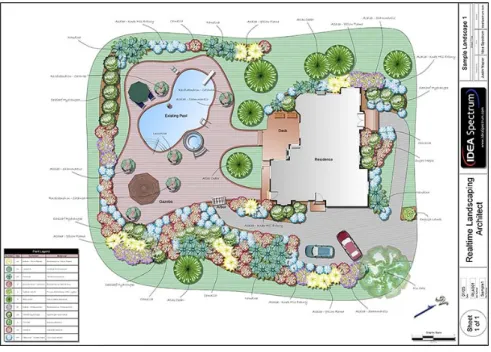
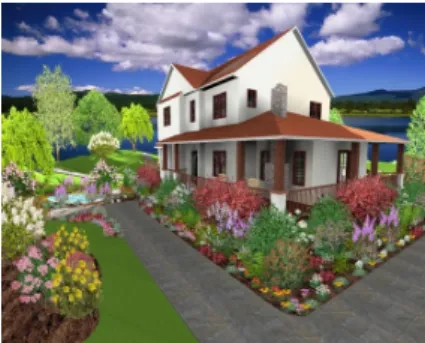
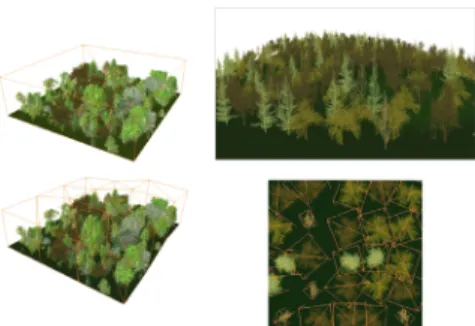
There are many assistance programs in landscape design which fall under the list of Computer Aided Design (CAD) – “Real time” software is one of them (fig. 1) – where those programs work particularly in the field of landscape design and do not interfere significantly in other fields. Classification was made for a range of CAD programs in the area of study based on scientific grounds in terms of quality and specifications, etc. Every program was selected to display its specifications, steps of design process and how it works at the level of landscape projects.
Figure 1: The location of a house designed by the “Real timeˮ program.
2
The research problem
The problem observed by this research is the lack of knowledge and the reluctance of some landscape designers to use computer assistance and CAD programs in this field, which would otherwise help to save time and effort while ensuring achieving the featured product technically with the typical required specifications.
3
Main aim of the research
The research aims to identify and present CAD programs used in landscape design to help those who are interested in this field to select the appropriate program according to the nature of the project.
3.1 The research objectives
This proposal will try to achieve its main aim through fulfilling the following objectives:
3.1.1 The basic criteria
3.1.2 Landscape design programs
Identify the most important landscape design programs (constraints, advantages, potentials and examples).
3.1.3 Scientific comparison
Set a scientific base for comparing between these programs.
4
Research methodology
Comparative classification will be made to a group of the most important computer assistance programs in landscape design through a set of scientific criteria for classification, which would help those interested in the field of landscape designing to select an appropriate program depending on the nature and the size of the project. A scale has been created to compare different elements equally, so that we can obtain the result of a final approximate total average for each program to compare between different programs. A comparison between thirteen specialised programs in landscape design by the researchers and study sample, where categorisation and comparison was under five groups. The first group compared programs on the basis of the use of two (2D) and three dimension (3D) and the availability of video tutorials. The second group presented a comparison between the usage of reality simulation features. The third group presents a comparison on the basis of the use of plants and their cultivation and other items used in landscape design. The fourth group compares programs on the basis of the study of different land topography and applying that in the landscape designing process. Finally, the fifth group compares which operating systems these programs can operate on.
5
Types of assistance programs in landscape design
Assistance programs in this field are divided based on the size of the design project:
5.1 Major companies
With long experience in landscape design using assistance programs in the final stages of graphics and presentation of large sized projects. The programs used in graphic “two and three dimensional drawings” and presentation: (AutoCAD; 3D-Max; Maya; Sketch up).
5.2 Small sized landscape projects
At the level of the house gardens and small public buildings’ gardens, users get back to commercial markets to choose from several alternative programs according to the input dimensions of land. Thirteen programs were selected depending on the most commonly used and best selling in this field. Each programs’ specifications were reviewed and a scientific classification for these
programs was set, according to a number of criteria which will be defined later. The programs are as follows:
Real time Landscaping Pro, Landscape deck patio designer 12,
Better homes and gardens landscaping and deck designer, Turbo floor Plan Landscape Deck,
Total 3D home Landscape Design, Imagine pro 7,
Landscape Vision, Custom 3D Land,
3D Home Architect & Landscape Design Deluxe, 3D Landscape Design for Everyone,
Earthscapes, LandCAD and 3D garden composer.
6
Classification criteria for assistance programs in landscape
design
There are many criteria for comparison between different landscape programs, which will be used in the comparison table. The following is a review of the criteria and their definitions.
6.1 The price of programs
Programs are compared in terms of their prices and the possibility to obtain them from the market and therefore the extent of their demand. Program’s prices range from 9.90 US$ (Custom 3D land software) and 105 dollars (Earthscapes software
)
.6.2 Tutorial videos
Whether they are available or not to assist users of these programs in dealing with the program and understanding the best uses of tools available. Moreover, if there is a possibility of saving the steps, used in the design, in a video to illustrate these steps later.
6.3 Two-dimensional design
Some programs create two-dimensional designs and have the possibility of modifying; inserting and saving these designs. Most programs feature the possibility of importing two-dimensional images, except Custom 3D land software which can’t import pictures and the pre-set designs must be used (as illustrated in figs 2 and 3).
Figure 2: Design from Custom 3D Land program.
Figure 3: 2D design from Landscape deck patio designer 12 program.
6.4 Printing
Printing is one of the most important criteria that should be available in programs that assist in landscape design. Thus, the possibility of presenting the output to the customer or the owner is very important. This feature is found in most programs, except Custom 3D land software.
6.5 Three-dimensional design
There are some programs that create three-dimensional designs and have the possibility of modifying, inserting, and saving designs. Not only that, there are also some programs that can draw three-dimensional plants and create animation (as shown in figs 4 and 5).
Figure 4: 3D design from Landscape deck patio designer 12 program.
Figure 5: 3D design from Turbo floorPlan Landscape Deck program.
6.6 Integration with other architectural programs
Land CAD software can convert between *.cad and *.gis file extensions. There is a feature of Landscape deck patio designer 12, where the final design can be converted/ modified in the AutoCAD program and printed at any scale.
6.7 Lighting
Lighting is the most important element of landscape design and thus the possibility of inserting effects of natural and artificial lighting to the product gives us a real perception closer to reality before its implementation and the possibility of modifying it (as illustrated in figs 6 and 7).
Figure 6: Day lighting simulation from Turbo floorPlan Landscape Deck program.
Figure 7: Night lighting simulation from Turbo floo rPlan Landscape Deck program.
6.8 Study the impact of lighting on the plants’ growth
We can study the lighting throughout the day in gardens or different sites and thus control the location of natural and artificial lighting in sites. In addition, we can study shades in landscape design at different times of the day and the impact of the secondary lighting generally. This helps in placing plants appropriately, (see example shade plants as illustrated in fig. 8).
Figure 8: Design from Landscape deck patio designer 12 program shows varying degrees of shadows and plants on the site.
6.9 Appropriate blooming sites
This could be done through special maps showing which flowers would grow and when would they bloom in different regions on earth. This is important as the site will be designed based on it. Flowers and plants suitable for cultivation depending on temperature and humidity and the change of four seasons in that place.
6.10 Trees and botanical library
A trees and botanical library provides numerous alternatives of different types and sizes of trees and the possibility of choosing the appropriate one to the project’s site (as illustrated in figs 9 and 10).
Figure 9: Flowers library from Combo 3D land program.
Figure 10: Plants library from Turbo floor Plan Land- scape Deck program.
6.11 Plant growth simulation
Full study of plants growth, expected heights, width, blooming seasons and the appropriate types of plants for the designed project. The change in the form and size of the plants can also be observed with time, up to 20 years ahead. Also, trees’ length calculation as in Realtime Landscaping pro software (as illustrated in fig. 11).
6.12 Land topography
The programs’ evaluation is in terms of the possibility of calculation of the rises and falls on the site and type of soil and groundwater. Some programs, such as Better Homes and Gardens landscaping software, were difficult to use in very steep spaces or high terrains. Fig. 12 illustrates the design of the earth topography from Turbo floor plan landscape software.
6.13 Computer aided drivers programs
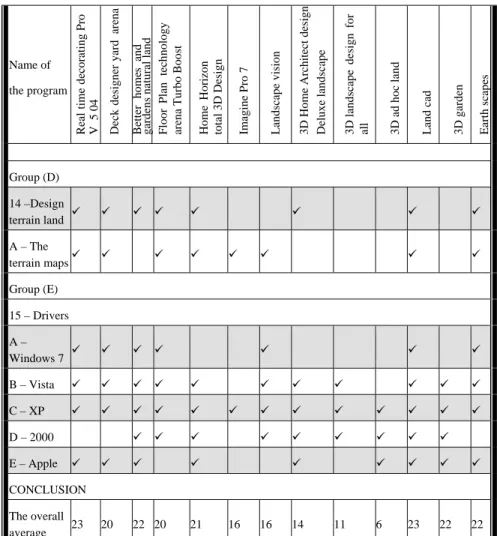
In this criterion, which software is appropriate for different computer operating systems.
Figure 11: Design from Realtime Landscaping pro program shows the growth of vegetation in the site.
Figure 12: Design from Turbo floorPlan Landscape Deck program shows the site typology.
7
Comparison of different CAD programs in the field of
landscape design
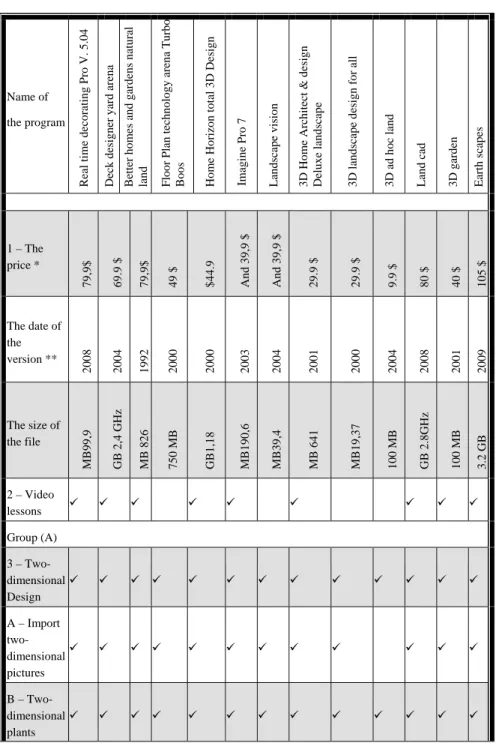
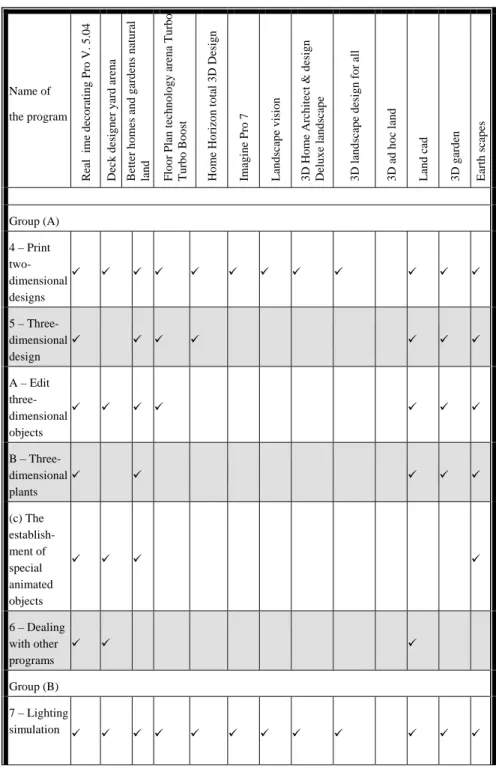
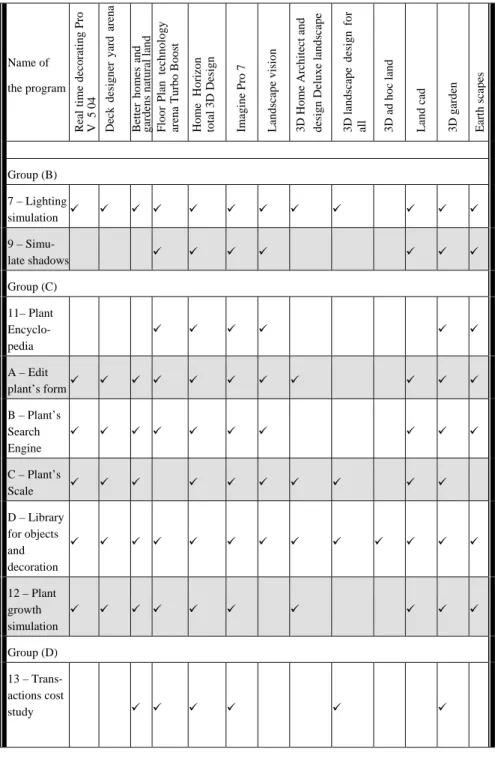
Table 1 displays the differences between different program and the rating criteria used.
8
Results and recommendations
Programs have been arranged according to the possibility of a program in achieving technical standards that have been compared to programs based on groups.
Group (A), 6 programs, more than 20 points: (recommended); (Real time Landscaping Pro) software, (Better homes & gardens landscaping & deck designer) software, (Total 3D home Landscape Design) software, (LandCAD) software, (3D Garden) software, (Earthscapes) software.
Group (B) , 4 programs , between 15 and 20 points: (natural); (Landscape deck patio designer 12) software, (Turbo floor Plan Landscape Deck) software, (Imagine pro 7) software, (Landscape Vision) software.
Table 1: Comparison between different landscape design programs. Name of the program R ea l t im e d ec o ra ti n g P ro V . 5 .0 4 Deck designer yard ar ena Better hom es and gar d ens natur al land Floor Plan techn ology ar ena T u rbo B o o st Hom e Ho ri
zon total 3D Design
Imagine P ro 7 L an d sc ap e v is io n 3 D H o m e A rc h it ec t & d es ig n
Deluxe landscape 3D landscape design f
o r all 3D ad hoc land L an d c ad 3D gar d en E ar th s ca p es 1 – The price * 79, 9$ 69. 9 $ 79, 9$ 49 $ $44. 9 And 39, 9 $ And 39, 9 $ 29. 9 $ 29. 9 $ 9. 9 $ 80 $ 40 $ 105 $ The date of the version ** 2008 2004 1992 2000 2000 2003 2004 2001 2000 2004 2008 2001 2009 The size of the file M B 99, 9 GB 2,4 GHz MB 826 750 M B GB1, 18 M B 190, 6 M B 39, 4 M B 641 M B 19, 37 100 M B GB 2.8GHz 100 M B 3. 2 GB 2 – Video lessons Group (A) 3 – Two-dimensional Design A – Import two- dimensional pictures B – Two-dimensional plants
Table 1: Continued. Name of the program R ea l ti m e d ec o ra ti n g P ro V . 5 .0 4 Deck designer yard ar ena Better hom es and gar d ens natur al land Floor Plan techn ology ar ena T u rbo Turbo B o o st t Hom e Ho ri
zon total 3D Design
Imagine P ro 7 L an d sc ap e v is io n 3 D H o m e A rc h it ec t & d es ig n
Deluxe landscape 3D landscape design f
o r all 3D ad hoc land L an d c ad 3D gar d en E ar th s ca p es Group (A) 4 – Print two-dimensional designs 5 – Three-dimensional design A – Edit three- dimensional objects B – Three-dimensional plants (c) The establish-ment of special animated objects 6 – Dealing with other programs Group (B) 7 – Lighting simulation
Table 1: Continued.
Name of the program
Real time decorati
ng Pro V 5 0 4 D ec k d es ig n er y ar d arena Better hom es and gardens n at ural land & Floor Plan tech nolog y
arena Turbo Boos
t
Home
H
o
rizon
total 3D Design Imagine P
ro 7 L andscape vision 3 D H o m e A rc h it ec t and
design Deluxe landscape 3D
landscape design f
o
r
all 3D ad hoc land Land cad 3D gar
d en Earth sca p es Group (B) 7 – Lighting simulation 9 – Simu-late shadows Group (C) 11– Plant Encyclo-pedia A – Edit plant’s form B – Plant’s Search Engine C – Plant’s Scale D – Library for objects and decoration 12 – Plant growth simulation Group (D) 13 – Trans-actions cost study
Table 1: Continued.
Name of the program
Real time decorati
ng Pro V 5 0 4 D ec k designer yard arena Better hom es and gardens n at ural land Floor Plan tech nolog y
arena Turbo Boos
t
Home
H
o
rizon
total 3D Design Imagine P
ro 7 L andscape vision 3 D H o m e A rc h it ec t d esign Deluxe landscape 3D landscape design f o r
all 3D ad hoc land Land cad 3D gar
d en Earth sca p es Group (D) 14 –Design terrain land A – The terrain maps Group (E) 15 – Drivers A – Windows 7 B – Vista C – XP D – 2000 E – Apple CONCLUSION The overall average 23 20 22 20 21 16 16 14 11 6 23 22 22
* – Prices (only in 2012 used as an indicator in the table). ** – Date of issue (First version).
Group (C), 3 programs, less than 15 points: (rejected); (3D Landscape Design for Everyone) software, (Custom 3D land) software, (Land CAD AutoCAD Land) software.
9
Conclusions
A recommendation list for landscapers to utilise different software in their design. This depended on the classification criteria that was presented in this paper.
References
[1] Wiberg, M. Interactive texture architecture and landscaping: Digital elements and techniques, pp. 30–50, 2010.
[2] Anthony J. White A list of computer programs personal natural land geophysical Mapping: selected bibliography (structure a series – references), pp. 7–8, 1990.
[3] Jacy L .Yun, Perfect Picture natural territories: images of tropical designed software offers guests virtual Introduction The yard their dreams (before and after), pp. 16–37 2002.
[4] The guide: New complete guide natural land: the design of the factory building (better homes and gardens(r)), 2002.
[5] Manual: A step-by-step natural territories (better homes and gardens and gardening), 2007.
[6] Giroux, P. & Beckstorm, B. Decorating to the public, pp. 19-30, 2003. [7] Landscape Design Software, www.squidoo.com/landscapedesignsoftware [8] SOFTWARE,www.software.com/view/5100/101/punch-landscape-deck-patio-designer [9] SOFTWARE,www.software.com/publisher/visual-application [10] www.landscapeyourvuisions.com [11] www.support.triverdeep.net [12] www.upperspace.com/products/7004 [13] www.amazon.com/custom-3d-land-jewel-case/dp/b00081ntja [14] www.landscaping-software-review.toptenreviews.com/cus-landdes-3d-des-hom-gar-suit-review.html [15] www.store.worldstart.com/product.php?productid=2534 [16] www.ideaspectrum.com [17] www.filebuzz.com/software_screenshot/full/29897realtime_landscaping_pl us.jpg [18] www.filebuzz.com/software_screenshot/full/realtime_landscaping_plus_3_ demo-60291.jpg [19] www.landscaping-software-review.toptenreviews.com