SAP Backup using
Tivoli Storage
Manager
Budi Darmawan
Miroslav Dvorak
Dhruv Harnal
Gerson Makino
Markus Molnar
Rennad Murugan
Marcos Silva
Covers and compares data management
techniques for SAP
Presents a sample implementation
of DB2 and Oracle databases
Explains LAN-free and
FlashCopy techniques
SAP Backup using Tivoli Storage Manager
June 2009
© Copyright International Business Machines Corporation 2009. All rights reserved.
First Edition (June 2009)
This edition applies to Version 5, Release 5, Modification 0 of Tivoli Storage Manager and its related components:
Tivoli Storage Manager Server, 5608-ISM
Tivoli Storage Manager for Enterprise Resource Planning, 5608-APR
Tivoli Storage Manager for Databases, 5608-APD
Tivoli Stroage Manager for Advanced Copy Services, 5608-ACS
Tivoli Storage Manager for SAN, 5608-SAN
Note: Before using this information and the product it supports, read the information in
Contents
Notices . . . xi
Trademarks . . . xii
Preface . . . xv
The team that wrote this book . . . xv
Become a published author . . . xvii
Comments welcome . . . xviii
Part 1. Concepts . . . 1
Chapter 1. SAP data management. . . 3
1.1 SAP . . . 4
1.2 Data management . . . 4
1.3 Book structure . . . 5
Chapter 2. SAP overview . . . 7
2.1 SAP product history. . . 8
2.2 SAP solutions and products . . . 11
2.2.1 Enterprise solutions. . . 11
2.2.2 Business solutions . . . 13
2.2.3 SAP solutions for small businesses and mid-size companies . . . 13
2.3 SAP NetWeaver overview . . . 13
2.3.1 Key capabilities . . . 14
2.3.2 Database positioning. . . 17
2.3.3 Application platform in detail . . . 18
2.4 SAP architecture . . . 23
2.4.1 Technical components . . . 24
2.4.2 Central instance . . . 26
2.4.3 Central services instance . . . 27
2.4.4 Database instance . . . 27
2.4.5 Dialog instance . . . 27
2.5 SAP system topologies . . . 28
2.6 Change and Transport System . . . 30
2.6.1 Clients and their roles . . . 31
2.6.2 System landscape . . . 32
2.6.3 Change management in the SAP system landscape . . . 34
2.7 SAP database . . . 35
2.7.1 Supported databases . . . 35
2.7.3 Connectivity and integration . . . 36
2.8 References . . . 39
Chapter 3. SAP data protection considerations . . . 41
3.1 Strategic view of data protection . . . 42
3.1.1 Measuring data availability and protection service levels . . . 44
3.1.2 Failure types . . . 47
3.2 Protection of SAP data . . . 49
3.2.1 Protection of the operating system . . . 51
3.2.2 Protection of SAP file systems data . . . 51
3.2.3 Protection of the SAP database . . . 53
3.2.4 Include exclude options. . . 59
3.3 Database backup types and considerations . . . 61
3.3.1 Backup modes . . . 61
3.3.2 Backup types. . . 63
3.3.3 Backup cycles . . . 65
3.3.4 Backup policy . . . 66
3.3.5 Retention period and tape release . . . 67
3.4 Data protection and data retention . . . 68
3.5 Tivoli Storage Manager and the SAP landscape. . . 69
3.5.1 Centralized SAP system . . . 70
3.5.2 Distributed SAP system . . . 70
3.5.3 High availability SAP system. . . 72
3.6 High availability . . . 76
3.6.1 Availability and performance . . . 76
3.6.2 High availability related consideration . . . 78
3.6.3 Disaster recovery . . . 81
3.7 Backup scheduling considerations . . . 82
3.7.1 SAP scheduler . . . 82
3.7.2 Tivoli Storage Manager scheduling . . . 85
3.7.3 Operating system schedulers . . . 86
3.7.4 External workload scheduling tools . . . 87
Chapter 4. Introduction to IBM Tivoli Storage Manager . . . 89
4.1 IBM Tivoli Storage Manager . . . 90
4.1.1 IBM Tivoli Storage Manager overview . . . 90
4.1.2 IBM Tivoli Storage Manager architecture . . . 92
4.1.3 IBM Tivoli Storage Manager server. . . 94
4.1.4 IBM Tivoli Storage Manager backup/archive client . . . 95
4.1.5 Tivoli Storage Manager backup . . . 96
4.2 IBM Tivoli Storage Manager storage agent . . . 97
4.3 Tivoli Storage Manager for Enterprise Resource Planning . . . 97
4.3.2 Data Protection for SAP for Oracle database . . . 99
4.3.3 Tivoli Data Protection for SAP for DB2 . . . 104
4.4 Tivoli Storage Manager for Databases . . . 105
4.4.1 Tivoli Data Protection for Oracle . . . 105
4.4.2 Tivoli Data Protection for Microsoft SQL Server . . . 105
4.5 ADINT/TSM client for MaxDB . . . 106
4.6 Tivoli Storage Manager for Advanced Copy Services . . . 107
4.6.1 Supported storage hardware. . . 108
4.6.2 Introduction to copy services. . . 109
4.6.3 Tivoli Storage Manager for Advanced Copy Services on SAP . . . . 111
Chapter 5. IBM DB2 CommonStore for SAP . . . 115
5.1 CommonStore for SAP overview. . . 116
5.2 Scenarios and features . . . 119
5.2.1 Data archiving . . . 119
5.2.2 Document archiving . . . 120
5.3 CommonStore for SAP server prerequisites . . . 121
5.4 CommonStore clients . . . 122
5.4.1 CommonStore archiving client . . . 123
5.4.2 CommonStore Viewing Client . . . 124
5.4.3 CommonStore Utility Client . . . 125
5.5 References . . . 126
Chapter 6. Database backup and recovery tools . . . 127
6.1 Database backup and recovery tools . . . 128
6.2 SAP BR*Tools for Oracle . . . 133
6.2.1 User interfaces . . . 134
6.2.2 Backup control function . . . 134
6.2.3 Archived redo log backup functions . . . 136
6.2.4 Restore and recovery functions . . . 137
6.2.5 Media interfaces . . . 139
6.2.6 Backup repository . . . 140
6.2.7 BR*Tools and Tivoli Storage Manager for ERP - Oracle . . . 140
6.2.8 References . . . 145
6.3 Oracle Recovery Manager (RMAN) . . . 145
6.3.1 User interfaces . . . 146
6.3.2 Backup control functions . . . 147
6.3.3 Archive redo log backup functions . . . 148
6.3.4 Restore and recovery functions . . . 149
6.3.5 Media interfaces . . . 151
6.3.6 Backup repository and retention control . . . 152
6.3.7 Integration of BR*Tools with Oracle RMAN . . . 153
6.4 IBM DB2 UDB backup recovery tools . . . 157
6.4.1 User interfaces . . . 157
6.4.2 Backup control functions . . . 158
6.4.3 Archived redo log backup functions . . . 160
6.4.4 Restore and recovery functions . . . 162
6.4.5 Media interfaces . . . 163
6.4.6 Backup repository . . . 163
6.4.7 DB2 UDB built-in Tivoli Storage Manager support . . . 164
6.4.8 DB2 UDB with Tivoli Storage Manager for ERP (DB2) . . . 166
6.4.9 References . . . 172
6.5 SAP MaxDB backup recovery tools . . . 172
6.5.1 User interfaces . . . 173
6.5.2 Backup control functions . . . 174
6.5.3 Archived redo log backup functions . . . 175
6.5.4 Restore and recovery functions . . . 175
6.5.5 Media interfaces . . . 177
6.5.6 Backup repository . . . 178
6.5.7 MaxDB with ADINT/TSM. . . 178
6.5.8 References . . . 181
6.6 Summary of backup tools . . . 182
Chapter 7. High availability and disaster recovery concepts . . . 185
7.1 High availability solutions . . . 186
7.1.1 High Availability Cluster Multi-Processing (HACMP) . . . 187
7.1.2 Microsoft Cluster Service (MSCS) . . . 189
7.1.3 Oracle Real Application Cluster (RAC) . . . 190
7.1.4 Tivoli System Automation for Multiplatforms . . . 192
7.1.5 Other high availability solutions. . . 193
7.2 Disaster recovery solutions . . . 194
7.2.1 HACMP Extended Distance option (HACMP/XD) . . . 194
7.2.2 Metro Mirror. . . 195
7.2.3 Oracle Maximum Availability Architecture (MAA) . . . 197
7.2.4 Oracle Dataguard . . . 198
7.2.5 DB2 High Availability Disaster Recovery (HADR) . . . 199
7.2.6 Microsoft SQL Server Log Shipping . . . 201
7.2.7 Microsoft SQL Server Mirroring. . . 201
7.2.8 Other options from IBM . . . 202
7.3 Usage matrix . . . 202
Part 2. Sample implementation and operation . . . 205
Chapter 8. Case study introduction. . . 207
8.1 DB2 environment. . . 208
8.3 Drivers and clients mapping to server roles . . . 209
Chapter 9. DB2 backup using Tivoli Storage Manager . . . 213
9.1 Introduction . . . 214
9.1.1 Data protection for SAP and DB2 . . . 214
9.1.2 DB2 built-in Tivoli Storage Manager support . . . 215
9.2 Planning for Data Protection for SAP with DB2. . . 215
9.2.1 Lab environment overview and backup consideration . . . 216
9.2.2 Backup methods to be used . . . 218
9.2.3 Installation prerequisites . . . 218
9.2.4 Tivoli Storage Manager software packages to be used . . . 219
9.2.5 Defining backup policies . . . 219
9.3 Configuration of Storage Agent . . . 221
9.4 Configuration for DB2 backup . . . 221
9.4.1 Configuration on the Tivoli Storage Manager server. . . 221
9.4.2 Data protection configuration on SAP server . . . 225
9.4.3 Optional DB2 configurations . . . 230
9.4.4 Schedule configuration . . . 231
9.5 Backup and restore using DB2 and the API client . . . 235
9.5.1 Executing tablespace backup . . . 235
9.5.2 Executing database backup . . . 236
9.5.3 Executing restore . . . 236
9.5.4 Monitoring backup and restore execution on DB2 . . . 237
9.5.5 Finding backup and restore log files or information . . . 238
9.5.6 Releasing backup tapes . . . 242
9.6 Tivoli Storage Manager for ERP-DB2 installation . . . 243
9.6.1 Required information for Data Protection for SAP . . . 244
9.6.2 Installing Tivoli Storage Manager for ERP . . . 244
9.6.3 System changes after Tivoli Data Protection for SAP installation . . 246
9.7 Tivoli Storage Manager for ERP configuration . . . 247
9.7.1 Configuration on the Tivoli Storage Manager server. . . 247
9.7.2 Data protection configuration on SAP server . . . 248
9.7.3 Manual configuration alternative . . . 251
9.7.4 Automation options of Data Protection for SAP . . . 254
9.7.5 Schedule configuration . . . 255
9.8 Backup and restore using Data Protection for SAP . . . 256
9.8.1 Executing backup . . . 256
9.8.2 Executing restore . . . 257
9.8.3 Backup and restore for DB2 partitions . . . 257
9.8.4 Monitoring backup and restore execution . . . 258
9.8.5 Getting reports from backup . . . 259
9.8.6 Releasing tapes and backup expiration . . . 262
9.9.1 Log files . . . 263
9.9.2 Configuration files . . . 263
9.9.3 Common error messages . . . 264
9.9.4 Other problems . . . 265
9.10 References . . . 265
Chapter 10. Oracle backup using Tivoli Storage Manager for ERP . . . . 267
10.1 Introduction . . . 268
10.1.1 Data Protection for SAP and BACKINT . . . 268
10.1.2 Data Protection for SAP and RMAN . . . 269
10.2 Data protection planning for SAP with Oracle . . . 270
10.2.1 Lab environment overview and backup considerations . . . 270
10.2.2 Backup methods to be used . . . 272
10.2.3 Installation prerequisites for Data Protection for SAP - Oracle . . . 272
10.2.4 Tivoli Storage Manager software packages to be used . . . 273
10.2.5 Defining backup policies . . . 273
10.3 Tivoli Storage Manager for ERP - Oracle installation . . . 275
10.4 BR*Tools with Oracle RMAN configuration . . . 278
10.4.1 Tivoli Storage Manager server configuration . . . 278
10.4.2 SAP database server configuration. . . 279
10.4.3 Scheduling configuration . . . 285
10.5 Configuration of BR*Tools with the BACKINT interface . . . 288
10.6 References . . . 290
Chapter 11. LAN-free backup and restore. . . 291
11.1 LAN-free backup and restore . . . 292
11.2 Installation . . . 293
11.2.1 Atape driver installation . . . 293
11.2.2 Storage agent installation . . . 296
11.2.3 Configuration worksheets . . . 299
11.3 Setup and configuration of storage agent . . . 302
11.3.1 Configuration on the Tivoli Storage Manager client . . . 304
11.3.2 Configuration on the Tivoli Storage Manager server. . . 305
11.4 Setup and configuration for DB2 environment . . . 307
11.4.1 Required Tivoli Storage Manager definitions . . . 308
11.4.2 Tivoli Storage Manager API configuration. . . 310
11.4.3 Tivoli Storage Manager for ERP configuration . . . 312
11.5 Setup and configuration in Oracle environment . . . 316
Chapter 12. FlashCopy backup and restore . . . 319
12.1 Conventional FlashCopy method . . . 320
12.2 Introduction Advanced Copy Services for SAP . . . 321
12.2.1 Backup to Tivoli Storage Manager server without FlashCopy . . . 324
12.2.3 Different options for the FlashCopy function . . . 326
12.2.4 Backup of offline transaction logs . . . 326
12.2.5 Expiration consideration . . . 328
12.3 Implement Advanced Copy Services for SAP in DB2 . . . 329
12.3.1 Data Protection for SAP (DB2) installation and configuration . . . . 329
12.3.2 Customizing the DB2 environment . . . 331
12.3.3 Password handling methods . . . 332
12.3.4 CIM installation and configuration . . . 333
12.3.5 Data Protection for FlashCopy installation and configuration . . . . 336
12.3.6 Data Protection for FlashCopy configuration . . . 338
12.3.7 Other prerequisites for the backup server . . . 343
12.3.8 FlashBack restore . . . 355
12.4 Implement Advanced Copy Services for SAP (Oracle) . . . 357
12.4.1 Data Protection for SAP (Oracle) installation and configuration . . 358
12.4.2 Password handling methods . . . 359
12.4.3 CIM installation and configuration . . . 360
12.4.4 Data Protection for FlashCopy installation . . . 360
12.4.5 Data Protection for FlashCopy configuration . . . 362
12.5 FlashCopy cloning of SAP databases . . . 369
12.5.1 FCClone process . . . 370
12.5.2 Installation requirements for FCClone. . . 371
Part 3. Appendixes . . . 373
Appendix A. DB2 basic operations. . . 375
Get information about the current DB2 instance . . . 376
Listing the current active databases . . . 376
Connecting to an active database . . . 376
Configuration parameters for the current instance . . . 376
Configuration parameters for the current database . . . 377
Listing tablespaces information . . . 378
Monitoring backup and restore . . . 380
Listing backup history . . . 380
Listing the backup history from DB2 . . . 380
Listing backups from DB2 tables. . . 382
Appendix B. Oracle basic operations . . . 383
Oracle basic information. . . 384
Get information about the Oracle instance . . . 384
Listing the Oracle database files . . . 387
Oracle control files . . . 388
Oracle redo log files . . . 388
Oracle archived log list . . . 390
Monitoring backup execution . . . 392
Abbreviations and acronyms . . . 395
Related publications . . . 399
IBM Redbooks . . . 399
Other publications . . . 399
Online resources . . . 402
How to get Redbooks . . . 408
Help from IBM . . . 408
Notices
This information was developed for products and services offered in the U.S.A.
IBM may not offer the products, services, or features discussed in this document in other countries. Consult your local IBM representative for information on the products and services currently available in your area. Any reference to an IBM product, program, or service is not intended to state or imply that only that IBM product, program, or service may be used. Any functionally equivalent product, program, or service that does not infringe any IBM intellectual property right may be used instead. However, it is the user's responsibility to evaluate and verify the operation of any non-IBM product, program, or service.
IBM may have patents or pending patent applications covering subject matter described in this document. The furnishing of this document does not give you any license to these patents. You can send license inquiries, in writing, to:
IBM Director of Licensing, IBM Corporation, North Castle Drive, Armonk, NY 10504-1785 U.S.A.
The following paragraph does not apply to the United Kingdom or any other country where such provisions are inconsistent with local law: INTERNATIONAL BUSINESS MACHINES CORPORATION
PROVIDES THIS PUBLICATION "AS IS" WITHOUT WARRANTY OF ANY KIND, EITHER EXPRESS OR IMPLIED, INCLUDING, BUT NOT LIMITED TO, THE IMPLIED WARRANTIES OF NON-INFRINGEMENT, MERCHANTABILITY OR FITNESS FOR A PARTICULAR PURPOSE. Some states do not allow disclaimer of express or implied warranties in certain transactions, therefore, this statement may not apply to you. This information could include technical inaccuracies or typographical errors. Changes are periodically made to the information herein; these changes will be incorporated in new editions of the publication. IBM may make improvements and/or changes in the product(s) and/or the program(s) described in this publication at any time without notice.
Any references in this information to non-IBM Web sites are provided for convenience only and do not in any manner serve as an endorsement of those Web sites. The materials at those Web sites are not part of the materials for this IBM product and use of those Web sites is at your own risk.
IBM may use or distribute any of the information you supply in any way it believes appropriate without incurring any obligation to you.
Information concerning non-IBM products was obtained from the suppliers of those products, their published announcements or other publicly available sources. IBM has not tested those products and cannot confirm the accuracy of performance, compatibility or any other claims related to non-IBM products. Questions on the capabilities of non-IBM products should be addressed to the suppliers of those products.
This information contains examples of data and reports used in daily business operations. To illustrate them as completely as possible, the examples include the names of individuals, companies, brands, and products. All of these names are fictitious and any similarity to the names and addresses used by an actual business enterprise is entirely coincidental.
COPYRIGHT LICENSE:
This information contains sample application programs in source language, which illustrate programming techniques on various operating platforms. You may copy, modify, and distribute these sample programs in any form without payment to IBM, for the purposes of developing, using, marketing or distributing application programs conforming to the application programming interface for the operating platform for which the sample programs are written. These examples have not been thoroughly tested under all conditions. IBM, therefore, cannot guarantee or imply reliability, serviceability, or function of these programs.
Trademarks
IBM, the IBM logo, and ibm.com are trademarks or registered trademarks of International Business Machines Corporation in the United States, other countries, or both. These and other IBM trademarked terms are marked on their first occurrence in this information with the appropriate symbol (® or ™), indicating US registered or common law trademarks owned by IBM at the time this information was
published. Such trademarks may also be registered or common law trademarks in other countries. A current list of IBM trademarks is available on the Web at http://www.ibm.com/legal/copytrade.shtml
The following terms are trademarks of the International Business Machines Corporation in the United States, other countries, or both:
AIX 5L™ AIX® CICS® DB2 Universal Database™ DB2® DRDA® DS6000™ DS8000®
Enterprise Storage Server® ESCON® eServer™ FlashCopy® GPFS™ HACMP™ IBM® Informix® iSeries® OS/390® OS/400® Passport Advantage® POWER5™ pSeries® Redbooks® Redbooks (logo) ® System p5® System p® System Storage™ Tivoli® TotalStorage® WebSphere® z/OS®
The following terms are trademarks of other companies:
ITIL is a registered trademark, and a registered community trademark of the Office of Government Commerce, and is registered in the U.S. Patent and Trademark Office.
IT Infrastructure Library, IT Infrastructure Library is a registered trademark of the Central Computer and Telecommunications Agency which is now part of the Office of Government Commerce.
Snapshot, and the NetApp logo are trademarks or registered trademarks of NetApp, Inc. in the U.S. and other countries.
Oracle, JD Edwards, PeopleSoft, Siebel, and TopLink are registered trademarks of Oracle Corporation and/or its affiliates.
ACS, Interchange, Red Hat, and the Shadowman logo are trademarks or registered trademarks of Red Hat, Inc. in the U.S. and other countries.
ABAP, BAPI, mySAP, mySAP.com, SAP ArchiveLink, SAP NetWeaver, SAP R/2, SAP R/3 Enterprise, SAP R/3, SAP Strategic Enterprise Management, SAP, and SAP logos are trademarks or registered trademarks of SAP AG in Germany and in several other countries.
VMware, the VMware "boxes" logo and design are registered trademarks or trademarks of VMware, Inc. in the United States and/or other jurisdictions.
ABAP, BAPI, mySAP, mySAP.com, SAP ArchiveLink, SAP NetWeaver, SAP R/2, SAP R/3 Enterprise, SAP R/3, SAP Strategic Enterprise Management, SAP, xApps, xApp and all SAP logos are trademarks or registered trademarks of SAP AG in Germany and in several other countries.
Image Viewer, J2EE, Java, JDBC, JRE, Solaris, Sun, Sun Java, and all Java-based trademarks are trademarks of Sun Microsystems, Inc. in the United States, other countries, or both.
Internet Explorer, Microsoft, MS, SQL Server, Windows Server, Windows, and the Windows logo are trademarks of Microsoft Corporation in the United States, other countries, or both.
Intel Pentium, Intel, Pentium, Intel logo, Intel Inside logo, and Intel Centrino logo are trademarks or registered trademarks of Intel Corporation or its subsidiaries in the United States, other countries, or both.
UNIX is a registered trademark of The Open Group in the United States and other countries. Linux is a trademark of Linus Torvalds in the United States, other countries, or both.
Preface
In this IBM® Redbooks® publication, we give an overview of different data management topics related to a typical SAP® data center. The intrinsic
functionality of SAP is not designed to completely handle all the tasks of a data center by itself, but the SAP system offers several interface possibilities to attach external tools to it to accomplish this task
We explain SAP basic concepts and the issues with SAP data management. We introduce Tivoli® Storage Manager and all of its products that are related to SAP data management. We provide some comparison between database backup and recovery tools. Finally, we discuss data archiving using IBM DB2®
CommonStore for SAP, and discuss high availability requirements and disaster recovery considerations.
The second part of this book discusses a practical implementation of SAP backup and recovery with Tivoli Storage Manager. We implement this setup on two separate SAP systems: one running DB2 and the other running Oracle® database. We also implement LAN-free backup and FlashCopy® scenarios.
In the sample implementation section, we show many different tasks, such as backup and restore, database recovery, backup monitoring, and tuning. We also cover some advanced backup/availability considerations, such as split mirror backup and standby databases.
This book helps individuals that operate an SAP environment to devise a strategy for a sound and comprehensive data backup solution using the IBM Tivoli Storage Management product family.
The team that wrote this book
This book was produced by a team of specialists from around the world working at the International Technical Support Organization, Austin Center.
Budi Darmawan is a project leader with the International Technical Support
Organization, Austin Center. He writes extensively and teaches IBM classes worldwide on all areas of Tivoli systems management. Before joining the ITSO 9 years ago, Budi worked in IBM Indonesia as lead implementor and solution architect. His current interests are application management, business system management, and Java™ programming.
Miroslav Dvorak is an IT Consultant with GC System a.s., an IBM Premier
Business Partner in the Czech Republic. He graduated from the University of Economics in Prague with a Master's degree in Information Technology and has 10 years of experience in the IT field. His areas of expertise include data protection technologies, databases, IBM System p® and AIX, and HACMP™. He holds several certifications, including IBM eServer™ Certified Systems Expert - pSeries® HACMP for AIX 5L™, IBM Certified Advanced Database Administrator - DB2 UDB V8.1 for LUW, Oracle Certified Associate 10g, and IBM Certified Advanced Deployment Professional - Tivoli Storage Management Solutions 2006.
Dhruv Harnal is a Sr. Associate IT Specialist with IBM Software Labs, India.He
has 4 years of experience in the IT industry, primarily on Tivoli Storage Manager, Tivoli Data Protection and Veritas Netbackup, IBM System Storage™ DS6800, SVC and DS8000®, Brocade Directors and Switches, IBM TotalStorage® Libraries, and Multi-path Drivers. He is also a BCFP, IBM certified IBM System p5® Virtualization expert.
Gerson Makino is an IT Architect at Technology Integration & Management
(TIM) with IBM Brazil, supporting IBM international customers. He is an IBM Certified IT Specialist, with more than 23 years of IT experience in a wide range of platforms from midrange to IBM mainframes. His areas of expertise include Oracle, DB2, and Microsoft® SQL Server® databases on UNIX®, Linux®, and Windows® platforms, and Assembler/370, DB2, and CICS® for MVS and OS/390® mainframes. He is an IBM DB2 Certified Database Administrator on DB2 UDB V8.1 for Linux, UNIX, Windows, and zOS operating systems, and an Oracle Certified Professional on Oracle 8i, 9i, and 10g databases.
Markus Molnar is a Managing Consultant with IBM Australia. He has 6 years of
experience in SAP Technology. He is an SAP certified Technology and OS/DB Migration consultant who has been working with different customers and projects running SAP on all kinds of platforms and databases. His areas of expertise include SAP Technology, Oracle, AIX, IXOS archiving server, and CommonStore for SAP.
Rennad Murugan is an Advisory IT Specialist with the Integrated Delivery
Centre (IDC) based in Johannesburg, South Africa. He provides technical support to multiple customers for Tivoli Storage Manager and its associated client products, Disaster Recovery, TotalStorage Productivity Centre, and broad based Storage Area Network environments (ESS, DS, Brocade, McData, and others). Rennad joined IBM in 2004 and has spent the last 3 years as a storage administrator. He is a certified TSM Deployment professional and holds a degree in Commerce, majoring in Management and Information Systems.
Marcos Silva is a System Specialist with IBM Brazil. He has 8 years of
experience in the IT field. For the last 4 years, he has been working with the Tivoli Storage Manager products portfolio. His areas of expertise include AIX®, Windows, Linux, and IBM Tape and Optical devices. He has been working for IBM since 2004. He is an ITIL® Certified Professional, IBM Certified Deployment Professional for Tivoli Storage Manager V5.4, and IBM Certified Administration Professional for Tivoli Storage Manager V5.4. He supports international and local companies in the Storage Field for IBM in Brazil.
Thanks to the following people for their contributions to this project:
Wade Wallace
International Technical Support Organization, Austin Center
Mark Smith, Michell Spooner, Monty Poppe IBM UNIX Product Testing, Austin, TX
Kathy Pang
Tivoli Storage Manager Level 2 Support, IBM San Jose, CA
Become a published author
Join us for a two- to six-week residency program! Help write a book dealing with specific products or solutions, while getting hands-on experience with
leading-edge technologies. You will have the opportunity to team with IBM technical professionals, Business Partners, and Clients.
Your efforts will help increase product acceptance and customer satisfaction. As a bonus, you will develop a network of contacts in IBM development labs, and increase your productivity and marketability.
Find out more about the residency program, browse the residency index, and apply online at:
Comments welcome
Your comments are important to us!
We want our books to be as helpful as possible. Send us your comments about this book or other IBM Redbooks in one of the following ways:
Use the online Contact us review Redbooks form found at:
ibm.com/redbooks
Send your comments in an e-mail to:
Mail your comments to:
IBM Corporation, International Technical Support Organization Dept. HYTD Mail Station P099
2455 South Road
Part 1
Concepts
In this part, we discuss background concepts of SAP and Tivoli Storage Manager. The discussion is divided into the following chapters:
Chapter 1, “SAP data management” on page 3
Chapter 2, “SAP overview” on page 7
Chapter 3, “SAP data protection considerations” on page 41
Chapter 4, “Introduction to IBM Tivoli Storage Manager” on page 89
Chapter 5, “IBM DB2 CommonStore for SAP” on page 115
Chapter 6, “Database backup and recovery tools” on page 127
Chapter 7, “High availability and disaster recovery concepts” on page 185
Part 1
Chapter 1.
SAP data management
This chapter gives an overview of this book. The discussion includes the following sections:
1.1, “SAP” on page 4
1.2, “Data management” on page 4
1.3, “Book structure” on page 5
1.1 SAP
SAP is an acronym for Systems Applications and Products. SAP provides a common centralized database for all the applications running in an organization. The application is assembled in such a versatile way that it handles all the functional departments within an organization.
SAP solutions are based on SAP NetWeaver®. It provides an integrated
application platform, and this common technology platform helps reduce the total cost of ownership (TCO) across the entire IT landscape. This also supports the evolution of SAP Business Suite into a services-based architecture.
SAP's products focus on Enterprise Resource Planning (ERP), which SAP helped to pioneer. The company's main product is SAP ERP. SAP ERP is an integrated application that fulfills the core business needs of midsize to large organizations across all industries and market sectors.
Businesses are depending more and more on SAP. SAP is typically a critical application for those businesses, so it has to be protected. An SAP application must accommodate a business’ requirements, which means the systems must be available and the data must be reliable. From a data management
perspective, all SAP components communicate to a database instance. This database instance can be highly available, but data in the database must be backed up to ensure recoverability.
1.2 Data management
Data management deals with data storage, backup, and retrieval (or restore). In SAP, data management involves control files, executables, program
customization, and its database. The largest issue in SAP data management is database backup and recovery, where you have to consider the following items:
An SAP database is used by the SAP application, and the SAP application typically requires near continuous availability.
AN SAP database is a single point of failure for all SAP components.
AN SAP database can become quite large as the data accumulates and
This book discusses several IBM Tivoli Storage Manager components that can help you perform data management functions in SAP. The software functions that we discuss are:
Tivoli Storage Manager Server and Backup Archive Client for backup of the file system objects
Tivoli Storage Manager for Database for database backup
Tivoli Storage Manager for Enterprise Resource Planning for SAP specific backup requirements
Tivoli Storage Manager for Advanced Copy Services for FlashCopy
Tivoli Storage Manager for SAN for LAN-free backup (direct to SAN backup)
1.3 Book structure
This book is divided into the following parts and chapters:
Part 1, “Concepts” on page 1 discusses the environment and product features.
– Chapter 1, “SAP data management” on page 3, this chapter, introduces the book.
– Chapter 2, “SAP overview” on page 7 gives an overview of SAP systems. – Chapter 3, “SAP data protection considerations” on page 41 explains
some considerations for protecting data in an SAP system.
– Chapter 4, “Introduction to IBM Tivoli Storage Manager” on page 89 describes Tivoli Storage Manager products features.
– Chapter 5, “IBM DB2 CommonStore for SAP” on page 115 explains the role of DB2 CommonStore for SAP data archiving, and contrasts it with data backup.
– Chapter 6, “Database backup and recovery tools” on page 127 provides an overview of different Tivoli Storage Manager related data backup and recovery tools that can be used for SAP data backup.
– Chapter 7, “High availability and disaster recovery concepts” on page 185 discusses the options for implementing high availability and disaster recovery scenario for an SAP system to complement data backup solution.
Part 2, “Sample implementation and operation” on page 205 provides a practical walkthrough of sample implementation schemes using Tivoli Storage Manager in an SAP environment.
– Chapter 9, “DB2 backup using Tivoli Storage Manager” on page 213 demonstrates a backup implementation for SAP with a DB2 database. – Chapter 10, “Oracle backup using Tivoli Storage Manager for ERP” on
page 267 demonstrates a backup implementation for SAP with an Oracle database.
– Chapter 11, “LAN-free backup and restore” on page 291 explains a SAN and LAN-free backup implementation with Tivoli Storage Manager. – Chapter 12, “FlashCopy backup and restore” on page 319 demonstrates
Chapter 2.
SAP overview
This chapter describes SAP. The discussion is divided into the following sections:
2.1, “SAP product history” on page 8
2.2, “SAP solutions and products” on page 11
2.3, “SAP NetWeaver overview” on page 13
2.4, “SAP architecture” on page 23
2.5, “SAP system topologies” on page 28
2.6, “Change and Transport System” on page 30
2.7, “SAP database” on page 35
2.8, “References” on page 39
2.1 SAP product history
In 1972, five former IBM employees started up a company called Systems Applications and Products in Data Processing in Germany. The company is most commonly know by the acronym SAP (the individual letters are sounded out). The goal was to develop standard application software for real-time business processing.
SAP R/2®, which ran on a mainframe architecture, was the first SAP version. R/3 was introduced and runs on a majority of platforms, including Microsoft Windows and different UNIX-type systems, such as AIX. R/3 is based on the client/server model. SAP NetWeaver is the latest product from SAP and provides the
foundation of SAP’s offered solutions. SAP NetWeaver enables the usage of Web and Java technologies.
SAP's products are generally focused around Enterprise Resource Planning (ERP). Their core product is the SAP ERP solution, which provides the
functionality to manage product operations, cost accounting, assets, materials, and personnel. SAP offers its solutions for large, mid-size, and small businesses.
The first financial accounting software that SAP developed is known as the R/1 system and was made available in 1973. The “R” stands for real-time data processing. After SAP analyzed their product’s database and dialog control system, they developed, announced, and released SAP R/2 in 1979. SAP R/2 is a mainframe based solution similar to R/1. It supported different languages and currencies.
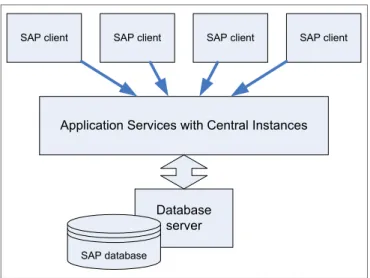
SAP R/3® was announced in 1992. This version made the leap from mainframe computing to the three-tier architecture of user interface, application, and database. The client-server concept, a consistent look and feel among the graphical interfaces, consistent use of relational databases, and the ability to run on computers from different vendors were introduced to meet the needs of the enterprise software market.
The client-server architecture shown in Figure 2-1 on page 9 is the current standard in business software.
Figure 2-1 SAP three-tier architecture
SAP R/3 through Version 4.6C consisted of various applications on top of SAP Basis, which is SAP's set of middleware programs and tools.
When SAP R/3 Enterprise™ was launched in 2002, all applications were built on top of the SAP Web Application Server. Extension sets were used to deliver new features and keep the core as stable as possible. The Web Application Server contained all the capabilities of SAP Basis and enabled the use of Web technologies.
At the end of the 1990s, SAP announced the mySAP™.com® strategy. mySAP.com uses standard Web and Internet technologies, and links
e-commerce solutions to existing ERP applications. SAP also develops SAP Workplace, which evolved to become an enterprise portal solution with role-based access to information.
SAP’s latest integration and application platform is called SAP NetWeaver. SAP NetWeaver enables the integration of information, people, and processes inside and outside a company. With enterprise service-oriented architecture and SAP NetWeaver as foundation, SAP provides solutions to build end-to-end business processes.
The first edition of mySAP ERP was launched in 2003 and bundled previously separate products, including SAP R/3 Enterprise, SAP Strategic Enterprise Management™ (SEM), and extension sets. The SAP Web Application Server was wrapped into NetWeaver, which was also introduced in 2003.
Application Services with Central Instances
SAP client SAP client SAP client SAP client
Database server
A complete architecture change took place with the introduction of mySAP ERP in 2004. R/3 Enterprise was replaced with the introduction of ERP Central Component (SAP ECC). The SAP Business Warehouse, SAP Strategic
Enterprise Management, and Internet Transaction Server were also merged into SAP ECC, allowing users to run them under one instance. Architectural changes were also made to support an enterprise services architecture to transition customers to a service-oriented architecture.
Figure 2-2 shows the SAP evolution.
Figure 2-2 SAP evolution
Service-oriented architecture moves the ERP landscape toward Web services based business activities. This move increases adaptability, flexibility, openness, and efficiency of SAP. The move towards enterprise SOA helps companies reuse software components and not have to rely as much on in-house enterprise resource planning hardware technologies, which helps make ERP adoption more attractive for small- or mid-sized companies.
You can learn more about Enterprise SOA at the following address:
http://www12.sap.com/platform/soa/index.epx Application SAP Basis V4.6D SAP R/3 Enterprise Extension Sets Industry solutions
SAP Web Application Server 6.20
SAP ECC Extension Sets Industry solutions
Composite applications Self service procurement
Internet sales Self services Strategic Enterprise Management SAP NetWeaver ‘04 C ompo si te a ppli cat ion fr amewo rk Lif e cycle man age m ent People integration Information integration Process integration Application platform Composite applications Self service procurement
Internet sales Self services Strategic Enterprise Management Supplier relationship management SAP NetWeaver 2004 C ompo si te a ppli cat ion fr amewo rk Lif e cycle man age m ent People integration Information integration Process integration Application platform SAP ECC Enterprise extensions Industry extensions SAP ECC Core
2.2 SAP solutions and products
The discussion includes the following sections:
2.2.1, “Enterprise solutions” on page 11
2.2.2, “Business solutions” on page 13
2.2.3, “SAP solutions for small businesses and mid-size companies” on page 13
For more information about SAP solutions, go to the following address:
http://www.sap.com/solutions/index.epx
2.2.1 Enterprise solutions
Here we discuss the following enterprise solutions:
“SAP Business Suite” on page 11
“Duet” on page 12
“SAP Manufacturing” on page 12
“SAP Service and Asset Management” on page 12
SAP Business Suite
SAP Business Suite is a family of adaptive business applications, with a high level of integration and industry-specific functionality and scalability that allows easy collaboration over the Internet.
SAP solutions are based on SAP NetWeaver. It provides an integrated
application platform that helps reduce the total cost of ownership (TCO) across the entire IT landscape. It also supports the evolution of SAP Business Suite into a services-based architecture.
SAP's products focus on Enterprise Resource Planning (ERP). The company's main product is SAP ERP. SAP ERP is an integrated application that fulfills the core business needs of mid-size to large organizations across all industries and market sectors. SAP offers a generic solution for over 20 industries, such as automotive, chemical, and telecommunications.
SAP ERP is one of five major enterprise applications in SAP's Business Suite, which includes the following applications:
Customer Relationship Management (CRM)
With CRM, companies are able to acquire and retain customers, gain deep marketing and customer insight, and align an organization towards
Enterprise Resource Planning (ERP)
ERP enables enterprises to perform financials, human capital management, procurement and logistics, product development and manufacturing, and sales and service, supported by functionality for analytics, corporate services, and user service delivery. It increases efficiency within your organization and helps extend end-to-end business processes to your customers, partners, and suppliers.
Product Lifecycle Management (PLM)
PLM helps manufacturers by giving them a single source of all the
product-related information necessary to collaborate with Business Partners and to support product lines.
Supply Chain Management (SCM)
SCM helps companies enhance operational flexibility across global enterprises and provide real-time visibility for customers and suppliers.
Supplier Relationship Management (SRM)
With SRM, customers can collaborate closely with suppliers and integrate sourcing processes with applications throughout the enterprise to enhance transparency and lower costs.
SAP Business Suite applications help manage the most critical business processes. Using them together adds even more value to your organization through seamless integration.
Duet
The Duet software enables seamless access to SAP business processes and data through Microsoft Office. It revolutionizes how information workers interact with enterprise applications. Duet is the result of a collaboration between SAP and Microsoft.
SAP Manufacturing
SAP Manufacturing integrates manufacturing with other enterprise processes. It takes into account the planning, execution, quality, maintenance, and
environment, health, and safety aspects of manufacturing.
SAP Service and Asset Management
SAP Service and Asset Management provides the tools to improve service management, service parts management, and asset management.
2.2.2 Business solutions
SAP also provides other business solutions that are not included in the enterprise solution. Those product offerings are:
SAP Solutions for Enterprise Performance Management
SAP Solutions for Governance, Risk, and Compliance (GRC)
SAP Solutions for Information Workers
SAP Solutions for RFID
Solution extensions
Software from SAP and Business Objects
2.2.3 SAP solutions for small businesses and mid-size companies
SAP offers ready solution packages for small and mid-size companies that can be tailored and adapted to a company’s needs. The business management and business intelligence solutions are:
SAP Business One
SAP Business ByDesign
SAP Business All-in-One
Crystal Reports Server
BusinessObjects Edge Series
2.3 SAP NetWeaver overview
SAP NetWeaver provides an open integration and application platform and permits the integration of the Enterprise Services Architecture. This allows business processes to be integrated as needed in a structured manner.
SAP NetWeaver is the basis for SAP solutions, as shown in Figure 2-3.
Figure 2-3 SAP NetWeaver architecture
SAP NetWeaver is built using open standards and industry
de facto
standards. It can be extended to interoperate with Microsoft .NET, Sun™ Java™ Enterprise Edition, and IBM WebSphere® products.SAP NetWeaver's allow enterprises to run their business on a single, integrated platform that includes both applications and technology. Industry analysts refer to this type of integrated platform offering as an “applistructure” (applications + infrastructure). This approach is driven by the industry's need to lower IT costs through an enterprise architecture that is:
More flexible,
Better integrated with applications
Built on open standards to ensure future interoperability and broad integration
Provided by a vendor that is financially viable for the long term
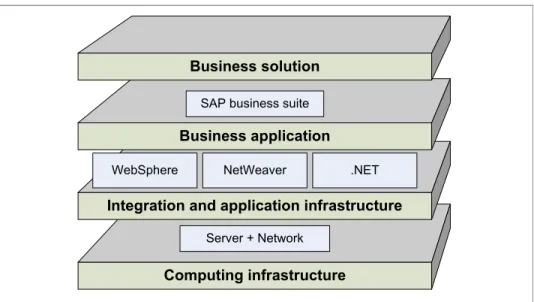
2.3.1 Key capabilities
Figure 2-4 on page 15 shows SAP NetWeaver’s key capabilities.
Computing infrastructure
Integration and application infrastructure Business application
Business solution
Server + Network
WebSphere NetWeaver .NET SAP business suite
Figure 2-4 SAP NetWeaver key capabilities
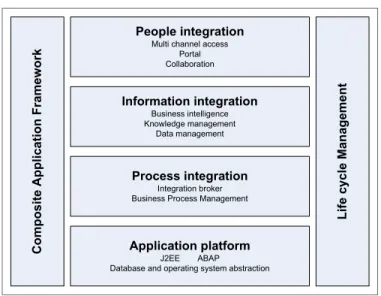
As shown in Figure 2-4, SAP NetWeaver has the following key capabilities:
People integration
People integration brings together the right functionality and the right
information to the right people. On the people level, SAP NetWeaver allows a seamless user experience across different systems, which allows
collaboration functions and pervasive access.
Information integration
Information integration provides both structured and unstructured information that is consistent and accessible. Users have constant access to consistent information, no matter where it is stored.
Process integration
The Integration Broker provides a technical infrastructure for XML-based message exchange to enable the integration of SAP systems with each other on the one hand, and SAP and non-SAP systems on the other.
With the Integration Broker, integration knowledge is shipped in the form of predefined integration scenarios. Furthermore, the Integration Broker provides a set of integrated tools for creating and managing all
integration-relevant information. Processes are controlled from the Business Process Management functions.
C o mposite Applic ation Framework Lif e c ycle Manage ment People integration Multi channel access
Portal Collaboration Information integration Business intelligence Knowledge management Data management Process integration Integration broker Business Process Management
Application platform J2EE ABAP
Application platform
The application server provides a complete development infrastructure on which you can develop, distribute, and execute platform-independent, robust, and scalable Web services and business applications. The Application Server supports Advanced Business Application Programming (ABAP™), Java, and Web services applications. The application platform is the basis of SAP NetWeaver and is implemented by the application server.
Solution Lifecycle Management
Solution Lifecycle Management (SLCM) provides you with the technology required for the entire life cycle of your solution, from its implementation, through running a live system, to continuous modifications and upgrades. This includes the capabilities to perform data archiving.
Composite Application Framework
Different services and people with different roles within different departments need to work together to drive business processes. The most effective approach for such solutions is the composite methodology, which allows reuse and composition of different services, user interface components, and business processes into flexible solutions. Composite Application Framework (CAF) leverages all layers of SAP NetWeaver.
In addition to the key capabilities described, SAP NetWeaver covers the following aspects:
Security
In today’s world of collaborative business processes and open system environments, security no longer means just adding a firewall and using passwords to log on. It requires a complete approach that applies to both the IT landscape and also to issues that arise beyond your organization. The infrastructure of the SAP NetWeaver technology platform supports comprehensive security features for heterogeneous environments.
Databases
– MaxDB
MaxDB is SAP’s own relational database system. You can use it in SAP solutions as a less expensive alternative to databases from other vendors. MaxDB is delivered as standard under NetWeaver Full Use License. – SAP liveCache Technology
SAP liveCache Technology is an object-based enhancement of the MaxDB database system. You can use SAP liveCache Technology either as a normal relational database system, or as a main memory-based special database system. SAP liveCache OneDB combines these two options.
SAP liveCache Technology is currently delivered as part of the SAP SCM/APO solution. Its use in other SAP solutions is forthcoming.
SAP Knowledge Warehouse
The SAP Knowledge Warehouse is the SAP Solution for all the material used in training, documentation, and handbooks.
It is an integrated environment for creating, translating, presenting, distributing, and managing information objects.
2.3.2 Database positioning
Different areas of SAP NetWeaver’s key capabilities show that the
database-related aspects are covered in Application platform and Solution Lifecycle Management.
The Application platform discusses database support. It also offers data archiving functionality as one of its many business services.
Under Solution Lifecycle Management, the following database aspects are discussed:
– Database system management – Database high availability – Data archiving
The SAP Database is discussed in more detail in 2.7, “SAP database” on page 35.
2.3.3 Application platform in detail
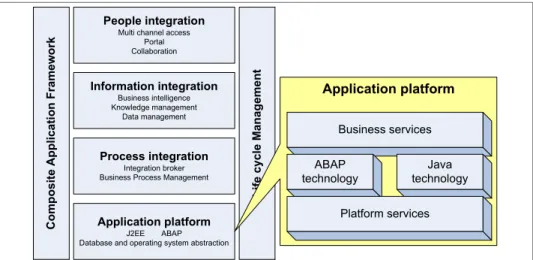
The application platform is the basis of SAP NetWeaver and is implemented by the application server. The application server provides a complete infrastructure on which you can develop, distribute, and execute platform-independent, robust, and scalable Web services and business applications. The application server supports ABAP, Java, and Web services, as shown in Figure 2-5.
Figure 2-5 SAP NetWeaver application platform key capabilities
This section discusses the following:
“Platform-wide services” on page 18
“ABAP technology” on page 19
“Java technology” on page 20
“Business services” on page 22
Platform-wide services
The platform-wide services provide support for the different databases and operating services that are supported by SAP NetWeaver. It allows the ABAP, Java, and both ABAP and Java application servers to run seamlessly on different database and operating system platforms.
The platform-wide services also allows exchange of application information. The exchange can be between different SAP systems or SAP and external systems.
Co m p osit e Applicati o n Framew ork
Life cycle Manag
ement
People integration
Multi channel access Portal Collaboration Information integration Business intelligence Knowledge management Data management Process integration Integration broker Business Process Management
Application platform
J2EE ABAP Database and operating system abstraction
Application platform Business services ABAP technology Java technology Platform services
ABAP technology
Advanced Business Application Programming (ABAP) is a programming
language developed by SAP to develop business applications. One fundamental application area is for processing data in a central database.
The SAP Application Server provides a complete development and runtime environment for ABAP-based applications. It is optimized for the development of highly scalable business applications.
The ABAP development environment is used for both developing completely new applications and extending and modifying SAP standard applications. The entire infrastructure of the Web application server can be used to support creation of the complex applications by large groups of developers.
The ABAP technology can be used to implement complete applications, including the user interfaces. However, it is also possible to implement only the core components, such as the business logic and data persistence in ABAP. The user interface can use a Java-based interface or other application. The user-interface can use the defined interfaces RFC, BAPIs, Web Services, and so on.
The ABAP development and runtime environment makes it possible to develop complex business applications without being concerned explicitly about technical details such as process or memory administration, multi-user capability,
database connections, or similar issues. These applications are provided in the base services or are integrated directly into the ABAP runtime. The application development is similarly independent of the underlying platform. The application server decouples the application coding completely from the operating system and database that are used.
A central feature of the ABAP development is the direct integration of database access. The runtime environment ensures that every ABAP program
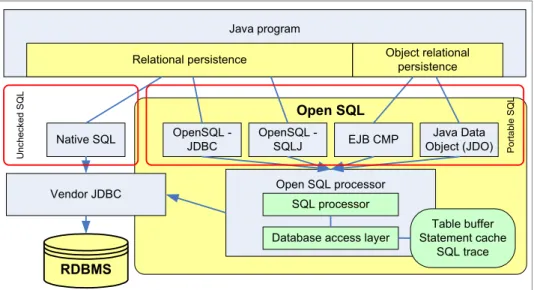
automatically receives an open connection to the central database in the system, so that an application programmer does not need to worry about opening and closing database connections. ABAP objects contain Open SQL, a
platform-independent SQL dialect that is a direct component of the language. It can be used to execute database accesses directly without having to use an API or a class library. Buffer mechanisms on the application server-side ensure that highly-scalable, complex database accesses are possible.
In addition to Open SQL, object services are offered that enable persistent objects to be defined, whose persistence is completely taken over by the runtime.
The runtime system provides its own lock mechanism for synchronizing accesses to data in the database. This prevents two parallel transactions from being able to change the same data in the database. Mapping business processes to transactions ensures the integrity of the data.
Java technology
The Java Application Server is a fully compliant Java 2 Enterprise Edition (J2EE™) 1.3 application server. The J2EE standard has been defined by the Java Community according to the rules of the Java Community Process. SAP has been a member of the Executive Committee of the Java Community since November 2002.
The Java application server architecture avoids single points of failure in the cluster environment by load balancing client requests between server processes. Requests are parsed by the Java dispatcher and forwarded for processing to individual server processes. The server processes provides a failover system to preserve the state of the user session. If a server process becomes unavailable, the state of the user session is recovered transparently on another available server process.
Some features and tools of the Java application server are:
Java application server implements the Java Authentication and Authorization Service (JAAS) API, enabling efficient user and authentication management. Pluggable login modules based on the JAAS support various authentication methods, including basic authentication, log-on tickets, X509 certificates, Security Assertion Markup Language (SAML), and Web Services Security (WSSec). This enables integration in single sign-on (SSO) environments. The application server allows for filtered communication over firewalls and packet filtering devices. The transport layer security on the Java application server is implemented with support for Generic Security Services API, the Java Cryptography Extension, and Secure Network Communications (SNC) for SAP-specific communication.
Web services are Web-based interfaces that can be integrated into a company’s business scenarios. Using Web services enables you to combine functions implemented on different software components into a single process. Web services are self-contained, modularized, and executable entities that can be published, searched for, and accessed across a network. The Java Web Service infrastructure allows developers to integrate Web services, irrespective of where they reside or how they are implemented. Therefore, business processes spanning different systems, both
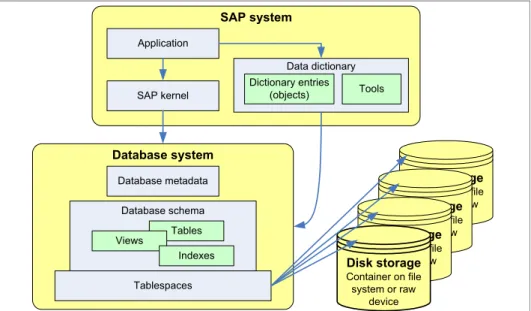
The Open SQL for Java framework provides a database abstraction level for truly portable database-independent applications. Open SQL for Java enhances performance by providing statement pooling and table buffers, caches open database connections in a server-side database connection pool transparently to applications, and facilitates maintenance by monitoring and tracing facilities. The Web AS Java also provides the Java Dictionary as a central repository for database objects. The Java Dictionary is fully integrated in the NetWeaver Developer Studio and enables portable definition, creation and modification of database objects, manages database objects’ life cycle, and performs statement checks against Open SQL grammar and table definitions.
The SAP NetWeaver Administrator provides a central entry point to the whole SAP NetWeaver system landscape. The SAP NetWeaver Administrator enables starting and stopping of systems, services, and applications, as well as technical configuration, user management, system monitoring, log viewing, and application and performance tracing.
The SAP NetWeaver Developer Studio provides a complete set of
development tools covering all aspects of Java development to develop, build, deploy, and execute applications centrally. The SAP NetWeaver Developer Studio also provides access to the NetWeaver Development Infrastructure (NWDI). The NWDI enables distributed and team-oriented development through central source code storage and versioning, component-based build process, development landscapes, and transports management.
Web Dynpro provides a client-independent programming model for
developing professional user interfaces.Web Dynpro tools support application development during the implementation and design phases. Web Dynpro applications are developed with a declarative programming approach to produce a platform-independent metamodel. The necessary source code is then generated automatically and executed at runtime. You can access the source code of your application from the development environment and thus define events for your Web Dynpro application. The generated source code contains separate, specially marked areas for this purpose.
Business services
Table 2-1 gives an overview of some of the business services integrated into SAP NetWeaver.
Table 2-1 SAP NetWeaver business services overview
For more information about available Business Services, visit the following address:
http://help.sap.com/saphelp_nw04/helpdata/en/2c/ed8e3f55b20617e10000000 a114084/frameset.htm
Business service Description
Smart forms Smart Forms are used to create and edit forms for mass printing in SAP systems. As well as standard output to a printer, Smart Forms are also compatible with e-mail, fax, and the Internet (using generated HTML output).
SAPscript SAPscript was the original tool for printing forms and creating texts in the SAP system. The form-related functions in SAPscript were replaced by Smart Forms in SAP Basis Release 4.6C.
ArchiveLink ArchiveLink is a system that links archived documents and related application documents that have been created in the SAP system.
Content server Content Server is an SAP NetWeaver content storage system for document-driven applications and business processes.
SAP business workflow
SAP Business Workflow is a workflow management system that automates and visualizes the business processes of SAP applications.
Organizational management
For many business or HR processes, you need to map the structure of your organization or enterprise according to tasks or functions. You can use
Organizational Management to map organizational and reporting structures, and keep a record of any changes.
Records management
Records Management also offers functions that are beyond conventional records management systems. You have direct and secure access to archived documents. You can save Office documents and notes directly to a record. In addition to documents, you can include other electronic elements such as business objects, transactions, reports, and workflows into record management from the local SAP system, other SAP systems, or non-SAP systems. These options enable the record to show all information objects for a business process, independently of the media involved.
2.4 SAP architecture
The design of the SAP NetWeaver Application Server is aimed at providing an exceptionally high level of robustness and maintainability for the applications running on it.
With Virtual Machine Container technology, SAP allows Java applications to be executed with a similar level of robustness as software developed in ABAP. The aim is to isolate individual users from each other as securely as possible to avoid any unwanted restrictions. In order to provide an optimal runtime environment for selected scenarios with especially high demands on a narrow ABAP-Java coupling, SAP Java VM can also run integrated in the ABAP work process.
An SAP system consists of SAP instances. An SAP instance is a group of processes that are started and stopped at the same time. SAP NetWeaver 7.0 has the following instances:
Central instance
Central services instance
Database instance
Dialog instance
All instances, except the database instance, are identified by an instance number, which is a two-digit number between 00 and 97 that is unique on a host. Instances can reside on one host, or they can be distributed on several hosts.
The usage type determines the role that a system plays in a particular scenario. They represent the capabilities offered by a collection of installed and configured software components. Usage types are a new structuring element of an SAP NetWeaver system on a technical level.
2.4.1 Technical components
This section discusses the technical components of an SAP NetWeaver. Figure 2-6 shows the technical components. To retain clarity, a few communication channels are not included in the diagram.
Figure 2-6 SAP NetWeaver architecture
There are several installation options for the SAP NetWeaver application server:
ABAP System with integrated VM Container. With this installation, you can run ABAP programs and selected SAP Java applications.
Java system. With this installation, you can run J2EE applications but not any ABAP programs.
ABAP and Java system.
ABAP / Java Engine
J2EE Engine Internet Communication Manager (ICM)
SAP database Gateway Software Deployment Manager Central Services Message Server Enqueue Server Dispatcher Dispatcher ABAP VM ABAP VM Java VM Java VM Java VM ABAP VM We b br ows e r re que st s S A P G U I re q ue st s Java VM Java VM Java VM Work Process Work Process Work Process
The components are:
Dispatcher
The dispatcher is the central process on an application server. It distributes the requests to the work processes. If all the processes are occupied, the requests are stored in the dispatcher queue. In addition to other tasks, the SAP dispatcher is responsible for the following principle tasks:
– Initialization, reading profile parameters, starting work processes, and logging on to the message server
– Evenly distributing the transaction load across work processes – Connecting to the GUI layer
– Organizing communication processes
Message server
The message server exchanges messages and balances the load in the SAP system. Only one message server can run on each Java application server or ABAP application server usage type. The message server handles the communication between the dialog instances and also supplies information to the SAP Web dispatcher about load balancing.
Enqueue server
The enqueue server contains a lock table that handles logical database locks plus infrastructure locks set by the Java server process. The enqueue server also synchronizes data in a Java cluster. In usage type AS ABAP, the enqueue server handles only locks on data objects.
Work processes
An SAP application server has to process SAP requests from multiple front ends. The application server has the use of a dispatcher, which gathers the requests and transfers them for processing to the work processes. The work processes then execute the desired requests (for example, an ABAP
program).
Here are the following types of work processes:
Dialog Executes dialog programs (ABAP).
Update Asynchronous database changes (is controlled by a COMMIT WORK statement in a dialog work process).
Background Executes time-dependent or event-controlled background jobs.
Enqueue Executes locking operations (if SAP transactions have to synchronize themselves).
Several dialog work processes usually run on one application server. There are usually only one or two other types of work processes.
A work process consists of a screen processor, the ABAP interpreter, the database interface, and the task handler that calls these programs.
Internet Communication Manager (ICM)
The ICM sets up the connection to the Internet. It can process both server and client Web requests.It supports the protocols HTTP, HTTPS, and SMTP. The SAP Web AS may be a Web server or a client.
Internet Graphics Service (IGS)
The Internet Graphics Service (IGS) constitutes the infrastructure to enable the application developers to display graphics in an Internet browser with a minimum of effort.
SAP Gateway
The SAP Gateway provides a remote function call interface between the SAP instances, within an SAP System, and beyond system boundaries.
Software Deployment Manager
The Software Deployment Manager (SDM) is a tool with which you can manage and deploy software packages, in the form of Software Deployment Archives (SDA) and Software Component Archives (SCA), that you receive from SAP.
2.4.2 Central instance
Every SAP system must have one central instance, which includes:
Usage type ABAP application server
– Dispatcher
– Work processes (dialog, batch, spool, or update) – Gateway
– Internet Communication Manager (ICM) – Internet Graphics Service (IGS)
Usage type Java application server – Java dispatcher
– Server processes
– Software Deployment Manager (SDM) – Internet Graphics Service (IGS)