Devon Waugh. Site Unseen: Website Accessibility Testing for Academic Libraries with Visually-Impaired Users. A Master’s Paper for the M.S. in I.S degree. April, 2019. 67 pages. Advisor: Sarah Arnold
Research was conducted to evaluate the accessibility at the University of North Carolina at Chapel Hill by having users with visual impairments answer questions about the use of the library website and use of assistive technologies in a questionnaire and following-up with a usability test. The usability test involved having participants complete tasks that were guided by a sample research question. Throughout the test, they navigated a database access page, a subject guide, and two databases to find research articles that related to the question. The resulting data indicated users preferred the organized layout of the database access page, but overall participants were frustrated with navigating the interfaces of databases, which varied in their design and delivery of accessible PDFs. Making changes to the database access page’s code and structure also ensured that the page was accessible prior to confirming with participants in the testing environment.
Headings:
Academic Libraries.
Accessible Web sites for people with disabilities.
Libraries and people with visual disabilities.
Web Site --- Design.
Usability Testing.
SITE UNSEEN: WEBSITE ACCESSIBILITY TESTING FOR ACADEMIC LIBRARIES
WITH VISUALLY-IMPAIRED USERS
by
Devon H. Waugh
A Master’s paper submitted to the faculty of the School of Information and Library Science of the University of North Carolina at Chapel Hill
in partial fulfillment of the requirements for the degree of Master of Science in
Information Science.
Chapel Hill, North Carolina
April 2019
Approved by
_______________________________________
Table of Contents
Table of Contents ... 1
Acknowledgments... 2
Introduction ... 3
Literature Review ... 7
Information Seeking Behavior of Visually Impaired Users ... 7
User Studies of Visually-Impaired Population ... 10
Accessibility of Academic Library Websites ... 13
Methodology ... 20
Overview ... 20
E-Research by Discipline ... 20
User Population ... 22
Questionnaire ... 23
Usability Test ... 24
Data Analysis ... 26
Results ... 28
Pre-test Questionnaire ... 28
Overview for Usability Test... 29
Task 1 - Searching in a General Database ... 30
Task 2 - Navigating an A-Z Database List Subject Page... 31
Task 3 : Search in Subject-Specific Database... 33
System Usability Scale ... 36
Post-Test Interview ... 37
Discussion ... 42
Limitations of the Study ... 47
Conclusion ... 50
Bibliography ... 52
Appendix A: Questionnaire ... 57
Appendix B: Usability Test Observation Guide ... 61
Appendix C: Post-Test Questionnaire and Interview Questions ... 64
System Usability Scale ... 64
Acknowledgments
I feel particularly grateful to dive deeply into a topic that unintentionally changed my life in high school and set the course for my first foray into academic research. I was
introduced to accessibility issues by Sister Mary Ann Tantalo when learning how to navigate a JAWS screen reader with a dial-up connection was no easy feat. I cannot begin to thank her for teaching me what it means to be of service to others.
I’d also like to thank my students at Northern Vance High School for sharing their life stories and teaching me about what is means to make a classroom inclusive. Navigating the daily struggles with technology and accessibility proved that the little changes can make a huge difference. You all showed me what it means to be a leader.
Sarah Arnold has truly gone the extra mile for me as an advisor, and I cannot begin to thank her enough for her dedication to this project and willingness to collaborate on a shared passion for accessibility. I am immensely appreciative of your support and mentorship.
Introduction
Advances in technology have made it possible for many libraries’ online services to
flourish and cover a broader base of users. The simple tools used by libraries to expand
their online presence could come at the cost of alienating a growing population of users
who have visual impairments, which will continue to rise as the population ages. Visual
impairments can vary from a temporary condition to low vision to lifelong blindness.
Traditionally, blind patrons received services and materials from a designated state
library but many people with visual impairments do not qualify for this service (Lewis,
2013). As mobile devices build more accessibility features into their operating systems,
the visually-impaired population relies on more advancements in their access to digital
information (Lewis, 2013). However, digital services from libraries do not always offer
consistently accessible formats to make their information available to all users (Mulliken,
2018).
Web accessibility needs to follow two main standards for compliance: the Web
Content Accessibility Guidelines (WCAG) 2.1 success criteria and Section 508 of the
Rehabilitation Act of 1973 (Mulliken, 2018) (Jaeger, 2006). WCAG 2.0 guidelines can be
used as a resource for building an accessible website but they are not a heuristic for
determining whether a website is exhaustively accessible (Rømen & Svanæs, 2011).
Section 508 of the Rehabilitation Act emphasizes that the content of a web page must be
recommend that website creators add alternative text to media so assistive technology can
read the text and give context for what the image is to visually-impaired users. Assistive
technology typically comes in the form of a screen reader that reads the content of a web
page sequentially. If websites do not incorporate accessible features outlined in these
guidelines, screen readers cannot read the content (Lazar & Jaeger, 2011). Each webpage
should also use heading tags that are coded in HTML, so a screen reader can determine
the order that content should be read (Mulliken, 2018). In Rømen & Svanæs’ (2011)
study, users with disabilities tested websites and faced considerable accessibility
challenges. However, more than half of these websites met WCAG 2.0 guidelines
(Rømen & Svanæs, 2011). In web pages with considerable content, screen readers read
the entire page in order so websites need a feature for this population to navigate away
from irrelevant content (Mulliken, 2018). Meeting these guidelines does not replace the
experiences of actual users attempting to meet their information needs on a website or
search engine.
Instead, user studies with visually-impaired participants complement WCAG
compliance measures and give the field of usability more concrete evidence that
accessibility benefits all users. In particular, this user study is focused on an academic
library website due to the changing nature of scholarly research on campuses (Al-Qallaf
& Ridha, 2018) (Dermody & Majekodunmi, 2011). Students, faculty and staff members
are required to participate and learn online more than ever before. Additionally,
navigating an academic library website requires sifting through thousands of e-journals,
Majekodunmi, 2011). It has become increasingly crucial to understand how users with
disabilities meet this expectation as well.
Components of the University of North Carolina at Chapel Hill’s University
Libraries website will be evaluated to determine whether they present challenges for this
population. The UNC Libraries website is a hub for students, faculty and staff to find
research articles. The main search bar allows users to search through most of the library’s
database and journal subscriptions as well as the catalog. Below the search bar, the
Research Tools menu organizes six methods for finding research: the library catalog, the
E-Research by Discipline page, Articles+, Google Scholar, WorldCat, E-Journals and the
Triangle Research Libraries Network (TRLN). Unlike the search bar, the E-Research by
Discipline page is a list of all the main, potential fields of research at UNC. Each research
field is arranged into four categories: General & Reference, Humanities & Social
Sciences, Health Sciences and Science & Technology. It offers a high-level view of the
fields in each discipline and links to each field’s sub-page, which can vary from Dramatic
Arts to Toxicology.
The right sidebar of the page allows users to find the most frequently used
databases, search for DOIs and view an alphabetical list of subscribed databases. This
page directs users to discipline-specific databases and sources of scholarly research and
employs a complex information architecture to do so. In usability testing, the
representative user group typically does not include users with visual impairments, which
leads websites to ignore the requirements of meeting this population’s needs. Conducting
whether its primary service meets all users’ information needs. The questions to then be
answered are:
1. How usable is the UNC Libraries website’s navigation page to databases
for visually impaired users?
2. How does this page's structure impact the amount of time this population
Literature Review
Information Seeking Behavior of Visually Impaired Users
Learning how specific user groups search for information online helps us develop
a broader picture of the various needs that an interface must fulfill. Several models of
information behavior have essentially become a shared vocabulary for describing users
(Bates, 1989) (Kulthau, 1991). The process typically starts out with forming their queries
with a combination of keywords and reforming them depending on the results received
from an interface (Marchionini, 1995) (Marchionini & White, 2007). After this initial
search, users evaluate results and use these judgments to reform their query until their
information need is satisfied (Bystrom & Jarvelin, 1995) (Kulthau, 1991). For visually
impaired users, their information needs are the same as their sighted peers, but the ways
they seek out this information involve developing strategies to speed up or remove steps
in this search process (Power et al., 2013) (Hunsucker, 2013) (Sahib et al., 2012).
Navigating the layout of a website is the primary challenge that visually impaired
users face online (Power et al., 2013). Sighted users rely on visual cues to orient
themselves as they would in a physical space. In contrast, visually impaired users employ
assistive technology to read HTML headings and focus on sections of a page to become
familiar with the virtual space of a website (Power et al., 2013). It also incorporates
keyboard shortcuts so users can speed up their searches (Power et al., 2013).
Subsequently, the information behaviors of query development and reformulation happen
and dyslexic users found that the blind and low vision users determined the overall
structure of a webpage through headings. Often, visually impaired users re-read sections
of a page to determine how key headings and sections structured the page’s content.
While sighted users scan a page, this population uses boundaries and headings to read a
web page section by section (Power et al., 2013)
Anchoring was another common technique found in Power et al.’s study (2013) as
well as Hunsucker’s (2013) study of 13 blind users who carried out self-directed search
tasks. Visually-impaired users anchor themselves on a web page by narrowing their gaze
to a particular section (Hunsucker, 2013) (Power et al., 2013). Avoidance was another
word used to describe this behavior because users avoided looking at a side of the page or
stopped their query once they reached a satisfactory result (Hunsucker, 2013) (Xie et al.,
2015). Low-vision users employed this strategy because they needed to magnify a section
of a page to read its content (Power et al., 2013). Users in Hunsucker’s (2013) study often
anchored themselves vertically from top to bottom because horizontal reading was not as
compatible with the screen magnifier. This technique indicates that this population gets
an overall feel of a web page in short bursts and needs clear boundaries to orient
themselves (Power et al., 2013). Trying to conduct a satisfactory search in one step
means that visually impaired users devote a considerable cognitive load to website
navigation. When evaluating their results, Xie et al.’s study (2015) found users struggled
to assess the quality and relevance of the information efficiently. Navigating a website
shifts the burden of understanding onto the user, especially for those who cannot see the
The search process for visually-impaired users is also impeded by the amount of
time and cognition it takes to operate assistive technology. Consequently, their queries
are much more focused and lengthy compared to sighted users (Marchionini & White,
2007) (Hunsucker, 2013) (Power et al., 2013) (Sahib et al., 2012). In Hunsucker’s study
(2013), users began their searches with precise search terms and did not reform their
queries. Once they reached their results, only 13 percent of users went beyond the first
page. Using assistive technology helps visually impaired users read articles once they
have located them. However, the actual process of navigating to a database and finding
an article can be far more complicated.
Throughout the search process, studies have found that this population took
extensive notes and bookmarked pages to avoid refinding the information later (Sahib et
al., 2012) (Hunsucker, 2013) (Mulliken, 2018). However, this behavior can take users
away from the results page and interrupt their search process many times in a single
session. Sahib et al’s (2015) study provided two features to counteract this issue: a record
of the user’s search and a note-taking app within the interface. The record of the user’s
search functioned similar to breadcrumbs on websites (Nielsen, 2007). Identifying and
integrating information behaviors more seamlessly into the search process could help
visually-impaired users reform queries more efficiently over time.
When reforming queries, some visually-impaired users cannot take advantage of
spelling suggestions in an interface because they require sight and are not compatible
with screen readers (Sahib et al., 2015). Subsequently, well-formed queries can be
rendered useless by one spelling error (Sahib et al., 2012) (Sahib et al., 2015) (Leporini et
for 12 blind users in which non-speech sounds signaled when a search yielded no results.
Users found this queue helpful for evaluating results quickly. Tab navigation and
shortcuts were also incorporated to make the interface compatible with assistive
technology (Leporini et al., 2008). This concept was then revised in the prototype of a
search interface developed in Sahib et al.’s (2015) study. Visually impaired users
received these queues when search terms were spelled incorrectly so these mistakes did
not interfere with the search process (Sahib et al., 2015). Because this population spends
limited time evaluating search results, modifications to an interface can help them satisfy
their information need efficiently without having to read extraneous information (Sahib et
al., 2015) (Power et al., 2013) (Hunsucker, 2013). Small adjustments to an interface and
the inclusion of auditory features can have a major impact on usability for visually
impaired users. Ultimately, this impact can and should only be evaluated by testing with
the users themselves.
User Studies of Visually-Impaired Population
Usability testing with this population requires creating and explaining tasks to
users in a way that reflects their information seeking behavior and use of online
information. Instead of exploring an interface, evaluating the usability of a website for
this population depends on having users complete tasks. Visually impaired users often
have a specific information need that lead them to search online (Craven & Nietzio,
2007). Sahib et al. (2015) created multi-session search tasks to examine the experience of
re-finding information in the modified interface. Because visually impaired users take
notes and use bookmarks throughout their search (Hunsucker, 2013) (Power et al., 2013),
searches. Participants were then able to reform queries between their first and second
searches, which is an information behavior common to sighted users. Building a new
interface helped Sahib et al. (2015) explore what features facilitate their existing search
process. Creating meaningful tasks allows participants to feel a connection to the test and
invite more qualitative description about how these searches relate to their information
seeking strategies. However, effective task analysis cannot happen without feedback from
users themselves. Usability testing of this population can vary in their structure and
protocols because they are not attempting to cover the most representative user group.
Along with the tasks, studies also found that it was critical to think about how the
think-aloud protocol can hinder usability tests (Chandreshekar et al., 2006) (Stefano et
al., 2010) (Strain et al., 2007) (Babu & Xie, 2017). Chandreshekar et al. (2006) prompted
participants to think aloud every 15 seconds. The four blind participants in the study
continued searching instead of answering the prompt, while two low-vision users
answered each time. In response, studies have proposed several adapted protocols to
allow users to share feedback in a more naturalistic way (Sahib et al., 2015) (Xie et al.,
2014) (Stefano et al., 2010). Stefano et al. (2010) developed a protocol called Partial
Concurrent Think Aloud in which discussion follows each search task but remains
focused on the task. Keeping the responses focused on tasks during the user study
allowed users to give feedback on current issues with the interface and remember their
thoughts (Stefano et al., 2010). Ultimately, each decision in a user study of this
population needs to consider existing methods of usability studies and modify them as it
makes sense. Making the protocols and tasks of a usability test inclusive does not
Another consideration for this population is how to incorporate assistive
technology into a usability test in a way that suits participants. Studies that incorporate
screen readers attempt to differentiate between advanced and novice users (Sahib et al.,
2015) (Calvo et al., 2014) (Leporini et al., 2008). Interviews and surveys prior to a
usability study established a baseline of participants’ proficiency with screen readers in
Sahib et al’s (2015) study and allowed them to determine whether this technology suited
the study’s purpose and tasks. For complex search tasks, assistive technology can help
support this population’s completion of them and offer a guideline for navigating the
interface (Sahib et al., 2015). The screen reader enhances the user’s experience in so far
as it can read the screen efficiently and be used easily by the participant. Evaluating
usability for this population also needs to include actual users because they can offer
immediate feedback and draw from their own experiences navigating online information.
Having one sighted researcher operate a screen reader and evaluate an interface
independently cannot sufficiently document the user experience of this population (Xie et
al., 2014).
Better understanding of designing interfaces for all users can come from testing
with participants with visual impairments. WCAG and Section 508 compliance are not
sufficient; people have more needs for using an interface than headings and alternative
text for images. There are automated accessibility tools such as WebAIM’s WAVE that
check whether a website’s content and code comply with WCAG guidelines. However,
this tool can only test for twenty-five to twenty-nine percent of all WCAG guidelines
(Groves, 2012). Another consideration for users with low vision is that any items in color
software can sometimes alter the contrast of colors as well as fonts. Giving captions to all
graphics, allowing users to change color options and not specifying exact font sizes or
layouts can assist this population with using a website. The visually impaired population
needs ways to re-find information quickly, take notes within an interface and have
another way to correct spelling errors besides visual cues (Sahib et al., 2015) (Stefano et
al., 2010) (Chandreshekar et al., 2005). For all interfaces, the visually impaired
population expects the same efficiency, ease of use and learnability when navigating
websites and mobile applications that is afforded to their sighted peers. Making websites
accessible does not imply sacrificing design considerations or making websites only in
text-form. Instead, it means that the website is incorporating features that lend more
organization and forethought to its pages.
Accessibility of Academic Library Websites
Because academic libraries offer thousands of databases, journals and other forms
of digital content, web accessibility has emerged as an issue for them to address on their
respective campuses. Their services are also accountable to a broad, protean base of users
who have come to expect research to be online and readily available (Al-Qallaf & Ridha,
2018). Given these shifting responsibilities, the academic library has moved away from
its original role of storing and managing massive collections of print materials. Instead, it
is a major hub for digital information on campus that serves students, faculty, staff
members, hospital employees, and citizens of the state, in the case of public universities
like UNC-Chapel Hill. Each academic library uses its website as a platform for managing
access to subscribed materials and self-produced content to support users (Al-Qallaf &
vendors and the private-sector publishers into a point of advocacy. With support from
their parent institutions, academic libraries have begun to support open access publishers
and the open textbook movement to shift the burden of cost off of their collection
development budget and their users as well (Al-Qallaf & Ridha, 2018) (Dermody &
Majekodunmi, 2011).
All higher education institutions must make public-facing materials accessible
under Section 508 of the Rehabilitation Act of 1973 (Leonard, 2018). As recently as
2013, Comeaux and Schmetzke evaluated 56 academic library websites and found 40
percent of these websites complied with WCAG guidelines based on tests completed
between 2002 and 2012 (Comeaux & Schmetzke, 2013). In early 2017, the baseline
compliance for academic library websites was updated to meet AA compliance for
WCAG guidelines, which required academic libraries to remediate their online presence
rapidly. Leonard (2018) detailed Seton Hall University’s process of remediation due to a
federal complaint in May 2017. Seton Hall University (SHU) Libraries had to reach out
to each vendor to identify accessibility issues, conduct accessibility training for
employees who create public-facing content, and make a plan for future content
(Leonard, 2018). Even without a lawsuit hanging over the university, academic libraries
across the world have sprung into action to make their current and future content
accessible (Mulliken, 2018) (Laufer Nir & Rimmerman, 2018) (Leonard, 2018)
(Ismailova & Inal, 2017). In reference to SHU Libraries, Leonard acknowledges, “a
single library can do a great deal, but not everything” (Leonard, 2018). Ultimately,
vendors remain impervious to any legal pressure, while the license holders of databases
(2009) study of thirty-three academic library websites and six database vendors, one
database vendor was found to be compliant with Section 508. Maintaining WCAG or
Section 508 compliance does not guarantee that the content is usable for people with
disabilities (Leonard, 2018) (Comeaux & Schmetzke, 2013) (Lazar & Jaeger, 2011)
(Yoon et al. 2016). Better understanding of making library websites usable can come
from the direct experiences of college students who have visual impairments.
In a user study of twelve visually impaired students, Dermody & Majekoudunmi
(2011) found that forty-one percent could find an article on the topic assigned to them.
After locating an article, the interlibrary loan system and inaccessible PDFs posed a
significant barrier for users. Most PDFs were image-based so they did not have optical
character recognition and were not tagged for use by screen readers (Dermody &
Majekodunmi, 2011). Fifty-five percent of users could find readable, full-text articles to
satisfy the search tasks (Dermody & Majekodunmi, 2011). Inaccessible PDFs require
users to convert the PDF into an accessible format, which can typically be done through
an online PDF conversion service (Oswal, 2014) (Mulliken, 2018). The system of online
databases can vary for each academic library website and no two PDFs behave alike
(Oswal, 2014). Despite these online constraints, this population is still expected to access
and learn from scholarly research, but developing this skill poses more logistical
challenges to them than their sighted peers.
The amount of links required to reach and use a database can place a significant
cognitive load on visually impaired users and overwhelm their search because they are
not able to find and evaluate results as quickly as sighted users. (Dermody &
architecture that links the library website to databases. Because academic library websites
act as a portal to their subscribed databases, users have to start on the library’s website to
gain access to the database and then navigate through at least two or three pages to reach
the search interface (Oswal, 2014). Once users reach the results page, they find it difficult
to focus the amount of results and must keep track of the number of links because there is
no breadcrumbs feature (Mulliken, 2018) (Dermody & Majekodunmi, 2011). This
confusing path and cluttered layout of results makes searches longer and leads users to
satisfy their search with one page of results (Mulliken, 2018) (Dermody & Majekodunmi,
2011) (Hunsucker, 2013).
In other cases, academic library users will seek out assistance from librarians to
help navigate their searches. One participant in Mulliken’s study (2018) of eighteen
visually impaired academic library patrons noted, “There’s so many different tabs and
ways of using it, it feels like a maze to me, I don’t understand quite how to navigate
through it” (Mulliken, 2018). This complex information architecture adds more time to
their searches compared to their sighted peers: “I could spend maybe 8 hours doing
something that would probably take a sighted student maybe half or even a third of the
time” (Mulliken, 2018). Librarians can be a valuable resource because they understand
how the information architecture of the website is set up and can “filter through the data a
lot quicker” (Mulliken, 2018). However, constant support from librarians can impact this
population’s ability to search independently for reliable and relevant sources. Selecting
and finding articles is the necessary first step for building self-efficacy online (Dermody
When visually impaired users run into problems with a database, few help pages
have an accessible format, such as plain-text, that helps them remedy their issue quickly.
In a survey of thirty-three library websites, three of them had text-only options for the
database interface (Power et al., 2013). Visually impaired users would benefit from this
format for help pages because the interface’s clutter can be what led them to seek help.
Pop-ups and visual cues can offer correctly-spelled search terms and lead users to help
documentation in a search interface (Sahib et al., 2014) (Oswal, 2014). However, these
features cannot assist this user group with resolving issues. Studies also found there is no
way to respond efficiently to an issue with a screen reader on these platforms (Oswal,
2014) (Sahib et al., 2014). Therefore, these system responses are useless for a population
that needs them often. The lengthy process of troubleshooting in a database grows even
longer when screen readers have to read through each prompt sequentially and cannot
skip to relevant help documentation.
Evaluating these complex interfaces has led studies to notice three primary design
solutions. In databases, many mouse clicks are required to perform certain actions, but
visually impaired users use keystrokes to navigate websites with screen readers (Gooda
Sahib et al., 2014) (Oswal, 2014) (Dermody & Majekodunmi, 2011). Tabs for skipping
content and incorporating keystrokes into the website’s navigation would guide this
population to results more efficiently (Mulliken, 2018) (Becker & Yanotta, 2013). The
inclusion of text-only navigation menus, help documentation, and site maps allows users
to determine the navigation of the website in a way that coincides with their mental
models of the website and their assistive technology (Dermody & Majekodunmi, 2011)
2018) (Yoon et al., 2013). Al-Qallaf & Ridha’s (2018) survey of academic library
websites found one fifth of them did not include a site map. Al-Qallaf & Ridha (2018)
also found 59 percent of surveyed websites contained excessive or irrelevant graphics
(Al-Qallaf & Ridha, 2018). Even more so than their sighted peers, clutter impacts how
visually impaired users navigate through a webpage and adds more time to their search
(Oswal, 2014). Effective design of an academic library website has to strike the delicate
balance between avoiding information overload and giving users satisfactory search
results.
Long-term solutions for accessibility depend on making their design inclusive at
the interface level, rather than fixing issues as they arise from litigation (Leonard, 2018)
(Oswal, 2014). Libraries also need to offer targeted instruction on web accessibility to
their employees and university departments, given the legal responsibilities placed on
higher education institutions (Mulliken, 2018) (Byerly et al., 2007) (Dermody &
Majekodunmi, 2011) (Power & Lebeau, 2009). Iterative usability tests on library
websites and databases can provide concrete feedback for any future re-designs of the
website’s interface (Al-Qallaf & Ridha, 2018) (Byerly et al., 2007). It is also doubly
important that people with disabilities are incorporated in this testing process because
actual users can give feedback on issues they experience with accessibility and usability.
All of these efforts will be minimal unless there is greater collaboration between database
vendors and academic libraries (Power & Lebeau, 2009). Improving the online research
experiences for this population allows libraries to improve the experience for all users.
Building accessibility into library websites will provide users with more intentionally
learnable search experience overall. Improving the experiences of marginalized
Methodology
Overview
The study conducted a survey to recruit participants and gather feedback on
experiences with the UNC Libraries website. The usability test then used these responses
to develop a representative research question that guided participants between the UNC
Libraries website and subscribed databases. After each task, participants self-reported the
task’s ease of use and rated it on a scale from 1 to 5. Once the test ended, the principal
investigator followed up with participants in a brief interview to discuss the experience
and search behaviors for finding scholarly research online.
E-Research by Discipline
The literature emphasized that visually impaired users can provide concrete
feedback when asked to complete a set of tasks rather than explore an interface. This
approach will give users time to offer feedback after each task and use several
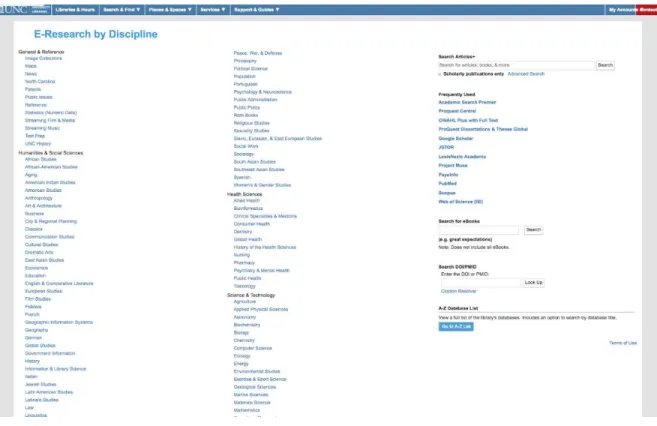
components of the E-Research by Discipline page. Its interface arranges research fields
by discipline in a list of links arranged into four categories: general reference, humanities
Figure 1. Screenshot of the E-Research by Discipline page as of November 2018.
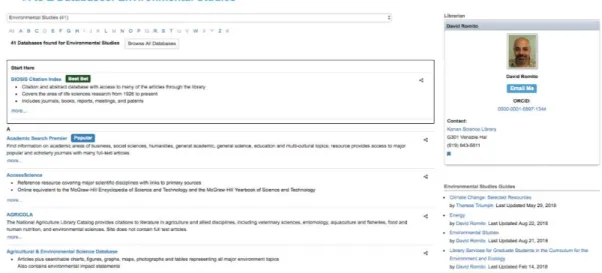
When users click on a field such as Environmental Studies, each link offers a set
of subject-specific databases, LibGuides and the contact information for a subject
librarian covering that field of study. Once users click on the name of a database in that
sub-page, they leave the main library website and are directed to the database’s search
Figure 2. Screenshot of sub-page for Environmental Studies as of November 2018.
The E-Research by Discipline page acts as a portal because users can click on a
subject page, navigate to a database and subsequently, leave the main library website.
However, users may need to navigate back to the website if their database search did not
return relevant results. The purpose of this tool is to allow users to focus their search on a
particular sub-field and find library resources and databases geared toward it.
The goals of this study were to understand the search habits of visually impaired users
and evaluate how usable the E-Research by Discipline page is for this population. In
using a screen reader, the study also measured the compatibility of this technology with
each page opened in the user study. A secondary goal of this study was to determine how
usable the PDF copies of articles are for this population and recommendations for making
them comply with assistive technology.
User Population
The user population consists of any students, faculty and staff members on
campus who have visual impairments. The study used convenience sampling by
from Accessible Resources and Services (ARS). ARS also distributed the survey in their
newsletter. Based on past experience with Maze Day, an event for K-12 visually impaired
students and community members, the study also used snowball sampling to identify
potential participants. The purpose of conducting a user study with this specific
population is to evaluate the accessibility of the E-Research by Discipline page, which
serves as a hub for several types of digital resources. The literature has reinforced that
web accessibility not only involves compliance with WCAG guidelines and Section 508,
but also testing whether a website is usable for individuals with visual impairments
(Dermody & Majekodunmi, 2011).
Questionnaire
Many studies of the visually impaired population used surveys as their initial tool
for recruitment (Mulliken, 2018) (Dermody & Majekodunmi, 2011) (Strain et al., 2007)
(Sahib et al., 2012). A questionnaire was created using Qualtrics through UNC’s online
tools. The questionnaire used survey logic so that if a participant records their affiliation
as a staff member, they will not be asked questions about using research articles for class
assignments. If a participant recorded that they do not have a visual impairment, then a
follow-up question will not be asked about whether they use any form of assistive
technology. The initial questionnaire served three purposes:
• Be a record of search habits related to the usage of the library website
• Establish a baseline of proficiency with assistive technology
• Recruit participants for the follow-up usability study
The questionnaire itself is organized into four sections: demographics, library use,
first and last sections supported the second purpose of the survey, the library use and
information behavior questions informed the tasks developed for the usability study. The
questions used multiple-choice options and a Likert scale. All questions were pilot-tested
prior to delivering the survey to listservs and contacts on campus. Ultimately, the survey
builds a foundation for the usability study, allowing the study to evaluate the user
experiences of this population with respect to the library website.
Usability Test
User studies with the visually impaired population have tested out the think aloud
protocol with fairly mixed results (Chandrashekar et al., 2006) (Strain et al., 2007) (Sahib
et al., 2014). Instead, Chandrashekar et al.’s study suggested adding in more inclusive
ways of gathering user feedback. A considerable amount of audio competes for attention
when a screen reader is involved in a user study. After each task, the participant was
asked two brief interview questions to prompt them to share their thoughts about the task.
Participants shared their opinions on the task and how usable they considered the
interface for each task. Additional probing questions were incorporated depending on the
participant’s initial response and the task itself. While this strategy can interrupt the flow
of task completion (Strain et al., 2007), the cognitive overload is not as significant.
This study used Techsmith’s Camtasia screen and audio recording to record
participants’ actions and audio via screen capture, which allowed the study to gather data
on task completion and the system’s compatibility with assistive technology. Because of
the significant amount of audio, the user study was completed by one user at a time in a
specified location on campus. The principal investigator observed participants, offered
the study. The note-taker took notes with an observation guide to record the participants’
completion of search tasks and observe their responses and behaviors.
Because of the complex arrangement of this search tool, the study included a set
of user tasks that will satisfy a specific information need and require users to navigate to
subject-specific databases and back to the E-Research by Discipline page. A screen
reader was used and the study was audio-recorded to determine how compatible and
usable assistive technology is with the existing layout of the page. Users were asked to
find articles and download PDF copies of the articles to evaluate the process of
downloading an article and determining its compatibility with a screen reader. The
usability test evaluated each participant’s task completion to compare participants’
experiences with the tasks. An observation guide recorded the following key actions
during each task: the participant’s use of navigation features, such as skipping to
HTML-tagged headings, the compatibility of the website with assistive technology and how
accessible the download PDFs are. After each task, users shared their feedback so their
thoughts did not compete with the sound of the screen reader and they can continue to
navigate through the task. In addition, a post-study questionnaire and brief interview
recorded participants’ perceived success with search tasks, recommendations for the
library website, and satisfaction with the overall search experience.
The post-study questionnaire used the System Usability Scale, which incorporates
participant feedback to quantify if a system is usable or not. It is considered “the most
widely used standardized questionnaire for the assessment of perceived usability” (Lewis,
2018). Participants answered the SUS questions on a scale from 1 being Strongly
overall usability score. Given the test’s user population, the principal investigator read
aloud the SUS questions and the notetaker will record participants’ responses. While this
questionnaire offered a reliable and consistent measure, it can only evaluate perceived
usability at most (Lewis, 2018). Rather, the post-study interviews offered more insights
on participants’ attitudes and satisfaction with the overall search experience. Several of
the interview questions are adapted from Saqr’s dissertation on the online behaviors of
visually impaired users (Saqr, 2016) because the study also wanted to gather feedback on
the participants’ existing patterns of research behavior along with their recommendations
for the interface. Qualitative measures contributed to understanding the ways that
visually-impaired users already interact with the library website. Their responses gave
subjective insight into problems they have experienced while interacting with the
website. A post-study questionnaire and interview also allowed the principal investigator
to review key actions from the test with the participant and gave a more nuanced record
of participants’ experiences.
Data Analysis
Several critical sources of data were gathered to evaluate the experiences of
visually-impaired users with the E-Research by Discipline page and by extension, a
massive collection of subscribed databases. Given that the initial questionnaire was a tool
for recruiting participants in the usability test, survey responses were analyzed for the
following criteria: affiliation with the university, diagnosis of a visual impairment,
experiences with the UNC Libraries website, proficiency with assistive technology and
interest in participating in a follow-up study. This scope ensured participants will only be
were analyzed visually but conducting statistical analysis was not considered necessary
since the user population is small and the study is not generalizable. Once the survey was
conducted via Qualtrics, the principal investigator contacted interested participants from
the user population and created tasks that fit their existing research needs.
The usability test gathered data on task completion, observations and participants’
responses to the System Usability Scale and interview questions to create a more nuanced
portrait of their experiences with the UNC Libraries website. Task completion data
offered a direct assessment of the usability of the UNC Libraries website’s information
architecture related to finding research articles. Observations consisted of any instances
of participants’ emotions, frustrations, experiences, and opinions of the system. An
existing coding scheme from a usability study of health information systems was used as
a reference and adapted as needed by the principal investigator (Kushniruk & Patel,
2004). This coding scheme was chosen for its identification of 11 broad themes for
describing usability issues but will not be exhaustively used given the exploratory nature
Results
Pre-test Questionnaire
The questionnaire was originally meant to capture participants’ experiences with
UNC Libraries’ online resources as well as their patterns of information behavior when
searching for scholarly research. While the questionnaire was open for 48 days, 20
respondents began the questionnaire with 15 completing it - a response rate of 75%.
However, the questionnaire ended up being a tool for recruiting participants for the
follow-up usability test and preparing the testing environment with the necessary
assistive technology. It also ended up being a single way to gather participants’ contact
information. To ensure that the survey was accessible, the principal investigator used the
Qualtrics check for accessibility tool and made a note on the first question that the
questionnaire would deviate from its numbered order due to survey logic.
One of the unforeseen challenges of the survey was the question asking if
participants had a visual impairment was too broad. In two cases, participants had visual
impairments that were minor and only required glasses to support their vision while
others required assistive technology. In retrospect, the question could have offered more
clarification that the visual impairment must hinder their ability to access information on
computers or mobile devices. While visual impairments can vary in their severity, the
purpose of the study is to evaluate a population that faces barriers to accessing
Overview for Usability Test
For the usability test, participants were asked about what assistive technology was
necessary for them to complete the test. Participant A used a browser extension for high
contrast. Participant B used screen magnification and the NVDA screen reader.
Participant C used his own iPad with VoiceOver, citing a lack of comfort with the NVDA
screen reader. Each participant made these adjustments and preferences for assistive
technology known before the test began. While this decision made it challenging to
establish a baseline of performance, expecting them to make do with the current
technology of the usability lab was counterproductive at best and ableist at worst.
To gauge prior knowledge, participants were asked questions about their
familiarity with the E-Research by Discipline page as well as their experience with the
library website. Then, they were given a research question: What is the impact of
pesticides on honey bees? The principal investigator developed tasks guided by this
question because users who are visually impaired do not explore interfaces. They often
use computers and mobile devices to look up realized questions and conduct known-item
searching. The tasks also reflect the assignments that are typical for a first-year student at
UNC - mirroring the expectations of the college research curriculum.
With the research question, they were asked to complete three tasks on the library
website based on how they would find resources to answer this question. The preselected
research question controlled the results and gave investigators outcomes that could be
compared across participants. After each task, participants were asked to share their
general thoughts and rate the task on a scale from 1 being very easy to 5 being very
wanted to learn about the library’s databases and integration with the website,
participants were asked to behave as they normally would. If participants veered from
this path, they were asked to return to the site and complete the task within the guidelines.
After first viewing the E-Research by Discipline page, all three participants noted
the organization of headings for disciplines and alphabetical listing of academic subjects.
Participant A commented on a preference for a single column list of links,
“I tend to like things to all be in one list instead of all the way across. I like the headings and subheadings. Since I don’t have that wide a field of view, I can miss things across the screen.”
Participant C found that it could be useful, “if you didn’t know how to get to your
discipline” or have experience with research on a new subject or class. As more faculty
members and graduate students are expected to conduct interdisciplinary research, the
library expects this page can be a conduit between academics that invite them to become
familiar with related disciplines and collaborate across disciplines as well.
Task 1 - Searching in a General Database
Participants then searched for articles in Academic Search Premier - an Ebsco
database - under the list of Frequently Used databases and opened a chosen article in a
PDF viewer. Participant A clicked on the first result and could not find a PDF of the
article. He went back to the results page, selected the second result and found the link for
‘PDF Full Text’ on the results page. While Participant A rated the task as a 3, he made
the following comment:
“I tend to like things to all be in one list instead of all the way across. I like the headings and subheadings. Since I don’t have that wide a field of view, I can miss things across the screen.”
Participant B opened up a new window in the browser to type out the keywords
able to correct “pesticides hunnybies” to “pesticides honey bees.” While Participant B
said he normally looks at all the results on the first page to see what he wants, he clicked
on the ‘PDF Full Text link’ for the second result on the page. Before reading the article,
Participant B had to find the NVDA default key on the keyboard, which differed from his
screen reader setup at home. Once the screen reader began reading the PDF, he started to
use keystrokes to read the article headings. Participant B considered this task very easy
and found that it would have been even easier on his computer at home by stating, “I’m
more used to it, and I have the keys on my keyboard mapped to particular things.”
Participant C did not fully complete the first task after he found a PDF, but was
not certain about its relevance to the research question. Before the task, he explained that
he had “never used [Academic Search Premier] before.” He explored the fields of the
search bar, but was not sure how to spell pesticide, even though suggested spellings
helped him spell it correctly. On his own device, he had to navigate through all of the
search boxes at the top of the page to find the list of search results. He said, “Oh there’s
the one,” chose the first result, and navigated to the ‘View PDF - Full Text’ link. He
struggled to have VoiceOver read the content of the article from start to finish, instead of
starting on the second page. If Participant C wanted to keep it, he normally would click
on the ‘Share’ option and email the result to himself. He ranked the task as a 2 and
commented that he normally searches for known-items in the library rather than browsing
in the beginning stages of researching a topic.
Task 2 - Navigating an A-Z Database List Subject Page
After the initial search, the principal investigator asked participants to navigate
page. On the guide, participants had to find a recommended database to perform the final
task. The interface for each subject area involves a section for databases that are labeled
‘Best Bet.’ The reason for this task is to determine whether the description of databases
was meaningful and could help participants narrow a search to a particular discipline or
subject.
Participant A was not sure what ‘Best Bet’ meant but considered it “on the right
track.” However, he struggled to figure out where to click. The principal investigator
assisted Participant A by reading the title of the page and then the Start Here section. He
attempted to click on ‘Start Here’ assuming it was a button. The principal investigator
then stepped in again to show that clicking on the title of the database allows the user to
navigate to that database. Participant A described the second task as “hard” and found the
links and descriptions made it unclear what actions were possible in the database.
Participant B originally missed the Environmental Science subject page on his
first scan of the page. He then asked what browser he was on and used the Ctrl+F
keyboard stroke to find the page. After skimming the page to find Start Here, he
immediately said “I would think this is recommended since it said Start Here” and then
called the first choice the most reliable. Participant B found the task to be very easy, but
wished all the headings for subject guides were in one single list down the page stating
that, “I do wish all those headings were down in one row so I wouldn’t have to go back
and forth across the screen.”
Participant C navigated back to the library homepage to get to the E-Research by
Discipline page and made the comment that he “usually opens in a new tab, but this time
by headings. Once he reached the subject page, he was unsure what qualified the three
databases to be ‘Best Bet.’
“They have the few at the top that are supposedly best bets, not that I know how they determine what goes there and in the alphabetic.”
He also considered the headings organized by discipline are helpful but would not know
how to find them unless he scrolled through the lists of databases, which would take a
considerable amount of time. He rated the task as a 1 - very easy - only because he had
scrolled through the Science section before the tasks and heard the screen reader say
Environmental Studies. While Participants A and B chose the Agricultural &
Environmental Science - a ProQuest database, the first result on the subject guide,
Participant C chose the Environment Complete - an Ebsco database.
Task 3 : Search in Subject-Specific Database
In the final task, participants were asked to find articles in a subject-specific
database from Environmental Studies that related to the original research question. Once
Participant A reached the search results for “pesticides and honeybees,” he was unsure
whether the results were the same as the first search. He settled on the article -
Biomonitoring with Honeybees of Heavy Metals and Pesticides in Nature Reserves of the
Marche Region - the third result on the page. While Participant A saw the PDF download
button on the top-right corner of the article detail page, he kept losing his cursor and
struggling to recover its place on the page. After the task, Participant A found the search
to be more challenging on this interface:
Participant B used the same search terms from his first search that he had copied
and pasted from Google. Before selecting a result, he hovered over the first result title
and explored some of the options for sharing the article. Participant B then began to
compare the first and second search results and noticed the database tagged results based
on their type of publication, such as trade journal or scholarly article. After hearing
NVDA read the article, “Current knowledge of detoxifying… in honey bees”, he paused
for a moment and said “Okay, I’ve got it.” On the PDF viewer of the article, the screen
reader started reading article information on the page but not the actual article. He then
asked, “The text is there so why would it not read it? What would be different about this
one?”
Participant B tried to use the select all keystroke (ctrl+A) so he could copy and
paste the article into another place to read it. The principal investigator then suggested
downloading it. After some discussion, Participant B discovered that the PDF is in a
frame in the browser so the screen reader is reading the article information that is outside
of the frame. The article was not accessible within the frame so he downloaded the article
and opened the PDF in Adobe Acrobat so the screen reader could read it aloud. After
discovering the setup issue, Participant B considered the task a 2 - easy - but difficult
because of the way the computer was set up. While the search results offered description
of resource type, the use of a frame for the PDF involved some extra troubleshooting.
Participant C did not complete the task after finding no PDF versions of relevant
articles in the database he chose. After entering “honey bees” and “impact of pesticides”
in one search bar, no results were found in the database. He searched again by placing the
Bees” to second search box. The search rendered no results. He commented, “Okay that’s
strange,” cleared the search boxes, and placed “Honey bees” in the first search box and
“impact of pesticides” in the second search box. This search yielded results but the first
result was the same article he chose in the first task. Participant C navigated to the second
result but found that it was ‘Detail only available.’ On the results page, he cited that the
search “would be much easier to navigate if this were a table” rather than having to go
link by link to find results. After finding another article that was ‘Detail only available,’
he asked, “Of course, why would they actually have the article?’ At the 11th result on the
page, Participant C realized he could tab through the article titles because they were
headings. Once he reached the second page of results, he said,
“I’m starting to think this is a bad database. If you weren’t asking me to do it this way, I would go to one search and have it show only full text. Maybe this
database can do that but I don’t know.”
One search, called Articles+ Catalog at UNC-Chapel Hill, is a combined search on the
homepage that gathers resources from most of the library’s subscriptions and catalog
records. It uses the Summon and Endeca discovery services. Participant C stopped
looking through the search results after reaching the 20th out of 35 possible results
concluding that he would not have luck with finding full text versions given the previous
results. The principal investigator mentioned that the database had a full-text option and
shared the Find@UNC button that can be used to locate full-text versions of articles
across UNC Libraries’ available subscriptions. Participant C used the Find@UNC option,
but UNC did not have the article available through that option. After going back to the
search results, he selected A Common Pesticide Decrease in Foraging Success in Honey
Bees, but could not find a PDF on the page, he asked, “Okay, why are you not in UNC
attempted to assist Participant C with finding the PDF option but only found a ‘Download
PowerPoint’ option. Participant C tried navigating through the article’s references for one
minute, but then gave up and scrolled to the top of the page. After struggling to find a
PDF of a relevant article, Participant C said the task did not work “not for accessibility
reasons but because the one database I selected didn’t have articles.” He also commented
that searching by individual databases adds more time to his search.
“Okay do I want to waste the time looking for this? Instead you start with ‘Does UNC have this somewhere?’ and that’s one of the big reasons I don’t do the database by database thing.”
Participant C was unsure of how to rank the task because he was unable to
complete it. He said it was “maybe a 3” but said “If this was just me, I’d go back to the
one search because you get stuff like this where the database is just citations - unless I see
one article I need and can request it through [Interlibrary Loan].” However, he rarely
requests articles through Interlibrary Loan because he finds that time-consuming as well.
System Usability Scale
Participants varied greatly in their self-reported experiences with the E-Research
by Discipline page and corresponding resources. A system is considered to provide an
above-average user experience if participants report a score higher than 68. On the
System Usability Scale, Participant A reported 77.5, Participant B reported 95, and
Participant C reported 55. The average score was 75.8, which was still higher than the
baseline for an optimal user experience. These scores indicate broad variation in user
experience, despite the test being focused on a specific population. Participants A and C,
who are not experienced users of screen readers, reported a lower usability of the system
with a variety of assistive technologies can alleviate the challenges with navigation
experienced by this population.
Users struggled with the language of the System Usability Scale. Participants B
and C asked what the scale meant by “well-integrated” with the following item: “I found
the various functions in the E-Research by Discipline page were well integrated.” The
principal investigator explained that well-integrated meant the navigation between the
E-Research by Discipline page and the library’s e-resources. In response, Participant B said
“I think the tools are good for accomplishing the task that you set.” Participant C also
commented that "I guess 3 and that's not having anything useful to say." For the
statement, “I would imagine that most people would learn to use the E-Research by
Discipline page,” Participant C shared his perspective on the navigation:
“The E-Research by Discipline page itself is fine, the tricky thing is the databases with significant variations. Finding a database part is all very nice, then the issue is 'Now what?' that's not the E-Research by Discipline's fault, but whoever created the database."
Post-Test Interview
After the usability test, the principal investigator debriefed the tasks with
participants and asked a series of questions related to their preferences and experience
using the library website, E-Research by Discipline page, and databases. The traditional
think-aloud protocol was adjusted so that the principal investigator’s questions did not
interfere with the audio of participants’ assistive technology. Instead, the post-test
interview asked more in-depth questions about information behavior and an opportunity
to debrief the tasks. The interviews were transcribed and coded with a scheme; however,
the codes did not seem to provide any more useful information than the responses
pointed to actionable results that can be taken to improve the interfaces on the library
website as well as database vendors. When asked about what they needed most from the
library website, participants all cited spelling correction and the incorporation of PDF
buttons for downloading articles instead of providing links to the PDF. Participants also
found that the E-Research by Discipline page was well organized and easy to navigate.
Participant A stated:
““Honestly it’s one of the better pages I’ve seen on a website, it’s pretty easy to get around. The titles help me, it’s like reading a menu, I struggle with reading menus but this is easy to read. Alphabetical order is good too. And then of course the search bar, that’s really helpful. Oh, and the frequently used is really good, I don’t have to search for something I’m not going to use a lot, that’s probably my favorite part now that I think about it.”
Participant B also appreciated “how disciplines are organized into headings and
subheadings so you have a good sense of whether it will be in the row you’re looking at”
and considered the Frequently Used section useful. Prior to testing, a screen reader would
have had to read through the entire list of disciplines and subdisciplines to find this
section. One critique of the Frequently Used page was that there was no information
provided to distinguish one popular database from the other, which Participant B found
limiting:
“I was surprised that there wasn’t a short description of what some of the main things do. If I’m just getting started, I might not know the difference between some of the different general databases that are in that frequently used ones. It might be better to have a short description there instead of having to click through and click back if I wanted to look at what those things are.”
Offering description through hover text or a structured menu could provide more
explanation of what databases offer and reduce the learning curve of using databases for
turned on, which creates a tradeoff between improving the experience and
accommodating a critical form of assistive technology.
While participants appreciated the E-Research by Discipline page’s structure, the
navigation between the library website and databases left more to be desired. Participants
found the pages required to find and download an article frustrating, particularly when
the databases yielded few relevant results. It was challenging for Participant A to
determine when he was clicking into an article and stated that “When I click, I’m not
really sure what I’m looking at.” Participant C commented on this experience,
“The page itself was fine. It’s annoying to have a database that consists mostly of things that aren’t even articles. I’m honestly not sure what the point of that is. I know that a lot of the databases are like that where they just have citations. I mean I guess if that’s all you had in the library, you could look at the abstracts and find them. If the library actually has the full text, then that’s just a waste of time.”
Participant A also cited that he tries to limit his clicking as much as possible so
navigating databases provides the additional challenge of determining where to click in
the first place. He often tries to limit his search to the first page of results but would
prefer if the databases offered larger buttons for the next page of results.
“I mean I go through whatever is easiest to read. I’ll go through the pages if I have to. That’s another thing. Finding the page numbers. The page numbers are hard to see and clicking the next page button but I do it.”
The navigation of the pages could be improved with clear indications of what actions are
possible. Users need to know where to find the next page of search results, how to
download the article, and whether the database even has the article in the first place.
These basic actions are not clear when databases use links to differentiate between
Earlier in the test, Participant B said that he appreciated the single-search on the
library homepage because it made the action clear. However, the subject-specific
database, Agricultural & Environmental Science Database, had a single search bar that
surprised him. Participant B stated,
“I was a little bit surprised that it didn’t have the additional fields and you know the Boolean search stuff all out there. It was just the single search bar that I saw. I’m sure there were advanced query options. I’m not sure which one I liked better. I think it can be a pain when these things are hidden.”
He then went on to describe that this trend was common in other websites he has seen.
“I’m not a fan of this make everything look as clean as possible and bury all of the features away. It’s a lot more clicking and confusing to try to figure out where the heck they put it but I understand it’s a tradeoff. The more crap you have on the screen all at once, the harder it is to figure out what you’re supposed to do. I think both had a reasonable balance it wasn’t excessive in either direction.”
On the surface, single-search bars on databases and hiding the option for
advanced features mirrors the interface of search engines like Google. However,
databases do not function like search engines. They depend on more clearly defined
information needs and structured combinations of keywords or controlled language.
Therefore, this seemingly simplified interface change can pose more problems for users
who have low vision, especially when they are familiar with multiple fields for searching.
When asked about whether they would use the E-Research by Discipline page
again, Participants A and B stated they would. Participant B found it useful for
subject-specific research: “Especially if I need to search for something more academic and
narrow. It might not be my first stop but it might be my second step.” In contrast,
Participant C found that it would only be helpful for discovering articles. In his own
discipline, he said he planned to check the list of resources again to see if there was
to him and considered researching articles in a completely different discipline uncommon
for his field. He offered a scenario of being asked to conduct interdisciplinary research:
“Unless there’s a situation where it’s like ‘you need to study this new field now!,’ I don’t
think so.” The E-Research by Discipline page provides access to all of UNC Libraries’
databases and guides users into new disciplines with contextual description. While it
provides this access, users are left to navigate the actual databases on their own with no