Embedding it better...
µTasker Document
µTasker – Zero-Configuration (Auto-IP)
Table of Contents
1. Introduction ...3
2. How does Zero Configuration work? ...3
3. Detecting Conflicts and Defending Addresses ...5
4. Zero-Configuration Usage Strategy and Initial Link-Local Address ...6
5. Conclusion ...7
1. Introduction
It is sometimes desirable to be able to allow IP enabled devices to be able to operate together without specifically needing to configure their IP settings – either manually or using a DHCP server. Such configurations are possible by using zero-configuration, or AutoIP, which is a method based on using a dynamically configured IPv4 link-local address as described in RFC 3927.
This configuration method is generally not used when other methods, such as DHCP, are available due to the fact that it is not suitable for communicating with devices not connected to the same physical (or logical) link. Where it is however very useful is when ad-hoc or isolated networks need to be configured with minimum effort and know-how; such an example would be in an isolated network consisting of a number of embedded devices that need to be able to communicate with each other but do not need to be able to be contactable from other routable networks or the Internet.
A strategy for the use of zero-configuration could also be as a fall-back when no DHCP server is available.
A validation test of the implementation is included in appendix A.
2. How does Zero Configuration work?
As noted in the introduction, zero-configuration is based on RFC 3927, which describes a method of dynamically configuring a link-local IPv4 address. When a new device is connected to the network it is assumed to have no IP settings and must first define an address for communication which can be used by all other network devices. This is performed by generating a random IP address in the range 169.254.1.0 to
169.254.254.255, which is in the 169.254/16 address space reserved by IANA (Internet Assigned Numbers Authority) for this purpose. The way that the random number is
generated is implementation dependent, whereby some systems may save the number to be re-used in subsequent zero-configuration attempts. The method should however avoid multiple devices using the same pseudo-random seed in order to avoid continuing conflicts as each device steps through the same pseudo-random sequence.
Once the device has chosen an IP address in the link-local address range it much first check to see whether this address is already in use before starting to use it actively. The checking used is based on ARP requests since such a request will result in any device on the network with this address to respond, whereby a non-response is an indication that there is probably no such device.
The ARP probe uses a source IP address of 0.0.0.0 and not yet the new link-local address.
The first ARP probe is sent after a random delay between 0 and PROBE_WAIT [1] seconds. A total number of PROBE_NUM [3] probes are sent, each with a random time interval between them between PROBE_MIN [1] and PROBE_MAX [2] seconds.
The probing is successful if there is no response. This means that there is no response after waiting ANNOUNCE_WAIT [2] seconds after the final ARP probe was sent.
starts again. The same is true in case an ARP probe is received for the same IP address during the probing interval since this indicates that another device on the network has chosen this IP address and is probing for it, thus representing a conflict.
It is recommended that a counter be maintained during the process of obtaining addresses to monitor the number of conflicts detected. Should the number of conflicts exceed
MAX_CONFLICTS [10] the rate of attempting new address must be limited to
RATE_LIMIT_INTERVAL [60] seconds.
Assuming that an IP address probe was successful (no answer up to the maximum possible response time) the new address is announced. This involves repeating ARP announcements sent ANNOUNCE_NUM [2] times spaced ANNOUNCE_INTERVAL [2] seconds apart. These announcements are different to the original probes because the sender and target IP addresses contain the new link-local IP address. This ensures that the ARP caches of all network devices can be updated to include the new information and overwrite any previous entries that may contain the same address.
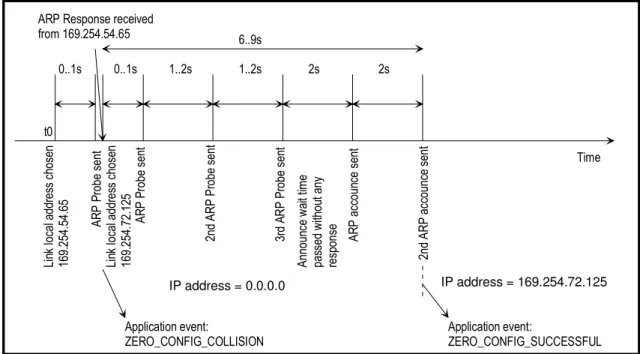
The device can now use its link-local IP address for communication in the local network. It doesn’t however have any gateway address and so cannot communicate with addresses outside of the link-local address range respectively outside of the physical or logical network. Figure 1 shows a typical configuration sequence whereby a collision is detected at the first chosen link local address. The second attempt is then successful. As can be seen, if there is no collision detected during the process the zero-configuration process takes between 6 and 9 seconds to complete. Time Li nk lo ca l a dd re ss c ho se n 16 9. 25 4. 54 .6 5 t0 0..1s A R P P ro be s en t Application event: ZERO_CONFIG_SUCCESSFUL ARP Response received
from 169.254.54.65 Li nk lo ca l a dd re ss c ho se n 16 9. 25 4. 72 .1 25 0..1s A R P P ro be s en t 1..2s 2n d A R P P ro be s en t 1..2s 3r d A R P P ro be s en t 2s A nn ou nc e w ai t t im e pa ss ed w ith ou t a ny re sp on se A R P a cc ou nc e se nt 2s 2n d A R P a cc ou nc e se nt IP address = 0.0.0.0 IP address = 169.254.72.125 6..9s Application event: ZERO_CONFIG_COLLISION
Figure 1 Typical configuration timing
Each time a collision is detected during the process the zero-configuration owner task is sent an interrupt event of type ZERO_CONFIG_COLLISION. Once the zero-configuration process has successfully complete the event ZERO_CONFIG_SUCCESSFUL is sent so that the owner can allow any operation which needed to wait on this completion.
3. Detecting Conflicts and Defending Addresses
Once the device has started using a link-local address the process of monitoring address conflicts has not terminated. When using a link-local address, conflict detection is an on-going process.
A conflict is defined as detecting any ARP request or response where the sender IP address matches the link-local address being used, but the sender’s MAC address doesn’t match the local one. That is, it originated from a different source.
When a conflict is detected the device must respond in one of two possible manners. It can either stop using the address and restart the process of obtaining a new address, or it can attempt to defend the address. Defending the address may be preferred when the address is actively being used by a TCP connection, for instance.
Defence of an address is however only allowed if a time DEFEND_INTERVAL [10] seconds has elapsed since seeing a previous conflict.
The defence of an address is quite simple and involves just the broadcast of a single ARP announcement.
If an address has to be abandoned it is recommended that an attempt first be made to actively reset any active TCP connections.
The µTasker implementation automatically checks whether there are any TCP sockets in a connected (or in the processor of connecting or closing) state and will defend the link-local address as long a the DEFEND_INTERVAL period is not active, in which case it will abandon the address and restart the process of claiming a new random link-local IP address.
When the IP address is abandoned, any TCP sockets in a connected state will send a
TCP RST and abort the connection. This results also in an event TCP_EVENT_ABORT
being sent to each of these socket’s call back routines.
When an IP address was defended the zero-configuration own task is sent an
interrupt event ZERO_CONFIG_DEFENDED. Each time there is a collision which results in the IP address being abandoned an interrupt event ZERO_CONFIG_COLLISION is sent.
4. Zero-Configuration Usage Strategy and Initial Link-Local Address
When the configured IP address is set to a value in the link-local range the first attempt to retrieve an IP address will be made with this address. This means that it is possible to allow a device to obtain an address and then save this address as its IP address configuration so that the same address can be retrieved as default after the next reset – this is similar to the implementation used by Apple Mac OS and results in a stable configuration in an isolated network after each reset when all devices use this feature.
The µTasker demo project contains the following zero-configuration usage strategy. The details are controlled at the application layer and can thus be modified as required to suit an individual project. The strategy is however expected to represent a typically used method.
1) If DHCP is enabled DHCP is used as default. If DHCP is successful the IP settings obtained from the DHCP server are used. This represents a case where the device can take part in communication with local and routable networks.
2) If the DHCP process fails (DHCP_MISSING_SERVER interrupt event is received by the DHCP owner task) the zero-configuration process is started. This allows the network to fall back to a link-local operation.
3) If DHCP is not used, a standard IP configuration is used as preference. If however the IP address is configured with 0.0.0.0 the zero-configuration process will be started. The same is true if the IP address is configured to an address in the link-local range. The case with 0.0.0.0 will result in a random link-local range address being
configured and the other case will result in the configured link-local address being used as preference in case no collisions are found in the process.
This strategy allows the DHCP and zero-configuration process to be controlled by the DHCP and IP settings. DHCP always has priority, as does a manual IP configuration including routable addresses. Zero configuration operation can always be configured, either as
alternative to the manual IP setting or as fall-back when the DHCP process is not successful.
When the zero-configuration is in use the µTasker simulator shows the present state of operation, beginning with the probing state and ending in the active state with the used IP address. Should the link-local address need to be defended during operation the defend period is also shown.
5. Conclusion
This document has discussed the operation of zero-configuration (Auto-IP) and its implementation in the µTasker project.
The link-local address used after zero-configuration is automatically defended, where possible, when TCP sockets are in use and TCP connections are automatically reset when defending is not allowed – in all cases the TCP socket users are automatically notified of such events. Also the zero-configuration owner task is informed of all zero-configuration events when they take place (collisions, defending and successful configuration).
When zero-configuration is enabled, the µTasker demo project implements a useful strategy whereby DHCP server has preference but zero-configuration can be used as fall-back when the DHCP process is not possible.
Modifications:
Appendix A – Validation of Operation
The zero-configuration module’s operation can be validated in the µTasker simulator by activating the define _VALIDATION_TEST in the file zero_config.c. This validation test is not performed on the hardware, even when this define is activated.
When the zero-configuration operation is in progress the validation part of the module generates collision ARP frames being sent from a bogus node with a MAC address equal to the test node’s MAC address plus 1 (eg. if the test node has the MAC address
00:00:01:02:03:04 the bogus one will have the MAC address
00:00:01:02:03:05). The validation test sequence consists of code which generates collisions (ARP frames with the source address set to the link-local address that is presently being probed for or is in use) at various points during obtaining and defending the link-local address.
There are two basis test phases:
- the first is when the node is trying to obtain a link-local address
- the second phase is when the link-local address is in use and needs to be either defended or released
During the first phase the validation code causes collisions to take places at various points in the acquiring sequence to verify that a new attempt is started each time with a new random link-local address.
Once all collision points have been verified the second phase tests collisions in operation. When there are no TCP sockets connected it is expected that the link-local address is given up immediately and a new one probed for. When at least one TCP connection is established it is expected that the link-local address is defended as long as there are not two collisions taking place within the defend interval (less than 10s between collisions). Both collisions with time differences greater and less than the defence interval are verified.
The following shows the validation test in operation. The test causes the sequence to restart several times as collisions are provoked at each possible stage. Once the link-local address has been verified there is a pause of 20s to allow the user to establish test TCP connections if required (this case shows a Telnet connection being established as test), after which the defence of this is verified twice before a third collision after a delay of less that the defend interval causes the Telnet connection to be automatically reset (all established TCP connections will be reset) and a new link-local address to be finally obtained without any more interference.
The simulator node’s MAC address is 00:00:00:00:00:00 and the validation node’s MAC address is 00:00:00:00:00:01.
1 2 3 4 5 6 7 8 9 10 11 12 13
1 – a collision occurs after the first probe of IP address 169.254.234.158, which restarts the process
2 - a collision occurs after the second probe of IP address 169.254.243.83, which restarts the process
3 - a collision occurs after the third (final) probe of IP address 169.254.52.181, which restarts the process
4 - a collision occurs after the first announcement of IP address 169.254.147.229, which restarts the process
5 – no collisions take place and the IP address 169.254.34.223 is used after the standard sequence of three probes and two announcements is successful
6 – A TELNET connection is established on the link-local IP address 7 – a collision takes place while the TCP connection is active
8 – the address is defended by sending an announcement
9 – a second collision takes place while the TCP connection is active after the defend interval of 10s has passed
10 – the address is again defended by sending an announcement
11 - a second collision takes place while the TCP connection is active but within the defend interval (less than 10s since previous defence)
12 – The TCP connection is automatically reset and the IP address 169.254.34.223 is abandoned