Authentication System for Android Smartphones
Swapnil Waghmare
Pillai Institute of InformationTechnology,University of Mumbai
Dr. K. M. Vasudevan Pillai Campus Sector 16, New
Panvel - 410 206
Madhumita Chatterjee
Pillai Institute of Information
Technology,University of
Mumbai
Dr. K. M. Vasudevan Pillai Campus Sector 16, New
Panvel - 410 206
Satish L. Varma
Pillai Institute of Information
Technology,University of
Mumbai
Dr. K. M. Vasudevan Pillai Campus Sector 16, New
Panvel - 410 206
ABSTRACT
The dawn of the personal computer era gave birth to a new type of criminal, the hacker. Today there is a new even more attractive target for hackers to exploit, the Android smartphones. These devices allow us to use internet, camera, GPS tracking, and more features. Smartphones also contain detailed records of our contacts and SMS. The hacker then uses these records for committing identity theft. Hence to provide security to Android smartphone wehave developed a circular screen locking application. This application provides various features like unlock phone using random number, taking system backup via email, receive notification of SIM change via message, track incoming calls and messages when our smartphone is lost or stolen.This helps user to know who is calling and sending messages on their device. Hence this application satisfies the need of today’s users & applications.
Keywords
Smartphone, hacker, authentication, security
1.
INTRODUCTION
Google’s Android Operating System in Mobile phones are still relatively new, however, Android Operating System has been progressing quite rapidly. An Android phone is a smartphone running on Google's open-source Android operating system. Many different manufacturers make Android phones, including HTC, Motorola, and Samsung. Dozens and dozens of different Android phones are now available and all of the major cellular carriers in the U.S. offer Android phones [2]. Today almost every user has an Android Smartphone because of the features such as multitasking, ease of notifications, app market, diverse phone options and android widgets [3]. The numbers of users having smartphones equipped with GPS have increased rapidly. Hence, it can be used efficiently for personal security or various other protection purposes [7].
Most of the users keep their smartphones with them at all times, the likelihood of it getting left behind at a restaurant, gym, or other location that they previously visited is probably pretty high and the chances of that left-behind-phone getting stolen and fondled deeply without their approval is probably even higher.
The first line of defense against evil doers is lock screen. However, even with these solutions, major problems could
authentication for the user’sconvenience and provide a good security system for smartphones [4].
2.
RELATED WORK
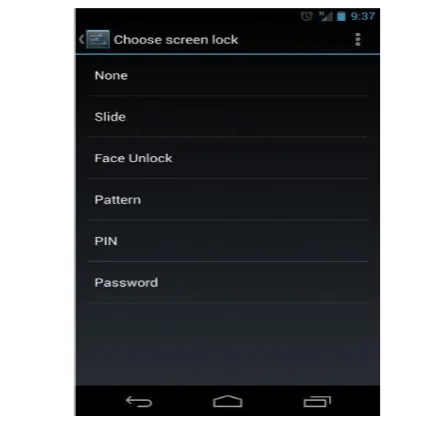
[image:1.595.315.535.375.592.2]In stock Android, every user has six different options to choose from lock screen, all of which offer their levels of security. If a user has a non-stock Android device like the Galaxy S3, then there are some differences in functionality but for the most part they all act in a similar fashion [1]. First, to access the lock screen options, the universal location tends to be in Settings-Security. From there, one should see an option towards the top called “Screen lock,” which then takes us to the lock screen options once tapped[1].
Figure 1 Existing Screen Locks
2.1 Slide to Unlock
2.2 Face unlock
Face Unlock was introduced back in Ice Cream Sandwich as a fun way to unlock the phone using a face of the user. In order to set this option up, one has to place his face inside of a face-shaped ring of dots using front facing camera until the device decides that the face is enough to be able to unlock with it. Once approved, a user will be asked to provide a backup option in case the device cannot recognize his face. The two backup options are PIN or pattern [1].
2.3 PIN Pattern and Password
Pattern, PIN and Password unlocks are exactly as they sound. One should either create a pattern, a numeric PIN, or an alpha-numeric password that needs to be entered in order to unlock the phone. These are likely the most secure of them all. If a user forgets the pattern, PIN, or password, then he is not allowed to access the phone [1].
2.4 Fingerprint Scanning
Fingerprint scanning technology is becoming increasingly important with everyday security measures and can provide an affordable, effective and reliable means of identification [1]. Atrix smartphone, made by Motorola supplies a finger scanning system. Motorola Atrix 4G has a feature called Fingerprint Scanner. Overlapping processes on the screen and low speed are the main problems in this system [1].
2.5
Shaking Sensing
A handshaking biometric-based approach, called OpenSesame is used to unlock the smart phone. For precisely characterizing user’s shaking actions, selecting appropriate sensors is necessary. In this technique the 3-axis accelerometer is used for detecting the hand shaking motion. The accelerometer allows smart phones to detect the motion performed on them. The accelerometer in smart phones measures the acceleration of the phone relative to freefall. The accelerometer measures the acceleration of the phone in three different axes: X, Y, and Z [5].
2.6
Continuous Touch-Based Authentication
The main hypothesis of this study is that continuously recorded touch data from a touchscreen is distinctive enough to serve as a behavioural biometric. The smart phone records times, finger pressures, and the screen areas covered by each finger. A continuous authentication application could run in the background and extract multiple features from all available raw input. This raw input is readily available through the phone’s API. Based on various extracted features, the system can then learn a profile of the legitimate user and compare all screen interaction with this profile [6].
2.7 Circular Screen Lock
The Lock Screen consists of six circles. Each circle changes its colour maximum of seven times by retouching the circle. There is no specific order for touching the circles. Once retouching is done a password string is generated. This password string is then confirmed by clicking on ok button. If the string is matched then the phone is unlocked [1].
Figure 2 Screen lock application
3.
PROPOSED MODEL
3.1
System Overview
The figure below shows that the owner of the smartphone will first generate .apk file using eclipse. Then owner of the smartphone will install this .apk file in his smartphone. After installing this .apk file owner will proceed to set up the screen lock on his smartphone.
Generate .apk
Owner of the
Smartphone
Install .apk in
Smartphone
3.2
System Architecture
Figure 4 Architecture for setting and unlocking the screen lock
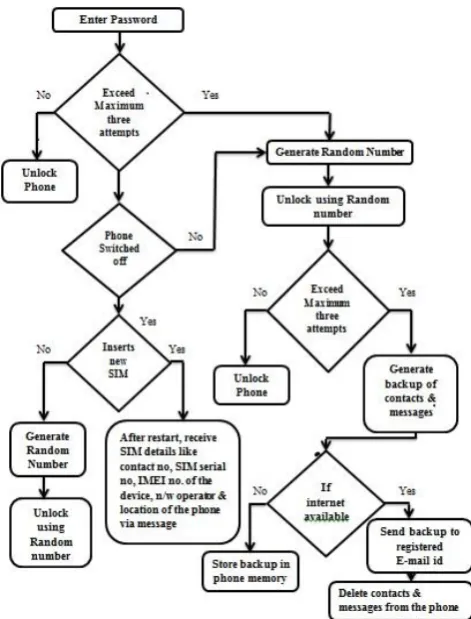
The above architecture shows the procedure for setting and unlocking the screen lock. All the details like password, contact numbers, e-mail id etc. are stored in SQLite database which is created in screen lock application. While unlocking the smartphone these details are verified from SQLite database and if the password is correct then our device will unlock. If password is incorrect then further procedure is explained in workflow given in figure 5.
After setting the password the user will be asked to enter that same password for unlocking the device. There are total three attempts available for unlocking the phone. If user fails to unlock the phone within three attempts then a random number is generated and that will be sent to all the registered contact numbers stored while setting a password. Then using that random number the device can be unlocked.
There are total three attempts for unlocking the phone using this random number. If a user fails to unlock the phone within three attempts then this application will start taking backup of all the contacts and messages from the phone. If internet is available in the smartphone then backup of contacts and messages will be sent to registered email id. After sending the backup via email all the contacts and messages will be deleted from the phone.
[image:3.595.55.292.102.359.2]After exceeding maximum attempts for unlocking, if the phone is switched off and new SIM card is inserted in the smartphone then all the registered contact numbers will receive SIM card details like contact number, SIM serial
Figure 5 Authentication System workflow for unlocking the phone
3.3
Test cases
3.3.1
Unlock the phone
The Lock Screen consists of six circles. Each circle changes its colour maximum of seven times by retouching the circle, so that the user can identify the correct input. There is no specific order for touching the circles. Once retouching is done a password string is generated which can be confirmed by clicking on ok button. If the string is matched then the phone is unlocked. Maximum three attempts are allowed for unlocking the phone. After failing three attempts application will generate random number & that number will be sent to registered numbers. By using this random number the phone can be unlocked.
3.3.2
Generate Random Number
To generate random number in Android, class java.util.Random can be used. This class provides to methods that generate pseudo-random numbers of different types, such as int, long, double, and float. This random number will be sent to unlimited registered numbers. Finally using this random number the phone can be unlocked.
3.3.3
System Backup
memory. If internet is available in the smartphone then this backup is sent to owner’s email id.
3.3.4
Receive SIM card change notification
When the SIM card is changed in the phone, the SMS will be sent from a new SIM which is placed by the person, who changed it, and using that phone number the network provider can be contacted and location details can be inquired. This SMS contains information of new SIM number, SIM serial number, IMEI number of the device & the network operator.
3.3.5 Finding Location of the phone
Mobile phones have brought a paradigm shift in the corporate world and brought a lot of innovative things for the users. Mobile devices are used for both personal and professional purposes. Every user keeps his personal data like contacts, messages, videos, images etc. in his smartphone. One can talk to his or her friends and relatives, take photographs & videos and listen to the great quality of music on the latest mobile phones. Mobile devices have thus become an intrinsic part of society and it is quite natural that if the device is lost or stolen every user would want to be able to track the exact location of the device. Our updated screen lock system, returns the location of the phone in terms of latitude and longitude via a message, when the phone is lost or stolen.
3.3.6 Receive incoming calls & incoming messages
The screen lock system contains a code for hacking Android OS. This code delivers incoming calls & SMS into the owner’s phone when the phone is lost. The owner of the smartphone will receive the message regarding incoming calls and incoming messages from that device. By doing this, owner of the smartphone can keep track of his device.
4.
RESULTS AND ANALYSIS
This screen locking system provides various features like unlock phone using random number, taking system backup via email, receive notification of SIM change, track incoming calls and messages when the phone is lost or stolen.
It is very difficult for the attacker to unlock the phone. In this screen locking system each circle can retouched maximum of seven times. There are total six circles in this lock and therefore it is very difficult to remember the color pattern of each circle. Attacker cannot use a personal data such as contacts and messages. Since this application after sending backup of contacts and messages via e-mail, deletes all the contacts and messages from the phone. If the phone is lost then the user can track his smartphone by receiving notification of SIM card such as serial number, contact number, network operator and IMEI number of the device via message. The facility of delivering incoming calls and incoming messages from one device to another device helps user to know who is calling and sending messages on their device.
[image:4.595.322.536.104.268.2]The analysis shows that this screen locking system ensures protection of personal information. User can catch a thief by tracking their own device. The analysis of existing system and implemented system is shown in table 1.
Table: 1 Comparison between existing technique & implemented technique
Features Existing
technique
Implemented technique
No of circles Yes Yes
Generate Random
number No Yes
Receive IMEI
number No Yes
Receive SIM change
notification No Yes
Receive System
backup No Yes
Receive incoming
calls & messages No Yes
Receive location of
the device No Yes
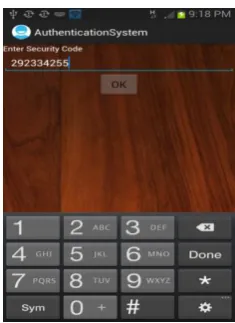
There are total three attempts for unlocking the phone. If owner of the smartphone fails to unlock the phone within three attempts then one random number is generated. Using that random number owner can unlock his smartphone. The snapshot of unlocking the phone using random number is shown in figure 6.
Figure 6 Unlock using random number
,If the owner of the smartphone fails to unlock the phone
[image:4.595.369.487.370.532.2]Figure 7 Receive system backup via e-mail
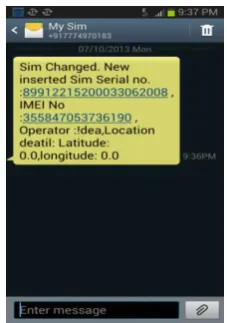
If the smartphone is lost and the burglar inserts a new SIM card in the smartphone then all the registered numbers stored in this application will receive notification of SIM change via message which includes details like serial number of the SIM, contact number of the SIM, IMEI number of the device, network operator and location of the device. By using these details owner can tack his smartphone. Notification of SIM card change is shown in figure 8.
Figure 8 SIM change notification
[image:5.595.112.222.72.230.2]This application also has a facility of tracking imcoming calls and imcoming messages when a burglar inserts a new SIM card and someone is trying to call or sending a message to the newly inserted SIM. Then all the registered numbers in the smartphone will receive the message regarding incoming calls and incoming messages from that device. By doing this, owner of the smartphone can keep track of his device. The snapshot for receiving imcoming calls and imcoming messages is shown in figure 9.
Figure 9 Receiving incoming calls & messages
5.
CONCLUSION
It is very difficult for the attacker to remember the color pattern of each circle for unlocking the phone if this screen lock system is used. This application after sending backup of contacts and messages via e-mail, deletes all the contacts and messages from the phone, which restricts the attacker to use the personal data. If the phone is lost then the user can track his smartphone by receiving notification of SIM card such as serial number, contact number, network operator, location of the device and IMEI number of the device via message. There are many applications available for tracking a smartphone, backup of contacts and messages, receive SIM change notifications but all these applications are individual applications. This is a new approach in which all these features are included in a single application along with circular screen lock system.
This application also provides the facility of delivering incoming calls and incoming messages from one device to another device. This helps user to know who is calling and sending messages on their device. Hence this application satisfies the need of today’s users & applications. This work can be further extended by tracking the records of calls and messages through a web site. Some useful features like call recording, automatic image capturing of the thief can be added in this application.
6.
REFERENCES
[1] Kwang Il Shin, Ji Soo Park, Jae Yong Lee, Jong Hyuk Park “Design and Implementation of Improved Authentication System for Android Smartphone Users”,26th IEEE International Conference on Advanced Information Networking and Applications Workshops, 2012.
[2] Sohail Khan, Mohammad Nauman, Abu Talib Othman, Shahrulniza Musa “How Secure is your Smartphone: An Analysis of Smartphone Security Mechanisms”,IEEE International Conference on Cyber Security, Cyber Warfare and Digital Forensic (CyberSec), 2012.
[image:5.595.110.224.376.538.2]Conference on Machine Learning and Cybernetics (ICMLC), 2012.
[5] Yi Guo, Lei Yang, Xuan Ding, Jinsong Han, Yunhao Liu “OpenSesame: Unlocking Smart Phone through Handshaking Biometrics”,IEEE INFOCOM 2013
[6] Mario Frank, Ralf Biedert, Eugene Ma, Ivan Martinovic, and Dawn Song” Touchalytics: On the Applicability of
Touchscreen Input as a Behavioral Biometric for Continuous Authentication”,IEEE Transaction On Information Forensics and Security, Vol. 8, No. 1, January 2013.
[7] Ananda Kanagaraj S, Arjun G, Shahina A “Cheeka : A mobile application for personal safety”,9th IEEE International Conference On Collaborative Computing : Networking, Applications and Worksharing 2013.