A Wearable Wireless Device for Effective Human
Computer Interaction
Yogesh D. Kataware
M.Tech Student Department of Technology Shivaji University, Kolhapur
U. L. Bombale,
Ph.D Associate Professor Department of Technology Shivaji University, KolhapurABSTRACT
Human Computer Interaction is a branch in which developer makes user friendly system. Now days, many persons suffer from Carpal Tunnel Syndrome and repetitive strain injuries due to continuous use of mouse. To avoid such serious problem of injuries and pains, a wearable wireless device is proposed in this paper. The proposed device uses Accelerometer and Flex sensors to sense the gestures with the help of ARM7 lpc2138 microcontroller. The sensors are mounted on a wearable hand glove. This device uses Zigbee modules at both user side and computer side and provides wireless communication. Due to simple gestures such as left click, right click, and drag operation rotation operation and pointing operation, the proposed device achieves user friendliness and effectively enhances user’s interaction with computer.
Keywords
Human Computer Interaction, Gesture, Accelerometer, Flex sensor, ZIGBEE Module Transceiver, ARM7 microcontroller (lpc2138) etc
1.
INTRODUCTION
Computers have brought up a revolution in the past twenty years. They have taken place everywhere now and then they are being used by everyone. Most of our day-to-day jobs are being influenced by the use of computers. They are playing important role in our daily life and providing facilities which are beyond our imagination. Human Computer Interaction is a branch in which developer makes user friendly system. Human beings have a good grasping and manipulating ability with their hands [1]. Hand gesture is a very natural form of human interaction and can be used effectively in Human Computer Interaction (HCI) [2]. Very simple and common interfaces are represented by mouse and keyboard by which a user interacts with the personal computer machine. In the last few years, new interfaces have been developed such as stylus, touch screen, voice recognition but they have some pros and some cons. Therefore mouse is still referred for GUI (graphical user interface).
Many of us suffer from RSI (Repetitive Strain Injury) like pain in forearm, shoulder and back as we use mouse for hours on end. Researchers have known for years that interactions like pointing operation, clicking operation and dragging operation are not ideal forms of interaction for many tasks. The most important injury related with using a mouse is Carpal Tunnel Syndrome. This is caused by putting the wrist on a hard surface while using mouse. This pinches the nerves that are passing into palm, specially the median nerve. This causes excruciating pain and tingle, which can usually only be
healed by surgery (and many times it will not heals completely) [3].
It is necessary to develop the wireless “user-friendly” and more efficient system for Human Computer Interaction. This paper describes design and implementation of wearable wireless device to effectively interact with computer. The proposed system makes the use of flex sensors and accelerometer to sense hand gestures, and according to hand gestures it will perform typical actions such as left click, right click, drag operation, rotation operation and pointing operation.
2.
PROPOSED SYSTEM
The proposed system mainly consists 2.1.Flex sensors
2.2. Accelerometer
2.3.ARM7 LPC2138 Microcontroller 2.4. MAX232 IC
[image:1.595.313.553.365.659.2]2.5. Zigbee modules.
Fig 1: Block Diagram of Proposed system.
2.1
Flex Sensors
The flex sensors are the sensors whose resistance changes with respect to bend of the sensor [4], [5]. The survey of different sensorized glove systems, their selection and applications are introduced in paper [6].It provides information about flexion sensors. Flex sensor converts the change in bend into electrical resistance. If there is more bend, there is more change in resistance value. Flex sensor is in the
PERSONEL
COMPUTER
XBEE
XBEE ARM
7 MAX232
2 FLEX SENSORS
INPUT
shape of a thin strip from 1 to 5 inches long. Resistance value varies depending upon length. The Flex sensors are analog resistors and they work as variable voltage dividers. Inside the flex sensor there is a thin flexible substrate in which carbon resistive elements are there. When there is bending on that substrate, sensor produces resistance output which is relative to bend radius. Due to such fundamental property of flex sensors they are incorporated onto a glove to make a user friendly wearable real time device. The flex sensors mounted on fingers produce change in electrical resistance and give electrical signal to ARM microcontroller.
Electrical Characteristics:
Size: approx 0.250 “wide and 2.2" long Flat Resistance: 25K Ohms
Resistance Tolerance: ±30%
Bend Resistance Range: 45K to 125K Ohms (depending on bend radius)
[image:2.595.350.510.124.247.2]Power Rating: 0.50 Watts continuous. 1 Watt Peak.
Fig 2: Flex sensor
Fig 3: basic flex sensor circuit
Formula: VOUT = Vcc (R2 / (R1 + R2))
2.2
Accelerometer
An accelerometer is device that measures acceleration forces. Forces may be static, such as the constant force of gravity, or they may be dynamic – due to movement or vibration of the accelerometer. The amount of static acceleration provides the tilt angle of device with respect to the earth. The amount of dynamic acceleration provides the information about the way the device is moving. Accelerometer uses different principles. Some accelerometers use the principle of piezoelectric effect. Such accelerometers contain microscopic crystal structures. When structures get stressed by accelerative forces, a voltage is generated. Some accelerometers use microstructures. Two microstructures have certain capacitance between them. An acceleration force moves one of the structure, then the capacitance changes [7], [8]. Therefore 3 axis accelerometer senses movement in three axis i.e. x-axis, y-axis, z-axis. It is used to identify movement of hand across the two axis i.e.
x-axis, y-axis. Movement of hand across the two axis i.e. x-axis and y-axis produces change in voltage on respective pins which is given to ARM microcontroller. MMA7260Q 3 Axis Accelerometer from freescale semiconductor is used.
Fig 3: MMA7260Q 3 Axis Accelerometer.
2.3
ARM7 LPC2138 Microcontroller
ARM7 LPC2138 Microcontroller is used for processing of signals obtained from flex sensors and accelerometer. Microcontroller converts analog signals from sensors by using onchip ADC and sends serial data using onchip UART according to c program logic. After manipulating it sends send the data to Zigbee module by using MAX232 converter.
2.4
MAX232 IC
[image:2.595.59.276.279.551.2]MAX232 IC provides conversion between TTL signal level and RS232 port standard signal levels.
Table 1. Voltage levels for TTL and RS232 Standard
Standard TTL RS232
Logic 1 3.3 V (-3v to -15v) Logic 0 0 V (+3v to +15v)
2.5
Zigbee Modules
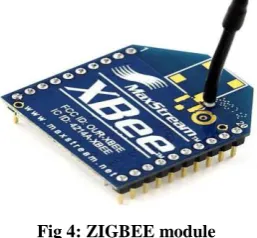
[image:2.595.334.523.413.469.2]Zigbee modules are used for wireless transmission of data from wearable hand glove device to personal computers. ZigBee is a wireless mesh network standard which is low-cost and low-power. Due to low cost, it is widely used in wireless control and monitoring applications. Due to low power-usage it provides longer life for smaller batteries. ZigBee operates in the industrial, scientific and medical band (ISM radio band); 868 MHz in Europe, 915 MHz in the USA and Australia and 2.4 GHz in most worldwide [9]. Data transmission rates vary from 20 kbps in the 868 MHz frequency band and upto 250 kbps in the 2.4 GHz frequency band.
Fig 4: ZIGBEE module
After receiving the data, program written at computer in Visual Basic Language analyzes and indicates particular VCC
FLEX SENSOR (R2)
R1
VOUT to ADC pin of
[image:2.595.365.494.605.724.2]The proposed system is advantageous over traditional mouse. First it provides wireless interactions and therefore mobility to user. It also achieves user-friendliness due to simple hand gestures.
Brief history of Human Computer Interaction from paper [10] and different glove based input system designs from paper [11] provides useful information to design wearable device.
3.
HARDWARE IMPLEMENTATION
[image:3.595.312.546.83.293.2]At user side, handheld unit uses glove with sensors mounted on it. Two flex sensors from Spectra symbolTM are used to sense left click and right click. Accelerometer MMA7260 from Freescale semiconductor is used to sense the movement in X axis and Y axis. Signals from two flex sensors and Xout and Yout pins from accelerometer are given to ADC pins of lpc2138 processor. After level conversion by MAX232 IC,two Zigbee transciever modules, one at user side and another at computer side,are used for wireless transmission.
Fig 5: Proposed Wearable Wireless Device
4.
SOFTWARE IMPLEMENTATION
C program written in Keil uVision4 software is burned into lpc2138 using flash magic software. C program after converting signals using inbuilt ADC takes decision according to threshold values and sends final string via zigbee modules to COM port of computer. Visual Basic program written at computer uses standard mouse functions designed by Microsoft©. After receiving data at COM port from handheld unit, according to string characters, VB program executes mouse functions such as left click, right click or moves cursor in appropriate direction.
5.
RESULTS
In this proposed system, based on the processed inputs of sensors given by the lpc2138 via zigbee, the VB program at the computer shows respective operation for that particular gesture. Table 2 shows the changes in characters and numbers for respective gestures in received string.
Variable YM represents movement of cursor in Y axis. Depending on gesture, YM takes Y, U and D values. Variable XM represents movement of cursor in X axis. Depending on gesture, XM takes X, R and L values. Variable LC represents left click. Depending on gesture, LC takes 1 and 0 values. Variable RC represents right click. Depending on gesture, RC takes 1 and 0 values.
Table 2. Changes in string according to gestures
Gesture YM XM LC RC
Description Movement in Y axis
Movement in X axis
Left click
Right click
Left Click Y X 1 0
Right Click Y X 0 1
Left Move Y L 0 0
Right Move Y R 0 0
Up Move U X 0 0
Down
Move D X 0 0
Drag
Operation * * 1 1
Left Rotate Y L 0 0
Right
Rotate Y R 0 0
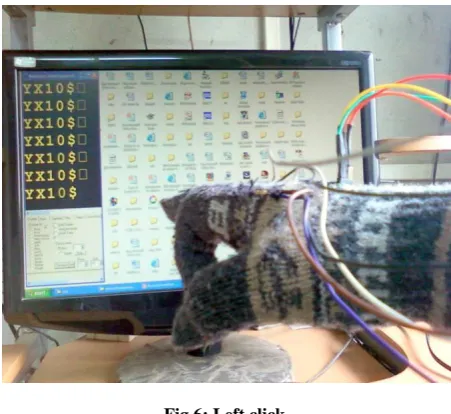
* indicates variable can take value U, D, Y and L, R, X according to gestures while performing drag operation. String received for different gestures is shown in following figures from figure 6 to figure 12.Figure 13 shows drag operation. Figure 14 and 15 shows rotation of cube in left side and right side respectively as follows:
[image:3.595.57.280.270.449.2]Figure 6 shows gesture of left click. When the index finger is bent, flex sensor mounted on it also bends and change in its resistance is given to microcontroller’s ADC and according to program logic when converted value is above threshold value, the third digit in string becomes 1 from 0, which is sent wirelessly by pair of zigbee module and can be seen at hyper terminal of computer.
Fig 6: Left click
Then left click function is called in visual basic code at computer.
[image:3.595.316.542.446.653.2]wirelessly by pair of zigbee module and can be seen at hyper terminal of computer.
Fig 7: Right click
Then left click function is called in visual basic code at computer.
[image:4.595.55.284.99.313.2]Figure 8 shows gesture of left move. When the hand is tilted in left direction, accelerometer mounted on upper side of glove also tilts and change in voltage at pin Xout is given to microcontroller’s ADC and according to program logic when converted value is below left threshold value, the second character in string becomes L from X, which is sent wirelessly by pair of zigbee module and can be seen at hyper terminal of computer.
Fig 8: Left Move
Visual basic code at computer decrements the cursor position in X axis by five pixels.
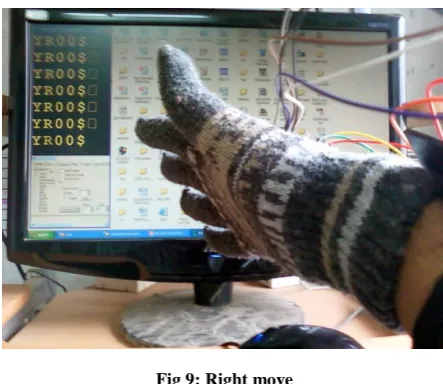
Figure 9 shows gesture of right move. When the hand is tilted in right direction, accelerometer mounted on upper side of glove also tilts and change in voltage at pin Xout is given to microcontroller’s ADC and according to program logic when converted value is above right threshold value, the second character in string becomes R from X, which is sent wirelessly by pair of zigbee module and can be seen at hyper terminal of computer.
Fig 9: Right move
Visual basic code at computer increments the cursor position in X axis by five pixels. When the hand is not tilted, the converted value is between two threshold values and character remains X.
[image:4.595.318.542.415.595.2]Figure 10 shows gesture of up move. When the hand is tilted in upward direction, accelerometer mounted on upper side of glove also tilts and change in voltage at pin Yout is given to microcontroller’s ADC and according to program logic when converted value is above up threshold value, the first character in string becomes U from Y, which is sent wirelessly by pair of zigbee module and can be seen at hyper terminal of computer.
Fig 10: Up move
Visual basic code at computer increments the cursor position in Y axis by five pixels.
[image:4.595.56.276.444.637.2]Fig 11: Down move
Visual basic code at computer decrements the cursor position in Y axis by five pixels. When the hand is not tilted, the converted value is between two threshold values and character remains Y.
[image:5.595.317.548.71.251.2]Figure 12 shows gesture of drag operation. When both index finger and middle finger are bent, both flex sensor bends, and third and fourth digit becomes1 from 0. This is sent wirelessly by pair of zigbee modules at computer.
Fig 12: Drag operation
Then drag function is called in visual basic code. And if hand is tilted in any direction then there is a respective change in characters and object is dragged in respective direction. Figure 13 shows gesture of drag operation of folder in upward direction. File is dragged in upward direction and dropped into folder.
Fig 13: Drag operation of folder.
[image:5.595.317.542.311.505.2]Figure 14 shows left rotation operation of the cube. It uses similar gesture of left move operation. When hand is tilted in left direction, the cube starts to rotate in left direction with respect to vertical axis of cube.
Fig 14: Left rotate operation of cube
Figure 15 shows right rotation operation of the cube. It uses similar gesture of right move operation.
Fig 15: Right rotate operation of cube.
[image:5.595.53.283.387.585.2] [image:5.595.316.544.542.723.2]6.
CONCLUSION
Human Computer Interaction Device is key area in modern electronics. The proposed wearable device can be treated as the new age input device.
There are many primary input devices, but these devices are still application specific. The proposed system is easy to use for computer applications that are mouse specific.
Due to simple hand gestures, anyone can use the system conveniently. Therefore system achieves user friendliness.As this device provides wireless interface, it provides mobility to user.
The proposed device is wearable hand glove unit due to which user does not requires keeping or putting a hand over a mouse and wrist on a mouse pad. Therefore this wearable hand glove system avoids aches, pains and injuries.
7.
ACKNOWLEDGMENTS
The author wish to thank Dr. U. L. Bombale sir, Associate Professor, Department of Technology, for his support in development of this application and for his systematic approach in getting familiarized with all the details needed for the project and constantly guiding at every step, Prof. P. C. Bhaskar, Coordinator, Department of Technology for his kindly guidance in dissertation work completion.
8.
REFERENCES
[1] Kumar P, Rautaray, S.S, Agrawal A, “Hand data glove: A new generation real-time mouse for Human-Computer Interaction.” In Proceedings of International Conference on Recent Advances in Information Technology (RAIT), 15-17 March 2012, pp. 750 – 755.
[2] Wan, Silas ; Nguyen, Hung T. “Human computer interaction using hand gesture.” In 30th Annual International Conference of the IEEE Engineering in Medicine and Biology Society, 20-25 Aug. 2008, pp.2357 – 2360.
[3] K. Mohamed Ali, B.W.C. Sathiyasekaran, “Computer Professionals and Carpal Tunnel Syndrome (CTS)”,
International Journal of Occupational Safety and Ergonomics (JOSE) 2006, Vol. 12, No. 3, 319–325. [4] Two-Directional Bi-Flex Sensors™.
http://www.imagesco.com/sensors/flex-sensor.html. [5] FlexSensor,
http://www.digikey.com/us/en/ph/SpectraSymbol/flex_se nsor.html.
[6] Laura Dipietro, Angelo M. Sabatini and Paolo Dario, “A Survey of Glove-Based Systems and Their Applications” IEEE transactions on systems, man, and cybernetics— part c: applications and reviews, vol. 38, no. 4, july 2008, pp.461 – 482.
[7] Li-Peng Wang, Richard A. Wolf, Yu Wang, Ken K. Deng, Lichun Zou, Robert J. Davis, Susan Trolier-McKinstry, “Design, Fabrication, and Measurement of High-Sensitivity Piezoelectric Microelectromechanical Systems Accelerometers”, IEEE journal of microelectromechanical systems, vol. 12, no. 4, august 2003, pp.433-439.
[8] Junseok Chae, Haluk Kulah, Khalil Najafi, “A Monolithic Three-Axis Micro-g Micromachined Silicon Capacitive Accelerometer”, IEEE journal of microelectromechanical systems, vol. 14, no. 2, april 2005, pp.235-242
[9] Jin-Shyan Lee, Yu-Wei Su, Chung-Chou Shen, “A Comparative Study of Wireless Protocols: Bluetooth, UWB, ZigBee, and Wi-Fi”, The 33rd Annual Conference of the IEEE Industrial Electronics Society (IECON), Nov. 5-8, 2007, Taipei, Taiwan, pp: 46 – 51 [10]Jonathan Grudin, “Three faces of human-computer
interaction.” Annals of History computing, IEEE Volume: 27, 5 December 2005, pp. 46-62.