JNT - Java Native Thread for Win32 Platform
Bala Dhandayuthapani Veerasamy
Research Scholar in Information Technology Manonmaniam Sundaranar University
Tirunelveli, Tamilnadu, India
G. M. Nasira,
PhDAssistant Professor/Computer Science Chikkanna Govt Arts College
Tirupur, Tamilnadu, India
ABSTRACT
Threading is a facility to allow multiple activities to coexist within a single process. Most modern operating systems support threads and the concept of threads has been around in various forms for many years. Java is the first mainstream programming language to explicitly include threading within the language itself, rather than treating threading as a facility of the underlying operating system. This research finding focuses on how Java can facilitate Win32 platform threads through JNI, which enables Java threads and native threads to schedule and execute in hybrid mode.
Keywords
Java Thread, JNA, JNI, JVM, Native Thread, Win32 Kernel
1.
INTRODUCTION
The technological advancement with processor designs focuses on the maximum clock speeds [1] of processors. Thus, chip manufacturers are always increasing performance of the chips in every different version. To increasing the performance, chip manufactures are increasing the number of processor cores on each chip. Through increasing the number of cores, a single chip could execute more instructions per second without increasing the CPU speed. The only problem was how to use the advantages of the extra processor cores. In order to use the advantages of multiple cores, any computer needs software that can do multiple things simultaneously.
Multiprocessing operating systems [2] enable numerous programs to carry out simultaneously. The operating system is accountable for allocating the computer’s resources among processes. These resources can be memory, peripheral devices such as printers, and the CPU(s). The goal of a multiprocessing operating system is to carry out processes at all times in order to increase CPU utilization.
A thread is an execution of program within a process [3]. When a thread runs, it accomplishes a function in the program. The process associated with a running program starts with one running thread, called the main thread, which perform the “main” function of the program. In a multithreaded program, the main thread creates all other threads, which execute all other functions. These other threads can create even any more threads, and so on.
Threads can be created using programming language or the functions provided by an application programming interface (API). Every thread has stack of activation records and its copy of the CPU registers [3]. It includes stack pointer and the program counter that together describes the state of the thread’s execution. Though, the threads in a multithreaded process shares the data, code, resources and address space of their process. The per-process state information showed in the above is shared by the threads in the program. It reduces the overhead involved in creating and managing threads. In
Win32 a program can produce multiple processes or multiple threads. Since thread creation in Win32 has lower overhead, it focuses on single-process multithreaded Win32 programs.
Java program has main() method that creates the main thread. Additional threads are created through the Thread constructor by instantiation classes that extend the Thread class. During execution of Java programs, the JVM creates some additional threads that are mostly invisible to us, for example, threads associated with garbage collection, object finalization, and other JVM housekeeping tasks. The Java virtual machine can carry out many threads of execution at once. These threads independently execute code [4] that works on values and objects exist in a shared main memory. Threads can accomplish by core processors, by time-slicing a single processor, or by time slicing core processors. Threads are scheduled on a particular virtual machine. There are two basic variations of thread available; they are listed [3] here:
1.1
The Green Thread Model
The green threads are scheduled by the virtual machine itself. This is the original model for Java Virtual Machine mostly follows the idealized priority based scheduling. This kind of thread never uses operating system threads library.
1.2
The Native Thread Model
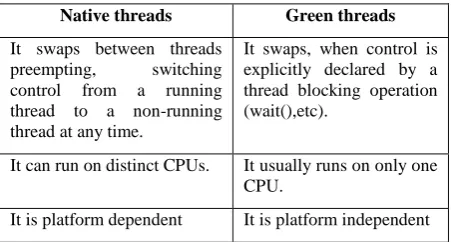
[image:1.595.316.542.635.756.2]The native threads are scheduled by the operating system that is hosting the virtual machine. The operating system threads are logically divided into two pieces [3]: user level threads and system level threads. The operating system itself that is the kernel of the operating system lies at system level threads. The kernel is accountable for managing system calls on behalf of programs that run at user level threads. Any program running under user level needs create and manage threads usually by the operating system kernel. One of the advantages of separating the user or system level native thread is, if a program performs an illegal function, it can be ended without affecting other programs or kernel. The differences between native and green threads are shown in Table 1.
Table 1. Differences between native and green threads Native threads Green threads
It swaps between threads preempting, switching control from a running thread to a non-running thread at any time.
It swaps, when control is explicitly declared by a thread blocking operation (wait(),etc).
It can run on distinct CPUs. It usually runs on only one CPU.
2.
JAVA NATIVE INTERFACE (JNI)
Java Native Interface (JNI) [5,6] is strong feature of the Java platform. An application that uses the JNI can incorporate native codes written in other programming languages such as C and C++. The JNI is a strong feature [6] that permits us to take benefits of the Java platform, but still uses code written in other languages. As a part of the Java Virtual Machine implementation, the JNI is a two-way interface that permits Java applications to invoke native code and vice versa. The JNI is designed to unite Java applications with native code. As a two-way interface, the JNI can support two types of native code: native libraries and native applications.
JNI allows writing native methods that allow Java applications to call functions implemented in native libraries. Java applications call native methods in the same way that they call methods implemented in the Java programming language. Behind the scenes, however, native methods are implemented in other language and reside in native libraries. In order to write Java Native Interface application [5,6] that calls a C or C++ function, consists of the following steps:
1. Declaring Native Methods in Java Class
2. Compiling Java Class and Creating Native Method Header
3. Implementing Native Method
4. Compiling the C++ Source and Creating Native Library
5. Testing Native Program
2.1
GetJavaVM
GetJavaVM function [5,6] returns the JavaVM interface pointer to which the current thread is attached. This function returns zero on success otherwise it returns a negative value.
2.2
JNIEnv Interface
The JNIEnv interface [5,6] pointer is the first parameter in native method. Native code can obtain a JNIEnv interface pointer by calling the GetEnv function on a JavaVM interface pointer. Even if a JNIEnv interface pointer is valid only in a specific thread, the JavaVM interface pointer is valid for all threads in a virtual machine instance.
2.3
Attaching/Detaching Native Threads
Attaches the current thread [5,6] to a given virtual machine instance, permits native thread to associate with java.lang.Thread instance. An attached native thread can issue JNI function calls. The native thread remains attached to the virtual machine instance until it calls DetachCurrentThread to detach.
2.4
Local and Global References
Local and global references [5,6] have dissimilar lifetimes. Local references are automatically unchained, whereas global references keep on valid until unchained by the programmers. JNI function New Object creates a new instance and returns a local reference and they can invalidate using JNI functions DeleteLocalRef. Global references are created by most JNI functions; global references are created through NewGlobalRef.
2.5
Accessing Fields
The JNI has two types of fields [5,6] that provide functions to get and set instance fields in objects and static fields in classes. To access an instance field, the native method follows a two-step process. First, it calls GetFieldID function to acquire the field ID from the class reference, field name, and field descriptor. Second, we can pass the field ID to the appropriate instance field access function GetObjectField.
The native method calls the JNI function GetMethodID, achieve lookup for a method in the given class. The lookup is based on the name and type descriptor of the method. A method descriptor has combined with the argument types and the return type of method. Argument types are listed in the order in which they appear in the method declaration. For example, "(I)V" denotes a method that takes one argument of type int and has return type void.
3.
THREADS IN WIN32
The Microsoft Windows Application Programming Interface (API) facilitates functions used by all Windows based applications. Most of the functions are generally supported on 32-bit and 64-bit Windows. This API [7] is designed for use by C/C++ programmers. We can develop our application with a graphical user interface; access system resources such as memory and devices; display graphics and formatted text; incorporate audio, video, networking and security.
3.1
System Services
The system services functions designed to provide applications access to use resources of the computer and the operating system, such as memory, file systems, devices, processes and threads. Any application can use these functions to manage, monitor computer resources and use process, thread management of the operating system in order to complete its task.
3.2
CreateThread function
A Windows Threads [7] can be created either by calling C++ runtime library function CreateThread() or by calling C runtime function beginthreadex(). The function call to request Windows create a child thread [7] using CreateThread() syntax as follows.
Public Declare Function CreateThread Lib "kernel32" Alias "CreateThread" (lpThreadAttributes As
SECURITY_ATTRIBUTES, ByVal dwStackSize As Long, lpStartAddress As Long, lpParameter As Any, ByVal dwCreationFlags As Long, lpThreadId As Long) As Long
The Parameter lpThreadAttributes states the security attributes of the thread. The parameter dwStackSize states the stack size for the thread. The parameter lpStartAddress states the address of the function that the thread will execute. The parameter lpParameter used to assign the parameters that are to be passed to the thread. The parameter dwCreationFlags states whether the thread should be created in a suspended state. The parameter lpThreadId is a pointer to a variable where the thread ID can be written. If the return value of function CreateThread() is zero then the call will be unsuccessful.
3.3
CloseHandle function
the resources. When creating native Windows threads the application has finished with the resource, the function CloseHandle() [7] enables the kernel to free the associated kernel space resources.
3.4
ExitThread/TerminateThread function
Threads can be terminated using the call ExitThread() [7] or TerminateThread() [7]. Though, it is not compulsory because thread possibly will leave our applications in an unspecified state.
4.
PROBLEM STATEMENT
Multithreaded programming is written in many programming languages with an improvement of setting an affinity to threads. Java support flexible and easy use of threads; However, Java does not contain any method to set an affinity for threads on CPU. Setting an affinity thread to multiprocessor [8] is not new to research, since it was already sustained by other multithreaded programming languages for example C in UNIX platform and C# in Windows platform. Java Native Access (JNA) provides [9] Java programs easy access to native shared libraries without using the Java Native Interface. JNA's design aims to provide native access in a natural way with a minimum of effort. The JNA library uses a small native library called foreign function interface library (libffi) to dynamically invoke native code. The JNA library uses native functions allowing code to load a library by name and retrieve a pointer to a function within that library, and uses libffi library to invoke it, all without static bindings, header files, or any compile phase. JNA [9] is built and tested on Mac OS X, Microsoft Windows, FreeBSD / OpenBSD, Solaris and Linux.
However JNA does not describe yet to create native threads for windows. In situations where Java does not provide the necessary APIs, it is sometimes necessary to use the JNI to make platform-specific native libraries accessible to Java programs, associated with JNI and lets us to access C libraries programmatically. This paper illustrates how java create native threaded using JNI program and adapt with an affinity thread on multiprocessor in windows platforms. Moreover this research finding focuses on how Java threads and native threads to schedule and execute in hybrid mode.
5.
Methodologies
JNI allows us to use native code when an application cannot be written entirely in the Java language. It want to implements time-critical code in a lower-level, faster programming language. It has legacy code or code libraries that we want to access from Java programs. It needs platform dependent features not supported in the standard Java class library. In order to create and work with native threads using Java Native Interface application that calls a C++ function with the following steps:
5.1
Declare the native method in java class
We begin by writing the following program in the Java programming language. The program 1 defined a class named NativeThread that contains native methods. The native keyword informs the Java compiler that a method is implemented in native code outside of the Java class in which it is being declared. Native methods can only be declared in Java classes, not implemented, so native methods do not have a body. The native methods have implemented using C++ program in the next following section.
Program 1 – Native Method Declarations
//Java Nativity Threads(JNT)
package JNT.Win32.Kernel;
public class NativeThread{
public NativeThread(){
createThread(); }
public final native void createThread();
public native void sleep(final long dwMilliseconds);
public native int getNumberOfProcessor();
public native int getCurrentThreadId();
public native void setThreadAffinityMask(NativeThread hThread,final int mask);
public void ExecuteNative(){
/* Parallel code */
}
}
The NativeThread is defined in package named JNT.Win32.Kernel. The class NativeThread declared with native methods, which will be implemented in C++ using JNI. Since createThread() declared as final native, can be called without creating an object for NativeThread class. The NativeThread empty constructor called createThread() to create a thread, when NativeThread object will be created. The sleep (final long dwMilliseconds) is used to give waiting time for a thread, which is used to schedule on windows process scheduler. The int getNumberOfProcessor() will return number of processor available in the computer system. The int getCurrentThreadId() will return current running thread id, which is assigned by windows process scheduler. The setThreadAffinityMask(NativeThread hThread,final int mask) will help to assign affinity mask for a specific thread and the ExecuteNative() will help to write parallel tasks.
5.2
Compiling java class and creating
native method header
We have compiled the Java code down to bytecode. One way to do this is to use the Java compiler javac, which comes with the SDK. The command we used to compile our Java code to byte code is:
javac NativeThread.java
This command generated a NativeThread.class file in the JNT.Win32.Kernal directory. The next step, we created C/C++ header file that defines native function signatures. One way to do this is we used the native method C stub generator tool javah.exe, which comes with the SDK. This tool is designed to create a header file that defines C-style functions for each native method it found in a Java source code file. The command we used on JNT.Win32.Kernal directory is:
javah NativeThread
Program 2 - JNT_Win32_Kernal_NativeThread.h
/* DO NOT EDIT THIS FILE - it is machine generated */
#include <jni.h>
/* Header for class JNT_Win32_Kernel_NativeThread */
#ifndef _Included_JNT_Win32_Kernel_NativeThread
#define _Included_JNT_Win32_Kernel_NativeThread
#ifdef __cplusplus
extern "C" {
#endif
/* Class: JNT_Win32_Kernel_NativeThread
* Method: createThread
* Signature: ()V */
JNIEXPORT void JNICALL
Java_JNT_Win32_Kernel_NativeThread_createThread
(JNIEnv *, jobject);
/* Class: JNT_Win32_Kernel_NativeThread
* Method: sleep
* Signature: (J)V */
JNIEXPORT void JNICALL
Java_JNT_Win32_Kernel_NativeThread_sleep
(JNIEnv *, jobject, jlong);
/* Class: JNT_Win32_Kernel_NativeThread
* Method: getNumberOfProcessor
* Signature: ()I */
JNIEXPORT jint JNICALL
Java_JNT_Win32_Kernel_NativeThread_getNumberOfProce ssor
(JNIEnv *, jobject);
/* Class: JNT_Win32_Kernel_NativeThread
* Method: getCurrentThreadId
* Signature: ()I */
JNIEXPORT jint JNICALL
Java_JNT_Win32_Kernel_NativeThread_getCurrentThreadId
(JNIEnv *, jobject);
/* Class: JNT_Win32_Kernel_NativeThread
* Method: setThreadAffinityMask
* Signature: (LJNT/Win32/Kernel/NativeThread;I)V */
JNIEXPORT void JNICALL
Java_JNT_Win32_Kernel_NativeThread_setThreadAffinityM ask
(JNIEnv *, jobject, jobject, jint);
#ifdef __cplusplus
}
#endif
#endif
The C/C++ function signatures in
JNT_Win32_Kernal_NativeThread.h are quite different from the Java native method declarations in NativeThread.java. JNIEXPORT and JNICALL is compiler-dependent specifier for export functions. The return types are C/C++ types that map to Java types. The parameter lists of all these functions have a pointer to a JNIEnv and a jobject, in addition to normal parameters in the Java declaration. The pointer to JNIEnv is infact a pointer to a table of function pointers. These functions provide the various faculties to manipulate Java data in C and C++. The jobject parameter refers to the current object. Thus, if the C or C++ code needs to refer back to the Java side, this jobject acts as a reference, or pointer, back to the calling Java object. The function name itself is made by the "Java_" prefix, followed by the fully qualified package name followed by an underscore and class name, followed by an underscore and the method name.
5.3
Implementing native methods
The JNI-style header file generated by javah helped us to write C++ implementations for the native method. When it comes to writing the C++ function implementation, the important thing to keep in mind is that our signatures must be exactly like the function declarations from JNT_Win32_Kernal_NativeThread.h.
The function that we write must follow the prototype specified in the generated header file. We implemented the method in C++ file named NativeThread.cpp as shown in the following program 3.
Program 3 - NativeThread.cpp
#include <jni.h>
#include "JNT_Win32_Kernel_NativeThread.h"
#include <windows.h>
JavaVM* javaVM = NULL;
JNIEnv* env=0;
DWORD PID,TID;
jclass aThreadCls;
jobject aThreadObj;
HANDLE hThread;
void WINAPI NativeThread(PVOID argv){
javaVM->AttachCurrentThread((void **)&env, NULL);
jclass cls = env-> GetObjectClass(aThreadObj);
jmethodID method = env->GetMethodID(aThreadCls, "ExecuteNative", "()V");
env->CallVoidMethod(aThreadObj, method);
CloseHandle(hThread);
javaVM->DetachCurrentThread();
}
JNIEXPORT void JNICALL
Java_JNT_Win32_Kernel_NativeThread_createThread
(JNIEnv *env, jobject obj){
jclass cls = env->GetObjectClass(obj);
aThreadCls = (jclass) env->NewGlobalRef(cls);
aThreadObj = env->NewGlobalRef(obj);
hThread = CreateThread (NULL, 0, (LPTHREAD_START_ROUTINE) NativeThread, NULL, NULL, NULL);
}
JNIEXPORT void JNICALL
Java_JNT_Win32_Kernel_NativeThread_sleep
(JNIEnv *env, jobject obj, jlong wtime){
Sleep(wtime);
}
JNIEXPORT jint JNICALL
Java_JNT_Win32_Kernel_NativeThread_getNumberOfProce ssor
(JNIEnv *env, jobject obj){
SYSTEM_INFO sysinfo;
GetSystemInfo( &sysinfo );
return sysinfo.dwNumberOfProcessors;
}
JNIEXPORT jint JNICALL
Java_JNT_Win32_Kernel_NativeThread_getCurrentThreadId
(JNIEnv *env, jobject obj){
TID = GetCurrentThreadId();
return (jint)TID;
}
JNIEXPORT void JNICALL
Java_JNT_Win32_Kernel_NativeThread_setThreadAffinityM ask
(JNIEnv *env, jobject obj, jobject thread, jint mask){
SetThreadAffinityMask((HANDLE)thread, (DWORD)mask);
}
The NativeThread.cpp program 3 included with windows.h, thus windows kernel library can be used to create
NativeThreads. A
Java_JNT_Win32_Kernel_NativeThread_createThread(JNIEn v *env, jobject obj) method creates thread by calling CreateThread (NULL, 0, (LPTHREAD_START_ROUTINE) NativeThread, NULL, NULL, NULL). The parameter (LPTHREAD_START_ROUTINE) NativeThread will call the WINAPI NativeThread(PVOID argv) method to execute task. In WINAPI NativeThread(PVOID argv) method the env->GetMethodID(aThreadCls, "ExecuteNative", "()V") is used to call public void ExecuteNative() method (program 1) though its signature "()V". Hence this method can have parallel code implementation at Java application program side, which will be called by native method and link with windows kernel to create thread. In order to attach our native threads with Java main thread, we should get JVM using JNI’s env->GetJavaVM(&javaVM) method. The env pointer
will allowed to attach thread in WINAPI NativeThread(PVOID argv) using JNI’s javaVM->AttachCurrentThread((void **)&env, NULL). Once thread execution is finished, first of all thread should be closed using windows kernel’s CloseHandle(hThread) and we should detach thread using JNI’s javaVM->DetachCurrentThread(). The Java_JNT_Win32_Kernel_NativeThread_ getNumberOfProcessor (JNIEnv *env, jobject obj) get number of processor in the current system using windows kernel’s type definition SYSTEM_INFO sysinfo, which pass as a parameter in windows kernel’s GetSystemInfo( &sysinfo
). The
Java_JNT_Win32_Kernel_NativeThread_getCurrentThreadId (JNIEnv *env, jobject obj) calls windows kernel’s GetCurrentThreadId() method to get current thread id. And the
Java_JNT_Win32_Kernel_NativeThread_setThreadAffinityM ask(JNIEnv *env, jobject obj, jobject thread, jint mask) calls windows kernel’s SetThreadAffinityMask((HANDLE)thread, (DWORD)mask) method to set the affinity mask for a thread.
Once NativeThread is created, it will start running public void ExecuteNative() method immediately. While creating native threads, we have used LPTHREAD_START_ROUTINE parameter. We never used WaitForMultipleObjects() to wait for multiple threads. However NativeThreads are running well. This research finding has openings to have methods of synchronization and resource sharing such as mutex locks, critical sections, slim reader/writer locks, semaphores and events.
5.4
Compiling C++ and creating native
library
We created Dynamic Link Library (DLL) is a shared library that contains the native code. Most C and C++ compilers can create shared library files in addition to machine code executables. The command we used to create the shared library file for NativeThread.dll using the Microsoft Visual C++ compiler:
cl -I "\Java\include" -I "\Java\include\win32" -LD NativeThread.cpp -FeNativeThread.dll
The -LD option instructs the C++ compiler to generate a DLL instead of a regular Win32 executable.
6.
TESTING NATIVE THREAD
PROGRAM
6.1
The Native Thread Model
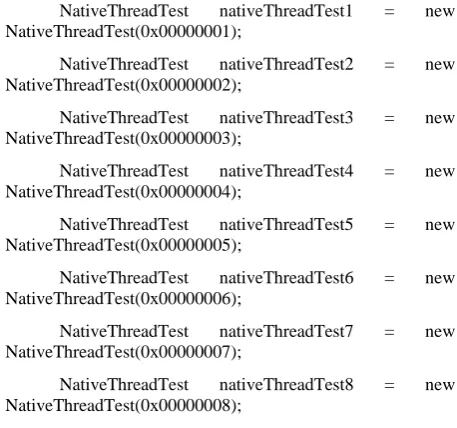
super(), called the native method createThread() to create Win32 native threads. Native threads are created through the NativeThread constructor through instantiation class objects or inheriting NativeThread class. The JVM attached native threads with main thread, hence thread are synchronized. Once thread is created the ExecuteNative() method overrides automatically called through NativeThread library. The code described in the ExecuteNative() will perform the job. The setThreadAffinityMask(this,mask) get current thread to set the affinity mask for native thread. The affinity mask parameter can be filled with 0x00000001 for core processor one, like wise by knowing the number of core processor available in the system we can use the affinity mask parameter such as 0x00000002, 0x00000003 and etc. Hence native threads can be scheduled by windows kernel. To know the number of core processor available in the present system, we can call getNumberOfProcessor() native method.
Fig 1: Native Thread using JNI Program 4 – Testing Native Threads
import JNT.Win32.Kernel;
class NativeThreadTest extends NativeThread{
static {
System.load("c:\\NativeThread.dll"); //loads native windows kernel thread library
}
NativeThreadTest(int mask){
super(); // creates native thread
// sets affinity mask for native thread
setThreadAffinityMask(this,mask); }
@Override
public void ExecuteNative(){ // runs parallel task
try{
for(int i=0;i<5;i++){
System.out.println("Native Thread-ID\t" +
getCurrentThreadId() + "\tValue " + i);
sleep(10);
}
}catch(Exception e){ System.out.println("Error in Native Thread"+e); }
}
public static void main(String[] args) {
try{
NativeThreadTest nativeThreadTest1 = new NativeThreadTest(0x00000001);
NativeThreadTest nativeThreadTest2 = new NativeThreadTest(0x00000002);
NativeThreadTest nativeThreadTest3 = new NativeThreadTest(0x00000003);
NativeThreadTest nativeThreadTest4 = new NativeThreadTest(0x00000004);
NativeThreadTest nativeThreadTest5 = new NativeThreadTest(0x00000005);
NativeThreadTest nativeThreadTest6 = new NativeThreadTest(0x00000006);
NativeThreadTest nativeThreadTest7 = new NativeThreadTest(0x00000007);
NativeThreadTest nativeThreadTest8 = new NativeThreadTest(0x00000008);
}catch(Exception e){ System.out.println("Error in Main Thread"+e); }
} }
It is important to set our native library path correctly for our program to run. The native library path is a list of directories that the Java virtual machine searches when loading native libraries. If we do not have a native library path set up correctly, then we see an error similar to the following:
java.lang.UnsatisfiedLinkError: no NativeThread in library path
at java.lang.Runtime.loadLibrary(Runtime.java)
at java.lang.System.loadLibrary(System.java)
at Main.main(Main.java)
We should make sure that the native library resides in one of the directories in the native library path. We can specify the native library path on the java command line as a system property as follows:
java -Djava.library.path=. NativeThread
The “-D” command-line option sets a Java platform system property. Setting the java.library.path property to “.” instructs the Java virtual machine to search for native libraries in the current directory. The sample output of the program as follows
Native Thread-ID 4776 Value 0
Native Thread-ID 1772 Value 0
Native Thread-ID 180 Value 0
Native Thread-ID 4156 Value 0
Native Thread-ID 2776 Value 0
Native Thread-ID 5388 Value 0
Native Thread-ID 4480 Value 0
Native Thread-ID 4584 Value 0
… ……. …
Native Thread-ID 4156 Value 4
Native Thread-ID 4776 Value 4
JVM
Java Application Main Class
JNT.Win32.NativeThread Class public void ExecuteNative() { //parallel code }Native Thread-ID 1772 Value 4
Native Thread-ID 2776 Value 4
Native Thread-ID 4584 Value 4
Native Thread-ID 4480 Value 4
Native Thread-ID 180 Value 4
Native Thread-ID 5388 Value 4
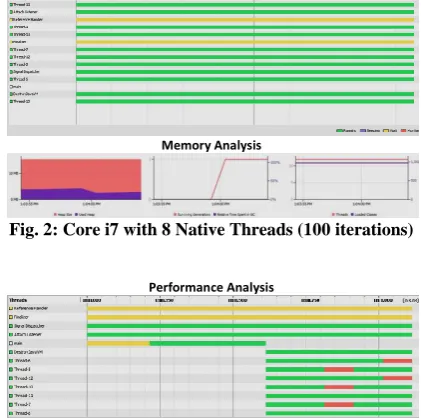
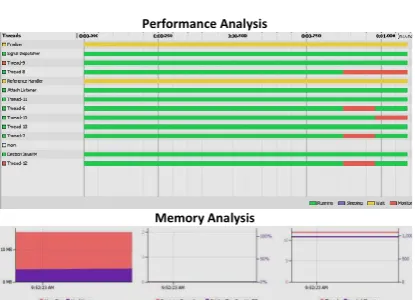
This program executed and evaluated using netbeans IDE profiler on two different multi-core environments by selecting different affinity on CPU and adding few more threads with different iterations. The sample thread profiles are given bellow.
In the above all figures states performance analysis and memory analysis of NativeThreads. The green colours lines in performance analysis are running threads, red colour lines on the green lines are thread monitoring. The same job has been given to core i5 and i7 processor, in which it is clearly stating above. In memory analysis figure, red colour is available stack memory and the violet colour is used stack.
6.2
Hybrid Thread Model
The Java thread (green thread), which can be created through java.lang.Thread class and the native thread (NativeThread.dll library) can be attached with Java main thread (see Fig 6.) Therefore in same program we have native thread as well as green thread. This articulate more than one thread execution method used in Java, which means public void run() and public void ExecuteNative() method implemented in parallel. Hence, Flynn’s Multiple Program Single Data (MPSD) [10] and Multiple Program Multiple Data (MPMD) [11] programming models can be utilized well though Java programs. The program 5 describes hybrid thread by creating thread using Thread class and NativeThread class
[image:7.595.323.535.78.214.2].
Fig. 6: Hybrid Thread using JNT in Java Program 5 - Hybrid Thread Model
import JNT.Win32.Kernel;
class HybridThread extends NativeThread implements Runnable {
Thread t;
NativeThread nt;
static {
System.load("c:\\NativeThread.dll"); //loads native windows kernel thread library
}
HybridThread(int mask){
JVM
Java Application Main Class
JNT.Win32.NativeThread Classpublic void ExecuteNative() { //parallel code }
•NativeThread.dll
java.lang.Thread Class public void run(){ //parallel code } Performance Analysis
Memory Analysis
Fig. 5: Core i5 with 8 Native Threads (1000 iterations)
Performance Analysis
[image:7.595.60.271.244.453.2]Memory Analysis
Fig. 4: Core i7 with 8 Native Threads (1000 iterations)
Performance Analysis
Memory Analysis
Fig. 3: Core i5 with 8 Native Threads (100 iterations)
Performance Analysis
[image:7.595.60.271.369.516.2]Memory Analysis
[image:7.595.314.545.475.620.2] [image:7.595.62.271.554.668.2]super(); // creates native thread
setThreadAffinityMask(nt,mask); //sets affinity mask for native thread
t=new Thread(this); // creates Java thread
setThreadAffinityMask(this,mask); // sets affinity mask for Java thread
t.start(); // starts Java thread
}
@Override
public void ExecuteNative(){ // call from NativeThread class
try{
for(int i=0;i<5;i++){
System.out.println("Native Thread-ID\t" +
getCurrentThreadId() + "\tValue " + i);
sleep(10);
}
}catch(Exception e){ System.out.println("Error in Native Thread"+e); }
}
public void run(){ // call from Thread class
try{
for(int i=0;i<5;i++) {
System.out.println("Green Thread-ID\t\t" + t.getId()
+ "\t\tValue " + i);
sleep(10);
}
} catch(Exception e){ System.out.println("Error in Green Thread"+e); }
}
public static void main(String[] args) {
try{
HybridThread t1 = new HybridThread(0x00000001);
HybridThread t2 = new HybridThread(0x00000002);
HybridThread t3 = new HybridThread(0x00000003);
HybridThread t4 = new HybridThread(0x00000004);
}catch(Exception e){System.out.println("Error in Main Thread"+e);}
}
}
The sample output is given bellow
Native Thread-ID 712 Value 0
Green Thread-ID 9 Value 0
Native Thread-ID 5940 Value 0
Green Thread-ID 10 Value 0
Green Thread-ID 12 Value 0
Native Thread-ID 1220 Value 0
Native Thread-ID 3404 Value 0
Green Thread-ID 13 Value 0
… ……. …
Green Thread-ID 12 Value 4
Native Thread-ID 5940 Value 4
Green Thread-ID 10 Value 4
Green Thread-ID 13 Value 4
Native Thread-ID 1220 Value 4
Green Thread-ID 9 Value 4
Native Thread-ID 712 Value 4
Native Thread-ID 3404 Value 4
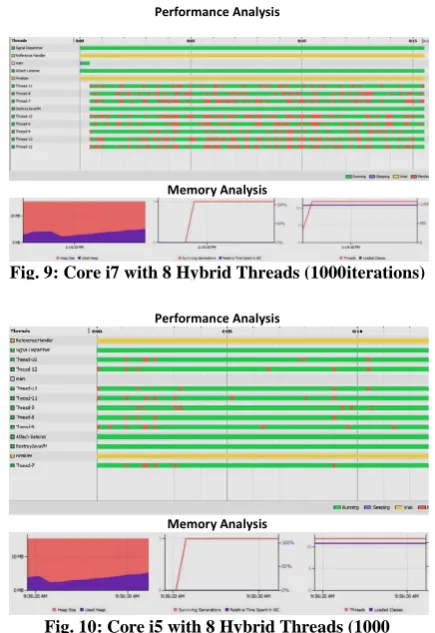
This program executed and evaluated using netbeans IDE profiler on two different multi-core environments by selecting different affinity on CPU and adding few more threads with different iterations. The sample thread profiles are given bellow.
Performance Analysis
[image:8.595.326.534.350.476.2]Memory Analysis
Fig. 8: Core i5 with 8 Hybrid Threads (100 iterations)
Performance Analysis
[image:8.595.325.533.501.651.2]
Memory Analysis
In the above all figures states performance analysis and memory analysis of NativeThreads. The green colours lines in performance analysis are running threads, red colour lines on the green lines are thread monitoring. The same job has been given to core i5 and i7 processor, in which it is clearly stating above. In memory analysis figure, red colour is available stack memory and the violet colour is used stack.
7.
CONCLUSION
The basic unit of scheduling is generally the thread; if a program has only one active thread, it can only run on one processor at a time. If a program has multiple active threads, then multiple threads may be scheduled at once. In a well-designed program, using multiple threads can improve program throughput and performance. Threading is a facility
to allow multiple activities to coexist within a single process. This research finding focuses on how Java can facilitate win32 kernel threads (Java Native Threads-JNT) through JNI, which enables Java threads and native threads to schedule and execute in hybrid mode. As a result, this research strongly recommending for Flynn’s Multiple Program Multiple Data (MPMD) and Multiple Program and Single Data (MPSD) through method level concurrency.
8.
REFERENCES
[1] Apple Developer, Concurrency Programming Guide, http://developer.apple.com/library/mac/
documentation/General/Conceptual/ConcurrencyProgra mmingGuide/ConcurrencyProgrammingGuide.pdf
[2] Richard h. Carver, Kuo-chung tai, Modern Multithreading Implementing, Testing, and Debugging Multithreaded Java and C++/Pthreads/Win32 Programs, John Wiley & Sons, ISBN 13 978-0-471-72504-6, 2006
[3] Scott Oaks & Henry Wong, Java Threads, 2nd edition, O'reilly, ISBN 1-56592-418-5, 1999
[4] James Gosling, Bill Joy, Guy Steele, Gilad Bracha and Alex Buckley, The Java™ Language Specification: Java SE 7 Edition, Oracle America Inc, 2011
[5] Java Native Interface,
http://java.sun.com/javase/6/docs/technotes/guides/jni/in dex.html
[6] Sheng Liang, The Java™ Native Interface Programmer’s Guide and Specification, Sun Microsystems Inc, ISBN 0-201-32577-2, 1999
[7] Windows Kernel Library (Win32), http://msdn.microsoft.com
[8] Bala Dhandayuthapani Veerasamy, Dr. G.M. Nasira, Setting CPU Affinity in Windows Based SMP Systems Using Java, International Journal of Scientific & Engineering Research, USA, Volume 3, Issue 4, pp 893-900, April 2012, ISSN 2229-5518.
[9] Get started with JNA, https://jna.dev.java.net
[10]Bala Dhandayuthapani Veerasamy, Concurrent Approach to Flynn’s MPSD Classification through Java, International Journal of Computer Science and Network Security, Korea, ISSN 1738-7906, Vol. 10 No. 1 pp. 126-129,30-January-2010.
Performance Analysis
[image:9.595.59.277.75.392.2]Memory Analysis
Fig. 10: Core i5 with 8 Hybrid Threads (1000 iterations)
Performance Analysis
Memory Analysis
[image:9.595.60.277.78.220.2]