© 2015, IRJET.NET- All Rights Reserved
Page 432
COMPARISON OF INTEGRATED DEVELOPMENT ENVIRONMENT
(IDE) DEBUGGING TOOLS: ECLIPSE VS NETBEANS
*
1Mrs. Kavitha S.,
*2Ms. Sindhu S.,
*1
Assisant Professor, Department of Computer Science Auxilium College (Autonomous),
Vellore, TamilNadu, India
*2
M.Phil Research Scholar, Department of Computer Science Auxilium College (Autonomous),
Vellore, TamilNadu, India
---***---Abstract
- The Integrated Development Environment(IDE) provides many debugging tool to limit coding errors and facilitate error correction. It avoids software failure, reduce development and maintenance cost, improve customer agreement and software quality. There are many tools in IDE providing source code editor, build computerization tools and a debugger. Most modern IDEs have quick code completion. Some IDEs contain a compiler, interpreter, or both, such as NetBeans and Eclipse. Both include the concept of plug-ins in that Eclipse was more advantageous than NetBeans, because Eclipse is a complex structure of interconnecting components, delivering all of the functionality. There is literally no monolithic core or base, just a tiny runtime which loads and executes plug-ins. In Eclipse terms: “all is a plug-in”. The compatibility between Eclipse and NetBeans based on these attributes: Complexity, Functionality, Extensibility, Flexibility, and Usability to provide additional sources and to solve specific problems and to increase efficiency, because the programmer spending less time in re-writing code and debugging. It also constructs bug report and the bug tracker using the open source Eclipse Bugzilla project from Mozilla.
Key Words:
Integrated Development Environment (IDE),Everything is a plug-in, Complexity, Functionality,
Extensibility, Flexibility, and Usability.
I. INTRODUCTION
An Integrated Development Environment (IDE) or interactive development environment is a software application that provides comprehensive facilities to computer programmers for software development. An IDE normally consists of a source code editor, build automation tools and a debugger. Most modern IDEs have intelligent code completion. Some IDEs contain a compiler,
interpreter, or both, such as NetBeans and Eclipse. Many modern IDEs also have a class browser, an object browser, and a class hierarchy diagram, for use in object-oriented software development. The IDE is designed to limit coding errors and facilitate error correction with tools such as the “NetBeans” FindBugs to locate and fix common Java coding problems and Debugger to manage complex code with field watches, breakpoints and execution monitoring.
IDE Tools
There are many IDE tools available for source code editor, built automation tools and debugger. Some of the tools are,
Eclipse
NetBeans
Code::Blocks
Code Lite
Dialog Blocks
Eclipse
Eclipse is an integrated development environment (IDE). It contains a base workspace and an extensible plug-in system for customizing the environment. Written mostly in Java, Eclipse can be used to develop applications. By means of various plug-ins, Eclipse may also be used to develop applications in other programming languages: Ada, ABAP, C, C++, COBOL, Fortran, Haskell, JavaScript, Lasso, Lua, Natural, Perl, PHP, Prolog, Python etc.
Plug-ins
© 2015, IRJET.NET- All Rights Reserved
Page 433
Eclipse Plug-ins
Eclipse is an extensible platform for building IDEs. It provides a core of services for controlling a set of tools working together to support programming tasks. Tool builders contribute to the Eclipse platform by wrapping their tools in pluggable components, called Eclipse plug-ins, which conform to Eclipse's plug-in contract
.
II. Related work
Modern applications are developed using components implemented in many different technologies, Creating an effective integrated development environment (IDE) for use in programming these applications presents some special challenges because a large number of different tool technologies have to be tightly integrated in support of development task flows. In order to meet these challenges, the Eclipse Platform was designed to serve as the common basis for diverse IDE-based products, providing open APIs (Application Programming Interfaces) to facilitate this integration.
The IDE part of the project known as SaveIDE still lacks many features in terms of usability to be considered a good user-friendly environment for the end users to work with. Since SaveIDE is designed as a set of plug-ins in Eclipse, this thesis tries to investigate the features of different Eclipse modeling tools used in the design of the IDE to further improve its usability features.In order to achieve this goal, several usability guidelines and suggestions are examined and offered to be considered and used in the improvement process of SaveIDE. This can help readers and other developers get a better picture of how to integrate the usability guidelines with Eclipse modeling tools in order to make SaveIDE more user-friendly.
TinyOS is a widely used open source operating system for embedded systems written in NesC. NesC code is first compiled into a C program which is then processed by an ordinary C compiler. Since there is no dedicated NesC debugger a normal C debugger is used for debugging. C debugger is unaware of the NesC code so the user has to have some knowledge about the implementation of the NesC compiler, something a TinyOS developper should not have to worry about. This paper presents a solution which allows the developer debug a TinyOS application without being aware of the implementation of the NesC compiler. A TinyOS debug plug-in for Eclipse is presented. The Eclipse plug-in facilitates debugging by integrating support for
variable examination, breakpoints and automatic launching of debug sessions. First testers have found the presented Eclipse plug-in to be a useful tool for TinyOS developers.
III. PREVIOUS IMPLEMENTATIONS
Eclipse and NetBeans IDEs
The basic versions of both Eclipse and NetBeans offer very similar standard capabilities. You get the auto-complete options for Java code so you can select from a menu rather than typing everything out. You get pointers on debugging and optimizing code as you go along. GUI builders, version control and other IDE features are also included.
IBM offer IDE
Eclipse was rolled out successfully to a much larger user population earlier than NetBeans. By 2003, Eclipse already had a substantial following in the IBM community. Acceptance spiked even higher when IBM released control of the IDE to the newly created Eclipse Foundation. IBM revamped its own products during the same time period to rely heavily on the Eclipse platform. Today, Eclipse is viewed as a well-proven platform that commercial vendors can build on to create their own set of products and that enterprise users can rely on for internal application development.
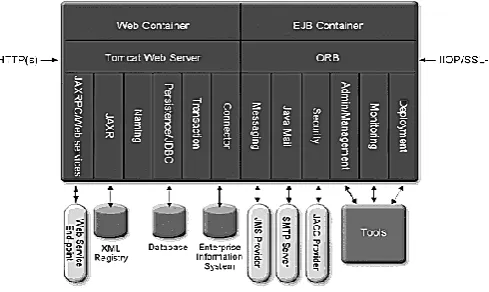
Eclipse System Architecture
© 2015, IRJET.NET- All Rights Reserved
Page 434
Fig. 1.1 Eclipse System ArchitectureNetBeans System Architecture
NetBeans is an IDE for developing software applications in Java, JavaScript, PHP, Python, C/C++, etc. NetBeans is also a platform framework that can be used for developing desktop applications in Java. NetBeans was developed in Java.
Fig 1.2 NetBeans System Architecture
IV. SYSTEM IMPLEMETNATION
4.1 Difference between Eclipse and Netbeans
NetBeans and Eclipse are two of the most popular free and open source Java IDE, they have their differences. Support for Maven is better in NetBeans. Because you can get GlassFish with Java EE package for NetBeans, it is easier to use than in Eclipses (as you have to configure GlassFish separately). NetBeans comes with build-in GUI builder for Swing, but you need to use a separate plug-in in Eclipse. The general opinions within the Java community about these two IDE are fairly similar.4.2 Eclipse Vs NetBeans
1)
Platform Support
There is no difference between the both of them under this segment. Eclipse and NetBeans have cross-platform support. You can have this application running on Windows, Mac, Linux, Solaris and any other platform, as long as JVM (Java Virtual Machine) is installed.
2)
Multiple Language Support
Both have a wide range of programming language support, which includes C/C++, Java, JavaScript and PHP. But how do you get this support is an interesting part. Eclipse is a plugin based IDE. Large part of its functionality comes from plugins. On the other hand NetBeans has many projects and is a tool based IDE. It incorporates many platforms using tooling support. Thus making it less scattered.
3)
Java Support
NetBeans has a strong support when you are developing MVC based application in Java. Servlet/JSP development is fairly very simple compared to Eclipse, especially in the field of deployment and debugging.
4) Database Support
NetBeans comes with in-built support for and SQL, MySQL and Oracle drivers plus it includes some others too. So this definitely makes things easy for beginners. However Eclipse has JDBC driver support – but it takes some serious time to configure the connection.
Comparing Java IDEs: Eclipse Vs NetBeans
Eclipse
Eclipse has been in existence from the year 2001, ever since IBM released Eclipse as an open source platform. Managed by the non-profit Eclipse Foundation, this is used in both open source and commercial projects. Starting in a humble manner, this has now emerged as a major platform, which is also used in several other languages. The greatest advantage of Eclipse is that it features a whole plethora of plugins, which makes it versatile and highly customizable.
[image:3.595.39.284.373.519.2]© 2015, IRJET.NET- All Rights Reserved
Page 435
NetBeans
NetBeans was independently developed in the latter half of the 1990s. It emerged as an open source platform after it was acquired by Sun in 1999. Now a part of Oracle, this IDE can be used to develop software for all versions of Java ranging between Java ME, up to the Enterprise Edition. Like Eclipse, NetBeans too features a variety of plugins you can work with.
NetBeans offers you various different bundles – 2 C/C++ and PHP editions, a Java SE edition, the Java EE edition that offers everything you will ever need for your project.
4.3 IDEs Vs Build Tools
Given the deep integration and love-hate relationship between users of different IDEs and build tools, we thought about starting here and covering Eclipse and NetBeans, which comfortably take up over 90% of the IDE market. Other tools, like Spring Tools Suite, MyEclipse, IBM RAD, JBossDev Studio, vi/vim, emacs, etc didn’t make up significant portions of the overall community, so to make things simpler we didn’t cover them at this time.
[image:4.595.308.557.139.276.2]The following graphic depicts the number of projects and lines of code (measured in millions) joining this release over the years.
Fig. 1.3 Eclipse Releases
EVALUATION RESULT:
Reuse techniques: This factor is divided into two: Reuse between SPL members, where the technology is evaluated on how variability can be separated from commonalities, and how variants can be selected for the specific members. Reuse over time, where it is evaluated on support for
introduction of unexpected features and variability during software evolution.
Table1.1: Implementation Technologies
Variation types: Is evaluation on how the technology handles positive and negative variability. Positive variability is when functionality is added for creating an SPL member and negative is when functionality is removed Which needs to be done to perform refactoring and two code listings (original code and refectories code) with highlighted changes. The user can see all changes and then confirm or cancel refactoring. The bad design here is that after renaming the user is prompted with text to press enter. He don't know that clicking on the small arrow will give him the chance to see the preview first.
Fig. 1.4 Eclipse
[image:4.595.308.557.478.658.2]© 2015, IRJET.NET- All Rights Reserved
Page 436
version of the Eclipse plug-in had 64 respondents. The95% confidence interval for the mean score is 49 to 58. The comments were about the output of unit-tests, missing documentation, and poor debugging again. Unfortunately, some students also used the survey to express discontent with parts of the course they were taking in which they used the IDE, resulting in comments about resist for example.
[image:5.595.38.273.334.529.2]The third survey on the second version of the Eclipse plug-in had 56 respondents. The 95% confidence interval for the mean score is 39 to 47. The students commented on performance issues, the lack of mental state inspection during execution, and some inconveniences resulting from the use of external module files.
Fig. 1.5 NetBeans
The fourth and final survey on the second version of the Eclipse plug-in had only 6 respondents. Though this is a low number, a trend might be distilled from these evaluations. The 95% confidence interval for the mean score is 64 to 83. The comments were approving of the immediate reporting of errors and warnings and the stepping debugger
.
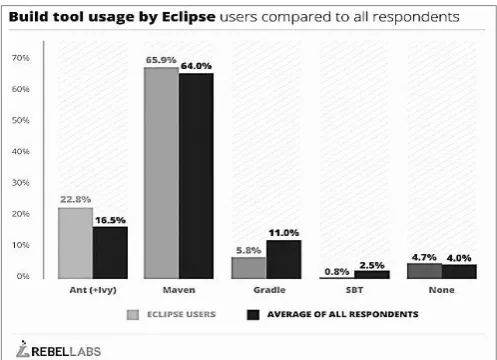
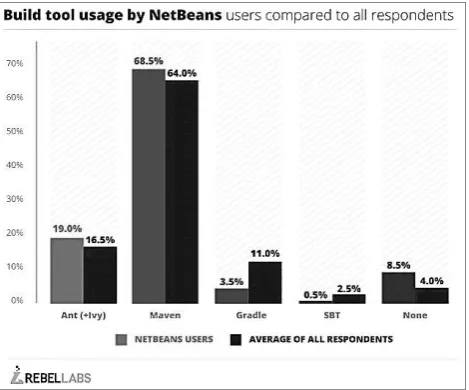
NetBeans remains in a stable third place in the market, using its proximity to Java and Oracle to its advantage when possible, most recently in the same-day launch of NetBeans 8 to fully support Java 8, and continued easy integration with GlassFish as the reference implementation for Java EE 7. Here’s what we see when it comes to NetBeans users:Similar to Eclipse, Ant (+/- Ivy) usage (19%) by NetBeans users is raised compared to the average (16.5%), as is Maven usage (68.5%) compared to the average (64%). The indication points to greater project maturity with NetBeans users. Adoption of Gradle (3.5%) and SBT (0.5%) compared to the average for all respondents (11% and 2.5%, respectively) is considerably lower, indicating a lack of affinity for newer tools and alternative JVM languages
CONCLUSION
Eclipse is better over NetBeans for many reasons. The first one is the startup time, NetBeans takes ages to load, and loading on the first instance is terrible in case of NetBeans IDE. Eclipse is very simple to get started with. The intelligence feature on Eclipse is better than that on NetBeans.Due to the complexity and extensibility of Eclipse, you will need additional resources to help you solve your specific problems. Fortunately, the web contains several resources which can help you with your Eclipse problems. The Eclipse bug and feature tracker is using the open source Bugzilla project from Mozilla. In this system you enter error reports for bugs you encounter with the usage of Eclipse and also to request new feature or improvements of existing features problems. This bug tracker can be found under Eclipse Bugzilla. Here you can search for existing bugs and review them. Eclipse can be mainly used for some purpose are: The only purpose of Eclipse is to increase the efficiency. Programmers should spend less time repeating stuff. Programmers should spend less time re writing code and debugging.
FUTURE WORK
© 2015, IRJET.NET- All Rights Reserved
Page 437
REFERENCES:
1.
Sherry Shavor, Jim D’Anjou, ScorrFairbrother, Dan Kehn, John Kellerman, and Pat McCarthy. “The JavaDeveloper’s Guide to Eclipse”.Addison-Wesley,2003.
2.
Benjamin Sigg. “Yeti 2 - tinyos 2.x eclipse plugin”. Master’s thesis, ETH, 2008.3.
Matthew Telles and Yuan Hsieh. “The Science ofDebugging”. Coriolis Group Books, Scottsdale,AZ, USA,
2001.
4.
Mampilly, T., &Ramnath, R. “An eclipsed-based environment for the process-orientedintegration of engineering tools”. MS Thesis, The Ohio
State University, Department of Computer Science and Engineering, 2007.
5.
E.Gamma and K. Beck, “Contributing to Eclipse:Principles, Patterns, and Plug-Ins. Reading”, MA, USA:
Addison-Wesley, 2004.
6.
A. Sigfridsson, “The purposeful adaptation of practice:An empirical study of distributed software
development”, Doctoral thesis, Dept. Comput. Sci. Inf.
Syst., Univ. Limerick, Limerick, Ireland, 2010.
7.
J. Des Rivieres and J. Wiegand, “Eclipse: A platform forintegrated development tools”, IBM Sys. J., Apr. 2004.
8.
SebastinDraxler, Gunnar Stevens, and Alexander Boden, “Keeping the Development Environment Up to Date-A Study of the Situated Practices ofAppropriating the Eclipse IDE”, IEEE Transaction on
Software Engineering, Nov. 2014.
9.
G. C. Murphy, M. Kersten, and L. Findlater, “How areJava Software Developers using Eclipse IDE?”, IEEE
Software Engineering, Aug. 2006.