A Multimodal Behavioral Biometric Technique for User
Identification using Mouse and Keystroke Dynamics
Anand Motwani
Department of computer science and engineering,
NIRT, Bhopal
Raina Jain
Department of computer science and engineering,
NIRT, Bhopal
Jyoti Sondhi
Department of computer science and engineering,
NIRT, Bhopal
ABSTRACT
A novel multimodal behavioral biometric technique is implemented to authenticate/identify users by the way they interact with the input devices namely mouse and keyboard. It is also shown how behavioral biometrics is more efficient and secure than physiological biometric systems and moreover the most secured system is that which uses combination of both. This paper explains how the user will first be enrolled into the system. Sufficient number of samples will ensure the accuracy of the system. During verification, the user data will be first matched with that of the database and a probability module will decide over most probable user to be authenticated. The database matching process and simple probability calculation will ensure a time efficient system.
Keywords
Behavioral biometric, physiological biometric, probability.
1.
INTRODUCTION
With hundreds of people using computers and mobile devices all over the globe, these devices have an established position in modern society. Nevertheless, most of these devices use weak authentication techniques with passwords, almost ancient and PINs which can be easily hacked. Identity theft is thus a problem which is commonly faced today. Thus, stronger identification is needed to ensure data security and privacy, which can be provided by biometric systems. In this paper, it is explained about the employment of behavioural biometrics to computer devices. A novel multimodal behavioural biometric technique is implemented to authenticate users. User will be identified by the way they interact with the input devices namely mouse and keyboard. It is also shown how behavioural biometrics is more efficient and secure than physical biometry. In addition, the possibility of using keystroke and mouse dynamics for computer authentication is explored. Also a multi-modal authentication scheme based on the probability method is proposed to identify a user, which uses two sources viz. mouse and keyboard. Verification of each individual mouse action increases the accuracy while reducing the time that is needed to verify the identity of the user since fewer actions are required to achieve a specific accuracy level, compared to the previous approaches.
2.
LITERATURE REVIEW
Clint Feher et al.[1] has introduced a novel method that continuously verifies users according to characteristics of their interaction with the mouse. The work has been done in three phases: first, event acquisition, second, feature extraction and finally user verification. Clint Feher et al.[1] has proposed algorithm which outperforms current state-of-the-art methods by achieving higher verification accuracy while reducing the response time of the system. In this paper has stated that behavioral biometric techniques can be categorized based on different types of categories such as type
of learning: implicit or explicit. Clint Feher et. al.[1] has given a general idea on how mouse based authentication methods work which will be explained in following sections.
Several works on keystroke biometrics have already adopted approaches based on different metrics, sampling methodologies and data analysis techniques. Most common behavioral biometrics verification techniques are based on: (a) mouse dynamics (b) keystroke dynamics and (c) software interaction[2].
Roman Yampolski, Venu Govindraju[3] has given a general discussion on different authentication schemes. Biometric based authentication techniques are best to uniquely characterize an individual, than text based (i.e. passwords and PIN) and physical (i.e. smartcards etc). According to Yampolski et. al. [3], behavioral biometric share a number of characteristics and can be analysed using seven properties of good biometrics by Jain et al (1999, 2004d). These properties of good biometrics are uniqueness, universality, permanence, collectability, performance, acceptability, circumvention.
Antokumar-Karnan[4] has used latency, duration and digraph as features for feature subset selection and to compare the performance. The proposed optimization technique such as Artificial Bee Colony Optimization (ABCO) is used for feature subset selection. Back Propagation Neural Network technique using Jack Knife to train the features and identify the Authenticate user. Finally, using False Acceptance Rate (FAR) and False Rejection Rate (FRR) the Receiver Operating Characteristic curve has been drawn to measure the performance.
As the above research work suggests different techniques to implement a user verification system, there have also been a wide research in the field of key or precisely keystroke dynamics. Benjamin et. al. [5] has to validated a method of collecting and analyzing behavioral biometric data in order to authenticate a user's identity in his work named “Security Through Behavioral Biometrics and Artificial Intelligence”. The method uses the data collected in the form of time to transit from one finger to another while typing, a form of Key Interval Time biometrics (KIT) and has performed the analysis of collected data using feed-forward neural nets. The URIEL(User Rights and Integrity Enforcement Logic ) system analyzed KIT data in near-real-time. This effectively distinguished a user’s identity from a group of privileged users. [5]
Mouse and keystroke dynamics are related and complement to each other. Mouse is an important GUI, while keyboard is a command line [6]. Compared to traditional techniques, mouse and keystroke based authentication scheme allows passive and dynamic verification of users throughout the computing session.
by using an SVM novelty detector, GA-SVM wrapper feature subset selection, and an ensemble creation based on feature selection, respectively. One of the limitation faced was that GA (Genetic Algorithm) was at time consuming search method.
H. Saevanee and P. Bhattarakosol[7] have taken the work of user identification upto mobile applications , precisely touch screen mobile phones. They collected dataset that included behavioral manners of users over the touchpad. An important attribute that was calculated by this dataset was the pressure the user applied on the touchpad. Other attributes included were inter key press time, key hold time etc. Accuracy rate 99% was achieved by this work. The work of Saevanee and Bhattarakosol [8] can be extended for recognizing behavioral patterns of user while they dial phone numbers, or type texts etc. All this can help with user identification as well as verification.
So, the research until now suggests that all the authentication/verification techniques that have been developed or proposed until now are having their own pros and cons and our aim is towards acquiring the accuracy of authentication techniques while reducing the response time.
3.
WORKING PRINCIPLE
3.1
Hierarchy of Mouse Actions
The mouse events that will be performed by the user are organized in a hierarchial manner for convenience of implementation. The basic mouse events are those which cannot be decomposed further in smaller events. All the higer level mouse actions are composed of these atomic events. They are as follows [1]:
i. Mouse-move Event (m) – occurs when the user moves the mouse from one location to another [1].
ii. Mouse Left Button Down Event (ld) – occurs when the left mouse button is pressed [1].
iii. Mouse Right Button Down Event (rd) – occurs when the right mouse button is pressed [1].
iv. Mouse Left Button Up Event (lug) – occurs after the left mouse button is released [1].
v. Mouse Right Button Up Event (run) – occurs after the right mouse button is released [1].
In the similar way, basic keyboard events are also organized hierarchically. The atomic events related to keyboard are as follows:
i. Key-press event (Kip)
ii. Key-release event(Kr)
The mouse and keystroke events are captured in the form of data and stored in the database with the help of a software module called an “event acquisition module”. Each mouse and keystroke event has certain parameters related to it. The parameters taken into consideration for a mouse event are:
i. Event.
ii. Location of starting point of the mouse event on the screen (x and y co-ordinates with respect to screen).
iii. Location of ending point of the mouse event on the screen (x and y co-ordinates with respect to screen).
iv. Time of event.
In general, higher-level actions can be decomposed into the atomic events. For example, a drag-and-drop action can be decomposed into left click event i.e. ld and lug. Also, there is a need to decide if two atomic events comprise a same mouse action or no. To decide this, concatenation-time-threshold (CTT) is used. If the events’ time lie within the CTT, then this event is one single event, otherwise it is categorized as two different events. Since there can be just few atomic events that can be considered for keystroke dynamics, hence the parameters for keyboard are also limited to the time of key-press Kip and key-release Kr.
3.2
Basic Mouse Actions (Level 1)
This level of basic mouse actions is constructed from a sequence of the atomic mouse events – m, ld, rd, lug and run. In order to link two consecutive level-0 mouse events into a level-1 event, we define the following CTTs[1]:
Moving CTT: Time threshold for concatenation of two consecutive mouse move events[1].
Mouse move to left click CTT: The time between a mouse-move (m) event and a left mouse-down (ld) event to be linked into an action[1].
Mouse-move to right click CTT: The time between a mouse-move (m) event and a right mouse-down (rd) event to be linked into an action[1].
Mouse-down to mouse-up CTT: The minimal it me duration between a mouse-down event (rd or ld) and a mouse-up event (run or lug) event to be linked into an action. Optional mouse-move events (m) may take place between the mouse-down and mouse-up events[1].
Given the above thresholds, we define the following basic (level 1) mouse actions:
Silence interval– is defined as a time interval that separates between two consecutive mouse events in which no action took place.
Left Click (LC) – refers to the action of clicking on the left mouse button. This action consists of a left button down event, and then a left button up event . Formally,
𝑳𝑪𝒕𝟏𝒕𝒏= 𝒍𝒅𝒕𝟏, 𝒎𝒎𝒕𝟐𝒕𝒏−𝟏, 𝒍𝒅𝒕𝒏 𝒂𝒏𝒅 𝒕𝒏 − 𝒕𝟏 ≤ 𝝉𝑳𝑪
[1]
Where t1 and tn denote the time points at which the left button down and left button up events took place, respectively[1]. The mt2 ; mt3 ; . . . ; m tn-1 refer to optional mouse move events taking place between the mouse down and mouse up events[1].
Right Click (RC) – refers to the action of clicking on the right mouse button which is combination of a right button down event and then a right button up event within sRC seconds. Formally,
𝑹𝑪𝒕𝟏𝒕𝒏= 𝒓𝒅𝒕𝟏, 𝒎𝒎𝒕𝟐𝒕𝒏−𝟏, 𝒓𝒅𝒕𝒏 𝒂𝒏𝒅 𝒕𝒏 − 𝒕𝟏 ≤ 𝝉𝑹𝑪
[1]
𝑴𝑴𝑺 𝒕𝟏𝒕𝒏= 𝒎
𝒕𝟏, . . , 𝒎𝒕𝒏,
∀𝒌: 𝟏 ≤ 𝒌 ≤ 𝒏 − 𝟏 𝒂𝒏𝒅 𝒕𝒌+𝟏 − 𝒕𝟏 ≤ 𝝉𝑴𝑴
[1]
Drag-and-Drop (DD) – denotes the action in which the user presses one of the mouse buttons, moves the mouse while the button is being pressed and releases the button at the end of the movement [1]. Using atomic events, this action consists of a left or right mouse-down event, thena sequence of mouse-move events and finally with a left or right mouse-up event. The minimal time between the left down event and left up event must exceed sDD. Formally:
[𝑫𝑫]𝒕𝟏𝒕𝒏= 𝒅𝒕𝟏, [𝒎𝒎]𝒕𝟐𝒕𝒏−𝟏, 𝒅𝒕𝒏 𝒂𝒏𝒅 𝒕𝒏 − 𝒕𝟏 ≤ 𝝉𝑫𝑫, [1]where dt1 and dtn denote either a left mouse button down and button up events or a right mouse button down and button up events. The duration of the action has to be greater than the click time, i.e.
𝝉𝑫𝑫> 𝝉𝑳𝑪 𝒂𝒏𝒅 𝝉𝑫𝑫 > 𝝉𝑹𝑪 , respectively [1].
3.3
Level 2 Mouse Actions
The next level of mouse actions is composed of level 1 actions and level 0 (atomic) events[1]:
Mouse-move Action (MM) – A sequence of mouse-move events followed by silence time σ. Formally, MM = MMS, σ .
Double Click Action (DC) – is composed of a two consecutive left clicks within an interval of sI seconds. Formally:
[𝑫𝑪]𝒕𝟏,𝒕𝟐𝒕𝟑,𝒕𝟒= [𝑳𝑪]𝒕𝟏𝒕𝟐, [𝑳𝑪]𝒕𝟑𝒕𝟒 𝒂𝒏𝒅 𝒕𝟑 − 𝒕𝟐 ≤ 𝝉𝑫𝑪
The level 2 mouse actions are – DC and MM.
3.4 Level 3 Mouse Actions
The actions in this level are composed of level 1 and level 2 actions as follows[1]:
Mouse-move and Left Click Action (MM_LC) – is composed of a sequence of mouse-move events followed by a left click taking place at most sMLM seconds after the last mouse-move event. Formally:
[𝑴𝑴 − 𝑳𝑪]𝒕𝟏𝒕𝒏= 𝑴𝑴 𝒕𝟏𝒕𝒏−𝟐, 𝑳𝑪 𝒕𝒏−𝟏𝒕𝒏 𝒂𝒏𝒅
𝒕𝒏−𝟏− 𝒕𝒏−𝟐 ≤ 𝝉𝑴𝑳𝑴
Mouse-move and Right Click Action (MM_RC) – consists of a sequence of mouse-move events and a right click taking place at most sMRM seconds after the last mouse move event. Formally:
[𝑴𝑴 − 𝑹𝑪]𝒕𝟏𝒕𝒏= 𝑴𝑴 𝒕𝟏 𝒕𝒏−𝟐, 𝑹𝑪
𝒕𝒏−𝟏 𝒕𝒏 𝒂𝒏𝒅
𝒕𝒏−𝟏− 𝒕𝒏−𝟐 ≤ 𝝉𝑴𝑹𝑴
Mouse-move and Double Click Action (MM_DC) – is defined as a sequence of mouse-move events which are followed by a double left click. Formally:
[𝑴𝑴 − 𝑫𝑪]𝒕𝟏𝒕𝒏= 𝑴𝑴 𝒕𝟏𝒕𝒏−𝟒, 𝑫𝑪 𝒕𝒏−𝟑,𝒕𝒏−𝟐𝒕𝒏−𝟏,𝒕𝒏 𝒂𝒏𝒅
𝒕𝒏−𝟑− 𝒕𝒏−𝟒 ≤ 𝝉𝑴𝑳𝑴
Mouse-move and Drag-and-drop Action (MM_DD) – is composed of a sequence of mouse-move events, a left/right down event, another sequence of
mouse-move events and a left/right mouse-up event, respectively. Formally,
[𝑴𝑴 − 𝑫𝑫]𝒕𝟏𝒕𝒏= 𝑴𝑴 𝒕𝟏𝒕𝒏−𝟐, 𝑫𝑫 𝒕𝒏−𝟏𝒕𝒏 𝒂𝒏𝒅
𝒕𝒏−𝟏− 𝒕𝒏−𝟐 ≤ 𝝉𝑴𝑫𝑴
The level 3 mouse actions – MM_LC, MM_RC, MM_DC and MM_DD[1].
3.4
Features of Mouse and Keyboard
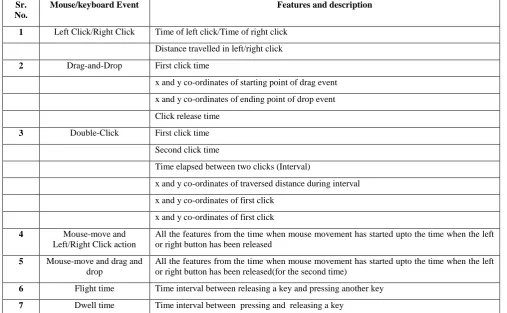
Until now, mouse and keyboard events are successfully captured in the above phases. Now, let us see, what features are extracted from the above process. The features extracted are listed in the table 1.4.
SYSTEM ARCHITECTURE
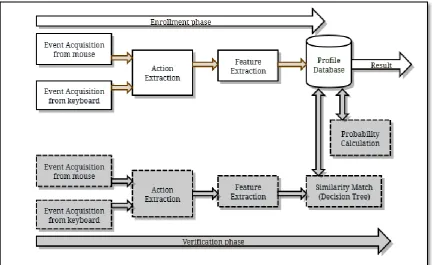
The proposed system is divided into two phases, namely
enrollment phase and verification phase. The enrollment phase consists of enrolling a new user and storing user’s record on the database. Verification phase matches the already defined database values with the user who wishes to gain access to the system. The proposed architecture of user identification technique consists of few modules that are listed as follows:
1. Event capturing: This module deals with acquiring atomic events from mouse and keyboard. The events that are acquired are explained in above section.
2. Action extraction: This module deals with identifying various mouse actions that is composed from the atomic events captured in previous module.
3. Feature extraction: This module deals with extraction of features from the mouse actions. This stage is combination of above two stages. The features that are extracted are stored in the database to be used in verification phase. For example: there are many redundant features in database like double click, which is basically a set of two left clicks. So, these types of redundant features are eliminated and a new feature set is constructed that is filtered.
Now, all the above stages are common to enrollment and verification phase. There might be a possibility that when a user wants to access the system, he/she enters a particular mouse and keyboard pattern which matches with more than one other user’s pattern that is already stored in database. So to select most probable user, a probability module is added to the system.
4. Probability module: This module identifies who is the most probable/likely user to be authenticated. This module first calculates normal probability to identify the most probable user. The second step is to calculate conditional probability to calculate the most probable password for most probable user. the normal probability is thus expressed as[9]:
Let event A be the event that the current user has entered a username that is present in database.
𝑷 𝑨 =
𝒄𝒖𝒓𝒓𝒆𝒏𝒕 𝒊𝒏𝒔𝒕𝒂𝒏𝒄𝒆 𝒊𝒏 𝒗𝒆𝒓𝒊𝒇𝒊𝒄𝒂𝒕𝒊𝒐𝒏𝒊𝒏𝒔𝒕𝒂𝒏𝒄𝒆 𝒊𝒏 𝒅𝒂𝒕𝒂𝒃𝒂𝒔𝒆 …(1)
𝑷 𝑩
𝑨 = 𝑷(𝑨⋂𝑩)/𝑷(𝑨) ……….(2)
5. Storage database: It is a database to record a user’s mouse and keystroke pattern. This database is used for storing mouse and keystroke data in enrollment phase
[image:4.595.46.554.152.465.2]and for matching the same data during verification phase. Each user enrollment corresponds to an entry in the corresponding databases for mouse and keystroke actions. During the enrollment phase, a user is enrolled for three times and the mean values of all the
Table 1. Features of mouse and keyboard
Sr. No.
Mouse/keyboard Event Features and description
1 Left Click/Right Click Time of left click/Time of right click
Distance travelled in left/right click
2 Drag-and-Drop First click time
x and y co-ordinates of starting point of drag event
x and y co-ordinates of ending point of drop event
Click release time
3 Double-Click First click time
Second click time
Time elapsed between two clicks (Interval)
x and y co-ordinates of traversed distance during interval
x and y co-ordinates of first click
x and y co-ordinates of first click
4 Mouse-move and
Left/Right Click action
All the features from the time when mouse movement has started upto the time when the left or right button has been released
5 Mouse-move and drag and drop
All the features from the time when mouse movement has started upto the time when the left or right button has been released(for the second time)
6 Flight time Time interval between releasing a key and pressing another key
7 Dwell time Time interval between pressing and releasing a key
enrollments are stored in the master database for future use.
6. Similarity matching module: This module is designed to match the similarities of the current user in verification with those, present in the database. The values stored during the enrollment phase are extracted and matched with those entered during verification. This module provides desired accuracy in similarity matching phase. The proposed architecture can be seen in figure 1.
7. Knowledge generation: The users are classified into legitimate users and imposters. The knowledge generation module will find out the accuracy of the system based on the number of legitimate users rejected (False Rejection Rate), the number of imposters accepted (False Acception Rate). Based on these values, the system can be compared with the other existing systems.
8. Result: Finally, a result stating , whether the user in verification is granted access into the system or not, is displayed.
5.
EXPERIMENTAL RESULTS:
The experimental results that have been conducted until now are been stated here as follows:
Dataset description: 3 Samples of each user were collected and the mean value was stored in the master database for all the 27 features mentioned above. (Simple mean calculation). This gave a dataset of total 27*3*128 =10368 feature set, where 128 indicates number of users who were enrolled. In the feature extraction module, redundant features are filtered at run time. So, a total feature-set of 19 features remain. This implies 19*3*128=7296 entries in the feature set (approximately).
Obtained results: the total time required to enroll each user (for 3 times) was calculated to be 10.2 seconds. Whereas, authentication time for each user, on an average, is 4.2 seconds. Since, the dataset is dynamically generated and the impostors are not involved during the enrollment phase, only False Rejection Rate (FRR) was calculated manually using:
Fig 1: System Architecture
This calculation resulted in FRR to be 3.2%, which is considerably small as compared to many of the existing techniques, that are explained in section 2.
6.
CONCLUSION
So finally, it can be concluded from the above architecture that the proposed system gives promising results in case of accuracy and time complexity for following reasons:
1. Less time is required for enrollment of a user compared to the previously implemented methods, since the users don’t need to be trained.
2. Sufficient number of a user samples are collected to ensure that a true user is never denied access and false user is never accepted. This ensures a considerable accuracy.
3. The verification time is just equal to the time required for matching the samples from database and calculation of simple probability values. Even though this time may increase as the size of database increases, still it is less than the previously stated methods.
4. The proposed system is cost efficient since there is no need of external devices such as sensors. This is a behavioral biometric technique that can be implemented in just the basic available hardware devices such as mouse and keystroke.
5. Though this system is designed for mouse, it can work considerably well for sensor pads in laptop.
6. Though this system is designed for mouse, it can work considerably well for sensor pads in laptop.
There are also certain limitations that are hardware dependent, for example, the amount of noise in the mouse and keyboard devices will certainly affect the accuracy of the system adversely. The user will have to remember the mouse and keystroke pattern.
7.
FUTURE SCOPE
There are various ways to extend the system implementation. One can increase the range of features used. Also, in case where the input device is sensor pad, feature such as pressure and time for which the pressure is applied can be taken into consideration. That will certainly provide more accuracy. One can extend the system by applying it with a combination of physiological biometric for more accuracy. Also, other input devices can be used in data acquisition phase such as joystick, touch-screen key pad etc. Certainly, the combination of multi-modal behavioral biometric and physiological biometrics will provide more accuracy.
This identification system can be extended to a verification system that will capture the user’s actions throughout the session for which the user has logged in. At the point of time where the system captures inappropriate behaviour, the user will be instantly logged out and his/her behaviour will be stored in database as an impostor, for future use.
In conclusion, there is a wide scope of extension with respect to this system.
8.
REFERENCES
[1] Clint Feher, Yuval Elovici, Robert Moskovitch, Lior Rokach, Alon Schclar “User identity verification via mouse dynamics”, Information Sciences 201 (2012) 19– 36.
[2] Nobuyuki Nishiuchi, “combining dynamic data with physical biometric verification to counteract spoofing”, journal of medical informatics & technologies vol. 15/2010, ISSN 1642-603.
[3] Roman V. Yampolskiy, Venu Govindaraju ”Behavioral biometrics: a survey and classification”, Int. J. Biometrics, Vol. 1, No. 1, 2008.
Bee Colony Optimization Technique”, European Journal of Scientific Research, ISSN 1450-216X Vol. 90 No 2 November, 2012, pp.234-242, 2012
[5] Benjamin Purgasona, David Hiblerb, Christopher Newport,” Security Through Behavioral Biometrics and Artificial Intelligence” , Conference Organized by Missouri University of Science and Technology 2012- Washington D.C., Procedia Computer Science 12 ( 2012 ) 398 – 403 1877-0509, published by Elsevier, doi: 10.1016/j.procs.2012.09.093.
[6] Enzhe Yu, Sungzoon Cho,” Keystroke dynamics identity verification, its problems and practical solutions, Received 5 November 2003; revised 2 February 2004; accepted 10 February 2004, Computers & Security (2004) 23, 428e440.
[7] H. Saevanee and P. Bhattarakosol, “Authenticating user using keystroke dynamics and finger pressure” , 978-1-4244-2309-5/09/$25.00 ©2009 IEEE.
[8] Abdul Serwadda , Zibo Wang, Patrick Koch, Sathya Govindarajan, Raviteja Pokala, Adam Goodkind, David-Guy Brizan, Andrew Rosenberg, Vir V. Phoha, Kiran Balagani, “Scan-Based Evaluation of Continuous Keystroke Authentication Systems”, Published by the IEEE Computer Society, IT Pro July/August 2013, 1520-9202/13/$31.00 © 2013 IEEE.
[9] Christopher M. Bishop, “Pattern Recognition and Machine Learning”, Springer, Information Science and Statistics, ISBN-10: 0-387-31073-8, ISBN-13: 978-0387-31073-2, February 2006.