Cloud based Anti-Theft Application for Android
Devices
Mundhe Vishal B. Choudhary Sagar S.
BE Student BE Student
Department of Computer Engineering Department of Computer Engineering
SCSCOE, Rahuri Factory SCSCOE, Rahuri Factory
Rathod Ajit S. Prof. Dighe Mohit
BE Student Assistant Professor
Department of Computer Engineering Department of Computer Engineering
SCSCOE, Rahuri Factory SCSCOE, Rahuri Factory
Abstract
In this system we have to implement the technique to improve antitheft for android base on mobile phones by using various services like snapshot on email instead of SMS and MMS. Android is most popular operating system in present days. This system contains many schemes that already been proposed that are related to anti-theft also many applications are available onto google play store but these application are not so useful to find the thief e.g. tracking using GPS for the devices like smartphones and tablets. We can use new technology likes snapshots on email id, which improves the present scenario. This system is totally hardware dependent of your smart phone device that is camera (front or rear) also support for SMS and location tracking. First, we just need to install this software then, it work’s in the background, stores the current SIM serial number in a variable and keeps continuously checking for SIM change, whenever SIM change detected from device, it will takes snapshots in the background with the use of camera of device and also find location of device with GPS i.e. without taking user permission and then it will send an SMS to an alternate mobile number, which was provided after installation for authorized user registration. The most benefit of this application is very ease to configure and keeps running in the background without interrupting the user activity. It helps the authorized user to identify and find the thief.
Keywords: Android, GPS tracking, GPRS, Snapshots, email, cloud
________________________________________________________________________________________________________
I. INTRODUCTION
In now a days, smartphones becomes more popular device around the world with using android platforms. They are acting like a computer also provides facility to store information, documents, videos, audios etc. This data can be shared every place via internet. Smart phones are very compact, helpful and effective for doing business smartly. Nearly about 70 percent peoples into the world are started using smart phone because they are available in market at very low cost. The smartphone provides various features, multitasking that attract to peoples. There are more than millions of apps, tools and games available onto Google play store for downloading.
The regular mobile phone that provides a GPS receptor and connecting with Global System for Mobile (GSM) network that is beneficial of for this technology in behalf of the user’s security.
In the previous system, text message is sent by using SMS (Short Messaging Service) to the alternate number that is provided by user after installing an application. This message contains the information about the SIM has been changed. It also holds the data such as the new SIM number. It is used the GPS technology that service is provided by Google Maps. This SMS contains information into the form of plain text and received message shows only when, user will be opened that message [1] [2]. Email contains the same details and some may contain images into it. Also these snapshots can be only visible, when user will be open that mail which is sent by this application to the registered email id [3] [4].
II. CONTROL MOBILE HARDWARE
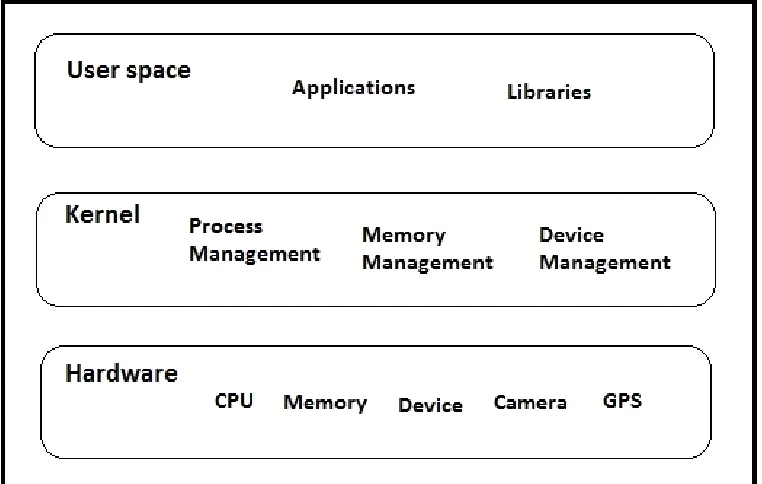
In this section we provide some details about how kernel of an android operating system controls the mobile hardware like camera, GPS, SIM card manager. After that it contains how the activities are created and destroyed in the virtual machine and services runs in background without user interruption. Android is a set of programs that work together to produce a result e.g. an Operating System, hardware and its applications.
Android system is use the Linux kernel with little bit architectural changes that’s made by Google. They needful to develop hardware drivers to control the hardware performance for the kernel, that’s the reason OEM (Original Equipment Manufacturer) has a largely contributed in developing drivers [4]. The most important function of kernel is to control the hardware. It will act as an interface between hardware and software.
Fig. 1: Android Kernel Architecture
III. APPLICATION DEVELOPMENT
The Application development contains the features and requirements for the development of the proposed Anti-theft application for android based devices. This application contains new features like location tracking with GPS technique and capturing the images of theft as well as surrounding pictures with the help of camera into mobile device. We can show are as given below:
System Requirements:
The Antitheft application contains two mobile phones, one for sending SMS details of lost device. It also requires the valid email address of the user. This smart phone application needs android platform of version 4.0 jelly bean or higher version with necessary of GPS and internet access enabled into the smart phone devices. And any other Operating System based mobile phones for receiving incoming SMS.
Fig. 2: System Requirement
Application Features:
This Antitheft application is used to find the lost device so that it required GPS technique for tracking the current location of user’s smart phone. The Camera is used for capturing the images of unauthorized person and sends it to the email ID without taking permission from any illegal user. The features of this application as given below:
The snapshots will be sent to email address, this feature will be activated when application detected for SIM card change. The camera is automatically activated on background without taking any permission from illegal user. It will be automatically starting to capturing snapshots (Images) into background and send this snapshots to the registered email address without permission of user. This service works on GPRS, for sending the images to the email ID. But, if it does not find internet access then will not send snapshots to the email, it continuously checks for internet to send images.
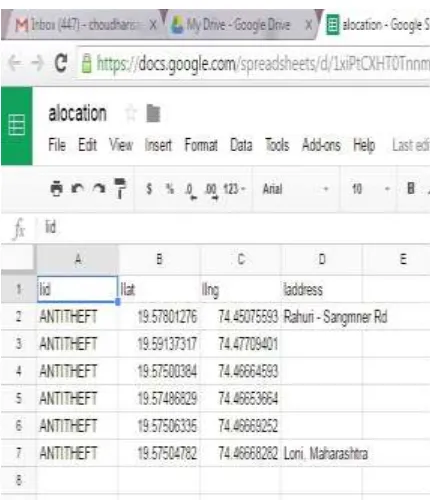
The location tracking service is used to find the location lost device with the help of GPS (Global Positioning System). This service is starting in a background of screen when it identifying the SIM gets changed into a device and stored the location into spreadsheet on cloud [5]. This service requires GPS enabled into device that is lost and also needed for GPRS to upload the location on cloud. GPS works latitude and longitude to find exact location of area.
Short Messaging Service (SMS) is used while SIM card will be get changed into our Smart phone then installed application will send SMS “SIM Card Changed” to the registered alternate mobile number.
Another feature of the application is to notify for application Uninstallation by sending SMS to the alternate mobile number of user.
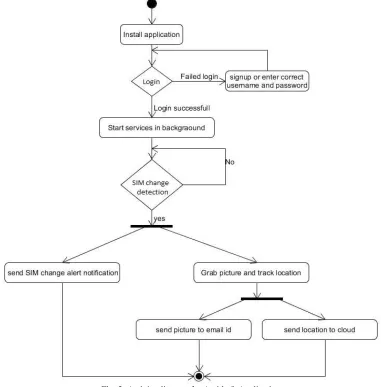
Fig. 3: Activity diagram for Antitheft Application
Algorithm:
1) Start the process.
4) If entered correct user ID and password, else goto step 3. 5) Login successfully into system, else goto step 4.
6) Start services into background.
7) If system detected for SIM card change, multiple services will be activated, else goto step 13. 8) Sent alert for SIM card changed to alternate mobile number.
9) Camera activated, grab pictures (Snapshots).
10) Send pictures to registered email address of user, then goto step 13. 11) Activated GPS to track a current location of device.
12) Fetch location from device and send it for storing onto the cloud, then goto step 13. 13) Stop.
The application installed will be work in the background and doesn’t be display into the task manager as well. Once the SIM card gets changed into lost mobile phone, this application enables the user to find a mobile device with GPS tracking and taking snapshots using camera that is present into smart phone and to email. Also send alert message of SIM changed notification via SMS to the alternative mobile number [6].
Technologies:
The Antitheft application for android devices is developed in Java programming language using the Android studio. The development tool chosen for this application is the Android Studio tool.
IV. HOW IT WORKS
In this section we will explain how this anti-theft application works and how it captures snapshots and how it sends an SMS and email.
The major advantage of this application is, anyone can use it without having much expertise about the device and without doing lots of settings, the user just needs to install the software by giving some information like alternate mobile number, email-id and login information, then it will work significantly in the background without interrupting the users activity.
How to Install the Application:
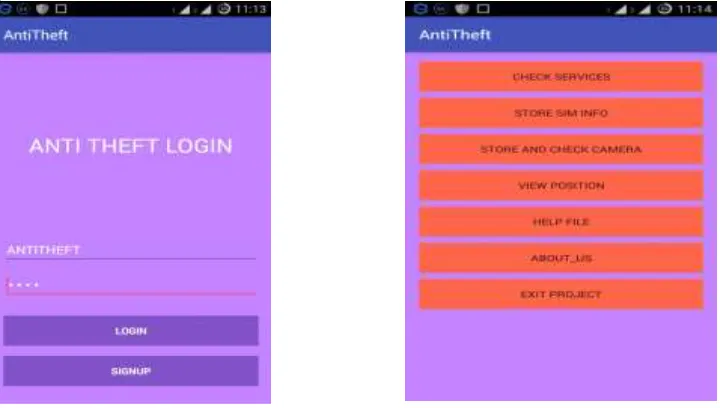
As we can examine in this image, the user has to run the application AntiTheftApp.apk and have to fill the information in the text boxes. Once it will be agree, it starts services running in the background. This application is very easy to understand for users, who do not have much technological knowledge.
How to Detect the SIM Change:
In this section, we discuss how to detect the SIM change process in android device with the help of this anti-theft application, which running in background automatically.
The TelephonyManager class uses to access the information about the telephony services on the mobile device. The device applications can use these methods in this class to resolve telephony services and states, as well as to access some types of subscriber information. Application can also register to broadcast receiver notification of telephony state changes.
getLine1Number() - this method returns the phone number string for line 1, i.e. the MSISDN for a GSM phone. Return null if it is unavailable. But this method works only for few cell phone but not all phones.
So, if you need to perform operations related to the SIM (other than calling), then you should use getSimSerialNumber(). The SIM Serial Number is always unique, valid and it always exists. We can use this method to get the serial number of SIM in first slot, String variables are used to store this serial number. Our application is compare this string value with the first SIM serial number for SIM change detection.
How to Activate the Camera:
In this section, we can explain how to control the camera in android device without showing user interface preview of picture and click automatically in the background.
The inbuilt application of camera provides a framework API in android SDK where you can request a picture from a previously existing camera application. To use camera device in application, as we mentioned above, in manifest file you have need to declare camera permission.
<uses-permission android:name="android.permission.CAMERA" />
First we have to check for camera availability whether it is ready to use or not, and also checks for number of cameras available (front and rear cameras). This can be done by invoking this method: PackageManager.hasSystemFeature() and Camera.getNumberOfCameras() respectively.
camera.takePicture(null, null, jpegCallback);
After taking a picture, this method calls Picture Call back() where the pictures get stored in .jpg format in the external SD card. FileOutputStream outStream = new FileOutputStream(String.format("/sdcard/secretimage.jpg", System.currentTimeMillis()));
How to Send an SMS & Email:
As we had declared, to use SIM services in application once it takes permissions by mentioning in manifest file. To send SMS you have need to set permission SEND_SMS in the Android manifest file.
<uses-permission android:name="android.permission.SEND_SMS" /> SmsManager class instant can be used to sending an SMS.
SmsManager MySmsManager = SmsManager.getDefault();
To fetch the current geographical location in android you have to set permission for GPS service in manifest file. <uses-permission android:name="com.google.android.providers.gsf.permission.READ_GSERVICES" /> This can read latitude and longitude on Google Map and store this location on cloud.
To send an e-mail you have to declare permission for internet services in manifest file to open a network socket connection for an application.
<uses-permission android:name="android.permission.INTERNET" />
To send an e-mail in background without user interaction we can use many private APIs, such as one provided by Gmail. In this anti-theft application we uses three jar files java-mail-1.4.4.jar, activation.jar, additional.jar which offers packages for email to send automatically with attached image and location.
V. EVALUATION AND RESULTS
The action of the user in the antitheft application is set alternate mobile number to send SMS. When SIM card changed in the mobile, the antitheft application start in background and send SMS “SIM card changed” alert. Following operation perform by user and functionality:
The first diagram shows the login window of antitheft application in that user creates user id and password. After successfully login; it opens the menu window of the antitheft application for configured the application.
If the SIM card change detected by antitheft application it starting in background, by storing the SIM detail and send SMS to alternate mobile number for alert.
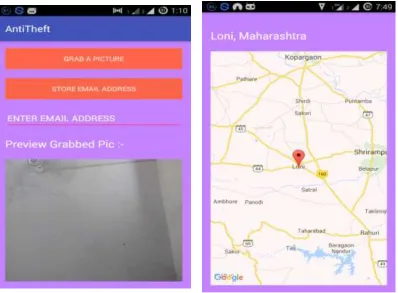
The camera services will start in background after changing of SIM, then it capture the pictures secretly of the thief and send this snapshot to the registered email id.
If application detected for GPS enabled into device, it start for tracking the correct current location of stolen device by using GPS technique and store these location into spreadsheet on the cloud.
If the antitheft application is uninstall from the device then it send SMS to the alternate mobile
Fig. 6: SMS received to alternate mobile number
Fig. 9: Send Captured Image to Registered Email address Fig. 10: Store location to spreadsheet in cloud
VI. CONCLUSION
The cloud based Anti-Theft Application represents a technique to improve security solution by providing the SMS alert and snapshots of the thief. GPS makes it easy for the user to track current location of the lost device and detects the thief; this helps to get thief captured and arrested. The tracking location will be stored on spreadsheet over the cloud. This all services will be activated whenever application detects the change of SIM card in mobile. SIM change alert notification would be sent to the alternate mobile number of the user. The snapshots would be taken by the camera and would be sent to the registered valid email address without taking any permission from the user. The proposed application is very user friendly and it can be installed without any technical knowledge.
VII. FUTURE SCOPE
With the change in time, technology is developing every day. Our application will further be evolved and improved. Currently this application is present for android based smart phones. Future related work involves achievement of the application for iOS, Symbian, Windows Mobile OS etc. the future scope of this project involves the automatic activation of GPS and internet without permission of user with the help of our application.
REFERENCES
[1] SONIA C.V., DR. A.R. ASWATHA, "AALTM: AN ANDROID APPLICATION TO LOCATE AND TRACK MOBILE PHONES ", IN MOBILE TRACKING SYSTEM BASED ON SMS, INTERNATIONAL JOURNAL OF ENGINEERING TRENDS AND TECHNOLOGY (IJETT) - VOLUME4ISSUE5- MAY 2013.
[2] D. ABIRAMI, S. ANANTHA SURYA, S. ANNAPOORANI, MS. M. PADMAPRIYA, "AN INTELLIGENT ANTI-THEFT ANDROID APPLICATION", IN LOCATION TRACKING, 2014 IJIRT | VOLUME 1 ISSUE 10 | ISSN: 2349-6002, 2014.
[3] R. ARCHANA, E.G. BHUVANESHWARI, T. HEMA VATHI, "MULTIMEDIA MESSAGING SERVICE (MMS) BASED ANTI-THEFT APPLICATION", IN MMS BASED GPS TRACKING MOBILE DEVICES, ISSN 23499842(ONLINE), VOLUME 1, SPECIAL ISSUE 2(ICITET 15), MARCH 2015.
[4] AZEEM USH SHAN KHAN, MOHAMMAD NAVED QURESHI, MOHAMMED ABDUL QADEER, "ANTI-THEFT APPLICATION FOR ANDROID BASED DEVICES", IN MMS BASED MOBILE TRACKING WITH GPS, 2014 IEEE INTERNATIONAL ADVANCE COMPUTING CONFERENCE (IACC), 2014.
[5] V. NIROSHA, K. SUMA LATHA, "A COMPREHENSIVE APPROACH TO ENSURE SECURE DATA COMMUNICATION IN CLOUD ENVIRONMENT", FOR DATA
STORAGE USING ENCRYPTION TECHNIQUE FOR SECURITY, INTERNATIONAL JOURNAL OF ADVANCED RESEARCH IN COMPUTER SCIENCE AND SOFTWARE
ENGINEERING, VOLUME 3, ISSUE 7, JULY 2013.
[6] sagar choudhary, Ajit Rathod, Vishal Mundhe and Prof. Mohit Dighe. "Cloud based antitheft application for android devices: A Literature review." For provide security for android and find to lost device, IJSRD - International Journal for Scientific Research & Development| Vol. 3, Issue 10, 2015 | ISSN (online): 2321-0613 .
[7] HTTP://WWW.DEVELOPER.ANDROID.COM
[8] Kumar, Sandeep, Mohammed Abdul Qadeer, and Archana Gupta. "Location based services using android." In IMSAA’09: Proceedings of the 3rd IEEE International Conference on Internet Multimedia Services Architecture and Applications, pp. 335-339. 2009.
[9] Chandra, Ankur, Shashank Jain, and Mohammed Abdul Qadeer. "Implementation of location awareness and sharing system based on GPS and GPRS using J2ME, PHP and MYSQL." In Computer Research and Development (ICCRD), 2011 3rd International Conference on, vol.1, pp. 216-220. IEEE, 2011. [10] Qadeer, Mohammed A., Robin Kasana, and Sarvat Sayeed. "Encrypted voice calls with ip enabled wireless phones over gsm/cdma/wifi networks." In
[11] Qadeer, Mohammed Abdul, Kanika Shah, and Utkarsh Goel. "Voice-Video Communication on Mobile Phones and PCs' Using AsteriskEPBX." InCommunication Systems and Network Technologies (CSNT), 2012 International Confere nce on, pp. 534-538. IEEE, 2012.
[12] Ansari, Abdullah Mohammad, Md Nehal, and Mohammed Abdul Qadeer. "SIP-based Interactive Voice Response System using FreeSwitch EPBX." InWireless and Optical Communications Networks (WOCN), 2013 Tenth International Conference on, pp. 1-5. IEEE, 2013.
[13] Deepak Kumar and Mohammed Abdul Qadeer, "SMS Based Emerging Techniques for Monitoring and Controlling Android Mobiles," International Journal of Engineering and Technology vol. 4, no. 6, pp. 798-802, 2012.