Open Source
B
RUCE
P
ERENS
â O
PEN
S
OURCE
S
ERIES
http://www.phptr.com/perens
â
C++ GUI Programming with Qt 3
Jasmin Blanchette, Mark Summerï¬eld
â
Managing Linux Systems with Webmin: System Administration and
Module Development
Jamie Cameron
â
Understanding the Linux Virtual Memory Manager
Mel Gorman
â
Implementing CIFS: The Common Internet File System
Christopher Hertel
â
Embedded Software Development with eCos
Anthony Massa
â
Rapid Application Development with Mozilla
Nigel McFarlane
â
The Linux Development Platform: Conï¬guring, Using, and Maintaining a
Complete Programming Environment
Rafeeq Ur Rehman, Christopher Paul
â
Intrusion Detection with SNORT: Advanced IDS Techniques Using SNORT,
Apache, MySQL, PHP, and ACID
Rafeeq Ur Rehman
â
The Ofï¬cial Samba-3 HOWTO and Reference Guide
John H. Terpstra, Jelmer R. Vernooij, Editors
Prentice Hall
Professional Technical Reference Upper Saddle River, NJ 07458 www.phptr.com
Open Source
Security Tools
Practical Applications for Security
Library of Congress Cataloging-in-Publication Data
Howlett, Tony.
Open source security tools : practical applications for security / Tony Howlett p. cm.
Includes index.
ISBN 0-321-19443-8 (pbk. : alk. paper)
1. Computer security. 2. Computer networksâSecurity measures. 3. Open source software. I. Title. QA76.9.A25H6985 2004
005.8âdc22
2004009479 Copyright © 2005 Pearson Education, Inc.
Publishing as Prentice Hall Professional Technical Reference Upper Saddle River, New Jersey 07458
Prentice Hall PTR offers excellent discounts on this book when ordered in quantity for bulk purchases or special sales. For more information, please contact: U.S. Corporate and Government Sales, 1-800-382-3419, [email protected]. For sales outside of the U.S., please contact: International Sales,
1-317-581-3793, [email protected].
Company and product names mentioned herein are the trademarks or registered trademarks of their respective owners.
This material may be distributed only subject to the terms and conditions set forth in the Open Publication License, v.1.0 or later. The latest version is presently available at www.opencontent.org/openpub/.
Printed in the United States of America First Printing, July 2004
ISBN 0-321-19443-8 Pearson Education Ltd.
Pearson Education Australia Pty., Limited Pearson Education South Asia Pte. Ltd. Pearson Education Asia Ltd.
Pearson Education Canada, Ltd.
Pearson Educación de Mexico, S.A. de C.V. Pearson EducationâJapan
Preface
xi
Audience xii Contents xiiOpen Source Security Tool Index xiii
Chapter 1: Information Security and Open Source Software xiii Chapter 2: Operating System
Tools xiii
Chapter 3: Firewalls xiii Chapter 4: Port Scanners xiii Chapter 5: Vulnerability
Scanners xiv
Chapter 6: Network Sniffers xiv Chapter 7: Intrusion Detection
Systems xiv
Chapter 8: Analysis and Management Tools xiv Chapter 9: Encryption Tools xiv Chapter 10: Wireless Tools xiv Chapter 11: Forensic Tools xiv Chapter 12: More On Open
Source Software xv Appendix A: Common Open
Source Licenses xv
Appendix B: Basic Linux/UNIX Commands xv
Appendix C: Well-Known TCP/IP Port Numbers xv
Appendix D: General Permission and Waiver Form xv
Appendix E: Nessus Plug-ins xv CD-ROM Contents and
Organization xv Using the Tools xvi Reference Installation xvi Input Variables xvi Acknowledgements xvii
Tools Index
xix
1
Information Security and Open
Source Software
1
Securing the Perimeter 1 Plugging the Holes 2
Establishing an Early Warning System 2
Building a Management System for Security Data 2
Implementing a Secure Wireless Solution 3
Securing Important Files and Communications 3 Investigating Break-ins 3 The Practice of Information
Security 4 Confidentiality 4 Integrity 5 Availability 5
The State of Computer Crime 5 The Advent of the Internet 7 Ubiquitous, Inexpensive
Broadband 7
Attack of the Script Kiddies 8 Worms, Auto-rooters, and Other
Malware 9
Info-Security Business Risks 9 Data Loss 9
Denial of Service 10 Embarrassment/Loss of
Customers 10 Liability 10
Disclosure of Corporate Secrets and Data 11
Tampering with Records 12 Loss of Productivity 12 Open Source History 13
Linux Enters the Scene 14 Open Source Advantages 15
Cost 15
Extendability 15
Contents
Security 15 Independence 16 User Support 16 Product Life Span 18 Education 18 Reputation 19
When Open Source May Not Fit Your Needs 19
Security Software Company 19 100 Percent Outsourced IT 20 Restrictive Corporate IT
Standards 20
Windows and Open Source 20 Open Source Licenses 21
The GNU General Public License 21
The BSD License 23
2
Operating System Tools
25
Hardening Your Security ToolSystem 27
Installing Bastille Linux 28 Running Bastille Linux 29 traceroute (UNIX) or tracert
(Windows): Network Diagnostic Tools 32
Considerations for Hardening Windows 45
Installing and Using Sam Spade for Windows 46
Installing and Running PuTTY 50
3
Firewalls
53
Network Architecture Basics 54 Physical 55
Data Link 55 Network 56 Transport 56 Session 57 Presentation 57 Application 57 TCP/IP Networking 57 Security Business Processes 60
Installing Iptables 63
Using Iptables 64 Creating an Iptables
Firewall 66 IP Masquerading with
Iptables 70
Installing Turtle Firewall 71 SmoothWall Hardware
Requirements 77
SmoothWall Express Versus Smooth-Wall Corporate 78
Installing SmoothWall 78 Administering the SmoothWall
Firewall 80
Creating a VPN on the SmoothWall Firewall 84
Additional Applications with the SmoothWall 85
Windows-Based Firewalls 86
4
Port Scanners
87
Overview of Port Scanners 90 Considerations for Port Scanning 93 Uses for Port Scanners 93
Network Inventory 93 Network/Server
Optimization 94
Finding Spyware, Trojan Horses, and Network Worms 94 Looking for Unauthorized or
Illicit Services 95
Installling Nmap on Linux 97 Installing Nmap for Windows 99 Scanning Networks with
Nmap 100 Nmap Command Line
Operation 103 Nmap Scan Types 103 Nmap Discovery Options 106 Nmap Timing Options 106 Other Nmap Options 107 Running Nmap as a Service 107 Output from Nmap 110
Contents vii
Creating Your Own Nlog Extensions 116
Interesting Uses for Nlog and Nmap 117
5
Vulnerability Scanners
121
Identifying Security Holes in YourSystems 122
Buffer Overflows 124 Router or Firewall
Weaknesses 124 Web Server Exploits 125 Mail Server Exploits 125 DNS Servers 126 Database Exploits 126
User and File Management 126 Manufacturer Default
Accounts 127
Blank or Weak Passwords 128 Unneeded Services 128 Information Leaks 129 Denial of Service 131 Vulnerability Scanners to the
Rescue 131
Depth of Tests 132
Client-Server Architecture 132 Independence 133
Built-in Scripting Language 133 Integration with Other
Tools 133 Smart Testing 133 Knowledge Base 134
Multiple Report Formats 134 Robust Support Network 134 Installing Nessus for Linux
Systems 135 Setting Up Nessus 137 Nessus Login Page 138 Nessus Plugins Tab 139 Nessus Preferences Tab 139 Scan Options Tab 143 Target Selection Tab 145 User Tab 147
KB (Knowledge Base) Tab 147 Nessus Scan in Process
Options 148
Installing NessusWX 150 Using the NessusWX Windows
Client 150
Creating a Session Profile 151 NessusWX Report s154 Sample Nessus Scanning Configurations 155 Considerations for Vulnerability
Scanning 158
Scan with Permission 158 Make Sure All Your Backups Are
Current 158 Time Your Scan 159 Donât Scan Excessively 159 Place Your Scan Server
Appropriately 159
What Vulnerability Testing Doesnât Find 160
Logic Errors 160 Undiscovered
Vulnerabilities 160 Custom Applications 160 People Security 160
Attacks That Are in Progress or Already Happened 161
6
Network Sniffers
163
A Brief History of Ethernet 165 Considerations for NetworkSniffing 166
Always Get Permission 166 Understand Your Network
Topology 166
Use Tight Search Criteria 167 Establish a Baseline for Your
Network 167
Installing Tcpdump 168 Running Tcpdump 169 TCP/IP Packet Headers 170
Tcpdump Expressions 175 Tcpdump Examples 180 Installing WinDump 182 Using WinDump 182 Installing Ethereal for
Installing Ethereal for Windows 185 Using Ethereal 185
Starting a Capture Session 187 Display Options 189
Ethereal Tools 189 Saving Your Ethereal
Output 190
Ethereal Applications 191
7
Intrusion Detection Systems
193
NIDS Signature Examples 196 The Problem of NIDS FalsePositives 198
Common Causes of False Positives 199
Getting the Most Out of Your IDS 200
Proper System Configuration 200 IDS Tuning 201 IDS Analysis Tools 201 Unique Features of Snort 203 Installing Snort 203
Running Snort 203 Configuring Snort for Maximum
Performance 207
Disabling Rules in Snort 211 Running Snort as a Service 215 Requirements for Windows
Snorting 220 Installing Snort for
Windows 221 Setting Up Snort for
Windows 221
Host-Based Intrusion Detection 225 Advantages of Host-Based
Intrusion Detection Methods 226
Disadvantages of Host-Based Intrusion Detection Methods 226 Installing Tripwire 227 Configuring Tripwire 227
Initializing Your Baseline Database 230
Checking File Integrity 231 Updating the Database 231 Updating the Policy File 231
8
Analysis and Management
Tools
233
Installing Swatch 237 Configuring and Running
Swatch 238
The Swatch Configuration File 239
Using Databases and Web Servers to Manage Your Security Data 241 Setting Up a MySQL Server 242 Setting Up the Apache Web
Server 244 Setting Up PHP 245 ADOdb 247
PHPLOT 247 JpGraph 247 GD 248
Configuring Snort for MySQL 248 Installing ACID 249 Configuring ACID 250
Introduction to Using ACID 251 Using ACID to Tune and Manage
Your NIDS 253
Other Ways to Analyze Alert Data Using ACID 255
Using ACID on a Daily Basis 256
Graphing ACID Data 257 Maintaining Your ACID
database 258 Installing NPI 261
Importing Nessus Scans into NPI 263
Using NPI 263 The Birth of an Open Source
Project 264
Contents ix
Is There a Broader Need for Your Program? 265
Do You Have Permission to Release Code as Open Source? 265
Platforms for NCC 267 Installing NCC 270 Using NCC 272 Adding Users 273 Adding Targets 274 Scheduling Your Scan 276
9
Encryption Tools
279
Types of Encryption 281Encryption Algorithms 283 Encryption Applications 284 Encryption Protocols 285 Encryption Applications 286 Installing PGP and Generating
Your Public/Private Key Pair 289
Using PGP 290 PGP Options 293 Installing GnuPG 296 Creating Key Pairs 297 Creating a Revocation
Certificate 297
Publishing Your Public Key 298 Encrypting Files with
GnuPG 298 Decrypting Files 299 Signing Files 299
The PGP/GnuPG Web of Trust Model 299
Signing Keys and Managing Your Key Trusts 300
Installing and Starting the OpenSSH Server 302 Port Forwarding with
OpenSSH 304 Virtual Private Networks 305
Installing and Starting FreeS/ WAN 307
Using FreeS/WAN 308 Windows Installation 313 UNIX Installation 313 Using John the Ripper 313
10 Wireless Tools
315
Wireless LAN TechnologyOverview 316 Wi-Fi Terms 317
Dangers of Wireless LANs 319 Eavesdropping 319
Access to Wireless PCs 320 Access to the LAN 320
Anonymous Internet Access 320 802.11-Specific
Vulnerabilities 320 The âWar-Drivingâ
Phenomenon 321
Performing a Wireless Network Security Assessment 322
Equipment Selection 323 Installing NetStumbler 325 Using NetStumbler 325 NetStumbler Options 329 Saving NetStumbler
Sessions 331
Installing StumbVerter 332 Using StumbVerter 332
Installing Your Network Interface Card and Drivers 335 Installing Kismet 337 Using Kismet Wireless 340 Kismet GPS Support 343 Kismet IDS 343
Uses for AirSnort 344 Installing AirSnort 345 Running AirSnort 345 Steps for More Secure Wireless
LANs 346
Turn On WEP 346
Use Wireless Equipment with an Improved Encryption
Protocol 347
Require Wireless Users to Come in Via a VPN Tunnel 347 Treat Your Wireless Network as
Untrusted 347
Audit Your Wireless Perimeter on a Regular Basis 347
Configure Your Wireless Network Properly 348
Train Your Staff 348
11 Forensic Tools
349
Uses for Computer ForensicTools 350 Cleaning Up and
Rebuilding 350
Criminal Investigation 350 Civil Action 352
Internal Investigations 352 ISP Complaints 353 Building an Incident Response
Plan 353
Preparing for Good Forensic Data 354
Log Granularity 354
Run a Central Log Server 354 Time Sync Your Servers 354 Where to Look for Forensic Data 355 Tenets of Good Forensic
Analysis 356
Operate on a Disconnected System 356
Use a Copy of the Evidence 356 Use Hashes to Provide Evidence
of Integrity 356
Use Trusted Boot Media and Executables 357
Forensic Analysis Tools 357 Installing Fport 358 Using Fport 358 Installing lsof 361 Using lsof 361 Reviewing Log Files 363 Making Copies of Forensic
Evidence 365 Installing dd 366 Using dd 366
Installing Sleuth Kit 369 Installing Autopsy Forensic
Browser 369
Using Sleuth Kit and Autopsy Forensic Browser 369
Creating and Logging Into a Case 370
Adding a Host 371 Adding an Image 372 Analyzing Your Data 374 Installing Forensic Toolkit 376 Using Forensic Toolkit 376
12 More on Open Source
Software
381
Open Source Resources 381 USENET Newsgroups 381 Mailing Lists 382
Web Sites 382 Joining the Open Source
Movement 384
Bug Finder/Beta Tester 385 Participate in Discussion Groups
and Support Other Users 385 Provide Resources to the
Project 386
Patronize Companies That Use or Support Open Source
Products 387 More Open Source Security
Tools 387
Appendix A Open Source
Licenses
389
Appendix B Basic Linux/UNIX
Commands
399
Appendix C Well-Known TCP/IP Port
Numbers
403
Appendix D General Permission and
Waiver Form
445
Appendix E
447
References
555
Web Sites 555xi
Preface
Open source software is such an integral part of the Internet that is it safe to say that the Internet wouldnât exist as we know it today without it. The Internet never would have grown as fast and as dynamically as it did without open source programs such as BIND, which controls the domain name system; Sendmail, which powers most e-mail servers; INN, which runs many news servers; Major Domo, which runs many of the thousands of mailing lists on the Internet; and of course the popular Apache Web server. One thing for sure is that the Internet is a lot cheaper due to open source software. For that, you can thank the Free Software Foundation, BSD UNIX, Linux and Linus Torvalds, and the thou-sands of nameless programmers who put their hard work and sweat into the programs that run todayâs Internet.
While open source programs cover just about every aspect of computer softwareâ from complete operating systems and games to word processors and databasesâthis book primarily deals with tools used in computer security. In the security field, there are pro-grams that address every possible angle of IT security. There are open source firewalls, intrusion detection systems, vulnerability scanners, forensic tools, and cutting-edge pro-grams for areas such as wireless communications. There are usually multiple choices in each category of mature, stable programs that compare favorably with commercial prod-ucts. I have tried to choose the best of breed in each major area of information security (in my opinion, of course!). I present them in a detailed manner, showing you not just how to install and run them but also how to use them in your everyday work to have a more secure network. Using the open source software described in this book, you can secure your enterprise from both internal and external security threats with a minimal cost and maxi-mum benefit for both the company and you personally.
extension the entire Internet. It is common knowledge that large-scale virus infections and worms are able to spread because many systems are improperly secured. I believe that by educating the rank-and-file system managers and giving them the tools to get the job done, we can make the Internet more secure, one network at a time.
Audience
The audience for this book is intended to be the average network or system administrator whose job duties are not specifically security and who has at least several years of experi-ence. This is not to say that security gurus wonât get anything out of this book; there might be areas or tools discussed that are new to you. And likewise, someone just getting into IT will learn quite a bit by installing and using these tools. The concepts discussed and tech-niques used assume a minimal level of computer and network proficiency.
There is also a broad group of readers that is often overlooked by the many open source books. These are the Windows system administrators. The info-security elite often has a certain disdain for Windows-only administrators, and little has been written on qual-ity open source software for Windows. However, the fact remains that Windows servers make up the lionâs share of the Internet infrastructure, and ignoring this is doing a disser-vice to them and the security community at large. While overall the book is still tilted towards Linux/UNIX because most open source programs are still Linux/UNIX-only, I have tried to put Windows-based security tools in every chapter. Iâve also included helpful hints and full explanations for those who have never run a UNIX machine.
Contents
This book covers most of the major areas of information security and the open source tools you can use to help secure them. The chapters are designed around the major disciplines of information security and key concepts are covered in each chapter. The tools included on the bookâs CD-ROM allow for a lab-like environment that everyone can participate in. All you need is a PC and this bookâs CD-ROM to start using the tools described herein.
This book also contains some quick tutorials on basic network terminology and con-cepts. I have found that while many technicians are well-schooled in their particular plat-forms or applications, they often lack an understanding of the network protocols and how they work together to get your information from point A to point B. Understanding these concepts are vital to securing your network and implementing these tools properly. So while this book may seem slanted towards the network side of security, most of the threats are coming from there these days, so this is the best place to start.
Coverage of each security tool is prefaced by a summary of the tool, contact informa-tion, and various resources for support and more information. While I give a fairly detailed look at the tools covered, whole books can and have been written on many of the programs discussed. These resources give you options for further research.
Preface xiii
helpful yet sometimes acerbic mascot who is there to help and inform the newbies as well as keeping the more technical readers interested in sections where we actually make some minor modifications to the program code. He resembles the denizens you may encounter in the open source world. In exploring the open source world, you will meet many diverse, brilliant, and sometimes bizarre personalities (you have to be a least a little bent to spend as much unpaid time on these programs as some of us do). Knowing the proper etiquette and protocol will get you a lot farther and with fewer flames. On a more serious note, many of the tools in this book can be destructive or malicious if used in the wrong ways. You can unintentionally break the law if you use these tools in an uninformed or careless manner (for example, accidentally scanning IP addresses that arenât yours with safe mode off). Flamey will always pipe up to warn you when this is a possibility.
Open Source Security Tool Index
Immediately following this Preface is a listing of all the tools and the pages where they are covered. This way you can skip all the background and go straight to installing the tools if you want.
Chapter 1: Information Security and Open Source Software
This chapter offers an introduction to the world of information security and open source software. The current state of computer security is discussed along with a brief history of the open source movement.
Chapter 2: Operating System Tools
This chapter covers the importance of setting up your security tool system as securely as possible. A tool for hardening Linux systems is discussed as well as considerations for hardening Windows systems. Several operating system-level tools are reviewed too. These basic tools are like a security administratorâs screwdriver and will be used again and again throughout the course of this book and your job.
Chapter 3: Firewalls
The basics of TCP/IP communications and how firewalls work are covered here before jumping into installing and setting up your own open source firewall.
Chapter 4: Port Scanners
Chapter 5: Vulnerability Scanners
This chapter details a tool that uses some of the earlier technology such as port scanning, but takes it a step further and actually tests the security of the open ports found. This secu-rity Swiss army knife will scan your whole network and give you a detailed report on any security holes that it finds.
Chapter 6: Network Sniffers
This chapter primarily deals with the lower levels of the OSI model and how to capture raw data off the wire. Many of the later tools use this basic technology, and it shows how sniffers can be used to diagnose all kinds of network issues in addition to tracking down security problems.
Chapter 7: Intrusion Detection Systems
A tool that uses the sniffer technology introduced in the previous chapter is used here to build a network intrusion detection system. Installation, maintenance, and optimal use are also discussed.
Chapter 8: Analysis and Management Tools
This chapter examines how to keep track of security data and log it efficiently for later review. It also looks at tools that help you analyze the security data and put it in a more usable format.
Chapter 9: Encryption Tools
Sending sensitive data over the Internet is a big concern these days, yet it is becoming more and more of a requirement. These tools will help you encrypt your communications and files with strong encryption as well as create IPsec VPNs.
Chapter 10: Wireless Tools
Wireless networks are becoming quite popular and the tools in this chapter will help you make sure that any wireless networks your company uses are secure and that there arenât wireless LANs you donât know about.
Chapter 11: Forensic Tools
Preface xv
Chapter 12: More On Open Source Software
Finally, this chapter will give you resources for finding out more about open source soft-ware. Various key Web sites, mailing lists, and other Internet-based resources are identi-fied. Also, I give a number of ways to become more involved in the open source movement if you so desire.
Appendix A: Common Open Source Licenses
Contains the two main open source licenses, the GPL and BSD software licenses.
Appendix B: Basic Linux/UNIX Commands
Contains basic navigation and file manipulation commands for those new to UNIX and Linux.
Appendix C: Well-Known TCP/IP Port Numbers
Contains a listing of all the known port numbers as per IANA. Note that this section is not intended to be comprehensive and is subject to constant update. Please check the IANA Web site for the most current information.
Appendix D: General Permission and Waiver Form
Contains a template for getting permission to scan a third-party network (one that is not your own). This is intended to be used as an example only and is not intended as a legal document.
Appendix E: Nessus Plug-ins
Contains a partial listing of plug-ins for the Nessus Vulnerability Scanner discussed in Chapter 5. This listing will not be the most current since the plug-ins are updated daily. The Nessus Web site should be consulted for plug-ins added after January 12, 2004.
CD-ROM Contents and Organization
Using the Tools
Whenever possible, the tools in this book are provided in RedHat Package Manager (RPM) format. Of course, you donât have to be running RedHat Linux to use RPM. The RedHat folks originally designed it, but now it comes with most Linux versions. The RedHat Package Manager automates the installation process of a program and makes sure you have all the supporting programs and so forth. It is similar to a Windows installation process where you are guided through the process graphically and prompted where neces-sary. Using the RPM is almost always preferable to doing a manual installation. When you need to set custom install parameters or if a RPM file is not available for your distribution, I describe how to install the program manually. If the RPM file is provided, simply down-load the file or copy it from the CD-ROM that comes with this book and click on it. Your version of RPM will take care of the rest.
If you use any of the other variations of UNIX (BSD, Solaris, HP/UX, and so on), they will probably work with the tools in this book, but the installation instructions may be different. You can run most of the tools in this book on alternative versions of UNIX or Linux. Staying within the Linux family will certainly make compatibility more likely with the actual tools on the CD-ROM. If you have to download a different version of the program, some of the features discussed may not be supported. But if you are a Solaris aficionado or believe that BSD is the only way to go, feel free to use it as your security workstation. Just be aware that the instructions in this book were designed for a specific implementation and you may have to do some additional homework to get it to work. The platforms supported are listed at the beginning of each tool description.
Reference Installation
Most of the tools in this book were tested and reviewed on the following platforms: ⢠Mandrake Linux 9.1 on a HP Vectra series PC and a Compaq Presario laptop. ⢠Windows XP Pro and Windows 2000 Pro on a Compaq Prosignia series desktop
and Compaq Armada laptop.
Input or Variables
In code and command examples, italics are used to designate user input. The words in ital-ics should be replaced with the variables or values specific to your installation. Operating system-level commands appear like this:
ssh âl login hostname
Preface xvii
in each category. Iâm sure some will differ with my choices; feel free to e-mail me at [email protected], and perhaps those will make it into a future edition.
Acknowledgments
xix
Open Source
Security Tools
Index
Tool Name On CD? Linux/
UNIX? Windows? Page Number
ACID Yes Yes No 249
AirSnort Yes Yes No 344
Autopsy Forensic Browser Yes Yes No 369
Bastille Linux Yes Yes No 28
dd Yes Yes No 366
Dig No Yes No 37
Ethereal Yes Yes Yes 183
Finger No Yes No 39
Forensic Toolkit Yes No Yes 375
Fport No No Yes 357
FreeS/WAN Yes Yes No 306
Tool Name On CD? Linux/
UNIX? Windows? Page Number
Iptables Yes Yes No 62
John the Ripper Yes Yes Yes 312
Kismet Wireless Yes Yes No 334
lsof` Yes Yes No 360
NCC Yes Yes No 266
Nessus Yes Yes No 131
NessusWX Yes No Yes 149
NetStumbler Yes No Yes 324
Nlog Yes Yes No 112
Nmap Yes Yes Yes 96
NPI Yes Yes No 259
OpenSSH (client) Yes Yes No 43
OpenSSH (server) Yes Yes No 301
PGP No Yes Yes 287
Ping No Yes Yes 30
PuTTY Yes No Yes 49
Sam Spade Yes No Yes 46
Sleuth Kit Yes Yes No 368
SmoothWall Yes No No 75
Snort Yes Yes No 201
Snort for Windows Yes No Yes 217
Snort Webmin Yes Yes No 216
Open Source Security Tools Index xxi
Tool Name On CD? Linux/
UNIX? Windows? Page Number
Swatch Yes Yes No 236
Tcpdump Yes Yes No 167
Traceroute No Yes Yes 32
Tripwire Yes Yes No 226
Turtle Firewall Yes Yes No 71
Whois No Yes Yes 35
1
C
H A P T E R
1
Information Security
and Open Source
Software
When Tom Powers took a new job as system administrator at a mid-sized energy company, he knew his computer security skills had been a critical factor for being hired. The com-pany had been hacked several times in the last year and their home page had been replaced with obscene images. Management wanted him to make their company information more secure from digital attacks in addition to running the computer network day to day.
After only his first day on the job, he knew he was in for a challenge. The company lacked even the most basic security protections. Their Internet connection, protected only by a simple ISP router, was wide open to the world. Their public servers were ill-maintained and looked like they hadnât been touched since they were installed. And his budget for improving this situation was practically nothing.
Yet within four months Tom had stabilized the network, stopped any further attacks, locked down the public access points, and cleaned up the internal network, as well as add-ing services that werenât there before. How could he do all this with such limited resources? He knew the basic principles and concepts of information security and found the right software tools to get the job done. He developed a plan and methodically carried out the following steps using security tools to improve company security.
Securing the Perimeter
some exceptions for the public servers operated by his new employer that needed access from the outside. He was even able to set up a Virtual Private Network (VPN) through the firewall so that his users could connect securely from the outside (see Chapter 3). Now he was able to repel most of the basic attacks coming from the Internet and focus on closing up the other holes in the network.
Plugging the Holes
Tom knew that he needed to assess his network for security holes and figure out where the intruders were getting in. Even though the firewall was now protecting the internal work-stations from random incursions, the public servers, such as Web and mail, were still vul-nerable to attack. His firewall was also now a target, so he needed a way to ensure it was secure from all attacks. He installed a program called Bastille Linux on his firewall server to make sure it was configured securely (Chapter 2). He then ran a program called Nmap from both outside and inside his network (Chapter 4). This reported what application ports were âvisibleâ from the outside on all his public IP addresses. The internal scan let him know if there were any unusual or unnecessary services running on his internal machines.
Next, he used a program called Nessus to scan the network from the outside and inside again (Chapter 5). This program went much deeper than Nmap, actually checking the open ports for a large number of possible security issues and letting him know if machines were improperly configured on his internal network. The Nessus program cre-ated reports showing him where there were security holes on the Web and mail servers and gave him detailed instructions on how to fix them. He used these reports to resolve the issues and then ran the Nessus program again to make sure he had eliminated the problems.
Establishing an Early Warning System
Even though he had sealed up all the holes he knew about, Tom still wanted to know if there was unusual activity happening on his LAN or against his public IP addresses. He used a network sniffer called Ethereal to establish a baseline for different types of activity on his network (Chapter 6). He also set up a Network Intrusion Detection System (NIDS) on a server, using a software package called Snort (Chapter 7). This program watched his network 24/7, looking for suspicious activity that Tom could define specifically, telling him if new attacks were happening, and if people on the inside were doing something they shouldnât be.
Building a Management System for Security Data
Information Security and Open Source Software 3
his Nessus security scan data into a database and ran reports on it (Chapter 8). Tom also had a program called Swatch keeping an eye on his log files for any anomalous activity (Chapter 8). These programs allowed him to view the reports from a Web page, which consolidated all his security monitoring jobs into a half-hour a day task. For a guy like Tom, who was wearing many hats (technical support, programmer, and of course security administrator), this was a crucial time saver.
Implementing a Secure Wireless Solution
Another of Tomâs assignments was to set up a wireless network for his company. Tom knew wireless network technology to be rife with security issues, so he used two pro-grams, NetStumbler and WEPCrack, to test the security of his wireless network, and deployed a wireless network that was as secure as it could be (Chapter 10).
Securing Important Files and Communications
One of the things that worried his companyâs management was the use of e-mail to trans-fer potentially sensitive documents. As Tom knew, sending information via regular e-mail was akin to sending it on a postcard. Any one of the intermediaries handling a message could potentially read it. He replaced this way of doing business with a system using PGP software, which allowed users to send encrypted files whenever sending confidential or sensitive information and to secure important internal files from unauthorized prying eyes (Chapter 9).
Investigating Break-ins
Finally, with his network as secure as it could be, he checked each server for any remains of past break-ins, both to make sure nothing had been left behind and to see if he could determine who had done the dirty work. Using system-level utilities such as wtmp and lsof, and a program called The Coronerâs Toolkit, Tom was able to identify the probable culprits responsible for the past break-ins (Chapter 11). While his evidence wasnât hard enough to turn in to authorities for criminal prosecution, he blocked the offending IP addresses at his new firewall so they couldnât come back to haunt him. He also used this information to file an abuse complaint with their Internet provider.
You too can use open source software to secure your company or organization. This book will introduce you to dozens of software packages that will help you accomplish this as well as educate you on the proper policies and procedures to help keep your infor-mation secure. As I emphasize many times in this book, software tools are a great help, but they are only half the equation. A well-rounded information security program is also comprised of polices and procedures to maximize the benefits of the software. So, before you start installing software, letâs first discuss the basics of information security and the background of open source software.
The Practice of Information Security
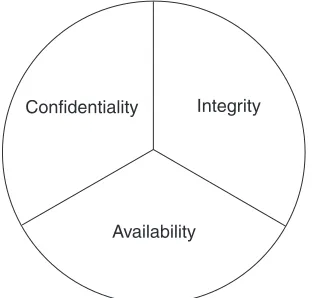
The discipline of information security (often shortened to info-security) has many differ-ent elemdiffer-ents, but they all boil down to the main goal of keeping your information safe. They can be distilled into three areas that are the foundation for all information security work: confidentiality, integrity, and availability. The acronym C.I.A. is often used to refer to them (no relation to the government agency). This triad represents the goals of informa-tion security efforts (see Figure 1.1). Each one requires different tools and methods and protects a different area or type of information.
Confidentiality
The confidentiality segment of info-security keeps your data from being viewed by unau-thorized individuals. This can be information that is confidential to your company, such as engineering plans, program code, secret recipes, financial information, or marketing plans. It can be customer information or top-secret government data. Confidentiality also refers to the need to keep information from prying eyes within your own company or organiza-tion. Obviously, you donât want all employees to be able to read the CEOâs e-mail or view the payroll files.
Figure 1.1 Principles of Information Security
Confidentiality
[image:26.612.120.278.501.650.2]The State of Computer Crime 5
There are multiple ways to protect your private data from getting out. The first way is to deny access to it in the first place. But sometimes that is not possible, as in the case of information going over the Internet. In that case, you have to use other tools, such as encryption, to hide and obscure your data during its journey.
Integrity
The integrity factor helps to ensure that information canât be changed or altered by un-authorized individuals. It also means that people who are un-authorized donât make changes without the proper approval or consent. This can be a subtle distinction. If a bank teller is secretly debiting someoneâs account and crediting another, that is an integrity problem. They are authorized to make account changes but they didnât have approval to make those ones. Also, data integrity means your data is properly synchronized across all your systems.
Availability
Having your information secure doesnât do you much good if you canât get to it. With denial of service attacks becoming more common, a major part of your info-security goals is not only keeping the bad guys from accessing your information, but making sure the right people can access it. Many computer criminals are just as satisfied to destroy your data or take your Web site offline. The availability element also includes preparing for disasters and being able to recover cleanly when they do occur.
In this example, Tom knew he had to apply each of these principles to completely secure his companyâs network. He found the software tools that would tackle each area. He was going to need all the help he could get. From the news and trade articles he had read, he knew the chilling statistics.
The State of Computer Crime
Computer crime has become an epidemic that affects every computer user from Fortune 500 CEO to the home user. According to the FBIâs annual study on computer crime, con-ducted in connection with the Computer Security Institute (CSI), over 90 percent of U.S. companies have fallen victim to some form of computer crime. Eighty percent of those surveyed had experienced some financial loss associated with those attacks. Losses of $445 million were attributed to computer crime in 2001, up from $337 million in 2000. And it is certain that many more attacks go unreported. Many companies do not want to publicize that their computer systems were broken into or compromised and therefore avoid going to the authorities because they fear bad publicity could hurt their stock prices or business, especially firms in industries like banking that rely on the public trust.
on routers, firewalls, and other noncomputer devices as these are less visible and offer fuller access to a corporate LAN if exploited. They had also predicted that the time between the release of a known exploit and tools to take advantage of it would shrink, giv-ing companies less time to respond to a potential threat. Sure enough, the average time from announcement of a security vulnerability and publishing exploit code has dropped from months to weeks. For example, the Blaster worm debuted a mere six weeks after the Microsoft Remote Procedure Call (RPC) vulnerabilities were discovered in early 2003.
The Computer Emergency Response Team (CERT), which is run jointly by Carnegie Mellon University and the federal government, tracks emerging threats and tries to warn companies of newly discovered exploits and security holes. They found that reports of computer security incidents more than doubled in 2001 over the previous year, from 21,756 to 52,658. They have been recording over 100 percent increase in attacks each year since 1998. In 2003, the number of incidents rose 70 percent even though the overall num-ber of new vulnerabilities, defined as weaknesses in hardware or software that allow unau-thorized entry or use, dropped (see Figure 1.2). This is due to the emergence of worms that spread quickly across the Internet affecting many systems with a single virus.
This exponential growth in both the number of attacks and the methods for making those attacks is a troubling trend as businesses connect their enterprises to the Internet in record numbers. Unfortunately, many businesses have chosen to stick their heads in the sand and ignore the information security problem. A common excuse for not properly securing their computer network is âWhy would a hacker come after my company? We donât have anything they want.â In years past, they would have been right. Old-school hackers generally only went after large institutions with data that was valuable to them or someone else.
Figure 1.2 CERT Incident and Vulnerability Graph
Growth of Computer Crime Incidents
0 20,000 40,000 60,000 80,000 100,000 120,000 140,000 160,000
2000 2001 2002 2003
5,000 10,000 15,000 20,000 25,000
V
ulner
abilities
Incidents Vulnerabilities
The State of Computer Crime 7
However, a sea change in the computer security equation has made everyone a target, even small business users. In fact, small- and medium-sized companies now comprise over 50 percent of the attacks reported by the FBI. This change has been caused by several fac-tors, which are described in the following sections.
The Advent of the Internet
When only a few networks were connected to the Internet, companies primarily had to worry about the risk of someone gaining access to a computer console or a virus being introduced by a floppy disk. Protecting against this kind of physical threat is something businesses have been doing for years. Locks on doors, alarm systems, and even armed guards can protect the computers and systems from physical access. Anti-virus software and passwords served as the only necessary technical security precaution for firms in the preâWorld Wide Web age.
With the Internet, hackers can attack from thousands of miles away and steal critical company assets, bypassing any and all physical barriers. They can then sink back into the anonymity that the Internet provides. They can come from foreign countries with no extra-dition treaties with the United States. They leave few clues as to who they are or even what they did. When you are connected to the Internet, you are literally no more than a few key-strokes away from every hacker, cracker, and neâer-do-well on the network. Password pro-tection and anti-virus software is not enough to keep intruders out of your virtual office.
Ubiquitous, Inexpensive Broadband
Not too long ago, dedicated Internet connections were the sole domain of large companies, educational institutions, and the government. Now, you can get DSL or cable modem access for your business or home use for less than $100 per month. Companies are getting online by the thousands, and this is a good thing overall for business. However, having a dedicated connection exposes them to more risk than their previous dial-up or private line connections. First of all, broadband is quite different from just dialing up via a modem from a network standpoint. Usually when you dial up, you are connected only while you are using it. With always-on broadband, hackers can work away, trying to get in, taking as much time as they need. They especially like working during the late night hours, when system administrators who might notice something awry have gone home.
authorities off their trail because all of the attacks are coming from unsuspecting victims, rather than the attackers themselves. These victim machines are known as zombies, and hackers have special software they can load to make these computers or servers âawakeâ on special commands that only they can issue. These programs are often very hard to find and eradicate because the host computer shows no ill effects while the zombie software is dormant. The one thing that the hacker hordes want is your bandwidth; they could gener-ally care less who you are.
Another reason hackers want to break into machines is to store their tools and other ill-gotten loot. These exploited machines are called storage lockers by the hackers, who often traffic in illicit files. The files might be pornography, pirated software or movies, or other hacker tools. Rather than store these on their own machines, where they might be found and used against them in court, they prefer to hide them on unsuspecting victimâs servers. A broadband connection is nice because they have lots of bandwidth for upload-ing and downloadupload-ing files. A small company is even better because it is likely they donât have a large IT staff monitoring their Internet connection and probably donât have very sophisticated security measures in place. They can give the hacked server IP address out to their buddies and use them for informal swap meets. Again, these kinds of intrusions are hard to find because the computer acts normally, although you might notice a slowdown in performance or download speeds while it is being used for these unauthorized activities.
Attack of the Script Kiddies
Info-Security Business Risks 9
Worms, Auto-rooters, and Other Malware
Finally, a major reason that the fundamental computer security scene has changed is that much hacking nowadays is automated and random. Script kiddies can use tools that scan IP addresses at random to look for weak or exploitable machines. They will often let these programs run all night, harvesting potential victims for them. There are packages, called auto-rooters, that gain ârootâ or admin privileges on a machine. These tools not only do the reconnaissance for them, but also actually carry out the act of breaking into the machine and placing their Trojan horse or other malicious software (malware) in place. The result is that with a single click of a mouse, someone with no more computer experi-ence than a six-year old can âownâ dozens of machines in a single evening.
With the advent of Internet worms like Nimda in 2001, even the human element has been taken out of the picture. These autonomous cousins to the computer virus roam the Internet, looking for computers with a certain set of security holes. When they find one, they insert themselves into that computer, perform whatever function they were pro-grammed to do, and then set that machine up to search for more victims. These automated hacking machines have infected far more networks than have human troublemakers. They also spread incredibly fast. It is estimated that the Code Red worm spread to over 300,000 servers within a few days of its release.
Info-Security Business Risks
So itâs clear that the playing field has changed. Before, few small companies really had to worry about their data security; now firms of all sizes are forced to spend time and money to worry about itâor risk the consequences. What are these risks? Few companies stop to think about all the possible risks that they are exposed to from an information security standpoint. You should understand all these risks, recognize which ones apply to your organization, and know what the value or dollar cost of each one is. This will help you make a business case for better computer security and justify the expenditures you need.
Data Loss
Denial of Service
Many of todayâs hackers are more high-tech vandals than computer geniuses. They take joy in knocking down servers or denying service for any reason, and sometimes for no rea-son at all. Often the denial of service is accidental or incidental to the hackerâs real goal. The Code Red and Nimda worms brought many networks to their knees just from trying to respond to all the attempts at infection. With the reliance of todayâs business on the Inter-net, this can be like shutting off the electricity. E-mail communication comes to a halt. A company Web site might go down. For a company that does a considerable amount of business over the Internet, this could mean a total stoppage of work.
How many companies know the hourly or daily cost to their business of a loss of Internet access? In certain industries or companies, it is very large due to their reliance on information technology. Few companies these days are without some dependence on Inter-net access. Depending on how much the business relies on the InterInter-net, a denial of service attack can either be a minor annoyance or a major blow to a companyâs business. Try cal-culating the cost for your company based on the number of employees unable to work, the number of orders processed online, and so on.
Embarrassment/Loss of Customers
Being offline can make a company look very bad. Not being able to communicate via e-mail or missing critical messages can be embarrassing at best. If their Web site is offline, customers will immediately begin asking questions. For public companies, it could mean a loss of stock value if the news gets out. Witness the drop in stock prices of Yahoo and Amazon after well-publicized denial of service attacks. Millions or even hundreds of mil-lions of dollars of stockholder value can disappear in an instant. For businesses like finan-cial intuitions or e-commerce companies that depend on people feeling safe about putting their financial information online, a single Web defacement can wipe out years of good-will. CD Universe, an online CD retailer who had their credit card database stolen, never recovered from that attack. Cloud Nine Communications, an ISP in England, was down for a week due to a concerted and lengthy denial of service attack and eventually had to close its doors. There are now gangs of hackers who go on mass Web site defacement binges, sometimes hitting hundreds of sites per night. The admission to these hacker clubs is racking up a certain number of Web site defacements. Do you want your Web site to become a notch on their scorecard?
Liability
Info-Security Business Risks 11
affected by legislation is healthcare. The Health Insurance Portability and Accountability Act of 1996 (HIPAA) requires any company dealing with patient information to properly secure that data from unauthorized use. The privacy provisions of the act affecting com-puter networks went into effect in 2003. There are civil and criminal penalties for viola-tors, so it is no longer just a money issue. Executives and managers could go to jail if found in violation.
Also, hackers are always looking for unsecured computers to launch their distributed denial of service attacks from. If your companyâs computers are used in such an attack and victims canât find the original perpetrator, they might come after you, charging that you were negligent in securing your network. After all, companies tend to have deeper pockets than most hackers.
Another area to be concerned about is liability for copyright violations. Copying of pirated movies, music, and software over the Internet has reached a fever pitch. Media companies are fed up and are starting to go after violators directly by tracking down the IP addresses of the downloaders and sending lawyers after them. InternetMovies.com, a Hawaii-based Web site, had their ISP service disconnected when their ISP was served with a lawsuit for alleged pirated files found on their network. Pirates who want to distribute their wares are resorting to storing them on third-party computers, often compromised servers on corporate networks. If your company is unknowingly running one of these servers or has such files stored on it, you could be disconnected from the Internet, liable for fines, or sued. Stories like these can often help you persuade reluctant executives to implement stricter personnel policies when it comes to information security, such as ban-ning file sharing software or implementing stronger password requirements.
Disclosure of Corporate Secrets and Data
It is hard to put a dollar value on this risk because it varies from firm to firm. For example, the value of the recipe for Coca-Cola or Colonel Sanderâs fried chicken could reach into the billions. At a smaller company, detailed plans for a proprietary device or formula may be invaluable. In some cases, much of the value of the company may be locked up in this important data. For example, a biotech company may have their research for their latest gene patents on their corporate network.
Customer lists are always valuable to competitors, especially in very competitive markets. Hewlett-Packard was served with a shareholder lawsuit after sensitive discus-sions between their executives were released to the public during a contentious merger.
Tampering with Records
Sometimes an intruder is not intent on stealing or destroying data but rather just making changes to existing records, hopefully without being detected. This can be one of the most difficult kinds of computer crime to detect because the systems keep functioning just as they were before. There is no system crash or performance drain to point to an intrusion. There is no defaced Web site to raise an alarm. Obviously, for banks and government agencies, this can be a very serious problem. But every company has to worry about some-one getting into the payroll system and changing pay amounts. Schools and universities have to deal with students trying to change grades. Often it is up to the accounting auditors to find evidence of foul play. However, with the right system security, these problems can be avoided up front.
Loss of Productivity
This is a much more subtle risk and often very hard to avoid. It can range from bandwidth being used by employees to download music or movies, thereby slowing down other workers, to employees surfing objectionable or nonwork Web sites. While these are employee policy issues, the system administrator is often called on to fix them with tech-nology such as content filters and firewalls. And many of these unauthorized programs, such as Napster, Kazaa, and instant messengers, in addition to being productivity drainers, can create security holes in a companyâs network defenses.
Given all these risks, you would think that companies would be falling over them-selves to put the proper protections in place. Yes, the largest companies have implemented significant defenses, but most small- and medium-sized companies have little in the way of network security. At best, a company will install a firewall and anti-virus software and consider that enough to protect them. Unfortunately, it is often not enough.
A whole industry has sprung up to offer solutions to these problems. There are com-mercial hardware and software solutions such as firewalls, intrusion detection systems, and vulnerability scanners. However, most of these products are priced so high that only larger firms can afford them. A simple firewall costs several thousands of dollars. Com-mercial intrusion detection systems and vulnerability testing solutions can run into the tens of thousands or more. In addition to the up-front costs, there are often yearly mainte-nance fees to support the software. And many of the software solutions require high-end computers to run on. They also often require pricey database software such as Oracle for reporting features. Given these costs, proper computer security is often seemingly out of reach for the small- and medium-sized firms. And as you have seen, the risk is just as great for these businesses as the Fortune 500, and perhaps even more so, since their financial resources to withstand such an attack will be much more limited than a large firm.
Open Source History 13
Open Source History
The open source software movement has its roots in the birth of the UNIX platform, which is why many people associate open source with UNIX and Linux systems, even though the concept has spread to just about every other computer operating system available. UNIX was invented by Bell Labs, which was then the research division of AT&T. AT&T subse-quently licensed the software to universities. Because AT&T was regulated, it wasnât able to go into business selling UNIX, so it gave the universities the source code to the operat-ing system, which was not normally done with commercial software. This was an after-thought, since AT&T didnât really think there was much commercial value to it at the time. Universities, being the breeding grounds for creative thought, immediately set about making their own additions and modifications to the original AT&T code. Some made only minor changes. Others, such as the University of California at Berkley, made so many modifications that they created a whole new branch of code. Soon the UNIX camp was split into two: the AT&T, or System V, code base used by many mainframe and mini-computer manufacturers, and the BSD code base, which spawned many of the BSD-based open source UNIX versions we have today. Linux was originally based on MINIX, a PC-based UNIX, which has System V roots.
The early open sourcers also had a philosophical split in the ranks. A programmer named Richard Stallman founded the Free Software Foundation (FSF), which advocated that all software should be open source. He developed a special license to provide for this called the General Public License (GPL). It offers authors some protection of their mate-rial from commercial exploitation, but still provides for the free transfer of the source code. Berkley had developed its own open source license earlier, the BSD license, which is less restrictive than the GPL and is used by the many BSD UNIX variants in the open source world.
These two licenses allowed programmers to fearlessly develop for the new UNIX platforms without worry of legal woes or having their work being used by another for commercial gain. This brought about the development of many of the applications that we use today on the Internet, as well as the underlying tools you donât hear as much about, such as the C++ compiler, Gcc, and many programming and scripting languages such as Python, Awk, Sed, Expect, and so on.
However, open source didnât really get its boost until the Internet came to prominence in the early 1990s. Before then, developers had to rely on dial-up networks and Bulletin Board Systems (BBSs) to communicate and transfer files back and forth. Networks such as USENET and DALnet sprung up to facilitate these many specialized forums. However, it was difficult and expensive to use these networks, and they often didnât cross interna-tional boundaries because of the high costs of dialing up to the BBSs.
and combined forces. Other splinter groups spun off from larger ones, confident that they could now find support for their endeavors.
Linux Enters the Scene
It was from this fertile field that open sourceâs largest success to date grew. Linus Torvalds was a struggling Finnish college student who had a knack for fiddling with his PC. He wanted to run a version of UNIX on it since that is what he used at the university. He bought MINIX, which was a simplified PC version of the UNIX operating system. He was frustrated by the limitations in MINIX, particularly in the area of terminal emulation, since he needed to connect to the school to do his work. So what became the fastest growing operating system in history started out as a project to create a terminal emulation program for his PC.
By the time he finished with his program and posted it to some USENET news groups, people began suggesting add-ons and improvements. At that point, the nucleus of what is today a multinational effort, thousands of people strong, was formed. Within six months he had a bare-bones operating system. It didnât do much, but with dozens of pro-grammers contributing to the body of code, it didnât take long for this âscience projectâ to turn into what we know as the open source operating system called Linux.
Linux is a testament to all that is good about open source. It starts with someone wanting to improve on something that already exists or create something totally new. If it is any good, momentum picks up and pretty soon you have something that would take a commercial company years and millions of dollars to create. Yet it didnât cost a dime (unless you count the thousands of hours invested). Because of this, it can be offered free of charge. This allows it to spread even farther and attract even more developers. And the cycle continues. It is a true meritocracy, where only the good code and good programs sur-vive.
However, this is not to say that there is no commercial motive or opportunity in open source. Linus himself has made quite a bit of money by his efforts, though he would be the first to tell you that was never his intention. Many companies have sprung up around Linux to either support it or to build hardware or software around it. RedHat and Turbo Linux are just a few of the companies that have significant revenues and market values (albeit down from their late 1990s heights). Even companies that were known as propri-etary software powerhouses, such as IBM, have embraced Linux as a way to sell more of their hardware and services.
Open Source Advantages 15
Open Source Advantages
You and your company can use open source both to cut costs and improve your security. The following sections touch on the myriad of reasons why open source security tools might make sense for you and your company.
Cost
Itâs hard to beat free! Although open source does not necessarily always mean free, most open source software is available at no charge. The most common open source license is the GNU GPL license, which is a free software license. Other open source software might be shareware or even charge up front, like the commercial servers available from RedHat. But either way, open source is usually available for a fraction of the cost of commercial alternatives. This helps greatly in justifying new security projects within your company. When all that is needed is a little of your time and maybe a machine to run the software, it is a lot easier to get approval for a new solution. In fact, depending on your authority level, you may be able to go ahead and implement it without having to make a business case for it. If you want to take it a step further, after successful installation, you can bring the results to your boss and demonstrate that you saved the company thousands of dollars while making the network more secure (and that may improve your job security!).
Extendability
By definition, open source software is modifiable and extendable, assuming you have the programming skills. Many open source programs have scripting languages built in so that you can write small add-on modules for them without having to be a programming guru. Nessus, the open source vulnerability scanner does this with their NASL scripting lan-guage (this is demonstrated later in this book, and youâll learn how to write some custom security tests too). Snort, the open source intrusion detection system mentioned earlier, lets you write your own alert definitions. This means that if there is something specific to your company that you need to test for, you can easily write a custom script to look for it. For example, if you have a database file called customer.mdb that is specific to your com-pany and that should only be used by certain departments, you could write a Snort rule that looks for that file traversing the network and alerts you.
And of course if you are a real programming guru, you can get involved in contribut-ing to the core code and gain both valuable experience and recognition within the open source community. This could also be helpful in terms of your job marketability.
Security
on the security premise of obfuscationâkeeping the design of your product secret. How-ever, this logic breaks down when you look at the facts. Windows is the largest proprietary software product in the world, yet the number of security holes announced in the Windows platforms is about the same as those found in Linux and other open source platforms. The truth is that whether the source code is open or closed doesnât make programmers write more secure programs.
Independence
Discovery and remediation of security issues in software can be much faster with open source programs. Commercial companies often have strong monetary motivations for not admitting to security flaws in their products. Multiple security holes found in a product, especially if it is a security product, could hurt sales to new customers. If it is a publicly traded company, the stock price could fall. Additionally, developing security patches and distributing them to customers are expensive endeavors, ones that usually donât generate any revenue. So getting a company to confirm a security issue with its software can be a major effort. This means days or weeks can go by while customer systems are still vulner-able. Frustration with this process has prompted some security researchers to adopt a policy of releasing new security vulnerabilities directly to the public rather than privately to the company.
Once a security hole is known to the public, a company will often go through a com-plicated development and testing process before releasing a patch to the public, ensuring that there arenât any liability issues and that the patch can be released for all platforms at once. So more time may go by while you have a known security hole that hackers can exploit.
Open source software projects have no such limitations. Security patches are usually available within hours or days, not weeks. And of course you donât have to wait for an official patch; if you understand the code well enough, you can write your own or design a workaround while you wait for one.
The general thinking in the open source community is that the best overall security comes from a critical review by a large body of people who donât have a vested interest in not finding any holes. This is the same measure of quality that cryptographic researchers apply to their work. The open source concept, while not guarantying that you will get more secure software, means you donât have to take a companyâs word that a product is secure, and then wait for them to come up with a solution for any security holes.
User Support
Open Source Advantages 17
will probably be shunted into a call queue. When