on e-Learning
Research Article
An Android Application for Animated Lecture Retrieval
in E-Learning
Osikoya Damilola
1and Adeleke Oluwalani
21
University of Witwatersrand Johannesburg, South Africa 2
University of Witwatersrand Johannesburg, South Africa
Abstract
The use of mobile devices in content delivery has made instructional learning more compact and convenient for learners and tutors. This is due to recent development in mobile technology and its use in supporting educational and instructional activities. The efficacy of creating instructional contents still serves as a major confrontation for educators at all institutions in all spheres of education. The main objective of this project is to integrate the use of mobile technology with instructional content retrieval to improve teaching and learning. In this paper, we have developed a mobile application for content retrieval in mobile learning. This application is linked to a repository where instructional contents reside. This approach would help students access instructional contents anywhere away from their regular learning environment using their mobile device. Students would also have access to an E-learning website whose database would also serve as a repository to the mobile application. The effectiveness of this work is to provide an ease of learning for students by offering a tool that would help access course materials from anywhere. Students in the scientific domain would also have the opportunity to understand abstract concepts on their own by having access scientific animated contents on their mobile devices as well as on the E-learning website.
Keywords: Mobile Devices, Mobile Learning, E-Learning, Scientific Animation, Instructional Content, Repository.
Received on 02 December 2012; accepted on 12 February 2013, published on 24 October 2013
Copyright © 2013 Osikoya and Oluwalani., licensed to ICST. This is an open access article distributed under the terms of the Creative Commons Attribution licence (http://creativecommons.org/licenses/by/3.0/), which permits unlimited use, distribution and reproduction in any medium so long as the original work is properly cited.
doi: 10.4108/ el.1.3.e4
Introduction
With the rapid development of network and communication technology, E-learning developers have had the opportunity to provide a better learning system to help tutors and students disseminate and acquire knowledge from anywhere at any time. The approval of mobile and electronic learning is widely due to the increase in learning technologies such as WebCT, Blackboard, and UniLearn etc.
Mobile devices such as tablets, phones and interactive mp3 players are either used by business professionals in keeping, organizing appointments and
better ways of learning, making students find it easier to access learning materials and do online tests, discussions and even checking of results, Hashim et al. (2011).
There are presently a lot of mobile application development done on different platforms in the mo- bile world. These platform according to Potts et al. (2011) include; Google Android, Palm OS, Apple iOS, and Windows mobile. This paper focuses on the development of Android learning Application for content retrieval. The application provides the students an opportunity to access their course works from anywhere. When an application is launched, course contents can be accessed by searching for lecture materials with their names. A list of courses are presented from which can be downloaded on the mobile device and stored on the local machine to conserve bandwidth. This means students don’t have to access the internet to get that particular content. We also created a website where tutors and learners can access. Tutors are able upload and download lecture contents while learners can only download and view instructional materials. The android App is currently available for download on Android Marketplace, while the website is already hosted and ready for use.
1.1 E-Learning
E-learning is simply defined as, Stockley (2003), “The delivery of a learning or education program by electronic means. It involves the use of a computer or electronic device (e.g. A mobile phone) to for effective knowledge delivery“. E-learning offers a wide range of advantages by Agarwal et al. (2004); reducing training time hence saving overhead c o s t on training, improving consistency in learning and speeding information delivery across multiple platforms and destinations etc.
Knowledge i s simply w h at p e o p l e know. To promote knowledge, an intermediary such as Internet, Personal Digital Assistant (PDA), mobile phones and laptops needs to be created. With the increase in Web technologies and multimedia applications, E-learning has come forward to become the new model for knowledge acquisition. The web technology offers content delivery, collaboration, easy accessibility, socialization and customized learning. E-learning is student centric as it extends teaching and learning beyond the drawbacks of the classroom. It does not only offer content presentation, but it also offers a system that facilitates pedagogical methods, Leung & Chan (2007). Among other uses, E-learning according to Trifonova (2003) offers: Resource sharing, specific services e.g. content management services and knowledge management, common
services e.g. user management, collaboration (chats, blogs and messaging), and event management etc.
As much as E-learning cannot replace classroom learning, it offers quick training to learners and makes sure its goal is achieved by technologically offering help to students to find their way within the knowledge society. The successful implementation of E-learning d epends its design and implementation, and how the end user can learn, acquire skills and access useful information with it Agarwal et al. (2004).
1.2 M-Learning
Mobile device technology is the latest technology pinned to improve and augment learning Connelly et al. (2009). Its small size and portability has given it an advantage over other devices such as PC‘s and laptops. Because of its easily accessible built-in applications, it is often used at anytime and anywhere including sitting in the classroom, commuting in buses and playing with friends, which has also given it an added advantage, Connelly et al. (2009). Examples of mobile learning application include: having a class group to enable students interact and solve pending problems, having a context aware application that allows tourist to easily have their way through a new environment, and having an application that allows students to browse through their course content, upload it on their phones and go through them even before lectures.
Research has shown that users who use sophisticated smartphones especially those equipped with network connectivity for browsing and downloading applications have a potential to produce Internet related habit Oulasvirta et al. (2011). On the average, users check their phone 34 times daily Cohen (2011) not because it is necessary but because it has become habitual. The application of mobile phones in education would help to gain educational information and access educational resources while on the move.
1.2.1 M-Learning Framework
Mobile learning is developed on three important levels. They are: according to Mostakhdemin-Hosseini & Tuimala ( 2005) Mobile usability, wireless technology and E-learning s y s t e m. Mobile usability
f o c u s e s identifying the requirements of the mobile device and providing a good quality o f service for each individual device.
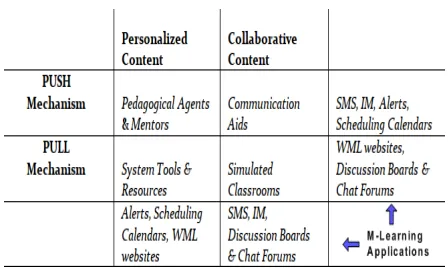
Figure 1: Mobile Learning System
The second level is mobile connectivity which according to, Motiwalla (2007), focuses on a blend of integration between application and technology. Wireless technologies depend on network connection. Networks often provide basic services needed for mobile devices to execute contents. It allows students to access school works and assignments through a wireless connection. Wireless devices allow students to interact with other students, tutors, and course materials from anywhere, provided there is a wireless connection. Benefits of mobile connectivity include: User control, real-time collaboration and interactivity and lastly, customer orientation which usually increases productivity, BenMoussa (2003).
A major disadvantage of network connection is the cost of connection as users of mobile phones need to stay online to stream instructional contents or access their educational needs.
The last level is E-learning. As much as it cannot r e p l a c e classroom learning, it offers quick training to learners and makes sure its goals are achieved by technologically offering help to students to find their way within the knowledge society. E-learning methods are used in designing applications and integrate constructive learning with theories of conversation into mobile learning settings, M o t i w a l l a (2007).
The framework presented above integrates the second and third level of mobile learning development into application development in E-learning. Content delivered according to Motiwalla (2007) is functional when personalized and collaborative with respect to the ideas of the constructive and conversational models. The framework uses these functional learning approaches to offer a better mobile learning environment. This framework provides; an interactive environment, a content delivery system, a report system and a submission system (Bowman & Bowman (1998), Gleason (1995), Karayan & Crowe (1997) in Motiwalla (2007)).
The remainder of the paper is organized as follows: in Section 2, we will we give a brief literature on the background and related works, in section 3 we describe the system environment which include the web and android, while in section 4 we focus on the implementation of this work. in section 5, we present content animation in android. And finally, in Section 6 we present a conclusion on our work and describe future works associated with it.
2 Related Work
Mobile applications are developed for different purposes and by different developers. They are quickly becoming a tradition in the life of almost every student and teacher. Developing applications for content retrieval can be useful for tutors and learners, especially in studying and revising lecture notes for tests and examination purposes. Mobile devices can develop learners by offering a student-device relationship and providing access to current mobile technology which helps them keep developing throughout their lives Roschelle et al. (2007).
The University of Massachusetts, Ssebanakitta et al. (2010), developed a content delivery system for delivering presentations through streaming and downloads. The system is also used for automatically generating indexed presentations that include videos and simple PDF slide presentations. Hashim et al. (2011), took a study at the Universiti Teknologi PETRONAS (UTP) with the design of a Mobile System Analysis and Design (MOSAD) with topics from System Analysis and Design to answer quiz questions. Their end results indicated that MOSAD was efficient, and justifies the use of mobile technology as a revision tool for the higher education students.
Campanella (2012), developed a mobile learning application for android using web service. His work involves using Web services for mobile application for communication between mobile client and server. Chang et al. (2008) discussed content adaptation tool reproducing high quality learning content for specific hand-held devices. While Potts et al. (2011) developed android and IOS application for teaching Electrical Engineering Courses, Arai & Tolle (2011), proposed a module based content adaptation process for adapting composite E-learning, created by Microsoft Producer tools for content delivery for learners on mobile devices.
In this paper, we have developed a mobile android learning application for content retrieval in learning. We have also developed a repository w h e r e contents are stored and accessed from, and provided an avenue where scientific contents can be accessed in form of animation in order to help science students better understand abstract concepts. With the proliferation of mobile devices, developing different applications for content download would be a great task. Thus we have decided to develop a single application that works across a single platform t o increase the interaction between s tud en ts and content creators (instructors).
3 System Environment
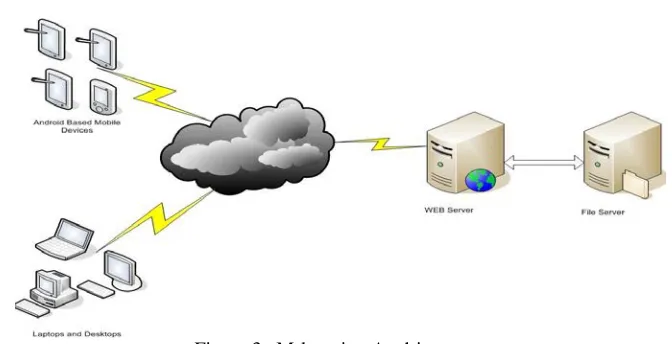
The system consists of a web server, a file server and a mobile client application, which are illustrated in figure 3 below.
3.1 System Topology
Figure 3: M-learning Architecture
And asynchronous connection between browser and http server (AJAX). LAMP (Linux, A p ach e http server, MySQL and PHP) framework is used as our web server. With the SQL database, complex searches are performed quickly in a large scale of data. The server manages user account. each time the users log in, they are authenticated and changes made are synchronized. The server also ensures that the system is secured and makes sure that all unauthorized access is declined.
3.2 Web Services and File S e r v e r
The w e b based system i s constructed for administrators and i n s t r u c t o r s to provide i n f o r m a t i o n and assignments to each learner. The whole system is designed in PHP language. JavaScript platform is used to develop rich client interface
3.3 Android Based Environment
The application built in this project is based on android Eclair to Icecream Sandwich. It is an open source model designed on Linux platform. Supported platform include ARM, MIPS, and x86 The operating system is designed on a hoard of software environments including; a Java based framework API‘s used by its core applications. Android uses C
and C + + libraries which include; media libraries, surface manager, LibWebCore, SG, FreeType, SQLite and 3D graphics API. The system uses XML parsing to interface between the android and Web server. It also uses Dalvik VM which depends on the Linux kernel for threading and low-level memory management.
The system supports a large base of heterogeneous a n d and ro id dependent devices (Smartphones and Tablets). The interface automatically readjusts itself with its new environment. The user is able to zoom, re-adjust and navigate t h r o u g h in an easy manner. Updates a r e also done automatically to allow the addition o f new functionalities and added features.
4 System Implementation
1. Students/Learners: They are allowed to login either from the internet or from the android application. They can then start to search for instructional contents using the text box provided by the website or the Application.
2. Tutor: The tutor can log in and also upload instructional contents by entering the detail. The form will request t h e tutor to enter details associated with the course. The tutor will also be able to perform a search by entering a keyword in the search box and open up contents by clicking on the search results similar to student.
3. Administrator: The administrator would be in charge o f the r u n n i n g o f the w h o l e system. He
is in charge of configuration a n d monitoring of the contents. He can add/delete the course and corresponding subject from the admin panel, and can also approve users into the system.
4.1 Content Retrieval Process
The android application (Educontent) will enable the users to sign in and search for instructional contents by entering a search term. It is available on Google Play on https: //play.google.com/store/search?q = educontent. Users are able to download contents by clicking on the search results on the device. Figure 4 gives a flowchart of how content retrieval i s achieved with this system.
Figure 4: Content Retrieval Process
4.1.1 Retrieval from Website
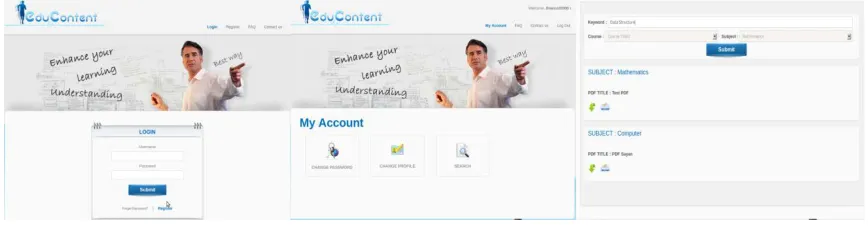
Students and tutors have the ability to retrieve contents from the web. Once they are registered and registration is confirmed, they can login with their
account, m o d i f y their profile, and search for subjects which they are interested in. This process is shown in figure 5 below.
EAI Endorsed Transactions on e-Learning 01 -12 2013 | Volume 01 | Issue 3 | e4 4.1.2 Retrival from Android Application
With the android application, users are able to login on their android device. All users including the Administrator
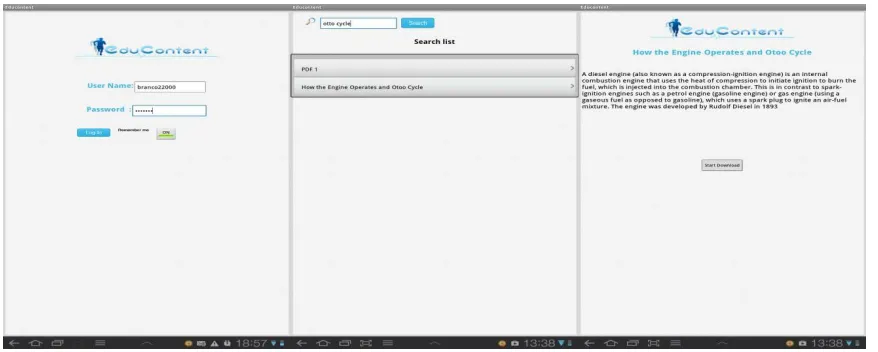
Can login as long as they are registered. The toogle ‘On’ and ‘Off’ are used to store user input on the phone memory. When the user logs in, the system authenticates the user. If the user‘s information is valid, the user is able to search for contents. If the user information is not valid, the user is asked to register or re-enter lo g in details.
Figure 6: User login, modify and search with the Android Application
To search for contents, the user would type a keyword in a textfield and click the search button. If the keyword matches the information stored in the database, a list of files with corresponding titles comes up. Once the user clicks on the search result, the system redirects to the next screen where the user can download desired contents. Once the download is the user can store the content on the device memory, or on a memory card.
4.2 Content Animation
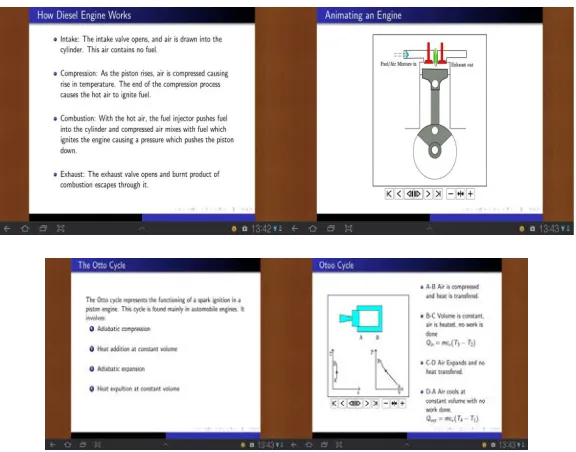
This section describes content animation on an android device. After lecture notes have been downloaded, users can use a specific viewer which we have designed to view animated lecture notes.
Figure 7: Animated Engine and Otoo Cycle
Because students also have a close relationship with their mobile devices i.e. (playing games, S M S and social networking), there is a tendency that they would be more interested in a collaborative education using their mobile devices. This in turn would help to increase their rate of assimilation and bring them closer to their studies. Also because animation is a better visual and integrative way of learning, what students see tend to be retained in their memory as compared to what is just in a textual form.
5 Conclusion
Developing Mobile learning application is one of the main focal point in mobile application development. It creates a link between technology and education. With the evolving technology of mobile phones and other mobile devices, the use of mobile learning is being established in the educational practice. Learners are beginning to understand the value of time. Wireless technologies are helping to access materials online from anywhere and its integration with education is helping to develop mobile learning.
In this paper, we have presented an android based application for content retrieval. We have also developed a repository for content storage. This system gives a room for creating and managing learning objects and instructional contents. It also provides science students an access to scientific
contents in the form of animations in a PDF format to help them understand abstract scientific concepts.
In future, we hope to research into a real time content delivery in a seamless environment, where students can use mobile devices for content retrieval and real time access while moving from one form of network to another without any interruption in content delivery. We also hope to develop a platform that would integrate technologies such as WebCT, Blackboard, and UniLearn etc. with mobile applications for ease of access by students.
References
[1] Agarwal, R., Deo, A., Das, S. et al. (2004), ‘Intelligent agents in E-learning’, ACM SIGSOFT Software Engineering Notes 29(2).
[2] Ally, M. (2009), Mobile Learning Transforming the Delivery of Education and Training, AU Press, 1200, 10011 – 109 Street Edmonton, AB T5J 3S8.
[3] Arai, K. & Tolle, H. (2011), ‘Module Based Content Adaptation of Composite E-Learning Content for Delivering to Mobile Learners’, International Journal of Computer Theory and Engineering 3(3).
[4] BenMoussa, C. (2003), ‘Workers on the move: new opportunities through mobile commerce’, IADIS International Conference e-Society pp. 251–256.
to group work’, Specialists in Group Work 23, 428– 445.
[6] Campanella, P. (2012), ‘Mobile Learning Application for Android using Web Service’, Society for Infor- mation and Technology Education .
[7] Chang, H.-P., Hung, J. C., Wang, C.-C., Weng, M.-T., Shih, T. K., Lee, C.-Y. et al. (2008), ‘A Learning Content Adaptation Tool with Templates for Different Handhelds’, 22nd International Conference on Advanced Information Networking and Applications pp. 457–463.
[8] Cohen, E. (2011), ‘Do you obsessively check your smartphone?’, Empowered Patient .
[9] Connelly, K., Rogers, Y., Hazlewood, W. & Tedesco, L. (2009), ‘Enhancing learning: a study of how mobile devices can facilitate sensemaking’, Pers Ubiquit Comput 14(1), 11–124.
[10] Gleason, N. A. (1995), ‘A new approach to disordered eating: using an electronic bulletin board to confront social pressure on body image’, Journal of American College Health 44, 78–80.
[11] Hashim, A. S., Ahmad, W. F. W. & Ahmad, R. (2011), Mobile Learning Course Content Application as a Revision Tool: The Effectiveness and Usability, Vol. 2, pp. 184–187.
[12] Karayan, S. S. & Crowe, J. A. (1997), ‘Student perspectives of electronic discussion groups’, T.H.E. Journal 24, 69–71.
[13] Leung, C.-H. & Chan, Y.-Y. (2007), ‘Knowledge Management System for Electronic Learning of IT Skills’, SIGITE’07 .
[14] Mostakhdemin-Hosseini, A. & Tuimala, J. (2005), ‘Mobile Learning Framework’, Mobile learning frame- work. In Proceedings of the IADIS International Conference on Mobile Learning .
[15] Motiwalla, L. F. (2007), ‘Mobile learning: a framework and evaluation’, Computers & Education 49(3), 581–596.
[16] Oulasvirta, A., Rattenbury, T., Raita, E. & Ma, L. (2011), ‘Habits make smartphone use more pervasive’, Pers Ubiquit Comput pp. 1–10.
[17] Potts, J., Nick Moore & Sukittanon, S. (2011), Developing Mobile Learning Applications for Electrical Engineering Courses, in ‘Proc. IEEE Southeastcon’, pp. 293–296.
[18] Roschelle, J., Patton, C. & Tatar, D. (2007)), ‘Designing networked handheld devices to enhance school learning.’, Advances in Computers 70, 1–60. [19] Ssebanakitta, E., Dickson, P. & Adrion, W. (2010),
‘MANIC content delivery in a mobile application’, Frontiers in Education Conference 10.
[20] Stockley, D. (2003), ‘E-learning Definition and Explanation (Elearning, Online Training, Online Learn- ing)’, http://derekstockley.com.au/elearning-definition.html.