GSJ: Volume 6, Issue 12, December 2018, Online: ISSN 2320-9186
www.globalscientificjournal.com
DESIGN
AND
IMPLEMENTATION
OF
AN
ONLINE
STUDENT
ROOM
AVAILABILITY
SYSTEM
Mohammed Shettima, Abubakar Sani Jato, Abubakar Mohammed, Umar Tijjani Ali, Idi Mohammed
———————————————
• Author Mohammed Shettima is currently a lecturer III of Computer Science Department at Mai Idriss Alooma Polytechnic (MIAPOLY), Geidam Yobe State Nigeria, PH-+2348085328386. E-mail: [email protected]
• Co-Author Abubakar Sani Jato is currently Assistant Lecturer at (MIAPOLY). PH-+2347061614828. E-mail: [email protected]
• Co-Author Abubakar Mohammed is currently Assistant Lecturer at (MIAPOLY). PH-+2348030626149. E-mail: [email protected]
• Co-Author Umar Tijjani Ali is currently a Lecturer III at (MIAPOLY). PH-+2348020866574. E-mail: [email protected]
• Co-Author Idi Mohammed is currently Lecturer at YSU). PH-+2347030615772. E-mail: [email protected]
KeyWords
Computerised reservation system; Internet; PHP/MySQL, HTML; Java Script; Waterfall Model
ABSTRACT
The advent of computerised reservation system (CRS) has influenced the way organisations used to store and retrieve
information and conduct transaction related to reservation of rooms, air ticket, train ticket and most types of
transportation. Organizations like Hotels transact businesses and conduct their room reservation with the help of an
internet. However, computerised reservation system is not widely used in most parts of developing countries. A
computerised reservation system has been designed to improve room reservation system that gives students access to
reserve a room. The main aim of this report is to develop an online student room availability system, designed in context
of a computerised reservation system. The reservation system has been implemented using PHP/MySQL coupled with
HTML and JAVA scripts. PHP was used to connect the reservation web pages and the reservation database. The linear
life cycle model (waterfall model), used to plan the activities and stages of the report has helped to provide a detailed
and well documented report. The final artefact was tested and evaluated to assess its achievements against its
Introduction
A computerised reservation system (CRS) plays a vital role both in IT and business transactions. CRS is a computerised system used to store and retrieve information and conduct transaction related to reservation of rooms, air ticket, train ticket and most types of transportation Pizam (2005, p.91). All reports produced by the CRS are enhanced with the help of a database, which is used to store, retrieve and also update data that are stored within the database. Majority of colleges in West African countries like Nigeria are not using an online reservation system to manage and maintain day-to-day activities like room reservation. A reservation system is not developed in context to a CRS in most of Nigerian colleges. Most of the colleges are using a spread sheet package to record and retrieve reservation information. Most student information in the campus department are stored using spread sheet package, the student information includes that includes student details like Names, address, contact, health status, and halls of residence. However, this system is not sufficient to maintain records or retrieve them because there is increase in number of students that leads to staff workload, back log in getting the records inputted, unauthorised access to records, students are not assigned rooms of their choice.
Pizam (2005, p.91) highlights some major benefits of CRS to individual organisations and IT in general, which include: flexible booking capability, complete and detailed reservation system, easy to retrieve and store records and over booking management that yields the functionality and integrity of the system.
Literature Review
Computer Reservation Systems (CRS)
Reservation systems is a computerised system used to store and retrieve information and conduct transaction related to reservation of rooms, air ticket, train ticket and most types of transportation. CRS is specifically used for inventory management in an organisation for their daily routine transactions that relates to room booking, airline, and other hospitality management organisations. However, an improved and sophisticated CRS configuration and features offers many organisations an incorporated control measures and ideas for numerous procedures like managing business transactions, reservations, customer courtesy control and services and some attributes of marketing practice (Sigala, Lockwood and Jones 2001). CRS plays a vital role both in IT and business transactions- Pizam (2005, p.91) suggested that there are major benefits of CRS, which include: the flexibility of inventory booking capability, complete and detailed reservation system, modifications and cancelation of confirmation and lastly, over booking management that yields the functionality and integrity of the system. In virtue of room reservation system, O’Connor also suggested some benefits of CRS; they include:
Improving bulk control and operating competence Simplify a centralised reservation record management Offer the detailed statistics of the last room booked Better database access for management purposes Extensive management report
Enhance handling of group booking
Computerised reservation system is not yet stable in developing countries like Nigeria. Previous analysis shows that, most of the schools in Nigeria are not quite familiar with a computerised reservation system (online). Database is not yet developed in such context, schools in Nigeria mostly rely on keeping room reservation details
for students living in the halls of residence using a spread sheet package and all the student information is stored within the computer system. Secondly, the system is not efficient enough to manage and control the data,
because the number of persons (administrative staff) maintaining the records are limited and records can only be accessed one at a time. However, another issue is that of unauthorised access and staff bias in terms of room
allocation that leads to an inappropriate use of data (misuse) or alteration (back log). Furthermore, the introduction of an online reservation system will enhance flexible boking capability, improve the database
accessibility for management and provide accessible and available details of the last room reserved
In respect to data integrity and security, Date(2004, P.505) differentiates the distinct between the two, he
lamented that, security simply means protecting the data against unauthorised users and integrity simply means protecting data against authorised users. In other words, security means making sure users are allowed to do
things they are trying to do; and integrity means making sure the things user is trying to do is correct.
Methodology
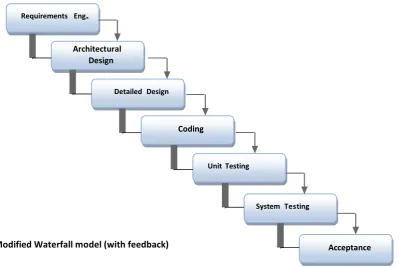
Software process model is a framework used to organise, plan and manage software development processes. In addition, Sommerville (2000) describes software process models as an abstract illustration of a system development life cycle. Furthermore, software process model is a method, plan, and process used for the control of software development activities, which comprises of the planning, analysis, design, coding, testing and maintenance of software. However, each available model or framework is not necessary suitable for a specific kind of projects it is based on various technical and organisational project and team consideration. There are many software process model used in the development of software which includes waterfall model, spiral model, agile model, prototyping model and unified model.
Fig. 1: Modified Waterfall model (with feedback)
Requirements Eng..
Architectural Design
System Testing Detailed Design
Coding
Unit Testing
Chosen Process Model
Waterfall model is the models that best suites this project because the following reasons The objectives and solutions to the problems are clearly stated and well understood Project requirements is comprehensive, clear and consistent
Project requirements is not subjected to any changes (stable) There is no pressure for immediate implementation
The project requires an accurate documentation of each phase
The requirements will continuously be verified, and validated to ensure its correctness and it meets user requirements
A waterfall type model shall be adhered to, whilst creating each different section of the project which as mentioned above will be shown to the client. Each stage will require requirements to be defined followed by the design, implementation, and testing. Each step will be completed fully before continuing to the next step, as described in the waterfall model. As mentioned earlier, using the waterfall model prevents the addition of extra features which may have been thought of during a step after the requirements. This is good for this project as it prevents adding any time consuming additions to the system.
Finally, waterfall model places a considerable emphasis on a careful analysis before system is actually built (Vliet 2008, P.50).
Requirement Specification for the New System
This section describes the requirement for the project based on the analysis done. It provides an overview of the generic requirements, the users (students) requirement and the staff (campus admin) requirements and lastly a detailed requirement specification document will be produced.
General Requirements:
The online reservation system should be able to compete and inherit some basic functionalities of a reservation system web site
To develop a system that provides good usability and in accordance with user interface design principles, rules and guidelines.
Developed using software that is compatible with various operating systems and are platform independent
User (student) requirement:
Registration web page Login information web page Updating information web page Room availability page
Reservation web page
Staff (campus admin) requirement:
User details administration web page Admin registration
Change account detail (staff)
Conceptual design of the system
The conceptual design of the CBT system was carried out using the data flow diagram, the use cases, flow chart and the entity-relationship diagram.
Data Flow Diagram (DFD DATA DESIGN)
Introduction to New System
Based on the underlining problems described in the requirement analysis, the proposed new system will bring about a rapid change to both the student and the campus administration. These changes include:
1. The new system will help student to reserve a room online without physically been present at the hostel or seeing any body. So the issue of delay does not exist.
2. The new system will also have a database where all the student's reservation records will be kept secured. Also with this database any time a particular file or information is needed it is very easy to retrieve it from the database without searching all the files or data in the database which in return reduces staff workload
3. The server which is responsible for managing the student’s data have number of disk to prevent damage and system recovery are going to be made, while in the current system data can lost easily by any means.
The new system will provide an opportunity for students to access the reservation system via the internet and make reservation anywhere. The introduction of the new online reservation system will provide ease of access and allow student to check the availability of rooms before reserving. Also, the admin staff will have ease of access to the control, manage and maintain the student reservation records. Students will also have access to the services rendered in each of the halls of residence, including study suites and recreational facilities.
This research is aimed at solving several problems with the current system by proposing an online reservation system to allow student to register and book rooms in the school’s various campuses. The diagram below shows the context diagram (DFD), for the flow of data, the process involved and the entities involved.
Figure 3: Process flow of the new system using the DFD (context level diagram)
that, DFD also represents a logical model that shows what the system does, not how it does it.
Payment detail
Room
Student
Campus
Staff
Accounts
Payment
Student details
Confirmation
Receipt
Use Case Diagram (UNIFIED MODELLING LANUGUAGE)
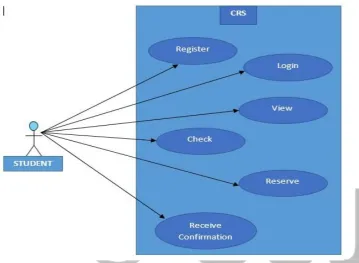
The use case diagram analyses the requirements analysis outlined in the indicating the main activities of users (actors) of the online reservation system. A use case diagram represents the boundaries of the system and the scope between the actors and the system, Pressman [9]. Also, it shows the system’s scope, describing the processes and the associations that lie between the system and the user while interacting with the system. The diagram below shows the use case that represents the system scope of the online reservation system.
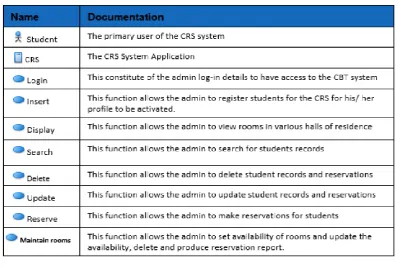
USE CASE DEFINITIONS
Fig. 4: Use Case Diagram for Online Student Room Availability System (Student)
Fig 5. Use Case Diagram for Online Student Room Availability System (System Admin) USE CASE DEFINITIONS
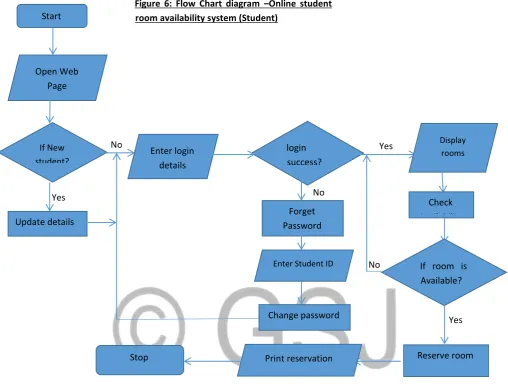
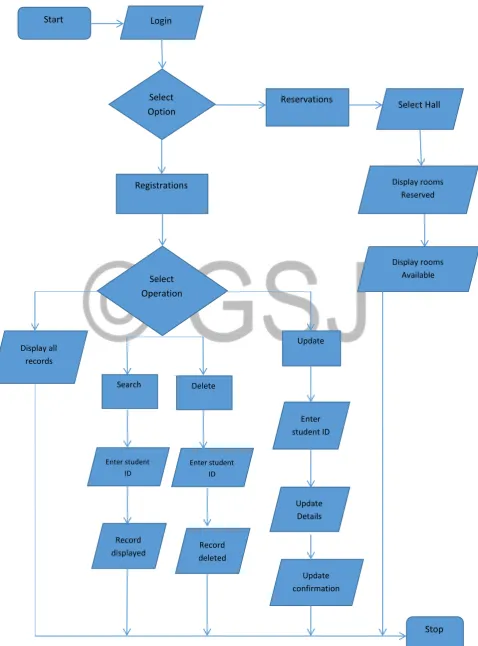
Flow chart (PROCEDURAL DESIGN)
Also referred to as the procedural design, flow chart transforms the structural components of the system into a procedural description; ideally, the procedural specification can be stated in a natural language like English using the program design language also referred to as the pseudo code, the graphical design notation and tabular design notation. But, the most widely used notation the graphical design using the program flow chart. Flow chart is a graphical representation of the program logic in solving a problem that describes the program based on the three structured constructs which includes sequence, selection/ repetition and iteration used in the coding of the artefact.
4.2.2 USE CASE DIAGRAM FOR STUDENT CLASS
Yes No
Yes Start
Open Web Page
If New student?
Update details
Enter login details
login success?
Forget Password
Enter Student ID
Change password
Display rooms
Check Availability
If room is Available?
Reserve room Print reservation
details Stop
Yes No
No
Figure 7: Flow Chart diagram –Online student room availability system (Campus Admin)
Start Login
Select Option
Reservations Select Hall
Registrations
Select Operation
Display rooms Available Display rooms
Reserved
Search Delete Display all
records
Update
Enter student ID
Update Details
Update confirmation
Enter student ID
Enter student ID
Record
displayed Record deleted
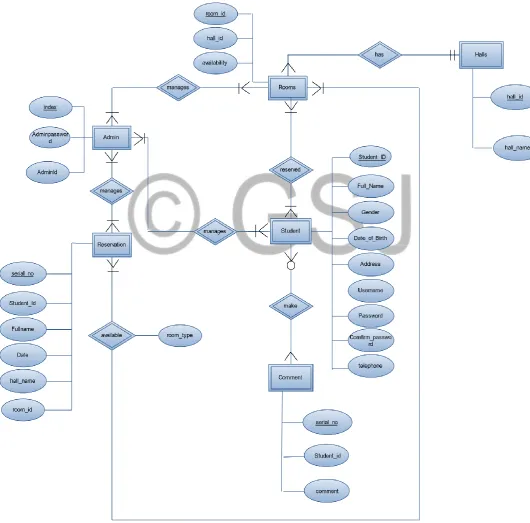
Database Design
This section describes the actual model of the database, it provides a detailed description of the logical structure used to store data. The database design model used is the entity relationship model known as the Entity Relationship Diagram (ERD). ERD is a diagram that helps to describe the database more efficiently by describing the entities involved and the relationship between those entities (tables) in the database with their various attributes and cardinalities. ERD helps to describe how the database actually works with all the interactions and data flows. The Diagram below shows the ERD of the online student room availability system.
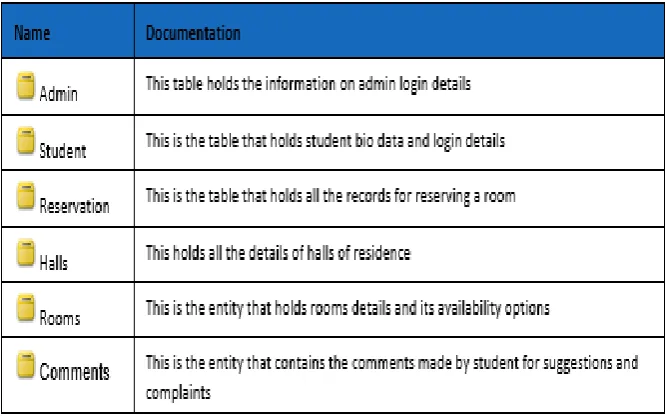
Table 3: ERD table definitions
System Interface Design
This is an illustration of the developed system implementing the mentioned features of the requirement. The main menu of the system, which is the first users interface containing a security gateway of the super administrator, the sub administrators and the citizens.
Halls of residence page Check room availability page
Implementation and Testing
Implementation
This section describes the development environment of the artefact, the difficulties encountered during the development and how the difficulties are countered.
Approach for implementation
The waterfall model approach to development verifies the design, implementation and testing phase after the artefact is developed as discussed earlier in chapter 3, the newly modified waterfall model allows developer to revisit the development phases for verification and validation. The artefact is tested in local computer using a local host testing server. The description of the development tools used is provided later in this section.
Development Environment
This section describes the tools used to develop the final artefact there are several development tools used for this project which includes.
Dreamweaver 8
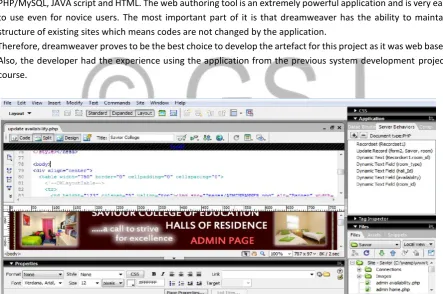
As discussed earlier in chapter 2, dreamweaver is a web authoring tool built with different programming languages and mark-up languages used for developing web applications. The programming tools used are PHP/MySQL, JAVA script and HTML. The web authoring tool is an extremely powerful application and is very easy to use even for novice users. The most important part of it is that dreamweaver has the ability to maintain structure of existing sites which means codes are not changed by the application.
Therefore, dreamweaver proves to be the best choice to develop the artefact for this project as it was web based. Also, the developer had the experience using the application from the previous system development projects course.
Figure 9: Dreamweaver application screen capture
The above screen capture shows the dreamweaver environment. The screen is divided into different parts: the platform for writing the codes, the page layout, and task pane for different set up wizards, files (web pages), page properties and database connection. Dreamweaver allows the user to write the codes and see the page design simultaneously, and also it allows the user to connect to the database using a setup wizard or to include a function to the web page with the setup wizard.
Wamp Server (database)
with the dream weaver environment to run the codes and execute queries. WAMP server is chosen because it is free source software, easy to set and use.
Hardware
The hardware used during the development includes a standard PC with Microsoft Windows 7 operating system. Due to the memory requirement issues for the development tools, it is recommended to use up to 512MB memory and at least 125MB hard disk space with a processor speed of 780MHz. For the actual implementation of the artefact, a 2.8GHz speed with dual processor, 1GB memory and 160GB hard disk space were used.
Configuring Software
Site definition
After a successful installation of the software, before creating the database connection, developer needs to define the sites for the project using the dreamweaver environment. Site definition describes the root folder in which all the web pages and images will be stored, the type of LAN connection and server side scripting language and lastly the URL prefix. Dreamweaver provides a set up wizard for the site definition; also a root folder will be created inside a folder named WWW in the WAMP program file.
Database connection
After the software installations, the database needs to be connected with the web developing environment. After a successful site definition, the database connection can be made by writing the PHP codes in the dreamweaver platform or connected using the database connection wizard in the applications task pane through the dreamweaver environment. The PHP code below describes the host name, database connection name and the username. If the inputs is the same the connection will be made else it will display User_Error. The following shows the PHP codes written to connect the database with the web developing environment
<?php
# FileName="Connection_php_mysql.htm"
# Type="MYSQL"
# HTTP="true"
$hostname_Savior = "localhost";
$database_Savior = "savior";
$username_Savior = "root";
$password_Savior = "";
$Savior = mysql_pconnect($hostname_Savior, $username_Savior, $password_Savior) or
trigger_error(mysql_error(),E_USER_ERROR);
?>
Difficulties Encountered
During the implementation of the project, there are several problems encountered while coding the artefact.
Update room availability problem
During the coding of the artefact, updating room availability was a bit difficult because after a successful reservation, room availability needs to be updated automatically and immediately after clicking on the reserve button. But the user finds it difficult to implement the function. After a thorough research, the user decides to implement the function using an SQL query within the PHP and HTML codes. The SQL query below shows the update function.
mysql_query("UPDATE room Set availability='No' WHERE
room_id='{$_POST['room_id']}'",$Savior) or die(mysql_error());
The above code and query describes that the function should update the table named room and set the field availability to NO where the room Id is equal to the room Id submitted during the reservation process from savior database. If the function is not successful, the page should display an error page.
Approach for implementation
The waterfall model approach to development verifies the design, implementation and testing phase after the artefact is developed as discussed earlier in chapter 3, the newly modified waterfall model allows developer to revisit the development phases for verification and validation. The artefact is tested in local computer using a local host testing server.
TESTING (Verification and Validation)
Testing is a technique for verification and validation of a system that is anticipated to ensuring that software adapts to its specification and meets its requirements. Testing includes checkind reviewing processes and system testing, it also involves executing the system with test cases that are derived from the specification. Currently the dominant technique used for verification is testing. And testing typically consumes an enormous proportion (sometimes as much as 50%) of the effort of developing a system (Bell 2005, P.267). Theobjectives of testing a software is executing a program with the intention of discovering an errors, a good test case is one that has a high probability of finding errors and a successful test is one that uncovers an as-yet-undiscovered error.
The technique chosen for testing the artefact is the black box testing because:
1. The artefact developed involves interactive interface and all the errors that relates to the structure of the program where debug during the coding of the program, that is why white box testing is not necessary.
2. Black-box testing attempts to find errors in an incorrect or missing functions, interface errors, errors in data structures or external database access, behaviour or performance errors, and initialization and termination errors.
3. Unlike white-box testing, which is performed early in the testing process, black box testing tends to be applied during later stages of testing.
4. The tester does not need to have any experience or knowledge of any specific programming languages.
TEST CASE
This section describes results of testing conducted, it comprises of the test plan, test cases and test log to determine the success of the testing conducted. It includes the results expected, the actual result, test data and conclusions of each test case whether it is successful or not.
TEST LOG
Test Case Description Conclusion
Case 1 To test whether the links in welcome page are working and also the login for new users Successful Case 2 To test the login page to ensure users login successfully Successful
Case 3 Update details page Successful
Case 4 Room availability page for BBY, Prince and Shanghai flats Successful
Case 5 Reservation page Successful
Case 6 Insert page Successful
Case 7 Search page Successful
Case 8 Update page Successful
Case 9 Delete page Successful
Case 10 Reservation report page Successful
Case 11 Delete reservation page Successful
Case12 Update availability Successful
TEST RESULT
During development, tests were performed on each section of the program as it was nearing completion, primarily to ensure the artefact is performing its intended function correctly. With corrections being applied during development, the testing was very successful, with no errors being found. The website anticipated all potential mistakes, and continued to function, without any difficulties.
Evaluation
This chapter discusses how the project was evaluated. It describes the evaluation of the project against its requirements and evaluation of the project management.
The aim of this project is to develop an online student room availability system that allows students to check room availability and reserve a room. The reservation system is divided into two different sites for students and for web page administrators, administrative staff will have access to maintain student records, update room availabilities and also make reservations.
Evaluation against Requirements
This section examines the requirements of the system to determine if the evaluation of the reservation system meets the specified requirements as discussed in the system requirement specification document (SRS).
Evaluation against General requirements
1. The online reservation system should be able to compete and inherit the basic features of a reservation system web site:-
2. To develop a system that provides good usability in accordance with user interface design principles, rules and guidelines:-
The requirement was achieved because the web pages provide a good navigation using links from one page to another. Another interface design guideline implemented with the artefact is the minimizing users input and also providing validation to forms. Users require less data input to make a reservation and lastly the web pages are easy to use.
3. Developed using software that is compatible with various operating systems and are platform independent:-
This requirement was successfully achieved because the artefact was developed using the simplest, most widely used and plat form independent developing tools. The full description about the tools used to develop the artefact is given in chapter 2.2.
Evaluation against Functional requirements
The functional requirement of the artefact is divided into two classes:
User class Student 1. Welcome Page:
This page allows new students to login and update their information to obtain a username and password. It also gives access to previous users to follow a link to the login page where they will have access to the home page. The functional requirements of this page was successful the full test cases, screen shots and test results are described in Appendix F and chapter 6.
2. Update detail Page:
This page allows students to update their information including their login details. The functional requirement of this page that is the update function was successful and the detailed test cases and screen shots are also described in Appendix F and chapter 6 respectively.
3. Login Page:
4. Availability Page:
This page is designed each hall of residents, it displays the list of all rooms available in the halls. The functional requirements for the availability pages was successful, the test cases, screen shots and results are described in Appendix F and chapter 6 respectively.
5. Reservation Page:
This page allows users to reserve a room and also the availability of the room reserved should be updated automatically after clicking on the reserve button. The functional requirement for this page was successful, the test cases, screen shots and test results are described in Appendix F and chapter 6 respectively.
User class- Campus administrator 1. Student details Page:
This page comprises of 5 functions insert, search delete, display and update record pages. The functional requirement for the page was successful, the test cases, screen shots and test results are described in Appendix F and chapter 6 respectively.
2. Reservations Page:
This page also consist of some set of pages that is used by administrators to manage reservation related information like the reservation report page, delete reservation page and updating availability page. The functional requirement for the page was successful, the test cases, screen shots and test results are described in Appendix F and chapter 6 respectively.
3. Admin Login page
This page authenticates the administrators to gain access to admin home. The functional requirement for the page was successful, the test cases, screen shots and test results are described in Appendix F and chapter 6 respectively.
Evaluation of Project management
This section discusses how the project is managed and planned. Project management plays a vital role in project development process and it always leads to a successful completion of a project. The main project management technique used is project time management that also counters the main constraint of the project.
Time management is an essential part of a project; it helps developers to plan their development phases, set project milestones and accurate timings for the start and completion of the development process. It is one of the crucial constraints that affect the overall progress and success of a project. The project plan was designed using the Gantt chart as shown in Appendix A and C. The development model (waterfall) used for this project also helps to plan this project in a linear and sequential manner.
Conclusion
This chapter summarises the aims and objectives of the whole report that has been achieved, it also describes the problems encountered and also the future enhancements for the artefact. It discusses the reflections on the technology and learning upon the approaches taken over the course of the project.
Project overview (Summary of what was achieved)
The main aim of this project is to develop an online student room availability system that performs the functions of a computerised reservation system. The key functional objectives of the project include:
Ability to check the availability of rooms Provide authentication to users
Validation of forms
Managing reservations by providing report for all reservations, access to delete reservations, update room availability and also to make a reservation by an administrative staff
No project is totally perfect, but the overview of the project was partly successful. All the functional requirements of the system was achieved after a successful testing as described in the evaluation chapter, though the artefact did not possess all the features of a reservation web site but it performs it intended functions correctly. The non-functional requirement of the project that is providing a documented report on the whole development process was achieved successfully within the expected duration having completing all the milestones of the project at the predefined time. Also, for the functional objectives of the project, the developing tools used also leads to a successful achievement of the functional objectives using developing tools PHP/MySQL, JAVA scripts and HTML implemented with WAMP serve as reviewed in chapter 2.
The design tools used for the project provides a greater flexibility in designing the database, also the sever side scripting language used (PHP) plays a vital role because it communicates with the both the web site and the database and there is no need to implement a lot of query or coding to make the communication. Furthermore, the methodology chosen for the project provides a great advantage in producing a good report because it ensures each development stage must be completed before proceeding to the next level which provides a great flexibility, a simplified and linear step by step development without any strictness. However, this leads to a successful design, implementation, testing and the objectives of the project.
Problems Encountered
The problem encountered during the development process is that of learning new technologies that are required for a successful development of the artefact. The student does not have enough experience on the key programming language needed for this project that is: PHP/MySQL. Having a little experience about this programming language specifically PHP, a lot of effort is pushed in on research and tutorials on the programming language because it is the key to a successful artefact. PHP is very easy to learn and understand, there many tutorials, books and codes for different functions available online at no cost which also helped to clarify how to develop a web application with many functionalities. Another problem regarding the new technology is that of implementing MySQL queries within the PHP codes. The SQL query written to automatically update the availability of rooms immediately after a reservation was difficult to implement within the PHP codes. This problem therefore delayed the project for a while due to some compilation errors in the syntax, a lot of time was spent trying to uncover the error and the syntax was somehow correct but where to paste the query within the code PHP is causing some technical error to the web page. However, the problem was solved after several rounds of trial; the SQL query needs to be placed after declaration of the form variables and the function is working as expected.
Future Enhancement
As discussed in the evaluation chapter, the general requirements for this project were successful, that is designing an interface that inherits the basic features of a reservation web site and designing an interface according to interface design principles and guidelines. Even though the functional requirements of the artefact are working correctly as expected, there are again room for further enhancement and improvements of the artefact. The following points highlight the future enhancements of the project:
The artefact should inherit all the main features of a reservation web site with newly improved functionalities
The artefact’s interface should be improved following all the key guidelines and principles of HCI as well as the principles of display design.
Improve handling of group reservation
References
1. Date, C., J. (2004). An Introduction to Database Systems (8th ed.). New York: Pearson/Addison Wesley. 2. Grand, C. L., Sarel, D. (2008). Database Access, Security, and Auditing for PCI Compliance. Journal on
EDPACS, 37(4), 6- 32.
3. Missier, P., Lalk, G., Verykios, V. S., Grillo, F., Lorusso, T., and P. Angeletti. (2003) “Improving Data Quality in Practice: A Case Study in the Italian Public Administration,” Journal on Distributed and Parallel Databases, 13(2), 135-160.
4. Schneier, B. (2004) “Hacking the Business Climate for Network Security,” Journal on Computer, 37(4), 87-89.
5. Elmasri, R., Navathe, S. W. (2003). Fundamentals of Database Systems (4th ed.). Boston: Pearson/Addison Wesley.
6. Gertz, M., Jajodia, S. (2008). Handbook of Database Security: Application and Trends. New York: Springer.
7. Fulkerson, C. L., Gonsoulin, M. A., Walz, D. B. (2002). Database Security Controlling access to your most Valuable information asset. Journal on Strategic Finance, 84(12), 48-53.
8. Hoffer, J. A., Prescott, M. B., McFadden, F. R. (2007). Modern Database Management (8th ed.). New Jersey: Pearson.
9. Ramakrishnan, R., Gehrke, J. (2000). Database Management System (2nd ed.). Michigan: McGraw Hill. 10. Pizam, A. (2005), Information Encyclopaedia of Hospitality Management. Oxford: ButterworthHeinemann.
11. Sigala, M,. Luckwood, A,. Jones, P. (2001), Strategic implementation of IT: Gaining Competitive Advantage from the Hotel Reservation Process. International Journal for Contemporary Hospitality Management, 17 (3), 364-371.
12. Yeung, K.F. (2006). User Registration Module for the Student and Unit Management System. Unpublished undergraduate dissertation, University of Portsmouth, Portsmouth.
13. Kwizombe, B.C. (2006). Electronic Voting System for Maliwi Parliamentary Elections using Boyd Voting Protocol. University of Portsmouth. Portsmouth.
14. Bell, D. (2005). Software Engineering for Students: Programmers Approach (4th ed.). Essex:
AddisonWesley.
15. Pressman, R. S., (2001). Software Engineering: Practitioners Approach (5th ed.). New York: McGraw Hill.
16. Sommerville, I. (2007). Software Engineering (8th ed.). Glasgow: Addison-Wesley.
17. Vliet, H.V., (2008). Software Engineering Principles and Practice (3rd ed.). Amsterdam: John-Wiley and
Sons.
18. Gilmore, W.J., (2010). Beginning PHP and MySQL: From Novice to Professional (4th ed.). New York:
Apress.
19. Savitch, W. (2011). Java: An Introduction to Problem Solving and Programming (6th ed.). Pearson.
20. Crackford, D. (2008). Java Script: The Good Parts. Sebastopol: O’Reilly.