IP Storage Networking:
IBM NAS and iSCSI Solutions
Rowell Hernandez
Keith Carmichael
Cher Kion Chai
Geoff Cole
All about the latest IBM Storage
Network Products
Selection criteria for Storage
Networking needs
Application scenarios
IP Storage Networking:
IBM NAS and iSCSI Solutions
Second Edition
February 2002
Second Edition (February 2002)
This edition applies to the IBM TotalStorage Network Attached Storage 200, 300, and 300G with microcode Release 2.0, IBM TotalStorage IPStorage 200i with microcode Release 1.2, Cisco SN5420 storage and initiator clients running on Redhat Linux 7.1, Windows 2000, and Windows NT.
Comments may be addressed to:
IBM Corporation, International Technical Support Organization Dept. 471F Building 80-E2
650 Harry Road
San Jose, California 95120-6099
When you send information to IBM, you grant IBM a non-exclusive right to use or distribute the information in any way it believes appropriate without incurring any obligation to you.
Take Note! Before using this information and the product it supports, be sure to read the general information in “Special notices” on page 285.
Summary of changes
This section describes the technical changes made in this edition of the book and in previous editions. This edition may also include minor corrections and editorial changes that are not identified.
Second Edition, February 2002
This revision reflects the addition, deletion, or modification of new and changed information described below.
New information
Added information on IBM TotalStorage 200 Added information on IBM TotalStorage 300 Added information on Cisco SN5420
Changed information
Removed all references to IBM
~
xSeries 150 Updated to include information on IPStorage 200i new models and microcode v1.2
Updated to include information on NAS new models and preloaded software v2.0
Contents
Summary of changes . . . iii
Preface . . . xi
The team that wrote this redbook . . . xii
Special notice . . . xiv
IBM trademarks . . . xv
Comments welcome . . . xv
Chapter 1. Introduction to storage networking . . . 1
1.1 The data explosion . . . 2
1.1.1 The storage networking evolution . . . 3
1.2 Growth in networked storage . . . 4
1.3 Storage architectures . . . 6
1.3.1 The role of storage and network protocols . . . 6
1.4 Direct attached storage . . . 7
1.4.1 DAS media and protocols . . . 8
1.4.2 DAS uses block I/O . . . 10
1.4.3 Benefits of DAS . . . 11
1.4.4 Other DAS considerations. . . 12
1.5 Local area networks . . . 13
1.5.1 Ethernet. . . 14
1.5.2 IP Network communication protocols . . . 15
1.5.3 Exploiting IP networks . . . 17
1.5.4 Managing the IP network resources . . . 20
1.6 Network attached storage (NAS) . . . 20
1.6.1 File servers . . . 21
1.6.2 Network appliances . . . 21
1.6.3 NAS appliances use File I/O . . . 23
1.6.4 IBM TotalStorage Network Attached Storage 200 and 300 . . . 24
1.6.5 NAS benefits . . . 25
1.6.6 Other NAS considerations. . . 28
1.7 Storage Area Networks . . . 29
1.7.1 Overview of Fibre Channel storage networks . . . 29
1.7.2 Fibre Channel SANs use block I/O . . . 32
1.7.3 IBM SAN solutions . . . 33
1.7.4 SAN benefits . . . 33
1.7.5 Other SAN considerations. . . 36
1.8 Getting the best of both worlds: SAN with NAS . . . 37
1.8.1 Tivoli SANergy . . . 38
1.8.2 SANergy uses a mix of file I/O and block I/O . . . 40
1.8.3 SANergy benefits . . . 41
1.8.4 SANergy considerations . . . 42
1.8.5 The IBM NAS 300G appliances . . . 43
1.8.6 IBM NAS 300G benefits . . . 45
1.8.7 Other NAS 300G considerations . . . 47
1.9 A new direction: SCSI over IP networks . . . 48
1.9.1 Internet SCSI (iSCSI) . . . 49
1.9.2 The IBM TotalStorage IP Storage 200i . . . 50
1.9.3 iSCSI gateways and the Cisco SN 5420 Storage Router . . . 52
1.9.4 iSCSI uses block I/O . . . 53
1.9.5 iSCSI benefits . . . 54
1.9.6 iSCSI considerations . . . 56
1.9.7 Where does the IBM IP Storage 200i fit? . . . 57
1.10 Storage networking solution options from IBM . . . 58
1.10.1 Which storage network? . . . 59
1.11 Industry standards . . . 60
1.11.1 Storage Networking Industry Association (SNIA) . . . 61
1.11.2 Internet Engineering Task Force (IETF) . . . 61
Chapter 2. IP storage networking technical details . . . 63
2.1 Open Systems Interconnection (OSI) model . . . 64
2.1.1 Physical layer . . . 64
2.1.2 Data link layer . . . 65
2.1.3 Network layer . . . 65
2.1.4 Transport layer . . . 65
2.1.5 Session layer. . . 65
2.1.6 Presentation layer . . . 65
2.1.7 Application layer . . . 66
2.2 TCP/IP technical overview . . . 66
2.2.1 Protocol stacks . . . 66
2.2.2 The TCP/IP protocol stack . . . 67
2.3 Ethernet technical overview . . . 72
2.3.1 The history of Ethernet . . . 72
2.3.2 Ethernet design concepts . . . 72
2.3.3 The CSMA/CD protocol. . . 73
2.3.4 Ethernet frames. . . 74
2.3.5 Ethernet physical topologies . . . 74
2.3.6 Ethernet media systems . . . 77
2.3.7 Ethernet summary . . . 79
2.4.1 iSCSI requirements . . . 79
2.4.2 iSCSI concepts . . . 80
2.4.3 iSCSI functional overview . . . 81
2.5 Understanding the storage I/O path . . . 86
2.5.1 Hardware components of the I/O channel. . . 86
2.5.2 Software components of the I/O channel . . . 89
2.5.3 I/O operations hardware/software combination. . . 92
2.6 Network file system protocols . . . 93
2.6.1 Network File System (NFS). . . 93
2.6.2 Common Internet File System (CIFS) . . . 95
2.6.3 Differences between NFS and CIFS . . . 97
2.7 Tracing the I/O path for local storage . . . 98
2.7.1 File system I/O . . . 98
2.7.2 Raw I/O . . . 100
2.7.3 Local and SAN attached storage block I/O summary . . . 101
2.8 Tracing the I/O path for network storage . . . 101
2.8.1 Redirected I/O . . . 102
2.8.2 Network File I/O summary. . . 103
2.9 Tracing the I/O path for SANergy clients . . . 104
2.10 Tracing the I/O path for Internet SCSI (iSCSI) . . . 106
2.11 Storage block I/O and network file I/O summary . . . 107
2.12 Clustering concepts . . . 108
2.12.1 Shared null . . . 109
2.12.2 Shared Nothing . . . 110
2.12.3 Shared Everything. . . 111
2.13 Data and network management . . . 111
2.13.1 Tivoli NetView . . . 112
2.13.2 Tivoli Storage Manager . . . 114
2.13.3 Tivoli Storage Network Manager (TSNM) . . . 115
2.13.4 Storage virtualization. . . 117
Chapter 3. IBM NAS and iSCSI storage products. . . 121
3.1 The IBM TotalStorage Network Attached Storage 200 . . . 122
3.1.1 IBM NAS 200 highlights . . . 123
3.1.2 IBM NAS 200 Model 201 tower hardware . . . 124
3.1.3 IBM NAS 200 Model 226 rack hardware . . . 125
3.1.4 IBM NAS 200 technical specifications summary . . . 127
3.1.5 IBM NAS 200 features and benefits . . . 128
3.1.6 IBM NAS 200 optional features . . . 129
3.1.7 IBM NAS 200 preloaded software . . . 129
3.1.8 IBM NAS 200 high availability and serviceability . . . 131
3.1.9 IBM NAS 200 scalability and growth . . . 132
3.2 IBM TotalStorage Network Attached Storage 300 . . . 135
3.2.1 IBM NAS 300 hardware . . . 137
3.2.2 IBM NAS 300 technical specifications. . . 140
3.2.3 IBM NAS 300 features and benefits . . . 140
3.2.4 IBM NAS 300 optional features . . . 141
3.2.5 IBM NAS 300 preloaded software . . . 141
3.3 IBM NAS 200 and 300 comparison . . . 144
3.4 IBM TotalStorage Network Attached Storage 300G . . . 145
3.4.1 IBM NAS 300G hardware . . . 146
3.4.2 IBM NAS 300G technical specifications . . . 151
3.4.3 IBM NAS 300G features and benefits . . . 152
3.4.4 IBM NAS 300G preloaded software . . . 153
3.4.5 IBM NAS 300G connectivity . . . 157
3.5 IBM TotalStorage IP Storage 200i Series . . . 158
3.5.1 IBM TotalStorage IP Storage 200i Configurations . . . 160
3.5.2 IBM TotalStorage IP Storage 200i Technical Specifications . . . 161
3.5.3 IBM TotalStorage IP Storage 200i Microcode . . . 162
3.5.4 IBM TotalStorage IP Storage 200i features and profiles . . . 162
3.5.5 IBM IP Storage high availability and serviceability . . . 163
3.5.6 IBM IP Storage expandability and growth . . . 164
3.5.7 IBM IP Storage 200i 4125-EXP Expansion Unit . . . 164
3.5.8 IBM IP Storage 200i Optional Features . . . 165
3.6 The Cisco SN 5420 Storage Router . . . 166
3.6.1 Cisco SN 5420 hardware . . . 168
3.6.2 Cisco SN 5420 technical specifications . . . 169
3.6.3 Cisco SN5420 clustering and high availability . . . 170
3.6.4 Cisco SN5420 SCSI Routing Services . . . 170
3.6.5 Cisco SN5420 features and benefits. . . 171
Chapter 4. Management of IBM NAS and IP Storage solutions . . . 173
4.1 IBM NAS and IP Storage management. . . 174
4.1.1 NAS 300 and 300G base drive configuration . . . 175
4.1.2 Advanced System Management (ASM) Processor . . . 175
4.1.3 ASM PCI adapter option . . . 177
4.2 IBM NAS and IP Storage preloaded software . . . 179
4.2.1 Configuration/Setup Utility. . . 179
4.2.2 SCSI Select Utility . . . 179
4.2.3 ServeRAID programs . . . 179
4.2.4 Terminal Services Client . . . 180
4.2.5 Universal Manageability Services (UM Services) . . . 181
4.2.6 IBM Advanced Appliance Configuration Utility (IAACU) . . . 182
5.1 IBM NAS cache exploitation for backup . . . 192
5.1.1 IBM NAS cache mechanisms . . . 193
5.1.2 Persistent Storage Manager True Image Copies . . . 197
5.1.3 PSM True Image copies can either be read-only or read-write. . . . 210
5.1.4 Differences between PSM and other similar implementations . . . . 210
5.1.5 Archival, backup, and restoration of IBM NAS appliances . . . 211
Chapter 6. Application examples for IBM NAS and iSCSI solutions . . . 221
6.1 NAS Storage consolidation . . . 222
6.2 NAS LAN file server consolidation . . . 224
6.3 SANergy high speed file sharing . . . 226
6.4 SANergy with Tivoli Storage Manager (TSM) . . . 227
6.4.1 Using TSM with SANergy . . . 227
6.4.2 TSM backup/restore using SANergy: Scenario 1 . . . 228
6.4.3 TSM backup/restore using SANergy: Scenario 2 . . . 228
6.5 NAS Web hosting . . . 229
6.6 IP Storage 200i solutions . . . 231
6.6.1 Database solutions . . . 232
6.6.2 Transaction-oriented applications . . . 233
6.7 Positioning storage networking solutions . . . 234
6.8 Typical applications for NAS and for iSCSI? . . . 235
Chapter 7. Other storage networking technologies . . . 237
7.1 Network performance . . . 238
7.2 Storage over IP (SoIP) . . . 238
7.3 Internet Fibre Channel Protocol (iFCP) . . . 239
7.4 Fibre Channel over TCP/IP (FCIP) . . . 240
7.5 InfiniBand (IB) . . . 241
7.5.1 InfiniBand objectives . . . 241
7.5.2 InfiniBand architecture specification . . . 242
7.5.3 The benefits of InfiniBand . . . 242
7.6 Virtual Interface (VI) architecture . . . 243
7.6.1 The objectives of Virtual Interface architecture . . . 244
7.6.2 Virtual architecture components . . . 244
7.7 Direct Access File System (DAFS) . . . 248
7.7.1 DAFS compared to traditional file access methods . . . 249
7.7.2 Benefits of DAFS-enabled storage . . . 250
7.8 Network Data Management Protocol (NDMP) . . . 251
7.8.1 NDMP terminology . . . 251
7.8.2 NDMP architecture model . . . 252
7.9 Industry standards bodies . . . 255
7.9.1 SNIA work groups . . . 255
7.10 The bottom line . . . 262
Appendix A. RAID concepts . . . 263
Related publications . . . 281
IBM Redbooks . . . 281
Other resources . . . 281
Referenced Web sites . . . 281
How to get IBM Redbooks . . . 283
IBM Redbooks collections . . . 283
Special notices . . . 285
Glossary . . . 287
Preface
This IBM Redbook is the result of residencies conducted at the International Technical Support Organization, San Jose Center following the announcement of Network Attached Storage and iSCSI products. This is the second edition; it has been updated to reflect the announcement in April 2001 of the iSCSI Cisco SN5420 Storage Router, and the June 2001 announcement of the IBM TotalStorage Network Attached Storage 200 and 300 appliances. This redbook will help you:
Understand the different technologies involved in storage Learn about IBM’s latest storage networking product offerings Discover the different storage network solutions
Decide which storage solution is right for a given situation Absorb the concepts behind iSCSI products and technology
We hope you will read this redbook from cover to cover, but in case you are in a hurry, here is a guide to its organization:
For beginners without any knowledge about storage, we suggest you first read Chapter 1, “Introduction to storage networking” on page 1. This chapter will guide you through the different storage technologies, pros and cons, description, terminologies, and so on—just the basics.
For more details, we suggest that you read Chapter 2, “IP storage networking technical details” on page 63. This chapter discusses the different protocols involved in storage networking and tells you what goes on under-the-covers. In Chapter 3, “IBM NAS and iSCSI storage products” on page 121, we write about the new IBM NAS and iSCSI products. You will get a comprehensive overview of the different IBM TotalStorage Network Attached Storage and iSCSI products.
The most important feature of these appliances is ease of use, detailed in Chapter 4, “Management of IBM NAS and IP Storage solutions” on page 173. We give you a hands-on tour through the different tools bundled with the products.
These storage products will be storing important data—hence the importance of backup. Chapter 5, “Backup for IBM Network Attached Storage” on page 191 covers this topic, and describes the operation of Persistent Storage Manager.
Many customers will wonder: “How and where do I use these new products?” For suggestions, check out Chapter 6, “Application examples for IBM NAS and iSCSI solutions” on page 221, where we give some application scenarios.
And finally, what other developments are going on with regard to storage networking? In Chapter 7, “Other storage networking technologies” on page 237, we describe some of the key developments which are under way within the industry, including work which is in progress to develop new industry standards in important areas.
For those who are primarily interested in iSCSI topics, the following sections cover various aspects of this new technology and the IBM iSCSI products: 1.9, “A new direction: SCSI over IP networks” on page 48
2.4, “iSCSI basics” on page 79
2.10, “Tracing the I/O path for Internet SCSI (iSCSI)” on page 106 3.5, “IBM TotalStorage IP Storage 200i Series” on page 158
The team that wrote this redbook
This redbook was produced by a team of specialists from around the world working at the International Technical Support Organization San Jose Center. In the following photograph, the team members (from left to right) are Rowell Hernandez, Chai Cher Kion, and Geoff Cole. Keith, Rowell and Geoff updated this redbook for the second edition.
Rowell Hernandez is a Project Leader for Network Attached Storage and Internet SCSI at the International Technical Support Organization, San Jose Center. Before joining the ITSO in 2001, he worked as an IT Specialist for IBM Philippines, providing support for Netfinity, Windows NT, clustering and Linux. Rowell is also an IBM
~
Certified Systems Expert - xSeries Windows, Microsoft Certified Systems Engineer + Internet, Citrix Certified Administrator, Comptia A+ Certified Technician, and Red Hat Certified Engineer. He holds a Bachelor of Science degree in Computer Science from AMA Computer University with graduate work toward a Master of Science in Information Management at Ateneo De Manila University.Cher Kion Chai is a Storage Networking Solutions Consultant in the Storage Systems Group, IBM Asia Pacific. He has 17 years of experience in the IT industry, including 14 years working at IBM. He holds a Bachelor of Science Degree in Computer Science. Chai also holds a professional diploma in management. He is an AIX Certified Advanced Technical Expert. His areas of expertise include storage networking, network attached storage, and IBM storage server products. He set up and now manages the IBM ASEAN/SA SAN Center located in IBM Singapore. Chai is based in Singapore and can be reached at [email protected].
Geoff Cole is a Senior Advisor and Sales Support Manager in the IBM Storage Networking Solutions Advisory Group. He provides sales support for the IBM Storage Systems Group in Europe, Middle East, and Africa (EMEA). Geoff is based in London. He has been with IBM for 30 years, and has 17 years experience in IBM’s storage business. He has held a number of sales and marketing roles in the United Kingdom, the United States, and Germany. Geoff holds a Master of Arts degree in Politics, Philosophy, and Economics from Oxford University. He is a regular speaker on storage networking-related topics at IBM customer groups and external conferences in Europe. Geoff can be reached at
Keith Carmichael is an advisory IT Availability Professional from IBM South Africa. He has been with the IBM Integrated Technology Services Division for the last 5 years. Keith’s current responsibilities include technical support for PCs and managing the parts recovery center. He is a Microsoft Certified Professional and is busy working on his Windows 2000 MCSE certification. His areas of expertise are Windows NT, Windows 2000, Netfinity Servers, Desktop, ThinkPads and Thin Clients. Keith holds a National Diploma in Electrical Engineering.
Thanks to the following people for their valuable contributions to this project: International Technical Support Organization
Jon Tate, Emma Jacobs, Yvonne Lyon, Deanna Polm, Will Carney, Alison Chandler
IBM Raleigh
Jay Knott, Eric Dunlap, Robert Owens, Chuck Collins, David Heath, Thomas Daniels, Jeff Ottman, Joao Molina, Rebecca Witherspoon, Ken Quarles, Sandra Kipp, Christopher Snell, Megan Kirkpatrick, Holly Tallon, Garry Rawlins
IBM Advanced Technical Support Center
Ling Pong, Norman Bogard, Mark Bruni, Bill Kerney IBM Rochester
Steve Miedema IBM Chicago David Sacks IBM San Jose
Scott Drummond, John Hufferd, Jeff Barckley IBM Austria
Wolfgang Singer
IBM Almaden Research
Prasenjit Sarkar, Kaladhar Voruganti
Special notice
This publication is intended to help IBMers, business partners and customers to understand the different storage networking solutions. The information in this publication is not intended as the specification of any programming interfaces that are provided by IBM TotalStorage NAS 200, 300, 300G, IPStorage 200i and Cisco SN 5420. See the PUBLICATIONS section of the IBM Programming Announcement for IBM TotalStorage NAS 200, 300, 300G, IPStorage 200i and Cisco SN 5420 for more information about what publications are considered to be product documentation.
IBM trademarks
The following terms are trademarks of the International Business Machines Corporation in the United States and/or other countries:
Comments welcome
Your comments are important to us!
We want our IBM Redbooks to be as helpful as possible. Send us your comments about this or other Redbooks in one of the following ways: Use the online Contact us review redbook form found at:
ibm.com/redbooks
Send your comments in an Internet note to:
Mail your comments to the address on page ii. e (logo)® IBM ® AIX Alert on LAN AT Current DB2
Enterprise Storage Server ESCON FICON Magstar Netfinity Netfinity Manager OS/2 OS/390
Predictive Failure Analysis RAMAC RS/6000 OS/400 Redbooks Redbooks Logo S/390 ServeRAID SP StorWatch Wave Wizard 400 Lotus Approach Freelance Graphics Lotus Notes Word Pro Domino Notes Tivoli NetView
Chapter 1.
Introduction to storage
networking
Recent IBM announcements of Network Attached Storage (NAS) and Internet SCSI (iSCSI) appliances which exploit Ethernet TCP/IP networks have increased your storage network options. The objectives of this book are to describe these new products and position them in relation to Direct Attach Storage (DAS) and Storage Area Network (SAN) storage solutions. After reading this book, we hope you will be well equipped to understand when to select IBM IP network storage solutions, and how to deploy them to meet your enterprise storage requirements. Many volumes have already been written describing the explosion in data storage, and the need for storage networks. We do not intend to repeat much of what you have probably already read. We think that Information Technology (IT) professionals who are involved in storage acquisition decisions understand very well that we have reached a time when traditional approaches to data storage no longer meet the needs of many applications and users. If you are a storage veteran you may wish to turn straight to section 1.2, “Growth in networked storage” on page 4.
1.1 The data explosion
For those who are less familiar with the storage scene, industry experts estimate that the amount of data stored is at least doubling every year. This is due to dramatic growth in existing applications, such as on-line transactions, e-mail and so on, plus development of complex new e-commerce applications, including multimedia applications. It is driven by systems like the Internet and intranets. The requirement for continuous availability of information in the e-business world encourages organizations to duplicate, even triplicate, on-line copies of their data. And this explosive growth is ultimately enabled by the extraordinary ability of the disk drive industry to keep doubling the capacity of hard drives almost yearly, while at the same time delivering 30% to 40% compound annual price reductions.
If your data is doubling every year, then in ten years it will have grown more than one thousand fold. We all know that if we do nothing, we will drown in data. It will become impossible to control, and our business effectiveness will suffer. We have to become more efficient in the way we store and manage data. IDC estimates that storage managers must increase efficiency more than 60% per year.
The problem is aggravated by the fact that information technology professionals with storage administration skills, like many other skilled IT staff, are becoming increasingly difficult to hire and retain. There is expected to be a shortage amounting overall to an estimated 1.5 million IT positions unfilled worldwide by 2002. In effect, users must manage more data, but with no additional human resources. When we combine this issue with the need to back up and recover these growing data mountains, control rising costs, and provide continuous operations around the clock, it soon becomes apparent that some things have to change.
Throughout the 1990s, more than 70% of all disk storage was directly attached to an individual server. This was primarily due to the rapid growth in the capacity of hard disk drive technology in individual PCs, as well as client and server
platforms, rising from tens of megabytes to tens of gigabytes. It is now generally recognized that connectivity of storage devices must enable substantially higher scalability, flexibility, availability, and manageability than is possible with directly attached devices.
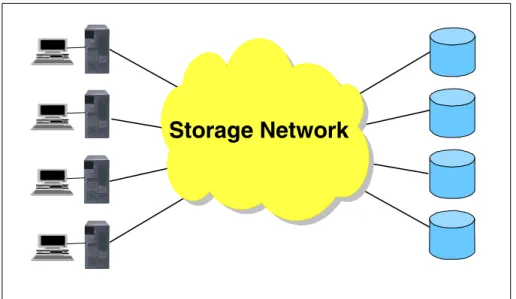
This is especially true to support today’s advanced business applications— Enterprise Resource Planning (ERP), Customer Relationship Management (CRM), Business Intelligence (BI), e-business, and so on. In today’s world the most valuable business asset is data. To exploit its worth to the fullest, information must be available to all who need it. In other words, it must be sharable. To achieve this, the data storage must be consolidated and attached to a network (see Figure 1-1).
Figure 1-1 Storage networks facilitate consolidation and data sharing
1.1.1 The storage networking evolution
In the early 1990s, in the open systems world (UNIX, Windows, NetWare), the need to share departmental files efficiently gave rise to what has become known as Network Attached Storage (NAS). This built on the infrastructure of Local Area Networks (LAN). Since the late 1990s, another type of network has developed, known as a Storage Area Network (SAN). SAN largely has grown from the need to handle multi-terabyte databases enterprise wide, and to deal with the
never-ending demand for high speed transactions.
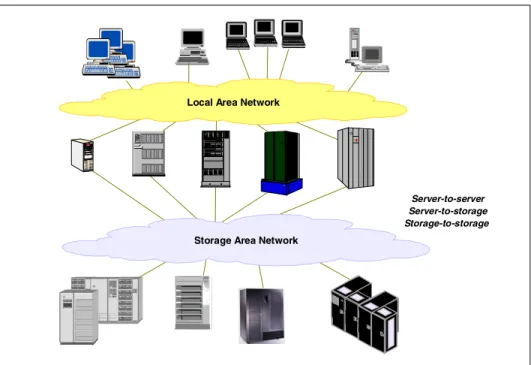
Links between NAS and SAN, by means of intelligent NAS appliances, were announced in early 2001 by IBM. These enable LAN-attached clients to access and share SAN-attached storage systems. Now a third type of network storage solution is emerging, known as iSCSI. This utilizes features of both SAN and NAS using SCSI storage protocols on LAN IP network infrastructures. IBM was first to market with iSCSI solutions with its TotalStorage IP Storage 200i devices, announced in February 2001.
1.2 Growth in networked storage
As shown in Figure 1-2 on page 5, NAS and SAN are projected to grow into multi-billion dollar markets. Figure 1-3 gives a proportional view of how the implementation of storage network technologies is expected to dramatically change the ratio of directly attached storage (DAS) in favor of SAN and NAS during the next two or three years. Whereas DAS began the new millennium at around 70% of the total, network storage systems are projected to represent some 80% (SAN at approximately 60% and NAS at around 20%) by the end of 2003. This is an extraordinary change in a very short time frame.
Since iSCSI is, in effect, SAN over IP, predictions regarding its growth are included in the SAN projections. One projection is that iSCSI could represent some 15% of the SAN market within three years. Although industry analysts anticipated delivery of such solutions after the beginning of 2002, IBM leadership in storage networking allowed an earlier introduction.
Since the advent of SAN solutions there has been a tendency to view NAS and SAN as competing technologies within the market. This is partly due to some confusion on how to apply each technology. After all, both terms include the words
storage
andnetwork
. The problem to be solved is how to connect lots ofstorage
to lots of servers. The best technology to use to resolve the problem is anetwork
. However, the implementations are very different. NAS exploits the existing intermediate speed messaging network, whereas the SAN solution uses a specially designed high-speed networkedchannel
technology.Figure 1-2 NAS versus SAN spending
Figure 1-3 SAN and NAS adoption rate projections
1997 1998 1999 2000 2001 2002 2003 0 10 20 30 40 NAS Storage SAN Storage
$ Billions
S ou rc e: G artne r IT x po 1 0/2 0 00 1998 1999 2000 2001 2002 2003 0 10 20 30 40 50 60 70 80 90 100 0 10 20 30 40 50 60 70 80 90 100DAS NAS SAN
Source: Salom on Sm ith Barney T he SAN Book : Aug 2000
In practice, IBM expects that NAS and SAN will be implemented as
complementary solutions, and together with directly attached storage and iSCSI devices, customers may choose to implement a mix of these storage topologies to suit their organization’s size, applications and budget. IBM has introduced advanced, specialized NAS appliances which enable Local Area Network (LAN) users to access enterprise class storage systems. The storage can be attached either directly to the NAS appliance, or to a SAN fabric. This is an indication of how storage architectures can cooperate in synergy to deliver the most cost effective solution to meet users’ business requirements.
1.3 Storage architectures
To understand which storage architecture to select for which environment, it is necessary to understand the differences between them, and the strengths and weaknesses of each. In this chapter we look at the current options available in the market that are supported by IBM. This information is presented in the sequence in which the solutions have appeared in the marketplace, specifically: Directly attached storage (DAS)
Local area networks and file transfer protocols Network attached storage (NAS)
Storage area networks (SAN) SANergy file sharing
SAN / NAS hybrid appliances Internet SCSI (iSCSI) appliances
We also refer to some recent IBM IP network storage solutions where applicable, and show what benefits they can provide.
1.3.1 The role of storage and network protocols
When we discuss various network and storage solutions, we frequently refer to protocols. The term
protocol
refers to a set of rules which governcommunications between computers and devices. A protocol is to a computer what a language is to humans. We are writing this book in English, so to read it you must understand English. In the same way, for two devices to communicate over a network, they must both understand the same protocols. There are numerous protocols which operate at different layers of the network
infrastructure. In this book we describe a number of different protocols, which participate in storage networks at various different stages, or layers. They are like different languages, or dialects. Each layer has its own language.
1.4 Direct attached storage
Direct Access Storage is the original and basic method of storage attachment. Storage devices are attached by cable directly to the server. In PC
configurations, the storage is usually integrated in the same cabinet as the processor. In mainframe and large open servers, the storage is typically located in a separate unit some distance (meters) from the host. In the open systems environment, the cable is known as an input/output (I/O) bus attaching to specialized bus adapters on the host and the device. In the mainframe arena, it is called an I/O channel. Each server effectively “owns” its own storage devices. I/O requests access devices directly. This topology was designed initially for
efficiency and high performance. Sharing data between systems was not initially anticipated.
The simplest configuration is a single disk or single tape drive attached to a single processor. Disk subsystems normally contain multiple disk drives. These may be configured as separate and independent disks, typically called a JBOD, or “just a bunch of disks.” Many subsystems are configured, by default or possibly optionally, as fault tolerant arrays of disks. These are known as
Redundant Arrays of Independent Disks, or RAID. A number of RAID topologies, or methods, are available. For those readers who are not familiar with RAID terminology, or who would like a refresher on the current RAID types supported by IBM’s recently announced IP storage systems, we have included an overview of RAID in Appendix A, “RAID concepts” on page 263.
Some disk systems allow the aggregate capacity of the subsystem to be subdivided into “partitions”, and partitions can be assigned to different
processors, as shown in Figure 1-4. Subsystems like the IBM Enterprise Storage Server (ESS) may allow partitions to be reassigned manually from one processor to another. Each processor only sees its own storage capacity, and this is essentially still a DAS approach.
Figure 1-4 DAS implementations
1.4.1 DAS media and protocols
The storage is physically connected to the processor by means of industry standard media in the form of cables. Media is managed by a low-level protocol (set of rules) unique to itself, regardless of the attached devices. The protocol provides the rules for exchanging information between devices, specifying the format and sequence of electronic messages. The most commonly used types of media and protocols for directly attaching storage and processors are:
Small Computer Systems Interface (SCSI) Fibre Channel
Serial Storage Architecture (SSA)
Small Computer Systems Interface (SCSI)
The parallel SCSI (pronounced “scuzzy”) I/O bus, with its roots in the early 1980s, is the most commonly used interconnect media in open systems. An I/O bus is also known as a
transport
medium. As its name indicates, SCSI was designed for the PC and small computer environment. SCSI provides a high performance and reliable channel for data between servers and storage. Typical bandwidths range from 40 MBps (Ultra SCSI), to 80 MBps (Ultra2 SCSI), and 160 MBps (Ultra160 SCSI). A parallel SCSI bus, utilizing copper cable media, has a number of well known limitations on scalability, connectivity and distance (maximum of 25 meters), due to its use of parallel data transfers over eight or sixteen data lines within the physical cable.Free space available for dynamic allocation Svr A Svr B Svr C A B C
Partitioned Disk Array Private Disk
In addition to being a physical transport, SCSI is also a protocol, which specifies commands and controls for reading and writing blocks of data between the host and the attached disk devices. SCSI commands are issued by the host operating system in response to user requests for data. For instance, a SCSI I/O command might tell a disk device to return data from a specific location on the disk drive, or tell a tape library to mount a specific cartridge. The SCSI bus media is connected to the host server by a
SCSI bus adapter (SBA)
. The SBA carries out much of the protocol mapping to disk with specialized firmware, thus optimizingperformance of the data transfer. Some operating systems, such as Windows NT, treat all attached peripherals as SCSI devices, and issue SCSI commands to deal with all I/O operations.
SCSI is a “block-level” protocol, called
block I/O
, since SCSI I/O commands define specific block addresses (sectors) on the surface of a particular disk drive. So with SCSI protocols (block I/O), the physical disk volumes are visible to the servers that attach to them. Throughout this book we assume the use of SCSI protocols when we refer to directly attached storage.The distance limitations of parallel SCSI have been addressed with the development of serial SCSI-3 protocols. These allow SCSI commands to be issued over different types of loop and network media, including Fibre Channel, SSA, and more recently IP Networks. Instead of being sent as a group of bits in parallel, on separate strands of wire within a cable, serial SCSI transports carry the signal as a stream of bits, one after the other, along a single strand of media.
Fibre Channel
Fibre Channel is an open, technical standard for networking. It combines many of the data characteristics of an I/O bus, with the added benefits of the flexible connectivity and distance characteristics of a network. Fibre Channel uses serialized data transmission over either copper (for short distances up to 25 meters) or fiber optic media (for distances up to 10 kilometers). IBM devices only support the use of fiber optic media.
Storage devices may be directly attached to Fibre Channel enabled servers by means of point-to-point topology. They attach to a server’s
Host Bus Adapter
(HBA)
. Note the similarity in name to the SCSI bus adapter (SBA). It clearly indicates that the Fibre Channel attachment is a “bus-like” attachment, using hardware assisted storage protocols. Like a SCSI bus, they communicate with the attached storage device by means of SCSIblock I/O
.Devices attached in this Fibre Channel point-to-point topology are, in effect, attached to a network comprising only two nodes. Because of its channel-like (bus) qualities, hosts and applications see storage devices as if they are locally attached storage.
Fibre Channel supports a number of low level storage protocols. When implemented with the SCSI command set, the low level protocol is known as Fibre Channel Protocol (FCP). Bandwidth is 100 MBps full duplex, with 200 MBps full duplex expected in late 2001.
Serial Storage Architecture (SSA)
SSA is a media technology developed by IBM. It is used to connect networks of disks together inside some disk systems, such as the IBM 7133 and Enterprise Storage Server. SSA uses a multiple loop architecture optimized for storage I/O. SSA loops deliver very high performance, currently 160 MBps, and have very high availability characteristics. SSA uses the serial SCSI-3 protocol, so it, too, communicates with attached storage devices in storage protocols (block I/O).
1.4.2 DAS uses block I/O
Application programs and databases generate I/O requests which culminate in data being read from, or written to, the physical storage device. Input/ Output requests to directly attached storage, or to storage on a SAN, communicate in storage protocols which are commonly called
block I/Os
. This is because the read and write I/O commands identify a specific device (disk drive or tape drive) and, in the case of disks, specific block (sector) locations on the disk are identified within the I/O request.In the case of I/Os to disks using SCSI protocols, the application may use generalized
file system services.
These manage the organization of the data onto the storage device via the device driver software. In the UNIX world, this file-level I/O is calledcooked I/O
. However, many databases and certain specialized I/O processes generate record-oriented I/O direct to the disk via the device driver. UNIX fans call thisraw I/O
.Note: Fibre Channel (FC) is able to use a number of lower level storage protocols, including SCSI (open systems) and ESCON (IBM^zSeries and S/390). In the open systems environment the FC protocol is called Fibre Channel Protocol (FCP). In the mainframe arena it is called FICON. For the purposes of this book, whenever we refer to FC protocols we mean FCP.
A fundamental characteristic of DAS (unlike some network storage devices) is that, regardless of whether the application uses cooked I/O or raw I/O (that is, file system or block access), all I/O operations to the device are translated to SCSI protocol
blocks
. That means they are formatted in the server by the database application, or by the operating system, into blocks which reflect the address and structure of the data on the physical disk device.These blocks are moved on the I/O bus to the disk device, where they are mapped via a block table to the correct sector on the media (in mainframe parlance, this is called
channel I/O
). Block I/O is illustrated in Figure 1-5. For technical details of how block I/Os are generated, refer to 2.7, “Tracing the I/O path for local storage” on page 98.Figure 1-5 DAS uses block I/O
1.4.3 Benefits of DAS
In summary, the benefits of direct storage attachment are these:
Simplicity of connection: The cabling is either integrated in the cabinet with the server, or it is a simple point-to-point connection, often over short distances. Storage administrative skills required for installation are low. Low acquisition cost: SCSI bus cable costs are generally relatively low.
Logistical planning and administrative overheads are kept to a minimum. FC point-to-point connection costs are likely to be higher owing to the need for specialized HBAs and extended distances using fiber optic cables.
SCSI protocol
IP network
Application serverBlock I/O
DAS
Application makes file I/O request to file system in server, which initiates block I/O to disk
Application initiates raw block I/O to disk
High performance: The interconnection is designed for storage, and has a significant amount of hardware assistance to minimize software overheads. DAS uses storage protocol, such as SCSI block I/O, so performance is optimized for all types of applications.
General purpose solution: Since the DAS solution is optimized for all types of storage processing, the investment in DAS can be applied to most
applications, giving good flexibility during the life of the acquisition.
1.4.4 Other DAS considerations
DAS connections have a number of constraints, as follows:
Limited scalability: The disk device can scale to a set maximum capacity. Bus connections normally strictly limit the distance at which storage devices can be positioned from the server (maximum of 25 meters for parallel SCSI bus), and limit the number of devices which can be attached to the bus (for example, a maximum of 15 on a parallel SCSI bus).
Dedicated connectivity: This is often at short distance, and prohibits the ability to share capacity resources with other servers. This limitation, however, is mitigated in storage systems, like the IBM Enterprise Storage Server, which allow connection of multiple servers, each attached to its own dedicated partition. SSA and FC point-to-point connections also may relieve distance limitations.
Function: In many cases, low cost disk systems attached to distributed clients and servers have limited function when compared to consolidated storage systems, which usually offer advanced capabilities such as RAID and enhanced copy services.
Backup and data protection: Backup must be done to a server-attached tape device. This may lead to additional costs in acquiring multiple small tape devices. These may be acquired more for reasons of low cost rather than for quality and reliability associated with departmental or enterprise class devices. Individual users of DAS may apply inconsistent, or even
non-existent, backup policies, leading to greater recovery costs in the event of errors or hardware failures.
Total cost of ownership: Storage resources attached to individual servers are frequently inefficiently utilized. Capacity available to one server is not available to other servers (unless the disk system allows attachment of multiple servers and partitioning). Storage administration costs are increased because the number of GBs an individual can manage in a distributed storage environment is substantially less than for consolidated storage such as NAS or SAN.
1.5 Local area networks
Much of the world’s business runs today on local area networks (LANs). A LAN is the interconnection of two or more computers in such a way that users can easily share files, programs, data, and physical resources such as printers, with minimal effort. As its name implies, a LAN is usually local. In other words, all the machines are physically located in a single building or campus site.
LANs proliferated from the mid-1980s to address the problem of “islands of information” which occurred with standalone computers within departments and enterprises. The objective was to enable users to share information and
applications across the organization and to communicate electronically. LANs are the basis of what has become known as client/server computing. In this model one computer (the
client
) initiates a request to another machine located elsewhere (theserver
). The server computes the answer and sends it back to the client.Typically, LAN design is based on open system networking concepts. These concepts are described in the network model proposed by the Open Systems Interconnection (OSI) standards of the International Standards Organization (ISO). The OSI model describes a seven layered approach to differentiate the various parts and functions of a network. We refer to certain of the layers in the following chapter, especially the Transport, Network, and Data Link layers. These are described in 2.1, “Open Systems Interconnection (OSI) model” on page 64. To achieve data exchange and sharing across networks, LANs require the use of appropriate interconnection topologies and protocols. A LAN has a single logical topology (access scheme), and will usually use a common network operating system and common connecting cable.
A logical topology is the method used for transporting data around the network. It is comparable to an access method (Media Access Control (MAC) in the OSI Data Link layer). The access scheme handles the communication of data packets, and places them in frames for transmission across the network. Several different types of network access schemes were developed for LANs in the 1980s. These include token ring passing schemes such as:
Fiber Distributed Data Interface (FDDI), based on concentric rings of fiber optic cable)
Token Ring (developed by IBM) ARCnet (developed by Datapoint)
Ethernet (originally designed by Xerox Corporation), which uses a collision-detect access method
Several other access schemes were developed for wide area networks (WANs), including Integrated System Digital Network (ISDN), Asynchronous Transfer Mode (ATM), X.25 packet switching, and Frame Relay.
Today the predominant logical topology for LANs is Ethernet. IDC estimates that more than 85% of all installed network connections worldwide are Ethernet, which is so popular because it offers the best combination of price, simplicity, scalability, and management ease of use. For this reason, we assume the Ethernet protocol whenever we refer to LANs in this book.
1.5.1 Ethernet
Ethernet is an open industry standard for local area networks. It includes definitions of protocols for addressing, formatting, and sequencing of data transmissions across the network. The term Ethernet also describes the physical media (cables) used for the network.
Based on initial developments by Xerox Corporation in the early 1970s, later supported by Intel and Digital Equipment Corporation, formal industry standards were defined in the early 1980s (IEEE 802.3 standard). It is an open, vendor neutral technology, capable of delivering a high degree of interoperability. Ethernet uses a media access protocol, known as Carrier Sense Multiple Access with Collision Detection (CSMA/CD). The CSMA/CD protocol moves packets on the network. In effect, every node monitors the network to see if the network is already transmitting a packet. A node waits until the network is free before transmitting its packet. Since the nodes are spread in different locations, it is possible for more than one node to begin transmitting concurrently. This results in a collision of the packets on the network. If a collision is detected, all nodes then go into a wait mode. On a random basis, they attempt to re-transmit the packets until they are successful.
More nodes tend to mean more data packets transferred, and therefore more collisions. The more collisions there are, the slower the network runs. This problem is alleviated by the division of Ethernet LANs into multiple smaller “subnets” or collision zones, by means of routers. Implementation of switched networks, which create collision-free environments, has overcome the potential limitations of the CSMA/CD protocol. CSMA/CD is described in more detail in 2.3.3, “The CSMA/CD protocol” on page 73.
Early implementations supported small numbers of devices attached to a relatively short (185 meter), single, shared segment of cable, rather like an I/O bus. This operated at a speed of 10 Megabits per second (Mbps). Fast Ethernet at 100 Mbps was delivered later, and in 1999 Gigabit Ethernet delivered 1000 Mbps (approximately 100 Megabytes per second (MBps)).
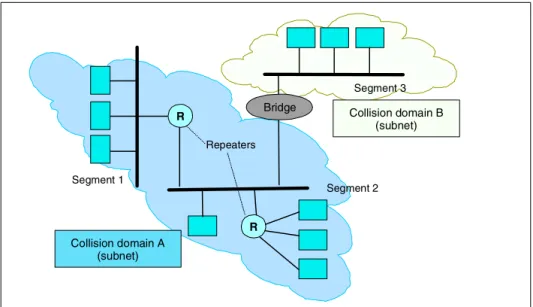
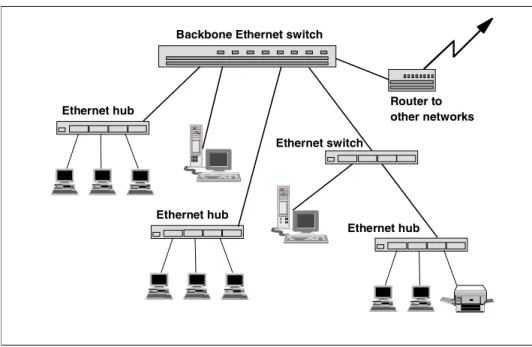
Ethernet has evolved over time to allow interconnection of multiple segments, linked by signal repeaters (hubs), and bridges, over large campus distances. The later introduction of high speed switches enabled many thousands of network nodes to communicate over long distances, and to interconnect with other LANs, intranets and the Internet, across wide area connections.
The physical topology of an Ethernet follows a number of possible implementations, known as
segment
(an arbitrated bus-like technology);spanning tree
(groups of interlinked segments); andswitched
. These topologies are described in 2.3.5, “Ethernet physical topologies” on page 74. Many sites today have a combination of these implementations, but new LANs generally use the switched fabric topology to deliver highest performance, scalability, and flexibility.There are several different types of Ethernet networks, based on the physical cable implementations of the network. There are a number of media segments, or cable types, defined in the Ethernet standards. Each one exhibits different speed and distance characteristics. They fall into four main categories: thick coaxial (thicknet), thin coaxial cable (thinnet), unshielded twisted pair (UTP), and fiber optic cable. These are described in 2.3.6, “Ethernet media systems” on page 77, for those readers who want more technical details.
Today, most sites use high quality twisted-pair cable, or fiber optic cables. Short wave fiber optics can use multi-mode 62.5 micron or 50 micron fiber optic cables, and single mode 9 micron fiber optic cable is used for long wave lasers. These cables can all carry either 10 Mbps, 100 Mbps or 1 Gigabit signals, thus allowing easy infrastructure upgrades as required.
Ethernet is well suited to many messaging applications, but it has some
limitations when applied to normal storage traffic. Ethernet’s major attractions are that it is low cost, it is pervasive in most organizations of any size, and it is the de facto standard for LANs.
We have included a technical overview of all aspects of Ethernet in 2.3, “Ethernet technical overview” on page 72.
1.5.2 IP Network communication protocols
To get data to its destination as quickly and accurately as possible, a
communications protocol is required. This protocol is responsible for packaging and formatting the data for transmission in a standard format.
Several communication protocols were developed for inter-computer communications, including:
System Network Architecture (SNA), developed by IBM DECNet (formerly Digital Network Architecture)
Internetwork Packet Exchange/Sequenced Packet Exchange (IPX/SPX), developed by Novell for its Netware products
Today, the de facto standard for client/server communications in the LAN, and across the Internet, is TCP/IP. This is because it is an entirely open protocol, not tied to any vendor. Millions of clients and servers, using TCP/IP protocols, are interconnected into IP network infrastructures by way of routers and switches. For this reason, we assume the TCP/IP protocol whenever we refer to LANs in this book.
Transmission Control Protocol/Internet Protocol
TCP/IP was born of work done by the US Department of Defense in the 1970s and 1980s, which was instrumental in developing inter-networking concepts. TCP/IP was implemented around UNIX, and the code later spread rapidly among universities and research centers. In time these US government-funded TCP/IP networks came to be known as the
Internet
.The Internet
Today the Internet is known to all since it is so pervasively used to interconnect autonomous networks around the world. The Internet has acquired its own administration body to oversee issues and to carry out ongoing research and development. This board is called the Internet Activities Board (IAB). It has a number of subsidiary groups, the best known of which is the Internet Engineering Task Force (IETF), which deals with tactical implementation and engineering problems of the Internet. For information on the IAB and IETF, see the following Web sites:
http://www.iab.org/iab/ http://www.ietf.org
The IETF plays an important role in the development of industry standards, especially with regard to inter-networking protocols. For this reason we give an outline of some of the IETF work group topics in 7.9.2, “IETF work groups” on page 259. These will certainly lead to future standards implementations, which will influence storage networking solutions.
TCP and IP combined
TCP/IP is really made up of two protocols, which by convention are combined to TCP/IP.
TCP: The protocol which manages the OSI Transport level of exchanges is Transmission Control Protocol (TCP). (Note: the OSI network layers are
described in 2.1, “Open Systems Interconnection (OSI) model” on page 64). TCP adds a destination port and other information about the outgoing data, and puts it into what is known as a TCP segment.
IP: The standard peer-to-peer networking protocol used by Ethernet (and the Internet) to route message exchanges between network nodes is the Internet Protocol (IP). As a result, these networks are generically known as
IP networks
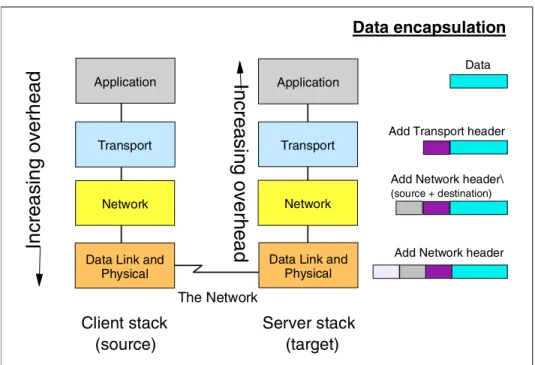
. IP is operating in the OSI Network layer. It takes the TCP segment and adds specific network routing information. The resulting packet is known as an IP datagram. The datagram passes to the network driver software, which adds further heading information. The datagram is now a packet, or frame, ready for transmission across the network.TCP/IP: The TCP/IP protocol is software based. It is geared towards unsolicited packets. TCP is reliable because it guarantees that the packet is received by the target destination. If the packet is not received the target notifies the initiator, and TCP/IP resends the packet. This software structure implies processing overhead both in the initiator and in the target nodes. This is a significant factor for data intensive applications, such as those related to data storage.
TCP/IP also includes a number of other protocols, which are known as the
TCP/IP Suite
orstack.
This describes a suite of protocols designed to handle program to program transactions, electronic mail, security, file transfers, remote logon facilities, and network discovery mechanisms over local and wide area networks. We describe the TCP/IP protocol stack, and how it interrelates with IP networks in 2.2, “TCP/IP technical overview” on page 66.1.5.3 Exploiting IP networks
Once you have established a client/server infrastructure, how can the network be exploited to deliver business benefit? Sharing of information was one of the key drivers for LAN implementation. Two major opportunities were exploited from the outset. The first made it possible to send copies of files between users, and is known as file transfer. The second enabled multiple users to share access to a common file, which is stored on a system remote to the user. This is file sharing.
File transfer
An early requirement was to be able to copy files from one computer to another across the network. Examples of file transfer protocols are remote copy (rcp), rdist, gopher, tftp. For brevity, this discussion is limited to File Transfer Protocol and Hypertext Transfer Protocol since these are the only file transfer protocols supported by Network Attached Storage.
File Transfer Protocol (FTP)
File copying capability is provided by the well known client/server function known as File Transfer Protocol (FTP). You probably have experience exchanging files with colleagues within your organization via the LAN or WAN, or between organizations or individuals over the Internet. It might be a spreadsheet, a graphical presentation, or a working document for review. FTP specifies how information that is organized as files should be transferred between
heterogeneous computers on the network.
The manner in which files are stored, accessed, and protected differs among different types of platforms. Therefore, FTP works with some basic properties which are common to files on most systems to enable users to manipulate files. An FTP communication begins when the FTP client establishes a session with the FTP server. The client can then initiate multiple file transfers to or from the FTP server. An example of FTP file copying is illustrated in Figure 1-6. At completion of the process, both systems have a copy of file “x”, and both can work on it independently.
Figure 1-6 File transfers use FTP
IP network
Computer B
Computer A
yx
x
x
Computer A sends a copy of file "x" to Computer B
File Transfer Protocol (FTP) File Transfer Protocol (FTP)FTP is frequently used to download data from sites on the Internet. It is
particularly useful for exchanging and distributing software programs, and test or sample code. However, FTP does not normally include encryption, and FTP data does not benefit from caching in proxy servers.
Hypertext Transfer Protocol (HTTP)
HTTP is probably familiar to you. It is the most widely used transfer protocol available on the Internet. It allows you to access Web sites, and to print and download files from the World Wide Web. It has a number of advantages compared to FTP, such as the ability to benefit from Web caching technology.
File sharing
Another early requirement was to share files. In other words, rather than ship files between computers, why not allow multiple clients to access a single copy of a file which is stored on a central server? Network file protocols and network operating systems (NOS) were developed in the 1980s to enable users to do this. These include Network File System (NFS), Common Internet File System (CIFS), and Novell Netware.
Network File System (NFS)
NFS is a file-level protocol for accessing and sharing data across the network. NFS originated in the UNIX world, having initially been developed for Sun systems. NFS is device independent. That means that NFS has no knowledge of the location of data on a storage device. It addresses data in files, for instance “read the first 80 bytes from File ABC.” For more details about NFS, refer to 2.6.1, “Network File System (NFS)” on page 93.
Common Internet File System (CIFS)
CIFS (commonly pronounced “siffs”) is a file level protocol developed by
Microsoft. It provides Windows operating environments with device independent accessing and sharing of data across the network. CIFS, like NFS, reads and writes data to and from files, with no knowledge of the location of the data on the storage device. For more details about CIFS, refer to 2.6.2, “Common Internet File System (CIFS)” on page 95.
NetWare
NetWare is a popular PC-based specialized network operating system (NOS) rather than a protocol. Developed by Novell, the NetWare operating system is optimized as a multi-platform network file server. It supports numerous client platforms by means of its name space service. In addition to supporting CIFS for Windows systems, UNIX clients can store data on NetWare servers using NFS, and Apple Macintosh users can do so via the Apple file protocol.
1.5.4 Managing the IP network resources
The strategic importance of network management in today's computing environments is critical. Businesses run on a collection of technological resources including applications, communication tools, the Internet, extranets, and PCs. A complex network of servers, hubs, switches, bridges, and routers connects these resources. If one component fails, a crippling domino effect can spread throughout your entire network of business-critical technology. A number of software tools are available to manage TCP/IP networks, including:
Tivoli NetView CA Unicenter TNG
Microsoft System Management HP OpenView
To illustrate the importance and functions of network management, we have included a brief description of Tivoli Netview in 2.13.1, “Tivoli NetView” on page 112.
1.6 Network attached storage (NAS)
Storage systems which optimize the concept of file sharing across the network have come to be known as NAS. NAS solutions utilize the mature Ethernet IP network technology of the LAN. Data is sent to and from NAS devices over the LAN using TCP/IP protocol.
By making storage systems LAN addressable, the storage is freed from its direct attachment to a specific server, and any-to-any connectivity is facilitated using the LAN fabric. In principle, any user running any operating system can access files on the remote storage device. This is done by means of a common network access protocol—for example, NFS for UNIX servers and CIFS for Windows servers. In addition, a task such as backup to tape can be performed across the LAN using software like Tivoli Storage Manager (TSM), enabling sharing of expensive hardware resources (for example, automated tape libraries) between multiple servers.
A storage device cannot just attach to a LAN. It needs intelligence to manage the transfer and the organization of data on the device. The intelligence is provided by a dedicated server to which the common storage is attached. It is important to understand this concept. NAS comprises a server, an operating system, and storage which is shared across the network by many other servers and clients. So a NAS is a
specialized server or appliance
, rather than anetwork
The NAS system “exports” its file system to clients, which access the NAS storage resources over the LAN.
1.6.1 File servers
NAS solutions have evolved over time, beginning in the mid 1990s. Early NAS implementations used a standard UNIX or NT server with NFS or CIFS software to operate as a remote file server. Clients and other application servers access the files stored on the remote file server as though the files are located on their local disks. The location of the file is transparent to the user. Several hundred users could work on information stored on the file server, each one unaware that the data is located on another system.
The file server has to manage I/O requests accurately, queuing as necessary, fulfilling the request, and returning the information to the correct client. The NAS server handles all aspects of security and lock management. If one user has the file open for updating, no one else can update the file until it is released. The file server keeps track of connected clients by means of their network IDs,
addresses, and so on.
1.6.2 Network appliances
Later developments use application specific, specialized
thin server
configurations with customized operating systems (OS). These OS usually comprise a stripped down UNIX kernel, reduced Linux OS, or a specialized Windows 2000 kernel, as with the IBM Network Attached Storage appliances described in this book. In these reduced operating systems, many of the server operating system functions are not supported. It is likely that many lines of operating system code have been removed. The objective is to improve performance and reduce costs by eliminating unnecessary functions normally found in the standard hardware and software. Some NAS implementations also employ specialized data mover engines and separate interface processors in efforts to further boost performance.
Note: A specialized NAS appliance, like the IBM NAS 300G, attaches to external storage via a Fibre Channel network connection. Refer to 3.4, “IBM TotalStorage Network Attached Storage 300G” on page 145 for details on the 300G. We also outline the benefits of the 300G, and similar “NAS gateway” products, in 1.8.5, “The IBM NAS 300G appliances” on page 43.
These specialized file servers with reduced OS are typically known as
appliances
, describing the concept of an application-specific system. The termappliance
borrows from household electrical devices the idea of a specializedplug-and-play,
application-specific tool, such as a coffee maker or a toaster. Indeed, specialized NAS appliances, like the IBM TotalStorage NAS solutions, come with pre-configured software and hardware, and with no monitor or keyboard for user access. This is commonly termed aheadless
system. A storage administrator can access the device and manage the disk resources from a remote console.One of the typical characteristics of a NAS appliance is its ability to be installed rapidly, with minimal time and effort to configure the system, and to integrate it into the network. This plug-and-play approach makes NAS appliances especially attractive when lack of time and skills are elements in the decision process. So, a NAS appliance is an easy-to-use device. It is designed for a specific function, such as serving files to be shared among multiple servers, and it performs this task very well. It is important to recognize this when selecting a NAS solution since it is not a general purpose server, and should not be used (indeed, due to its reduced OS, probably cannot be used) for general purpose server tasks. But it does provide a good solution for appropriately selected shared storage applications.
The IBM 3466 Network Storage Manager (NSM) is an integrated appliance that provides backup, archive, storage management, and disaster recovery of data stored in a network computing environment. The NSM integrates Tivoli Storage Manager (TSM) server functions with a rack mounted RS/6000, SSA disk storage, network communications, and links to automated tape libraries. NSM manages clients’ data, providing easily installed, centrally administered storage management services in a distributed network environment.
The IBM 3466 Network Storage Manager (NSM) is an example of a specialized, plug-and-play IBM network-attached appliance; it requires limited administrator skills to implement a comprehensive data backup and protection solution. Since the focus of this book is on recently announced NAS disk storage, we do not include further details about the 3466. For more information on this powerful backup/restore product, see A Practical Guide to Network Storage Manager, SG24-2242.
1.6.3 NAS appliances use File I/O
One of the key differences in a NAS appliance, compared to DAS or other network storage solutions such as SAN or iSCSI, is that all client I/O operations to the NAS use file level I/O protocols. File I/O is a high level type of request that, in essence, specifies only the file to be accessed, but does not directly address the storage device. This is done later by other operating system functions in the remote NAS appliance.
A file I/O specifies the file. It also indicates an offset into the file. For instance, the I/O may specify “Go to byte ‘1000’ in the file (as if the file were a set of
contiguous bytes), and read the next 256 bytes beginning at that position.” Unlike block I/O, there is no awareness of a disk volume or disk sectors in a file I/O request. Inside the NAS appliance, the operating system keeps track of where files are located on disk. It is the NAS OS which issues a block I/O request to the disks to fulfill the client file I/O read and write requests it receives.
In summary, network access methods like NFS and CIFS can only handle file I/O requests to the remote file system. This is located in the operating system of the NAS device. I/O requests are packaged by the initiator into TCP/IP protocols to move across the IP network. The remote NAS file system converts the request to block I/O and reads or writes the data to the NAS disk storage. To return data to the requesting client application, the NAS appliance software repackages the data in TCP/IP protocols to move it back across the network. This is illustrated in Figure 1-7 on page 24.
By default, a database application that is accessing a remote file located on a NAS device is configured to run with File System I/O. It cannot utilize raw I/O to achieve improved performance. For more technical details about network file I/O, refer to “File systems and database systems” on page 90 and to 2.8, “Tracing the I/O path for network storage” on page 101.
Figure 1-7 NAS appliances use file I/O
1.6.4 IBM TotalStorage Network Attached Storage 200 and 300
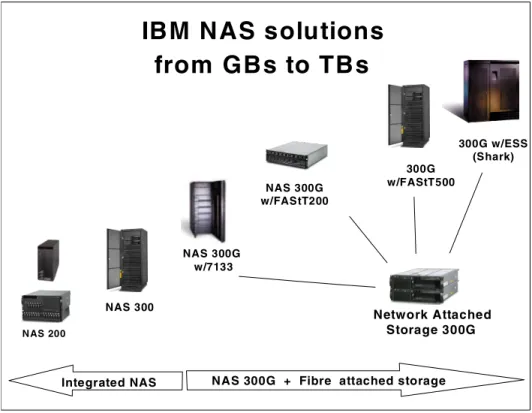
IBM has recently introduced a series of network attached disk storage servers comprising: IBM 5194 TotalStorage Network Attached Storage 200
– The IBM 5194-201 is a tower model, which scales from 108 GB to 440.4 GB (Internally).
– The IBM 5194-226 is rack mounted and scales from 108 GB to 3.52 TB.
The IBM NAS 200 appliances are well suited to support work group and departmental environments.
IBM 5195 TotalStorage Network Attached Storage 300
The IBM 5195-325 is a dual node, fault tolerant, rack mounted model which provides superior performance and data availability. It scales from 109.2 GB to 6.61 TB.
The IBM NAS 300 is ideal to support larger departmental and smaller enterprise applications.
Application server
IP protocol
File I/O
File system in NAS appliance initiates block I/O to NAS integrated disk Application server
directs file I/O request over the LAN to remote file system in the NAS appliance