USER GUIDE
CM52 Integrators’ Manual
Reference:
WI_DEV_CM52_UGD_001
Version:
001
Date:
June 20, 2007
CM52 Integrators’ Manual WI_DEV_CM52_UGD_001-001 Page 2 of 53
CM52 Integrators’ Manual
Trademarks
®, WAVECOM®, WISMO®, Open AT®, Wireless CPU®, Wireless Microprocessor® and certain other trademarks and
logos appearing on this document, are filed or registered trademarks of Wavecom S.A. in France or in other countries. All other company and/or product names mentioned may be filed or registered trademarks of their respective owners.
Copyright
This manual is copyrighted by WAVECOM with all rights reserved. No part of this manual may be reproduced in any form without the prior written permission of WAVECOM.
No patent liability is assumed with respect to the use of the information contained herein.
No Warranty
This document is provided “as is” without any warranty of any kind. WAVECOM makes no warranties of any kind, either express or implied, including any implied warranties of merchantability, fitness for a particular purpose or noninfringement.
This document is the sole and exclusive property of WAVECOM. Not to be distributed or divulged without prior written agreement. Ce document est la propriété exclusive de WAVECOM. Il ne peut être communiqué ou divulgué à des tiers sans son autorisation préalable
CM52 Integrators’ Manual
CM52 Integrators’ Manual WI_DEV_CM52_UGD_001-001 Page 3 of 53
This document is the sole and exclusive property of WAVECOM. Not to be distributed or divulged without prior written agreement. Ce document est la propriété exclusive de WAVECOM. Il ne peut être communiqué ou divulgué à des tiers sans son autorisation préalable
Table of Contents
1
Introduction to the Integrator’s Manual... 9
1.1 OVERVIEW ... 9
1.2 HOW TO READ THE MANUAL ... 9
1.3 SERVICE AND SUPPORT... 9
1.3.1 WEB PAGES ... 9
1.4 RELATED DOCUMENTS ... 10
1.5 ABBREVIATIONS... 10
2
Integrating the CM52 Wireless CPU
®... 11
2.1 OVERVIEW ... 11 2.2 MECHANICAL DESCRIPTION ... 11 2.2.1 MECHANICAL DIMENSIONS ... 11 2.2.2 HEAT-SINK REQUIREMENTS ... 16 2.2.3 MOUNTING HOLES ... 16 2.2.3.1 MOUNTING CONFIGURATION A ... 16 2.2.3.2 MOUNTING CONFIGURATION B... 17
2.2.4 RF CONNECTOR MOUNTING CONSIDERATIONS... 17
2.3 SYSTEM CONNECTOR INTERFACE... 18
2.3.1 MECHANICAL OVERVIEW... 18
2.3.2 SYSTEM CONNECTOR INTERFACE PINOUT... 19
2.3.3 LOGIC LEVELS ... 21
2.3.3.1 LEAKAGE CURRENT FOR CMOS SIGNALS ... 21
2.3.3.2 VALIDITY OF CMOS SIGNALS ... 21
2.4 POWER SUPPLY ... 21
2.4.1 POWER SUPPLY INPUT CAPACITANCE ... 22
2.4.2 POWER SUPPLY AND GROUND SIGNALS... 23
2.4.2.1 POWER SUPPLY SIGNAL PINS ... 23
CM52 Integrators’ Manual
CM52 Integrators’ Manual WI_DEV_CM52_UGD_001-001 Page 4 of 53
This document is the sole and exclusive property of WAVECOM. Not to be distributed or divulged without prior written agreement. Ce document est la propriété exclusive de WAVECOM. Il ne peut être communiqué ou divulgué à des tiers sans son autorisation préalable
2.4.3 POWER CONSUMPTION... 23
2.4.3.1 VCC_MAIN SUPPLY POWER CONSUMPTION... 24
2.4.3.2 VCC_AUX SUPPLY POWER CONSUMPTION... 24
2.4.3.3 POWER DOWN MODE (MINIMUM DC POWER CONSUMPTION) ... 25
2.4.4 VREF SIGNAL DETAILS ... 25
2.5 REAL TIME CLOCK (RTC) CIRCUIT... 26
2.5.1 RTC INITIALIZATION... 26
2.5.2 RTC FUNCTIONAL BLOCK DIAGRAM... 26
2.6 AUDIO INTERFACE... 27
2.6.1 DIGITAL AUDIO ... 28
2.6.1.1 DATA FORMAT... 28
2.6.1.2 TIMING ... 29
2.6.2 ANALOG AUDIO ... 30
2.7 SERIAL DATA INTERFACE ... 33
2.8 ANTENNA INTERFACE... 33
2.8.1 ANTENNA CONNECTOR... 34
2.8.2 RF OUTPUT POWER... 35
2.8.3 CARRIER APPROVAL ... 36
2.8.4 ANTENNA DIAGNOSTICS ... 36
3
Recommended Interface Circuitry... 38
3.1 STATUS GROUP RECOMMENDED CIRCUITRY... 38
3.1.1 MODULE_PWR_EN_B ... 39
3.1.2 VREF... 39
3.1.3 RI ... 40
3.1.4 HW_SD... 40
3.2 DATA GROUP RECOMMENDED CIRCUITRY... 42
3.2.1 VPPFLASH/DCD... 42
3.3 PCM GROUP RECOMMENDED CIRCUITRY... 43
3.4 ANALOG AUDIO GROUP RECOMMENDED CIRCUITRY ... 44
3.4.1 CREATING AN ANALOG GROUND... 44
3.4.2 ANALOG GROUND VS. AGND... 45
CM52 Integrators’ Manual
CM52 Integrators’ Manual WI_DEV_CM52_UGD_001-001 Page 5 of 53
This document is the sole and exclusive property of WAVECOM. Not to be distributed or divulged without prior written agreement. Ce document est la propriété exclusive de WAVECOM. Il ne peut être communiqué ou divulgué à des tiers sans son autorisation préalable
3.4.4 LOUDSPEAKER PATH ... 46
3.5 SYSTEM CONNECTOR IO FUNCTIONALITY ... 47
4
Functional Description ... 49
5
Hints for Integrating the Wireless CPU
®... 50
5.1 PRECAUTIONS ... 50
5.2 WHERE TO INSTALL THE WIRELESS CPU®... 50
5.3 SAFETY STANDARDS... 50
5.4 ANTENNA... 51
5.4.1 ANTENNA TYPE ... 51
5.4.2 ANTENNA PLACEMENT ... 51
5.5 POSSIBLE COMMUNICATION DISTURBANCES ... 51
CM52 Integrators’ Manual
CM52 Integrators’ Manual WI_DEV_CM52_UGD_001-001 Page 6 of 53
This document is the sole and exclusive property of WAVECOM. Not to be distributed or divulged without prior written agreement. Ce document est la propriété exclusive de WAVECOM. Il ne peut être communiqué ou divulgué à des tiers sans son autorisation préalable
List of Tables
TABLE 1: ABBREVIATION DEFINITIONS... 10
TABLE 2: SYSTEM CONNECTOR AND MATING PART NUMBERS... 18
TABLE 3: PIN-OUT OF THE SYSTEM CONNECTOR HEADER... 20
TABLE 4: CMOS OUTPUT / INPUT ELECTRICAL CHARACTERISTICS... 21
TABLE 5: MAXIMUM LEAKAGE CURRENT FOR CMOS SIGNALS... 21
TABLE 6: CM52 POWER SUPPLY REQUIREMENTS... 22
TABLE 7: POWER SUPPLY INPUT CAPACITANCE (0.6W VARIANTS)... 22
TABLE 8: POWER SUPPLY INPUT CAPACITANCE (3W VARIANTS)... 22
TABLE 9: CM52 POWER SUPPLY SIGNALS... 23
TABLE 10: CM52 GROUND SIGNALS... 23
TABLE 11: VCC_MAIN SUPPLY POWER CONSUMPTION... 24
TABLE 12: VCC_AUX SUPPLY POWER CONSUMPTION... 25
TABLE 13: MODULE_PWR_EN_B SIGNAL PARAMETERS... 25
TABLE 14: VREF SUPPLY DETAILS... 26
TABLE 15: FREQUENCY CHARACTERISTICS OF THE RTC... 26
TABLE 16: CM52 AUDIO SIGNALS... 27
TABLE 17: CM52 DIGITAL AUDIO SIGNALS... 28
TABLE 18: PCM TIMING PARAMETERS... 29
TABLE 19: CM52 ANALOG AUDIO SIGNALS... 30
TABLE 20: AUDIO CHARACTERISTICS... 30
TABLE 21: SERIAL DATA CHANNELS... 33
TABLE 22: ANTENNA CONNECTOR SUPPLIERS... 35
TABLE 23: MOBILE STATION NOMINAL ANALOG POWER LEVELS... 36
TABLE 24: MOBILE STATION CDMA MAXIMUM OUTPUT POWER... 36
TABLE 25: RANGE OF ADC READINGS FOR AN EXTERNAL ANTENNA... 37
TABLE 26: PIN DIRECTION FOR GENERAL PURPOSE SIGNALS... 48
CM52 Integrators’ Manual
CM52 Integrators’ Manual WI_DEV_CM52_UGD_001-001 Page 7 of 53
This document is the sole and exclusive property of WAVECOM. Not to be distributed or divulged without prior written agreement. Ce document est la propriété exclusive de WAVECOM. Il ne peut être communiqué ou divulgué à des tiers sans son autorisation préalable
List of Figures
FIGURE 1: CM52 PRIMARY SIDE... 11
FIGURE 2: CM52 SECONDARY SIDE... 11
FIGURE 3: MECHANICAL DIMENSIONS DRAWING (CM52003 VARIANT)... 12
FIGURE 4: MECHANICAL DIMENSIONS DRAWING (CM52001 AND CM52004 VARIANTS)... 13
FIGURE 5: MECHANICAL DIMENSIONS DRAWING (CM52002 VARIANT)... 14
FIGURE 6: KEEP-OUT DRAWING OF CM52... 15
FIGURE 7: MOUNTING CONFIGURATION A... 16
FIGURE 8: MOUNTING CONFIGURATION B... 17
FIGURE 9: APPLICATION HOUSING... 17
FIGURE 10: 40-PIN SYSTEM CONNECTOR... 18
FIGURE 11: 40-PIN SYSTEM CONNECTOR PIN NUMBERING... 18
FIGURE 12: RTC FUNCTIONAL BLOCK DIAGRAM... 27
FIGURE 13: PCM TIMING DIAGRAM... 29
FIGURE 14: BIAS DIAGRAM EXAMPLE... 31
FIGURE 15: MICROPHONE IMPLEMENTATION EXAMPLE... 32
FIGURE 16: DIFFERENTIAL IMPLEMENTATION EXAMPLE... 32
FIGURE 17: COLOR AND KEYING FOR VARIOUS FAKRA CONNECTORS ... 34
FIGURE 18: SAMPLE SMA CONNECTOR AND MOUNTING HOLE... 35
FIGURE 19: ANTENNA DIAGNOSTIC CIRCUIT... 37
FIGURE 20: STATUS GROUP DIAGRAM... 39
FIGURE 21: PIN 15 HW_SD DIAGRAM... 40
FIGURE 22: SHUT DOWN SEQUENCE TIMELINE... 41
FIGURE 23: DATA GROUP DIAGRAM... 42
FIGURE 24: PCM GROUP DIAGRAM... 43
FIGURE 25: CREATING AN ANALOG REFERENCE VOLTAGE (BIAS)... 44
FIGURE 26: BIAS/VANA REFERENCE... 44
FIGURE 27: MICROPHONE IMPLEMENTATION EXAMPLE... 45
CM52 Integrators’ Manual
CM52 Integrators’ Manual WI_DEV_CM52_UGD_001-001 Page 8 of 53
This document is the sole and exclusive property of WAVECOM. Not to be distributed or divulged without prior written agreement. Ce document est la propriété exclusive de WAVECOM. Il ne peut être communiqué ou divulgué à des tiers sans son autorisation préalable
Revision History
Release Date Summary of Changes
PA1 05/07/2004 Initial Draft
PA2 09/01/2004 Formatting
PA3 11/17/2004 Updated Chapters 1 & 2
PA4 11/29/2004 Updated with review feedback
PA5 12/01/2004 Updated the List of Tables and Figures
PA6 06/16/2005 Current Consumption Table, RTC Block Diagram, Mechanical
Drawing
A 09/15/2005 Release version
PB1 11/30/2005 Updates for VREF sourcing capability, inrush current, mechanical
mounting, recommended application circuitry and CMOS leakage current.
PB2 02/16/2006 Update to Power consumption section & Formatting updates
PB3 03/08/2006 Updated mechanical drawings, Re-formatted Table 2, Added RTC
Frequency Characteristics.
PB4 03/16/2006 Updated Sections: 2.5 - Real Time Clock Circuit, 2.8.2 – RF Output
Power. Added section 3.1.3 – RI
PB5 03/22/2006 Updated Table of Contents.
Updated Sections: 3.1.3 – RI and 3.1.4 – HW_SD.
Removed the Random Stationary Vibration information from Section 6 – Technical Data.
B 03/24/2006 Release Version
PC1 06/02/2006 Updated Vibration Specification and add Minimum Off-Time
PC2 06/13/2006 Added RTC Initialization section and reformatted Technical Data
table
CM52 Integrators’ Manual
CM52 Integrators’ Manual WI_DEV_CM52_UGD_001-001 Page 9 of 53
This document is the sole and exclusive property of WAVECOM. Not to be distributed or divulged without prior written agreement. Ce document est la propriété exclusive de WAVECOM. Il ne peut être communiqué ou divulgué à des tiers sans son autorisation préalable
1
Introduction to the Integrator’s Manual
1.1
Overview
This manual is for use as a guide to the setup, installation, and use of the CM52 Wireless CPU® into
your application. The Wireless CPU® may be tested using the developer’s board, which is supplied
together with all the necessary tools in the Developer’s Kit.
1.2
How to Read the Manual
This manual is divided into six chapters:
Chapter 1 gives a general view of the integrator’s manual. A list of related documents as well as a list of abbreviations used throughout the manual is also included. Information concerning service and support is also presented.
Chapter 2 focuses on helping the hardware developer to integrate the CM52 hardware into their application. An overview of the mechanical and electrical information is provided. Interface specifications, RF output power, and power supply issues are included in this chapter.
Chapter 3 contains information on recommended circuitry needed to ensure proper performance from the CM52 Wireless CPU®.
Chapter 4 describes several of the common cellular functions available with the CM52. Chapter 5 provides some hints for integrating the Wireless CPU®.
Chapter 6 provides a summary of the technical data for the CM52 Wireless CPU®.
1.3
Service and Support
1.3.1 Web Pages
Visit our Web site for more information about where you can buy our products or for recommendations for accessories and components. The address is:
http://www.wavecom.com
To register for product news and announcements or for product questions, work with your usual Wavecom contact.
CM52 Integrators’ Manual
CM52 Integrators’ Manual WI_DEV_CM52_UGD_001-001 Page 10 of 53
This document is the sole and exclusive property of WAVECOM. Not to be distributed or divulged without prior written agreement. Ce document est la propriété exclusive de WAVECOM. Il ne peut être communiqué ou divulgué à des tiers sans son autorisation préalable
1.4
Related Documents
CM52 AT Command Manual – Details the AT command interface for the CM52 The CM52 is based upon the following mobile standards:
IS-2000 Release 0 (1XRTT), MOB_P_REV – CDMA protocol
TIA/EIA/IS-91 – Mobile Station – Base Station Compatibility Standard for 800 MHz Analog
Cellular
TIA/EIA-98-D – Recommended Minimum Performance Standards for Dual-Mode Spread
Spectrum Mobile Stations
1.5
Abbreviations
Abbreviation Definition
AGND Analog Reference
AMPS Advanced Mobile Phone System
AT Attention Command
CDMA Code Division Multiple Access
CTS Clear to Send
DCD Data Carrier Detect
DFMS Data from Mobile Station
DTMS Data to Mobile Station
DTR Data Terminal Ready
EMI Electromagnetic Interference
ESD Electrostatic Discharge
GND Chassis GrouND
IRA International Reference Alphabet
LSB Least Significant Bit
ME Mobile Equipment
MO Mobile Originated
MS Mobile Station
MT Mobile Terminated
OEM Original Equipment Manufacturer
PCB Printed Circuit Board
PCM Pulse Code Modulation
PIN Personal Identification Number
PSD Power Spectral Density
RD Receive Data, also known as DFMS
RF Radio Frequency
RI Ring Indicator
RTS Request to Send
SMS Short Message Service
TD Transmit Data, also know as DTMS
CM52 Integrators’ Manual WI_DEV_CM52_UGD_001-001 Page 11 of 53
2
Integrating the CM52 Wireless CPU
®2.2.1 Mechanical Dimensions
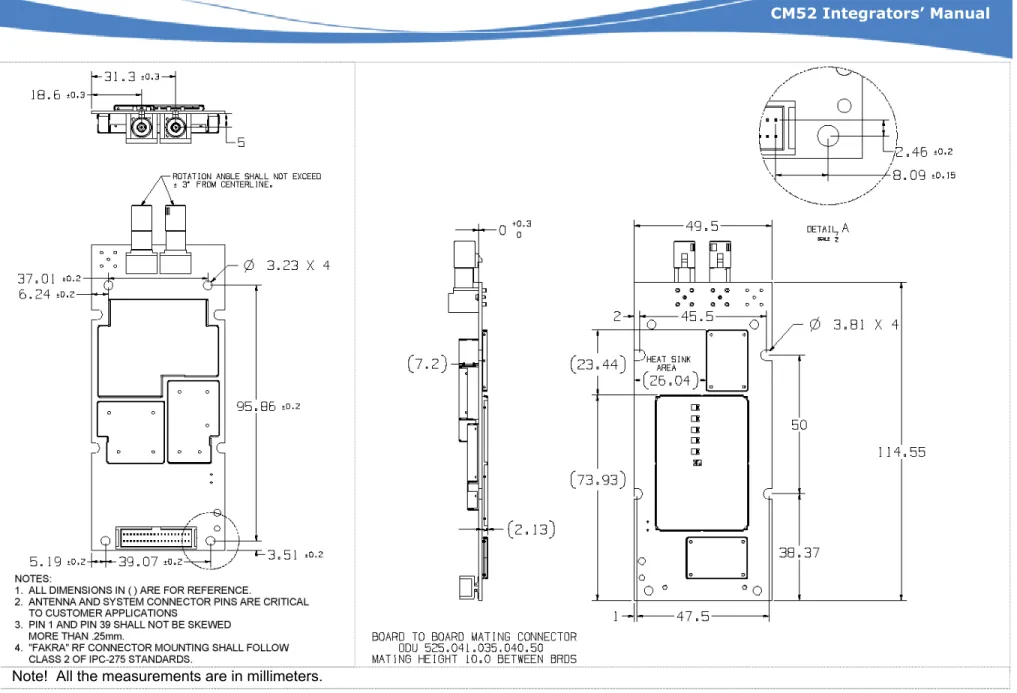
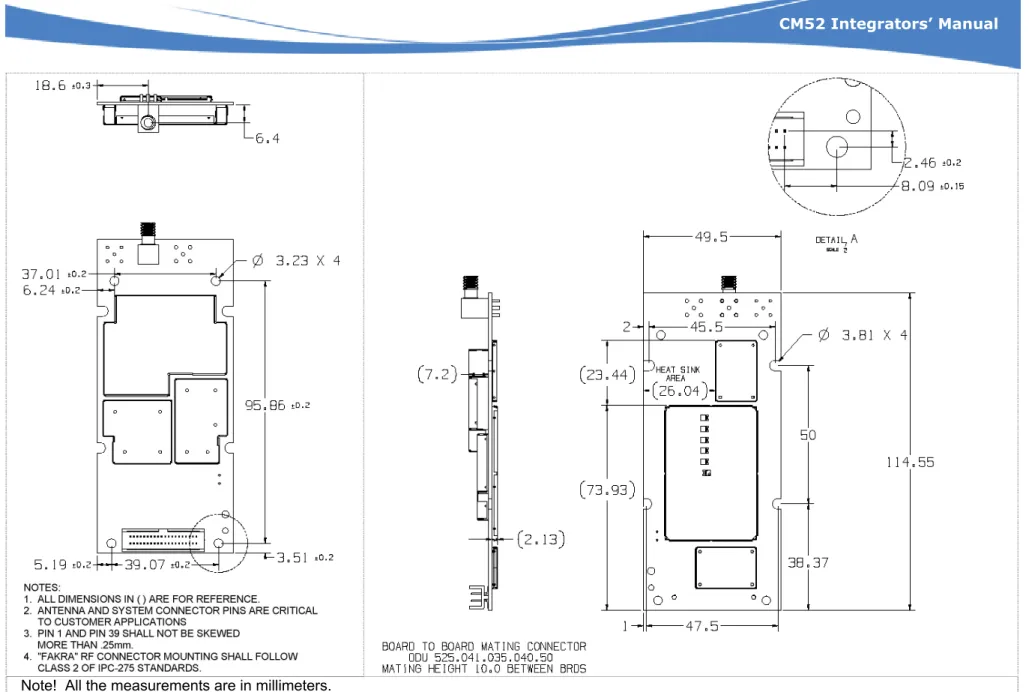
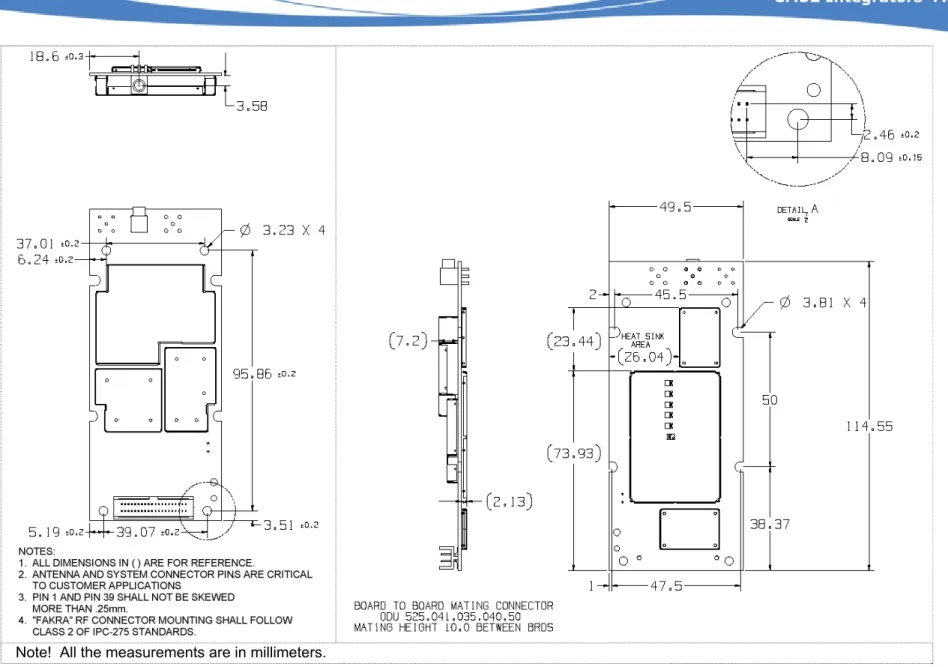
The following figures provide the mechanical dimensions for several CM52 variants (CM52002, CM52003, and CM52004). There is also a drawing detailing the mechanical keep-out regions.
2.2
Mechanical Description
2.1
Overview
The CM52 is a dual band, dual mode CDMA transceiver Wireless CPU®. It operates in the 800 MHz
band for CDMA and AMPS and in the 1900 MHz band for CDMA. It is designed for consumer and OEM industrial voice and data applications.
The CM52 Wireless CPU® is intended for mounting into an application developer’s chassis to
provide wireless communication capability for the product. The target chassis could be in a wide variety of forms such as a residential electric meter, a point of sale terminal, an alarm panel, or an automobile console. All initial configuration, mode control, and operational commands are issued to the Wireless CPU® over an RS-232 serial port using a flexible AT command format. The Wireless
CPU® circuitry has been designed to meet the environmental requirements of a large range of
commercial and industrial users.
The CM52 has no mechanical elements other than the main PCB assembly. All critical electronic components are shielded using six cans to prevent internal and external electromagnetic
interference from degrading the Wireless CPU performance and to prevent the Wireless CPU® from
interfering with other nearby devices. The Wireless CPU® is plugged into the fixed mating
connector and secured with four screws.
The Wireless CPU® has no keypad, display, microphone, speaker, or battery. The following figures
show 3-D models of the Wireless CPU®.
The antenna interface is provided via a board mounted RF connector at the opposite end of the board from the system connector. See Section 2.8 for more information on antenna connector options.
Figure 1: CM52 Primary Side Figure 2: CM52 Secondary Side
This document is the sole and exclusive property of WAVECOM. Not to be distributed or divulged without prior written agreement. Ce document est la propriété exclusive de WAVECOM. Il ne peut être communiqué ou divulgué à des tiers sans son autorisation préalable
CM52 Integrators’ Manual WI_DEV_CM52_UGD_001-001 Page 12 of 53
CM52 Integrators’ Manual
Note! All the measurements are in millimeters.
Figure 3: Mechanical Dimensions Drawing (CM52003 variant)
This document is the sole and exclusive property of WAVECOM. Not to be distributed or divulged without prior written agreement. Ce document est la propriété exclusive de WAVECOM. Il ne peut être communiqué ou divulgué à des tiers sans son autorisation préalable
CM52 Integrators’ Manual WI_DEV_CM52_UGD_001-001 Page 13 of 53
CM52 Integrators’ Manual
Note! All the measurements are in millimeters.
Figure 4: Mechanical Dimensions Drawing (CM52001 and CM52004 variants)
This document is the sole and exclusive property of WAVECOM. Not to be distributed or divulged without prior written agreement. Ce document est la propriété exclusive de WAVECOM. Il ne peut être communiqué ou divulgué à des tiers sans son autorisation préalable
CM52 Integrators’ Manual WI_DEV_CM52_UGD_001-001 Page 14 of 53
CM52 Integrators’ Manual
Note! All the measurements are in millimeters.
Figure 5: Mechanical Dimensions Drawing (CM52002 variant)
This document is the sole and exclusive property of WAVECOM. Not to be distributed or divulged without prior written agreement. Ce document est la propriété exclusive de WAVECOM. Il ne peut être communiqué ou divulgué à des tiers sans son autorisation préalable
CM52 Integrators’ Manual
CM52 Integrators’ Manual WI_DEV_CM52_UGD_001-001 Page 15 of 53
Note! All the measurements are in millimeters.
This document is the sole and exclusive property of WAVECOM. Not to be distributed or divulged without prior written agreement. Ce document est la propriété exclusive de WAVECOM. Il ne peut être communiqué ou divulgué à des tiers sans son autorisation préalable Figure 6: Keep-out drawing of CM52
CM52 Integrators’ Manual WI_DEV_CM52_UGD_001-001 Page 16 of 53
CM52 Integrators’ Manual
2.2.2 Heat-Sink Requirements
The application is required to provide a heat-sink for the 3W AMPS capabilities of the CM52. The application should be designed to provide a heat sink with a thermal resistance of 4.0 °C/W.
For applications that disable the 3W mode (Class I) and only operate in 0.6W mode (Class III) a heat-sink is not required.
2.2.3 Mounting Holes
Mounting holes and tabs are provided for proper mechanical support of the CM52 Wireless CPU® in
the customer’s application. The OEM’s application must provide sufficient mechanical retention using the mounting holes and/or tabs or some other means. The system connector and RF connector connections should not be used as a means of mechanical support. Also, please note that the mounting holes may not substitute for the actual grounding pins provided via the system connector.
Two mounting configurations are supported (A and B). Each has its own mechanical vibration specification. Section 6 details the mechanical vibration specification for both configurations. For machine screw mounting a wet torque of 8 in-lbs is recommended.
2.2.3.1 Mounting Configuration A
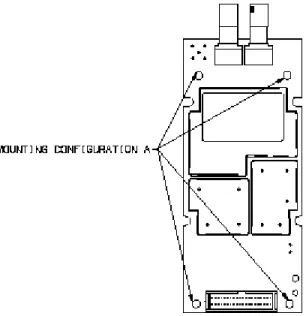
Mounting configuration “A” uses four exterior mounting holes that support #4 size screws.
Figure 7: Mounting Configuration A
This document is the sole and exclusive property of WAVECOM. Not to be distributed or divulged without prior written agreement. Ce document est la propriété exclusive de WAVECOM. Il ne peut être communiqué ou divulgué à des tiers sans son autorisation préalable
CM52 Integrators’ Manual WI_DEV_CM52_UGD_001-001 Page 17 of 53
CM52 Integrators’ Manual
2.2.3.2 Mounting Configuration B
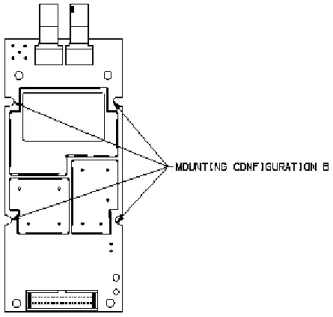
Mounting configuration “B” uses four 3/4 mounting holes that support #6 size screws.
Figure 8: Mounting Configuration B
Note: This is the recommend mounting configuration due to the higher mechanical vibration specification supported.
2.2.4 RF Connector Mounting Considerations
When designing the application the designer should ensure that the housing does not degrade the RF performance of the CM52. A minimum clearance of 4mm from the surface of the PCB to the housing on the back side of the RF connectors should be provided.
4mm
Figure 9: Application Housing
This document is the sole and exclusive property of WAVECOM. Not to be distributed or divulged without prior written agreement. Ce document est la propriété exclusive de WAVECOM. Il ne peut être communiqué ou divulgué à des tiers sans son autorisation préalable
CM52 Integrators’ Manual WI_DEV_CM52_UGD_001-001 Page 18 of 53
CM52 Integrators’ Manual
This document is the sole and exclusive property of WAVECOM. Not to be distributed or divulged without prior written agreement. Ce document est la propriété exclusive de WAVECOM. Il ne peut être communiqué ou divulgué à des tiers sans son autorisation préalable
2.3
System Connector Interface
2.3.1 Mechanical Overview
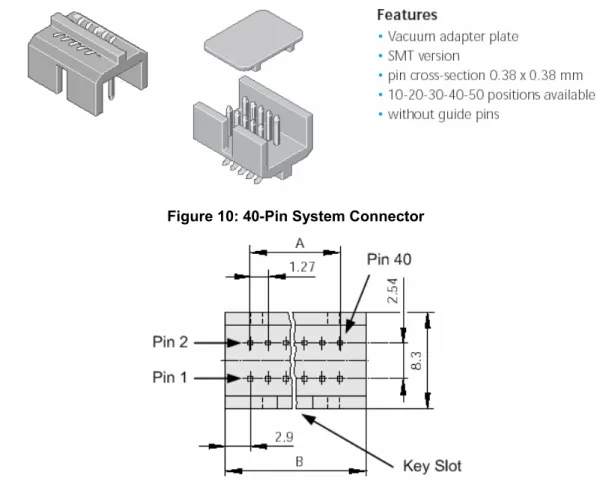
External interfaces to the Wireless CPU® are made primarily through a 40 pin, standard 0.050-inch
pitch, ODU header show below.
Figure 10: 40-Pin System Connector
Figure 11: 40-Pin System Connector Pin Numbering
Description ODU Part Number Dimension A Dimension B
System Connector 515.569.035.140.xxx 24.13 mm 22.86 mm
Mating Ribbon Connector
525.060.035.040.xxx
SMT Mating Header 525.041.035.040.xxx
Ribbon cable, AWG 30 921.659.031.040.000
Please consult the ODU site for more information on mating options: http://www.odu.de
CM52 Integrators’ Manual
CM52 Integrators’ Manual WI_DEV_CM52_UGD_001-001 Page 19 of 53
This document is the sole and exclusive property of WAVECOM. Not to be distributed or divulged without prior written agreement. Ce document est la propriété exclusive de WAVECOM. Il ne peut être communiqué ou divulgué à des tiers sans son autorisation préalable
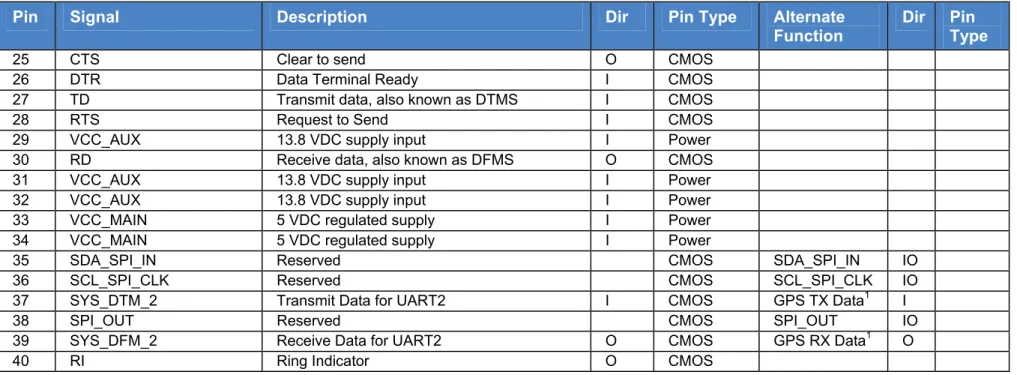
2.3.2 System Connector Interface Pinout
Pin Signal Description Dir Pin Type Alternate
Function
Dir Pin
Type
1 Reserved TIMEMARK 1 O CMOS
2 VREF Logic Voltage O Reference
3 Reserved GPS Fix 1 O CMOS
4 VRTC Supply pin for RTC 2 I Power GPS VRTC1 I Supply
5 GND Chassis Ground Ground
6 GND Chassis Ground Ground
7 AFMS Analog Audio from Wireless CPU® O Audio
8 GND Chassis Ground Ground
9 AGND Analog Reference Audio
10 ATMS Analog Audio to Wireless CPU® I Audio
11 Reserved UART3_RX1 I CMOS
12 MODULE_PWR_EN_B Switches the Wireless CPU® on/off
(hardware-wise), active low I
13 Reserved UART3_TX1 O CMOS
14 Reserved
15 HW_SD Hardware shutdown I/O 16 Reserved
17 PCMCLK PCM Clock output O CMOS 18 PCMSYNC PCM Frame sync O CMOS 19 PCMULD PCM Voice input to Wireless CPU® I CMOS
20 PCMDLD PCM Voice output from Wireless CPU® O CMOS
21 GND Chassis Ground Ground
22 GND Chassis Ground Ground
23 DCD / VPPFLASH Data Carrier Detect & Flash programming
voltage input O / I CMOS / Power
24 Reserved O RINGER O CMOS
1 Default function if GPS option on board
CM52 Integrators’ Manual
CM52 Integrators’ Manual WI_DEV_CM52_UGD_001-001 Page 20 of 53
This document is the sole and exclusive property of WAVECOM. Not to be distributed or divulged without prior written agreement. Ce document est la propriété exclusive de WAVECOM. Il ne peut être communiqué ou divulgué à des tiers sans son autorisation préalable
Pin Signal Description Dir Pin Type Alternate
Function
Dir Pin
Type
25 CTS Clear to send O CMOS
26 DTR Data Terminal Ready I CMOS 27 TD Transmit data, also known as DTMS I CMOS
28 RTS Request to Send I CMOS
29 VCC_AUX 13.8 VDC supply input I Power 30 RD Receive data, also known as DFMS O CMOS 31 VCC_AUX 13.8 VDC supply input I Power 32 VCC_AUX 13.8 VDC supply input I Power 33 VCC_MAIN 5 VDC regulated supply I Power 34 VCC_MAIN 5 VDC regulated supply I Power
35 SDA_SPI_IN Reserved CMOS SDA_SPI_IN IO
36 SCL_SPI_CLK Reserved CMOS SCL_SPI_CLK IO
37 SYS_DTM_2 Transmit Data for UART2 I CMOS GPS TX Data1 I
38 SPI_OUT Reserved CMOS SPI_OUT IO
39 SYS_DFM_2 Receive Data for UART2 O CMOS GPS RX Data1 O
40 RI Ring Indicator O CMOS
CM52 Integrators’ Manual
CM52 Integrators’ Manual WI_DEV_CM52_UGD_001-001 Page 21 of 53
This document is the sole and exclusive property of WAVECOM. Not to be distributed or divulged without prior written agreement. Ce document est la propriété exclusive de WAVECOM. Il ne peut être communiqué ou divulgué à des tiers sans son autorisation préalable
2.3.3 Logic Levels
Many of the signals present in the interface are CMOS signals where the following levels apply. The nominal voltage level for the CMOS signals is 2.9 V. Drive capability of the outputs is also indicated.
Limits
Parameter Test
Conditions Min Max
Units
High level output voltage (IOH = 800 µA) VOH 2.45 3.1 Volts
Low level output voltage (IOL = 800 µA) VOL 0 0.45 Volts
High level input voltage VIH 1.9 3.1 Volts
Low level input voltage VIL 0 0.9 Volts
Table 4: CMOS Output / Input Electrical Characteristics
Note: The maximum voltage that may be applied to any CMOS signal is 3.1V 2.3.3.1 Leakage Current for CMOS Signals
The following table defines the maximum leakage for the CMOS inputs of the CM52.
Parameter Max Units
High level drive for input signal with internal pull down 60 uA
Low level drive for input signal with internal pull up3 60 uA
Table 5: Maximum Leakage Current for CMOS signals
2.3.3.2 Validity of CMOS signals
The CMOS signals of the CM52 shall only be considered valid when the level of the VREF signal is above 2.3V.
2.4
Power Supply
The CM52 requires a dual DC power supply implementation in the application. VCC_MAIN provides power to the entire radio while VCC_AUX provides power for the 3-Watt functionality and biasing for the RF switches.
Note: VCC_AUX must be present if the 3W option is provided even if it is not used. If the 3W circuitry is not populated then VCC_AUX is not required or may be bussed together with VCC_MAIN.
CM52 Integrators’ Manual
CM52 Integrators’ Manual WI_DEV_CM52_UGD_001-001 Page 22 of 53
This document is the sole and exclusive property of WAVECOM. Not to be distributed or divulged without prior written agreement. Ce document est la propriété exclusive de WAVECOM. Il ne peut être communiqué ou divulgué à des tiers sans son autorisation préalable
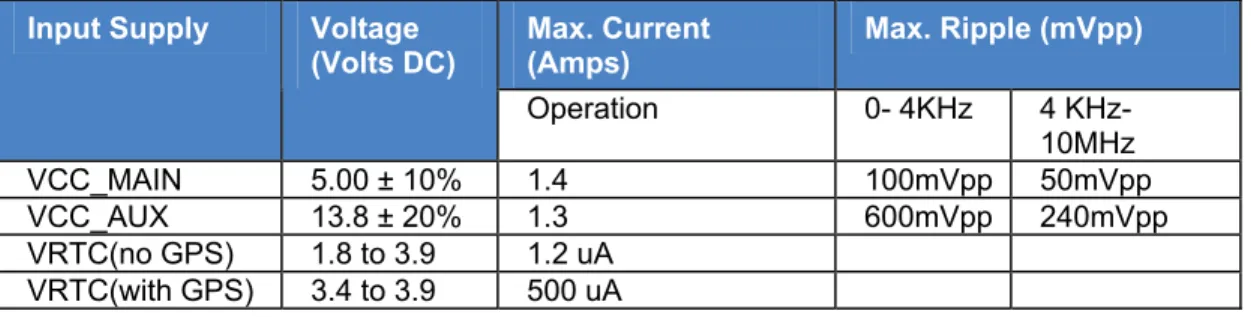
The following table summarizes the power supply requirements from the application. Max. Current
(Amps) Max. Ripple (mVpp)
Input Supply Voltage (Volts DC) Operation 0- 4KHz 4 KHz-10MHz VCC_MAIN 5.00 ± 10% 1.4 100mVpp 50mVpp VCC_AUX 13.8 ± 20% 1.3 600mVpp 240mVpp VRTC(no GPS) 1.8 to 3.9 1.2 uA VRTC(with GPS) 3.4 to 3.9 500 uA
Table 6: CM52 Power Supply Requirements
2.4.1 Power Supply Input Capacitance
It should be noted that when applying power to the Wireless CPU®, the current will exceed the
maximum input current specified in Table 6: CM52 Power Supply Requirements, or any other CM52 electrical specification due to the transient current required to charge the de-coupling capacitors of the Wireless CPU® (specified below as CIN). The magnitude and duration of the transient current
spike is solely dependent on the application power supply design. Any built-in short circuit protection in the application power supply must take this in to account as well as all other "Power Supply" specifications.
The maximum total input capacitance on VCC_MAIN is 100uF. However at “Contact”, 60uF will be charged instantly by the application’s power supply. Then at “Wake” an additional 14.5uF will be instantly charged. At that point internal regulators are activated and limit the charge rate of the remaining capacitance. If VCC_MAIN and VCC_AUX are tied together (0.6W variants only) then the input capacitance on VCC_AUX is negligible.
The “Wakeup” condition occurs when the MODULE_PWR_EN_B signal transitions from High to Low. The “Contact” condition occurs when voltage is first asserted to VCC_MAIN, and or VCC_AUX.
Parameter Contact Wakeup Units
VCC_MAIN Input Capacitance (CIN) 60 14.5 uF
VCC_AUX Input Capacitance (CIN) 33 10 pF
Table 7: Power Supply Input Capacitance (0.6W variants)
Parameter Contact Wakeup 3W assertion
VCC_MAIN Input Capacitance (CIN) 60 uF 14.5 uF n/a
VCC_AUX Input Capacitance (CIN) 10 uF 10 pF 20 uF
CM52 Integrators’ Manual
CM52 Integrators’ Manual WI_DEV_CM52_UGD_001-001 Page 23 of 53
This document is the sole and exclusive property of WAVECOM. Not to be distributed or divulged without prior written agreement. Ce document est la propriété exclusive de WAVECOM. Il ne peut être communiqué ou divulgué à des tiers sans son autorisation préalable
2.4.2 Power Supply and Ground Signals 2.4.2.1 Power Supply Signal Pins
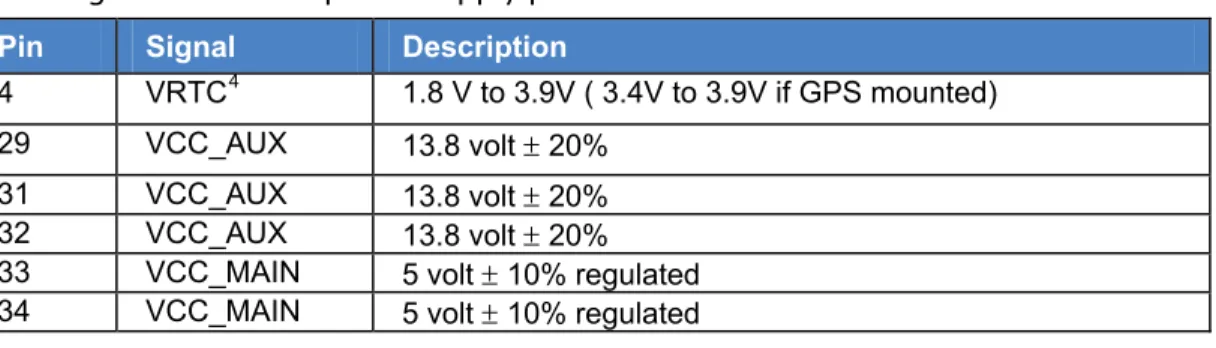
Following is a list of the power supply pins:
Pin Signal Description
4 VRTC4 1.8 V to 3.9V ( 3.4V to 3.9V if GPS mounted)
29 VCC_AUX 13.8 volt ± 20%
31 VCC_AUX 13.8 volt ± 20%
32 VCC_AUX 13.8 volt ± 20%
33 VCC_MAIN 5 volt ± 10% regulated
34 VCC_MAIN 5 volt ± 10% regulated
Table 9: CM52 Power Supply Signals
For the power supply signals in the above table with multiple pins defined, the application shall bus all defined pins together.
2.4.2.2 Ground Signal Pins
The ground signal in the CM52 is Digital Ground, GND, connected to the system connector interface through pin numbers 5, 6, 8, 21 and 22.
Following is a list of the ground pins:
Pin Signal Description
5 GND Digital Ground
6 GND Digital Ground
8 GND Digital Ground
21 GND Digital Ground
22 GND Digital Ground
Table 10: CM52 Ground Signals
Digital Ground (GND) is the logical reference of all digital signals in the System Interface as well as the DC return of the power supply signal, VCC_MAIN and VCC_AUX (used for AMPS Class I
operation). All 5 ground pins in the Wireless CPU® need to be connected to the application
ground. The PCB mounting holes may not to be used as substitute for the ground signal pins of the system connector interface.
2.4.3 Power Consumption
The following tables show typical and maximum values of current that can be expected from the Wireless CPU® in different modes of operation.
CM52 Integrators’ Manual
CM52 Integrators’ Manual WI_DEV_CM52_UGD_001-001 Page 24 of 53
This document is the sole and exclusive property of WAVECOM. Not to be distributed or divulged without prior written agreement. Ce document est la propriété exclusive de WAVECOM. Il ne peut être communiqué ou divulgué à des tiers sans son autorisation préalable
2.4.3.1 VCC_MAIN Supply Power Consumption
Parameter Min Typical Max Units
Input Voltage 4.5 5 5.5 V
In AMPS Call on Power Level 0 (Power Class
I) 0.62 0.82 A
In AMPS Call on Power Level 2 0.94 1.4 A
In CDMA call-Cellular Mode 0.77 1.2 A
In CDMA call-PCS Mode 0.84 1.3 A
CDMA burst duration for Network update 1.2 s
Standby/Idle Current Draw in Slotted Mode (CDMA)
1.28 sec slot 9.6 mA
2.56 sec slot 7.2 mA
5.12 sec slot 4.5 mA
Stand-by/Idle mode (AMPS) 45 mA
Powered Down Current Draw 1 5 uA
Table 11: VCC_MAIN Supply Power Consumption
Notes
1. The typical current measurements noted in CDMA mode are with the following settings: a. CDMA-Cellular (800MHz): Band = IS-2000, Cell-Power = -104dBm,
Channel Number 358
b. CDMA-PCS (1900MHz): Band = IS-2000, Cell-Power = -104dBm, Channel Number 563
Maximum Slot Cycle Index for both 800MHz and 1900MHz modes = 1
2. Measurements are based on worst case scenario—CM52 with 3W option. Values for CM52 with no 3W option could be marginally lower.
3. A +10% tolerance is allowed for the listed maximum values. 2.4.3.2 VCC_AUX Supply Power Consumption
The VCC_AUX power supply is required for CM52 variants with 3W AMPS circuitry populated. This requirement is regardless of whether the AMPS Power Class 1 is used.
The VCC_AUX power supply is not required for any CM52 Wireless CPU® other than those with 3W
AMPS circuitry populated, but it can be applied if desired. In this case, the VCC_AUX pins can be supplied as 5V, 13.8V or Grounded.
CM52 Integrators’ Manual
CM52 Integrators’ Manual WI_DEV_CM52_UGD_001-001 Page 25 of 53
This document is the sole and exclusive property of WAVECOM. Not to be distributed or divulged without prior written agreement. Ce document est la propriété exclusive de WAVECOM. Il ne peut être communiqué ou divulgué à des tiers sans son autorisation préalable
Parameter Min Typical Max Units
Input Voltage 11 13.8 16.6 V
In a Call on Power Level 0 (Power Class I) 0.88 1.3 A
In a Call on Power Level 2 3.5 4.5 mA
AMPS Burst Duration for network update 0.16 S
Stand-by/Idle mode (Rx ON) 0.5 1 uA
Powered Down Current Draw 1 uA
Table 12: VCC_AUX Supply Power Consumption
Note: The typical values observed are made in AMPS call with voice channel set to 358. 2.4.3.3 Power Down Mode (Minimum DC Power Consumption)
In power down mode the Wireless CPU® is placed in a low power consumption state under the
control of host application. In this mode, the unit consumes approximately 1 uA of current as measured from the VCC_MAIN supply input and 1 uA of current as measured from the VCC_AUX supply input.
To activate this mode, the Module_PWR_EN_B signal on pin 12 of the system connector is pulled to a logic level 1, which puts the Wireless CPU® into the low power state. The Wireless CPU® will stay in
the low power state until the Module_PWR_EN_B signal is driven low by an external open collector transistor in the application circuitry. Turning the external open collector transistor off will cause the Module_PWR_EN_B signal to float high and turn the Wireless CPU® off. The Module_PWR_EN_B
line is tied to VCC_MAIN through a 100kΩ pull-up resistor so the sink current in the external open
collector transistor is minimal.
Parameter Minimum Nominal Maximum Units
Internal Pull-up Resistance to
VCC_MAIN 90 100 KΩ
Off-Time 1 S
Table 13: Module_Pwr_EN_B Signal Parameters
In the Power Down Mode the radio is inactive and serial communication with the CM52 is suspended.
2.4.4 VREF Signal Details
The following table defines the current sourcing capabilities and behavior of the VREF signal. This signal is defined as a logic reference voltage, not a supply voltage to the application. Refer to 3 Recommend Circuitry for interface circuit implementation suggestions.
CM52 Integrators’ Manual
CM52 Integrators’ Manual WI_DEV_CM52_UGD_001-001 Page 26 of 53
This document is the sole and exclusive property of WAVECOM. Not to be distributed or divulged without prior written agreement. Ce document est la propriété exclusive de WAVECOM. Il ne peut être communiqué ou divulgué à des tiers sans son autorisation préalable
Parameter Minimum Typical Maximum Units
Supply Voltage Reference 2.45 2.9 3.1 V
Output Current 1000 uA
Application Load 10 100 KΩ
Rise Time 3300 us
Fall Time 0.8 ms
Table 14: VREF Supply Details
2.5
Real Time Clock (RTC) Circuit
The real time clock is a feature provided by the CM52 that allows the Wireless CPU® to sleep and
wakeup for a definable number of cycles, as configured by the host application. This feature is an optional hardware feature. Please refer to the CM52 Software User’s Guide and AT Command Manual for more details about usage scenarios and programming this feature.
The following table defines the Frequency Characteristics of the RTC:
Item Symbol Condition Rating Unit
Frequency precision Δf / f Ta = +25 °C, VDD = 3.0 V 5 ± 23 (*1) X 10-6 Frequency / voltage characteristics f / V Ta = +25 °C, VDD = 2.0 V to 5.0 V ± 2 Max. X 10 -6 / V Frequency / temperature characteristics Top Ta = -20 °C to +70 °C, VDD = 3.0 V; +25 °C reference +10 / -120 X 10 -6 Aging fa Ta = +25 °C, VDD = 3.0V, first year ± 5 Max. X 10 -6 / year
Table 15: Frequency characteristics of the RTC
(*1) precision gap per month: 1 minutes (excluding offset value) 2.5.1 RTC Initialization
When power is first applied to the RTC via the VRTC pin of the system connector it is necessary to allow the CM52 to initialize the RTC. In order to initialize the RTC the CM52 must be powered up while power is applied to the RTC. Once the Restart message is received the CM52 can be
shutdown via the normal procedures. If the supply to the VRTC input is interrupted then the CM52 must be allowed to power up to initialize the RTC again.
2.5.2 RTC Functional Block Diagram
The purpose of this section is to provide an overview of the Real Time Clock feature functional block and interconnects that are shared with the application.
CM52 Integrators’ Manual WI_DEV_CM52_UGD_001-001 Page 27 of 53
CM52 Integrators’ Manual
Figure 12: RTC Functional Block Diagram
2.6
Audio Interface
The audio-related signals are: the analog audio signals
ATMS (Audio to Mobile Station), AFMS (Audio from Mobile Station),
PCM (Pulse Code Modulation) signals (PCMULD, PCMDLD, PCMCLK, and PCMSYNC).
Pin Signal Description
7 AFMS Audio Output From Wireless CPU®.
10 ATMS Audio Input to Wireless CPU®.
9 AGND Analog Reference
17 PCMCLK PCM Clock Output from Wireless CPU®.
18 PCMSYNC PCM Frame Sync Output from Wireless CPU®.
19 PCMULD PCM Voice Input to Wireless CPU®
20 PCMDLD PCM Voice Output from Wireless CPU®.
Table 16: CM52 Audio Signals
This document is the sole and exclusive property of WAVECOM. Not to be distributed or divulged without prior written agreement. Ce document est la propriété exclusive de WAVECOM. Il ne peut être communiqué ou divulgué à des tiers sans son autorisation préalable
CM52 Integrators’ Manual
CM52 Integrators’ Manual WI_DEV_CM52_UGD_001-001 Page 28 of 53
This document is the sole and exclusive property of WAVECOM. Not to be distributed or divulged without prior written agreement. Ce document est la propriété exclusive de WAVECOM. Il ne peut être communiqué ou divulgué à des tiers sans son autorisation préalable
2.6.1 Digital Audio
The CM52 provides digital audio capability over the system connector. The digital audio signals enable the connection of a digital audio source. The receiver is bypassing the analog audio processing functions performed within the Wireless CPU®. The digital audio interface includes the
following PCM signals:
Pin Signal Description
17 PCMCLK PCM Clock Output from Wireless CPU®.
18 PCMSYNC PCM Frame Sync from Wireless CPU®
19 PCMULD PCM Voice Input to Wireless CPU®.
20 PCMDLD PCM Voice Output from Wireless CPU®.
Table 17: CM52 Digital Audio Signals
Already defined CMOS output/input electrical characteristics apply (see Section 1.1.1). The PCM signals are referenced to digital ground.
The PCM format (for PCMULD and PCMDLD) follows a linear PCM data format with 13-bit data embedded in a 16-bit word. The data bits in PCMULD (input) and PCMDLD (output) are aligned so that the MSB in each word occurs on the same clock edge. See timing diagram in 2.6.1.2.
2.6.1.1 Data Format
The CM52 Wireless CPU® implements a 13-bit linear PCM with the 13-bit data embedded in a
16-bit word as follows.
Each PCM word shall contain 16-bits D15 – D00. D15 – D03 is the 2´s-complement value of the 13-bit PCM, with D15 as the sign bit. D15 is the MSB while D03 is the LSB. Note that the MSB is sent in first place. Ensure that the read data from PCMDLD is right shifted three times and sign extended before being used
13-bit linear
15 14 13 12 11 10 9 8 7 6 5 4 3 2 1 0
MSB LSB x x x
Bit Contents
D15 – D03 2’s complement of the 13-bit PCM. D02 – D00 Bits are undefined.
CM52 Integrators’ Manual WI_DEV_CM52_UGD_001-001 Page 29 of 53
CM52 Integrators’ Manual
2.6.1.2 Timing
Timing shall be according to the following diagram (see Figure 13: PCM Timing Diagram). The signals in the diagram shall be interpreted according to the following relation.
Figure 13: PCM Timing Diagram
The meaning and value of the timing parameters are described in Table 18.
Name Description Min Typical Max Unit
PCM_SYNC cycle time. 125 Us
tSYNC
PCM_SYNC frequency 8.0 kHz
tSYNCA PCM_SYNC asserted time. 62.4 62.5 Us
tSYNCD PCM_SYNC de-asserted time. 62.4 62.5 Us
tSU(SYNC) PCM_SYNC setup time to PCM_CLK
rising. 1.95 us
tH(SYNC) PCM_SYNC hold time after PCM_CLK
falling. 1.95 us PCM_CLK cycle time. 7.8 us tCLK PCM_CLK frequency 128 kHz tCLKH PCM_CLK high time. 3.8 3.9 us tCLKL PCM_CLK low time. 3.8 3.9 us
tPDLD Propagation delay from PCM_CLK
rising to PCM_DLD valid. 50 ns
TSU(ULD) PCM_ULD setup time to PCM_CLK
falling.
70 ns
TH(ULD) PCM_ULD hold time after PCM_CLK
falling. 20 ns
Table 18: PCM Timing Parameters
This document is the sole and exclusive property of WAVECOM. Not to be distributed or divulged without prior written agreement. Ce document est la propriété exclusive de WAVECOM. Il ne peut être communiqué ou divulgué à des tiers sans son autorisation préalable
CM52 Integrators’ Manual
CM52 Integrators’ Manual WI_DEV_CM52_UGD_001-001 Page 30 of 53
This document is the sole and exclusive property of WAVECOM. Not to be distributed or divulged without prior written agreement. Ce document est la propriété exclusive de WAVECOM. Il ne peut être communiqué ou divulgué à des tiers sans son autorisation préalable
2.6.2 Analog Audio
ATMS is the analog audio input to the Wireless CPU®. When it is active, it is connected to the radio
via the audio processing stages in the Wireless CPU®.
The AFMS is the analog audio output from the Wireless CPU®. When it is active it is connected to
the radio via the audio processing stages in the Wireless CPU®.
The AGND is the analog reference signal. ATMS and AFMS are referenced to this signal, which is connected to GND in one place inside the Wireless CPU®.
Pin Signal Description
7 AFMS Audio Output From Wireless CPU®
10 ATMS Audio Input To Wireless CPU®
9 AGND Analog Reference
Table 19: CM52 Analog Audio Signals
Signal Parameter
Wireless CPU® audio output 300 – 3400 Hz
Output Impedance Rout 100 Ω
Drive capacity into 10 kΩ 3.77 VP-P max. or 2.5 dBV
External Device audio input
impedance Zin ≥ 10 kΩ
Volume control -81 dB from maximum > - 81 dB (mute)
AFMS
Sensitivity 1004 Hz tone at 8kHz deviation
generates 900+100 mVrms.
Sources are preferably AC coupled.
Cout ≥ 2.2uF
External Device audio source
Output resistance Rout ≤ 1.0 kΩ
Wireless CPU® audio input
impedance Zin ≥ 10 kΩ
Levels from external audio source (maximum)
3.77 VP-P max. or 2.5 dBV
ATMS
Sensitivity 1004 Hz tone at 900+100 mVrms
generates 8kHz deviation.
CM52 Integrators’ Manual WI_DEV_CM52_UGD_001-001 Page 31 of 53
CM52 Integrators’ Manual
Analog Reference (AGND)
The AGND lead is the analog audio reference ground. It is the return signal for Audio To Mobile
Station (ATMS), Audio From Mobile Station (AFMS).
Electrical characteristics: Imax < 40 mA (peak)
The AGND is connected to the chassis Ground (GND) in the CM52 Wireless CPU®, and only
there. The application should be connected to GND and only use AGND as reference for the audio lines ATMS and AFMS.
AGND and GND are not to be connected together in the application.
Application Implementation:
BIAS: An analog ground plane should be generated which connects to GND in one point so that high frequency digital current is not floating through the analog ground. Connecting the analog ground in only one point also avoids ground currents from power supplies and other high current circuitry from creating noise in the analog circuitry. The voltage supply for the analog circuitry should connect its ground pin as close as possible to the point where the analog ground connects to GND. The BIAS reference is generated from this supply voltage and analog ground and shall be used as a reference for all analog circuitry in the application. Note that Analog Ground and AGND are two different signals. Analog Ground is the ground plane used by the application. It should be connected to the application’s GND in one point preferably at the regulator that generates the analog supply voltage. AGND is the analog audio reference received from the phone. This is a signal with the intent to be used together with ATMS and AFMS as a semi differential interface between the Wireless CPU® and the application.
Figure 14: BIAS Diagram Example
ATMS: An application using the analog audio interface must re-reference the signal from its own internal BIAS to AGND. The figure below shows an example of a microphone implementation.
This document is the sole and exclusive property of WAVECOM. Not to be distributed or divulged without prior written agreement. Ce document est la propriété exclusive de WAVECOM. Il ne peut être communiqué ou divulgué à des tiers sans son autorisation préalable
CM52 Integrators’ Manual WI_DEV_CM52_UGD_001-001 Page 32 of 53
CM52 Integrators’ Manual
Figure 15: Microphone Implementation Example
The microphone should preferably be connected to its pre-amplifier differentially which will minimize noise pickup from possible ground current.
AFMS: An application using the analog audio interface must re-reference the AFMS-signal from AGND to its own internal BIAS. The figure shows a differential implementation. C1 is chosen to create the correct HP frequency response. R1 and R2 determine the gain; C2 and R2 determine the LP frequency response.
Figure 16: Differential Implementation Example
This document is the sole and exclusive property of WAVECOM. Not to be distributed or divulged without prior written agreement. Ce document est la propriété exclusive de WAVECOM. Il ne peut être communiqué ou divulgué à des tiers sans son autorisation préalable
CM52 Integrators’ Manual
CM52 Integrators’ Manual WI_DEV_CM52_UGD_001-001 Page 33 of 53
This document is the sole and exclusive property of WAVECOM. Not to be distributed or divulged without prior written agreement. Ce document est la propriété exclusive de WAVECOM. Il ne peut être communiqué ou divulgué à des tiers sans son autorisation préalable
2.7
Serial Data Interface
The serial channels are used as asynchronous communication links between the application system and the Wireless CPU®. The following table shows the serial data channels related signals:
Pin Signal Description Dir
23 DCD Data Carrier Detect
This signal is set default high. It goes low indicating that a data call is established (CONNECT received from the remote modem). The signal goes high when the data connection is disconnected.
O
25 CTS Clear To Send
This signal is initially set high indicating that the Wireless CPU® is
not ready to receive data. It is set low after the Wireless CPU® is
done performing its startup procedure indicating that it is ready to receive data.
O
26 DTR Data Terminal Ready
This signal should be set low by the application during a data call. A low to high transition will terminate the data call.
I
27 TD Transmit Serial Data To Wireless CPU® (DTMS)
The application shall set this signal high at startup. I
28 RTS Request To Send
The application shall set this pin low when it is ready to receive data.
I
30 RD Receive Serial Data From Wireless CPU® (DFMS)
The Wireless CPU® will set this signal high at startup. O
Table 21: Serial Data Channels
The common CMOS electrical specifications defined in Section 1.1.1 are valid for all these signals. The standard character format is 1 start bit, 8 data bits, non-parity and 1 stop bit. In all there are 10 bits per character.
Note! The signal levels do not match the standard RS-232 (V.28). If the application signal levels
are not compatible with the CMOS levels described in Table 4: CMOS Output / Input Electrical Characteristics, then electrical protection level limiters or level conversion hardware will be necessary between the CM52 Wireless CPU® and the application.
2.8
Antenna Interface
The antenna interface of the CM52 consists of a single or dual RF connector for the radio with optional antenna diagnostics and a single RF connector for the optional GPS function.
CM52 Integrators’ Manual WI_DEV_CM52_UGD_001-001 Page 34 of 53
CM52 Integrators’ Manual
2.8.1 Antenna Connector
A variety of antenna connectors are available for the CM52 Wireless CPU® including SMA, SMB, and
MCX. A standard 5-pin, thru-hole pattern has been selected because of the wide variety of compatible connectors available and also for the maximum mechanical strength.
For automotive applications, a FAKRA-type connector is available which provides a double locking mechanism as well as a keyed, color-coded interface as shown below:
A Black B Natural C Blue D Violet E Green F Brown G Gray H Violet I Beige Curry K Z Waterblue
Figure 17: Color and Keying for various FAKRA connectors
The physical dimensions of a sample SMA connector and mounting hole are shown in the drawing below.
This document is the sole and exclusive property of WAVECOM. Not to be distributed or divulged without prior written agreement. Ce document est la propriété exclusive de WAVECOM. Il ne peut être communiqué ou divulgué à des tiers sans son autorisation préalable
CM52 Integrators’ Manual WI_DEV_CM52_UGD_001-001 Page 35 of 53
CM52 Integrators’ Manual
Figure 18: Sample SMA Connector and Mounting Hole
Electrical performance parameters are valid only when the terminating impedance at the output of the antenna connector exhibits a VSWR of less than 2:1 for all phase angles in the frequency band of operation. High VSWR loads at the antenna connector adversely affect current consumption, linearity, and power efficiency of the Wireless CPU® and may degrade operation; however, internal
protection circuitry has been added to the design to prevent damage.
The performance of the Wireless CPU® as defined in Section 2.8.2, RF Output Power, is referenced
to the antenna connector. The antenna connectors must not negatively affect the performance of the CM52. For this reason, all options are discrete connectors and thus do not include cable assemblies.
The table below lists several suppliers of antenna connectors that are available.
Description Vendor / Part # Additional Information
RF Connectors and cabling ITT Cannon /
Various http://www.ittcannon.com
RF Connectors and cabling Amphenol RF /
Various
http://www.amphenolrf.com
RF Connectors and cabling Hirschmann /
Various http://portal.hirschmann.com
Table 22: Antenna Connector Suppliers
2.8.2 RF Output Power
The CM52 is able to operate in several modes and different output power level. Applications may require output power levels similar to those in a handheld cellular phone or higher levels
commonly required in rural areas.
A CM52 that is a 0.6W variant is an AMPS Power Class III device. A 3W variant will be an AMPS Power Class I device. The following tables show the nominal power provided by the CM52.
This document is the sole and exclusive property of WAVECOM. Not to be distributed or divulged without prior written agreement. Ce document est la propriété exclusive de WAVECOM. Il ne peut être communiqué ou divulgué à des tiers sans son autorisation préalable
CM52 Integrators’ Manual
CM52 Integrators’ Manual WI_DEV_CM52_UGD_001-001 Page 36 of 53
This document is the sole and exclusive property of WAVECOM. Not to be distributed or divulged without prior written agreement. Ce document est la propriété exclusive de WAVECOM. Il ne peut être communiqué ou divulgué à des tiers sans son autorisation préalable
Mobile Station Power Level (dBm)
0 1 2 3 4 5 6 7
Class I, AMPS 34.8 31 26.3 24 20 16 12 8
Class III, AMPS 26.3 26.3 26.3 24 20 16 12 8
Table 23: Mobile Station Nominal Analog Power Levels
Note: These numbers represent the Nominal Output Power5 in AMPS mode and are referenced to
the antenna connector. Analog output power levels are as defined for a Power Class I device in Industry Specification EIA/TIA IS-91.
Mobile Station Power Level (dBm)
Lower Limit Upper Limit
Class III, CDMA Band Class 0 23 dBm (0.2 Watts) 30 dBm (1.0 Watts)
Class II, CDMA Band Class 1 23 dBm (0.2 Watts) 30 dBm (1.0 Watts)
Table 24: Mobile Station CDMA Maximum Output Power
2.8.3 Carrier Approval
The CM52 has undergone carrier qualification and has been approved referencing the antenna connector. Any application intending to use the CM52 will likely be required to undergo similar testing with the CM52 integrated into the application. For this reason it is strongly recommended that the application is designed to accommodate exposing the antenna connector(s) of the CM52. This will help insure that the qualification of the application with the carrier will be successful. 2.8.4 Antenna Diagnostics
The antenna diagnostics function consists of one antenna detection circuit per RF connector. Each detection circuit can support antenna resistance (RL) values of 1 KΩ to 20 KΩ and 49.9 KΩ.
Internal resistance (R) value is either 10 KΩ or 49.9 KΩ, as required by the customer’s application.
AT commands are provided to query the status, query the limits and set the limits for the status: GOOD, OPEN, or SHORTED. These commands are detailed in the CM52 Software User’s Guide and AT Command.
The drawing below is a high level description of the antenna diagnostics circuit.
CM52 Integrators’ Manual WI_DEV_CM52_UGD_001-001 Page 37 of 53
CM52 Integrators’ Manual
Figure 19: Antenna Diagnostic Circuit
The current antenna status is based on a comparison between the voltage measured at the antenna connector and the limits set by the application for OPEN and SHORT.
Because of the tolerances associated with Wireless CPU® power supply, ADC power supply and the
ADC itself, there will be a correction factor in the ADC reading as listed below in Table 25. Lower Limit Nominal Higher Limit
ADC Reading Correction (%) -5 4 11
ADC Correction (Multiplying Factor) 0.95 1.04 1.1
Table 25: Range of ADC readings for an external antenna
Example: The multiplying factors shown above are used to establish the ADC limits values for an antenna OPEN, SHORT and nominal conditions of a known antenna resistance value. These limits can be calculated using the formula below:
ADC Reading = 255 * Multiplying Factor * RL/(R+ RL)
The following example shows calculation using internal resistance (R) = 49.9K and antenna resistance (RL) = 10K.
Lower Limit of ADC Reading = 255 * 0.95 * 10k/ (49.9k + 10k) = 41 Nominal Value of ADC Reading = 255 * 1.04 * 10k/ (49.9k + 10k) = 45 Upper Limit of ADC Reading = 255 * 1.1 * 10k/ (49.9k + 10k) = 47 Note: All ADC values should be rounded up to next integer value.
This document is the sole and exclusive property of WAVECOM. Not to be distributed or divulged without prior written agreement. Ce document est la propriété exclusive de WAVECOM. Il ne peut être communiqué ou divulgué à des tiers sans son autorisation préalable
CM52 Integrators’ Manual
CM52 Integrators’ Manual WI_DEV_CM52_UGD_001-001 Page 38 of 53
This document is the sole and exclusive property of WAVECOM. Not to be distributed or divulged without prior written agreement. Ce document est la propriété exclusive de WAVECOM. Il ne peut être communiqué ou divulgué à des tiers sans son autorisation préalable
3
Recommended Interface Circuitry
Abbreviations:
VCC - Represents the logic supply voltage used by the application.
VREF_CA- Current amplified reference voltage used for all logic interface circuitry to the CM52.
Component proposals:
Transistors not showing a base resistor should be interpreted as a BRT (Built in Resistor
Transistor) i.e. Toshiba RN1308.
The inverting buffers should preferably be Schmitt-Triggered, i.e. Toshiba TC7S14 or similar.
3.1
Status Group Recommended Circuitry
The status group contains four signals, one output signal from the application and three input signals to the application.
CM52 Integrators’ Manual WI_DEV_CM52_UGD_001-001 Page 39 of 53 CM52 Integrators’ Manual Phone Module Application 12, MODULE_PWR_EN_B 0 = Phone Module Power OFF
1 = Phone Module Power ON
+ -0 0 - 1k 0 -10 ohm 5V 2, VREF 1M 10uF VREF_CA 5V VREF_CA 40, RI 1 - 100k VCC Ring Indicator 15, HW_SD 100 Shutdown Request Shutdown Indicate
Figure 20: Status Group Diagram
3.1.1 MODULE_PWR_EN_B
This signal, located on pin 12 in the system connector, enables the main 5V supply in the phone Wireless CPU® so that it powers on. This is an open collector input to the phone Wireless CPU®. Its
reference voltage is the VCC_MAIN supply. 3.1.2 VREF
This signal, located on pin 2 in the system connector, provides the application with its logic supply voltage. The application shall current-amplify this signal to use it as a supply (VREF_CA) for its interface circuitry to the Wireless CPU®.
This document is the sole and exclusive property of WAVECOM. Not to be distributed or divulged without prior written agreement. Ce document est la propriété exclusive de WAVECOM. Il ne peut être communiqué ou divulgué à des tiers sans son autorisation préalable
CM52 Integrators’ Manual WI_DEV_CM52_UGD_001-001 Page 40 of 53
CM52 Integrators’ Manual
3.1.3 RI
This signal, located on pin 40 in the system connector, provides the application with notification of an incoming call or SMS. Please refer to the CM52 Software User’s Guide and AT Command Manual for more details about what events can toggle this signal.
It takes approximately three seconds for the Wireless CPU® to be ready to receive data after it is
powered ON by pulling the MODULE_PWR_EN_B signal low. The application should not rely on the ring indicator signal at power up, until the ‘Restart’ message is received via the RD signal.
3.1.4 HW_SD
This signal, located on pin 15 in the system connector, provides the ability to perform a hardware shutdown of the Wireless CPU®. It is a bi-directional signal that is pulled up inside the phone
module. Shutdown Indicate Shutdown Request Shutdown Confirm Shutdown Detect VREF 15, HW_SD
Application
Phone Module
Figure 21: Pin 15 HW_SD Diagram
The following sequence and diagram illustrate a proper shutdown sequence initiated by the application via the HW_SD pin.
This document is the sole and exclusive property of WAVECOM. Not to be distributed or divulged without prior written agreement. Ce document est la propriété exclusive de WAVECOM. Il ne peut être communiqué ou divulgué à des tiers sans son autorisation préalable
CM52 Integrators’ Manual WI_DEV_CM52_UGD_001-001 Page 41 of 53
CM52 Integrators’ Manual
Shut down sequence
1. To request a shutdown of the phone module, the application should provide an active low pulse of 100 ± 25 ms on the HW_SD pin through an open collector output.
2. This pulse is detected by the Wireless CPU®, which confirms the request by enabling its
HW_SD output, setting it active low.
3. The application waits for the HW_SD pin to become inactive high.
4. The Wireless CPU® has performed its power down sequence and disables its output
resulting in HW_SD becoming inactive high.
5. The application shuts down, disabling MODULE_PWR_EN_B.
HW_SD Shutdown Request Shutdown Confirm 1 2 3 4 MODULE_ PWR_EN_B 5
Figure 22: Shut Down Sequence Timeline
This document is the sole and exclusive property of WAVECOM. Not to be distributed or divulged without prior written agreement. Ce document est la propriété exclusive de WAVECOM. Il ne peut être communiqué ou divulgué à des tiers sans son autorisation préalable
CM52 Integrators’ Manual WI_DEV_CM52_UGD_001-001 Page 42 of 53
CM52 Integrators’ Manual
3.2
Data Group Recommended Circuitry
The data group contains six signals: three output signals from application, two input signals to application, and one I/O signal.
VREF_CA 30, RD (DFMS) 25, CTS 1 - 100k VCC RxD CTS Phone Module Application VREF_CA 27, TD (DTMS) 28, RTS 26, DTR 1 - 100k VREF_CA TxD RTS DTR VREF_CA 23, VPPFLASH/DCD 1 - 100k VCC DCD 100k VREF_CA VPPFLASH_EN 1 - 100k VREF_CA
Figure 23: Data Group Diagram
3.2.1 VPPFLASH/DCD
This signal, located on pin 23 in the system connector, can be used by the application to enable flashing of the phone module. To enter flash-mode, the application shall set VPPFLASH_EN active high, then enable the MODULE_PWR_EN_B pin.
This document is the sole and exclusive property of WAVECOM. Not to be distributed or divulged without prior written agreement. Ce document est la propriété exclusive de WAVECOM. Il ne peut être communiqué ou divulgué à des tiers sans son autorisation préalable
CM52 Integrators’ Manual WI_DEV_CM52_UGD_001-001 Page 43 of 53
CM52 Integrators’ Manual
3.3
PCM Group Recommended Circuitry
The PCM group contains four signals, three input signals to the application, and one output signal from the application.
Figure 24: PCM Group Diagram
This document is the sole and exclusive property of WAVECOM. Not to be distributed or divulged without prior written agreement. Ce document est la propriété exclusive de WAVECOM. Il ne peut être communiqué ou divulgué à des tiers sans son autorisation préalable
CM52 Integrators’ Manual WI_DEV_CM52_UGD_001-001 Page 44 of 53
CM52 Integrators’ Manual
3.4
Analog Audio Group Recommended Circuitry
3.4.1 Creating an analog ground
An analog ground plane should be generated which connects to GND in one point so that high frequency digital current is not floating through the analog ground. Connecting the analog ground in only one point avoids ground currents from power supplies and other high current circuitry from creating noise in the analog circuitry. This common point should be located where the analog supply voltage (VANA) is generated (at filter (A), or regulator (B) depending on implementation).
5V VANA 12V VANA Regulator
B
A
Figure 25: Creating an analog reference voltage (BIAS)
The BIAS reference should be generated from the analog supply voltage (VANA) and be referenced to the analog ground. This reference shall be used to bias all analog circuitry in the application.
-+ 0 100k 100k
VANA
BIAS
Figure 26: BIAS/VANA Reference
The bias can be tapped directly from the resistor voltage divider, but the amplifier will make the bias more stable and less susceptible to noise.
This document is the sole and exclusive property of WAVECOM. Not to be distributed or divulged without prior written agreement. Ce document est la propriété exclusive de WAVECOM. Il ne peut être communiqué ou divulgué à des tiers sans son autorisation préalable