What Component content management systems
do to technical documentation and technical
communication: a qualitative study
Luyao Zhang
Thesis for M.Sc.
Faculty of Faculty of Behavioral,
Management and Social sciences
Acknowledgement
Abstract
A component content management system (CCMS) is a type of content management system (CMS) used for managing content at a component level. It has been used in technical documentation. In a CCMS-based working environment, technical authors experience both benefits and challenges. Antecedent studies have discussed the benefits including reuse, consistency, collaboration, workflow, separation of content and layout and publishing, as well as challenges such as usability and the cost; however, these studies were done years ago, and most of them were based on case studies instead of extensive empirical studies. Therefore, the first research question of this study investigated the benefits and challenges of CCMSs that are recognized in current technical documentation.
A CMS is used for content management in the field of technical communication. Now as technical communication sees the emergence of innovative devices that support multimedia like audios, videos, virtual reality, augmented reality, together with the new changes of readership and authorship, the second research question in this study examined what possibilities CMSs have in the future of technical communication.
37 interviews with practitioners in the field of technical communication were made to find the answers to the two research questions. The findings are as follows: the benefits of CCMSs recognized by practitioners, include reuse, single sourcing & consistency, separated layout, filtering, variable & conditional publishing, the single-sourcing reuse of images, predefined template, metadata and open standard, version management, workflow & collaboration among roles, translation & language management, good accessibility, safety and searchablity. The challenges of predefined layout and template, workflow and collaboration among roles, use of image, overview, component-based writing, translation and language management, publishing, bad usability, slow response time, negative attitudes of technical communicators, search, version management, metadata, filtering & conditional publishing, and restricted genres still occur, while most of the challenges can be resolved or reduced by a careful and proper implementation process of CCMSs. A CMS driven by metadata will still be a suitable tool for the content management in the future of technical communication.
I. Introduction
Technical communication is an ever-changing field. As it is shifting from providing support for products to a knowledge-centered field that focuses on contributing knowledge that adds value to an organization (Dicks, 2009, p.51-82), technical organizations are communicating more information with stakeholders such as employees, distributors, installers and users, and technical contents are now created for multiple purposes, such as marketing, sales, internal and external training and user support. The needs of technical communication and technical documentation become more complex and dynamic. A content management system (CMS) is used for content management, which is defined by Boike (2005, p. xv) as a process of collecting, managing, and publishing information to whatever medium. A component content management system (CCMS), a type of CMSs, is especially designed for managing content at a component level and is adopted by technical documentation groups.
Before CCMSs or any component-based authoring tools are used, the most popular tool for documentation was Microsoft Word. In the era of Microsoft Word-based documentation approach, technical authors had to take care of both content and layout. The content and the layout were bound closely, and the change of the former often caused problems of the latter. An additional publishing tool was often needed to generate sophisticated formats that Microsoft Word doesn’t support, such as EPUB or CHM. If documents shared information in common, the most common way to reuse information was copying and pasting, and when updated, the reused information needed to be manually updated wherever it was used, easily leading to inconsistent and out-of-date contents. If documents targeted users speaking different languages, the manual workload of copying and pasting went up as the numbers of the languages increased. Documents were usually saved on the technical author’s local computers and were not uploaded and shared until they were ready, imposing obstacles for technical authors to reuse contents created by each other, limiting the access of other departments to the contents, and causing safety and knowledge management problems. This traditional approach of technical documentation resulted in low efficient work, inconsistent and out-of-date information and unsatisfied users.
To address the critical challenges, technologies are innovated and introduced to the technical documentation and communication groups, including CCMSs for managing documentation content and CMSs for managing content in general.
Different CCMSs have different architectures and characteristics, but they have common basic parts: an
XML1 editor and a publishing engine, both of which often have the ability to process DITA2 modules, and
a repository for components and sometimes also for images; and they also have common characteristics, including mechanisms to check-in, check-out, and version management; workflow to support editorial and publishing operations; and interfaces to connect the component content management technology to editing, content transformation, and publishing tools, and a repository for storage of XML-encoded content objects (Trippe, 2005, p.1-16).
Therefore, to make the scope of CCMSs clear, CCMSs in this study are a package of integrated
1 XML is short for Extensible Markup Language. It’s notable for its extensibility and structuredness, and is a widely used language in
technical documentation.
2 DITA is short for Darwin Information Typing Architecture. It is a data model for technical authoring and publishing, and is also
technologies that are used to collect, create, maintain and publish content components, which include an XML technical authoring tool, database platforms that store components and sometimes images, and a publishing engine.
CCMSs revolutionize the documentation process. First, writing changes from document-based to component-based, so each component is context-independent and self-contained. Second, content is separated from layout, so authors don’t take care of layout when they are writing. Third, metadata are written to identifying components and images. In summary, documentation process in CCMSs is like this: authors based on predefined templates create components and metadata for the components instead of writing documents. Later, the components get reviewed and translated if needed, and assembled and published into final output.
CCMSs also offer a new approach for content management for documentation. First, the storage of components is different from the folder-like hierarchic storage, instead, components are stored and connected in a central repository, second, CCMSs support version management and translation management, and record the status of components, such as “under review” “ready for translation” “ready for release” which aims to facilitate the management of the workflow. Therefore, content management for documentation in CCMSs is different from the past.
As a CCMS is adopted by an increasing number of technical documentation groups, and it brings so many changes to technical documentation, what benefits and challenges do CCMS have? This first question in this study seeks to investigate the benefits and challenges that a CCMS brings to technical documentation.
Technical communication is a dynamic field that the innovative devices that support multimedia like audios, videos, virtual reality, and augmented reality are emerging and the readership and authorship are evolving. Is a CMS just a fad for technical communication, or will it still be a suitable tool for technical communication in the future? The answer to this question can shed light upon the value of CMSs in technical communication. The second question in this study examined what possibilities that CMSs have in the future in the field of technical communication.
In the following section, namely, Section II of the thesis, antecedent studies that have investigated the benefits and challenges that CCMSs bring to technical documentation and the evolved roles of readers, authors are described, and the research questions of this study are presented. In Section III, the methodology employed in this study is described, followed by the result and the discussion in Section IV and V. In Section VI, the limitations of this study are given. Finally, the conclusion is presented in Section VII.
II. Literature review
Antecedent studies3 discussed that CCMS bring the changes to both technical documentation process.
3
Some benefits and challenges were identified, including the component-based writing, metadata, reuse of components, the separation of content and layout, publishing, workflow, usability and cost.
In CCMSs, contents are broken down into components, and the approach of documentation, including developing, managing and publishing content, is changed from a document-based approach to a component-based one (Anderson, 2013). Components are small pieces of self-contained information that is structured and reusable and have “the potentiality to be repurposed in multiple outputs for multiple audiences” (Anderson and Batova, 2015, p.247-270, Dayton & Hopper, 2010, p.375-397;). After the adoption of CCMSs, technical communicators, like it or not, have to move towards the new approach. They must “learn to write modular, component-based, context-independent content using a new breed of technical authoring tools. ” and it is “not an easy change for many”. (Abel, 2010).
A component has its structure and type, which are defined by content models and substantialized by the predefined templates in CCMSs, which guide technical authors through the process of creating structured content. (Rockley and Cooper, 2012, p.209). The templates are defined during the implementation of a CCMS, and for practical purposes, the templates in a CCMS tend to be rigidly fixed, and to be reused as much as possible. Therefore, the genres are restricted by the templates and different genres are squeezed into the most commonly used templates in a CCMS, causing genres problems. As Clack (2007a, p.9-13) found in a case study of the implementation of a CCMS, “the genre has been effectively locked down and permanently reified” and “a templated approach to generic problem solving rather than allowing for the potential complexities of genre… there is little room for genre modification that might make the overall document more effective.”
Besides writing the components, technical authors also need to write metadata for each component, which describes the information of a component, such as the structure, function, and information type, etc. Metadata is the data for the components in a CCMS, which promises the search and management of all the components. As Boike said (2005, p.497), “if content management is the art of naming information, metadata is the set of names. In other words, content management is all about metadata.” Writing metadata is a new task compared to the past. McCarthy et al. (2011) found that writing metadata was a challenge for traditional technical authors. They also observed that authors did not have a full understanding of a descriptive system for tagging documents, nor did they understand the value and the necessity of using metadata, or know how to tag or use metadata effectively.
The biggest benefit of CCMS is the reuse of information with the strategy of single sourcing, which avoids inconsistency of the information, reduces the labor of updating information, and decreases the cost of both writing and translation. However, as information reuse in a CCMS is not only driven by quality concerns, but also more often by economic reasons, a tension between writing “good” content and writing “reusable” content attracts the attention of academia. Clark pointed out the practices in the industry to make the components as reusable as possible, “medium-, user-, and situation-neutral ‘components’” are created, at the risk of “producing components that aren’t perfect fits for any contexts” (2002, p. 22). Besides, pressures to reuse as much as possible may lead to uncritical and sloppy reuse across dissimilar genres despite of the differences in their style, tone, or organization of the information, therefore, resulting very poor documentation (Clark, 2007a, p.9-13).
consist layout of components at the publishing stage with the help of style sheets, which control how the output looks, including fonts, sizes, colors, list numbers, margins, equations, math symbols, tables and so on. Also, style sheets decide the layout of the texts in a “mass production” way, instead of determining the format of each small specific unit of text respectively (Sapienza, 2002, p.155-170), which means that the texts have the standardized layout as long as they are wrapped by the same markup tags. Technical authors are supposed to be freed from designing layout, focus on creating content and just choose the right markup tags of XML that wrap the contents. The tags define the elements of the document based on the content rather than on the appearance” (Hackos, 2002, p.68). This change is challenging to technical authors. McCarthy et al. (2011) observed that when starting using a CCMS, authors would still often addressed the issue of the layout, and some wanted to control the layout individually. Facing the change, Clark (2007b) commented, “The separation is foundational to content management, a fact that can create philosophical and cognitive dissonance for technical communicators trained to think of information as content that is inherently connected to presentation”. Although the separation seems to allow technical authors focus more on content instead of the design, others question its righteousness. Stein (2000), by using Tufte’s quote “to envision information – and what bright and splendid visions can result – is to work at the intersection of image, word, number, art”, defined this intersection as a part of design, and argued in an emotional tone that “This is design inextricable from technical authorship. It’s style that cannot be dissected from content without bleeding away informative power.”
Publishing embraces more flexibility. Variables are made in components in such as way that multiple possible outputs can be published from the same source depending on certain conditions, such as the file types and certain visual formats of the output, the characteristics of audience and communication purposes (Dayton, 2007, p.1-8). Besides, publishing also becomes less manual and more automatic: the output can be published with a few clicks of buttons and when an update is made to a component, a CCMS notifies that the information products containing that component need to be republished.
CCMSs automate and simplify the workflow of documentation, as McCarthy et al. (2011) claimed, the workflow become systematized in a CCMS and the work deliberately done for moving documents through the workflow becomes automatic. Moreover, in the past, several tools were needed for carrying out the workflow: the collaboration among authors, the process of writing and publishing documents, versioning management and so on, now theoretically the whole workflow can be completed within CCMSs.
the budget to do this” is a common barrier to the implementation of a CCMS in an organization. As cited in Clark (2007b), Joyce also mentioned the exorbitant technical maintenance costs of a CCMS, which is in some case as high as $25,000 per year.
Antecedent studies discussed the pros and cons of CCMS, but these studies were done years ago and many of them were just cases studies, so are these benefits and challenges generally found in the industry, and are they still recognized by the documentation groups now? Therefore, the first research questions in this study are as follows:
Q1: what benefits and challenges of CCMS are recognized in current technical documentation?
Technical communication has been changed and is still evolving. Does such a tool used for content management fit the trend for the future of technical communication when readers have new needs and technical communicator make new deliverables in new ways, or will it also be like Microsoft Word, which would become old-fashioned and not suitable when technical communication becomes more sophisticated and advanced in the future? When discussing the trend of technical communication, Scholars talked about the changes of readership and authorship.
The readership in the field of technical communication is evolving. In traditional working environment, technical authors bear their readers in mind when creating documents, but readers are in a more passive position: they read what technical authors deliver and have to search information by themselves. With the help of A CCMS, writing becomes more dynamic, and it is even possible that documents are made upon the request of readers. As Albers (2003) passionately described a scene of this desirable readership, “multiple authors at multiple locations contribute information to a document database which then, on reader request, dynamically generates a unique document fulfilling current reader needs. What the reader sees is not a document that an editor has carefully groomed, but rather a dynamic document that was compiled from a database just before the information was presented.”
The authorship is also changing in technical communication. In the past, the authorship was assigned to the writer who created the original draft (McCarthy et al., 2011). However, the traditional technical authorship of a document doesn’t exist in a CCMS. Authors don’t own the authorship of a document or a component any more. As McCarthy et al. said, the system encouraged technical authors to share contents with each other.
Although the future of technical communication is not clear yet, we still can make reasonable predictions based on the trend and discuss if a content management system could still be a useful tool for technical communication in the future. The second research question in this study is this:
Q2: What possibilities do content management systems have in the future of technical communication?
III. Methodology
In order to gain comprehensive and in-depth insights into the two research questions, the qualitative approach of interviews is adopted in this study. 37 interviewees were made with the practitioners in total.
3.1 Collecting data
groups and 2 of them were also designers of CCMSs), 1 manager of documentation group, who himself is not a technical author, 2 technical documentation consultants who advised technical documentation groups and 2 clients of technical documentation services companies which use CCMSs. Their experiences of technical communication range from a few weeks to 30 years.
37 interviewees came from 27 companies, including small-, medium- and large- size companies. These companies include hardware engineering companies (18 interviewees), software engineering companies (8 interviewees), independent technical communication services companies (6 interviewees), transportation companies (2 interviewees), energy companies (2 interviewees) and logistics companies (1 interviewee). 31 of the interviews being done at the workplace of the interviewees in face-to-face manner, and 6 of them via phone call. 29 interviewees were Dutch and 8 were Chinese. 14 interviewees were female and 23 were male.
The interviewed technical authors received different education at university, from English language, communication studies, industrial design, architecture to computer science. Their jobs also had different titles, including information designer, content management specialist, technical writer, and manager of documents.
The 32 technical authors use CCMSs from either fully or to a certain extent. When CCMSs are not fully used, other supplementary tools are used, such as authoring tools or publishing tools. In some of the companies, they sometimes still write and review on papers.
The information products they create are mainly manuals for internal and external users, and in some cases also training and marketing materials. The output formats are CD-ROM, PDF, HTML, CHM, EPUB, MOBI, ITP4, online help.
3.2 Interview questions
Although the background and roles of interviewees differ, the questions in each interview investigated the benefits and challenges that a CCMS brings to technical documentation, such as “what benefits has the CCMS brought to your work?” or “what challenges has the CCMS brought to your work?” The list of the prepared questions can be found in Appendix A.
Additional questions were added to probe the reasons behind those benefits and challenges. For instance, after an interview said she thought version management had been a challenge for her, the following question was “Why do you think this is a challenge?”
3.3 Procedure
Before the interview, an informed consent form (Appendix B) was presented or sent to the interviewee. The form describes the purpose and offers an overview of the upcoming interview, including the time needed, explanation for the necessity of recording the interview, anonymity and privacy of the interviewee and the interviewee’s rights. The interviewee was asked to read the form carefully. After finishing reading the informed consent form, the interviewees were asked whether they agreed to the form. If they did, they signed the form. All of the interviewees agreed to the form, except one interview who didn’t give the consent to recording the interview. Therefore, the data during this interview was not collected and therefore not counted in the study. In total, 36 interviews were recorded and their data were used for this study. The 36 interviews were recorded by electronic devices with the consent given by interviewees. Most of the time, 2 electronics devices were used for backup concerns.
3.4 Processing data
After the data were collected, the recorded audios were transcribed in a word-by-word manner. When there was inaudible part, three question marks were used to indicate the loss of the information. After a recheck, the transcripts were ready for coding.
The coding process generally followed the guidance described by Hruschka et al. (2004, p.307-331), which involves several steps: segmentation of text, codebook creation, coding, assessment of reliability, codebook modification, and final coding.
In this step, at first, the transcripts were closely read. The texts were segmented according to the independence, completeness and relevance of the information contained in the texts. Notes were made on the theme of the texts, which serve as reasons for the segmentation. After the first round of segmentation, more rounds of checks were made until the segmentation was considered to be optimal based on the principles of independence, completeness and relevance of the information contained in the texts. The segments were highlighted as quotations in the software ATLAS.ti with the notes also saved, which pave the way for creating the initial codebook in the second step.
At first, a set of themes was proposed based on the notes on the themes. Then the themes were examined based on their relevance to the research questions, and whether they actually emerge in the texts. After emerging themes are defined. The emerging themes were categorized into upper-level codes, which are more general categories: benefit, challenge, implementation and opportunities. The category “benefit” and “challenge” marked the information about the benefits and challenges that interviewees described; “implementation” marked the information about the implementation work for a CCMS mentioned by interviewees; and “opportunities” marked the information about the possibilities of CMS in the future of technical communication. Each general upper-level codes were further divided into lower-level codes, which were more specific aspects of the general upper-level codes.
Cohen’s kappa (Cohen, 1960, p.20, 37-46) was used to assess the reliability, as it can prevent the inflation of reliability scores by correcting for chance agreement (Hruschka et al., 2004, p.307-331). Cicchetti (1994, p.284) proposed the following criteria to interpret kappa value: 0.75–1.00 = excellent; 0.60–0.74 = good; 0.40–0.59 = fair; and < 0.40 = poor. And the Cohen’s kappa value was 0.82, indicating the validity of the coding of the author.
Modifications of codes were then made based on two coders’ discussion of the problems with applying codes, code definitions and inclusion and exclusion criteria. Six lower-level codes were merged into three lower-level codes. The names of several codes were modified to be more complete and exclusive. The modification is shown in Table 1. The final codes and the definition of each code are explained in IV. Results.
Table 1. Modification of codes
Original Modified
Benefit: technical operations Benefit: good usability
Challenge: technical operations Challenge: bad usability
Implementation: technical operations Implementation: technical operations.
Migration of legacy data Conversion & migration of documents
Implementation: fitting CMS into the organization
Implementation: fitting CMS into the whole organization
Given the adequately high kappa value, the entire data of all interviews were transcribed according to the final code revision.
IV. Results
4.1 Benefit of CCMSs that are recognized in current technical documentation
Interviewees talked about the benefits that CCMSs brought to their work. These benefits are shown in Table 2.
Table 2. Recognized benefits of CCMSs
Benefits Segments/
Reuse, single sourcing &
consistency 52/30
“I think, efficiency and time, that’s the biggest benefits. When you are using CCMS, …you have to update the manuals, it costs I think half the time, because this is only one source topic, when you change it, it changes all the manuals that are linked. So I think that is the biggest benefit.”
Separated layout
(The separation of
content and layout is beneficial)
25/21
“[The separation of this layout from the content is] a very good thing. When writing content, you shouldn’t be worried about the layout, because it just gets in the way you know: I have this, this is a title. I have this, this is a paragraph and I have an image here. I know I have those items, and I don’t care at this moment when I write content how they’re going to look on paper. That’s something that comes after you complete your content.”
Good usability
(A CCMS is easy to use. It has sufficient functions to meet the needs and has a simple interface)
28/17
“I like that application, it’s very simple and it’s stable. We don’t have any complaints, errors…”
Version management 24/17
“ What is the version of the topic? What is changed in the topic? When did you change it? Every change you make in the topic in the map, you can find out in the memory. You can find out, OK, you want a topic, it changes from version 4 to 5, you can see all five changes in a topic.”
Publishing 28/18
“So if you want to use it for publishing, then the CCMS can help in making the publishing process more smooth.”
Workflow &
collaboration among
roles
26/16 “You would be able to work with more
(A CCMS facilitates the workflow and the collaboration among different roles within and without technical documentation groups)
Translation & language
management 26/15
“If you have a CCMS it’s easy to translate contents, if you have a good CMS. So that makes it more easy to make multi-lingo publishing and multi-lingo content management.” Accessibility
(Components stored in a CCMS are accessible to a wide range of people within and without technical documentation groups)
10/8 “The topics are accessible for
everyone”
Use of image
13/11
“I think it is easy to handle, because there is one place where everything is stored, so you don’t have to go around in directories and find your image and adapt it and place it somewhere.”
Filtering, variable &
conditional publishing 10/7
“That’s the conditional publishing. That's a very strong feature to use them, because we have several releases of the software with mostly some
minor differences. For those
differences, you can use conditional publishing.”
Predefined template 8/6
A structured repository
that store linked
components
7/5
“At the moment you move a document
within the database, it will
automatically find the topic and reconnect it.”
Metadata
(Components are stored in A CCMS in a structured and connected way)
5/4 “Do it automatically by using your
metadata…”
Safety
(It is safe to store data in a CCMS)
8/4 “Things like losing the documents
never happen.”
Open standard
(CCMSs adopt XML, a open standard language, and therefore have benefits)
9/4
“Maybe also because it’s XML, if in the future, we want to go to another CMS, we can simply import.”
Search
(A CCMS supports good search function)
3/3 “The search is quick.”
Management overview
(A CCMS supports the management overview of the documentation)
6/3 “And a manager can say, well, this
document is ready for review.”
Speed
(The response time in A CCMS is short)
1/1 “This tool is speedy.”
It is shown in Table 2 that the benefits of component-based documentation are widely recognized by practitioners, including reuse, single sourcing & consistency, filtering, variable & conditional publishing, separated layout, predefined template, metadata and open standard.
“Reuse, single sourcing & consistency” is the benefit most recognized by the interviewees. As an interview said:
Reuse is not something new. Technical authors have always been reusing the content “in ways both formal (templating) and informal (copying and pasting)” (Clark, 2007a, p. 9-13). However, compared to the old way of copying and pasting, the single-sourcing approach gets authors rid of updating the reused information manually at all the places where the updated component is used. It results in consistent and updated information and a shortened production cycle. The variable & conditional publishing allows authors to add variables in a component and merge similar components into one, therefore reducing the numbers of components and increasing the reuse. This feature is very useful to technical authors, and one interviewee considers it as “a very strong feature” of CCMSs.
For the separated layout, technical authors need get used to it. Once they are used to the separation, the benefit is recognized. They said the separation make them focus on writing content. Moreover, the separation promises multiple formats of output in the publishing process. As an interview said:
“[The separation of this layout from the content is] very good, because we used lots of different layouts, for instance, we have a layout for paper, and we have a layout for online help, and we also have just texts and no layouts, so just the XML, and we send that to another database, so it gets the layout in other database and we can do all kinds of wonderful stuff with just content and then put a different layout.”
This interviewee clearly realized that the separation of content and layout allows for more possibilities for output formats. In his study, Clark (2007b, p.35-60) also said the same thing: “separating content from presentation can…allow for rapid reuse and repurposing of content… A single piece of content, properly marked and stored, can automatically and simultaneously appear in user manuals, help files, and press releases that can in turn be automatically altered to appear in print, on the Web, or on mobile devices.”
In the editing environment of CCMSs, technical authors work with what is called “templates”, and the templates are made in the implementation process of CCMSs, and define the structure of a component: what is allowed and what is not. When getting used to it, authors consider it as a useful guide to their writing, which is also considered as a benefit, as an interview said: “It gives you a clear overview of what you are writing, of what you are doing. Very to the point.”
Some interviewees recognize the value of metadata, as one interviewee said: “When you create a topic, you need to fill in some metadata, which helps you search for content later. Although it takes some work to write the metadata, it brings you lots of benefits in the future.” This idea echoes the value of metadata that Kowalsky et al. (2010, p.75) pointed out: “if everyone in an organization tagged information in the same way, then they could build on that shared knowledge and find information across the organization with the help of the embedded metadata”.
“That gives me already the feeling that I can move from a CCMS to another CCMS. And for me, that’s important. I don’t want to be stuck with one tool and be dependent on that supplier. It's risky. I want to [have the] control of my own future. I don’t want to be dependent on a CCMS supplier… If we have to find a new person, it’s easy to find a technical documentation person that knows DITA.”
It is also recognized that a CCMS facilitates the workflow & collaboration among roles, and supports better content management, such as version management, and some CCMSs feature a management overview. For example, interviewees said: “In our CMS…we can actually see what was changed, who changed it, and it’s really easy to see, oh, for instance, if you want to work on one change with several authors, you have all kinds of functionalities that make it easy to do that.”
The benefits mentioned by interviewees confirm the statement of McCarthy et al. (2011) that the workflow become systematized in CCMS and the work deliberately done for moving documents through the workflow becomes automatic. Besides the systematization and automation of the workflow, in the past, several tools were needed for carrying out the workflow: the collaboration among authors, the process of writing and publishing documents, version management and so on, now theoretically the whole workflow can be completed in CCMSs.
The benefit of translation & language management is also recognized by interviewees. CCMSs can automatically notify the components that need to be updated, as one interviewee said: “Before I had to make a list of topics which have been changed, so I had to resend it to the translate agency. Now I just push a button, and [the CCMS] tells me which topics need retranslation.” Therefore, CCMSs make translation & language management more automatic. Additionally, the open standard of XML makes it very easy to
import translation into or export translation from CCMSs in XLIFF format.5
17 interviewees talked about that their CCMSs have a good usability. This finding is at odds with Johnson’s study (2009) and in line with the study of McCarthy et al. (2011). They think that although it may take some time to learn CCMS, after they get used to it, it is easy and effective to use, as an interviewee said: “It always works. It's very simple and works.” This confirms what McCarthy et al. (2011) found in his study: the technical authors interacted with the system quite easily and could accomplish the tasks with the new operations of the tool.” Those interviewees, who talked about that their CCMSs have good usability, often talked about they put lots of efforts in the implementation of CCMSs, for example, one interviewee who was very happy with the usability of her CCMS also said their CCMS supplier customized the CCMS for them to meet their needs, and they also had a lot of sessions with the writers to make sure that they all knew how they should work with the CCMS.
Interviewees also said that CCMSs that integrating publishing tools automatize the publishing process, as an interview said: “Now with a button I can click, and the documents are published in a map.” The publishing tool in CCMS, enabled by the separation of layout and content, also allows technical writers to publish the same content into different output formats, which as mentioned above is also a benefit.
CCMSs have a structured and central repository that store linked components, which can give people
5 XLIFF is an XML-based format created to standardize the way localizable data are exchanged, and it is a common file format
within and without technical documentation groups the access to content, guarantee the safety of the data, and support the search among all the components. This stands in line with the idea of Kowalsky et al. (2010) “all good content management systems, regardless of type, should provide strong facilities for security…and robust access to information.”
With the same single-sourcing idea for text components, some CCMSs feature the single-sourcing usage of images, which is considered as a benefit by interviewees. This feature allows technical authors to insert the links of images into a component, and when an update is made to an image, the image can be updated automatically in all the components that contain the link of that image without any manual update done by technical authors. Besides this, some CCMSs also feature the version management of images, for example, technical authors can manage different versions of an image, and set which version they want to use in a component. The most rare but exciting feature about the use of image is found in only one company: in that company, the SVG images6 can be parameterized in such a way that product IDs can be added into the
images automatically.
4.2 Challenges of CCMSs that are recognized in current technical documentation
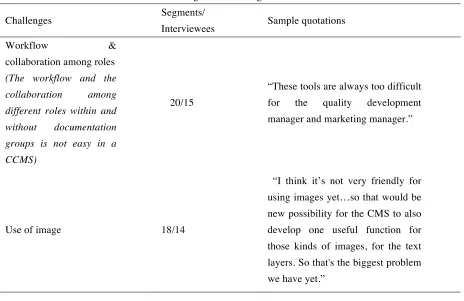
[image:17.595.54.518.378.679.2]The Interviewees talked about the challenges that CCMSs brought to their work. These challenges are shown in Table 3.
Table 3. Recognized Challenges of CCMSs
Challenges Segments/
Interviewees Sample quotations
Workflow &
collaboration among roles
(The workflow and the collaboration among different roles within and without documentation groups is not easy in a CCMS)
20/15
“These tools are always too difficult
for the quality development
manager and marketing manager.”
Use of image 18/14
Translation & language
management 17/14
“This system we've got here is not really for translation. It doesn’t care about languages, actually. So you must do it all manually. But If you do translation, you create a new database with translation content in it. It's not linked in between.”
Separated layout
(The separation of content and layout causes challenges)
24/13
“[The separation of the content and layout] is a bad thing, because I really want to see how it looks like, for example, which type of fonts but also the spacing, colors, I don’t know if you can directly see it’s bold or italic, and I really like to see how the layout will be”
Bad usability
(A CCMS is hard to use. It has insufficient or too many functions and has a unfriendly interface)
13/12 “It’s not efficient, because you want
to work, you want to produce.”
Component-based writing 18/10
“Some authors have problems
switching from unconstructed
FrameMaker to topic-based
authoring.”
Overview
(A CCMS doesn't offer sufficient overview functions.)
14/9
“You cannot see it in context. You can only preview one topic, but not a whole project or something like that. That would be nice if we had that.”
Speed
(The response time in a CCMS is long)
11/9
Attitudes
(People hold negative attitude to the shift to CCMS)
10/8
“Sometimes people dislike using a CMS because they’re setting with their old ways, mostly. They like the way they were writing before, now they have to do something different.”
Reuse, single sourcing &
consistency 10/7
“What now we miss now in CMS is reusing a single paragraph or table in different topics. We couldn’t find how we could do that in the current version [of the CCMS].”
Publishing 11/6
“You publish something and you get an error message, but the error message doesn’t say what’s wrong. But you can't publish.”
Predefined template 9/5
“When we want to change
something in the look and feel of the output, then it’s a bit difficult.” Search
(A CCMS doesn't have sufficient search functions)
6/5 “You can’t search across the DITA
modules”
Metadata
(Metadata management in a CCMS is not understandable, useful or easy to do.)
11/5
Version management 5/4
“You change the topic…but I still want to have the possibility to publish version 2 (the previous version). But if I change this topic, this one, I change the text, then this one is not available.”
Filtering, variable &
conditional publishing 5/3
“The main challenge that I still have is using the right filter, attributes. Because we have the different products and I reuse a lot of topics for older products, but then you have to make filters, for example, if you wanted to add a length to a text, and the length is different for the different products, then you can use filters to do the job. The hard part is when you have two different products, they both have different lengths, but one product sometimes has a different length in another country, for example. So then you have two product filters, and then for the one product, you also have a filter for if it’s used in Europe or in America, for example. That’s kind of hard to do so that’s still a challenge has to have.”
Genre
(It’s hard to add new genres in a CCMS)
4/3 “It’s also adding new document
types, it is also difficult.”
reviewing and publishing content, could be completed within CCMSs. For example, an interviewee said:
“One of the things that we do not currently do and what we need to do is to involve other people in the company in supplying information for our manuals. They do now supply information, but it’s always through mail or a Word document and would like to give them a tool, with which they can immediately add information to the CCMS, and we can review it and adapt it and send it to a reviewer.”
This brings another issue into the light: the implementation and usage of CCMS should not be only a decision of a department, but also a decision for the whole organization. (Although in some cases, the fact that the decision has to be made by the top management of the whole organization also has some defects: the top management may choose a CCMS that doesn't fit the needs of its documentation group due to they having different priorities or due to miscommunication between them.) However, compared to the collaboration within documentation groups, it is much harder to make the collaboration outside documentation groups be carried out in CCMSs, such as collecting input from engineers, having content reviewed by engineers, getting the release of output approved by managers. Why? An interviewee said:“[Using a CCMS is] also very technical for them (reviewers).”Is CCMS too difficult for reviewers, who are often engineers – the technical experts? Another interview’s comment may shed light on this issue:
“The engineers are considered as the smartest guys. As long as they want to learn, they can use any kind of tool. The problem is that they think it’s not necessary [to learn to work with a CCMS], so they are not motivated to learn it. Why? Because they work with ClearCase7, SVN8 or other
kinds of code management tools, and they feel working with CCMS is not part of their job.”
Therefore, The reason could be people’s mentality, and even an interviewee who manages the documentation group admitted that he shared the same idea:“… the quality development manager and marketing manager, these guys, they should not be bothered of learning a CMS tool, and I agree on that.”
Besides this reason, there is also a practical reason, as an interviewee who works in a large company said:
“It has something to do with licenses. You need a license to log in the CCMS, Sometimes we ask many reviewers to review the content about one product, not only people within the project group, but also people from marketing and legal departments and also application engineers, electrical engineers, mechanical engineers, software engineers, component engineers, etc., and it’s not possible to assign a license to each reviewer. ”
component is shown in the component under review, which is very easy to be ignored since the content of that linked component is not shown until an reviewer clicks the link; and fifth, it should allow knowledge experts to fill in input in the system; last but not least, it should be intuitive to use for a person who doesn’t use it on a daily basis.
Although the use of image is advanced enough to have single-sourcing technology, version management and even automatic insertion of product IDs, technical authors are still struggling with other sub-aspects of using an image in a CCMS. First, all the interviewees except one said their CCMS doesn’t integrate an image-editing tool, and they had to switch from the CCMS to a separate image-editing tool to do the job, therefore, an interviewee said: “It would be nice if the images were more flexible, more integrated into the program. Perhaps you have an image, you can draw things like this in FrameMaker, for example.” Second, if a technical author wants to reuse part of an image, she or he has to create a new image because reusing part of an image is not possible in CCMSs. It could be helpful if images can be reused partially. Thirdly, the image formats allowed to use in CCMSs sometimes are very limited. A technical author who just started learning using a CCMS said: “[The use of image is] not handy at all… you cannot easily draw, you CANNOT draw in it! And also there is limitation in extension of documents or figures…and it needs to be PNG extension.” One technical author even worried about the difficulty in using image reduces the usability of the manual she wrote. She said:
“Yes, it is [complex]. And therefore, you are not very likely to start thinking from the image, so that’s why typing is much more easy. But a lot of text doesn’t make it easier to understand for the reader how to hang up the unit, for example, so if I can make one image in which it’s completely clear how you have to hang it up, then I don’t need all this text. But… I think [for] DITA, and FrameMaker, [it] is easier to change text than to change the image, you are far more likely to make adjustment to the text or to add text. So for example, if I want to say, “just make sure this is big enough”, it’s far easier to say, “make sure this X is big enough”, then I finish in two second. But perhaps for the readers, it’s clearer if I adjust this picture and say, “X is bigger than 200 millimeter”, for example. But it’s more difficult for me to do. It’s quite tempting to make adjustment to the text than to the image… And I’m wondering more and more that if that’s the right way. I think for example, if you take IKEA manual, it’s only about images.”
These technical problems may be hard to solve now, but once they could be, it would be very nice for technical authors who use images quite often in their work.
whole component instead of that changed line. Additionally, an interviewee hoped that a CCMS could integrate computer-aided translation (CAT) features, such as supporting translation memory and terminology management. He said:
“When you have a text which has the same sentences in two different chapters, and in one chapter, I have a translation, and in the other chapter, I don’t have translation, but the CMS itself doesn’t know it has translation of this sentence, and just sends out the text to the translation agency. They have translation memory, so they find out. But you can find out by yourself if it has this function, and it reduces the cost.”
Although there are specialized CAT tools available that can realize such goals, the interviewees really hoped that CCMSs could be an all-in-one solution to all of their documentation needs.
The separation of content and layout is challenging for interviewees mainly for two reasons: first, some authors are not comfortable with not taking care of layout while writing, which stands in line with McCarthy et al.’s observation (2011) that many technical authors still cared about issues of design and even desired an individual control of the style. An interviewee who also observed this phenomenon said: “Some are difficult to make the separation. So they have to understand that if they write something, that’s not the same as when it is to be published. As long as they understand it, then it’s a benefit and also good for them. They also like it. If they get freed from the layout, for them it’s like more freedom to write all they need to write.” Therefore, once authors get used to the new way, it may not be a problem any more. However, the second reason seems more essential and needs to be addressed from a technical perspective, as an interviewee said when he complained the problem due to his inability to see the final layout during writing: “You need to scale [the image] in the right size, but you don’t know if it is the right size until you have published it…it is really irritating for me.” The separation of layout and content makes author unable to find out the problems of layout until they reach the publishing process. To make the situation worse, as publishing is normally the last stage of documentation, the groups often suffer from high deadline pressure at that time, and the problems of layout can cause lots of anxiety and pressure at the last moment. It would be better if a preview of layout could be available in CCMSs before the publishing process.
also difficult. Then we need a new style sheet for that document type, but also, the interface has to be
changed. Now we have options of 6 types of manuals that we need a new button for the 7th document type,
and that also needs [our CCMS supplier] to help.”
Although some interviewees recognized the value of metadata, not all of them did good metadata management or appreciate the value. One interviewee said they didn’t have any metadata currently due to lack of time. Another reason might be mentality, as a manager observed:
“The problem often is that in technical documentation, you write your content, but you also fill in the metadata. The metadata is often used to structure your CMS… They do know now to fill in the right metadata, but it irritates [them] that the management of the information is regarded as more important than the writing. So that’s really a core issue that I see in a lot of CMS.”
The challenge may also be caused by technical reasons. An insightful idea is that, as an interviewee hoped, it would be better if the management of metadata could be independent from the management of versions. In his case, whenever he changed the metadata of a component, the version of that component went up one level despite the information in the component was not updated after all. Therefore, a more independent and powerful metadata management feature is expected. This is a very reasonable suggestion since metadata management is critical to content management (Boike, 2005, p.479).
Component-based writing requires technical authors to write self-contained and context-independent components. Very different from the traditional way of writing, it challenges technical authors, as an interviewee said: “I think when you start using CMS, you really need some training about writing in topics. It’s really different from writing in words… I learned it on the job… for me, that’s the biggest challenges.”
Also because of component-based writing, technical writers miss the context of a component when their output is a document. It would be better if CCMSs could offer an overview of a document before the publishing process so that technical writers can check the context of the component she or he is working on.
Besides, the change to component-based writing, the new approach of documentation brings at least other two changes to technical authors: first, the change of tools, second the change of the work process, for example, as mentioned, technical author have to add metadata, which was irritating to some authors as an interviewee observed. Some interviewees mentioned the negative attitude technical authors experience when they shift from the old approach of documentation to the CCMS-based approach, some technical author thought that they were “forced” to make the change, and they wanted to “stick with” the old tools, and some feel “a bit more daunted by technical stuff”.
9 interviewees reported “speed” as a challenge. This is a technical issue. A more proper implementation of CCMSs might solve the problem, for example, a documentation group can use a more powerful server to hold the CCMS that support better computing.
The biggest advantage of CCMS “reuse, single sourcing & consistency” also has some challenging sub-aspects. First, technical authors sometimes forget that a component may be reused at other places when they make changes to it. An interviewee noted: “If you do it in wrong thing, you will change everything…so I am a bit anxious.” Second, in some CCMSs, the reuse at certain levels doesn’t work, as an interviewee said: “What we miss now in CCMS is reusing a single paragraph or table in different topics. We couldn’t find how we could do that in the current version.”
When talking about the challenges of version management, interviewees mainly want more automation and flexibility. One interviewee mentioned she wanted to save the component with new changes as a new version before she checked it into the system, and also she hoped she could save the same comments for new versions of a group of components, instead of saving the same comments one by one.
5 interviewees talked about the search function in CCMSs. They thought the function is not powerful and could be more advanced. One interviewee said he could not search across the DITA modules. This may result from the mismanagement of metadata which enables search in CCMSs. Other reasons might be technical, as another interviewee said when she searched for a key word, the search engine would scan all the information in the components, not just the titles, and therefore, it was quite difficult for her to see what is relevant in the search result.
Filtering, variable & conditional publishing was reported by 3 interviewees to be too basic and could not meet their needs. For example, an interviewee said: “Sometimes we cannot make the title conditional. So that’s also a disadvantage. We would like to make the title conditional and the paragraph. Now we can only make the paragraph conditional.” This might be solved by updating their current CCMS into a more advanced version.
4.3 Implementation work of CCMSs
The interviewees did not only give information about the challenges and benefits that a CCMS brings, but also discussed the implementation of CCMSs. The implementation of CCMSs has a big influence on whether CCMSs can be made the best use of or not after implementation: many of the problems during the usage of CCMSs could be fixed if the implementation of CCMSs could be carefully arranged and executed. In some extreme examples given by the consultants during our interviews, the importance of implementation work of CCMSs is clearly shown: some companies chose to buy the most expensive CCMSs because they believe they work the best, and they paid to little attention to the implementation process, and the CCMSs don’t work in the end. One consultant pointed out how important the implementation work of CCMSs by saying this:
get installed, or to buy the software, and then if you don’t also get proper training and proper support in using it, then there’s problem. It's a waste of money…they buy something, they buy software, and then [they expect’] it should work. But it’s not. The content doesn’t work, doesn’t function that easily. And the thing is, sometimes there are cheap CMSs, and there are more expensive ones. What would happen and it’s a human thing that they think if I buy the expensive one, there is big company behind it, it's more elaborated, things are very good, so that must be better. But that’s not how it works.”
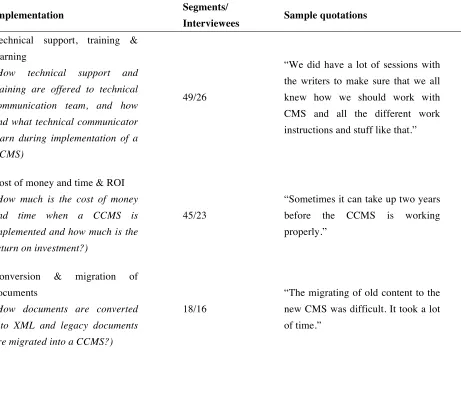
[image:26.595.67.528.253.646.2]Therefore, it’s useful to code and discuss the information about the implementation of CCMSs as it helps to understand why challenges exist and also offers practical implications to solve these problems. Table 4 shows the codes related to the implementation of CCMSs.
Table 4. Implementation of CCMSs
Implementation Segments/
Interviewees Sample quotations
Technical support, training & learning
(How technical support and training are offered to technical communication team, and how and what technical communicator learn during implementation of a CCMS)
49/26
“We did have a lot of sessions with the writers to make sure that we all knew how we should work with CMS and all the different work instructions and stuff like that.”
Cost of money and time & ROI
(How much is the cost of money and time when a CCMS is implemented and how much is the return on investment?)
45/23
“Sometimes it can take up two years before the CCMS is working properly.”
Conversion & migration of
documents
(How documents are converted into XML and legacy documents are migrated into a CCMS?)
18/16
Fitting A CCMS into whole organization
(How to make a CCMS not an isolated system for technical content management, but collaborate with other systems and meets the needs of the whole organization?)
21/12
“That’s the challenge in a company [with] 4000 people and I have 22 people in my department, also people writing in Spain, in UK, in Germany and in the States...and in India, and they all have to try... I have to convince them that we all should work in the same way, and it’s far more challenging than, say, just buying a content management tool.”
Content modeling
(How key content types, such as procedures and concepts, and also the granularity of structure are defined?)
13/9
“We had to determine for instance how big the topics are going to be, and the structure of different books and reuse, and that was a bit of challenge.”
Redesign of functionality
(How functionality of a CCMS is redesigned to meet the specific needs of the technical documentation groups?)
8/6
“[Our CCMS supplier] built a customized CMS for us. So we said we want this and this and this. And they took a basic CMS and they removed the things that we didn’t need and added the things that we needed.”
Usability
(How a CCMS is designed to be easy and functional to use, and has a simple interface)
6/6
“Should be fine if it's a bit fancier than how it looks now. It looks a bit simple and old-fashioned”
Layout & template design
(How layout and templates are designed)
7/6 “You have to define DTDs for all
the styles.”
Redesign of roles
(How roles of technical communicators are redesigned according to the CCMS-based workflow)
5/4 “Besides technical writer…we need
(How workflow in technical communication organization is redesigned)
up, and also the whole workflow with all that take place.”
According to the interview, the implementation work of CCMSs include many aspects, including technical support, training &learning, conversion & migration of documents, fitting a CCMS into whole organization, content modeling, layout & template design, usability implementation, redesign of functionality of a CCMS, roles and workflow.
Technical support, training & learning normally start from the beginning of the implementation of CCMSs and still last after the implementation of a CCMS, whenever authors may still find new problems, or new authors join the documentation group. Technical documentation groups should guarantee that the staff members get enough technical support and training that enables them to learn and use a CCMS. The technical support, as interviewees reported, could come from inside of the technical documentation groups, or from the IT department of the company, or the external professionals. Beside technical support, the staff members should be offered training from either internal or external trainers, which, as Rockley et al. (2010, p.70) claimed, is critical to the successful usage of the new system. The education should be comprehensive, not only including the technical operation of a CCMS, but also knowledge such as component-based writing, metadata management and reuse strategies.
However, due to the limitation of budget and time, most of the interviewees talked about that once they had a short course which lasted a couple of hours on how to operate CCMS, they started to work with the CCMS immediately and just learned on the job. This is of course about being practical in the real world. However, managers should always keep in mind that they should try their best to offer the technical support and training to people, as a CCMS won’t bring good work itself, but people who work with a CCMS do. A bad example has been discussed during the interview that a documentation group could not afford any time to offer training to staff members, and end up with a producing less content and costing more money. Therefore, the time and money used for technical support and training should be considered, too, when a CCMS is considered of being introduced.
Conversion & migration of documents refers to converting other formats of documents into XML-based components and migrating them into a CMSS. All the interviewees sought for external specialists for help, which is less costly according to Kowalsky et al. (2010, p.70). A script could be used to convert and legacy documents efficiently if the documents were well structured and all of them If the legacy documents are not structured and written in a from-A-to-Z manual, the conversion would be, quoting what an interviewee said, “hard labor”.
Fitting a CCMS into whole organization is vital, especially for a large company, as pointed out by an interviewee: “CCMS should not only be a tool used by documentation department in an isolated manner, but also should be used by other departments, and linked to all other kinds of systems within the whole organization.”
Kowalsky et al. (2010, p.69) listed the costs for implement DITA, which can also be used as reference to understand the costs for implementing a CCMS. The costs include the purchase of tools, conversion of legacy documents, training and consultants and lost productivity which means internal human resources get involved in the implementation of CCMS and therefore the productivity of documentation decreases. In reality, as both consultants observed, a common mistake made by companies is that they often give generous budget for purchasing a CCMS, but pay little attention to the implementation process, and as a result the CCMS cannot bring the expected benefits.
This is also echoed during the interviews. The technical problems mentioned by the interviewees, such as a expected higher level of automation and flexibility for the publishing, version management, translation & language management, use of image, bad usability, metadata management, filtering & conditional publishing, reuse, predefined templates, search, can be solved fully or to some extent by the careful defining and designing of the workflow, content modeling, layout and template; the problem of collaboration can be addressed by fitting the CCMS into the whole organization; and the issues of negative attitudes and lack of content management strategies such as how to reuse components can be tackled by giving the people enough training and technical support.
All the implementation work mentioned deserves the utmost carefulness, because if something is wrong during the implementation, it needs to be fixed with higher cost later on. The implementation work of CCMSs doesn’t only cost money, but also cost lots of time. For example, an interviewee said it took their group around two years to totally implement a CCMS. Therefore, for a documentation group, picking the appropriate time to implement a CCMS is important, as a manager said he would only implement a CCMS after the group finishes the current projects and the whole group has more time. However, not all the CCMSs are expensive, which contradicts the previous studies: according to the interviewees, there are cheap ones. Several interviewees said they bought a cheap CCMS and one even said, “It costs nothing.” The CCMSs offer the most basic and useful functions and still work well. Therefore, for technical documentation groups which have a small budget, they can choose the cheaper ones and spare some money for implementation work of CCMSs. Since implementation work of CCMSs is a long and problematic process, and the failure is costly, a prudent and strategic planning is always encouraged. For example, for documentation groups that are going to the direction of using CCMSs, they can start with the shift from document-based writing to component-based one, which can be done in any authoring tools. When authors get used to this new approach of writing, the group can implement a less expensive version of CCMSs which have basic and most common used functions as a trial, and then upgrade the system step by step.
4.4 Possibilities of CMS in the future of Technical Communication