Security Target for PalmSecure
Version 1.0 14.September 2008
Change history
Version Date Description
1.0 14.09 2008 First Version
Variables
Name Value Display
File name and sizes automatically Fujitsu_STforPS_01.doc
(1.524.224 Bytes)
Last Version 1.0 1.0
Date 14.September 2008 14.September 2008
Classification released released
Contents Document Introduction... 7 A Acknowledgement... 7 B Application notes... 7 C Notations... 7 D Abbreviations ... 8 E References... 8 F Terminology ... 8
1 Security Target Introduction ... 9
1.1 ST and TOE Reference ... 9
1.2 Related Documents ... 9
1.3 Organisation ... 9
1.4 TOE Overview ... 10
1.5 TOE Description ... 10
1.5.1 Description of biometric processes ... 11
1.5.2 Wording in context of Common Criteria ... 14
1.5.3 TOE configuration and TOE environment ... 14
1.5.4 Generic design of a biometric system and the PalmSecure ... 14
1.5.5 TOE boundary... 21
1.6 Required non-TOE hardware/software/firmware ... 23
2 Conformance Claims... 25
2.1 CC Conformance Claim... 25
3 Security Problem Definition ... 26
3.1 Assets and Roles... 26
3.1.1 Assets ... 26
3.2 Threats ... 27
3.3 Organisational Security Policies ... 30
3.4 Assumptions ... 30
4 Security Objectives ... 34
4.1 Security Objectives for the TOE ... 34
4.2 Security Objectives for the Operational Environment ... 35
4.3 Security Objectives Rationale... 38
4.3.1 Coverage of the security objectives ... 38
4.3.2 Coverage of the assumptions ... 40
4.3.3 Countering the threats ... 41
4.3.4 Coverage of organisational security policies... 42
5 Extended Components Definition ... 43
6 Security Requirements ... 44
6.1 Security Functional Requirements... 44
6.1.1 User data protection (FDP) ... 45
6.1.2 Identification and authentication (FIA) ... 45
6.1.3 Protection of the TSF (FPT)... 46
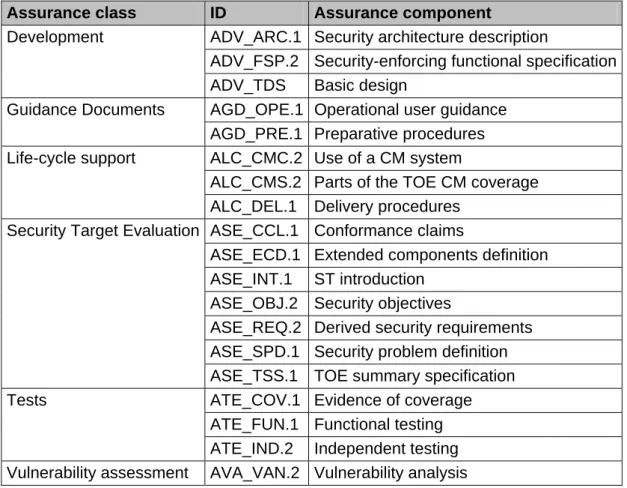
6.2 Security Assurance Requirements ... 47
6.2.1 Development (ADV) ... 48
6.2.2 Guidance documents (AGD)... 48
6.2.3 Tests (ATE)... 48
6.2.4 Vulnerability assessment (AVA)... 49
6.3 Security Requirements Rationale ... 50
6.3.1 TOE security functional requirements rationale ... 50
6.3.2 Assurance requirements rationale ... 51
7 TOE Summary Specification ... 52
Annex ... 54
B Abbreviations and glossary... 54 C References ... 58
Tables
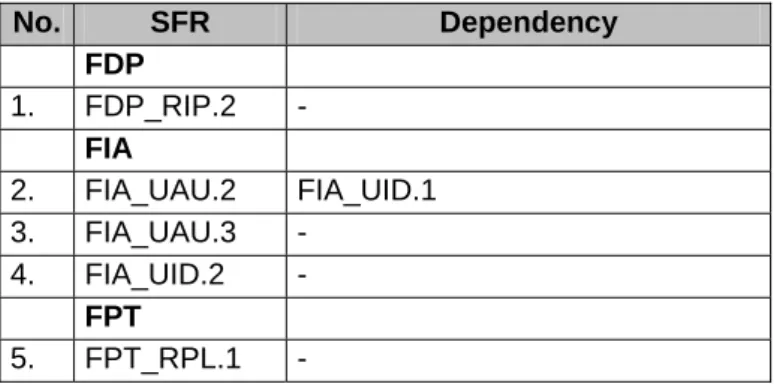
Table 1: TOE deliverable 23 Table 2: Assumptions/threats/OSP - security objectives mapping 39 Table 3: TOE security functional requirements 44 Table 4: Assurance requirements (EAL2) 47 Table 5: SFR (TOE) - security objectives (TOE) mapping 50 Table 6: Fulfilment of SFR (TOE) dependencies 51 Table 7: Abbreviations and Glossary 58
Figures
Figure 1: Identification / Verification flowchart 13 Figure 2: Simplified biometric verification system 15 Figure 3: PalmSecure verification system 16 Figure 4: PalmSecure verification system in client-server-model 17 Figure 5: Software- and hardware-part of the TOE 21
Document Introduction
This Security Target (ST) was developed based on the Protection Profile (PP) for Biometric Verification Mechanisms ([PP_BSI_BV], BSI-PP-0016) published by the German Federal Office for Information Security (BSI). It does not claim conformity to this PP, because the CC version of the PP is 2.1 and that of the ST is 3.1.
All text, which is taken from the PP, is in blue colour. Text specific to this ST is in black colour.
The following subchapters will provide some information for the further understanding of this document and introduce the reader to some used conventions:
A Acknowledgement
The author would like to acknowledge the significant contributions of four draft Protection Profiles for biometric systems [PP_UK_BD], [PP_US_BV_BR], [PP_US_BV_MR], and [PP_US_BS] as well as of the Biometric Evaluation Methodology Supplement [BEM] of the Common Criteria Biometric Evaluation Methodology Working Group. Due to its overall relevance, much of their work has been incorporated into this document.
B Application notes
Application notes are provided where they may contribute to the understanding of the reader. These notes, while not part of the formal statement of the Security Target, are included as an acknowledgment of the diverse backgrounds of potential users of this Security Target. It should be understood, that these application notes cannot completely substitute an understanding of the biometric techniques or related [CC] documents.
Application notes are divided into:
• General Application Note (GEN) - explains basic principles of the approach and provides general information.
• [CC] explanatory Application Note (CC) - provides details of Common Criteria definitions and usage; regarding biometric practitioners.
• Biometric Application Note (BIO) - provides details of biometric definitions and usage; applicable to [CC] practitioners.
C Notations
The [CC] allows several operations to be performed on security requirements; refinement, selection, assignment, and iteration are defined in section C.4 of [CC] part 1.
• Refinement operation (denoted by bold text): is used to add details to a requirement, and thus further restricts a requirement.
• Selection operation (denoted by underlined text): is used to select one or more options provided by the [CC] in stating a requirement.
• Assignment operation (denoted by italicised text): is used to assign a specific value to an unspecified parameter, such as the length of a password. Showing the value in square brackets indicates assignment.
• Iteration operation: are identified with a number inside parentheses (“#”)
D Abbreviations
Assumptions, threats, organisational security policies and security objectives (for TOE and environment) are assigned with a unique label for easy reference as follows:
A.<xxx> Assumptions about the TOE security environment O.<xxx> Security objectives for the TOE
OE.<xxx> Security objectives for the operating environment OSP.<xxx> Organisational security policies
R.<xxx> Requirements for the TOE environment T.<xxx> Threats
E References
References in this document are specified with the help of brackets (e.g.: [<Reference>, <chapter number>]. A list of all used references <Reference> can be found in Annex C - References. Sometimes an additional <chapter reference> is given.
F Terminology
A complete list of used terms and abbreviations can be found in Annex B - Abbreviations and glossary. Thereby Common Criteria as well as biometric and IT technology terms relevant for this Security Target are described. Most of the definitions were taken out of the Biometric Evaluation Methodology [BEM] and supplemental from four previous draft biometric Protection Profiles [PP_UK_BD], [PP_US_BV_BR], [PP_US_BV_MR], and [PP_US_BS] as well as from the Common Criteria [CC].
1 Security Target Introduction
1.1 ST and TOE Reference
Title: Security Target for PalmSecure ST Version: 1.0 ST Date: 14.September 2008 Author: Fujitsu Developer: Fujitsu Product: PalmSecure SDK TOE-name: PalmSecure TOE-version: Version 24 Premium Product Type: biometric authentication system Certification
Authority:
Bundesamt für Sicherheit in der Informationstechnik (BSI) Federal Office for Information Security
Certification ID: BSI-DSZ-CC-0511
CC Version: Common Criteria for Information Technology Security Evaluation, Version 3.1, Revision 2, September 2007 [CC]
Keywords: authentication; biometric; identification; verification
1.2 Related Documents
All related Protection Profiles can be found in Annex C - References. They can be identified by [PP_<...>].
References to related documents regarding to the production of this Security Target are referenced in the Annex C as follows: [BEM], [CC], and [CEM].
1.3 Organisation
The main chapters of this Security Target are Security Target Introduction with the TOE description, Conformance claims, Security problem definition, Security objectives, Extended components definition, Security requirements and TOE summary specification as well as annexes. This document is structured according to the Security Target requirements of [CC] part 1.
• Chapter 1: The TOE description provides general information about the TOE, its generic structure and boundaries.
• Chapter 2: The ST claims section states conformance to Protection Profiles.
• Chapter 3: The security problem definition describes security aspects of the environment in which the TOE is intended to be used and the manner in which it is intended to be
operation (section 3.2), organisational security policies (section 3.3), which must be complied by the TOE, and assumptions regarding the TOE's intended usage and environment of use (section 3.4).
• Chapter 4: The statement of security objectives defines the security objectives for the TOE (section 4.1) and for its environment (section 0). The rationale (section 4.3) presents evidence that the security objectives satisfy the threats and policies.
• Chapter 5: This chapter defines the extended components.
• Chapter 6: The security requirements are subdivided into TOE security functional requirements (section 6.1) and security assurance requirements (section 6.2). The rationale (section 6.2.4) explains how the set of requirements is complete relative to the security objectives
• Chapter 7: The TOE summary specification provides a description of the TOE security functions in narrative form.
The annexes offer a glossary and abbreviations as well as relevant references and biometric standards.
1.4 TOE Overview
The scope of this Security Target is to describe the functionality of the PalmSecure biometric verification system in terms of [CC] and to define functional and assurance requirements for this system.
Therewith the major mean of the PalmSecure biometric verification system is to verify or reject the claimed identity of a human being using the structure of the veins in his palm as a unique characteristic of his body.
Note that inside this Security Target the enrolment and the identification process of the biometric system are not considered. Chapter 1.5 gives a more detailed overview about the design of the TOE and its boundaries.
1.5 TOE Description
This chapter contains the following sections: Description of biometric processes (1.5.1) Wording in context of Common Criteria (1.5.2) TOE configuration and TOE environment (1.5.3) Generic design of a biometric system (1.5.4) TOE boundary (1.5.5)
The TOE provides a verification process to verify the claimed identity of a human being using his palm vein pattern as a unique characteristic of his body.
The basic processes of the biometric verification system are described in chapter 1.5.1. This ST describes a biometric system that works in a verification mode. Biometric Identification is not addressed within this ST. Furthermore the enrolment process is out of scope of this ST and it is assumed that all authorized users have been enrolled. Last but not least a biometric verification system that is conformant with this ST has to verify the identity of a user for the purpose of controlling access to a portal1.
Beside the biometric verification process every biometric system needs to include a mechanism to identify and authenticate an administrator of the system with other means2 than biometrics and to enforce an access control for the objects of the TOE. This is especially important to limit the ability to change the threshold settings for the biometric verification process to an authorized administrator. The PalmSecure SDK provides a library, which is meant to be embedded into an overall application. Authentication of an administrator needs to be handled by this application, which is part of the operative environment of the TOE. Therefore this requirement is not handled by the TOE but by the operative environment – in contrast to the assumptions made by the Protection Profile [PP_BSI_BV].
1.5.1 Description of biometric processes
The core functionality of a biometric system can be divided into three processes: • Enrolment (1.5.1.1)
• Biometric Verification (1.5.1.2) • Biometric Identification (1.5.1.3)
Also if the biometric enrolment and identification are not addressed in this ST, they are introduced for the interested reader in the following subchapters. Because of the different
1
Application Note (BIO) - Portal: The physical or logical point beyond which information or assets are protected by a biometric system. With failed verification, the portal is closed for the user. Via successful verification, the portal is open. Therefore, only two allowed states are possible after biometric verification: failed or successful. The converting from a biometric probabilistic message into a boolean value is part of the TOE. Everything beyond the portal and the activation of the portal is out of the scope of the TOE.
2
Application Note (GEN): In general the identification and authentication of an administrator of a biometric system should never be realized thru the biometric verification process itself. There are two reasons for this: 1. A user could try to authenticate himself as an administrator thru the biometric process. Because of the FAR of this algorithm he could have success and would then compromise not only the security of the primary assets behind the portal but of the whole system. 2. An administrator could fail to authenticate himself thru the biometric verification process
use of the words identification and authentication chapter 1.5.2 clarifies the use of these words in context of this ST.
1.5.1.1 Enrolment
Usually, the enrolment process is the first contact of a user with the biometric system. This process is necessary because a biometric verification system has to ‘learn’ to verify the identity of a each user based on his biometric characteristic.
During the enrolment process the system captures the biometric characteristic of a user and extracts the features it is working with. This feature vector is then combined with the identity of the user to a Biometric Identification Record (BIR) and stored in a database. The BIR is also called template.
The quality of the biometric template has to be assured and quality proofed. In the case of inadequate biometric characteristics or lower template quality, the person to be enrolled, has to repeat the process or is not possible to be enrolled. Additionally it is useful to be able to update a user biometric template regarding to possible physiology changes.
Only an administrator is allowed to start the enrolment process. He has to observe the whole process to ensure a correct enrolment. Furthermore the administrator has to ensure that the user claims his correct identity to the system during the enrolment process.
An unauthorised user becomes an authorised user after a successful enrolment procedure. As mentioned before: Within this ST it is assumed that the enrolment process has already been performed.
1.5.1.2 Verification
The verification process is the major functionality of a biometric system in context of this ST. Its objective is to verify or refuse a claimed identity of a user.
Therefore the user has to claim an identity to the system. The system then gets the BIR associated with this identity from the database and captures the biometric characteristic of the user.
If the Biometric Live Record (BLR) that is extracted from the characteristic and the BIR from the database are similar enough, the claimed identity of the user is verified. Otherwise or if no BIR was found for the user, the claimed identity is refused.
The matching component of a biometric system that decides whether a BIR and BLR are similar enough usually uses a threshold value for this decision that can be configured by an administrator. If the matcher finds that the BLR and the BIR are more similar than demanded by the threshold, it returns successful verification, otherwise failed verification.
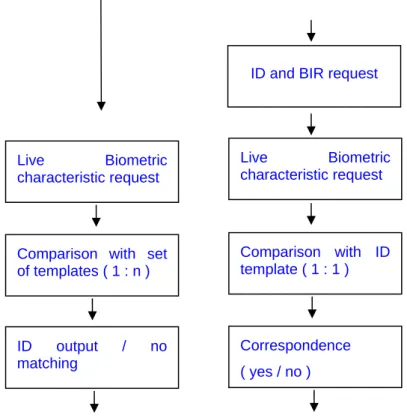
The process of biometric verification is pointed up in part b of the following figure. ( a ) Identification (One-to-many comparison) ( b ) Verification (One-to-one comparison)
ID and BIR request
Live Biometric characteristic request Live Biometric characteristic request Comparison with ID template ( 1 : 1 )
Comparison with set of templates ( 1 : n )
Correspondence ( yes / no ) ID output / no
matching
Figure 1: Identification / Verification flowchart
1.5.1.3 Identification
The objective of a biometric identification process is quite similar to a verification process. But in contrast to verification process there is no claimed identity necessary.
The system directly captures the biometric characteristic of a user and compares it to all BIR in the database. If at least one BIR is found to be similar enough, the system returns this as the found (and verified) identity of the user. The process of biometric identification in contrast
Biometric identification systems produce many additional problems. The possibility to find more than one BIR that matches or the higher error rates of those systems are only two of them.
The biometric identification process is out of scope of this ST. Please see [BEM] or [BPT] for further explanations.
1.5.2 Wording in context of Common Criteria
In context of [CC] identification usually means the statement of a claimed identity while authentication means the confirmation of this identity. In context of biometric technology identification usually means a process as described in chapter 1.5.1.3. Because biometric identification is out scope of this ST there should not be a conflict in wording. To avoid any misunderstanding: the wording in this ST is as follows:
1. Identification: As defined in [CC] 2. Authentication: As defined in [CC]
3. Verification: biometric verification as described in chapter 1.5.1.2 1.5.3 TOE configuration and TOE environment
The PP [PP-BSI-BV] discusses two possible configurations of a biometric system: • A Stand-alone solution
The stand-alone solution is not integrated into another network and works with one database
• A Network-integrated solution
The network-integrated solution is embedded in an existing network.
The software part of the PalmSecure is in particular a library, which is used as a part of an overall application. This overall application could be stand-alone or embedded in a network. However, the software part of the TOE itself is located in one local environment, for example a PC, to which the hardware part of the TOE (the PalmSecure Sensor) is connected.
The performance of biometric systems (especially the capture device) depends on physical environmental conditions in its environment. The environmental factors that could influence a biometric system are dependent on the used biometric characteristic and on the used capture device.
1.5.4 Generic design of a biometric system and the PalmSecure
This chapter provides a general description of the main and necessary components of a biometric verification system. In addition the specific construction of the PalmSecure is described.
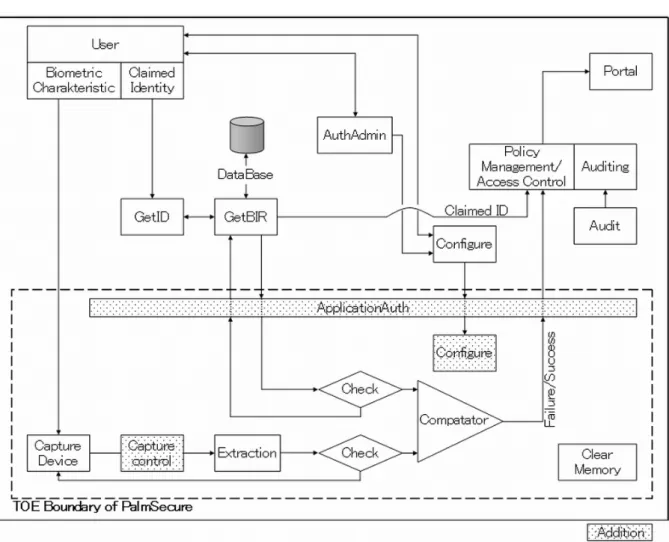
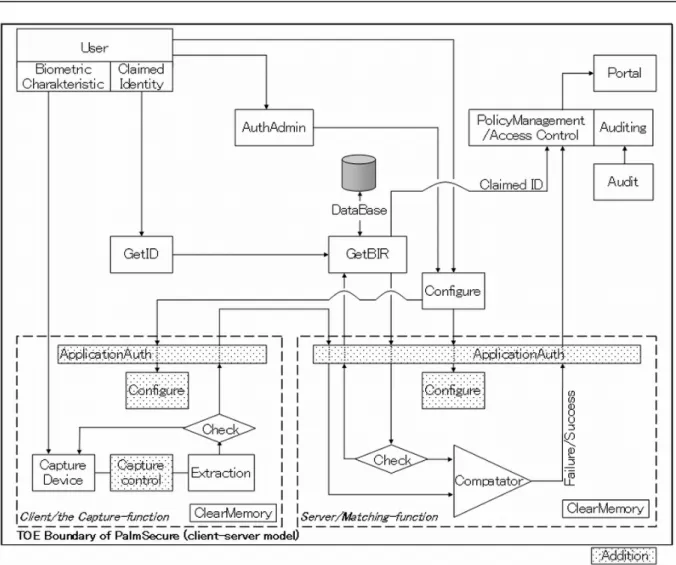
The following figure 2 shows a simplified biometric verification system as defined in the [PP-BSI-BV]. The next Figure 3 shows the specific function of the PalmSecure. In a client-server-model the application using the PalmSecure Library has to handle the BLR. Thus the BLR is encrypted and sent to the application as well as the BIR. Figure 4 shows the specific function in a client-server-model. The components of the generic system and their realisation in the PalmSecure are described in the paragraphs following after that.
Figure 4: PalmSecure verification system in client-server-model
• Get ID: This component is responsible for getting the user's claimed identity. Its functionality is security relevant because the system uses the claimed ID to determine, which BIR has to be used for comparison. Furthermore this component provides an obligatory user visible interface.
For PalmSecure this component is outside of the TOE, the application using the PalmSecure Library needs handle claimed identities and their connection to biometric data.
• Get BIR: This component is responsible for getting the stored (already enrolled) biometric identification record (BIR) related to one claimed user's identity.
For PalmSecure this component is outside of the TOE. The application using the PalmSecure Library needs to handle claimed identities and their connection to biometric data. The BIR is handed to the TOE as a parameter, when it is called by the application.
• Extraction: In preparation of the verification a feature vector has to be extracted from the captured data. This is the objective of this component. Optionally, the biometric data can be compressed.
For PalmSecure this is part of the TOE since the library receives the raw data from the capture device and processes them as needed. In addition to the general model of the PP the TOE specific figure 3 contains an additional block called "capture control". This indicated the fact, that the PalmSecure library contains functionality to control the capture device.
• Check: This component ensures the minimum quality requirements regarding the biometric templates (BIR; BLR). However, it can be differentiated between integrity and authenticity check during the process of getting the BIR as well as the quality check during the processing of the live biometric characteristics.
Integrity and authenticity of the BIR as taken from the database is provided by the environment. Moreover the quality check for the BIR was already done during enrolment, so no explicit quality check of the BIR is necessary during operation of the TOE.
• AuthAdmin: This component is responsible for identification and authentication of the administrator with other means than the biometric verification mechanism itself. This mechanism is a classical identification and authentication component that could for example be realized via a SmartCard/PIN based mechanism. It is especially necessary to authenticate an administrator before he is allowed to configure the thresholds of the system.
For PalmSecure this component is outside of the TOE. The application using the PalmSecure Library needs to implement this functionality. Note that the TOE provides a functionality, which fulfils an analogue role at the boundary of the TOE: The component called "ApplicationAuth" in Figure 3 provides an authentication for the application calling the PalmSecure library by means of specific application identifiers.
• Configure: This component provides an interface for the administrator to set security relevant TOE parameters. This component is especially used to configure the threshold setting for the comparator component and to determine audit events3.
For PalmSecure this component is outside of the TOE. Since the TOE is a software development kit, it provides programmers interfaces for the configuration of threshold values (the internal management of the values is therefore indicated as an additional component called "Configure" in picture 3). Therefore the application developer using the PalmSecure Library needs to implement configuration management in the application.
• Comparator (also called Matcher): This is an important component regarding the scope of this Security Target. It compares the enrolled Biometric Identification Record (BIR) with
3
the Biometric Live Record (BLR) and includes the determination whether these records match or not.
Usually a comparator returns a value that shows how well the BIR and BLR match. To get a successful/failed return value from the biometric system, the comparator considers a threshold during the matching process. If the BIR and the BLR are more similar than demanded by the threshold, the return value is success, otherwise it is fails.
“Exact match” comparison should not result in a positive verification as it may be a replay attempt and should be recorded in the audit log.
This functionality is realised by the comparator component.
• Clear memory: In order to protect against attacks, this component clears the content of memory after using.
The information that has to be cleared is not limited to the verification result but especially includes the BIR, BLR or any biometric raw data as well as authentication data for the administrator authentication. Because the memory that has to be cleared could belong to every other component no lines are signed in the picture before to or from this component. Clearing of sensitive memory areas is done by all subsystems of the TOE as appropriate. For the data under control of the application using the TOE, that application itself is of course responsible.
• Audit: This component of the TOE records security relevant events to ensure that information exists to support effective security management (e.g. verification protocol, retry counter, etc.).
For PalmSecure this component is outside of the TOE. The TOE, as a library, returns data, which can be helpful for logging purposes. However, to produce logging data from these results and to provide these data in a form useful for audit is up to the application using the TOE.
Some security related components, functions and interfaces in the TOE environment (note, that for the PalmSecure the capture device is part of the TOE in contrast to the general model of the PP) should be considered here:
• Capture Device: This component that is also called sensor is responsible for capturing the biometric characteristic from the user and forwards it into the biometric system. Depending on the used sensor technology also additional processes as a liveness or an image enhancement could be performed by this PalmSecure sensor and the PalmSecure Library.
The capture device is a hardware component of the TOE, the "Palm Secure Sensor". It is connected (usually by a USB cable) to the computer, on which the biometric application runs, which uses the PalmSecure Library.
• Result passing on: The verification result as Boolean value (verification successful or fail) is passed on via the policy management to the portal. Furthermore the claimed ID of the user is forwarded. The last decision, whether a user gets access to a portal is therefore done in the environment based on the biometric verification result.
The TOE passes the result of the comparator to the application, into which the PalmSecure Library is embedded. That application is then responsible to process the result and also for the control, how many trials are allowed for a user. How the result is then passed to the outside world, depends on the application.
• Policy manager: The result of the biometric verification process is passed on to the policy manager of the environment. This component is responsible for checking the user’s rights and opening the door if the user has enough privileges and was successfully verified by the TOE and is therewith realizing an access control mechanism for the portal.
As mentioned before the TOE passes the result of the comparator to the application, into which the PalmSecure Library is embedded. All more specific decisions (whether a user with a specific identity has specific rights for the Portal Service) is up to the application or to the Portal Service itself. In any case the Policy Manager is outside of the TOE.
• Storage: The environment has to provide a database to the TOE. This is especially used to store the BIR of a user but it can be used to store additional information too.
The database is provided by a database program outside of the TOE. How it is realised depends on the design of the overall application.
• Portal: The physical or logical point beyond which information or assets are protected by a biometric system is controlled by the TOE environment policy management, which gets the verification results (verification "failed" or "successful") related to the user identity from the TOE.
As mentioned before the specific connection to the Portal Service is out of scope of the TOE and depends on the overall application using the PalmSecure Library.
• Auditing: The environment may provide additional audit functionalities and has to provide a mechanism for audit review of the TOE audit logs.
As mentioned before all auditing aspects are out of scope of the TOE.
• Transmission / Storage: The environment cares for a secure communication and storing where security relevant data is transferred to or from the TOE.
This assumption is also made for the PalmSecure for most external connections, since they are provided by the overall application, into which the TOE is embedded. However, the connection between the software part of the TOE (the PalmSecure Library) and the sensor part of the TOE is secured by cryptographic means provided by the TOE.
1.5.5 TOE boundary
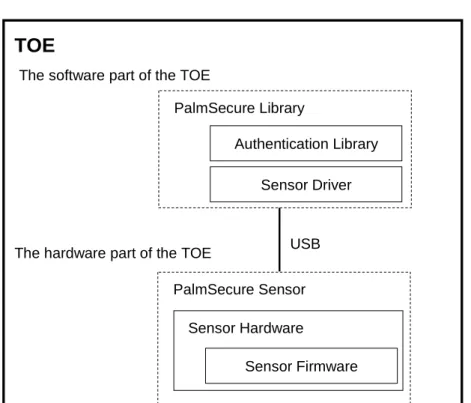
A simplified model of the biometric verification and its boundaries is shown in Figure 2. In contrast to the model assumed by the PP the capture device is a part of the TOE, see the TOE boundary indicated in Figure 3. Therefore the biometric verification system as described in this ST is not a pure software system. It therefore consists of two parts as shown in Figure 5:
- The software part of the TOE is a library and is used by an application running for
example on a PC.
- The hardware part is the Palm Secure Sensor (which itself also contains firmware for
its internal operation).
Authentication Library Sensor Driver PalmSecure Library Sensor Firmware PalmSecure Sensor Sensor Hardware
TOE
The software part of the TOE
The hardware part of the TOE USB
Figure 5: Software- and hardware-part of the TOE
The functionality to perform an audit review is not part of the TOE but of the environment. Nevertheless the TOE of course has to include functionalities for auditing.
In contrast to the model of the Protection Profile the TOE (as a library) does not provide auditing functionality itself. The application using the library has to take care of this.
Furthermore the database where the BIR and other information is stored in, is not part of the TOE. The TOE has to provide an interface to this database that ensures a correct and secure communication.
For the PalmSecure the handling of these aspects is outside of the TOE, it has to be handled by the application, into which the TOE is integrated.
The TOE consists of a hardware part, the PalmSecure Sensor, and a software part, the PalmSecure Library.
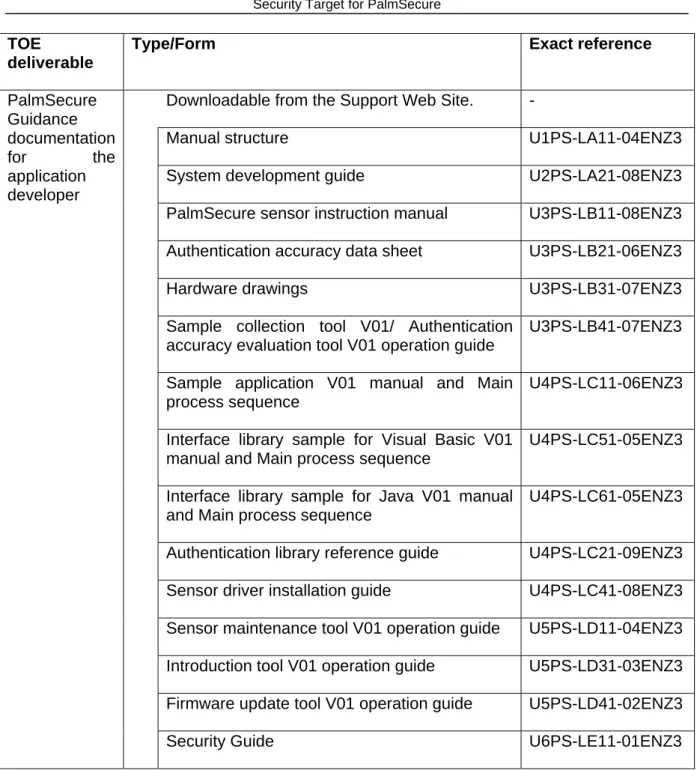
The table of TOE deliverables can therefore be described as follows:
TOE
deliverable
Type/Form Exact reference
Downloadable from the Support Web Site. -
Authentication Library V24L10-S02
PalmSecure Library
Sensor driver V11L02
Capture device (including firmware), which can be connected to a computer (e.g. a PC) by USB.
-
Sensor Hardware Product number
KD03231-B051, Revision 01A
Sensor in mouse Product number
KD03231-B052, Revision 01A
Sensor only or sensor in mouse Product number
KD03231-B05y, Revision 01A
B05y : B053 – B059 The suffix “y” is designated and thus reserved for specific customers. The hardware of the sensor is the same. PalmSecure
Sensor
TOE
deliverable
Type/Form Exact reference
Downloadable from the Support Web Site. -
Manual structure U1PS-LA11-04ENZ3
System development guide U2PS-LA21-08ENZ3
PalmSecure sensor instruction manual U3PS-LB11-08ENZ3
Authentication accuracy data sheet U3PS-LB21-06ENZ3
Hardware drawings U3PS-LB31-07ENZ3
Sample collection tool V01/ Authentication accuracy evaluation tool V01 operation guide
U3PS-LB41-07ENZ3
Sample application V01 manual and Main process sequence
U4PS-LC11-06ENZ3
Interface library sample for Visual Basic V01 manual and Main process sequence
U4PS-LC51-05ENZ3
Interface library sample for Java V01 manual and Main process sequence
U4PS-LC61-05ENZ3
Authentication library reference guide U4PS-LC21-09ENZ3
Sensor driver installation guide U4PS-LC41-08ENZ3
Sensor maintenance tool V01 operation guide U5PS-LD11-04ENZ3
Introduction tool V01 operation guide U5PS-LD31-03ENZ3
Firmware update tool V01 operation guide U5PS-LD41-02ENZ3 PalmSecure Guidance documentation for the application developer
Security Guide U6PS-LE11-01ENZ3
Table 1: TOE deliverable
1.6 Required non-TOE hardware/software/firmware
Since the TOE is a software development kit, it will be embedded into an overall application, which is designed by an application developer using the PalmSecure Library. The
the SDK and that it implements those parts of the overall biometric system not provided by the TOE itself, like administrative functions. See the preceding section 1.5.4 for an overview of the division of work between the TOE and the application using it. More specific details on the adequate use of the SDK will be given in the user guidance documentation.
The following hardware and software is required for the operating environment:
Hardware (Personal Computer): • CPU: Intel Celeron 600MHz or more (a CPU of 1.0 GHz or faster is recommended for Windows Vista)
• Memory: 256MB or more (Memory required is 1GB or more for Windows Vista)
• USB: USB2.0 recommendation
• HDD: 118MB or more (Minimum required space for the Authentication library and the Sensor driver)
Software (OS): • Windows 2000 SP 4 or later the Professional Edition • Windows XP SP 2 or later the Professional Edition
and Home Edition
• Windows Vista SP1 or later except the Starter Edition • Windows Server 2003 SP2 or later
2 Conformance Claims
2.1 CC Conformance Claim
This ST is conformant to part 2 of [CC] (CC part 2 conformant) and conformant to part 3 of [CC] (CC part 3 conformant) at the selected Evaluation Assurance Level.
The assurance level for this Security Target is EAL2 (EAL2 conformant).
Additional information related to [CC] biometric system evaluations are referenced in the Biometric Evaluation Methodology supplement [BEM]. For the pure biometric verification process, the strength of function is defined in terms of the FAR (see Annex A)4.
The assessment of the strength of any cryptographic algorithms used is outside the scope of the [CC], and therefore not part of this Security Target.
4
Application Note (BIO): The value of FRR is primarily not important, because it is not related to security. A system that rejects every user is not usable but it is secure. Nevertheless the FRR has
3 Security Problem Definition
This chapter Security Problem Definition contains the following sections:
Assets and Roles (3.1) Threats (3.2)
Organisational Security Policies (3.3) Assumptions (3.4)
3.1 Assets and Roles
3.1.1 Assets
Primary assets: Assets (i.e. user data), which are protected against unauthorised access and which do not belong to the TOE itself. The application using the TOE permits access only after successful authentication as a result of the biometric verification. The primary assets, either physical or logical systems are behind a portal.
Secondary assets: Assets (i.e. TSF data), which are used by the TOE in order to fulfil its security functions. The following assets should be explicitly mentioned:
• Biometric Identification Record (BIR): This template includes the enrolled biometric data linked with the identity of a user. It is produced during the enrolment process and assumed to be given and quality checked.
• Biometric Live Record (BLR): This template includes the live (actual) biometric data (actual biometric characteristic and claimed user identity) to be verified against the BIR.
Note that the following data, which are also defined in the PP [PP_BSI_BV], are not used by the TOE but by the application into which it will be embedded:
• The claimed identity of a user
• User related security attributes and authentication data for non biometric authentication
3.1.2 Roles
Application-developer: Develops the overall application, into which the PalmSecure Library is integrated.
Application: The overall application, into which the PalmSecure Library is integrated. Since this application calls the security functions of the TOE, it can be considered as a (non-human) user of the TOE.
Application-administrator: Is authorised to perform administrative operations for the application and able to use the administrative functions of the application.
IT administrator: The IT administrator installs the application, into which the TOE is embedded, and maintains the IT system (e.g. access control), but not the TOE itself5.
User: A person who wants access to the portal, which is protected by a biometric system. Authorised user: An enrolled user with an assigned identity (BIR). He is allowed to get access to the protected portal.
Unauthorised user: A not enrolled user. He is not allowed to get access to the protected portal.
Attacker: An attacker is any individual who is attempting to subvert the operation of the biometric system. The intention may be either to gain unauthorized entry to the portal or to deny entry to legitimate users.
3.2 Threats
General threats that need to be considered are described as follows6: T.BRUTEFORCE
An attacker may use a brute force attack to find biometric data of a (e.g. randomly) chosen user's identity in order to get verified. During this attack a fraction of possible characteristics until one’s matching is presented to the TOE. This threat also covers two distinct scenarios:
• A not really hostile user who just tries to get verified with a wrong claimed identity a few times. The motivation if these people is usually just curiosity
• A real attacker who uses a large fraction of biometric characteristics and who really wants to get an illegal access to the portal.
5
IT- and application-administrator could be the same person, but it is not necessary or obligatory.
6
This threat can be performed without a specific knowledge about the TOE. It is well known that biometric system have error rates that could lead to success for such an attack. But of course also in a non guarded environment the time to perform such an attack is limited thru the normal usage of the TOE by authorized users. The temptation to perform such an attack on the other hand is quite high especially for not really hostile users.
T.MODIFY_ASSETS
An attacker may modify secondary assets like biometric templates or security-relevant system configuration data or settings.
Such attacks could compromise the integrity of the user security attributes (e.g. BIR) resulting in an incorrect result that might give illegal access to the portal. This threat covers a number of distinct types of attacks:
• An attacker may attempt to modify the threshold level used by the biometric system to authenticate users. If the attacker is able to change the threshold (for one or more authorised users), the ability to verify the user(s) will be compromised, and an impostor may succeed in gaining entry to the portal, or an authorised user may be denied entry to the portal.
• An attacker may attempt to modify the biometric authentication data (the biometric template) of an authorised user with the aim of enabling an impostor to masquerade as the authorised user and gain access to the portal. Alternatively, an authorised user may be denied access to the portal. The attacker may be able to insert a new biometric template, containing biometric data belonging to an impostor, with the aim of enabling the impostor to gain entry to the portal.
This kind of attack usually presupposes special knowledge about the TOE and often special equipment. Which kind of knowledge or equipment is needed is highly dependent on the identified vulnerability the threat tries to exploit.
T.REPRODUCE
An attacker may try to record and replay, imitate, or generate the biometric characteristic of an authorised user. Therefore, the attacker could use technical equipment for analysing and generation of the biometric characteristics7.
Therefore, an attacker may use an artificial replica to gain access. If an impostor can access a biometric sample or template, the impostor may be able to produce an artefact with an equivalent biometric template.
7
Application Note (BIO): Fingerprint and hand geometry systems are known to be vulnerable to artefacts. The setup costs are often low making the production of artefacts worthwhile for impostors for common use biometric technologies.
This vulnerability is not very difficult to identify. Furthermore the time that is needed to exploit this vulnerability is quite moderate. But depending on the used biometric characteristic the efforts of time and money to create an artefact can be quite high.
T.RESIDUAL
An attacker tries to take advantage of unprotected residual security relevant data (biometric data, templates, and settings) during a user's session or from a previous, already authenticated user. Several different scenarios are possible:
• An attacker takes advantage of the verification memory content (e.g. by reading the memory content, cache or relevant temporary data).
• An attacker may take advantage of residual images at the capture device. These are likely to be limited to cases where physical contact with the biometric capture device is involved, the obvious case are fingerprints.
A physical access to the components of the TOE is not possible for an attacker because of the Assumption A.PHYSICAL. For the first kind of this attack (taking advantage of memory content) the attacker would therefore have to use a flaw in the user visible interfaces of the TOE.
At some biometric systems this vulnerability can be obviously. This is highly dependent on the used capture device. In these cases the effort of time and money to identify this vulnerability is quite moderate.
On the other hand, an attacker needs special knowledge about the TOE to find and exploit a vulnerability regarding residual data in memory. The effort of time and money that is needed to attack a biometric system via taking advantage of residual data in memory could also be quite high.
T.ROLES
An already enrolled and authenticated user tries to exceed its authority.
No special knowledge is needed to identify the general possibility because each authorized user of the system knows (thru his own enrolment process) that an administrator account with higher privileges exists.
The efforts in time and money to exploit such vulnerability could be quite high, depending on the detailed approach of this attack.
The threats T.MODIFY_ASSETS and T.ROLES are countered only by the operational environment and thus are not addressed to the TOE (cf. section 4.3.3).
3.3 Organisational Security Policies
The Security Target does not make a statement about organisational security policies for the operational environment. The TOE must comply with the following organisational security policies:
OSP.FAR8
As minimum requirement the TOE must meet recognised national and/or international criteria (see Annex A - BSI biometric performance standard) for false acceptance rate (FAR) as appropriate for the specified assurance level.
For the PalmSecure a FAR of 0.00008 % (= 0.0000008) is claimed.
Note: For the FAR of 0.00008 % the threshold level has to be at least “normal” and the non-compressed format (the size of the palm vein data for a single hand is maximum 2448 bytes with BIR) has to be used for the palm vein data. The compressed format (832 bytes) can optionally be used but is not within the scope of the TOE.
OSP.USERLIMIT9
Impostors must be prevented from gaining access to the portal by making repeated verification attempts using one or more claimed IDs.
This organisational security policy shall establish the maximum number of unsuccessful verification attempts permitted by the biometric verification system.
3.4 Assumptions
This chapter describes the assumptions about the operating environment including physical, personnel, and connectivity aspects.
A.ADMINISTRATION
The application- and IT-administrator are well trained and can be trusted (non hostile), read the guidance documentation carefully, completely understand and apply it.
Moreover, the application administrator is responsible to accompany the TOE installation and oversee the biometric system requirements regarding to the TOE as well as the TOE settings and requirements.
8
Application Note (BIO): To establish a claimed FAR, cross comparison is the most efficient test technique, because cross comparisons are statistically dependent, no claims to statistical confidence can be made. Determination of test size will depend on both the unknown correlations and the anticipated error rates.
9
Application Note (BIO): One way to realise the userlimit OSP is to set a limit of unsuccessful authentication attempts. Once these limits are reached, further attempts will not be accepted or an administrator is informed to control the high amount of unsuccessful authentication attempts.
Note: The PP [PP_BSI_BV] formulates an assumption "A.Capture" about the quality of operation of the capture device. However since the capture device is a part of the TOE in this ST, such assumption is not adequate here.
A.ENROLMENT
The enrolment is assumed to be already performed and therefore, the BIR for each authorized user is assumed to be given. The generated BIR suffices minimum quality standards and is linked with the correct user.
Additionally it is assumed that all biometric templates are protected stored and measures regarding to authenticity and integrity are available.
For the PalmSecure System it is assumed that integrity and authenticity of all data in the database (which include the vein-samples) is provided by physical and organisational protection in the environment.
A.ENVIRONMENT
It is assumed, that necessary TOE operating equipment and adequate infrastructure is available (e.g.: operating system, database, LAN, public telephone, and guardian).
• Operating System: It is assumed that the biometric system underlying operating system compatibly supports the functionality of the biometric system (e. g. GINA replacement, audit functionality). Regarding the request of the claimed identity, which is necessary for the biometric authentication, the underlying operating system offers the possibility to integrate a claimed identity into the biometric verification process.
Additional it is assumed that the operating system is able to protect itself and its own functionality (e.g.: policy management, access control, non-authenticated start-up).
• Storage: The TOE environment provides a database for the already enrolled biometric templates, whereby integrity and authenticity are guaranteed. The storage is a secure IT-product (e.g. SmartCard or hard disk in a secure area) and provides an access interface for the TOE.
In case of user supplied templates (e.g. stored on SmartCard or token), measures exist to protect the authenticity and integrity of the template.
For the PalmSecure system it can be assumed that the database is located in a physically secured environment together with the application, into which the PalmSecure Library is integrated, such that only application-administrators can get access to the database. All data in the database are therefore protected by these physical measures.
• Transmission: The environment takes care for a secure communication of security relevant data from and to the TOE.
For the PalmSecure system it can be assumed that all interfaces to the TOE except the sensor are located in the same secure environment as the TOE itself and are physically protected.
• Audit: It is assumed that the application, into which the PalmSecure Library is integrated, has functionality for logging and providing data for audit purposes and that the environment provides a functionality to review the audit information of the application and to ensures that only authorized administrators are able to do this.
For PalmSecure again physical protection by a secure environment can be assumed.
• Beside this it is assumed that the surrounding TOE environment is Virus, Trojan, and malicious software free.
• The PalmSecure Sensor is a piece of equipment that uses near-infrared light to capture palm vein data without contacting the palm. Thus the near-infrared light from natural light (sunlight), incandescent lamps and halogen lamps in the environment can reduce the authentication accuracy. Therefore it is assumed that the capture device is not exposed to direct sunlight, etc (brightness: natural light and fluorescent lamps under 2,000 lux, incandescent and halogen lamps below 500 lux).
A.PHYSICAL
It is assumed that the TOE and its components are physically protected against unauthorized access or destruction. Physical access to the hardware that is used by the TOE is only allowed for application- or IT administrators. This does not cover the capture device that has to be accessible for each user.
For the PalmSecure it is assumed that the complete application, into which the PalmSecure Library is integrated and all underlying software and hardware is located in a secured environment, which already prevents unauthorised access.
A.FALLBACK
It is assumed that a fallback mechanism for the biometric verification system is available that reaches at least the same security level as the biometric verification system does. This fallback system is used especially if an authorized user is rejected by the biometric verification system (False Rejection).
A.AUDIT_REACTION
It is assumed that the application using the TOE supports security management by recording security relevant events and that all TOE users can subsequently be held accountable for their security relevant actions.
The application performs logging about all security critical processes and informs about insecure states. This includes countered, unsuccessful attacks to the TOE.
These messages are send to authorised users (monitoring and reaction in case of unwanted authorisation) as well as to the application or IT administrator (supervision). However no feedback information is provided, which may assist an impostor in gaining access.
It is assumed that the application for example (but not exclusively) reacts to:
• Administrator’s authentication: The application audits the number of unsuccessful authentication attempts to one administrator account and locks the authentication mechanism if a configurable number of unsuccessful authentication attempts has been reached.
• Replay or brute force attacks against the same identity: The application provides a mechanism thru which more than an administrator defined number of unsuccessful verification attempts with the same claimed identity is blocked.
• The detection of attacks based on the use of residual information (as specified T.RESIDUAL)
• Less quality: This means that the verification process is stopped if either the BIR or the BLR do not have sufficient quality
• An unusual high amount of unsuccessful verification attempts against different identities could be caused by a brute force attack. In this case the system shuts down for a specified time or informs an administrator. The limit of unsuccessful attempts and the action taking place has to be specified by the administrator.
A.ROLES_AND_ACCESS
It is assumed that the application limits restricted functionality to those authorised and authenticated. Therefore, the application especially enforces access control such that only authorised administrators may create, modify and delete security relevant data.
The application administrator is the only one to authenticate to the application administrator functionality (e.g.: Administration tool).
A.AUTHADMIN
It is assumed that the application using the TOE provides a mechanism to authenticate an administrator with other means than the biometric verification process. This authentication process for example is realized thru a username/password or a smartcard/pin based mechanism.
4 Security Objectives
This chapter Security Objectives contains the following sections:
Security Objectives for the TOE (4.1)
Security Objectives for the Operational Environment (4.2)
Security Objectives Rationale (4.3)
4.1 Security Objectives for the TOE O.BIO_VERIFICATION
The TOE shall provide a biometric verification mechanism to ensure access to a portal with an adequate reliability.
• The TOE shall process only its own templates (respectively standardised) from the enrolment process (consideration of integrity and authenticity).
• The BIR as well as the BLR shall suffice minimum quality standards and compatible among each other.
Exact match comparison: An “Exact match” comparison should not activate the portal as it may be a replay attempt and should be recorded in the audit log.
The TOE shall meet national and/or international criteria for false acceptance rate (FAR) (see Annex A - BSI biometric performance standard or [BEM]) in accordance with OSP.FAR10. For the PalmSecure a FAR of 0.00008 % (= 0.0000008) is claimed (with threshold level “normal” and non-compressed format).
O.RESIDUAL
The TOE shall ensure that no residual or unprotected security relevant data remains after operations are completed.
O.NO_REPRODUCE
Recorded and replayed, imitated or generated biometric templates or data must not be accepted as legitimate by the biometric system. This includes forgery of complete biometric samples.
10
Application Note (BIO): To meet the national and/or international criteria for FAR, the adjustment of the related thresholds has to be proofed and adjusted by the application administrator.
O.RESIDUAL_CAPTURE
It has to be assured that residual data that may be at a capture device after use could not be used to gain access.
Note: For the objectives O.NO_REPRODUCE and O.RESIDUAL_CAPTURE the PP [PP_BSI_BV] allows the choice, whether they are relevant for the TOE or the environment. For this ST this functionality is contained in the TOE.
4.2 Security Objectives for the Operational Environment OE.AUDIT_REACTION
The application using the TOE shall ensure to support security management by recording security relevant events and that all TOE users can subsequently be held accountable for their security relevant actions.
The application shall perform logging about all security critical processes and inform about insecure states. This includes countered, unsuccessful attacks to the TOE.
These messages can be send to authorised users (monitoring and reaction in case of unwanted authorisation) as well as to the application or IT administrator (supervision). However, thereby it is to mind, that no feedback information is provided, which may assist an impostor in gaining access.
The application should for example (but not exclusively): react to,
• Administrator’s authentication: This objective should audit the number of unsuccessful authentication attempts to one administrator account and should lock the authentication mechanism if a configurable number of unsuccessful authentication attempts has been reached
• Replay or brute force attacks against the same identity. This means that the reaction part of this objective should realize a mechanism thru which more than an administrator defined number of unsuccessful verification attempts with the same claimed identity is blocked.
• The detection of attacks based on the use of residual information (as specified T.RESIDUAL)
• Less quality: This means that the verification process should be stopped if either the BIR or the BLR do not have sufficient quality
• An unusual high amount of unsuccessful verification attempts against different identities could be caused by a brute force attack. In this case the system should shut down for a specified time or should inform an administrator. The limit of unsuccessful attempts and the action taking place has to be specified by the administrator.
Note: The objective OE.AUDIT_REACTION is formulated as an objective for the TOE in the PP [PP_BSI_BV], however for this ST this functionality is not contained in the TOE but in the overall application.
OE.ROLES_AND_ACCESS
The application shall limit restricted functionality to those authorised and authenticated. Therefore, the application must especially enforce access control such that only authorised administrators may create, modify and delete security relevant data.
The application administrator shall be the only one to authenticate to the Application administrator functionality (e.g.: Administration tool).
Note: The objective OE.ROLES_AND_ACCESS is formulated as an objective for the TOE in the PP [PP_BSI_BV], however for this ST this functionality is not contained in the TOE but in the overall application.
OE.ADMINISTRATION
The application- and IT-administrator are well trained and can be trusted (non hostile), read the guidance documentation carefully, completely understand and apply it.
Moreover, the application administrator is responsible to accompany the installation of the application, into which the TOE is embedded, and oversee the biometric system requirements regarding to the application as well as the application settings and requirements.
OE.AUTHADMIN
The application using the TOE should provide a mechanism to authenticate an administrator with other means than the biometric verification process. This authentication process could for example be realized thru a username/password or a smartcard/pin based mechanism. Note: The objective OE.AUTHADMIN is formulated as an objective for the TOE in the PP [PP_BSI_BV], however for this ST this functionality is not contained in the TOE but in the overall application.
OE.ENROLMENT
The enrolment has already been performed and therefore, the BIR for each authorized user is given. The generated BIR suffices minimum quality standards and is linked with the correct user.
Additionally all biometric templates are protected stored and measures regarding to authenticity and integrity are available.
For the PalmSecure System it is required that integrity and authenticity of all data in the database (which include the vein-samples) is provided by physical and organisational protection in the environment.
OE.ENVIRONMENT
The necessary TOE operating equipment and adequate infrastructure is available (e.g.: operating system, database, LAN, public telephone, and guardian).
• Operating System: It is assumed that the biometric system underlying operating system compatibly supports the functionality of the biometric system (e.g.: GINA replacement, audit functionality). Regarding the request of the claimed identity, which is necessary for the biometric authentication, the underlying operating system offers the possibility to integrate a claimed identity into the biometric verification process.
The OS has to provide a reliable time stamp mechanism to be used by the TOE.
Additional it is assumed that the operating system is able to protect itself and its own functionality (e.g.: policy management, access control, non-authenticated start-up).
• Storage: The TOE environment provides a database for the already enrolled biometric templates, whereby integrity and authenticity are guaranteed. The storage is a secure IT-product (e.g. SmartCard or hard disk in a secure area) and provides an access interface for the TOE.
In case of user supplied templates (e.g. stored on SmartCard or token), measures exist to protect the authenticity and integrity of the template.
In the PalmSecure system the database is located in a physically secured environment together with the application, into which the PalmSecure Library is integrated, such that only application-administrators can get access to the database. All data in the database are therefore protected by these physical measures.
• Transmission: The environment takes care for a secure communication of security relevant data from and to the TOE.
In the PalmSecure system all interfaces to the TOE except the sensor are located in the same secure environment as the TOE itself and are physically protected.
• Audit: The application, into which the PalmSecure Library is integrated, provides a functionality for logging and providing data for audit purposes, and the environment provides a functionality to review the audit information of the application and ensures that only authorized administrators are able to do this.
For PalmSecure again physical protection by a secure environment has to be assured.
• The surrounding TOE environment is Virus, Trojan, and malicious software free.
• The environment cares for access control to the controlled portal(s) based on the verified id of a user.
(sunlight), incandescent lamps and halogen lamps in the environment can reduce the authentication accuracy. Therefore the capture device is not exposed to direct sunlight, etc (brightness: natural light and fluorescent lamps under 2,000 lux, incandescent and halogen lamps below 500 lux).
OE.PHYSICAL
The TOE and its components are physically protected against unauthorized access or destruction. Physical access to the hardware that is used by the TOE is only allowed for application- or IT administrators. This does not cover the capture device that has to be accessible for each user.
In the PalmSecure the complete application, into which the PalmSecure Library is integrated and all underlying software and hardware is located in a secured environment, which already prevents unauthorised access.
OE.FALLBACK
A fallback mechanism for the biometric verification system is available that reaches at least the same security level as the biometric verification system does. This fallback system is used especially if an authorized user is rejected by the biometric verification system (False Rejection).
4.3 Security Objectives Rationale
4.3.1 Coverage of the security objectives
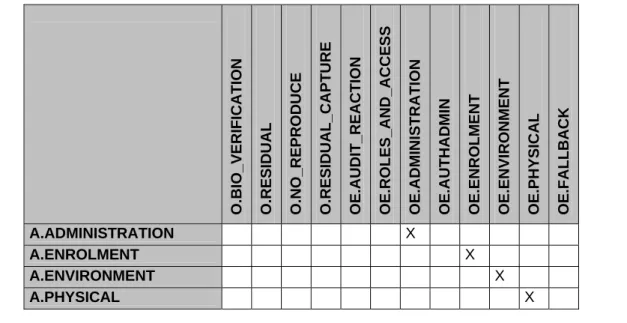
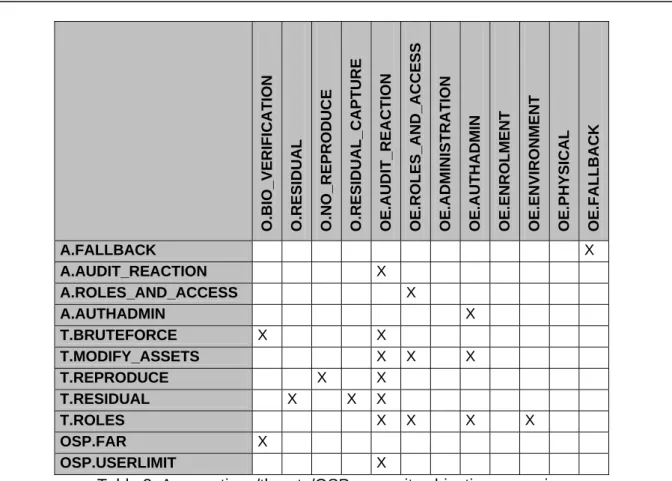
Table 2 below gives an overview, how the assumptions, threats, and organisational security policies are addressed by the security objectives. The text following after the Table 2 together with the descriptions of the subchapter's 4.3.2, 4.3.3, and 4.3.4 justifies this more detailed. O.BIO_VERI FICATIO N O.RESIDUAL O.NO_ R EPR OD UCE O.RESIDU A L_C APT URE OE.AUDIT_REACTION OE.ROLES_ AN D_ A CCE SS OE.ADMI N ISTR ATION OE.A U T HA DMIN OE.ENRO LM ENT
OE.ENVIRONMENT OE.PHYSICAL OE.FALL
B A CK A.ADMINISTRATION X A.ENROLMENT X A.ENVIRONMENT X A.PHYSICAL X
O.BIO_VERI FICATIO N O.RESIDUAL O.NO_ R EPR OD UCE O.RESIDU A L_C APT URE OE.AUDIT_REACTION OE.ROLES_ AN D_ A CCE SS OE.ADMI N ISTR ATION OE.A U T HA DMIN OE.ENRO LM ENT
OE.ENVIRONMENT OE.PHYSICAL OE.FALL
B A CK A.FALLBACK X A.AUDIT_REACTION X A.ROLES_AND_ACCESS X A.AUTHADMIN X T.BRUTEFORCE X X T.MODIFY_ASSETS X X X T.REPRODUCE X X T.RESIDUAL X X X T.ROLES X X X X OSP.FAR X OSP.USERLIMIT X
Table 2: Assumptions/threats/OSP - security objectives mapping
The TOE security objective O.BIO_VERIFICATION can be traced back to the threats T.BRUTEFORCE (to be resistant against brute force attacks) and OSP.FAR because O.BIO_VERIFCATION realizes the demanded limit for the FAR from OSP.FAR.
The TOE security objective O.RESIDUAL can be traced back to the threat T.RESIDUAL as directly follows.
The TOE security objective O.NO_REPRODUCE (the TOE shall be resistant against fake and similar attacks) can be traced back to the threat T.REPRODUCE as directly follows. The TOE security objective O.RESIDUAL_CAPTURE can be traced back to the threat T.RESIDUAL as directly follows.
The environment security objective OE.AUDIT_REACTION can be traced back to the assumption A.AUDIT_REACTION (as directly follows) and the threats T.BRUTEFORCE (to log the amount/values of the attack and the attacked user identity and to keep the system in a secure state in such a situation), T.REPRODUCE, T.RESIDUAL, T.MODIFY_ASSETS (each to log that an unsuccessful impostor attempt happened), T.ROLES (because it audits every unsuccessful authentication attempt to an administrators account and locks the system in insecure states), and OSP.USERLIMIT because the demanded user limit from OSP.USERLIMIT is realized in OE.AUDIT_REACTION.
The environment security objective OE.ROLES_AND_ACCESS (the environment shall limit access to administrative functions) can be traced back to the assumption A.ROLES_AND_ACCESS as well as the threat T.ROLES as directly follows and to T.MODIFY_ASSETS as this objective realizes access control.
The environment security objective OE.ADMINISTRATION (well trained and trusted administrator) can be traced back to the assumption A.ADMINISTRATION (well trained and trusted administrator).
The environment security objective OE.AUTHADMIN (the environment shall be able to authenticate an administrator with non biometric means) can be traced back to the assumption A.AUTHADMIN (as directly follows) as well as the threats T.ROLES because it helps to ensure that only authorised administrators are able to change security relevant data of the TOE and T.MODIFY_ASSETS because this objective is responsible for authentification of the administrator and the correct authentication of an administrator is needed to enforce the access control mechanisms to counter T.MODIFY_ASSETS.
The environment security objective OE.ENROLMENT can be directly traced back to A.ENROLMENT
The environment security objective OE.ENVIRONMENT can be directly traced back to A.ENVIRONMENT. Furthermore it counters parts of T.ROLES because the environment ensures the access to the portal.
The environment security objective OE.PHYSICAL can be directly traced back to A.PHYSICAL.
The environment security objective OE.FALLBACK can be directly traced back to A.FALLBACK.
4.3.2 Coverage of the assumptions
The assumption A.ADMINISTRATION is covered by security objective OE.ADMINISTRATION as directly follows.
The assumption A.ENROLMENT is covered by security objective OE.ENROLMENT as directly follows.
The assumption A.ENVIRONMENT is covered by security objective OE.ENVIRONMENT as directly follows.
The assumption A.PHYSICAL is covered by security objective OE.PHYSICAL as directly follows.
The assumption A.FALLBACK is covered by objective OE.FALLBACK as directly follows. The assumption A.AUDIT_REACTION is covered by security objective OE.AUDIT_REACTION as directly follows.
The assumption A.ROLES_AND_ACCESS is covered by security objective OE.ROLES_AND_ACCESS as directly follows.
The assumption A.AUTHADMIN is covered by security objective OE.AUTHADMIN as directly follows.
For all assumptions, the corresponding objectives are stated in a way, which directly correspond to the description of the assumption (see chapter 3.4). It is clear from the description of each objective (see chapter 4), that the corresponding assumption is covered, if the objective is valid. Nevertheless some objectives exceed the statements of the assumptions they cover.
Each assumption is covered by one environmental security objective.
4.3.3 Countering the threats
The threat T.BRUTEFORCE (using a fraction of possible biometric data to verify against a wrong claimed id) is fully countered by a security objective combination of OE.AUDIT_REACTION and O.BIO_VERIFICATION. O.BIO_VERIFICATION ensures that the verification process itself is done with an appropriate reliability and that the chance of one impostor brute force attempt is less then the specified limit11. OE.AUDIT_REACTION records an unusual high amount of verification attempts to one claimed id or an unusual high amount of unsuccessful verification attempts against different ids and reacts via shutting down the system for a specific time or informing an administrator.
The threat T_MODIFY_ASSETS is countered by a combination of the objectives OE.ROLES_AND_ACCESS, OE.AUTHADMIN and OE.AUDIT_REACTION. OE.ROLES_AND_ACCESS is responsible to limit the access to security relevant objects of the environment to authorized administrators. OE.AUTHADMIN is responsible to authenticate an administrator. OE.AUDIT_REACTION is logging the impostor attempt.
The threat T.REPRODUCE is fully countered by a security objective combination of O.NO_REPRODUCE (as directly follows from the security objective definition) and OE.AUDIT_REACTION because the impostor attempt is logged.
The threat T.RESIDUAL is fully countered by a security objective combination of O.RESIDUAL, O.RESIDUAL_CAPTURE and OE.AUDIT_REACTION. O.RESIDUAL directly protects against memory attacks as described in T.RESIDUAL, O.RESIDUAL_CAPTURE counters the possibility to use residual data from the capture device and OE.AUDIT_REACTION audits the impostor attempt.
The threat T.ROLES is fully countered by a security objective combination of OE.AUDIT_REACTION, OE.ROLES_AND_ACCESS, OE.AUTHADMIN and OE.ENVIRONMENT. OE.AUTHADMIN ensures a secure authentication of administrators. OE.ROLES_AND_ACCESS takes care that only authorized administrators are allowed to