_______________________________________________________________________________
1. Senior Application Development Lead, CH2M HILL, 13921 Park Center Road, Suite 600 Herndon, VA 20171. Phone 703-471-1441. Fax 703-471-1508. E-Mail: [email protected]
A Highly Adaptive Rapid GIS Application Development Method
Andrew Hu1
Abstract
Conventional software development methodologies often fail to address the GIS application development needs due to the complex and dynamic nature of GIS projects. This paper presents a highly adaptive rapid development method for GIS application development. It was designed to quickly setup the GIS software
development with small project initiation/startup cost, and allows high flexibility and continuous refinement and enhancement to the design during the software development process. It is an incremental development approach which strives to provide cost effective GIS solutions to meet customer’s short term and long term needs. It is a rapid application development process committed to quickly deliver quality GIS software products to customers in a tight schedule and offers continuous improvement as the customers gradually adapt to the new GIS system and become ready to take advantage of more advanced GIS and information technologies.
Introduction
GIS software applications are often called to solve much more complex problems compare to software applications in other scientific discipline. Developing
applications is often one of the most time-consuming and expensive elements of implementing a GIS. It is also one of the keys to a successful GIS (Maguire 1995). A GIS application often contains high volume of user interactions, multi-step
processes, and multiple ways of performing the same task. The GIS users often desire to have higher level of involvement during the software development. Yet, the detailed functional requirements, scope of works are often hard to define at the beginning of a GIS application development project. Some times, both the GIS users and GIS developers leave the software requirements and functional specifications purposely vague to allow the inevitable changes along the way of software
development process. But this kind of practice often cause confusions and contract conflicts later in the project.
Two common mistakes are often made during a GIS application development, “feature creep” and requirement “gold-planting”. Feature creep refers to the
the application “creep in” during the application development process; whereas requirement gold-planting means an application may have more requirements than it needs, even before the development project begins (McConnell 1996; Hoffer, et al. 2002) Hoffer et al. pointed out that the average project may see a 25 percent change in requirements, all which can significantly delay the project and drive-up the project costs. This is especially true in a GIS application development projects.
Developing high quality GIS application on time and within budget has always been very challenging. According to the Standish Report, one of the most comprehensive studies of software development projects, there are only 16% of all software
development projects finish on schedule and within budget (Pine and Larson, 2000). The requirement gold-planting in GIS application development often happened in a project where the GIS users insert many extremely complex and unnecessary
functional requirements. These requirements, if not eliminated in the early phases, would result into spending a lot of time and money developing functions that are going to be rarely used by an average GIS user.
GIS application development often heavily relies on existing GIS software platforms or functional libraries, such as ArcGIS and ArcObjects. Working within these GIS platforms is often one of the major constraints in a GIS application development. However, these GIS platforms and readily available object codes in the functional libraries also provide unique opportunities for GIS developers to be able to develop more robust GIS application rapidly. For an example, the choice of designing user interfaces of a GIS application that will be developed within ArcGIS Desktop environment using VBA may be limited in many ways, but the developer can
quickly assembly a very robust application utilizing the powerful ArcMap functions and programming with ArcObjects. In a GIS environment, there are often multiple ways to accomplish a GIS analytical or programming task. A generic approach using common knowledge functions or programming techniques may be easy to come up with, but it often take more time to be programmed. There are many highly
specialized GIS objects and functions available in the GIS object library for a specific GIS platform such as ArcObjects for ArcGIS. These functions were optimized for performing specific GIS tasks, and the applications are often easier to be
programmed utilizing these objects or special functions.
Rapid Application Development (or RAD) method came to the software
development community in the early 1990s (Martin, 1991). The creation of RAD did not lead to its immediate adoption. But the increasing disenchantment with
traditional systems development methods and the long development times
associated with them led more and more firms to serious consider RAD. There are many different rapid development approaches. In fact, many consulting firms and corporations have defined their own RAD (Hoffer, et al. 2002). The general common characteristics of an RAD have always included high level of user involvement in
the development process. Although many have pointed out that RAD only works for systems that have to be developed quickly, and other aspects of application development efforts, such as interface consistency, programming standards, scalability, etc. are often overlooked (Gibson and Hughes, 1994; McConnell 1996; Bourne, 1994), the success of RAD in the new business environment of increased costs and competitions is undeniable. Hoffer et al. (2002) has reported some RAD successes ranging from saving 50 percent of costs to nearly cutting more than 60 percent of development time.
The RAD approaches naturally fit the needs of GIS application development, especially in the small to medium size projects that often require accelerated development schedule and fast turn-a-round. There are many success stories of utilizing RAD tools and techniques in GIS projects documented in ESRI user
conference proceedings and other publications (Cone, et al. 1999; Dennerlein, J. 1997; Kroot et al. 2000). This paper will focus on discussing a highly adaptive rapid GIS application development approach from a software development methodological point of view.
Project Planning
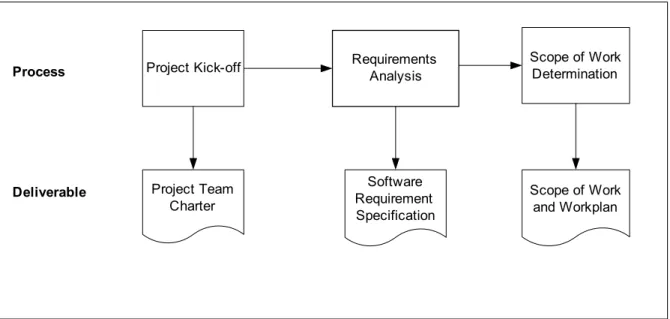
Although a GIS application development using rapid development method is generally set to be performed on an accelerated schedule, careful planning in the startup phase of the project is still an essential factor to the success of the project (Figure 2). Project Kick-off Project Team Charter Process Deliverable Requirements Analysis Scope of Work Determination Software Requirement Specification Scope of Work and Workplan
A project kick-off meeting should be called to charter a project team and define the rules and responsibilities of each team members. The project team may include the customers or GIS users, sometimes may be your client. A draft work plan and preliminary schedule may also be determined at this time.
In gathering requirements, always ask the GIS users or your clients three questions (1) What do you must have? (2) What do you wish to have? (3) What do you not want to have? The software requirement specification should document the needs in first category as the basic requirements in great detail, list the needs in the second category as optional requirements, and note the third category as being excluded. The basic requirements will be given thorough consideration throughout the project; whereas, the optional requirement will be considered as the second tier of
functionality. In fact the users often have alternative methods to perform the GIS analysis without these functions defined by the optional requirements. In the case of limited funding and development time, they may also choose to delay the
development of more complex GIS functions that support certain advanced GIS analyses. Sometimes, with the ever improving GIS technology, if you wait, functions that provide better solutions to those needs may come directly from the next release of the underline GIS platform or software upgrade, such as ArcGIS. Meantime, the GIS users may take the time to become more familiar with the basic GIS systems and applications before they can take advantage of more advanced GIS technologies. The third question may be odd, but determining what do not need to be in the
development can help further bound the scope of work.
After the software requirement specification has been determined, a detailed scope of work and initial work plan should be developed to document the scope of work, cost proposal and development schedule.
Software Design and Build
The second phase of GIS application development in the highly adaptive rapid development process is to design and build the application. Normally, in a rapid application development process, both the developers and GIS users will need to be involved in this design process that may contains several Joint Application Design (JAD) sessions where both the developers and users work together to determine what is the best for the system.
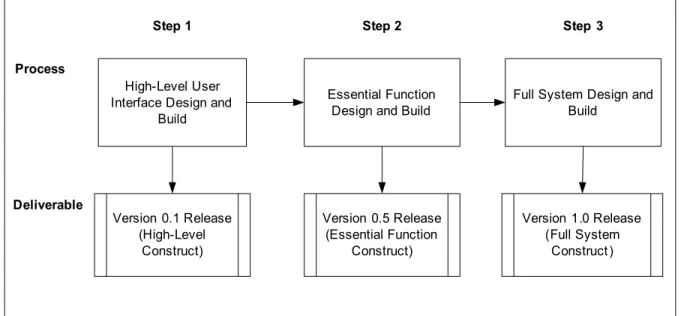
The high level processes of the design and build are shown in Figure 2. The first step of design and build is to quickly design and build the high level GIS interfaces. The greatest flexibility of changes are allowed at this step, A few iterations may be allowed for the developers and users to work together quickly come up with acceptable high level user interfaces and functions. A “prototype” release may be allowed for your client’s high level presentations and public outreach activities.
The second step of design and build will actually design and construct all essential functionality of the system which should include all the core functions that satisfy most of the basic requirements. The product will be an essential functional release. Users should be able to start “test driving” the system by performing some GIS analyses with additional help. Without additional functions that will be built in the next step, the users may have to prepare data or parameters manually before running the analysis using the “basic” system. An iterative development process is also allowed in this step to improve and finalize the major functions of the
application.
The third step of design and build is the final step of software construction. The whole system will be built at this time. All the basic system requirements and some, if not all, of the optional requirements will be satisfied. The software product will be released to the customers or GIS users for deployment in the production
environment. Process Deliverable Version 0.1 Release (High-Level Construct) Essential Function Design and Build
Full System Design and Build Version 0.5 Release (Essential Function Construct) Version 1.0 Release (Full System Construct)
Step 1 Step 2 Step 3
High-Level User Interface Design and
Build
Figure 2. Design and Build Process
Initial Software Design and Build
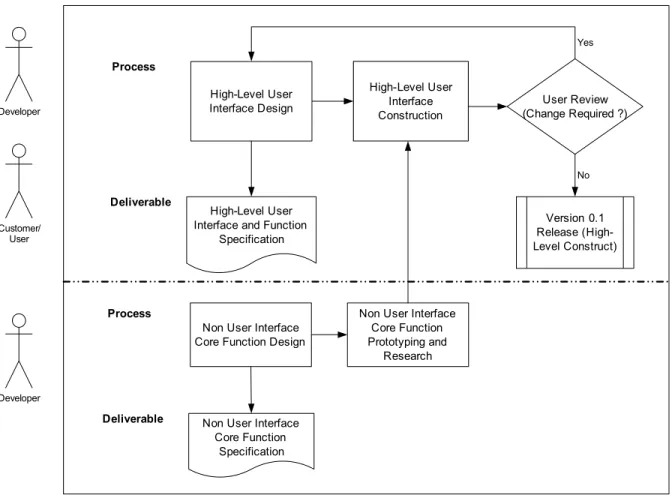
The detailed initial design and build process are shown in Figure 3. While the developers and GIS users may work collaboratively to design and build the high level user interfaces, the developers can work in a parallel process to study and prototype those core functions that do not require user interactions. The users in general do not have great concern on how a low level GIS function should be designed and programmed. The developers may decide alone what the best
also be avoided concerning the cost and development schedule. Early design and prototyping on non user interface core functions can also help to identify certain “road blocks” in the high level design. For an example, if a proposed user menu item calls a function that is proven to be impossible to be implemented within a given GIS environment, an alternative design has to be given to the menu item. Early identification of the high level design issues and making appropriate changes can significantly reduce the cost than changing at a late development stage.
High-Level User Interface Design
High-Level User Interface and Function
Specification Process Deliverable High-Level User Interface Construction
Non User Interface Core Function Design
Non User Interface Core Function Specification Version 0.1 Release (High-Level Construct) User Review (Change Required ?) No Yes Process Deliverable
Non User Interface Core Function Prototyping and Research Developer Customer/ User Developer
Figure 3. Initial Design and Build
Essential Function Design and Build
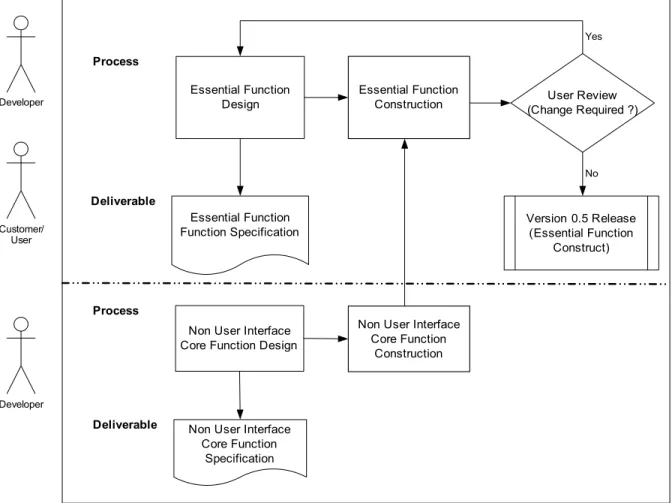
The detailed essential function design and build process are shown in Figure 4. Similar to the initial design and build, both the developers and GIS users can work together to create the essential function specification. Then the developer will start to develop the essential functions of the application. The constructed essential functions will be review and tested by the users for acceptance. Necessary changes will be made to the design and software construct to address user’s comments. Note that non interactive core functions can be designed and developed by the developers
in parallel to the joint design and build of essential functions. These core functions will be incorporated into the essential software construct. Once accepted, the essential function construct will become the “basic” system of the application that contains all the essential functionality. For the developers, it is a good to baseline the system at this time.
Essential Function Design Essential Function Function Specification Process Deliverable Essential Function Construction
Non User Interface Core Function Design
Non User Interface Core Function Specification Version 0.5 Release (Essential Function Construct) User Review (Change Required ?) No Yes Process Deliverable
Non User Interface Core Function Construction Developer Customer/ User Developer
Figure 4. Essential Function Design and Build
Full System Design and Build
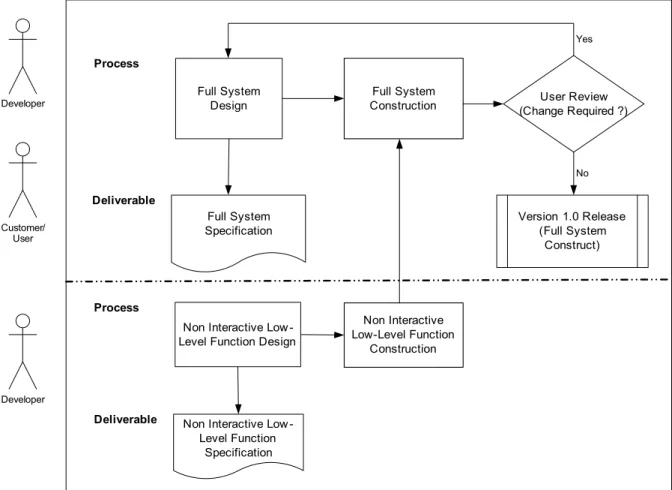
The final system design and build process are shown in Figure 5. All of the additional system functions will be designed and constructed at this step. The developers and GIS users will work together to create specification for additional functions that required by the system. Then, the developer may begin to develop these additional functions to finish the full system construct. Note that additional non interactive low level functions may be designed and developed by the
developer at the same time. These non interactive low level functions will be incorporated into the final system. An iterative process may also be allowed to address user’s comments and concerns to improve the functionality and system performance. At this time, the developers and users also assess the available funding
and development time. If both the time and budget allow, some or all optional requirements may be considered to further enhance the software application.
Full System Design Full System Specification Process Deliverable Full System Construction
Non Interactive Low -Level Function Design
Non Interactive Low -Level Function Specification Version 1.0 Release (Full System Construct) User Review (Change Required ?) No Yes Process Deliverable Non Interactive Low-Level Function Construction Developer Customer/ User Developer
Figure 5. Full Design and Build
Project Close-out
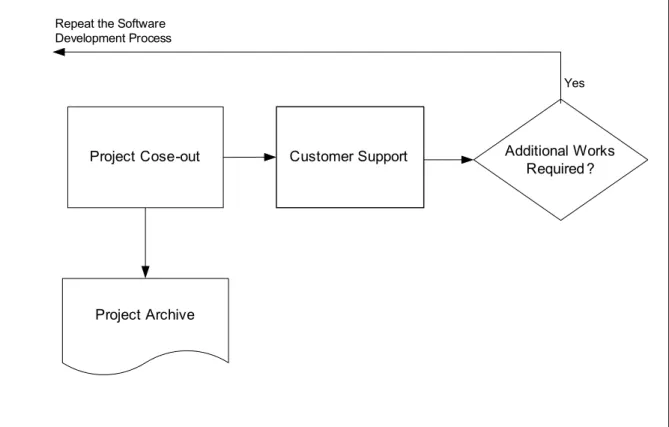
After the final delivery of the software application, the current development project will be closed out. All project materials, including requirements and software design documents as well as programming source codes and object codes will need to be archived. The developers should always consider certain level of customer support for all GIS applications delivered to the clients or GIS users. With the rapid changes and ever improving GIS technology, there may be opportunities for additional
works in the future to further improve the functionally of the software application or realign it with newer GIS technology.
Project Cose-out
Project Archive
Customer Support Additional Works Required ?
Yes Repeat the Software
Development Process
Figure 6. Project close-out and customer support
Conclusion
The highly adaptive rapid GIS application development method described in the paper can be applied to many complex GIS applications that are developed in a dynamic environment. It will significantly shorten the development time while allow many iterations of software construct to be built with great level of flexibility. Significant user involvement right from the beginning allows more design issues to be addressed early in the process and thus reduce the amount of re-work to the minimum. Being able to prioritize the functional requirements and design and build the application in different phases allows the development to start small and more adaptive to change. Focusing on adding the “must have” functions next will keep the development concentrated on major requirements of the system while leaving enough room for growth and being adaptive to changes in the middle of the project. As long as the budget and time allow, more additional functions will be added, and some or all optional requirements may be considered. The final software product will be a high quality software application with maximum optimized functionality allowed by a given budget and development time. The software requirements and design specifications are always living documents throughout the process that allows reasonable changes and updates.
References
Bourne, K.C. 1994. “Putting Rigor Back in RAD.” Database Programming & Design 7(8): 25-30
Cone, L., D. Moonie, S. Oppmann, N. von Meyer, B. Ader, and J. Steffenson, 1999. USDI BLM and USDA Forest Service – Working Toward a National Integrated Land System. Federal GIS Connections Fall 1999 ESRI
Dennerlein, J. 1997. Rapid Application Development (RAD) and ArcView: A New Horizon for GIS Application Development. Proceedings of the ESRI User Conference
Gibson, M. L. and C. T. Hughes, 1994. Sys stem Analysis and Design: A
Comprehensive Methodology with CASE. Danvers, MA: Boyd & Fraser Publishing Company
Hoffer, J. A., J. F. George, and J. S. Valacich, 2002. Modern System Analysis and Design. Upper Saddle River, NJ: Prentice Hall
Kroot, C. M. Smith, S. Rich, and J. Sardano. 2000. Building and Deploying an Enterprise Geographic Information System Using ArcInfo 8.0, Oracle, and Citrix. Proceedings of the ESRI International User Conference
Maguire, D. J. 1995 GIS Application Development. Proceedings of the ESRI User Conference
Martin, J. 1991. Rapid Application Development. New York: Macmillan Publishing Company
McConnell, S. 1996 Rapid Development. Redmond, WA: Microsoft Press
Pine, S. M. and K. R. Larson, 2000. Extreme Programming: What it is and How to Get Started. Project Management Series No. 12-2000-1. Advanced Technology Integration, Inc.