© 2014, IJCSMC All Rights Reserved 334 Available Online atwww.ijcsmc.com
International Journal of Computer Science and Mobile Computing
A Monthly Journal of Computer Science and Information Technology
ISSN 2320–088X
IJCSMC, Vol. 3, Issue. 6, June 2014, pg.334 – 340
RESEARCH ARTICLE
QR Code Scanning app for
Mobile Devices
Mircea Moisoiu, Andrei Negrău, Robert Győrödi, Cornelia Győrödi, George Pecherle
Faculty of Electrical Engineering and Information Technology, Department of Computer Science and Information Technology, University of Oradea
Oradea, Romania
[email protected], [email protected], [email protected] [email protected], [email protected]
Abstract - QR code (abbreviated from Quick Response Code) is the trademark for a type of matrix barcode first designed for the automotive industry [1]. Today the QR code is widely used in all industries. In our paper we present an implementation of an Android device using libraries and combined algorithms in order to be able to scan any QR code fast accurate and easy. The devices that we targeted for our application are the Google Glasses and an Android operated phone. The implementation for each of the devices was slight different, but the core algorithms and libraries were the same.
Keywords – QR code, information, mobile, smartphones, Android
I. INTRODUCTION
© 2014, IJCSMC All Rights Reserved 335
amount of data and a large variety of character types, the market called for a new approach. Enter 2-Dimensional bar codes. The 2-Dimensional barcodes offers good advantages like high density, high capacity, error detection, small areas. PDF417 is a stack of two-dimensional barcode. The matrix barcode is that codes the data based on the position of black spots within a matrix. Each black element is the same dimension and it is the position of the element that codes the data.
One of the most popular 2-D bar code formats, Denso Wave's QR Code. A QR code uses four standardized encoding modes (numeric, alphanumeric, byte / binary, and kanji) to store data. A QR code consists of black spots arranged in a square grid on a white background, which can be read by an imaging device and processed using Reed–Solomon error correction until the image can kk be appropriately interpreted; data is then extracted from patterns present in both horizontal and vertical components of the image.
Below are some examples of 2-Dimensional barcodes [16]:
Fig 1. Example of PDF417 Code [16] The following barcodes are created by us:
Fig 2. Example of a QR code and Data Matrix code
II. OVERVIEW OF THE PROJECT
© 2014, IJCSMC All Rights Reserved 336 Fig 3. Example of Google Glass™ voice commands [11]
The Google Glass™ are light weight glasses without optical lens, as shown in Fig 4.
Fig 4. Google Glass™ device [7]
After the user gives the right command the QR Scanner app starts and user interface initializes. The user interface consists of a camera view which contains a partial shadow with a horizontal green line. When the user approaches a QR code the application establish the required patterns like position, alignment, timing and the application decodes it and translates into URI, as described in [6]. If the code it’s valid the application prompts a dialog message with a text view that consists the URL. and asks if you want to open that page. When the users accepts, a web view it’s opened inside the device and the page it’s shown.
III.THE BACKEND OF THE APPLICATION
After a long research and experimental process, we decided the best solution is to use an open source library named Zebra Crossing [8], which helped us decoding a wide variation of QR codes and that allowed us to focus more on user experience. The code behind the QR scan application was created in such a way that will allow further customization and even extend the possibility to scan other types of codes, the only change the developer will have to do it's to change or modify the current library with a new or custom made.
© 2014, IJCSMC All Rights Reserved 337
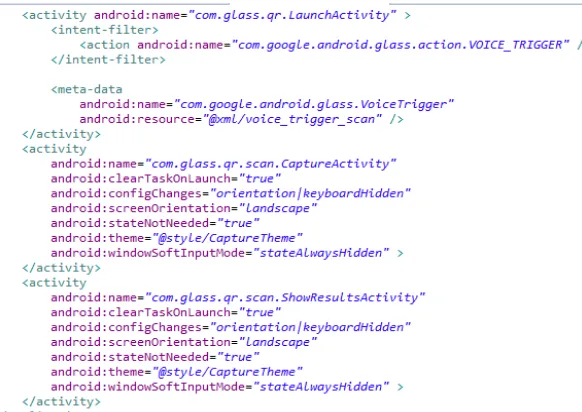
Along these, we added two intent filters: a main intent and second intent for the scanning process. In Fig 5. we are showing the AndroidManifest.xml file of our application.
Fig 5. The Android Manifest file
The next step is to create an Intent [14] where you specify what type of Intent you want to receive, as shown in Fig 6.
Fig 6. Example of an Intent from our implementation
And the final change it to change the onActivityResult to make possible to read the results. If the
resultCode is RESULT_OK the activity will get the SCAN_RESULT and SCAN_RESULT_FORMAT from the Intent. The code below shows the process (Fig. 7).
Fig 7. The onActivityResult code
© 2014, IJCSMC All Rights Reserved 338
IV. THE STEPS OF OUR IMPLEMENTATION
IV.1 Setting up the project
Because the Google Glass is not an ordinary Android device we had to acknowledge the documentation for Google Glass available on Google’s website [12]. In order to be able to implement the application we had to become familiarized with the specific concepts.
To develop Google Glass apps, we needed to add the GDK library to our project. The official GDK can be found in Eclipse’s SDK Manager under the Android 4.0.3 (API 15) package, as shown in Fig 8.
Fig 8 The Android SDK Manager
IV.2 Configuring the project for Google Glasses
First, we included three activities: LauncherActivity, CaptureActivity and ShowResult Activity. The Android Manifest file was also updated with the necessary activities we set android:minSdkVersion="15"and
android:targetSdkVersion="15" and we updated the Permissions for the app (Camera, Internet, Acces Wi-Fi
State, Write External Storage). For a full Google Glass experience we added the Voice Trigger action via intent. The source code is shown in Fig 9.
© 2014, IJCSMC All Rights Reserved 339
IV.3 Creating the classes and packages
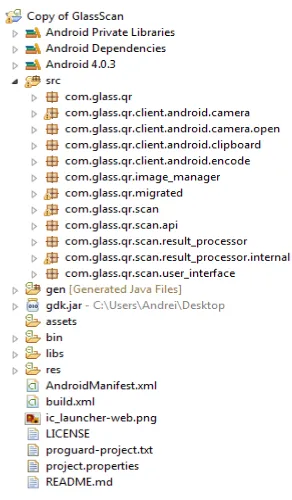
In order to simplify processes and to have a smooth workflow we organized all the classes within specific packages. All the packages and classes were named in order to ensure an easy customization of the app.
Fig 10. The project resources and packages
The purpose of the package android camera is to merge several classes which ensure that it will be
compatible with the Google Glass™ camera. It contains an AutoFocusManager which helps focus more easily
the QR code an CameraConfigurationManager which deals with reading, parsing and settings the camera
parameters which are used to configure de camera hardware. It also contains a CameraManager whose job was
to wrap to the Camera service object and expects to be the only one talking to it. The implementation encapsulates the steps needed to take preview-sized images which are used for both preview and decoding.
The package qr.scan is the main collection of classes which opens the camera and takes the picture, decodes it and returns an activity. It contains a CaptureActivity class whose job is to open the camera, do an actual scan in a background thread and to draw a view finder. The view finder is a line that helps the user place correctly the camera when he approaches a QR Code and shows feedback as the image is being processed. The package contains a CaptureActivityHandler which handles all the messaging which comprises the state of machine for capture. It contains a DecodeThread class which helps CaptureActivity class to decode the images to see if is a valid QR scan. The ResultActivity returns the result if it’s valid or not.
CONCLUSIONS
Developing a QR Scanner application for Google Glass TM was a challenge for us because the device is still a prototype, the GDK[10] is still under development so there wasn't a dedicated support for it. Another challenge was the Zxing library. We had some difficulties in using it because the Google GlassTM device’s
camera is not that powerful compared with the modern days mobile devices. The Google GlassTM uses an 5 MP
camera and this forces the user to get closer to the QR Tag so that the openCV can process the image and can send it to Zxing to decode it. Our implementation opens new directions for many industries and also for the normal user of the Google GlassTM devices.
© 2014, IJCSMC All Rights Reserved 340
resolved and the user will not be needed to get close, he will have the possibility to scan from a further distance and the user experience will be much more improved.
REFERENCES
[1] http://en.wikipedia.org/wiki/QR_code
[2] http://en.wikipedia.org/wiki/Barcode
[3] http://www.dataid.com/whatisbarcode.htm
[4] http://science.howstuffworks.com/innovation/repurposed-inventions/2d-barcodes.htm
[5] https://support.google.com/glass/answer/3079305?hl=en
[6] http://en.wikipedia.org/wiki/Uniform_resource_identifier
[7] http://upload.wikimedia.org/wikipedia/commons/2/25/Google_Glass_Explorer_Edition.jpeg
[8] https://github.com/zxing/zxing/
[9] http://en.wikipedia.org/wiki/OpenCV
[10] http://en.wikipedia.org/wiki/Google_Glass
[11] http://marketingland.com/google-glass-apps-facebook-twitter-48718
[12] www.google.com/glass/start/
[13] http://en.wikipedia.org/wiki/APK_(file_format)
[14] http://en.wikipedia.org/wiki/Intent_(Android)
[15] http://www.differencebetween.com/difference-between-barcode-and-vs-qr-code/
![Fig 1. Example of PDF417 Code [16]](https://thumb-us.123doks.com/thumbv2/123dok_us/1981927.1261916/2.595.206.413.233.343/fig-example-of-pdf-code.webp)
![Fig 3. Example of Google Glass™ voice commands [11]](https://thumb-us.123doks.com/thumbv2/123dok_us/1981927.1261916/3.595.159.451.312.483/fig-example-google-glass-voice-commands.webp)