International Journal of Advanced Research in Computer Science
RESEARCH PAPER
Available Online at www.ijarcs.info
Use of Windows Presentation Foundation and Windows Forms in Windows
Application Programming
Anurag Misra
Training Specialist
Higher Institute of Plastic Fabrication Riyadh, Saudi Arabia
Abstract: This paper concentrates upon two of the development tools used to develop windows applications and both of them are provided by Microsoft. One quite old and very widely used is Win-Forms which is there since the days of visual basic 6. But now Microsoft came up with a new tool that is called Windows Presentation Foundation (WPF). As compared to Win-Forms, WPF is quite new and introduced with .Net 3.0 as a part of .Net framework. Microsoft has never given a clear statement that WPF is here to replace the Win-Forms or both tools will be there to be used side by side. Both the tools have some pros and cons over each other. So, here in this paper we will present a comparative study of both the tools. Which will help a developer to decide which of the tool is better to develop the application in question. But as Microsoft hasn't cleared that WPF will replace Win-Forms or not, in this paper we assume that both the tools are to be used together.
Keywords: WPF, Win-Forms, Memory, Templates, Controls, Animation, Triggers, Design options, Layout, Control Design, Procedural approach, User Interface, Data Binding, Framework, Skinning Structure.
I. INTRODUCTION
Although WPF is not a very recent tool and its around here for few years but as compared to Win-Forms it's still a very recent tool. Even today there are lots of developers out there who don't know much about WPF.
Windows Presentation Foundation (WPF) is a GUI framework and it is used to create windows applications same as Win-Forms. Both the technologies are launched by Microsoft. WPF is a part of Microsoft .Net framework 3 or higher. As we have already said both of the tools are used for almost same function which is to develop windows application but still WPF has lots of differences as compared to the Win-Forms. The biggest difference between them is that Win-Forms are simply a layer on top of standard windows control; it completely relies on windows environment whereas WPF can be created from the scratch so there are not many dependencies on windows environment.
Both the tools have some pros and cons over each other and here we will see those differences, pros and cons in detail. So, readers of this paper can make their decision with ease and without any doubt that which one is better for their application and should be used by them.
II. WINDOWS PRESENTATION FOUNDATION (WPF)
Windows Presentation Foundation (WPF) is a Graphical User Interface (GUI) framework. This is used to create client side applications for windows as well as web based applications. Although in this paper we will
only concentrate on windows client side development. WPF is a part of .Net framework 3 and above. Figure 1, depicts the .Net 3.0 Stack with all if its main parts.
Figure 1
WPF is capable of designing UI not only with user control and some on screen document support but it supports much more than this. Comparative supported formats for WPF and Win-Forms are listed in table 1.
Technology Win-Forms WPF
Graphical Interface like form, user
controls etc
Yes Yes
On Screen
Document support Yes Yes
Fixed Format
Some of you may have seen the things stated above as supported techs by Win-Forms in lots of applications developed using Win-Forms but the support is very limited in use and for that to Win-Forms need to import a handler to some application which actually supports the feature. Like for videos Win-Forms uses Windows Media Player to play videos in your application. For Fixed Format Documents like .PDFs it has to use Adobe's PDF applications or for 3-D graphics Direct 3D can be used etc. Whereas in WPF all these technologies can be incorporated directly in your application. So, there is quite less dependency in other applications and windows environment, if you are using WPF as your development platform. WPF is not only good at styling but it also provides very simple and highly advanced data binding. Over all it is a quite strong tool to develop windows client side apps. Some of the advantages and disadvantages of WPF are as follows:
Advantages of WPF:
Very powerful in styling
Provides skinned structure for form design.
Environment dependency is less so it's easy to create own look and feel.
Ability to reuse existing code.
Data binding is simple yet highly advanced.
Much quicker to develop normal apps. Forms are probably simple, once you are experienced.
Futuristic technology for developing advance applications.
Supports declarative as well as procedural approach. Procedural methods can be used as and when required.
Framework is much smarter and requires quite less code behind to do general things.
Apps are much more maintainable due to good data binding and effective declarative code.
Excellent layout is provided.
Document support is very good and efficient.
Multimedia, Audio and video support is very good.
Two dimension and three dimension graphics is supported.
Also provides support for Win-Forms control.
Disadvantages of WPF:
Requires .Net 3.0 or higher.
Compared to Win-Forms still some of the controls and definitions are missing.
Available support is less as compared to Win-Forms.
Requires DX9 compatible graphics card to support advanced graphics.
Technology is quite new so learning curve is quite high.
III. WINDOWS FORMS (WIN-FORMS)
Windows form is a platform which is used to develop windows client applications. This platform comes up with a set of managed libraries to provide a clear, object oriented extensible set of classes to support the development of windows applications. It’s a graphical Application Programming Interface (API) to facilitate data display and to manage user’s interaction with application. Windows Forms has extensive client library to provide interface for accessing graphical UI and graphics of windows operating system using managed coding. Every control in Win-forms is an instance of a class. Its layout and behavior is managed using methods. It provides an event driven architecture, so application developed using windows forms not only takes user inputs but it also waits for specific values entered by user or specific events to occur for their execution. Win-forms has variety of controls available as well as provides option to design the new ones. There are classes to create fonts, brushes, icons and other graphic objects.
Visual Studio comes up with a tool called Windows Forms Designer with facility to insert controls in a form, arrange them as per desired layout, provides option to use event handlers and to add code to implement user interaction as desired. Application setting also can be used in Win-forms to create, store and maintain run time state information in XML form. That type of information can be used to get application settings as per user requirement and these setting can be reused for future applications also. Some of the advantages and disadvantages of Windows Forms are as follows:
Advantages of Windows Forms:
tested code and working examples are available in abundance everything is tested thoroughly for years.
Some support for WPF is also available
lots of 3rd party controls are available in the market to make your job easier
Visual Studio designer is somewhat easier for Win-forms as compared to WPF, where lots of work has to be done by the programmer to get exactly what is desired.
Disadvantages of Windows Forms:
It needs a lot of work to get desired look and feel. So, be prepared to take lots of pain to get it.
If third party controls are needed definitely it means some extra cost will be added to your budget.
IV. COMPARATIVE STUDY
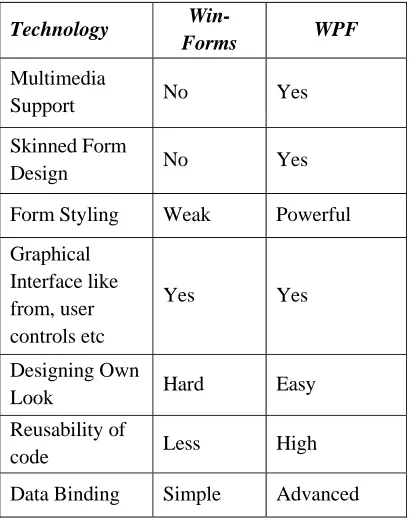
As we have seen in introduction of WPF and Windows Forms, both technologies are used in developing client end windows applications and both are having some pros and cons. So, one cannot put a clear line that which one is better for the development of windows applications. Rather than having straight choice one has to look for application's needs and has to decide as per requirement. To support his/her decision more clearly now we will come up with tabular comparison of both tools to make comparison and to see that which one of the tool can supports the features needed by an application.
TABLE II. Comparative analysis of WPF and win-Forms
Technology
Win-Form Styling Weak Powerful
Graphical
Data Binding Simple Advanced
Code behind
work High Less
Learning Curve Small High
Procedural Programming Support
Yes Yes
Documentation
availability Extensive Medium
Availability of
Technology No Yes
XAML support No Yes
Effort in
Binding Data High Less
2-D and 3-D
Graphics No Yes
.Net 3.0 or Higher
Not
Required Required
DX9 Compatible Graphic Card
Not
Required Required
Windows
Memory
Consumption Less High
CPU Load Less High
Load Time High Less
Availability of Help Forums & Blogs
More Less
Routed Events No Yes
Video & Audio No Yes
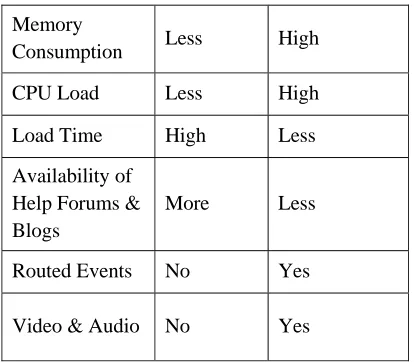
Table 2 gives tabular comparison for WPF and Win-Forms which can make it easier to choose one of them when a person needs to develop an application. One thing is clear though that it's not good to move to one tool completely for all of your solutions. But wiser decision is that look in to your application's needs and then decide which one of the tool you want to use. Like if your application needs high multimedia support definitely your first choice will be WPF or if your application needs very advanced data bindings or if your main concern is speed instead of memory usage then you can go for WPF without a doubt. But if you are in reverse situation and for your application saving memory is far more important than speed then you have to go for Windows Forms.
V. COMPARISON FOR MEMORY USES
This memory comparison has been done with a small practical scenario created with both tools and then compare the results of memory utilisation, retrieved by diagnostic tools available with Visual Studio 2015. The scenario includes a small application in which 1000 textboxes are created and then rendered on screen. Reason for using Textbox is that they are quite simple controls and directly available in control classes: in
Windows-Forms class is System.Windows.Forms.Control whereas in WPF class is
System.Windows.Controls.Primitives.Control. So, any other class is not involved which will reduce the additional overheads.
For Windows-Forms when first snapshot is taken application has created 1247 objects which took 94.35 KB memory but at the time of second snapshot when all 1000 textboxes are created application has created 14,327 objects which all took 654.77 KB memory.
Whereas for WPF at the time of initial snap shot application has created 12,702 objects and consumed 595.80 KB memory where as when all 1000 textbox has created application has created 4,04,324 objects which all consumed 17,689 KB of memory.
It clearly shows that for creating and rendering 1000 textboxes Win-Forms created considerably less objects and took very less memory whereas for same job WPF created too many objects and consumed quite high amount of memory.
But there are some other things to observe to get the exact performance factor. So, I will summarise everything in table 3 which will provide us clear idea of performance of both tools for given scenario.
Table III. Memory Consumption and Load Time Comparison of WPF and Win-Forms
Table 3 makes it very clear that in comparison with Win-Forms, WPF's memory consumption is really high that is due to the fact that in WPF, controls are designed in such a way that they need more smaller units to be initialized to create the control but it also shows an interesting fact that even with such a high memory consumption, Load Time for WPF is very less. It means that even if WPF is taking high amount of memory, speed wise WPF is way better than
VI. CONCLUSION
speed. So, which tool is better is mainly depends upon application's requirements.
VII. REFERENCES
[1] Window Form Controls v/s WPF Controls Memory Comparison, yash soman, 10 Oct 2015,
"http://www.codeproject.com/Articles/1038077/Win dow-Form-Controls-v-s-WPF-Controls-Memory-Compa".
[2] Windows Presentation Foundation vs Win-Forms "http://www.infragistics.com/community/blogs/devto olsguy/archive/2015/04/17/windows-presentation-foundation-vs-winforms.aspx".
[3] WPF vs Windows Forms,
"https://joshsmithonwpf.wordpress.com/2007/09/05/ wpf-vs-windows-forms/".
[4] Windows Forms,
"https://www.techopedia.com/definition/24300/wind ows-forms-net".
[5] Windows Forms,
"https://en.wikipedia.org/wiki/Windows_Forms".