A Hybrid Graphical Password Based System –
Balancing the Usability and Security
A.Petchiammal
1, S.Venkateswari
2PG Scholar, Department of CSE, P.S.R.Rengasamy College of Engineering for Women, Tamilnadu, India1
Assistant Professor, Department of CSE, P.S.R.Rengasamy College of Engineering for Women, Tamilnadu, India2
ABSTRACT: Wide-ranging people prefer the unforgettable passwords rather than the strong passwords which are complicated to keep in mind. Human mind can effortlessly memorize the image than textual character. Now a day, the online guessing attacks such as dictionary attacks, brute force attacks and the botnet (Robotic Network) are dreadfully confronting to face. While keeping from happening such attacks, make available the expedient login for genuine users is a complex problem. This project effort unites the Persuasive Pixel Click Points (PPCP) and Password Guessing Resistant Protocol (PGRP) in graphical passwords. In this work, we confer the inadequacy of existing and proposed login protocols intended to address large scale online dictionary attacks. To recognize the malicious login attempts Automated Turing Tests (ATTs) e.g., Captcha is efficient and uncomplicated to organize technique other than it offers inconvenience to the users. The PGRP counts the number of failed login attempts per username. It confines the total number of failed login attempts from the unknown seclude hosts at the same time it offers the genuine users to make use of several failed login attempts prior to deal with an ATT. As a result this work balances the usability and security in the authentication schemes.
KEYWORDS: Graphical password, password, Captcha, dictionary attack, password guessing attack, Automated Turing Test, botnet, Password Guessing Resistant Protocol.
I. INTRODUCTION
A. Brute Force Attack
A Brute Force attack is a kind of password guessing attack and it consists of trying every probable code, combination, or password awaiting find the correct one. This kind of attack may obtain long time to complete.
B. Dictionary Attack
A dictionary attack is the one more password guessing attack which makes use of a dictionary of common words to identify the user‟s password.
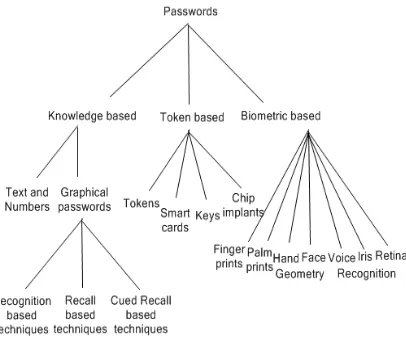
C. Authentication schemes
Pandian Saraswathi Yadav Engineering College, Arasanoor, Sivagangai, Tamilnadu, India
Fig. 1 Authentication schemes
D. Graphical Passwords
Graphical passwords are easy to remember for many people than textual passwords. They provide better security than text based passwords because more people choose the plain passwords which are easier to keep in mind, but vulnerable to some guessing attacks such as dictionary attacks, brute force attacks.
II. BACKGROUND AND RELATED WORK
A. Graphical Passwords
A huge number of graphical password schemes have been proposed. They classified into three categories according to the password entry and memorization of the password. They are recognition, recall, and cued recall. Each type will be briefly explained here. Additional can be found in a recent review of graphical passwords [1]. It examines the security and usability of these schemes and also analyses the possibility of attacks for these schemes. It reviews the usability requirements for knowledge-based authentication as they apply to graphical passwords, identify security threats that such systems must address and review known attacks, discuss methodological issues related to empirical evaluation, and identify areas for further research and improved methodology.
In a cued-recall scheme, an external cue is provided to help memorize and enter a password. PassPoints [9] is a widely studied click-based cued-recall scheme wherein a user clicks a sequence of points anywhere on an image in creating a password, and re-clicks the same sequence during authentication. The authors provide a report an empirical study comparing the use of PassPoints to alphanumeric passwords. The evaluation of passpoints [10] presents the various methods for purely automated attacks against click-based graphical passwords. These purely automated methods combine click-order heuristics with focus-of-attention scan-paths generated from a computational model of visual attention. Users preferred CCP to PassPoints, saying they thought that selecting and reuse the only one point per image was easier, and that seeing each image triggered their memory of where the corresponding point was located. The CCP provides greater security than PassPoints because the number of images increases the workload for attackers. Cued Click Points (CCP) [11] is similar to PassPoints but uses one image per click, with the next image selected by a deterministic function. Persuasive Cued Click Points (PCCP) [12] extends CCP by introducing the persuasion to the Cued Click-Points graphical password scheme. In click-based graphical passwords, poorly chosen passwords lead to the emergence of hotspots – portions of the image where users are more likely to select click-points, allowing attackers to mount more successful dictionary attacks. They use the persuasion to influence user choice in click-based graphical passwords, encouraging users to select more random, and hence more secure, click-points.
Among the three types, recognition is considered the easiest for human memory whereas pure recall is the hardest [1]. Recognition is typically the weakest in resisting guessing attacks.
B. Captcha in Authentication
It was introduced in [13] to use both Captcha and password in a user authentication protocol, which we call Captcha-based Password Authentication (CbPA) protocol, to counter online dictionary attacks. The CbPA-protocol in [13] requires solving a Captcha challenge after inputting a valid pair of user ID and password unless a valid browser cookie is received. For an invalid pair of user ID and password, the user has a certain probability to solve a Captcha challenge before being denied access. This protocol suggestion is used to reduce the number of ATTs sent to the legitimate users, but at some meaningful loss of security. An improved CbPA-protocol is proposed in [14] by storing cookies only on user-trusted machines and applying a Captcha challenge only when the number of failed login attempts for the account has exceeded a threshold. It is further improved in [15] by applying a small threshold for failed login attempts from unknown machines but a large threshold for failed attempts from known machines with a previous successful login within a given time frame.
III. OBJECTIVES & OVERVIEW OF THE PROPOSED MECHANISM
A. Objectives
In this paper, we propose to design the authentication scheme which enhance the balance between usability and security of graphical passwords and avoid the online guessing attacks such as dictionary attacks and reduce the brute force attacks. We propose the graphical pictures which enhance the usability of authentication to users by using Persuasive Pixel Click Points (PPCP) and using the PGRP we can enhance the security.
B. Overview of the proposed Mechanism
Pandian Saraswathi Yadav Engineering College, Arasanoor, Sivagangai, Tamilnadu, India
IV. PROPOSED WORK
A. Persuasive Pixel Click Points (PPCP)
In our proposed system, the small pictures are collected and they are grouped into one image. The image can be either 4×4 or 8×8 small pictures. The image is build into the pixel values from 0 to 240. Each small image occupies 0 to 60 pixels both in the height and width. Same like that the other images are generated. Users have to click any one of the small image from the given image for the sequence of five images shown by the system. Fig. 2 shows the 8×8 graphical password image.
Fig. 2 8×8 Graphical Password image
B. Password Guessing Resistant Protocol (PGRP)
This protocol will check the IP address of the user and checks for the wrong entry of passwords. If the user uses the same registered IP for login, it will allow five wrong entries. If the IP is different, it will allow three attempts only. If the user clicks on the wrong picture one time, it will change the sequence of pictures display for click points.
In particular, to limit attackers in control of a large botnet (e.g., comprising hundreds of thousands of bots), A deterministic function (AskATT()) of the entered user credentials is used to decide whether to ask the user an ATT. PGRP accommodates both graphical user interfaces (e.g., browser-based logins) and character-based interfaces (e.g., SSH logins), while the previous protocols (PS and VS) deal exclusively with the former, requiring the use of browser cookies. PGRP uses either cookies or IP addresses, or both for tracking legitimate users. Tracking users through their IP addresses also allows PGRP to increase the number of ATTs for password guessing attacks and meanwhile to decrease the number of ATTs for legitimate login attempts.
PGRP enforces ATTs after a few (e.g., three) failed login attempts are made from unknown machines. On the other hand, PGRP allows a high number (e.g., 30) of failed attempts from known machines without answering any ATTs. We define known machines as those from which a successful login has occurred within a fixed period of time. These are identified by their IP addresses saved on the login server as a white list, cookies stored on client machines. A white-listed IP address and/or client cookie expires after a certain time.
V. IMPLEMENTATION
A. Commencement of Access
B. Graphical Password Generation
The small pictures are collected and they are grouped into one image. The image can be either 4×4 or 8×8 small pictures. The image is build into the pixel values from 0 to 240. Each small image occupies 0 to 60 pixels both in the height and width.
Same like that the other images are generated. Users have to click any one of the small image from the given image for the sequence of five images shown by the system.
C. Persuasive Pixel Click Point Identification
Persuasive Pixel Click-Points was designed to reduce patterns and to reduce the usefulness of hotspots for attackers. Rather than five click-points on one image, PPCP uses one click-point on five different images shown in sequence. The next image displayed is based on the location of the previously entered click-point, creating a path through an image set. Users select their images only to the extent that their click-point determines the next image. Creating a new password with different click-points will give results in a different image sequence.
The users‟ click location is captured and the region is calculated for the particular image range. Then the clicked point will be converted into binary values. The hash algorithm will generate a system generated password for each region.
D. Image Mapping
The image is shown to the user one by one. When the user clicks on one image, it will automatically show the next image. If the user enters a wrong click at any point, the system will generate another set of images. This will be very useful to inform the user that they are entering wrong password. If the user is another person (hackers), then they do not know that they are entering wrong image. Thus we can increase the size of the security level in graphical passwords.
E. Working Flow
Pandian Saraswathi Yadav Engineering College, Arasanoor, Sivagangai, Tamilnadu, India
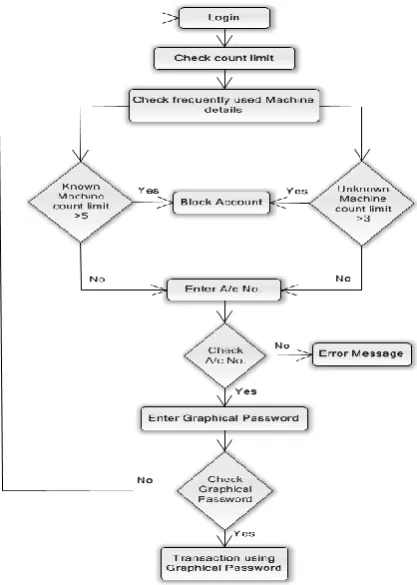
After successfully create an account user can use this authentication scheme by login in the application. When the user login the system, it will check the count limit and also checks the frequently used machine details. If the count limit of known machine exceeds the number of attempts 5 and the unknown machine count limit exceeds the number of attempts 3 the system will block the account. Otherwise user should enter their account number. The system will verify that account number from the database. If it is wrong it will through the error message. Else the system will show the graphical password images which are shown to the user in the registration phase. User should click their graphical password from the shown images. The system will verify the graphical password. If it is wrong it will redirected to the login page. Otherwise users can successfully use their application now. Fig. 3 shows working flow of the proposed system.
VI. CONCLUSION
We have proposed a persuasive pixel click point scheme. It had large password space over alphanumeric. There is a growing interest for Graphical password since they are better than Text based passwords, although the main argument for graphical password is that people are better at memorizing graphical password than text based passwords.
In this, PGRP is more restrictive against brute force and dictionary attacks while safely allowing a large number of free failed attempts for legitimate users. PGRP is apparently more effective in preventing password guessing attacks; it also offers more convenient login experience. PGRP appears suitable for organization of both small and large number of user accounts. Shoulder surfing attack is one of the difficult problems in the graphical passwords. We can reduce the shoulder surfing attacks by combining with movable frames or dual view technology. The stored hashed passwords might be cracked by rainbow attacks. We could increase the security of stored passwords in the database by using hashing with salt.
ACKNOWLEDGEMENT
The authors acknowledge the contributions of the students, faculty of P.S.R.Rengasamy College of Engineering for Women for helping in the design of graphical passwords, and for tool support. The authors also thank the anonymous reviewers for their thoughtful comments that helped to improve this paper. The authors would like to thank the anonymous reviewers for their constructive critique from which this paper greatly benefited.
REFERENCES
[1]. R. Biddle, S. Chiasson, and P. C. van Oorschot, “Graphical passwords: Learning from the first twelve years,” ACM Comput.Surveys, vol. 44, no. 4, 2012.
[2]. (2012, Feb.). The Science Behind Passfaces [Online]. Available: http://www.realuser.com/published/ScienceBehindPassfaces.pdf [3]. D. Davis, F. Monrose, and M. Reiter, “On user choice in graphical password schemes,” in Proc. USENIX Security, 2004, pp. 1–11. [4]. R. Dhamija and A. Perrig, “Déjà Vu: A user study using images for authentication,” in Proc. 9th USENIX Security, 2000, pp. 1–4. [5]. D. Weinshall, “Cognitive authentication schemes safe against spyware,” in Proc. IEEE Symp. Security Privacy, May 2006, pp.300–306. [6]. I. Jermyn, A. Mayer, F. Monrose, M. Reiter, and A. Rubin, “The design and analysis of graphical passwords,” in Proc. 8th USENIX Security
Symp., 1999, pp. 1–15.
[7]. H. Tao and C. Adams, “Pass-Go: A proposal to improve the usability of graphical passwords,” Int. J. Netw. Security, vol. 7, no.2, pp. 273– 292, 2008.
[8]. P. Dunphy and J. Yan, “Do background images improve „Draw a Secret”graphical passwords,” in Proc. ACM CCS, 2007, pp. 1–12.
[9]. S. Wiedenbeck, J. Waters, J. C. Birget, A. Brodskiy, and N. Memon, “PassPoints: Design and longitudinal evaluation of a graphical password system,” Int. J. HCI, vol. 63, pp. 102–127, Jul.2005.
[10]. P.C.van Oorschot, Amirali Salehi-Abari, Julie Thorpe, “Purely Automated Attacks on Pass Points-Style Graphical Passwords,”IEEE Transaction on Information Forensics and Security, Sept.2010.
[11]. S. Chiasson, P. C. van Oorschot, and R. Biddle, “Graphical password authentication using cued click points,” in Proc.ESORICS, 2007,pp. 359–374.
[12]. S. Chiasson, A. Forget, R. Biddle, and P. C. van Oorschot, “Influencing users towards better passwords: Persuasive cued click-points,” in
Proc.Brit. HCI Group Annu. Conf. People Comput. Culture, Creativity, Interaction, vol. 1. 2008, pp. 121-130. [13]. B. Pinkas and T. Sander, “Securing passwords against dictionary attacks,” in Proc. ACM CCS, 2002, pp. 161–170.
[15]. M. Alsaleh, M. Mannan, and P. C. van Oorschot, “Revisiting defenses against large-scale online password guessing attacks,”IEEETrans. Dependable Secure Comput., vol. 9, no. 1, pp. 128–141, Jan./Feb. 2012.
BIOGRAPHY
A.Petchiammal has received B.E degree in Computer Science and Engineering from Kamaraj College of Engineering and Technology, Virudhunagar under Anna University, Chennai in 2013. She is currently pursuing Master of Engineering in Computer Science and Engineering in P.S.R.Rengasamy College of Engineering for Women under Anna University, Chennai. Her areas of interest in research are Information Security and Wireless Networks.