PERTH WESTERN AUSTRALIA
SCHOOL OF ENGINEERING AND INFORMATION TECHNOLOGY
Parallel Development of a Real-time
Co-Simulation and MPC Control
System for the Universal Water System
Submitted to the School of Engineering and Information Technology, Murdoch University in partial
fulfilment of the requirements for the ENG470 Engineering Thesis
Author: Joseph Allsopp
Supervisor: Professor Parisa Bahri
(This page was intentionally left blank)
Authors
Declaration
I declare that this thesis is my own account of my research and contains as its main content
work which has not previously been submitted for a degree at any tertiary education
institution.
_______________________________
Abstract
Model Predictive Control (MPC) has had great success within the process industry. With its
optimising capabilities and ability to handle complex interactions, MPC helps reduce
operating costs while increasing production rates. A comprehensive internal process model is
a prerequisite for MPC and consequently the process must be disturbed extensively with test
signals during development or following modifications. This project focuses on the
development of a cooperative simulation (co-simulation) to facilitate the end to end design of
an MPC control system to be ultimately used on its real-world counterpart.
Murdoch University’s Universal Water System (UWS) was used as the test case with
Honeywell’s Profit Suite selected as the MPC software platform. Following the derivation of
a process model from first principles and empirical data, offline and real-time simulations
were developed in Matrix Laboratory (MATLAB) and connected to Profit Suite using an
OLE for Process Control (OPC) server. The offline simulation was used to generate data for
controller model identification and the real-time version was used to virtually commission the
MPC controller and for operator training. Profit Stepper was used to recreate the controller’s
internal model by applying test signals directly to the real-world process. Analysis of
controller performance for both controller models and conventional feedback control
indicated that even with an imperfect controller model, MPC performance was superior to
Proportional and Integral control, particularly when control loop interaction and disturbances
were prominent. However, it was noted that MPC performance did improve with model
accuracy. The benefit of the simulated design approach is that the controller model can be
Acknowledgements
I must first thank my supervisor Professor Parisa Bahri for her support, expert guidance and,
perhaps too often, her patience. I would also like to thank Graham Malzer, Mark Burt, Will
Stirling and Drew Parsons for their invaluable help throughout this project. Thanks also to
my classmates who have taught me a lot over the years, and particularly to Jackson
Thompson who has been a true friend and always willing to lend a helping hand.
A sincere thanks to Gemma Calvezzi, who has been with me through the highs and lows and
never once suggested that control theory is boring.
Finally to Mum and Dad for their encouragement, for never losing faith and for dotting the Is
and crossing the Ts in what must have seemed an interminable number of rewrites of my final
report.
This thesis is dedicated to Iafeta “Jeff” Laava, a great friend with a heart of gold who will be
Table
of
Contents
Authors Declaration ... 2
Abstract ... 4
Acknowledgements ... 6
Table of Contents ... 8
Table of Figures ... 14
Table of Tables ... 20
Table of Equations ... 22
Acronyms and Abbreviations ... 24
– Introduction ... 27
1.1 Background ... 27
1.2 Project Objectives ... 28
1.3 Report Structure ... 28
- Literature Review... 30
2.1 Simulation use within the Life-Cycle of a Process Plant ... 30
2.1.1. Plant Safety Design ... 31
2.1.2. Equipment Selection and Sizing ... 32
2.1.3. Operator Training ... 33
2.1.4. Predetermined Scenario Handling ... 34
2.2 Co-simulation and Connectivity ... 36
2.2.1. ActiveX ... 36
2.2.2. OLE for Process Control ... 37
2.3 Summary ... 40
Section One ... 42
- Calibration... 43
3.1 Level Transmitters ... 43
3.2 Experimental Flowrate Measurement ... 43
3.3 Pumps with VSD Speed Control ... 44
3.4 Restriction Orifice Plates ... 46
3.4.1. Outlet Flowrate Estimation ... 50
3.4.2. Orifice Diameter selection ... 52
- Process Simulation ... 54
4.1 Mathematical Modelling... 55
4.2 Offline Simulation Development... 57
4.2.1. PIS Offline Simulation ... 57
4.2.2. SSI Offline Simulation ... 58
4.3 Real-time Simulation Development ... 59
4.3.1. Honeywell Experion Configuration ... 61
5.2 Profit Controller Development for the Real-time Simulation ... 65
5.2.1. Simulating Open Loop Step Response Data ... 66
5.2.2. Model Identification ... 67
5.2.3. Virtual Commissioning ... 70
5.3 Profit Controller Development for the Real-World System ... 71
5.3.1. LabVIEW to Experion Gateway ... 72
5.3.2. Station Displays ... 75
5.3.3. Profibus Connection Failure ... 76
Simulation Tuning and Validation ... 78
6.1 Open Loop Validation ... 78
6.1.1. Tuning the Simulation ... 81
6.2 Closed Loop Validation ... 84
6.3 Conclusion ... 86
Section Two ... 88
- Expanding the Mathematical Model ... 89
7.1 Calibration ... 89
7.1.1. Level Transmitters ... 89
7.1.2. Pumps with VSD Speed Control ... 90
7.1.3. Flow Control Valves ... 90
7.1.4. Restriction Orifice Plate ... 96
– Profit Stepper ... 101
- Gain Multipliers ... 106
9.1.1. Automated Gain Mapper Manipulation ... 109
9.1.2. Custom Scripts ... 111
9.1.3. Modified UWS Configuration with a Reduced Number of MVs ... 112
–Results and Analysis ... 114
10.1 Feedback Controller Tuning ... 114
10.2 Range Tracking ... 116
10.2.1. Interaction Analysis ... 116
10.2.2. Effects of Controller Model Mismatch ... 124
10.3 Disturbance Rejection ... 125
– Conclusion and Future Work ... 129
11.1 Future Work ... 130
References ... 134
Appendices ... 138
Appendix 1 Universal Water System Overview ... 138
Appendix 2 – Flowrate Calibration Plots... 139
2.1. Pumps with VSD Speed Control ... 139
2.2. Pumps with Flow Control Valves ... 142
3.2. SSI Offline Simulation ... 149
Appendix 4 – MATLABS OPC Toolbox Functions... 152
Appendix 5 – Profit Suite Programs ... 154
Appendix 6 – Changing the Controller Model in PSOS ... 156
Appendix 7 Profit Controller Model Matrices ... 159
7.1. Four Tank Configuration (Simulated Controller Model) ... 159
7.2. Five Tank Configuration (Simulated Controller Model) ... 160
7.3. Five Tank Configuration (Profit Stepper Controller Model)... 162
Appendix 8 – The Pre-existing Centralised Control System ... 164
8.1. cRIO... 164
8.2. UWS Server ... 164
8.3. Client Machines ... 165
Appendix 9 – Front Panel of the LabVIEW to Experion Gateway ... 167
Appendix 10 – UWS Station Displays... 168
10.1. Main Display ... 168
10.2. Trends Popup ... 169
10.3. Profit Controller Popup ... 170
10.4. PID Controller Popup ... 170
10.5. Auto Step Popup ... 171
Appendix 11 – Hardware Modifications throughout the Project Period ... 172
11.2. Hydro-electric System Separation ... 172
Appendix 12 – Feedback Controller Tuning ... 175
12.1. Direct Synthesis ... 175
12.2. Relay Feedback Test ... 178
Appendix 13 - Range Change Sequence Responses ... 180
13.1. PI Control (Direct Synthesis Tuning) ... 180
13.2. PI Control (Relay Feedback Tuning) ... 182
13.3. Profit Control (Simulated Controller Model) ... 184
13.4. Profit Control (Profit Stepper Controller Model) ... 186
Table
of
Figures
Figure 1:Co-simulated MPC-PI Cascaded Control System. Adapted from [25] ... 39
Figure 2: OPC Connection between a Process Simulation and Profit Controller. Adapted From [19] ... 39
Figure 3: Four Tank Configuration of the UWS ... 42
Figure 4: PU09 Flowrate Calibration Curve with Fitted Trend Line ... 45
Figure 5: Restriction Orifice Plate ... 47
Figure 6: Plot of LT01 vs Tank01 Outlet Flowrate for Different Restriction Orifice Diameters ... 48
Figure 7: Installed Height of Tank01, Tank02, Tank03 and Tank04 ... 49
Figure 8: Theoretical Relationship between Tank Level and Outflow of a Tank ... 50
Figure 9: Tank Outlet Flowrate Relationships for Different Sized Orifice Diameters with Extrapolated Trend Lines ... 51
Figure 10: Orifice Diameter Selection Chart for Tank01 and Tank02 ... 53
Figure 11: Orifice Diameter Selection Chart for Tank03 and Tank04 ... 53
Figure 12: Comparison of Steady State and Dynamic Model Scopes. Adapted from [33] ... 54
Figure 13: Flow Diagram of the PIS Offline MATLAB Simulation ... 58
Figure 14: Flow Diagram of the SSI Offline MATLAB Simulation ... 59
Figure 15: Flow Diagram of the Real-time MATLAB Simulation ... 60
Figure 16: Control Modules Executed by the UWS_Simulation SIMC300 Controller ... 62
Figure 17: PU09 PID Function Block Connections and Tag Names... 62
Figure 18: Model Predictive Control Concept [41] ... 64
Figure 21: Load and Go Model Identification Setup ... 68
Figure 22: Controlling the Real-time Simulation with a Profit Controller during Commissioning ... 71
Figure 23: Pre-existing UWS System Architecture. Adapted from [46] ... 72
Figure 24: UWS_Simulation Control Modules Copied to UWS_Real_Plant ... 73
Figure 25: Configuring an OPC Client I/O Server in LabVIEW ... 73
Figure 26: Transferring MVs and PVs between the UWS and Experion2 Servers ... 74
Figure 27: Communication Pathways for the Modified System Architecture ... 75
Figure 28: Eliminating the Connection between the Profibus Flowmeters and the UWS Server ... 77
Figure 29: Accessing the PROFIBUS FPGA Host.VI from the UWS Master Project ... 77
Figure 30: Range Change Sequence Applied for Controller Analysis ... 79
Figure 31: LT03 Open Loop Validation (Four Tank Configuration – Temporary Controller Model) ... 80
Figure 32: Updated Outlet Flowrate Plots for Tank01 and Tank02 ... 81
Figure 33: Updated Outlet Flowrate Plots for Tank03 and Tank04 ... 82
Figure 34: LT03 Open Loop Validation (Four Tank Configuration – Updated Controller Model) ... 83
Figure 35: IAE between the Simulated and Real Plants Open Loop Response (Four Tank Configuration) ... 84
Figure 36: Closed Loop Validation using Temporary Outlet Flowrate Equations ... 85
Figure 37: Closed Loop Validation using Updated Outlet Flowrate Equations ... 86
Figure 41: FCV04 Valve Position vs Tank05 Outlet Flowrate for Different Tank Levels ... 93
Figure 42: Three-dimensional Plot of the Tank05 Outlet Flowrate ... 95
Figure 43: Orifice Diameter Selection Chart for Tank04 ... 96
Figure 44: Estimating Orifice Diameter for Increased Flow out of Tank04 ... 97
Figure 45: Updated Orifice Sizing Relationship for the Outlet of Tank04 ... 98
Figure 46: LT03 Open Loop Validation (Five Tank Configuration) - PV Response ... 99
Figure 47: LT05 Open Loop Validation (Five Tank Configuration) – PV Response ... 99
Figure 48: Normalised IAE between the Simulated and Real Plants Response (Five Tank Configuration) ... 100
Figure 49: Profit Stepper’s Connection to a Profit Controller ... 101
Figure 50: Stepper Operation Tab ... 102
Figure 51: Auto Locking Profit Stepper Pop-up ... 103
Figure 52: Model Highlights Tab for the Model Matrix Identified using Profit Stepper ... 104
Figure 53: Plant Response during Profit Stepper Model Identification ... 105
Figure 54: Gain Delay Matrix in PSOS ... 106
Figure 55: Gain Delay Lock Data Item in URT Explorer ... 106
Figure 56: Gain/Delay Operations Popup ... 107
Figure 57: Gain Mapper Function Block in URT Explorer ... 108
Figure 58: Connections to the GM Panel on the Station HMI ... 109
Figure 59: OPC Connection to the Profit Controller’s GM Array... 110
Figure 60: OPC Connection to the Profit Controller’s Gain Delay Changed Data Item ... 110
Figure 61: GM Manipulation Script for PU01 ... 111
Figure 62: UWS Re-configuration with PU05 and PU01 Eliminated ... 112
Figure 63: Gain Delay Matrix for the UWS with PU05 and PU01 Eliminated ... 113
Figure 65: Range Change Sequence for LT01 Under PI Control (Direct Synthesis Tuning) 118
Figure 66: Range Change Sequence for LT02 Under PI Control (Direct Synthesis Tuning) 119
Figure 67: Tank Level Responses to a 10% Step Increase in PU08 and PU09 ... 120
Figure 68: Range Change Sequence for LT01 Under PI Control (Relay Feedback Tuning) 121 Figure 69: Range Change Sequence for LT01 Under Profit Control (Profit Stepper Model) ... 122
Figure 70: Range Change Sequence for LT01 Under Profit Control (Reduced Number of MVs) ... 123
Figure 71: IAE Controller Performance Analysis ... 124
Figure 72: Range Change Sequence for LT01 Under Profit Control (Simulated Model) ... 125
Figure 73: Shewart Control Chart for a Disturbance Introduced under PI Control (Relay Feedback Tuning) ... 127
Figure 74: Shewart Control Chart for a Disturbance Introduced under Profit Control (Profit Stepper Model)... 128
Figure 75: Tank Level Interaction Valves ... 131
Figure 76: Interaction Valve Positioners ... 132
Figure 77: Photograph of the UWS ... 138
Figure 78: PU01 Flowrate Calibration Curve ... 139
Figure 79: PU09 Flowrate Calibration Curve ... 139
Figure 80: PU03 Flowrate Calibration Curve ... 140
Figure 81: PU08 Flowrate Calibration Curve ... 140
Figure 82: PU05 Flowrate Calibration Curve ... 141
Figure 86: PIS Offline Simulation Input Type Selection... 144
Figure 87: Random Input Sequence for PU0 ... 145
Figure 88: User Prompt to Export the Random Input Step Test Plan to a Data File ... 145
Figure 89: Saving the Random Input Step Test Response to a Data File ... 146
Figure 90: Importing a Data File to the PIS Offline Simulation ... 146
Figure 91: Data File Format for the PIS Offline Simulation ... 146
Figure 92: Simulated Response to Imported Data ... 147
Figure 93: Response Validated by the PIS Offline Simulation ... 148
Figure 94: SSI Offline Simulation MV Selection Menu Box ... 149
Figure 95: Stepping PU01 using the SSI Offline Simulation ... 150
Figure 96: Command Window Snippet from the SSI Offline Simulation ... 151
Figure 97: Changing the Security Level to Manager in PSOS ... 156
Figure 98: Controller Model File In PSOS ... 157
Figure 99: Restarting the Profit Controller in PSOS ... 158
Figure 100: Student Program Read/Write Sub-VIs [30] ... 166
Figure 101: Front Panel of the LabVIEW to Experion Gateway ... 167
Figure 102: UWS Main Display ... 168
Figure 103: UWS Trends Display... 169
Figure 104: Profit Controller Popup ... 170
Figure 105: PID Controller Popup ... 170
Figure 106: Auto Step Popup ... 171
Figure 107: Connection Between the Hydro-electric System and UWS [62] ... 172
Figure 108: Separation of the Hydro-electric System and UWS ... 173
Figure 109: FIT02 Removable Mounting Bracket... 174
Figure 111:Analysing the Relay Feedback Response ... 178
Figure 112: Set Point Change Sequence under PI Control (Direct Synthesis Tuning) - PV
Response ... 180
Figure 113: Set Point Change Sequence under PI Control (Direct Synthesis Tuning) - MV
Response ... 181
Figure 114: Set Point Change Sequence under PI Control (Relay Feedback Tuning) - PV
Response ... 182
Figure 115: Set Point Change Sequence under PI Control (Relay Feedback Tuning) - MV
Response ... 183
Figure 116: Range Change Sequence under Profit Control (Simulated Model) - PV Response
... 184
Figure 117: Range Change Sequence under Profit Control (Simulated Model) - MV Response
... 185
Figure 118:Range Change Sequence under Profit Control (Profit Stepper Model) - PV
Response ... 186
Figure 119:Range Change Sequence under Profit Control (Profit Stepper Model) - MV
Response ... 187
Figure 120: Range Change Sequence under Profit Control (Reduced Number of MVs) - PV
Response ... 188
Figure 121: Range Change Sequence under Profit Control (Reduced Number of MVs) - MV
Table
of
Tables
Table 1: Calibration Range for PU01, PU03, PU08 and PU09 ... 46
Table 2: Calibration Range for Different Sized Orifice Diameters for the Outlet of Tank01 . 50 Table 3: Estimated Orifice Plate Calibration Range for the Outlet of Tank03 and Tank04 .... 52
Table 4: Calibration Range for PU05 ... 90
Table 5: Calibration Ranges for the Flow Control Valves ... 95
Table 6: Calibration Range for a 16mm Orifice Diameter ... 98
Table 7: Signal to Noise Ratio Quality Definitions [50] ... 103
Table 8: Gain Mapper Configuration Example ... 107
Table 9: Feedback Controller Parameters - Tuned using the Relay Feedback Test ... 115
Table 10: Feedback Controller Parameters - Tuned using Direct Synthesis ... 115
Table 11: Syntax of the Functions from MATLABs OPC Toolbox ... 153
Table 12:4x4 Model Matrix Developed From Simulated Plant Data ... 159
Table 13:9x5 Model Matrix Developed Using Simulated Plant Data (1/2) ... 160
Table 14:9x5 Model Matrix Developed Using Simulated Plant Data (2/2) ... 161
Table 15:9x5 Model Matrix Developed Using Profit Stepper (1/2) ... 162
Table 16:9x5 Model Matrix Developed Using Profit Stepper (2/2) ... 163
Table 17: Direct Synthesis Feedback Controller Tuning ... 176
Table
of
Equations
Equation 1: Stop Watch and Beaker Flowrate Equations ... 44
Equation 2: Temporary Outlet and Verified Pump Flowrate Relationships (Four Tank
Configuration) ... 55
Equation 3:Mass Balance and ODE Surrounding Tank01 ... 56
Equation 4: Discretising an ODE using Euler’s Derivative Approximation [4] ... 57
Equation 5: Updated Tank Outlet Flowrate Relationships (Four Tank Configuration) ... 82
Equation 6: Verified PU05 Flowrate Relationships (Five Tank Configuration) ... 90
Equation 7:Verified Flow Control Valve Flowrate Relationships (Five Tank Configuration)91
Equation 8: Tank 05 Outlet Flowrate Relationship (Five Tank Configuration) ... 94
Equation 9: Verified Outlet Flowrate Relationships for Tank04 (16mm orifice - Five Tank
Configuration) ... 98
Equation 10: Control Chart Limit Calculation [53] ... 126
Equation 11: Direct Synthesis Controller for a Pure Capacity System [4] ... 175
Equation 12: Direct Synthesis Controller for a First Order System [4] ... 175
Equation 13: Calculating the Ultimate Gain from the Relay Feedback Test [4] ... 179
Acronyms
and
Abbreviations
APC Advanced Process Control
APD Aspen Plus Dynamics
CEE Control Execution Environment
CGU Control Group Unit
CM Control Module
Co-simulation Cooperative Simulation
COM Component Object Model
cRIO Compact RIO
CV Controlled Variable
DCS Distributed Control System
DMC Dynamic Matrix Control
FCV0# Flow Control Valve 0#
FIT0# Flow Indicator Transmitter 0#
GD Gain Delay
GM Gain Multiplier
HAZOP Hazard and Operability Study
HMI Human Machine Interface
IAE Integral of the Absolute Error ISE Integral of the Square of the Error
L Litre
m metre
MATLAB Matrix Laboratory
min Minute
mm Millimetre
MPC Model Predictive Control
MV Manipulated Variable
ODE Ordinary Differential Equation
OLE Object Linking and Embedded
OP Operating Point
OPC OLE for Process Control
OTS Operator Training Simulator
PI Proportional and Integral
PID Proportional Integral and Derivative
PIS Predefined Input Sequence
PSES Profit Suite Engineering Studio PSOS Profit Suite Operator Station PSRS Profit Suite Runtime Studio
PU0# Pump 0#
PV Process Variable
RIO Remote Input/Output
RMPCT Robust Model Predictive Control Technology
s Second
URT Unified Real Time
UWS Universal Water System
VI Virtual Instrument
‐
Introduction
1.1 Background
Consumer demand is driving the need for increased production rates and lower operating
costs throughout the process industry. As technology advances to meet these demands,
process plants become more complex and operators need to be increasingly upskilled and
specialised. [1] It can take years for them to become entirely familiar with their plant and the
most valuable lessons may only be learned when something goes wrong. It is also a huge loss
when experts retire and valuable knowledge leaves with them. Process simulators have
become a vital tool for anticipating operational problems, capturing potentially lost expertise
and training newcomers. [2] With a virtual replica of the process running in parallel to the
real-world counterpart, undesirable scenarios can be explored in depth and procedures can be
repeated countless times with no damaging ramifications [3].
A review of case studies revealed that process simulations have been successfully used to
tune and commission both conventional feedback and Model Predictive Control (MPC)
systems. However, there were no documented studies surrounding the end-to-end
development of an MPC control system in a simulated environment to be ultimately used on
a real-world system. As MPC relies on a comprehensive process model, the empirical data
requirements are extensive [4]. Consequently, the process must be disturbed by test signals
1.2 Project Objectives
The objectives of this thesis are as follows:
To create an offline simulation of a real-world process to supply data for MPC model
identification.
To adapt the offline simulation to run in real time for the virtual commissioning of an
MPC control system and for operator training.
To replicate the simulated MPC control system for its real-world counterpart and
assess controller performance.
The proposed approach is to develop a cooperative simulation (co-simulation) between
Matrix Laboratory (MATLAB) and Honeywell’s Advanced Process Control (APC) platform,
Profit Suite. It is hypothesised that, if the process is accurately modelled, a controller
designed using simulated data could be used in the real-world system and Honeywell’s
Robust Model Predictive Control Technology (RMPCT) would handle the model mismatch.
1.3 Report Structure
The following report begins in Chapter 2 with a literature review of relevant case studies. The
formal work of this thesis is separated into two sections. The chapters in each section begin
with a brief introduction followed by a discussion of the methods applied. Section One
(Chapter 3 to Chapter 6) details the development of a co-simulation and MPC control system
for a basic configuration of the Universal Water System (UWS). As a proof of concept, this
section deals primarily with software development. Chapter 3 explains the steps involved
with plant calibration which is used in Chapter 4 to establish a mathematical model. Chapter
5 introduces MPC and outlines the design of a Profit Controller, first for the simulation and
Section Two (Chapter 7 to Chapter 11) covers the upgrade of the control system and
co-simulation for a more complex configuration of the UWS and explores some advanced Profit
Suite functionality. Chapter 7 highlights the additional plant calibration required to expand
the mathematical model. Chapter 8 introduces Profit Suites step testing platform, Profit
Stepper, for online model identification. Chapter 9 explains how a Profit Controller’s internal
model can be modified dynamically with changing plant conditions. Controller performance
is analysed in Chapter 10 for the controller models identified in the earlier chapters and a
conventional feedback strategy. The report concludes in Chapter 11 with a presentation of the
‐
Literature
Review
Over the years simulations have become widely used across a number of different industries.
Although literature covers a wide range of applications, this review will focus primarily on
the use of simulations for operator training and control system design within the process
industry. The major themes that appeared throughout the reviewed literature included safety
studies, scenario replication, dynamic real-time operator training platforms, equipment
selection and sizing, offline optimisation and control system design. Issues were highlighted
surrounding the interoperability of software packages from different vendors, as well as the
associated expenses. Solutions to this were presented in various case studies and have been
reviewed accordingly. Although these themes have been studied in a number of contexts, this
chapter will concentrate predominantly on the development of APC solutions – specifically
MPC.
2.1 Simulation use within the Life‐Cycle of a Process Plant
With the increasing complexity of modern process plants, simulations are becoming a vital
tool for use during the design and operational phases of a plant’s life cycle. While it is
important that these plants maintain high production rates at the lowest cost, the primary
objective is for them to operate within safe limits. Many plants run for 24 hours a day, 7 days
a week, and this may continue for years with no downtime. [2] Even though plant operators
may try to maintain operating conditions, they rarely stay constant over time and periodic
optimisation is often required [6]. Bearing in mind the costs associated with a process upset,
operators and engineers cannot simply take an ad hoc approach when making changes.
Furthermore, it is widely accepted that design modifications can be made more easily and
simulators offer both an effective operator training platform and a means to predict the
outcome of modifications proposed during the design or operational phase. [2]
2.1.1. Plant Safety Design
It is critically important in process plant design that control and safety engineers identify
potentially hazardous events early. A Hazard and Operability Study (HAZOP) is a qualitative
technique used to systematically identify hazardous situations that may arise when a plant
deviates from its intended operation. Root cause analysis can then be applied to each scenario
to identify the initiating event. Finally, a quantitative risk assessment can be carried out to
identify the likelihood and severity of each situation. When a high risk event is identified, to
adhere to safety requirements engineers must alter the design by incorporating Independent
Protection Layers to reduce the risk level. [7]
A case study, presented in [7], investigated the effective use of a distributed dynamic
simulation to aid the safe design of a chemical processing plant. The distributed simulation
comprised a number of smaller sub-processes called Control Group Units (CGU). Each CGU
represented a different stage in a complex hydrodesulphurization chemical process. A
HAZOP was conducted around each CGU and the risk assessment was tightly integrated with
the simulation. Each of the identified hazardous situations was simulated and the results were
used to quantify the associated risk. The simulation was instrumental in identifying fault
propagation between CGUs and, in turn, the entire process. It was also found to significantly
reduce the time required to complete the safety assessment. [7]
reaction exceeds the rate of heat removal and it can result in fire, thermal degradation,
contamination or even a thermal explosion. A study by [8] investigated a runaway scenario
caused by a cooling system failure on an ethylene oxide plant using an Aspen Plus Dynamic
(APD) process simulation. By repeatedly simulating the scenario it was possible to identify
the early warning signs and devise an appropriate emergency response plan. [8]
2.1.2. Equipment Selection and Sizing
Crosstex and Bryan Research and Engineering [6], made use of a ProMax steady state
simulation to rate the performance of plant equipment and identify potential flaws. The
Gregory Gas Plant Facility, located in Southeast Texas, was the test case for this simulation.
The base process model was built from Process Flow Diagrams and Piping and
Instrumentation Diagrams from the real plant. The simulation was validated by matching the
rating and sizing of all equipment in the model with the real plant and then comparing the
results. It was found to accurately represent the plant’s operation in areas such as product
composition, flowrates, heat duties and horsepower requirements. The physical
characteristics of the various heat exchangers, columns and separators were entered into the
performance rating section of the simulator and the results were compared with those from
the equipment vendors. The simulation was found to be remarkably accurate and the
predicted performance ratings were within +10/-5 % of the vendor ratings. This provided
engineers with the flexibility to assess proposed equipment modifications offline without
disturbing the real process. Further testing presented a number of potential areas for concern,
such as calculated pressure drop through a heat exchanger, actual nozzle size versus
recommended nozzle size, and the approach to flooding within a tower. This information was
In a study carried out by [9], a phosphoric acid concentration unit was simulated using
Honeywell UniSim Design. The simulation was used to test and compare two different
control configurations in order to identify which would be most effective. It was found that
one of the control strategies was unable to control the evaporator pressure while the other did
so with ease. The simulation was also used to identify frequent mistakes made by process
engineers during operation. It was found that a low level interlock was repeatedly triggered
during the start-up procedure. This resulted in downtime as the pumps needed to be restarted
each time. The simulation was able to test and verify that a low level switch and alarm placed
above the low level interlock switch would help to avoid such situations. Again, this study
allowed engineers to draw conclusions about proposed changes without disturbing the real
process. [9]
2.1.3. Operator Training
During a process plant’s life cycle, decisions and adjustments are traditionally made by
experienced engineers and operators. Unfortunately, when these people retire or change jobs,
their knowledge is not necessarily passed on. [2] This can be detrimental to the efficiency and
safety of the plant. Studies have shown that human error is responsible for 50 % of
production losses in the US process industry and is a factor in 70-90 % of industrial accidents
across most industries. It is accepted that the majority of these human errors are due to
unsatisfactory operator knowledge and the inability to respond appropriately to changing
operating conditions. [9] Simulations can be used as low risk virtual experiments to capture
expert knowledge and use it to train inexperienced engineers and operators [2]. Recent
studies suggest that the most effective way to teach is by combining face-to-face learning
Simulations have the benefit of being independent of many real-world dynamic constraints.
For example, they can be configured to run much faster than the actual process to decrease
training time. It was found by [10] that, for most simulation work, engineering effectiveness
was maximised when the models could run up to 50 times faster than real time. It was found
that when the simulations ran so slowly that operators could take coffee breaks or start new
tasks while awaiting results, their concentration would lapse. This tended to interrupt the
learning process and significantly reduce efficiency. [10] Alternatively, simulations can be
slowed down to give trainees time to think about how to respond to more challenging
situations. [11]
2.1.4. Predetermined Scenario Handling
The number of operators required in modern control rooms is significantly reduced by the
high levels of automation made available by contemporary technology [12]. It was
highlighted in [1] that the mineral processing industry focuses heavily on developing
technical and hardware solutions. However, there is little effort put into maximising the gains
from emerging technology by training operators effectively. [1] Operators have to deal with
both normal and abnormal situations. Normal operations include factors such as product
quality, emission control, efficiency and profitability while abnormal situationsmight involve
aspects such as speed of recovery, damaged hardware and system failure. [12] It is imperative
that operators are suitably trained to cope with all types of situations. Simulations can be
extended to emulate a wide range of scenarios and provide operators with risk-free training to
prepare for the real-world counterpart. This is particularly relevant for high-risk applications.
[13]
A study presented in [3] used a biodiesel process simulation to investigate scenarios
bursting disks. The simulation was developed using APD along with the Aspen Operator
Training Simulator (OTS) Framework. The aforementioned scenarios were part of a portfolio
that could be loaded by an instructor at any given time to train new or existing operators. The
operators could then respond to the situations and naturally identify the optimal way to cope.
Repeating the procedure saw the operators become familiar with each situation and
confidently respond with corrective action. This provided them with the necessary skills to
respond when working with the actual process. Furthermore, the OTS could be linked to a
performance evaluation algorithm that would quantifiably verify the most effective way to
respond. [3]
2.1.5. Control System Design
It was suggested in [1] that operator performance can, at times, impose a constraint on control
system performance. Simulations can provide operators with the ability to practise control
system tuning techniques without upsetting the real process. In [3], [14], [15] and [16],
operator training platforms were developed to test different Proportional Integral and
Derivative (PID) controller configurations, parameters, modes and set points. In a simulated
environment, operators have the ability to drive the process unstable with aggressive tuning
without detrimental repercussions. This type of training has been found to build operator
skills and instil confidence prior to entering the control room. [3]
Given its ability to handle multivariable loop interactions and actuator constraints, MPC has
become a preferred strategy in the chemical and petrochemical industries. [17] However, it
was highlighted in [18] that MPC and dynamic operator training simulation software usually
platform. In [18], blending and distillation process simulations were developed in SimSuite
Pro and connected to the MPC software through a Distributed Control System (DCS). This
enabled operators to experiment with MPC on a high fidelity simulated process, tune the
controllers and examine the connection to the DCS. [18]Both studies were exclusively used
for training purposes and no physical systems were involved.
2.2 Co‐simulation and Connectivity
There is a range of dynamic simulators available in today’s market. Generally, each
simulation platform is best suited to a specific production process. [20] Furthermore, modern
plants tend to have several plant-wide operations which may fall into separate classifications.
Similarly, there are a several MPC software packages to choose from. Despite this, many oil
refining and petrochemical plants will adopt one and use it in a routine way for decades. This
will see plant personnel become proficient with that particular technology but can lead to
complications when companies merge or processes are combined. It can be beneficial to
establish seamless and synchronised communication between different simulation platforms
and MPC systems in order to exploit individual strengths and make use of existing software
licences. This is known as co-simulation. [20]
2.2.1. ActiveX
Object Linking and Embedded (OLE) Automation (later renamed Automation) is a Microsoft
Windows programming application. Automation makes it possible for different applications
to manipulate objects within one another. An Automation server can reveal its functionality
to an Automation client via its Component Object Model (COM) interface. This allows the
client to utilise the services provided by any object exposed by the server. An ActiveX
Automation client of that control. This client server relationship can be used to transfer data
between software packages from different vendors. [21]
In [22], ActiveX was used to build a co-simulation between APD, MATLAB and Laboratory
Virtual Instrument Engineering (LabVIEW) to develop an MPC strategy for a simulated
distillation process. With an extensive database of chemical properties and applications, APD
is one of the most widely used simulation packages in the chemical industry. However, while
it is useful for analysing dynamic plant behaviour and PID control schemes, it does not
support MPC. The DMCPlus software add-on can be purchased separately from AspenTech
to extend the capabilities of APD. This includes an MPC algorithm known as Dynamic
Matrix Control (DMC). To avoid the additional costs associated with DMCPlus, in [22],
ActiveX servers were developed in MATLAB, LabVIEW and APD to extend the original
APD software functionality. The MPC toolboxes in both LabVIEW and MATLAB were
explored and MPC controller performance was compared to Proportional and Integral (PI).
One of the initial aims was to develop an operator training platform in LabVIEW for students
to experiment with MPC on the simulation in real time. This was not achieved due to a lack
of documentation surrounding the object tree structure and was instead left as a future
recommendation. [22]
2.2.2. OLE for Process Control
One disadvantage of using ActiveX controls is that they are intended to be embedded inside
another application. This means that they are not capable of running standalone. On the other
hand, OLE for Process Control (OPC) Servers can run standalone and are specifically
from different vendors to communicate seamlessly using a client server approach. An OPC
server can communicate with a device using a vendor specific protocol and then make the
information available to clients via its interface. Once configured, an OPC client can request
the information from the server and use it freely. An application that consumes and supplies
data can be both a client and a server. [24] As of 2009, the OPC market included over 2,500
vendors offering over 15,000 OPC-enabled products. [24]
In [20], a crude oil furnace was co-simulated using two rigorous dynamic simulation
platforms - Apros 6 and NAPCON. Apros 6 can be used for a wide range of processes,
however its primary application areas are power plants (nuclear, combustion and solar) and
pulp and paper mills. NAPCON, on the other hand, has an extensive chemical component
library with built in thermodynamics. To combine their strengths, the two simulators were
interfaced at the heat transfer surface between the coils and crude oil in the furnace. OPC
communication was used for scheduling and data exchange between the two simulation
platforms and a NAPCON MPC controller. [20]
In [25], OPC was used to connect well known simulation and research tools MATLAB and
LabVIEW in a co-simulated environment. This was done to support the study of Advanced
APC and Network Control Systems. The major focus of this study was the development of an
MPC-PID cascaded control system for a simulated non-linear boiler system as seen in Figure
1. The closed loop plant model was deployed as a periodic OPC server on LabVIEW. A
series of step inputs were applied to the system and the data was collected via OPC
connectivity for closed loop model identification. This was achieved using MATLAB’s
Identification Toolbox. Finally, the identified model was used to create the MPC interface in
simulation environment, Simulink, using functions of the OPC Toolbox. Once tested, it was
connected to the closed loop simulation in LabVIEW. [25]
Figure 1:Co‐simulated MPC‐PI Cascaded Control System. Adapted from [25]
In [19], a real-time vacuum crystalliser process simulation was developed in Simulink.
Variables were passed back and forward between the simulation and a Honeywell Profit
Controller (see section 5.1) using MATLAB’s OPC Read and Write toolboxes, as seen in
Figure 2. The simulation framework was designed as a proof of concept. It was proposed that
a similar setup could be used to test and pre-tune advanced controllers in order to reduce the
amount of onsite time required for commissioning. Further to this, it could be used to train
engineers and operators in the use of APC software. It was suggested that this was the first
2.3 Summary
There is a wide range of simulation and APC software vendors who understandably
safeguard their products – so interoperability can be a significant hurdle [26]. While some
APC vendors do provide simulation packages that are compatible with their other software,
these generally come with a hefty price tag [27]. However, it is possible to reduce costs by
making use of existing software licenses and bridging the gap between different vendors
using co-simulation [20]. This is an attractive option as it can be challenging to find effective
MPC training tools [18]. OPC has been used in a number of cases to connect simulation and
control applications from different vendors. One particular study presented the first, and what
would appear to be the only, documented integration of Honeywell’s industrially used Profit
Suite software with MATLAB’s simulation environment, Simulink [19]. Other co-simulation
platforms were developed using both OPC and ActiveX controls to study different MPC
software packages [24], [20], [25], [22]. However, while the simulated control systems did
provide some insight into controller development, all of the documented test cases were
based entirely on simulations and there was no real-world result validation.
A major challenge that comes with the implementation of APC is the complexity of the
associated software [5]. A class of APC known as MPC has had notable success with highly
interacting processes as it uses an internal process model to calculate the optimal control
action. [17] Consequently, extensive testing is often required to gather enough data that
sufficiently captures the process dynamics [5]. This not only takes up valuable time but also
means that the process has to be deliberately disturbed for extended periods [5]. Simulations
have been successfully used to train engineers and operators with MPC software prior to
been done on the use of process simulators to develop the internal model for an MPC
controller to be used on a real process.
Section
One
Simulation
and
Control
System
Development
Chapter 3 to Chapter 6 in Section One deal with the development of an MPC control system
for the UWS, configured as shown in Figure 3. This section describes the parallel
development of a co-simulated and real-world MPC control system. Chapter 3 discusses plant
calibration and how mathematical estimations can be used to predict unmeasurable process
data. Chapter 4covers the development of offline and real-time process simulations using the
mathematical models developed in the preceding chapter. Chapter 5introduces Profit Suite
and discusses Profit Controller development - first for the real-time simulation and then for
the real-world plant. The open and closed loop simulated responses are analysed in Chapter 6
and the areas of model inaccuracy are highlighted. With the plant under control, the
estimations made in Chapter 3 were refined and the consequential improvements in
simulation fidelity quantified.
‐
Calibration
Calibration is defined by The Automation, Systems and Instrumentation Dictionary as “a test
during which known values of measurand are applied to the transducer and corresponding
output readings are recorded under specified conditions” [28]. A transducer can measure
variations in a physical quantity but without a known reference point they are meaningless.
An instrument can be calibrated by taking measurements at several points throughout the
calibration range with another instrument of higher accuracy [28]. The calibration range can
be defined as “the region between the limits within which a quantity is measured, received or
transmitted, expressed by stating the lower and upper range values” [28]. The physical
quantities of interest in this study are tank level and volumetric flowrate. The primary
calibration objective of the chapter is to ensure that all level and flow transmitters (LT and
FIT respectively) are outputting the correct values. The secondary objective is to develop a
mathematical model of each flowrate within the system.
3.1 Level Transmitters
All level transmitters (LT) in the plant were calibrated in early 2018 by Murdoch University
engineering students [29]. A guide outlining the calibration procedure is given in [29]. All
four level transmitters (LT01, LT02, LT03 and LT04) were checked by filling each tank from
0% to 100% capacity and confirming that the correct values were output to the instruments
digital display.
3.2 Experimental Flowrate Measurement
The volumetric flowrate of a fluid can be quantified by measuring the volume passing
measurements, the volumetric flowrate can be calculated as per Equation 1. This technique
will be referred to as the stopwatch and beaker method.
60 ∗ " "
1000 ∗ " "
60000
Equation 1: Stop Watch and Beaker Flowrate Equations
Although this method eliminates the need for costly apparatus, the results are typically
influenced by human error. The largest source of error in this experiment arises from the
measurer’s coordination and reaction time. For the results to be accurate, the beaker must be
moved under the fluid stream precisely as the stopwatch is started and removed exactly as it
is stopped. To reduce such errors, the same individual was employed to take all
measurements during plant calibration, all measurements were repeated and the resulting
flowrates were averaged.
3.3 Pumps with VSD Speed Control
Of the five Variable Speed Drive (VSD)-controlled pumps in the plant, four were required to
control the system in the four-tank configuration (see Figure 3). These include Pump01
(PU01), PU03, PU08 and PU09 - all of which have a flow transmitter installed downstream.
When the plant was commissioned, the pumps were configured to operate between 800 and
1500 RPM as recommended by the manufacturer to avoid low RPM - which can damage the
pump’s electric motor. [30] Consequently, the pumps will only ever run between 53% and
100% of their maximum speed. To calibrate the inline flowmeters, each of the pumps was
experimental stopwatch and beaker measurements were recorded at each point. The resulting
flowrate data for each pump was plotted against the pump speed percentage for comparison
(see Figure 4).
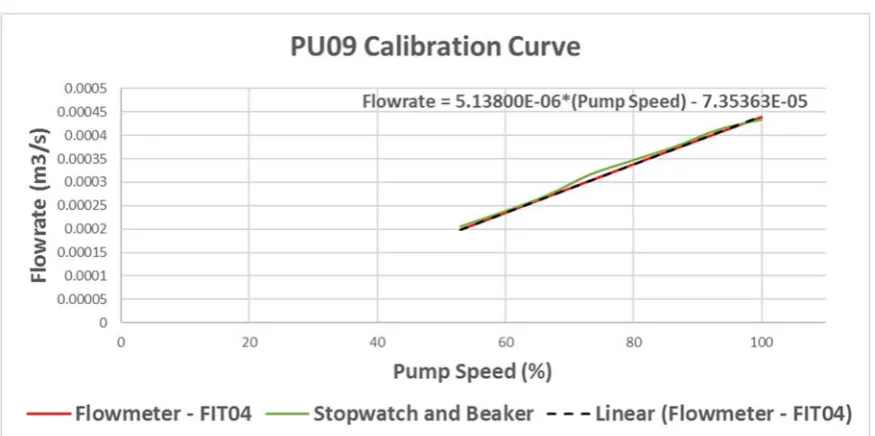
Figure 4: PU09 Flowrate Calibration Curve with Fitted Trend Line
Figure 4 shows that the experimental measurements match closely with the flowmeter
readings. Both sets of data follow the same gradient and the minor positive offset was
considered due to human error. This was the case for all four pumps (see Appendix 2.1) and
it was therefore concluded that the flowmeters were calibrated correctly. Microsoft Excel was
used to fit trend lines to the flowmeter data and ascertain the mathematical relationship
Table 1: Calibration Range for PU01, PU03, PU08 and PU09 Pump Minimum Flowrate (L/min) Maximum Flowrate (L/min)
PU01 14.88 29.98
PU03 13.97 28.34
PU08 12.16 27.08
PU09 11.89 26.36
3.4 Restriction Orifice Plates
Orifice plates are most frequently used for flow measurement. They are typically constructed
from a machined metal plate containing one or more orificesthrough which fluid will flow.
The plate is clamped between two flanges and mounted in line with a straight section of
piping to create a flow-dependant pressure drop. A differential pressure sensor can be used to
measure the pressure drop and in turn calculate flowrate. Alternatively, a restriction orifice
plate uses the same design principle but aims to maintain a constant pressure loss by
restricting the flowrate. [31]
Initially, the outlet flowrates from each tank were restricted by manually actuated gate valves.
These are not recommended for throttling flow and are rather designed for on/off
applications. If used for flow control, the high velocity fluid impinging against the partially
open disc can cause excessive vibration and damage the seating surfaces. This type of wear
will eventually prevent the valve from shutting off completely. [32] Testing showed that,
with the valves fully open, the inlet flowrates from the pumps could not be raised high
plates constructed from Polyvinyl Chloride end caps as seen in Figure 5. The gate valves
would then be opened to 100 % and the flow would be throttled by the downstream orifice.
Figure 5: Restriction Orifice Plate
Flowrate through the outlet depends on the surface area of the orifice and the upstream
pressure [31], therefore calibrating the flow through the orifice involved measuring the outlet
flowrate at several tank levels and repeating this for a number of different orifice diameters.
As Tank01 had a downstream flowmeter (FIT07) installed, it was selected as the initial
testing platform. LT01 was maintained at steady state by manually adjusting the speed of
PU01. The flowrate measurements were taken using FIT07 at several steady state tank levels
between 10% and 90%. This was repeated for five different orifice diameters ranging from
FIT07 gave a reading of 2.7 litre /minute (L/min) during zero flow conditions and the
difference between the reading from FIT01 and FIT07, at each steady state, was also 2.7
L/min. This confirmed a constant offset throughout FIT07’s working range and also indicated
that the variation in the flowrate measurements was consistent with FIT01 - which had been
previously calibrated. In view of this, 2.7 L/min was subtracted from all FIT07 flowrate
readings. A plot of flowrate against tank level, for the range of orifice diameters, can be seen
in Figure 6. As expected, the flowrate increased with orifice diameter as well as tank level.
Figure 6: Plot of LT01 vs Tank01 Outlet Flowrate for Different Restriction Orifice Diameters
The relationship between the tank level and outlet flowrate, for each orifice diameter, was
linear. This did not align with the theoretical supposition that the outlet flowrate of a
self-regulatory tank can be approximated by a constant multiplied by the square root of the tank
Figure 7: Installed Height of Tank01, Tank02, Tank03 and Tank04
As shown in Figure 7, the tanks can only vary by a maximum of 0.87m. However, the
distance between the tank outlet and the orifice plate is 1.68m. It is proposed that the
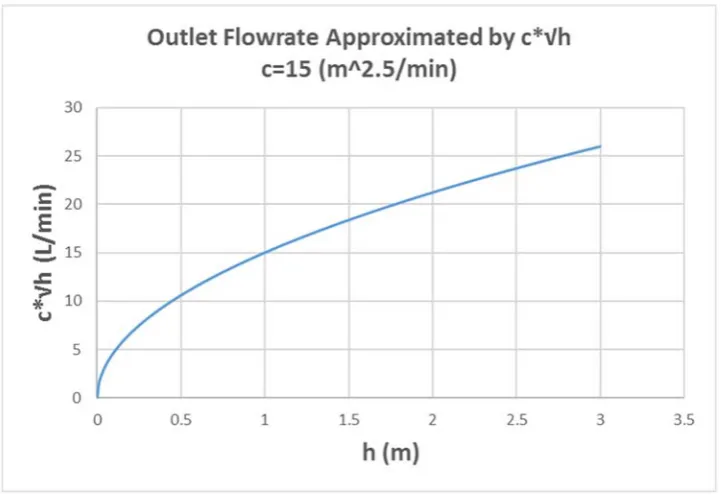
theorised nonlinearities were negligible due to the head upstream of the orifice only being
able to vary between 1.77m and 2.46m. A plot of the theoretical relationship (see Figure 8)
indicates that as the tank level deviates from 0 m, the relationship becomes increasingly
Figure 8: Theoretical Relationship between Tank Level and Outflow of a Tank
The calibration range for each orifice diameter, tested on the outlet of Tank01, can be seen in
Table 2.
Table 2: Calibration Range for Different Sized Orifice Diameters for the Outlet of Tank01
Orifice Diameter (mm)
Maximum Flowrate (L/min)
Maximum Flowrate (L/min)
8.1 10.91 13.11
9.9 16.16 19.91
10.5 18.40 22.09
11.5 22.05 30.91
12.9 27.26 33.00
3.4.1. Outlet Flowrate Estimation
It was predicted that the outlet flowrate characteristics for Tank01 and Tank02 would be
tank bottom were the same in each case (see Figure 7). However for Tank03 and Tank04,
although the tank dimensions were the same, the distance between the tank bottom and
orifice plate was one meter higher. Consequently, the plots shown in Figure 6 were
extrapolated to account for the additional upstream pressure (see Figure 9).
Figure 9: Tank Outlet Flowrate Relationships for Different Sized Orifice Diameters with Extrapolated Trend Lines
By extrapolating the plots, it was assumed that the relationship between tank level and outlet
flowrate would remain linear throughout the extended range. In practice this may not be the
case and it was therefore expected that the mathematical models fitted to the data would hold
some degree of error. The flowrate measurements would be refined at a later stage using the
stopwatch and beaker method once level control had been implemented. This would enable
models would be sufficiently accurate to simulate the process dynamics at a rudimentary
level.
The estimated calibration range for each orifice diameter attached to Tank03 and Tank04 can
be seen in Table 3.
Table 3: Estimated Orifice Plate Calibration Range for the Outlet of Tank03 and Tank04
Orifice Diameter (mm) Maximum Flowrate (L/min) Maximum Flowrate (L/min)
8.1 15.49 13.29
9.9 20.21 23.96
10.5 22.39 26.09
11.5 31.39 37.24
12.9 33.48 39.22
3.4.2. Orifice Diameter selection
For the plant to be controllable, the outlet flowrate of each tank had to fall within a range
such that the inlet pump would increase the tank level when operating towards its upper limit
and decrease it when operating towards its lower limit. This could be achieved by selecting
the orifice diameter so that its calibration range would fall within the inlet pump’s calibration
range. Orifice plate sizing charts were created by overlaying the pump and orifice diameter
calibration plots, as seen in Figure 10 and Figure 11. Using the charts, a 10.5mm orifice
diameter was selected for Tank01 and Tank02 (see Figure 10) and a 9.9mm diameter was
Figure 10: Orifice Diameter Selection Chart for Tank01 and Tank02
‐
Process
Simulation
A process simulation is defined by [33] as the application of mathematics and first principles
(i.e. conservation laws, thermodynamics, transport phenomena and reaction kinetics) to
describe and accurately represent the behaviour of a process. Mathematical models can be
developed to describe either the steady state or dynamic nature of a system. The scope of
each is shown inFigure 12. [33]
Figure 12: Comparison of Steady State and Dynamic Model Scopes. Adapted from [33]
A steady state simulation assumes that all variables are constant with respect to time so, for
the overall mass and energy balances, input will be equal to output and there is no
accumulation within the system. Consequently, a steady state simulation only provides
information about the ultimate state of the process at a particular operating point (i.e. when
all state variables are constant). Conversely, a dynamic simulation takes into account the
accumulation of mass and energy so it is possible to determine the amount of time taken for a
Simulations can be further classified as either real-time or offline. A discrete-time offline
simulation can be configured to execute with a longer or shorter time-step than the
mathematical model. Offline simulations are typically used to gather data at a faster rate,
whereas real-time simulations are intended to run at the same speed as their physical
counterpart. Real-time simulations are only compatible with a fixed time-step, the duration of
which is vital for effective operation. The time-step must be selected so that the simulator has
time to complete all calculations and then lie idle until the start of the next interval. [34]
4.1 Mathematical Modelling
Flowrate relationships, recovered during plant calibration, are shown in Equation 2. Pump
flowrate equations were verified during calibration and are therefore final. The estimated tank
outlet flowrates, shown in red, would be used temporarily until they were refined and verified
at a later stage.
Verified Pump Flowrate Equations
01 5.02 ∗ 10 01 1.80 ∗ 10
03 5.15 ∗ 10 03 4.17 ∗ 10
08 5.28 ∗ 10 08 7.39 ∗ 10
09 5.14 ∗ 10 09 7.35 ∗ 10
Temporary Tank Outlet Flowrate Equations
01 10.5 6.16 ∗ 10 01 3.07 ∗ 10
02 10.5 6.16 ∗ 10 02 3.07 ∗ 10
Mass balances were carried out around each tank to develop a system of Ordinary
Differential Equations (ODE) that describe the UWS. The simulation needed to be dynamic
and therefore accumulation within the system had to be considered. The conservation of mass
law stipulates that the rate of mass accumulation within the confines of a system is equal to
the difference between rate of mass entering and leaving the system [4]. As the outlet
flowrate of each tank depends on the tank level, the systems are all classified as
self-regulatory. This means that when a step change is applied to the input, the system will move
to a new steady state rather than increasing or decreasing indefinitely [35]. A mass balance,
and resulting ODE, for a self-regulatory tank level process can be seen Equation 3.
Assuming fluid density remains constant:
Where:
A= Tank Surface Area
5.02 ∗ 10 . 01 1.80 ∗ 10
6.16 ∗ 10 . 100
0.87 3.07 ∗ 10
Each ODE was discretised so it could be solved iteratively using MATLAB. This was done
using Euler’s derivative approximation (see Equation 4) [4]. The proposed MATLAB script
will store the values from the current time-step and use them to calculate the ODE solution in
the next. Using this technique, the program will be able to update all state variables at each
sampling instance (every ∆ seconds).
∆
∆
∴ ∆ ∆ ∗
And shifted back by ∆ seconds:
∆ ∆ . ∆ ∆
Equation 4: Discretising an ODE using Euler’s Derivative Approximation [4]
4.2 Offline Simulation Development
For the purpose of this project, the offline simulation was designed to rapidly generate
process data. This was achieved by numerically solving the previously introduced
mathematical model in MATLAB. The desired functionality of the program was to enable the
user to specify an input sequence and recover the process response for analysis. Two different
versions of the offline simulation were developed, including the Predefined Input Sequence
(PIS) and the Step by Step Input sequence (SSI).
4.2.1. PIS Offline Simulation
The flow diagram of the PIS offline MATLAB script can be seen in Figure 13. The program
can either generate a random input sequence at discrete points in time or the user can choose
solve the system of ODEs and, when complete, provides an option to export the results to a
new spreadsheet. If the user chooses to import process data, an option is offered to validate
the simulated response against the imported response on completion. Further details can be
found in Appendix 3.1.
Figure 13: Flow Diagram of the PIS Offline MATLAB Simulation
4.2.2. SSI Offline Simulation
The SSI offline simulation repeatedly prompts the user to select which MV to step, the step
magnitude and step duration. A flow diagram of the MATLAB script is given in Figure 14.
After each step the resulting data plot will update and the user will be prompted to select the
next move. The options include performing another step, erasing a section of data or exiting
the program. The SSI simulation enables dynamic alteration of the input sequence between
to carry out a precise step test plan while making modifications on the run. When sufficient
data is gathered, the user can opt to end the program and export the results to a spreadsheet.
Further details can be found in Appendix 3.2.
Figure 14: Flow Diagram of the SSI Offline MATLAB Simulation
4.3 Real‐time Simulation Development
The real-time simulation was designed to authentically replicate the real-world system in a
virtual environment. This includes the process dynamics and the connection to the DCS. The
objective was to make it feel as realistic as possible so that it could be used as an operator
training tool when later experimenting with MPC. Also, a high fidelity simulation provides a
way to commission a controller in a risk-free environment before transferring it onto the real
plant.
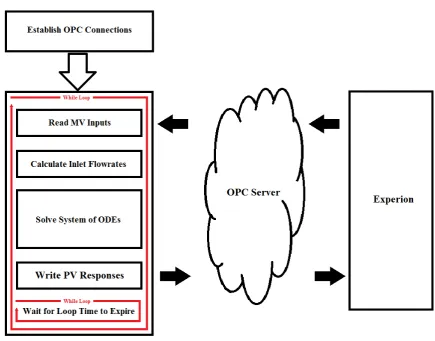
The real-time simulation was built on the foundations of its offline counterpart. However,
rather than running for a finite number of time steps (For Loop), the program continues to run
until it is externally triggered to stop (While Loop). The exit condition on the main loop is
response speed as desired. The flow diagram of the real-time MATLAB script is given in
Figure 15.
Figure 15: Flow Diagram of the Real‐time MATLAB Simulation
As previously mentioned, to operate in real time, the simulation must be able to complete all
calculations and then lie idle until the start of the next time interval. This was achieved using
MATLAB’s built-in ‘tic’ and ‘toc’ functions. The tic function starts a stopwatch timer and is
called prior to entering the main loop. Once all calculations are complete, the toc function is
called to read the elapsed time from the stopwatch. The program is then forced into a
secondary loop that runs until the toc value reaches the loop time. When this exit condition is
met, the tic function is called again to restart the stopwatch timer. A timestamp is read from
A number of functions from MALAB’s OPC Toolbox were used to establish a seamless
connection to the OPC server. The functions required to build the real-time simulation are
defined in Appendix 4.
4.3.1. Honeywell Experion Configuration
Experion is Honeywell’s control and safety system that was designed to expand the role of
distributed control and provide seamless plant-wide connectivity [36]. At Murdoch
University, the Experion2 server is host to an instantiation of Experion that can be used by
students to experiment with the software. A guide to the configuration of Experion and its
associated applications can be found in [37]. The following definitions clarify the
Experion-specific terminology used in the following chapter:
Asset: An asset is defined by Honeywell as a database entity that represents a
particular item within an enterprise. Assets are named such that engineers and
operators can easily isolate and identify plant equipment without having to remember
a vast array of obscure tag names. [37]
Simulated C300 Controller (SIMC300): Not to be confused with the process
simulation, a SIMC300 controller is a virtual process controller used to execute
control functions through Control Modules (CM) in the Control Execution
Environment (CEE). [38]
CM: A CM is simply a container for its respective function blocks which can be soft
wired together to deliver their specific function. A PID controller is an example of a
Figure 16: Control Modules Executed by the UWS_Simulation SIMC300 Controller
A single CM was created for each area of the plant and all were assigned to the UWS_SIM
parent asset. Every MV within the CM was connected to the Operating Point (OP) output of a
PID controller, as seen in Figure 17. In manual mode the controller writes the OP input
directly to the output whereas in automatic mode it reads the set point and calculates the OP
output using a PID algorithm. Numeric function blocks were created to hold pump,
flowmeter and tank level readings while digital values such as pump and solenoid states were
held using boolean flags.
![Figure 1:Co‐simulated MPC‐PI Cascaded Control System. Adapted from [25]](https://thumb-us.123doks.com/thumbv2/123dok_us/9658655.1948454/40.595.129.462.161.327/figure-simulated-mpc-cascaded-control-system-adapted-from.webp)
![Figure 12: Comparison of Steady State and Dynamic Model Scopes. Adapted from [33]](https://thumb-us.123doks.com/thumbv2/123dok_us/9658655.1948454/55.595.176.427.286.489/figure-comparison-steady-state-dynamic-model-scopes-adapted.webp)